lights AUDI R8 SPYDER 2012 Owner's Manual
[x] Cancel search | Manufacturer: AUDI, Model Year: 2012, Model line: R8 SPYDER, Model: AUDI R8 SPYDER 2012Pages: 236, PDF Size: 59.24 MB
Page 55 of 236
lever is controlled by a light sensor locat
ed in the instrument panel. The instru
ment pane l illumination will a utomat i
cally become dimmer as the daylight
fades away and eventually will go o ut
completely when outside light is ve ry
low. T his is to rem ind you, the drive r, to
switch on the headlights before it gets
too dark.
- Canada models: instrument panel i llum i
nat io n w ill stay b right regard less of the
i n tens ity of amb ien t lig ht. Always be
aware o f ch anges in outside light con di
tions wh ile you are driving. Resp ond in
time to fading daylight by t urning the
l ight sw itch to position
io (or "A UTO" if
your car is equ ipped with this feature) to
turn on your headlights.
Luggage compartment light
The light is located on the right side of the
luggage compartment .
These lights come on automatica lly when the
front lid is opened. The lig hts turn off auto
mat ica lly if the lid is left open for more then
10 minutes.
Sun visors
CJ
C • -·-·--·,
~
-----____ ,,_
~ --·----"-------.. ----
~ ---- s;i~~~j
.---~~·-·oiiiiiii------------1
Fig. 6 5 Sun v isor
The vanity mir rors in the sun v isors are eq uip
ped with covers.
Clear vi sion 5 3
Wiper and washer
system
Windshield wiper
The windshield wiper lever controls both the
windshield wipers and the washer system.
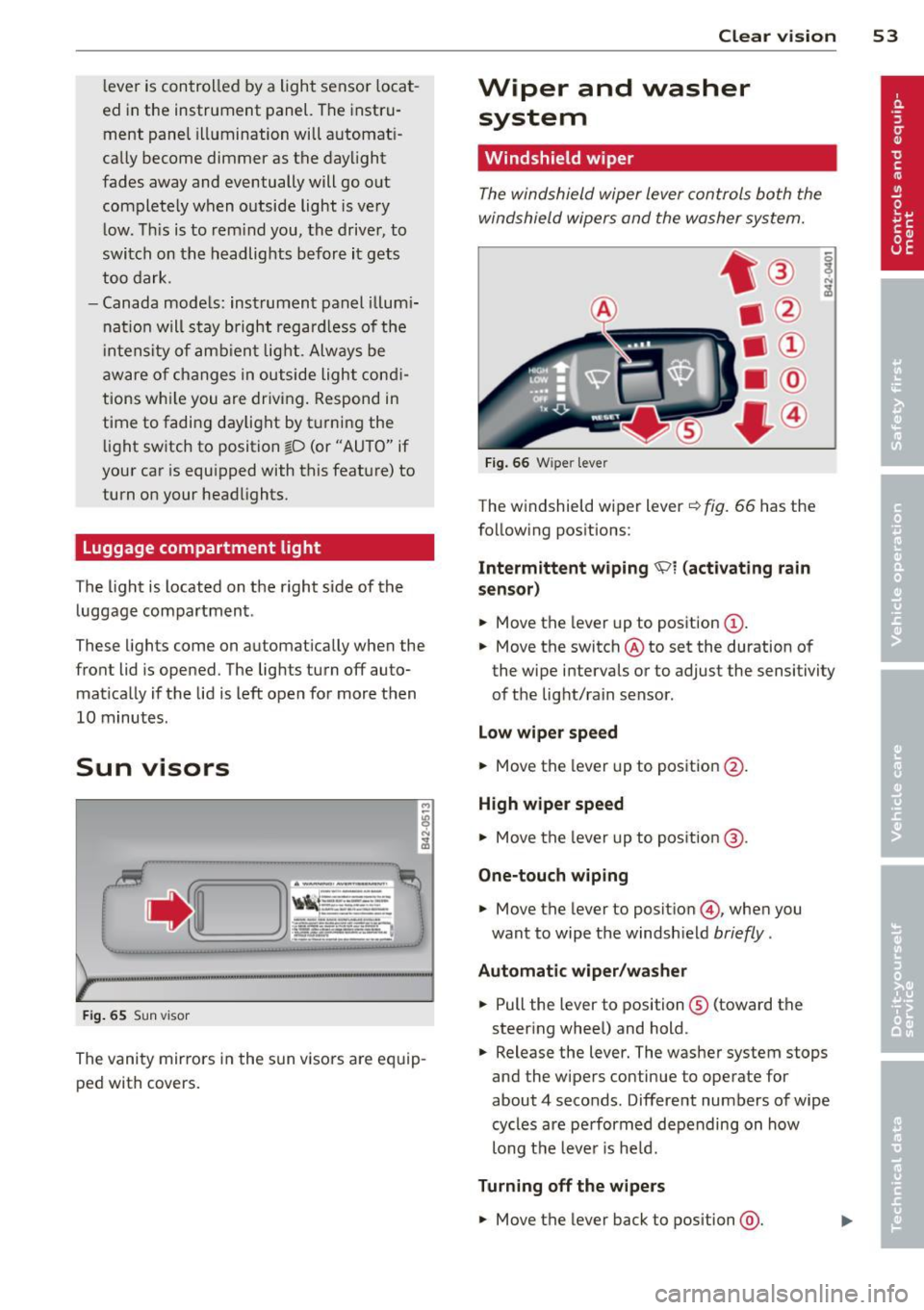
Fi g. 6 6 W iper leve r
The w indshield wiper lever¢ fig. 66 has the
follow ing pos itions:
Intermittent wiping 'Pl (activating rain
sen sor)
.,. Move the lever up to position (D .
.,. Move the switch @ to set the duration of
the wipe intervals or to adjust the sensitivity
of the light/rain sensor .
Low wiper speed
.,. Move the lever up to position @.
High wiper speed
.,. Move the lever up to pos ition @.
One-touch wiping
.,. Move the lever to positio n @, when you
want to wipe the windsh ield
briefly .
Automatic wip er/ washer
.,. Pull the lever to position ® (toward the
steering whee l) and hold .
.,. Release the lever. The washer system stops
and the wipers continue to operate for
about 4 seconds. Different numbers of wipe
cycles are pe rformed depending on how
long t he leve r is he ld.
Turning off the w ipe rs
.,. Move the lever back to position @.
Page 56 of 236
54 Clear vis ion
Moving w ip er blade s to th e service
po sit ion
.. Do not lift the wiper arms away from the
glass when they are in their parked position;
this would damage the paint on the front
lid .
.. When there is a risk of frost, make sure t hat
the wiper blades are not frozen to the wind shield .
.. Move wipe r blades to the service pos it ion
¢page 55.
The windshield wipers and washer on ly work
when the ignition is turned on.
To reduce the sensit iv ity of the sensor, move
switch @down . To increase the sens itiv ity,
move the switch up. The higher you adjust the
sens itivity, the faste r th e sensor will react
when i t senses moisture on the w indshield.
The pauses between w iper t urns depend not
only on the sensitivity setting, but on the ve
hicle speed as well.
Du ring a temporary stop, e.g . at a t raff ic sig
na l, the set wipe r speed is automatically re
duced by one stage.
When the igni tion is tu rned on, the washer
jets are heated.
_& WARNING
- Wipe r blades a re cruc ial for safe driving!
Only when they are in good condition are
they able to clear the windows properly
to provide uncompromising visibility.
Worn or damaged wiper blades are a safety hazard ¢
page 55, Replacing
front wiper blades!
- The light/ra in sensor is only des igned to
assist and support the dr iver .
It remains
entirely the driver 's responsibility to
mon itor outs ide weather conditions and
to manually activate the w ipers as soon
as rain o r dri zz le red uces visibi lity
thro ugh the windshie ld.
- T he windshie ld must not be treated with
water-repe llent materials. They can in
crease glare under poor visib ility condi
tions such as wetness, darkness, or when the s
un is low on the horizon . In addi
tion, they can cause the w indshield w ip
ers to chatter .
(D Note
In freezing or near freezing conditions:
- Always check that the wiper blades are
not frozen to the g lass before you turn
the wipers on . Loosen a wiper blade
which is frozen in place before operating
the wipers to prevent damage to the
w iper blade or the wiper motor.
- Do not use the w ipers to clear a frosted
window. Us ing the wipers as a conven
ient ice scraper will destroy the wiper
blades .
- Before you take your veh icle to an auto
matic car wash, make sure you have the
w indshield w iper system switched off
(lever in position 0), otherwise the w ind
shield w iper system could get damaged
in the car wash if it should suddenly
come on .
(D Tips
-The windshie ld w ipers are switched off
when the ignit ion is turned off. Act ivate
t he winds hield wipers after the ignition
is switched back on by moving the wind
shield wiper lever to any position.
- Worn or dirty windshield wipe r blades
cause smearing, which can affect the op
eration of the light/rain sensor . Check
the cond ition of your windsh ield wiper
blades regularly.
- When the wipers are switched on man
ually and in ra in cond itions, the auto
matic headlights turn on¢
page 49 or
off during the day when the wipers are
no longer operating . The automat ic
head lights fu nction is avai lab le in this
case on ly w hen the light switch is in the
"A UTO" posit ion¢
page 49, fig. 60.
- Make su re the washer fluid reservoir is
t opped off before goi ng on a long tr ip.
Look up ¢
page 182 for checking and
filling the washe r container .
Page 58 of 236
56 Clear vis ion
In stall ing t he wiper blade
.,. Place the rounded end of the wiper onto the
end of the w iper arm in the
op pos ite direc
tion to the arrow @
c:::> fig. 68 .
.,. Squeeze the corrugation on the wiper until
you hear it click in the wiper arm .
.,. Fold the wiper arm back onto the wind
shield .
.,. Switch the ignition on and move the wiper
lever down briefly
c:::> page 53, fig . 66 . The
wipe r will move back to the park position.
_& WARNING
- Clean yo ur wiper blades regularly w ith a
windshield washer solution to prevent
streaking. If the wiper blades are very
dirty, for examp le with insects, carefu lly
clean the w iper blades with a sponge or a
soft brush.
- For your safety, you should replace the
wiper blades once or twice a year. See
your authorized Aud i dealer for replace
ment blades.
(D Note
- The w iper blades may only be changed
c:::> page 55 in the service position! Other
wise, you r isk damaging the paint on the
front lid or the windsh ield wiper motor .
- To prevent damage to the wiper system:
-Always loosen blades which a re fro zen
to the windshield before operating
w ipers.
- Do not use gasoline, kerosene, paint
t hinner, or o ther solvents on or near
the wipe r blades .
- Do not attempt to move the wipers by
hand.
{D) Tips
The front wiper blades are different
lengths; the blade o n the dr ive r's side is
longer.
Mirrors
Dimming the mirrors
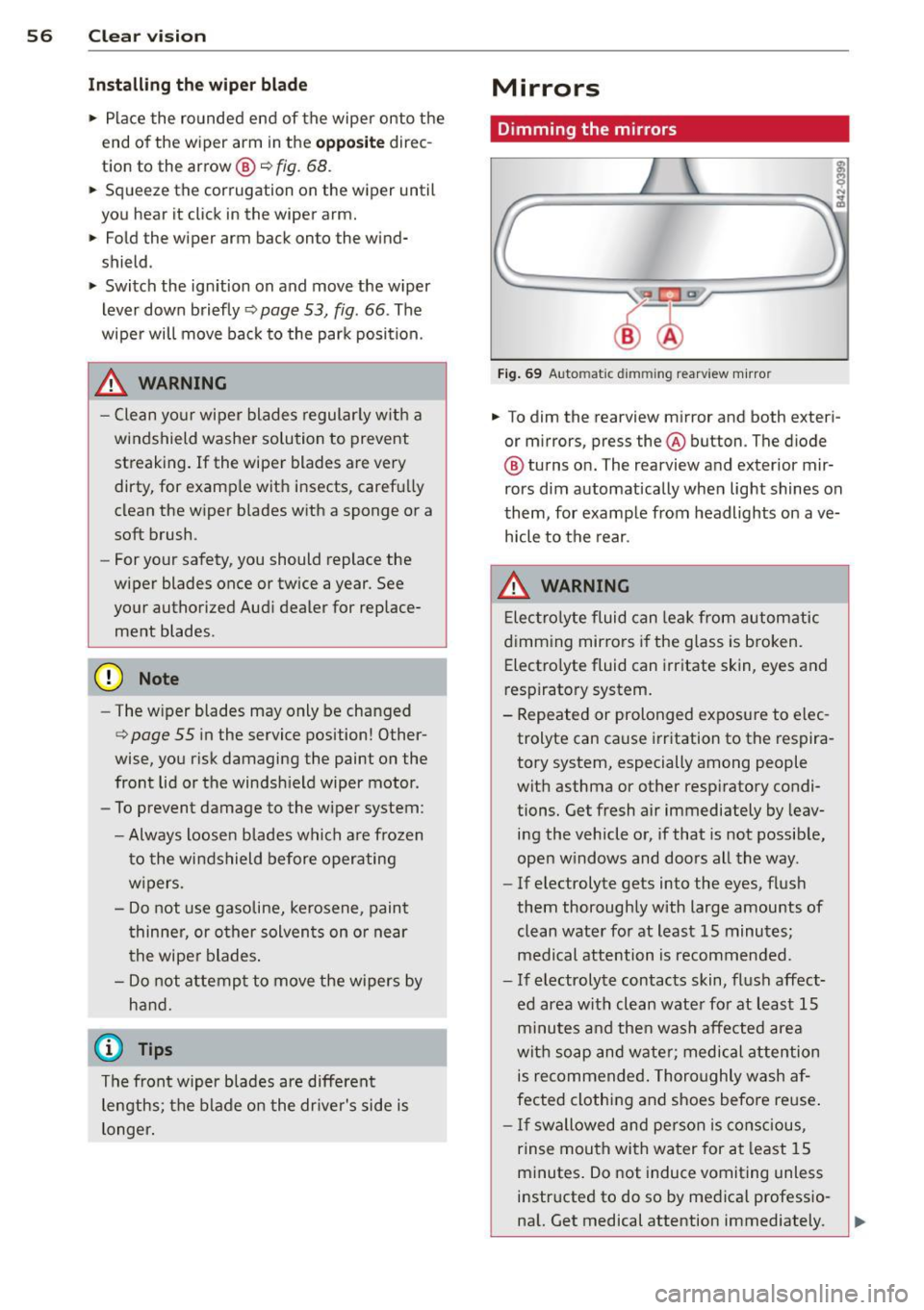
Fig . 69 Auto matic dimming rearview m irro r
.,. To dim the rearview mirror and both exteri
or m irrors, press the@ button . The diode
@ turns on. The rearview and exterior mir
rors dim automatically when light shines on
them, for example from headlights on ave
h icle to the rear .
_& WARNING
-
Elec tro lyte fluid can lea k from automatic
dimming mirrors i f the glass is b roken.
Electro lyte fluid can irritate skin, eyes and
respiratory system.
- Repeated or prolonged exposure to e lec
trolyte can cause i rr itation to the respira
tory system , especially among people
with asthma or other respiratory condi
tions. Get fresh air immediately by leav
ing the vehicle or, if that is not possib le,
open w indows and doors all the way .
- If electrolyte gets into the eyes, flus h
them thoroughly with large amou nts
of
clean water for at least 15 minutes;
medical attention is recommended.
- If electrolyte contacts skin, fl ush affect
ed area with clean wate r fo r at least 15
minutes and then wash affe cted area
wit h soap and wate r; medical attention
is recommended. Thoro ughly wash af
fected clothing and shoes before reuse .
- If swallowed and person is consc ious,
rinse mouth with water for at least 15
minutes . Do not induce vomiting unless
instructed to do so by medical professio na l. Get medical attention immediately.
Page 65 of 236
could slide around inside the vehicle
wh ile driving or when accelerating or
when applying the brakes or when driv
ing around a corner .
- When you are driving make sure that
anything you may have placed in the cen
ter console or other storage locations cannot fa ll out into the footwells . In case
of sudden braking you would not be able
to brake, depress the clutch or acceler
ate.
Glove compartment
The glove compartment is illuminated and
can be locked.
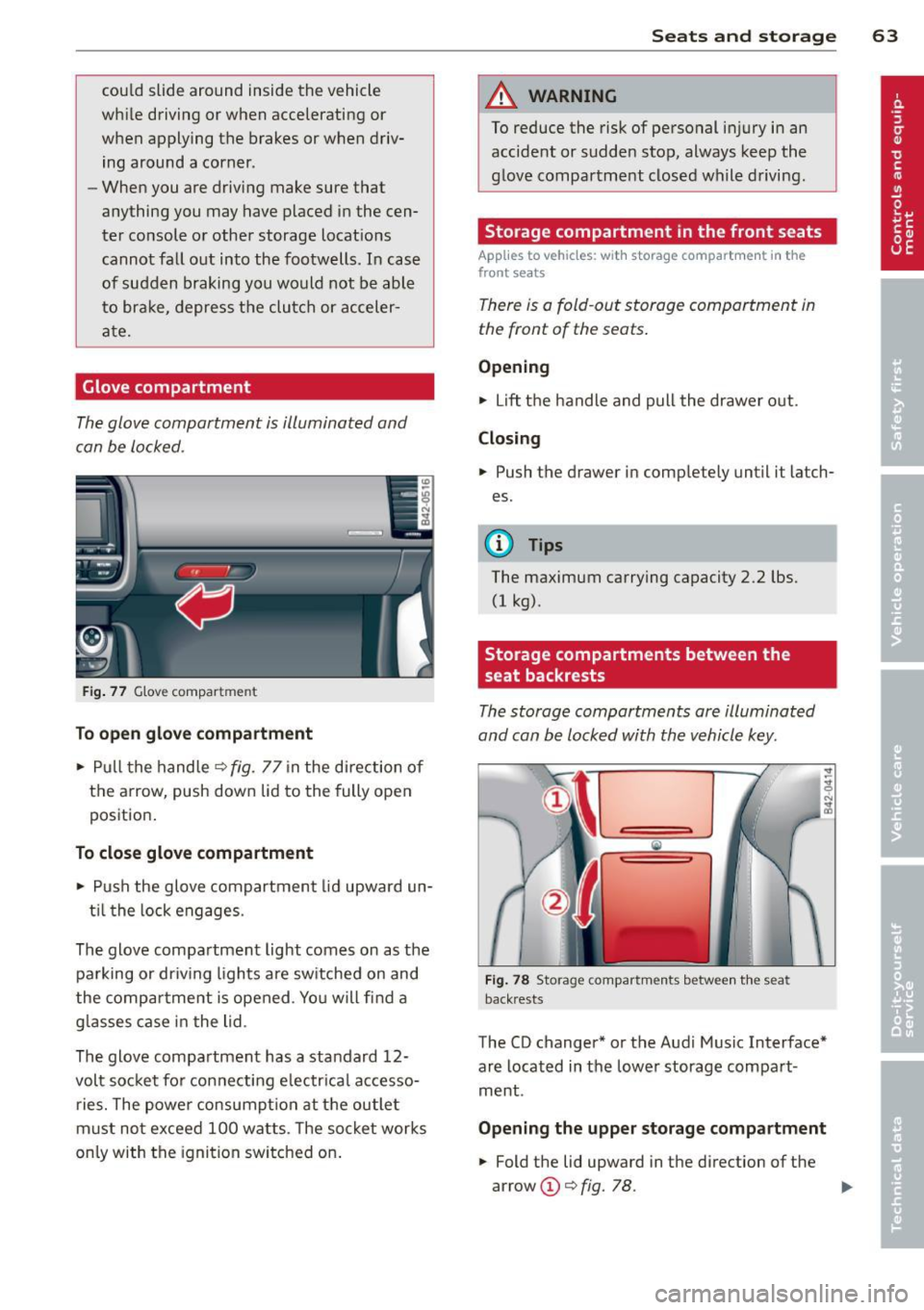
F ig . 77 G love compar tmen t
To op en glove compa rtm ent
... Pull the hand le ¢ fig . 77 in the direction of
the arrow, push down lid to the fully open
position.
To close glove compartm ent
.., Push the glove compartment lid upward un-
t il the lock engages.
The glove compartment light comes on as the parking or dr iving lights are sw itched on and
the compartment is opened . Yo u will find a
g lasses case in the lid .
The glove compartment has a standard 12-
volt socket for con necting e lectrica l accesso
ries. The powe r consumpt ion at the outlet
must not exceed 100 watts. The socket works
on ly with the ignition switched on .
Sea ts a nd s to rage 63
A WARNING
To reduce the risk of personal injury in an
accident or sudden stop, always keep the
glove compartment closed while driving.
Storage compartment in the front seats
Applies to vehicles: with storage compartment in the
front seats
There is a fold -out storage compartment in
the front of the seats .
Opening
.., Lift the handle and pull the drawer out.
Closing
... Push the drawer in completely until it latch
es.
(!) Tips
The maximum carrying capacity 2 .2 lbs.
(1 kg).
Storage compartments between the
seat backrests
The storage compartments are illuminated
and can be locked with the vehicle key.
F ig . 78 Storage compar tm ents betw een th e sea t
back rests
The CD changer* or the Audi Music Interface*
are located in the lower storage compart
ment .
Opening the upper storage compartment
... Fold the lid upward in the direction of the
arrow @¢
fig. 78. ..,_
Page 73 of 236
Ignition on @
Afte r switch ing the ignition on, the needles
move all the way up and then down .
I f it is difficult to turn the key afte r you have
i nse rted it into the ignit ion lo ck, tur n the
steer ing whee l back and forth. This will take
the load off the steering lock mechanism and
you will be able to turn the key freely and start the engine .
Starting the engin e@
In th is position the engine starts. While the
engine is start ing, the power s upply to the
headlights and other e lectrica l consumers is
temporari ly interrupted to conserve battery
pow er. Aft er the engine has started, release
the key and it will return to posit ion @.
Before the starter can be operated again the
key must be turned back to position@. The
non -repe at lock prevents you from damaging
the starter when the engine is runn ing .
A WARNING
-Never remove the key from the ign ition
lock whi le the vehicle is moving. The
steering wheel will lock causing loss of control.
- If you have to leave your veh icle -even
for just a m in ute - always remove the ig
nition key and take it with you. This is es
pecially important if you a re going to
leave c hildren behind in the vehicle. The
children co uld start the engine or use
other vehicle controls . Unsupervised use
of vehicle controls (for example, power
windows) can cause serious personal in
jur ies .
If the vehicle battery has been disconnect
ed and then reconnected, then you m ust
leave the key in pos ition @for abo ut 5
seconds before you can start the engine.
On th e ro ad 71
Starting the engine
The engine can only be started with your orig
inal Audi key.
On vehicles with R tronic *, the engine can be
start ed in the ne utra l position N and in each
gea r (1 - 6 and R).
.. Set the park ing brake ¢,&. .
.. On vehicles with man ua l transmission *,
fu lly depress the clutch pedal.
.. Press and hold the brake pedal.
.. Turn the ignition key to pos it ion ®
¢ page 70, fig. 82 - do not depress the gas
pedal when starting the engine .
.. Let go of the key as soon as the engine
starts - the sta rter must not cont inue to
r u n. On ve hicles w ith R t ro ni c, selec t gea r
posi tion N .
A cold engine may at first be loud afte r it has
been sta rted. This is due to the hydraulic
valves bu ild ing up the oil press ure . Thi s is nor
mal and no need for concern.
If the engine does not start immediately, stop
tryi ng after 10 seconds and then try to restart
the engine abou t 30 seconds later.
A WARNING
- Never start or let the eng ine run in a con
fined or enclosed area . Exha ust fumes
from the engine contain carbon monox
ide, a co lor less and odorless gas. Carbon
mo nox ide ca n be fatal if inhaled.
- Never leave the engine idling unattend
ed. An unattended veh icle with a runn ing
engine poses a danger of personal injury
or theft .
- With the engine r unning and a gear en
gaged, you have to hold the veh icle w ith
the foot brake .
(D Note
- Avoid h igh engine speeds, fast accelera
tion or heavy engine loads while the en
gine is still cold. This could damage the
eng ine .
Page 79 of 236
Transmission Manual transmission
Gearshift lever
App lies to vehicles: with manual transmission
The clutch pedal must be depressed all the
way before you can start the engine.
T he manual transmission in your Audi is
equipped with an
interlock-feature.
• Depress the clutch pedal all the way.
• Start the engine with the gearshift lever in
Neutral and the clutch pedal depressed.
(D Note
Always depress the clutch pedal fully when
changing gears . Do not hold the vehicle on
a hill with the clutch pedal partially de
pressed. This may cause premature clutch
wear or damage .
@ Tips
- Resting your hand on the gearshift lever
knob while driving will cause premature
wear in the transmission.
- The back-up lights go on when you sh ift
into Reverse w ith the ignition on.
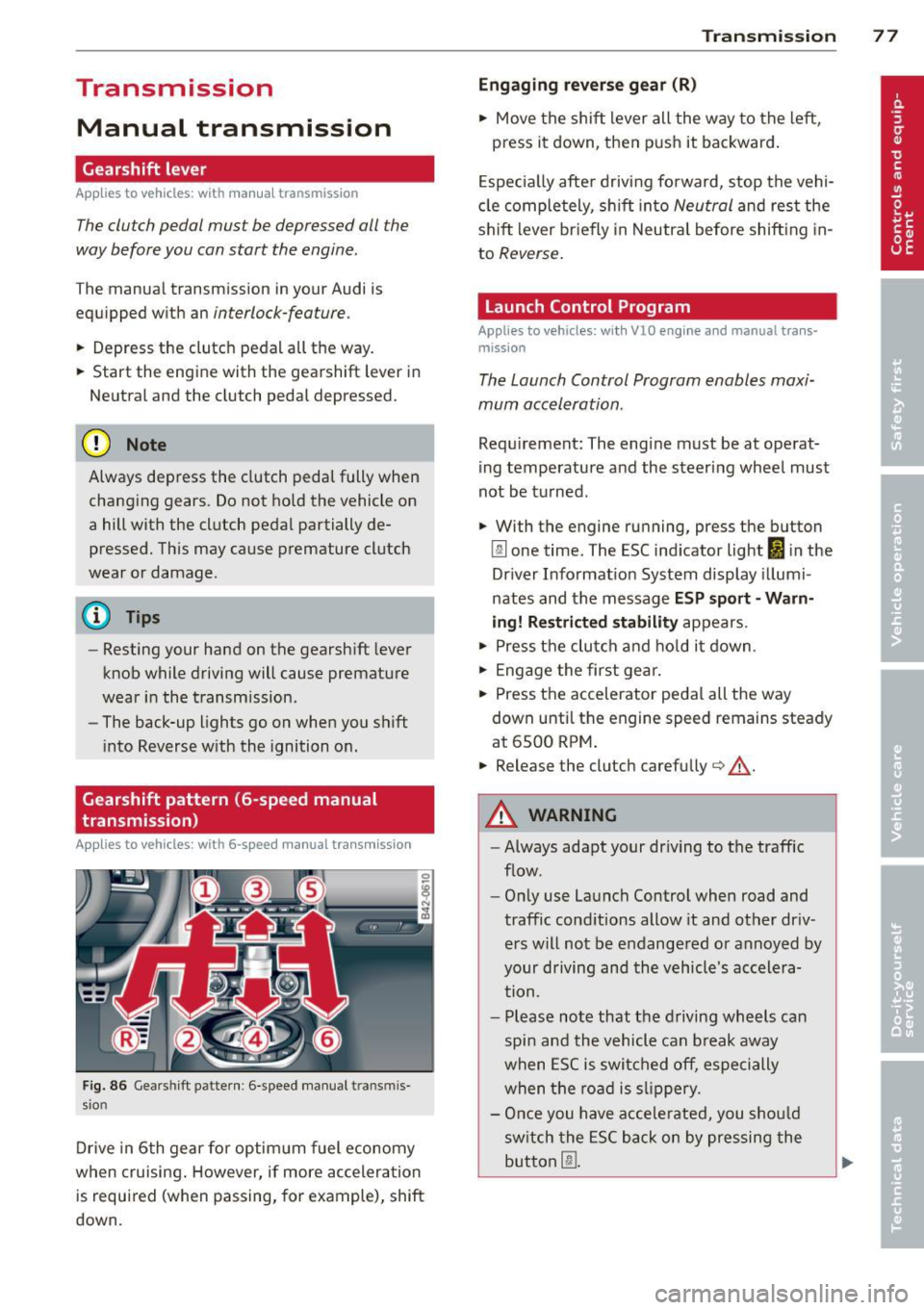
Gearshift pattern (6-speed manual
transmission)
Applies to vehicles: with 6-speed manual transmission
Fig. 86 Gearshift pattern : 6 -speed manual tran smi s
sio n
Drive in 6th gear for optim um fuel economy
when cruising . However, if more acceleration
is required (when passing, for example), shift
down.
Transmission 77
Engaging reverse gear (R)
• Move the shift lever all the way to the left,
press it down, then push it backward.
Especially after driving forward, stop the vehi
cle completely, sh ift into
Neutral and rest the
shift lever br iefly in Neutra l before shift ing in
to
Reverse .
Launch Control Program
Applies to vehicles: with VlO eng ine and manual t ra ns·
miss ion
The Launch Control Program enables maxi
mum acceleration .
Requirement: The engine must be at operat
ing temperature and the steering wheel must
not be turned .
• With the engine running, press the button
Im one time. The ESC indicator light 1B in the
Driver Informat ion System display illumi
nates and the message
ESP sport - Warn
ing! Restricted stability
appears.
• Press the clutch and hold it down.
• Engage the first gear.
• Press the accelerator pedal all the way
down until the engine speed remains steady
at 6500 RPM .
• Release the clutch carefu lly <=> .& ..
A WARNING
- Always adapt your dr iving to the traffic
flow.
- Only use Launch Control when road and
traffic conditions allow it and other dr iv
ers will not be endangered or annoyed by
your driving and the vehicle's accelera
tion.
- Please note that the driving wheels can
spin and the vehicle can break away
when ESC is switched off, especially
when the road is slippery.
- Once you have accelerated, you sho uld
sw itch the ESC back on by pressing the
button
[fil .
Page 80 of 236
78 Transmission
@ Tips
-When accelerating using the Launch
Control program, all vehicle parts are
subject to heavy loads. This can result in
increased wear.
- The Launch Control Program only func tions when the parking brake is released
and the vehicle speed is less than 3 mph
(5 km/h).
R tronic
Description
Applies to vehicles: with R tro nic
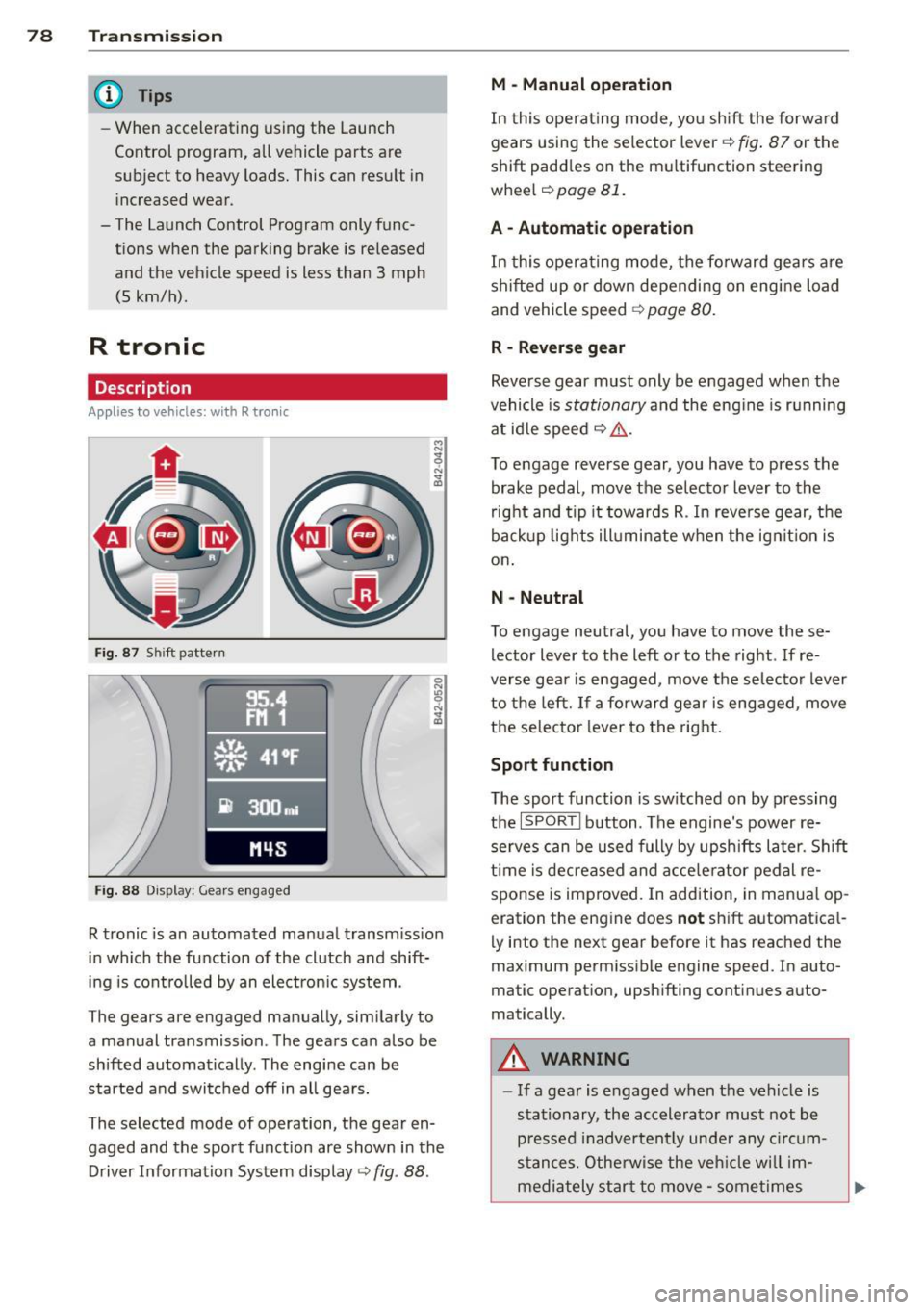
Fig. 87 Shi ft pattern
Fig. 88 Disp lay: Gea rs engaged
R tronic is an automated manual transmission
in which the function of the clutch and shift
ing is controlled by an electron ic system .
The gears are engaged manually, sim ilarly to
a manual transmission . The gears can also be
shifted automatically . The engine can be
started and switched off in all gears.
The selected mode of operation, the gear en
gaged and the sport function are shown in the
Driver Information System display
Q fig . 88 .
M -Manual operation
In this operat ing mode, you shift the forward
gears using the selector lever
Q fig. 87 or the
shift paddles on the mu ltifunction steering
whee l
Q page 81.
A - Automatic operation
In this opera ting mode, the forward gears are
shifted up or down depending on engine load
and vehicle speed
Q page 80.
R -Reverse gear
Reverse gear must only be engaged when the
vehicle is
stationary and the eng ine is running
at idle speed
¢ ,&. .
To engage reverse gear, you have to press the
brake pedal,
move the selector lever to the
right and tip it to wards R . In reverse gear, the
backup lights illuminate when the ignit ion is
on .
N -Neutral
To engage neutral, you have to move these
lector lever to the left or to the right.
If re
verse gear is engaged,
move the selector lever
to the left.
If a forward gear is engaged , move
the selector lever to the right.
Sport function
The sport function is sw itched on by pressing
the
I SPOR T I button. The engine's power re
serves can be used fully by upshifts later. Shift
time is decreased and accelerator pedal re
sponse is improved. In addition, in manual op
eration the engine does
not shift automatica l
ly into the next gear before it has reached the
maximum permissible engine speed. In auto
matic operation, upsh ifting cont inues auto
matically.
A WARNING
-- If a gear is engaged when the vehicle is
stationary, the accelerato r must not be
p ressed inadvertently under any circum
stances. Otherwise the vehicle w ill im
mediately star t to
move -sometimes
Page 86 of 236
84 Parking sy stem
Switching on /off
Appl ies to vehicles: with park ing system advanced
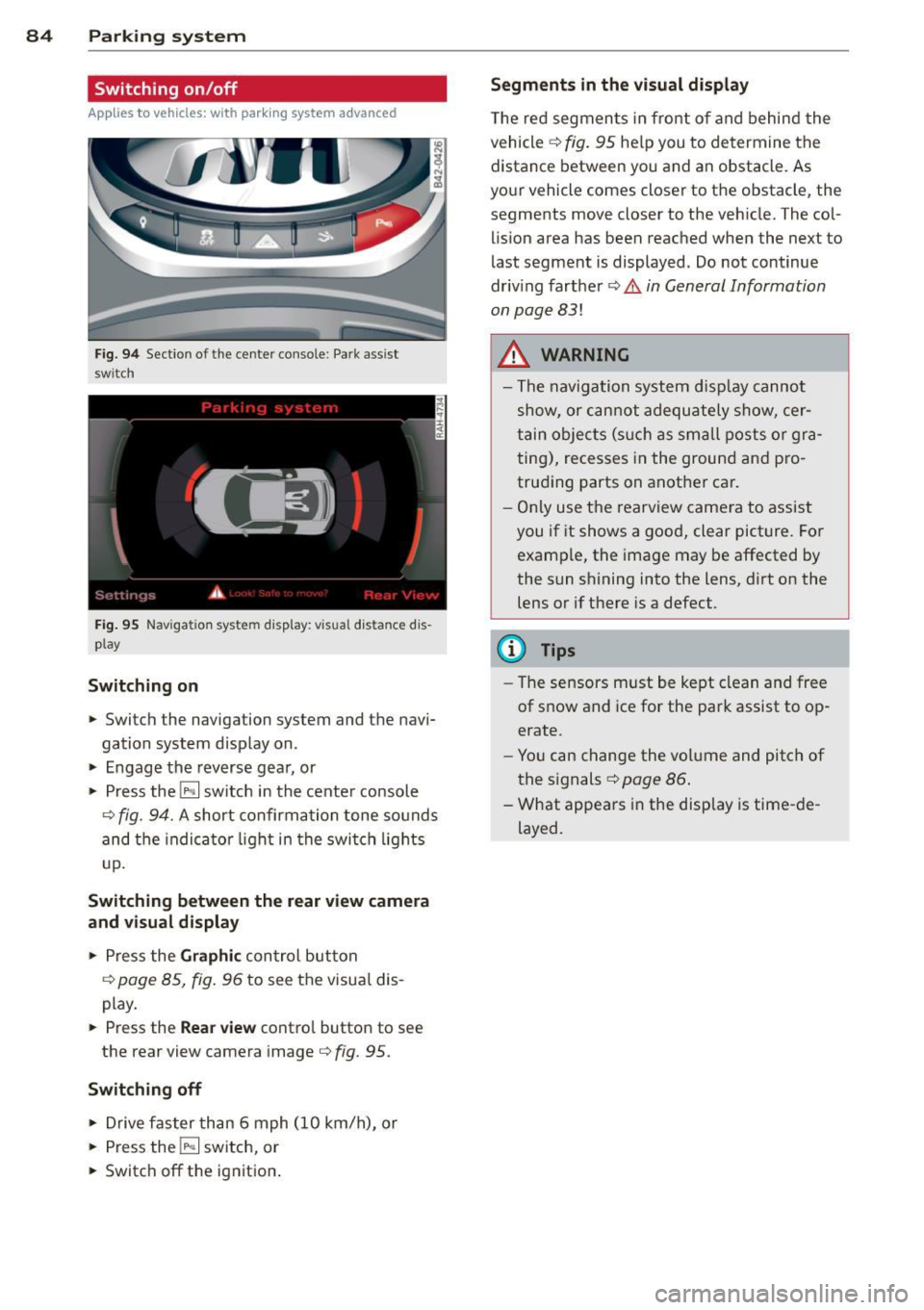
Fig. 9 4 Section of the center console: Pa rk assist
switch
F ig. 95 Nav igatio n system disp lay: visual distance dis
play
Switching on
• Switch the navigation system and the navi
gation system display on.
• Engage the reverse gear, or
• Press the
l"" I switch in the cente r console
¢ fig. 94. A short confirmation tone sounds
and the indica tor light in the swi tch lights
u p.
Switching betwe en the rear v iew camera
and vi sual display
• Press the Graphic con trol button
¢ page 85, fig. 96 to see the visua l dis
play.
• Press the
Rear view contro l button to see
the rear view camera image
¢ fig. 95.
Switching off
• Drive faster than 6 mph (10 km/h), or
• Press the
l"" I switch, or
• Switch off the ignition .
Segments in the vi sual display
T he red segmen ts in front o f and behind the
vehicle ¢
fig. 95 help you to determine the
distance between you and an obstacle. As
your vehicle comes closer to the obstacle, the
segments move closer to the vehicle. The col
lis ion area has been reached when the next to
last segment is displayed. Do not continue
driv ing farther ¢
Ii::.. in General Information
on page 83!
A WARNING
- The navigation system d isp lay cannot
show, or c an not adequately show, cer
tain objec ts (s uch a s sma ll posts o r gra
ting), recesses in the ground and p ro
trud ing parts on another car.
- Only use t he rearv iew came ra to assist
you if it shows a good, clear picture. For examp le, the image may be affected by
the sun shining into the lens, d irt on the
lens or if there is a defect.
(D Tips
- The sensors m ust be kept clean and free
of snow and ice for the park assist to op
erate.
- Yo u can change the volume and pitch of
the s ignals ¢
page 86 .
-What appea rs in the disp lay is time -de
layed.
-
Page 93 of 236
Driving Safely
General notes
Safe driving habits
Please remember -safety first!
This chapter contains important information,
tips, instructions and warnings that you need
to read and observe for your own safety, the
safety of your passengers and others . We have
summarized here what you need to know
about safety belts, airbags, child restraints as
well as child safety. Your safety is for us
priori
ty number 1.
Always observe the information
and warnings in this section - for your own
safety as well as for that of your passengers.
The information in this section applies to all
model versions of your vehicle . Some of the
features described in this sections may be
standard equipment on some models, or may
be optional equipment on others. If you are
not sure, ask your authorized Audi dealer.
A WARNING
- Make certain that you follow the instruc
tions and heed the WARNINGS in this
Manual. It is in your interest and in the
interest of your passengers.
- Always keep the complete owner's litera
ture in your Audi when you lend or sell
your vehicle so that this important infor
mation will always be available to the
driver and passengers.
- Always keep the owner's literature handy
so that you can find it easily if you have
questions.
Safety equipment
The safety features are part of the occupant
restraint system and work together to help
reduce the risk of injury in a wide variety of
accident situations .
Your safety and the safety of your passengers
should not be left to chance. Advances in
technology have made a variety of features
available to help reduce the risk of injury in an
Driving Safely 91
accident. The following is a listing of just a
few of the safety features in your Audi:
- sophisticated safety belts for driver and all
passenger seating positions,
- safety belt pretensioners ,
- front airbags,
- knee airbags,
- side airbags in the seats
- adjustable head restraints,
- adjustable steering column.
These individual safety features can work to
gether as a system to help protect you and
your passengers in a wide range of accidents.
These features cannot work as a system if
they are not always properly adjusted and
properly used!
Safety is everybody's responsibility!
Important things to do before driving
Safety is everybody's job! Vehicle and occu
pant safety always depends on the informed and careful driver.
For your safety and the safety of your passen
gers,
before driving always:
~ Make sure that all lights and signals are op
erating correctly .
~ Make sure that the tire pressure is correct.
~ Make sure that all windows are clean and
afford good visibility to the outside.
~ Secure all luggage and other items carefully
c::>page 62.
~ Make sure that nothing can interfere with
the pedals.
~ Adjust front seat, head restraint and mir
rors correctly for your height .
~ Instruct passengers to adjust the head re
straints according to their height .
~ Make sure to use the right child restraint
correctly to protect children¢
page 130,
Child Safety.
~ Sit properly in your seat and make sure that
your passengers do the same¢
page 59,
Seats and storage. .,..
•
•
Page 156 of 236
154 Cleaning and protection
Hand washing
When washing your vehicle by hand, first soft
en the dirt with copious amounts of water and rinse it
off as best you can.
Then clean the vehicle using a soft
sponge, an
auto glove or a low-pressure wash brush.
Work from the top down to the bottom, start
ing with the convertible top
¢ page 156. Use
a
shampoo only for very stubborn dirt.
Rinse the sponge or auto glove thoroughly at
frequent intervals.
Clean the wheels, door sills and similar areas last . Use a separate sponge for this.
_& WARNING
- Car washes with conveyors can damage
the vehicle tires, which could cause the tire to lose pressure suddenly while driv
ing and put you at risk for an accident.
Do not use car washes with conveyors.
- Switch
off the ignition when you wash
your vehicle to avoid an accident.
- Protect your hands and arms from sharp
metal edges when you clean the under
body, the inside of the wheel wells or the
wheel covers to avoid cutting yourself.
- When washing your vehicle in the winter:
Moisture and ice in the brake system can
affect the brakes.
- Never wash tires with a jet that sprays
water in a direct stream. This could cause invisible damage to the tires and weaken
them, even if the spray is from a relative ly long distance and for a short time.
Damaged and weakened tires can fail
and cause accidents and personal injury.
(D Note
- Never drive your vehicle through any au tomatic car wash that fails to provide ei
ther sufficient clearance for your vehicle
or sufficient track width for your tires. Risk of expensive damage to the vehicle's
underbody , tires, and rims!
- As described in your Warranty
& Mainte
nance booklet, damage or malfunction due to misuse of the vehicle or failure to
operate the vehicle in accordance with
the
instructions of this Owner's Manual
will not be covered under warranty.
- Fold the exterior mirrors flat - there is a
risk of damaging the exterior mirrors.
Power folding exterior mirrors must not
be folded in or out by hand. Use the pow
er function!
- Do not wash the vehicle in direct sun
light. You may damage the paint.
- Do not use sponges designed to remove
insects, rough kitchen sponges, or simi
lar products. You risk damaging the
paint surface.
- You should remove debris (such as in
sects) from the headlight lenses on a
regular basis, for example when refuel
ing your vehicle. Never clean the head
lights with a dry cloth or sponge . Use a
wet cloth or sponge.
It is best to use
soapy water.
- Never clean tires using a nozzle that
sprays water in a direct stream. Damage
can occur even with a relatively long
spraying distance and for a very short
time.
- To avoid damaging your vehicle, always
make sure that there is sufficient dis
tance between the spray head and soft materials like rubber hoses, plastic parts
and sound-deadening materials. Never
aim the spray head at the same point for
a long time. This also applies to cleaning
headlights and painted bumpers. Re
member: the closer the nozzle is to the
surface of the material, the greater the
stress on the material.
- Never clean the convertible top using a
power washer.
@) For the sake of the environment
Wash your vehicle only at specially de
signed facilities. They can prevent any dirty
water contaminated by oil from entering
the waste water. In certain areas washing
a car outside of such facilities is not per mitted.