key AUDI R8 SPYDER 2014 User Guide
[x] Cancel search | Manufacturer: AUDI, Model Year: 2014, Model line: R8 SPYDER, Model: AUDI R8 SPYDER 2014Pages: 244, PDF Size: 61.06 MB
Page 36 of 244
34 Openin g and clo sing
• Press the front lid closed carefully using
both hands unti l it latches audibly¢ &,.
A WARNING
A front lid that is not comp lete ly latched
could fly up and block your view while driv
ing.
- When you close the front lid, check it to
make sure the safety catch has properly
engaged. The lid should be flush with the
surround ing vehicle body parts.
- If you not ice wh ile driving that the lid is
not secured properly, stop at once and
close it.
- Never leave your vehicle unattended es
pecially with the front lid left open. A
child could c rawl into the luggage com
par tment and pull the lid s hut, becoming
tr apped and unable to get out. To re duce
the risk of personal i njury, never let chil
dren p lay in or around your vehicle . Al
ways keep the front lid as we ll as the ve
hicle doors closed when not in use.
(D Note
Ma ke s ure no objects are protruding above
t he edge o f the luggage compartment.
Otherwise, the front lid could be dam
aged.
(D Tips
I f the front lid is open or not p roperly
locked w hen the ignit ion is tu rned on, the
door and front lid warning appea rs in the
instrument cluster disp lay.
Emergency release for front lid
If the front lid cannot be opened, an emer
gency release is provided .
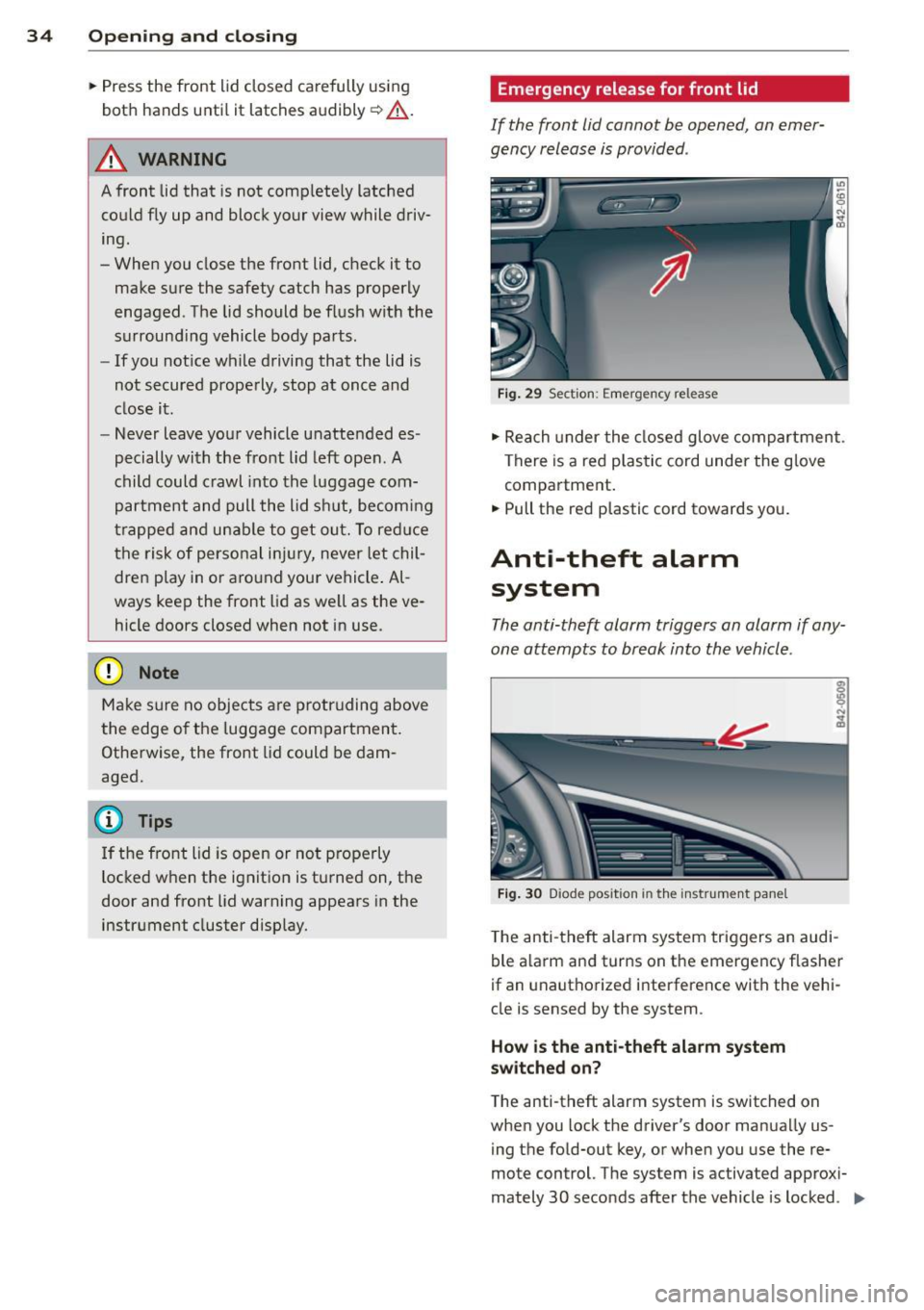
Fig . 29 Sect io n: Eme rgency release
• Reach under the closed glove compartmen t.
There is a red plas tic cord under the glove
compartment .
• Pull the red plastic cord towards yo u.
Anti-theft alarm
system
The anti-theft alarm triggers an alarm if any
one attempts to break into the vehicle .
Fig . 30 Diode position in the instrument pane l
The anti -theft alarm system triggers an audi
ble a larm and turns on the emerge ncy flasher
if an unauthorize d interference with the vehi
cle is sensed by the system .
How is the anti-theft alarm system
switched on?
T he anti -theft alarm system is switched on
when you lock the driver's door manua lly us-
ing the fo ld-out key, or when you use the re
mote control. The system is activated approxi
mately 30 seconds after the vehicle is locked . .,,_
Page 37 of 244
The indicator li ght q fig . 30 starts flashing
rapidly fo r 2 seconds and then blinks slowly.
How is the anti-theft alarm system
switched off?
The anti -the ft alarm system is switched off
on ly when you unlock your vehicle. If yo u do
not open a door with in 30 seconds after yo u
have unlocked with the remote control, the
ve hicle w ill lock itse lf again a utomat ically.
When will the anti theft alarm system be
triggered?
When the veh icle is locked, the alarm system
monitors and protects the following parts of
the vehicle:
- engine compartment
- luggage compartment
- doo rs
- ignition
When the system is activated , the alarm wi ll
be tr iggered if one of the doors, the eng ine
compa rtment lid or the front lid are opened .
The anti-theft a larm system will also go off
when the battery is disconnected .
You can a lso trigger the alarm by pressing t he
PANIC button on your remote-control key .
This will a lert other peop le in case of emer
gency . Press the
PANIC button again to tu rn
off the alarm .
How is the ant i-theft alarm switched off
when triggered?
The alarm system is switched off w hen you
u nl ock the vehicle us ing the remote-control
key or when the ignition is sw itche d on . T he
a larm w ill also switch itse lf off when it comes
t o the en d of its cycle.
Emergency flasher
The emergency f lasher w ill blink b riefly w hen
the doors, e ngine compartment l id and fron t
lid are properly clos ed .
If the emergency flashers do not blink, check
the doors, e ngine compartment l id and front
l id to make sure t hey a re p roperly closed . If
Opening and clo sin g 35
you close a doo r, the eng ine compartment lid
o r the fro nt lid with the anti -theft alarm
switched on, the eme rgency flashers w ill blink
o nl y after yo u have closed the door or lid.
@ Tips
For the a nti-theft alarm system to f unc
tion properly, make sure all ve hicle do ors
and windows are closed bef ore leaving t he
vehicle.
Power windows
Controls
Th e driver can opera te all windo ws.
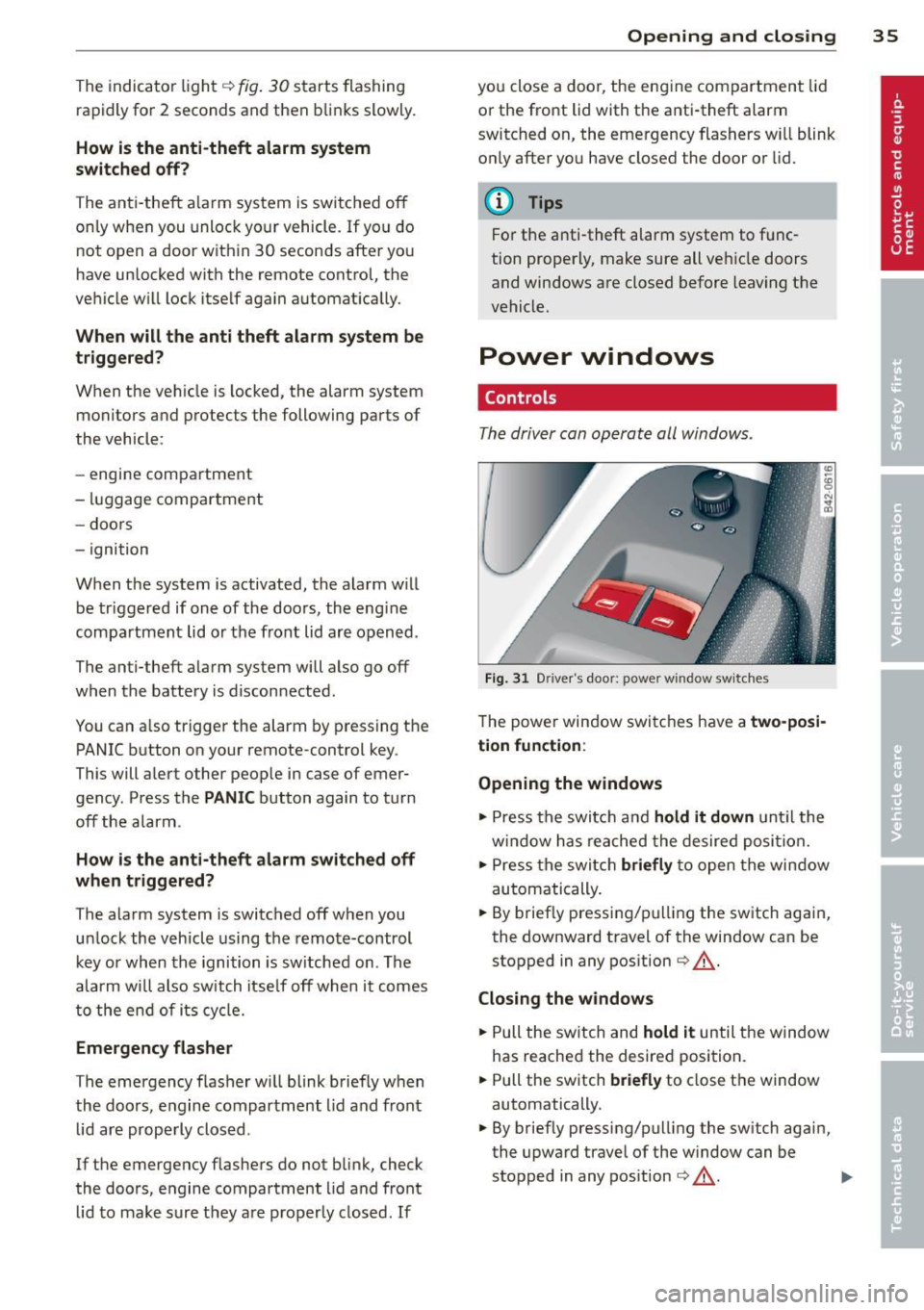
F ig. 31 Driver 's doo r: power w indow sw it ches
T he powe r window swi tc hes have a two-posi
tion function :
Opening the windows
.,. Press the swit ch and hold it down u nt il the
w indow h as reached the desired posi tio n.
.,. Press t he swi tch
briefly to open the win dow
automatically .
... By briefly press ing/p ulling the sw itch again,
the downward t ravel of the window can be
stopped in any pos ition
¢ ,& .
Closing the windows
.,. Pull the sw itch and hold it until the w indow
has reached the desire d posi tion .
... Pull the sw itch
briefly to close t he window
automatically.
... By briefly pressing/pull ing the sw itch again,
the upwa rd trave l of the w indow can be
stopped in any pos it ion
¢ ,& . .,.
Page 38 of 244
36 Openin g and clo sing
A WARNING
- Do not leave children unattended in the
vehicle, especially with access to vehicle
keys . Unsupervised use of the keys can
result in starting of the engine and use
of vehicle systems such as powe r win
dows , etc. which cou ld result in serio us
injury.
- Remember -you can still open or close
the power w indows for abou t ten m i
nutes after the ignition is sw itched off .
Only when either of the front doors are
opened are the power windows switched
off.
- Be careful when closing the windows .
Check to see that no one is in the way, or
serious injury could result!
- Always remove the ignition key whenever
you leave your vehicle.
- If you lock your vehicle from the outside,
no one, especia lly children, sho uld re
ma in in the vehicle .
- Do not stick anything on the windows or
the windsh ield that may interfere with
the driver's fie ld of vision.
@ Tips
- When the doors are opened, the w in
dows are a utomatica lly lowered 0.4 in
(10 mm) .
Reactivating the system after battery
disconnection
If the vehicle ba ttery i s disconnected and
then reconnected, the automatic closing and
opening function will not work until it is reac
tivated .
• Pull and hold the power w indow swi tch un til
the window is completely clo sed .
• Release the switch and pull it again for one
second.
Page 42 of 244
40 Convertible top
The rear window can be extended comp lete ly
for cleaning. This is ca lled the cleaning posi
tion.
E xtendin g the rear w indow into th e w ind
d efl ector po sit io n
.. Pull and hold the rear window switch
¢ fig. 36 .
.. Re lease the switch once the rea r window has
reached the wind deflector position.
E xte nding th e rear window into th e
cle aning po sition
.. Pull and hold the rear window switch
¢ fig . 36.
.. Release the switch once the rear window has
reached the wind deflector position .
.. Pull and hold the rear w indow switch again .
.. Pull and hold the convertible top switch
within one second
¢ page 37, fig . 32.
Re tra cting the re ar w indow
.. Press and hold the rear window sw itch until
the window has been retracted .
Retra cting the re a r wi ndow using the one
t ouch function
.. Press the rear window switch briefly . There
is no need to hold the switch .
The rear window can only be operated when
t he igni tion is switched on.
The rear window can also be extended or re
tracted when the convertib le top is closed.
A WARNING
- Do not use the rear window to secure car
go or other objects. This could result in
mJury .
- Always pay attention and be careful
when extending or retracting the rear
window . It could cause injury by pinch
ing .
(D Tips
-Keeping all of the w indows raised pro
v ides the best wind protection . - The vehicle must be stationary to bring
the rear window into the cleaning posi
tion . The rear window will retract once
you begin dr iv ing .
Convertible top
emergency operation
General information
The convertible top can be closed by hand if
there is a malfunction .
First check if overload protection is active
¢ page 38. If this is the case, the convertible
top wi ll operate again afte r a short de lay. Oth
erwise the fo llowing steps must be completed
before closing the convertib le top:
.. Activate the pa rking brake .
.. Open the side w indows, if necessary.
.. Remove the key from the ignition.
E mergency loc king is not intended for long
term use or long d rives . The convertible top
will not be completely waterproof after using
the emergency locking procedure because the
seals wi ll not be seated correctly. Only close
the convertible top manually in an emergency .
Please see an authorized Audi R8 dealer to
have the cause of the malfunction corrected .
A WARNING
-The ignition must be sw itched off d uring
the entire closing p rocedu re.
- When pos itioning the convertible top,
avoid contact with the supports or other
movi ng parts. Otherwise you could p inch
your hands.
- Never drive when the convert ible top is
not locked correctly . The wind from d riv
ing could cause the convertible top to
open . This can resu lt in injuries and dam
age to the vehicle.
(D Tips
Have a second person assist when clos ing
the convert ible top. Opening the storage
bay lid and positioning the convertible top
i s easier when a second person is assisting.
Page 44 of 244
42 Convertible top
Opening the conv ertible top stor age bay
lid
• From the r ear of the vehicle, r each into the
center ventilation slot in the sto rage bay lid
wi th both hands and raise the lid approxi
mately 12 in (30 cm).
• Hold the storage bay lid in this posit ion and
pull it toward you until it stops ¢
fig. 40.
A WARNING
When working in the engine compart
ment:
- T urn the engine off.
- Act ivate the park ing brake.
-
- In vehicles with a manua l transm iss ion,
move the sh ifter lever into idle . In
vehicles with the R tronic transmission,
move the se lector lever into the N pos i
t ion.
- Remove the ignit ion key .
- Let the engine cool down .
- Keep children away from the engine com-
partment.
(D Note
To prevent damage to the vehicle, only
open the convertible top storage bay lid
when the engine compartment lid is
closed.
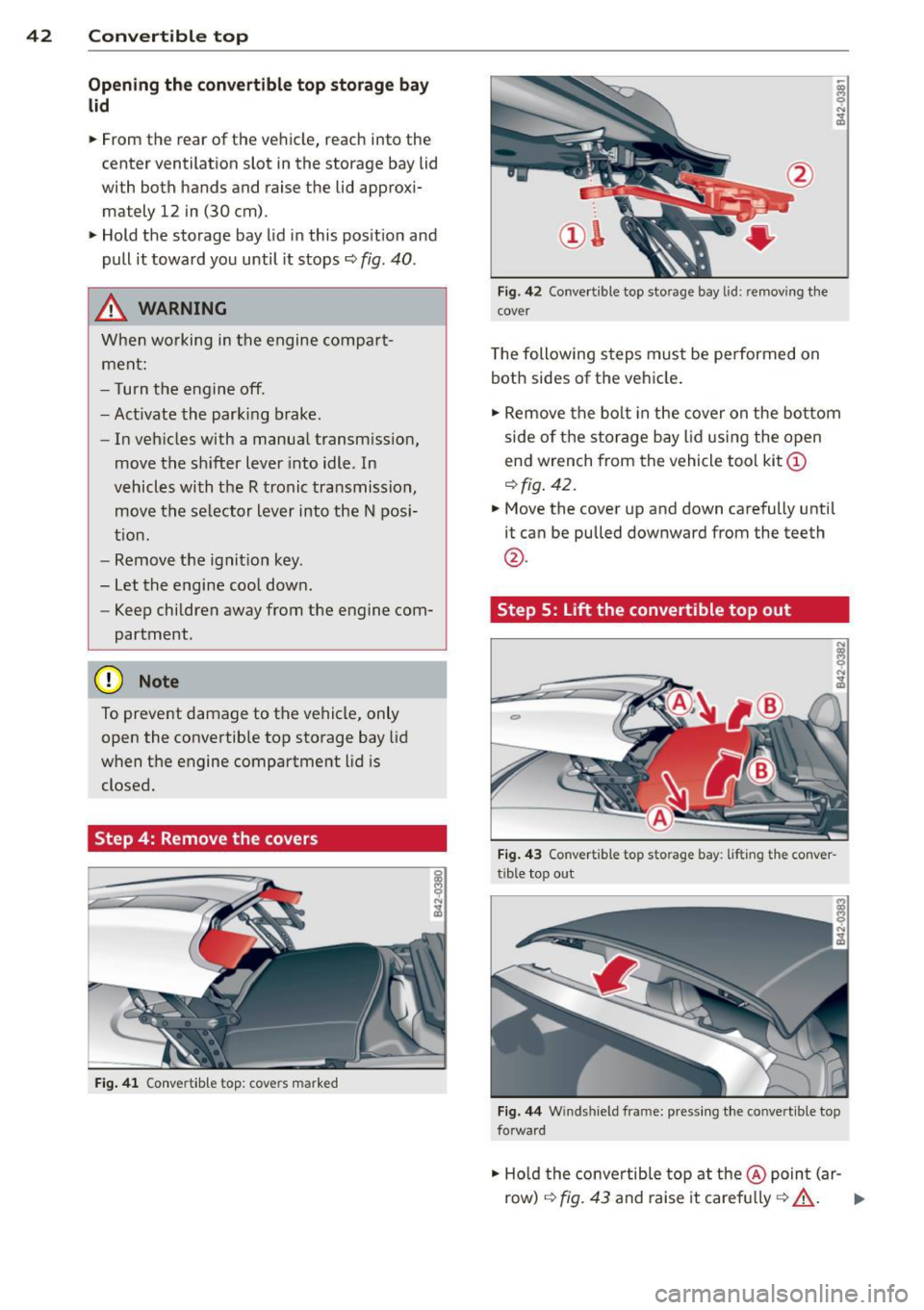
Step 4: Remove the covers
Fi g. 41 Conv ertib le top : cov ers ma rk e d
Fig. 42 Co nver tible top storage bay lid: r em ov ing t he
c o ver
T he following steps mus t be performed on
both sides of the vehicle .
• Remove the bo lt in the cover on the bo ttom
side of the sto rage bay lid using the open
e nd w rench from the vehicle too l kit
(D
¢ fig . 42.
• Move the cover up and down carefully until
it can be pulled downwa rd from the teeth
@ .
Step 5: Lift the convertible top out
Fig. 4 3 Conve rtib le to p sto rage bay: liftin g th e c onve r
tible top o ut
Fig . 44 Wind shi eld fr ame: p res sing the c onvert ible top
fo rwa rd
• Ho ld the conve rtib le top at the@ point (ar
row)
r:!;> fig. 43 and raise it carefu lly ¢ A . .,..
Page 48 of 244

46 Clear vision
Clear vision Lights
Switching the headlights on/off
F ig . 52 Instr ument pane l: light sw itch (automat ic
head· and ta illight control)
Switching on the side marker lights
• Turn the light switch to :oo:.
Switching on the headlights and high
beam
• Turn the light switch to ;D .
• Push the high beam lever forwa rd towards
the instrument panel~
page 47 .
Switching off the lights
• Turn the light switch to 0 .
Switching on automatic head -and
taillight control
• Turn the light switch to AUTO q fig. 52.
The headlights and taillights will come on au·
tomatically when the ignition is switched on
and the light switch is in the position AU TO
(on ly in nighttime conditions). When switch·
ing off the ignit ion, the headlights will go off
and only the side marker lights will remain lit.
Daytime running lights
USA models: The daytime running lights will
come on automatica lly when the ignition is
switched on and the light switch is in the posi·
tion
AUTO (only in daylight cond itions).
Canada models: The daytim e running lights
will come on automatically when the ignition
is switched on and the light switch is in the position
0
, AUTO (on ly in daylight condit ions)
or
:oo:.
Automatic head- and taillight control
In the switch position AUTO the automatic
head· and ta illight control is activated. Light
senso rs are located in the inside mirror hous
ing and constantly check the light conditions
surrounding the vehicle. If ambient bright·
ness falls below a factory set value (e.g. when
driv ing into a tunnel), the head- and taill ights
including the license plate illumination are
automat ically turned on. When amb ient
brightness increases aga in, the external lights
are turned off aga in
q ,&. . In the sw itch posi
t ion
AUTO , the low beams are turned off when
the ignition is switched off. The remaining
lights are turned off when the key is ta ken out
of the ignition lock.
With aut omat ic head- and taillight control,
the high-beam function is also available, but
with one restriction: If you have not switched
the high beams back to low beams during a u
tomat ic head light operation (for examp le, af
ter driving through a tunnel), on ly the low
beams come on the next time automatic
headlights are switched on. To use the high
beams, you first have to pull the h igh beam
lever back and then push the lever forward
again.
The side marker lights and headlights can be
switched on manually by turning the light
switch to the desired position .
Light sensor malfunction
If there is a light sensor ma lfunction, the
symbol
tal comes on in the display. For safety
reasons, the low beams are turned on perma
nently with the sw itch in
AUTO. However, you
can continue to turn the lights on and off us
ing the light switch. Have the light sensor
checked as soon as possible at an authorized
A udi dealer.
Coming home/leaving home function
The function is sw itched on when the sw itch is
i n the
AUTO position and the function is ...,
Page 49 of 244

shown as active in the driver information
system.
The
coming home function illuminates the
area around the vehicle when the ignition is
switched off and the driver 's door is opened.
The length of time the lights rema in on can be
set in the menu display
(Lights> Exterior
lights> coming home) .
The leaving home function illuminates the
area around the vehicle when unlock ing it.
A WARNING
- Never use daytime running lights to see
where you are going. They are not bright enough and will not let you see far
enough ahead for safety, especially at
dusk or when it is dark . Be aware of
changes in outside light conditions when
you are driving and respond by switching
on your low beams.
- Automatic head- and taillight control is
only intended to assist the driver. This
feature does not relieve the driver of his
responsibility to check the headlights
and to turn them on manually according
to the current light and visibility condi
tions. For example, fog and rain cannot
be detected by the light sensors. Conse
quently, always switch the headlights on
under these weather conditions and
when driving in the dark.
- Crashes can happen when you cannot see
the road ahead and when you cannot be
seen by other motorists .
-Always turn on the headlights so that you can see ahead and so that others can see your car from the back.
- Please observe legal regulations when
using the light ing systems descr ibed .
@ Tips
-Always observe the specific local regula
tions for your area when to use your
lights .
- Turn on low beams as evening ap
proaches or in conditions of poor visibili
ty. Clear vision 4
7
- Do not attach stickers to the windshield
in front of the sensors as this can disable
the automatic head- and taillight control
and the automatic glare-dimming of the
rearview mirror(s)*.
- If you remove the ignition from the igni
tion lock while the headlights are still
on, a buzzer will sound as long as the
driver's door is open to remind you to
turn off the lights .
- In the AUTO mode, the low beams are
turned off when the ignition is turned
off. The remaining lights are turned off
when the key is taken out of the ignition .
- In cool or damp weather conditions the
headlights may fog over temporarily on
the inside.
- The critical factor is the temperature
difference between the interior and the
exterior of the headlight Lens.
- With the main beams switched on, the
light-emitting area will be free of con
densation after a short time, however
the edges of the glass may still be fog
ged .
- This physical phenomenon has no ef
fect on the life of your vehicle's light
ing system .
Turn signals and high beam lever
The lever on the left side of the steering col
umn is used to operate the turn signals and the high beam as well as the headlight flash
er.
t
'
Fig. 53 Turn signal and high b eam lever
The turn signal and high beam lever has the
following functions: ..,.
Page 51 of 244

Interior lights
Interior lights
The interior lights include the reading lights
for the driver and the front passenger .
Fig. 55 Section from headliner : In terior lights
Activating door contact circu it
• Press the button @. The LED in the button
illuminates.
Deactivating do or contact circu it
• Press the button @. The LED in the button
goes out.
Fr ont re ad ing l ight s
~
• Press one of the switches ® to turn the
right or left reading light on/off .
"' l1l 0
With the door contact circuit, the interior
lights turn on as soon as you unlock the vehi
cle or open the doors. The interior lights are
also turned on when the ignition key is re
moved. The lights turn off about 30 seconds
after the doors are closed . When the vehicle is
locked or when the ignit ion is tu rned on, the
inte rior lights are turned off .
When a door is open, the interior lights are
turned off after about 10 m inutes to prevent
battery draining.
The brightness of the lights is controlled au
tomatically by a dimmer when they are
switched on/off.
Clear vi sion 49
Instrument panel illumination
The illumination of the instruments, displays
and the center console can be adjusted .
Fig . 56 Instrumen t pa nel illuminat ion
You regu late the brightness of the instr u
ments with the left thumbwheel
C1 ~ fig . 56 .
Ignition ON, light switch at @
With the ign ition switched ON, the glow of
in
strument needles
can be adjusted to appea r
brighter o r dimmer.
Ignition ON, light switch at
:oo~ or ~D.
With the lights switched on, the brightness of
instrument cluster (i.e. needles, gauges and
displays) and center conso le illuminat ion can
be adjusted .
(D Note
The instrument cluster and center conso le
ill umination (gauges and need les) comes
on when you sw itch on the ignition and the
v eh icle headlight s are off . Be awa re of the
fo llow ing difference be tween models bu ilt
to US or Canadian specifications:
- USA mo dels: illumination o f the i nstr u
ment cl uster (gauges and need les), dash
and center conso le around the gearshift
lever is controlled by a light sensor locat
ed in the instrument pane l. The instru
ment pa nel illuminat ion w ill automati
cally become dimmer as the daylight
fades away and eventually will go out completely when outs ide light is very
low. This is to remind you, the dr iver, to
switch o n the hea dlights before it ge ts
too d ark .
Page 61 of 244
you will be out of position. Always adjust
the driver's or front passenger seat when
the vehicle is not moving.
- Be careful when adjusting the seat
height. Check to see that no one is in the
way, or serious injury could result!
- Because the seats can be electrically ad justed with the ignition key removed, never leave children unattended in the
vehicle. Unsuperv ised use of the electr ic
seat adjustments may cause serious in
jury.
- To reduce the r isk of injury in the case of
sudden braking or accident, front pas
sengers must neve r ride in a moving ve
hicle wi th the seatback recl ined. Safety
belts and the airbag system offer maxi
mum protection on ly when the seatback
is upright and the safety belts are prop
erly posit ioned on the body. The more
the seatback is reclined, the greater the
risk of personal injury from an incorrect
seating pos ition and improperly posi
tioned safety belts!
- Always make sure the front seatbacks are
in the upright posit ion and securely
locked in place when dr iv ing .
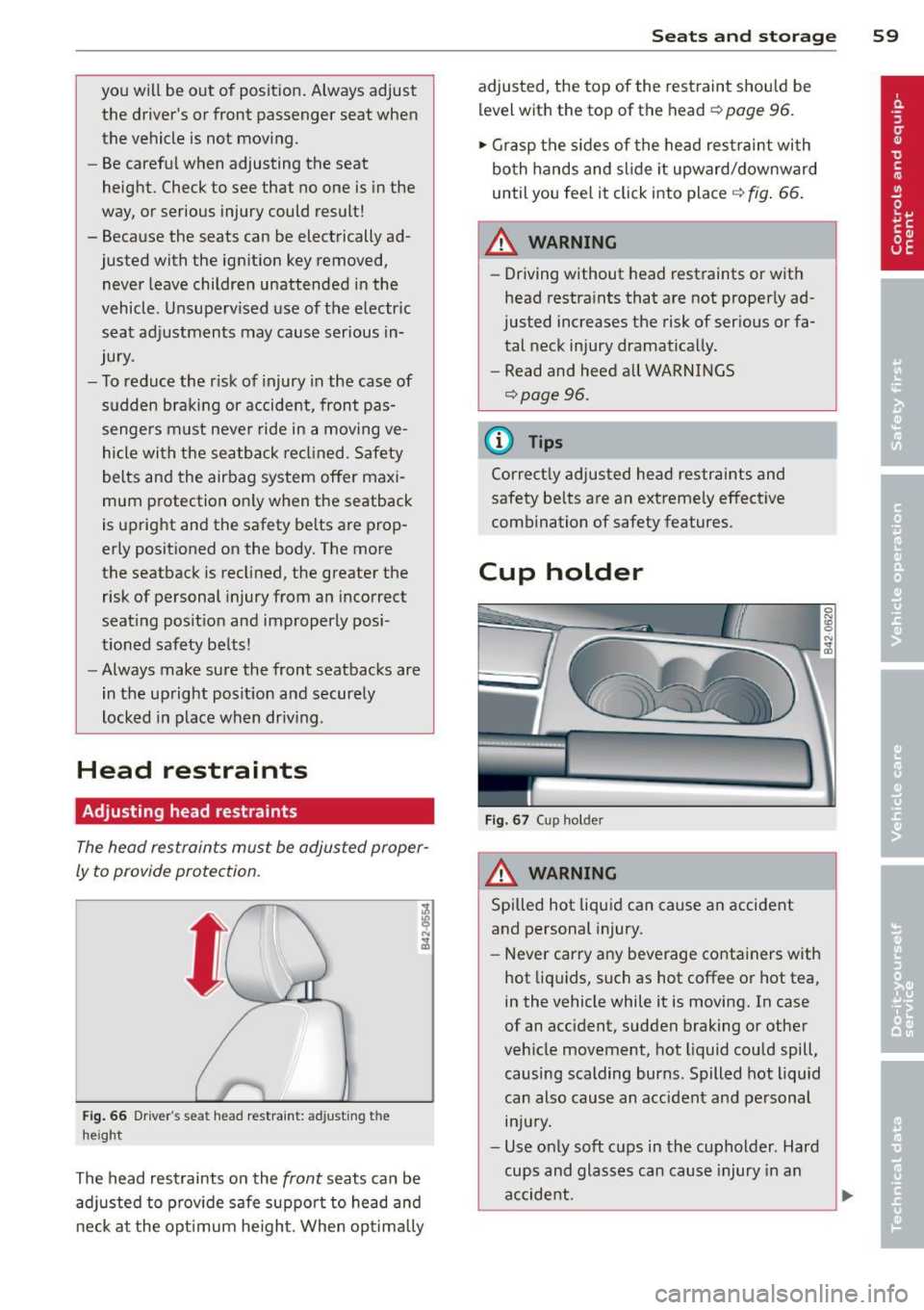
Head restraints
Adjusting head restraints
The head restraints must be adjusted proper
ly to provide protection.
Fig . 66 Drive r's seat head restraint: adjusting the
height
The head restraints on the front seats can be
adj usted to p rov ide safe support to head and
neck at the opt imum he ight. When opt imally
S ea ts a nd s to rage 59
adjusted, the top of the restraint should be
level with the top of the head
c::> page 96.
'" Grasp the s ides of the head restraint with
both hands and slide it upward/downward
until you fee l it click into place
c::> fig . 66.
& WARNING ~ -
- Driving without head restraints or with
head restra ints that are not properly ad
justed increases the risk of serious or fa
tal neck injury dramat ically.
- Read and heed all WARNINGS
<=:>page 96.
@ Tips
Correctly adjusted head restraints and
safety be lts are an extremely effective
combination of safety features.
Cup holder
F ig. 67 Cup holder
A WARNING
Spilled hot liquid can cause an accident
and personal injury.
-
- Never carry any beverage containers with
hot liq uids, such as hot coffee or hot tea,
in the vehicle while it is moving. In case
of an acc ident, sudden braking or other
veh icle movement, hot liquid could spill,
causing scalding burns. Spilled hot liquid
can also cause an accident and personal injury.
- Use only soft cups in the cupholder . Hard
cups and glasses can cause injury in an
accident.
Page 63 of 244
could slide around inside the vehicle
wh ile driving or when accelerating or
when applying the brakes or when driv
ing around a corner .
- When you are driving make sure that
anything you may have placed in the cen
ter console or other storage locations
cannot fa ll out into the footwells . In case
of sudden braking you would not be able
to brake, depress the clutch or acceler
ate.
- Any articles of cloth ing that you have
hung up must not interfere with the driv
er's v iew. The coat hooks are designed
only for lightweight clothing. Never hang
any clothing with hard, pointed or heavy
objects in the pockets on the coat hooks .
During sudden braking or in an accident -
especially if the airbag is deployed -
these objects could injure any passen
gers inside the veh icle .
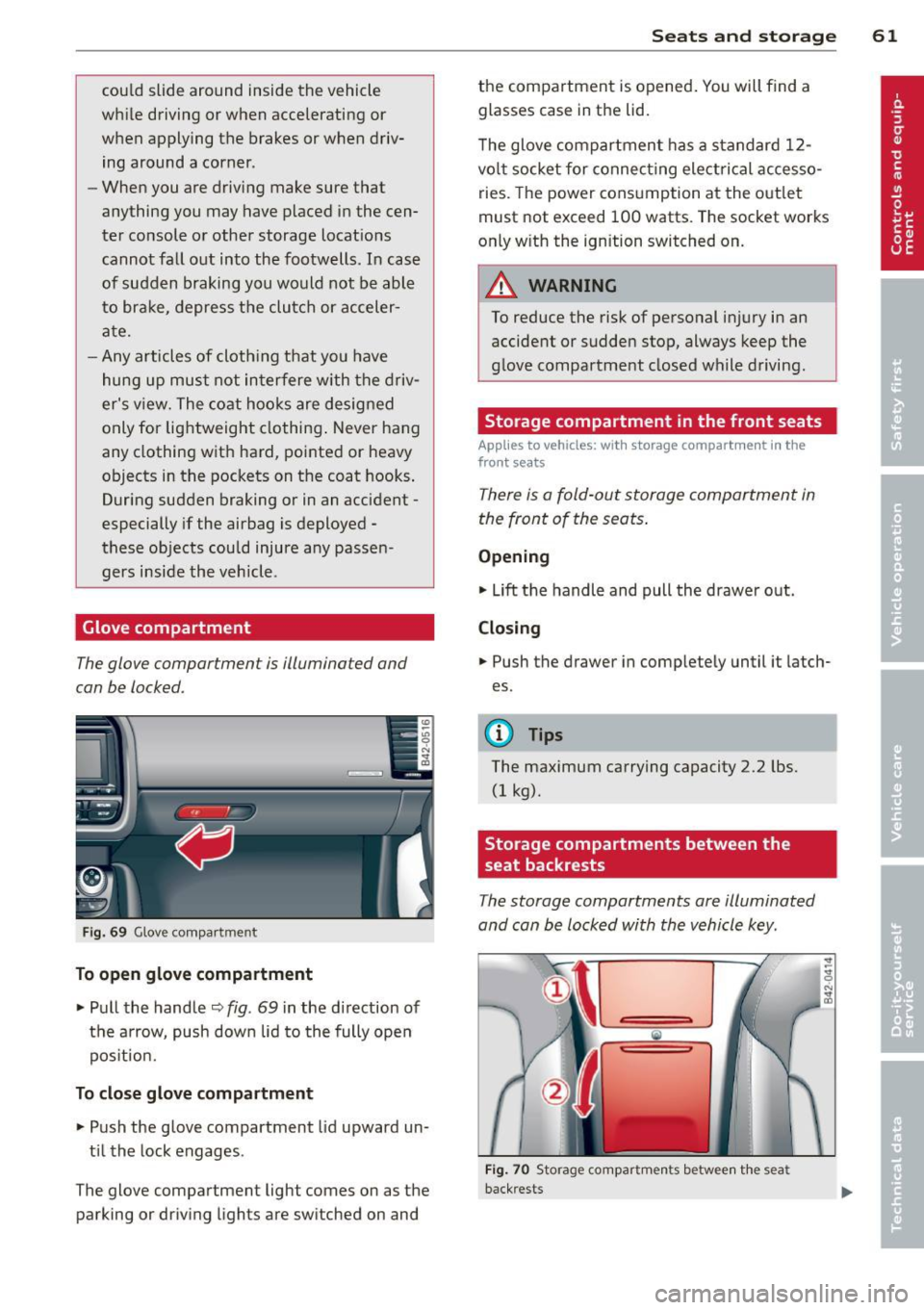
Glove compartment
The glove compartment is illuminated and
can be locked.
Fig. 69 Glove compar tme nt
To open glove compartment
• Pull the handle ~ fig . 69 in the direction of
the arrow, push down lid to the fully open
pos it ion .
To close glove compartment
• Push the glove compartment lid upward un
t il the lock engages .
The glove compartment light comes on as the parking or driving lights are switched on and
Seats and storage 61
the compartment is opened . You will find a
glasses case in the lid.
T he glove compartment has a standard
12-
volt socket for connecting electrical accesso
ries. The power consumption at the outlet
must not exceed 100 watts. The socket works
only w ith the ignition switched on.
_& WARNING
To reduce the risk of personal injury in an
accident or sudden stop, always keep the
g love compartment closed while driving.
Storage compartment in the front seats
Applies to vehicles: with storage compartment in the
front seats
There is a fold-out storage compartment in
the front of the seats .
Opening
• Lift the handle and pull the drawer out.
Closing
-
• Push the drawer in completely until it latch
es.
(D Tips
The maximum carrying capacity 2.2 lbs.
(1 kg).
Storage compartments between the
, seat backrests
The storage compartments are illuminated
and can be locked with the vehicle key.
F ig . 70 Storage compartments betwee n the seat
back rests