key AUDI R8 SPYDER 2014 Owner's Manual
[x] Cancel search | Manufacturer: AUDI, Model Year: 2014, Model line: R8 SPYDER, Model: AUDI R8 SPYDER 2014Pages: 244, PDF Size: 61.06 MB
Page 70 of 244
68 On th e road
On the road
Steering
Adjusting the steering wheel column
The steering wheel position can be continu
ously adjusted in height and distance .
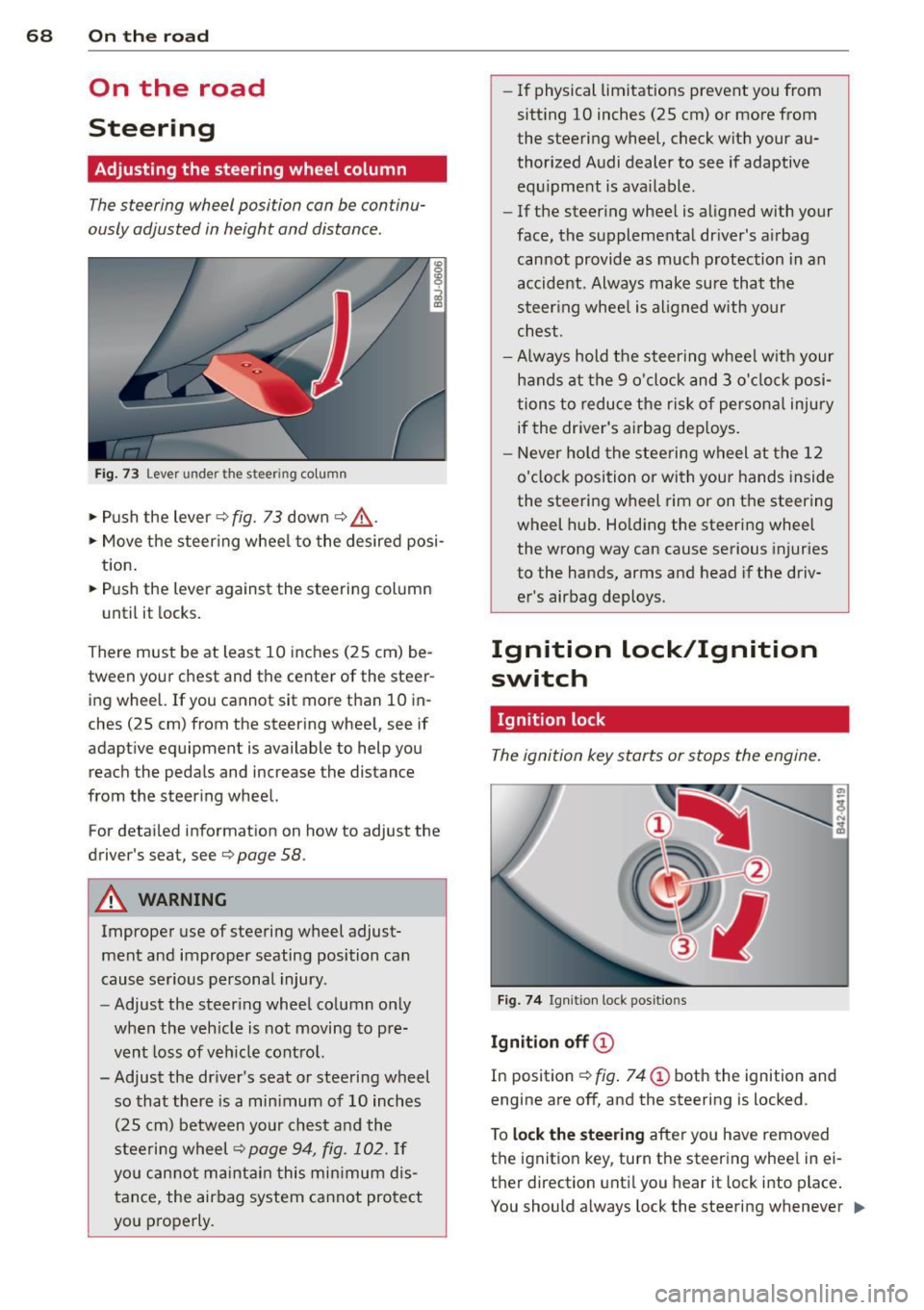
Fig. 73 Lever under the steering column
~ Push the lever Q fig. 73 down Q ,&..
~ Move the steer ing whee l to the desired posi
tion.
~ Push the lever against the steering column
until it locks.
There must be at least 10 inches (25 cm) be
tween your chest and the center of the steer ing wheel. If you cannot sit more than 10 in
ches (25 cm) from the steering wheel, see if
adaptive equipment is available to help you
reach the pedals and increase the distance
from the steer ing wheel.
For detai led informat ion on how to adjust the
driver's seat, see
Q page 58.
A WARNING
Improper use of steering wheel adjust
ment and improper seating position can
cause serious personal injury .
- Adjust the steer ing wheel column only
when the veh icle is not moving to pre
vent loss of veh icle cont rol.
-
- Adjust the driver's seat or steering wheel
so that there is a min imum of 10 inches
(25 cm) between your chest and the
steering wheel
Q page 94, fig . 102. If
yo u can not maintain this min imum dis
tance, the airbag system cannot protect
you properly.
- If physical limitations prevent you from
sitt ing 10 inches (25 cm) or more from
the steering wheel, check with your au
thorized Audi dealer to see if adaptive equ ipment is ava ilable .
- If the steering wheel is aligned with your
face, the supplemental driver's airbag cannot provide as much protection in an
accident. Always make sure that the
steer ing whee l is aligned with your
chest.
- Always hold the steering wheel w ith your
hands at the 9 o'clock and 3 o'clock posi
tions to reduce the risk of persona l injury
if the driver's airbag dep loys .
- Never ho ld the steering wheel at the 12
o'clock position or with your hands inside
the steering wheel rim or on the steering
wheel hub . Holding the steering wheel
the wrong way can cause serious injuries
to the hands, arms and head if the driv
er's airbag deploys.
Ignition lock/Ignition
switch
Ignition lock
The ignition key starts or stops the engine.
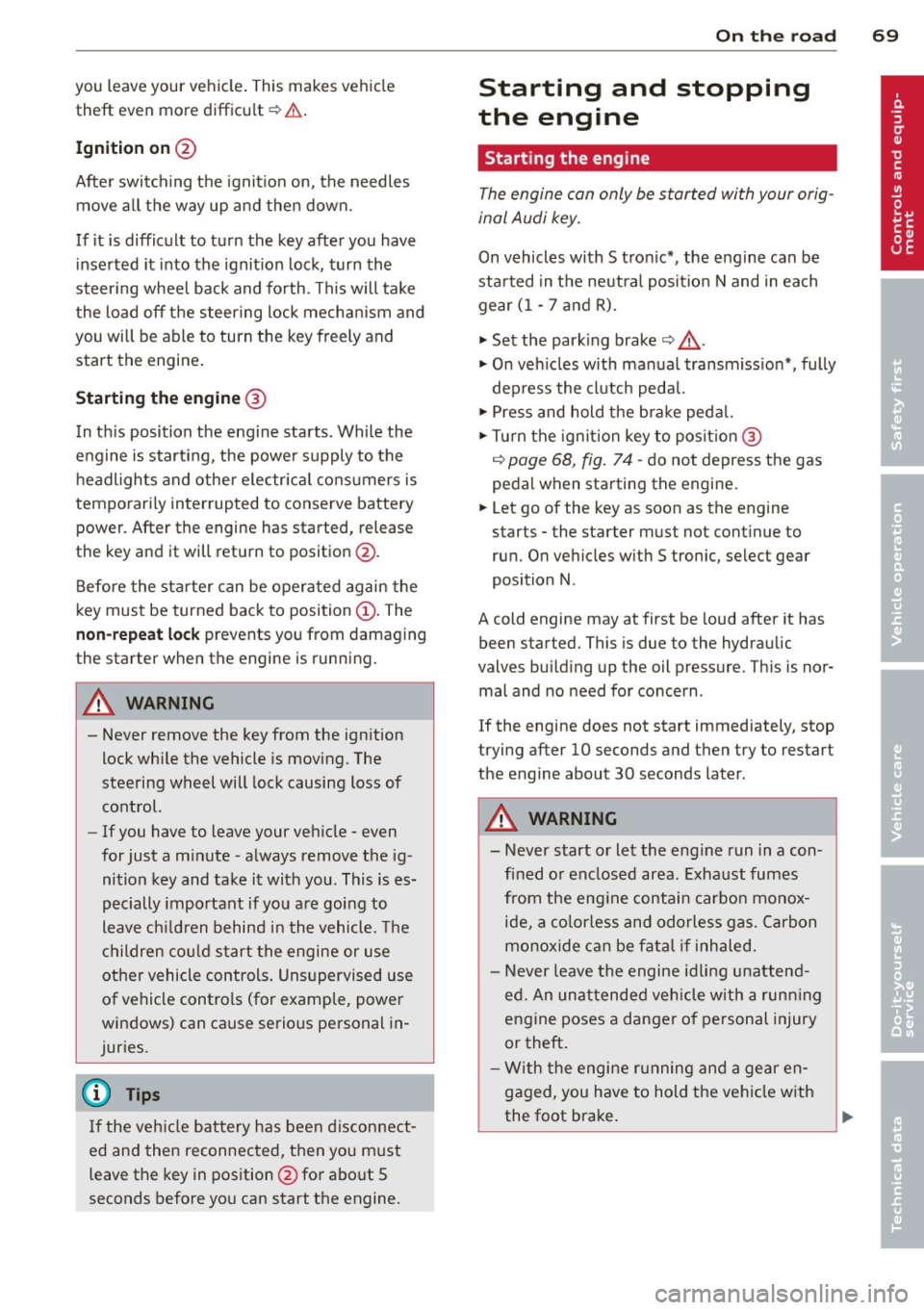
Fig . 7 4 Ign ition lock positions
Igniti on off @
In position Q fig. 74 @ both the ignition and
engine are off, and the steering is locked .
T o
lo ck th e steering after yo u have removed
the ignition key, turn the steer ing whee l in ei
ther direction unti l you hear it lock into place .
You should always lock the steering whenever
II>
Page 71 of 244
you leave your vehicle. This makes vehicle
theft even more difficu lt
r=:, .&. .
Ign ition on @
After switch ing the ignition on, the needles
move all the way up and then down.
If it is difficult to turn the key after you have inserted it into the ignit ion lock, turn the
steer ing whee l back and forth. This will take
the load
off the steering lock mechan ism and
you will be able to turn the key freely and start the engine .
Starting the engine @
In th is position the engine starts. While the
engine is start ing, the power supply to the
headlights and other e lectr ica l cons umers is
temporari ly inter rupted to conserve battery
power. After the engine has started, release
the key and it will return to position @.
Before the starter can be operated again the
key must be turned back to position
(D . The
non-repeat lock prevents you from damaging
the starter when the engine is running.
A WARNING
- Never remove the key from the ign ition
lock while the vehicle is moving. The
steering wheel will lock causing loss of
control.
- If you have to leave your veh icle - even
for just a m inute - a lways remove the ig
nition key and take it with you. This is es
pecially important if you a re going to
leave ch ildren behind i n the vehicle. The
children co uld s tart the engine or use
other vehicle controls . Unsupervised use
of vehicle controls (for example, power
windows) can cause serious personal in
juries.
@ Tips
I f the veh icle bat tery has been d isconnect
ed and then reconnected, then you must
leave the key in pos ition @for abo ut 5
seconds before you can start the engine.
-
On th e ro ad 69
Starting and stopping
the engine
Starting the engine
The engine can only be started with your orig
inal Audi key.
On vehicles with S tron ic*, the e ngine can be
sta rted in the neut ra l position N and in each
gear (1 - 7 a nd R).
" Set the park ing brake
r=:, & .
"On veh icles with manual transmiss ion*, fully
dep ress the clutch peda l.
" Press and hold the brake peda l.
" Tur n the igni tion key to pos it ion @
r=:> page 68, fig . 74 -do not depress the gas
peda l when sta rting the engine .
... Let go of the key as soon as the engine
starts - the starter m ust not cont inue to
run. On vehicles w ith S tronic, select gear
position N.
A cold engine may at first be loud after it has
been started. This is due to the hydraulic
valves bu ild ing up the oil p ressure . Th is is nor
mal and no need for concern .
If the engine does not start immediately, stop
trying after 10 seconds and then try to restart
the engine about 30 seconds later .
A WARNING
- Never start or let the engine run in a con
fined or enclosed area. Exhaust fumes
from the eng ine contain carbon mono x
ide, a co lor less and odorles s gas. Carbon
monox ide can be fata l if inh aled.
- Never leave the engine id ling una ttend
ed. An unat tended ve hicle with a runn ing
engine poses a danger of personal injury
or theft .
- With the engine r unning and a gear en
gaged, you have to hold the veh icle w ith
the foot bra ke.
Page 72 of 244
70 On the road
(D Note
-Avoid hig h engine speeds, fast accelera
tion or heavy engine loads while the en
gine is still cold. Th is could damage the
engine.
- The engine cannot be started by pushing or towing the vehicle.
@) For the sake of the environment
To avoid unnecessary engine wear and to
reduce exhaust emissions, do not let your
veh icle stand and warm up. Be ready to
drive off immediately after starting your
veh icle.
Stopping the engine
On vehicles w ith S tronic*, the engine can be
turned off in the neutral position N and in
each gear (1 -7 and R).
~ Turn the ign ition key to position ©
r:::>page 68, fig . 74 .
_& WARNING
- Never turn off the engine until the vehi
cle has come to a complete stop.
- Th e brake booster and servotronic on ly
work when the engine is running. With
the ignition turned off, you have to apply
more force when steering or braking .
Since you cannot steer and stop norma l
ly, this can lead to accidents and serious
injuries.
(D Note
- If the engine has been under heavy load
for an extended period of time, heat
builds up in the engine compartment af
ter the engine is switched off -there is a
risk of damaging the engine. Allow the
engine to continue to run at idle for a
short time or drive until it has cooled
down before you turn it off¢
page 75.
- If the engine has been under heavy load
for an extended period of time, it can be
come extremely hot. You should not park your vehicle over easily combustib
le ob
jects or areas (e .g. grass or leaves). There
is a risk of starting a fire.
(D Tips
After the engine has been switched off, the
radiator fan can continue to run for up to
10 minutes -even with the ignition switch
ed off. It can also sw itch on again after
some time if the coolant temperature rises
as the result of heat buildup or if the en
gine compartment is heated by the sun's
rays and the engine is hot.
Parking brake
Parking brake
When the parking brake is set, it prevents the
vehicle from rolling away unintentionally
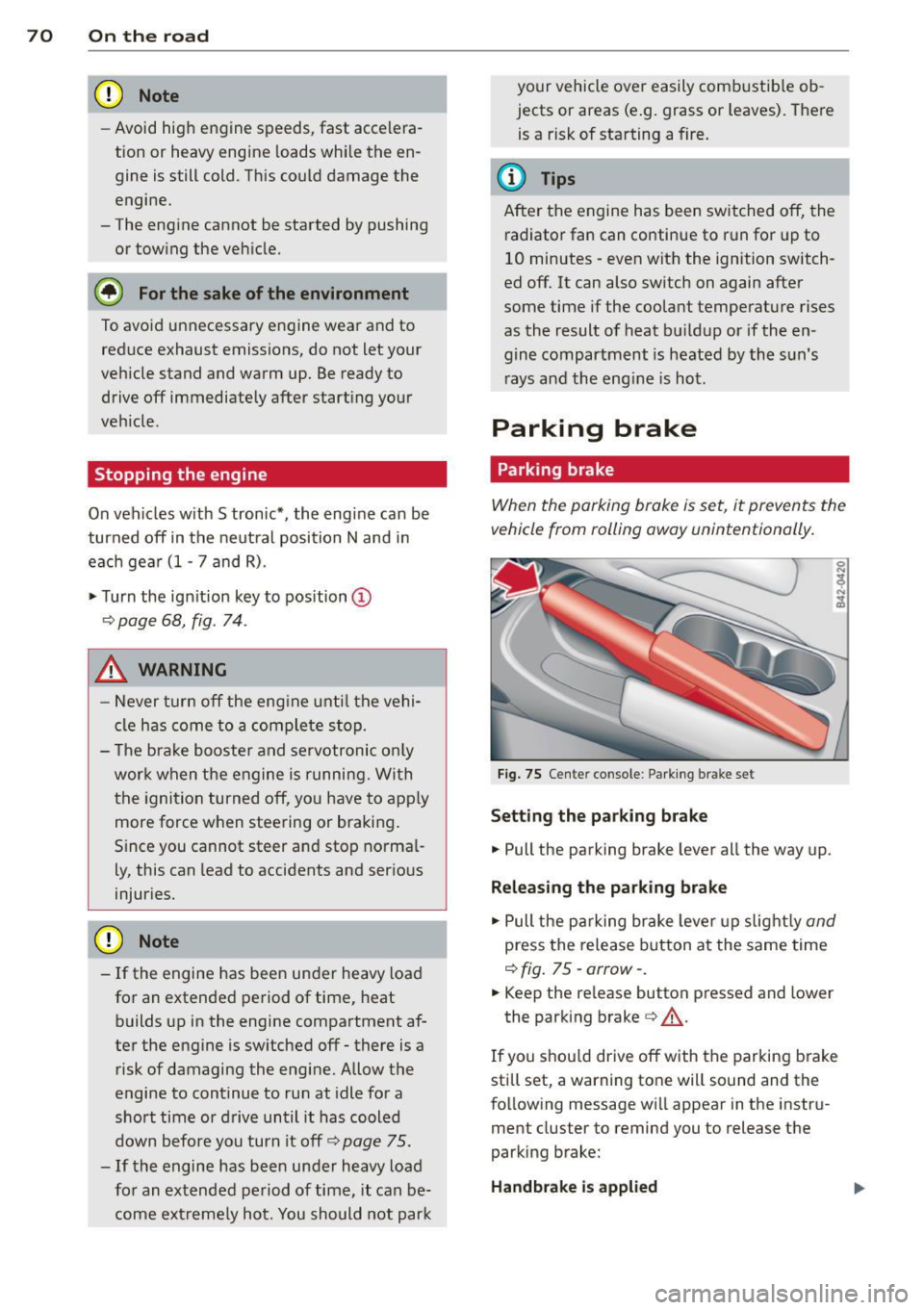
Fig. 75 Center co nsole : Parking brake set
Sett ing the parking brake
~ Pull the parking brake lever all the way up.
Releasing the parking brake
~ Pull the parking brake lever up slight ly and
press the release button at the same time
r:::>fig. 75-arrow- .
~ Keep the release button pressed and lower
the park ing brake ¢,& .
If you shou ld drive off with the parking brake
still set, a warning tone will sound and the
following message will appear in the instru
ment cluster to remind you to release the
parking brake:
Handbrake is applied
Page 80 of 244
78 Transmission
@ Tips
-When accelerating using the Launch
Control program, all vehicle parts are
subject to heavy loads. This can result in
increased wear.
- The Launch Control Program only func
tions when the parking brake is released
and the vehicle speed is less than
3 mph
(5 km/h).
S tronic®
Description
Applies to vehicles: with S tronic
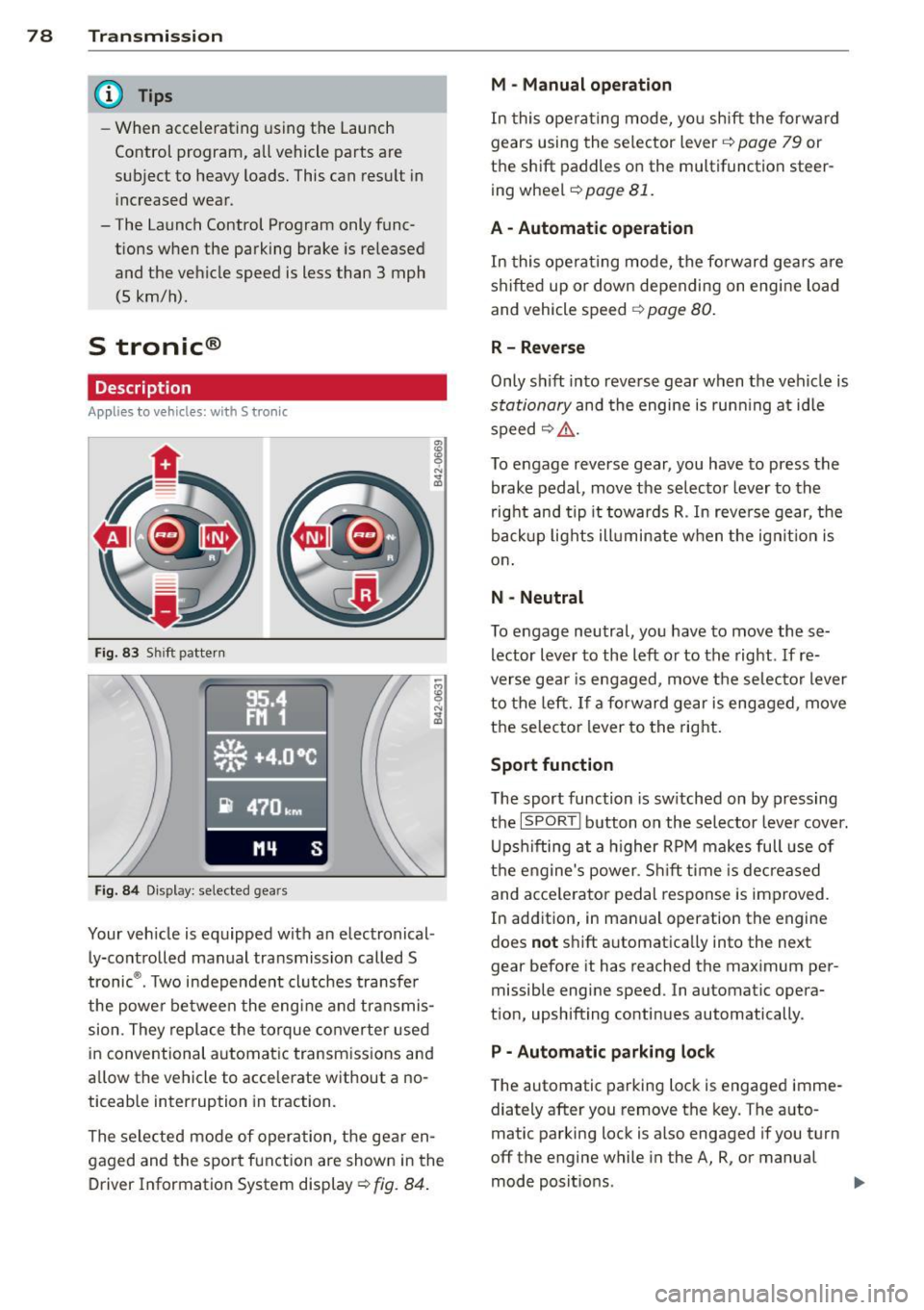
Fig. 83 Shift pattern
Fig. 84 Display: selected gears
Your vehicle is equipped with an electronical
ly-controlled manual transmission called S
tronic ®. Two independent clutches transfer
the powe r between the engine and transmis
sion. They replace the torque converter used
in conventional automatic transmissions and
allow the vehicle to accelerate without a no
ticeable interruption in traction.
The selected mode of operation, the gear en
gaged and the sport function are shown in the
Driver Information System display ¢
fig. 84.
M -Manual operation
In this operating mode, you shift the forward
gears using the selector lever ¢
page 79 or
the shift paddles on the multifunction steer
ing wheel¢
page 81.
A - Automatic operation
In this opera ting mode, the forward gears are
shifted up or down depending on engine load
and vehicle speed ¢
page 80.
R- Reverse
Only shift into reverse gear when the vehicle is
stationary and the engine is running at idle
speed~ ,&..
To engage reverse gear, you have to press the
brake pedal, move the selector lever to the
right and tip it towards R . In reverse gear, the
backup lights illuminate when the ignit ion is
on .
N -Neutral
To engage neutral, you have to move these
lector lever to the left or to the right.
If re
verse gear is engaged, move the selector lever
to the left.
If a forward gear is engaged, move
the selector lever to the right.
Sport function
The sport function is sw itched on by pressing
the
I SPOR T I button on the selector lever cover.
Upshifting at a higher RPM makes full use of
the engine's power. Shift time is decreased
and acce le rator pedal response is improved.
In addition, in manual operation the engine
does
not shift automatically into the next
gear before it has reached the maximum per
missible engine speed. In automatic opera
tion, upshifting continues automatically.
P - Automatic parking lock
The automatic parking lock is engaged imme
diately after you remove the key. The auto
matic parking lock is also engaged if you turn
off the engine while in the A, R, or manual
mode positions. .,..
Page 81 of 244
If you turn off the engine while in the N posi
ti on and leave the vehicle key in the ignition,
the transm ission remains in the N pos ition for
approximately 20 mi nutes an d then act ivates
th e automatic parking lock. If vehicle
move
ment is detected within tha t 20 minutes
based on rotat ion of the wh eels, th en the
time will increas e according ly.
A WARNING
- If a gear is engaged when the vehicle is
stationa ry, the acce lerator must not be
pressed inadvertently under any circum
stances. Otherwise the vehicle will im
med iately start to
move -sometimes
even if the parking brake is firmly ap
plied.
- Before you or other persons open the en
gine compartment lid and work on a ru n
ning eng ine, se lect neutral position
N
and firmly apply the handbrake. A lways
read and follow the applicable warn ings
¢ page 172, Working in the engine
compartment.
(i) Tips
- If you accidentally shifted into N while
driving, you can engage a gear in the nor mal way using the selecto r lever.
-An indicator light is displayed if a mal
funct ion occ urs while in S tronic. Refe r to
qpage 81.
Manual mode
Appl ies to vehicles : wit h S t ronic
S tronic allows the driver to shift gears man
ually.
Starting from a stop
.. Press and ho ld the brake pedal.
.. Move the selector lever to the left.
.,. Tap the selector lever forward
0 -
.. Re lease the brake pedal and press the accel
erato r peda l¢ ,& .
Tran sm iss ion 79
Shifting
.,. To shift up, tap the selec to r l ever forwa rd
0-
.. To shift down, tap the selector lever to the
rear Q.
Stopping temporarily
.. Press the b rake pedal to p revent the veh icle
from mov ing, fo r ex ample at tra ffic l ights.
Parking
.. Press and hold the brake pedal¢ ,& .
.. Act ivate the park ing brake .
.,. Tu rn off the ignition and remove the key.
Stopping on an incline
.. Always keep th e vehicle stat ionary using the
foot brake to prevent it from "rolling back"
¢ ,& . D o
not try to p revent the veh icle from
"rol ling back" when a gear is engaged by in
creasing e ng ine speed.
.. Ac tiva te the pa rk ing br ake.
Starting on a hill
.. With a gear engaged, remove your foot from
th e brake, accelerate and slowly release the
park ing brake.
When accelerat ing, S tronic sh ifts i nto the
next gear i n gears 1, 2, 3, 4, 5 and 6 shortly
before the max imum pe rm issib le eng ine
speed is reached.
If you have se lected a lowe r gear tha n the cur
r ent one, S tron ic will s hift down only when
the engine will not be
over- revved .
You can switch to automat ic operation at any
time
q page 80.
A WARNING
-Never leave your vehicle with the engine
ru nning while in gear . If you must leave
your veh icle w ith the engine r unning, set
the par king brake firm ly and engage neu
tral
N.
- W ith the engine r unning and a gear en
g aged, you have to hold the ve hicle with
the foot bra ke.
Page 84 of 244
![AUDI R8 SPYDER 2014 Owners Manual 82 Transmission [O] Risk of rolling! P not possible. Plea se set
the parking brake
- T he pa rking lock was released using the
eme rgency release
r=;, page 82. Or
- T he pa rking](/img/6/57641/w960_57641-83.png "AUDI R8 SPYDER 2014 Owners Manual 82 Transmission [O] Risk of rolling! P not possible. Plea se set
the parking brake
- T he pa rking lock was released using the
eme rgency release
r=;, page 82. Or
- T he pa rking")
82 Transmission [O] Risk of rolling! P not possible. Plea se set
the parking brake
- T he pa rking lock was released using the
eme rgency release
r=;, page 82. Or
- T he pa rking lock can no longer be engaged.
Drive to your authorized Audi dealer or
qualified repair facility immediately to have
the malfunction corrected.
• Transmission: System malfunction ! Stop
the vehicle
Do not cont inue driving. Turn off the ignition
and contact your nearest authorized Audi
dealer for assistance.
There is a serious system malfunction . Con
tinuing to drive could result in subsequent
damage.
0 Note
If S tronic has switched to emergency op
eration mode, you should have the mal
function corrected as soon as possible.
Parking lock emergency release
Appl ies to vehicles: with S tronic
The parking lock must be released using the
emergency release before towing the vehicle .
Fig. 86 Engine compartment: emergency release
Fig. 87 Engine compa rtment: pa rking lock emergency
r e lease
The emergency release is located in the en
gine compartment.
Releasing the parking lock using the
emergency release
.,. Turn the engine off.
.,. Set the parking brake to prevent the vehicle
from rolling unintentionally.
.,. Remove the removable plastic key from the
luggage compartment and extend the key to
its full length .
.,. Remove the cover over the emergency re
lease mechanism .
.,. Insert the plastic key into the emergency re
lease mechanism and turn it all the way to
the right
r=;, fig. 87.
Resetting the parking lock
.,. Tu rn the key all the way to the left .
.,. Install the cover.
The
[O] indicator light appears in the instru
ment cluster if the park ing lock was released
from P using the emergency release. The mes
sage
Risk of rolling! P not possible. Please
set the parking brake
also appears .
.&_ WARNING
- Only activate the emergency release
while on a level surface or a slight slope.
-If you release the parking lock using the
emergency release, secure you r vehicle
wit h the parking brake. The vehicle can
roll away if it is not secured and cause a
crash.
Page 92 of 244
90 Homelink®
Homelink®
Universal remote
control
General information
The Homelink universal remote control can
be programmed with hand-held transmitters
from existing equipment.
You must first program the Homelink ® trans
mitter before you can use the system
~ page 90, Programming the Homelink ®
transmitter.
I n o rder to prog ram the Homelink ® transmit
ter for devices utilizing rolling code, a second pe rson on a ladder who can safely reach the
garage doo r opener motor is recommended.
It is also necessary to locate the "learn" but
ton on your garage door opener motor . Refer
to the operating instructions for the opener,
as the location and color of this button may
vary by manufacturer .
You can still use the original remote control
for the device at any time.
A WARNING
-
- Never use the Homelink® transmitter
with any garage door opener that does
have not the safety stop and reverse fea
ture as requ ired by federa l safety stand
ards. This includes any garage door open
er model manufactured before April 1,
1982.
- A garage door opener which cannot de
tect an object, signa ling the door to stop
and reverse does not meet current feder
al safety standards. Using a garage door
opener without these features increases
risk of serious injury or death.
- For safety reasons never release the
parking brake or start the engine while
anyone is stand ing in front of the vehicle.
- A garage door or an estate gate may
sometimes be set in motion when the
Homelink ® remote control is being pro
grammed. If the device is repeatedly ac- tivated, this can overstrain motor and
damage its e
lectrical components -an
overheated motor is a fire hazard!
- To avoid possib le injuries or property
damage, please always make absolutely
certain that no persons or objects are lo
cated in the range of motion of any
equ ipment being operated.
(!) Tips
- If you would like more information on
Homelink ®, where to purchase the
Homelink ® compatible products, or
would like to purchase the Homelink®
Home Lighting Package, please call toll
free: 1-800-355-3515.
- For Declaration of Compliance to United
States FCC and Industry Canada regula
tions~
page 230.
Programming the Homelink ®
transmitter
The transmitter is programmed in two phas
es. For rolling code transmitters, a third
phase is also necessary.
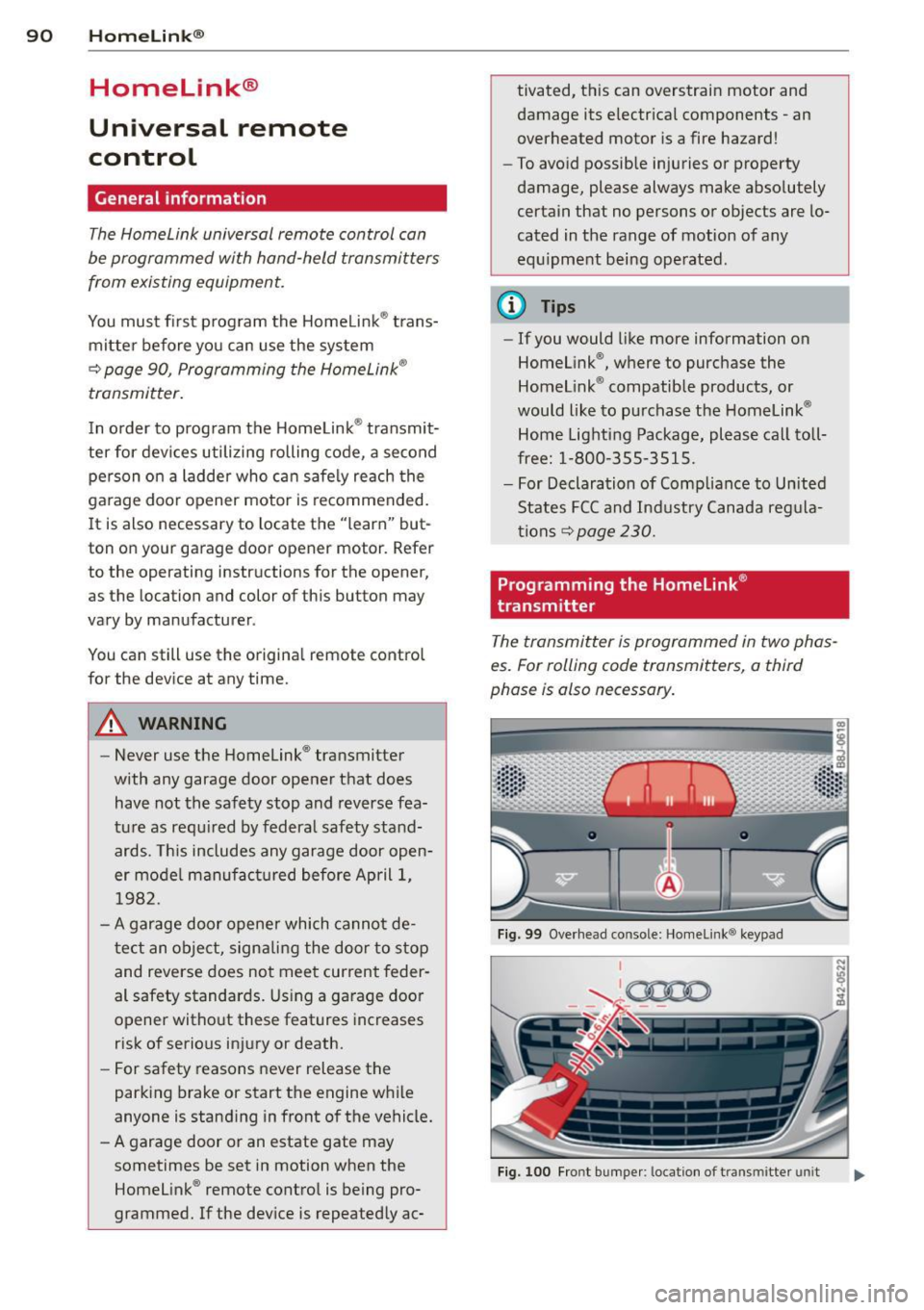
Fig. 99 Overhead co nsole: Homelink ® keypad
I
'-.. ~0000 - - ,r.;-_ - -
Fig. 100 Fro nt bumper : location of tra nsmi tter unit
Page 93 of 244
Phase 1:
p rogramming the overhead keypad
1. Make sure your vehicle is wit hin operating
range of the remote contro lled garage
door opener .
2. Set the parking brake
q A in General in
formation on page 90 .
3. Turn the ignition on . Do not start the en
gine!
4. Press and hold the two outs ide Home
Link ® buttons
(D and @for approxi
mately 20 seconds until indicator light@
c:!;> fig. 99 begins to flash. Then re lease
both buttons. Do not ho ld the buttons for
longer than 30 seconds .
.,. This procedure only needs to be performed
once . It erases the factory-set default codes
and does not have to be repeated to pro
gram addit ional remote controls .
S . Press and hold the Home Link ® button
(D ,
® or @ until the indicato r light @
starts flashing
slowly . Release the button.
.,. The system will remain in programming
mode for 5 minutes . Co to the front of the
vehicle and proceed with phase 2 .
Phase 2:
programming the bumper mounted trans
mitter
6. Hold the original remote control at a dis
tance between 0 -6 in . (0 -15 cm) from the
bumper below the appropriate headlight
for your vehicle
c:!;> fig. 100 (use the short
est distance possible).
7. A im the remote con trol just below the
driver side headlight.
8. Press and hold the activation button on
the remote control.
.,. May be different in Canada.
If so, press and
re-press (cycle) the act ivation button on your
remote control every two seconds.
9 . The emergency flashers will flash
three
times
(after about 15-60 seconds) when
the programm ing is successful. Release
the butto n on the remote control.
.,. To program more devices, repeat steps 4 to
9.
Homelin k® 91
10. Press and hold the trained Homelink ®
button and observe the indicator light @
qfig. 99.
.,. If the ind icator light is solid/continuous,
programm ing is complete and your device
should activate when you press and release
the trained Homelink ® button .
.,. If the ind icator light blinks rapidly for 2 sec
onds and is then a solid/continuous light,
proceed w ith phase 3 to program a rolling
code device.
Phase 3: rolling code programming
.,. A second person o n a ladder who can safely
reach the garage door opener motor is rec
ommended .
11. Locate the "learn" button on the gar age
door opener motor (re fer to the operating
instructions for the opener, as the loca
tion of t his button may vary by manufac
turer) .
12 . Press and release the learn button on the
garage door opener motor .
.,. Note : once the button is pressed, there are
30 seconds in which to initiate the next
step.
13. On the Home link® keypad inside the vehi
cl e, firmly press and hold the Homelink®
button prev iously programmed in phases
1 and 2 for two seconds and release . Re
peat this sequence
twice.
.,. Some vehicles may require the press/hold/
release sequence up to three times to com
plete the train ing process .
.,. Homelink ® should now activate your rolling
code equipped device.
If the 5 m inute time limit is exceeded, the
emergency flashers will flash one time to in
dicate that the process has been term inated .
In this case, repeat steps 4 through 9.
If the emergency flashers do not flash
three
times (after about lS-60 seconds), program
ming was not successful. In this case, repeat
steps 4 through 9 .
Remote contro l units for garage door openers
in Canada are set to stop transmitting radio
frequency signals after two seconds. This time ..,.
Page 94 of 244
92 Homelin k®
may not be sufficient for the Homelink ® sys
tem to learn the radio frequency signal. Per
form all other steps as described above .
Operating the Homelink ® transmitter
The HomeLink ® transmitter works in the
some manner as the original hondheld re
mote control that come with the system.
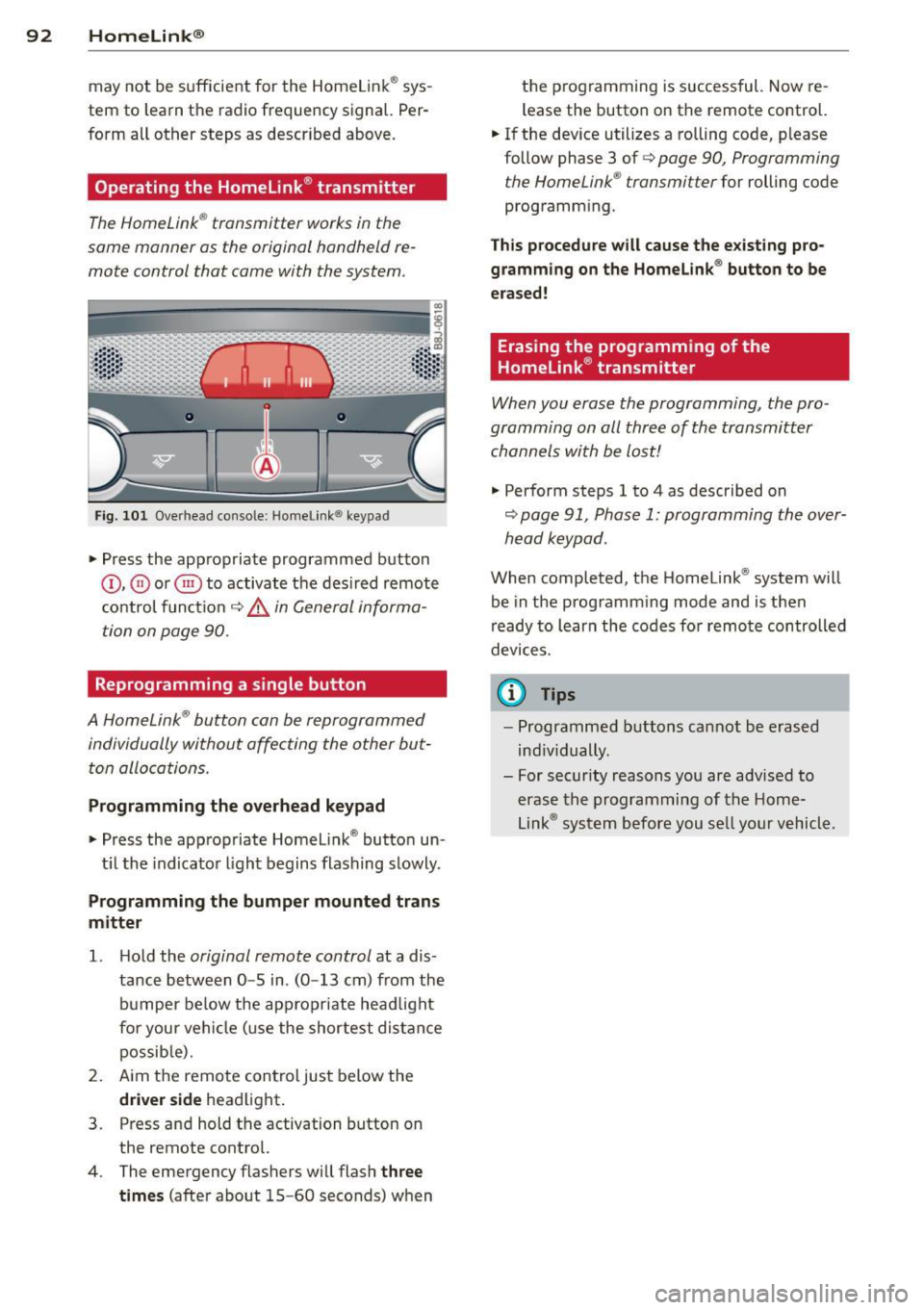
Fig. 101 Ove rhead conso le: Home link ® keypad
.,. Press the appropriate programmed button
(D , ® or @) to activate the des ired remote
control funct ion
c::> &, in General informa
tion on page 90.
Reprogramming a single button
A Homelink ® button can be reprogrammed
individually without affecting the other but ton allocations.
Programming the o verhead k eypad
.,. Press the appropriate Homelink ® button un -
t il the indicator light begins flashing slowly .
Programmin g the bumper mounted tran s
m itter
1. H old the original remote control at a dis
tance between
0 -5 in . (0 -13 cm) from the
bumper below the appropriate head light
for your vehicle (use the shortest distance possib le).
2. Aim the remote control just below the
d riv er side headlight .
3 . Press and hold the activation button on
the remote control.
4 . The emergency flashers will flash
th ree
time s
(after about 15-60 seconds) when the p
rogramming is successful. Now re
l ease the button on the remote control.
.,. If the device utilizes a rolling code, please
follow phase 3 of
c::> page 90 , Programming
t he HomeLink ® transmi tter
for rolling code
programm ing .
Th is p ro cedu re will c ause the e xisting pro
gr amm in g on the Homelink ® button to be
era sed!
Erasing the programming of the
Homelink ® transmitter
When you erase the programming , the pro
gramming on all three of the transmitter
channels with be lost!
.,. Perform steps 1 to 4 as described on
c:::;, page 91, Phase 1: programming the over
head keypad .
When completed , the Homelink ® system will
be in the programming mode and is then
r eady to learn the codes fo r remote controlled
devices.
© Tips
- Programmed buttons cannot be erased
ind iv idually .
- For security reasons you are advised to erase the programming of the Home
Link ® system before you se ll your vehicl e .
Page 108 of 244
106 Safety belts
-For maximum protection, safety belts
must always be positioned correctly on
the body.
- Never strap more than one person, in
cluding small children, into any single
safety belt.
- Never place a safety belt over a child sit
ting on your lap.
- Always keep feet in the footwell in front
of the seat while the vehicle is being driv
en .
- Never let any person ride with feet on
the instrument panel or sticking out the
window or on the seat.
- Never remove a safety belt while the ve
hicle is moving. Doing so will increase
your risk of be ing injured or killed.
- Never wear belts twisted.
- Never wear belts over rigid or breakable
objects in or on your clothing, such as
eye glasses, pens, keys, etc., as these
may cause injury.
- Never wear the shoulder part of the belt
under your arm or otherwise out of posi
t ion .
- Several layers of heavy clothing may in
terfere with correct positioning of belts and reduce their effectiveness .
- Always keep belt buckles free of anything
that may prevent the buckle from latch
ing securely .
- Never use comfort clips or devices that
create slack in the shoulder belt. Howev
er, special clips may be required for the
correct use of some child restraint sys
tems.
- Never allow safety belts to become dam
aged by being caught in door or seat hardware.
- Torn or frayed safety bel ts can tear and
damaged belt hardware can break in an
accident. Inspect belts regularly. If web
bing, bindings, buckles, or retractors are
damaged, have belts replaced by an au
thorized Audi dealer or qualified work shop.
- Safety belts that have been worn and
loaded in an accident must be replaced with the correct replacement safety belt
by an authorized Audi dealer or qualified
workshop. Replacement may be necessa
ry even if damage cannot be clearly seen .
Anchorages that were loaded must also
be inspected .
- Never remove, modify, disassemble, or
try to repair the safety belts yourself.
- Always keep the belts clean. Dirty belts
may not work properly and can impair
the function of the inertia reel
¢ page 165, Safety belts.
Safety belts
· Fastening safety belts
Seat first -everybody buckle up!
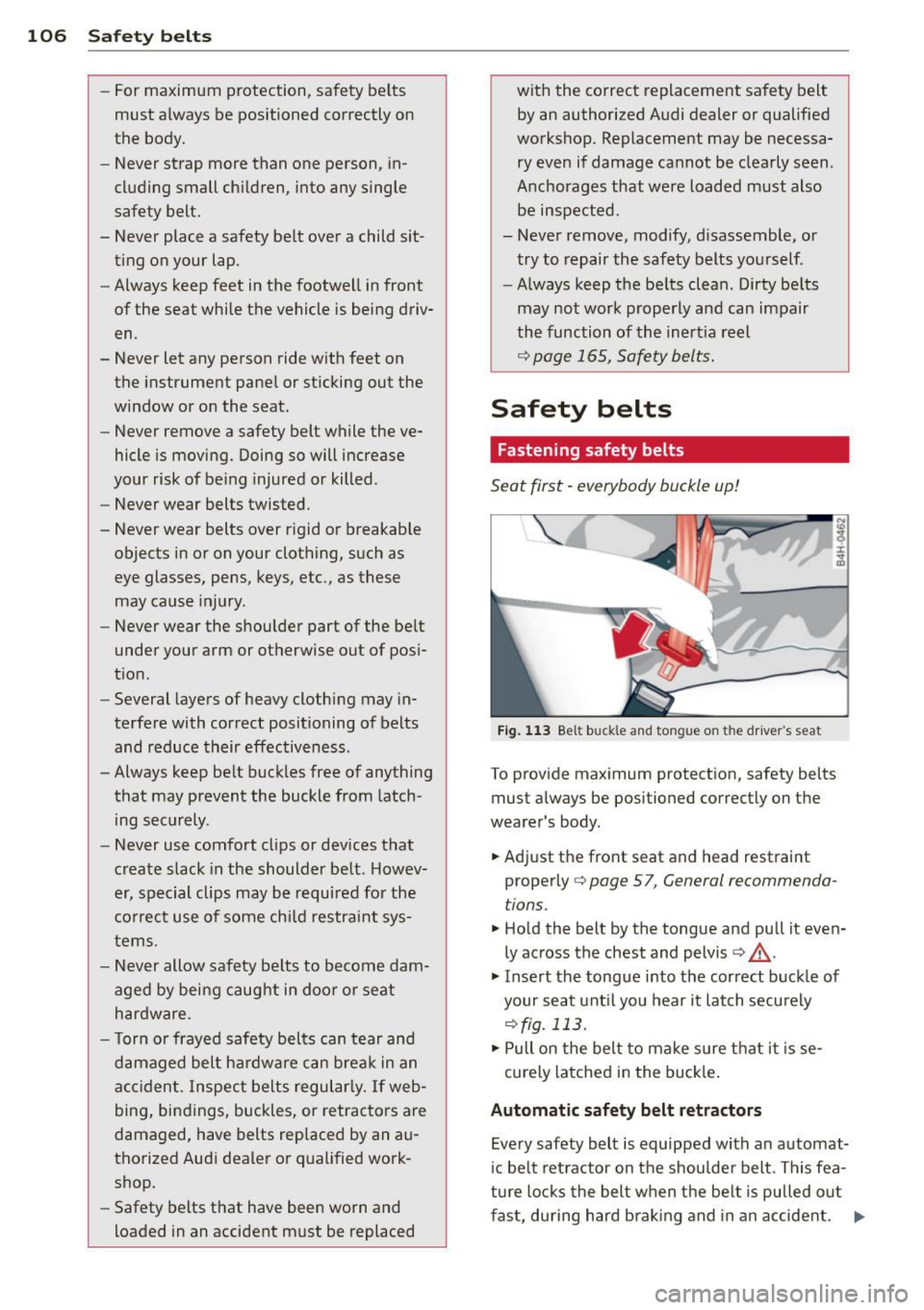
Fig. 113 Be lt buck le and to ngue o n th e drive r's se at
To provide maximum protection, safety belts
must always be positioned correctly on the
wearer 's body.
.. Adjust the front seat and head restraint
properly ¢
page 5 7, General recommenda
t ions .
.. Hold the belt by the tongue and pull it even
ly across the chest and pelvis ¢
_&..
.. Insert the tongue into the correct buckle of
your seat until you hear it latch securely
¢fig. 113 .
.. Pull on the belt to make sure that it is se-
curely latched in the buckle.
Automatic safety belt retractors
Every safety belt is equipped with an automat-
ic belt retractor on the shoulder belt. This fea
ture locks the belt when the belt is pulled out
fast, during hard braking and in an accident. ..,.