display AUDI R8 SPYDER 2014 Owner's Guide
[x] Cancel search | Manufacturer: AUDI, Model Year: 2014, Model line: R8 SPYDER, Model: AUDI R8 SPYDER 2014Pages: 244, PDF Size: 61.06 MB
Page 81 of 244
If you turn off the engine while in the N posi
ti on and leave the vehicle key in the ignition,
the transm ission remains in the N pos ition for
approximately 20 mi nutes an d then act ivates
th e automatic parking lock. If vehicle
move
ment is detected within tha t 20 minutes
based on rotat ion of the wh eels, th en the
time will increas e according ly.
A WARNING
- If a gear is engaged when the vehicle is
stationa ry, the acce lerator must not be
pressed inadvertently under any circum
stances. Otherwise the vehicle will im
med iately start to
move -sometimes
even if the parking brake is firmly ap
plied.
- Before you or other persons open the en
gine compartment lid and work on a ru n
ning eng ine, se lect neutral position
N
and firmly apply the handbrake. A lways
read and follow the applicable warn ings
¢ page 172, Working in the engine
compartment.
(i) Tips
- If you accidentally shifted into N while
driving, you can engage a gear in the nor mal way using the selecto r lever.
-An indicator light is displayed if a mal
funct ion occ urs while in S tronic. Refe r to
qpage 81.
Manual mode
Appl ies to vehicles : wit h S t ronic
S tronic allows the driver to shift gears man
ually.
Starting from a stop
.. Press and ho ld the brake pedal.
.. Move the selector lever to the left.
.,. Tap the selector lever forward
0 -
.. Re lease the brake pedal and press the accel
erato r peda l¢ ,& .
Tran sm iss ion 79
Shifting
.,. To shift up, tap the selec to r l ever forwa rd
0-
.. To shift down, tap the selector lever to the
rear Q.
Stopping temporarily
.. Press the b rake pedal to p revent the veh icle
from mov ing, fo r ex ample at tra ffic l ights.
Parking
.. Press and hold the brake pedal¢ ,& .
.. Act ivate the park ing brake .
.,. Tu rn off the ignition and remove the key.
Stopping on an incline
.. Always keep th e vehicle stat ionary using the
foot brake to prevent it from "rolling back"
¢ ,& . D o
not try to p revent the veh icle from
"rol ling back" when a gear is engaged by in
creasing e ng ine speed.
.. Ac tiva te the pa rk ing br ake.
Starting on a hill
.. With a gear engaged, remove your foot from
th e brake, accelerate and slowly release the
park ing brake.
When accelerat ing, S tronic sh ifts i nto the
next gear i n gears 1, 2, 3, 4, 5 and 6 shortly
before the max imum pe rm issib le eng ine
speed is reached.
If you have se lected a lowe r gear tha n the cur
r ent one, S tron ic will s hift down only when
the engine will not be
over- revved .
You can switch to automat ic operation at any
time
q page 80.
A WARNING
-Never leave your vehicle with the engine
ru nning while in gear . If you must leave
your veh icle w ith the engine r unning, set
the par king brake firm ly and engage neu
tral
N.
- W ith the engine r unning and a gear en
g aged, you have to hold the ve hicle with
the foot bra ke.
Page 82 of 244
80 Transmi ssion
-Do not accelerate when you shift gears
with the vehicle stationary and the en
gine running.
- Before driving down a steep slope, re
duce your speed and shift into a lower
gear with S tron ic.
- Do not ride the brakes or press the brake pedal too often or too long. Constant
braking causes the brakes to overheat
and substantially reduces brak ing per
formance, inc reases braking distance or
c auses comp lete failure of t he b rake sys
tem.
0 Note
If you must stop on an incline, always hold
t he vehicle in place w it h the foot bra ke to
p revent it from roll ing ba ck. Do not t ry to
preven t the vehicle from r oll ing bac k when
t he ge ar is engaged by increasing speed,
as t his may damage the clutch .
Automatic mode
Applies to vehicles: with 5 tronic
The transmission shifts up and down auto
matically when in the driving gears.
Starting from a stop
.. Press and hold the brake peda l.
.. Tap the se lector lever towards A.
.. Re lease the brake pedal and press the accel
era to r peda l¢
A in Manual mode on
page
79 .
Unde r certain circumstances (d riving in the
mo unt ains fo r example), it can be beneficia l
to switch tempo rari ly to the manua l shift pro
gram ¢
page 79 in order to adjust the gear ra
tios to driving conditions
manually .
Kick-down
Applies to vehicles: with S tronic
When you depress the acce lerator pedal be
yond the resistance po int, S tronic downshifts
i n to a lower gear , depending on vehicle speed
l) Market- sp ec ifi c
and engine rpm . It shifts up into the next
higher g ear once the maximum specified en
gine RPM is reached. Except ion: you have acti
vated the sport func tion .
A WARNING
Please note that the whee ls cou ld spin on
slick or slippe ry roads when kick-down is
active .
Launch control program
Applies to vehicles: wit h S tronic
The Launch Con trol Program enables maxi
mum acceleration .
Requirement: The eng ine must be at operat
ing temperature and the steering wheel must
not be turned.
.. With th e engine running, press the
(fill
!ESC OFF!1l
button one time. The I ind ica
tor light and the message
ESC Spo rt -Cau
tion! Lim ited stabil ity!
appears in the driver
information system display .
.. Press the brake pedal with your left foot a nd
hold it down .
.. Engage a gea r.
.. Press the
I SPOR T! button on the selecto r lev
er cover .
.. Press the accelerator peda l at the same time
with your right foot unti l the engine has
reached a constant speed .
.. Remove your left foot from the brake¢,&. .
A WARNING
--Always adapt your dr iving to the traff ic
f low.
- Onl y use t he Launch contro l program
when road and t raff ic conditions a llow it
a nd other d rivers w ill not be e ndangered
or both ered by your dr iving and the vehi
cle 's ac celera tion.
- Pl ease note that the d riving wheels ca n
sp in a nd the vehicle can b reak away
-
Page 87 of 244

Rear vi ew camer a coverage area
The rearview camera shows you the a rea be
hind your vehicle in the navigation system dis
p lay. This area roughly corresponds to the
area in¢
fig . 90 and (!)¢ fig. 91. Orientation
lines and colored surfaces are projected in the
area shown, which can help you with parking
and maneuvering. Objects that are located in
an area that is not captured by the camera @
¢
fig. 91 and that are closer to the bumper
will not appear on the nav igation system dis
p lay.
We recommend that you practice park ing with
the rearview camera in a traffic-free location
or pa rking lot to become familiar w ith the sys
tem, the o rientation l ines, and their function.
There should be sufficient light and good
weather conditions when doing so.
I n the nav igat io n system disp lay, objects or
veh icles appear closer or fu rther away if:
Objects or vehicles appear closer or farther
away in the navigation system if:
- you are driving in reverse gear from a level
surface onto an incline, or a downward
slope,
- you are driving in reverse gear toward pro-
truding objects.
The accuracy of the orientation lines and blue
surfaces dimin ishes if:
- the rearview camera does not provide a reli able image, for examp le, in poor visibility
cond itions or if the lens is dirty,
- the image on the screen is not visible due to
sun g lare and reflect ion .
Caring f or the re arvi ew cam era len s
The rearview camera is located i n the center
of the vehicle above the rear license plate bra cket. In o rder for the rearview camera to
f u nction properly, the came ra lens must be
kept clean and free of snow and ice .
- Dampen the lens with a househo ld alcoho l
based glass cleane r, and clean the lens with
a dry cloth.
Par king system 85
- Remove snow with a hand br ush and ice
preferably with a de-icing spray ¢(D .
A WARNING
-The parking system cannot replace the
driver's attention. The driver alone is re
sponsib le for parking and similar driving
maneuvers.
- Sensors have blind spots in wh ich objects
can not be detected. Pay spec ia l attent ion
to small children and an imals because
the sensors cannot always detect them.
- Always keep your eyes on the vehicle's
sur ro undings, us ing the rearv iew mirro r
as well.
- Do not allow yourself to be distracted from traffic by the rearv iew camera pic
tures in the navigat ion system display.
- If the position and the installation angle
of the camera has changed, for example,
after a rear end collision, do not conti nue
to use the system for safety reasons.
Have it checked by an au thori zed A ud i
dea ler or other q ualified workshop .
(D Note
-Low obstacles a lready s ignaled by a
wa rni ng can disappear from the system's
detect ion range as they are app roached
and wi ll not continue to be signaled. Ob
jects such as barrier chains, trailer d raw
bars, narrow painted vertica l poles or
fences may not be detected by the sys tem, posing risk of damage.
- Never use warm or hot water to remove snow or ice from the rearv iew camera
lens because the lens could crack.
- Never use products that are abrasive when clean ing the lens.
-
Page 88 of 244

86 Parking system
Switching on /off
App lies to vehicles: with park ing system advanced
SPORT •
Fig. 92 Sectio n of the cente r conso le : Park assist
s w it c h
F ig. 93 Nav iga tio n sy ste m disp lay : v is u al dis ta n ce d is
p lay
Switching on
.,. Switch the navigation system and the nav i
gation system display on.
.,. Engage the reverse gear, or
.,. Press the
!"" I switch in the cente r co nsole
¢ fig. 92. A short confirmation tone so unds
and the indicato r light in the swi tc h lights
up.
Switching betwe en the rear v iew camera
and vi sual display
.,. Press the Gr aph ic control button
¢ page 87, fig. 94 to see t he visua l dis
play .
.,. Press the
Rear view contro l button to see
the rear view camera image
¢ fig. 93 .
Switching off
.,. Drive faster than 6 mph (10 km/h) , or
.,. Press the~ switch , or
.,. Sw itch off the ignition .
Segments in the visual display
T he red segmen ts in front o f and behind the
vehicle ¢
fig. 93 help you to determine the
distance between you and an obstacle. As
you r vehicle comes closer to the obstacle, the
segments move closer to the veh icle. The col
lis ion area has been reached when the next to
last segment is displayed. Do not continue
driv ing farther ¢
Ii::.. in General Information
on page
85 !
A WARNING
- T he navigation system d isp lay cannot
show, or c an not adequately show, cer
tain o bjec ts (s uch a s sma ll posts o r g ra
ting), recesses in the ground and p ro
trud ing parts on another ca r.
- Only use t he rearv iew came ra to assist
you if it shows a good, clear picture. For examp le, the image may be affected by
the sun shining into the lens, d irt on the
lens or if there is a defect .
(D Tips
-The sensors m ust be ke pt cl ean and free
of snow and ice for the park assist to op
erate .
- Yo u can change the vol ume and pitch of
the s ignals ¢
page 88 .
-What appea rs in the disp lay is time -de
layed.
-
Page 89 of 244
Reverse parking
Applies to vehicles: with parking system advanced
Parking mode 1 can be used when parking in
a garage or into a parking space.
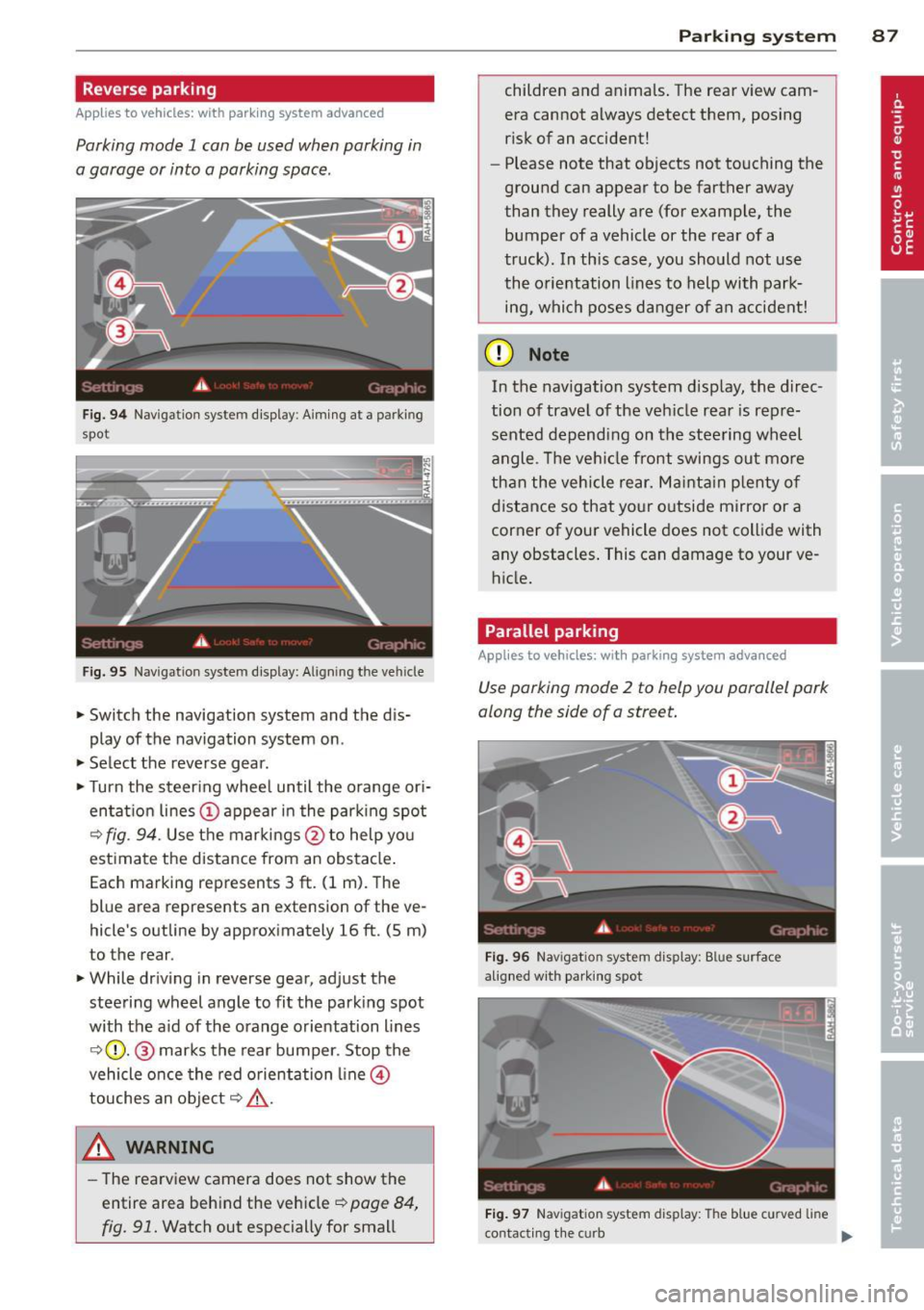
Fig. 94 Navigation system display: Aiming at a parking
spot
Fig.
95 Navigation system display: Al igning the veh icle
~ Switch the navigation system and the dis
play of the navigation system on.
~ Select the reverse gear .
~ Turn the steering wheel until the orange ori
entation lines
(D appear in the parking spot
C? fig. 94. Use the markings @to help you
estimate the distance from an obstacle.
Each marking represents 3
ft. (1 m). The
blue area represents an extension of the ve
hicle's outline by approximately 16
ft. (5 m)
to the rear.
~ While driving in reverse gear, adjust the
stee ring wheel angle to fit the parking spot
with the a id of the orange orientation lines
E:?(D. @ marks the rear bumper. Stop the
vehicle once the red orientation line©
touches an object
E:? ,&. .
A WARNING
-The rearview camera does not show the
entire area behind the vehicle~
page 84,
fig. 91. Watch out especially for small
Parking system 87
children and animals. The rear view cam
era cannot always detect them, posing
risk of an accident!
- Please note that objects not touching the
ground can appear to be farther away
than they really are (for example, the
bumper of a vehicle or the rear of a
truck). In this case, you should not use
the orientation lines to help with park
ing, which poses danger of an accident!
(D Note
In the navigation system display, the direc
tion of travel of the vehicle rear is repre
sented depending on the steering wheel
angle. The vehicle front swings out more
than the vehicle rear. Maintain plenty of
distance so that your outside mirror or a
corner of your vehicle does not collide with
any obstacles. This can damage to your ve
hicle.
Parallel parking
Applies to vehicles: with parking system advanced
Use parking mode 2 to help you parallel park
along the side of a street.
Fig. 96 Nav igation system display: Blue surface
a ligne d with parking spot
Fig. 97 Navigation system display: The blue curved line
contacting the curb
IJi,,-
Page 116 of 244
114 Airbag sys te m
the front airbag inf lates -even with an Ad
vanced Airbag System.
- The inflating airbag will hit the child
safety seat or infant carrier with great
force and w ill smash the ch ild safety seat
and child against the backrest, door or
roof.
- Never install a rearward facing child
safety seat on the front passenge r seat
unless the
PASSENGER AIR BAG OFF
light comes on and stays on . If the PAS
SENGER AIR BAG OFF
light does not
come on and stay on the infla ting airbag
wi ll hi t the child safe ty seat or infant car
rie r with great force and will smash the
child safety seat and child against the
backrest, door or roof . Have the airbag
system inspected immediately by your
authorized Audi dealer .
- Forward-fac ing ch ild safety seats instal
led on the front passenger's seat may in
terfere with the deployment of the air
bag and cause serious personal injury to
the ch ild.
A WARNING
If, in exceptional c ircumstances, you must
install a forwa rd-facing child restra int on
t he fron t passenger's seat:
- Always make sure the forward-fac ing
sea t has been des igned and certified by
i t s manufac turer for use on a fro nt sea t
with a passenger front an d side airbag.
- Never put the forwa rd-f acing child re
s t rain t up aga inst or very near the inst ru
ment pane l.
- Always move t he passenger seat into i ts
rearmost position in the seat 's fore and
aft adjustment ran ge, as far away from
the a irbag as poss ible before installing
the forward-facing child restraint . The
backrest must be adjusted to an upr ight
posit ion.
- Make sure that the
PASSENGER AIR BAG
OFF
light comes on and stays on all the
t ime whenever the ignition is switched
on .
A WARNING
To reduce the risk of serious injury, make
sure that the
PASSENGER AIR BAG OFF
light w ill be displayed whenever a child re
straint is insta lled on the front passenger
sea t and the igni tion is sw itched on .
- If the
PASSENGER AIR BAG OFF light
does not stay on, perform the checks de
s cri bed
~ page 121, Monitoring the Ad
vanced Airbag System.
- Have the airbag system inspected by
your Aud i dea le r i mmedia tely .
- Always carefu lly follow instr uctions from
child res tra in t manufacture rs whe n in
s tall ing c hild restr aints .
A WARNING
If, in except iona l circumst ances, yo u m ust
i nst all a forward or rearwa rd -f acing child
r estraint on t he front passenger's seat :
- I mp roper ins tallation o f ch ild restra ints
can reduce their effectiveness o r even
prevent them from providing any protec
tion .
- An improper ly installed c hild restra int
can interfere with the airbag as it de p loys and seriously injure or even k ill the
child -even with an Advanced Airbag
System .
- Always carefully follow the manufactur
er 's instructions prov ided with the chi ld
safety seat or carrier .
- Never p lace add itiona l items on the seat
that ca n increase the total weight reg is
tered by the weig ht-sensing mat and can
cause injury in a crash.
Page 125 of 244

described in the child restraint manufactur
er 's instructions;
- make sure that the convertible locking fea
ture on the safety be lt for the front passen
ger seat has been activated and that the
safety belt has been pulled tight. The belt
must not be loose or have loops of slack so
that the sensor below the safety belt latch
on the seat can do its job<=>
page 140 .
-make sure that th ings that may increase the
weight of the child and child safety seat are
not being transported on the front passen
ger seat;
- make sure that the safety belt tension sen
sor is not blocked . Shake the safety belt
latch on the front passenge r seat back and
forth;
- If a st rap or tether is being used to tie the
ch ild safety seat to the front passenger
seat, make sure t hat it is not so tigh t that it
ca uses the we ight-sensing mat to meas ure
more weight than is actua lly on the seat .
If the PASSENGER AIR BAG OFF light still
does not com e on and does not stay on con
tinuously (when the igni tion is sw itched on),
- take the ch ild restraint off the front passen·
ger seat and install it p roperly at one of the
rear seat pos itions. Have the a irbag system
i nspec ted by your A udi dealer immediately.
- move the ch ild to a rea r seat posit io n and
make su re th at the chi ld is proper ly res train
ed in a chi ld restraint that is appropriate fo r
its size and age .
The
PASSENGER AIR BAG OFF light shou ld
NO T come on when the ign ition is on and an
ad ult is sitting in a p rope r seat ing pos ition on
the front passenger seat. If the
PASSENGER
AIR BAG OFF
li ght comes on and stays on or
flashes for about 5 seconds while driving, un
der these circumstances, make sure that:
- the ad ult on the front passenger seat is
proper ly seated on the center of the seat
cushion with his or her back up against the
backrest and the backrest is not reclined
<=> page 94, Proper occupant seating posi
tions,
A irbag system 123
- the adult is not tak ing weight off the seat by
holding on to the passenger assist handle
above the front passenger door,
- the safety be lt is being properly worn and
that there is not a lot of s lack in the safety
be lt webbing,
- accesso ry seat covers or cushions or other
things that may cause an incorrect reading
or impression on the weight-sensing mat
under the upho lstery of the seat have been
removed from the front passenger seat,
- a safety belt extender has not been left in
the safety belt latch for the front passenger
seat .
In add ition to the
PASSENGER AIR BAG O FF
light in the center of the instrument panel,
the message
PASSENGER AIR BAG O FF or
PASSENGER AIR BAG ON w ill briefly appear
in the instrument cluster display. This is to in
form the dr iver of the current front passenge r
a irbag status.
Important safety instructions on
monitoring the Advanced Airbag System
A WARNING
An airbag system that is not functioning
p roperly cannot provide supplemental pro
tection in a frontal c rash.
- If the airbag ind icator light comes on, it
means that there may b e something
wrong with the Advan ced Airbag Sys tem.
It is poss ible that the air bag w ill inflate
when it is not supposed to, or will not in
f late when it sho uld .
- Have the airbag system inspe cted imme
diate ly by your Audi dealer.
A WARNING
If the front airbag inflates, a child without
a child restraint, in a rea rward-facing child
safety seat or in a forward-facing child re
straint that has not been proper ly installed
will be ser ious ly injured and can be killed.
- Even tho ugh your vehicle is equipped
with an Advanced A irbag System, make
certain that all children, espec ially 12
-
•
•
Page 148 of 244

146 Intelligent technology
ESC sport mode
In ce rtain situat ions, it migh t make sense to
a llow some slip. For example :
- Rocking the vehicle to free it when it is stuck
- Driving in deep snow or on loose ground
- Driving with snow cha ins
Press the[!] button briefly¢
fig. 128 . The I
indicator light turns on and Sport control
Warning! Restricted stability
appears in the
driver information system display . Driving sta
b ili ty is limited in sport mode .
Switching ESC off
Press and hold the [!I button for three sec
onds . The ESC indicator light
ti turns on and
Stabilization program off appears in the dis
play. ASR is also sw itched
off when ESC is
switched
off .
Switching on
Press the[!] button aga in. The message Stabi
lization program on
appears briefly in the d is
play.
A WARNING
You should only switch the ESC off if your
driving ability and the traffic s ituation al
low. This could increase the risk of slip
ping.
- The stabilizing function is limited in ESC
sport mode. The driv ing whee ls could
spin and the vehicle could swerve, espe
cially on slick or slippery road surfaces.
- T here is no vehicle stabilization when
E SC is switched
off.
0) Tips
If there is a malfunction in the retractable
rear spo iler* or the Audi magnet ic r ide*, it
may not be possible to activate ESC spo rt
mode or normal mode may activate again
automatically.
Braking
General information
What affects braking efficiency?
New brake pads
During the first 250 miles (400 km), new
brake pads do not possess their full braking
effect, they have to be "broken in" first. The
distance can be ten times longer in vehicles
with ceramic brakes*. You can compensate for
th is slightly reduced braking power by push
ing harder on the brake pedal. Avoid heavy
braking loads during the break-in period.
Operating conditions and driving habits
The brakes on today's automobiles are still
subject to wear, depending largely on operat
ing condit ions and driving habits ¢.&, . On
vehicles that are either driven mostly in stop
and-go city traffic or are driven hard, the
brake pads should be checked by your author
ized Audi dea ler more often than specified in
the
Warranty & Maintenance booklet. Failure
to have your brake pads inspected can result
in reduced brake performance.
On steep slopes, you should use the braking
effect of the engine. This way, you prevent un
necessary wear on the brake system. If you
must use your brakes, do not hold the brakes
down cont inuously. Pump the brakes at inter
vals.
Moisture o r road salt
Under certain conditions, for example, when
driving through water or very heavy rain, or
even after washing your vehicle, the braking
effect can be reduced due to moisture (or in
freezing conditions ice) on the brake pads . A
few cautious brake applications should dry
off
the brake pads or remove any ice coatings .
When you are driving at higher speeds with
the windshield wipers on, the brake pads will briefly touch the brake discs in regular inter
vals so as to improve reaction time when brak
i ng on wet surfaces. You, the driver, will not
notice anything. .,.
Page 153 of 244
than is being generated and ensures an optimal state of charge for the battery.
@ Tips
- But even energy management cannot
negate the limits o f physics. Consider
that the power and life of a battery are
limited.
- If starting ability is threatened, you are
i nformed by a warning
¢ page 151,
Driver notification in the instrument
cluster display.
What you should know
The highest priority is given to maintaining
starting capability.
The battery is severely taxed in short-distance
driving, in city traffic and during the co ld time
of year. Abundant e lectrical energy is re
quired, but only a litt le is generated. It is also
cr itical if the engine is not runn ing and electri
cal components are turned on. In th is in
stance energy is being consumed but none is
be ing gene rated.
It is in precisely these situations that you w ill
notice energy management actively regulat
in g the distribution of energy .
Vehicle stands for an extended period
If you do not drive your vehicle over a period
of several days or weeks, electrical compo
nents are gradually cut back or switched off.
This reduces energy consumption and main
tains sta rting capab ility over a longer per iod.
Take into consideration that when you unlock
your veh icle, some convenience functions,
such as the remote key or power seat adjust
ment, may not be available . The convenience
functions will be ava ilable again whe n you
turn on the igni tion and star t the eng ine.
With the engine turned off
If you listen to the radio, for example, with
the eng ine turned off, the battery is being dis
charged .
Intellig ent technolog y 151
If starting capability is jeopardized d ue to en
ergy consumption, a message appears in the
drive r information d isplay .
You have to start t he engine to charge the
batte ry .
With the engine running
Although electrical energy is generated when
the ve hicl e is being driven, t he battery can be
come disc harged. This happens mostly when
li ttle energy is being generated and a great
deal consumed and the battery's state of
c h arge is not optimal.
T o b ring the energy ba lance back into equili
br ium, consumers which requ ire espec ially
large amounts of energy are temporari ly cut
back or switched off . Heating systems in pa r
ticu lar require a great deal of energy. If you
notice, for example, that the heated seats* or
the heated rear window are not heating, they
have been temporarily cut back or switched
off . These systems w ill be available again as
soon as the ene rgy balance has been restored.
You w ill also notice that engine id le speed has
been increased slightly . Th is is normal and not
a cause for concern . By increas ing engi ne idle
speed the additional energy required is gene r
ated and the battery is charged.
Driver notification in the instrument
cluster display
If battery power drops into the range where it
can limit the ability of the engine to start, this
is shown in the instrument cluster display
with the following driver message:
(•) Low battery charge: battery will be
charged while driving
T his not ificat ion reminds yo u that the start ing
capability of the engine may be limited . As
soon as you sta rt driving again, the battery
will be recharged and the not ificat ion w ill go
out. •
•
Page 163 of 244
You should also clean the inside of the win
dow g lass at regular intervals.
The cloth or chamois used on paint s urfaces
contains wax res idue. Use a separate clo th or
chamo is to dry the window glass.
Cl eaning the rear window
Aud i recommends cleaning the window us ing
a soft cotto n cloth and water mixed with
cleaning solution or window cleaner
(1: 1 mix
ture) . To avoid streaks, do not wipe the win
dow dry with paper towels.
D o not use any clean ing so lutions that conta in
ammonia, acids , silicone or fluo ride or clean
e rs that are abrasive or cou ld cause scratches .
Do not use any alkaline cleaning solutions.
A WARNING
- The windshie ld must not be treated with
water-repellent materials. They can in
crease glare under poor visib ility condi
t ions such as wetness, darkness, or when
the sun is low on the horizon. In addi
t ion, they can cause the windshield wip
ers to chatter.
- Always read and heed all WARNINGS and
other information
r:::> page 156.
(D Note
-Never use warm or hot water to remove
snow and ice from windows and mirrors.
This could cause the glass to c rack.
- To prevent damage to the wires of the
rear defogger, do not place any adhesive
stickers on the inside of the rear window
ove r the wires.
- To he lp prevent di rt from scratching the
window, always scrape in a forward d i
r ection - pus hing the scraper away from
you - never back and fo rth.
Wheels
Regular care is required to preserve the deco
rative appearance of the wheels . Road sa lt
and b rake dust must be washed off regu larly
or the wheels wi ll be damaged.
Cleaning and protec tion 16 1
Use only specia l acid -free cleaning agents. You
can find proper wheel cleaner at authorized
Audi dealers and specia lty stores . Do not leave
the cleaner on the whee ls longer than speci
fied. Wheel cleaners containing acid can dam
age the surface of the w heel bo lts .
Pa int polish or other abrasive materials must
not be used when caring for wheels. If the
protective coat ing has been damaged, from
stones for example, touch up the damage as
soon as possible .
A WARNING
-Moisture and ice on brakes may affect
brak ing eff ic iency -
c:::> page 146, General
information.
T est the bra kes ca re fully af
ter each vehicle wash .
- Always read and heed a ll WAR NINGS and
the information¢
page 156.
Exhaust tail pipes
-
Road salt and other corrosive materials wi ll
damage the material in the exhaust tail pipes
if they are not cleaned regularly . Do not clea n
the tail pipes with wheel cleaner, pa int polish,
chrome polish or other abras ive cleaners.
Clean the tail pipes with car care products
that are suitable for stainless steel.
Your authorized Audi dea ler can provide clean
ing products that have been tested and ap
proved for your vehicle.
Care of interior
Radio-/Navigation* display
T he disp lay may be cleaned with a soft cloth
and commercially-avai lab le "LCD cleaner".
The cloth should be coated lightly with the
cleaning so lution when cleaning the disp lay.
Q) Note
To prevent scratches, only clean the dis
play when it is dry .
•
•