warning AUDI R8 SPYDER 2014 Workshop Manual
[x] Cancel search | Manufacturer: AUDI, Model Year: 2014, Model line: R8 SPYDER, Model: AUDI R8 SPYDER 2014Pages: 244, PDF Size: 61.06 MB
Page 66 of 244
64 Warm and cold
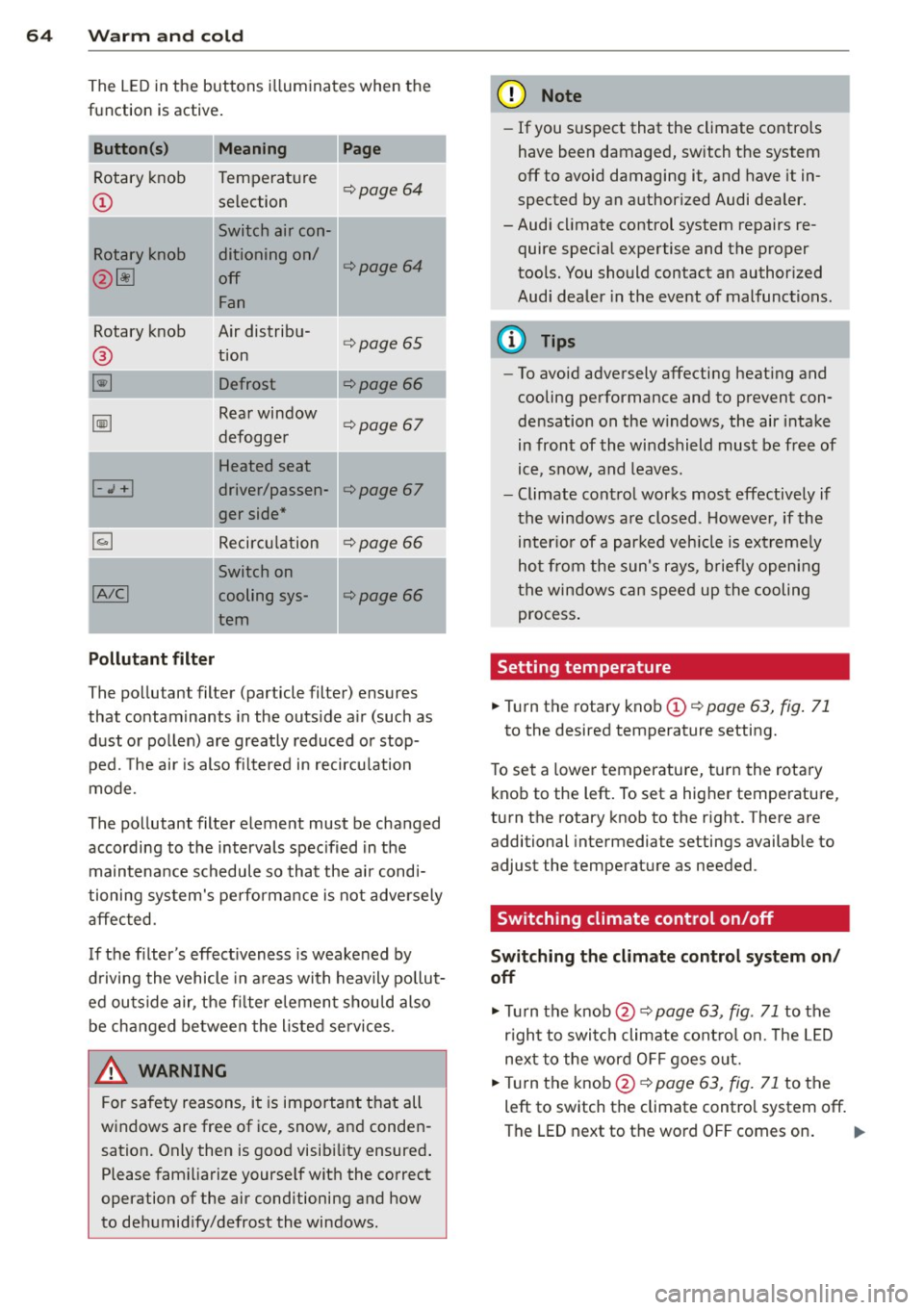
The LED in the buttons i lluminates when the
function is active .
Button(s) Meaning Pag e
Rotary knob Temperature ¢page 64
CD selection
Switch air con-
Rotary knob ditioning on/
¢page 64
@ ~ off
Fan
Rotary knob Air distribu-
® tion
¢page 65
~ Defrost
Ii] Rea r window
defogge r ¢page 67
I Heated seat
1-J + ! driver/passen-
I ger side *
¢page 67
~ Recirculation ¢page 66
1
, A/CI
Switch on
cooling sys-
¢page 66
I tern
Pollutant filter
The pollutant filter (particle filter) ensures
that contaminants in the outs ide a ir (such as
dust o r pol len) are greatly reduced o r stop
ped. The ai r is also fi ltered in recircu lation
mode.
The po llutant filter eleme nt must be changed
according to the intervals spec ified in the
maintena nce schedule so that the ai r cond i
tioning sys tem's pe rforma nce is not adve rsely
a ffec ted.
If the filter's effect iveness is weakened by
d riving the vehicle in a reas with heavily pollut
ed outside air, the fi lter elemen t shou ld al so
be changed be twee n the liste d se rvices.
_8 WARNING
For safety reasons, it is importan t th at all
w indows are free of ice, snow, an d conde n
sation. Only then is good visib ility ensured .
Please fam iliarize yourse lf wit h the correct
operation of the air conditioning and how
to de humid ify/defrost the windows.
(D Note
- If you suspect that the climate controls
have been damaged, switch the system
off to avoid damaging it, and have it in
spected by an authorized Audi dealer.
-Audi cl imate control system repairs re
quire special expertise and the proper
tools. You should contact an author ized
Audi dea ler in the event of malfunct ions.
(D Tips
- To avoid adversely affecting heat ing and
cooling performance and to prevent c on
densation on the w indows, t he air i ntake
in front of the wi ndshield must be free of
ice, s now, and leaves.
- Climate cont ro l wor ks mos t effectively if
the windows a re closed. Howeve r, if the
inter io r of a par ked veh icle is ext reme ly
ho t from the sun's r ays, briefly openi ng
t he win dows c an spee d up the cooling
process .
Setting temperature
.,. Tur n the rotary knob CD¢ page 63, fig. 71
to the desired temperature setting.
T o set a lowe r temperature, turn the rota ry
knob to the left. To set a higher temperature,
turn the rotary knob to the r ight. There are
additional intermediate settings available to
adjust the tempe rature as needed .
Switching climate control on/off
Switching the climate control system on /
off
.,. Tu rn the knob@¢ page 63, fig. 71 to the
r igh t to swi tc h climate cont ro l on. The LED
nex t to the wor d OFF goes o ut.
.,. Turn the kn ob @ ¢
page 63, fig. 71 to the
left to switch the climate contro l system off.
The LED next to the wo rd OFF comes on . ..,_
Page 68 of 244
66 Warm and cold
Defrost~
The w indshi eld and sid e windo ws ore defrost
e d or clear ed o f cond ensation as quickly as
possibl e.
• To turn on t he defogger/defroster , press t he
~ button <=> page 63, fig . 71 .
• To turn the d efogger/d efroste r off, press the
~ button again, o r th e IA UT OI butto n.
Temperatu re is co ntrolled automatically . The
maximum a mou nt of air flows ma in ly fr om
ve nts 1 <=>
pag e 65.
A sma ll amount of ai r flows from vents 2 - if
they are open <=>
page 65.
Pressing the ~ button switches off recircu la
ti on mode.
Automatic operation ~
Standard operating mode at all times of the
year .
Turning on automatic operation
• Set t he te mp erature you w ant.
• Press the
!AUTO ! button <=> page 63, fig. 71 .
Automatic opera tion e nsur es constant tem
pe ra tur es in the i nterio r a nd dehum idifies the
a ir i nside t he vehi cle. Ai r tem perature, vo l
ume, and dist ribution are controlled a utomat
ica lly to reach o r maintain the desired interio r
temperature as q uic kly as possib le. Fluct ua
ti ons in exterior temperature and the effects
of temperatu re from the position of the sun
are compensated fo r automat ica lly.
Manual air recirculation mode~
The recirculation mod e prevents polluted out
side air from entering the vehicle interior.
Switching on air recir culation
• Press the button I;]<=> page 63, fig. 71,
<=>A .
Switching off air recirculation
• Pres s the button ~ again , o r
• Press the
!AU TO ! bu tton, or •
Press the~ button .
In recir culation mode, air is drawn from t he
vehicle interi or, filtered, and re circula ted . We
re commend that yo u se lec t rec irculat io n
mode
briefly <=>.&. under the fo llowing condi
t ions:
When driving thro ugh a tunne l or in a t raff ic
jam so that exha ust fumes and odors canno t
enter the vehicle inte rior.
A WARNING
You sho uld not use the recirculation m ode
for an extended period s ince no fresh air is
drawn in, and with the air co ndit ioning
switched off t he windows can fog up - t his
i nc reases the r is k of an accident!
A/C operation ~
Switching on A/C
• Press the IA/Cl button <=> page 63 , fig . 71 .
Switching A /C off
• Press the IA/Cl button again.
T he cooli ng sys tem is swi tched on d uring A/C
opera tion -the heat ing and ven tilat ion sys tem
is contro lled automatically.
@ Tips
If th e L ED in the sw itch stays o n aft er A/C
opera tion has been switched off( = sw itch
i ng the A/C off) , there is a fault i n an air
conditioning component. P lease cons ult
an a uthorized Audi dealer when there is an
operating problem.
Using the climate controls economically
E conomical use of the climate controls helps
to save fuel.
When climate control is wo rking in cooling
mode, engine pe rformance is reduced and
f uel consumpt ion is affected. To keep the time
the a ir cond ition ing is on as short as poss ible,
you should do the following: .,,_
Page 69 of 244
~ If you would like to save fuel, switch the air
conditio ning off.
~ If you open the w indows wh ile driving,
switch the air conditioning off.
~ If the vehicle is extremely hot due to the
heat of the sun, briefly open doo rs and win
dows .
@ For the sake of the environment
When you save fuel, you reduce em iss ions
from the vehicle.
Rear window defogger
The rear window defogger clears the rear win
dow of cond ensation .
~ Press the~ button ¢ page 63, fig . 71 to
turn the rear window defogge r on and off.
The rear w indow defogger works only when
the engine is ru nning. The indicator light in
the button illuminates when the rear w indow
defogger is tu rned on .
The window between the cockpit and engine
compa rtment is also cleared with the rear
w indow .
The rear w indow defogger is switched
off au
tomatically after approx. 10 minutes.
@ For the sake of the environment
As soon as the rea r win dow is clear, yo u
should switch the rear window defogger
off . The reduced power cons umption has a
be neficial effect on fuel consumption.
Heated seats
App lies to vehicles: with heated seats
The seat cushion and the seatback of the
front seats can be heated electrically.
~ Press the heated seats b utton I-J + I
c:> page 63, fig. 71 to set the level of heati ng
desired.
The range of controls goes from 1 to 3. The
heat sett ing selected is shown by LEDs above
the button.
Warm and c old 67
A WARNING
Individuals wit h reduced sensitivity to pai n
or temperature cou ld deve lop bur ns when
us ing the seat heat ing funct ion. To red uce
the r is k of injury, these ind ividuals should
not use seat heating.
Q) Note
To avoid damage to the heat ing e lements
i n the seats, do not kneel o n the sea ts or
p lace heavy loads o n a small area of the
seat.
Page 70 of 244
68 On th e road
On the road
Steering
Adjusting the steering wheel column
The steering wheel position can be continu
ously adjusted in height and distance .
Fig. 73 Lever under the steering column
~ Push the lever Q fig. 73 down Q ,&..
~ Move the steer ing whee l to the desired posi
tion.
~ Push the lever against the steering column
until it locks.
There must be at least 10 inches (25 cm) be
tween your chest and the center of the steer ing wheel. If you cannot sit more than 10 in
ches (25 cm) from the steering wheel, see if
adaptive equipment is available to help you
reach the pedals and increase the distance
from the steer ing wheel.
For detai led informat ion on how to adjust the
driver's seat, see
Q page 58.
A WARNING
Improper use of steering wheel adjust
ment and improper seating position can
cause serious personal injury .
- Adjust the steer ing wheel column only
when the veh icle is not moving to pre
vent loss of veh icle cont rol.
-
- Adjust the driver's seat or steering wheel
so that there is a min imum of 10 inches
(25 cm) between your chest and the
steering wheel
Q page 94, fig . 102. If
yo u can not maintain this min imum dis
tance, the airbag system cannot protect
you properly.
- If physical limitations prevent you from
sitt ing 10 inches (25 cm) or more from
the steering wheel, check with your au
thorized Audi dealer to see if adaptive equ ipment is ava ilable .
- If the steering wheel is aligned with your
face, the supplemental driver's airbag cannot provide as much protection in an
accident. Always make sure that the
steer ing whee l is aligned with your
chest.
- Always hold the steering wheel w ith your
hands at the 9 o'clock and 3 o'clock posi
tions to reduce the risk of persona l injury
if the driver's airbag dep loys .
- Never ho ld the steering wheel at the 12
o'clock position or with your hands inside
the steering wheel rim or on the steering
wheel hub . Holding the steering wheel
the wrong way can cause serious injuries
to the hands, arms and head if the driv
er's airbag deploys.
Ignition lock/Ignition
switch
Ignition lock
The ignition key starts or stops the engine.
Fig . 7 4 Ign ition lock positions
Igniti on off @
In position Q fig. 74 @ both the ignition and
engine are off, and the steering is locked .
T o
lo ck th e steering after yo u have removed
the ignition key, turn the steer ing whee l in ei
ther direction unti l you hear it lock into place .
You should always lock the steering whenever
II>
Page 71 of 244
you leave your vehicle. This makes vehicle
theft even more difficu lt
r=:, .&. .
Ign ition on @
After switch ing the ignition on, the needles
move all the way up and then down.
If it is difficult to turn the key after you have inserted it into the ignit ion lock, turn the
steer ing whee l back and forth. This will take
the load
off the steering lock mechan ism and
you will be able to turn the key freely and start the engine .
Starting the engine @
In th is position the engine starts. While the
engine is start ing, the power supply to the
headlights and other e lectr ica l cons umers is
temporari ly inter rupted to conserve battery
power. After the engine has started, release
the key and it will return to position @.
Before the starter can be operated again the
key must be turned back to position
(D . The
non-repeat lock prevents you from damaging
the starter when the engine is running.
A WARNING
- Never remove the key from the ign ition
lock while the vehicle is moving. The
steering wheel will lock causing loss of
control.
- If you have to leave your veh icle - even
for just a m inute - a lways remove the ig
nition key and take it with you. This is es
pecially important if you a re going to
leave ch ildren behind i n the vehicle. The
children co uld s tart the engine or use
other vehicle controls . Unsupervised use
of vehicle controls (for example, power
windows) can cause serious personal in
juries.
@ Tips
I f the veh icle bat tery has been d isconnect
ed and then reconnected, then you must
leave the key in pos ition @for abo ut 5
seconds before you can start the engine.
-
On th e ro ad 69
Starting and stopping
the engine
Starting the engine
The engine can only be started with your orig
inal Audi key.
On vehicles with S tron ic*, the e ngine can be
sta rted in the neut ra l position N and in each
gear (1 - 7 a nd R).
" Set the park ing brake
r=:, & .
"On veh icles with manual transmiss ion*, fully
dep ress the clutch peda l.
" Press and hold the brake peda l.
" Tur n the igni tion key to pos it ion @
r=:> page 68, fig . 74 -do not depress the gas
peda l when sta rting the engine .
... Let go of the key as soon as the engine
starts - the starter m ust not cont inue to
run. On vehicles w ith S tronic, select gear
position N.
A cold engine may at first be loud after it has
been started. This is due to the hydraulic
valves bu ild ing up the oil p ressure . Th is is nor
mal and no need for concern .
If the engine does not start immediately, stop
trying after 10 seconds and then try to restart
the engine about 30 seconds later .
A WARNING
- Never start or let the engine run in a con
fined or enclosed area. Exhaust fumes
from the eng ine contain carbon mono x
ide, a co lor less and odorles s gas. Carbon
monox ide can be fata l if inh aled.
- Never leave the engine id ling una ttend
ed. An unat tended ve hicle with a runn ing
engine poses a danger of personal injury
or theft .
- With the engine r unning and a gear en
gaged, you have to hold the veh icle w ith
the foot bra ke.
Page 72 of 244
70 On the road
(D Note
-Avoid hig h engine speeds, fast accelera
tion or heavy engine loads while the en
gine is still cold. Th is could damage the
engine.
- The engine cannot be started by pushing or towing the vehicle.
@) For the sake of the environment
To avoid unnecessary engine wear and to
reduce exhaust emissions, do not let your
veh icle stand and warm up. Be ready to
drive off immediately after starting your
veh icle.
Stopping the engine
On vehicles w ith S tronic*, the engine can be
turned off in the neutral position N and in
each gear (1 -7 and R).
~ Turn the ign ition key to position ©
r:::>page 68, fig . 74 .
_& WARNING
- Never turn off the engine until the vehi
cle has come to a complete stop.
- Th e brake booster and servotronic on ly
work when the engine is running. With
the ignition turned off, you have to apply
more force when steering or braking .
Since you cannot steer and stop norma l
ly, this can lead to accidents and serious
injuries.
(D Note
- If the engine has been under heavy load
for an extended period of time, heat
builds up in the engine compartment af
ter the engine is switched off -there is a
risk of damaging the engine. Allow the
engine to continue to run at idle for a
short time or drive until it has cooled
down before you turn it off¢
page 75.
- If the engine has been under heavy load
for an extended period of time, it can be
come extremely hot. You should not park your vehicle over easily combustib
le ob
jects or areas (e .g. grass or leaves). There
is a risk of starting a fire.
(D Tips
After the engine has been switched off, the
radiator fan can continue to run for up to
10 minutes -even with the ignition switch
ed off. It can also sw itch on again after
some time if the coolant temperature rises
as the result of heat buildup or if the en
gine compartment is heated by the sun's
rays and the engine is hot.
Parking brake
Parking brake
When the parking brake is set, it prevents the
vehicle from rolling away unintentionally
Fig. 75 Center co nsole : Parking brake set
Sett ing the parking brake
~ Pull the parking brake lever all the way up.
Releasing the parking brake
~ Pull the parking brake lever up slight ly and
press the release button at the same time
r:::>fig. 75-arrow- .
~ Keep the release button pressed and lower
the park ing brake ¢,& .
If you shou ld drive off with the parking brake
still set, a warning tone will sound and the
following message will appear in the instru
ment cluster to remind you to release the
parking brake:
Handbrake is applied
Page 73 of 244
The parking brake warning comes on only af
ter you hav e drive n for longer than 3 seconds
and faster than 5 mph (5 km/h).
The parking b rake warning light _
(USA)/ . (CON) illuminates when the parking
brake is set and you switc h on the ignition .
A WARNING
Always release the parking brake com
pletely. A partially engaged brake will
overheat the rear brakes, reduce the ir ef
fectiveness and cause excess ive wear . This
could lead to brake failure and an accident .
On ly after the vehicle has come to com
plete stop, should you f irm ly set the park
ing brake and move the gearshift lever into
a gear.
Parking
Parking
"' Stop the vehicle using the brake pedal.
"' Set the parking brake firmly.
"' Swi tch off the e ngine .
"' Engage a gear
~ ,&. .
In addition on inclines and grad es
"' Turn the steer ing whee l so that your vehicle
will ro ll against the curb i n case it should
sta rt to move .
A WARNING
This is how yo u can reduce the risk of in
jury when leaving your veh icle.
- Never pa rk the vehicle whe re it can come
in contac t wi th dry grass, spille d fu el or
any othe r flammable materials.
- Never allow a nyone - especially small
children -to remain in the vehicle when
it is locked. Locked doors ma ke it mo re
difficult for rescuers to access the pas
senger compartment in the event of an emergency . Danger to life!
- Never leave c hildren unsupervised in the
vehicle . Children co uld re lease the park-
-
On th e ro ad 71
ing brake or move the gearsh ift leve r out
of gear. The vehicle could start to ro ll
away and cause an acc ident.
- No matter what the season is, the tem
perature in a parked ve hicle can reach
dangerous leve ls.
Starting on hills
App lies to vehicles : wi th hill ho ld assist
Hill ho ld assist makes it eas ier to start on
hill s.
The system is activated when the brake peda l
is depressed
for a few second s.
After releasing the brake ped al, the brake
power is held for a
brief moment t o p reven t
the ve hicle from rolling back when starting . A t
this time, you can easi ly begin to move your
vehicle.
A WARNING
- If you did not begin moving immed iate ly
after releasing the brake pedal, under
certa in circumstances, the vehicle would
begin to roll backwa rd . Dep ress the
brake peda l imm ediate ly o r engage the
hand b rake.
- Should t he eng in e sta ll, dep ress th e
bra ke peda l immediate ly o r engage the
ha nd br ake.
- In o rder to prevent the vehicl e from roll
ing back unintentionally whe n starti ng in
s top-and-go tr affic, keep the br ake ped al
depressed fo r a few seconds be fore driv
in g off .
(D Tips
You can find o ut if yo ur vehicle is equ ipped
wi th "Hi ll hold ass ist" at a n au thori ze d
A udi dealersh ip.
Page 74 of 244
7 2 On the road
Speed warning system
Speed warning system
The speed warning system helps you to keep
your driving speed below a set speed limit.
Fi g. 7 6 D isplay: Speed warning
The speed warning sys tem warns the d river if
he exceeds a prev iously stored maxim um
speed. A warning tone will sou nd as soon as
the vehicle speed exceeds the set speed by
about 3 mph (3 km/h). At the same t ime, a
warn ing symbol appears in the display
¢fig. 76.
The speed warning system has
two warning
th reshold s that function independently of
each other and that have somewhat different
purposes:
Speed warn ing 1 HIil/iS) ( Canada model s)
You can use speed warning 1 to set the maxi
m um speed w hile you are driving. This setting
will remain in effect until you t urn off the igni
tion, assuming that you have not changed or
reset the setting.
The speed warning symbo l
[l;[i] (Canada
models) in the warn ing 1 display appears
when you exceed the maximum speed. It goes
out when the speed falls be low the stored
maximum speed .
The speed warning symbo l w ill also go out if
the speed
exceeds the stored max imum speed
by more than about 25 mph (40 km/h) for at
least 10 seconds. The stored maximum speed
i s deleted.
Sett ing speed warning 1
¢page 72.
Speed warning 2 [Cl!r.t] (Canada models)
Stor ing warning 2 is recommende d if you al
ways
want to be reminded of a ce rtain speed,
for example when you are t rave ling in a co un
try that has a general maxim um speed limit,
or if you do not want to exceed a specified
speed for winter tires.
The speed warn ing 2 symbol,
tt]/[f] (Canada
models) appears in t he display when yo u ex
ceed the stored speed limit. Unlike warning 1,
it will not go o ut until the vehicle speed drops
below the stored speed limit .
Setting speed warn ing 2
¢ page 73.
a) Tips
Even though your vehicle is eq uipped w ith
a speed war ning system, you sho uld still
watc h the speedometer to ma ke s ure yo u
are not driv ing faster than the speed limit.
Speed warning 1: setting a speed limit
Warning threshold 1 is set by the button .
Fig. 77 Section of ins trumen t cl uster: Set/C heck bu t
ton
Storing the maximum speed
" Dr ive at the des ired maximum speed.
" Press the knob but ton¢
fig. 77 until the
sym bo l
i=!:> page 72, fig . 76 appears .
Resetting the maximum speed
" Dr ive the veh icle at a speed of at least
3 mph (5 km/h)
" Press the knob for mo re tha n 2 seconds .
The speed warn ing symbol
[CJ (USA mode ls)/
i•j (Canada models) will appea r briefly in the
display when you release the but ton to
Ill>
Page 75 of 244

indicate that the maximum speed has been
stored successfully. The maximum speed re mains stored until it is changed by pressing
the button again briefly or until it is deleted
by a lengthy push on the button.
Speed warning 2: setting a speed limit
Switches in the wiper arm ore used to operate warning threshold 2.
--------, @
Fig. 78 Controls
To store maximum speed
"'Turn off the ignition.
"'Br iefly press the button in the instrument
cluster
c::> page 72, fig. 77. The odometer
and the digital clock are now illuminated.
"' Press the button for at least 2 seconds. The
currently stored maximum speed appears in
the display
or the crossed out symbol for
warning threshold 2, if no maximum speed
was set previous ly.
"' Press the function selector switch in the
wiper lever @
c::> fig. 78 up or down to
change the set value . Values run up or down
in steps of 6 mph (10 km/h).
To delete maximum speed
"'Turn off the ignition.
"' Briefly press the button in the instrument
cluster
c::> page 72, fig. 77 . The odometer
and the digital clock are now illuminated.
"' Press the button for at least 2 seconds . The
currently stored maximum speed appears in
the display.
"' Press the
l"'R-=E =s =ET =I button in the wiper lever
® c::> fig . 78 until the crossed out speed
warning symbo l for warning threshold 2 ap
pears in the display.
On the road 73
A few seconds after the adjustment is com
pleted, the illumination for the odometer and
the d igital clock will go out.
(D Tips
This warning threshold can also be con
trolled through the trip computer
c::> page 23, Navigating the menu.
Cruise control
Switching the system on
The cruise control system makes it possible to
drive at a constant speed starting at 20 mph (30 km/h).
®-
Fig. 79 Control lever with set button
Fig. 80 D isplay: Se lected speed
"' Pull the lever to position (D c::> fig. 79 to
switch the system on.
"' Drive at the speed you wish to set.
"' Press button @ to set that speed.
T he disp lay
c::> fig. 80 will show the set speed.
The display may vary depending on the type of
display in your vehicle. The indicator light
M;W~1~ (US model) I. (Canadian model) will
also light up in the instrument cluster . .,..
Page 76 of 244
74 On the road
8_ WARNING
-Always pay attention to traffic even when
the cruise control is switched on. You are
always responsible for your speed and
the distance between your vehicle and
other vehicles.
- For safety reasons, the cruise control
should not be used in the city, in stop
and-go traffic, on twisting roads and
when road conditions are poor (such as
ice, fog, gravel, heavy rain and hydro
planing) -risk of accident.
- Turn
off the cruise control temporarily
when entering turn lanes, highway exit
lanes or in construction zones.
- Please note that inadvertently "resting"
your foot on the accelerator pedal causes
the cruise control not to brake. This is
because the cruise control is overridden
by the driver's acceleration.
@ Tips
- Vehicles with manual transmission: You
can attain the set speed only if the cur
rently engaged gear allows it and the en
gine is not stressed. Shifting to a higher
or lower gear promptly will allow the en
gine to run smoothly .
- The cruise control cannot maintain a
constant speed when driving downhill.
The vehicle will accelerate under its own
weight. Downshift to a lower gear or use
the brakes to slow down.
Changing speed
.,. Press lever in the 0 or 0 direction
¢ page 73, fig. 79 to increase or decrease
your speed.
.,. Release the lever to save that speed.
You can also press the accelerator pedal down
to increase your speed, e.g. if you want to
pass someone. The speed you saved earlier
will resume as soon as you release the acceler ator pedal.
If, however, you exceed your saved speed by
S mph (10 km/h) for longer than 5 minutes,
the cruise control will turn
off temporarily.
The symbol will go out but the saved speed
will be retained .
Presetting your speed
You can preset your desired speed while the
vehicle is not moving.
.,. Turn on the ignition.
.,. Pull lever into position@~
page 73,
fig. 79.
.,. Press the lever in the 0 or 0 direction to
increase or decrease your speed.
.,. Release the lever to save that speed .
This function makes it possible, for example,
to save the speed you want before driving on
the highway. Once on the highway, activate
the cruise control by pulling the lever toward
CD-
Switching the system off
Temporary deactivation
.,. Press the brake pedal , or
.,. Keep the clutch pedal pressed down longer,
or
.,. Press the lever into position @ (not clicked
into place)
~ page 73, fig. 79 , or
.,. Drive for longer than S minutes at more
than 5 mph (10 km/h) above the stored
speed.
Switching off completely
.,. Press lever into position @(clicked into
place), or
.,. Switch the ignition
off.
The system retains the saved speed if you de
activate the cruise control temporarily. To re
sume the saved speed, release the brake or
clutch pedal and pull the lever to position
(D .
Switching the ignition off erases the saved
speed.