display AUDI R8 SPYDER 2015 User Guide
[x] Cancel search | Manufacturer: AUDI, Model Year: 2015, Model line: R8 SPYDER, Model: AUDI R8 SPYDER 2015Pages: 232, PDF Size: 58.36 MB
Page 19 of 232
Instrument s and warning /indicator ligh ts
..... N
r-N "':
@ Tips
If this warning/indicator light illuminates
while you are dr iving, then there is a malfunc
tion in the en gine electronics. Have the ma l
function corrected as soon as p ossible by your
author ized Audi dealer or qualified workshop .
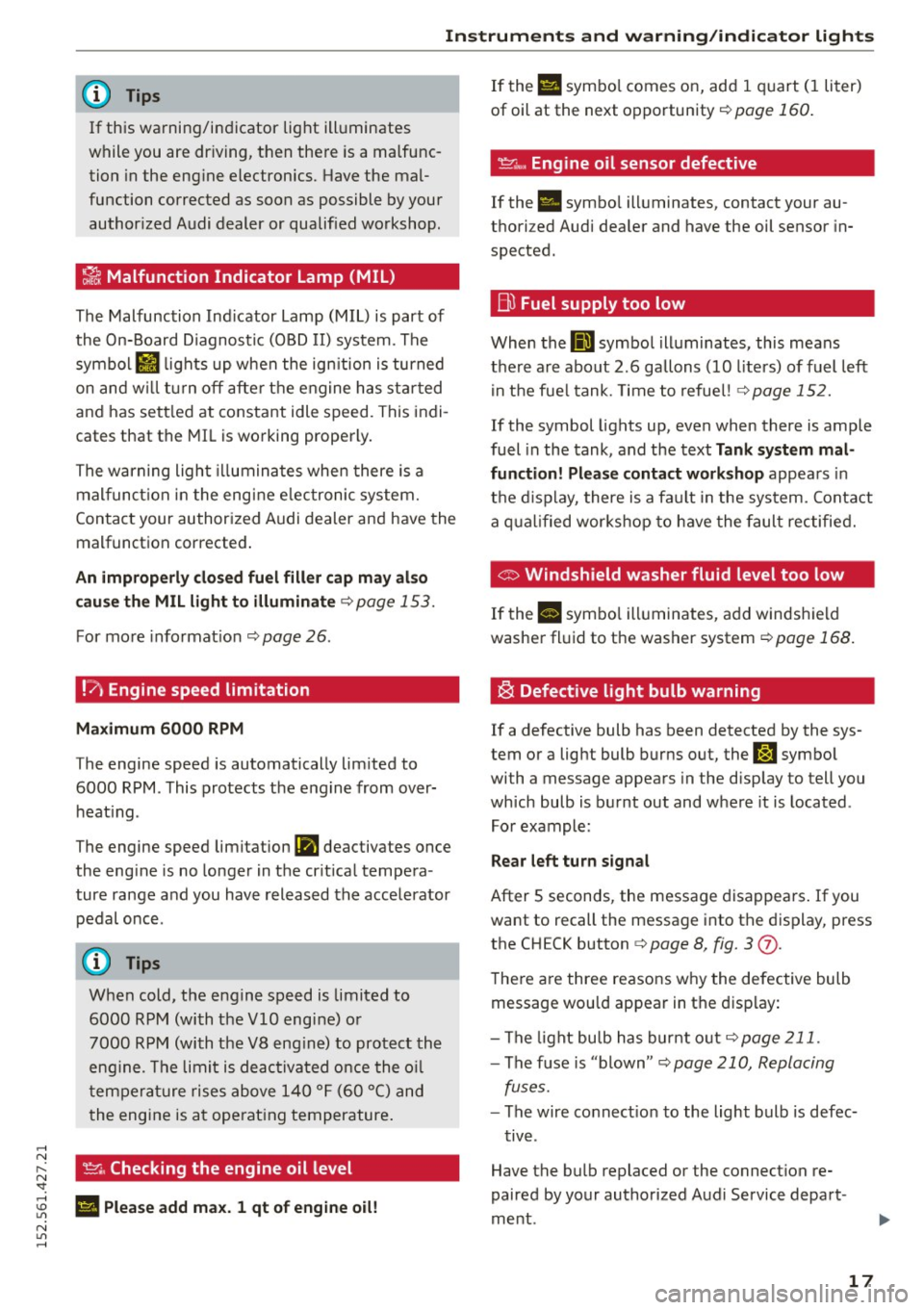
~ Malfunction Indicator Lamp (MIL)
The Malfunction Indicator Lamp (MIL) is part of
the On-Board Diagnostic (OBD II) system . The
symbo l
II lights up when the ign ition is turned
on and w ill tur n off after the engine has sta rted
and has sett led at constant idle speed. This indi
cates that the MIL is working properly.
The warning light illuminates when there is a
mal funct ion in the eng ine e lectronic system.
Contact your author ized Audi dealer and have the
malfunct ion corrected .
An improperly clo sed fuel fill er cap m ay al so
cau se th e MIL light to illuminate¢
page 153.
For more info rmat ion ¢ page 26.
!?' Engine speed limitation
Maximum
6000 RPM
T he engine speed is automatically lim ited to
6000 RPM. This protects t he engine from over
heat ing .
The engine speed limit ation
(Pl deac tivates once
the eng ine is no longer in the cr it ica l tempe ra
ture range and you have released the accelerator
pedal once.
When cold, the engine speed is limited to
6000 RPM (with the
VlO engine) o r
7000 RPM (with the V8 eng ine) to protect the
eng ine . T he limit is deac tivated once the o il
t em pera ture rises above 140 ° F (60 °C) and
t he engine is a t ope rat ing temperature .
~. Checking the engine oil level
; El Plea se add max. 1 qt of eng ine oil!
N
"' .....
If the Ell symbo l comes on, add 1 quart (I liter)
of oil at the next opportunity¢
page 160.
~"' Engine oil sensor defective
If the . symbo l ill um inates, contact your au
thori zed Audi dea ler and have the oil sensor in
spected.
B) Fuel supply too low
When the 00] symbol ill uminates, this means
there a re about 2 .6 gallons (10 liters) of fuel left
i n the fue l tank. Time to refue l! ¢
page 152.
If the symbol lights up , even when there is ample
fuel in the tank , and the text
Tank system mal
function! Please contact workshop
appea rs in
t h e d isplay, there is a fa ult in the system. Contact
a q ual ified wor kshop to h ave the faul t rec tified.
© Windshield washer fluid level too low
If the II symbo l ill uminates, add windsh ield
washe r fl uid to t he washer system
¢ page 168.
~ Defective light bulb warning
If a defective bulb has been detected by the sys
tem or a lig ht bulb burns out, the
J:J symbo l
wi th a message appears in the disp lay to tell you
which bulb is burnt out and w here it is located .
For example :
Rear left turn signal
After 5 seconds , the message disappears . If you
want to recall the message i nto the display, press
the CH ECK button ¢
page 8, fig. 3 (j).
The re a re three reasons w hy the defective bulb
message wou ld appear in t he display:
- The light bu lb has bur nt o ut
¢ page 211.
-The f use is "blown" <=-> page 210, Replacing
fuses.
- The wire co nnect ion to the light bulb is defec-
t iv e .
Have the bulb repl aced or the connect ion re
paired by your authorized Aud i Service depart
me nt.
17
Page 22 of 232
Driver information system
Driver information
system
Introduction
The Driver information display inside the instru
ment cluster provides you, the driver, with im
portant information.
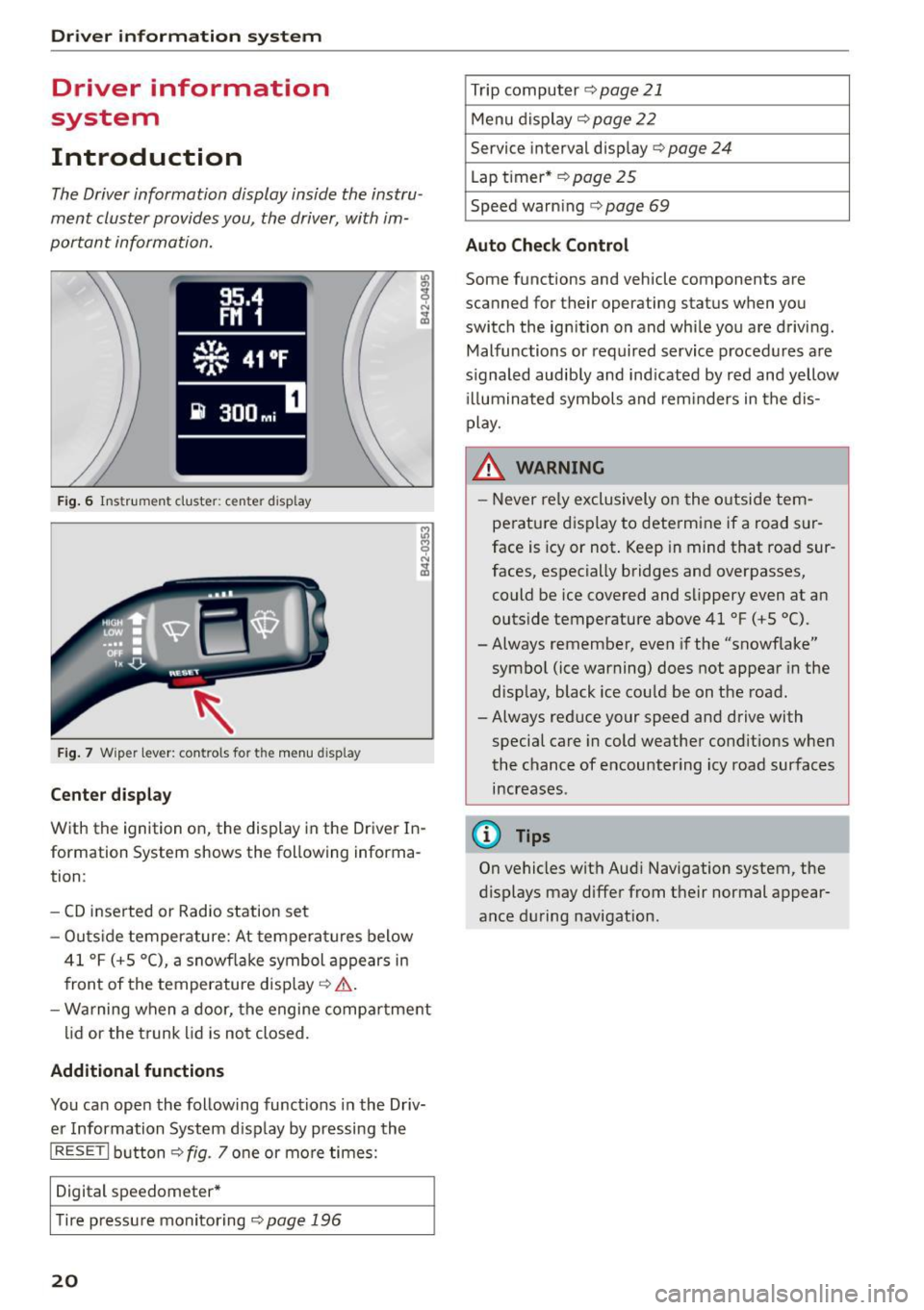
F ig. 6 Instr um en t cluster: center display
Fig. 7 Wiper lever: controls for the menu display
Center display
With the ignition on, the display in the Driver In
formation System shows the following informa
tion :
- CD inserted or Radio station set
- Outs ide temperature: At temperatures below
41 °F (+ S
0
(), a snowflake symbol appears in
front of the temperature display ¢,& .
- Warning when a door, the engine compartment
lid or the trunk lid is not closed.
Additional functions
You can open the following functions in the Driv
er Information System disp lay by pressing the
I RES ET I button ¢ fig. 7 one or more times:
Digital speedometer*
T ir e pressu re monitoring
¢page 196
20
Trip computer ¢ page 21
Menu display ¢ page 22
Service interval display¢ page 24
Lap timer* ¢page 25
Speed warn ing ¢ page 69
Auto Check Control
Some functions and vehicle components are
scanned for their operating status when you
switch the ignition on and whi le you are driving .
Malfunctions or required service procedures are
signaled audib ly and ind icated by red and yellow
ill uminated symbols and reminders in the dis
play.
& WARNING -
- Never re ly exclusively on the outside tem
perature display to determine if a road sur
face is icy or not. Keep in mind that road sur
faces, especially bridges and overpasses,
could be ice covered and slippery even at an
outside temperature above 41 °F (+S °C).
-Always remember, even if the "snowflake"
symbol (ice warning) does not appear in the
display, black ice could be on the road.
- Always reduce your speed and drive with
special care in cold weather cond itions when
the chance of encountering icy road surfaces
increases.
(D Tips
On vehicles with Aud i Navigation system, the
displays may differ from their normal appear
ance during navigation.
Page 23 of 232
.... N
l'
N "1: .... I.O
"' N
"' ....
Trip computer
Introduction
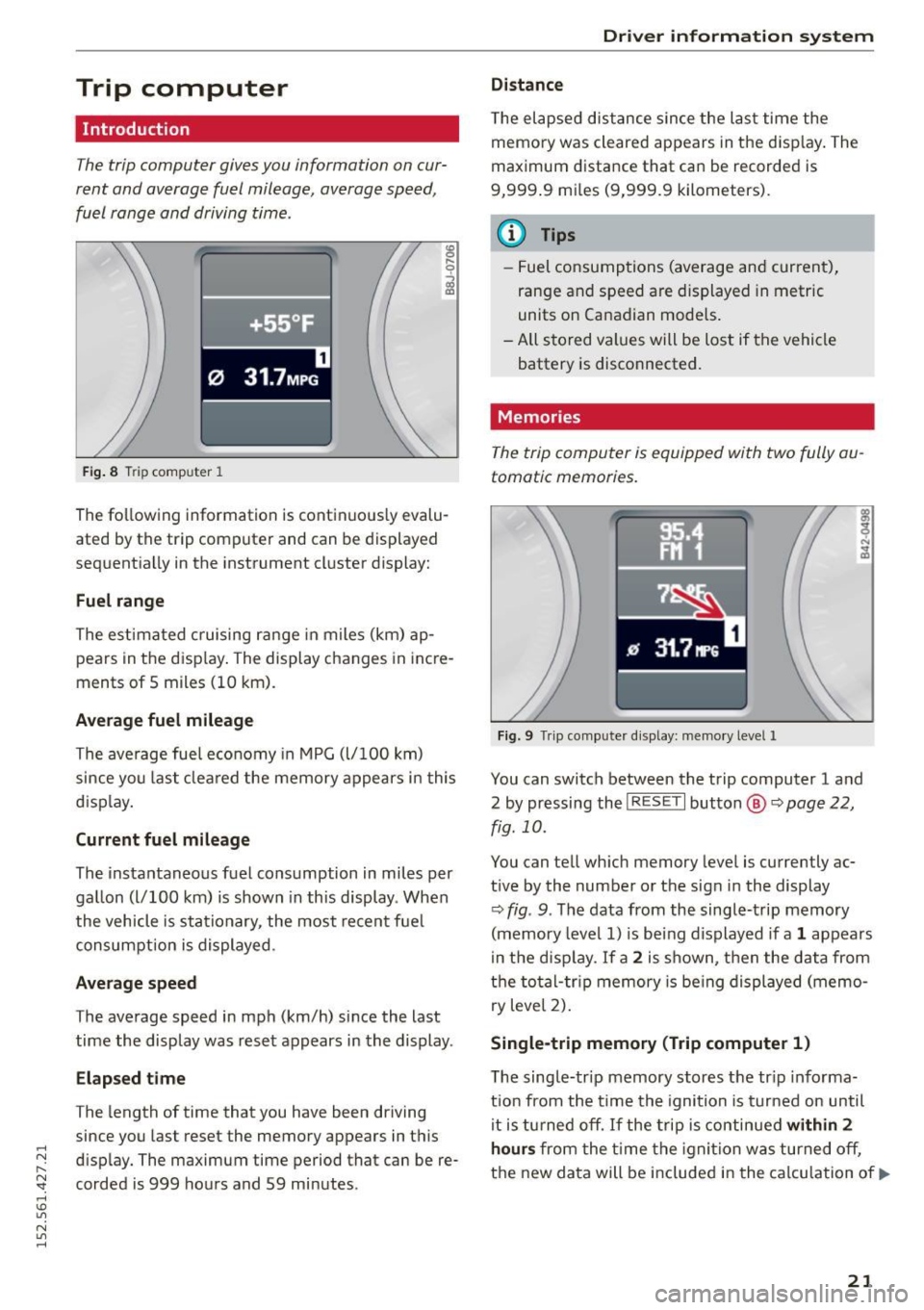
The trip computer gives you information on cur
rent and average fuel mileage, average speed ,
fuel range and driving time.
Fig. 8 T ri p comp uter 1 ,....
0
;;i ID
The following
information is continuously evalu
ated by the trip computer and can be displayed
sequentially in the instrument cluster display:
Fuel range
The estimated cruising range in m iles (km) ap
pears in the disp lay. The display changes in incre
ments of 5 miles (10 km) .
Average fuel mileage
The average fuel economy in MPG (l/100 km)
since you last cleared the memory appears in this
d isplay.
Current fuel mileage
The instantaneous fuel consumption in miles per
gallon (l/100 km) is shown in this display . When
the vehicle is stationary , the most recent fuel
consumption is displayed.
Average speed
The average speed in mph (km/h) since the last
time the display was reset appears in the display .
Elapsed time
The length of time that you have been driving
since you last reset the memory appears in this
disp lay. The maximum time period that can be re
corded is 999 hours and 59 minutes .
Driver information system
Distance
The elapsed distance since the last time the
memory was cleared appears in the disp lay. The
maximum distance that can be recorded is
9,999 .9 mi les (9,999.9 kilometers).
(D Tips
- Fuel consumptions (average and current),
range and speed are displayed in metric
units on Canadian models .
- All stored values will be lost if the vehicle battery is disconnected.
Memories
The trip computer is equipped with two fully au
tomatic memories.
Fig. 9 Trip computer d is play: memo ry level 1
You can switch between the trip computer 1 and
2 by pressing the
! R ESET I button @ ~page 22,
fig. 10.
You can tell which memory level is currently ac
t ive by the number or the sign in the display
Q fig . 9. The data from the single-trip memory
(memory level 1) is being displayed if a
1 appears
in the disp lay.
If a 2 is shown, then the data from
the total-tr ip memory is being displayed (memo
ry level 2).
Single -trip memory (Trip computer 1)
T he single-trip memory stores the tr ip informa
tion from the time the ignition is turned on until
it is turned off. If the trip is continued
within 2
hours from the time the ignition was turned off,
the new data will be included in the calculation of.,.
21
Page 24 of 232
Driver information system
the current trip information. If the trip is inter
rupted for
more than 2 hours the memory is re
set automat ically.
Total-trip memory (Trip computer 2)
Unlike the sing le-trip memory, the total-trip
memory is not reset automatically. This permits
you to evaluate your driving data for the entire
period between manual resets.
Operation
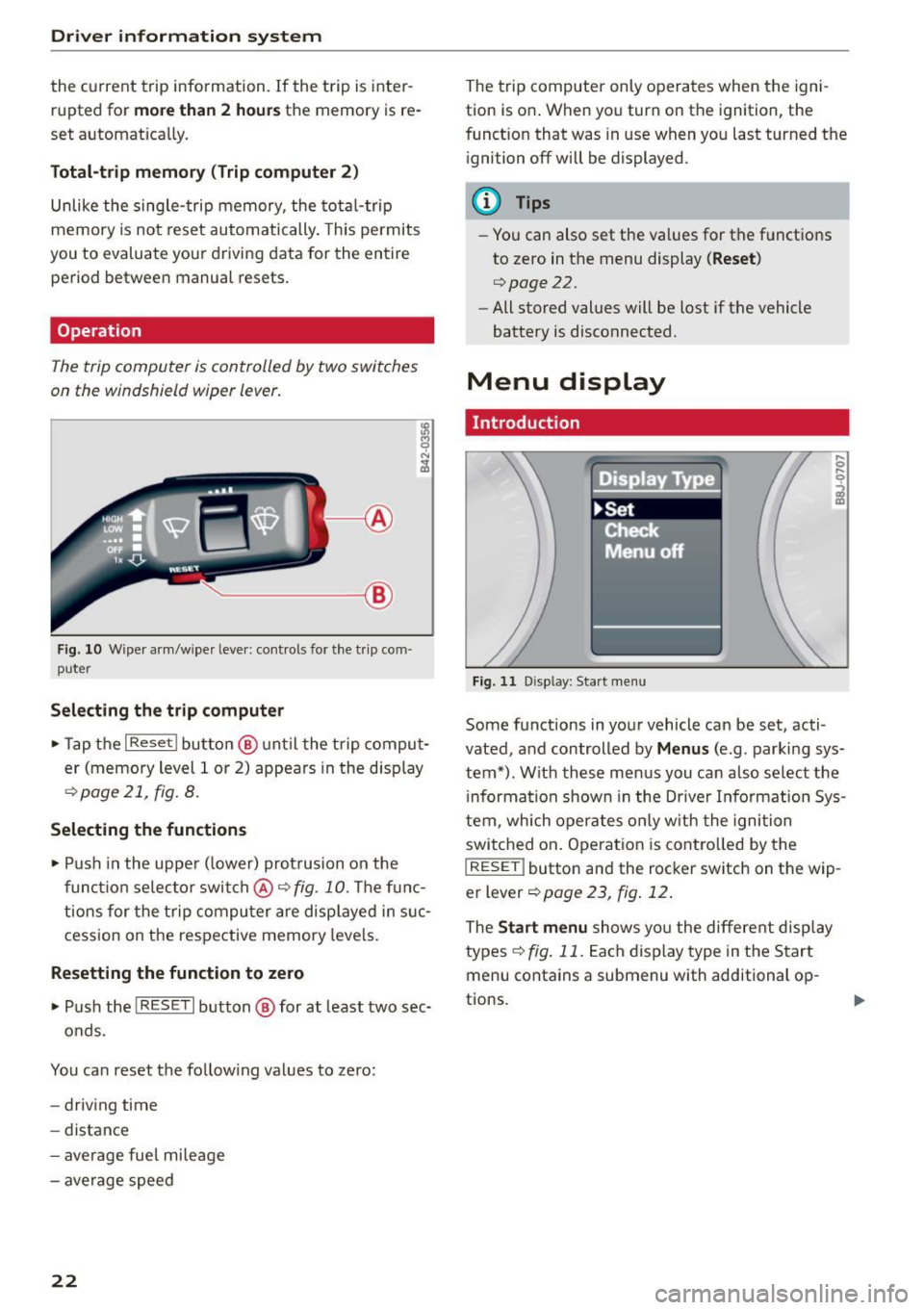
The trip computer is controlled by two switches
on the windshield wiper lever.
------- ®
Fig. 10 Wiper a rm/wiper leve r: controls for the t rip com ·
puter
Selecting the trip computer
• Tap the I Reset ! button @ unt il the trip comput
er (memory level 1 or 2) appears in the disp lay
¢ page 21, fig. 8.
Selecting the functions
• Push in the upper ( lower) protrusion on the
function selector switch @~
fig. 10. The func
tions for the trip computer are displayed in suc
cession on the respective memory levels.
Resetting the function to zero
• Push the I RESE T I button @ for at least two sec-
onds.
You can reset the follow ing values to zero:
- driving time
- distance
- average fuel mileage
- average speed
22
The trip computer only operates when the igni
tion is on . When you turn on the ignition, the
funct ion that was in use when you last turned the
ignition off will be displayed.
(D Tips
-You can also set the values for the functions
to zero in the menu display
( Reset )
c':) page 2 2.
-All stored values will be lost if the vehicle
battery is disconnected.
Menu display
Introduction
Fig. 11 D isp lay: Start menu
Some functions in your vehicle can be set, acti
vated, and controlled by
Menus (e.g . parking sys
tem•). With these menus you can also select the
i nformation shown in the Driver Information Sys
tem, which operates only with the ignition
switched on . Operation is contro lled by the
I RESET ! button and the rocker switch on the wip
er lever
¢page 23, fig. 12 .
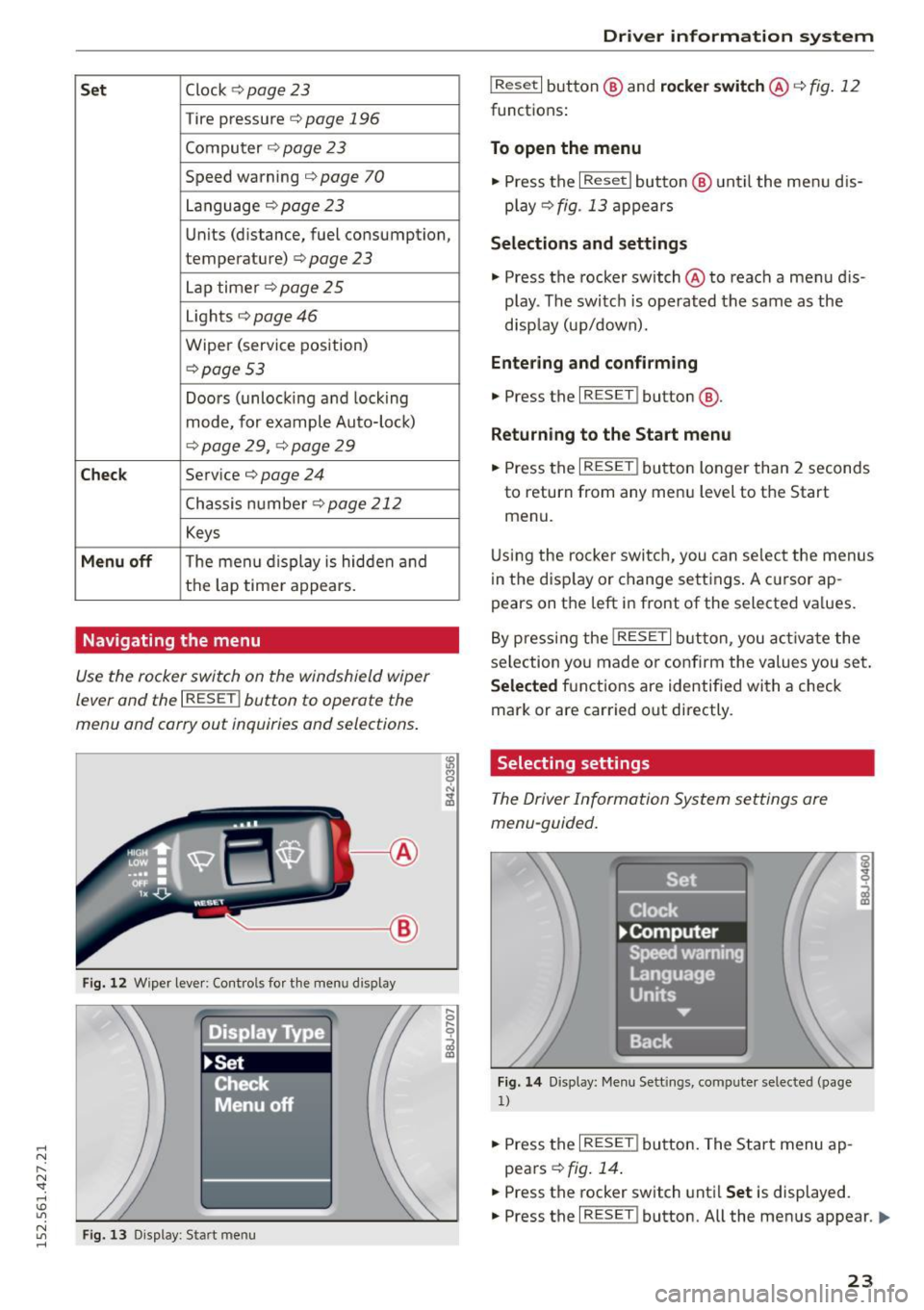
The Start menu shows you the different display
types
~ fig . 11. Each dis play type in the Start
menu contains a submenu with additional op-
tions.
Ill-
Page 25 of 232
.... N
l'
N "1: rl I.O
"' N
"' ....
Set Clock ¢ page 23
Tire pressure c::> page 196
Computer c::> page 2 3
Speed warning c::> page 70
Language c::>page23
Units (distance, fuel consumption,
temperature)
c::> page 23
Lap timer c::> page 25
Lights c::> page 46
Wiper (service position)
c::>page 53
Doors (unlocking and locking
mode, for example Auto-loc k)
c::> page 29, ¢ page 29
Chec k Service c::> page 24
Chassis number c::>page 212
Keys
Menu off The menu display is hidden and
the lap time r appears.
Navigating the menu
Use the rocker switch on the windshield wiper
lever and the
I RESET ! button to operate the
menu and carry out inquiries and selections.
-----®
Fig. 12 Wiper lever: Cont rols fo r th e menu d isplay
Fi g. 13 Display: Start menu
Dr iver inform atio n sy stem
I Reset I button @ and rocker switch @ c::> fig. 12
functions:
To open the menu
• Press the I Reset I button @ until the menu d is
play
c::> fig . 13 appears
Selection s and settings
• Press the rocker switch @ to reach a menu dis
play . The switc h is operated the same as the
disp lay (up/down).
Entering and confirming
• Press the I RESET ! button@.
Returning to the Start menu
.. Press the I RESET ! button longer than 2 seconds
to return from any menu level to the Start
menu.
U sing the rocke r switch, you can select the menus
in the disp lay or change settings . A c ursor ap
pears on the left in front of the selected va lues.
By pressing the
! RESET I button, you activa te the
selection yo u made or confirm the values you set .
Selected fu nctions are identified with a check
mark or are car ried out directly.
Selecting settings
The Driver Information System settings are
menu-guided.
Fi g. 14 Display: Me nu Sett ings, computer selected (page
1)
.. Press the I RESET ! button. The Start menu ap
pears
c::> fig . 14 .
.. Press the rocker switch until Set is displayed.
.. Press the
I RESET ! button. All the menus appear. Ill-
23
Page 26 of 232
Driver information system
• Press the rocker switch until the desired line is
highlighted (cursor)~
fig. 14.
• Press the !R ESE T I button.
• If necessary, scroll by se lecting and activating
the symbol for "Next page" or "Previous page".
When you have selected the Computer menu and
activated it by p ressing the
! RESET I button, two
computer levels appear (computer 1 and comput
er 2) . Now you have to select the level you want
using the rocker switch and activate it with the
I RESET I button .
Service interval display
The service interval display reminds you when
your next service is due.
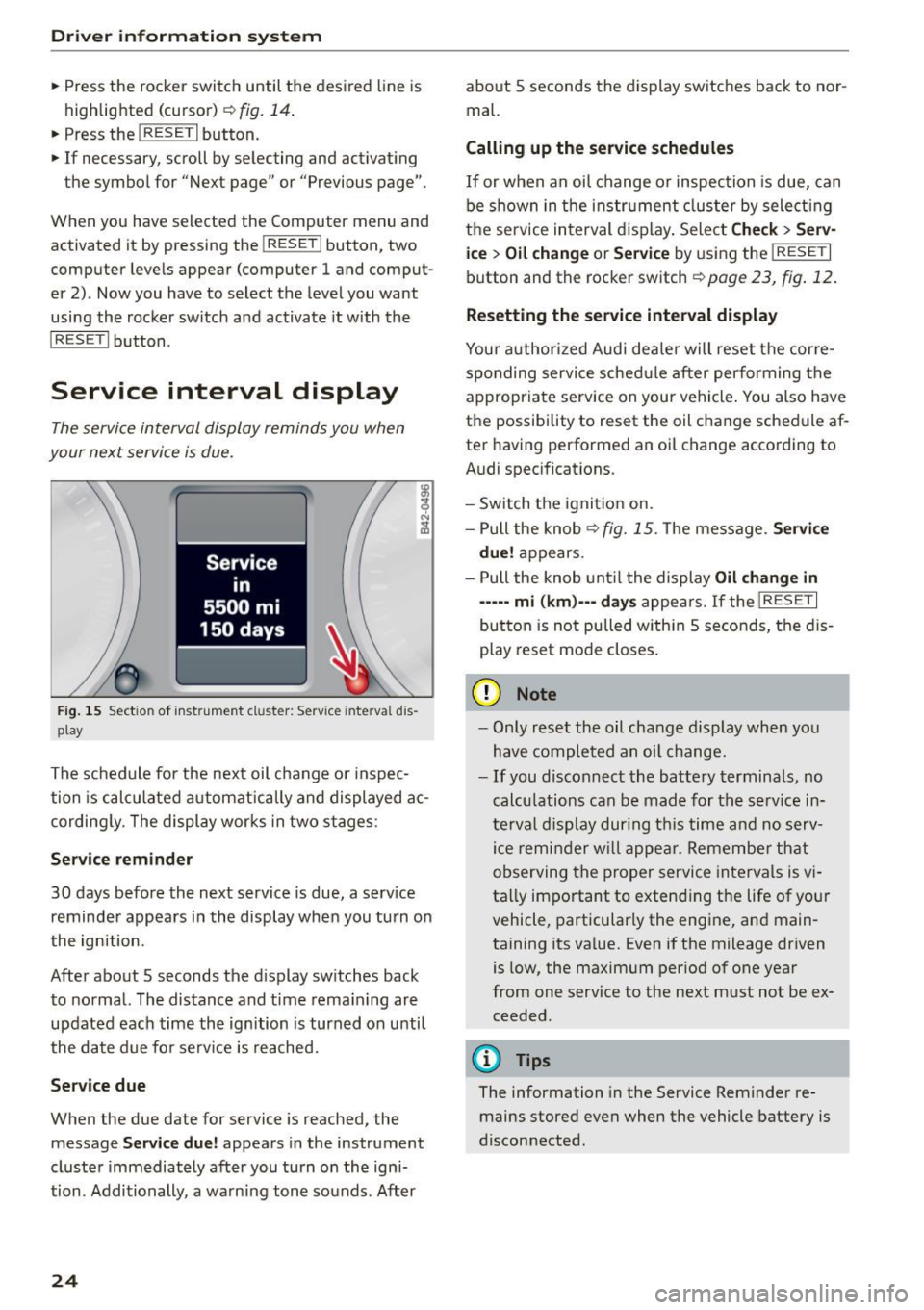
Fig. 15 Sectio n of inst rument cl uster: Serv ice in terva l dis
pl ay
The schedule for the next oil change or inspec
tion is calculated automatically and displayed ac
cording ly. The display works in two stages:
Service reminder
30 days before the next service is due, a serv ice
reminder appears in the display when you turn on
the ignition.
After about 5 seconds the display sw itches back
to normal. The distance and time remaining are
updated each time the ignition is turned on unti l
the date due for serv ice is reached.
Service due
When the due date for service is reached , the
mes sage
Service due! appears in the instrument
cluster immediately after you turn on the igni
tion . Additionally, a warning tone sounds. After
24
about 5 seconds the display switches back to nor
mal.
Calling up the service schedules
If or when an oil change or inspection is due, can
be shown in the instrument cluster by select ing
the se rvice interval display. Select
Check> Serv
ice
> Oil change or Service by using the I RESET I
button and the rocker switch ¢ page 23, fig. 12.
Resetting the service interval display
Your authorized Audi dealer will reset the corre
sponding service schedule after performing the
appropriate service on your vehicle . You also have
the possibility to reset the oil change schedule af
ter having performed an oi l change according to
Audi specifications.
- Switch the ignition on.
- Pull the knob<>
fig. 15. The message. Service
due!
appears.
- Pull the knob until the display
Oil change in
-----mi (km)---days appears. If the I RESE T I
button is not pulled with in 5 seconds, the dis
play reset mode closes.
(D Note
-Only reset the oil change display when you
have completed an oil change.
-If you disconnect the battery terminals, no
calculations can be made for the service in
terval display during this time and no serv
ice reminder will appear. Remember that
observing the proper service intervals is vi
tally important to extend ing the life of your
vehicle, particularly the engine, and main
taining its va lue. Even if the mileage driven
is low, the maximum per iod of one year
from one service to the next must not be ex
ceeded.
@ Tips
The information in the Service Reminder re
mains stored even when the vehicle battery is
disconnected .
Page 27 of 232
.... N
l'
N "1: .... I.O
"' N
"' ....
Lap timer
Introduction
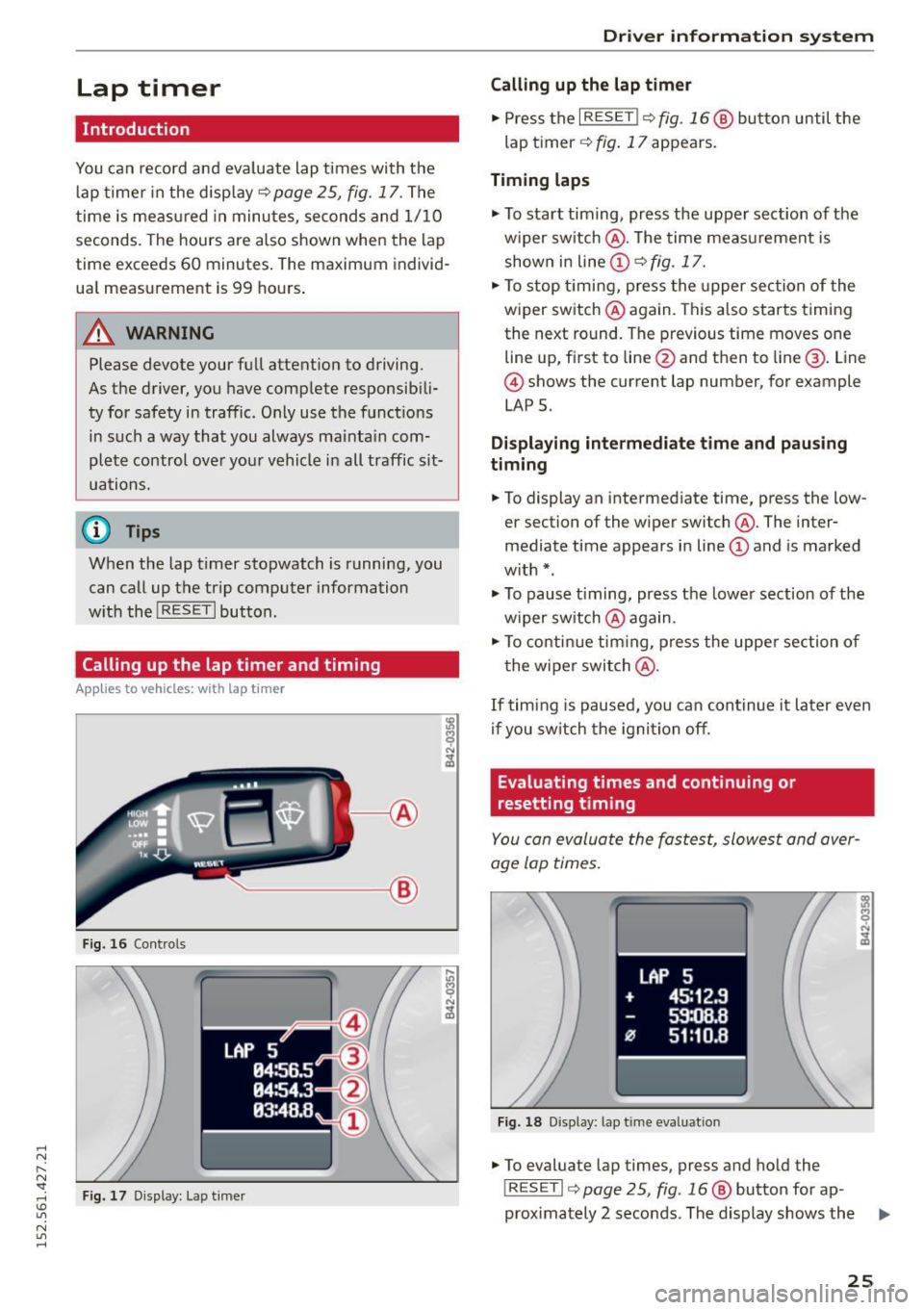
You can record and evaluate lap times with the
lap timer in the display¢
page 25, fig. 17. The
time is measured in minutes, seconds and 1/10
seconds. The hours are also shown when the lap
time exceeds
60 minutes . The maximum individ
ua l measurement is
99 hours.
A WARNING
Please devote your full attention to driving.
As the driver, you have complete responsib ili
ty for safety in traffic. Only use the functions
in such a way that you always ma inta in com
plete control over your vehicle in all traffic sit
uations.
0) Tips
When the lap t imer stopwatch is running, you
can call up the trip computer information
w ith the
! RESET I button.
Calling up the lap timer and timing
A ppl ies to vehicles: with la p t ime r
'---- ®
Fig. 16 Controls
Fig. 17 D isplay: Lap timer
Driver inform atio n sy stem
Calling up the lap timer
.,. Press the I RESET !¢ fig. 16 @ button until the
lap timer ¢
fig. 17 appears.
Timing laps
"' To start timing, press the upper section of the
w iper sw itch @. The time meas urement is
shown in line(!)¢
fig. 17.
.,. To stop timing, press the upper section of the
wiper switch @again. This a lso starts timing
the next round. The previous time moves one
line up, first to line @and then to line@. Line
@ shows the current lap number, for example
LAP 5.
Di splaying inte rm ed iat e time and pau sing
timing
"' To display an intermediate time, press the low
er section of the wiper switch@. The inter
mediate time appears in line(!) and is marked
w ith *.
"' To pause timing, press the lowe r section of the
w iper sw itch @again.
"' To conti nue tim ing, press the uppe r section of
t he wiper swi tch @ .
If timing is paused, you can continue it later even
if you sw itch the igni tion off.
Evaluating times and continuing or
resetting timing
You can evaluate the fastest, slowest and aver
age lap times.
LAP 5
+ 45:12 .9
59:08.8
9J 51:10.8
F ig. 18 Display: lap time evaluat ion
"' To evaluate lap times, press and ho ld the
IRESE TI ¢ page 25, fig . 16 @ button for ap-
proximately 2 seconds. The display shows the
Iii>
25
Page 35 of 232
.... N
l'
N "1: .... I.O
"' N
"' ....
lid as well as the vehicle doors closed when
not in use.
(D Note
Make sure no objects are p rotruding above
the edge of the luggage compartment. Other
w ise, the front lid could be damaged .
@ Tips
If the front lid is open or not properly locked
when the ignit ion is t urned on, the door and
front lid warning appears in the instrument duster display.
Emergency release for front lid
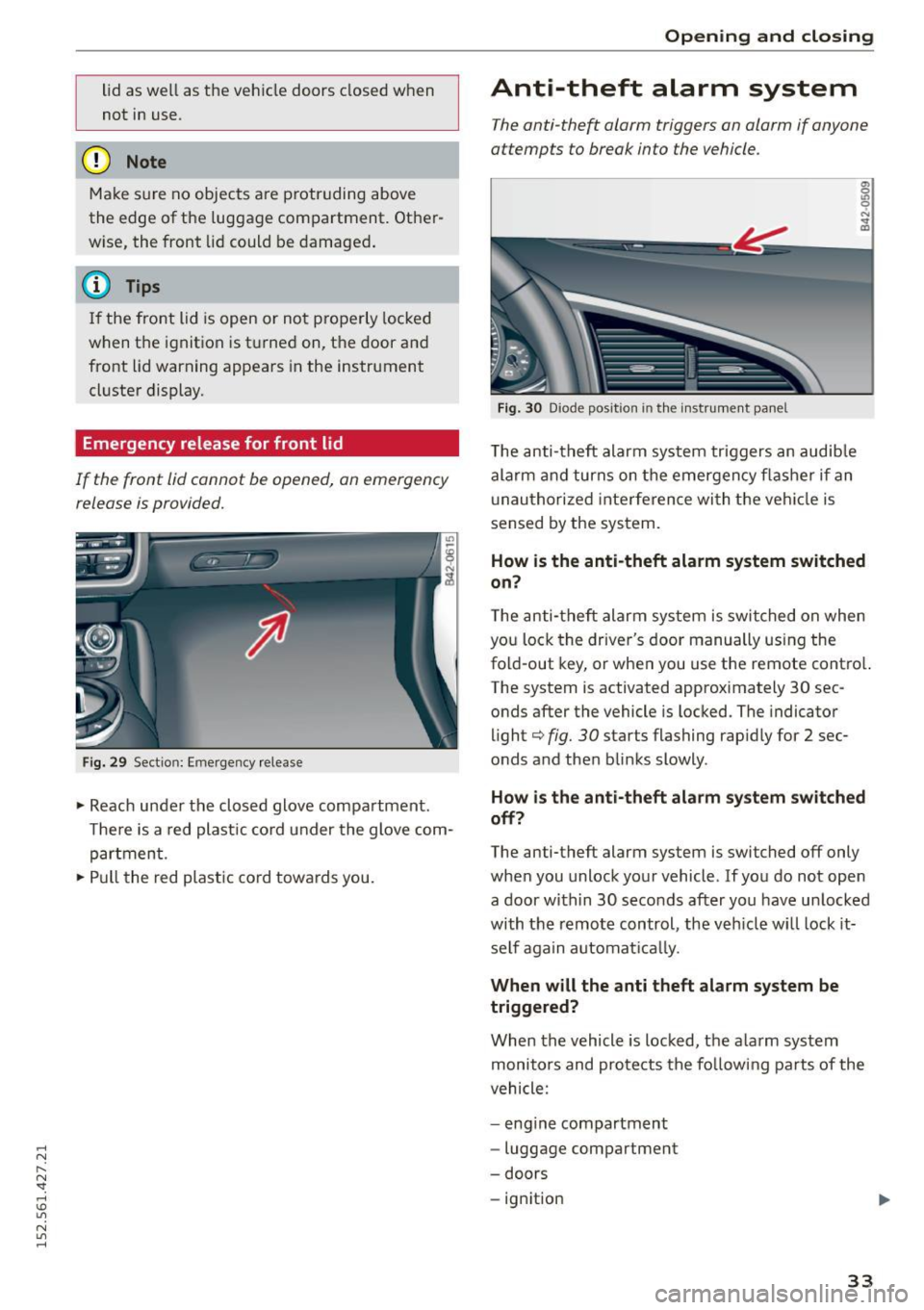
If the front lid cannot be opened , on emergency
release is provided.
Fi g. 29 Section: Emergency release
.. Reach under the closed glove compartment.
T he re is a red plast ic co rd u nder the glove com
partment .
.. Pull the red plast ic co rd towa rds you.
Open ing and clo sing
Anti-theft alarm system
The anti-theft alarm triggers an alarm if anyone
attempts to break into the vehicle.
Fig. 30 Diode position in the i nst ru m ent pa nel
T he anti-theft alarm system tr iggers an audib le
alarm a nd turns on the emergency flasher if an
u nau thori zed interfe ren ce wi th t he veh icle is
sensed by the system.
0) 0 u, 0 ,:. .. m
How i s the anti -theft alarm system switched
on?
T he anti-theft alarm system is switched on when
yo u lock the driver's door manually using the
fold-out key, or when you use the remote cont ro l.
The system is activated approximately 30 sec
onds after the vehicle is locked. The indicator
li ght¢
fig. 30 starts flashing rap idly for 2 sec
onds and then blinks slowly.
How i s the anti-theft alarm sy stem swit ched
off?
The anti-theft alarm system is switched off only
whe n you unlock your vehicle. If you do not open
a door within 30 seconds after you have un locked
with the remo te control, the veh icle wi ll lock it
self again automat ica lly.
When will the anti theft alarm system be
triggered?
When the vehicle is locked, the a la rm system
monito rs and prote cts the fo llowing pa rts of the
vehicle:
- eng ine compartment
- luggage compartment
- doors
- ign ition
33
Page 41 of 232
..... N
r--N "': ..... \!) ..,.,
N ..,., .....
- Ma ke sure no one will be in jured by the con
vertible top supports and other moving ob
jects on the ve hicle when opening and clos
ing the top.
(D Note
To prevent damage to the convertible top:
- do not store any objects in the convertible
top storage bay .
- make sure there is enough space above the
vehicle when openi ng or closing the conver
tib le top.
(D Tips
- When the indica to r l amp f+j blinks, there is
a system ma lf u nction
¢page 15.
-The one-touch opening f unction is not avail
able when the vehicle is traveling below
4 mph (6 km/ h) o r above 31 mph (SO km/
h). If this is the case, a warn ing tone will
sound and a message will appear in the in
str ument cluster¢
page 39.
Error message in the instrument cluster
display
An error message appears if the convertible top
cannot open or close.
Severa l conditions must be met for the converti
b le top to open or close automatically .
An error message in the inst rument cluste r dis
p lay indicates i f one of the cond itions is not met
or there is a malfunction.
Soft top : Please clo se engine lid!
The engine compa rtment lid must be closed
when opening or clos ing the converti ble top . This
message appears in the instrument cluster dis
p lay if the engine compartment lid is not closed.
Soft top : Cannot be used!
This e rror message appears if the convertib le top
cannot open or close because of safety reasons or
if there is a malfunction. The following causes a re
possible:
- The vehicle is traveling too fa st: Conver tible
top operation is deactivate d for safety reasons
Con vertible top
if the vehicle is traveling too fast . A message
w ill appea r. Reduce the vehicle speed and pull
or press the switc h aga in to open or close the
convert ible top.
- The battery voltage is too low: Th e convert ible
top cannot open o r close i f the battery vo ltage
is too low. T his ensures there w ill be enough
battery voltage left to sta rt the ve hicle. The
convert ible top can be operated again after the
eng ine is s tarted.
- Overload protection is active: Operating the
convert ible top continuously fo r a long period
of t im e places stress on the hydrau lic uni t.
Ove rload p rotection is activa ted to prevent
d am age to the system. This pro te ct ive f unct ion
p reven ts the convertib le top from opening o r
close for approximate ly 15 to 30 minutes.
It
w ill function again afte r that ¢& .
-Malfun ction: Failure of sys tem components is
one poss ible cause for malf unct ion . If this hap
pens, yo u can also operate the conve rtible top
by hand
<=> page 41.
- The exterior temperature i s too low: Th e con
vertible top will not open in temperatures be
low (5 ° F) (-15 QC).
Soft top not secure
If the convertib le top is not completely open or
cl osed and the vehicle is traveling too fast, the
error message above appears and a wa rn ing tone
sounds. Reduce the veh icle speed and pull or
press the sw itch agai n to ope n or close the co n
vertib le top.
A WARNING
--
N eve r drive when the c onver tible top is not
l ocked correctly . Th e wind from driving co uld
cause the conve rtible top to open . This can re
sul t in injur ies and d amage to t he ve hicle .
39
Page 48 of 232
Clear vision
Clear vision Lights
Switching the headlights on/off
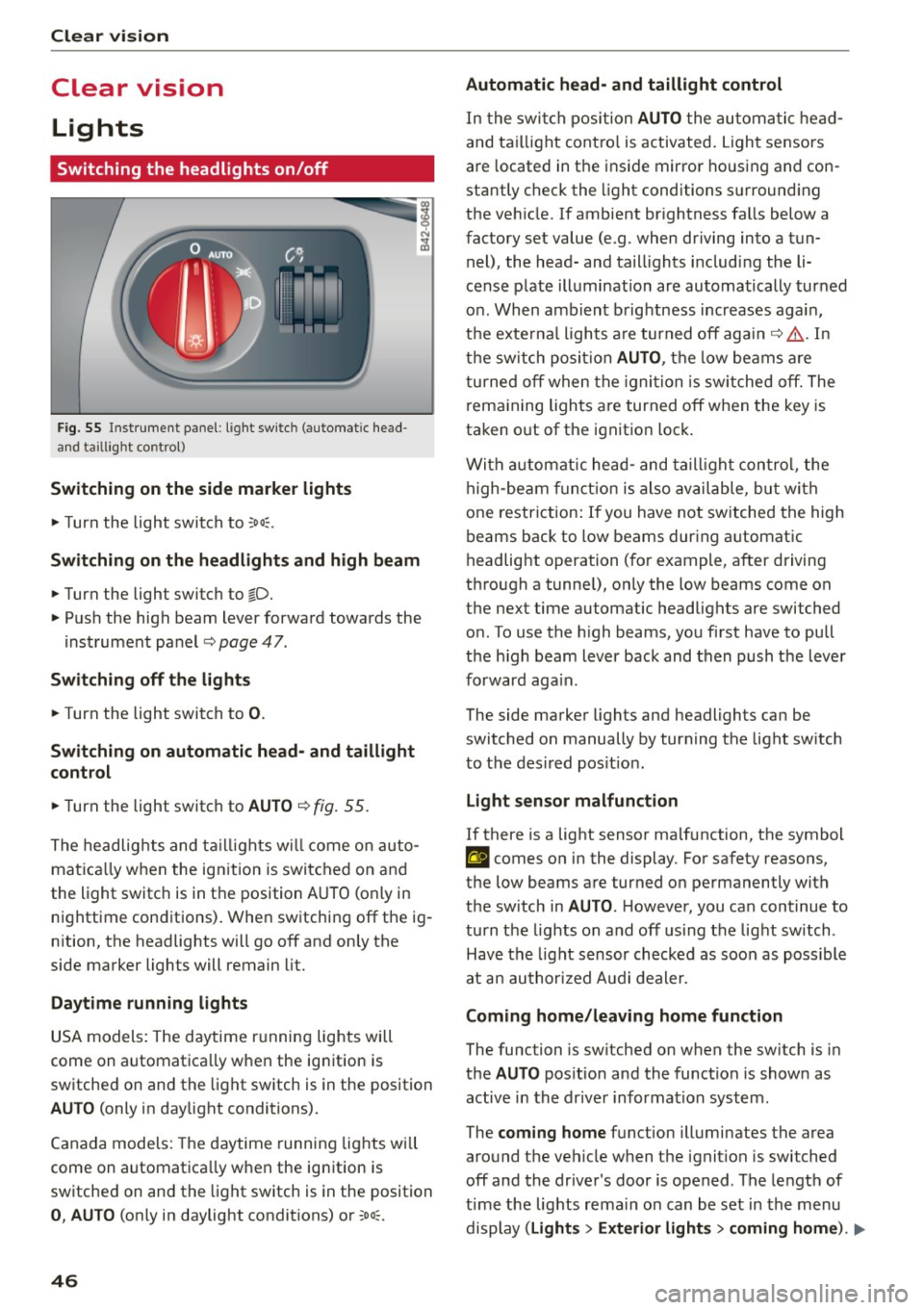
F ig. 55 Inst rument pane l: ligh t switch (automatic head
and taill ig ht control)
Switching on the side marker lights
"'T urn the light switch to :oo:.
Switching on the headlights and high beam
"'Turn the light switch to io.
"'Push the high beam lever forward towards the
instrument panel~
page 47.
Switching off the lights
"'Turn the light switch to 0.
Switching on automatic head- and taillight
control
"'Turn the light switch to AUTO ~ fig. 55.
The headlights and taillights will come on auto
matica lly when the ignition is switched on and
the light switch is in the position AUTO (on ly in
nighttime conditions). When switching
off the ig
nition, the headlights will go
off and only the
side marker lights will remain lit.
Daytime running lights
USA models: The daytime running lights will
come on automatica lly when the ign ition is
sw itched on and the light switch is in the position
AUTO (only in daylight conditions).
Canada models: The daytime running lights will
come on automatica lly when the ign ition is
sw itched on and the light switch is in the position
0, AUTO (only in daylight condit ions) or :oo;.
46
Automatic head- and taillight control
In the switch position AUTO the automatic head
and taillight contro l is activated . Light sensors
are located in the ins ide mirror housing and con
stantly check the light conditions surrounding
the vehicle. If ambient brightness falls below a
factory set value (e.g. when driving into a tun
nel), the head- and taill ights including the li
cense plate illumination are automatically turned
on . When ambient brightness increases again,
the externa l lights are turned
off again~,& . In
the switch position
AUTO , the low beams are
turned
off when the ignition is switched off. The
remaining lights are turned
off when the key is
taken o ut of the ignition lock .
With automatic head-and taillight control, the
high-beam function is also available, but with
one restriction: If you have not switched the high
beams back to low beams during automatic
headlight operation (for example, after driving
through a tunne l), only the low beams come on
the next time automatic headlights are switched
on . To use the high beams, you first have to pull
the h igh beam lever back and then push the lever
forward again.
The side marker lights and headlights can be
switched on manually by turn ing the light sw itch
to the des ired pos it ion .
Light sensor malfunction
If there is a light sensor ma lfunction, the symbol
El comes on in the display. For safety reasons,
the low beams are turned on permanently with
the sw itch in
AUTO. H owever, you can continue to
turn the lights on and
off using the light sw itch.
Have the light sensor checked as soon as possible
at an authorized Audi dealer .
Coming home/leaving home function
The function is sw itched on when the sw itch is in
the
AUTO pos ition and the function is shown as
active in the driver information system.
The
coming home function illuminates the area
around t he vehicle when the igni tion is switched
off and the driver's door is opened. The length of
time the lights rema in on can be set in the menu
display
( Lights > Exterior lights > coming home ). IJJ,,