display AUDI R8 SPYDER 2015 Owner's Manual
[x] Cancel search | Manufacturer: AUDI, Model Year: 2015, Model line: R8 SPYDER, Model: AUDI R8 SPYDER 2015Pages: 232, PDF Size: 58.36 MB
Page 51 of 232
.... N
l'
N "1: .... I.O
"' N
"' ....
With the door contact circuit, the interior lights
turn on as soon as you unlock the veh icl e or open
the doors . The interior lights are also turned on
when the ignition key is removed . The lights turn
off about 30 seconds afte r the doors are closed .
When the veh icle is locked or when the ignition is
turned o n, the inter ior lights are turned off .
When a door is open , the interior lights are
turned off after about 10 m inutes to preven t bat
tery draining .
T he brightness of the lights is controlled a uto
mat ica lly by a d immer when they a re sw itched
on/off.
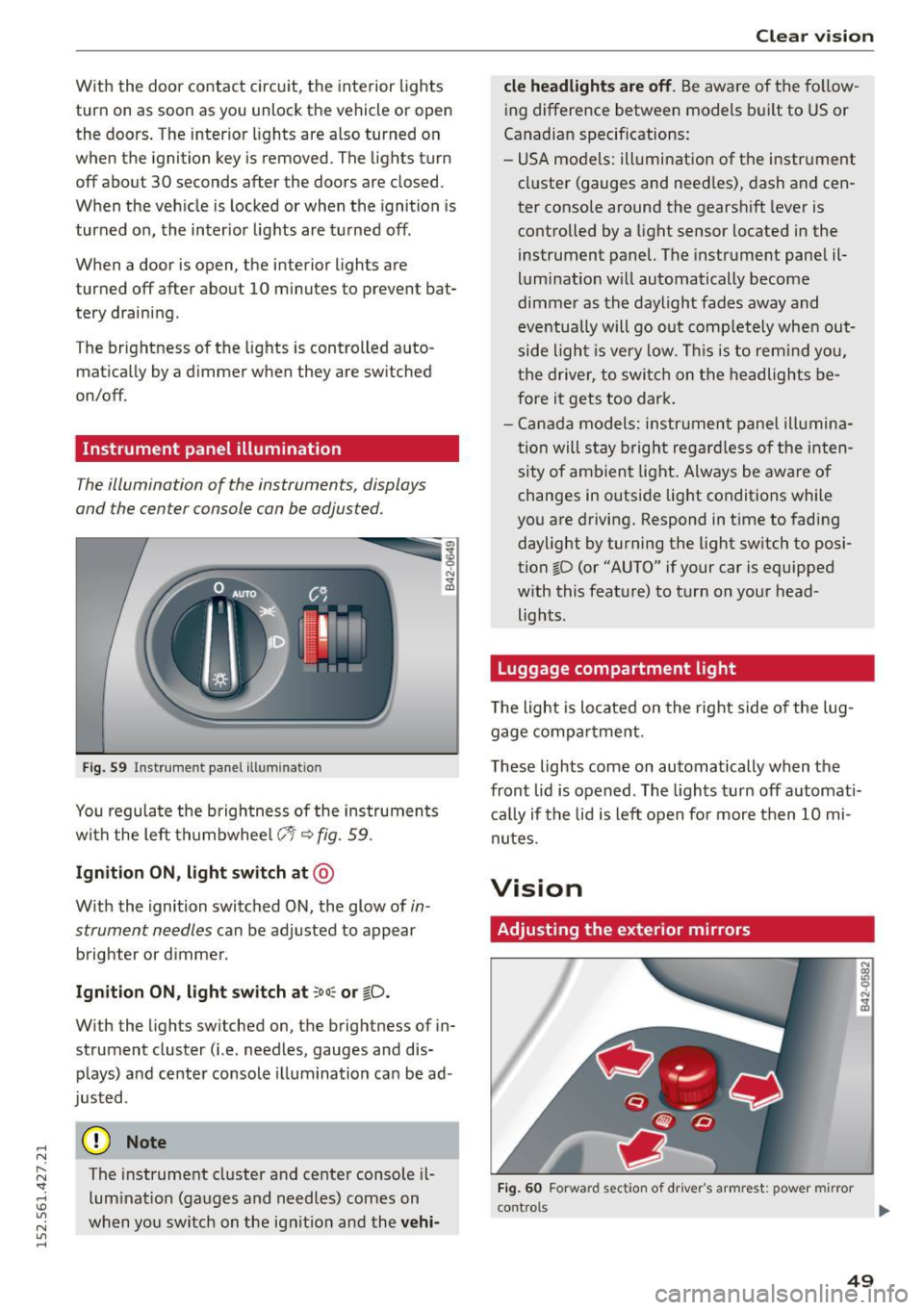
Instrument panel illumination
T he illumination of the instruments, displays
and the center console can be adjusted .
Fig . 59 In strument pa nel ill uminatio n
You regulate the brightnes s of the ins truments
with the left th umbwhee l
C:1 i::;,fig. 59.
Ign ition ON , light switch at @
With the ignition switched ON, the glow of in
strument needles
can be adjusted to appear
brighter or d immer .
Ignition ON , light switch at :oo~ or tD .
With the lights sw itched on, the brightness of in
strument cluster (i.e. needles, gauges and dis
plays) a nd center console il lum ination ca n be ad
justed .
(D Note
The instrument cluster and center console il
lum inat io n (gauges and needles) comes on
when you sw itch on the ig nitio n and the
ve hi-
Cle ar vi sion
cle headlight s are off . Be aware of the fo llow
ing difference between models b uilt to US or
Canadian specif ications:
- USA models: ill umination of the i nstr ument
cl uster (gauges and need les) , dash and cen
ter console around the gearsh ift lever is
controlled by a light sensor located in the
instrument panel. The instrume nt pane l il
lum ination w ill automatically become
dimme r as the daylight fades away and
eventua lly will go out comp letely when out
side light is very low . Thi s is to rem ind you,
t he driver, to switch on t he headlights be
fore it gets too dark .
- Cana da model s: instrument panel illumina
t ion will s tay bright regar dless o f the inten
si ty of ambien t light . Always be aware o f
changes in outside lig ht conditions while
you are driving. Respond in t ime to fading
daylight by turning the light sw itch to posi
tion ~D (or "AUTO" if your car is equipped
w ith this feat ure) to turn on your head
lights .
Luggage compartment light
The light is located on the right side of the lug
gage compa rtment .
These lights come on automatically when the
front lid is opened . The lights turn off automati
c a lly if the lid is left o pen fo r more then 10 mi
nutes .
Vision
Adjusting the exterior mirrors
Fig. 60 Forward sect io n of driver 's armrest: pow er mirr or
con trol s ...
49
Page 55 of 232
.... N
l'
N "1: .... I.O
"' N
"' ....
Service position
It is only possible to change wiper blades if you move the wiper arms to the service position .
In order to use the windshield wipers, the front
lid must be completely closed.
Moving wiper bla de s to th e serv ice positi on
• When there is a risk of frost, make sure that the
wiper blades are not frozen to the windshield.
• Switch the ignition on.
• Move the wiper lever to position
O i:> page 51,
fig. 63.
• Press the
!RESE T I button unt il the Di spla y ty pe
menu appears in the Driver Information System
display .
• Usi ng the rocke r switch a nd the
!RESET I b utton,
select the
Se t> Wip ers > Fr ont > S ervi ce pos i
ti on on
function. The windshie ld wiper arms
move to the service position.
Moving wi per blades to park position
• Make ce rtain that the wiper arms are lying
against the w indshie ld.
• Switch the ignition on and move the w iper lever
from position Oto
4 i:> page 51, fig. 63 . The
wiper arms will move back to the park position.
(D Note
Never drive yo ur vehicle when the windshield
wiper arms are in the service position and
pulled away from the windshield. When you
drive faster than 4 mph (6 km/h), the wiper
arms automatically return to the park posi
tion and could cause paint damage to the
front lid!
(D Tips
- You can also turn on the service pos ition, for
example, if you want to protect the wind
sh ield from ic ing by using a cover .
- The service position moves to
off automati
cally when you operate the windshield w iper
lever, or speed exceeds 4 mph (6 km/h) .
Clear vi sion
Cleaning windshield wiper blades
Clean the windshie ld w iper b lades when they be
gin to leave strea ks. Use a soft cloth and g lass
cleaner to clean t he windshie ld w iper blades.
• Place the windshie ld w iper arms in the service
position. Refe r to
c> page 53.
• Lift the wiper a rm away from the front window .
& WARNING
-
Dirty windsh ield wiper b lades can impair your
view. This can lead to accidents.
Replacing windshield wiper blades
Wiper blades in good condition help keep the
windshield clear.
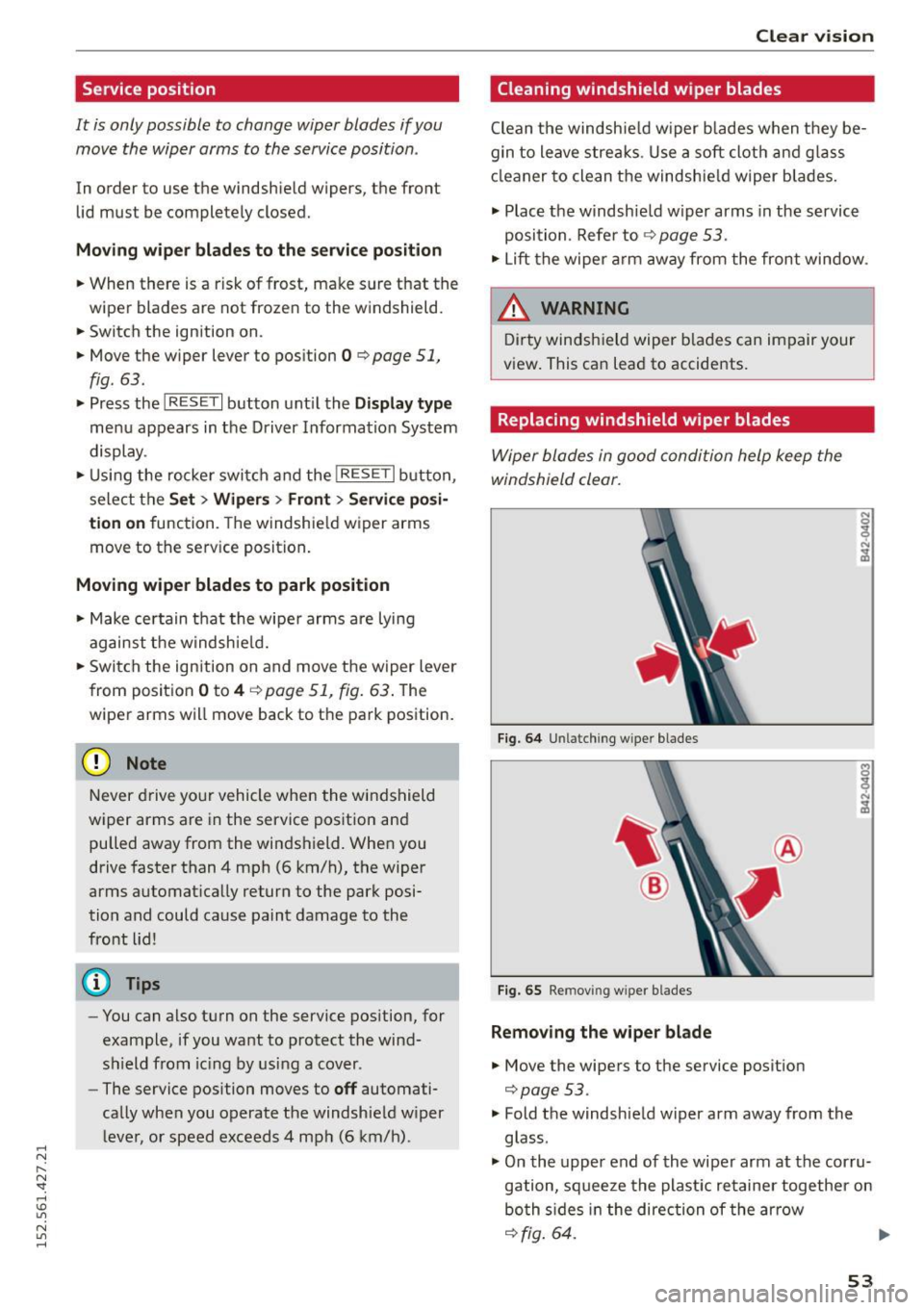
F ig. 6 4 Unlatching wiper blades
Fig. 65 Removing wiper blades
Remo ving the wiper bl ade
• Move the wipers to the service position
i=>page53.
.,. Fold the windshield wiper arm away from the
glass .
• On the upper end of the wiper arm at the corru
gation, squeeze the plastic retainer together on
bo th s ides in the direction of the arrow
i=>fig . 64. ..,_
53
Page 56 of 232
Clear vision
... Rotate the w iper blade in the direction of the
arrow @c:>
fig. 65 away from the wiper arm.
... Lift the wiper blade
off in the direction of the
arrow @.
Install ing the wiper blade
" Place the rounded end of the wiper onto the
end of the wiper arm in the
oppo site direction
to the arrow @c:>
fig. 65.
"Squee ze the corrugation on the wiper until you
hear it click in the wiper arm .
" Fo ld the w iper arm back onto the windshield .
... Switc h the ignition on and move the wiper lever
down br iefly
c:> page 51, fig. 63 . The wiper w ill
move back to the park position .
_& WARNING
For your safety, you should replace the wiper
blades once or tw ice a year . See your a utho r
ized Audi dea le r f or replacement b lades.
(D Note
- The wipe r blades may only be changed
c:> page 53 in the serv ice position! O ther
wise, you r is k damaging the paint on the
front lid or t he windshie ld wiper motor.
- To he lp preven t damage to the wipe r sys
tem, a lways loosen blades which are frozen
to the windshie ld before ope rating wipers .
- To he lp prevent d amage to w iper blades, do
not use gaso line, kerosene, paint th inner, or
other solvents o n or near the wiper b lades.
- To he lp prevent damage to the wipe r arms
or other components, do not attempt to move the wipers by hand .
- Commerc ial hot waxes applie d by au tom atic
ca r washes affect the cleanability of the
glass surface .
- T he front wipe r blades a re d ifferent le ng ths;
the blade on the driver 's side is longer .
54
Digital compass
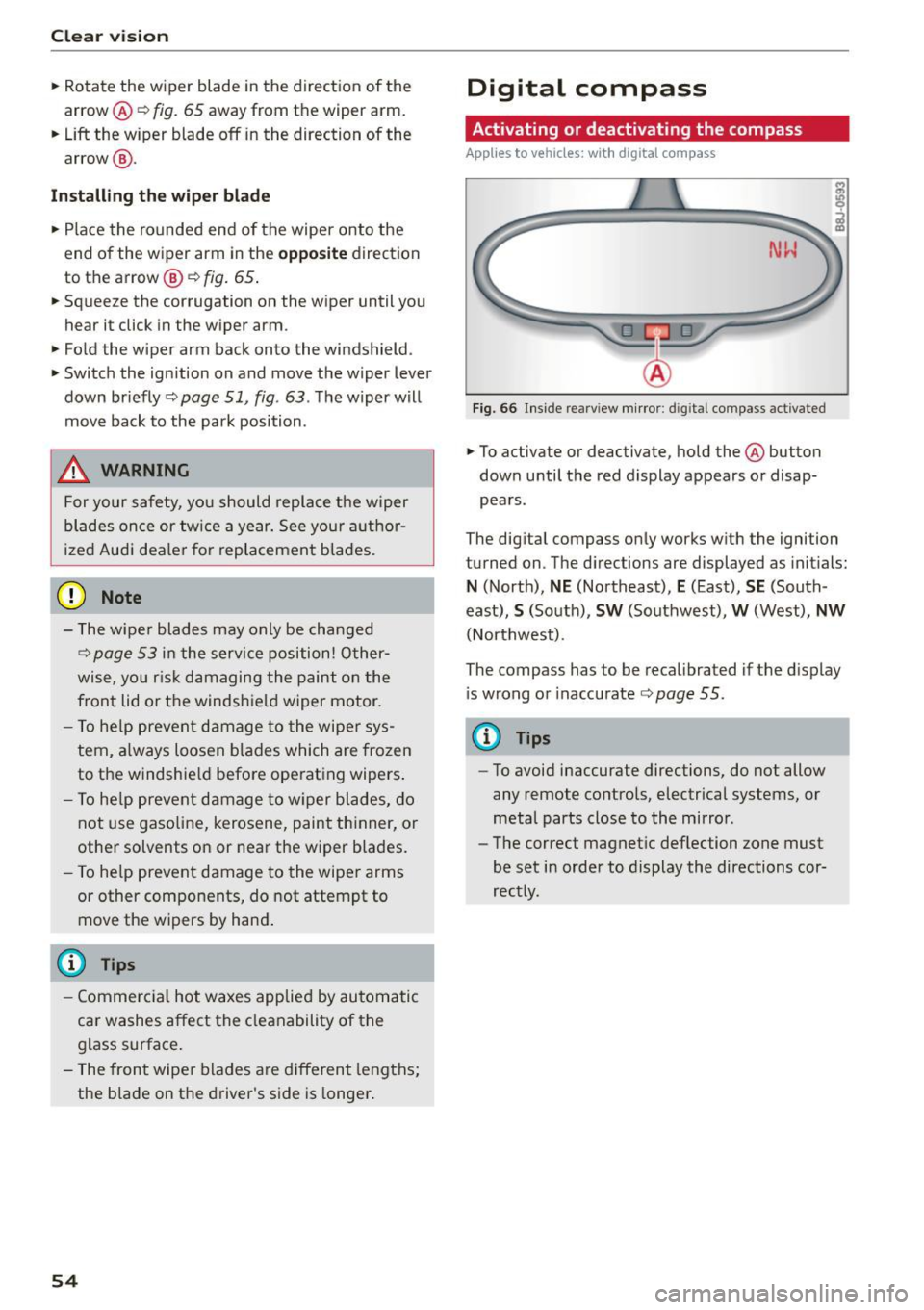
Activating or deactivating the compass
Applies to ve hicles: w ith d igital compass
Fig. 66 Insi de rea rv iew m irror: d ig ital co mpass activated
... To activate or deactivate, hold the @button
down until the red display appears o r disap
pears .
The dig ital compass only works with the ignition
turned on . T he d irect ions are displayed as init ials:
N (North), NE (Northeast), E (East), SE (South
east),
S (South), SW (Southwest), W (West), NW
(Northwest).
The compass has to be recalibrated if the d isplay
i s wrong or inaccurate c:>
page 55.
@ Tips
-To avoid inaccurate directions, do not allow
any remote co ntro ls, electrical systems , or
meta l parts close to the mirror .
- Th e correct magnet ic deflection zone must
be set in order to display the directi ons cor
rectly.
Page 57 of 232
.... N
l'
N "1: .... I.O
"' N
"' ....
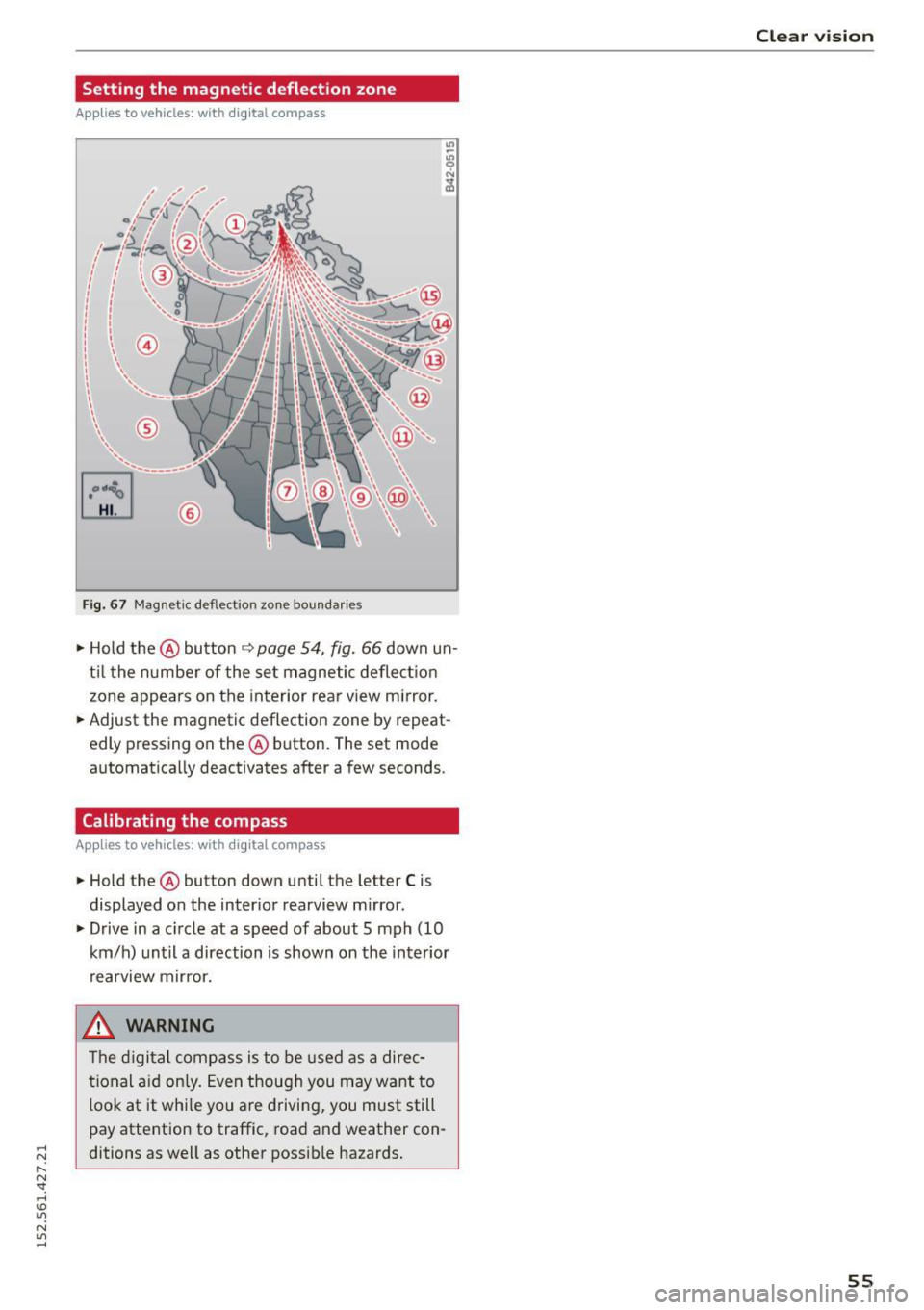
Setting the magnetic deflection zone
Applies to vehicles: with dig ital compass
®
F ig. 67 Magnetic deflect io n zon e bou ndaries
• Hold the@ button ~ page 54, fig. 66 down un
til the number of the set magnetic deflection
zone appears on the interior rear view mirror .
• Adjust the magnetic deflection zone by repeat
edly pressing on the @ button . The set mode
automatically deactivates after a few seconds .
Calibrating the compass
Applies to vehicles: with dig ital compass
• Hold the@ button down until the letter C is
displayed on the interior rearview mirror.
• Drive in a c ircle at a speed of about 5 mph
(10
km/h) until a direction is shown on the interior
. . rearv1ew mirror.
_& WARNING
-
The digital compass is to be used as a direc
tional aid only. Even though you may want to
loo k at it while you are driving, you must still
pay atte ntion to traffic, road and weather con
ditions as well as other possible hazards.
Clear vision
55
Page 71 of 232
..... N
r-N "': ..... \!) ..,.,
N ..,., .....
A WARNING
-=
Always release t he parkin g brake completely.
A part ially engaged brake will over heat th e
rear brakes, reduce their effect iveness and
cause excess ive wear. This could lead to brake
fai lure and an accident.
([) Note
Only after the ve hicle has come to complete
stop, sho uld you firmly set the parking brake
and move the gearshift lever into a gear.
Parking
Parking
~ Stop t he vehicle using the brake pedal.
~ Set the parking b ra ke firmly.
~ Swi tch off the engine.
~ Move t he se lecto r lever into the P pos ition ( au
tomatic t ransmis sion )
or move the gearshift
lever into 1st . gear
(manual transmission )
c:>.&_ .
~ When on incl ines or declines, turn the steering
whee l so that t he vehicle w ill roll into the curb
if it beg ins to move .
A WARNING
This is how yo u can reduce the risk of in jury
w hen leav ing you r vehicle.
-
- Never park the vehicle whe re it ca n come i n
co ntact wi th dry g rass, spilled fuel or a ny
other flammable mater ials.
- Never allow anyone - especially small chi l
dre n -to remai n in t he vehicle when it is
locked. Locke d doors ma ke i t mo re d iff icult
for rescuers to access the passenger com
partment in the event of an emergency .
Dange r to life!
- Never leave c hildren unsupervised in the ve
hicle. C hildren cou ld re lease the par king
brake or move the gearshift lever out of
gear. The vehicle could sta rt to roll away and
cause an accident .
- No matter what the season is, the tempera
ture in a parked veh icle can reach dangerous
levels.
On th e road
Starting on hills
Applies to vehicles: wit h hill ho ld assist
Hill ho ld assist makes it eas ier to sta rt on hills.
The system is activated when the brake peda l is
depressed
for a few seconds .
After releasing the brake pedal, the b rake power
is he ld for a
brief moment to prevent the vehicle
from rol ling back when starting . At this time, you
can eas ily beg in to move your vehicle.
A WARNING
- I f you did not begin moving imme diate ly af
ter re leasi ng the b ra ke peda l, unde r ce rtain
cir cumstan ces, the vehicle w ould beg in to
roll bac kward. Depress t he brake pe dal im
mediately or engage the hand brake.
- Should t he e ngine sta ll, dep ress the brake
pe dal immed iately or enga ge the hand
b rake.
- I n or der to preven t the vehicle from roll ing
back unintentionally when s tarting in s top
and-go traffic, keep the brake pe dal de
pressed for a few seconds before driving off.
(D Tips
You can find o ut if yo ur vehicle is eq uipped
wi th "Hill hold ass ist" at an autho riz ed Au di
d ealersh ip.
Speed warning system
Speed warning system
The speed warning system helps you to keep your
driving speed below a set speed limit .
The speed warn ing system warns the driver if he
exceeds a previously stored max imum speed. A
warning tone will sound as soon as the veh icle
speed exceeds the set speed by about
3 mph
(3 km/h) . At the same t ime, a warning symbo l
appea rs i n the display .
The speed warn ing system has
two warn ing
thre sholds
tha t function independe ntly of each
othe r and t hat have somewhat d iffe rent pu rpos
es:
69
Page 72 of 232
On the road
Speed warning 1 lGJ /laJ
speed while you are driving. This setting wi ll re
main in effect until you turn off the ignition, as
suming that you have not changed or reset the
setting .
The speed warning symbo l
lDJ/[f] (Canada mod
els) in the warning
1 display appears when you
exceed the maximum speed. It goes out when
the speed falls below the stored maximum
speed.
The speed warning symbo l will also go out if the
speed
exceeds the stored maximum speed by
more than about
25 mph (40 km/h) for at least
10 seconds. The stored maximum speed is delet
ed.
Sett ing speed warning 1
¢ page 70.
Speed warning 2 lCl/lDJ
want to be reminded of a certain speed, for ex
ample when you are trave ling in a country that
has a general maximum speed limit, or if you do
not want to exceed a specified speed for winter
tires.
The speed warning 2 symbol
lCIJ(a1 (Canada
models) appears in the disp lay when you exceed
the stored speed limit. Unlike warning 1, it will
not go out until the vehicle speed drops be low
the stored speed limit.
Sett ing speed warning 2
¢ page 70.
@ Tips
Even though your vehicle is equipped with a
speed warning system, you should still watch
the speedometer to make sure you are not
driving faster than the speed limit.
70
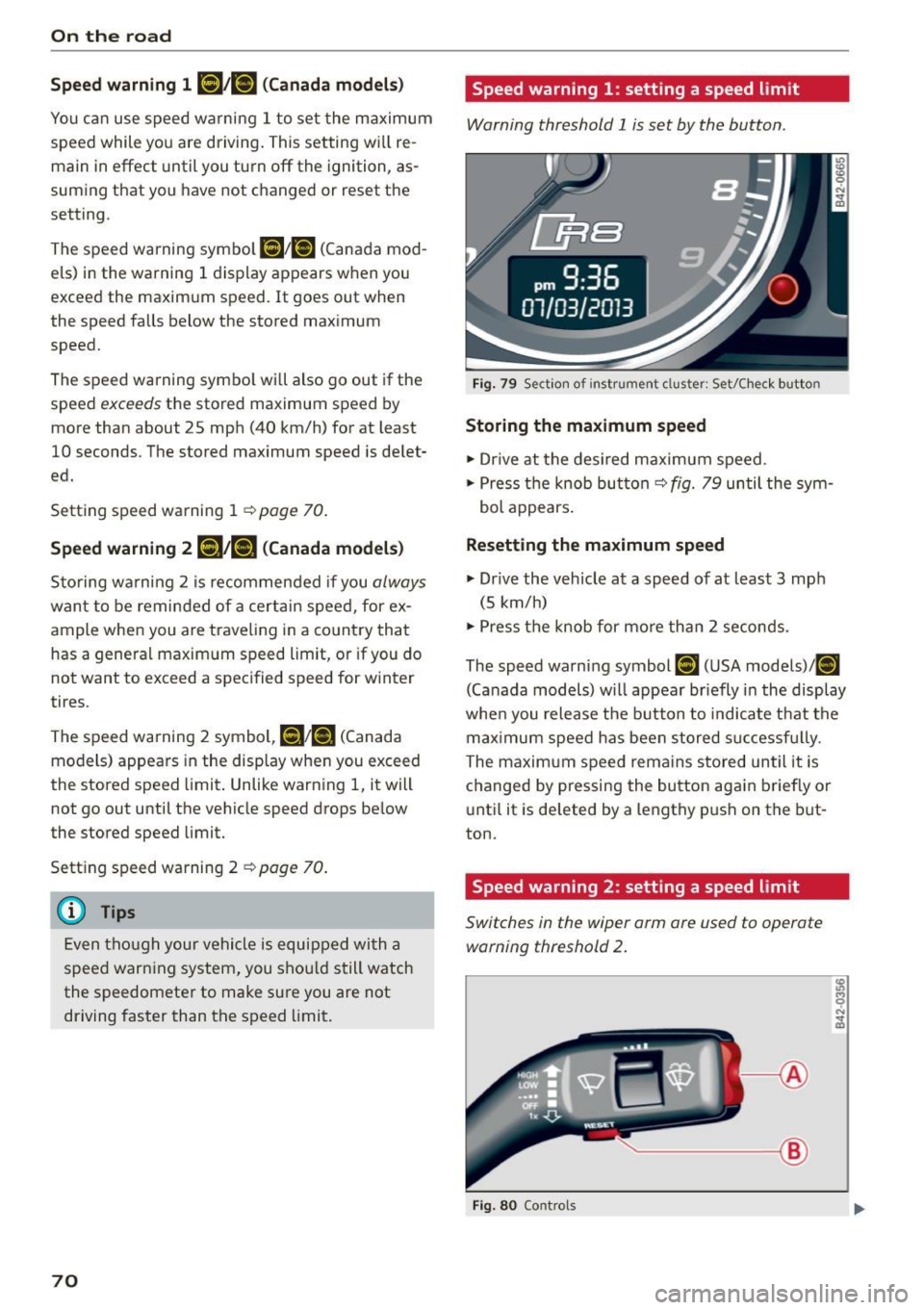
Speed warning 1: setting a speed limit
Warning threshold 1 is set by the button .
Fig. 79 Section of instrument cluster: Set/C hec k button
Storing the maximum speed
.,. Dr ive at the desired maximum speed .
.,. Press the knob butto n
c::> fig. 79 until the sym
bol appears.
Resetting the maximum speed
.,. Dr ive the vehicle at a speed of at least 3 mph
(5 km/h)
.,. Press the knob for more than 2 seconds .
The speed warning symbol
[IH (USA models)/ (01
(Canada models) w ill appear br iefly in the display
when you release the button to indicate that the
max imum speed has been stored s uccessfu lly.
The maximum speed rema ins stored until it is
changed by pressing the button again briefly or
until it is deleted by a lengthy push on the but
ton.
Speed warning 2: setting a speed limit
Switches in the wiper arm ore used to operate warning threshold 2 .
~--®
Fig. 80 Controls
Page 73 of 232
.... N
l'
N "1: .... I.O
"' N
"' ....
To store maximum speed
•Turnoff the ignit ion.
• Briefly press the button in the instrument clus
ter
9 page 70, fig. 79. The odometer and the
digital clock are now illuminated.
• Press the button for at least 2 seconds. The cur
rently stored maximum speed appears in the
display
or the crossed out symbol for warning
threshold 2, if no maximum speed was set pre
viously.
• Press the function selector sw itch in the wiper
lever @r=>
fig. 80 up or down to change the set
val ue. Values run up or down in steps of 6 mph
(10 km/h).
To delete maximum speed
•Turnoff the ignition .
• Briefly press the button in the instrument clus
ter
9 page 70, fig. 79 . The odometer and the
digital clock are now illum inated.
• Press the button for at least 2 seconds. The cur
rently stored maximum speed appears in the
display.
• Press the
iRESETI button in the wiper lever @
r:=> fig. 80 until the crossed out speed warning
symbol for warning threshold 2 appears in the
display.
A few seconds after the adjustment is completed,
the illumination for the odometer and the digital
clock w ill go out.
@ Tips
This warning threshold can also be controlled
through the trip computer
r=> page 23, Navi
gating the menu.
On the road
Cruise control
Switching the system on
The cruise control system makes it possible to
drive at a constant speed starting at 20 mph (30kmlh).
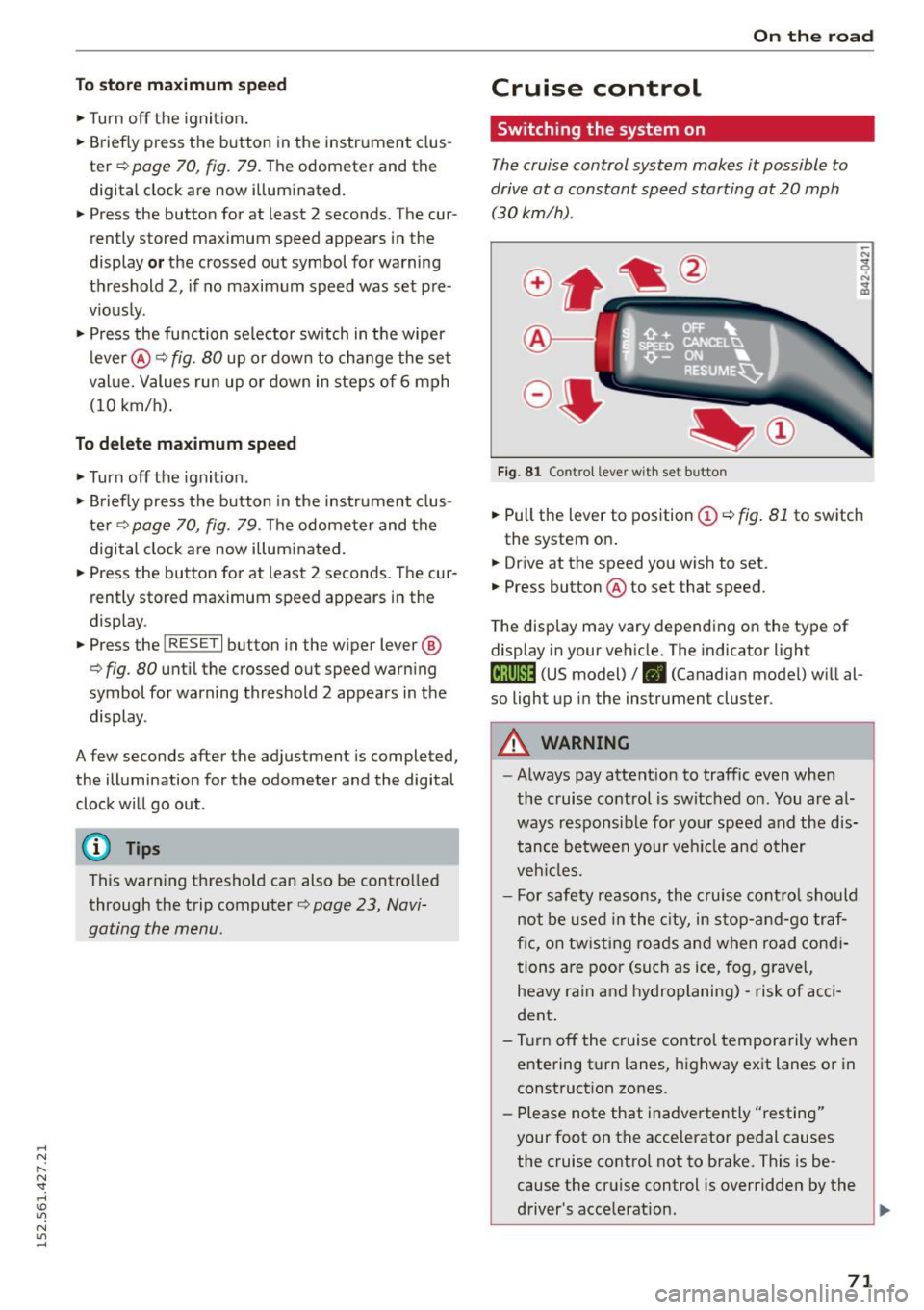
Fig. 81 Contro l lever with set button
• Pull the lever to position (Dr=> fig . 81 to switch
the system on .
• Drive at the speed you wish to set.
• Press button @to set that speed.
The display may vary depending on the type of
display in your vehicle. The indicator light
(lj;jl)~i~ (US model)/ . (Canadian model) will al
so light up in the instrument cluster.
A WARNING
--
-Always pay attention to traffic even when
the cruise control is switched on. You are al
ways responsible for your speed and the dis
tance between your veh icle and other
veh icles.
- For safety reasons, the cruise control should
not be used in the city, in stop-and -go traf
fic, on twisting roads and when road condi
tions are poor (such as ice, fog, gravel,
heavy rain and hydroplaning) -risk of acci
dent .
- T urn off the cruise control temporarily when
entering turn lanes, highway exit lanes or in
construction zones.
- Please note that inadvertently "resting"
your foot on the accelerator pedal causes
the cruise control not to brake. This is be
cause the cruise control is overridden by the
driver's acce lerat ion.
71
Page 76 of 232
Transmission
Transmission Manual transmission
Gearshift lever
Applies to vehicles: with manua l transmission
The clutch pedal must be depressed all the way
before you can start the engine .
The manual transmission in your Audi is equipped
with an
interlock-feature.
• Depress the clutch pedal all the way.
• Start the engine with the gearshift lever in Neu
tral and the clutch pedal depressed.
(D Note
Always depress the clutch pedal fully when
changing gears. Do not hold the vehicle on a
hill with the clutch pedal partially depressed.
This may cause premature clutch wear or
damage.
(D Tips
- Resting your hand on the gearshift lever
knob while driving will cause premature
wear in the transmission.
- The back-up lights go on when you shift into
Reverse with the ignition on.
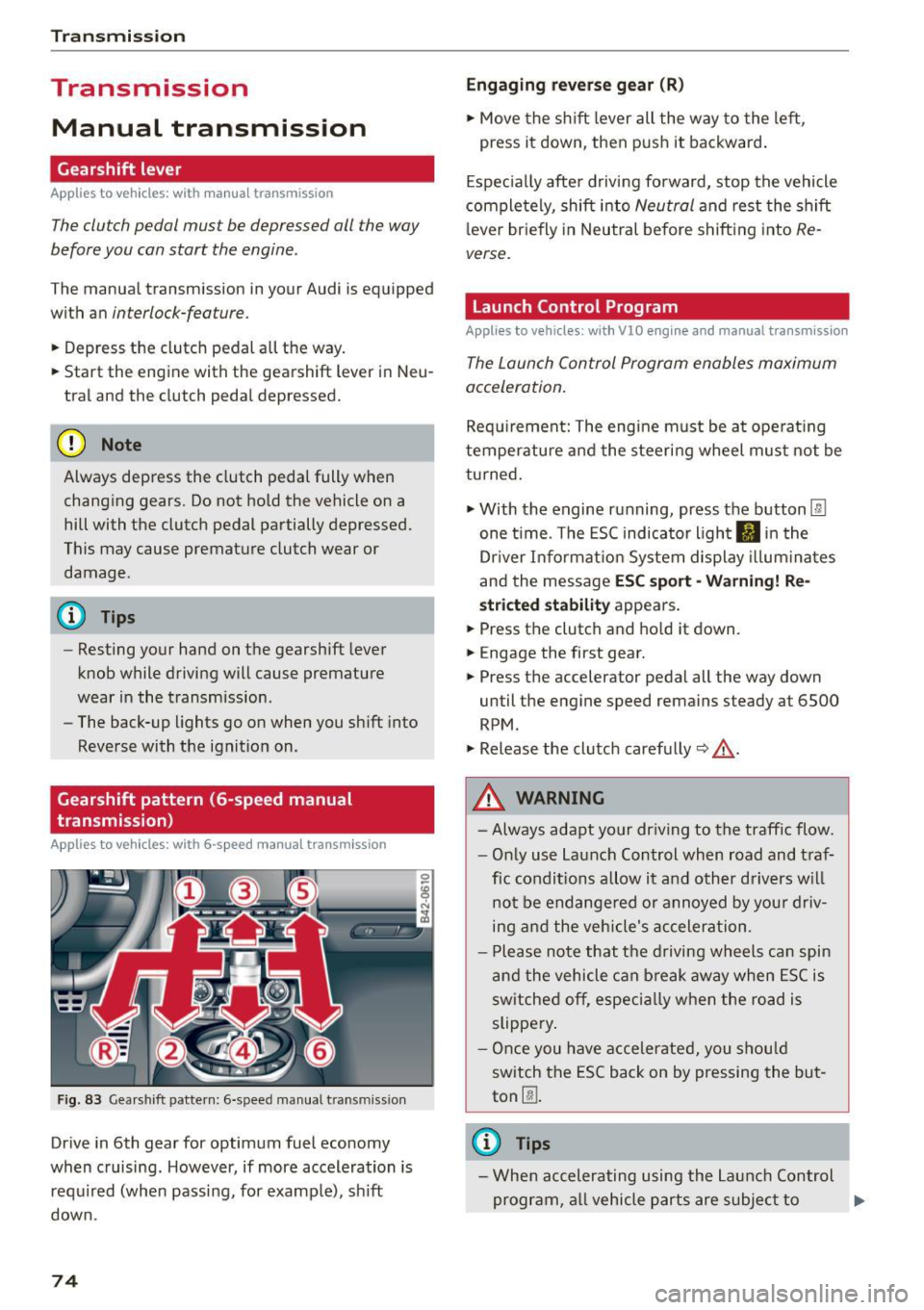
Gearshift pattern (6-speed manual
transmission)
App lies to vehicles: with 6-speed manual transmission
Fig. 83 Gearshift pattern: 6-speed manual transm iss ion
Drive in 6th gear for optimum fuel economy
when cruising. However, if more acceleration is
required (when passing, for examp le), sh ift
down.
74
Engaging reverse gear (R)
• Move the shift lever all the way to the left,
press it down, then push it backward.
Especially after driving forward, stop the vehicle
completely, shift into
Neutral and rest the shift
l ever briefly in Neutral before shifting into
Re
verse.
Launch Control Program
Applies to vehicles : wit h VlO engin e and manual t ra nsmissio n
The Launch Control Program enables maximum
acceleration.
Requirement: The engine must be at operat ing
temperature and the steering wheel must not be
turned.
• With the engine running, press the button
l:fil
one time. The ESC indicator light II in the
Dr iver Informat ion System display illum inat es
and the message
ESC sport -Warning! Re
stricted stability appears .
• Press the clutch and hold it down.
• Engage the first gear.
• Press the accelerator pedal all the way down
until the engine speed remains steady at 6500
RPM .
• Release the clutch carefully~,&. .
A WARNING
- Always adapt your driving to the traffic flow.
- Only use Launch Control when road and traf-
fic conditions allow it and other drivers will
not be endange red or annoyed by your driv
ing and the vehicle's acceleration .
- Please note that the driving wheels can spin
and the vehicle can break away when ESC is
sw itched off, especially when the road is
slippery .
- Once you have accelerated, you should
switch the ESC back on by pressing the but
ton
00 .
(D Tips
- When accelerating using the Launch Control
program, all vehicle parts are subject to .,..
Page 77 of 232
.... N
l'
N "1: .... I.O
"' N
"' ....
heavy loads. This can result in increased
wear .
- The Launch Control Program only funct ions
when the parking brake is released and the
vehicle speed is less than 3 mph (5 km/h).
S tronic
Description
Applies to vehicles: with S tronic
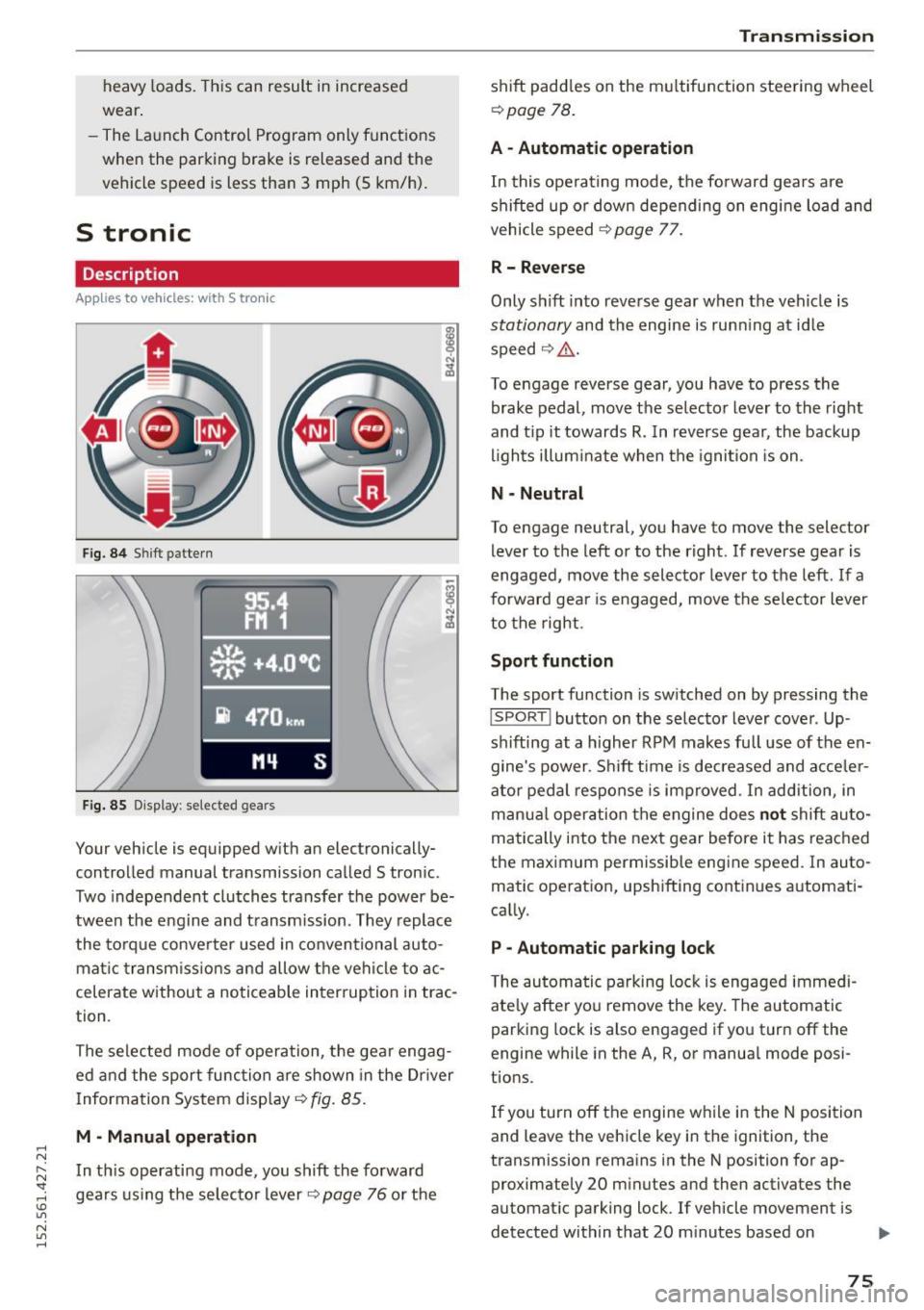
Fig. 84 Shift pattern
Fig. 85 Display : selected gea rs
Your vehicle is equipped with an electronically
controlled manual transmission called S tronic .
Two independent clutches transfer the power be
tween the eng ine and transmission. They replace
the torque converter used in conventional auto
mat ic transmissions and allow the vehicle to ac
celerate without a noticeable interruption in trac
tion .
The selected mode of operation, the gear engag ed and the sport function are shown in the Dr iver
Information System display ¢
fig. 85.
M -Manual operation
In this operating mode, you shift the forward
gears using the selector lever
r=>v page 76 or the
Transmission
shift paddles on the multifunction steering wheel
¢ page 78.
A - Automatic operation
In this operating mode, the forward gears are
shifted up or down depending on engine load and
vehicle speed
¢ page 77.
R- Reverse
Only s hift into reverse gear when the vehicle is
stationary and the engine is runn ing at idle
speed ¢
Li')...
To engage reverse gear, you have to press the
brake pedal, move the selector lever to the right
and t ip it towards
R. In reverse gear, the backup
lights illuminate when the ignition is on .
N -Neutral
To engage neutral, you have to move the selector
lever to the left or to the right . If reverse gear is
engaged,
move the selector lever to the left . If a
forward gea r is engaged, move the selector lever
to the right.
Sport function
The sport function is switched on by pressing the
I SPORT ! button on the selector lever cover . Up
shifting at a higher RPM makes full use of the en
gine's power . Shift time is decreased and acceler
ator pedal response is improved . In addition, in
manua l operation the engine does
not shift au to
matically into the next gear before it has reached
the maximum permissible engine speed. In auto
matic operation, upshifting continues automati
cally.
P -Automatic parking lock
The automatic parking lock is engaged immedi
ately after you remove the key. The automatic
parking lock is also engaged if you turn off the
engine while in the A, R, or manual mode posi
tions .
If you turn off the engine while in the N position
and leave the vehicle key in the ignition, the
transmission remains in the N position for ap proximately 20 minutes and then activates the
automatic parking lock . If vehicle movement is
detected within that 20 minutes based on
IIJI.
75
Page 78 of 232
Transmi ssio n
rotation of the whee ls, then the time wi ll in
crease a ccording ly .
A WARNING
- If a gear is engaged when the vehicle is sta
tionary, the acce lerator must not be pressed
inadvertently under any circumstances. Oth
erwise the vehicle will immed iately start to
move - sometimes even if the park ing brake
is f irmly applied.
- Before you or other persons open the engine compartment l id and work on a running en
gine, select neutral pos it ion
N and firmly
apply the handbra ke. Always read and fol
low the app licab le warn ings¢
page 155,
Working in the engine compartment.
@ Tips
- If you accidenta lly shifted into N w hile d riv
i ng, you can engage a gear in the normal
way using the selecto r lever.
- An indicator light i s displayed if a malfunc
tion occurs while in S tronic. Refer to
~page 78.
Manual mode
App lies to veh icles: w ith 5 tro nic
S tronic allows the driver to shift gears man ua lly.
Starting from a stop
.,. Press and ho ld the brake pedal.
.. Move the selecto r leve r to the left.
.. Tap the se lec tor lever forwa rd
0 -
.. Re lease the brake pedal and press the accelera -
tor pedal ¢ .&,. .
Shifting
.,. To shift up, tap the selector lever fo rward 0 -
.,. To shift down, t ap the sele ctor lever to the re ar
o.
Stopp ing temporarily
.,. Press the brake pedal to prevent the vehicle
from moving, for examp le at traff ic lights .
Par king
.. Press and ho ld the brake pedal¢.&,. .
76
.. Activate the parking brake .
.. Turn off the ignition and remove the key .
Stopping on an incline
.,. Always keep the vehicle stat ionary using the
foot brake to prevent it from " rolling back"
¢ .&,. . D o not try to p revent the vehicle from
"ro lling back" when a gear is engaged by in
creasing engine speed.
.. Activate the parking brake.
Starting on a hill
.. With a gear engaged, remove your foot from
the brake, accelerate and slowly release the
parking brake.
When acce lera ting, S tronic sh ifts i nto the nex t
gear in gea rs 1, 2, 3, 4, 5 and 6 shor tly befo re
the maximum permissib le engine speed is
r eached.
If you have se lec ted a lower gear than the current
one, S tron ic w ill shift down only when the engine
will not be ove r-revved.
You can switch to a utomat ic operation at any
time
¢ page 77.
A WARNING
-
- Never leave your vehicle with the engine
ru nning while in gear. If you must leave yo ur
vehicle with the engine r unning, set the
parking brake firmly and engage neutral
N .
- With the engine r unning and a gear engag
ed, you have to ho ld the vehicle with the
foot brake .
- Do not accelerate when you sh ift gears with
the vehicle stationary and the engine run ning.
- Before driving down a steep slope, reduce
your speed and sh ift into a lower gear with S
tronic.
- Do not ride the bra kes or press the bra ke
pedal too often or too long. Constant brak
ing causes the brakes to overheat and sub
stantially reduces brak ing performance, in
creases braking d istance or causes comp lete
fa ilu re of the brake system. ..,.