lights AUDI R8 SPYDER 2015 Owner's Manual
[x] Cancel search | Manufacturer: AUDI, Model Year: 2015, Model line: R8 SPYDER, Model: AUDI R8 SPYDER 2015Pages: 232, PDF Size: 58.36 MB
Page 52 of 232
Clear vision
Turn the knob to the desired position :
Q/P -In this position, you can adjust the driv
er's and front passenger 's exterior mirrors by
turning the knob in the desired direction .
(@ -The mirrors are heated depending on the
outside temperature.
8 - The exterior mirrors fold in*
You are well-advised to fold the exterior mirrors in when maneuvering in tight spaces or when
leaving the car parked close to other vehicles.
A WARNING
-
- Curved (i .e. convex) mirror surfaces in
crease your field of view . Remember that
vehicles or other objects will appear smaller
and farther away than when seen in a flat
mirror. If you use this mirror to est ima te
distances of following vehicles when chang
ing lanes, you could estimate incorrectly
and cause an accident.
- If th e mirror housing is moved unintent ion
a lly (for example, wh ile parking your vehi
cle), then you must first fold the mirror
electrically. Do not readjust the mirror hous
ing manually. You could damage the motor
which controls the mirror.
- If you wash the vehicle in an automatic car
wash, you must fold the exterior mirrors in
to reduce the risk of damage to the mirrors.
Never fold power folding exterior mirrors*
by hand . Only fold them in and out using
the power controls.
(D Tips
If there should be a malfunction in the elec
trical system, you can still adjust the exter ior
m irrors by pressing the edge of the mirror .
50
Dimming the mirrors
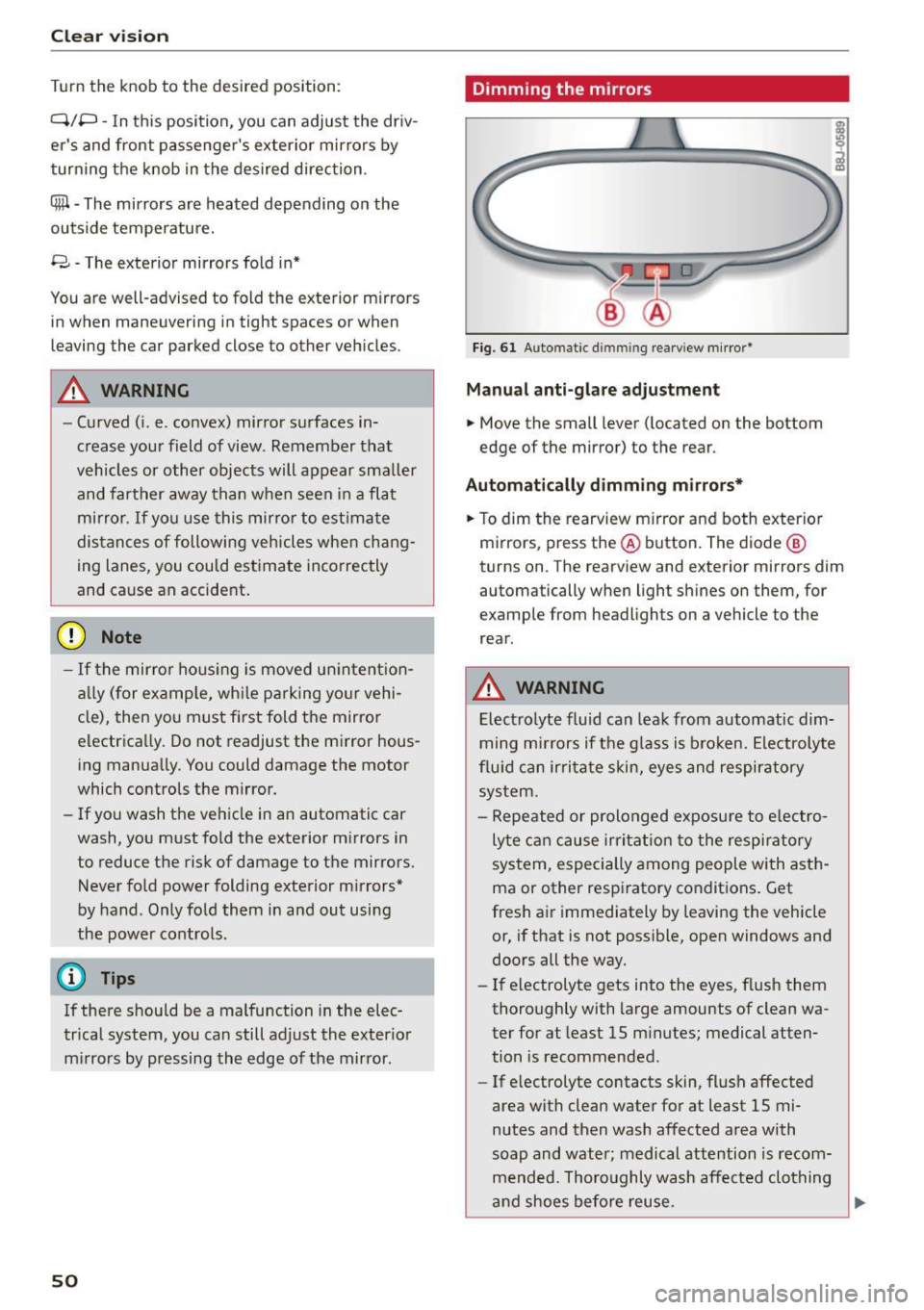
Fig. 61 Auto matic d immin g rearv iew mirror*
Manual anti-glare adjustment
.. Move the small lever (located on the bottom
edge of the mirror) to the rear .
Automatically dimming mirrors*
.. To dim the rearview m irror and both exterior
mirrors, press the@ button. The diode @
turns on . The rearview and exterior mirrors dim
automatically when light shines on them, for
example from headlights on a vehicle to the
rear.
A WARNING
Electrolyte fluid can leak from automatic dim
ming mirrors if the glass is broken. Electrolyte
fluid can irritate skin, eyes and respiratory
system.
- Repeated or prolonged exposure to electro
lyte can cause irritat ion to the respiratory
system, especially among people with asth
ma or other respiratory conditions. Get
fresh air immediately by leaving the vehicle
or, if that is not possible, open windows and
doors all the way.
- If electrolyte gets into the eyes, flush them
thoroughly with large amounts of clean wa
ter for at least 15 minutes; medical atten
tion is recommended .
- If electrolyte contacts skin, flush affected
area with clean water for at least 15 mi
nutes and then wash affected area with
soap and water; medical attention is recom
mended. Thoroughly wash affected clothing
and shoes before reuse.
Page 54 of 232
Clear vision
in the interval wipe position and then come back
a while later and drive off, the rain sensor will re
activate itself after the vehicle speed has exceed
ed 4 mph (6 km/h).
The rain sensor* is only activated with the wiper
lever set to position(!). When it starts to rain,
the rain sensor will automatically activate the in
termittent wiping mode.
To reduce the sensitivity of the sensor, move
switch @ down. To increase the sensitivity, move
the switch up. The higher you adjust the sensitivi
ty, the faster the sensor will react when it senses moisture on the windshield. The pauses between
wiper turns depend not only on the sensitivity setting, but on the vehicle speed as well.
During brief stops, e.g . at a red light, wiper mo
tion will automatically be reduced to the next
lower speed . Wipers already turning at low speed
change to intermittent wiping.
When the ignition is turned on, the washer jets
are heated.
A WARNING
- Wiper blades are crucial for safe driving! On
ly when they are in good condition are they
able to clear the windows properly to pro
vide uncompromising visibility. Worn or
damaged wiper blades are a safety hazard
¢ page 53, Replacing windshield wiper
blades!
- The light/rain sensor* is only designed to as
sist and support the driver. It remains en
tirely the driver's responsibility to monitor outside weather conditions and to manually
activate the wipers as soon as rain or drizzle
reduces visibility through the windshield .
- The windshield must not be treated with
water-repellent materials. They can increase
glare under poor visibility conditions such as
wetness, darkness, or when the sun is low
on the horizon . In addition, they can cause
the windshield wipers to chatter.
(D Note
In freezing or near freezing conditions:
52
- Always check that the wiper blades are not
frozen to the glass before you turn the wip
ers on. Loosen a wiper blade which is frozen
in place before operating the wipers to pre
vent damage to the wiper blade or the wiper
motor .
- Do not use the wipers to clear a frosted win
dow. Using the wipers as a convenient ice
scraper will destroy the wiper blades .
- Before you take your vehicle to an automatic
car wash, make sure you have the wind
shield wiper system switched off (lever in position
0), otherwise the windshield wiper
system could get damaged in the car wash if
it should suddenly come on.
(D Tips
- The windshield wipers are switched off
when the ignition is turned off. Activate the
windshield wipers after the ignition is
switched back on by moving the windshield
wiper lever to any position.
- Worn or dirty windshield wiper blades cause
smearing, which can affect the operation of
the light/rain sensor*. Check the condition
of your windshield wiper blades regularly.
- The rain sensor is part of the interval wiping
system. Turning off the ignition will also de
activate the rain sensor . To reactivate the
sensor, switch off the interval wiping func
tion, then switch it back on again.
- Applies to vehicles with light/rain sensor:
When the wipers are switched on manually
and in rain conditions, the automatic head
lights* turn on <=>
page 46, Lights or off dur
ing the day when the wipers are no longer
operating. The automatic headlights* func
tion is available in this case only when the
light switch is in the "AUTO" position
<=>
page 46, fig. 55.
- Make sure the washer fluid reservoir in the
engine compartment is topped off before
going on a long trip. Look up<=>
page 168
for checking and filling the washer contain
er.
- The wipers only operate with the hood com
pletely closed.
Page 62 of 232
Seats and storag e
braking or in an accident -especially if the
airbag is dep loyed -these objects could in
jure any passengers ins ide the vehicle.
Glove compartment
The glove comportment is illuminated and con
be locked.
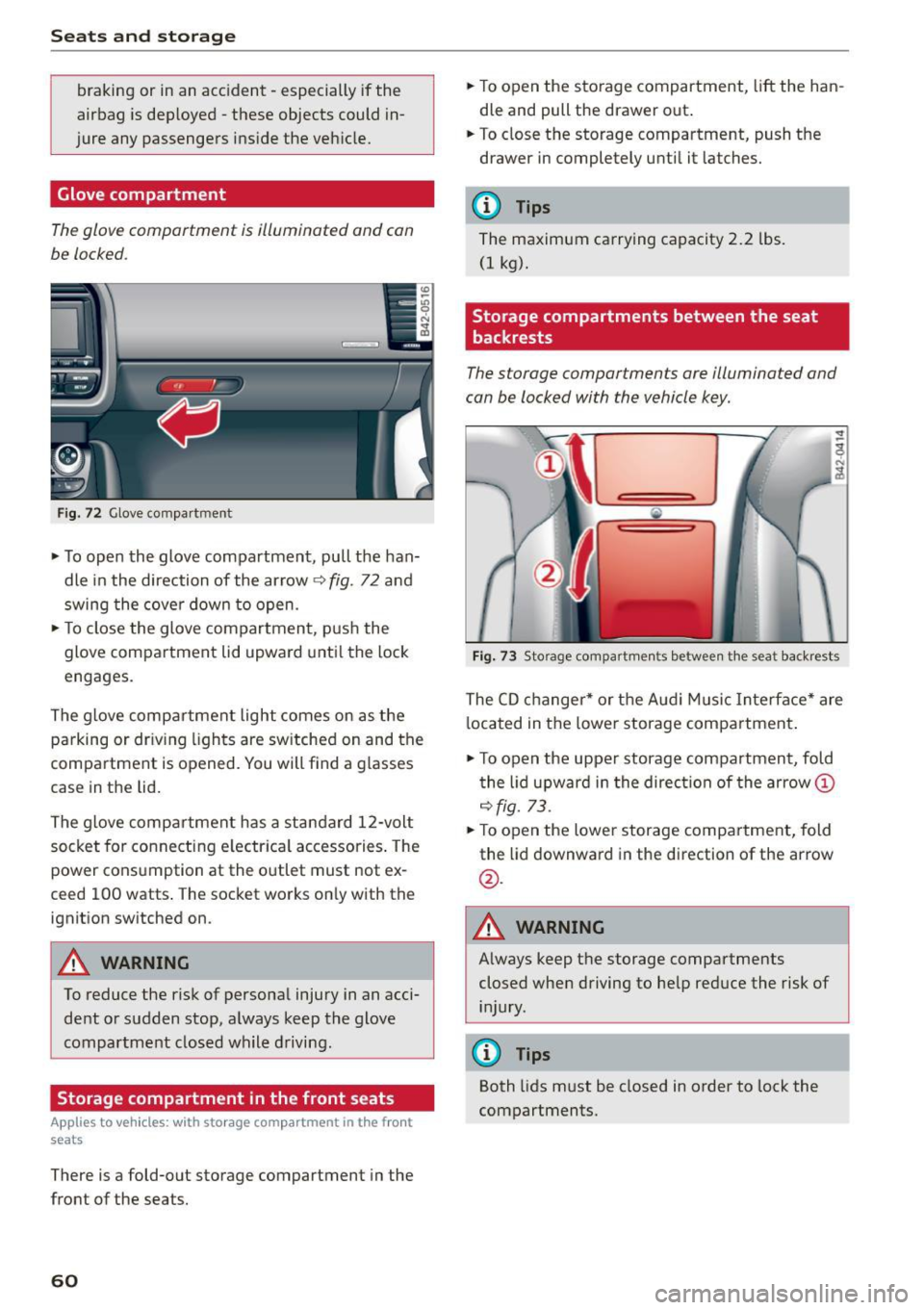
F ig. 72 Glove compartment
.,. To open the glove compartment, pull the han
dle in the direction of the arrow
9 fig. 72 and
swing the cove r down to open .
.,. To close the glove compartment, p us h the
glove compartment lid upward unti l the lock
engages.
The glove compartment light comes on as the parking or dr iving lights are switched on and the
compartment is opened. You will find a g lasses
case in the lid.
The glove compartment has a standard 12-volt socket for co nnecting e lectrica l accessories . The
power cons umption at the outlet must not ex
ceed 100 watts . The socket works on ly with the
ignition switched on.
A WARNING
To reduce the risk of personal injury in an acci
dent o r sudden stop, a lways keep the glove
compartment closed wh ile driving .
Storage compartment in the front seats
Applies to veh icles: w ith storage compartment in the front
seats
There is a fold-out storage compartment in the
front of the seats.
60
.,. To open the storage compartment, lift the han
dle and pull the drawer out .
.,. To close the storage compartment, push the
drawer in completely until it latches.
(D Tips
The maximum carrying capacity 2.2 lbs.
(1 kg).
Storage compartments between the seat
backrests
The storage comportments ore illuminated and
con be locked with the vehicle key.
Fi g. 73 Storage compart men ts betwee n th e seat backrests
The CD changer * or t he A ud i M usic Interface* are
l ocated in the lowe r storage compartment .
.,. To open the upper storage compartment, fold
t he lid upward in the direc tion of the arrow@
9fig. 73 .
.,. To open the lower storage compartment, fold
the lid downward in the direction of the arrow
@ .
A WARNING -
Always keep t he storage compartments
closed when driving to help reduce the risk of i n jury.
(D Tips
Both lids m ust be closed in order to lock the
compartments.
Page 76 of 232
Transmission
Transmission Manual transmission
Gearshift lever
Applies to vehicles: with manua l transmission
The clutch pedal must be depressed all the way
before you can start the engine .
The manual transmission in your Audi is equipped
with an
interlock-feature.
• Depress the clutch pedal all the way.
• Start the engine with the gearshift lever in Neu
tral and the clutch pedal depressed.
(D Note
Always depress the clutch pedal fully when
changing gears. Do not hold the vehicle on a
hill with the clutch pedal partially depressed.
This may cause premature clutch wear or
damage.
(D Tips
- Resting your hand on the gearshift lever
knob while driving will cause premature
wear in the transmission.
- The back-up lights go on when you shift into
Reverse with the ignition on.
Gearshift pattern (6-speed manual
transmission)
App lies to vehicles: with 6-speed manual transmission
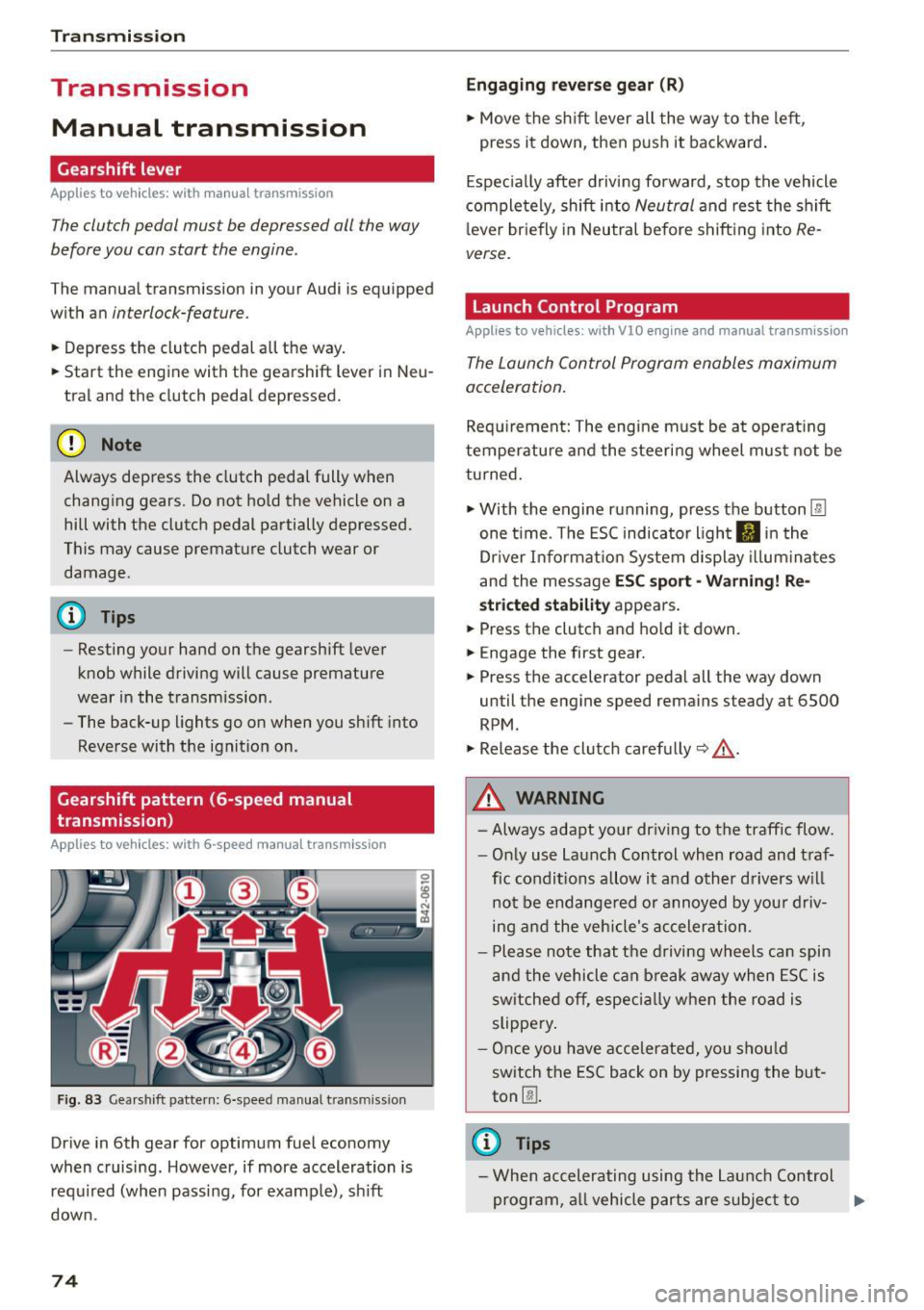
Fig. 83 Gearshift pattern: 6-speed manual transm iss ion
Drive in 6th gear for optimum fuel economy
when cruising. However, if more acceleration is
required (when passing, for examp le), sh ift
down.
74
Engaging reverse gear (R)
• Move the shift lever all the way to the left,
press it down, then push it backward.
Especially after driving forward, stop the vehicle
completely, shift into
Neutral and rest the shift
l ever briefly in Neutral before shifting into
Re
verse.
Launch Control Program
Applies to vehicles : wit h VlO engin e and manual t ra nsmissio n
The Launch Control Program enables maximum
acceleration.
Requirement: The engine must be at operat ing
temperature and the steering wheel must not be
turned.
• With the engine running, press the button
l:fil
one time. The ESC indicator light II in the
Dr iver Informat ion System display illum inat es
and the message
ESC sport -Warning! Re
stricted stability appears .
• Press the clutch and hold it down.
• Engage the first gear.
• Press the accelerator pedal all the way down
until the engine speed remains steady at 6500
RPM .
• Release the clutch carefully~,&. .
A WARNING
- Always adapt your driving to the traffic flow.
- Only use Launch Control when road and traf-
fic conditions allow it and other drivers will
not be endange red or annoyed by your driv
ing and the vehicle's acceleration .
- Please note that the driving wheels can spin
and the vehicle can break away when ESC is
sw itched off, especially when the road is
slippery .
- Once you have accelerated, you should
switch the ESC back on by pressing the but
ton
00 .
(D Tips
- When accelerating using the Launch Control
program, all vehicle parts are subject to .,..
Page 77 of 232
.... N
l'
N "1: .... I.O
"' N
"' ....
heavy loads. This can result in increased
wear .
- The Launch Control Program only funct ions
when the parking brake is released and the
vehicle speed is less than 3 mph (5 km/h).
S tronic
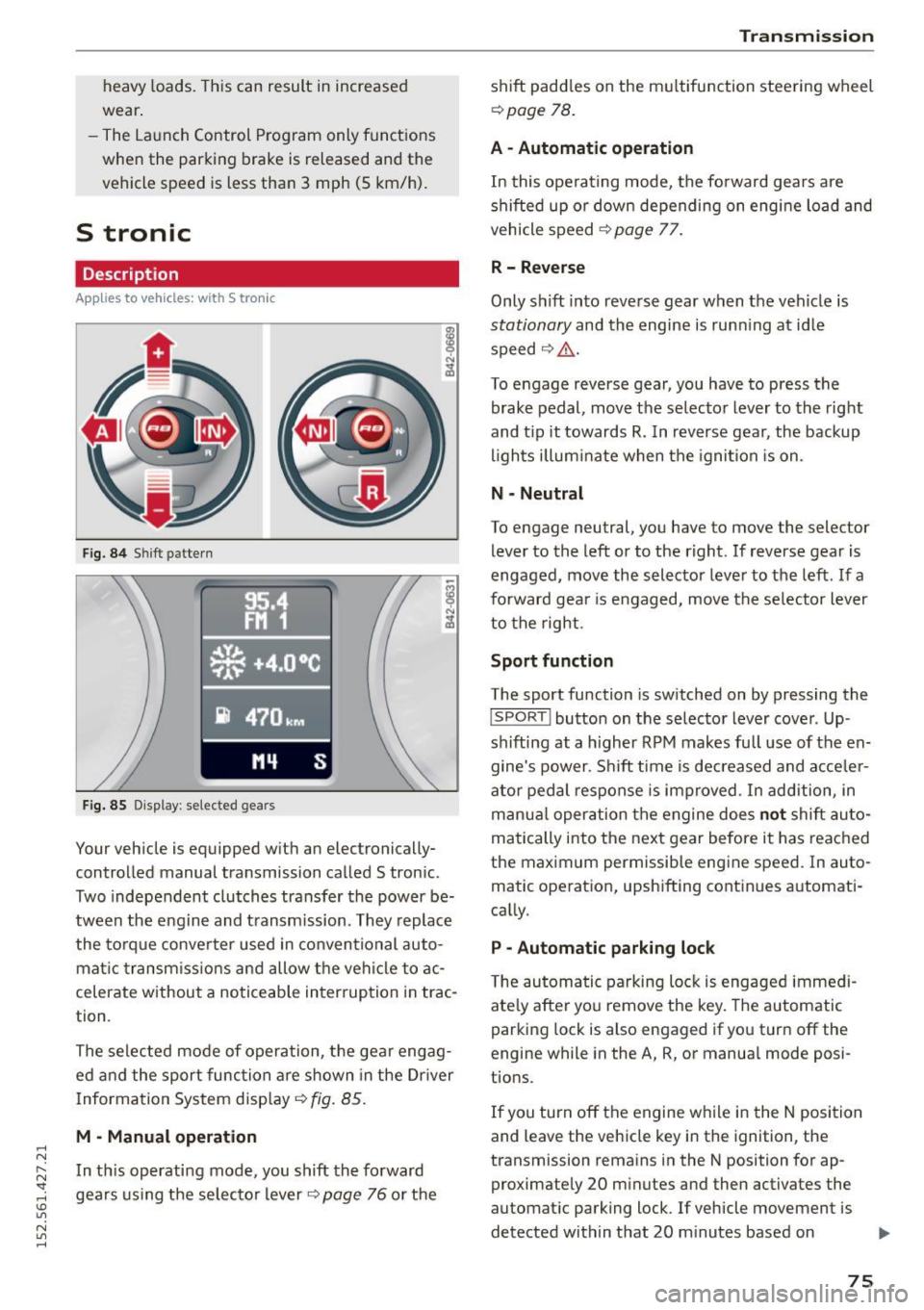
Description
Applies to vehicles: with S tronic
Fig. 84 Shift pattern
Fig. 85 Display : selected gea rs
Your vehicle is equipped with an electronically
controlled manual transmission called S tronic .
Two independent clutches transfer the power be
tween the eng ine and transmission. They replace
the torque converter used in conventional auto
mat ic transmissions and allow the vehicle to ac
celerate without a noticeable interruption in trac
tion .
The selected mode of operation, the gear engag ed and the sport function are shown in the Dr iver
Information System display ¢
fig. 85.
M -Manual operation
In this operating mode, you shift the forward
gears using the selector lever
r=>v page 76 or the
Transmission
shift paddles on the multifunction steering wheel
¢ page 78.
A - Automatic operation
In this operating mode, the forward gears are
shifted up or down depending on engine load and
vehicle speed
¢ page 77.
R- Reverse
Only s hift into reverse gear when the vehicle is
stationary and the engine is runn ing at idle
speed ¢
Li')...
To engage reverse gear, you have to press the
brake pedal, move the selector lever to the right
and t ip it towards
R. In reverse gear, the backup
lights illuminate when the ignition is on .
N -Neutral
To engage neutral, you have to move the selector
lever to the left or to the right . If reverse gear is
engaged,
move the selector lever to the left . If a
forward gea r is engaged, move the selector lever
to the right.
Sport function
The sport function is switched on by pressing the
I SPORT ! button on the selector lever cover . Up
shifting at a higher RPM makes full use of the en
gine's power . Shift time is decreased and acceler
ator pedal response is improved . In addition, in
manua l operation the engine does
not shift au to
matically into the next gear before it has reached
the maximum permissible engine speed. In auto
matic operation, upshifting continues automati
cally.
P -Automatic parking lock
The automatic parking lock is engaged immedi
ately after you remove the key. The automatic
parking lock is also engaged if you turn off the
engine while in the A, R, or manual mode posi
tions .
If you turn off the engine while in the N position
and leave the vehicle key in the ignition, the
transmission remains in the N position for ap proximately 20 minutes and then activates the
automatic parking lock . If vehicle movement is
detected within that 20 minutes based on
IIJI.
75
Page 78 of 232
Transmi ssio n
rotation of the whee ls, then the time wi ll in
crease a ccording ly .
A WARNING
- If a gear is engaged when the vehicle is sta
tionary, the acce lerator must not be pressed
inadvertently under any circumstances. Oth
erwise the vehicle will immed iately start to
move - sometimes even if the park ing brake
is f irmly applied.
- Before you or other persons open the engine compartment l id and work on a running en
gine, select neutral pos it ion
N and firmly
apply the handbra ke. Always read and fol
low the app licab le warn ings¢
page 155,
Working in the engine compartment.
@ Tips
- If you accidenta lly shifted into N w hile d riv
i ng, you can engage a gear in the normal
way using the selecto r lever.
- An indicator light i s displayed if a malfunc
tion occurs while in S tronic. Refer to
~page 78.
Manual mode
App lies to veh icles: w ith 5 tro nic
S tronic allows the driver to shift gears man ua lly.
Starting from a stop
.,. Press and ho ld the brake pedal.
.. Move the selecto r leve r to the left.
.. Tap the se lec tor lever forwa rd
0 -
.. Re lease the brake pedal and press the accelera -
tor pedal ¢ .&,. .
Shifting
.,. To shift up, tap the selector lever fo rward 0 -
.,. To shift down, t ap the sele ctor lever to the re ar
o.
Stopp ing temporarily
.,. Press the brake pedal to prevent the vehicle
from moving, for examp le at traff ic lights .
Par king
.. Press and ho ld the brake pedal¢.&,. .
76
.. Activate the parking brake .
.. Turn off the ignition and remove the key .
Stopping on an incline
.,. Always keep the vehicle stat ionary using the
foot brake to prevent it from " rolling back"
¢ .&,. . D o not try to p revent the vehicle from
"ro lling back" when a gear is engaged by in
creasing engine speed.
.. Activate the parking brake.
Starting on a hill
.. With a gear engaged, remove your foot from
the brake, accelerate and slowly release the
parking brake.
When acce lera ting, S tronic sh ifts i nto the nex t
gear in gea rs 1, 2, 3, 4, 5 and 6 shor tly befo re
the maximum permissib le engine speed is
r eached.
If you have se lec ted a lower gear than the current
one, S tron ic w ill shift down only when the engine
will not be ove r-revved.
You can switch to a utomat ic operation at any
time
¢ page 77.
A WARNING
-
- Never leave your vehicle with the engine
ru nning while in gear. If you must leave yo ur
vehicle with the engine r unning, set the
parking brake firmly and engage neutral
N .
- With the engine r unning and a gear engag
ed, you have to ho ld the vehicle with the
foot brake .
- Do not accelerate when you sh ift gears with
the vehicle stationary and the engine run ning.
- Before driving down a steep slope, reduce
your speed and sh ift into a lower gear with S
tronic.
- Do not ride the bra kes or press the bra ke
pedal too often or too long. Constant brak
ing causes the brakes to overheat and sub
stantially reduces brak ing performance, in
creases braking d istance or causes comp lete
fa ilu re of the brake system. ..,.
Page 84 of 232
Parking syste m
Switching on /off
App lies to veh icles: w ith park ing system advanced
SPORT •
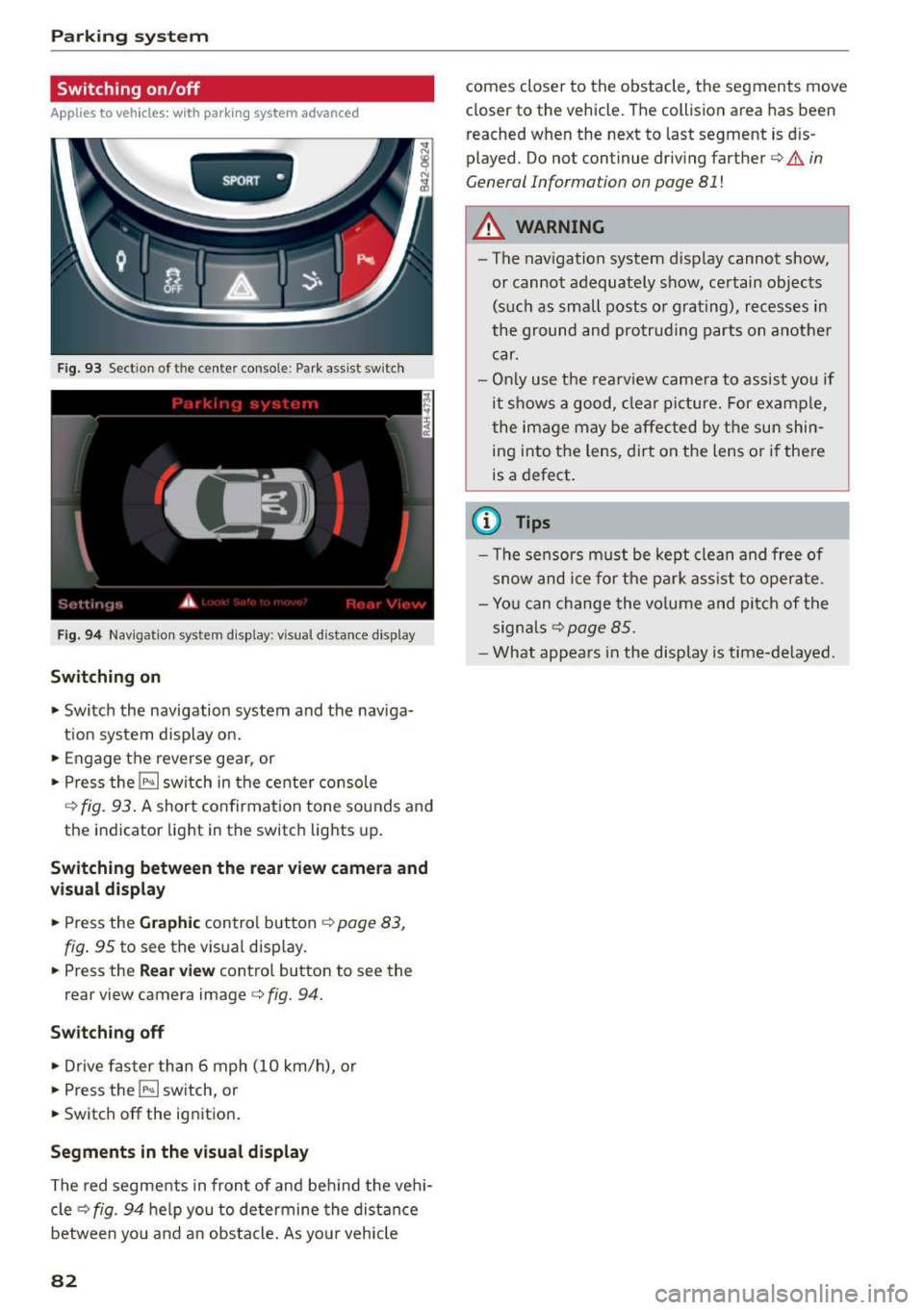
Fig. 93 Section of the cente r conso l-e : Park ass ist sw itch
F ig . 94 Naviga tio n sys tem display : v isual distance display
Sw itching on
... Switch the navigation system and the nav iga
tion system display o n .
... Engage the reverse gea r, or
... Press the
!l¾ I switch in the center console
Q fig. 93. A short confirmation tone sounds and
the indicator light in the switch lights up.
Switching betwe en th e rear view c amera and
vi su al d isplay
... Press the Graphic control button ¢ page 83,
fig . 95
to see the visual disp lay .
... Press the
Rea r v iew contro l button to see the
rear view camera image¢
fig. 94.
Switch ing off
... Drive faster than 6 mph (10 km/h), or
... Press the
!P-<. I switch, or
... Switc h off the ignition .
Segments in the visual d isplay
The red segments in front of and be hind the vehi
cle¢
fig. 94 help you to determine the distance
between you and a n obstacle. As your vehicle
82
comes closer to the obstacle, the segments move
closer to the vehicle . The collision area has been
reached when the next to last segment is dis
played. Do not continue driving farther
Q & in
General Information on page 81
!
A WARNING
-The navigation system display cannot show,
or cannot adequately show, certain objects (such as small posts or grating), recesses in
the ground and protrud ing parts on another
car.
- Only use the rearv iew camera to assist you if
it s hows a good, clear pictu re. For examp le,
the image may be affected by t he sun shin
ing i nto the lens, dirt oh the lens or if there
is a defect .
(1) Tips
- The sensors m ust be kept clean and free of
snow and ice for the park ass ist to operate.
- Yo u can change the vo lume and pit ch of the
signa ls
Qpage 85.
-What appears in the display is time-delayed.
Page 88 of 232
Driving Sa fel y
Driving Safely
General notes
Safe driving habits
Please remember -safety first!
This chapter contains important information,
tips, instructions and warnings that you need to
read and observe for your own safety, the safety
of your passengers and others. We have summar
ized here what you need to know about safety
be lts, airbags, chi ld restraints as well as child
safety. Your safety is for us
priority number 1 . Al
ways observe the informat ion and warn ings in
t his section - for your own safety as well as for
that of your passengers.
The information i n this section applies to all
model ve rsions of your vehicle . Some of the fea
t ures des cribed in this sect ion may be standard
equipment on some models, or may be optional
eq uipment on others . If you are not sure, ask
your author ized Audi dealer.
A WARNING
-Make certain that you fo llow the instruc
t ions and heed the WARNINGS in this Man
ual. It is in your interest and in the interest
of your passengers .
- Always keep the complete owner's literature
in your Audi when you lend or se ll you r vehi
cle so that this important information will
always be ava ilable to the driver and passen
gers.
- Always keep the owner's literature handy so
that you can find it easily if you have ques
ti ons.
Safety equipment
The safety features are part of the occupant re
straint system and work together to help reduce
the risk of injury in a wide variety of occident si t
uations.
Your safety and the safety of yo ur passengers
should not be left to chance. Advances in tec h
nology have made a var iety of f eatures av ailable
to help re duce the r isk of inj ury in an accident.
86
The following is a listing o f just a few o f the safe
ty features in yo ur Audi:
- sophis tica ted s afety be lts for drive r and a ll pas-
senger sea ting pos itions,
- safety belt p rete nsio ners,
- front airbags,
- knee airbags,
- side airbags in the seats
- adjustab le head restraints,
- adjustab le steering column .
These ind iv idual safety featu res can wor k togeth
er as a sys tem to he lp pro tect you a nd your pas
sengers in a wide range of accidents . These fea
tures cannot work as a system if th ey are not al
ways proper ly adjusted and prope rly used!
Safety i s everyb ody' s re sponsibilit y!
Important things to do before driving
Safety is everybody's job! Vehicle and occupant
safety always depends on the informed and care
ful driver.
Fo r you r safety and the safety of your passen
gers,
before driving always:
.,. Make sure that all lights and signals are operat
ing correctly .
.,. Make sure that the tire pressu re is co rrect.
.,. Ma ke s ure that all w indows are clean and affo rd
good visibility to the outs ide.
.,. Secure a ll luggage and o ther items caref ully
r=;,page 59 .
.,. Make s ure that nothing can interfere with the
pedals.
.,. Adjust front seat, head restraint and mirrors
correctly for your height.
.,. Instruct passengers to adjust the head re
straints according to the ir height .
.,. Make su re to use the r ight child restraint cor
rec tly to p rotect ch ild ren
r=;, page 122, Child
Safety.
.,. Sit p roperly in your seat and ma ke su re that
your passengers do the same
c::> page 56, Gen
eral recommendations.
.,. Fasten your safety belt and wear it properly. A l
so instruct your passengers to fasten their safe
ty belts proper ly
c::> page 95 .
Page 148 of 232
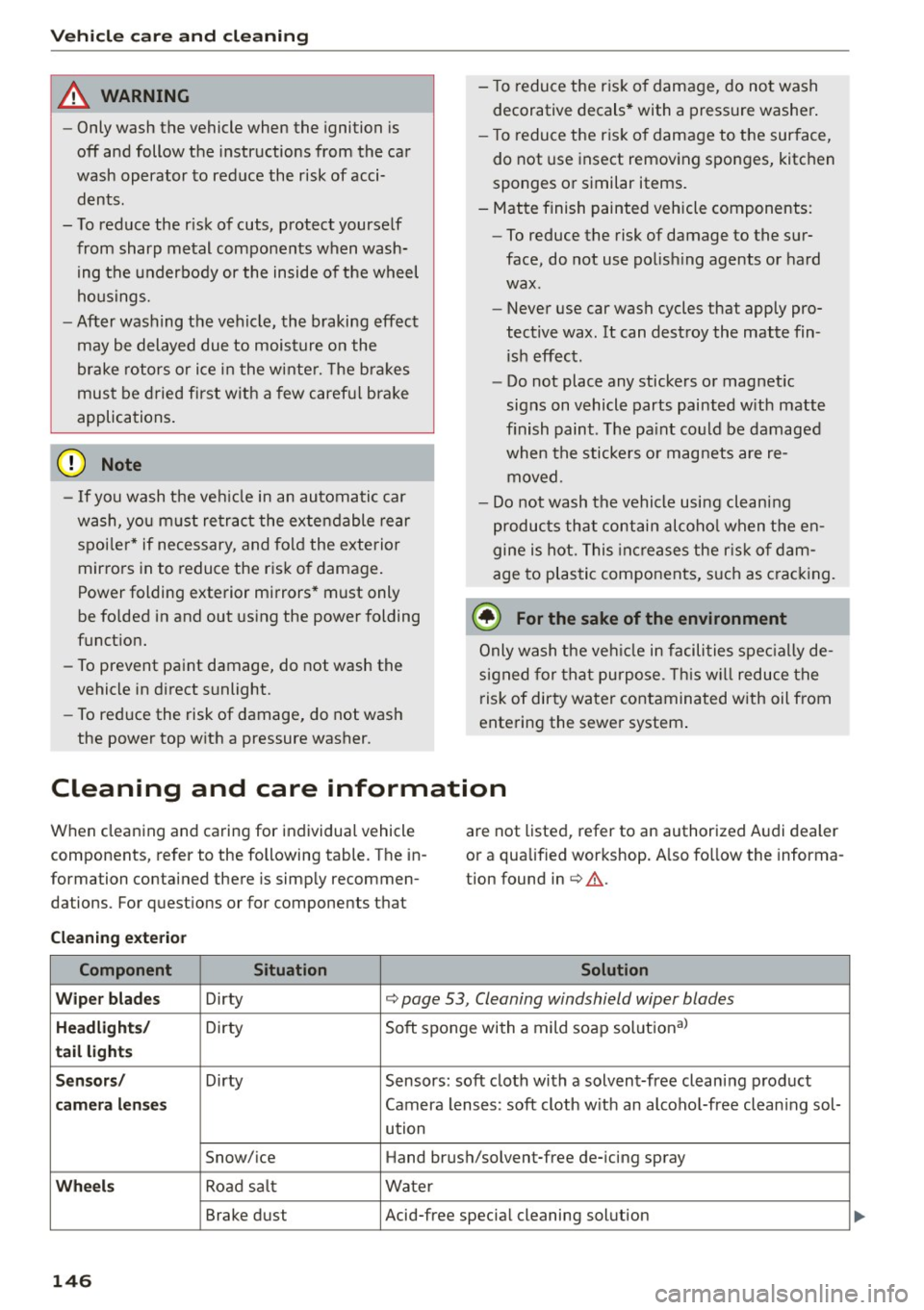
Vehicle care and cleaning
A WARNING
-Only wash the vehicle when the ignition is
off and follow the instructions from the car
wash operator to reduce the risk of acci
dents.
- To reduce the risk of cuts, protect yourself
from sharp metal components when wash ing the underbody or the inside of the wheel
housings.
- After washing the vehicle, the braking effect
may be delayed due to moisture on the
brake rotors or ice in the winter. The bra kes
must be dried first with a few caref ul brake
applications .
@ Note
-If you wash the ve hicle in an au tomatic car
wash, you must retract the extend able rear
spoi ler * if necessary, and fold the exterior
mirrors in to reduce the risk of damage .
Power folding exterior mirrors* must only
be fo lded in and out using the power folding
funct ion.
- To prevent paint damage, do not wash the
vehicle in direct sunlight.
- To red uce the risk of damage, do not wash
the power top with a pressure washer. -
To reduce the risk of damage, do not wash
decorative decals * with a pressure washer.
- T o reduce the risk of damage to the surface,
do not use insect remov ing sponges, kitchen
sponges or similar items.
- Matte finish painted vehicle components:
- To reduce the risk of damage to the sur-
face, do not use polish ing agents or hard
wax.
- Never use car wash cycles that apply pro
tective wax. It can destroy the matte fin ish effect .
- Do not place any stickers or magnet ic
signs on vehicle parts painted w ith matte
finish paint. The pa int could be damaged
when the stickers o r magnets are re
moved.
- Do not wash the vehicle using cleaning
products that contain alcohol when the en
gine is hot. This increases the risk of dam
age to plastic components, such as cracking.
@ For the sake of the environment
Only wash the vehicle in facilities spec ial ly de
signed for that purpose. This w ill reduce the
risk of dirty water contaminated with oil from
entering the sewer system .
Cleaning and care information
When cleaning and caring for individual vehicle
components, refer to the following table . The in
formation contained there is simp ly recommen
dations. For questions or for components that are not listed, refer to an authorized Audi dealer
or a qualified workshop. A
lso fo llow the informa
tion found in
¢ .&. .
Cleaning exterior
Component Situation Solution
Wiper blades
Dirty ¢ page 53, Cleaning windshield wiper blades
Headlights/ Dirty Soft sponge with a mild soap solutiona>
tail lights
Sensors
/
Dirty Sensors: soft cloth with a solvent-free cleaning product
camera lenses Camera lenses: soft cloth w ith an alcoho l-free clean ing sol-
ution
Snow/ice Hand brush/solvent-free de-icing spray
Wheels Road salt Water
Brake dust Acid-free special cleaning solution
146
...
Page 150 of 232
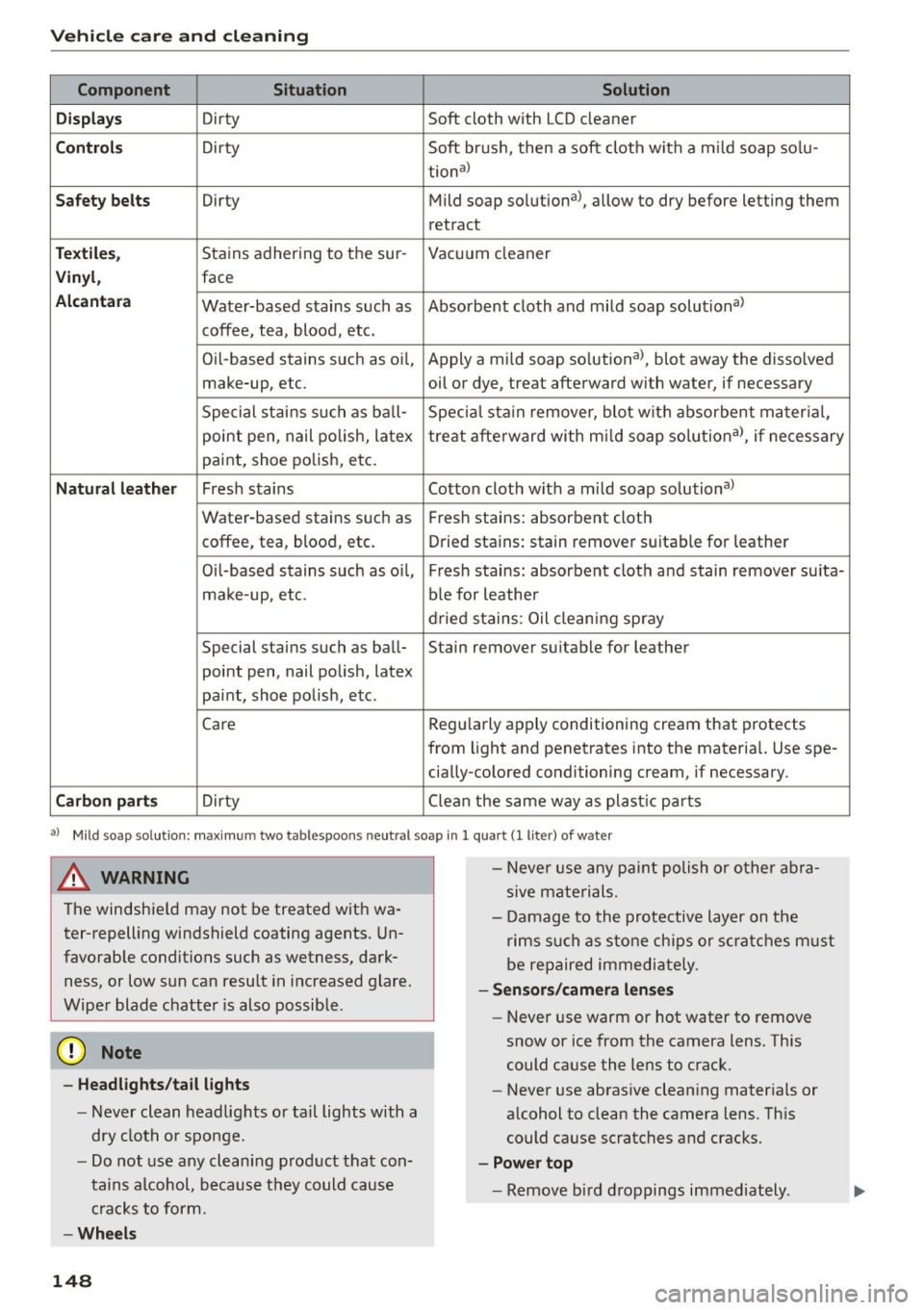
Vehicle care and cleaning
Component Situation Solution
Displays
Dirty Soft cloth with LCD cleaner
Controls Dirty Soft brush, then a soft cloth with a mild soap solu-
tional
Safety belts Dirty Mild soap solution a>, allow to dry before letting them
retr act
Textiles, Stains adhering to the sur- Vacuum cleaner
Vinyl, face
Alcantara Water-based stains such as Absorbent cloth and mild soap solutional
coffee, tea, blood, etc.
Oil-based stains such as o il, Apply a mi ld soap solutiona>, blot away the disso lved
make-up, etc. oil ori dye, treat afterward with water, if necessary
Special stains such as ball- Special stain remover, blot with absorbent material,
point pen, nail polish, latex treat afterward with mild soap solutional, if necessary
paint, shoe polish, etc.
Natural leather Fresh stains Cotton cloth with a mild soap solutional
Water-based stains such as
Fresh stains: absorbent cloth
coffee, tea, blood, etc. Dried stains: stain remover suitable for leather
Oil-based stains such as oil, Fresh stains: absorbent cloth and stain remover suita-
make-up, etc. ble for leather
dried stains: Oil cleaning spray
Special stains such as ball- Stain remover suitable for leather
point pen, nail polish, latex
paint, shoe polish, etc.
Care Reg
ula rly apply conditioning cream that protects
from light and penetrates into the materia l. Use spe-
cially-co lored conditioning cream, if necessary.
Carbon parts Dirty Clealil the same way as plastic parts
aJ Mild soap so lution: max im um two ta blespoo ns neut ral so ap in 1 quart (l lite r) of w ate r
A WARNING
Th e windshie ld may not be treated with wa
ter-repelling windshield coating agents. Un
favorable conditions such as wetness, dark
ness, or low sun ca n resu lt in increased glare.
Wiper blade chatter is also possible .
(D Note
-Headlights/tail lights
- Never clean headlights or tail lights with a
dry cloth or sponge.
- Do not use any cleaning product that con
tains alcohol, because they could cause
cracks to form.
-Wheels
148
-
- Never use any paint polish or other abra
sive materials.
- Damage to the protective layer on the
r ims such as stone chips or scratches must
be repaired immed iately.
-Sensors/camera lenses
- Never use warm or hot water to remove
snow or ice from the camera lens. This
could cause the lens to crack.
- Never use abrasive clean ing materials or
a lcohol to clean the camera lens. This
could cause scratches and cracks.
- Power top
- Remove bird droppings immediately .