lights AUDI R8 SPYDER 2015 User Guide
[x] Cancel search | Manufacturer: AUDI, Model Year: 2015, Model line: R8 SPYDER, Model: AUDI R8 SPYDER 2015Pages: 232, PDF Size: 58.36 MB
Page 20 of 232
Instruments and warning/indicator lights
A WARNING
- Light bulbs are pressurized and cou ld ex
plode while they are being changed causing
serious persona l injury.
-
- Work with due care when handling the high
vo ltage section of gas discharge (xenon)
lamps. Fa iling to do so could result in death
or serious injury!
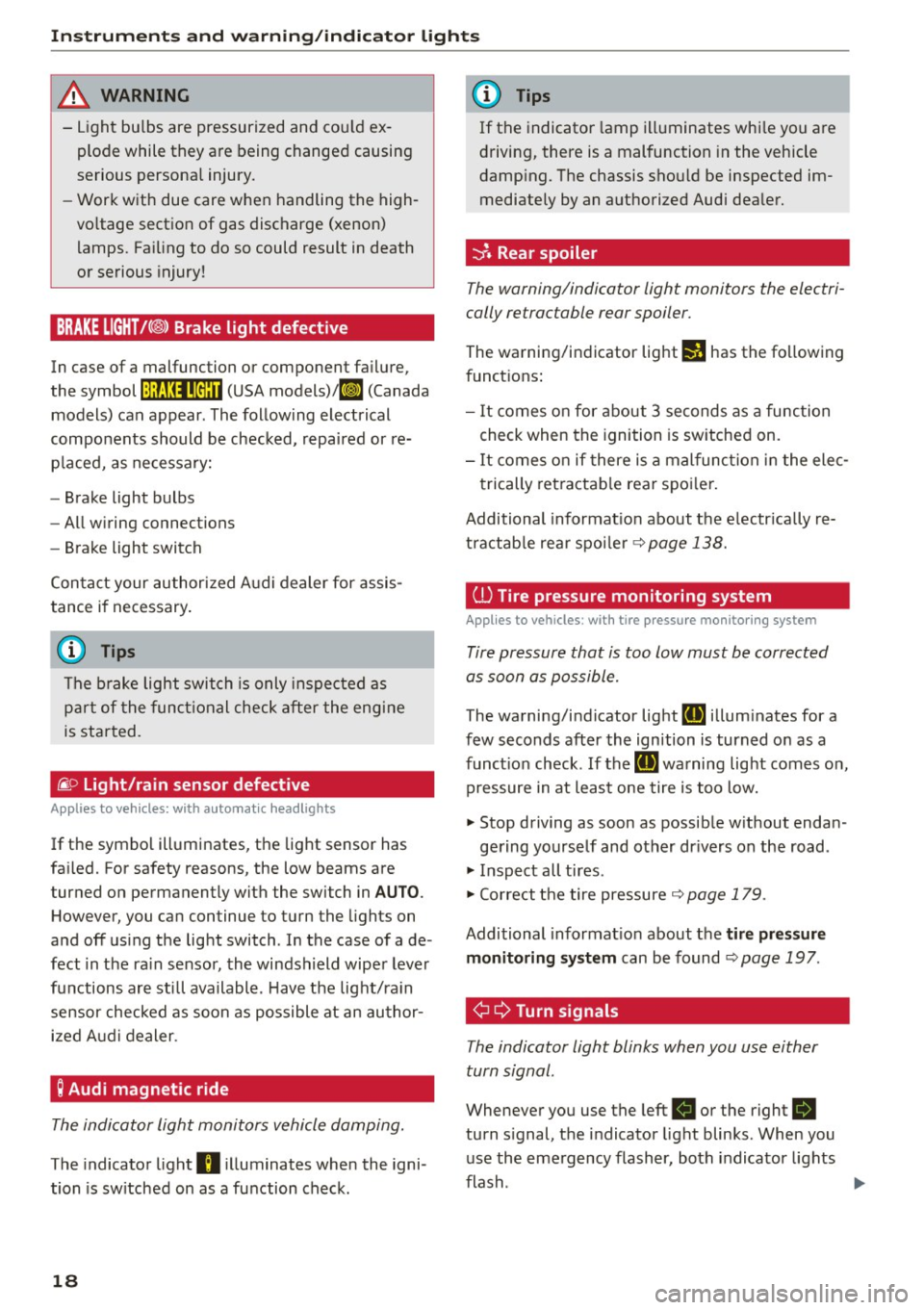
BRAKE LIGHT!< ®> Brake light defective
In case of a malfunction or component failure,
the symbol
!:ljf:Ul•@:U (USA models)/ ll] (Canada
models) can appear. The following electrical
components should be checked, repaired or re
p laced, as necessary:
- Brake light bulbs
- All wiring connections
- Brake light switch
Con tact your authorized Audi dealer for assis
tance if necessary.
(D Tips
The brake light switch is only inspected as
part of the functional check after the engine
is started.
/i. O
Light/rain sensor defective
Applies to veh icles: w ith automatic headlights
If the symbol illuminates, the light sensor has
fai led. For safety reasons, the low beams are
turned on permanently with the switch in
AUTO.
However, you ca n continue to turn the lights on
and off using the light switch . In the case of a de
fect in the ra in sensor, the windshield wiper lever
functions are still available . Have the light/ra in
sensor checked as soon as possible at an author ized Audi dealer.
; Audi magnetic ride
The indicator light monitors vehicle damping.
The indicator light B illuminates when the igni
tion is sw itched on as a function check.
18
(D Tips
If the indicator lamp illuminates whi le you are
driving, there is a malfunction in the vehicle
damping. The chassis should be inspected im
mediately by an authorized Audi dealer.
-::}. Rear spoiler
The warning/indicator light monitors the electri
cally retractable rear spoiler.
The warning/indicator light I! has the fo llowing
funct ions :
- It comes on for about 3 seconds as a function
check when the ignition is switched on.
- It comes on if there is a malfunction in the elec
trically retractable rear spoiler.
Additional informat ion about the e lectr ically re
tractable rear spoiler
~ page 138.
ill Tire pressure monitoring system
Applies to vehicles: with tire pressure monitoring system
Tire pressure that is too low must be corrected
as soon as possible.
The warning/indicator light [IJ illum inates for a
few seconds after the ignition is turned on as a
function check. If the
[IJ warning light comes on,
pressure in at least one tire is too low.
.. Stop driving as soon as possible w ithout endan -
gering yourself and other dr ivers on the road .
.. Inspect all tires .
.. Correct the tire pressure ~
page 179.
Additional informat ion about the tire pr essure
monitoring system
can be found~ page 197 .
¢ Q Turn signals
The indicator light blinks when you use either
turn signal .
Whenever you use the left B or the right R
turn signal, the indicator light blinks. When you
use the emergency flasher, both indicator lights
flash .
Iii>
Page 21 of 232
..... N
r-N "': ..... \!) ..,.,
N ..,., .....
Instruments and warning/indicator lights
If one of the turn signal light bulbs burn out, the
turn signal wi ll blink twice as fast as normal.
Addit ional info rmation on the turn signals
~page 47.
CRUISE/ 0 Cruise control
The @;(1)~14 (USA models)/ . (Canada models)
warning/indicator light illuminates when the
cruise control is activated .
19
Page 25 of 232
.... N
l'
N "1: rl I.O
"' N
"' ....
Set Clock ¢ page 23
Tire pressure c::> page 196
Computer c::> page 2 3
Speed warning c::> page 70
Language c::>page23
Units (distance, fuel consumption,
temperature)
c::> page 23
Lap timer c::> page 25
Lights c::> page 46
Wiper (service position)
c::>page 53
Doors (unlocking and locking
mode, for example Auto-loc k)
c::> page 29, ¢ page 29
Chec k Service c::> page 24
Chassis number c::>page 212
Keys
Menu off The menu display is hidden and
the lap time r appears.
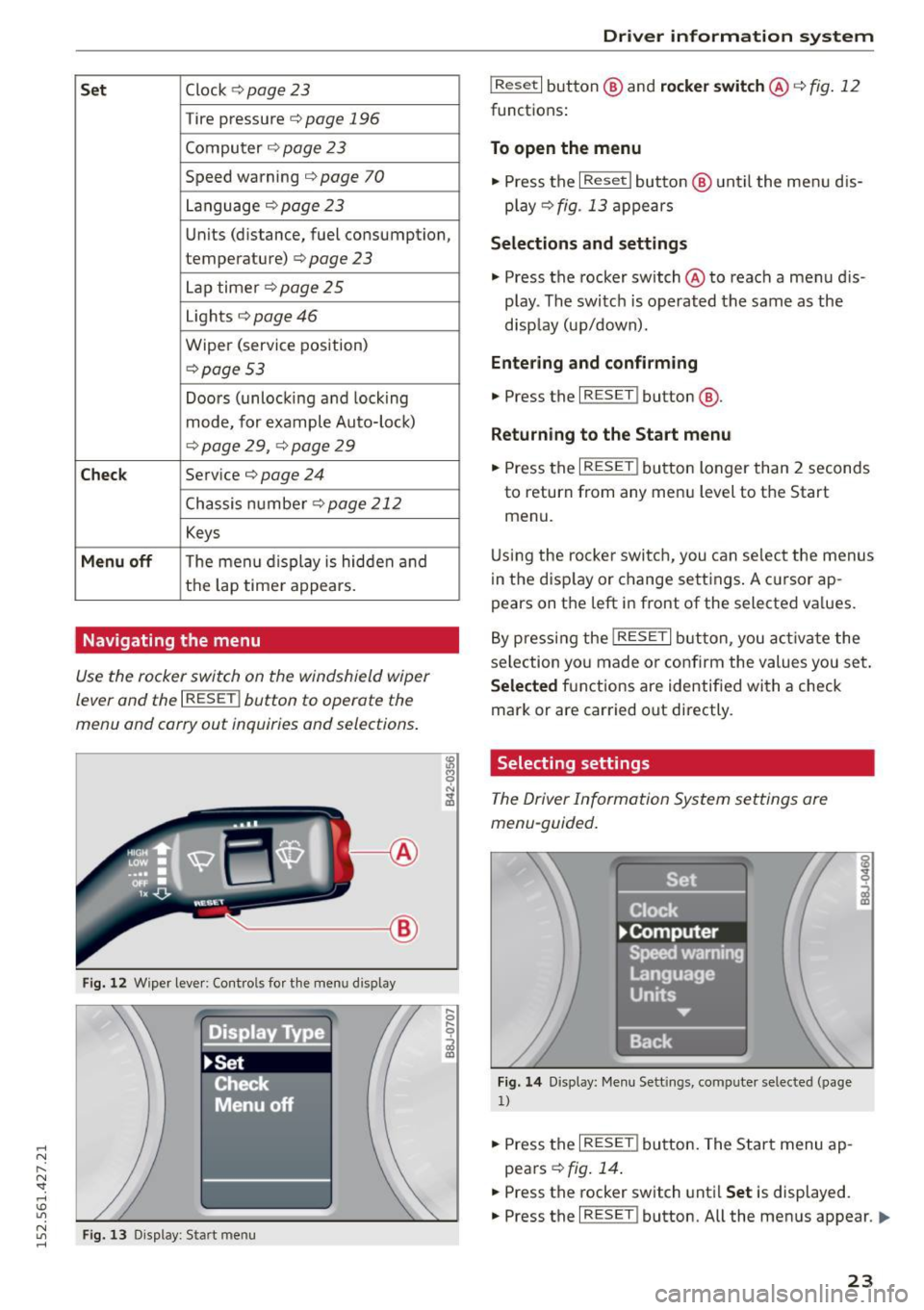
Navigating the menu
Use the rocker switch on the windshield wiper
lever and the
I RESET ! button to operate the
menu and carry out inquiries and selections.
-----®
Fig. 12 Wiper lever: Cont rols fo r th e menu d isplay
Fi g. 13 Display: Start menu
Dr iver inform atio n sy stem
I Reset I button @ and rocker switch @ c::> fig. 12
functions:
To open the menu
• Press the I Reset I button @ until the menu d is
play
c::> fig . 13 appears
Selection s and settings
• Press the rocker switch @ to reach a menu dis
play . The switc h is operated the same as the
disp lay (up/down).
Entering and confirming
• Press the I RESET ! button@.
Returning to the Start menu
.. Press the I RESET ! button longer than 2 seconds
to return from any menu level to the Start
menu.
U sing the rocke r switch, you can select the menus
in the disp lay or change settings . A c ursor ap
pears on the left in front of the selected va lues.
By pressing the
! RESET I button, you activa te the
selection yo u made or confirm the values you set .
Selected fu nctions are identified with a check
mark or are car ried out directly.
Selecting settings
The Driver Information System settings are
menu-guided.
Fi g. 14 Display: Me nu Sett ings, computer selected (page
1)
.. Press the I RESET ! button. The Start menu ap
pears
c::> fig . 14 .
.. Press the rocker switch until Set is displayed.
.. Press the
I RESET ! button. All the menus appear. Ill-
23
Page 31 of 232
..... N
r-N "': ..... \!) 1.1'1
N 1.1'1 .....
Power locking system
General description
The power locking system locks or unlocks all
doors simultaneously.
The power lock ing system i n your veh icle incorpo
rates the follow ing funct ions:
- Central lock ing function
- Remote contro l feature ¢ page 28.
- Ant i-Theft Alarm Sys tem ¢ page 33.
All the doors and the front lid are loc ked by the
centra l locking system when you lock the vehicle.
The unlocking and lock ing mode* can be changed
i n the dr iver information system
¢ page 22.
Unlocking the vehicle
You can un lock the vehicle from outside either by
usi ng the remote co ntrol
or by insert ing and
turning the key in the driver's door lock. When
you
unlock your vehicle:
- The anti -theft alarm system is deactivated
briefly.
- The veh icle inter ior lights ill uminate for app rox
imately 30 seconds .
- All t urn signa l lights will flas h twice when the
ca r is un locked .
- After unloc king the veh icle, you have 30 sec
onds to open a door or the front lid. After 30 seco nds, the vehicle automatically locks and
the anti-theft a larm system activates again.
The fron t lid can be locked or un locked e ither by
usi ng the remote contro l
or by inserting and
turning t he key in the driver's door lock . Unlock
ing the vehicle with the remote control~ will
only unlock the front lid, to open it, the lid han
d le needs to be pressed.
Loc king the vehicle
You ca n lock the vehicle from o utside eithe r by
using the remote co ntro l
or by insert ing and
turning the key in the drivers's door lock. When
you
lock the vehicle:
- All doors and the front lid are locked.
- All turn sign al ligh ts will flash once whe n the
car is locked .
Opening and closing
-The ant i-theft a larm system is ac tivated. The
horn of the anti-theft a la rm system will soun d
and the anti-theft alarm system read iness
light, located in the center of the instrument
pane l be low the windshield on the right side of
the air vent, will start to bli nk.
- The vehicle in terior lights turn
off.
Automatic locking*
The automatic locking feature loc ks a ll the vehi
cle doors and the front lid when you dr ive faste r
t h an 9 mph (15 km/h).
You can unlock t he veh icle from the i nsi de by:
- remov ing the key from the ignition switc h (the
ve hicle w ill automat ica lly unloc k itself) or
- pressing the unlock pa rt of th e power lock
sw itch
ccri o r
pull ing the door handle (to open the door).
If you wish, yo u can have an a utho rized Aud i
dealer convert your powe r doo r lock system to
automat ic locking.
Unintentionally locking yourself out
T he vehicle does not lock with t he centra l locking
swi tch ¢page 31 if the dr ive r's door is open.
D o no t lock your ve hicle w ith the
remote master
key u ntil all doors an d the front lid a re closed. In
t hi s way you avo id loc king yo ursel f out ac ciden
ta lly.
A WARNING
-
- W hen you loc k yo ur vehicle from o utside,
nobody- espec ia lly children -shou ld remain
inside the vehicle. Remember, when you
lock the vehicle from the outside the win
dows cannot be ope ned from the inside.
- W hen you leave the veh icle, always remove
the ignition key and take it with you. This
will prevent passengers (children, for exam
p le) from accidenta lly bei ng locke d in th e
veh icle should they accide ntally press the
power l ocking sw itc h in one of the doo rs .
- Do not leave ch il dr en inside t he vehicle un
s upe rvise d. In a n em erge ncy it would be im
p o ssible to open the door s fro m the outs id e
wit ho ut t he key.
~
29
Page 32 of 232
Opening and closing
@ Tips
- The dr iver's door can be locked and un
l ocked with the key if the power locking sys
tem fails. The passenger 's door can be
l ocked manually
c:> page 32.
- In the event of a crash with airbag deploy
ment all loc ked doors will be automatically
unlocked to give access to the vehicle occu
pants from the outs ide .
- The anti-t heft alarm system cannot be acti
vated if the power locking system is not ac
tivated .
- You are well advised not to keep valuables
i nside an unattended vehicle, v is ible or not.
Eve n a prope rly locked veh icle cannot p ro
v id e the secur ity of a safe!
Unlocking and locking the vehicle with the
remote control
How the remo te control works.
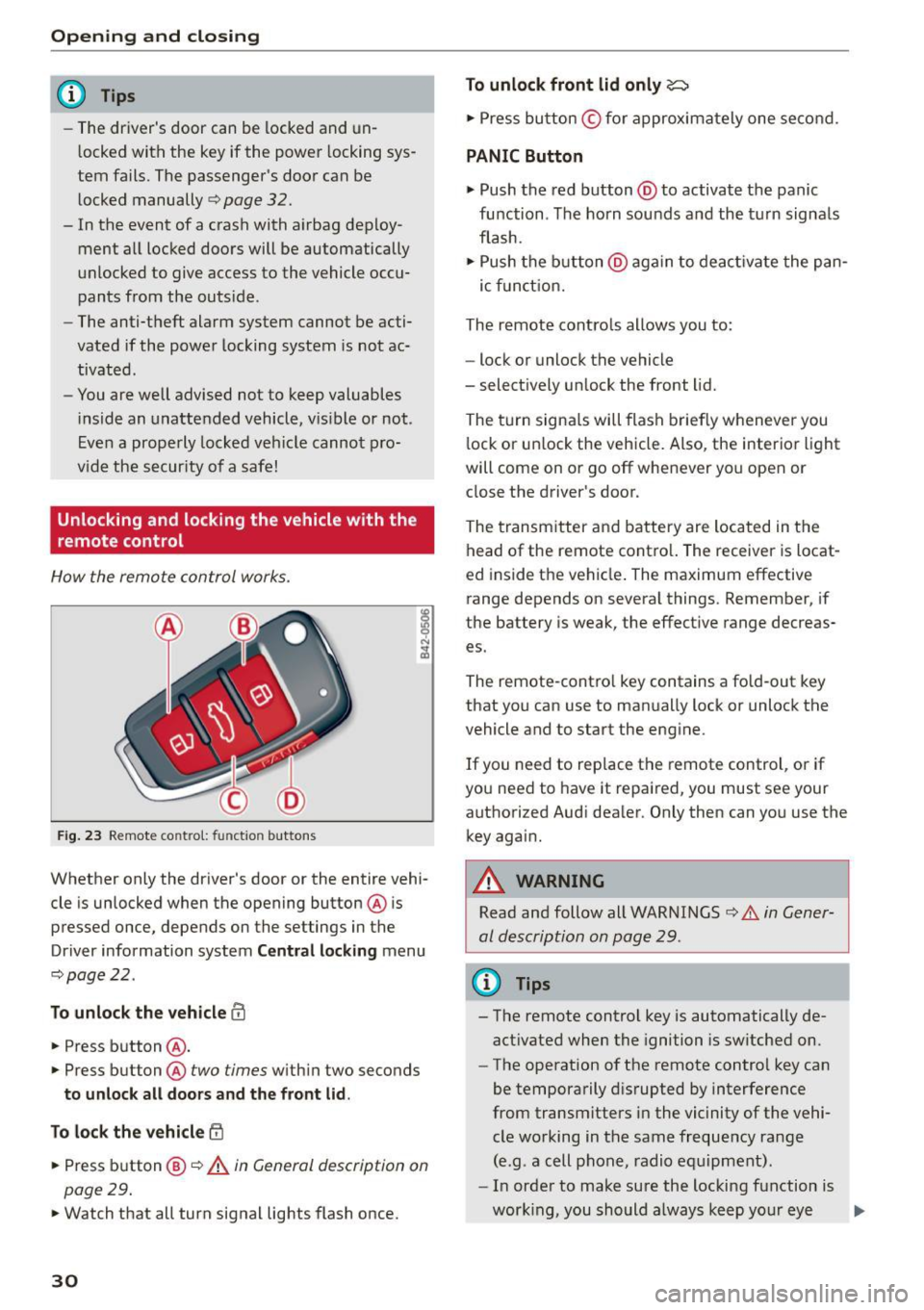
F ig. 2 3 Remote co ntrol: fun ctio n butto ns
Whether only the d river's doo r or the entire veh i
cle is unlocked when the opening button @ is
pressed once, depends on the settings in the
Driver information system
Central locking menu
~ page 22 .
To unlock the vehicle III
• Press button @.
• Press but ton @ two
times w ith in two seconds
to unlock all doors and the front lid .
To lock the vehicle
~
• Press button @~.&. in General description on
page 29 .
• Watch that all turn signal lights flash once.
30
To unlock front lid only~
• Press bu tton © for approxima tely one se con d.
PANIC Button
• Push the red button @to activate t he panic
fu nction . The horn sou nds an d the turn signa ls
fla sh.
• Push the button @aga in t o de acti va te the pan-
ic fu nct io n.
The remote cont ro ls allows you to:
- lock or unlock the vehicle
- select ively un lock the front lid.
The turn signa ls will flash brief ly whenever you
l ock or u nlock the veh icle. Also, the interior light
will come on o r go off whenever yo u open or
close the driver's door.
The transm itter and battery are located in the
head of the remote contro l. The receiver is locat
ed inside the vehicle . The maximum effective
range depends on severa l things . Remembe r, if
the battery is weak, the effect ive range decreas
es .
The remote -cont ro l key contains a fo ld-out key
that you can use to man ually lock or unlock t he
vehicle and to start the eng ine .
I f you need to replace the remote control , or if
you need to have it repaired, you must see your
authorized Aud i dea ler. Only then can yo u use the
key agai n.
A WARNING
Read and follow all WARNI NGS c:> & in Gener
al description on page 29 .
(D Tips
- The remote control key is automatically de
act ivated when the ignition is sw itched on.
- The operation of the remote contro l key can
be temporarily d isrupted by interference
from transmitters in the vicinity of the vehi
cle wo rking in the same freque ncy ra nge
(e.g . a cell phone, radio eq uipment).
- In orde r to make su re the locking function is
wor king, you should a lways keep yo ur eye
II>
Page 33 of 232
.... N
l'
N "1: .... I.O
"' N
"' ....
on the vehicle to make sure it is properly
l ocked.
- Do not use the remote control if you are in
side the car, otherwise you may unintention
ally lock the vehicle, and then you would set
off the ant i-theft a larm when you try to
start the engine or open a door . In case this
happens anyhow, push the unlock button©.
- Use the panic funct ion only if you are in an
emergency situa tion.
Resetting the remote control
The remote control must be reset if the vehicle
does no t unlock .
.. Press the unlock button 0 on the remote con
trol.
.. Manually unlock the driver's door lock with the
mechan ical key wi thin 30 se cond s.
.. Press e ither the lock-
{fl or the unlock CD button
to comple te the reset sequence .
Operating locks with the key
To lock and unlock the vehicle from the outside ,
turn the key in the lock of the driver's door .
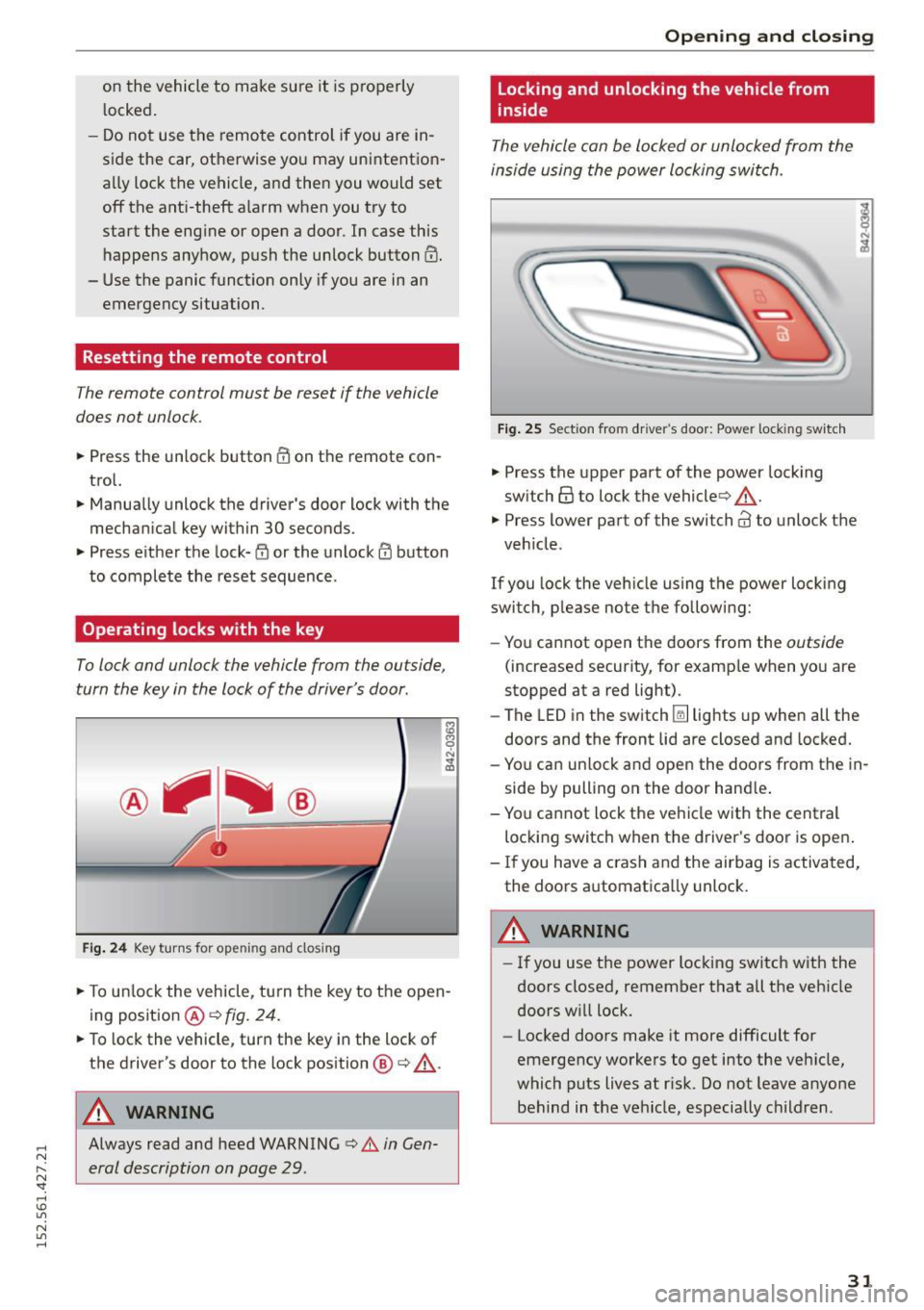
Fig. 24 Key turn s for op ening and closin g
.. To un lock the vehicle, tu rn t he key to the open
ing position @¢
fig. 24 .
.. To lock the vehicle , turn the key in the lock of
the driver's door to the lock position @
c:> .&_.
A WARNING
Always read and heed WARNING c> A in Gen
eral description on page 29 .
Opening and clo sing
Locking and unlocking the vehicle from
inside
The vehicle can be locked or unlocked from the
inside using the power locking swi tch .
Fig . 2 5 Sect ion fro m drive r's door : Powe r loc king switc h
.. Press the upper part of the powe r lock ing
sw itch@ to lock the vehicle ¢,&. .
.,. Press lower part o f the sw itch@ to unlo ck the
veh icle .
If you lock the veh icle using the power locking
switch, p lease no te t he following:
- You cannot open the doors from the
outside
(increased security, for examp le when you are
stopped at a red light) .
- The LED in the switch~ lights up when all the
doors and the front lid a re closed and locked.
- Yo u can un lock and open the doors from the in
side by pulling on the door hand le .
- You ca nnot lock the ve hicle w it h the central
locking switch when the d river's door is open .
- If you have a crash and the airbag is activated,
the doors a utomatically unlock.
A WARNING
-
- If you use the power loc king switch with the
doors closed, remember that all the veh icle
doors w ill lock.
- Locked doors make it more difficult for
emergency workers to get into the veh icle,
which puts lives at r isk. Do not leave anyone
behind in the vehicle, especially children .
31
Page 48 of 232
Clear vision
Clear vision Lights
Switching the headlights on/off
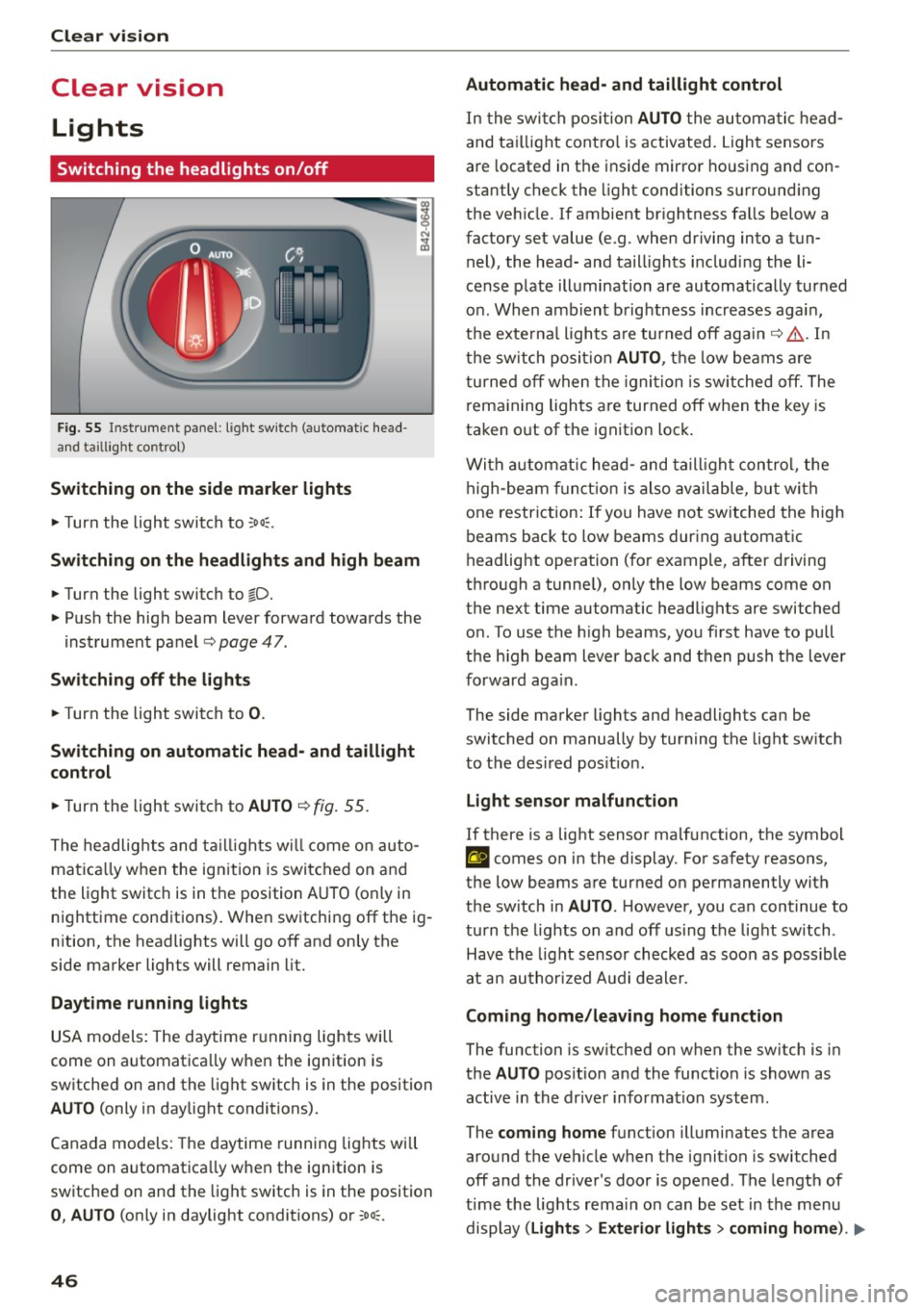
F ig. 55 Inst rument pane l: ligh t switch (automatic head
and taill ig ht control)
Switching on the side marker lights
"'T urn the light switch to :oo:.
Switching on the headlights and high beam
"'Turn the light switch to io.
"'Push the high beam lever forward towards the
instrument panel~
page 47.
Switching off the lights
"'Turn the light switch to 0.
Switching on automatic head- and taillight
control
"'Turn the light switch to AUTO ~ fig. 55.
The headlights and taillights will come on auto
matica lly when the ignition is switched on and
the light switch is in the position AUTO (on ly in
nighttime conditions). When switching
off the ig
nition, the headlights will go
off and only the
side marker lights will remain lit.
Daytime running lights
USA models: The daytime running lights will
come on automatica lly when the ign ition is
sw itched on and the light switch is in the position
AUTO (only in daylight conditions).
Canada models: The daytime running lights will
come on automatica lly when the ign ition is
sw itched on and the light switch is in the position
0, AUTO (only in daylight condit ions) or :oo;.
46
Automatic head- and taillight control
In the switch position AUTO the automatic head
and taillight contro l is activated . Light sensors
are located in the ins ide mirror housing and con
stantly check the light conditions surrounding
the vehicle. If ambient brightness falls below a
factory set value (e.g. when driving into a tun
nel), the head- and taill ights including the li
cense plate illumination are automatically turned
on . When ambient brightness increases again,
the externa l lights are turned
off again~,& . In
the switch position
AUTO , the low beams are
turned
off when the ignition is switched off. The
remaining lights are turned
off when the key is
taken o ut of the ignition lock .
With automatic head-and taillight control, the
high-beam function is also available, but with
one restriction: If you have not switched the high
beams back to low beams during automatic
headlight operation (for example, after driving
through a tunne l), only the low beams come on
the next time automatic headlights are switched
on . To use the high beams, you first have to pull
the h igh beam lever back and then push the lever
forward again.
The side marker lights and headlights can be
switched on manually by turn ing the light sw itch
to the des ired pos it ion .
Light sensor malfunction
If there is a light sensor ma lfunction, the symbol
El comes on in the display. For safety reasons,
the low beams are turned on permanently with
the sw itch in
AUTO. H owever, you can continue to
turn the lights on and
off using the light sw itch.
Have the light sensor checked as soon as possible
at an authorized Audi dealer .
Coming home/leaving home function
The function is sw itched on when the sw itch is in
the
AUTO pos ition and the function is shown as
active in the driver information system.
The
coming home function illuminates the area
around t he vehicle when the igni tion is switched
off and the driver's door is opened. The length of
time the lights rema in on can be set in the menu
display
( Lights > Exterior lights > coming home ). IJJ,,
Page 49 of 232
.... N
l'
N "1: .... I.O
"' N
"' ....
The leavin g home function i lluminates the area
around the vehicle when un locking it .
A WARNING
-Never use daytime running lights to see
where you are going. They are not bright enough and w ill not let you see far enough
ahead for safety, especially at dusk or when it is dark . Be aware of changes in outside
light cond itions when you are dr iv ing and re·
spond by switching on your low beams.
- Automatic head· and taillight control is only
intended to assist the d river. This feature
does not relieve the driver of his responsibi l
ity to check t he headlights a nd to turn t hem
on manually according to the cur rent lig ht
and visibility conditions. For example, fog
and rain cannot be detected by the light
sensors. Consequent ly, always switch the
headlights on under these weather cond i·
tions and when dr iv ing in the da rk.
- Crashes can happen when yo u cannot see
the road ahead and when you cannot be
seen by other motorists.
- Always turn on the headlights so that you
can see ahead and so that others can see
your car from the back.
- Please observe lega l regulations when using
the light ing systems described .
@ Tips
-Always observe the specific local regulations
for your area when to use your lights.
- Turn on low beams as evening app roaches
or in conditions of poor visib ility.
- Do not attach stickers to the windshie ld in
front of the sensors as this can disab le the
automat ic head- and taill ight control and
the automatic glare-dimming of the rear·
v iew mirror(s) *.
- If you remove the ignit ion from the ign it ion
lock while the headlights are still on, a buz
zer w ill sound as long as the dr iver's door is
open to remind you to t urn off the lights .
- In the AUTO mode, the low beams are
turned off when the ignition is t urned off.
The remaining lights ar e turned off when
t h e key is taken ou t of the ignition.
Cle ar vi sion
-In cool or damp weather conditions the
head lights may fog
over temporarily on the
inside .
- The c ritical factor is the temperature dif
ference between the inter io r and the exte·
rior of the hea dlight lens .
- W ith the mai n beams switched on, the
lig ht-em itting area w ill be free of conden
sation after a short time, however the
e d ges of the glass may still be fogged.
- This physical phenomeno n has no effect
on the life of your veh icle's lighti ng sys
tem .
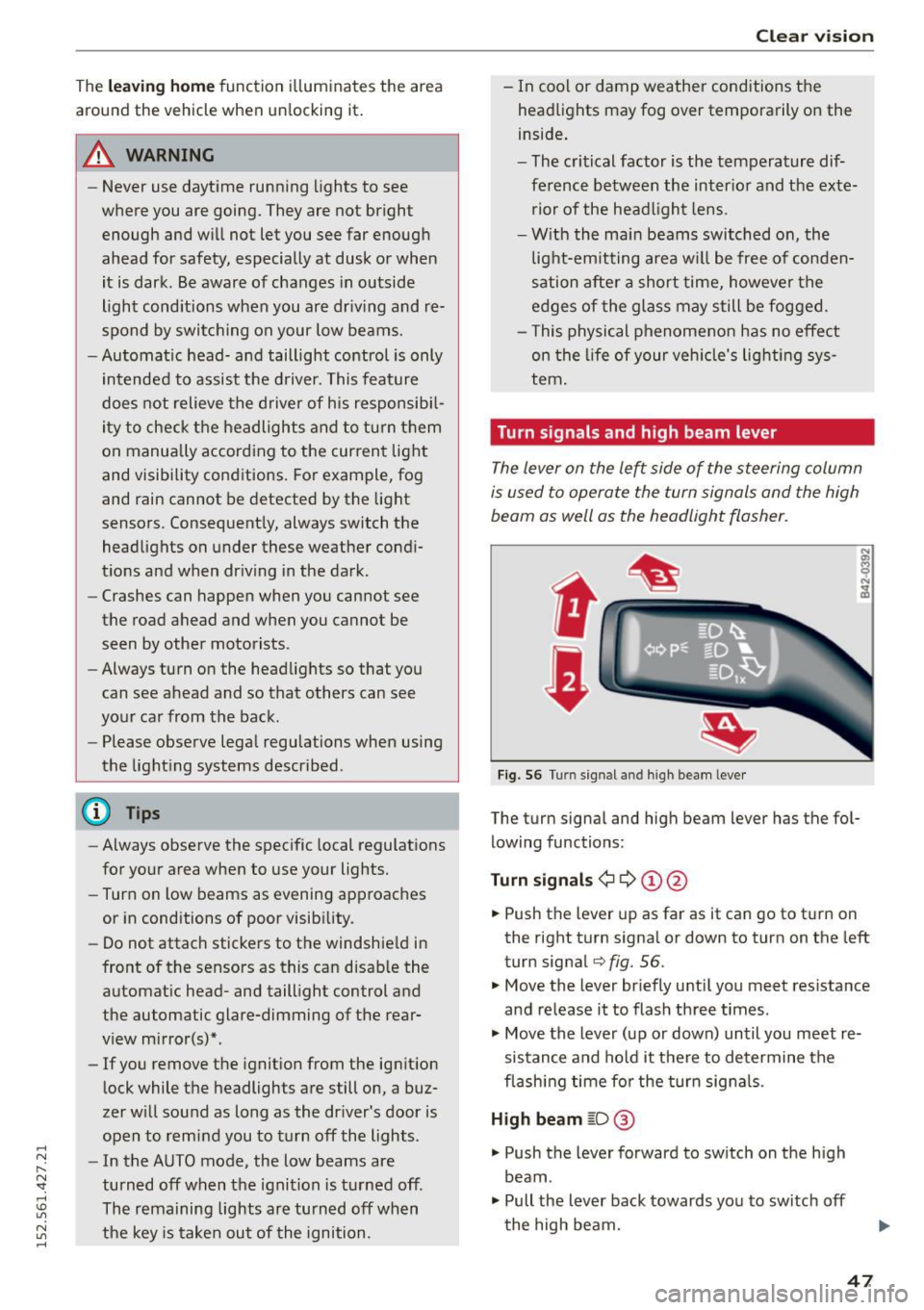
Turn signals and high beam lever
The lever on the left side of the steering column
is used to operate the turn signals and the high
beam as well as the headlight flasher.
t
t
Fig . 56 Turn signal and high bea m leve r
The turn signa l and high beam lever has the fo l
lowing functions :
Turn signal s¢¢ ©@
.,. Push the lever up as far as it can go to t urn on
the right turn signa l or down to turn on the left
turn signal
q fig. 56.
.,. Move the lever br iefly u ntil you meet res istance
and re lease it to flash three times.
.,. Move the lever (up or down) until you meet re
sistance and hold it there to determine the
flash ing time fo r the turn signa ls .
High beam ~D @
.,. Push the lever forward to sw itch on the h igh
beam.
.,. Pull the lever back towards yo u to switch off
the high beam.
47
Page 50 of 232
Clear vision
Headlight flasher ~D ©
.. Pull the lever toward the stee ring wheel to use
the headlight flasher.
Notes on these features
- The turn signals only work with the ignit ion
switched on. The ind icator lights
M or Ip] in
the instr ument cluster
q page 11 also b lin k.
- After you have turned a corner, the tur n signal
switches off automat ica lly.
- The
high beam works only when the headlights
a re on. The ind icator light
II i n the instrument
cluster illuminates when the high beams are
o n.
- The
headlight flasher wo rks only as long as you
ho ld the lever - even if the re are no lights
turned on. The indicator light
II in the instru
ment cluster illum inates when yo u use the
headlight flasher .
A WARNING
Do not use the high beam or headlight flasher
if you know that these could b lind oncom ing
traffic.
Emergency flasher
The emergency flasher makes other motorists
aware that you or your vehicle are in an emer
gency situation.
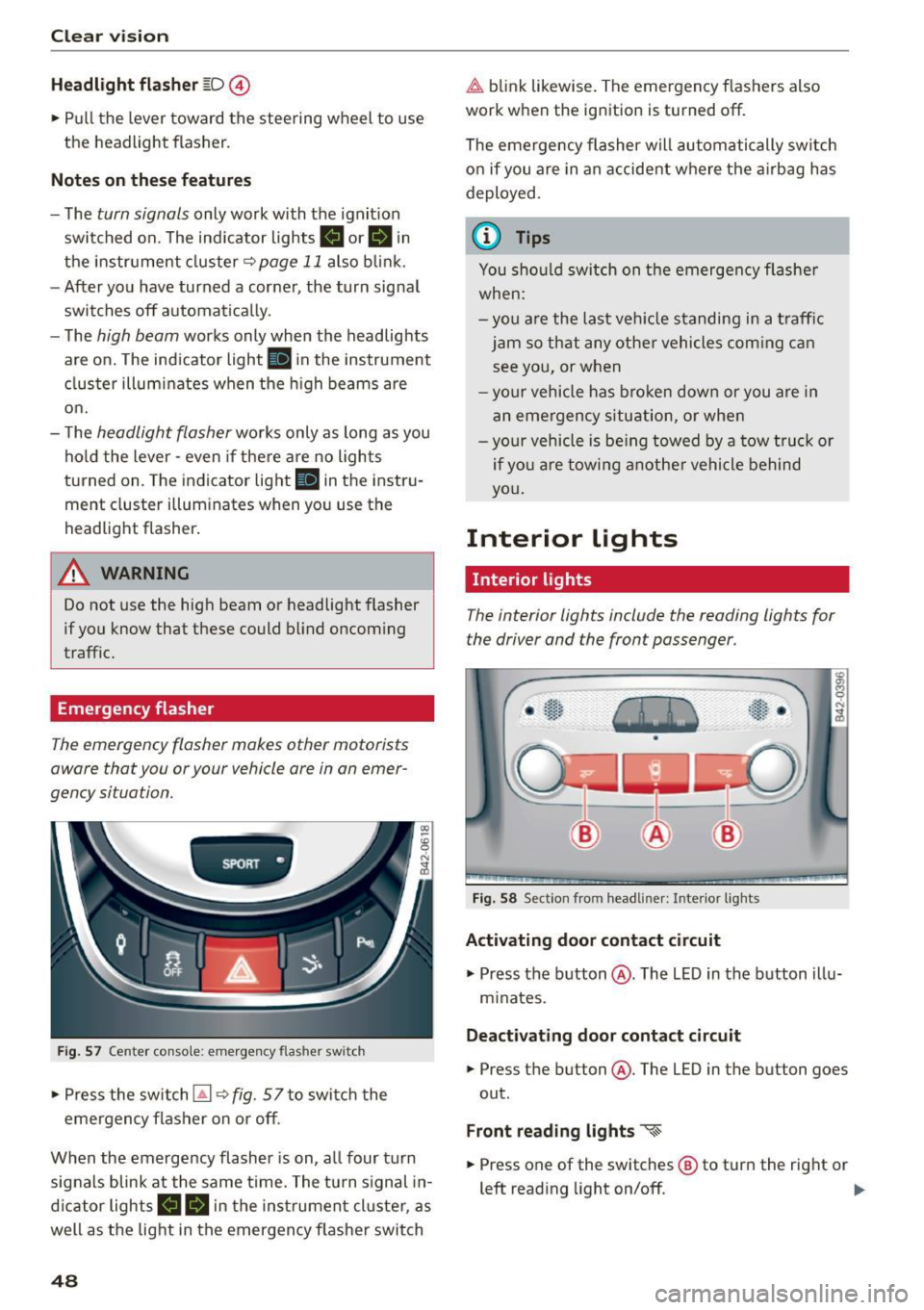
SPORT •
Fig . 57 Cente r co nso le : em erge ncy flasher sw itc h
• Press the switch~ q fig. 5 7 to switch the
emergency flasher on or off.
When the emergency flasher is on, a ll four turn
sig nals blink at the same time. The tu rn s ignal in
d icator lights
B II in the instrumen t cl uste r, as
well as t he lig ht in the emergency f lasher switch
48
~ b link likewise. The emergency flas hers also
work when the ignition is turned off .
The emergency flasher will automatically switch
on if you a re in an acciden t w here the a irbag has
deployed .
{I) Tips
You should sw itch on the emerge ncy flashe r
when:
- you a re the las t veh icle standing in a t raff ic
jam so th at any other vehicle s com ing can
see you, or when
- yo ur vehicle has b roken dow n or y ou are in
an eme rgency s itu ation, or whe n
- yo ur vehicle is be ing towed by a tow tru ck or
i f yo u a re towin g ano th er vehicle behind
yo u.
Interior Lights
Interior lights
The interior lights include the reading lights for
the driver and the front passenger .
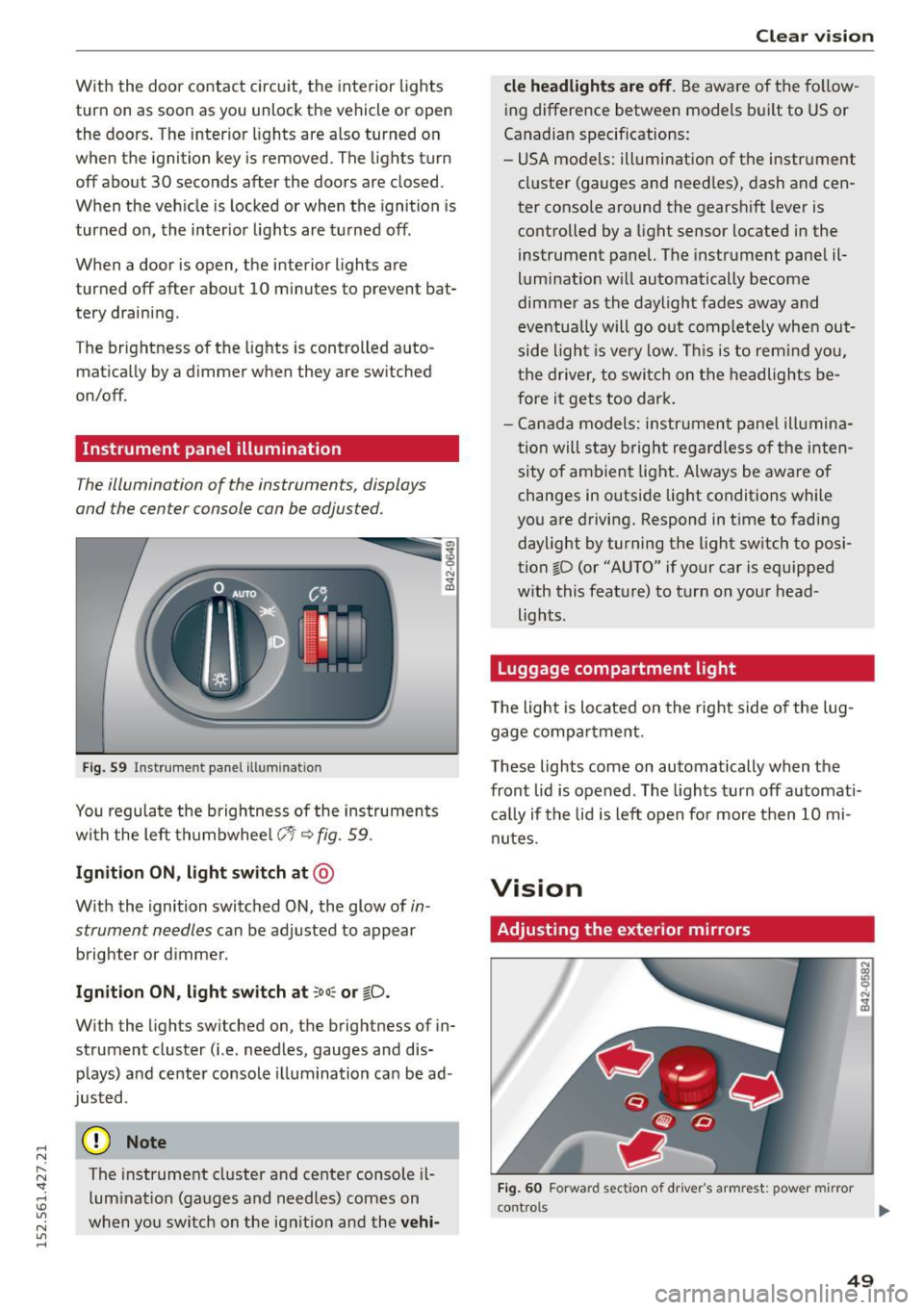
Fig. 58 Sect ion from headliner: Interior lights
Activating door contact circuit
• Press the button @. The LED in the b utton illu
m inates.
Deact ivating door cont act circuit
• Press th e button @. The LED in the button goes
out .
Front r eading light s «~
.. Press one of the switches® to turn the right or
left reading light on/off. ..,.
Page 51 of 232
.... N
l'
N "1: .... I.O
"' N
"' ....
With the door contact circuit, the interior lights
turn on as soon as you unlock the veh icl e or open
the doors . The interior lights are also turned on
when the ignition key is removed . The lights turn
off about 30 seconds afte r the doors are closed .
When the veh icle is locked or when the ignition is
turned o n, the inter ior lights are turned off .
When a door is open , the interior lights are
turned off after about 10 m inutes to preven t bat
tery draining .
T he brightness of the lights is controlled a uto
mat ica lly by a d immer when they a re sw itched
on/off.
Instrument panel illumination
T he illumination of the instruments, displays
and the center console can be adjusted .
Fig . 59 In strument pa nel ill uminatio n
You regulate the brightnes s of the ins truments
with the left th umbwhee l
C:1 i::;,fig. 59.
Ign ition ON , light switch at @
With the ignition switched ON, the glow of in
strument needles
can be adjusted to appear
brighter or d immer .
Ignition ON , light switch at :oo~ or tD .
With the lights sw itched on, the brightness of in
strument cluster (i.e. needles, gauges and dis
plays) a nd center console il lum ination ca n be ad
justed .
(D Note
The instrument cluster and center console il
lum inat io n (gauges and needles) comes on
when you sw itch on the ig nitio n and the
ve hi-
Cle ar vi sion
cle headlight s are off . Be aware of the fo llow
ing difference between models b uilt to US or
Canadian specif ications:
- USA models: ill umination of the i nstr ument
cl uster (gauges and need les) , dash and cen
ter console around the gearsh ift lever is
controlled by a light sensor located in the
instrument panel. The instrume nt pane l il
lum ination w ill automatically become
dimme r as the daylight fades away and
eventua lly will go out comp letely when out
side light is very low . Thi s is to rem ind you,
t he driver, to switch on t he headlights be
fore it gets too dark .
- Cana da model s: instrument panel illumina
t ion will s tay bright regar dless o f the inten
si ty of ambien t light . Always be aware o f
changes in outside lig ht conditions while
you are driving. Respond in t ime to fading
daylight by turning the light sw itch to posi
tion ~D (or "AUTO" if your car is equipped
w ith this feat ure) to turn on your head
lights .
Luggage compartment light
The light is located on the right side of the lug
gage compa rtment .
These lights come on automatically when the
front lid is opened . The lights turn off automati
c a lly if the lid is left o pen fo r more then 10 mi
nutes .
Vision
Adjusting the exterior mirrors
Fig. 60 Forward sect io n of driver 's armrest: pow er mirr or
con trol s ...
49