fuel AUDI R8 SPYDER 2015 Owners Manual
[x] Cancel search | Manufacturer: AUDI, Model Year: 2015, Model line: R8 SPYDER, Model: AUDI R8 SPYDER 2015Pages: 232, PDF Size: 58.36 MB
Page 5 of 232
..... N
r-N "': ..... \!) 1.1'1
N 1.1'1 .....
Kneeairbags .. ........... .. .. .. .. ... 116
Side airbags . . . . . . . . . . . . . . . . . . . . . . . . 118
Ch ild Safety . . . . . . . . . . . . . . . . . . . . . . 122
Important things to know . . . . . . . . . . . . . 122
C hild safety seats . . . . . . . . . . . . . . . . . . . . 127
Instal ling a chi ld safety seat . . . . . . . . . . . 130
Additional Information . . . . . . . . . . . . . . . 132
Vehicle operation . . . . . . . . . . . . . . . . 134
Intelligent technology . . . . . . . . . . . 134
Notice about data recorded by vehicle
control modules . . . . . . . . . . . . . . . . . . . . . 134
Electronic Stabilization Control (ESC) . . . . 134
Braking . . . . . . . . . . . . . . . . . . . . . . . . . . . . 136
Rear spoiler . . . . . . . . . . . . . . . . . . . . . . . . 138
Power steering . . . . . . . . . . . . . . . . . . . . . . 139
D ry s ump lubr ication . . . . . . . . . . . . . . . . . 139
Driving with your quattro . . . . . . . . . . . . . 139
Energy management . . . . . . . . . . . . . . . . . 140
Driving and environment . . . . . . . . 142
Break-in period . . . . . . . . . . . . . . . . . . . . . . 142
Avoid damaging the vehicle . . . . . . . . . . . . 142
Driving through water on roads . . . . . . . . 142
Catalytic converter . . . . . . . . . . . . . . . . . . . 142
Shutting down vehicle . . . . . . . . . . . . . . . . 143
Operation and maintenance . . . . . . . . . . . 143
Trailer towing . . . . . . . . . . . . . . . . . . . . . . . 144
Vehicle care . . . . . . . . . . . . . . . . . . . . . . 145
Vehicle c are and cleaning . . . . . . . . 145
General information . . . . . . . . . . . . . . . . . 145
Car washes . . . . . . . . . . . . . . . . . . . . . . . . . 145
Cleaning and care information . . . . . . . . . 146
Fuel supply and filling your fuel
tank ... .. .. .... ............. .. .. .. .
151
Gasoline . . . . . . . . . . . . . . . . . . . . . . . . . . . 151
Fu el tank . . . . . . . . . . . . . . . . . . . . . . . . . . . 152
Checking and filling . . . . . . . . . . . . . . 155
Engine compartment lid . . . . . . . . . . . . . . 155
Engine oil . . . . . . . . . . . . . . . . . . . . . . . . . . 158
Eng ine cooling system . . . . . . . . . . . . . . . . 161
Brake fl uid . . . . . . . . . . . . . . . . . . . . . . . . . 164
Table of contents
Battery . . . . . . . . . . . . . . . . . . . . . . . . . . . . 164
Windshield washer container . . . . . . . . . . 168
Tires and wheel s . . . . . . . . . . . . . . . . . 169
Tires . . . . . . . . . . . . . . . . . . . . . . . . . . . . . . 169
Tire pressure monitoring system . . . . . . . 196
Do-it-yourself service . . . . . . . . . . . . 199
What do I do now? . . . . . . . . . . . . . . . 199
Trunk escape handle . . . . . . . . . . . . . . . . . 199
Vehicle tool kit . . . . . . . . . . . . . . . . . . . . . . 199
Tire repair . . . . . . . . . . . . . . . . . . . . . . . . . . 199
What should I be aware of when changing
a tire? . . . . . . . . . . . . . . . . . . . . . . . . . . . . . 203
Jump-starting . . . . . . . . . . . . . . . . . . . . . . . 206
Emergency towing with commercial tow
truck . . . . . . . . . . . . . . . . . . . . . . . . . . . . . . 208
Fu ses and bulb s . . . . . . . . . . . . . . . . . . 210
El ectr ical fuses . . . . . . . . . . . . . . . . . . . . . . 210
Bulbs......... .. .. ........... .. .. .. 211
Technical data . . . . . . . . . . . . . . . . . . . . 212
Technical Data . . . . . . . . . . . . . . . . . . . . 212
Vehicle identification . . . . . . . . . . . . . . . . . 2 12
Weights . . . . . . . . . . . . . . . . . . . . . . . . . . . 212
Dimensions......................... 213
Capacities . . . . . . . . . . . . . . . . . . . . . . . . . . 213
Gasoline engines . . . . . . . . . . . . . . . . . . . . 214
Consumer Information . . . . . . . . . . 215
Warranty coverages . . . . . . . . . . . . . . . . . . 21S
Operating your vehicle outside the U.S.A .
o r Canada . . . . . . . . . . . . . . . . . . . . . . . . . . 21S
Audi Servi ce Repair Manuals and
Literature . . . . . . . . . . . . . . . . . . . . . . . . . . 215
Maintenance. .. .. ... .......... .. .. .. 215
Additional accessor ies, modifications and
parts replacement 217
Index . . . . . . . . . . . . . . . . . . . . . . . . . . . . . 219
3
Page 9 of 232
..... N
r-N "': ..... \!) Ll'I
N Ll'I .....
(!) Adjuster control for outside mirrors .. .. .............. ... .
@ Door handle
@ Power locking switch
© Switches for:
- Front lid release ........... . .
- Fuel filler flap release ... .. .. .
® A ir outlets ............ .... .. .
® Light switch ........... .... .. .
(J) Turn signal and high beam . .. . . .
@ Multifunction steering wheel with :
- Horn
- Driver's airbag ....... .. .. .. .
- Audio, telephone and voice con-
trol system operating buttons
® Instrument cluster
@ Switches for:
- Windshield wiper/washer
- Trip computer ........ .. .. .. .
- Menu display .............. .
- Lap Timer ........... .. .. .. .
- Speed warning system ... .. .. .
@ Steering lock/ignition/starter
switch (in the steering wheel col- umn) .. . .... ............. .. .
@ Adjustable steer ing column .. .. .
@ Cruise control ............... .
(§ Instrument lighting .... .. .. .. .
@ Data Link Connector (DLC) for On
Board Diagnostics (OBD II) ... .. .
49
31
32
153
63
46
47
106
8
51
21
22
25
69
66
66
71
49
26
@ Power window switches
@
@
@
@
@
@ Navigation system
Glove compartment (lockable)
Front passenger's airbag ...... .
Rear window defogger switch ...
Climate controls .. .......... . .
Gear shift lever or selector lever (S
tronic):
- Manual transmission
- S tronic ..... .............. .
@) Switches for:
- Audi magnetic ride
- E lectronic Stabilization Control
- Emergency flasher .......... .
- Retractable rear spoiler ...... .
- Parking system ............ . .
@ Convertible top switch ........ .
@
@ Rear window switch
Parking brake lever
(D Tips
Cockpit
34
60
106
64
61
75
72
134 48
138
80
38
40
68
- Some of the equipment or features shown
in the general illustration may be standard
equipment on your vehicle or my be option
al equipment depending on your mode l.
- A separate brochure is p rovided for your fac
tory-installed audio system and/or the Audi
Navigation System.
7
Page 11 of 232
.... N
l'
N "1: .... I.O
"' N
"' ....
Instruments and warn ing /indicator lights
Tachometer (engine rev counter )
The tachometer indicates the engine RPM (revo
lutions per minutes).
If engine RPM drops below 1,500, you should
downshift to the next lower gear. The red area at
the end of the scale indicates max imum permis
sible eng ine RPM after the break-in period . Be
fore reach ing th is area, move the selector lever to
position "A (Automatic ope rat ion)" or ease your
foot off the accelerator pedal.
(D Note
The tachometer needle should only br iefly be
in the red zone: you could damage your en
gine! The beginning of the red zone varies de
pending on the engine.
@) For the sake of the environment
Upshift ing early saves fuel and reduces eng ine
noise.
Digital clock with date display
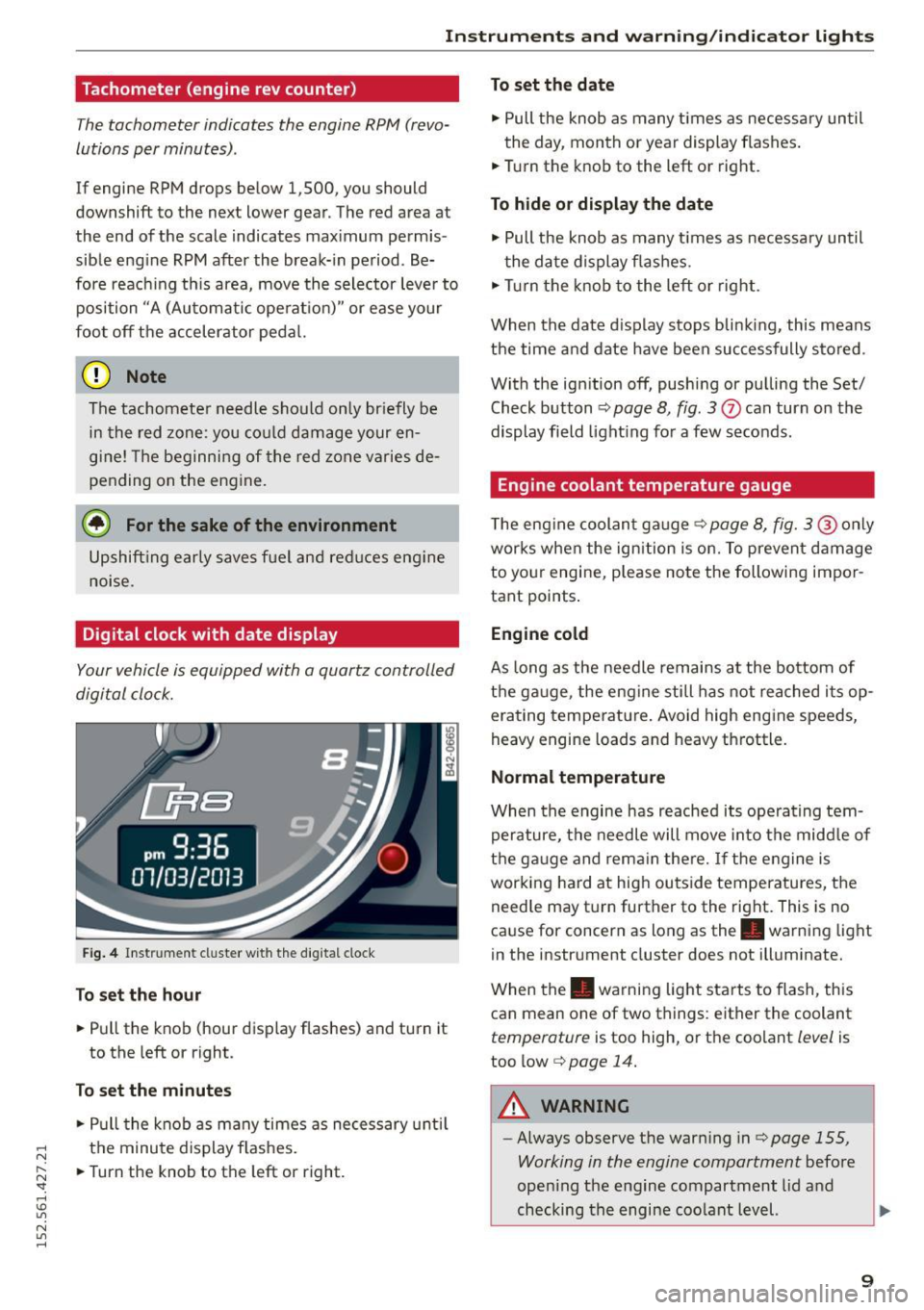
Your vehicle is equipped with a quartz controlled
digital clock.
Fig. 4 In str um ent cluster w ith the digital clock
To set the hour
.. Pull the knob (hour display flashes) and turn it
to the left or right.
To set the minutes
.. Pull the knob as many times as necessary until
the minute display flashes .
.. Turn the knob to the left or right.
To set the date
.. Pull the knob as many times as necessary until
the day, month or year display flashes.
.. Turn the knob to the left or right.
To hide or display the date
"' Pull the knob as many times as necessary until
the date dis play flashes.
"' Tur n the knob to the left or right.
When the date d isplay stops blinking, this means
the time and date have been successfully stored .
With the ignition off, pushing or pu lling the Set/
Check button
¢ page 8, fig . 3 Q) can turn on the
display field lighting for a few seconds.
Engine coolant temperature gauge
The engine coolant gauge¢ page 8, fig. 3@ only
works when the ignition is on. To prevent damage
to yo ur engi ne, please note the following impor
tant points .
Engine cold
As long as the needle remains at the bottom of
the ga uge, the engine still has not reached its op
erating temperature. Avoid high engine speeds,
heavy engine loads and heavy throttle.
Normal temperature
When the engine has reached its operating tem
perature, the needle will move into the midd le of
the gauge and remain there.
If the engine is
working hard at high outside temperatures, the
need le may t urn further to the right. This is no
cause for concern as long as the. warning light
in the instrument cluster does not illuminate.
When the. warning light starts to flash, this
can mean one of two things: either the coolant
temperature is too high, or the coolant level is
too low¢
page 14.
A WARNING
-
-Always observe the warn ing in¢ page 155,
Working in the engine compartment
before
open ing the engine compartment lid and
checking the engine coolant level. ""
9
Page 12 of 232
Instrum ent s a nd w arn ing /indi cator lights
-Never open the engine compartment lid if
you see or hear steam, or if you see engine coolant dripping from the engine compart
ment. You could burn yourself. Let the en
gine cool off first until you can no longer see
or hear steam or coo lant escaping .
CD Note
- Mount ing additional lights or accessories in
front of the a ir inlets reduces the cooling ef
fect of the rad iator. At h igh outside temper
atures or high engine load, the engine could
ove rheat.
- The front spo ile r has been designed to prop
erly distribute the cooling air when the veh i
cle is mov ing. If the spo iler is damaged, this
could reduce the cooling effect and the en
gine could then overheat. Ask your author
ized Audi dealer for assistance.
Fuel gauge
The fuel gauge works only when the ignition is
on. When the needle reaches the red area, the
warning light in the instrument cluster will illu
minate
c:> page 17 Ill Time to ref uel!
CD Note
Never run the tank completely dry! An irregu
lar supply of fuel can cause engine m isfiring
and fuel could enter into the exhaust system .
The catalytic converter cou ld then overheat
and be damaged.
10
Speedometer with odometer
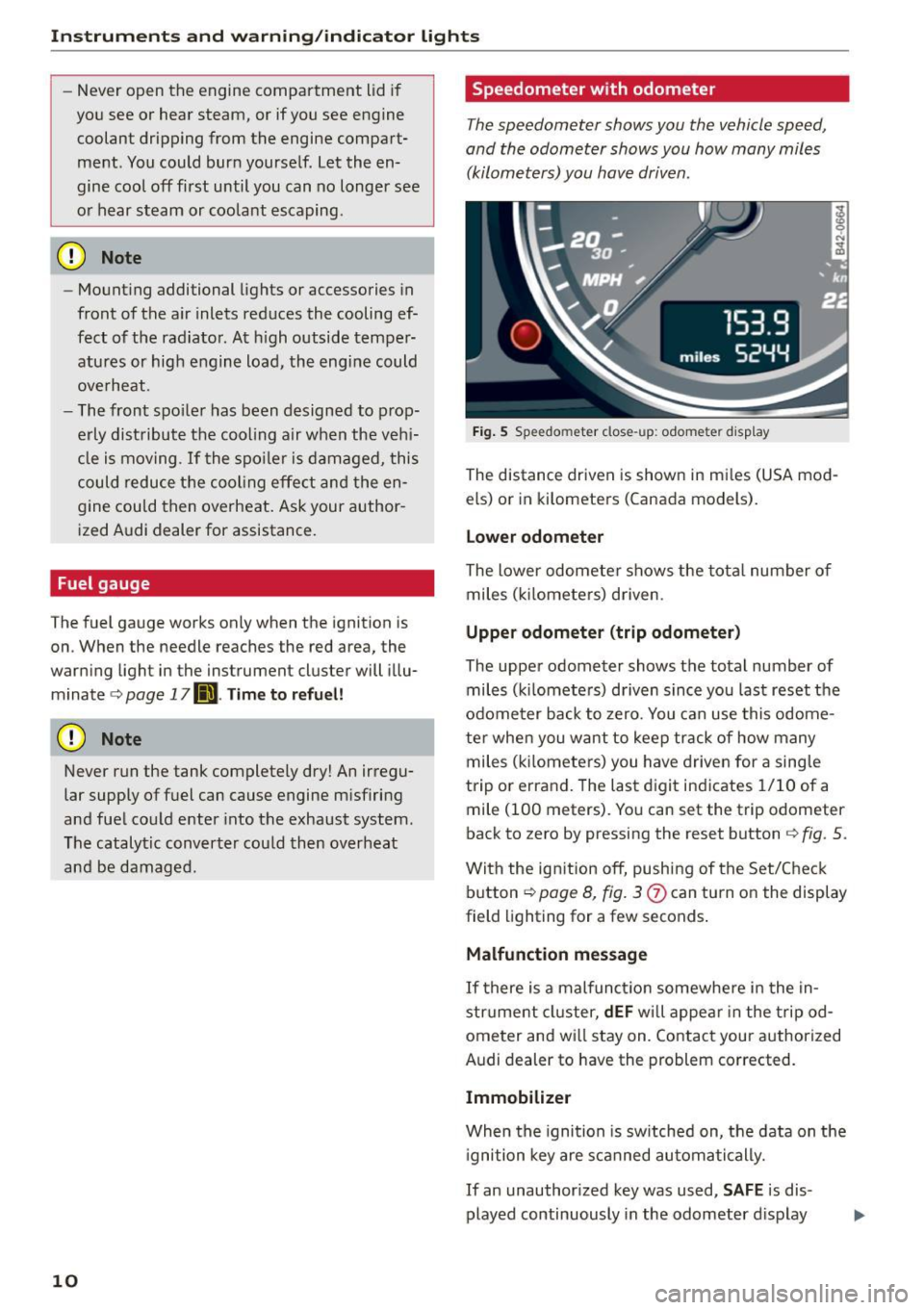
The speedometer shows you the vehicle speed,
and the odometer shows you how many miles
(kilometers) you have driven.
Fig. 5 Speedo meter close-up: odometer disp lay
The distance driven is shown in mi les (USA mod
els) or in kilometers (Canada models).
Lower odomet er
The lower odometer shows the tota l number of
miles ( kilometers) driven .
Upper odometer (trip odometer )
The upper odometer shows the total number of miles (k ilometers) driven since you last reset the
odome ter back to zero. You can use this odome
te r when you want to keep track of how many
miles (k ilomete rs) you have driven for a sing le
trip or errand. The last digit ind icates 1/10 of a
mile (100 meters). You can set the trip odometer
back to zero by pressing the reset button
c:> fig . 5 .
With the ig nition off, push ing of the Set/Check
button
c:> page 8, fig. 3
Malfunction messag e
If there is a malfunction somewhere in the in
strument cluster,
dEF wi ll appea r in the tripod
ometer and wi ll stay on. Contact your authorized
Audi dealer to have the problem corrected.
Immobilizer
When the ignition is sw itched on, the data on the
i gnition key are s canned automatically.
If an unauthor ized key was used,
S AF E is dis
played continuously in the odometer d isplay
Page 14 of 232
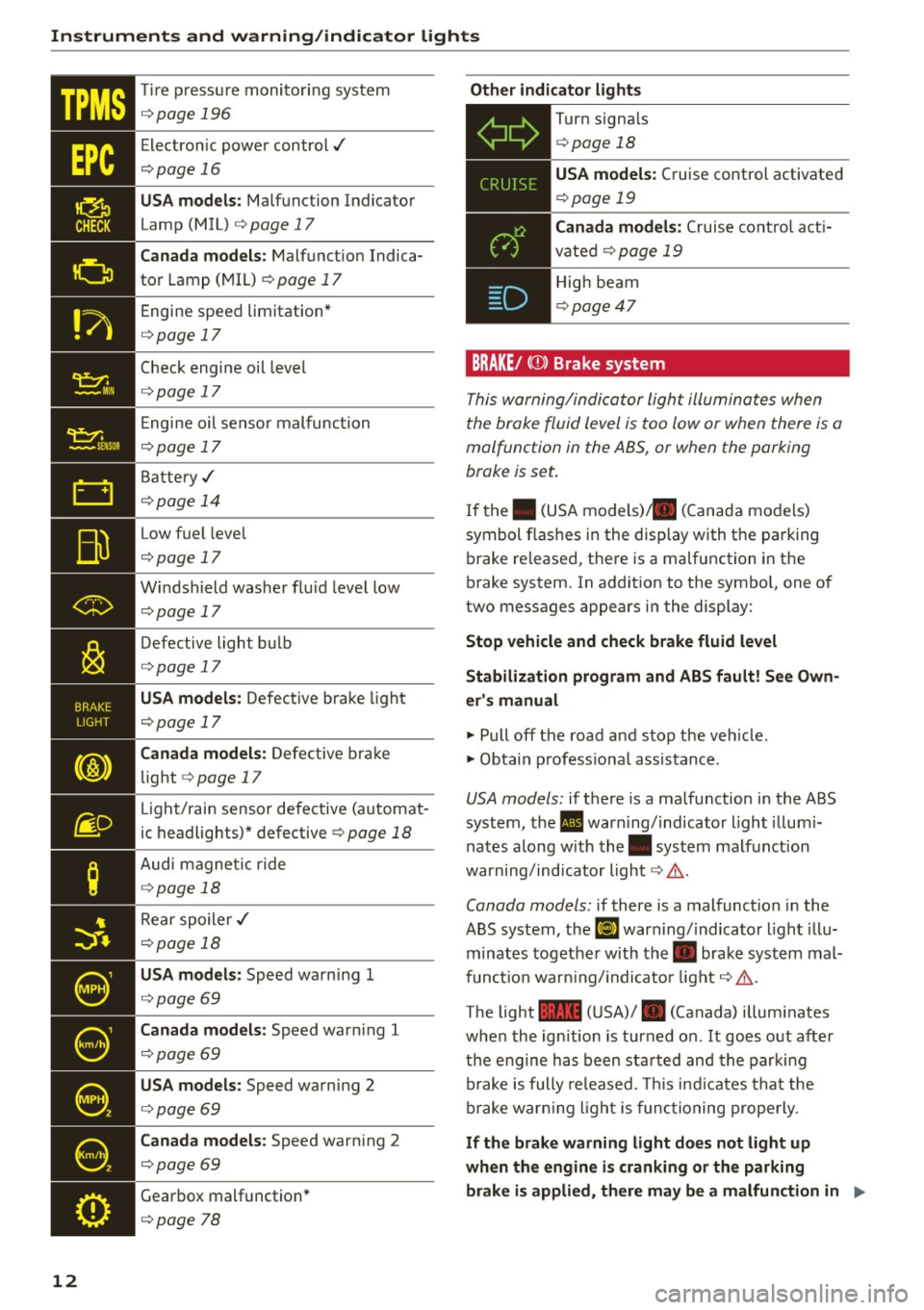
Instruments and warning/indicator lights
"t:::1: ~MI ii
12
Tir e p ress ure monito ring system
¢page 196
Electron ic power control../
¢page 16
USA models: Malfunction Indicator
Lamp (MIL) ¢
page 17
Canada models: Malfunction Indica
tor Lamp (MIL)
¢ page 17
Engine speed limitation *
¢page 17
Check engi ne oil level
¢ page 17
Engine oil senso r malfunction
¢page 17
Batte ry,/
¢ page 14
Low fuel leve l
¢page 17
Windshield washer flu id leve l low
¢page 17
Defective light b ulb
¢page 17
USA models: Defective bra ke light
¢page 17
Canada models: Defective bra ke
light ¢
page 17
Light/rain sensor defective (a utomat
ic headlights) * defective
¢ page 18
Aud i magne tic ride
¢ page 18
Rear spoiler .I
¢page 18
USA models: Speed wa rn ing 1
¢ page 69
Canada models: Speed war ning 1
¢page 69
USA models: Speed warning 2
¢page 69
Canada models: Speed warn ing 2
¢page 69
Gear box mal function *
¢page 78
Other indicator light s
Turn signals
¢ page 18
USA models : Cruise control activate d
¢page 19
BRAKE/ ((D) Brake system
This w arning/in dica tor light illumina tes when
the broke fluid level is too low or when there is a
malfunction in the ABS, or when the parking
brake is set .
If the . (U SA models) . (C anada mo de ls)
symbol f las hes i n the display with t he pa rking
b rake re leased, the re is a malfunction in the
brake system. In addit ion to the symbo l, one of
two messages appears in the display:
Stop vehicle and check brake fluid level
Stabilization program and ABS fault! S ee Own
er's manual
~ Pull off the road an d stop th e veh icle .
~ Obta in p rofess io na l assis tan ce .
USA mod els: if there is a ma lfunction in the ABS
system, the. warn ing/ indicato r light illum i
na tes a long w ith the . system ma lf u nction
war ning/ind icator light¢ ,&. .
Canada models: if there is a malfunction i n the
ABS system, the
EiJ warn ing/ indica tor ligh t il lu
minates together with the. brake syst em mal
f unc tion war ning/ indica to r lig ht ¢,&. .
The light
1111 ( U SA)/ . (Canada) illum inates
whe n the ign ition is turned on. I t goes o ut afte r
the engin e has be en sta rted and th e p arkin g
brake is fully re leased. This ind icates that th e
br ake warn ing lig ht is func tioning properly.
If the brake warning light does not light up
when the engine is cranking or the parking
brake is applied, there may be a malfunction in
1111>
Page 16 of 232
Instruments and warning/indicator lights
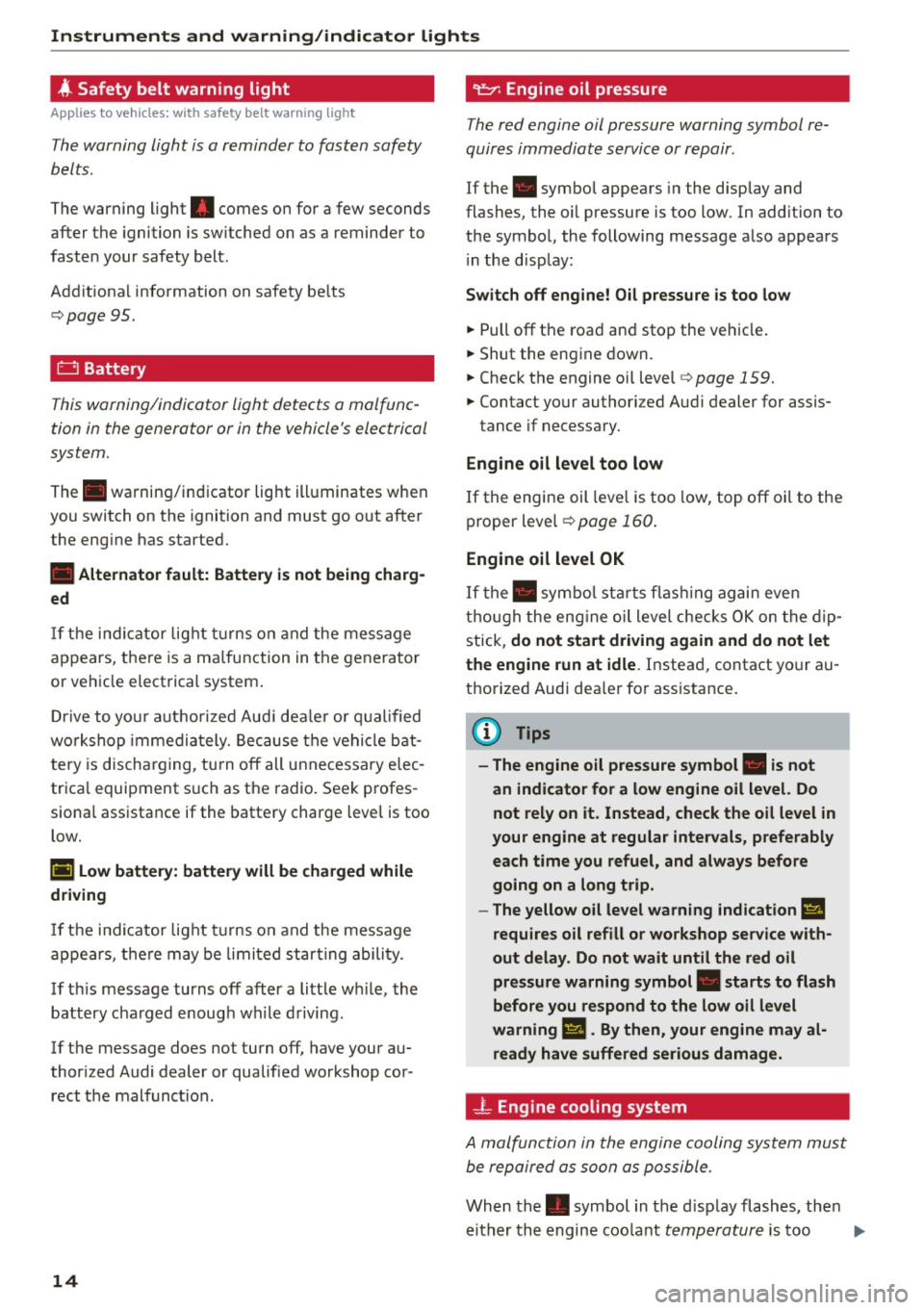
4 Safety belt warning light
Applies to vehicles: with safety belt warning light
The warning light is a reminder to fasten safety
belts.
The warning light . comes on for a few seconds
after the ignition is sw itched on as a reminder to
fasten your safety belt.
Additiona l information on safety be lts
¢page 95.
D Battery
This warning/indicator light detects a malfunc
tion in the generator or in the vehicle's electrical
system.
The. warning/indicator light ill uminates when
you switch on the ignition and must go out after
the engine has started.
• Alternator fault: Battery is not being charg
ed
If the indicator light turns on and the message
appears, there is a malfunction in the generator
or vehicle electrical system .
D riv e to you r aut horized Aud i dea le r or qualified
wo rkshop immediately. Because the vehicle bat
tery is discharging, turn off all unnecessary elec
trica l equipment suc h as the radio. Seek profes
siona l assistance if the battery charge level is too
low.
(•) Low battery: battery will be charged while
driving
If the indicator light turns on and the message
appears, there may be limited star ting ability.
If th is message turns off after a little wh ile, the
battery charged enough wh ile driving .
If the message does not turn off, have your au
thor ized Audi dealer or qualified workshop cor
rect the malfunct ion.
14
·~Engine oil pressure
The red engine oil pressure warning symbol re
quires immediate service or repair .
If the . symbol appears in the display and
flashes, the o il pressure is too low. In add ition to
the symbol, the following message also appears i n the d isp lay:
Switch off engine! Oil pressure is too low
.. Pull off the road and stop the vehicle .
.. Shut the engine down.
.. Check the engine oil level¢
page 159 .
.. Contact your authorized Audi dealer for assis-
tance if necessary.
Engine oil level too low
If the engine oil leve l is too low, top off oil to the
proper level
¢page 160.
Engine oil level OK
If the. symbol starts flashing again even
though the engine oi l level checks OK on the dip
stick,
do not sta rt driving again and do not let
the engine run at idle .
Instead, contact your au
thorized Audi dealer for assistance .
(D Tips
- The engine oil pressure symbol. is not
an indicator for a low engine oil level. Do
not rely on it. Instead, check the oil level in
your engine at regular intervals, preferably each time you refuel, and always before
going on a long trip.
- The yellow oil level warning indication
II
requires oil refill or workshop service with
out delay. Do not wait until the red oil
pressure warning symbol. starts to flash
before you respond to the low oil level
warning
Ill. By then, your engine may al
ready have suffered serious damage.
-L Engine cooling system
A malfunction in the engine cooling system must
be repaired as soon as possible.
When the. symbol in the display flashes, then
either the engine coo lant
temperature is too IJ,,
Page 19 of 232
Instrument s and warning /indicator ligh ts
..... N
r-N "':
@ Tips
If this warning/indicator light illuminates
while you are dr iving, then there is a malfunc
tion in the en gine electronics. Have the ma l
function corrected as soon as p ossible by your
author ized Audi dealer or qualified workshop .
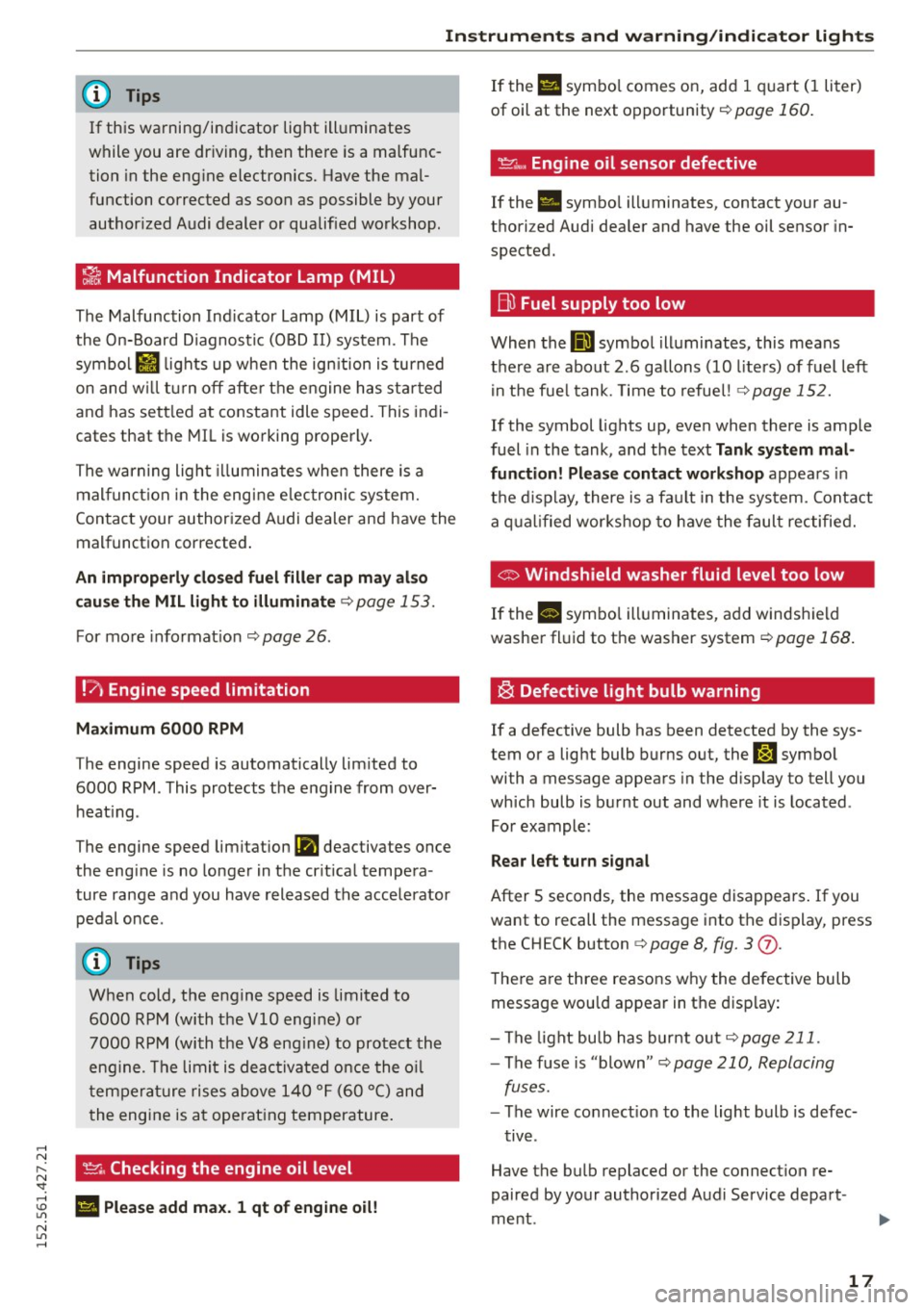
~ Malfunction Indicator Lamp (MIL)
The Malfunction Indicator Lamp (MIL) is part of
the On-Board Diagnostic (OBD II) system . The
symbo l
II lights up when the ign ition is turned
on and w ill tur n off after the engine has sta rted
and has sett led at constant idle speed. This indi
cates that the MIL is working properly.
The warning light illuminates when there is a
mal funct ion in the eng ine e lectronic system.
Contact your author ized Audi dealer and have the
malfunct ion corrected .
An improperly clo sed fuel fill er cap m ay al so
cau se th e MIL light to illuminate¢
page 153.
For more info rmat ion ¢ page 26.
!?' Engine speed limitation
Maximum
6000 RPM
T he engine speed is automatically lim ited to
6000 RPM. This protects t he engine from over
heat ing .
The engine speed limit ation
(Pl deac tivates once
the eng ine is no longer in the cr it ica l tempe ra
ture range and you have released the accelerator
pedal once.
When cold, the engine speed is limited to
6000 RPM (with the
VlO engine) o r
7000 RPM (with the V8 eng ine) to protect the
eng ine . T he limit is deac tivated once the o il
t em pera ture rises above 140 ° F (60 °C) and
t he engine is a t ope rat ing temperature .
~. Checking the engine oil level
; El Plea se add max. 1 qt of eng ine oil!
N
"' .....
If the Ell symbo l comes on, add 1 quart (I liter)
of oil at the next opportunity¢
page 160.
~"' Engine oil sensor defective
If the . symbo l ill um inates, contact your au
thori zed Audi dea ler and have the oil sensor in
spected.
B) Fuel supply too low
When the 00] symbol ill uminates, this means
there a re about 2 .6 gallons (10 liters) of fuel left
i n the fue l tank. Time to refue l! ¢
page 152.
If the symbol lights up , even when there is ample
fuel in the tank , and the text
Tank system mal
function! Please contact workshop
appea rs in
t h e d isplay, there is a fa ult in the system. Contact
a q ual ified wor kshop to h ave the faul t rec tified.
© Windshield washer fluid level too low
If the II symbo l ill uminates, add windsh ield
washe r fl uid to t he washer system
¢ page 168.
~ Defective light bulb warning
If a defective bulb has been detected by the sys
tem or a lig ht bulb burns out, the
J:J symbo l
wi th a message appears in the disp lay to tell you
which bulb is burnt out and w here it is located .
For example :
Rear left turn signal
After 5 seconds , the message disappears . If you
want to recall the message i nto the display, press
the CH ECK button ¢
page 8, fig. 3 (j).
The re a re three reasons w hy the defective bulb
message wou ld appear in t he display:
- The light bu lb has bur nt o ut
¢ page 211.
-The f use is "blown" <=-> page 210, Replacing
fuses.
- The wire co nnect ion to the light bulb is defec-
t iv e .
Have the bulb repl aced or the connect ion re
paired by your authorized Aud i Service depart
me nt.
17
Page 23 of 232
.... N
l'
N "1: .... I.O
"' N
"' ....
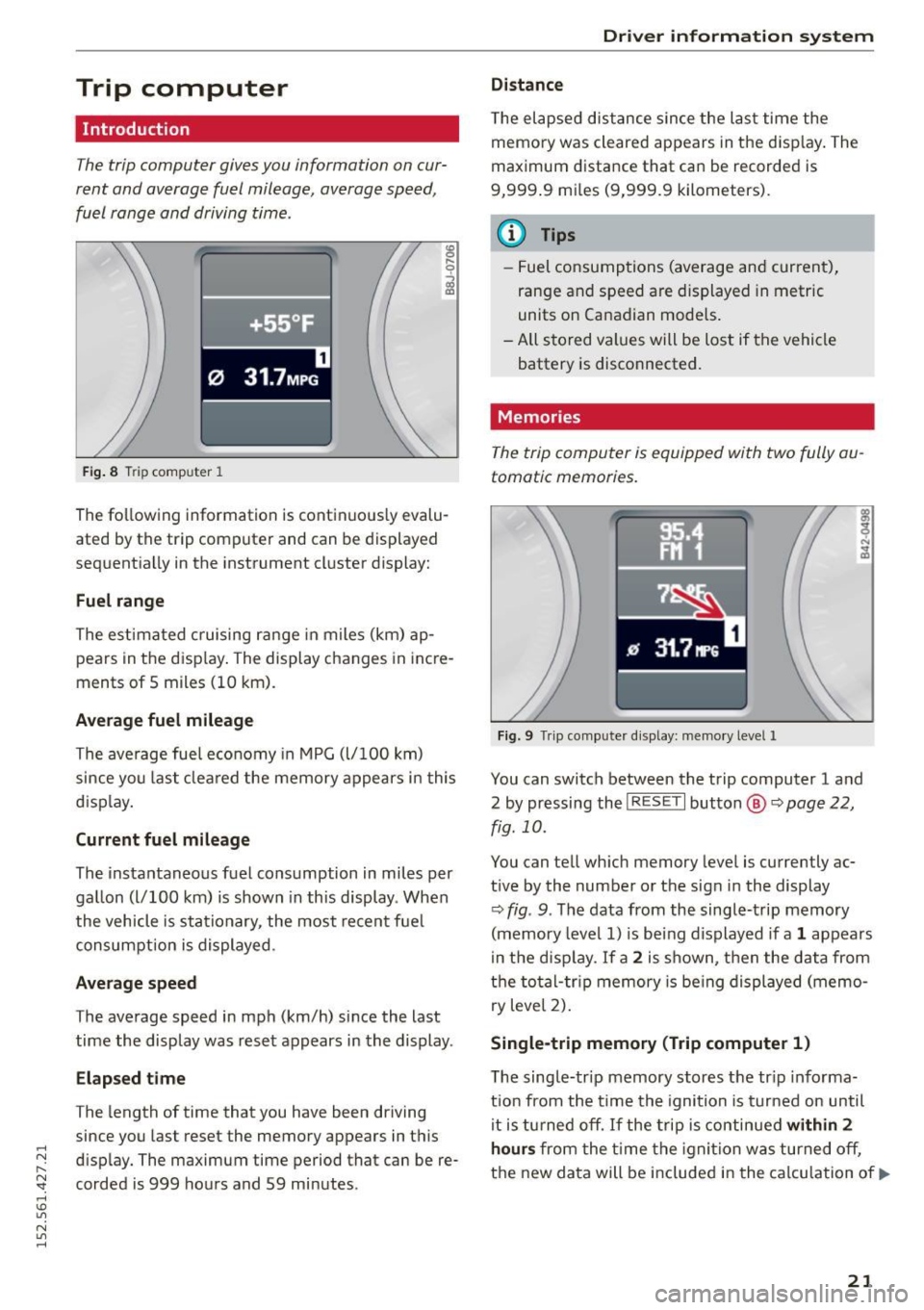
Trip computer
Introduction
The trip computer gives you information on cur
rent and average fuel mileage, average speed ,
fuel range and driving time.
Fig. 8 T ri p comp uter 1 ,....
0
;;i ID
The following
information is continuously evalu
ated by the trip computer and can be displayed
sequentially in the instrument cluster display:
Fuel range
The estimated cruising range in m iles (km) ap
pears in the disp lay. The display changes in incre
ments of 5 miles (10 km) .
Average fuel mileage
The average fuel economy in MPG (l/100 km)
since you last cleared the memory appears in this
d isplay.
Current fuel mileage
The instantaneous fuel consumption in miles per
gallon (l/100 km) is shown in this display . When
the vehicle is stationary , the most recent fuel
consumption is displayed.
Average speed
The average speed in mph (km/h) since the last
time the display was reset appears in the display .
Elapsed time
The length of time that you have been driving
since you last reset the memory appears in this
disp lay. The maximum time period that can be re
corded is 999 hours and 59 minutes .
Driver information system
Distance
The elapsed distance since the last time the
memory was cleared appears in the disp lay. The
maximum distance that can be recorded is
9,999 .9 mi les (9,999.9 kilometers).
(D Tips
- Fuel consumptions (average and current),
range and speed are displayed in metric
units on Canadian models .
- All stored values will be lost if the vehicle battery is disconnected.
Memories
The trip computer is equipped with two fully au
tomatic memories.
Fig. 9 Trip computer d is play: memo ry level 1
You can switch between the trip computer 1 and
2 by pressing the
! R ESET I button @ ~page 22,
fig. 10.
You can tell which memory level is currently ac
t ive by the number or the sign in the display
Q fig . 9. The data from the single-trip memory
(memory level 1) is being displayed if a
1 appears
in the disp lay.
If a 2 is shown, then the data from
the total-tr ip memory is being displayed (memo
ry level 2).
Single -trip memory (Trip computer 1)
T he single-trip memory stores the tr ip informa
tion from the time the ignition is turned on until
it is turned off. If the trip is continued
within 2
hours from the time the ignition was turned off,
the new data will be included in the calculation of.,.
21
Page 24 of 232
Driver information system
the current trip information. If the trip is inter
rupted for
more than 2 hours the memory is re
set automat ically.
Total-trip memory (Trip computer 2)
Unlike the sing le-trip memory, the total-trip
memory is not reset automatically. This permits
you to evaluate your driving data for the entire
period between manual resets.
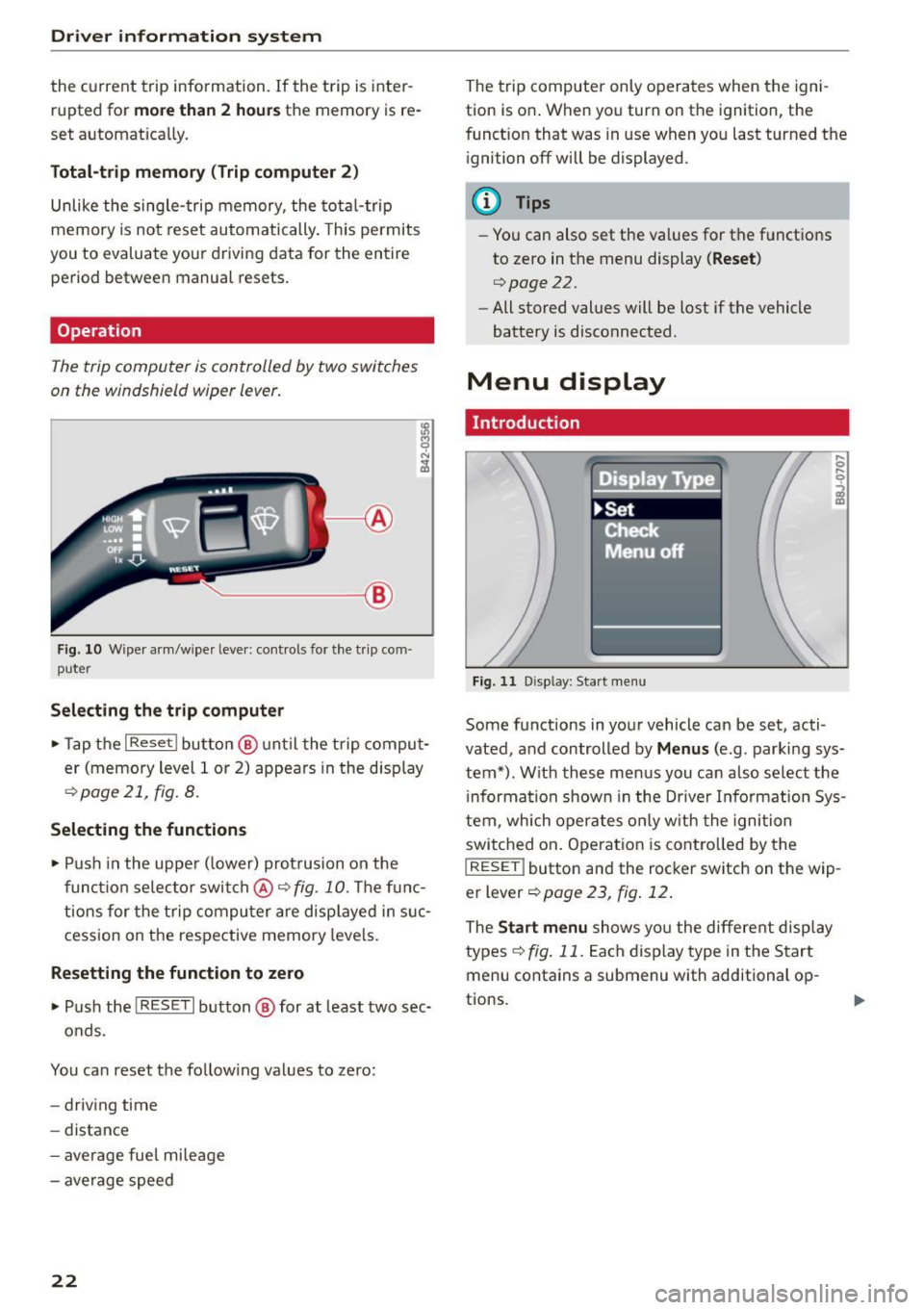
Operation
The trip computer is controlled by two switches
on the windshield wiper lever.
------- ®
Fig. 10 Wiper a rm/wiper leve r: controls for the t rip com ·
puter
Selecting the trip computer
• Tap the I Reset ! button @ unt il the trip comput
er (memory level 1 or 2) appears in the disp lay
¢ page 21, fig. 8.
Selecting the functions
• Push in the upper ( lower) protrusion on the
function selector switch @~
fig. 10. The func
tions for the trip computer are displayed in suc
cession on the respective memory levels.
Resetting the function to zero
• Push the I RESE T I button @ for at least two sec-
onds.
You can reset the follow ing values to zero:
- driving time
- distance
- average fuel mileage
- average speed
22
The trip computer only operates when the igni
tion is on . When you turn on the ignition, the
funct ion that was in use when you last turned the
ignition off will be displayed.
(D Tips
-You can also set the values for the functions
to zero in the menu display
( Reset )
c':) page 2 2.
-All stored values will be lost if the vehicle
battery is disconnected.
Menu display
Introduction
Fig. 11 D isp lay: Start menu
Some functions in your vehicle can be set, acti
vated, and controlled by
Menus (e.g . parking sys
tem•). With these menus you can also select the
i nformation shown in the Driver Information Sys
tem, which operates only with the ignition
switched on . Operation is contro lled by the
I RESET ! button and the rocker switch on the wip
er lever
¢page 23, fig. 12 .
The Start menu shows you the different display
types
~ fig . 11. Each dis play type in the Start
menu contains a submenu with additional op-
tions.
Ill-
Page 25 of 232
.... N
l'
N "1: rl I.O
"' N
"' ....
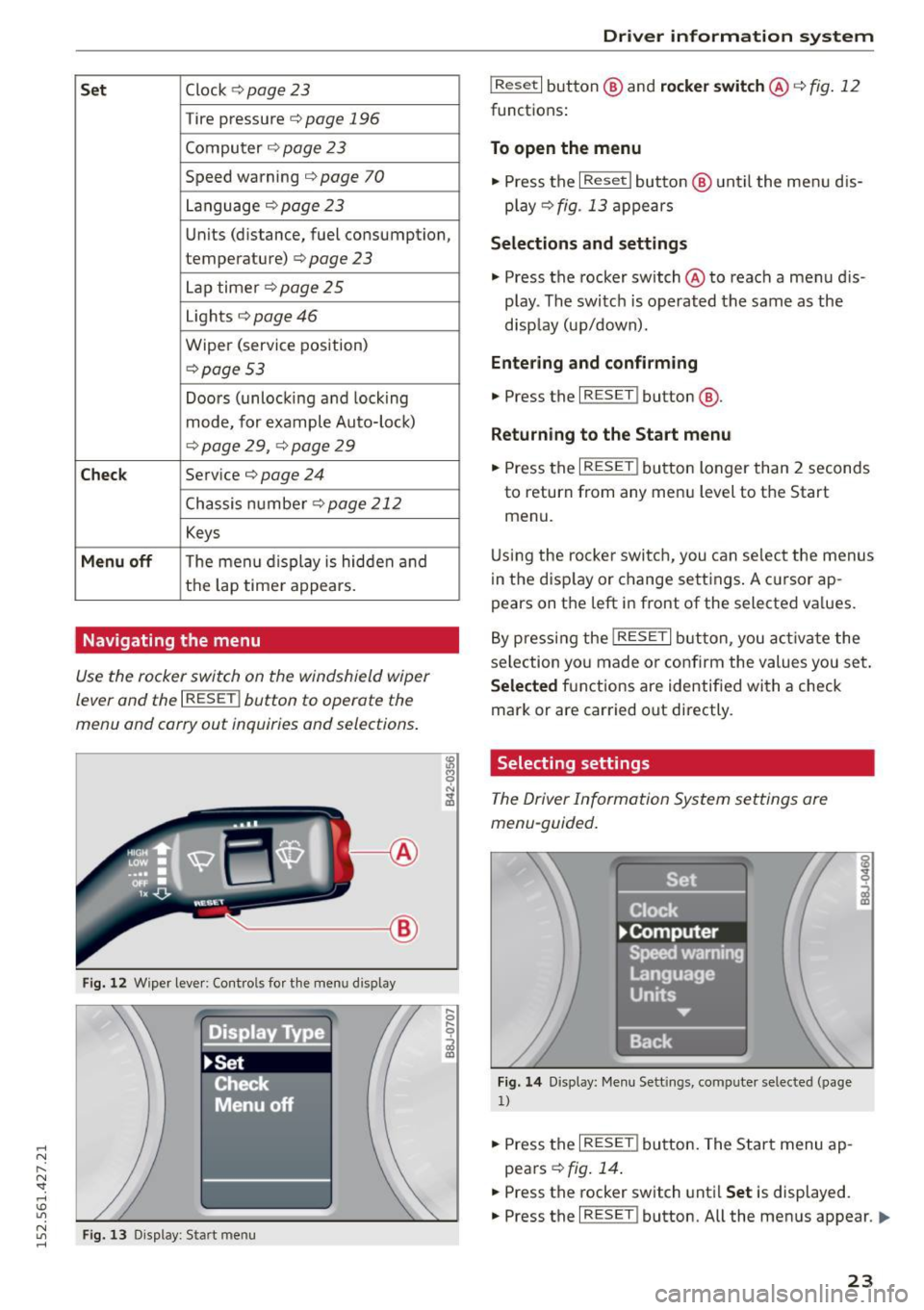
Set Clock ¢ page 23
Tire pressure c::> page 196
Computer c::> page 2 3
Speed warning c::> page 70
Language c::>page23
Units (distance, fuel consumption,
temperature)
c::> page 23
Lap timer c::> page 25
Lights c::> page 46
Wiper (service position)
c::>page 53
Doors (unlocking and locking
mode, for example Auto-loc k)
c::> page 29, ¢ page 29
Chec k Service c::> page 24
Chassis number c::>page 212
Keys
Menu off The menu display is hidden and
the lap time r appears.
Navigating the menu
Use the rocker switch on the windshield wiper
lever and the
I RESET ! button to operate the
menu and carry out inquiries and selections.
-----®
Fig. 12 Wiper lever: Cont rols fo r th e menu d isplay
Fi g. 13 Display: Start menu
Dr iver inform atio n sy stem
I Reset I button @ and rocker switch @ c::> fig. 12
functions:
To open the menu
• Press the I Reset I button @ until the menu d is
play
c::> fig . 13 appears
Selection s and settings
• Press the rocker switch @ to reach a menu dis
play . The switc h is operated the same as the
disp lay (up/down).
Entering and confirming
• Press the I RESET ! button@.
Returning to the Start menu
.. Press the I RESET ! button longer than 2 seconds
to return from any menu level to the Start
menu.
U sing the rocke r switch, you can select the menus
in the disp lay or change settings . A c ursor ap
pears on the left in front of the selected va lues.
By pressing the
! RESET I button, you activa te the
selection yo u made or confirm the values you set .
Selected fu nctions are identified with a check
mark or are car ried out directly.
Selecting settings
The Driver Information System settings are
menu-guided.
Fi g. 14 Display: Me nu Sett ings, computer selected (page
1)
.. Press the I RESET ! button. The Start menu ap
pears
c::> fig . 14 .
.. Press the rocker switch until Set is displayed.
.. Press the
I RESET ! button. All the menus appear. Ill-
23