door lock AUDI RS5 CABRIOLET 2013 User Guide
[x] Cancel search | Manufacturer: AUDI, Model Year: 2013, Model line: RS5 CABRIOLET, Model: AUDI RS5 CABRIOLET 2013Pages: 286, PDF Size: 71 MB
Page 42 of 286
40 Opening and clo sing
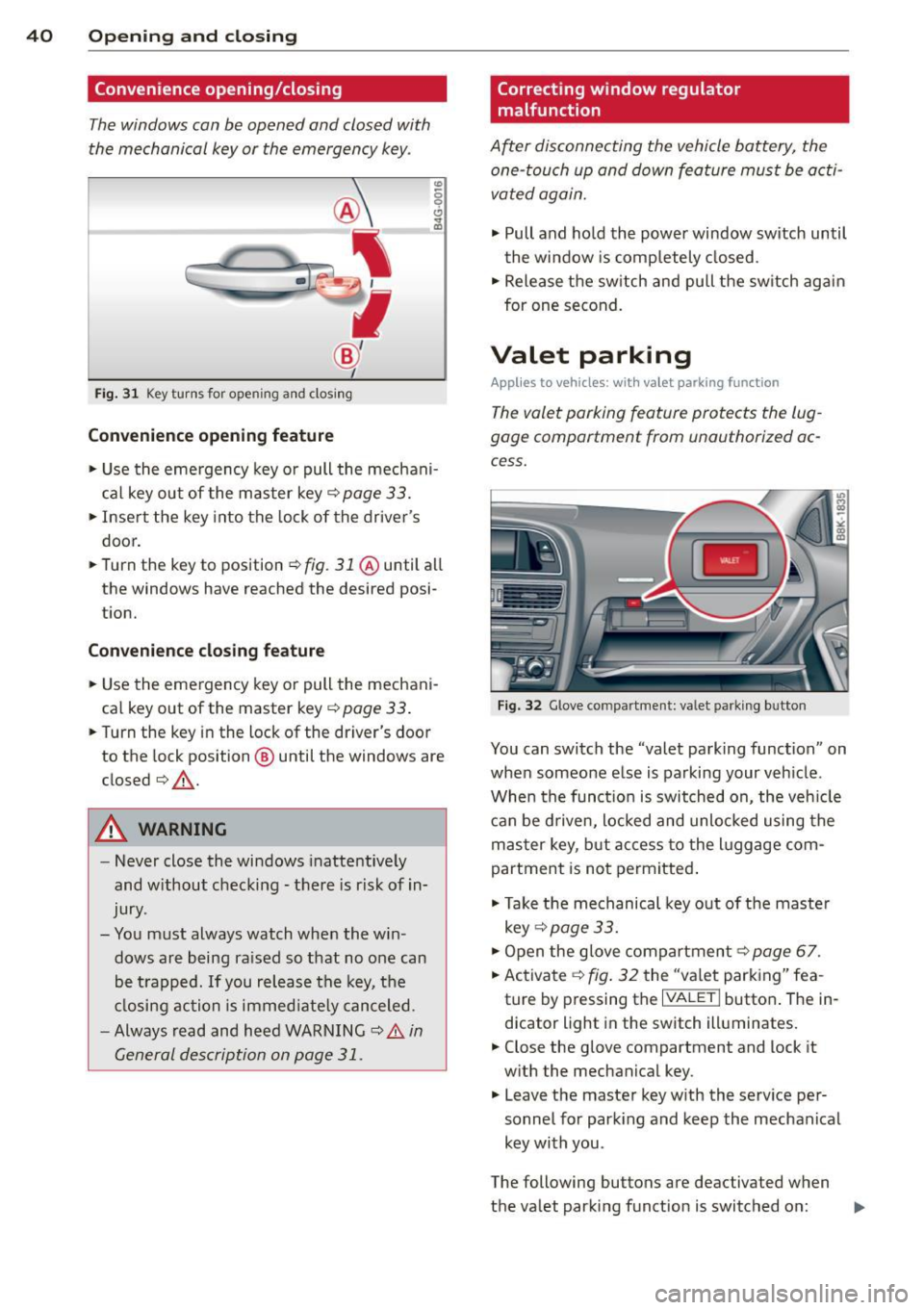
Convenience opening/closing
The windows can be opened and closed with
the mechanical key or the emergency key.
@
' ~-~
® '
Fig . 31 Key turns for open ing an d clos ing
Conv eni ence open ing fe ature
"' 0 0 0
" m
• Use the eme rgency key or pull the mechani
cal key out of the master key¢
page 33.
• Inse rt the key into the lock of the driver's
door.
• Turn the key to position~
fig. 31 @until all
the windows have reached the desired posi
t ion.
Con venience clo sing f eature
• Use the emergency key or pull the mechani
cal key out of the master key¢
page 33 .
• Turn the key in the lock of the dr iver's door
to the lock position @ until the windows are
closed¢ &.
A WARNING
-Never close the windows inattentive ly
and w ithout checking -there is risk of in
jury.
- You must always watch when the win dows are being ra ised so that no one can
be t rapped. If you release the key, the
closing action is immed iate ly canceled.
- Always read and heed WARNING ¢
A in
General description on page 31.
Correcting window regulator
malfunction
After disconnecting the vehicle battery, the
one-touch up and down feature must be activated again.
• Pull and ho ld the power window switch until
the window is completely closed.
• Release the sw itch and pull the switch again
for one second.
Valet parking
App lies to vehicles: wit h va le t parking function
The valet parking feature protects the lug
gage compartment from unauthorized ac
cess.
F ig . 32 Glove compartme nt: valet parking button
You can switch the "valet parking function" on
when someone else is parking your veh icle .
When the funct io n is switched on, the veh icle
can be d riven, locked and unlocked using the
master key, but access to the l uggage com
partment is not permitted .
• Take the mechanical key out of the maste r
key ¢
page 33.
• Open the glove compartment¢ page 67.
• Activate ¢
fig. 32 the "va let parking" fea
ture by p ressing the
I VALET I button . The in
dicator light in the switch illuminates.
• Close the glove compartment and lock it
w ith the mechanical key .
• Leave the master key w ith the serv ice pe r
sonnel for park ing and keep the mechanical
key with you .
The following buttons are deactivated when
the valet parking function is switched on: ..,_
Page 46 of 286
44 Power top
Reduce the vehicle speed below 50 km/h and
use the switch to open or close the powe r top
comp lete ly.
.&_ WARNING
Never drive when the powe r top is not
locked co rrectly. The w ind from dr iv ing
co uld cause t he power top to open. Th is
can r esult in injuries a nd damage to th e
veh icle .
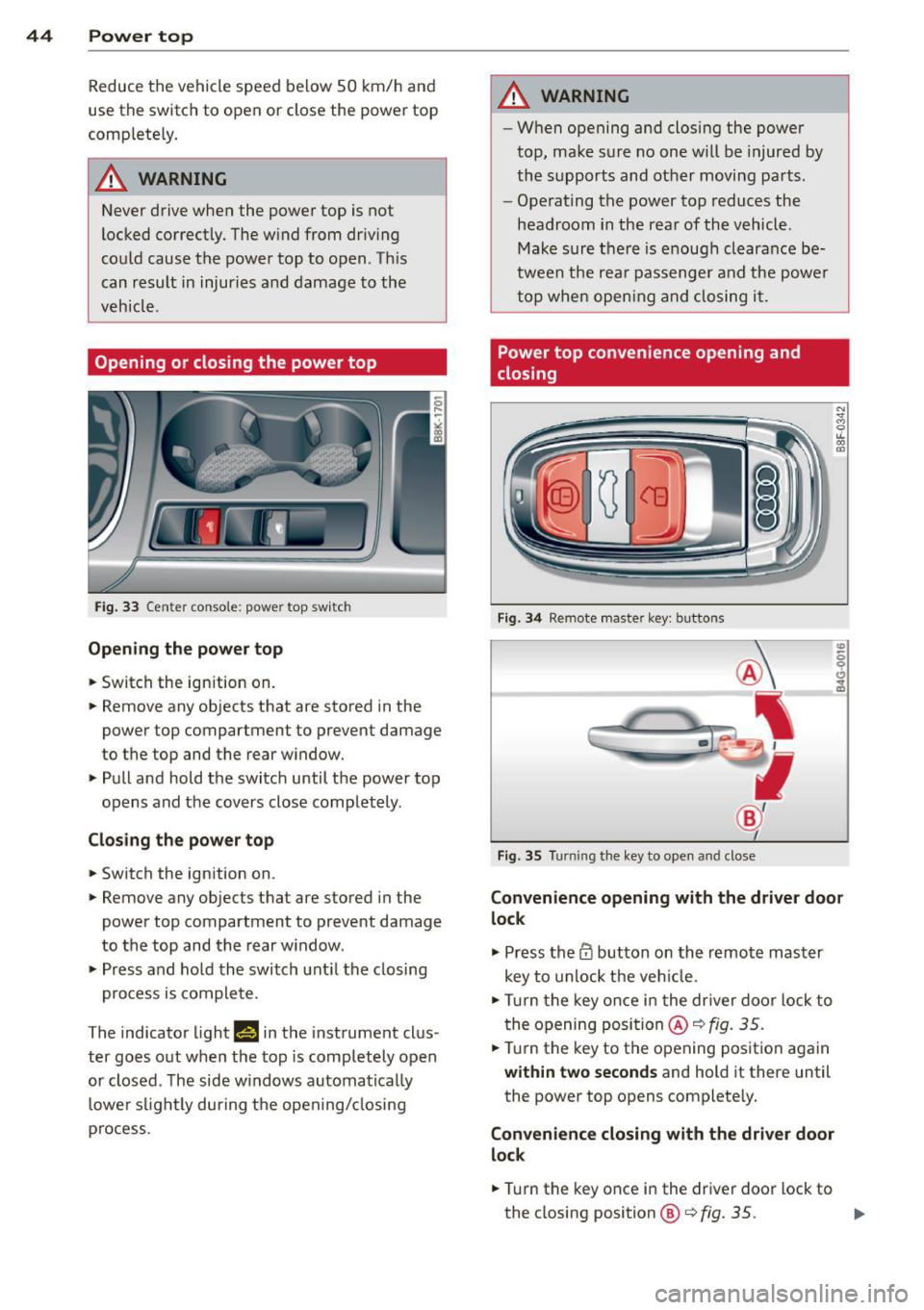
Opening or closing the power top
Fig. 33 Ce nte r conso le : powe r top sw itc h
Opening the power top
.. Switch the ign ition on .
-
.. Remove any ob jects that a re stored in the
power top compartment to prevent damage
to the top and the rear w indow .
.. Pull and hold the switc h until the power top
opens and the cov ers close compl ete ly .
Closing the power top
.. Switch the ign ition on .
.. Remove any objects t hat are stored in the
power top compartment to prevent damage
to the top and the rear w indow .
.. Pr ess and ho ld the switch unt il the closing
pro cess is co m plete.
The indicator ligh t
Hin the instrument clus
ter goes o ut when the top is completely o pen
or closed . T he side w indows automa tica lly
lowe r slig htl y during t he open ing/ closing
p ro cess.
.&_ WARNING
-- W hen opening and closing the power
top, ma ke s ure no on e w ill be injur ed by
the supp orts and ot her moving pa rts .
- Ope rat ing the power top reduces the
headroom in the rea r of the vehicle .
Ma ke sur e th ere i s enoug h clear an ce be
twee n the rea r passenger an d the power
t o p whe n openin g an d closing it.
Power top convenience opening and
closing
Fi g. 34 Remote maste r key : butto ns
Fig . 35 Turnin g the key to ope n an d close
Convenience opening with the driver door
lock
.,. Press the CD button on th e remot e mas ter
key to unlock the ve hicle.
.. Turn t he key once i n the dr iver doo r lo ck to
t he openi ng posi tion @~
fig. 35 .
.. Tur n the key to the opening pos itio n again
within two seconds and hold it there until
the power top opens complete ly.
Convenience closing with the driver door
lock
.. Tur n the key once i n the driver doo r lock to
the closing position@¢
fig. 35. ..,.
Page 55 of 286

(D Tips
-The light sensor * for headl ight control is
l ocated in the rear view m irror mount.
You should therefore not apply any st ick
ers to the windsh ield in this area in order
to prevent malfunctions or failures .
- Some exterior lighting functions can be
adjusted
¢page 53.
-When yo u remove you r key from the igni
tion w hile the vehicle's lights are turned
on, a buzzer sounds as long as the driv
er's door is open.
- In cool or damp weather, t he ins ide of
the headlights, turn signa ls and tail
li ghts can fog ove r due to the tem pera
ture diffe ren ce betwe en the inside and
outside. They will clear shor tly after
swi tching t hem on. This d oes not aff ect
the service life of the ligh ting.
- In the even t of a ligh t sensor malfunc
tion, the drive r is no tifie d in the inst ru
ment cluster disp lay ~
page 2 2.
Turn signals and high beam lever
The lever operates the turn signal s, the high
beams and the headlight flasher .
Fig. 56 T urn sig na l and high beam leve r
Turn signals ¢i ¢
The turn s ignals activate when you move the
l ever into a turn s ignal position when the ign i
tion is sw itched on.
(D -right turn signal
@ -Left turn signa l
The turn s ignal b links three times if you just
tap the lever .
Clear vision 5 3
High beams and headlight flasher @:D
Move the lever to the corresponding posit io n:
@ -high beams on
@-high beams off or headlight flasher
T he ind icator light
II in the instr ument clus
ter turns on .
Notes on these features
-The turn signals on ly wor k w it h t he ignition
t urned on. The indica tor l igh ts
11 or II in
the instrument cluste r also blink .
- Aft er you have tu rned a corner, the turn s ig
na l swi tches off au tom atically .
- The
high beam wo rks only when the head
lights a re on. The indicator Ligh t. in the
instrumen t clus ter illuminates when the
high beams are on .
- The
headligh t flasher works on ly as long as
you ho ld the lever -even if the re are no
lights switched o n. The ind icator light
Ill i n
the inst rument cluster illuminates when you
use the headlight flasher.
&_ WARNING
Do not use the h igh beam or head light
flasher if you kn ow that these could b lind
oncom ing traffic.
Adjusting exterior lighting
The functions are selected in the radio or
MM!* .
.. Select: !CAR I function button> Exterior
light ing .
Or
.. Select: !CAR I function button > Car systems*
contro l butto n > Vehicle settings > Exterior
lighting .
Coming home (light when leav ing car )*,
Leaving home (light when unlocking car)*
The coming home function illumi nates the
area around the vehicle when the ignition is
switched off and the drive r's door is open ed.
Depend ing on ve hicle equipment, t he fu nction
can be sw itched on and off or the length of
time the lights rem ain on* can be ad justed . .._
Page 57 of 286

Interior lights
Front/rear interior lights
Fig. 58 Front headliner: inter ior lighti ng controls
Fig.
59 Rear headlin er: rear reading lights
@ Interior lights
Press the button @. The LED in the button il
l uminates .
If the LED illuminates, the interior lights turn
on automatically when you unlock the vehicle,
open a door or remove the ignition key. The in
terior lights turn off several seconds after
your close the doors, when you lock the vehi
cle or when you turn the ignition on. When a
door is open, the light turns off after a few
minutes.
@ Front/rear reading lights
To turn a reading light on/off, press the but
ton ~¢
fig. 58 or¢ fig. 59.
Clear vision 55
Instrument illumination
The basic brightness of the illumination for
the instruments, the center console and the
display can be adjusted.
Fig. 60 Instrument illumination
.,. Press the knob to release it .
.. Turn the knob toward"-" or"+" to reduce or
increase the brightness .
.,. Press the knob again to return it to its origi
nal position.
(D Tips
The instrument illumination (for dials and
needles) lights on when the ignition is
switched on and the vehicle lights are
turned off. As the daylight fades, the illu
mination of the dials likewise dims auto
matically and will go out completely when
the outside light is
very low. This feature is
meant to remind you to switch on the
headlights when outside light conditions
become poor.
Vision
Adjusting the exterior mirrors
Fig. 61 Forward sect ion of dr iver 's armrest: power mir
r or cont rols
Page 66 of 286

64 Seats and storage
Center armrest
The center armrest can be adjusted to several
levels.
Fig. 71 Armrest between the driver's/front passenger's
seats .
Adjusting the center armrest
.. To adjust the angle, raise the armrest from
the starting position ¢
fig. 71 detent by de
tent.
"To bring the armrest back into the starting
position, raise it out of the top detent and
fold it back down .
The armrest can slide forward and back .
Head restraints
Front head restraints
Applies to vehicles: with a djustable head restrain ts
Head restraints that are adjusted according
to body size, along with the seat belt , offer
effective protection.
Fig. 72 Fro nt seat: adjusting the power head rest ra in t
Adjust the head restraint so the upper edge is
as even as possible with the top of your head.
If that is not possible, try to adjust the head
restraint so that it is as close to this position
as possible ¢
page 64.
"To adjust the height of the power head re
straint*, press the button up/down
¢fig. 72.
Refer to¢ page 121, Proper adjustment of
head restraints
for guidelines on how to ad
just the height of the front head restraints to
suit the occupant's body size.
A WARNING
-
- Driving without head restraints or with
head restraints that are not properly ad
justed increases the risk of serious or fa
tal neck injury dramatically.
- Read and heed all WARNINGS
¢page 121.
(D Tips
Correctly adjusted head restraints and
safety belts are an extremely effective
combination of safety features .
Seat memory
Description
Applies to vehicles: wi th memory f unctio n
-
The memory funct ion allows you to quickly
and easily store and recall personal seating
profiles for the driver. The memory function is
operated through the master key and the
memory buttons in the driver's door .
The driver's seating profile is stored and as
signed to the master key each time the vehicle is locked. The seating profile is recalled auto
matically when the vehicle is unlocked . If two
people use one vehicle, it is recommended
that each person always uses "their own" master key.
Up to 2 seat profiles can be stored in the
memory buttons in the driver's door . Once
they are stored, these seat profiles can be se lected at any time.
In addition to the driver's seat settings, you
can also store and access the exterior mirror
adjustment settings* using the remote con
tro l key or memory button.
Page 67 of 286

Remote control key
Applies to vehicles: with seat memory
To assign the d river 's sea t settings to the re
m ote cont ro l key when locking the vehicle, the
f u nction must be activ ated in the radio or
M MI*
.. Se lect :
I CAR I fu n ct io n but ton > Seat adjust
ment
> Driver's seat > Remote control key >
on .Or
.. Se lect:
~ I C - A- R~ I fu nction but ton > Car sy stem s*
co ntrol button > Vehicle settings > Seats >
Driver's seat > Remote control key > On .
@ Tips
If you do not want another driver's set
tings to be assigned to the remote key,
sw itch off the memo ry function us ing t he
rad io or MMI* or the
!ON/OF F I button
¢page 65.
Memory buttons
Applies to vehicles: with seat memo ry
F ig. 7 3 Driver 's door: mem ory fu nct io n buttons
The memory buttons are located i n the driv
er 's door .
Switching the memory function on/off
.. Pres s the I ON/OF F I butt on to swi tch the
memo ry function on/off . The wor d
OFF
lights up when the memory f unction is
switched off. Seat prof iles are not sto red .
Storing a seat profile
.. Press the ISET I button. W hen the word SET
ligh ts up, the memory is re ady to s tore se t
t ings .
Seats and storage 65
.. Press a memory bu tto n dil or ~ brie fly. A
tone conf irms that the settings were stored .
Accessing a seat profile
.. If the driver's door is open, pre ss a memory
but ton.
.. If the d river 's door is closed, p ress and hold
the memo ry but ton unti l the seat adjus t
ment is complete.
&_ WARNING
- For safety reas ons , the seat setting can
o nly be recalled when the vehicle is sta
tionary -otherwise yo u risk havi ng a n ac
cident.
- In an emergency the r ecall p roced ure ca n
be cancelled by pressing t he
IO N/O FF!
sw itch o r by ta pping the m emory bu t
tons.
Ashtray
Fi g. 74 Ce nter console: ashtray
Opening/closing
.. To open t he ashtr ay, slide t he cover up
c:> fig. 74.
.. To close the ashtray , press dow n on the cov
er .
Emptying the ashtray
.. To remove the in sert, s lide the l atch to the
r igh tc:>fig . 74-ar row -.
.. To ins ta ll th e insert, press it down i nto the
mou nt .
Page 78 of 286

76 On the road
Starting the vehicle with the emergency
key
Applies to vehicles: with ig ni tion lock
You can use the emergency key as an ignition
key in on emergency.
Fi g. 89 Glove compar tme nt: Adapter for emergency
key
Fig. 90 Inse rt emergency key into the adapter
.. Take the adapter for the emerge ncy key out
of the glove compartment
c!> fig . 89 .
.. Push the emergency key c::> fig. 90 fully into
the adap ter . Make sure tha t the Aud i rings
are facing up.
.. Press the emergency key in the adapter
down until it latches audibly .
.. Inse rt the adapte r with the emergency key
forward into the ignit ion switch. The engine
can now be started as usual.
Stopping the engine
App lies to vehicles: with ig n ition lock
.. Bring the vehicle to a full stop .
.. Automatic transmission: Move the selector
lever to the P or N pos ition .
.. Press on the ignition key. The engine is
t ur ned off.
.. You can now remove the key.
Steering lock
T he s teeri ng locks when yo u remove the igni
t ion key. The locked steering helps prevent
ve
hicle theft .
Emergency off
If it is necessary in unu sual circumstan ces, the
engine can be switched off while the veh icle is
moving. The eng ine will be switched off if you
press on the key for an extended period .
A WARNING ~
-Never turn off the engine before the ve
hicle has come to a comp lete stop. T he
fu ll function of the brake booster and the
power steering is not guaranteed. You
must use more force to turn or brake if
necessa ry. Beca use you cannot steer and
brake as you usually wou ld, this could
lead to crashes and ser io us injuries.
- For safety reasons, you sho uld a lways
park your vehi cle with the sele ctor lever
in P. O therwise, the vehicle could in ad
ver ten tly roll away.
- The radiator fan can continue to run fo r
up to 1 0 minu tes
even after you have
t urned off the engine and removed the
ignit ion key. The radiator fan can a lso
turn on agai n if the engine coo lant heats
up because o f intense sunlight or heat
bu ild-up in the engine compartment.
- Always take the key with you whenever
you leave your ve hicle. Otherw ise, the
engine could be sta rted or electrical
equ ipment such as the power windows
could be operated. This can lead to seri
ous injury.
- Never leave childre n or persons requiring
assistance unattended in t he vehicle . The
doors can be locked using the remote
trans mitte r, preven ting people from es
c a ping from t he ve hicle on the ir own in
the event of a n emergency . Depe nding
on the time of year, peop le inside the
ve
h icle can be exposed to very high or very
low temperatures .
Page 79 of 286

CD Note
If the engine has been under heavy load
for an extended period, heat builds up in
the engine compartment after the engine
is switched off- there is a risk of damaging
the engine . Allow the engine to run at idle
for about two minutes before switching it off.
Convenience key
Starting the engine
Applies to vehicles: with convenience key
The I START ENGINE S TOPI button switches
the ignition on and starts the engine.
Fig. 91 Ce nter console : S TART ENGINE STOP button
Starting the engine
.. Step on the brake pedal and move the selec
tor lever to P or N
c::> ,&..
.. Press On the ,..,I s=T"" A--=R=T =-= E~N::;:.,=G-;-,I N:-:--;:::E--;:S:-:;T:--;:O:;--;:P::il button
c::>fig. 91 -the engine w ill start.
Switching the ignition on/off
If you would like to switch the ignition on
without starting the engine, follow these
steps:
.. Press the
!S TART ENGINE STOPI button
without pressing the brake pedal.
.. To switch the ignition off, press the button
again.
If the engine should not start immediately,
the starting process is automatically stopped
after a short time . Repeat starting procedure.
When starting the engine, major electrical
loads are switched off temporarily.
On the road 77
After a cold engine is started, there may be a
brief period of increased noise because oil
pressure must first build up in the hydraulic
valve adjusters. This is normal and not a cause
for concern .
A WARNING
-Never allow the engine to run in confined
spaces - danger of asphyxiation.
- Never turn off the engine until the vehi
cle has come to a complete stop.
- Always take the key with you whenever
you leave your vehicle. Otherwise, the
engine could be started or electrical
equipment such as the power windows
could be operated. This can lead to seri
ous injury.
- Never leave children or persons requ iring
assistance unattended in the vehicle. The
doors can be locked using the remote
transmitter, preventing people from es
caping from the veh icle on their own in
the event of an emergency . Depending
on the time of year, people inside the ve
hicle can be exposed to very high or very
low temperatures.
CD Note
- Avoid high engine rpm, full throttle and
heavy engine loads until the eng ine has
reached operating temperature - other
w ise you risk engine damage.
@ For the sake of the environment
Do not let the engine run while parked to
warm up. Begin driving immediately. This
reduces unnecessary emissions .
(!} Tips
-After starting a cold engine, there may
be a brief period of increased noise be
cause the oil pressure must first bu ild up
in the hydraulic valve adjusters. This is
normal and not a cause for concern .
- If you leave the veh icle with the ignition
switched on, the ign it ion w ill switch off
after a certain period of time . Please ..,.
Page 80 of 286

78 On the road
note that e lectrica l equipment such as
exterior lights wi ll switch off as well
when that happens .
Switching engine off
Applies to vehicles: with conven ience key
._ Bring your vehicle to a complete stop.
._ Move the selector lever to the P or N pos i
t ion .
._ Press the
I START ENGINE STOPI button
9 page 77, fig. 91.
Steering lock
The steering locks when you turn the engine
off us ing the
I STAR T ENGINE STOP I button
and open the dr iver's door. The locked steer
i ng helps prevent vehicle theft .
Emergency off
If necessary, the engine can be sw itched off
with the selector lever in the R or D/S pos i
tions. To do so, step on the brake pedal and
press and hold the
I START ENGINE STOP I but
ton vehicle speed must be less than 6 mph (10 km/h).
_& WARNING
- N ever turn off the eng ine before the ve
hicle has come to a comple te stop . The
f ull function o f the brake booster and the
powe r steering is not guara nteed . You
must use more force to turn or brake if
necessary. Because you cannot steer and
brake as you usually would, this could
lead to crashes and serious injur ies.
- For safety reasons, you should always
park your vehicle with the se lector lever
in P. Otherwise, the ve hicle could inad
vertent ly roll away.
-The rad iator fan can continue to ru n for
up to 10 m inutes even afte r yo u have
tu rned off the eng in e and removed the
ignition key. The radiator fa n can also
t u rn on again i f th e e ngine cool ant hea ts
up because of intense sunlight or hea t
build -up in the engine compartment. -
Always take the key with you whenever
you leave your veh icle. Otherw ise, the
engine could be started or electrical
equ ipment such as the power windows
could be ope rated. This can lead to seri
ous injury.
(D Note
If the engine has been under heavy load
for an extended period, heat bu ilds up in
the e ngine compartment after the eng ine
i s sw itched off - there is a r isk of damag ing
the engine. Allow the engine to run at id le
fo r about two minutes before switching it
off.
Driver messages
Ignition i s on
This message appears and a warning tone
sounds if you open the driver's door when the
ignition is sw itched on.
No key ident ified
This message appears when the
I S TART ENGINE STOPI button is pressed if
t h ere is no master key ins ide the ve hicle or if
the system does not recognize it. For exam
ple, the master key cannot be recognized if it
i s covered by an object (e.g . al uminum brief
case) which
screens the radio s ignal. Electron
i c dev ices such as cell phones can also i nte r
f ere with the radio s ignal.
Pres s bra ke p edal to start engine
This message appears if you do not press the
brake pedal to start the eng ine .
Shift to N or P to start engine
Th is mess age appears w hen at tempt ing to
sta rt the eng ine if the selecto r lever for the
automatic transmission is not in the P or N
pos ition . The engine can only be started with
the selecto r in these positions.
Is the key in the vehicle ?
Page 81 of 286

This message appears if the master key is re
moved from the vehicle with the engine run
n ing.
If the master key is no longer in the ve
hicle, you cannot switch on the ignition after
stopping the engine and you also cannot start
the engine again . Moreover, you cannot lock
the vehicle from the outside w ith the key.
Shift to P otherwise vehicle can roll away.
Doors do not lock if lever is not in P.
This message appears for safety reasons
along w ith a warning signa l. It appears if the
selector lever for the automat ic transm ission
is not in the P position when switch ing off the
ignition. Move the selector lever to the P posi
tion, otherw ise the veh icle is not secured
against rolling away . You also cannot lock the
veh icle using the locking button* on the door
handle or using the remote key.
Convenience key defective! Use ignition lock
This message appears if the engine must be
started or stopped using the ignition key and
not the
I STAR T ENGIN E STOP ! button .
Electromechanical
parking brake
Operation
The electromechanical parking brake replaces
the hand brake.
F ig. 92 Cen ter console: Pa rk ing brake
.. Pull on the switch @c> fig . 92 to apply the
parking brake. The indicator light in the
switch illum inates .
.. Step on the brake pedal or the acce le rator
pedal and press the switch at the same time
On the road 79
to release the parking brake. The indicator
light in the switch goes out .
Your vehicle is equipped wi th an electrome
chanical parking brake. The parking brake is
designed to prevent the vehicle from rolling
unintentionally and replaces the hand brake.
In addition to the normal functions of a tradi
tiona l hand brake, the electromec hanical
parking brake provides various convenience
and safety funct ions .
When starting from rest
-The integral start ing ass ist helps you when
driving by automatically releasi ng the park
ing brake
¢ page 80, Starting from rest.
-When starting on inclines, the starting as
sist prevents the vehicle from unintentiona l
ly rolling back. The braking force of the
parking brake is not re leased until sufficient
driving force has been bui lt up at the
wheels.
Emergency brake function
An emergency brake ensures that the veh icle
can be slowed down even if the
normal brakes
fail
c> page Bl, Emergency braking.
Indicator lights
- If the parking brake is closed with the ign i
t ion
switched on the . (USA models) /
• (Canada models) indicator lights come
on in the instrument cluster and the switch.
- If the parking brake is closed with the igni
tion
switched off the. (USA models) /
• (Canada models) indicator lights come
on in the instrument cluster and the switch
for about 20 seconds.
A WARNING
If a drive range is engaged with the vehicle
stationary and the engine runn ing, you
must in no instance accelerate carelessly .
Othe rwise the vehicle w ill start to move
imm ediately- risk of an accident.