warning AUDI RS5 CABRIOLET 2013 Owner's Manual
[x] Cancel search | Manufacturer: AUDI, Model Year: 2013, Model line: RS5 CABRIOLET, Model: AUDI RS5 CABRIOLET 2013Pages: 286, PDF Size: 71 MB
Page 34 of 286

32 Opening and clo sing
- If the power locking system should ma l
function, you can lock the driver's door us ing the mechanical key
c:> page 36.
- If the power locking system should fail,
you can sti ll open the fue l tank flap in an
emergency
c:> page 205.
- You are we ll advised not to keep valua
bles inside an unattended vehicle, visib le
or not. Even a properly locked vehicle
cannot provide the security of a safe.
- If the LED in the upper edge of the driv
er's door panel comes on for abo ut 30
seconds after t he vehicle is locked, there
i s a ma lfunction in the power locki ng or
the anti-theft warning system. Have the
malfunction corrected by an author ized
A udi dealersh ip or qua lified repai r fac ili
ty.
Key set
F ig . 18 Key set
@ Remote cont rol key with mechanical
key
You can centrally lock and unlock your vehicle
and start the engine with the master key with
remo te con trol. A mec hanical key is integ rat
ed i n the master key
c:> page 33 .
@ Emergency key
The emergency key is not intended for con
stant use.
It should on ly be used in an emer
gen cy, fo r example, in place of the ign ition key
cc> page 7 6. Keep it in a s afe p lace and do
not ca rry it on your key ring .
Key replacement
If you lose a key, contact you r authorized Audi
dealer immed iate ly to have the
Lost key disa
bled. Be sure to bring all your keys with you .
Number of keys
You can chec k the number of assigned keys to
yo ur vehicle
c:> page 11. This allows you to
make su re you have re ceived all of the keys
when you purchase a used vehicle.
Data in the master key
D uring d riving, s ervice and maintenance-rele
vant data is continuously stored on your mas
te r k ey. Your Aud i service adviser can read out
t hi s data and tell you abo ut the work yo ur
ve
hicle needs . This applies also to vehicles with
convenience key*.
Personal comfort settings
If two people use one veh icle, it i s r ecom
men ded that e ach person alw ays uses "t heir
own" maste r key. When the ignition is tu rne d
off or when the vehicle is locked, personal
convenience setti ngs for the following sys
tems are stored and assigned to the remote
master key.
- Climate contro l
- Powe r lock ing system
- Seat memory *
- Parking system*
- Adapt ive cru ise control*
- Side assist*
- Drive se lect*
T he s to red settings are au toma tically recalled
whe n you unlock the vehicle, when yo u open
t h e doors or w hen you t urn on t he ignitio n.
A WARNING
-Do not leave your vehicle unattended
wit h the key in the ignition lock. Entry by
unaut horized persons co uld endanger
you or result in theft or damage the vehi
cle.
- Do not leave ch ildren unattended in the
veh icle, especially with access to vehicle
Page 36 of 286

34 Openin g and clo sing
@ For the sake of the environment
Dispose of dead batteries proper ly so as
not to pollute the environment.
@ Tips
The replacement battery must be the
same specification as the original.
Emergency unlocking of the ignition key
In the event of malfunctions in the electrical
system, it may happen that you cannot re move the ignition key .
,. Remove the mechanical key r::¢> page 33.
,. Lock the veh icle using the mechanica l key
r::¢> page 3 6.
,. Have the electrical system inspected by an
authorized Audi dealership.
Locking and unlocking the vehicle with
the remote control
Fig . 2 1 Remote master key: funct ion buttons
,. Press button 0 to unlock the veh icle
,::¢, fig. 21.
,. Press button fij to lock the vehicle¢ .&. in
General description on page 31.
,. Press button C::5 briefly to unlock the rear
lid.
,. Press the bu tton
e::5 for a t least o ne second
to open t he rear lid.
,. Push the red
IPANICI button to activate the
panic function . The horn sounds and the
tu rn s ignals flash . Push the red
I PANIC I but
ton again to deactivate the panic function.
If the vehicle is unlocked and no door, the rear
lid or the hood is opened within 60 seconds, the vehicle locks itself again automatica
lly.
T his feature prevents the vehicle from being
accidentally left unlocked over a long period
of time.
It depends on t he settings in the radio or
MMI * whether the entire vehicle is unlocked
or on ly certain doors¢
page 36.
On vehicles wi th a utomatic transm ission, the
selector lever must be in the P position, other
wise the vehicle cannot be locked.
.&_ WARNING
--
Read and follow all WARNINGS i::> & in
General description on page 31.
(D Tips
- In order to make sure the locking f unc
tion is work ing, you should a lways keep
your eye on the vehicle to make s ure it is
properly locked .
- Do not use the remote cont rol if yo u are
inside the car, otherw ise you may unin
tentionally lock the vehicle, and then you
would set off the anti-theft alarm whe n
you try to sta rt the engine or open a
door. In case this happens anyhow, push
the unlock button@.
- Use the pa nic function o nly if you a re in
an eme rgency s ituation.
-Add itiona l remote co ntrol key functions
¢page 40.
Page 37 of 286

Locking and unlocking with convenience
key
Applies to vehicles: with convenience key
The doors and the rear lid can be unlocked
and locked without operating the master key .
Fig . 22 Doo r handle : lock ing t he ve hicle
Unlocking vehicle
.. Take hold of the door handle . The door is un-
locked automatically.
.. Pull the handle to open the door.
Locking vehicle
.. Move the selector lever to the P position,
otherwise the veh icle cannot be locked .
.. To lock the vehicle , close the door and touch
the sensor in the door hand le
once Q fig. 22
Q A in Gen eral description on page 31. Do
not reach inside the door handle.
The vehicle can be locked and unlocked at any
door. The remote control key cannot be more
than 1.5 m away from the door hand le. It
makes no difference whether the master key
is in your jacke t pocket or in your brie f case.
If you grip the door handle while locking, this
can adversely affect the locking function.
It is not possible to re-open the door for a
brief period d irect ly after closing it. This al
lows you to ens ure that the doors are properly
locked.
It depends on the settings in the radio or
MMI* whether the entire veh icle is unlocked
or one of the doors
Q page 36 .
Opening and closing 35
A WARNING
Read and follow all WARNINGS Q .&. in
General description on page 31 .
(D Tips
If your vehicle has been standing for an ex
tended per iod, please note the following:
- The proximity sensors are deactivated af-
ter a few days to save power . You then
have to pull on the door handle once to
unlock the vehicle and a second t ime to
open the vehicle.
- To prevent the battery from being d is
charged and to preserve your vehicle's
ability to start for as long as possible,
the energy management system gradu
ally switches off unnecessary conven
ience functions.
It is possible that you
w ill not be able to unlock your vehicle us
ing these convenience functions.
- For Declaration of Compliance to United
States FCC and Industry Canada regula
tions
Q page 267.
Locking and unlocking the vehicle from
inside
Fig. 23 D rive r's doo r: pow er locking sw it c h
.. Press the button@ to lock the vehicle Q _&.
.. Press the button@ to unlock the vehicle
¢fig.23.
If you lock the vehicle using the power locking
switch, please note the fo llowing:
- If a door is open , the vehicle cannot be
locked using the power locking system
switch.
Page 38 of 286

36 Opening and clo sing
- You cannot open the doors or the rear lid
from th e outside (increased security, for ex
amp le when you are stopped at a red light).
- The diodes in the power locking switch illu
minate when all the doors are closed and
locked .
- You can unlock and open the doors from the
inside by pulling on the door hand le .
- If you have a crash and the airbag is activat
ed, the doors automatically un lock .
.&_ WARNING
- The power locking switch works with the
ignition off and automatically locks the
entire vehicle when it is actuated .
- On a vehicle locked from the outs ide the
power locking system switch is inopera
t ive .
- locked doors make it more difficult for
emergency workers to get into the vehi
cle, which puts lives at risk . Do not leave
anyone beh ind in the veh icle, especially
children.
(D Tips
Your vehicle is locked automatically at a speed of
9 mph (15 km/h) (Auto lock)
¢ page 31. You can unlock the veh icle
again using the opening f unction in th e
power locking sys tem switch
@I.
Setting power locking
In the radio/MM!* , you can set which doors
the central locking system will unlock.
• Select :
I CAR I function button> Central lock
ing .
Or
• Se lect :
~I C-A-R ~I funct io n button > Car sy stem s*
control bu tton > Vehicle setting s > (Centr al
locking )*.
Sing le door un locking /Unlock do ors* -
you
can specify which doors un lock when you open
the veh icle .
- Se lecting
off /All and pressing the I@ b utton
on the remote cont ro l key unlocks the entire
vehicle . -
Selecting
on/Dri ver and pressing the~ but
ton on the r emote control key once un locks
only the driver 's door. In vehicles w ith a con
ven ience key*, only the door whose handle
you pull will unlock . If you press the
@J but
ton tw ice, the entire vehicle will un lock .
If
you p ress the I@ b utton, t he ent ire ve hicle
w ill always lock.
Luggage comp. lock /Lock e xterior trunk han
dle -
If you select On, you can no longer ope n
t h e luggage compartment usi ng the rea r lid
hand le ¢ page 37, fig .
26. In this case, the
rear lid can be opened with the
l=I button on
t h e master key
¢ page 34 , fig. 21.
Ton e when locking -if you select On, a tone
will sound when you lock the vehicle .
Auto Lock/Lock when driving -if you select
On, the entire vehicle w ill lock automatica lly
when the speed reaches
9 mph ( 1 5 km/h) .
Emergency locking
Fig. 24 D river 's doo r: lock cy li nder
Fig. 25 Fro nt pass eng er 's doo r: emer gency lock
If the central locking system malfunctions,
you must unlock/lock the doors separate ly us
i ng the emergency key or the mechanical key . .,.
Page 39 of 286

Unlocking/ loc king th e dri ver' s door with
th e m ech anical k ey
• Remove the mechanical key ¢ page 33.
• To un lock the driver's door, turn the key to
the open position@¢
fig. 24 .
• To lock the driver's door, move the selector
lever to the P position (automatic transmis
s ion) and turn the key
o nc e to the close posi
tion
@ ¢&. in General description on
page 31.
Locking the front pa ssenger' s door with
th e mechanical ke y
The emergency lock is located on the rear side
of the front passenger's door.
It is on ly visible
when the door is open.
• Remove the mechanical key
¢ page 33.
• Pull the cover cap out of the opening
¢ fig . 25.
• Inse rt the key in the inside slot and turn it
all the way to the right .
Once the front passenger's door has been
closed , you cannot open it again from the out
side. The door can be opened from the inside
by pulling the door handle.
A WARNING
Read and follow all WARNINGS¢ ,1. in
General description on page 31.
@ T ips
After the ign ition is swi tched on, the pow
er locking system switch is enab led.
Electronic immobilizer
The immobilizer prevents your vehicle from
being started by unauthorized persons.
-
I nside the key there is a computer chip . T his
ch ip automatically activates/deactivates the
e lectronic immob ilizer.
Appli es to v eh icl es with ign ition lock :
The electronic immobilizer deactivates auto
mat ica lly when you insert the remote control
key into the ignition lock.
It activates again
Op enin g an d clos ing 3 7
automatica lly when you remove the remote
control key from the ignition lock.
Applies to veh icles with convenien ce ke y:
If the remote control key is located inside the
vehicle and you press the
I STAR T ENGINE ST OPI button, the electro nic
immobilizer deactivates a utomatically. If you
switch the ignition
off and remove the remote
cont rol key from the vehicle, the electronic
immobili zer activates again automatically.
A WARNING
-
Always take the key with you when you
leave the vehicle . The key can disarm the
electronic engine immobilizer and permit
an unauthorized person to start the engine
and enable operation of the vehicle sys
tems such as power w indow or power sun
roof leading to serious personal injury.
© Tips
- T he veh icle cannot be started if an unau
tho rized key is used. The vehicle may not
start if another radio device such as a key
for another ve hicle or a transponder is
located on the key ring .
- For Declaration of Comp liance to United
States FCC and Ind ustry Canada reg ula
tions¢
page 267.
Rear lid
Opening /closing rear lid
F ig . 26 Rea r lid: han dle
Page 40 of 286
38 Openin g and clo sing
Opening th e re ar lid
.,. Press the button c::5 on the remote contro l
master key for at least one second. The rear
lid unlocks and opens slightly. Or
.,. Press the handle on the rear lid
Q fig. 26.
Closing th e re ar lid
.,. Pull the rear lid down at the grip on the in
side and allow it to drop gently to close it
¢ ,& .
~ WARNING
-After closing the rear lid, always pull up
on it to make sure that it is properly
closed. Otherwise it could open suddenly
when the vehicle is moving.
- To help prevent po isonous exhaust gas
from being drawn into the veh icle, al
ways keep the rear lid closed while driv ing. Never transport objects larger than
those which fit completely into the lug
gage area, because then the rear lid can
no t be fully closed.
- Never leave you r vehicle unattended es
pecially with the rea r lid left ope n. A
child could crawl into the car through the
l u ggage compartment and pull the lid
shut, becoming trapped and unab le to
get out. To reduce the risk of persona l in
jury, never let children play in or around your vehicle. A lways keep the rear lid as
well as the vehicle doors closed when not in use.
- Always ensure that no one is w ithin
range of the rear lid when it is mov ing, in
part icu lar close to the h inges -fingers or
hands can be pinched.
@ Tips
When the vehicle is locked, the rear lid can
be opened separately by pressing the but
ton
c::5 on the maste r key. When you close
the r ear lid agai n, it locks automatically.
Emergency unlocking of the luggage
compartment lid
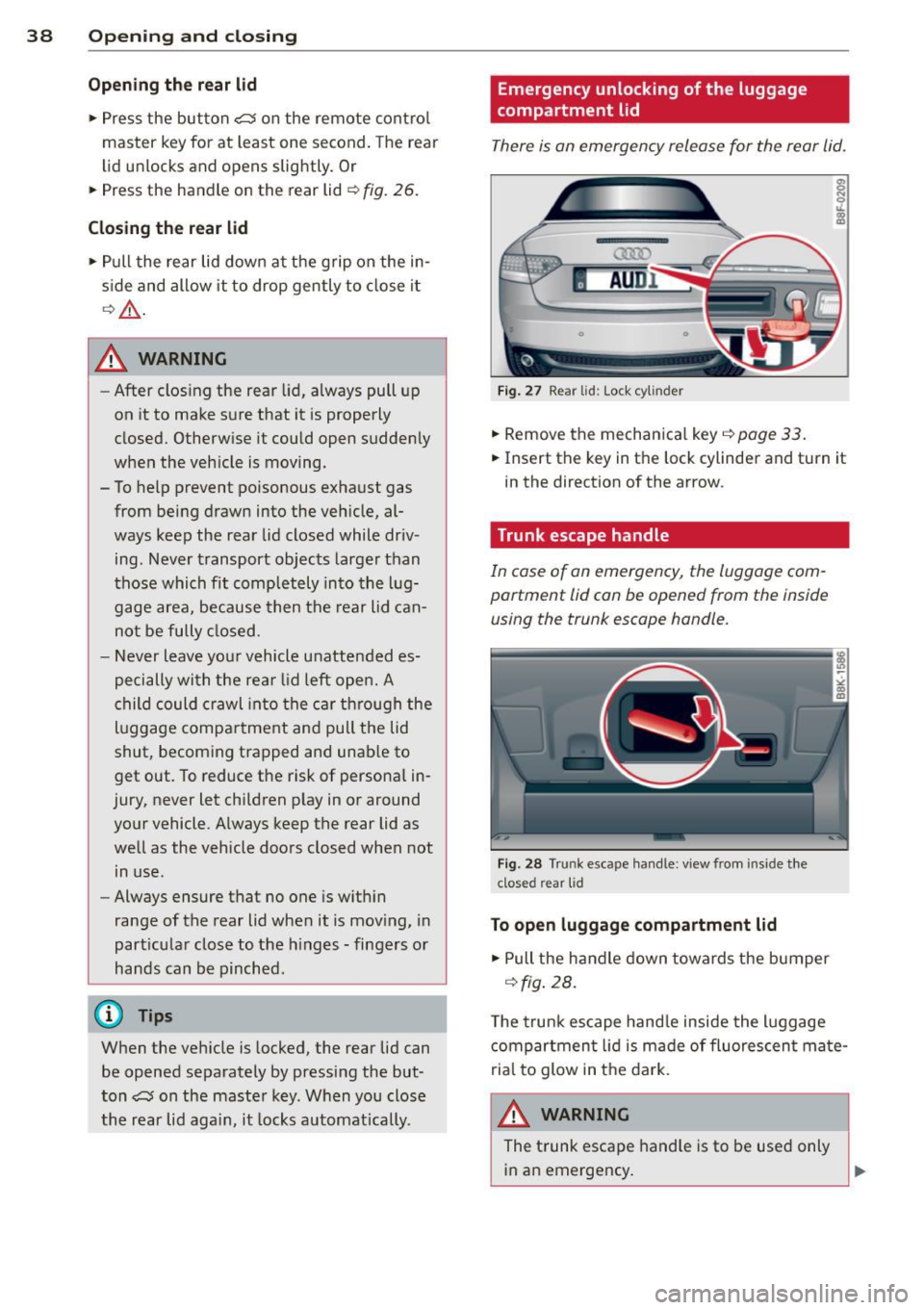
There is an emergency release for the rear lid .
AUDl
F ig . 27 Rear lid: Lock cylinder
.,. Remove the mechanica l key ¢ page 33.
.,. Insert the key in the lock cylinder and turn it
in the direction of the arrow.
· Trunk escape handle
In case of an emergency , the luggage com
partment lid can be opened from the inside using the trunk escape handle.
F ig . 28 Tru nk escape handle: v iew from inside the
closed rear lid
To open luggage compa rtment lid
.,. Pull the handle down towards the bumper
¢ fig . 28.
T he trunk escape hand le inside the l uggage
compartment lid is made of fluorescent mate
rial to glow in t he dark.
A WARNING
The t runk escape handle is to be used only
in an emergency .
Page 41 of 286

@ Tips
The emergency release lever should never
be used as a handle for closing the lug
gage compartment lid.
Power windows
Controls
The driver can control all power windows .
Fig. 29 Sectio n of the drive r's d oor: Control s
l
I I
I
Fig. 30 Center con sole: cen tral power window sw it c h
All power window switches Q fig. 29 are pro
vided with a
two-position function:
Opening the windows
.,. Press the switch to the first stop and hold it
until the window reaches the desired posi
tion .
.. Press the switch briefly to the
second stop
to automatically open the window.
Closing the windows
.,. Pull the switch to the first stop and hold it
until the window reaches the desired posi
tion .
.,. Pull the switch briefly to the
second stop to
automatically close the window.
Opening and closing 39
Power window switches
@ Driver's door
® Passenger's door
© Left rear window
@ Right rear window
You can open or close all the windows with
the switch
Q fig. 30.
_&. WARNING ..-
- When you leave your vehicle - even if on-
ly briefly - always remove the ignition
key. This applies particularly when chil
dren remain in the vehicle. Otherwise the
children could start the engine or oper
ate electrical equipment (e.g . power win
dows). The power windows are function
al until the driver's door or passenger's
door has been opened.
- Pay close attention when closing the win dows to prevent pinching of hands or
limbs.
- When locking the vehicle from outside,
the vehicle must be unoccupied since the
windows can no longer be opened in an
emergency.
{D Tips
- When you open the doors, the windows
automatically lower about 10 mm .
- After the ignition has been switched off, the windows can still be opened or
closed for about 10 minutes. The win
dow regulators are not switched until
the driver's or passenger's door is
opened.
Page 42 of 286
40 Opening and clo sing
Convenience opening/closing
The windows can be opened and closed with
the mechanical key or the emergency key.
@
' ~-~
® '
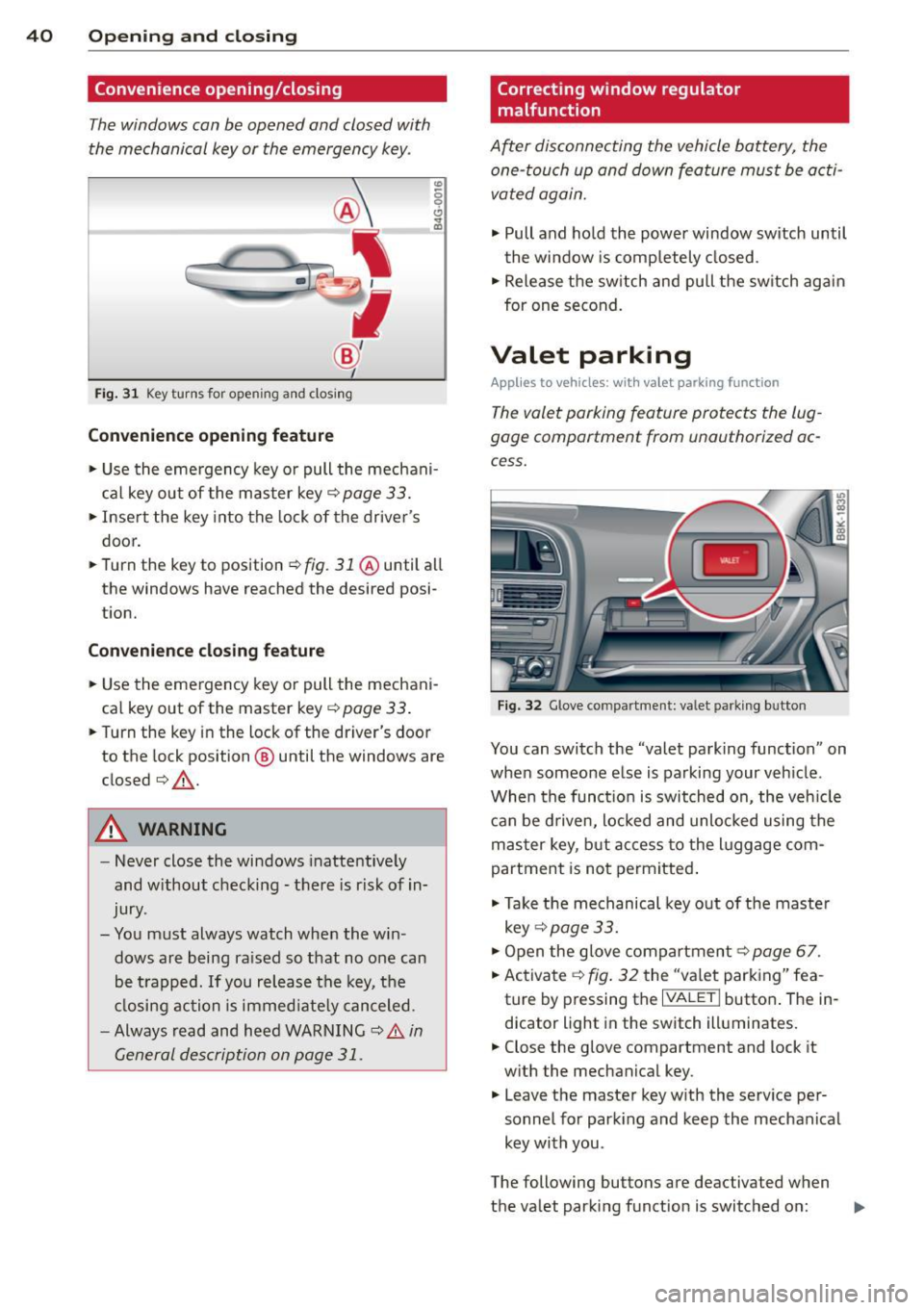
Fig . 31 Key turns for open ing an d clos ing
Conv eni ence open ing fe ature
"' 0 0 0
" m
• Use the eme rgency key or pull the mechani
cal key out of the master key¢
page 33.
• Inse rt the key into the lock of the driver's
door.
• Turn the key to position~
fig. 31 @until all
the windows have reached the desired posi
t ion.
Con venience clo sing f eature
• Use the emergency key or pull the mechani
cal key out of the master key¢
page 33 .
• Turn the key in the lock of the dr iver's door
to the lock position @ until the windows are
closed¢ &.
A WARNING
-Never close the windows inattentive ly
and w ithout checking -there is risk of in
jury.
- You must always watch when the win dows are being ra ised so that no one can
be t rapped. If you release the key, the
closing action is immed iate ly canceled.
- Always read and heed WARNING ¢
A in
General description on page 31.
Correcting window regulator
malfunction
After disconnecting the vehicle battery, the
one-touch up and down feature must be activated again.
• Pull and ho ld the power window switch until
the window is completely closed.
• Release the sw itch and pull the switch again
for one second.
Valet parking
App lies to vehicles: wit h va le t parking function
The valet parking feature protects the lug
gage compartment from unauthorized ac
cess.
F ig . 32 Glove compartme nt: valet parking button
You can switch the "valet parking function" on
when someone else is parking your veh icle .
When the funct io n is switched on, the veh icle
can be d riven, locked and unlocked using the
master key, but access to the l uggage com
partment is not permitted .
• Take the mechanical key out of the maste r
key ¢
page 33.
• Open the glove compartment¢ page 67.
• Activate ¢
fig. 32 the "va let parking" fea
ture by p ressing the
I VALET I button . The in
dicator light in the switch illuminates.
• Close the glove compartment and lock it
w ith the mechanical key .
• Leave the master key w ith the serv ice pe r
sonnel for park ing and keep the mechanical
key with you .
The following buttons are deactivated when
the valet parking function is switched on: ..,_
Page 44 of 286

42 Power top
Power top
Automatic power top
General information
The sophisticated design of the fabric power
top allows you to operate it easily and quickly.
You can open and close the power top while
driving as long as the vehicle is traveling be
low 30 mph. When open, the power top is
stored in a special compartment which is
equipped with a cover.
Under normal conditions, the power top is
wind- and waterproof . In rare cases, small
droplets of water may form under extreme
weather conditions such as torrential or pro longed rain. That is normal and no cause for
concern.
F ollow the maintenance instructions to main
tain the attractive appearance of the converti ble and to ensure that it does not leak
<=> page 192, Power top care. Also observe
the following:
- Only open and close the power top when it is
clean. Sharp-edged particles of dirt can
scratch the rear window when the power top
is folded and can cause abrasion that result
in damage to the power top over time. You
should also remove ice and snow before
opening the power top.
- Never remove snow and ice with sharp
edged objects. You can remove ice from the
rear window w ith a standard ice scraper .
- You should on ly open the power top when it
is completely dry. Opening the power top
and stowing it in the compartment when it
is wet can cause marks on the top that de
tract from its appearance. Mildew can also
form if the power top is stowed for an ex
tended period of time when it is wet.
- Do not leave the power top open for several
weeks at a time. Always close it between
uses to prevent discoloration and creases
from forming. This is especially important if
it was not completely dry when stowed.
- Opening or closing the power top in temper
atures below 32 °F
(0 °() is not recommend- ed because the flexibility of the fabric
de
creases is sub-zero temperatures .
A WARNING
--When operating the power top, make
sure the function is not affected by wind
or other factors and that it does not in
terfere w ith other dr ivers.
- Never drive when the power top is not
locked correctly. The wind from driving
could cause the power top to open . This
can result in injuries and damage to the
veh icle.
- When opening and closing the power
top, make sure no one will be injured by
the supports and other moving parts.
- Operating the power top reduces the
headroom in the rear of the vehicle.
Make sure there is enough clearance be
tween the rear passenger and the power
top when opening and closing it.
-
-When operat ing the power top, visibility
to the rear is limited . Avo id operat ing the
top while driving in reverse.
(D Note
-Always make sure there is enough clear
ance above the vehicle so the power top
is not damaged when opening and clos
ing it.
- Do not store any objects in the power top
compartment to avoid damage when
opening the top.
@ Tips
- To prevent the battery from discharg ing,
do not open or close the power top re
peated ly when the engine is switched
off.
-A message in the instrument cluster dis
play will a lert you if a protection function
was activated or if there is a malfunction
<=>page 43.
-The power top can also be operated
manually if there is a malfunction
<=> page 47, Power top emergency op
eration.
Have you authorized Audi dealer .,..
Page 45 of 286
correct the cause of the mal function as
soon as possible.
- If park ing the veh icle w ith the power top
open, remember that the ve hicle interior
will not be protected from the weather
or from unauthorized entry. Closing the
power top before leaving the vehicle is
r ecommended. If you leave items in the
vehicle, lock them in the trunk .
"' Power top operation
The indicator light monitors the power top.
The l'JI indicator light illuminates for approxi
mate ly 2 seconds when the ignit ion sw itches
on to check the function and then goes out
again . T he indicator light also:
- illuminates when the power top opens or
closes.
- blinks if the power top switch is operated
but the conditions for opening or closing the
power top are not met. A warning message
also appears in the instrument cluster dis
play
c::> page 43, Error message in the in
strument cluster display .
-if the power top d id not open or close com
pletely.
(D Tips
The indicator light stays on if the power
top was opened manually.
Error message in the instrument cluster
display
An error message appears if the power top
cannot open or close .
Several conditions must be met for the power
top to open or close automat ically .
An error message in the instrument cluster
d isp lay ind icates if one of the condit ions is not
met or there is a malfunct ion.
Power top: please close rear lid
The luggage compartment lid must be closed
when the power top is opening or closing . This
error message appears in the instrument cl us-
Power top 43
ter display if the luggage compa rtment lid is
not closed .
Storage bay not lowered. Please remove
obstruction
The power top sto rage bay must lower when
the power top is opening . This error message
appears in the instrument cluster display if
the storage bay is not lowered. If the storage
bay does not lower automat ically because of
objects in the luggage compartment, remove
the objects that are in the way from the stor
age bay area . Otherwise, you can operate the
power top storage bay manually
c::> page 45.
Power top : cannot be used
This error message appears if the convertible
cannot open or close automatically because of
safety reasons or if there is a malfunct ion . The
follow ing causes are possible:
- Vehicle speed too high: Power top opera
tion is deactivated and an error message ap
pears if the veh icle speed is too high. Re
duce the vehicle speed and ope rate the
sw itch again to open or close the powe r top.
- Battery voltage too low: The power top can
not be ope rated if the battery voltage is too
low. This ens ures the re will be enough bat
t ery vol tage le ft to sta rt the vehicle. The
power top can be operated again after the
eng ine is started .
-Rollover protection active: If the power top
is operated continuously for an extended pe
riod of time, rollover protection will activate
to prevent damage to the hydra ulic unit.
This protective funct ion prevents the power
top from opening or close for approx imately
15 to 30 minutes. It w ill function again af
ter that
c::> & .
-Malfunction: Failure of system components
is one possib le cause for malfunction . If this
happens, you can a lso ope rate the powe r
top by hand
c::> page 47.
Power top not secure
This message appears with a warning tone if
the power top is not
completely closed or
open and the vehicle speed is above 50 km/h.
ll-