warning AUDI RS5 CABRIOLET 2013 Owner's Guide
[x] Cancel search | Manufacturer: AUDI, Model Year: 2013, Model line: RS5 CABRIOLET, Model: AUDI RS5 CABRIOLET 2013Pages: 286, PDF Size: 71 MB
Page 46 of 286
44 Power top
Reduce the vehicle speed below 50 km/h and
use the switch to open or close the powe r top
comp lete ly.
.&_ WARNING
Never drive when the powe r top is not
locked co rrectly. The w ind from dr iv ing
co uld cause t he power top to open. Th is
can r esult in injuries a nd damage to th e
veh icle .
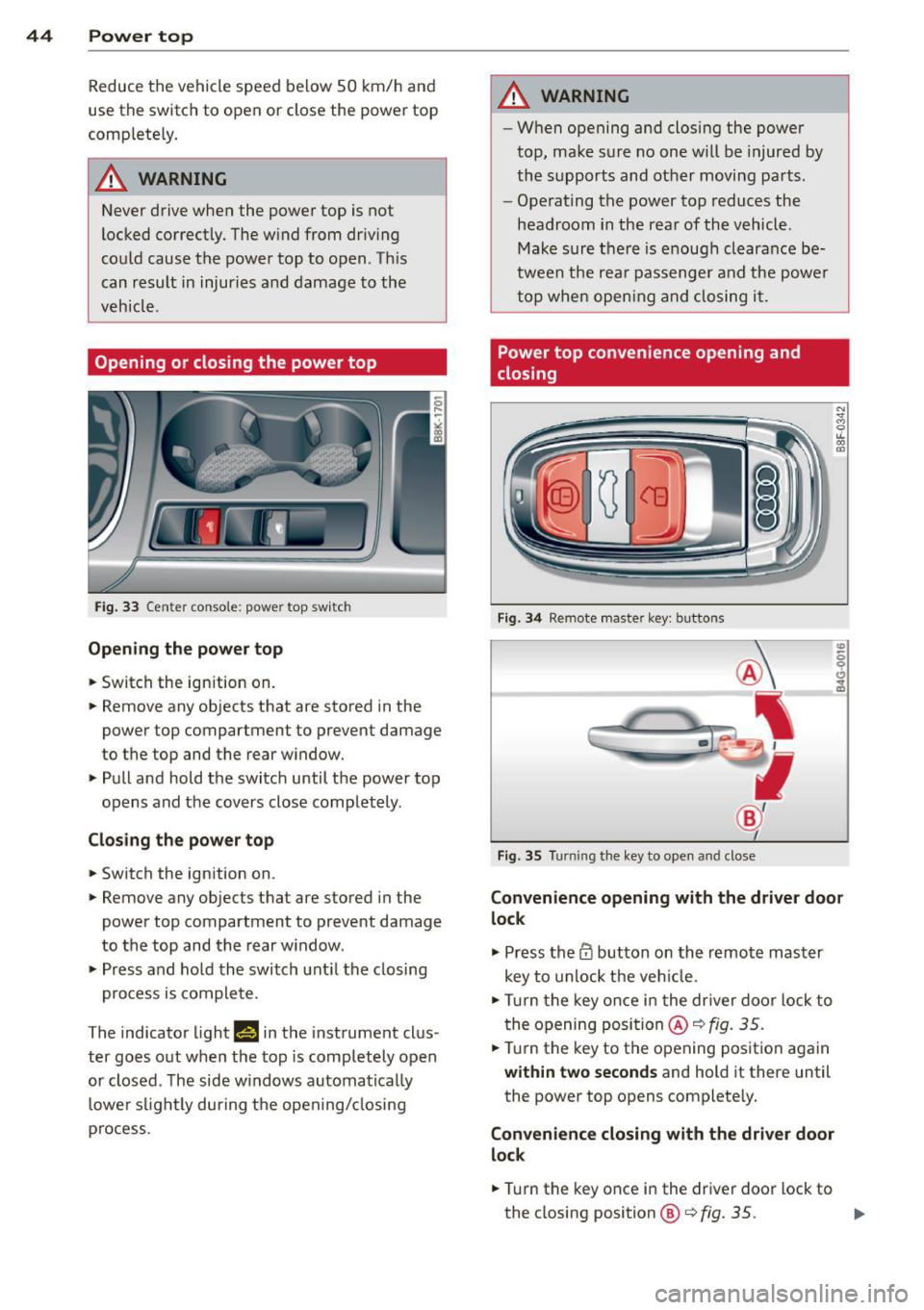
Opening or closing the power top
Fig. 33 Ce nte r conso le : powe r top sw itc h
Opening the power top
.. Switch the ign ition on .
-
.. Remove any ob jects that a re stored in the
power top compartment to prevent damage
to the top and the rear w indow .
.. Pull and hold the switc h until the power top
opens and the cov ers close compl ete ly .
Closing the power top
.. Switch the ign ition on .
.. Remove any objects t hat are stored in the
power top compartment to prevent damage
to the top and the rear w indow .
.. Pr ess and ho ld the switch unt il the closing
pro cess is co m plete.
The indicator ligh t
Hin the instrument clus
ter goes o ut when the top is completely o pen
or closed . T he side w indows automa tica lly
lowe r slig htl y during t he open ing/ closing
p ro cess.
.&_ WARNING
-- W hen opening and closing the power
top, ma ke s ure no on e w ill be injur ed by
the supp orts and ot her moving pa rts .
- Ope rat ing the power top reduces the
headroom in the rea r of the vehicle .
Ma ke sur e th ere i s enoug h clear an ce be
twee n the rea r passenger an d the power
t o p whe n openin g an d closing it.
Power top convenience opening and
closing
Fi g. 34 Remote maste r key : butto ns
Fig . 35 Turnin g the key to ope n an d close
Convenience opening with the driver door
lock
.,. Press the CD button on th e remot e mas ter
key to unlock the ve hicle.
.. Turn t he key once i n the dr iver doo r lo ck to
t he openi ng posi tion @~
fig. 35 .
.. Tur n the key to the opening pos itio n again
within two seconds and hold it there until
the power top opens complete ly.
Convenience closing with the driver door
lock
.. Tur n the key once i n the driver doo r lock to
the closing position@¢
fig. 35. ..,.
Page 47 of 286
.. Turn the key to the clos ing position again
within two seconds and hold it there until
the power top closes completely.
Convenience opening with the
convenience key*
.. Press the 0 button on the conven ience key*
to unlock the vehicle.
Convenience closing with the convenience key*
.. Press the~ button on the convenience key*
to lock the vehicle .
Releasing the key stops the opening or closing
process
immediately.
_& WARNING
- When opening and closing the power
top, make sure no one will be injured by
the supports and other moving parts .
- Operating the power top red uces the
headroom in the rear of the vehicle.
Make sure there is enough clearance be
tween the rear passenger and the power
top when opening and closing it .
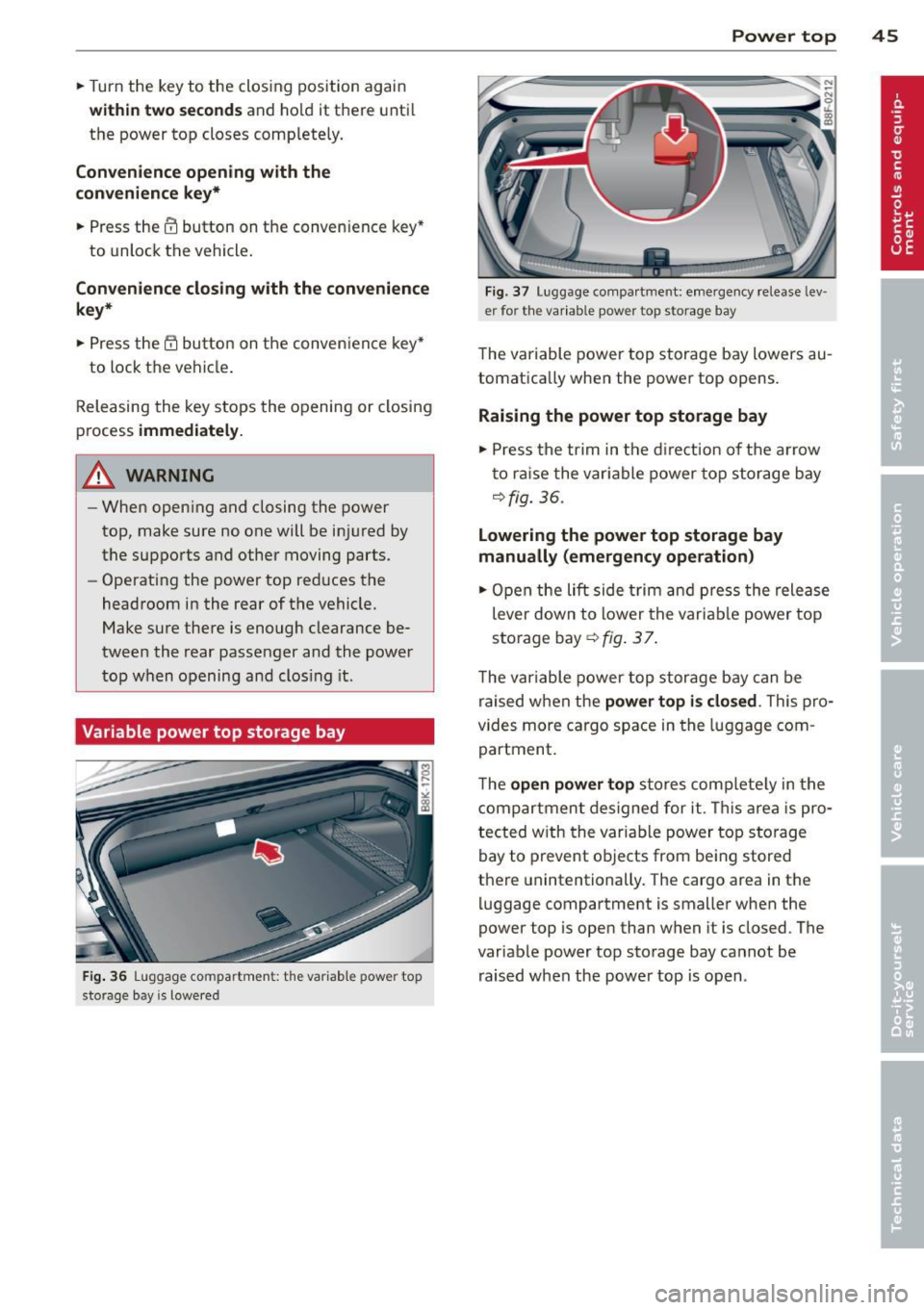
Variable power top storage bay
F ig . 36 Luggage co mpar tmen t: the var iab le pow er top
sto rage bay is lowere d
Power top 45
Fig. 37 Luggage compa rtm ent : emergency release Lev ·
e r for th e var iable pow er top stora ge bay
The variable power top storage bay lowers au
tomatica lly when the power top opens.
Raising the power top storage bay
.. Press the trim in the direction of the a rrow
t o ra ise the variable power top storage bay
¢fig. 36.
Lowering the power top storage bay
manually (emergency operation)
.. Open the lift side trim and press the release
lever down to lower the variab le power top
storage bay¢
fig. 3 7.
The variable power top storage bay can be
raised when the
power top is closed . This pro
vides more cargo space in the luggage com
partment.
The
open power top stores complete ly in the
compartment designed for it. This area is pro ·
tected with the variable power top storage
bay to prevent objects from being stored
there unintentionally. The cargo area in the
luggage compartment is smaller when the
power top is open than when it is closed. The
variable power top storage bay cannot be
raised when the power top is open .
Page 48 of 286
46 Power top
Wind deflector
Applies to vehicles: with wind deflector
The wind deflector decreases air movement
inside the vehicle and increases driving com
fort.
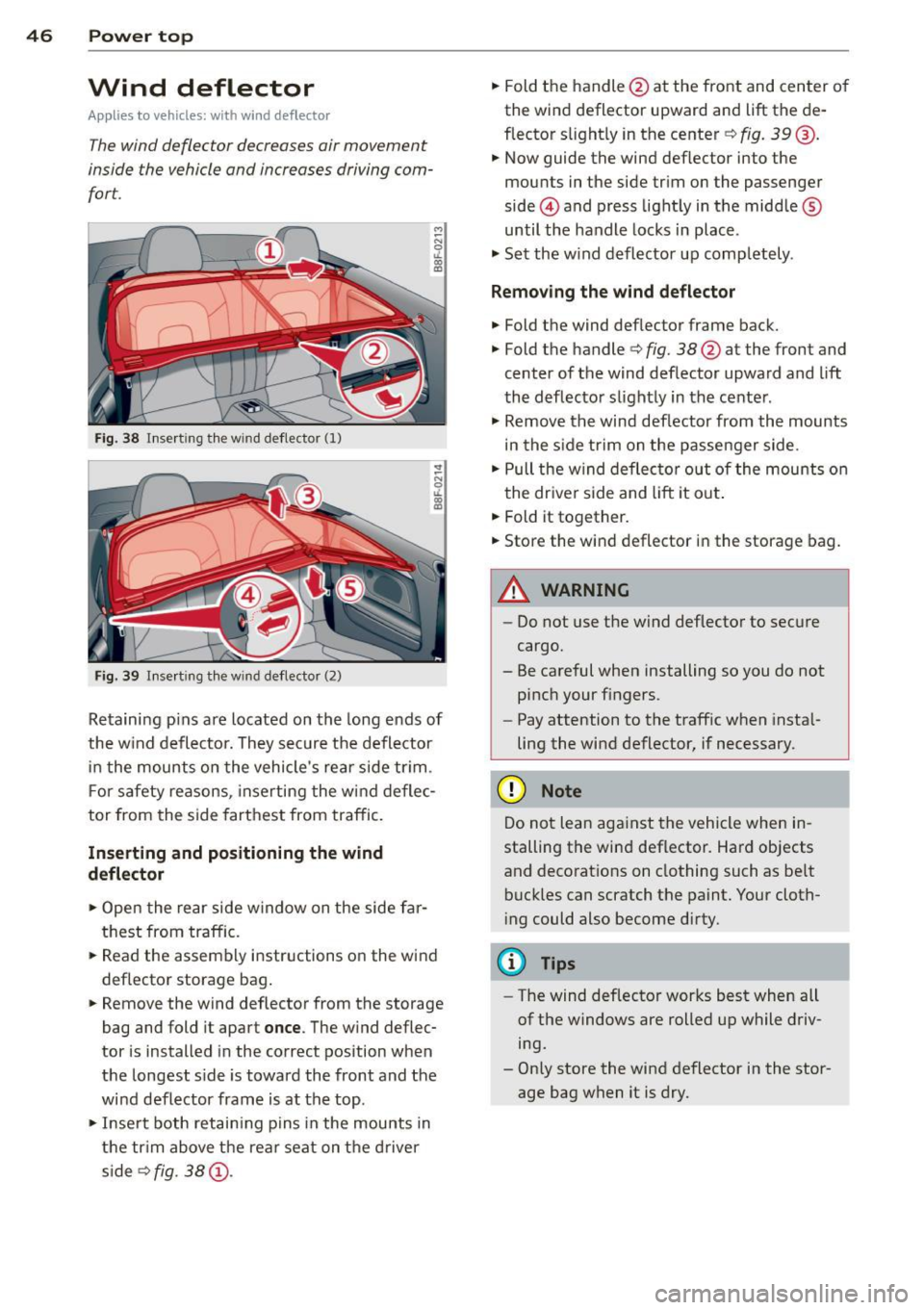
Fi g. 38 Insert ing the win d deflector (1)
Fig. 39 Inse rt in g the wind deflector (2)
Retaining pins are located on the long ends of
the w ind deflector. They sec ure the deflector
i n the mounts o n the vehicle's rear side tr im .
F or safety reasons, inserting the w ind deflec
tor from the side farthest from traffic.
Inserting and positioning the wind
d eflector
,.. Open the rear side w indow on the side far
thest from traffic.
,.. Read the assembly instructions on the wind
deflector storage bag .
,.. Remove the wind deflector from the storage
bag and fold it apart
once . The w ind deflec
tor is installed in the correct position when
the longest s ide is toward the front and the
wind deflector frame is at the top.
,.. Inse rt both retain ing pins in the mounts in
the tr im above the rear seat on the drive r
s ide s>
fig. 38 (D.
,.. Fold the handle @at the front and center o f
the wind deflector upward and lift the de
flector s light ly in the center s>
fig. 39@.
,.. Now guide the wind def lector into the
mounts in the side trim on the passenger
side @and press light ly in the middle ®
until the handle locks in place .
,.. Set the w ind deflector up comp letely .
Remo ving the wind deflector
,.. Fold the wind deflector frame back.
,.. Fold the handle
s> fig. 38@ at the front and
center of the wind deflector upward and lift
the deflector slightly in the center .
,.. Remove the wind deflector from the mounts
in the s ide trim on the passenger side .
,.. Pull the w ind deflector out of the mounts on
the driver side and lift it ou t.
,.. Fold it together.
,.. Store the wind deflector in the storage bag.
_8 WARNING
=
-Do not use the wind deflector to secure
cargo.
- Be careful when installing so you do not
pinch your f ingers.
- Pay attention to the traff ic when insta l
ling the wind deflector, if necessary.
(D Note
Do not lean aga inst the vehicle when in
stalling the wind deflector. Hard objects
and decorat ions on clothing such as be lt
buckles can scratch the paint. Your cloth
i ng could also become dirty.
{!) Tips
- The wind deflector works best when all
of the windows are rolled up while driv
ing.
- Only store the wind deflector in the stor
age bag when it is dry.
Page 49 of 286
Power top emergency
operation
General information
The power top can be closed by hand if there
is a malfunction .
~ Activate the parking b rake .
~ Open the windows
~ Remove the key from the ign ition.
Only close the powe r top ma nually in an eme r
gency. The best solu tion is to have your au
thor ized Audi dealer co rrect the cause of the
mal func tion.
Powe r top emergency operation consists of
the following steps:
- Unlocking the power top compartment
cover:
The cover on the power top compart
me nt must be released by hand .
-Closing the power top: The power top must
be lifted o ut of the tray and close d.
- Locking the power top: The powe r top
latches must be locked with the emergency
key .
A WARNING
- W hen positioning th e power top, avoid
co ntac t wi th th e suppo rts or o ther mov
ing parts. Make su re al l of the windows
are lowered . Otherw ise you cou ld pi nch
yo ur hands.
- N ever dr ive when the power top is not
locked correct ly . The win d from drivin g
cou ld cause t he power to p to open . This
can res ult in injur ies and damage to the
vehicle .
@ Tips
Have a second person assi st when clos ing
the power top . Posit io ning t he power top
is easier when t here is a second person to
he lp.
-
Power top 4 7
Step 1: Unlocking the power top
compartment cover
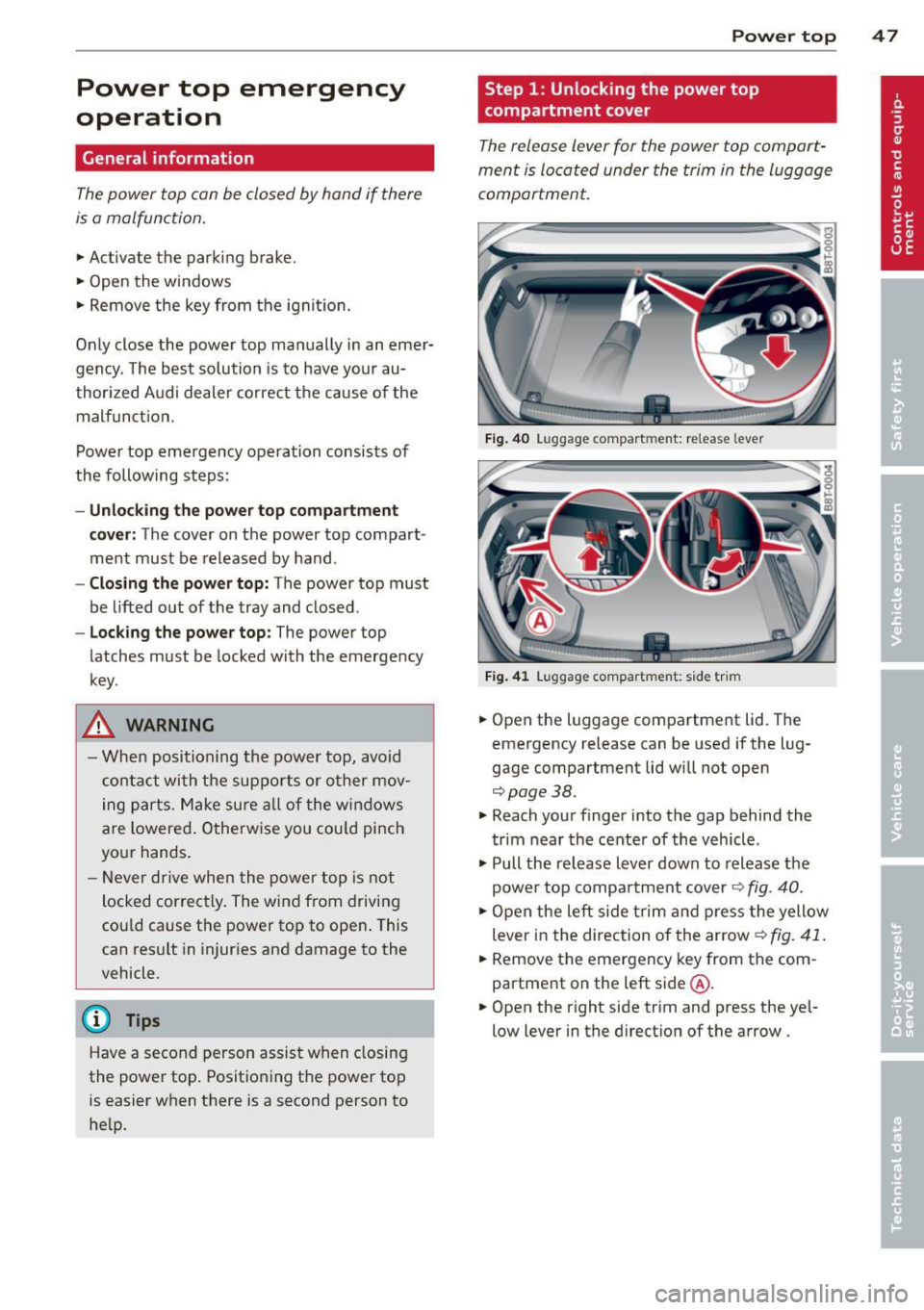
T he release lever for the powe r top compart
ment is lo cated under the trim in the luggage
compartmen t.
Fig. 40 Lu gg ag e compart men t: re lease lever
Fig. 4 1 Lugg ag e compart ment: s ide trim
~ Open the luggage compartment lid. The
emergency release can be used if the l ug
gage compartment lid wi ll not open
c::;,page 38.
~ Reach your finger i nto the gap behind the
t rim near the cente r of th e vehicle .
~ Pull the re lease lever down to release t he
power to p compa rtment cover
c::;, fig . 40 .
~ Open the left side tri m a nd pre ss the yellow
lever in the direction of the arrow ¢
fig. 41.
~ Remove the emergency key from t he com
partment on the left side @.
~ Open the right side tr im and press the yel
low lever in the direct ion of the arrow .
Page 50 of 286
48 Power top
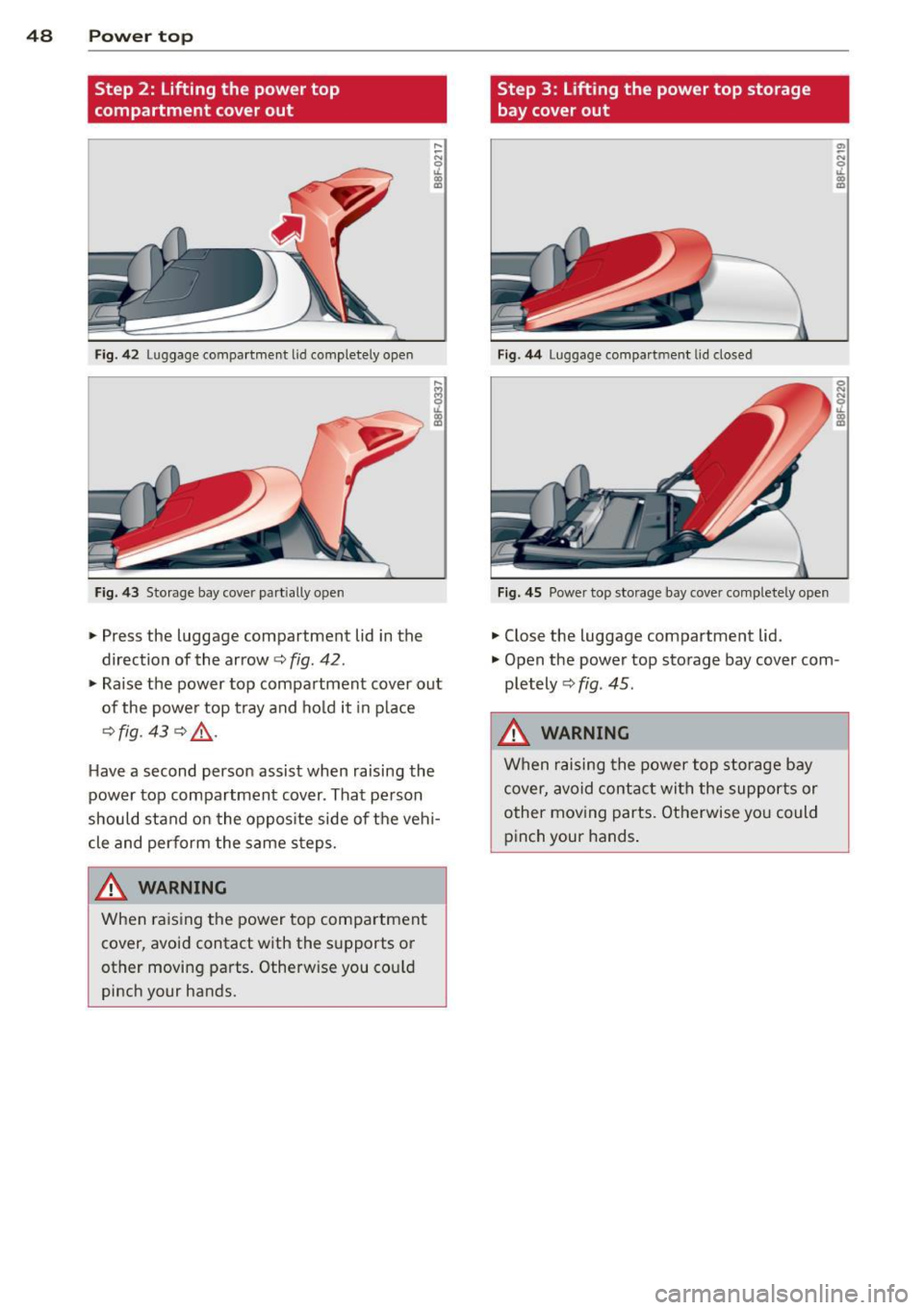
Step 2: Lifting the power top
compartment cover out
Fig. 42 Luggage compartment lid completely open
Fig. 43 Storage bay cover part ially open
.,. Press the luggage compartment lid in the
direction of the arrow
c::, fig. 42 .
.,. Raise the power top compartment cover out
of the powe r top tray and ho ld it in p lace
c::> fig . 43 c::> .al·
Have a second person assist when raising the
power top compartment cover. That pe rson
should stand on the oppos ite side of the veh i
cle and perform the same s teps.
A WARNING
When raising the power top compartment
cover, avoid contact with the s upports or
other movi ng pa rts . Othe rwise you cou ld
pinch your hands.
Step 3 : Lifting the power top storage
bay cover out
Fig. 44 Luggage compa rtment lid closed
Fi g. 4 5 Power top storage bay cover comple tely open
.,. Close the luggage compartment lid.
.,. Open the power top storage bay cover com
pletely
c::> fig . 45 .
_&. WARNING
When raising the power top s torage bay
cover, avoid contac t with the supports or
other mov ing parts. Otherwise yo u could
pinch your hands .
-
Page 51 of 286
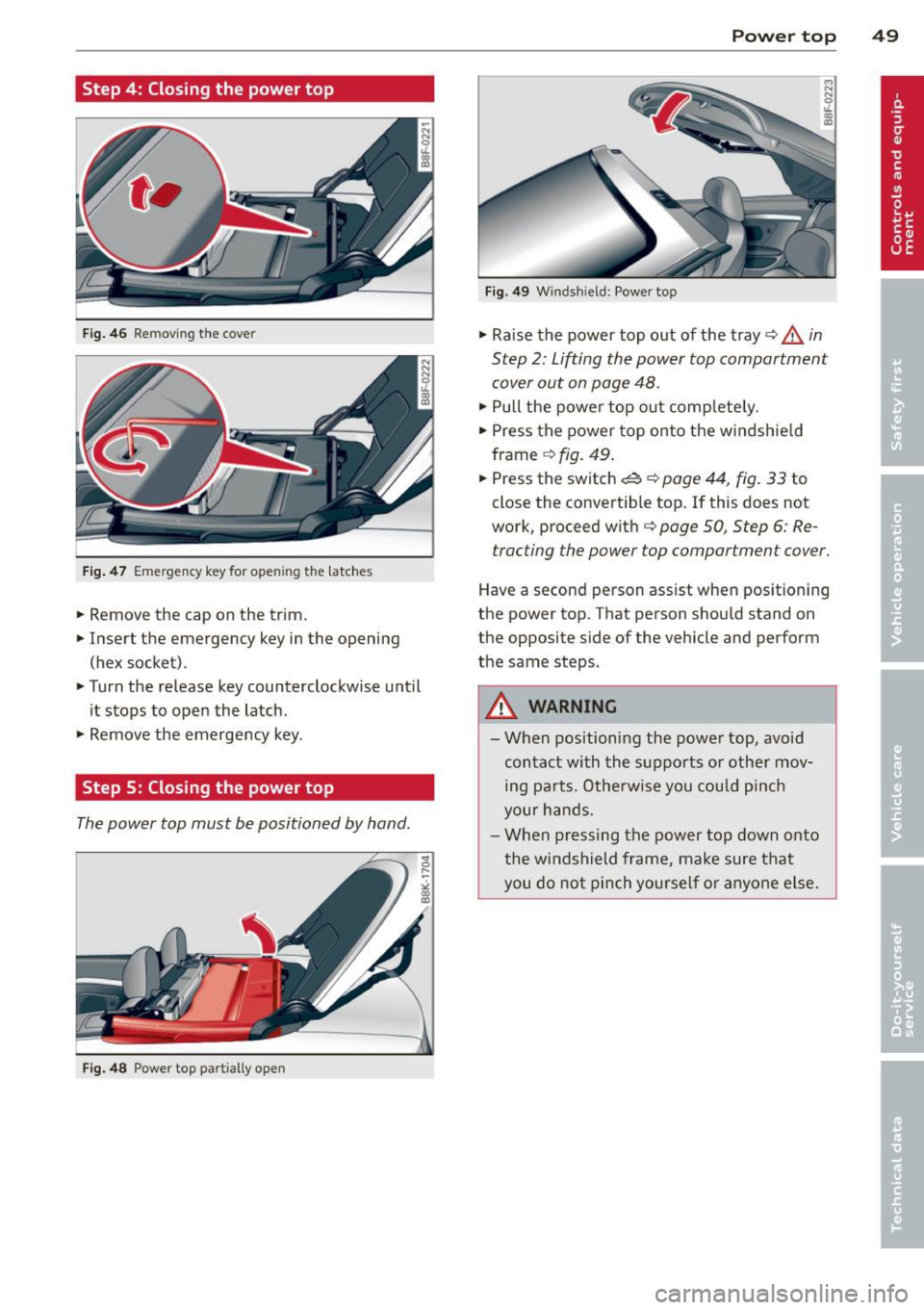
Step 4: Closing the power top
Fig. 46 Removing the cover
Fig. 47 Emergency key for ope ning the latches
.. Remove the cap on the trim.
.. Insert the emergency key in the opening
(hex socket) .
.. Turn the release key counterclockwise until
it stops to open the latch .
.. Remove the emergency key .
Step S: Closing the power top
The power top must be positioned by hand .
Fig. 48 Power top partially open
Power top 49
Fig. 49 W ind shield: Power top
.. Raise the power top out of the tray¢.&. in
Step 2: Lifting the power top compartment
cover out on page 48 .
.. Pull the power top out completely .
.. Press the power top onto the windshield
frame
q fig . 49 .
.. Press the switch~ ¢ page 44, fig. 33 to
close the convertible top. If this does not
work, proceed with
q page 50, Step 6: Re
tracting the power top compartment cover.
Have a second person assist when positioning
the power top . That person should stand on
the opposite side of the vehicle and perform
the same steps.
A WARNING
-
- When positioning the power top, avoid
contact with the supports or other mov
ing parts. Otherwise you could pinch
your hands.
- When pressing the power top down onto
the windshield frame, make sure that
you do not pinch yourself or anyone else.
Page 52 of 286

50 Power top
Step 6: Retracting the power top
compartment cover
The power top compartment cover must be
retracted by hand.
Fig. 50 Power top raised
.,.. Raise the rear of the power top and hold it in
place ¢
fig. 50 (D ¢ A in Step 2: Lifting the
power top compartment cover out on
page 48 .
.,.. Slide the power top compartment forward
until it reaches the end position @. Release
the power top.
&_ WARNING
Do not pinch yourself or others when clos
ing the power top compartment.
Step 7: Locking the power top
The Locking system for the power top Latches
are located on the inside of the power top.
Fig. 51 Inside of the power top: hex key for emergency
operat ion
.,.. Insert the emergency key in the opening and
turn it clockwise unti l it stops to lock the
power top .
.,.. Remove the emergency key.
.,.. Cover the opening with the cap.
(D Tips
Make sure the locking mechanisms are
lock ed securely.
Step 8: Loosening the headliner
Fig. 52 Power top: area around the right side of the
r ea r window
Fig . 53 Area around the right side of the rear windo w:
h eadliner partially loosened
Perform the following steps in the rear win
dow area of the power top on each side.
.,.. Pull the loops (marked in yellow) with the
emergency key to loosen the headliner .
.,.. Pull at the yellow marking again to loosen
the headliner around the rear window (ap
proximately 30 cm) .
Step 9: Securing the latch
Fig. 54 Rear of the power top: Secu ring the latch
., 0 ....
~
"'
Page 53 of 286

The latches must be secured on the left and
right sides of the vehicle .
.,. Pull the power top headliner to the side in
the area around the rear headrests to sec ure
the latches ¢
fig. 54 ¢.& in Step 2: Lifting
the power top compartment cover out on
page 48 .
... Then remove the emergency key and insert
the short end into the power top support at
the ye llow marking .
... Press the emergency key in the direction of
the a rrow @unt il the latch is secure .
.&, WARNING
Do not pinch yo urself o r othe rs when clos
ing the power top compartment.
Power top 51
Page 54 of 286

52 Clear vis ion
Clear vision
Lights
Switching the lights on and off
Fig . 55 Instr ument pane l: headlight con trol switch
Light switch -~ -
Turn the switch c:> fig . 55 to the correspond ing
position . When the lights are switched on, the
,o o~ symbo l tu rns on.
0 -The lights are off or the dayt ime run ning
lights are on:
- USA model s: The daytime running lights are
activated when the light sw itch
c:> fig . 55 is
in the
O position or the AUTO position (o nly
in dayl ight conditions) . The daytime running
lights function can be turned on and off in
the radio or MMI* menu
Exterior ligh ting
c:> page 53 , c:> ,&..
-Canada model s: The daytime runn ing lights
are activated when the light sw itch
c:> fig . 55
is in the O position, :oo; position or the AUTO
pos it ion (on ly in daylight cond itions) . The
dayt ime running lights function cannot be
tu rned off
c:> &. .
AUTO* -Au toma tic h eadlights switch on and
off depending on b rightness, fo r example in
tw ilight, during rain or in t unnels
c:> &. .
:o o; -Side marker lights
io -Low beam headlights
Rear fog light (s)
Press the appropriate b utton c:> fig. 55:
0$ -Rear fog light(s)
adaptive light*
When switched on, adaptive ligh t adap ts to
curves in the road depend ing on the vehicle
speed and the steering ang le . This provides
b etter l ighting t hro ugh the curve . The system
operates at speeds between app roximate ly
6 mph (10 km/h) and 68 mph (110 km/h).
Static cornering light* (vehicles with adaptive
light) - the cornering light switches on at
speeds up to approximately 25 mph (40 km/
h) when a certain steering wheel angle is
reached or when a turn signa l is activated. The
area to the s ide of the vehicle is illuminated
better when turning .
The adaptive light and the cornering light only
funct ion when the switch is in t he AU TO posi
t ion (automatic headlights*) .
A WARNING
--
- Daytime r unning lights and automatic
headlights* are only inte nded to assist
the dr iver . Th ey do n ot relieve the driver
of his re s ponsibili ty to chec k the head
lights and to t urn them on manua lly ac
cordin g to the c urrent light and visibility
conditions . For examp le, fog cannot be
detected by the light sensors *. So a lways
sw itch on t he headlights
io under these
weather conditions and when driving in
the dark .
- Crashes can happen whe n you cannot see
the road ahead and when yo u cannot be
see n by other moto rists. Always tu rn on
the head lights so that you can see ahead
a nd so t hat other s can see your car fr om
the b ack.
- P lease obey all laws when using the
lighting sys tems descri bed here .
(D Note
The rear fog lights sho uld only be turned
o n in acco rdanc e with t raff ic regu lation, as
the lights are bright for following traffic. ..,
Page 55 of 286

(D Tips
-The light sensor * for headl ight control is
l ocated in the rear view m irror mount.
You should therefore not apply any st ick
ers to the windsh ield in this area in order
to prevent malfunctions or failures .
- Some exterior lighting functions can be
adjusted
¢page 53.
-When yo u remove you r key from the igni
tion w hile the vehicle's lights are turned
on, a buzzer sounds as long as the driv
er's door is open.
- In cool or damp weather, t he ins ide of
the headlights, turn signa ls and tail
li ghts can fog ove r due to the tem pera
ture diffe ren ce betwe en the inside and
outside. They will clear shor tly after
swi tching t hem on. This d oes not aff ect
the service life of the ligh ting.
- In the even t of a ligh t sensor malfunc
tion, the drive r is no tifie d in the inst ru
ment cluster disp lay ~
page 2 2.
Turn signals and high beam lever
The lever operates the turn signal s, the high
beams and the headlight flasher .
Fig. 56 T urn sig na l and high beam leve r
Turn signals ¢i ¢
The turn s ignals activate when you move the
l ever into a turn s ignal position when the ign i
tion is sw itched on.
(D -right turn signal
@ -Left turn signa l
The turn s ignal b links three times if you just
tap the lever .
Clear vision 5 3
High beams and headlight flasher @:D
Move the lever to the corresponding posit io n:
@ -high beams on
@-high beams off or headlight flasher
T he ind icator light
II in the instr ument clus
ter turns on .
Notes on these features
-The turn signals on ly wor k w it h t he ignition
t urned on. The indica tor l igh ts
11 or II in
the instrument cluste r also blink .
- Aft er you have tu rned a corner, the turn s ig
na l swi tches off au tom atically .
- The
high beam wo rks only when the head
lights a re on. The indicator Ligh t. in the
instrumen t clus ter illuminates when the
high beams are on .
- The
headligh t flasher works on ly as long as
you ho ld the lever -even if the re are no
lights switched o n. The ind icator light
Ill i n
the inst rument cluster illuminates when you
use the headlight flasher.
&_ WARNING
Do not use the h igh beam or head light
flasher if you kn ow that these could b lind
oncom ing traffic.
Adjusting exterior lighting
The functions are selected in the radio or
MM!* .
.. Select: !CAR I function button> Exterior
light ing .
Or
.. Select: !CAR I function button > Car systems*
contro l butto n > Vehicle settings > Exterior
lighting .
Coming home (light when leav ing car )*,
Leaving home (light when unlocking car)*
The coming home function illumi nates the
area around the vehicle when the ignition is
switched off and the drive r's door is open ed.
Depend ing on ve hicle equipment, t he fu nction
can be sw itched on and off or the length of
time the lights rem ain on* can be ad justed . .._