warning AUDI RS5 CABRIOLET 2013 Manual PDF
[x] Cancel search | Manufacturer: AUDI, Model Year: 2013, Model line: RS5 CABRIOLET, Model: AUDI RS5 CABRIOLET 2013Pages: 286, PDF Size: 71 MB
Page 94 of 286

92 Audi adaptive cruise control and braking guard
Audi adaptive cruise
control and braking
guard
Introduction
App lies to vehicles: with Audi adaptive cruise co ntrol
The adaptive cruise control system assists the
driver by regulating vehicle speed and helping
to maintain a set distance to the vehicle
ahead, within the limits of the system .
If the
system detects a moving vehicle up ahead,
adaptive cruise control can brake and then ac
celerate your vehicle. This he lps to make driv
ing more comfortable on long highway
stretches.
The braking guard system can warn you about
an impending collision and initiate braking
maneuvers
c:::> page 98.
Adaptive cruise control and braking guard
have technical limitations that you must
know, so please read this section carefully, un
derstand how the system works and use them
properly at all times.
General information
General information
Applies to vehicles: with Audi adaptive cruise co ntrol
Fig. 103 Front of the vehicle: Position of radar senso r
The area that contains the radar sensor
c:::> fig. 103 must never be cove red by stickers
or other objects or obstructed with dirt, in
sects, snow or i ce that will interfere with the
adaptive cruise control system and braking
guard. For information on cleaning, refer to
c:::> page 193. The same applies for any modifi
cations made in the front area . T
he function of the adaptive cruise cont rol
system and braking guard is limited under
some condit ions:
- Objects can only be detected when they are
within sensor range
c:::>page 94, fig . 106.
-The system has a limited ability to detect
objects that are a short d istance ahead, off
to the side of your vehicle or moving into
your lane.
- Some kinds of vehicles are hard to detect;
for examp le motorcycles, vehicles with high
ground clearance or overhanging loads may
be detected when it is too late or they may
not be detected at all.
- When driving through curves
c:::> page 93.
- Stat ionary objects c:::> page 93 .
A WARNING
-
Always pay attention to traffic when adap-
tive cruise contro l is switched on and brak
ing guard is active. As the driver, you are
still respons ible for starting and for main
tain ing speed and distance to other ob
jects. Braking guard is used to assist you.
The driver must always take action to avoid
a col lision. The driver is always responsible
for braking at the correct time.
- Im proper use of adaptive cruise con trol
can cause collisions, other accidents and
serio us personal injury.
- Never let the comfor t and convenience
that adaptive cruise control and braking
guard offer distract you from the need to
be alert to traffic conditions and the
need to remain in full control of your ve
h icle at a ll times,
- Always remember that the adaptive
cru ise contro l and brak ing guard have
lim its -they will not s low the vehicle
down or maintain the set distance when
you drive towards an obstacle or some
thing on or near the road that is not
mov ing, such as vehicles stopped in a
traffic jam, a stalled or disabled vehicle.
If registered by the radar sensor, vehicles
or obsta cles that are not moving can
trigger a co llision warning and if
Page 95 of 286
Audi adapt ive crui se c ontrol an d bra kin g guard 9 3
confirmed by the video camera, an acute
collision warning.
- For safety reasons, do not use adaptive
cruise control when driving on roads with
many curves, when the road surface is in
poor condition and/or in bad weather
(such as ice, fog, gravel, heavy rain and
hydroplan ing). Using the system under
these conditions cou ld result in a co lli
sion.
- Switch adaptive cruise control off tempo rar ily when driving in turning lanes, on
expressway exits or in cons truction
zones. This prevents the vehicle from ac celerating to the set speed when in these
situations.
- The adaptive cr uise control system wi ll
not brake by itse lf if you p ut your foot on
the accelerator pedal. Doing so can over
ride the speed and distance regulation .
- When approaching stationary objects
such as stopped traff ic, adaptive cruise
control will not respond and braking
guard w ill have limited function.
- The adaptive cruise control system and
braking guard do not react to people, an
ima ls, objects crossing the road or on
coming objects.
- The function of the radar sensor can be
affected by reflective objects such as
guard rails, the entrance to a tunnel,
heavy rain or ice.
- Never follow a ve hicle so closely that you
cannot stop your vehicle safely. The
adaptive cruise cont ro l cannot slow or
brake the veh icle safely when you follow
ano ther veh icle too closely. Always re
member that the automatic braking
function cannot bring the vehicle to a sudden or emergency stop under these
condit ions.
- To prevent unintended operation, always
switch ACC off when it is not being used.
(D Note
The sensor can be disp laced by impacts or
damage to the bumper, whee l housing and
underbody . That could affect the adaptive cruise control
system and braking g uard.
Have your authorized Audi dea ler or au
thorized Audi Service Facility chec k their
funct ion.
In curves
App lies to vehicles: with A ud i ada ptive c ruise contro l
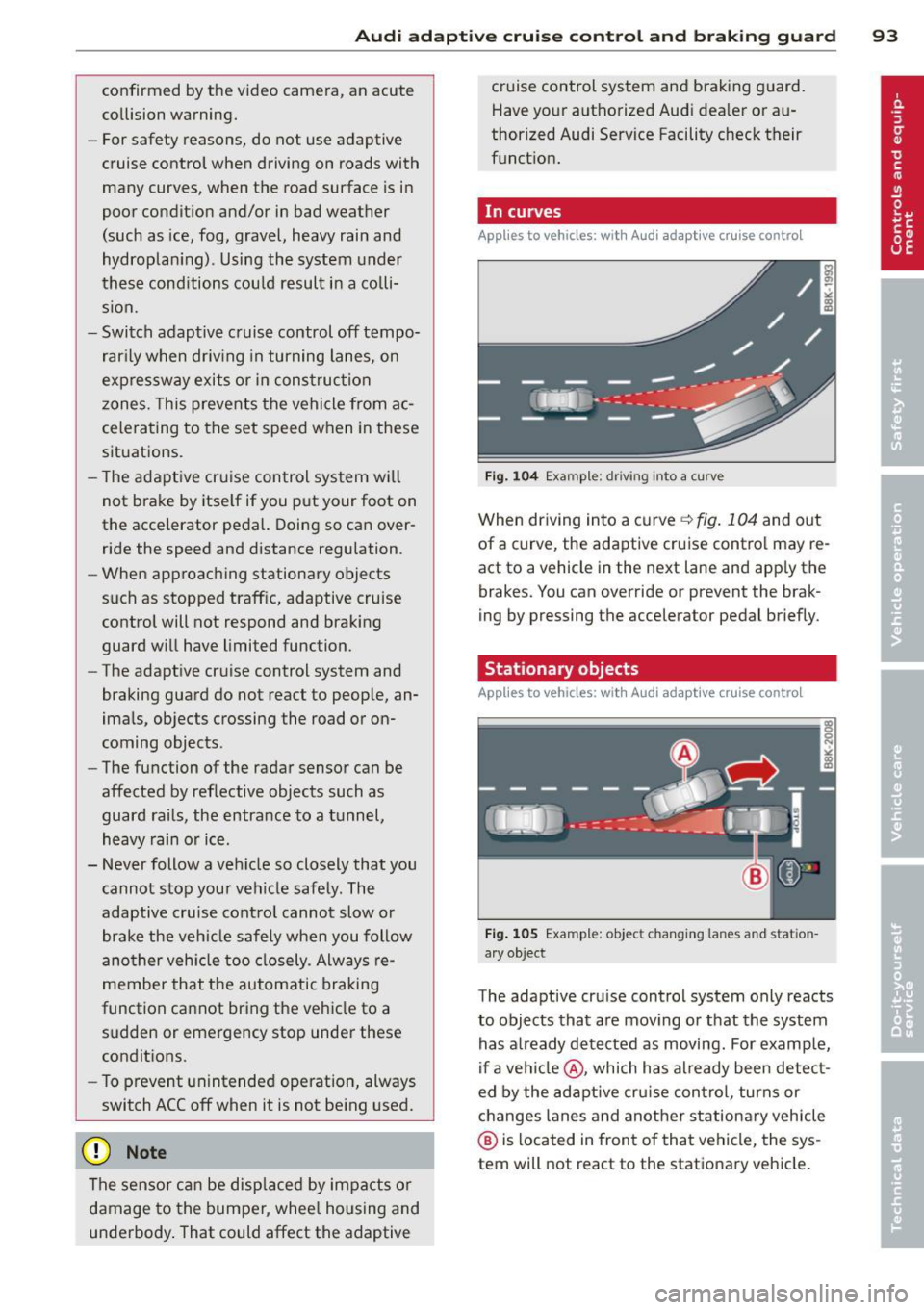
F ig . 1 04 Examp le : driv ing into a curve
When driving into a curve ¢ fig. 104 and out
of a curve, the adaptive cru ise contro l may re
act to a vehicle in the next lane and app ly the
brakes. You can override or prevent the brak
ing by pressing the accelerator pedal briefly.
Stationary objects
Applies to vehicles: wit h Audi adapt ive cr uise contro l
F ig . 1 05 Examp le: objec t chang ing la n es and stat ion
a ry object
The adaptive cruise control system only reacts
to objects that a re mov ing or that the system
has a lready detected as moving . For examp le,
if a ve hicl e@ , which has already been detec t
ed by the adaptive cru ise con trol , turns or
changes lanes and another stationa ry vehicle
@ is located in front of that vehicle, the sys
tem will not react to the stationary vehicle.
Page 97 of 286
Audi adaptive cruise control and braking guard 95
shown in the tachometer @and is also
shown briefly in the display @¢
fig. 108 .
Switching Audi adaptive cruise control off
~ Push the lever away from you into position
@ until it clicks into place. The message
ACC off appears.
@ Indicator lights
II-Adaptive cruise control is switched on . No
vehicles are detected up ahead. The stored
speed is ma intained.
I-A moving vehicle is detected up ahead .
The adaptive cruise control system regulates
the speed and distance to the moving vehicle
ahead and acce lerates/brakes automatica lly.
I -When automatic braking is not able to
keep enough distance to a previously detected
mov ing vehicle up ahead , you must take con
trol and brake ¢
page 9 7, Request for driver
intervention.
© Display
If adaptive cruise control is not shown in the
d isplay, you can call it up with the
I RES ET I
button ¢ page 24.
Based on the symbols in the d isplay, you can
determine if the system is maintaining a dis
tance to the vehicle ahead and what that dis
tance is.
No vehicle -No vehicle ahead was detected.
White vehicle -A vehicle ahead was detected .
Red vehicle -Prompt for the driver to take ac
tion
¢ page 97.
Both
arrows on the s cale © indicate the dis
tance to the vehicle ahead . No ar row appears
when the vehicle is on an open road and there
is no object ahead . If an object is detected
ahead, the arrow moves on the scale.
The green zone on the scale shows the stored
distance. For information on changing the
stored distance, refer to¢
page 96. If the
distance selected is too close or may soon be
come too close, th e arrows move into the red
zone on the scale .
A WARNING
Improper use of the adaptive cruise con
trol can cause collisions, other accidents
and serious personal injuries.
- Pressing the
!SET ! button when driv ing at
speeds below 20 mph (30 km/h), w ill au
tomatically accelerate the vehicle to
20 mph (30 km/h), which is the mini
mum speed that can be set.
@ Tips
-If you switch the ignit ion or the adaptive
cruise control off, the set speed is erased
from the system memory.
- The electronic stab ilizat ion control (ESC)
and the anti-slip-regulat ion (ASR) are au
tom atica lly turned on when the adaptive
cruise control is turned on. Both systems
cannot be turned off if the adaptive
cruise control is turned on . You cannot
switch the ESC to the sport mode when
adaptive cruise contro l is switched on.
Changing the speed
Applies to vehicles: wit h Audi adaptive cruise contro l
0
f
• 0
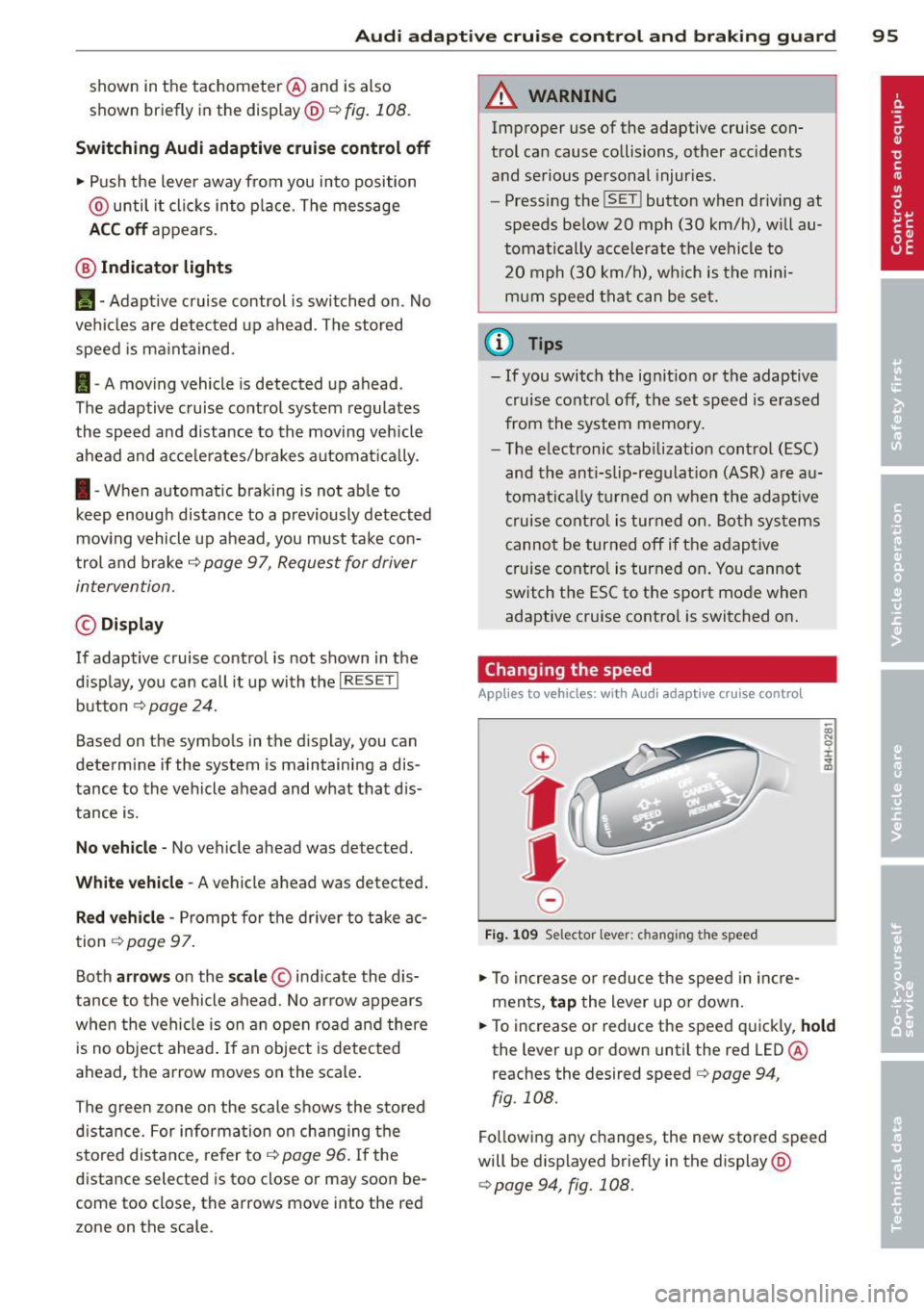
Fig . 1 09 Selector lev er: ch an gin g the speed
~ To increase or reduce the speed in incre
ments,
tap the lever up or down.
~ OI) N 0 ±
~
~ To increase or reduce the speed quickly, hold
the lever up or down unt il the red LED@
r eaches the desired speed
c> page 94 ,
fig . 108.
Fo llow ing any changes, the new stored speed
will be displayed brief ly in the display @
¢page 94, fig. 108.
Page 98 of 286
96 Audi adaptive cruise control and braking guard
Interrupting cruise control
Applies to vehicles: with Audi adaptive cruise control
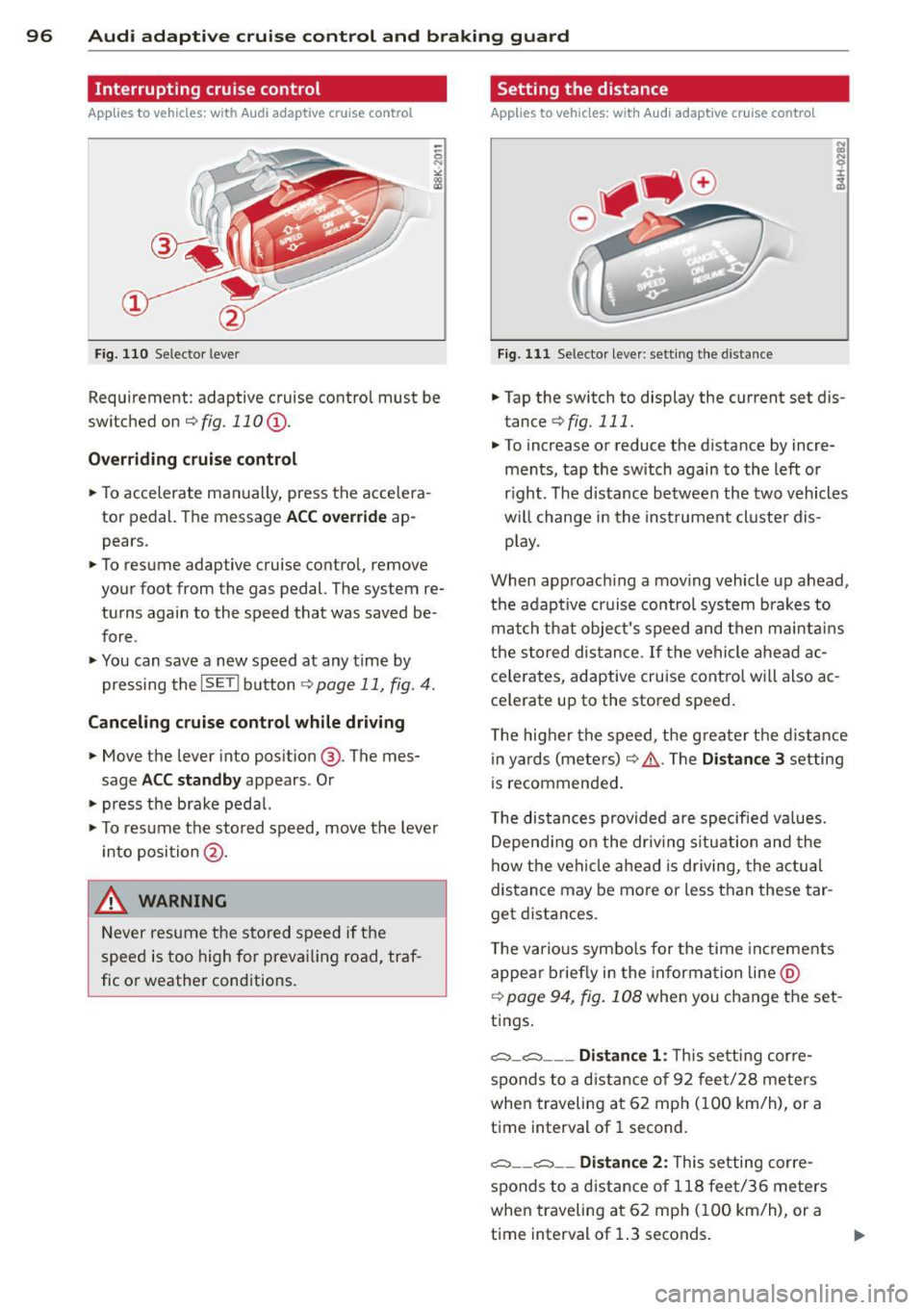
Fig. 110 Selector leve r
Requirement : adaptive cruise contro l must be
switched on
¢fig.110 (i).
Overriding cruise control
.. To accelerate ma nually, press the accelera
tor pedal. The message
ACC override ap
pears .
.. To resume adaptive cruise control, remove
your foot from the gas pedal. The system re
turns again to the speed that was saved be
fore .
.. You can save a new speed at any time by
pressing the
I SETI button ¢ page 11, fig. 4.
Canceling cruise control while driving
.. Move the lever into posit ion @. The mes
sage
ACC standby appears . Or
.. press the brake pedal.
.. To resume the stored speed, move the lever
into position @.
&_ WARNING
Never resume the stored speed if the
speed is too high for prevailing road, traf
fic or weather cond itions.
Setting the distance
Applies to vehicles: wit h Audi adapt ive cr uise contro l
Fig. 111 Selector lever : sett ing the distance
.. Tap the switch to display the current set dis
tance
¢ fig. 111 .
.. To increase or reduce the distance by incre
ments, tap the switch again to the left or
r ight. The distance between the two vehicles
w ill change in the instrument cluster dis
play .
When approach ing a moving vehicle up ahead,
the adaptive cruise control system brakes to
match that object's speed and then maintains
the stored dis tance. If the vehicle ahead ac
ce le rates, adaptive cruise control will also ac
ce lerate up to the stored speed.
T he higher the speed, the greater t he distance
in yards (meters)
c:::> /1.. Th e Distan ce 3 setting
is recommended .
T he distances provided are specified va lues .
Depending on the driv ing situation and the
how the veh icle ahead is driving, the actual
distance may be more or less than these tar
get distances.
T he various symbols for the time inc reme nts
appear briefly in the information line @
¢ page 94, fig. 108 when you change the set
tings.
c::::,_c::::, ___ Distance 1: Th is setting corre-
sponds to a distance of 92 feet/28 meters
when traveling at 62 mph (100 km/h), or a
time interval of 1 second.
c::::, __ c::::, __ Distance 2: This setting corre
sponds to a distance of 118 feet/36 meters
when traveling at 62 mph (100 km/h), or a
time interval of 1.3 seconds.
Page 99 of 286

Audi adaptive cruise control and braking guard 97
~---~-Distance 3: This setting corre
sponds to a distance of 164 feet/SO meters
when traveling at 62 mph (100 km/h), or a
time interval of 1.8 seconds .
~----~ Distance 4: This setting corre
sponds to a distance of 210 feet/64 meters
when traveling at 62 mph (100 km/h), or a
time interval of 2.3 seconds .
A WARNING
Following other vehicles too closely in
creases the risk of collisions and serious
personal injury.
- Setting short distances to the traffic
ahead reduces the time and distance
available to bring your vehicle to a safe
stop and makes it
even more necessary
to pay close attention to traffic.
-Always obey applicable traffic laws, use
good judgment, and select a safe follow
ing distance for the traffic, road and
weather conditions .
¢j) Tips
- Distance 3
is set automatically each time
you switch the ignition on.
- Your standard settings are automatically
stored and assigned to the remote con
trol key being used.
Setting the driving program
Applies to vehicles: with Audi adaptive cruise control
Depending on the selected driving program
and distance, driving behavior when accelerat
ing will
vary from dynamic to comfortable.
Setting the driving program for vehicles
without Audi drive select*
~ In the radio/MMI*, select: !CAR !funct ion
button >
Adaptive cruise control > Driving
prog.
> comfort, standard or dynamic. Or
~ Select : !CARI function button> Car systems*
control button > Driver assist > Adaptive
cruise control
> Driving program* > Com
fort, Standard
or Dynamic. Setting the driving mode for vehicles with
Audi drive select*
Refer to
¢ page 105.
(D Tips
Your settings are automatically stored and
assigned to the remote control key being
used.
Request for driver intervention
Applies to vehicles : with Audi adaptive cruise contro l
Fig. 112 Instrument d uster: request for drive r inte r
ve ntion
In certain situations, the system will prompt
you to take action. This could happen, for ex
ample, if braking by the adaptive cruise con
trol system is not enough to maintain enough
distance to the vehicle ahead.
The instrument cluster will warn you about
the danger ¢
fig. 112:
-A red vehicle is pictured in the display.
- The text
DISTANCE! appears in the status
bar.
- The red indicator light
I blinks .
- In addition, a warning tone sounds .
Page 100 of 286

98 Audi adaptive cruise control and braking guard
Audi braking guard
Descript ion
Applies to vehicles: with Audi adaptive cruise control
F ig . 11 3 Instrumen t cl uste r: approach warn ing
Braking guard uses a radar sensor. It also
functions within the limits of the system
when adaptive cruise cont ro l is switched off .
What can Audi braking guard do?
When detected i n time, the system ca n assess
situations when a vehicle ahead brakes sud
denly or if your own veh icle is traveling at a
hi gh speed and approachi ng a ve hicle up
a head that is moving more slowly . Brak ing
guard does not react if i t can not detect the
situation.
The system advises you of various situations :
- The
distance warning is g iven if you are too
close to t he vehicle ahead for a long time . If
the vehicle ahead b rakes sharply, you w ill
not be ab le to avoid a c oll is io n. The indicator
li ght
I in the display comes on .
- The
approach warning is g iven when a de
tected vehicle up ahead in yo ur lane is mov
i ng much more slowly than you are or if it
brakes sha rply . W hen th is wa rning is given,
i t may only be possib le to avoid a collisio n
b y swerving or br aki ng sha rply . Th e in dicator
l igh t
I and indi ca tor in the disp lay will wa rn
yo u about t he d anger
¢ fig. 113 . Yo u will al
so hear an acoustic signa l.
I f yo u do not reac t fas t enoug h or do not reac t
a t all t o the si tuation , Br aking gu ard will in-
ll Thi s is not ava ilable in some co un tri es .
tervene by br aki ng and the message braking
guard intervention
w ill appea r.
- If a coll is ion is imm inent, the sy stem wi ll
fi rst provide an
acute warning by br iefly and
sharply a pplying the brakes.
- If you do no t re act to the acu te wa rning,
bra king g uard can brake w it hi n the lim its of
the system. This red uces the vehicle speed
in the event of a collision .
- At speeds un der 20 m ph (3 0 km/h), the sys
tem can initiate a comp lete deceleration
short ly before a co llision .
1
).
- If the bra king g uard senses that yo u are not
bra king hard enough w hen a co llision is im
m inent, it can inc rease the brak ing force.
Which functions can be controlled?
You can swi tch braki ng gu ard and t he dis
tance/ap proa ch warn ing on or off in the rad io
o r MM I
¢ page 99, Settings in the radio/
MMI.
A WARNING
-Lack of attention can cause collisions , oth
e r accidents and serio us pe rsonal injuries.
The braking gua rd is an assist system and
ca nnot preve nt a collision by itself. Th e
dr ive r must alway s intervene. Th e dr ive r is
al ways res po nsib le for braki ng a t the co r
r e ct t ime .
- Always pay close attent io n to traffic,
eve n when the br aking gu ard is swi tched
o n . B e rea dy t o int erve ne and be re ad y to
t ake com plete contro l w he never nece ssa
ry. Always keep the safe and legal dis
tance between your ve hicl e an d veh icles
up ahead.
- Braking gua rd wo rks within limits and
will not res po nd outside the system lim
its, for examp le w hen approachi ng a
sto pped veh icle o r stati onary o bstacle
(end of a t raffic jam or ve hicle that has
b roken dow n in t ra ff ic).
Page 101 of 286

Audi adaptive cru ise control and brakin g guar d 99
-Always remember that the radar sensor
for the braking guard works only within
defined detection and range limits that
may prevent the proper detection of oth
er vehicles.
- The radar sensor's function and range
can be reduced by rain, snow and heavy
spray. Moving vehicles up ahead may not be promptly detected or may not be de
tected at al l.
- Reflective surfaces includ ing crash barr i
ers or tunnel ent ran ces may impair the
function of the radar sensor.
- You can cance l the braking that is initiat
ed by the system by braking yourself, by
accelerating noticeab ly or by swerving.
- Bra king guard error messages
<> page 99.
- Keep in mind that braking guard can
brake unexpectedly . Always secure any
ca rgo or objects that you are transport
i ng to reduce the risk of d amage or in
ju ry.
Settings in the radio/MM!
Applies to vehicles: with Audi adaptive cruise co ntrol
~ Se lect: ICARI f u nction button> Car system s*
control button > Dri ver assist > Audi brak
ing guard .
Or
~ Select : I CARI funct ion button > A udi braking
guard .
System -
Switch Audi braking g uard On and
Off . When you switch the ignition on, the
message
Aud i braking guard off appears if
the system is sw itched off .
Early warning -The distance and app roac h
warn ings in the display can be switched
On /
Off .
(D Tips
-Your settings are automatically stored
and ass igned to the remote control key
being used at the t imes the settings are
made. -
If you switch the sport mode on, braking
guard switches off automatically
<> page 178.
- Switch braking guard off when you a re
loading the vehicle onto a vehicle carrier,
t rain, ship or other type of transporta
t ion. This can prevent undesired warn
ings from the braking gua rd system.
Messages
App lies to vehicles : wit h Aud i adapt ive c ruise contro l
Braking guard : Off
This driver message appears if the system is
turned off via the radio/MMI *. Otherwise, if
the system is turned off, the informat ion ap
pears every t ime shortly after the start of the
trip.
B raking guard : Activated
T h is dr iver message appears if sharp b rake
pressure was applied due to an acu te warning.
•••
Three white dots appear if a sett ing cannot be
selected w ith the operating lever. For exam
ple, this happens if you want to raise/lower
the speed even though there was no previous
ly saved speed.
ACC: Sensor blocked
This message appears if the sensor v iew is ob
structed, for examp le by leaves, snow, heavy
spray or d irt . Clean the sensor<>
page 92,
fig . 103 .
ACC: not a vailable
T he dr iver mess age appears if there is a mal
function . The adaptive cruise contro l turns off .
A chime sounds as a reminder. Have the sys
tem checked by an authorized Aud i dea ler or
authori zed Aud i Service Fac ility.
ACC: una vailable
T he driver message appears if, for example,
the b ra ke tempe rat ure is too hig h. T he ad ap
t ive cr uise con tro l is temporar ily u nava ilable.
A chime sounds as a reminder .
Page 103 of 286

Audi side assist Lane change assistant
Description
Applies to vehicles: with Audi side assist
Fig. 114 Sensor dete ction ra n ge
Fig. 115 Disp la y on the exterio r mirro r
Side assist he lps you mon itor your blind spot
and traffic behind you r veh icle. With in the
limits of the system, it warns you about
vehicles that are coming closer or that are
traveling w ith you within sensor range
(D
c::, fig . 114 : if a lane change is class ified as crit
ical, the display@ in the exterior mirror
c::> fig. 115 turns on.
The display in the left exterior mirror provides
assistance when making a lane change to the
le ft, while the display in the right exterior mir
r or provides assistance when making a lane
change to the right.
Information stage
As long as you do not activate the turn signal,
side assist
informs you about vehicles that are
detected and classified as crit ical. The display
in the respective mirror turns on, but is d im.
Audi side assist 101
The display remains dim intentionally in the
information stage so that your view toward
the front is not disturbed .
Warning stage
If you activate the turn signal, side assist
warns you about vehicles that are detected
and classified as critical. The display in the re
spective mirror blinks brightly . If this hap
pens, check traff ic by glanc ing in the rearview
mirror and over your shoulder
c::> A in General
information on page 102 .
@ Tips
-You can adjust the brightness of the dis
play @
c::, page 103.
General information
Applies to vehicles: with A ud i side ass ist
®
®
©
Fig. 116 D riving s it u atio ns
Fig . 117 Rea r of th e ve hicl e: pos it io n of the senso rs
Page 104 of 286

102 Audi side assist
Side assist functions at speeds above approxi
mately 19 mph (30 km/h).
(D Vehicles that are approaching
I n certain cases, a vehicle will be classified as
cr itica l for a lane change even if it is still
somewhat far away . The faster a vehicle ap
proaches, the sooner the display in the exteri
or mirror will turn on.
@ Vehicles traveling with you
Vehicles traveling with you are indicated in the
exterior m irror if they are classified as critica l
for a lane change. All vehicles detected by
side assist are indicated by the time they en
ter your "blind spot", at the latest.
@ Vehicles left behind
If you slowly pass a vehicle that side assist has
detected (the difference in speed between the
vehicle and your vehicle is less than 9 mph
(15 km/h), the disp lay in the exterior mirror
turns on as soon as the vehicle enters your blind spot.
The display will not turn on if you quickly pass
a vehicle that side assist has detected (the dif
ference in speed between the vehicle and your
vehicle is greater than 9 mph (15 km/h).
Functional limitations
The radar sensors are designed to detect the
left and right adjacent lanes when the road
lanes are the normal width. In certain situa
tions, the display in the exterior mirror may
turn on even though there is no vehicle locat
ed in the area that is critical for a lane change.
For example:
- if the lanes are narrow or if your are driving
on the edge of your lane. If this is the case,
the system may have detected the vehicle in
another lane that is
not adjacent to your
current lane.
- if you are driving through a curve. Side assist
may react to a veh icle that is one lane over
from the adjacent lane.
- if side assist reacts to other objects (such as
high or displaced guard ra ils). -
In poor weather conditions . The side assist
functions are limited.
Do not cover the rada r senso rs~
fig. 117 with
stickers, deposits, bicycle wheels or other ob
jects, because this will affect the function . For
information on cleaning, refer to~
page 193.
A WARNING
-
-Always pay attention to traffic and to the
area around your vehicle. Side assist can
not replace a driver's attention. The driv
er alone is always responsible for lane
changes and similar dr iving maneuvers .
- Improper reliance on the side assist sys
tem can cause coll is ions and serious per
sonal injury:
- Never rely on ly on side assist when
changing lanes.
- Always check rear view mirrors to make
s ur e that it is safe to change lanes.
- Side assist cannot detect all vehicles un
de r all conditions- danger of accident!
- Please note that side assist indicates
there are approaching vehicles, or
vehicles in your blind spot, only after
your vehicle has reached a driving speed
of at least 19 mph (30 km/h).
- In certain sit uations, the system may not
function or its function may be limited.
For example:
- if vehicles are approach ing or being left
behind very quickly. The disp lay may
not turn on in time.
- in poor weather conditions such as
heavy rain, snow or heavy mist.
- on very wide lanes, in tight curves or if
there is a rise in the road surface.
Vehicles in the adjacent lane may not
be detected because they are outside
of the sensor range .
([) Note
The sensors can be displaced by impacts or
damage to the bumper, wheel housing and
u nderbody. This can affect the system. .,..
Page 105 of 286

Have your authorized Audi dealer or au
thorized Audi Service Facility check their
function.
@ Tips
- If the window glass in the driver's door
or front passenger's door has been tint
ed, the display in the exterior mirror may be misinterpreted .
- For Declaration of Compliance to United
States FCC and Industry Canada regula
tions
¢ page 267.
Activating and deactivating
Applies to vehicles: with Audi side assist
Fig. 118 Drive r's d oor : Sid e ass ist bu tton
.. Press the button ¢.&. in General informa
tion on page 102
to switch the system on/
off . The LED in the button turns on when
side assist is switched on.
Adjusting the display brightness
Applies to vehicles: with Audi side assist
The signal brightness can be set in the radio
orMMI* .
.. Select : ICARI function button> Audi side as
sist.
.. Select : I CARI function button > Car systems*
control button > Driver assist > Audi side
assist.
The display brightness adjusts automatically
to the brightness of the surroundings, both in
the information and in the warning stage. In
very dark or very bright surroundings, the dis play is already set to the minimum or maxi
mum level by the automatic adjustment. In
Audi side assist 103
such cases, you may notice no change when
adjusting the br ightness, or the change may
only be noticeable once the surroundings
change.
Adjust the brightness to a level where the dis
play in the information stage will not disrupt
your view forward. If you change the bright
ness, the display in the exterior mirror will
briefly show the brightness level in the infor
mation stage. The brightness of the warning
stage is linked to the brightness in the infor
mation stage and is adjusted along with the
information stage adjustment.
(D Tips
- Side assist is not active while you are
making the adjustment.
- Your settings are automatically stored
and assigned to the remote control key
being used.
Driver messages
Applies to vehicles: wit h Aud i side ass ist
If side assist switches off by itself, the LED in
the button turns off and a message will ap
pear in the instrument cluster display:
Audi side assist unavailable: Sensors blocked
The radar sensors' vision is affected . Do not
cover the area in front of the sensors with bike
wheels, stickers, dirt or other objects. Clean
the area in front of the sensors, if necessary
¢page 101, fig . 117.
Audi side assist: Currently unavailable
Side assist cannot be switched on temporarily
because there is a malfunction (for example,
the battery charge level may be too low) .
Audi side assist: System fault!
The system cannot guarantee that it will de
tect vehicles correctly and it is switched off.
The sensors have been displaced or are faulty.
Have the system checked by an authorized
Audi dealer or authorized Audi Service Facility
soon.