brakes AUDI RS5 CABRIOLET 2013 Owners Manual
[x] Cancel search | Manufacturer: AUDI, Model Year: 2013, Model line: RS5 CABRIOLET, Model: AUDI RS5 CABRIOLET 2013Pages: 286, PDF Size: 71 MB
Page 18 of 286

16 Instrum ent s and w arn ing /indic ato r light s
(US A models): If t he warning light 1111 and
the warning light
E+J appear toget her, imme
di ate ly contact your authorize d Aud i dea ler or
qua lified workshop to have all brake pa ds in
spected
¢ page 20.
When the li ght comes on, an audib le warning
signal is also given .
.&_ WARNING
-Always observe the warni ngs in
¢ page 200, Engine compartment, be
fore opening the hood and checking the
brake flu id.
- Driv ing with low brake fluid is a safety
hazard. Stop the car and get professional
assista nee.
- USA models: If the 1111 warn ing light,
the
G1 warning light and the (i1!B warn
ing light come on together, the rea r
wheels co uld lock up first unde r hard
braking. Rear wheel lock-up can cause
loss of vehicle con trol and an accident.
Have your vehicle repaired immediately
by you r authorized Aud i dea ler or a quali
fied workshop. Drive slowly and avoid
sudden, hard brake applications.
- Canada models: If the brake warning
light •• the
DJ warn ing light and the
ABS warning light
ti] come on together,
the rear wheels could lock up first under
hard braking. Rear wheel lock-up can
cause loss of vehicle control and an acc i
dent. Have yo ur vehicle repaired immed i
a tely by your authori zed A udi dealer or a
qualifie d workshop. Dr ive slowly and
avo id sudden, hard brake applicat ions.
- If the brake warning/indicator light does
not go out afte r a few seconds and the
par king brake is released, or lights up
whi le you are driving, the fluid level in
the brake fluid reservoir is too low. If you believe that it is safe to do so, proceed
immediately at low speed to the nearest
authorized Audi dealer or qualified repair
facility and have the brake system in spected. -
Always keep in mind that after severa l
brake applications, you will need greater
pressure on the brake pedal to stop your
veh icle. Do not rely on strained brakes to
respond with max imum s topping powe r
in critical s ituations . You must allow for
increased braking dis tan ces. The extra
d istance u sed up by fading br akes could
lead to an acciden t.
:l~ /(® ) Electromechanical parking brake
The warning/indicator light monitors the
electromechanical parking brake.
If the indicato r light . (USA models)/ .
(Canada mode ls) turns on, the pa rking brake
was set. If the pa rking brake is set when the
ignition is off, the indicator light turns off a f
te r abo ut 20 seconds .
The wa rning/indicator lig ht wi ll go out when
the pa rking brake is re leased.
• (USA models ) /. (Can ada models) Cau
tion: Vehicle parked too steep
If the indicator light b links and the message
appears, there is not enough braking power to
keep the vehicle from rolling . The brakes have
overheated . The vehicle cou ld roll away eve n
o n a sma ll incline .
Press brake pedal to release parking brake
To release the parking b rake, press the brake
peda l and press the button(®) or start dr iving
with starting assist at the same time
¢ page 80.
Please relea se p arking brake
To re lease the par king brake manually , p ress
the b rake peda l and press the button<®> at
the same time. The pa rking brake on ly re leas
es automatically if the driver's safety be lt is
fastened.
Iii Parkin g brake!
If the Iii indicator light t urns on and th is
message appears, the re is a parking b rake
malfunction. D rive to your au thori zed A udi
Page 21 of 286

Instruments and warning/indicator lights 19
!;.!~ Electronic Stabilization Control
(ESC)
If the Jjj indicator lamp blinks while driving,
the ESC or ASR (Anti-Slip Regulation) is active
l y regulating.
If the Ji) i ndicator lamp illuminates, the sys
tem has switched the ESC
off. In this case, you
can switch the ignition
off and then on to
switch the ESC on again. Th e system is func
tioning completely when the indicator lamp
switches
off.
If the II indicator lamp illuminates, the ESC
was switched
off with the I ~ OFF ! button.
Stabilization control (ESC/ABS): Fault! See
owner's manual
I f the indicator light Jj;] and the ABS ind icator
light
E (USA models) / ti] (Canada mod
e ls) turn on and the message appears, there is
a ma lfunction in the ABS system or e lectronic
differential lock. This also interrupts the ESC.
The brakes still function with their normal
power, but ABS is not active.
Drive to your authorized Audi dea le r immedi
ately to have the malfunction corrected .
For more information about the ESC
c:> page 176.
ABS/( §) Anti-lock braking system (ABS)
This warning/indicator light monitors the ABS
and the electronic differential lock (EDL).
The warning/ind icator light E (USA mod
els)/ ti] (Canada models) w ill come on for a
few seconds when the ignition is switched on.
The light will go o ut after an automatic check
sequence is completed.
There is a malfunction in the ABS when:
- The warning/indicator light does not illumi
na te when you switc h the ignition on.
- The warning/indicator light does not go out
after a few seconds.
- The warning/ind icator light illuminates
while driving. T
he ESC indicator light also illuminates if
there is a ma lfunction in the ABS . The mes
sage
Stabilization control (ESC): Fault! See
owner's manual
a lso appears in the instru
ment cluster d isplay and a warning tone
sounds.
The brake system will still respond even
without the assistance of the ABS system.
See your authorized Audi dealer as soon as
possible to restore full braking performance .
For more information regarding the ABS
c:>page 176.
Malfunction in the brake system
If the brake warning light c:> page 15 and the
ABS warning illum inate
together there may be
a malfunction in the ABS, and there may also
be a malfunction in the brake system itself
c:> &. The ABS will not work and you will no
tice a change in braking response and per
formance.
In the event of a malfunction in the brake
system
the warning/indicator light 1111
(USA mode ls)/ . (Canada models) in the in
strument cluster flashes
c:> page 15.
Malfunction in the electronic differential
lock (EDL)
The EDL works together with the ABS. The
ABS wa rning light will come on if there is a
malfunction in the EDL system
c:> page 176.
See your authorized Audi dealer as soon as
possible .
A WARNING
---=-if the E (USA mode ls)l ti] (Canada
models) warning light does not go out,
or if it comes on while dr iving, the ABS
system is not working properly. The vehi
cle can then be stopped only w ith the
standard brakes (without ABS). You w ill
not have the protection ABS provides.
Con tact your authorized Aud i dealer as
soon as possible.
- USA models: If the 1111 warning light
and the
E warning ligh t come on to
gether, the rear whee ls could lock up
Page 22 of 286

20 Instruments and warning /indicator lights
first under hard braking. Rear wheel lock
up can cause loss of vehicle control and
an accident. Have your vehicle repaired
immediately by your authorized Audi
dealer or a qualified workshop . Dr ive
slowly and avoid sudden, hard brake ap
plicat ions.
- Canada models: If the brake warning
light . and the ABS warning light
II]
come on together, the rear wheels could
lock up first under hard braking. Rear
wheel lock -up can cause loss of vehicle
control and an accident . Have your vehi
cle repaired immediately by your author
ized Audi dea ler or a qualified workshop.
Drive slowly and avoid sudden, hard
brake applicat ions.
I I !i.' Safety systems
The fl (USA models) ;fll (Canada models) in
dicator light monitors the safety systems (e .g.
a ir bags, pretensioners) and illuminates for a
few seconds each time you switch the ignition
on.
If the
I (USA models)/ E,I (Canada mode ls)
indicator light does not go out, or if it illumi
nates whil e you are driv ing, or if it sta rts to
blink, then there is a ma lf unct ion somewhere
in the system. If the light does not illuminate
when you switch the ignition on, this also
means there is a ma lfunction.
A WARNING
If you have a malfunction in the safety sys
tems, contact your authorized Audi dealer
immediately. Otherwise the safety sys
tems may not work properly in an acci
dent .
(0) Worn brake pads
EIJ Brake pads!
If the warn ing light illuminates, immediately
contact your authorized Audi dealer or quali-
l ) - : USA models onl y
fied workshop to have all brake pads inspect
ed. On USA models the warning light
EIJ
comes on together w ith the warning light
1111 . Both sets of brake pads on an ax le
must always be replaced at the same time.
A WARNING Co-- -
Driving with bad brakes can cause a colli
sion and ser ious personal injury.
- If the warn ing light
EIJ and the warn ing
light
11111> with the message Brake
pads!
comes on in the instrument cluster
d isplay, immediately contact you r au
thorized Audi dealer or qualified work
shop to have all brake pads checked or
replaced if necessary.
EPC Electronic power control
This warning/indicator light monitors the
electronic power control.
The
(m warning/indicator light (Electronic
Power Control) illuminates when you sw itch
the ignition on as a function check.
(D Tips
If this warning/ indicator l ight illum inates
while you a re driving, then there is a mal
funct ion in the engine electronics. Have
the malfunct ion corrected as soon as pos
s ib le by your authorized Audi dealer or
qualified repair facility.
o Malfunction Indicator Lamp (MIL)
The Malfunction Indicator Lamp (MIL) is part
of the On-Board Diagnostic (OBD II) system.
The symbol
¢.j lights up when the ignition is
switched on and will turn off after the engine
has started and has settled at a constant idle
speed. This indicates that the MIL is working
properly.
The warning light illuminates when there is a
malfunction in the engine electron ic system . ..,.
Page 68 of 286
66 Seat s and st o rage
A WARNING
Never put waste paper in the ashtray. Hot
ashes or other hot objects in the asht ray
could set waste paper on fire.
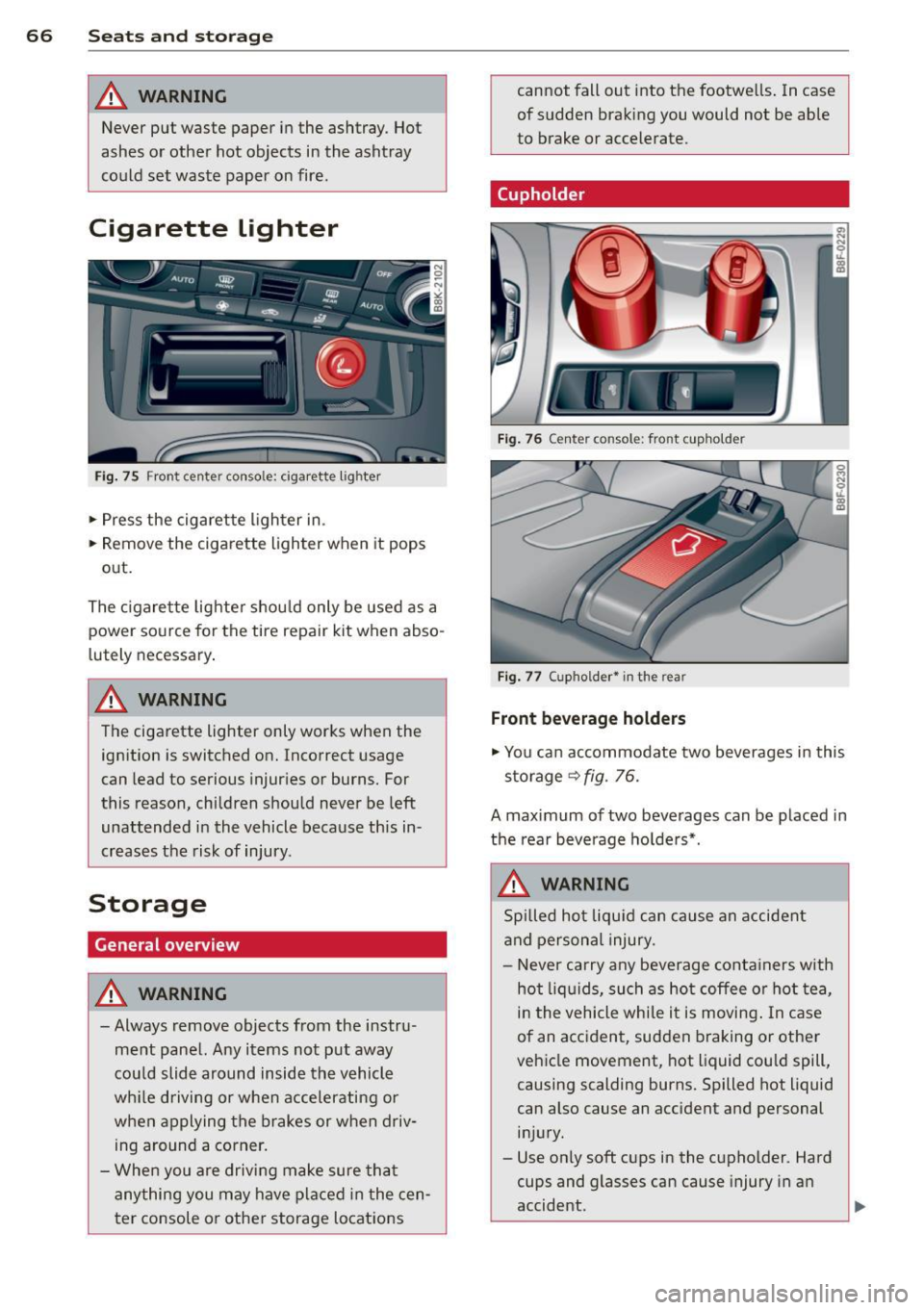
Cigarette Lighter
Fig . 75 Fron t center console: cigarette lig hter
.. Press the cigarette l ighter in .
.. Remove the cigarette lighter when it pops
out.
The c igarette lighte r shou ld only be used as a
power source for the tire repair
kit when abso
lutely necessary .
A WARNING
The cigarette lighter only works when the
ign ition is switched on. Incorrect usage
can lead to serious injur ies or burns. For
this reason, children should never be left
unattended in the vehicle because this in
creases the risk of injury.
Storage
General overview
A WARNING I A
- Always remove objects from the instru
ment pane l. Any items not put away
cou ld slide around inside the vehicle
wh ile driving or when accelerating or
when applying the brakes or when driv ing around a corner.
- Whe n you are drivi ng make sure that
anything you may have placed in the cen
ter console or othe r storage locat ions
-
cannot fall out into the footwe lls . In case
of sudden braking you would not be able
to brake or accelerate.
(upholder
Fig . 76 Center console : fro nt cupho lder
Fig . 77 (upholder• in the rear
Front bev erag e holder s
.. You can accommodate two beverages in this
storage
9 fig. 76.
A maximum of two beverages can be placed in
the rear beverage ho lde rs*.
A WARNING
Spi lled hot liqu id can cause an accident
and persona l injury.
-
- Never carry any beverage conta iners with
hot liq uids, such as ho t coffee or hot tea
I
in the vehicle while i t is moving . In case
of an accident, sudden braking or other
vehicle movement, hot liquid cou ld spill,
causing scalding burns. Spilled hot liquid
can also cause an accident and personal
i n jury.
- Use on ly soft cups in the cupholder. Hard
cups and glasses can cause injury in an
accident.
'--------------_J ~
Page 81 of 286

This message appears if the master key is re
moved from the vehicle with the engine run
n ing.
If the master key is no longer in the ve
hicle, you cannot switch on the ignition after
stopping the engine and you also cannot start
the engine again . Moreover, you cannot lock
the vehicle from the outside w ith the key.
Shift to P otherwise vehicle can roll away.
Doors do not lock if lever is not in P.
This message appears for safety reasons
along w ith a warning signa l. It appears if the
selector lever for the automat ic transm ission
is not in the P position when switch ing off the
ignition. Move the selector lever to the P posi
tion, otherw ise the veh icle is not secured
against rolling away . You also cannot lock the
veh icle using the locking button* on the door
handle or using the remote key.
Convenience key defective! Use ignition lock
This message appears if the engine must be
started or stopped using the ignition key and
not the
I STAR T ENGIN E STOP ! button .
Electromechanical
parking brake
Operation
The electromechanical parking brake replaces
the hand brake.
F ig. 92 Cen ter console: Pa rk ing brake
.. Pull on the switch @c> fig . 92 to apply the
parking brake. The indicator light in the
switch illum inates .
.. Step on the brake pedal or the acce le rator
pedal and press the switch at the same time
On the road 79
to release the parking brake. The indicator
light in the switch goes out .
Your vehicle is equipped wi th an electrome
chanical parking brake. The parking brake is
designed to prevent the vehicle from rolling
unintentionally and replaces the hand brake.
In addition to the normal functions of a tradi
tiona l hand brake, the electromec hanical
parking brake provides various convenience
and safety funct ions .
When starting from rest
-The integral start ing ass ist helps you when
driving by automatically releasi ng the park
ing brake
¢ page 80, Starting from rest.
-When starting on inclines, the starting as
sist prevents the vehicle from unintentiona l
ly rolling back. The braking force of the
parking brake is not re leased until sufficient
driving force has been bui lt up at the
wheels.
Emergency brake function
An emergency brake ensures that the veh icle
can be slowed down even if the
normal brakes
fail
c> page Bl, Emergency braking.
Indicator lights
- If the parking brake is closed with the ign i
t ion
switched on the . (USA models) /
• (Canada models) indicator lights come
on in the instrument cluster and the switch.
- If the parking brake is closed with the igni
tion
switched off the. (USA models) /
• (Canada models) indicator lights come
on in the instrument cluster and the switch
for about 20 seconds.
A WARNING
If a drive range is engaged with the vehicle
stationary and the engine runn ing, you
must in no instance accelerate carelessly .
Othe rwise the vehicle w ill start to move
imm ediately- risk of an accident.
Page 87 of 286

Transmission S tronic ®
Introduction
The automat ic transm iss ion is controlled elec
tronically. The transmiss ion ups hifts or down
shifts automatically depend ing on which drive
program is se lected.
When a
modera te driving sty le is used, the
tra nsmission se lec ts the most econom ica l
driving mode.
It w ill then change up early and
de lay the downshifts to g ive better f uel econ
omy .
The transmis sion swit ches to a sporty mode
after a k ick-down o r when the driver uses a
s porty dri ving sty le characterized by quick ac
celerator peda l movements, heavy accelera
tion, frequent changes in speed and traveling
at the maximum speed.
I f desired, the drive r can a lso se lect the gears
manually ( tiptronic mode ) ~ page 89.
The S tronic ® is a dual-clutch transmission.
P owe r is transfe rred using two clutches that
work independently from one anothe r. They
rep lace the torq ue converter used in conven
tional automatic transmiss ions and allow the
vehicle to accelerate without a noticeable in
terruption in traction.
Selector lever positions
F ig. 96 Display in the instrument cluster: se lector lever
in pos itio n P
The selector lever position engaged appears
n ext to the selector leve r as well as in the in
strument cluster display.
Tran sm iss ion 85
P -Park
In this se lector lever posi tion the transm is
s ion is mechanica lly locked. Engage P on ly
when the vehicle is
completely stopped~&.
in Driving the automatic transmission on
page 87.
T o shift in or out of pos it ion P, yo u must first
press and ho ld the brake pedal and then press
the re lease button in the selector leve r hand le
whi le moving the selector lever to or from P.
You can shift out of this position only with the ignition o n.
R - Reverse
Se lect R on ly when the veh icle is at a full stop
and t he engine is running at idle speed~.&. in
Driving the automatic transmission on
page 87.
Before you move the se lector lever to R, press
both the re lease button in the hand le o f the
selector lever
and the brake pedal at the same
time.
When the ignition is on, the backup lights illu
minate when the selecto r lever is moved into
R.
N -Neutral
The transmiss ion is in neu tral in this pos ition .
S hift to t his position fo r standing with the
brakes app lied
~ .&. in Driving the automatic
transmission on page 87.
When the vehicle is stat iona ry or a t speeds
below 1 mph (2 km/h), yo u must always app ly
the footbrake before and whi le mov ing the
l ever o ut of
N.
D/S - Normal posit ion for driving forward
In the D/S pos it ion, t he tr ansmission c an be
operated either in the norma l mode D or in
the sport mode S . To select the sport mode S,
pull the selector lever back briefly. P ulling the
l ever back again will se lect the norma l mode
D. The instr ument cluster disp lay shows the
selected driving mode. ..,_
Page 90 of 286

88 Transmission
-Unintended vehicle movement can cause
serious injury .
- Never leave your vehicle with the engine
running while in gear. If you must leave
your vehicle when the engine is running,
activate the parking brake and move the
selector lever to P .
- Power is still transmitted to the wheels
when the engine is running at idle. To
prevent the vehicle from "creeping", you
must keep your foot on the brake when
the engine is running and the selector
lever is in D/S or R or "tiptronic" mode is
selected.
- Do not press the accelerator pedal when
changing the selector lever position
while the vehicle is stationary and the
engine is running.
- Never shift into
R or P while driving.
- Before driving down a steep slope, re-
duce your speed and shift into a lower
gear with "tiptronic".
- Do not ride the brakes or press the brake
pedal too often or too long when driving
down a hill. Constant braking causes the
brakes to overheat and substantially re
duces braking performance, increases
braking distance or causes complete fail
ure of the brake system.
- To prevent the vehicle from rolling back
when stopping on inclines, always hold it
in place with the brake pedal or parking
brake .
- Never hold the vehicle on an incline with
a slipping clutch . The clutch opens auto
matically when it becomes too hot from
the overload . An indicator lamp
[O] illu
minates and a driver message appears
Q page 90 when the clutch is overload
ed.
- If the engine must remain running, never
have any driving position engaged when
checking under the hood. Make sure the
selector lever has securely engaged and
is locked in P with the parking brake set
Q page 200, Engine compartment . Oth
erwise, any increase in engine speed may set the vehicle in motion, even with the
parking brake applied.
@ Note
- When stopping on an incline, do not try
to hold the vehicle in place by pressing
the accelerator pedal while a driving gear is selected. This can cause the transmis
sion to overheat and can damage it. Acti
vate the parking brake or press the brake
pedal to prevent the vehicle from rolling .
- Allowing the vehicle to roll when the en
gine is stopped and the selector lever is
in N will damage the transmission be
cause it is not lubricated under those cir
cumstances.
(D Tips
For safety reasons, the parking brake is re
leased automatically only when the driv
er's safety belt is engaged in the buckle.
Hill descent control
The hill descent control system assists the
driver when driving down declines.
Hill descent control is activated when these
lector lever is in D/S and you press the brake
pedal. The transmission automatically selects
a gear that is suitable for the incline. Hill de
scent control tries to maintain the speed ach
ieved at the time of braking, within physical
and technical limitations. It may st ill be nec
essary to adjust the speed with the brakes.
Hill descent control switches off once the de
cline levels out or you press the accelerator
pedal.
On vehicles with the cruise control system*
Q page 82 , hill descent control is also activat
ed when the speed is set.
A WARNING -
Hill descent control cannot overcome
physical limitations, so it may not be able
to maintain a constant speed under all
Page 91 of 286

conditions. Always be ready to apply the
brakes.
Manual shift program
Using the manual shift program you can
manually select gears.
Fig. 99 Ce nter console: shift ing t he gea rs manually
Fig. 100 Stee ring wheel: S hift b uttons
Gear selection with selector lever
The tiptronic mode can be selected either with
the vehicle stationary or on the move.
.. Push the selector lever to the right from 0/
5. An M appears in the instrument cluster
display as soon as the transmission has
shifted.
.. To upshift, push the selector lever forward
to the plus position
0 c:> fig. 99 .
.. To downshift, push the lever to the minus
position
0 -
Gear selection with paddle levers*
The shift buttons are activated when these
lector lever is in 0/5 or the t iptronic manual
shift program .
.. To upshift, touch the button on the right
0
c> fig . 100. Transmission 89
.. To downshift, touch the button on the left
0.
.. If you do not press a sh ift button within a
short time while in the 0/5 position, the
transmission will return to automatic mode.
To keep shifting using the shift buttons,
move the selector lever to the r ight out of
the 0/5 position .
When accelerating, the transmission does
not
automatically shift to the next gear shortly
before the maximum permitted engine RPM is
reached.
If you have selected a lower gear than the cur
rent one, the automatic transmission will shift
down only when the engine will not be over
revved.
With kick-down, the transmission shifts into a lower gear depend ing on speed and engine
RPM .
(D Tips
Tiptronic is inoperative when the transmis
sion is in the fail-safe mode .
, Kick-down
Kick-down enables maximum acceleration.
When you depress the accelerator pedal be
yond the resistance point, the automatic
transmission downshifts into a lower gear, de
pending on vehicle speed and engine speed .
The upshift into the next higher gear takes
place once the maximum specified engine
speed is reached .
.&_ WARNING
Please note that the whee ls can spin if
kick-down is used on a smooth s lippery
road -there is a risk of skidding.
-
Page 95 of 286
Audi adapt ive crui se c ontrol an d bra kin g guard 9 3
confirmed by the video camera, an acute
collision warning.
- For safety reasons, do not use adaptive
cruise control when driving on roads with
many curves, when the road surface is in
poor condition and/or in bad weather
(such as ice, fog, gravel, heavy rain and
hydroplan ing). Using the system under
these conditions cou ld result in a co lli
sion.
- Switch adaptive cruise control off tempo rar ily when driving in turning lanes, on
expressway exits or in cons truction
zones. This prevents the vehicle from ac celerating to the set speed when in these
situations.
- The adaptive cr uise control system wi ll
not brake by itse lf if you p ut your foot on
the accelerator pedal. Doing so can over
ride the speed and distance regulation .
- When approaching stationary objects
such as stopped traff ic, adaptive cruise
control will not respond and braking
guard w ill have limited function.
- The adaptive cruise control system and
braking guard do not react to people, an
ima ls, objects crossing the road or on
coming objects.
- The function of the radar sensor can be
affected by reflective objects such as
guard rails, the entrance to a tunnel,
heavy rain or ice.
- Never follow a ve hicle so closely that you
cannot stop your vehicle safely. The
adaptive cruise cont ro l cannot slow or
brake the veh icle safely when you follow
ano ther veh icle too closely. Always re
member that the automatic braking
function cannot bring the vehicle to a sudden or emergency stop under these
condit ions.
- To prevent unintended operation, always
switch ACC off when it is not being used.
(D Note
The sensor can be disp laced by impacts or
damage to the bumper, whee l housing and
underbody . That could affect the adaptive cruise control
system and braking g uard.
Have your authorized Audi dea ler or au
thorized Audi Service Facility chec k their
funct ion.
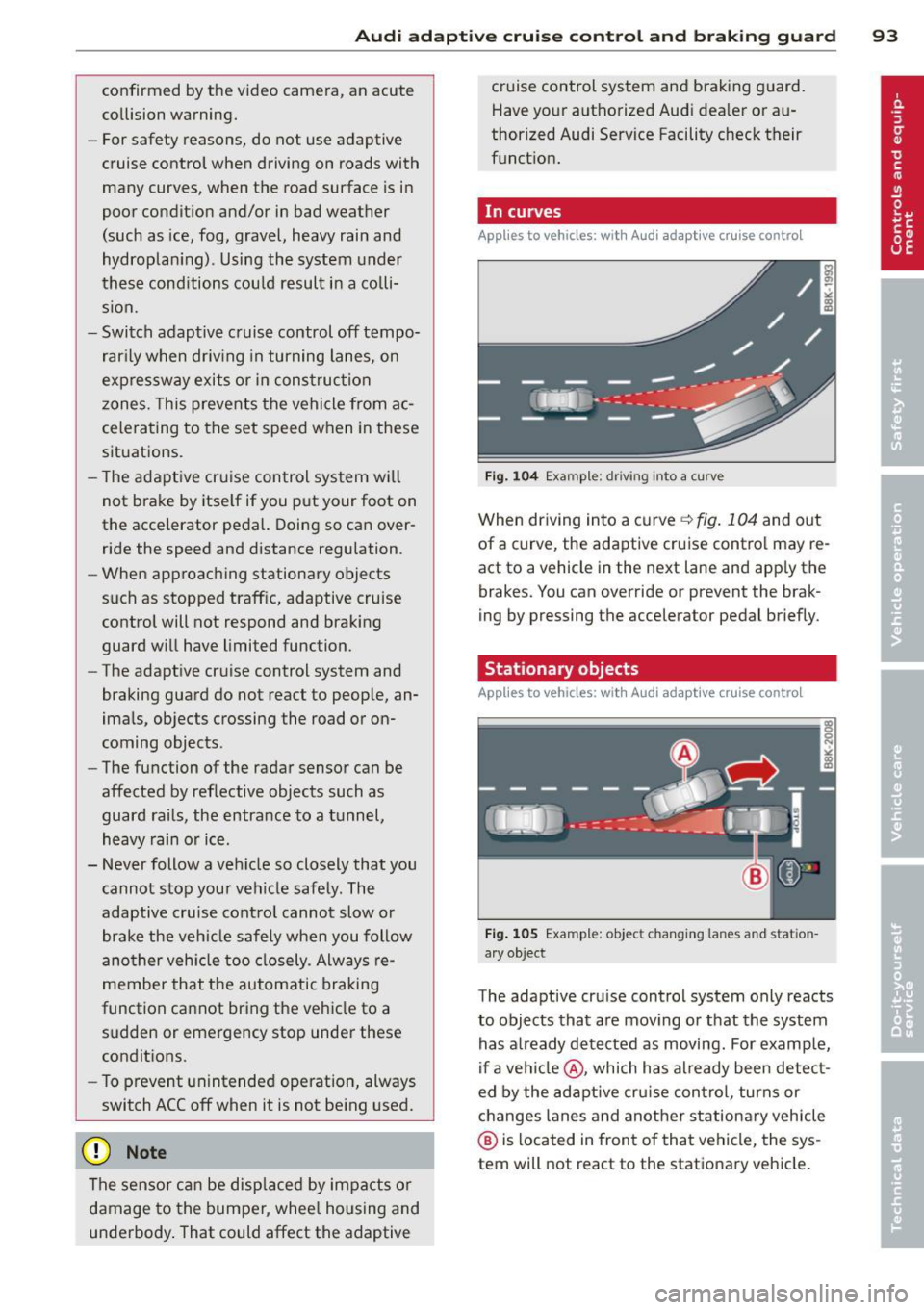
In curves
App lies to vehicles: with A ud i ada ptive c ruise contro l
F ig . 1 04 Examp le : driv ing into a curve
When driving into a curve ¢ fig. 104 and out
of a curve, the adaptive cru ise contro l may re
act to a vehicle in the next lane and app ly the
brakes. You can override or prevent the brak
ing by pressing the accelerator pedal briefly.
Stationary objects
Applies to vehicles: wit h Audi adapt ive cr uise contro l
F ig . 1 05 Examp le: objec t chang ing la n es and stat ion
a ry object
The adaptive cruise control system only reacts
to objects that a re mov ing or that the system
has a lready detected as moving . For examp le,
if a ve hicl e@ , which has already been detec t
ed by the adaptive cru ise con trol , turns or
changes lanes and another stationa ry vehicle
@ is located in front of that vehicle, the sys
tem will not react to the stationary vehicle.
Page 97 of 286
Audi adaptive cruise control and braking guard 95
shown in the tachometer @and is also
shown briefly in the display @¢
fig. 108 .
Switching Audi adaptive cruise control off
~ Push the lever away from you into position
@ until it clicks into place. The message
ACC off appears.
@ Indicator lights
II-Adaptive cruise control is switched on . No
vehicles are detected up ahead. The stored
speed is ma intained.
I-A moving vehicle is detected up ahead .
The adaptive cruise control system regulates
the speed and distance to the moving vehicle
ahead and acce lerates/brakes automatica lly.
I -When automatic braking is not able to
keep enough distance to a previously detected
mov ing vehicle up ahead , you must take con
trol and brake ¢
page 9 7, Request for driver
intervention.
© Display
If adaptive cruise control is not shown in the
d isplay, you can call it up with the
I RES ET I
button ¢ page 24.
Based on the symbols in the d isplay, you can
determine if the system is maintaining a dis
tance to the vehicle ahead and what that dis
tance is.
No vehicle -No vehicle ahead was detected.
White vehicle -A vehicle ahead was detected .
Red vehicle -Prompt for the driver to take ac
tion
¢ page 97.
Both
arrows on the s cale © indicate the dis
tance to the vehicle ahead . No ar row appears
when the vehicle is on an open road and there
is no object ahead . If an object is detected
ahead, the arrow moves on the scale.
The green zone on the scale shows the stored
distance. For information on changing the
stored distance, refer to¢
page 96. If the
distance selected is too close or may soon be
come too close, th e arrows move into the red
zone on the scale .
A WARNING
Improper use of the adaptive cruise con
trol can cause collisions, other accidents
and serious personal injuries.
- Pressing the
!SET ! button when driv ing at
speeds below 20 mph (30 km/h), w ill au
tomatically accelerate the vehicle to
20 mph (30 km/h), which is the mini
mum speed that can be set.
@ Tips
-If you switch the ignit ion or the adaptive
cruise control off, the set speed is erased
from the system memory.
- The electronic stab ilizat ion control (ESC)
and the anti-slip-regulat ion (ASR) are au
tom atica lly turned on when the adaptive
cruise control is turned on. Both systems
cannot be turned off if the adaptive
cruise control is turned on . You cannot
switch the ESC to the sport mode when
adaptive cruise contro l is switched on.
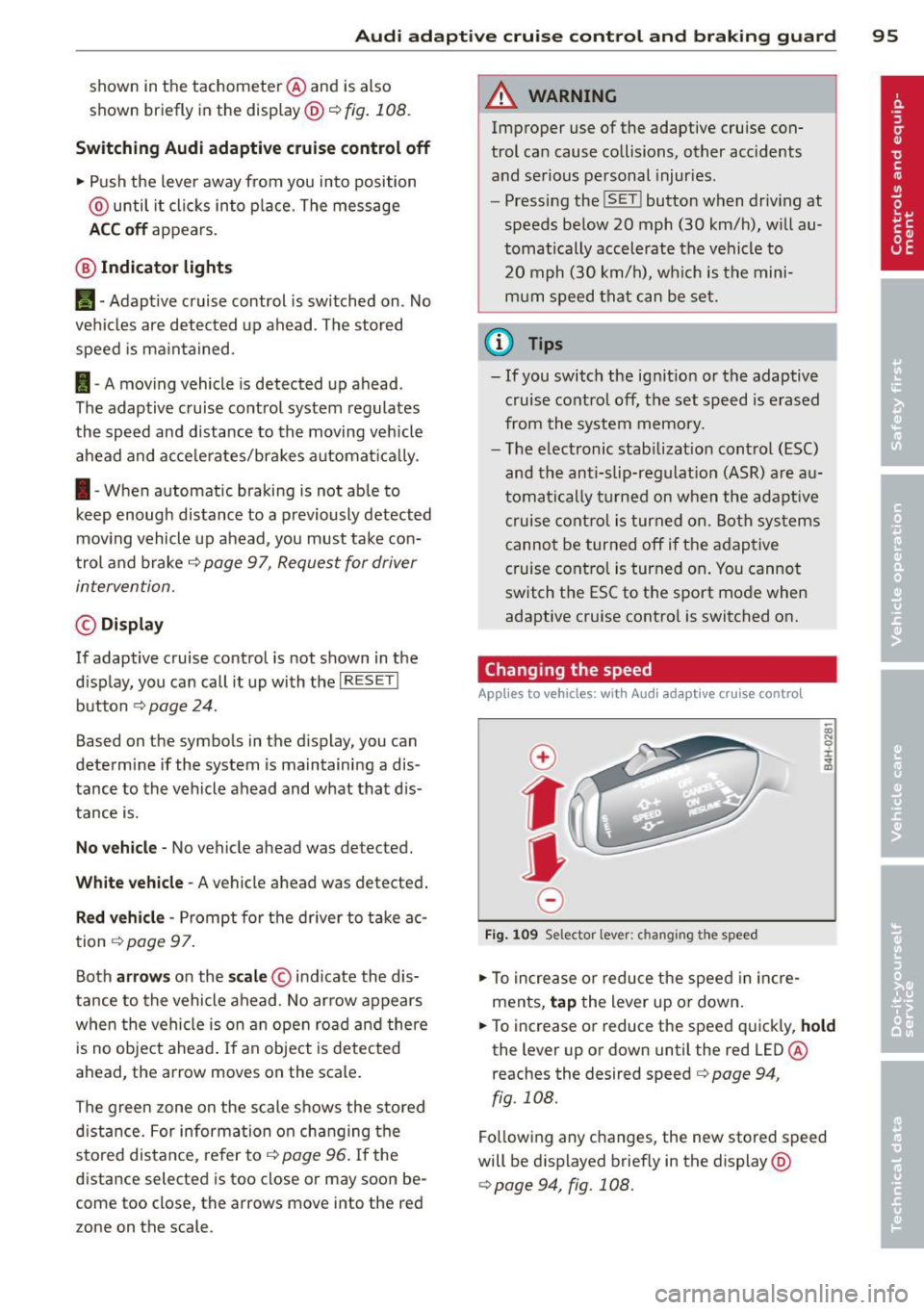
Changing the speed
Applies to vehicles: wit h Audi adaptive cruise contro l
0
f
• 0
Fig . 1 09 Selector lev er: ch an gin g the speed
~ To increase or reduce the speed in incre
ments,
tap the lever up or down.
~ OI) N 0 ±
~
~ To increase or reduce the speed quickly, hold
the lever up or down unt il the red LED@
r eaches the desired speed
c> page 94 ,
fig . 108.
Fo llow ing any changes, the new stored speed
will be displayed brief ly in the display @
¢page 94, fig. 108.