power AUDI RS5 CABRIOLET 2013 Owners Manual
[x] Cancel search | Manufacturer: AUDI, Model Year: 2013, Model line: RS5 CABRIOLET, Model: AUDI RS5 CABRIOLET 2013Pages: 286, PDF Size: 71 MB
Page 4 of 286
2 Table of contents Vehicle literature .. .. .. .. .. ... .
5
About this Owner's Manual . . . 6
Controls and equipment .. ... .
Ins truments and controls .. . .
General illus tration .... ... .. .. ... .
Instruments and warning /
indicator lights ........ .. .. .. . .
I ns truments . .. .. ..... ... .. .. ... .
War ning/ indi cator lights ... .. ... .. .
Driver information d isplay .. . .
I ntroduct ion . .. .. ..... ... .. .. ... .
Trip computer .. .. ..... ... .. .. ... .
Service interval d isp lay .... .. .. ... .
Eng ine oil temperature indicator ... .
Lap timer .. ........ ..... .. ... .. .
On -Board Diagnostic system (OBD) .. .
Opening and closing .... .. .. . .
Power locking system .. ... .. .. .. . .
R ear lid .. .. ................ ... . .
P owe r win dows . ...... ... .. .. ... .
Va let par king . ......... .. .. .. .. . .
Power top .. .. ...... .... ... .. . .
Autom atic power top ...... .. .. ... .
W ind defle cto r ......... .. .. .. .. . .
P owe r top emergency operation
Clear vision .............. .. ... .
L ights . .. .. .. . .......... .. .. .. . .
I n ter ior lights .. .. ..... ... .. .. ... .
V 1s1on ...... .. .. ..... ... .. .. ... .
W iper and washer system . ... ... .. .
Dig ita l compass ............ .. ... .
Seats and storage ... .. .. .. ... .
General recommendat ions . .. .. .. . .
Front seats ... ........... .. .. ... .
H ead restraints . ......... .... .. . .
Seat memo ry ............. ... .. . .
As htray .. .. ... .... .... .. .. .. .. . .
C igarette lig hte r .......... .. .. .. . .
St orage ...... ........... ....... . 8
8
8
10
1
0
13
24
2 4
25
27
28
28
29
31
31
37
39
4 0
42
42
46
47
52
52
55
5 5
57
59
61
61
62
64
64
65
66
66
Lugg age compartmen t . . . . . . . . . . . . 6 7 Warm and cold
... .. ..... .... . .
Climate co ntrols . ... ... ..... ... .. .
On the road ... .. ... ..... ... .. .
Stee ring . ..... .. ... .. ..... .... . .
Ign it io n lock ..... .. .... .... ... .. .
Convenience key .. ... .......... .. .
Driver messages ................. .
E lectromechanical parking brake . .. .
Speed warning sys tem .. .. ... ... .. .
Cru ise cont ro l .. .. ............... .
Transm ission .. ..... ......... . .
S · ® tronrc .. ... ... ............... .
Audi adaptive cruise control and braking guard .......... . .
I n troduc tion ... .. ... .. .. ... ..... .
Genera l informa tion ......... .. .. .
A udi adaptive cruise cont rol ..... .. .
A udi braking gua rd ..... .... ... .. .
Messages ..... .. .. ... ..... ... .. .
Audi side assist ............ .. .
L ane change ass istant
69
69
74
74
74
77
78
79
81
82
8 5
85
92
92
9 2
94
98
99
101
101
Audi drive select . . . . . . . . . . . . . . 104
D riving set tings . . . . . . . . . . . . . . . . . . 104
Park assist . . . . . . . . . . . . . . . . . . . . . 107
Parking sys tem . . . . . . . . . . . . . . . . . . . 10 7
Parking system plu s . . . . . . . . . . . . . . . 107
Pa rking system (rear, with rear view
camera) . . . . . . . . . . . . . . . . . . . . . . . .
108
Homelink ® . . . . . . . . . . . . . . . . . . . . 114
U niversa l remote contro l..... ... .. . 114
Safety fir st . . . . . . . . . . . . . . . . . . . . 118
Driving Safely . . . . . . . . . . . . . . . . . 118
Genera l notes . . . . . . . . . . . . . . . . . . . . 118
Proper occupant seating positions . . . 119
Driver and passenger s ide footwe ll . . . 123
Pedal a rea . . . . . . . . . . . . . . . . . . . . . . . 123
Stow ing luggage .... .. .. ... ..... . 124
Repo rting Safety Defe cts . . . . . . . . . . . 12 6
Active rollove r pro te ction sy st em . . . . 1 27
Page 5 of 286
Safety belts . . . . . . . . . . . . . . . . . . . 129
General notes . . . . . . . . . . . . . . . . . . . . 129
Why safety be lts? . . . . . . . . . . . . . . . . 130
Safety belts . . . . . . . . . . . . . . . . . . . . . 132
Safety belt pretens ioners . . . . . . . . . . 13S
Airbag system ............. .. .. 137
Important things to know . . . . . . . . . . 137
Front airbags . . . . . . . . . . . . . . . . . . . . 141
Monitoring the Advanced Airbag
System . . . . . . . . . . . . . . . . . . . . . . . . . 148
Knee airba gs. . . . . . . . . . . . . . . . . . . . . 152
Side airbags . . . . . . . . . . . . . . . . . . . . . 155
Child Safety . . . . . . . . . . . . . . . . . . . 158
Import ant things to know .... .. .. . .
C hild safety sea ts ......... .. .. .. . .
I ns tall ing a chi ld safety seat . ... .. . .
L A T CH Lower anchorages and tether
for chi ldren ... ........... .. .. .. . .
Addit ional Information
Vehicle operation ............ .
Intelligent technology .. .. .. . .
Notice about data recorded by vehicle
control modules .......... .... .. . .
Electronic Stabilization Control (ESC) .
Braking .. ... ...... ......... .... .
E lect ro-mechanical power assist,
dynamic steering ............. .. . .
Driving with your qu attro ® ... .. .. . .
E nergy management ............. .
Driving and environment ... ..
The first 1,000 miles (1,500 km) and
afterwards ... ........... .. .. .. . .
Avoid damaging the vehicle ... .. .. . .
Driving through water on roads ... . .
Warming up and cooling down .. .. . .
Cataly tic converter ........ .... .. . .
Operate your vehicle econom ically and
minim ize pollution ......... ... ... .
Vehicle care .............. .. .. .
158
164
16 8
172
175
176
176
176
176
178
180
18 1
182
184
184
184
184
185
18S
186
189
Cleaning and protection . . . . . . 189
Gene ral i nfo rmation . . . . . . . . . . . . . . 189
Ca re of exte rior . . . . . . . . . . . . . . . . . . 189
Ca re of inter ior . . . . . . . . . . . . . . . . . . . 196
Table of contents 3
Fuel supply and filling your
fuel tank . . . . . . . . . . . . . . . . . . . . . . .
202
Gasoline . . . . . . . . . . . . . . . . . . . . . . . . 202
Fuel tank. . . . . . . . . . . . . . . . . . . . . . . . 203
Checking and filling . . . . . . . . . . . 207
Engine hood . . . . . . . . . . . . . . . . . . . . . 207
Engine compartment . . . . . . . . . . . . . . 209
Engine oil . . . . . . . . . . . . . . . . . . . . . . . 209
Engine cooling system . . . . . . . . . . . . . 214
Brake fluid ....... ............... 216
Battery . . . . . . . . . . . . . . . . . . . . . . . . . 217
Windshield/headlight* washer
container . . . . . . . . . . . . . . . . . . . . . . . 221
Tires and wheels ............. .
T ires ... .. .. .. .. .. . ............ .
T ire pressu re mon itoring system
Do-it-yourself service ........ .
What do I do now? ........... .
Vehicle tool kit ... .. . .. .......... .
Tire repair ... .. .... . ............ .
Chang ing a wheel ..... ........... .
Fuses and bulbs .. .. ... .... ... .
Fuses ..... .. .. .... .. ........... .
Bul bs ....... .. ...... ........... .
Emergency situations ........ .
General ... .. .. .. ............... .
Starting by pushing or towing ...... .
Starting with jumper cables ..... .. .
U se of jumper cables ... .. .. ... ... .
Emergency towing with commercia l
tow truck ... .. .. .. . ............ .
Lift ing vehicle .. .. .... ........... .
Technical data ... . .. .. ..... ... .
General information ......... .
Exp lanation of techn ic al data ...... .
Vehicle identification ........... .. .
Weights .. .. .... ... .. .......... .
Dimensions . ....... . .. .......... . 222
222
240
24
3
243
243
243
245
251
251
2S4
255
255
255
255
256
2 57
259
261
261
26 1
261
261
262
•
•
Page 11 of 286

CD
@
®
©
®
®
Door handle
Power locking sw it ch
Memory buttons (dr iver's seat)
Button for side ass ist
A ir outlets
Control leve r for :
- Turn signal and high beam
0 Multi-function steering wheel
with:
- Horn
- Driver's airbag ...... ... .. .
- Audio/video , telephone and
navigation buttons
- Rocker switches for tiptron ic
operation .... .... ... .... .
@ ISETI button .... ....... .... .
® Instrument cluster ......... .
@ Reset button for trip odometer
@ Switches for:
- Windsh ield wiper/washer .. .
- Trip computer ............ .
- Lap -Timer ............ ... .
@ Ignition lock ... .... ... .... .
@ Adju stable steer ing column
@ Control lever for:
- Cruise contro l ....... ... .. .
- adaptive cruise cont ro l ... .. .
@ Instrument lighting .... .. .. .
@ Release lever for the engine
hood .. .. .... .. .. .. ....... .
@ Data Link Connector for On
Board Diagnost ics (OBD II) . .. .
35
64
101
53
14 1
89
11
10
12
57
25
28
74
74
82
92
55
207
29
@ Lig ht switch . . . . . . . . . . . . . . . . 52
@ Adjuster control fo r outside mi r-
rors . . . . . . . . . . . . . . . . . . . . . . 55
@ Power window switches . . . . . . 39
@ Radio-Disp lay or MM I-Disp lay
@ Depending on options:
- Radio system
- CD changer
@ Emergency flasher . . . . . . . . . . 54
@ Glove compartment ( lockable) 6 7
@ Front passenger's a irbag . . . . . 141
Instrument s and control s 9
@ Depending on options, switches
for :
- drive select .. .. . .. ... ... . . 104
- Electron ic Stabili zation Con-
trol ...... .. .. . ... ...... .
- parking sy stem ....... .... . 176
107
@ Deluxe automat
ic cl imate con-
t ro l .... .. .. .. ........... . .
69
@ Se lector lever for automatic
transmission .. .... ........ .
85
@) Ashtray with cigarette lighter 65
@ Depending on options:
- MMI control console or
- drive select . . . . . . . . . . . . . . . 104
- Electronic Stabili zation Con-
trol button . . . . . . . . . . . . . . . 176
- parking system . . . . . . . . . . . . 107
@ Central power w indow swi tch
@ Power top switc h . . . . . . . . . . . . 44
@ I S T AR T ENGINE S TOPI button 77
§) Electromechanical parking
brake . . . . . . . . . . . . . . . . . . . . . 79
(D Tips
- Some of the equipment or features
show n in the general illustration may be
standard equ ipment on your vehicle or
may be opt ional equ ipment depending
on your model. Always as k yo ur au thor
ized Audi dea ler if you have a quest ion
about your ve hicle .
- Ope rat ion of the Multi Med ia In terface
(MMI) is described in a separa te manua l.
Page 16 of 286

14 Instrum ent s and w arn ing /indic ato r light s
Engine cooling system
r:::;,page 18
Steering column lock
r:::;, page 18
Ignition lock
r:::;,page 18
USA mod els:
Speed warning system
r:::;, page 81
Canada models :
Speed warning system
r:::;,page81
Adapt ive cru ise control./
r:::;, page 94
Yellow ind ic a tor lights
Ye llow symbols indicate a priority 2 ma lfunc
tion -Warning!
•
I
ESC OFF
m
ll!fJ
Power top operation
r:::;, page43
Electronic Stabilization Control
(ESC) ,/
r:::;, page 19
Electronic Stabilization Control ( E SC) ./
r:::;,page 19
Electronic Stabilization Control
(ESC)
r:::;,page 176
USA mod els :
Anti-lock braking system (ABS)
defective ,/
r:::;, page 19
Canada model s:
Anti-lock braking system (ABS)
defective ,/
r:::;,page 19
USA models :
Safety systems ./
r:::;,page20
Canada models :
Safety systems ,/
r:::;,page20
•
•
[I]
.,,,~,
~
•
Im
-
•
•
-
ml
II
•
m
!I
-
!!
l:J
E
II
Worn brake pads
r:::;, page20
Electromechanical parking brake
r:::;, page
79
I
Tire pressure monitoring
system./
r:::;, page 241
Tire pressure monitor ing system
r:::;, page2 41
Electronic power control./
r:::;, page 20
Malfunction indicator Lamp
(MI L),/
r:::;, page 2 0
Engine speed limitation
r:::;, page21
Engine oi l level
r:::;,page 17
Eng ine oi l sensor
r:::;, page 21
Battery
r:::;, page 17
Tank system
r:::;, page 21
Windshield washer fluid level
r:::;,page 21
Windshie ld w ipers
r:::;, page 21
Remote control key
r:::;, page
7 7
"
Battery in remote control key
r:::;, page33
Defective light bulb warning
r:::;, page 21
Rear fog light(s)*
r:::;, page 21
Headlight range control
r:::;, page 22
Page 18 of 286

16 Instrum ent s and w arn ing /indic ato r light s
(US A models): If t he warning light 1111 and
the warning light
E+J appear toget her, imme
di ate ly contact your authorize d Aud i dea ler or
qua lified workshop to have all brake pa ds in
spected
¢ page 20.
When the li ght comes on, an audib le warning
signal is also given .
.&_ WARNING
-Always observe the warni ngs in
¢ page 200, Engine compartment, be
fore opening the hood and checking the
brake flu id.
- Driv ing with low brake fluid is a safety
hazard. Stop the car and get professional
assista nee.
- USA models: If the 1111 warn ing light,
the
G1 warning light and the (i1!B warn
ing light come on together, the rea r
wheels co uld lock up first unde r hard
braking. Rear wheel lock-up can cause
loss of vehicle con trol and an accident.
Have your vehicle repaired immediately
by you r authorized Aud i dea ler or a quali
fied workshop. Drive slowly and avoid
sudden, hard brake applications.
- Canada models: If the brake warning
light •• the
DJ warn ing light and the
ABS warning light
ti] come on together,
the rear wheels could lock up first under
hard braking. Rear wheel lock-up can
cause loss of vehicle control and an acc i
dent. Have yo ur vehicle repaired immed i
a tely by your authori zed A udi dealer or a
qualifie d workshop. Dr ive slowly and
avo id sudden, hard brake applicat ions.
- If the brake warning/indicator light does
not go out afte r a few seconds and the
par king brake is released, or lights up
whi le you are driving, the fluid level in
the brake fluid reservoir is too low. If you believe that it is safe to do so, proceed
immediately at low speed to the nearest
authorized Audi dealer or qualified repair
facility and have the brake system in spected. -
Always keep in mind that after severa l
brake applications, you will need greater
pressure on the brake pedal to stop your
veh icle. Do not rely on strained brakes to
respond with max imum s topping powe r
in critical s ituations . You must allow for
increased braking dis tan ces. The extra
d istance u sed up by fading br akes could
lead to an acciden t.
:l~ /(® ) Electromechanical parking brake
The warning/indicator light monitors the
electromechanical parking brake.
If the indicato r light . (USA models)/ .
(Canada mode ls) turns on, the pa rking brake
was set. If the pa rking brake is set when the
ignition is off, the indicator light turns off a f
te r abo ut 20 seconds .
The wa rning/indicator lig ht wi ll go out when
the pa rking brake is re leased.
• (USA models ) /. (Can ada models) Cau
tion: Vehicle parked too steep
If the indicator light b links and the message
appears, there is not enough braking power to
keep the vehicle from rolling . The brakes have
overheated . The vehicle cou ld roll away eve n
o n a sma ll incline .
Press brake pedal to release parking brake
To release the parking b rake, press the brake
peda l and press the button(®) or start dr iving
with starting assist at the same time
¢ page 80.
Please relea se p arking brake
To re lease the par king brake manually , p ress
the b rake peda l and press the button<®> at
the same time. The pa rking brake on ly re leas
es automatically if the driver's safety be lt is
fastened.
Iii Parkin g brake!
If the Iii indicator light t urns on and th is
message appears, the re is a parking b rake
malfunction. D rive to your au thori zed A udi
Page 21 of 286

Instruments and warning/indicator lights 19
!;.!~ Electronic Stabilization Control
(ESC)
If the Jjj indicator lamp blinks while driving,
the ESC or ASR (Anti-Slip Regulation) is active
l y regulating.
If the Ji) i ndicator lamp illuminates, the sys
tem has switched the ESC
off. In this case, you
can switch the ignition
off and then on to
switch the ESC on again. Th e system is func
tioning completely when the indicator lamp
switches
off.
If the II indicator lamp illuminates, the ESC
was switched
off with the I ~ OFF ! button.
Stabilization control (ESC/ABS): Fault! See
owner's manual
I f the indicator light Jj;] and the ABS ind icator
light
E (USA models) / ti] (Canada mod
e ls) turn on and the message appears, there is
a ma lfunction in the ABS system or e lectronic
differential lock. This also interrupts the ESC.
The brakes still function with their normal
power, but ABS is not active.
Drive to your authorized Audi dea le r immedi
ately to have the malfunction corrected .
For more information about the ESC
c:> page 176.
ABS/( §) Anti-lock braking system (ABS)
This warning/indicator light monitors the ABS
and the electronic differential lock (EDL).
The warning/ind icator light E (USA mod
els)/ ti] (Canada models) w ill come on for a
few seconds when the ignition is switched on.
The light will go o ut after an automatic check
sequence is completed.
There is a malfunction in the ABS when:
- The warning/indicator light does not illumi
na te when you switc h the ignition on.
- The warning/indicator light does not go out
after a few seconds.
- The warning/ind icator light illuminates
while driving. T
he ESC indicator light also illuminates if
there is a ma lfunction in the ABS . The mes
sage
Stabilization control (ESC): Fault! See
owner's manual
a lso appears in the instru
ment cluster d isplay and a warning tone
sounds.
The brake system will still respond even
without the assistance of the ABS system.
See your authorized Audi dealer as soon as
possible to restore full braking performance .
For more information regarding the ABS
c:>page 176.
Malfunction in the brake system
If the brake warning light c:> page 15 and the
ABS warning illum inate
together there may be
a malfunction in the ABS, and there may also
be a malfunction in the brake system itself
c:> &. The ABS will not work and you will no
tice a change in braking response and per
formance.
In the event of a malfunction in the brake
system
the warning/indicator light 1111
(USA mode ls)/ . (Canada models) in the in
strument cluster flashes
c:> page 15.
Malfunction in the electronic differential
lock (EDL)
The EDL works together with the ABS. The
ABS wa rning light will come on if there is a
malfunction in the EDL system
c:> page 176.
See your authorized Audi dealer as soon as
possible .
A WARNING
---=-if the E (USA mode ls)l ti] (Canada
models) warning light does not go out,
or if it comes on while dr iving, the ABS
system is not working properly. The vehi
cle can then be stopped only w ith the
standard brakes (without ABS). You w ill
not have the protection ABS provides.
Con tact your authorized Aud i dealer as
soon as possible.
- USA models: If the 1111 warning light
and the
E warning ligh t come on to
gether, the rear whee ls could lock up
Page 22 of 286

20 Instruments and warning /indicator lights
first under hard braking. Rear wheel lock
up can cause loss of vehicle control and
an accident. Have your vehicle repaired
immediately by your authorized Audi
dealer or a qualified workshop . Dr ive
slowly and avoid sudden, hard brake ap
plicat ions.
- Canada models: If the brake warning
light . and the ABS warning light
II]
come on together, the rear wheels could
lock up first under hard braking. Rear
wheel lock -up can cause loss of vehicle
control and an accident . Have your vehi
cle repaired immediately by your author
ized Audi dea ler or a qualified workshop.
Drive slowly and avoid sudden, hard
brake applicat ions.
I I !i.' Safety systems
The fl (USA models) ;fll (Canada models) in
dicator light monitors the safety systems (e .g.
a ir bags, pretensioners) and illuminates for a
few seconds each time you switch the ignition
on.
If the
I (USA models)/ E,I (Canada mode ls)
indicator light does not go out, or if it illumi
nates whil e you are driv ing, or if it sta rts to
blink, then there is a ma lf unct ion somewhere
in the system. If the light does not illuminate
when you switch the ignition on, this also
means there is a ma lfunction.
A WARNING
If you have a malfunction in the safety sys
tems, contact your authorized Audi dealer
immediately. Otherwise the safety sys
tems may not work properly in an acci
dent .
(0) Worn brake pads
EIJ Brake pads!
If the warn ing light illuminates, immediately
contact your authorized Audi dealer or quali-
l ) - : USA models onl y
fied workshop to have all brake pads inspect
ed. On USA models the warning light
EIJ
comes on together w ith the warning light
1111 . Both sets of brake pads on an ax le
must always be replaced at the same time.
A WARNING Co-- -
Driving with bad brakes can cause a colli
sion and ser ious personal injury.
- If the warn ing light
EIJ and the warn ing
light
11111> with the message Brake
pads!
comes on in the instrument cluster
d isplay, immediately contact you r au
thorized Audi dealer or qualified work
shop to have all brake pads checked or
replaced if necessary.
EPC Electronic power control
This warning/indicator light monitors the
electronic power control.
The
(m warning/indicator light (Electronic
Power Control) illuminates when you sw itch
the ignition on as a function check.
(D Tips
If this warning/ indicator l ight illum inates
while you a re driving, then there is a mal
funct ion in the engine electronics. Have
the malfunct ion corrected as soon as pos
s ib le by your authorized Audi dealer or
qualified repair facility.
o Malfunction Indicator Lamp (MIL)
The Malfunction Indicator Lamp (MIL) is part
of the On-Board Diagnostic (OBD II) system.
The symbol
¢.j lights up when the ignition is
switched on and will turn off after the engine
has started and has settled at a constant idle
speed. This indicates that the MIL is working
properly.
The warning light illuminates when there is a
malfunction in the engine electron ic system . ..,.
Page 31 of 286
Displaying intermediate time and pausing
timing
• To disp lay an intermediate time, press the
lower section of the wiper switch ®· The
timing continues to run in the background.
• To pause timing, press the lower section of
the wiper switch ® again .
• To continue t iming, press the upper section
of the wiper switch @.
If timing is paused, you can continue it later
even if you switch the ign it ion off.
Evaluating times and continuing or
resetting timing
You can evaluate the fastest, slowest and
average lap times.
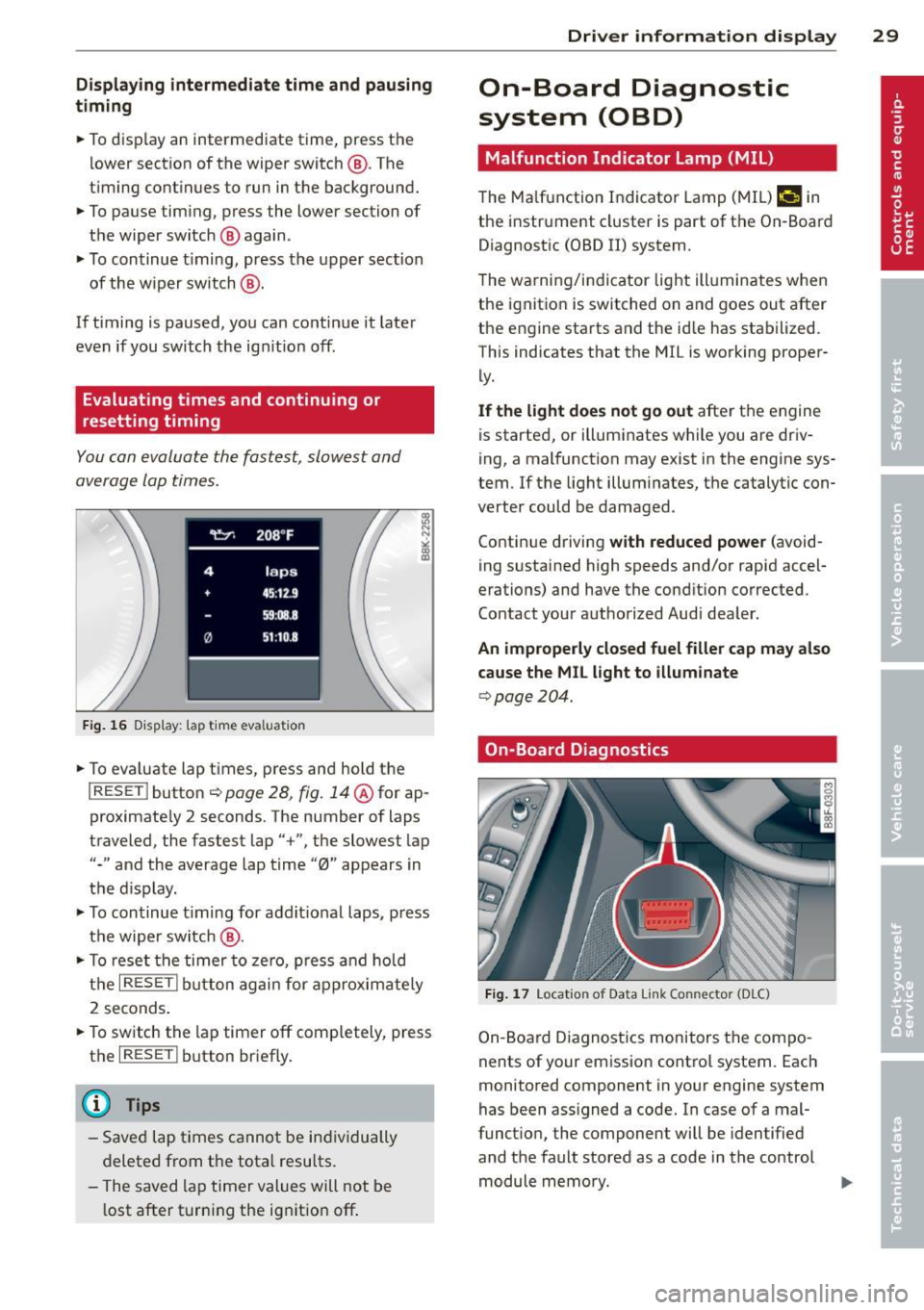
Fig. 16 Display : lap t ime eva luat ion
• To eva luate lap times, press and hold the
I RESE T I button ¢ page 28, fig. 14@for ap
proximate ly 2 seconds. The number of laps
traveled, the fastest lap"+", the slowest lap
"-" and the average lap time "0" appears in
the display .
• To continue timing for additional laps, press
the wiper switch @.
• To reset the timer to zero, press and hold
the
I RESET ! button again for approximately
2 seconds .
• To switch the lap timer off completely, press
the
I RESE T I button briefly.
(D Tips
-Saved lap times cannot be individually
deleted from the total resu lts.
- The saved lap timer values will not be
l ost after turning the ignition off .
Driver information display 29
On-Board Diagnostic
system (OBD)
Malfunction Indicator Lamp (MIL)
The Malfunction Indicator Lamp (MIL)¢• in
the instrument cluster is part of the On-Board
Diagnostic (OBD II) system .
T he warning/indicator light illuminates when
the ignition is switched on and goes out after
the engine starts and the id le has stabilized.
This indicates that the MIL is working proper
ly.
If the light does not go out after the engine
is started, or illuminates while you are driv
ing, a malfunction may exist in the engine sys
tem .
If the light illuminates, the catalytic con
verter could be damaged .
Continue driving
with reduced power (avoid
ing sustained high speeds and/or rapid accel
erations) and have the condition corrected.
Contact your authorized Audi dealer.
An improperly closed fuel filler cap may also
cause the MIL light to illuminate
¢ page 204.
On-Board Diagnostics
Fig. 17 Locat io n of Data Link Co nn ector (D LC)
On-Board Diagnostics monitors the compo
nents of your emission contro l system. Each
monitored component in your engine system
has been assigned a code. In case of a mal
funct ion , the component will be identified
and the fault stored as a code in the control module memory.
Page 33 of 286

Opening and closing
Power locking system
General description
The power locking system locks or unlocks all
doors and the rear lid simultaneously.
You can lock and unlock the vehicle centrally.
You have the following choices:
- Remote master key~
page 34,
-Door handles with convenience key*
O? page 35 ,
-Lock cylinder at the dr iver's door
r=> page 36 , or
- Power loc king switc h inside
<:!> page 35.
Automatic locking
The automat ic locking feature locks all the ve
hi cle doors and the rear lid when you drive
faster than 9 mph (15 km/h).
The car is unlocked again once the ignition key
is removed . In addition, the vehicle can be un
locked if the opening fu nction in the power
locking system sw itch or at one of the door
l eve rs is actuated. The Au to Lo ck function can
be turned o n and off in the rad io or
MMI*
r=> page 36 .
Additionally, in the event of a c rash with air
bag deployment the doors are automatically
u nl ocked to a llow access to the veh icle.
Selective unlocking
When you lock the vehicle, the power locking
system w ill lock the doors and the rear lid.
W hen unlocking, you ca n set in the rad io or
M MI* whethe r
only the dr iver's door or the
enti re ve hicle should be unlocked
r=> page 3 6.
Anti -theft alarm warning system
If the a nti-theft alarm warning system de
tects a brea k-in into t he vehicle, acoust ic and
visua l wa rning sig na ls are triggered .
The an ti- theft warn ing system is act ivated au
tomatically when you lock the vehicle .
It is de
activated when u nlocking using the remote
Opening and clo sin g 31
key, w ith the mechan ica l key, and when you
switch on the ignition.
T he al arm a lso t urns off w hen t he a la rm cy cl e
has expired.
Turn signals
When you u nlock the ve hicle, the turn signals
flash twice, when yo u lock it once . If they do
not flash, one of the doo rs, the luggage com
partment lid or the hood is not lo cked or the
ignition is s till sw itched on.
Unint entionally locking yourself out
In the follow ing cases there safeg uards to
prevent you lock ing you r remote master key in
t h e ve hicl e:
- The vehicle does not loc k w ith the power
lock ing switc h
r=> page 35 if the drive r's
door is open .
- On veh icles with convenience key*, if the
most recently used master key is in the lug
gage compartment, the rear lid is a utomat i
cally u nlocked again after it is closed.
Do not lock your veh icle w ith the remote mas
te r key o r convenience key* unt il all doors a nd
the rear lid a re closed . In this way you avoid
l ocking yo urse lf o ut accidentally .
_&. WARNING
-
-When you leave the veh icle, alw ays re
move the ignition key an d take it with
you. This wi ll prevent passengers (chil
dren, for example) from acc identally be
ing locked in the vehicle should they acci
dentally press the power locking switch in the front doors .
- Do not leave ch ildren inside the vehicle
unsuperv ised. In an emergency it would
be imposs ible to open the doors from
the o utside w itho ut the key .
(D Tips
- In the event of a crash with airbag de
ployment all locked doors will be auto
matically unlocked to give access to the
v ehicle occupants from the outside.
Page 34 of 286

32 Opening and clo sing
- If the power locking system should ma l
function, you can lock the driver's door us ing the mechanical key
c:> page 36.
- If the power locking system should fail,
you can sti ll open the fue l tank flap in an
emergency
c:> page 205.
- You are we ll advised not to keep valua
bles inside an unattended vehicle, visib le
or not. Even a properly locked vehicle
cannot provide the security of a safe.
- If the LED in the upper edge of the driv
er's door panel comes on for abo ut 30
seconds after t he vehicle is locked, there
i s a ma lfunction in the power locki ng or
the anti-theft warning system. Have the
malfunction corrected by an author ized
A udi dealersh ip or qua lified repai r fac ili
ty.
Key set
F ig . 18 Key set
@ Remote cont rol key with mechanical
key
You can centrally lock and unlock your vehicle
and start the engine with the master key with
remo te con trol. A mec hanical key is integ rat
ed i n the master key
c:> page 33 .
@ Emergency key
The emergency key is not intended for con
stant use.
It should on ly be used in an emer
gen cy, fo r example, in place of the ign ition key
cc> page 7 6. Keep it in a s afe p lace and do
not ca rry it on your key ring .
Key replacement
If you lose a key, contact you r authorized Audi
dealer immed iate ly to have the
Lost key disa
bled. Be sure to bring all your keys with you .
Number of keys
You can chec k the number of assigned keys to
yo ur vehicle
c:> page 11. This allows you to
make su re you have re ceived all of the keys
when you purchase a used vehicle.
Data in the master key
D uring d riving, s ervice and maintenance-rele
vant data is continuously stored on your mas
te r k ey. Your Aud i service adviser can read out
t hi s data and tell you abo ut the work yo ur
ve
hicle needs . This applies also to vehicles with
convenience key*.
Personal comfort settings
If two people use one veh icle, it i s r ecom
men ded that e ach person alw ays uses "t heir
own" maste r key. When the ignition is tu rne d
off or when the vehicle is locked, personal
convenience setti ngs for the following sys
tems are stored and assigned to the remote
master key.
- Climate contro l
- Powe r lock ing system
- Seat memory *
- Parking system*
- Adapt ive cru ise control*
- Side assist*
- Drive se lect*
T he s to red settings are au toma tically recalled
whe n you unlock the vehicle, when yo u open
t h e doors or w hen you t urn on t he ignitio n.
A WARNING
-Do not leave your vehicle unattended
wit h the key in the ignition lock. Entry by
unaut horized persons co uld endanger
you or result in theft or damage the vehi
cle.
- Do not leave ch ildren unattended in the
veh icle, especially with access to vehicle