remote control AUDI RS5 CABRIOLET 2015 User Guide
[x] Cancel search | Manufacturer: AUDI, Model Year: 2015, Model line: RS5 CABRIOLET, Model: AUDI RS5 CABRIOLET 2015Pages: 284, PDF Size: 69.56 MB
Page 71 of 284

M N
er
u..
co ,...., \!) 1.1'1 ,...., 1.1'1 ,....,
Warm and cold Climate controls
Description
Th e climate control sy stem warms, cools and
adds humidity to the a ir in the veh icle inter io r.
It is the most effect ive when the windows and
power top are closed. If there is a build-up of
h eat inside the vehicle, ventilation can help to
speed up the cooling process .
I n all he ating mode f unctions except
defrost,
the blower on ly switches to a higher speed
once the engine coolant has reached a certain
temp erature.
Condensat ion from the cooling sys tem can
d rip and form a puddle of water under the ve
h icle. This is normal and does not mean there
is a leak .
Pollutant filter
The po llutant filte r removes po llutants s uch
as dus t and pollen from the air.
The air pollutants filte r must be changed at
the intervals spec ified in you r Wa rra nty
&
M aintenance book let, so tha t the air condi
tioner can prope rly work .
If you drive your vehicle in an area w ith h igh
a ir po llution , the fi lter may need to be
changed more frequent ly than specified in
your Aud i Warranty
& Ma intenance bookle t. If
in doubt, ask your authorized A udi Service Ad
v isor for advice .
Key coded settings
The clima te control sett ings are automat ically
stored and assigned to the remote co ntro l key
that is in use. These set tings are differe nt
when the power top is open or closed .
& WARNING
Reduced visibility is dangero us and can
cause accidents . -
Warm and cold 69
-For safe driving it is very important that
all windows be free of ice, snow and con
densat ion.
- Comp letely fam iliarize yourse lf with the
proper use and funct ion of the heat ing
and ve nti lation system and especially
how to defog and defrost the w indows.
- Never use the windshield wiper/washer
system in freez ing weather unt il you
have warmed the w indshield first, using
the heating and ventilation system. The
washer sol ution may free ze o n the wind
shie ld an d red uce visib ility.
(D Note
- If you s uspect that the air conditioner
has been damaged, switch the system
off to avoid furt her damage and have it
i n spected by a q ua lified dea lership.
- Repairs to the Audi air condition er re
quire specia l techni cal know ledge and
speci al tools. Contact an autho rized Aud i
dealer fo r ass istance.
@ For the sake of the environment
B y reduci ng the amou nt of f uel you use,
you also re duce the amount of pollu tan ts
emitted in to the a ir .
(D Tips
- Keep the air intake s lo ts ( in fro nt of the
w indshield) free from ice, snow and de
br is in order to maintai n the proper f unc
tion of the climate control system.
- T he energy m anagement system may
switch the seat heating* or rear window
defroster off temporar ily . These systems
are available again as soon as the energy
balance has been restored .
- Air escapes through vents under the rear
window. When placing items of clothing
on the luggage compartment cover, en
sure that the openings are not covered.
Page 97 of 284
"' N
a: LL co
rl I.O
"' rl
"' rl
Audi adaptive cruise control and braking guard 95
~--- ~-Di stance 3: This setting corre
sponds to a distance of 164 feet/SO meters
when traveling at 62 mph (100 km/h), or a
time interva l of 1.8 seconds .
~---- ~ Distance 4: This setting corre
sponds to a distance of 210 feet/64 meters
when traveling at 62 mph (100 km/h), or a
time interva l of 2.3 seconds .
A WARNING
Following other vehicles too closely in
creases the risk of collisions and serious
personal injury.
- Setting short distances to the traffic
ahead reduces the time and distance
available to br ing your vehicle to a safe
stop and ma kes it
even more necessary
to pay close attention to traffic.
- Always obey applicable traffic laws, use
good judgment, and select a safe follow
ing distance for the traffic, road and
weather conditions .
¢j) Tips
- Distance 3
is set automatically each time
you switch the ignition on.
- Your standa rd settings are automatically
stored and assigned to the remote con
trol key being used.
Setting the driving program
Applies to vehicles: with Audi adaptive cruise control
Depending on the se lected driv ing program
and distance, driving behavior when accelerat
ing will
vary from dynamic to comfortab le .
Setting the driving program for vehicles
without Audi drive select*
~ In the radio/MMI*, select: !CAR !funct ion
button >
Adaptive cruise control > Driving
prog .
> comfort, standard or dynamic. Or
~ Select: !CARI function button> Car systems*
control button > Driver assist > Adaptive
cruise control
> Driving program* > Com
fort, Standard
or Dynamic. Setting the driving mode for
vehicles with
Audi drive select*
Refer to ¢ page 103.
(D Tips
Your settings are automatica lly stored and
assigned to the remote control key being
used.
Request for driver intervention
Applies to vehicles : with Audi adaptive cruise contro l
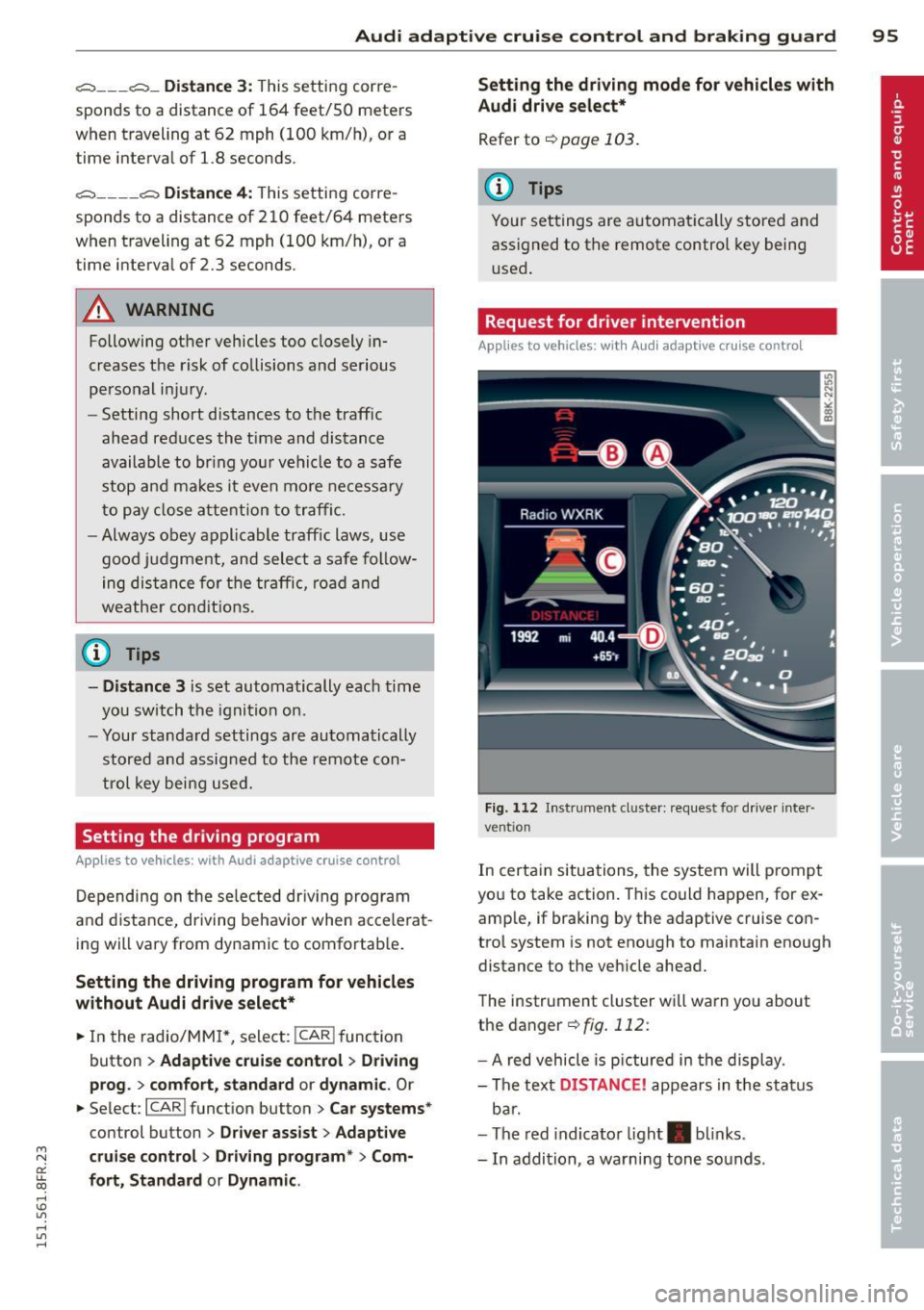
Fig. 112 Instrument d uste r: request for drive r inte r
ve ntion
In certain situations, the system will p rompt
you to take action. This could happen, for ex
amp le, if braking by the adaptive cruise con
trol system is not enough to maintain enough
distance to the vehicle ahead.
The instrument cluster will warn you about
the danger ¢
fig. 112:
-A red vehicle is pictured in the display.
- The text
DISTANCE! appears in the status
bar.
- The red indicator light . blinks.
- In addition, a warning tone sounds .
Page 99 of 284

M N
er
u..
co ,...., \!) 1.1'1 ,...., 1.1'1 ,....,
Audi adaptive cru ise control and brakin g guar d 97
-Always remember that the radar sensor
for the braking guard works only within
defined detection and range limits that
may prevent the proper detection of oth
er vehicles.
- The radar sensor's function and range
can be reduced by rain, snow and heavy
spray. Moving vehicles up ahead may not be promptly detected or may not be de
tected at al l.
- Reflective surfaces includ ing crash barr i
ers or tunnel ent ran ces may impair the
function of the radar sensor.
- You can cance l the braking that is initiat
ed by the system by braking yourself, by
accelerating noticeab ly or by swerving.
- Bra king guard error messages
<> page 97.
-Keep in mind that braking guard can
brake u nexpectedly . Always secure any
ca rgo or objects that you are transport
i ng to reduce the risk of d amage or in
ju ry.
Settings in the radio/MM!
Applies to vehicles: with Audi adaptive cruise co ntrol
~ Se lect: ICARI f u nction button> Car system s*
control button > Dri ver assist > Audi brak
ing guard .
Or
~ Select : I CARI funct ion button > A udi braking
guard .
System -
Switch Audi braking g uard On and
Off . When you switch the ignition on, the
message
Aud i braking guard off appears if
the system is sw itched off .
Early warning -The distance and app roac h
warn ings in the display can be switched
On /
Off .
(D Tips
-Your settings are automatica lly stored
and ass igned to the remote control key
being used at the t imes the settings are
made. -
If you restrict or sw itch off the ESC, the
braking gua rd also switches itself off
<> page 173.
-Switch braking guard off when you a re
loading the vehicle onto a vehicle carrier,
train, ship or other type of transporta
tion. This can prevent undesired warn
ings from the braking guard system.
Messages
App lies to vehicles : wit h Audi ada ptive c ruise contro l
Braking guard : Off
This driver message appears if the system is
turned off via the radio/MMI *. Otherwise, if
the system is turned off, the informat ion ap
pears every t ime shortly after the start of the
trip.
The driver message a lso appears if the system
is not ava ilable d ue to a malfunct ion or if the
ESC is not switched
on <> page 173. If this is
the case, the system w ill not prov ide warnings
about a poss ible collision.
Braking guard : Acti vated
T h is dr iver message appears if sharp b rake
pressure was applied due to an acute warning.
•••
Three white dots appear if a sett ing cannot be
selected w ith the operating lever . For exam
ple, this happens if you want to raise/lower
the speed even thoug h there was no previous
l y saved speed.
ACC: S ensor blo cked
This message appears if the sensor v iew is ob
structed, for examp le by leaves, snow, heavy
spray or d irt. Clean the sensor<>
page 90,
fig. 103 .
ACC: not a vailable
The driver message appears if there is a mal
functio n. The adaptive cruise contro l tu rns off .
A chime sounds as a reminder . Have the sys
tem checked by an authori zed Aud i dea ler or
authorized Aud i Service Fac ility.
ACC: unavailable ll-
Page 103 of 284

"' N
a: LL co
rl I.O
"' rl
"' rl
Have your authorized Audi dealer or au
thorized Audi Service Facility check their
function.
@ Tips
- If the window glass in the driver's door
or front passenger's door has been tint
ed, the display in the exterior mirror may be misinterpreted .
- For Declaration of Compliance to United
States FCC and Industry Canada regula
tions
¢ page 267.
Activating and deactivating
Applies to vehicles: with Audi side assist
Fig. 118 Drive r's d oor : Sid e ass ist bu tton
.. Press the button ¢.&. in General informa
tion on page 100
to switch the system on/
off . The LED in the button turns on when
side assist is switched on.
Adjusting the display brightness
Applies to vehicles: with Audi side assist
The signal brightness can be set in the radio
orMMI* .
.. Select : ICARI function button> Audi side as
sist.
.. Select : I CARI function button > Car systems*
control button > Driver assist > Audi side
assist.
The display brightness adjusts automatically
to the brightness of the surroundings, both in
the information and in the warning stage. In
very dark or very bright surroundings, the dis play is already set to the minimum or maxi
mum level by the automatic adjustment. In
Audi side assist 101
such cases, you may notice no change when
adjusting the br ightness, or the change may
only be noticeable once the surroundings
change.
Adjust the brightness to a level where the dis
play in the information stage will not disrupt
your view forward. If you change the bright
ness, the display in the exterior mirror will
briefly show the brightness level in the infor
mation stage. The brightness of the warning
stage is linked to the brightness in the infor
mation stage and is adjusted along with the
information stage adjustment.
(D Tips
- Side assist is not active while you are
making the adjustment.
- Your settings are automatically stored
and assigned to the remote control key
being used.
Driver messages
Applies to vehicles: wit h Aud i side ass ist
If side assist switches off by itself, the LED in
the button turns off and a message will ap
pear in the instrument cluster display:
Audi side assist unavailable: Sensors blocked
The radar sensors' vision is affected . Do not
cover the area in front of the sensors with bike
wheels, stickers, dirt or other objects. Clean
the area in front of the sensors, if necessary
¢ page 99, fig. 117 .
Audi side assist: Currently unavailable
Side assist cannot be switched on temporarily
because there is a malfunction (for example,
the battery charge level may be too low) .
Audi side assist: System fault!
The system cannot guarantee that it will de
tect vehicles correctly and it is switched off.
The sensors have been displaced or are faulty.
Have the system checked by an authorized
Audi dealer or authorized Audi Service Facility
soon.
Page 113 of 284
M N
er
u..
co ,...., \!) ..,.,
,...., ..,., ,....,
(D Note
-In the MMI display, the directio n of trav
el of the vehicle rear is represented de
pending on the steering wheel angle.
The vehicle front swings out more than
the veh icle rear . Maintain plenty of dis
tance from an obstacle so that your out
s ide mirro r or a corner of your veh icle
does not collide with any obstacles -dan
ger o f accident!
- Remember to ma inta in sufficie nt clear
ance from the curb to avoid damaging
the wheel rims.
(j) Tips
The left or right orientation lines and sur
faces will be di splayed, depend ing on the
t ur n signa l being use d.
Adjusting the display
and warning tones
Applies to vehicles: with parking system plus/ parking sys
tem plus with rear view camera
The display* and warning tones are adjusted
in the radio or MMI*.
,.. Se lect : I CARI fu nct ion button > Parking sy s
tem.
Or
,.. Se lect : ~ I C~ A,..., R,..., I function button > Car system s*
control button > Drive r assist > Parking aid .
Display*
-Off -when t he parking system is sw itch ed
on, only a udib le signa ls are given .
-On -when the parking sys tem is switched
on, the pict ure from the rear view camera is
displayed.
Warning tones
- Rear volume -
rear sensor volume
-Rear frequency -rear sensor frequency
-Front volume -front sensor volume
-Front frequency -front sensor freq uency
- Mu sic volume while pa rking -when the
parking system is switched on, the vol ume
of the activ e audio source is lowered.
P ark a ssis t 11 1
The newly adj usted va lue is briefly hea rd from
the sig na l generato r. Th e settings are auto
matically stored and assigned to the remote
control key.
A WARNING
- Always make sure that the vo lume and
frequency of the warning tones is ad just
ed so that yo u can easily hear the acous
tic d istance signa l even if the radio is
p laying, the air-cond itio ne r blower is on
High or there is a high level of ou ts ide
noise.
- Chec k the settings whenever someone
e lse has drive n the vehicle before yo u.
(D Tips
- The warn ing tones can also be adjus ted
directly from t he rear view came ra im
age. S imp ly press the Sett ings* cont ro l
bu tton.
- Cha nged settings are ac tiva ted whe n
park ing ass ist is swi tc hed on aga in.
Error messages
Applies to vehicles: with parking system plus with rear
view camera
There is an error in the system if the LED on
the
p, ,; A switch is blinki ng and you hear a con
tinuous alarm fo r a few seconds after switch
ing on the park ing system or when the park
ing system is already activated . Have yo ur au
t h orized Aud i dea le r cor re ct the e rror.
Keep th e senso rs in the rea r bumpe r clean and
free from ice so that the acoust ic par k assist
system can fu nction properly.
@ Tips
If the error is not corrected before you
switc h off the ig nitio n, when you sw itch on
the p arking system again, the LED in the
P" JA switch will b link.
Page 269 of 284

M N
er
u..
co ,...., \!) 1.1'1 ,...., 1.1'1 ,....,
Technical Modifications
Our guidelines must be complied with when technical modifications are made .
Always consult an authorized Aud i dealer be
fore starting work on any modifications.
This will he lp ensure that vehicle function,
performance and safety are not impaired
¢ .&. .
Attempting to work on electronic components
and the software used with them can cause
malfunctions. Beca use of the way electronic
components are interconnected with each
other, such malfunctions can also have an ad
verse affect on other systems that are not di
rectly involved . Th is means that you r isk both
a substantial reduction in the operational
safety of you r vehicle and an inc reased wea r of
vehi cle parts¢ _&..
Author ized Audi dealers w ill perform th is
wo rk in a professiona l and competent ma nner
or, in spec ial cases, refer you to a p rofessional
company that specializes in such mod ifi ca
tions .
_& WARNING t= -
Improper repairs and modifications can
change the way vehicle systems wo rk and
cause se rious personal injury.
0 Note
If emergency repairs must be perfo rmed
elsewhere, have the ve hicle examined by
an authorized A udi dealer as soon as possi
ble.
Con sumer In formation 267
Declaration of
Compliance, Telecom
munications and
Electronic Systems
Radio Frequency Devices and Radiocommuni
cation Equipment User Manual Notice.
The manufact urer is not responsib le for any
radio or TV interference caused by unauthor
ized modifications to this equipment.
Device s
The following devices each comply wi th FCC
Part 15 .19, FCC Part 15.2 1 and RSS -Gen Iss ue
1:
- Adaptive cr uise con trol*
- Conven ience key*
- Side assist*
- Cell phone package*
- Electron ic immobilizer
- Homelink universa l remote control *
- Remote control key
FCC Part 15.19
Th is device complies with part 15 of the FCC
Ru les . Operation is subject to the fo llow ing
t wo conditions:
(1) This device may not cause harmful i nter
ference, and
(2) this device must accept any interference
received, including interference that may
cause undes ired operation .
FCC Part 15 .21
CAUTION:
Changes or mod ificat ions no t expressly ap
proved by the pa rty responsible fo r compli
ance could void the user's aut hority to operate
the eq uipment .
RSS-Gen Issue 1
Operation is sub ject to the fo llow ing two con
di tions :
(1) this device may not ca use inte rference,
and
•
•
Page 272 of 284

270 Index
Automatic climate control Air vents ... ............... .. .... .. 71
Operation . . . . . . . . . . . . . . . . . . . . . . . . . 70
Setup . .. ............... .. .. .... .. 72
Automatic power top ....... .. .. .... .. 43
Automatic transmission . . . . . . . . . . . . . . . 83
Emergency release . . . . . . . . . . . . . . . . . . 89
Removal lock (ignition key) . .. .. .. .. . . 73
also refer to S tron ic transmission ..... 83
Au tomatic wipers . . . . . . . . . . . . . . . . . . . . 56
Auto Safety Hotline ................ . 120
Average speed . . . . . . . . . . . . . . . . . . . . . . . 24
Avoid damaging the vehicle .. .. .. .. .. . 179
B
Battery . . . . . . . . . . . . . . . . . . . . . . . 16, 205
Battery location inside the luggage com-
partment .. .. . .......... .. .. .... . 205
Charging . .. ............... .. .... . 207
Important warnings when working on
the battery .... ... ... .... .. .. .. .. . 205
Jump starting ............. ... .. ... 255
L ow . .. .. .... ........... .... .... . 177
Rep lacing the battery ..... .. .. .... . 208
State of charge ............ ... .... . 177
Winter operation .......... ... .... . 205
Working on the battery ..... ... .... . 205
Before driving ............. .. .. .. .. . 112
Belt posi tioner ............ .. .. .. .. . 126
Blended gasoline .............. .... . 190
Blower (automatic climate control) . . . . . . 71
Booster seats ............. .. .. .. .. . 160
Brake fluid Changing the brake fluid ......... .. . 204
Checking the brake fluid level ..... ... 204
Reservoir . ................. ..... . 204
What is the correct brake fluid level? . . 204
What should I do if the brake fluid warn-
ing light comes on? ......... .. .... . 204
Brake system ............... ... .... . 204
Anti-lock braking system . . . . . . . . . . . . . 19
Brake assist system ....... .. .. .... . 171
Brake fluid ................ .. .... . 204
Brake fluid specifications for refill and re
placement . . . . . . . . . . . . . . . . . . . . . . . 204
Brake light defective .......... .. .... 21
Brake power assist unit .. .. .. .. .. .. . 174 Brakes ...
..... .. ............. .... 174
Ceramic brakes ... ................ . 174
Electromechanical parking brake ...... 78
Warning/indicator lights ........ .... . lS
Worn brake pads symbol . . . . . . . . . . . . . 20
Braking Emergency braking function ....... .. . 79
braking guard . .. .. ... .......... .. .. . 90
Messages . .... .. ............. .... . 97
Settings .. .. .. . .............. .. .. . 97
Break-in per iod .. .. .......... ...... . 179
Tires . ........ .. .. ........ ...... . 179
Bulbs .. .... .... ................... 253
C
California Proposition 65 Warning ..... 196
Battery specific . ................. . 206
Capacities .. .. .. . .............. .. .. 262
Carbon parts Cleaning . . . . . . . . . . . . . . . . . . . . 186, 187
Care ........... .. .. .............. . 184
Cargo area
refer to L uggage compartment. . . 66, 118
Catalytic converter . . . . . . . . . . . . . . . . . . 180
Center armrest . . . . . . . . . . . . . . . . . . . . . . 63
Central locking .. .. ................ .. 30
Central lock ing switch .......... .... . 34
Convenience key . . . . . . . . . . . . . . . . . . . . 34
Remote control key ................. 33
Ceramic brake rotors New brake pads .. ................ . 17 4
Certification .... .. ............. .... 267
Changing a flat tir e . ... .......... .. .. 244
Changing a wheel .. ................ . 244
Changing engine oil ............. .... 200
Checking Engine coolant level ............ .. .. 202
Checking tire pressure ..... ...... .. .. 221
Child restraints Danger of using child restraints in the
front seat . .... ... .............. .. 132
Where can I get addi tional information
about child restraints and their use? .. 169
Child restraint system anchors ..... ... 166
Page 273 of 284

M N
er
u..
co ,...., \!) 1.1'1 ,...., 1.1'1 ,....,
Child safety . ... .... .... ... .. .. .. ... 152
Convertible locking retractor . ... .. .. . 162
Important safety instructions for using
chi ld safety seats .................. 155
Important things to know when driv ing
with children ..................... 152
Instal ling a child restraint us ing the
L ATC H system ................... .. 168
L ower ancho rages ........ .. .. .. .. . 167
M ounti ng and releas ing the ancho rage
hook . ..... .. .. ... ..... ... .. .. ... 168
Ch ild safety seats .... ... ... .. .. .. .. . 158
Booste r seats ..................... 160
Conve rtible c hild seats ............. 159
Conver tible locking retrac tor .. .. .. .. . 16 2
D anger o f using c hild restra ints in the
fro nt sea t . . . . . . . . . . . . . . . . . . . . . . . . 132
H ow do I properly install a child safety
seat in my vehicle? ........ .. .. .. .. . 155
Infant seats . . . . . . . . . . . . . . . . . . . . . . 158
Install ing .. ............. .... .. ... 162
LATCH system ................... .. 168
Safety instructions . ......... .. .. .. . 155
Unused safety belts on the rear seat .. 157
Cigarette lighter . . . . . . . . . . . . . . . . . . . . . 65
Cle aning .......................... 184
Climate controls . . . . . . . . . . . . . . . . . . . . . 69
Climate control system Automatic recirculation . . . . . . . . . . . . . . 72
synchron iz ing ............ .... .. .... 72
Clock ..... .. .. ... .. ..... ... .. .. .... 12
Closing Powe r windows . . . . . . . . . . . . . . . . . . . . 38
C losing/opening
at t he lock cylinder ........ .. .. .. .. .. 35
by remote contro l ..... ..... .. .. .. .. 33
with the cen tral locking switch . . . . . . . . 34
with the convenience key . . . . . . . . . . . . . 34
Cold tire inflat ion pressure ... .. .. .. .. . 217
Com ing home ............. .... .. .. .. 52
Compass in the mirror ................ 58
Compliance . ... ... ..... ... .. .. .. ... 267
Consume r In fo rmat ion . . . . . . . . . . 120, 264
Contact ing N HTSA .................. 120
Controls Cleaning ... .. .... .... ... .. .. .. ... 187
Inde x 271
Convenience key
Indicator lights .. .. . ... .... ... .. .. . 77
Starting engine (START EN GINE STOP
button) ... .. .. .. ................. . 76
Stopping the engine (START ENGINE
S TOP button) . . . . . . . . . . . . . . . . . . . . . . 77
Switch ing on ignit ion ... .. ... ..... .. . 76
u nlocking/locking .................. 34
Convenience opening/clos ing
C onvertib le child sa fe ty se ats
Convertib le locking retractor 39
159
Activati ng .............. .......... 164
Deact ivat ing . .. .. .... ........... .. 164
U si ng to secu re a child safety seat 1.6 2, 16 4
Coolant system .. .. ............... .. 201
Cooling mode (automatic climate control) 70
Cooling System Expansion tank . .. ................. 202
Cornering light .. .. ................. . 51
Cruise cont ro l
Changi ng speed .... . .. ..... ... .. .. . 82
Presetting your speed ... .... ... .. .. . 82
Switching off .. .. .... ............. . 82
Swit ching on . .. .. .. ............... . 81
Cruising range . . . . . . . . . . . . . . . . . . . . . . . 24
(upholder .. .. .. .. .. . .. .... ...... .. . 65
D
Data recorder . . . . . . . . . . . . . . . . . . . . . . 170
Date disp lay . ... .... . ... ...... ... .. . 12
Dayt ime runn ing lights . . . . . . . . . . . . 51, 52
Declarat ion of compliance
Adaptive cruise control ............. 267
Audi side ass ist .. .. . .. .. ... ..... .. 267
Cell phone package ................ 267
Convenience key ................... 267
El ectronic immob ilizer . ......... .. .. 267
Homeli nk unive rsal remote con trol . .. 267
Remote con tro l key .. .. ..... ... .. .. 267
Decorat ive pa rts/tr im
Cleaning . . . . . . . . . . . . . . . . . . . . . . . . . 186
Defective light bu lb warning ........... 21
Defrost ing (windows) ............ .... . 71
Determ ining correct load limit ....... . 226
Digital cloc k . . . . . . . . . . . . . . . . . . . . . . . . 12
Digi tal compass . . . . . . . . . . . . . . . . . . . . . 58
•
•
Page 277 of 284

M N
er
u..
co ,...., \!) 1.1'1 ,...., 1.1'1 ,....,
L
Lane Change Assistant
refer to side assist . . . . . . . . . . . . . . . . . . 99
L ap t imer .. .. .. ... ....... .... ... .. ..
27
Evaluating times . . . . . . . . . . . . . . . . . . . 28
Pausing tim ing .....................
27
Starting ... ... .. ..... ... .. .. .. .... 2 7
LA T CH .. .. .. .. ..... ...... .. .. .. .. . 166
D escr ipt ion .................. .. ... 167
I nstal ling a chi ld restraint ........... 168
L ocat ion . .. .... ......... .. .. .. ... 167
M ounting and releasing the ancho rage
hook .... .. .. .. .. .... ... .. .. .. ... 168
L aunch Cont ro l Program . . . . . . . . . . . . . . 88
Leather clean ing/protection . .. .. .. .. . 187
L eaving home . . . . . . . . . . . . . . . . . . . . . . . 52
Left hand drive ...................... 53
Lifting jack . ... .... .... ... .. .. .. ...
247
Lift ing vehi cle .... ......... .... .. .. . 259
Light adaptive light .... .. ... ... .. .. .. .. .. 51
Com ing/Leavi ng home .............. . 52
Daytime running lights . . . . . . . . . . 5 1, 52
E xterio r ligh ting . . . . . . . . . . . . . . . . 5 1, 52
I n ter io r/re ad ing .......... .. .. .. .. .. 54
L ow beam .... .. .. .... ... .. .. .... .. 51
Rear fog lights . . . . . . . . . . . . . . . . . . . . . 51
Side marker lights . . . . . . . . . . . . . . . . . . 51
Travel mode . . . . . . . . . . . . . . . . . . . . . . . 53
Light/ra in se nsor
H eadlig hts . . . . . . . . . . . . . . . . . . . . . . . . 51
Intermittent (windshield wipe rs) . . . . . . 56
Sensor defective .. ..... ... .. .. .. .. .. 22
L ights
E mergency fla shers . . . . . . . . . . . . . . . . . 5 3
H igh beam . .... ......... .... .. .. .. 52
T u rn signa ls . .. .. .. ... ... .. .. .. .... 52
L oc king
Rear lid .. .. .... ......... .... .. .. .. 36
Lock ing/ unlocking
at the lock cylinder .................. 35
by remote con tro l ......... ... ... ... 33
with the central locking switch . . . . . . . . 34
with the convenience key . . . . . . . . . . . . . 34
Low beams .. ............. .... .. .... 51
L ower anchorage locator bu tto n .. .. .. . 16 7
Inde x 275
Lower universal anchorage bars (Canada) 166
Lower universal anc horages (Canada) 166
Luggage Stow ing .. .. .. .. ................. 118
Luggage compartment . . . . . . . . . . . . . . . . 66
En larging ... .... .. . .. .. ..... ... .. . 66
Lid .. ... .. .. .. .... .. .. ...... ... .. . 36
Load ing ... .. .. .. .... ............. 118
Ski sack ... .. .. .. .. ............... . 67
Tie-downs. .. .. .. .. .. ......... 67, 119
Valet parking .. ... ... .............. 39
Luggage compartment lid
Emergency unlocking ............... . 37
Lumbar suppor t . . . . . . . . . . . . . . . . . . . . . 61
M
Maintenance .. .. .... ..... ..... ... .. 264
Malfunction Indicator Lamp (MIL) . . 20, 28
Ma tte fin ish pain t clean ing ........... 184
Mechan ica l key . . . . . . . . . . . . . . . . . . 31, 32
Memory function . . . . . . . . . . . . . . . . . . . . 63
Mileage Ave rage ... .. .. .. .. .. ........... .. . 24
Instantaneous ..... . .. .. ..... ... .. . 24
Mir ro rs
Adjusting the exter ior m irrors ....... .. 54
Compass .. .. .. .. .... ............. . 58
dimming .. .. .. .. ................. . 55
Vanity mirrors . . . . . . . . . . . . . . . . . . . . . 56
Monito ring the Advanced Airbag System 141
N
Natura l leather
Cleaning . . . . . . . . . . . . . . . . . . . . . . . . . 187
New tires and wheels
N HTS A 230
Co ntacting .. .. .. .... ............. 120
Number of seats .... .... ........... . 123
0
Occupant seating positions
113
Oct ane rat ing . .. .. ................. 190
Odometer . . . . . . . . . . . . . . . . . . . . . . . . . . 12
OFF (automatic climate control) . . . . . . . . 70
•
•
Page 279 of 284

M N
er
u..
co ,...., \!) ..,.,
,...., ..,., ,....,
Index 277
-----------------------------------.......
Protecting . . . . . . . . . . . . . . . . . . . . . . . . . 186
Q
Quartz clock . ............. .... .. .. .. 12
quattro
refer to all-wheel dr ive .... .. .. .. .. . 176
Question What happens to unbelted occupants? 124
Why safety belts? . . . . . . . . . . . . . . . . . 123
R
Radiator fan
203
Ra in/ light sensor
H eadlig hts . ............. .... .. .... 5 1
I ntermittent (windshield wipe rs) . . . . . . 56
Sensor defective . . . . . . . . . . . . . . . . . . . . 22
Reading lights ............. .. .. .. .... 54
Rear fog lights ............ .... .. .... 51
Rear lid Escape hand le . . . . . . . . . . . . . . . . . . . . . 3 7
Opening and closing ... ... .. .. .. .. .. 36
Rear light Defective . . . . . . . . . . . . . . . . . . . . . . . . . 21
Rear view camera Park ing mode 1
Par king mode 2
Rear view mirror ........... .... .. ... . 109
110
55
Rear w indow heati ng ....... .. .. .. .. .. 7 1
Recirculation mode (automatic climate
control) . . . . . . . . . . . . . . . . . . . . . . . . . . . . 70
Refue lling . .. .. ........... .. .. .. ... 192
Rele ase lever for hood ...... .. .. .. .. . 195
Remote control Garage door opener (Homel ink) . .... .. 40
Remote control key . . . . . . . . . . . . . . . . . . . 31
Personalizing . . . . . . . . . . . . . . . . . . . . . . 31
u nl ocking/locking ........ .. .. .. .. .. 33
Remote rear lid release .. ... .. .. .. .. .. 36
Repai r manua ls . ........ .... ... ... .. 264
Repairs Airbag system ........... .. .. .. .. . 144
Replacement key . . . . . . . . . . . . . . . . . . . . 3 1
Replacing bulbs .............. .. .... 253
Replacing tires and whee ls ... .. .. .. .. . 23 1
Replacing w iper blades ..... .. .. .. .. .. 57 Reporting Sa
fety Defects . ..... ... .. .. 120
Reset button . . . . . . . . . . . . . . . . . . . . . . . . 12
Retractor ... .. .. .. ............... .. 127
R ight hand dr ive . . . . . . . . . . . . . . . . . . . . . 53
Rims Cleaning . . . . . . . . . . . . . . . . . . . . . . . . . 186
Rollbar
refer to Active ro llover protection sys-
tem ........ .. .. .... ............. 121
s
SAFE ...... .. .. .. ................. . 12
S afe driving habi ts . .... ......... .. .. 112
Safety be lt pos ition .. .. .. ...... .... . 128
Safety be lts worn by pregnan t women . 128
Safety be lt pretensioner ... .... ... .. .. 129
Serv ice and disposa l .. ............. 130
S afety be lts . .. .. .. ... .. .......... .. 1 26
Be lt pos itione r ... .. . .. .. ..... ... .. 126
Cleaning . ... .... .. . .. .. ..... ... .. 187
Danger to passengers who do not wear a
sa fety belt . . . . . . . . . . . . . . . . . . . . . . . 124
Fa sten ing .. ... .. .. . .............. 127
Improperly worn . ... ... ...... ... .. 129
Not wor n . . . . . . . . . . . . . . . . . . . . . . . . 124
Safety be lt pos ition ... .. ...... .... . 128
Safety i nstructions ............. .... 126
Securing child safety se ats ...... .. .. 162
Spe cial considera tions for pregnan t
women ... .. .... ... .. .. ..... ... .. 128
Unfastening ..... .. . .. .. ..... ... .. 129
Warning/indicator light . ..... ... .. .. 123
Warning light .. .. .................. 16
Why YOU MUST wear them ........ .. 123
Wor n properly ... .. . .. .... .... .. .. 125
Safety be lt warning light . ..... ... .. .. 123
Safety comp liance sticker ........ .. .. 261
Safety eq uipment .. ............. .. .. 112
S afety features for oc cupant rest ra in t an d
protection . ... .. .... . ... ...... ... .. 112
Safety gu idelines
Seats ..... .. .. .. ................. . 60
Safety instr uctions
E n gine compartment .......... .... . 195
for using ch ild safety seats .......... 155
•
•