steering AUDI RS5 CABRIOLET 2015 User Guide
[x] Cancel search | Manufacturer: AUDI, Model Year: 2015, Model line: RS5 CABRIOLET, Model: AUDI RS5 CABRIOLET 2015Pages: 284, PDF Size: 69.56 MB
Page 77 of 284
"' N
a: LL co
rl I.O
"' rl
"' rl
Starting the vehicle with the emergency
key
Applies to vehicles: with ignition lock
You can use the emergency key as an ignition
key in an emergency.
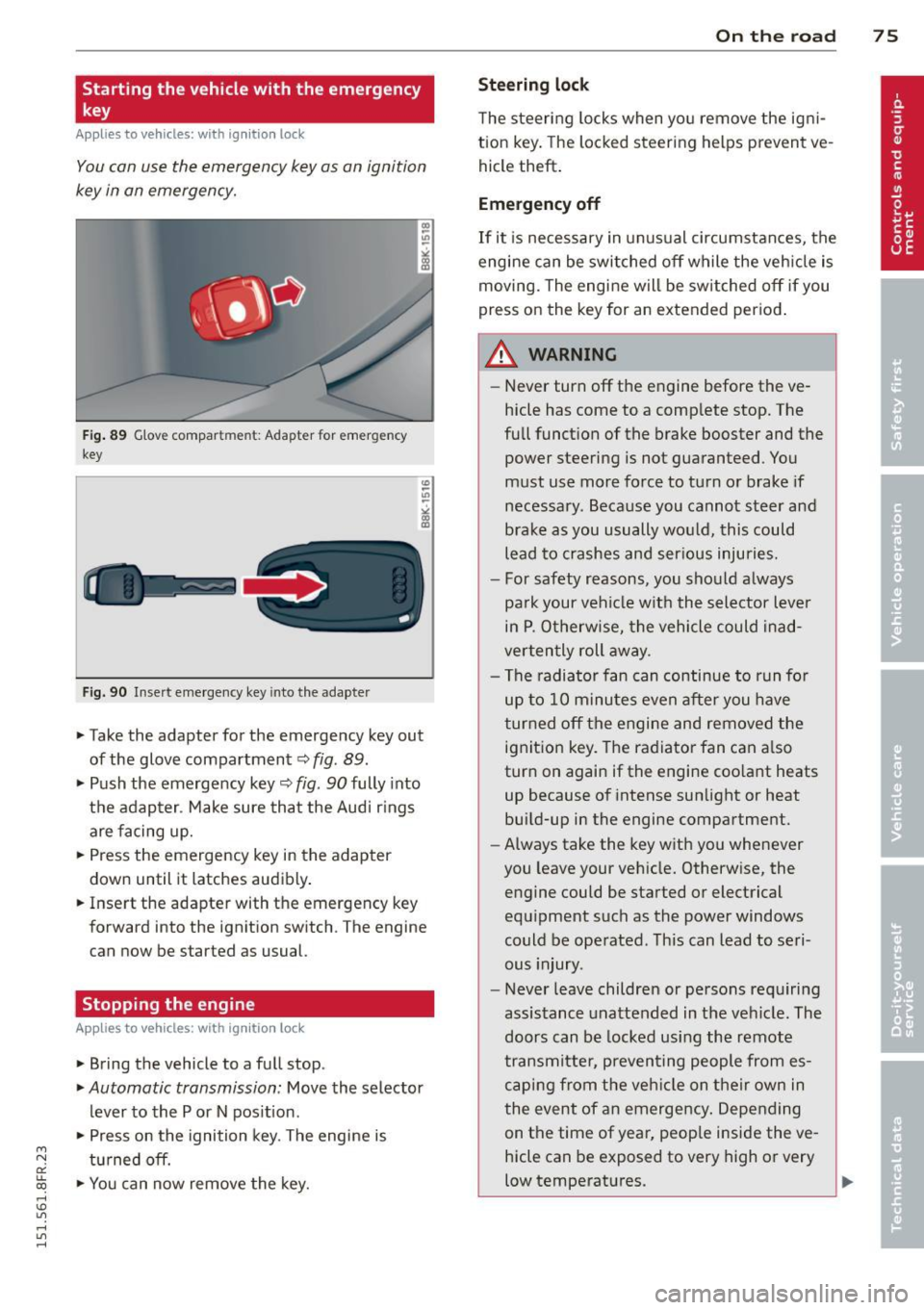
F ig . 89 G love compar tmen t: Adapter for emergency
key
Fig. 90 Insert emergency key into the adapter
.,.. Take the adapter for the emergency key out
of the glove compartment
c:> fig . 89 .
.,.. Push the emergency key~ fig. 90 fully into
the adap ter . Make sure that the Audi r ings
are facing up.
.,.. Press the emergency key in the adapter
down until it latches audibly .
.,.. Insert the adapter with the emergency key
forward into the ignition switch . The engine
can now be started as usual.
Stopping the engine
App lies to vehicles: with ig ni tion loc k
.,.. Bring the vehicle to a full stop.
.,.. Automatic transmission: Move the selector
lever to the P or N pos ition .
.,.. Press on the ignition key. The engine is
tu rned off.
.,.. You can now remove the key.
On th e road 7 5
Steering lo ck
The steering locks when yo u remove the ig ni
tion key. The lo cked steering helps prevent ve
hicle theft .
Emergency off
If it is necessary in unus ual circumstances, the
engine can be switched off while the veh icle is
moving. The engine will be switched off if you
press on the key for an extended period .
A WARNING
-Never turn off the engine before the ve
hicle has come to a comp lete stop. The
full funct ion of the brake booster and the
power steering is not guaranteed . You
must use more force to turn or brake if
necessary. Because you cannot steer and
brake as you usually would, this could
lead to crashes and ser ious injuries.
- For safety reasons, you should always
pa rk your vehicle w ith the selector lever
in P . Otherw ise, the vehicle could inad
verten tly roll away.
- The radiator fan can continue to run fo r
up to 10 minu tes even after you have
turned off the engine and removed the ignition key. The radiator fan can a lso
turn on again if the engine coo lant heats
up because of intense sunlight or heat
bui ld-up in the engine compartment.
- Always take the key with you whenever
you leave your vehicle. Otherw ise, the
engine could be started or electrical
equ ipment such as the power windows
could be operated . This can lead to seri
ous injury.
- Never leave children or persons requiring
assistance unattended in the vehicle. The
doors can be locked using the remote
transmitter, preven ting people from es
caping from the veh icle on their own in
the event of an emergency . Depending
on the time of year, peop le inside the ve
hicle can be exposed to very high or very
low temperatures. ..,.
Page 79 of 284

M N
er
u..
co ,...., \!) 1.1'1 ,...., 1.1'1 ,....,
note that electrica l equipment such as
exterior lights wi ll switch off as well
when that happens.
Switching engine off
App lies to vehicles: with conve nien ce key
.,. Bring your vehicle to a complete stop.
.,. Move the selector lever to the P or N pos i
t ion.
... Press the
I START ENGINE STOPI button
~ page 76, fig. 91 .
Steering lock
The steering locks when you turn the engine
off us ing the
I STAR T ENGINE STOP I button
and open the dr iver's door. The locked steer
ing helps prevent vehicle theft.
E mergenc y off
If necessary, the eng ine can be sw itched off
with the selector lever in the R or D/S pos i
tions. To do so, step on the brake pedal and
press and hold the
I STAR T ENGINE STOP I but
ton vehicle speed must be less than 6 mph (10 km/h).
.&, WARNING
- Never t urn off the eng ine be fore the ve
hicle has come to a complete stop . The
f ull function of the brake booster and the
power steering is not guaranteed . You
must use more force to turn or brake if
necessary. Because you cannot steer and
brake as you usually would, this could
lead to c rashes and serious injur ies.
- For safety reasons, you should always
park your vehicle with the se lector lever
in P. Otherwise, the veh icle could inad
vertent ly roll away.
- The rad iator fan can continue to run for
up to 10 minutes eve n afte r you have
tu rned off the eng ine and removed the
ignition key. The radiator fan can also
turn on again if the eng ine coolant hea ts
up because of intense sunlight or hea t
build -up in the engine compartment.
On th e ro ad 77
-Always take the key with you whenever
you leave your ve hicle. Otherw ise, the
e ngine could be started or electrical
equipment such as the power windows
could be operated. This can lead to seri
ous injury.
(D Note
If the engine has been under heavy load
for an extended period, heat bu ilds up in
the eng ine compartment after the engine
i s sw itched off - there is a r is k of damag ing
the e ngine. A llow the eng ine to run at id le
for abo ut two minutes before switching it
off.
Driver messages
I g nition i s on
This message appears and a warning tone
sounds if you open the d river's door when the
ignition is sw itched on.
No key ident ified
This message appears when the
I START ENGINE STOP I button is pressed if
there is no master key ins ide the ve hicle or if
the system does not recognize it . For exam
ple, the master key cannot be recognized if it
i s covered by an object (e .g . aluminum brief
case) which
screens the radio s ignal. Electron
ic dev ices such as cell p hones can also inte r
f ere with the radio s ignal.
Pr ess brake p edal to start engine
This message appears if you do not press the
brake pedal to start the eng ine .
Shift to N or P to start eng ine
T his message appears w hen attempt ing to
star t the eng ine if the selecto r lever for the
automatic transmiss ion is not in the P or N
pos ition . The engine can only be started with
the se lector in these positions.
!I I s the ke y in the vehicle?
Page 90 of 284

88 Transmi ssion
Launch Control Program
Th e Launch Cont rol Program provides the
best accel eration possible when starting from
a st op .
R equirement : The engine must be at operat
i n g t emp eratur e and the steering wheel must
not be turned .
.,. Press the
I~ O FFI button c:> page 173 while
the engine is running. The
II ind icator light
i lluminates in the instrument cluster and
Stabilization control (ESC ): Sport . Warn
ing! Re stricted sta bility
appea rs in the dr iv
er information system d isplay.
.,. Move the selec tor lever to the D/S pos ition
to select sport mode (S) or select the
dy
nami c
driving mode in drive select*
c:> page 103.
... Press the brake peda l strongly with your left
foot and hold it down for at least 1 second.
.,. At the same t ime, press the accelerator ped
al down complete ly w ith your r ight foot un
t il t he engine reaches and maintains a h igh
RPM .
.,. Remove you r foot from the brake pedal
withi n S seconds
c:> &, .
&_ WARNING
-Always adapt you r driving to the traffic
flow .
- O nly use the Launch Control Program
when road and traffic con dit ions allow it
and other dr ivers will not be endangered
o r annoyed by yo ur dr iv ing and t he vehi
cle's acce lerat ion.
- Please note that the driving wheels can spin and the vehicle can break away
w hen sport mode is sw itched on, espe
c ially when the road is slippery .
- Once yo u have accelerated, yo u should
switch sport mode off by pressing the
I~ O FF I but ton .
(D Tips
- The transm ission temperat ure may in
crease significantly after using the Launch Control Program . If that hap- pens, the p
rog ram may not be availab le
for a few minutes . It will be available
again after a cool-down period .
- When accelerating using the La unch
Cont ro l program, a ll vehicle parts are
subject to heavy loads. Th is can result in
increased wear.
Transmission malfunction
['1 Transmission: Pre ss brake pedal and se
lect gear again .
Press the bra ke peda l and select the desired
selector lever position again. You ca n then
co ntinue driving .
['1 Transmission overheating: Please drive
conservatively.
T he transmiss ion temperat ure has inc reased
s ignificantly due to the sporty d riving manner .
Drive in a less sporty manner until the tem
perature returns to the normal range and the
indicator light switches of.
ID T ransmission malfunction: You can con
tinue driving
T he re is a sys tem malfunc tion in the transm is
sion . You may continue driving .
Drive to yo ur
autho rized Audi deale r or qualified repair fa
c ility soon to have the ma lfunction corrected.
['1 Transmis sion malfun ction : Limited driv
ing functionality
T he re is a system malfunction in the t ransm is
s io n. The transm ission is swi tching to emer
gency mode. This mo de on ly shifts in to cer
ta in gears o r will no longer shift at al l. The en
gine may sta ll. Drive to your authorized Audi
dealer or qualified repair facility immediately
to have t he malfunction corrected.
('1 ffl Transmi ssion malfunction: No reverse
You can continue driving
T he re is a sys tem mal func tion in the t ransm is
s io n. The transm iss ion is swi tch ing to eme r
gency mode. This mode on ly shifts into cer -
tain gears o r will no longer shift at all . The en
gine may sta ll. You cannot engage the
reverse liJJ,
Page 104 of 284

102 Audi drive select
Audi drive select
Driving settings
Introduction
App lies to vehicles: with Audi drive select
Drive select provides the possib ility to exper i
e nce diffe ren t types of vehi cle sett ings in o ne
ve hicl e. For ins tance, us ing t he three
Com
fort , Auto and Dynamic modes, the driver can
switch from a sporty to a comfortab le drivi ng
mode with the press of a b utton.
A ddit ionally, in veh icles wi th MM I*, the vehi
cle setup for
Individual* mode can be c us
tom ized by you . This makes it possib le to
comb ine settings such as a sporty engine tun
ing with comfortable steering.
A WARNING
Improper use of the A udi d rive select can
cause collisions , ot her acc idents and se ri
ous pe rsonal injury .
Description
Applies to vehicles: with Audi drive select
The vehicle setup in each mode depends on
the veh icle's features . However, the engin e,
automa tic t ransmissio n and s teeri ng a re a l
ways involved.
-
Engine and automatic transmission
Depending on the mode , the e ng ine and the
automatic t ransm ission respond quicke r or i n
a more ba la nced manne r to a cce le rator pedal
move ments. In t he sporty dynam ic mode, the
a ut om at ic t ra nsmissio n shifts at h igher R PMs.
The engine sound is ad justed by open ing or
clos ing t he exhaust doors for the respective
mode .
Steering
The stee ring ada pts in te rms of stee ring effort
an d steer ing ra tios. In direc t steer ing t hat
moves easi ly, like the stee ring in comfort
mode , is best su ite d to long dr ives on a high
way. In contrast, dynam ic mode p rov ides
sporty, d irect steering. T
he following app lies to veh icles with dynamic
stee ring *: the steering rat io chan ges base d on
vehicle speed in order to ma inta in optim um
steering effort for the driver at all times. This
sets the steering to be less sens itive at higher
speeds in o rder to provide improved vehicle
co ntrol. At r educed speeds, howeve r, s teer ing
is mo re d irect in o rder to k eep th e stee ring ef
fo rt as minima l as poss ible whe n the drive r is
mane uveri ng the veh icle. At low and ave rage
s p eeds, dynamic steering ad dit iona lly pro
vides more responsive stee ring pe rformance .
Sport differential*
As a compone nt of the all whee l dr ive system
(qua ttro)
~ page 1 76 , the sp ort differential*
distributes the d riving power to the rear axle
depen ding on the si tuatio n. The dis trib ution
of power var ies depending on the mode se
l ected . The goal is a high level of agility and
ability to accelerate on curves . The vehicle is
very respons ive to steering.
Audi adaptive cruise control*
T he be hav io r when accelera ting can be adjus t
ed from comfortab le to sporty, de pendi ng on
t h e d rive select mode . Adaptive cru ise contro l
also responds to the driv ing behavior o f the
vehicle ahead in a more conservative or sporty man ner .
Engine sound*
The so und of the eng ine is adapte d to these
l ected mode and ranges from s ubt le to sporty .
(!) Tips
-In some mo dels, the maximum vehicle
spee d can only be reac hed in the
Auto
and Dynamic mo des .
- Selecting the
Dynamic mo de res ults in
sporty shifti ng cha racte ristics . T he 5
gear position engages aut omatically.
- In ve hicl es that have dynamic stee rin g* ,
operating noise is heard when start ing or
stopping the engine. This does not indi
cate a problem.
Page 111 of 284
"' N
a: LL co
rl I.O
"' rl
"' rl
Reverse Parking
Applies to vehicles: with parking system plus wit h rea r
view ca mera
Parking mode 1 can be used when parking in
a garage or parking space.
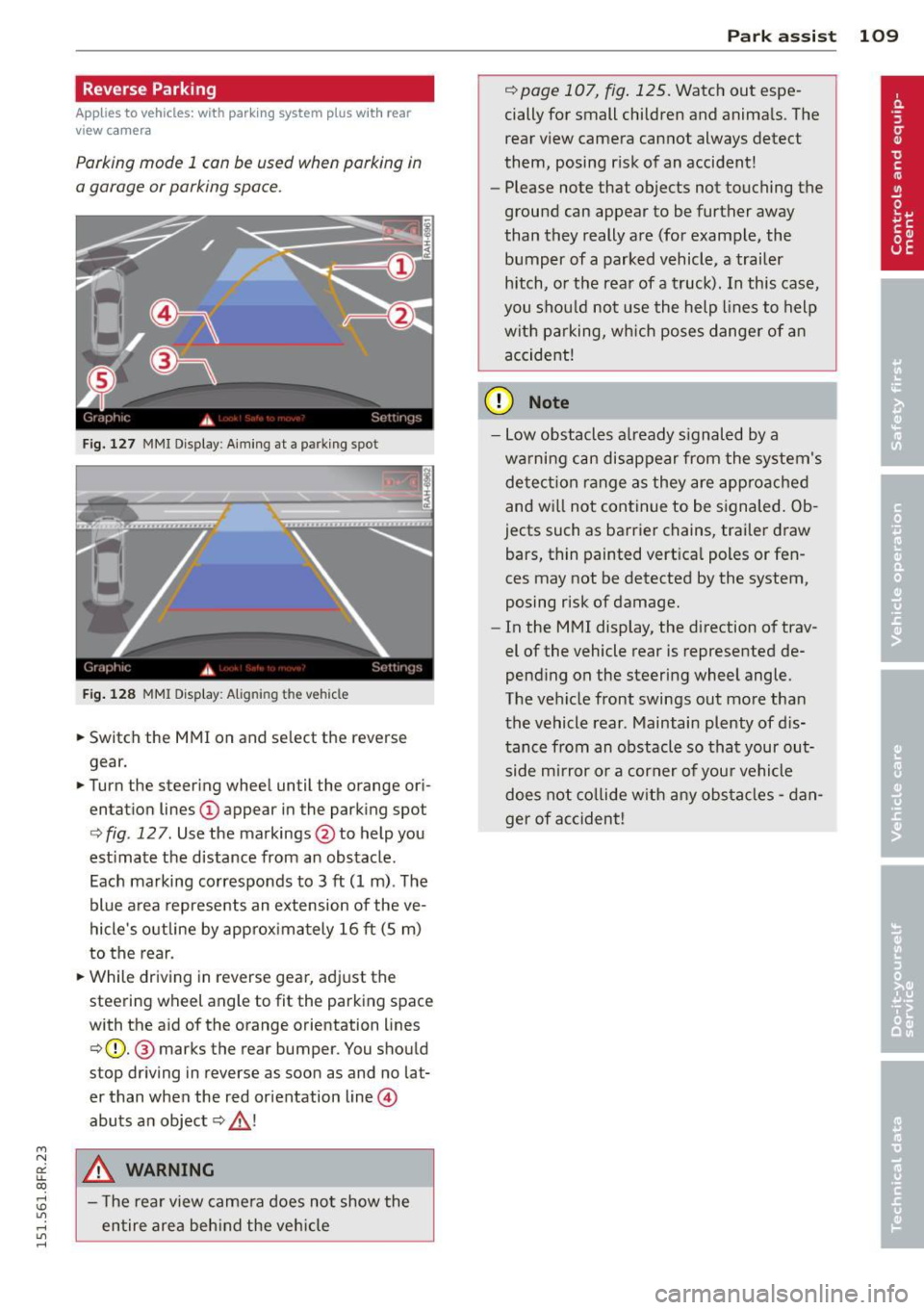
Fig. 127 MMI Display: Aiming at a parking spot
Fig . 128 MMI Display : A ligning the vehicle
• Sw itch the MMI on and se lect the reverse
gear.
• Turn the steering wheel until the orange ori
entation lines
(D appear in the parking spot
c> fig. 12 7. Use the markings @to help you
estimate the distance from an obstacle .
Each marking corresponds to 3
ft (1 m) . The
blue area represents an extension of the ve
hicle 's outline by approximately 16
ft (5 m)
to the rear.
• While driving in reverse gear, adj ust the
steer ing wheel angle to fit the parking space
with the aid
of the orange orientation lines
¢ (D. @ marks the rear bumper. You should
stop driving in reverse as soon as and no lat
er than when the red orientation line@
abuts a n object ¢_&. !
A WARNING
- The rear view came ra does no t show the
entire area beh ind the veh icle
Par k ass ist 109
r::!) page 107, fig . 125. Watch out espe
cially for small children and animals. The rear view camera cannot always detect
them, posing risk of an accident!
- Please note that objects not touching the
ground can appear to be further away
than they really are (for example, the bumper of a parked vehicle, a trailer
hitch, o r the rear of a truck). In this case,
you shou ld not use the help lines to help
with parking, wh ich poses danger of an
accident!
(D Note
- Low obstacles a lready s ignaled by a
warning can disappear from the system's detect ion range as they are app roached
and wi ll not continue to be signaled. Ob
jects such as barrier chains, trai ler draw
bars, thin painted vert ica l poles or fen
ces may not be detected by the system,
posing risk of damage.
- In the MMI display, the direction of trav
el of the vehicle rear is represented de
pending on the steering wheel angle.
The vehicle front swings out more than
the vehicle rear . Maintain plenty of d is
tance from an obstacle so that your out
side mi rror or a corner of you r vehicle
does not co llide w ith any obsta cles -dan
ger of accident !
Page 112 of 284

110 Park assist
Parallel Parking
Applies to vehicles: with par king system p lus w it h rear
view ca mera
Use parking mode 2 to help you park on the
edge of a street.
F ig. 129 MMI Display: blue s urface in the parking spot
Fig. 130 MMI Disp lay: Blue curve on the curb
The following steps apply only when there is
no obstacle (such as a wall) near the parking
spot. Otherwise, please read the "Tips on Parking Next to Obstacles"¢
page 110.
.. Activate the turn signal.
.. Position your vehicle parallel to the edge of
the street, approximately 3 ft (1 m) from a parked vehicle .
.. Switch the MMI on and select the reverse
gear. The parking aid turns on and parking
mode 1 appears on the display.
"Press the
Mode¢ fig. 129 © control button
on the MMI control console. Parking mode 2
appears .
.. Back up in reverse gear and align your vehi
cle so that the blue area
@ borders on the
rear end of the vehicle or on the parking
spot line. The blue area represents an exten
sion of the vehicle's outline by approximate ly 16 ft (S m) to the rear. The long s ide of the blue
area shou ld be on the curb. The en
tire blue area must fit into the parking spot.
.. While the vehicle is stationary, turn the
steering wheel to the rig ht as far as it will
go.
" Back into the parking spot. Stop the vehicle
as soon as the blue curve is nea r the curb
q fig . 130 ¢0.
"Whil e the vehicle is stationary, turn the
steering wheel to the left as far as it will go .
.. Continue to back up into the parking spot
until the vehicle is parked parallel to the
curb .@ marks the rear bumper. You should
stop driving in reverse as soon as and no lat
er than when the red orientation line@
abuts an object¢_&. ! Keep an eye on the
front of your vehicle while do ing th is ¢ 6) .
Parking next to obstacles
When there is an obstacle (such as a wa ll)
next to the parking spot, choose a spot with
more space on the sides. Posit ion the long
s ide of the blue area so that there is suff ic ient
space from the curb . The area must not be on
the curb . You will a lso need to start turning
the steer ing wheel much earlier. There should
be a sufficient amount of space between the
curb and the blue curve, and the blue curve
¢
fig. 130 must not touch the curb.
A WARNING
- The rear view camera does not show the
entire area behind the vehicle
¢
page 10 7, fig. 12 5. Watch out espe
cially for small children and anima ls. The
rear view camera cannot always detect
them, posing risk of an acc ident!
- Please note that objects not touching the
ground can appear to be further away
than they really are (for example, the
bumper of a parked vehicle, a trailer
hitch, or the rear of a truck). In this case,
you should not use the help lines to help
with parking, which poses danger of an
accident!
.__ _____________ _J ...
Page 113 of 284
M N
er
u..
co ,...., \!) ..,.,
,...., ..,., ,....,
(D Note
-In the MMI display, the directio n of trav
el of the vehicle rear is represented de
pending on the steering wheel angle.
The vehicle front swings out more than
the veh icle rear . Maintain plenty of dis
tance from an obstacle so that your out
s ide mirro r or a corner of your veh icle
does not collide with any obstacles -dan
ger o f accident!
- Remember to ma inta in sufficie nt clear
ance from the curb to avoid damaging
the wheel rims.
(j) Tips
The left or right orientation lines and sur
faces will be di splayed, depend ing on the
t ur n signa l being use d.
Adjusting the display
and warning tones
Applies to vehicles: with parking system plus/ parking sys
tem plus with rear view camera
The display* and warning tones are adjusted
in the radio or MMI*.
,.. Se lect : I CARI fu nct ion button > Parking sy s
tem.
Or
,.. Se lect : ~ I C~ A,..., R,..., I function button > Car system s*
control button > Drive r assist > Parking aid .
Display*
-Off -when t he parking system is sw itch ed
on, only a udib le signa ls are given .
-On -when the parking sys tem is switched
on, the pict ure from the rear view camera is
displayed.
Warning tones
- Rear volume -
rear sensor volume
-Rear frequency -rear sensor frequency
-Front volume -front sensor volume
-Front frequency -front sensor freq uency
- Mu sic volume while pa rking -when the
parking system is switched on, the vol ume
of the activ e audio source is lowered.
P ark a ssis t 11 1
The newly adj usted va lue is briefly hea rd from
the sig na l generato r. Th e settings are auto
matically stored and assigned to the remote
control key.
A WARNING
- Always make sure that the vo lume and
frequency of the warning tones is ad just
ed so that yo u can easily hear the acous
tic d istance signa l even if the radio is
p laying, the air-cond itio ne r blower is on
High or there is a high level of ou ts ide
noise.
- Chec k the settings whenever someone
e lse has drive n the vehicle before yo u.
(D Tips
- The warn ing tones can also be adjus ted
directly from t he rear view came ra im
age. S imp ly press the Sett ings* cont ro l
bu tton.
- Cha nged settings are ac tiva ted whe n
park ing ass ist is swi tc hed on aga in.
Error messages
Applies to vehicles: with parking system plus with rear
view camera
There is an error in the system if the LED on
the
p, ,; A switch is blinki ng and you hear a con
tinuous alarm fo r a few seconds after switch
ing on the park ing system or when the park
ing system is already activated . Have yo ur au
t h orized Aud i dea le r cor re ct the e rror.
Keep th e senso rs in the rea r bumpe r clean and
free from ice so that the acoust ic par k assist
system can fu nction properly.
@ Tips
If the error is not corrected before you
switc h off the ig nitio n, when you sw itch on
the p arking system again, the LED in the
P" JA switch will b link.
Page 114 of 284
112 Driving Saf ely
Driving Safely
General notes
Safe driving habits
Please remember -safety first!
This chapter contains important information,
tips, instructions and warnings that you need
to read and observe for your own safety, the
safety of your passengers and others . We have
summarized here what you need to know
about safety belts, a irbags, ch ild restra ints as
well as child safety. Your safety is for us
priori
ty number 1.
Always observe the info rmat ion
and warn ings in th is sect ion -fo r yo ur own
safety as well as that of your passengers .
The information in this se ction app lies to all
model ve rsions of your veh icle . Some of the
feat ures described in this sec tions may be
standard equipment on some models, or may
be optional equipment on others . If you are
not sure, ask your authorized Audi dealer.
A WARNING
- Always make sure that you follow the in
struct ions and heed the WARNINGS in
this Manual. It is in your interest and in
the inte rest of you r passengers.
- Always keep the complete Owner's Liter
ature in your Audi when you lend or sell
your vehicle so that this important info r
mation will always be ava ilable to the
dr iver and passengers.
- Always keep the Owner's literature handy
so that you can find i t eas ily if you have
ques tions.
Safety equipment
The safety features are part of the occupant
restraint system and work together to help
redu ce the risk of injury in a wide variety of
accident situations.
Your safety and the safety of your passenge rs
should not be left to chance. Advances in
technology have made a varie ty o f fea tures
avai la bl e to he lp re duce the risk of injury in an accident
. The following is a list of just a few of
the safety features in your Audi:
- sophis tic ated s afety be lts fo r drive r and a ll
passenger sea ting pos it ions,
- be lt fo rce limi ters fo r the front seats,
- belt p retensioners for the seats,
- head restra ints for each seating posit io n,
- front airbags,
- side airbags in the front seats,
- specia l LATCH anchorages for child re -
straints,
- adj ustab le steering column .
T hese ind iv idual safety features, can wo rk to
ge ther as a system to he lp p rotect you and
yo ur passengers in a w ide r ange of acci dents .
T hese features canno t work as a system i f
they a re not always correct ly adjusted and co r
rect ly used.
Safety i s everybody's responsibility!
Important things to do before driving
Sofety is everybody's job! Vehide ond occu
pant safe ty alw ays depends on the informed
and careful driver.
F o r yo ur safe ty and the safety of your passen
gers,
before driving alwa ys:
" Make su re t hat all lights and signa ls are op
erati ng correctly .
" Ma ke sur e that the t ire p ressu re is co rrect.
" Ma ke su re t hat all windows are clean and af
ford good v isibili ty to the outs ide.
" Secure all luggage and other items caref ully
¢page 65.
"Ma ke su re that nothing can interfere with
the pedals.
" Adjust front seat, head restraint and mirrors
correctly fo r your height .
" Inst ruct passe ngers to adjust the head re
straints according to the ir height .
" Ma ke sur e to use the r igh t chi ld res traint
correctly to p rotect children ¢
page 15 2,
Child Safety .
"Sit prope rly in your seat and ma ke sure t hat
your passengers do the same ¢
page 60,
Seats and storage. ..,
Page 115 of 284

"' N
a: LL co
rl I.O
"' rl
"' rl
.. Fasten your safety belt and wear it properly.
Also instruct your passengers to fasten their
safety belts properly ¢
page 123.
What impairs driving safety?
Safe driving is directly related to the condi
tion of the vehicle, the driver as well as the
driver's ability to concentrate on the road
without being distracted.
The driver is responsible for the safety of the
vehicle and a ll of its occupants . If your ability
to drive is impaired, safety risks for everybody
in the vehicle increase and you also become a
hazard to everyone else on the road ¢ ,&. .
Therefore:
.,. Do not let yourself be distracted by passen
gers or by us ing a cellular telephone.
.. NEVER drive when your driving ability is im
paired (by medicat ions, alcohol, drugs, etc.) .
.. Observe all traffic laws, rules of the road
and speed limits and plain common sense.
.. ALWAYS adjust your speed to road, traffic
and weather conditions.
.. Take frequent breaks on long trips. Do not
drive for more than two hours at a stretch .
.. Do NOT drive when you are tired, under
pressure or when you are stressed.
A WARNING
Impaired driving safety increases the risk
of serious personal injury and death when
ever a vehicle is being used.
Driving Safely 113
Proper occupant
seating positions
Proper seating position for the driver
The proper driver seating position is impor
tant for safe, relaxed driving.
Fig. 131 Correct seat ing pos ition
For your own safety and to reduce the risk of
injury in the event of an accident, we recom
mend that you adjust the driver's seat to the
following position:
.. Adjust the driver's seat so that you can easi
ly push the pedals all the way to the floor
while keeping your knee(s) slightly bent
¢ ,&. .
.. Adjust the angle of the seatback so that it is
in an upr ight position so that your back
comes in full contact with it when you drive .
.. Adjust the steering wheel so that th ere is a
distance of at least 10 inches (25 cm) be
tween the steering wheel and yo ur breast
bone ¢
fig. 131. If not possible, see your au
thorized Audi dealer about adaptive equip
ment .
.. Adjust the steering wheel so that the steer
ing wheel and airbag cover points at your
chest and not at your face .
.,. Grasp the top of the steer ing whee l with
your elbow(s) slightly bent .
.. App lies to veh icles with adjustable head re
straints: Adjust the head restraint so the up
per edge is as even as possible with the top
of your head. If that is not possible, try to
adjust the head restraint so that it is as
close to this posit ion as possible.
.. Fasten and wear safety belts correctly
¢page 126.
Page 116 of 284
114 Driving Safely
• Always keep both feet in the footwell so
that you are in control of the vehicle at all
times.
For detailed information on how to adjust the
driver's seat, see
¢page 61.
A WARNING
Drivers who are unbelted, out of position
or too close to the airbag can be seriously
injured by an airbag as it unfolds. To help
reduce the risk of serious personal injury:
- Always adjust the driver's seat and the
steering wheel so that there are at least
10 inches (25 cm) between your breast
bone and the steering wheel.
- Always hold the steering wheel on the
outside of the steering wheel rim with
your hands at the 9 o'clock and 3 o'clock positions to help reduce the risk of per
sonal injury if the driver's airbag inflates.
- Never hold the steering wheel at the
12 o'clock position or with your hands at
other positions inside the steering wheel
rim or on the steering wheel hub. Hold
ing the steering wheel the wrong way
can cause serious injuries to the hands,
arms and head if the driver's airbag de
ploys.
- Pointing the steering wheel toward your
face decreases the ability of the supple
mental driver's airbag to protect you in a
collision.
- Always sit in an upright position and nev
er lean against or place any part of your
body too close to the area where the air
bags are located.
- Before driving, always adjust the front
seats and head restraints properly and
make sure that all passengers are prop
erly restrained.
- Never adjust the seats while the vehicle
is moving . Your seat may move unexpect
edly and you could lose control of the ve
hicle.
- Never drive with the backrest reclined or
tilted far back! The farther the backrests
are tilted back, the greater the risk of in- jury due to incorrect positioning of the
safety belt and improper seating posi
tion.
- Children must always ride in child safety
seats ¢
page 152. Special precautions
apply when installing a child safety seat
on the front passenger seat¢
page 131.
Proper seating position for the front
passenger
The proper front passenger seating position
is important for safe, relaxed driving .
For your own safety and to reduce the risk of
injury in the event of an accident, we recom
mend that you adjust the seat for the front
passenger to the following position :
• Move the front passenger seat back as far as
possible . There must be a minimum of
10 inches (25 cm) between the breastbone
and the instrument panel¢,&. .
• Adjust the angle of the seatback so that it is
in an upright position and your back comes
in full contact with it whenever the vehicle is
moving.
• Applies to vehicles with adjustable head re
straints: Adjust the head restraint so the up
per edge is as even as possible with the top
of your head. If that is not possible, try to
adjust the head restraint so that it is as
close to this position as possible.
• Keep both feet flat on the floor in front of
the front passenger seat.
• Fasten and wear safety belts correctly
¢page 126.
For detailed information on how to adjust the
front passenger's seat, see
¢ page 60.
A WARNING
-
Front seat passengers who are unbelted,
out of position or too close to the airbag
can be seriously injured or killed by the air bag as it unfolds. To help reduce the risk of
serious personal injury: