ignition AUDI RS5 CABRIOLET 2015 Owner's Manual
[x] Cancel search | Manufacturer: AUDI, Model Year: 2015, Model line: RS5 CABRIOLET, Model: AUDI RS5 CABRIOLET 2015Pages: 284, PDF Size: 69.56 MB
Page 35 of 284
"' N
a: LL co
rl I.O
"' rl
"' rl
@ For the sake of the environment
Dispose of dead batteries properly so as
not to pollute the environment.
@ Tips
The replacement battery must be the
same specification as the original.
Emergency unlocking of the ignition key
In the event of malfunctions in the electrical
system, it may happen that you cannot re
move the ignition key .
• Remove the mechanical key Q page 32.
• Lock the vehicle using the mechanical key
Q page 3 5.
• Have the electrica l system inspected by an
authori zed Audi dealership .
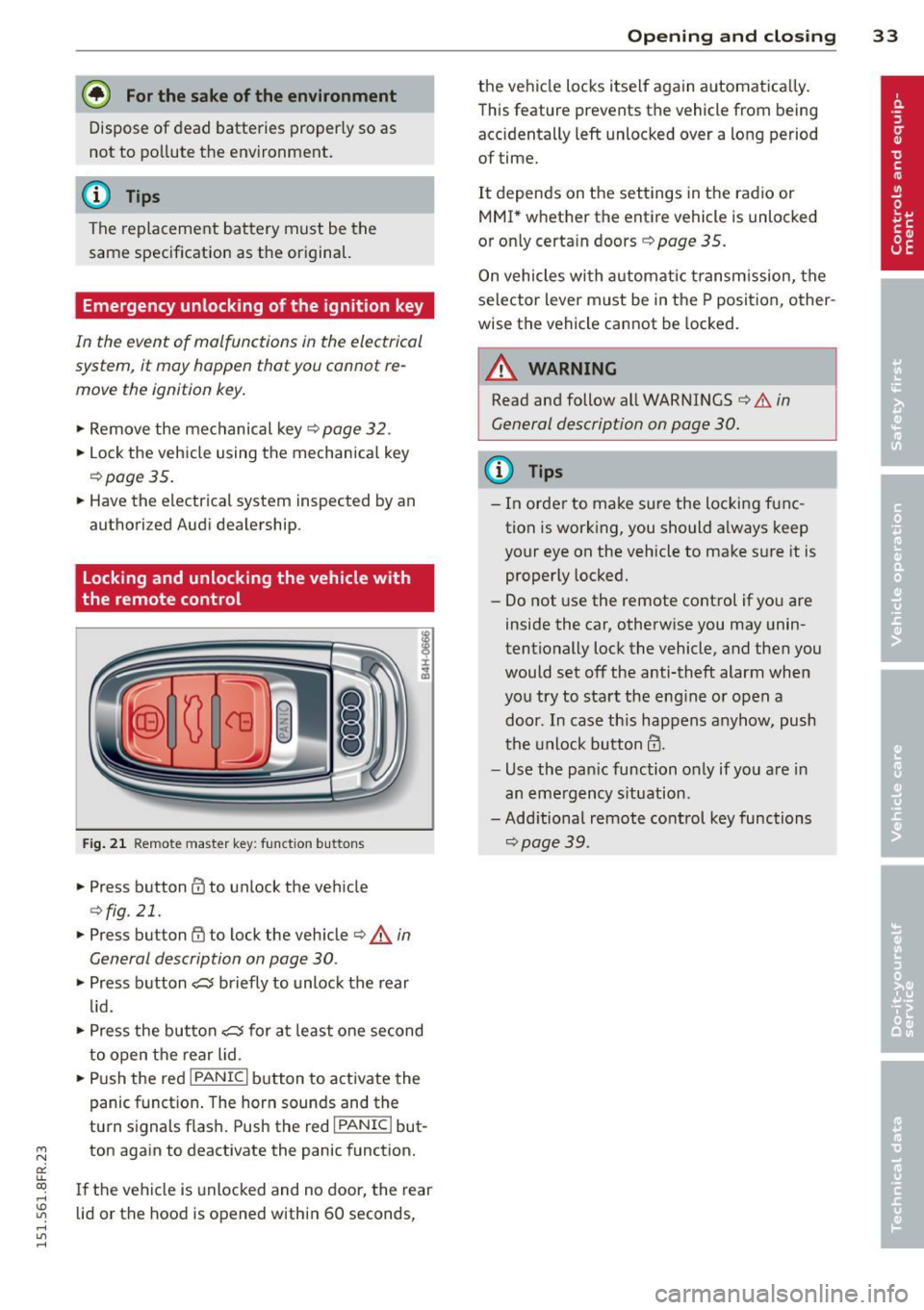
Locking and unlocking the vehicle with
the remote control
Fig. 21 Remote master key: function but tons
• Press button @to unlock the vehicle
Qfig . 21.
• Press button {jj to lock the vehicle r::!:> .& in
General description on page 30 .
• Press button e5 briefly to unlock the rear
lid .
• Press the button
e5 for at least one second
to open the rear lid .
• Push the red
IPANICI button to activate the
panic function. The horn sounds and the
turn s ignals flash . Push the red
I PANIC ! but
ton again to deactivate the panic function.
If the vehicle is unlocked and no door, the rear
lid or the hood is opened within 60 seconds,
Opening and closing 33
the vehicle locks itself again automat ica lly.
This feature prevents the vehicle from being
accidentally left unlocked over a long period of time.
It depends on the settings in the radio or
MMI * whether the entire vehicle is unlocked
or only certain doors
r::!:> page 35.
On vehicles with automatic transmission, the
selector lever must be in the P position, other
wise the vehicle cannot be locked.
A WARNING
Read and follow all WARNINGS r::!:> .&. in
General description on page 30.
(D Tips
- In order to make sure the locking func
tion is working, you should a lways keep
your eye on the vehicle to make sure it is
properly locked.
- Do not use the remote control if you are
inside the car, otherwise you may unin
tentionally lock the vehicle, and then you
would set off the anti-theft alarm when
you try to start the engine or open a door . In case this happens anyhow, push
t he unlock button@.
- Use the pan ic function only if you are in
an emergency s ituation.
-Add itional remote control key functions
r::!:>page39 .
Page 37 of 284

"' N
a: LL co
rl I.O
"' rl
"' rl
- You cannot open the doors or the rear lid
from the outside (increased security, for ex
amp le when you are stopped at a red light).
- The diodes in the power locking switc h illu
minate when all the doors are closed and
locked.
- You can unlock and open the doors from the
i nside by pul ling on the door hand le .
- If you have a crash and the airbag is activat
ed , the doors automatically un lock .
_& WARNING
- The power locking switch works with the
ignition off and automatically locks the
entire vehicle when it is actuated .
- On a vehicle locked from the outside the
power locking system switch is inopera
t ive.
- locked doors make it more difficult for
emergency workers to get into the vehi
cle, which puts lives at risk . Do not leave
anyone behind in the veh icle, especially
children .
@ Tips
Your vehicle is locked automatically at a
speed of
9 mph (15 km/h) (Auto lock)
Q page 30. You can un lock the vehicle
aga in using the opening function in the
powe r locking system switch~-
Setting power locking
In the radio/MM!*, you can set which doors
the centrol locking system will unlock .
~ Select: I CAR I function button > C entral lock
ing .
Or
~ Select: ~IC_A_R~I funct ion button> Car systems *
control button > Vehicle settings > (C entral
locking )* .
Sin gle door unlocki ng /Unl ock door s* -
you
can specify which doors u nlock when you open
the vehicle .
- Se lecting
off / All and pressing the Ii button
on the remote control key unlocks the entire
vehicle.
Opening and clo sin g 35
- Select ing o n/Dri ver and pressing the~ but
ton on the remote control key once u nlocks
only the driver's door . In vehicles w ith a con
ven ience key*, only the door whose handle
you pull w ill unlock . If you press the @! but
ton tw ice, the entire vehicle will u nlock . If
you press the [@] button, t he e ntire ve hicle
w ill always lock .
Luggage comp. lock /Lock e xterio r trunk han
dl e -
If you select On , you can no longer open
the luggage compartment us ing the rear lid
hand le
Q page 36, fig. 26. In this case, the
r ear lid can be opened with the
l~I bu tton on
the maste r key
Q poge 33, fig. 21 .
Tone when lock ing -if you select On , a tone
will sound when yo u loc k the vehicle .
Auto Lock /lock when dr iving -if you select
On, the entire ve hicle w ill lock automatica lly
whe n the speed reaches
9 mph ( lS km/h) .
Emergency locking
Fig. 2 4 D river 's doo r: lock cylinder
Fi g. 25 Fro nt pass eng er 's doo r: em erg en cy lock
If the cent ral locking system malfunct ions,
you must unlock/lock the doo rs separate ly us
ing the emergency key or the mechanical key . ..,.
Page 38 of 284

36 Opening and closing
Unlocking/locking the driver's door with
the mechanical key
• Remove the mechanical key ¢ page 32.
• To unlock the driver's door, turn the key to
the open position@¢
fig. 24.
• To lock the driver's door, move the selector
lever to the P position (automatic transmis
s ion) and turn the key
once to the close posi
tion
@ ¢.& in General description on
page
30.
Locking the front passenger's door with
the mechanical key
The emergency lock is located on the rear side
of the front passenger's door. It is only visible
when the doo r is open.
• Remove the mechanical key ¢
page 32 .
• Pull the cover cap out of the opening
¢ fig. 25.
• Inse rt the key in the inside slot and turn it
all the way to the right.
Once the front passenger's door has been
closed, you cannot open it again from the out
side. The door can be opened from the inside
by pulling the door handle.
A WARNING
Read and follow a ll WARNINGS ¢ A in
General description on page
30.
(_D Tips
After the ignition is switched on, the pow
er locking system switch is enab led .
Electronic immobilizer
The immobilizer prevents your vehicle from
being started by unauthorized persons .
-
Inside the key there is a computer chip . This
ch ip automatically activates/deactivates the
e lectronic immobilizer.
Applies to vehicles with ignition lock:
The electron ic immobilizer deactivates auto
mat ica lly when you insert the remote contro l
key into the ignition lock.
It activates again a
utomatical ly when you remove the remote
control key from the ignition lock.
Applies to vehicles with convenience key:
If the remote control key is located inside the
vehicle and you press the
I START ENGINE ST OPI button, the electronic
immobilizer deactivates automatica lly. If you
switch the ignition off and remove the remote
control key from the vehicle, the electronic
immobilizer activates again automatically.
A WARNING
--
Always take the key with you when you
leave the vehicle. The key can disarm the
electronic engine immobilizer and permit
an unauthorized person to start the engine
and enable operation of the vehicle sys
tems such as power window or power sun
roof leading to se rious personal injury.
(D Tips
- The vehicle cannot be started if an una u
thorized key is used. The vehicle may not
start if another radio device s uch as a key
for another vehicle or a transponder is
located on the key ring.
- For Declaration of Compliance to United
States FCC and Industry Canada reg ula
tions ¢
page 267.
Rear lid
Opening /closing rear lid
Fig. 26 Rea r lid: ha nd le
Page 40 of 284

38 Openin g and clo sing
@ Tips
The emergency re lease lever shou ld never
be used as a handle for closing the lug
gage compartment lid.
Power windows
Controls
The driver can control all power windows .
Fig. 29 Section of the drive r's door: Controls
Fig. 30 Cen ter console: central power wi ndow sw itch
All power window switches ~ fig. 29 are pro
vided with a
tw o-po sit ion fun ction :
Opening th e window s
~ Press the switch to the first s to p and hold it
until the window reaches the des ired pos i
tion.
~ Press the sw itch br iefly to the sec ond stop
to au toma tically open the window.
Clos ing th e windows
~ Pull the switch to the first sto p and hold it
unt il the window reaches the desired pos i
t ion.
~ P ull the switch briefly to the se con d sto p to
automatically close the window .
Power window switches
@ Driver 's door
® Passenger's door
© Left rear window
@ Right rear window
You can open or close a ll the windows with
the switch
~ fig. 30 .
A WARNING
-- When you leave your vehicle -even if on
ly briefly -always remove the ignition
key. Th is app lies particularly when chil
dren remain in the vehicle. Otherwise the
children could start the engine or oper
ate electrical equipment (e.g . power win
dows) . The power w indows are function
al until the dr iver's door or passenger's
door has been opened.
- Pay close attention when closing the win dows to prevent p inching of hands o r
limbs.
- When locking the vehicle from outside, the vehicle must be unoccupied since the
windows can no longe r be opened in an
emergency.
0) Tips
- When you open the doors, the windows
automatically lower abo ut 10 mm.
- After the ignition has been switched off, the windows can st ill be opened or
closed for about 10 mi nutes . T he win
dow reg ulators are not sw itched until
the driver's or passenge r's door is
o pened .
Page 42 of 284

40 Opening and clo sing
-I «:s I button on the master key
- Handle in the rear lid
When the valet parking feature is activated,
the message
V ale t park ing activat ed appea rs
in the ins trument cluster display when you
switc h the ignition on.
Garage door opener
(Homelink)
Description
App lies to vehicles: with garage door opener ( Homelink)
Fig. 33 Garage door ope ner: exa mples of u sing wit h
diff erent sy stems
You can activate various systems such as ga
rage doors, sec urity systems and home light
ing from inside yo ur vehicle using the ga rage
door opener (Homelink). There are three but
tons for this in the vehicle headliner that can
be in used in place of up to three hand -he ld
transmitters.
To operate systems using the garage door
opener , the three buttons in the roof headlin
er must be programmed first .
A WARNING
Make sure no people or objects are in the
immediate vicinity of the equipment when
using or programm ing the garage doo r
opene r. People can be injured and objects
can be damaged if they are caught in the
equipment .
@ Tips
-Fo r security reasons, we recommend that
you clear the programmed buttons be
fore se lling the vehicle. -
For add itiona l information about Home
Link, visit www.homelink .com.
- For Declara tion of Compliance to United
States FCC and Ind ustry Canada reg ula
tions
c::> page 267.
' . Operation
Applies to vehicles: with garage door opener (Homelink)
Fig. 3 4 Headli ner: con tro l uni t
Requir ement: The buttons in the roof head lin
er must be programmed
c::> page 40 or
c::> page 41 and the ve hicle must be within
range of the system, such as the garage door
opener.
.,. Press the b utton to open t he garage door.
The LED @ blinks o r turns on .
.,. Press the button aga in to close the garage
door.
(D Tip s
To open or close the garage door, press the
button, but do not hold it for longer than
10 seconds or the garage door opener
module will switch to programming mode.
Programming the buttons (version A)
Applies to vehicles: with garage door opener (Homelink)
You can program both fixed code and rol ling
code systems using this procedu re .
Pro gramming or repr ogramm ing buttons
.,. Switch the ignition on .
.,. Press and hold the button in the roof head
liner
c::> page 40, fig . 34 that you wou ld like
to prog ram for at least 10 seconds. Or
.,. Select:
!CARI function button> Car sy ste m s*
contro l butto n > Vehicle setting s > Garage IJJI,
Page 43 of 284

"' N
a: LL co
rl I.O
"' rl
"' rl
door opener> Program garage door open
er.
If this path is not available, program the
button as described in version
Bqpage41 .
.,. Follow the instructions in the MMI.
Erasing button programming
The programmed buttons cannot be erased
individually. They must all be erased together.
Reprogram the buttons if necessary .
.,. Select:
ICARI function button> Car systems*
control button > Vehicle settings > Garage
door opener> Clear program settings
>
Yes .
Displaying the version/status/country
code
.,. Select: I CARI function button > Car systems*
control button > Vehicle settings > Garage
door opener > Version information.
@ Tips
-Programming through the MMI* is not
possible with all infotainment systems.
If this is the case, program the buttons
as described in version B
c:> page 41.
- The required distance between the hand
transmitter and the HomeLink module in
the radiator grille
c:> page 41; fig. 35
depends on the system that you are pro
gram ming.
- Depending on the model of the system,
you may need to release the button on
the remote control during programming
and press it again. Hold each position
you try for at least 15 seconds before
trying another position. Keep the turn
signals on your vehicle in view when do
ing this.
- After programming the garage door
opener, it may be necessary to synchroni ze the motor with the system. Refer to
the manufacturer's instructions.
Opening and closing 41
Programming the buttons (version 8)
Applies to vehicles: with garage door opener (Homelink)
Fig. 35 Distance be tween the ra diato r grille and the
hand transmitter
Programming the button: Part 1 with the
controls
1. Switch the ignition on.
2. Press and hold both outer buttons in the
roof headliner
c:> page 40, fig. 34 until the
LED @turns off completely (after about
20 seconds). This procedure clears the
standard codes that were set at the facto
ry and does
not need to be repeated again
to program the other buttons.
3. Briefly press the button on the roof head
liner that you would like to program.
4. Wait until the LED @ begins to blink
quickly. Programming mode is active for 5
minutes.
5. Move in front of your vehicle while hold
ing the original remote control for the
system that would like to program to a
button in the roof headliner.
Programming the button: Part 2 at the
radiator grille
6. Hold the remote control up to the radiator
grille on your vehicle
c:> fig. 35.
7. Press and hold the remote control until
the turn signals on your vehicle blink. This
may take up to 30 seconds.
8. If the emergency flashers blink three
times, the programming was successful.
If the emergency flashers only blink one
time, the 5 minute time limit for the pro
gramming has ended or the programming
was not successful. Repeat the program
ming from the third step, or try changing
t he distance to the radiator grille. .,.
Page 44 of 284

42 Openin g and clo sing
9 . I f the garage door or other system does
not open using the buttons in the roof
headliner even though the programming
was successful, the system may use a roll ing code instead of a fixed code.
Roll ing
code pro gramming
must be performed
¢ page 42.
The other two buttons in the roof headliner
can be programmed according to the instruc
tions above . Begin with the third step .
Erasing butt on progr amming
The programmed buttons cannot be erased
individually . They must all be erased together.
Reprogram the buttons if necessary.
.. Switch the ignition on.
.. Press and ho ld both outer buttons in the
roof headline r until the LE D @ turns off
completely (after about 20 seconds).
Re prog ramming th e button s
.. Switch the ignition on.
.. To reprogram an individual button, press
and hold the button until the LED@ starts
to flash quick ly (after about 10 seconds) .
Re lease the button immediately. Program
ming mode is active for 5 minutes .
.. Continue with the fifth step .
(D Tips
-Programming using the buttons in the
roof headliner is not possible with all In
fota inment systems. If this is the case,
program the buttons as described in ver
s ion A¢ page 40 .
- The requ ired distance between the hand
transmitter and the Home Link module in
the radiato r grille ¢ fig. 35 depends on
the system tha t you are programming.
- Depend ing on the model of the system,
you may need to release the but ton on
the remote contro l during programming
and press it again . Ho ld each position
you try for at least 15 seconds before
trying another position. Keep the turn
s ignals on your vehicle in v iew when do
i ng th is.
Rolling code programming
Applies to vehicles: with garage door opener (Homelink)
Rolling code programming is also needed for
some systems .
Identifying a rolling cod e
.. Press and hold the button in the roof head
liner that was already programmed .
.. Watch the LED@¢ page 40, fig. 34. If the
LE D blinks quickly, the systems (such as a
garage door) is equipped with a rolling code .
.. Program the rolling code as follows:
Acti vating the moto r unit in a system
.. Locate the programming button on the sys
tem's motor un it. The exact location and
color of the button may vary depend ing o n
the brand of the system.
.,. Press the programming button on the ga
rage door opene r moto r unit (this will usual
ly activate an " indicator" on the motor unit) .
Yo u now have approximate ly
30 second s to
program the b utton in the roof headliner .
Programming the button in the roof
headlin er
.,. Press and hold the previo usly programmed
button in the roof headliner for 2 seconds .
.. To end ro lling code programming , press and
hold the button again for 2 seconds.
.. With some systems, the button may need to
be pressed a third t ime to end the program
m ing process .
After programm ing, the system sho uld detect
the signal and begin moving when the button
in the roof headliner is pressed . Now you may
program the other buttons as needed .
(D Tips
-The rolling code can be programmed
more quickly and more easily with the
help of a second person.
- If you have difficulty programming the
roll ing code, referr ing to the user guide
for the system may help .
Page 54 of 284

52 Clear vis ion
@ Tips
- The light sensor* for headlight control is
located in the rear view m irror mount.
You should therefore not apply any st ick
ers to the windsh ield in this area in order
to prevent malfunctions or failures.
- Some exterior lighting functions can be
adjusted
¢page 52.
- When you remove your key from the igni
tion while the vehicle's lights are turned
on, a buzzer sounds as long as the driv
er's door is open .
- In cool or damp weather, the ins ide of
the headlights, turn signals and tail lights can fog over due to the tempera
ture difference between the inside and
outside. They will clea r shor tly after
switching them on. This does not affect
the service life of the lighting.
- In the even t of a light sensor malfunc
tion, the driver is no tified in the instru
ment cluster disp lay¢
page 22.
Turn signals and high beam lever
The lever operates the turn signals, the high
beams and the headlight flasher .
Fig. 56 Tu rn s ig na l and hig h beam lever
Turn sign als ¢i ¢
The turn signals activate when you move the
l ever into a turn s ignal pos ition when the ign i
tion is switched on.
(D -right turn signal
@-left tur n signa l
The turn s ignal blinks three times if you just
tap the lever .
High be ams and headlight flasher [D
Move the lever to the correspon ding posit io n:
@ -high beams on
@ -high beams off or headlight flasher
The indicator light
ii in the instrument cl us
te r turns on .
Notes on thes e features
-The turn signals on ly wor k w ith the ignition
t ur ned on. The indicator ligh ts
Ct or a in
the instrument cluster also blink.
- After you have turned a co rner, the turn s ig
na l switches off au toma tically .
- The
high beam works on ly w hen the head
lights a re on. The ind icator ligh t
II in the
instrument cluster illuminates when the
high beams are on .
- The
headlight flasher works o nly as long as
you ho ld the lever -even if there a re no
lights switched on . The indicator light
II in
the instrument cluster illuminates when you
use the headlight flasher.
A WARNING
--
Do not use the h igh beam or headlight
flasher if you know that these could blind
oncom ing traffic.
Adjusting exterior lighting
The functions ore selected in the radio or
MMI" .
.,. Select: !CARI function button> Exte rior
light ing .
Or
.,. Select: !CARI function button > Car systems *
control button > Vehicle s etting s> Exterior
lighting .
Coming home (light when leav ing car }*,
Leav ing home (light when unlocking car )*
The coming home function illuminates the
area around the vehicle when the ignition is
switched off and th e dr ive r's door is open ed.
Depend ing on veh icle equ ipment, the function
can be switched on and off or the length of
time the lig hts remain on* can be ad justed . ..,.
Page 55 of 284

"' N
a: LL co
rl I.O
"' rl
"' rl
The leavin g home function i lluminates the
area around the vehicle when unlock ing it.
T his function can be switched on and off.
The
c o ming h om e and lea ving home func
tions on ly operate when it is dark and the
light switch is in the AUTO posit ion
¢ page 51 , fig. 55.
Auto headlight s*
When the light switch is in the A UTO
¢ page 51 position, the switch-on po int of the
lights can be changed in the automatic driving
light function.
Daytime running lights
USA m odel s:
You can switch the dayt ime run
ni ng lights
on and o ff .
Canada mod els:
The function cannot be
turned off .
It is activated a utomat ica lly each
time the ignition is switched on.
Travel mode*
T he headlight beam is asymmetrical. This pro
v ides stronger illum ination on the s ide of the
road on wh ich you are driving .
If you are driv
i ng in a country that d rives on the opposite
side of the road from your own country, th is
will cause glare for on coming drivers. To pre
vent glare:
- Trave l mode must be selected in vehicles
with Xenon headlights*.
- In veh icles with halogen headlights, ce rtain
areas of the head light lenses must be cov
ered with wate rproof adhesive covers that
prevent light from passing thro ugh. For
more informat ion, please see your author
i z ed Audi dea ler or author ized repa ir faci lity .
(D Tips
When trave l mode is activated, a display in
the driver information system indicates
this each time you switch the ignit io n on.
Clear vi sion 5 3
Emergency flashers
Fig. 5 7 Center co n sole : em erge ncy flasher sw itc h
The emergency flashers makes other moto
rists aware that you or your vehicle are in an
emergency situation .
.. Press the switch
Gil ¢ fig. 57 to turn the
emergency flashers on or off .
When the emergency f las hers are on, all four
turn s ignals b link at the same time. The turn
s ignal indicator lights .
1B in the instru
ment cluster, as well as the light in the emer
gency flasher switch ~ blink likewise.
You can indicate a lane change or a tu rn w hen
the emergency flashers are switched on by us
ing the turn signal lever. The emergency flash
ers stop temporarily .
T he emergency flashers also work when the
ign it ion is turned off .
T he emergency flashers w ill turn on a utomat i
ca lly if yo u are in an accident where the airbag
has deployed.
(D Tips
You sho uld turn on the emergency f lashers
when:
- yo u are the last veh icle standing in a t raf
fic jam so that any other vehi cles coming
can see you, or whe n
- your vehicle has bro ken down or you are
in an eme rgency s ituation, or when
- yo ur vehicle is be ing towed by a tow
truck or if you are tow ing another vehicle
beh ind you.
Page 56 of 284

54 Clear vis ion
Interior lights
Front /rear interior lights
Fig . 58 Fro nt headliner : interior lig htin g con tro ls
Fig. 59 R ear headlin er: r ear rea ding lights
@ Interio r ligh ts
Press the button ®· T he LED in the button il
lum inates.
I f the LED illum inates, the interior lighti ng is
controlled automatically .
@ Front /rear r eading li ghts
To turn a reading light on/off , press the but
ton~ ~
fig. 58 or ~ fig. 59 .
Instrument illumination
The basic brightness of the illumination for
the instruments, the center console and the
display can be adjusted .
Fig . 60 Ins trument ill umin atio n
.,. Press the knob to re lease it .
.,. Turn the knob toward"-" or"+" to reduce or
increase the brightness .
.,. Press the knob aga in to return it to its origi
nal posit ion.
(!') Tips
The instrument i llumination (for dials and
needles) lights on when the ignition is
switched on and the vehicle lights are
turned off . As the daylight fades, the illu
mination of the dia ls likewise dims auto
matically and wi ll go out completely when
the ou tside light is very low. This feature is
meant to rem ind you to sw itch on the
headlights when ou tside light conditions
become poor .
Vision
Adjusting the exterior mirrors
Fig . 6 1 Forwar d se ct io n of drive r's armr est: powe r mir
r o r contro ls