ignition AUDI RS5 CABRIOLET 2015 Service Manual
[x] Cancel search | Manufacturer: AUDI, Model Year: 2015, Model line: RS5 CABRIOLET, Model: AUDI RS5 CABRIOLET 2015Pages: 284, PDF Size: 69.56 MB
Page 80 of 284

78 On the road
This message appears if the master key is re
moved from the vehicle with the engine run
n ing.
If the master key is no longer in the ve
h icle, you cannot switch on the ignition after
stopping the engine and you also cannot start
the eng ine again . Moreover, you can not lock
the veh icle from the outside w ith the key.
Shift to P otherwise vehicle can roll away .
Doors do not lock if lever is not in
P.
This message appears for safety reasons
a long w ith a warning signa l. It appears if the
selector lever for the automat ic transm iss ion
is not in the P position when sw itch ing off the
ignition . Move the selector lever to the P pos i
tion, othe rwise the ve hicle is not secured
against rolling away . You also cannot lock the
vehi cle using the locking bu tton* on the door
han dle or using the remote key.
Convenience key defective! Use ignition lock
This message appears if the eng ine must be
started or stopped using the ignition key and
not the
I STAR T ENGIN E ST OP ! button .
Electromechanical
parking brake
Operation
The electromechanical parking brake replaces
the hand brake.
F ig. 92 Cen te r console: Parking brake
.., Pull on the switch @ c.> fig. 92 to apply the
parking brake. The indicator lights in the
switch and. (USA models)/. (Cana-
da models) in the instrument cluste r ill umi
nate. ..,
With the ignition switched on, step on the
brake peda l or the accelerator pedal and
press the switch @ at the same time to re
lease the parking brake . The indicator lights
in the switch and. (USA mode ls)/ . (Can
ada models) in the instrument cluster go
out.
Your vehicle is equipped with an electrome chanical parking brake. The parking brake is
designed to prevent the veh icle from rolling
u nintentionally and replaces the hand brake.
In add ition to the normal functions of a tradi
t ional hand brake, the electromechanical
parking brake provides various convenience
and safe ty funct ions .
When starting from rest
-The integral start ing ass ist helps you when
driving by automatically releasing the park
ing brake
c> page 79, Starting from rest .
- When start ing o n inclines, the starting as
sist prevents the vehicle from unintentional
ly rolling back. The braking force of the
pa rking brake is not released until suffic ient
driving force has been bui lt up at the
wheels.
Emergency brake function
An emergency brake ensures that the veh icle
can be slowed down even i f the normal brakes
fail ¢ page 79, Emergency braking.
A WARNING
If a drive rang e is engaged with the vehicle
stationary and the engine running, yo u
must in no instance accelerate carelessly.
Otherwise the vehi cle wi ll start to move
immediately -risk of an accident.
(0 Tips
-If the parking brake is applied with the
ign ition switched off, the ind icator lights
in the switch and - (USA models) .
(Canada mode ls) in the instrument clus
ter will go out after a certain period of
time.
Page 84 of 284

82 On the road
-For reasons of safety, cruise contro l
should not be used in the city, in stop
and-go traff ic, on twisting roads and
when road conditions are poor (such as
ice, fog, gravel, heavy rain and hydro
planing) - risk of accident .
- Turn off the cruise control temporar ily
when ente ring turn lanes, highway exit
lanes or in construction zones.
- Please note that inadvertently "rest ing"
yo ur foot on the accelerator peda l causes
the cruise control not to brake. This is
because the cr uise con trol is overridden
by the d river 's acce lerat ion.
- If a bra ke system malfunction such as
overheat ing occurs when the cru ise con
tro l system is sw itched on, the braking
function in the system may be switched
off. The othe r cruise control f unctions re
ma in active as long as the indicator light
@;rn~i~ (US models) !lB (Canadian mod
els) is on.
The brake lights illuminate as soon as the brakes apply automatically.
Changing speed
.,. To increase/decrease the speed in incre
me nts, tap the lever in the
0 10 d irection
q page 81, fig . 94 .
.,. To increase/decrease the speed qu ickly, hold
the leve r in the
010 direction unti l the de
s ired speed is d isplayed.
You can also press the accelerator pedal down
to increase your speed, e.g. if you want to
pass someone. The speed yo u saved earl ier
will resume as soon as you let off of the accel
erator pedal.
I f, however, you exceed your saved speed by
6 mph ( 10 km/h) for longe r than 5 m in utes,
the cruise cont ro l w ill be turned off tempo ra
rily. The green symbol in the display turns
white. The saved speed remains the same.
Presetting your speed
You can preset your desired speed while the
vehicle is not moving .
.,. Switch on the ign ition.
.,. Pull lever into position
(D q page 81,
fig . 94 .
.,. Press the lever in the 0 or 0 direction to
increase or decrease your speed .
.,. Release the lever to save that speed .
This function makes it poss ible, for example,
to save the speed you want before dr iving on
the h ighway. Once on the h ighway, act ivate
the cr uise control by pulling the lever toward
(D .
Switching off
Temporary d eacti vat ion
.,. Press the b rake pedal , or
.,. Press the lever into position @(not clicked
into place)
q page 81, fig. 94, or
.,. Dr ive for longer than 5 m inutes at more
than 6 mph (10 km/h) above the stored speed.
S w itching off complete ly
.,. Press lever into position @(clicked into
p lace), or
.,. Switch the ignit ion off.
The speed you saved will be retained if the cruise control has been switched off tempora
rily . To resume the saved speed, let up on the
brake and pull the lever to posit ion
(D .
Switching the ignition off erases the saved
speed.
A WARNING "'---
You shou ld only return to the saved speed
if it is not too fast for the current traffic
conditions - r isk of an accident!
Page 85 of 284
M N
er
u..
co ,...., \!) 1.1"1 ,...., 1.1"1 ,....,
Transmission S tronic
Introduction
The automat ic transm iss ion is controlled elec
tronically. The transmiss ion upshifts or down
shifts automatically depend ing on which drive
p rogram is se lected.
When a
moderate driving sty le is used, the
transmission selects the most econom ica l
d riving mode.
It w ill then change up early and
de lay the downshifts to g ive better f uel econ
omy .
The transmis sion swi tches to a sporty mode
after a k ick-down or when the dr iver uses a
sporty driving sty le characterized by quick ac
celerator peda l movements, heavy accelera
tion, frequent changes in speed and traveling
at the maximum speed.
If desired, the drive r can a lso se lect the gears
manually ( tiptronic mode ) ~ page 87.
The S tronic is a dual-clut ch tra nsmission.
P ower is transfe rred using two clutches that
work independently from one another . They
rep lace the torq ue converter used in conven
tional automatic transmiss ions and allow the
vehicle to accelerate without a noticeable in
terruption in traction.
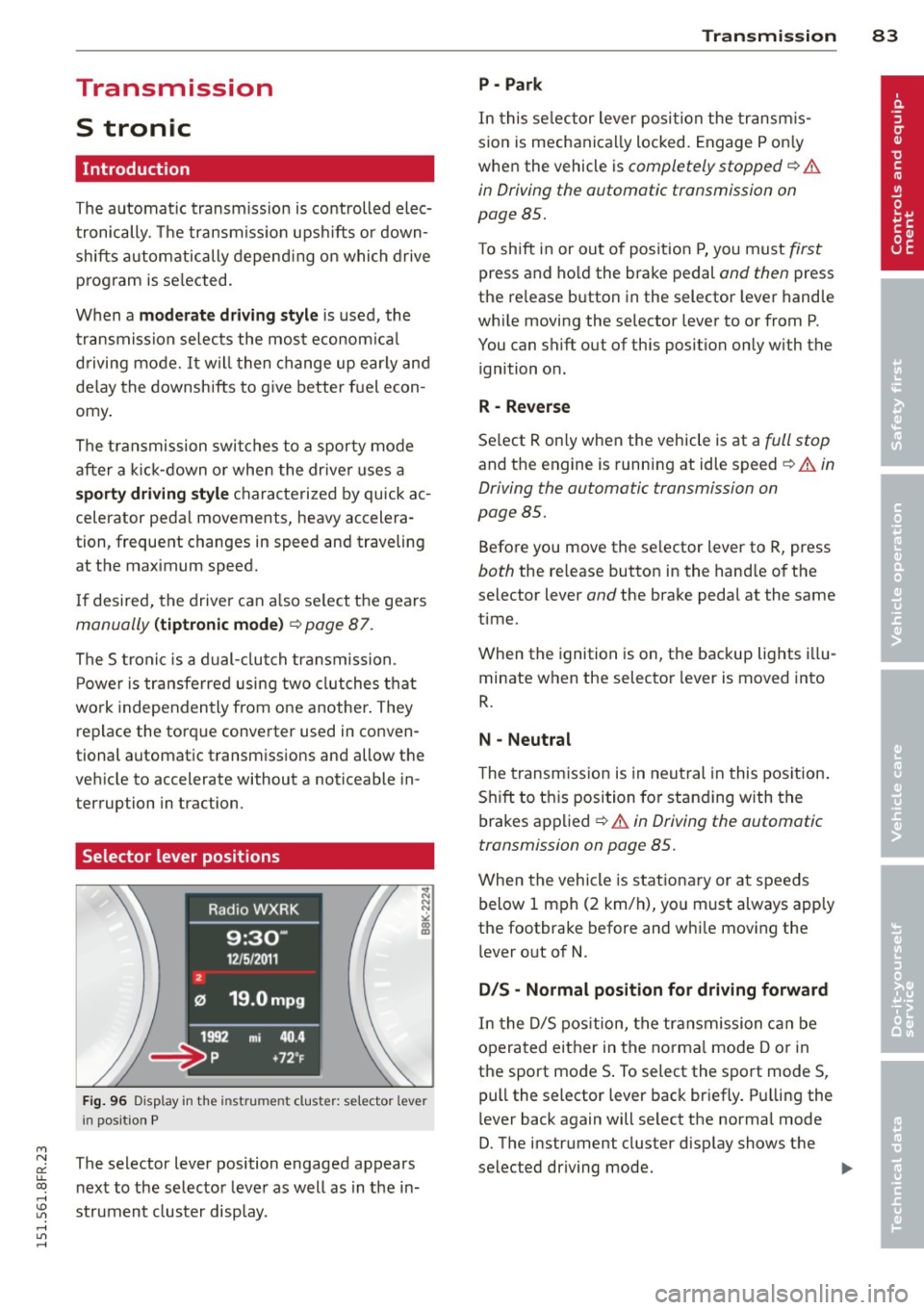
Selector lever positions
F ig. 96 Display in the instrument cluster: se lector lever
in pos itio n P
The selector lever position engaged appears
n ext to the selector leve r as well as in the in
strument cluster display.
Tran sm iss ion 83
P -Park
In this se lector lever posi tion the transm is
s ion is mechanica lly locked. Engage P on ly
when the vehicle is
completely stopped~&.
in Driving the automatic transmission on
page 85.
T o shift in or out of pos it ion P, yo u must first
press and ho ld the brake pedal and then press
the re lease button in the selector leve r hand le
whi le moving the selector lever to or from P.
You can shift out of this position only with the ignition o n.
R - Reverse
Se lect R on ly when the veh icle is at a full stop
and t he engine is running at idle speed~.&. in
Driving the automatic transmission on
page 85.
Before you move the se lector lever to R, press
both the re lease button in the hand le o f the
selector lever
and the brake pedal at the same
time.
When the ignition is on, the backup lights illu
minate when the selector lever is moved into
R.
N -Neutral
The transmiss ion is in neu tral in this pos ition .
S hift to t his position fo r standing with the
brakes app lied
~ .&. in Driving the automatic
transmission on page 85.
When the vehicle is stat iona ry or a t speeds
below 1 mph (2 km/h), yo u must always app ly
the footbrake before and whi le mov ing the
l ever o ut of
N.
DIS -Normal posit ion for driving forward
In the D/S pos it ion, t he tr ansmission c an be
operated either in the norma l mode D or in
the sport mode S . To select the sport mode S,
pull the selector lever back briefly. P ulling the
l ever back again will se lect the norma l mode
D. The instr ument cluster disp lay shows the
selected driving mode. ..,_
Page 86 of 284
84 Transmi ssion
In the no rm al m ode D, the transmission auto
matica lly selects the suitab le gear ratio. It de
pends on eng ine load, veh icle speed and driv
ing style.
Select the
s p or t mode S for spo rty driving.
The vehicle makes full use of the eng ine 's
power. Shifting may become noticeab le when
accelerating.
When the vehicle is stationary or at speeds
be low 1 mph (2 km/h), you must always apply
the foot brake before and while mov ing the
lever to D/S out of N.
A WARNING
Read and follow all WARNINGS c> .&. in
Driving the automatic transmission on
page 85 .
(D Note
-
Coasting downh ill with the transmission in
N and the engine not running w ill result in
damage to the automatic transmiss ion
and possibly t he catalyt ic converter .
(D Tips
-On vehicles with drive select*, you can
adjust the sporty shift characteristics in
the
Dynamic d riving mode.Swill appear
i n the instrum ent cluster disp lay instead
ofD.
- If you accidentally select N whil e driv ing ,
take your foot off the acce le rator pedal
i mmedia tely and wait fo r the engine to
s low down to idle be fore se lecting D/S.
- If there is a power failure, the se lector
l ever will not move out of t he P posi tion.
The eme rgency release can be used if
th is happens<=>
page 89.
Automatic Shift Lock {ASL)
The Automatic Shift Lock safeguards you
against accidentally shifting into a forward or
the reverse gear and causing the vehicle to
move unintentionally.
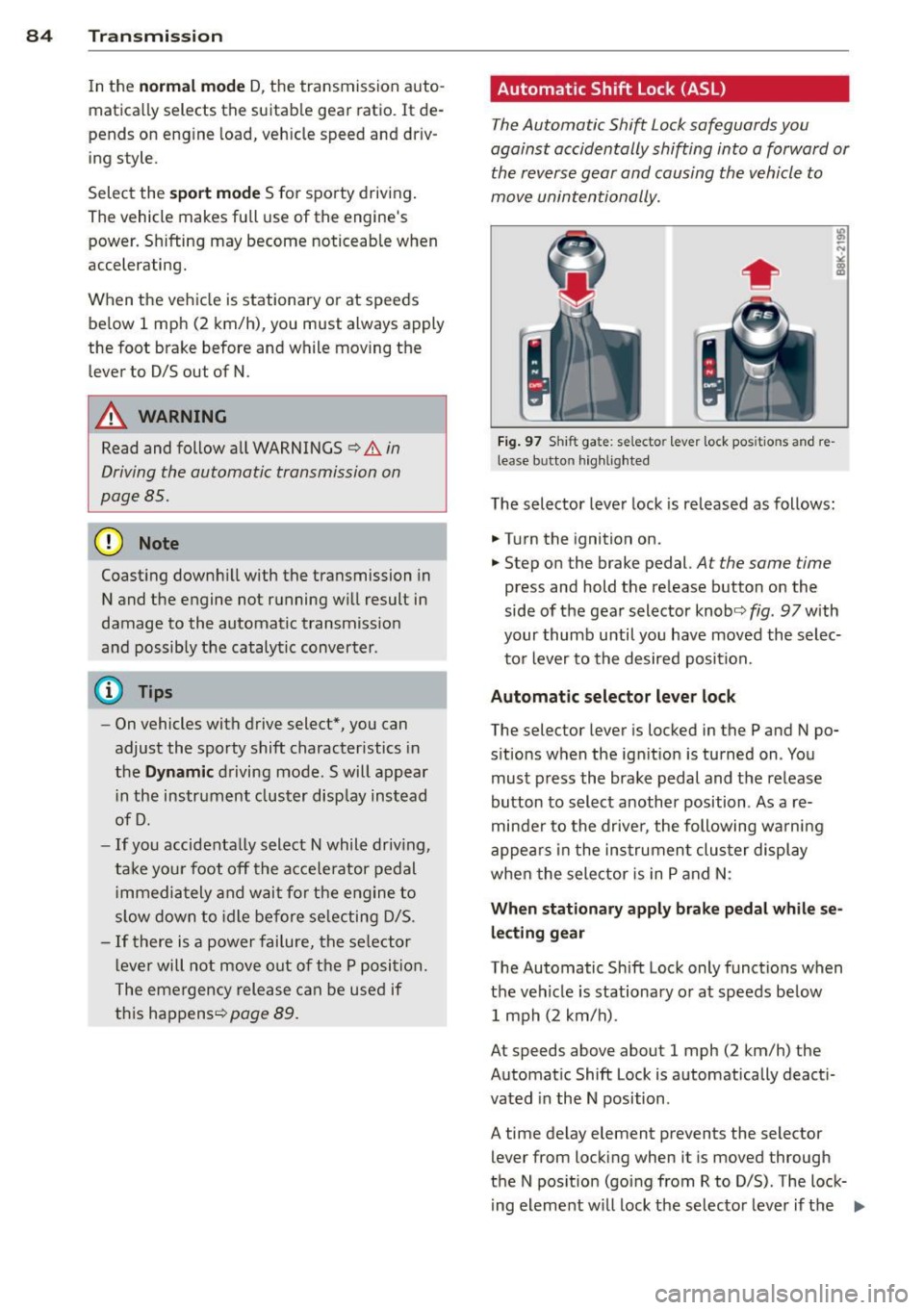
Fi g. 9 7 Shi ft ga te : se lecto r le ver lock pos itio ns and re
lease b utto n hig h lighted
The selector lever lock is released as follows:
.. Turn the ignition on .
.. Step on the brake pedal.
At the same time
press and hold the release button on the
side of the gear selector knob<=>
fig. 97 with
your thumb until you have moved the selec
to r lever to the desired position.
Automatic selector leve r lock
The selector lever is locked in the P and N po
s itions w hen the ign ition is turned on . You
must p ress the brake pedal and t he release
button to select anothe r position . As a re
minde r to the drive r, the following wa rni ng
appea rs in the in strumen t clus ter di splay
when the sele ctor is in P and N:
When stationar y apply brak e pedal while se
lecting gear
The Automatic Shift Lock only funct ions when
t h e veh icle is stationary or at speeds be low
1 mph (2 km/h) .
At speeds above about 1 mph (2 km/h) the
Automat ic Shift Lock is automatically deact i
vated in the N position .
A time delay element prevents the selector lever from locking when it is moved through
the N pos it ion (go ing from R to D/S) . The lock
ing element w ill lock the selecto r leve r if t he
Ill>
Page 87 of 284
"' N
a: LL co
rl I.O
"' rl
"' rl
lever is left in N (Neutral) for more t han ap
prox imately 2 seconds, without the b rake ped
a l being pressed .
Release button
The release b utton on the selec tor leve r pre
ve nts the leve r from bei ng accide ntally s hifte d
i n to ce rtain positions. Depen ding on the direc
tion of the shift, the se lector lever locks at d if
ferent positions. The positions are h ighlighted
in the ill ustration
c!> fig . 97.
Ignition key safety interlock
The key canno t be removed from the igni tion
un less the se lector lever is in the P park posi
tion . When the ignition key is remove d, the
se lecto r lever wi ll be locked in the P pos ition.
Driving the automatic transmission
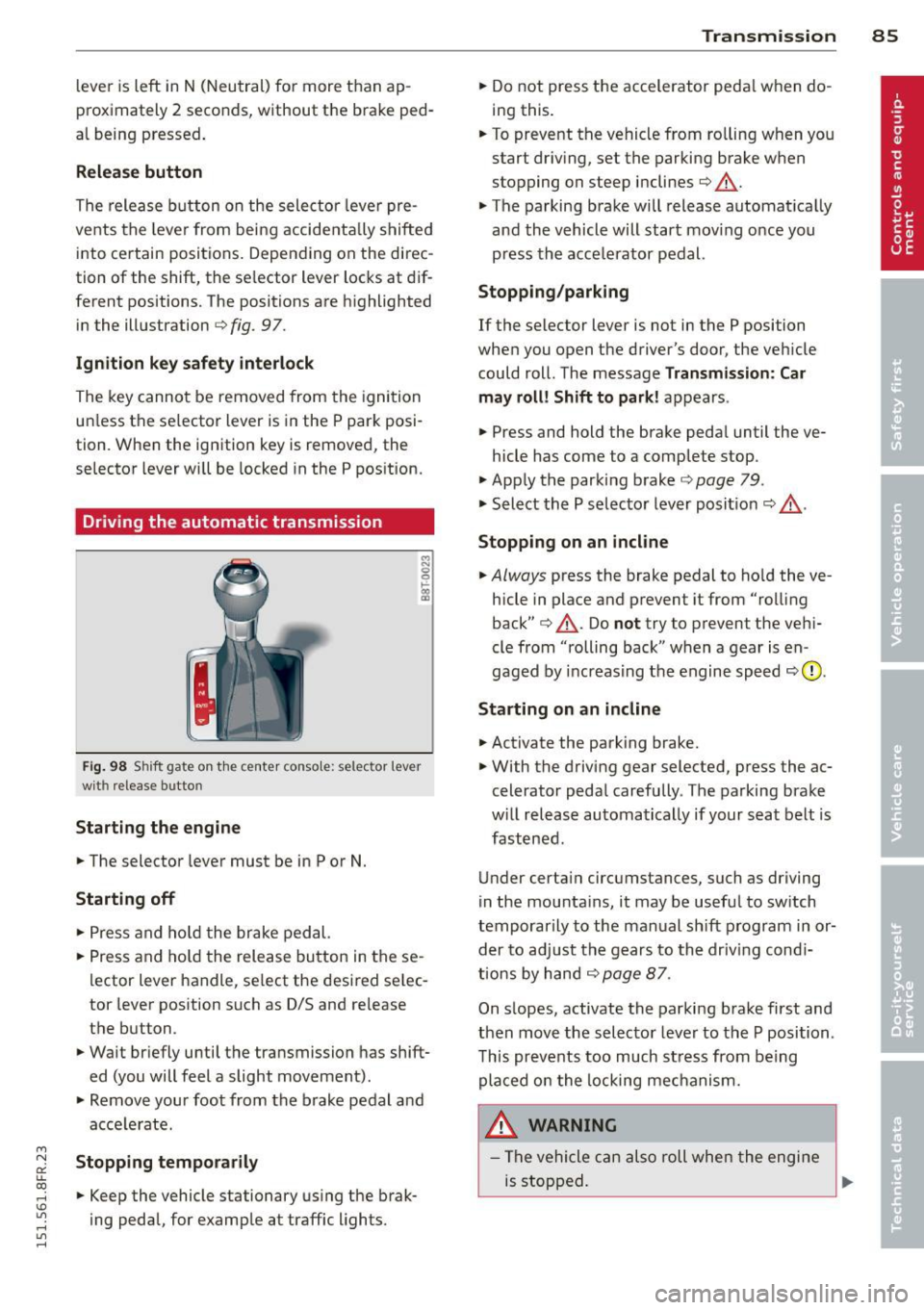
F ig. 98 S hift gate o n th e ce nte r conso le: selector lever
wit h release bu tton
Starting the engine
.. The selector leve r must be in P or N.
Starting off
.. Press a nd ho ld t he brake ped al.
.. Press and ho ld the release bu tton in these
l ector lever handle, se lect the desi red se lec
tor leve r pos ition such as D/S and re lease
t h e b utton.
.. Wait br iefly u ntil t he transmission has shift
ed (you will feel a slight movement).
.. Remove your foot from the b rake pedal a nd
acce le rate.
Stopping temporarily
.. Keep the vehicle stationary us ing the brak
ing peda l, for e xamp le at traffic lights.
Transm ission 85
.. Do not press the accelerator peda l w hen do
ing this .
.. To preve nt t he vehicle from ro lling when yo u
start dr iv ing, set the parking b rake w hen
stopping on steep inclines
c!> _&. .
.. The parking brake will release automat ica lly
an d the vehicle will start mov ing o nce you
p ress th e acce lerator pedal.
Stopping/parking
If the selector lever is not in the P position
whe n you open the driver's door , the veh icle
could roll . The message
Transmission: Car
may roll! Shift to park! ap pears .
.. Press and hold the brake peda l until the ve-
hicle has come to a comp lete stop .
.. App ly t he park ing brake
co page 79 .
.. Select the P selec to r lever posit io n
co _&. .
Stopping on an incline
.. Always press the brake pedal to ho ld the ve
hicle in place and prevent it from "ro lling
back"
co _&. . Do not try to p revent the ve hi
cle from "rolling back" when a gear is en
gaged by increas ing t he engine spee d co (!).
Starting on an incline
.. Activate the parking brake .
.. With t he driving gear selected, p ress the ac
celerato r peda l carefully . The parking brake
w ill rel ease au toma tically if your sea t belt is
fast ene d .
U nder certa in circumstances, such as driving
in the mounta ins, i t may be usefu l to sw itch
t emporar ily to the man ual sh ift program in or
d er to adju st the gears to th e d riv in g con di
ti ons by ha nd
co page 87 .
On s lopes, activate the parki ng b rake first and
t hen move the s electo r leve r to the P posi tion .
T his pr eve nts t oo much st ress from be ing
p la ced o n the locking me chani sm .
&_ WARNING
- Th e vehicle c an als o roll whe n the engi ne
is s topped .
~
Page 97 of 284
"' N
a: LL co
rl I.O
"' rl
"' rl
Audi adaptive cruise control and braking guard 95
~--- ~-Di stance 3: This setting corre
sponds to a distance of 164 feet/SO meters
when traveling at 62 mph (100 km/h), or a
time interva l of 1.8 seconds .
~---- ~ Distance 4: This setting corre
sponds to a distance of 210 feet/64 meters
when traveling at 62 mph (100 km/h), or a
time interva l of 2.3 seconds .
A WARNING
Following other vehicles too closely in
creases the risk of collisions and serious
personal injury.
- Setting short distances to the traffic
ahead reduces the time and distance
available to br ing your vehicle to a safe
stop and ma kes it
even more necessary
to pay close attention to traffic.
- Always obey applicable traffic laws, use
good judgment, and select a safe follow
ing distance for the traffic, road and
weather conditions .
¢j) Tips
- Distance 3
is set automatically each time
you switch the ignition on.
- Your standa rd settings are automatically
stored and assigned to the remote con
trol key being used.
Setting the driving program
Applies to vehicles: with Audi adaptive cruise control
Depending on the se lected driv ing program
and distance, driving behavior when accelerat
ing will
vary from dynamic to comfortab le .
Setting the driving program for vehicles
without Audi drive select*
~ In the radio/MMI*, select: !CAR !funct ion
button >
Adaptive cruise control > Driving
prog .
> comfort, standard or dynamic. Or
~ Select: !CARI function button> Car systems*
control button > Driver assist > Adaptive
cruise control
> Driving program* > Com
fort, Standard
or Dynamic. Setting the driving mode for
vehicles with
Audi drive select*
Refer to ¢ page 103.
(D Tips
Your settings are automatica lly stored and
assigned to the remote control key being
used.
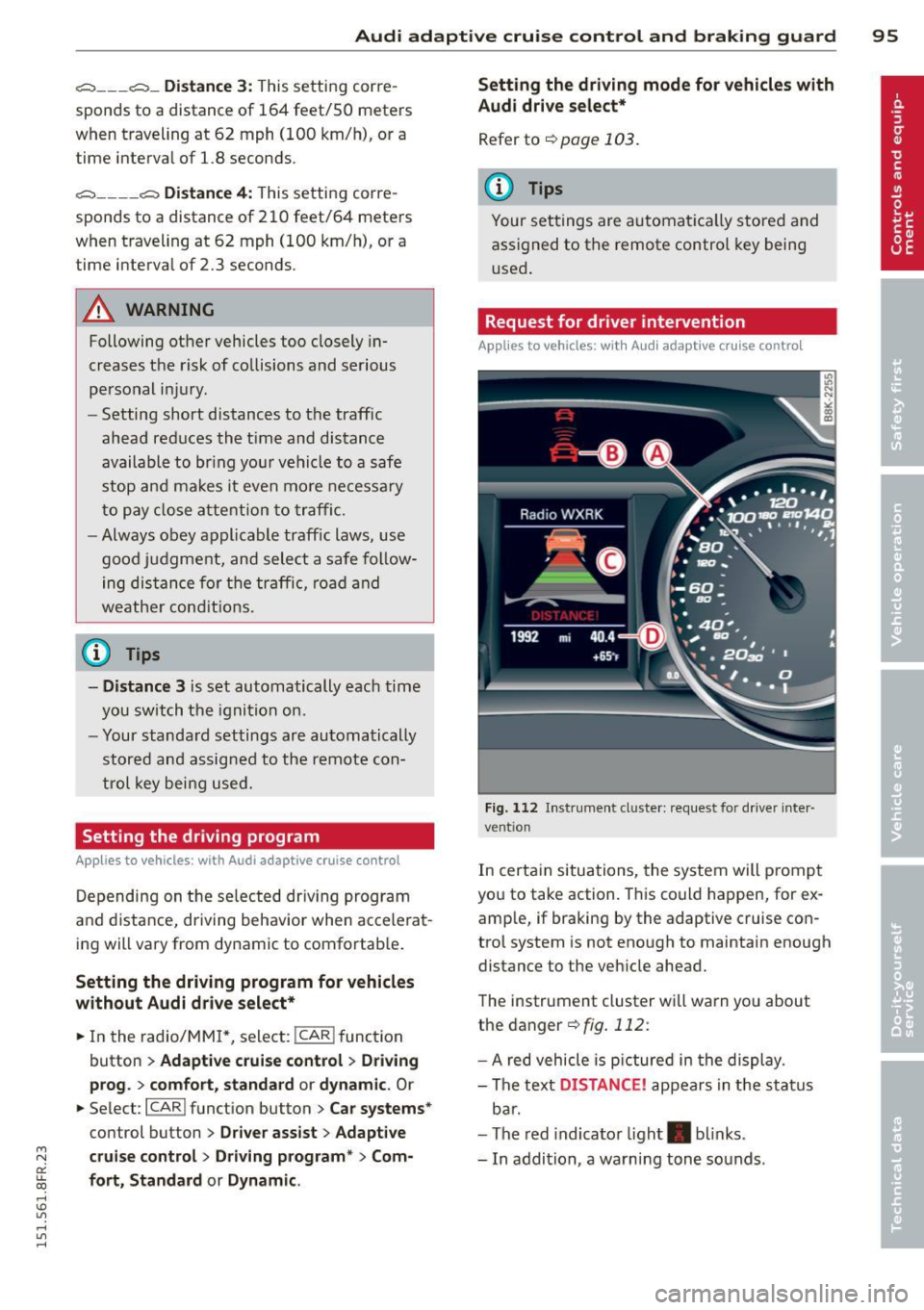
Request for driver intervention
Applies to vehicles : with Audi adaptive cruise contro l
Fig. 112 Instrument d uste r: request for drive r inte r
ve ntion
In certain situations, the system will p rompt
you to take action. This could happen, for ex
amp le, if braking by the adaptive cruise con
trol system is not enough to maintain enough
distance to the vehicle ahead.
The instrument cluster will warn you about
the danger ¢
fig. 112:
-A red vehicle is pictured in the display.
- The text
DISTANCE! appears in the status
bar.
- The red indicator light . blinks.
- In addition, a warning tone sounds .
Page 99 of 284

M N
er
u..
co ,...., \!) 1.1'1 ,...., 1.1'1 ,....,
Audi adaptive cru ise control and brakin g guar d 97
-Always remember that the radar sensor
for the braking guard works only within
defined detection and range limits that
may prevent the proper detection of oth
er vehicles.
- The radar sensor's function and range
can be reduced by rain, snow and heavy
spray. Moving vehicles up ahead may not be promptly detected or may not be de
tected at al l.
- Reflective surfaces includ ing crash barr i
ers or tunnel ent ran ces may impair the
function of the radar sensor.
- You can cance l the braking that is initiat
ed by the system by braking yourself, by
accelerating noticeab ly or by swerving.
- Bra king guard error messages
<> page 97.
-Keep in mind that braking guard can
brake u nexpectedly . Always secure any
ca rgo or objects that you are transport
i ng to reduce the risk of d amage or in
ju ry.
Settings in the radio/MM!
Applies to vehicles: with Audi adaptive cruise co ntrol
~ Se lect: ICARI f u nction button> Car system s*
control button > Dri ver assist > Audi brak
ing guard .
Or
~ Select : I CARI funct ion button > A udi braking
guard .
System -
Switch Audi braking g uard On and
Off . When you switch the ignition on, the
message
Aud i braking guard off appears if
the system is sw itched off .
Early warning -The distance and app roac h
warn ings in the display can be switched
On /
Off .
(D Tips
-Your settings are automatica lly stored
and ass igned to the remote control key
being used at the t imes the settings are
made. -
If you restrict or sw itch off the ESC, the
braking gua rd also switches itself off
<> page 173.
-Switch braking guard off when you a re
loading the vehicle onto a vehicle carrier,
train, ship or other type of transporta
tion. This can prevent undesired warn
ings from the braking guard system.
Messages
App lies to vehicles : wit h Audi ada ptive c ruise contro l
Braking guard : Off
This driver message appears if the system is
turned off via the radio/MMI *. Otherwise, if
the system is turned off, the informat ion ap
pears every t ime shortly after the start of the
trip.
The driver message a lso appears if the system
is not ava ilable d ue to a malfunct ion or if the
ESC is not switched
on <> page 173. If this is
the case, the system w ill not prov ide warnings
about a poss ible collision.
Braking guard : Acti vated
T h is dr iver message appears if sharp b rake
pressure was applied due to an acute warning.
•••
Three white dots appear if a sett ing cannot be
selected w ith the operating lever . For exam
ple, this happens if you want to raise/lower
the speed even thoug h there was no previous
l y saved speed.
ACC: S ensor blo cked
This message appears if the sensor v iew is ob
structed, for examp le by leaves, snow, heavy
spray or d irt. Clean the sensor<>
page 90,
fig. 103 .
ACC: not a vailable
The driver message appears if there is a mal
functio n. The adaptive cruise contro l tu rns off .
A chime sounds as a reminder . Have the sys
tem checked by an authori zed Aud i dea ler or
authorized Aud i Service Fac ility.
ACC: unavailable ll-
Page 107 of 284

"' N
a: LL co
rl I.O
"' rl
"' rl
Park assist
Parking system
Applies to vehicles: with parking system plus/parking sys
tem plus with rear view camera
The parking system may be used for parking
or maneuvering.
Depending on your vehicle's equipment, vari
ous parking aids will help you when park ing
and maneuvering.
The
parking system plus assists you when
parking by audibly and visually indicat ing ob
jects detected
in front of and behind the vehi
cle
~p age 105.
The parking system plus with rear view cam
era
shows the area behind the vehicle in the
d isplay. This display assists you when you are
reverse or parallel parking<=>
page 106. In ad
dition, you are assisted by the functions from
the parking system plus~
page 105.
_& WARNING
Make sure the sensors are not covered by
st ickers, deposits or any other obstruc
tions as it may impair the
sensor function.
For information on cleaning, refer to
~page 184.
Parking system plus
Description
Applies to vehicles: with parking system plus
Audi parking system plus provides audio and
visual signals when parking.
Sensors are located in the front and rear
bumpers. If these detect an obstacle, visual
and audible s ignals warn you. The range at
which the sensors begin to measure is approx
imately:
side
front 3 ft (0.90 m)
center
4 ft (1.20 m)
side 2 ft (0 .60 m)
rear
center S.2 ft (1.60 m)
Park assist 105
The
closer you get to the obstacle, the shorter
the interva l between the audible signals. A
continuous tone sounds when the obstacle is less than approximately 1
ft (0.30 m) away.
Do not continue driving farther!
If the distance to an obstacle stays the same,
the volume of the d istance signa l chime is
gradually reduced after about
4 seconds (does
not affect the continuous signal tone).
Switching on/off
Applies to vehicles: with parking system plus
''"•• ~.....J n,.. -' --· ( l ~-- --~ _#,,___.._...
Fig. 121 Center console: f'> •! button
Fig. 122 In fotainment: visual distance display
Switching on
... Switch the radio/MM I* on .
.,. Shift into reverse or
... Press the
P"'A bu tton in the cente r console
<=> fig. 121. A short confirmation tone
sounds and the LED in the button turns on.
Switching off
... Drive forward faster than 6 mph (10 km/h),
or
.,. press the
P1#A button, or
... switch the ignition off.
Page 110 of 284

108 Park assis t
8_ WARNING
- The parking aid cannot replace the driv
er's attention . The driver a lone is respon
sible fo r parki ng a nd s imilar driving ma
neuvers.
- Always keep your eyes on the veh icle's
surround ings, using the rear view mirro r
as well.
- Do not allow yourse lf to be d istracted
from traffic by the rear view camera pic
tu res.
- If the pos it io n and the installat ion angle
of the came ra has changed, fo r example,
afte r a rea r end collision, do not continue
to use the sys tem for s afety reasons.
Have i t checked by a q ualified dealership .
0 Note
-Low obs tacles already sig na led by a
w arning can di sappea r from the system's
dete ction r ange as they are approached
and will not contin ue to be signaled. Ob
j ects s uch as barrier cha ins, trailer draw
bars, thin painted vertical po les or fen
ces may not be detected by the system, pos ing risk of damage.
- Never use warm or hot water to remove
snow or ice from the rear v iew camera
l ens -danger of crack formation on the
l ens!
- When cleaning the lens, never use prod
u cts that are abras ive.
Switching on/off
App lies to vehicles: with par king system p lus w it h rear
view ca mera
T he rear view camera switches on automati
cally together with the acoustic park assist
when you put the vehicle in reverse.
Switching on
.,. Swi tch the M MI on and s hift into reve rse o r
.,. press the
P1#.4. button in the cente r console
¢ page 105, fig. 1 21 . A short con firmation
tone sounds and the LED in the button turns
on .
Switching between the rear view camera
and optic al di splay
.,. Press the Graphic control button ®
¢ page 109, fig. 12 7 to see the optical d is
play .
.,. Press the
Rearview control button to see the
rear v iew camera image.
Switching off
.,. Drive faster than 6 mp h (10 km/h), or
.,. press the
P111A button, or
.,. sw itch off the ignition .
If you press a function button on the M MI
control console , the rear view camera p icture
disappears. The rear v iew camera picture reap
pears the next t ime yo u park.
8_ WARNING ,-
- The MMI d isplay cannot show, or ca nnot
a d equately show, certain objects (such as
sma ll posts or grating) , recesses in the
g round and p rot ruding pa rts on ano ther
c a r.
- Onl y use t he rearview ca mera to assist
you if it shows a goo d, clear pic ture. F or
examp le, the im age may be affec ted by
t he s un s hining into the lens, d irt on the
lens or if t here is a defect.
- U se t he rearv iew camera only with the
rea r lid com plete ly closed . Make s ure any
objects you may have mounted on the rea r lid do n ot b lock the rearview cam
era .
(D Tips
- The rear view came ra picture is available
as soon as the M MI Display or the M MI is
switched on, or the start- up phase is
completed.
- The sensors m ust be kept clean and free
o f snow and ice for the park assist to op
erate .
- Yo u can change the vo lume and pitch of
the s ignals as we ll as the disp lay
¢page 111.
- What appears in the display is time-de
layed .
Page 129 of 284

The front seats are equipped with belt posi
tioners so it is easier to fasten the safety be lts . T he belt positioners automatically ex
tend when the door closes and the ignition
sw itches on ¢
fig. 144.
The belt positioner retur ns to its starting posi
tion again when
- th e tongue in the bel t latc h engages o r the
belt was not fastened within 60 seconds .
- yo u sw itch the igni tion off.
- you ope n the doo r.
_& WARNING
- O nly y our auth orize d Au di de aler s hou ld
wor k on the sys tem or remove and in stal
ling system com ponents when perform
ing other work .
- T he be lt positioners could cause in jury or
damage if they pi nc h peop le or objects
when extendi ng or retracting .
Fastening safety belts
Safety first -everybody buckle up!
Fig. 145 Be lt buckle an d to ngue o n th e dr iver's seat
T o provide maxim um protection, sa fety belts
must always be posit ioned correctly on the
wearer's body .
~ Adjust the front seat and head restraint
properly ¢
page 60, Seats and storage .
~ Make sure the seatback of the rear seat
bench is in an upright pos ition and securely
latched i n place before using the belt¢ ..
&.
~ ~ Hold the belt by the tongue and pull it even-
~ Ly across the ch est and pelvis ¢ ,&. .
rl I.O
"' rl
"' rl
Safety belts 12 7
~ Insert the tongue into the correct buck le o f
your seat unti l you hear it latch securely
¢ fig. 145.
~ Pull on the belt to make sure that it is se-
curely latched in the buck le.
Automatic safety belt ret ractors
Eve ry safety bel t is equipped with an a utomat
ic be lt ret ractor on the shoulder belt. This fea
ture locks the belt when the be lt is pu lled out
fast, during hard brak ing and in an accide nt.
The belt may a ls o l ock when you drive up or
down a steep h ill or t hrough a sha rp cu rve.
D uring normal driv ing the be lt lets you move
freely .
Safety belt pretensioners
The safety belts are equipped with a belt pre
tensioner that he lps to tighten the safety belt
and remove slack when the p retensioner is ac
t ivated. The function of the pretensione r is
monito red by a warn ing light ¢
page 19.
Convertible locking retractor
Every safety belt except the one on t he d river
seat is equipped with a convert ible locking re
tractor tha t
must be used when t he safety
belt is used to attach a ch ild safety seat . Be
su re to read t he importa nt infor mation about
t h is feature ¢
page 162.
_& WARNING
Im properly posit io ned s afe ty be lts c an
cause serious injury in an accident
¢ page 128, Safety belt position .
- Safety belts offer opt imum protec tion
only when the seatba ck is upr ight a nd
be lts a re p ro perly posit io ned on the
body.
-
- Never attach t he safety be lt to the buck
le for another seat. Attac hing t he belt to
the wrong buckle will reduce safety be lt
effectiveness and can cause ser ious per
sonal injury .
- A passenge r who is not properly restrai n-
ed can be seriously injured by t he safety .,.