washer AUDI RS5 CABRIOLET 2015 Owners Manual
[x] Cancel search | Manufacturer: AUDI, Model Year: 2015, Model line: RS5 CABRIOLET, Model: AUDI RS5 CABRIOLET 2015Pages: 284, PDF Size: 69.56 MB
Page 4 of 284
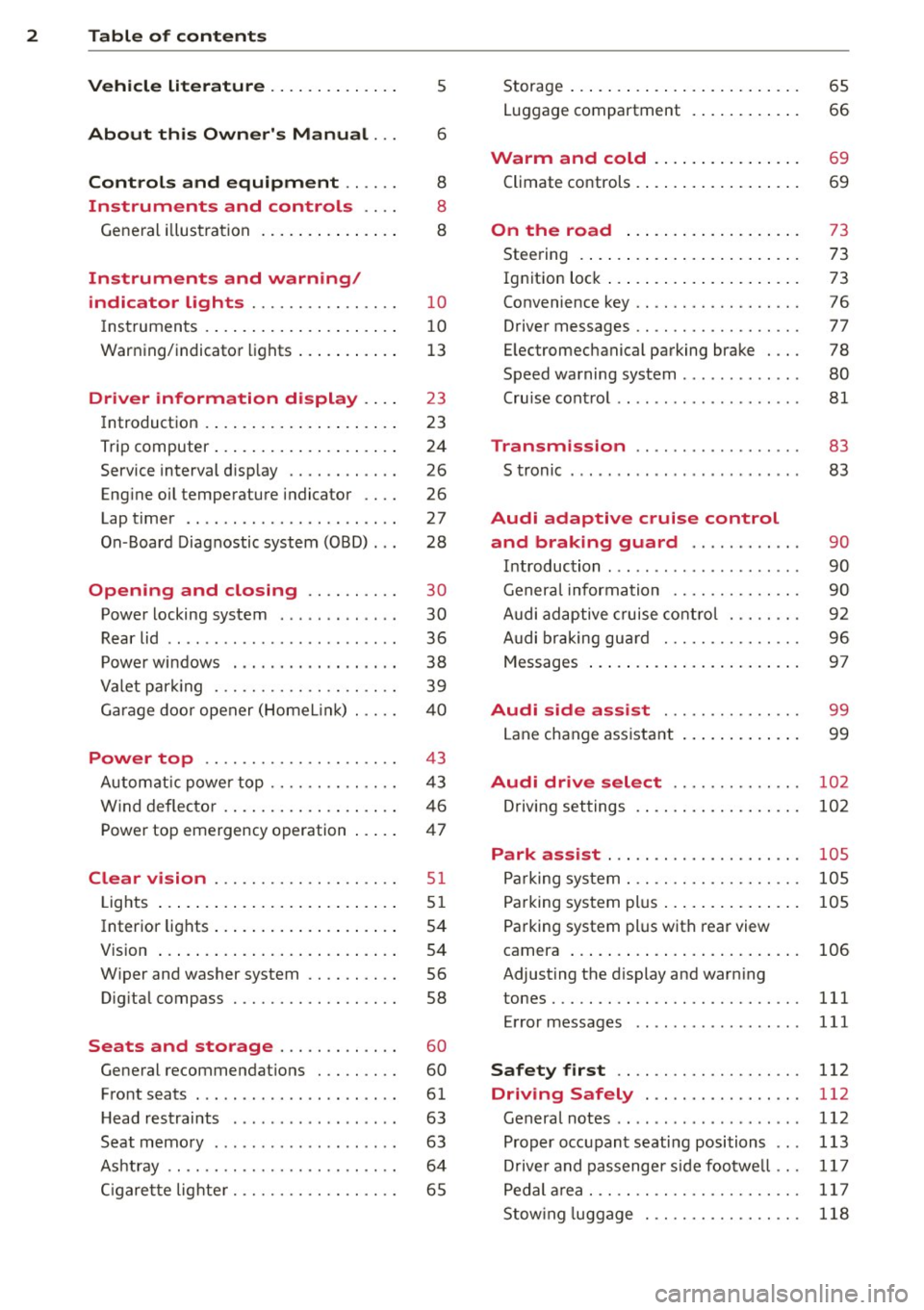
2 Table of contents Vehicle literature .. .. .. .. .. ... .
5
About this Owner's Manual . . . 6
Controls and equipment .. ... .
Ins truments and controls .. . .
General illus tration .... ... .. .. ... .
Instruments and warning /
indicator lights ........ .. .. .. . .
Ins truments . .. .. ..... ... .. .. ... .
War ning/ indi cator lights ... .. ... .. .
Driver information d isplay .. . .
Introduct ion . .. .. ..... ... .. .. ... .
Trip computer .. .. ..... ... .. .. ... .
Service interval d isp lay .... .. .. ... .
Eng ine oil temperature indicator ... .
Lap timer .. ........ ..... .. ... .. .
On -Board Diagnostic system (OBD) .. .
Opening and closing .... .. .. . .
Power locking system .. ... .. .. .. . .
R ear lid .. .. ................ ... . .
P owe r win dows . ...... ... .. .. ... .
Va let par king . ......... .. .. .. .. . .
G arage door opener (HomeL in k) . .. . . 8
8
8
10
1
0
1 3
23
23
24
26
26
27
28
30
30
36
38
39
40
Power top . . . . . . . . . . . . . . . . . . . . . 43
Autom atic power top .... .. .. .. ... .
W ind deflecto r .. ...... ... .. .. ... . 4 3
46
Power top emergency operation . . . . . 47
Clear vision .. ........ .. .. .. .. . .
Lig hts ... .. ... .. ..... ... .. .. ... .
Inter ior lights .. .. ..... ... .. .. ... .
V 1s 1on ..... ... . ...... ... .. .. ... .
W iper and washer system .. .. .. ... .
Dig ita l compass .......... .. .. ... .
51
51
54
54
56
58
Seats and storage . . . . . . . . . . . . . 60
General recommendat ions . .. .. .. . .
Front seats . ... ....... ... .... .. . .
H ead restraints . ............. .. . .
Seat memo ry .. .... .... .. .. .. .. . .
As htray .. .. ............. .. .. .. . .
C igare tte lig hte r .......... .... ... . 60
61
63
63
6 4
65
Storage ... .... .. ... .. ..... .... . .
Luggage compartment . ..... ... .. .
Warm and cold .. ... ..... ... .. .
Climate controls . .... .. ..... .... . .
On the road ... .. ... ..... ... .. .
Stee ring . ..... .. .. .... .... ... .. .
Ig nit ion lock ..... ... .. ..... .... . .
Convenience key .. ... .......... .. .
Driver messages .. ............... .
E lectromechanical parking brake . .. .
Speed warning system . .......... . .
Cru ise cont ro l .. .. ............... .
Transm ission .. .......... ..... .
S tronic ....... .. .. ........ ... .. .
Audi adaptive cruise control
and braking guard .......... . .
65
66
69
69
73
73
73
76
77
78
80
81
83
83
90
I n troduction . . . . . . . . . . . . . . . . . . . . . 90
Genera l information ............. .
Audi adaptive c ruise cont ro l ... .. .. .
A udi braking gu ard ............ .. .
Messages ..... .. .. .... .... ... .. .
Audi side assist .............. .
Lane change ass ista nt 9
0
92
96
97
99
99
Audi drive select . . . . . . . . . . . . . . 102
Dr iving set tings . . . . . . . . . . . . . . . . . . 102
Park assist . . . . . . . . . . . . . . . . . . . . . 105
Parking sys tem . . . . . . . . . . . . . . . . . . . 10 5
Parking system plus . . . . . . . . . . . . . . . 105
Pa rking system plus with rear view
camera . . . . . . . . . . . . . . . . . . . . . . . . .
106
Adjust ing the d isplay and warn ing
tones . .... .... .. ............. ...
111
Error messages 111
Safety first . . . . . . . . . . . . . . . . . . . . 112
Driving Safely . . . . . . . . . . . . . . . . . 112
General notes . . . . . . . . . . . . . . . . . . . . 112
Prop er occ upant seating positions . . . 113
Dr ive r and passenger s ide footwe ll . . . 11 7
Pedal a rea. .... .. ............. ... 11 7
Stow ing luggage . . . . . . . . . . . . . . . . . 118
Page 5 of 284
M N
er
u..
co ,...., \!) 1.1'1 ,...., 1.1'1 ,....,
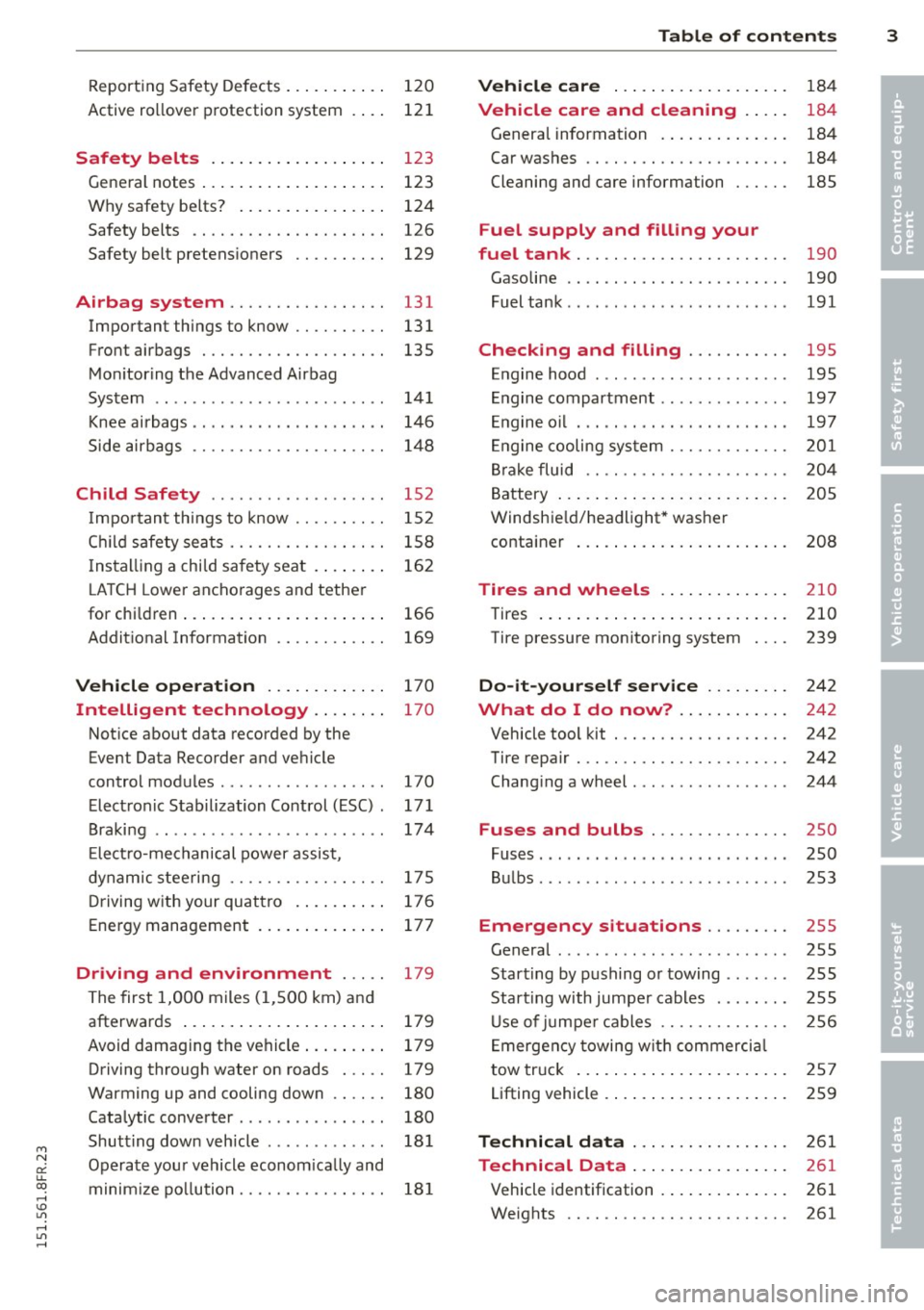
Reporting Safety Defects . . . . . . . . . . . 120
Active ro llover protection system 121
Safety belts . . . . . . . . . . . . . . . . . . . 123
General notes ..... .... ... .. .. .. . .
Why safety be lts? ..... ... .. .. .. . .
Safety belts ............. .... .. . .
Safety belt pretens ioners .. .. .. .. . .
Airbag system ............. .. . .
Important things to know .. .. .. .. . .
Front airbags ............ .... .. . .
Mon itoring the Advanced Airbag
System ...... .............. ... . .
Knee ai rbags .... .... ... .. .. .. .. . .
Side airbags .. ........... .. .. .. . .
Child Safety ... .. ...... .. .. .. . .
Impor tant th ings to know .. .. .. .. . .
C hi ld safety se ats ......... .... .. . .
I ns tall ing a chi ld sa fety seat . ...... .
L A TCH Lower anchorages and tethe r
for chi ld ren ..... .. .... ... .. .. .. . .
Addit ional Information
Vehicle operat ion ..... .. .. .. . .
Intelligent technology .. .. .. . .
Not ice about data recorded by the
Event Data Recorder and ve hicle
control modules ............... .. .
Elect ronic S tabilization Control (ESC) .
B raki ng .. ... ............. ... ... .
E lect ro-me chanical power assis t,
dynam ic steering ......... .... .. . .
D riving w ith your quat tro . ... .. ... .
E nergy management ... ... .. .. .. . .
Driving and environment ... ..
The first 1,000 miles (1 ,5 00 km) and
afterwar ds ..... .. .... ... .. .. .. . .
Avoid damaging the vehicle ... .. .. . .
Driving through water on roads . .. . .
Warming up and cooling down .. .. . . 123
124
126
129
131 131
135
14 1
146
1 4 8
152
152
1 58
16 2
166
169
170
170
170
17 1
174
175
176 177
179 179
179
179
180
Cata lytic converter . . . . . . . . . . . . . . . . 180
Shutt ing down veh icle . . . . . . . . . . . . . 181
Operate you r vehicle econom ica lly and
minim ize po llution. . . . . . . . . . . . . . . . 18 1
Table of contents 3
Vehicle care . . . . . . . . . . . . . . . . . . .
184
Vehicle care and cleaning . . . . . 184
Genera l information . . . . . . . . . . . . . . 184
Car washes . . . . . . . . . . . . . . . . . . . . . . 184
Cleaning and care information . . . . . . 185
Fuel supply and filling your
fuel tank . . . . . . . . . . . . . . . . . . . . . . .
190
Gasoline . . . . . . . . . . . . . . . . . . . . . . . . 190
Fuel tank . . . . . . . . . . . . . . . . . . . . . . . . 191
Checking and filling . . . . . . . . . . . 195
E n gine hood . . . . . . . . . . . . . . . . . . . . . 195
Engine compartment . . . . . . . . . . . . . . 197
E ngine oil . . . . . . . . . . . . . . . . . . . . . . . 197
En gine cooling sy stem . . . . . . . . . . . . . 201
Br ake fluid . . . . . . . . . . . . . . . . . . . . . . 20 4
Battery . . . . . . . . . . . . . . . . . . . . . . . . . 205
Windshie ld/headlight* washer
container . . . . . . . . . . . . . . . . . . . . . . . 208
Tires and wheels . . . . . . . . . . . . . . 2 10
Tires . . . . . . . . . . . . . . . . . . . . . . . . . . . 210
Tire pressure monitoring system 239
Do-it-yourself service . . . . . . . . . 242
What do I do now? . . . . . . . . . . . . 24 2
Vehicle tool kit . . . . . . . . . . . . . . . . . . . 242
Tire repair . . . . . . . . . . . . . . . . . . . . . . . 242
Chang ing a wheel . . . . . . . . . . . . . . . . . 244
Fuses and bulbs . . . . . . . . . . . . . . . 250
Fuses . . . . . . . . . . . . . . . . . . . . . . . . . . . 250
Bul bs. . . . . . . . . . . . . . . . . . . . . . . . . . . 253
Emergency situations . . . . . . . . . 255
General . . . . . . . . . . . . . . . . . . . . . . . . . 255
Star ting by pushing o r towing . . . . . . . 255
Start ing with jumper cables . . . . . . . . 255
U se of j umpe r cables . . . . . . . . . . . . . . 256
E mergen cy towing wit h commercia l
tow truck . . . . . . . . . . . . . . . . . . . . . . . 257
Lifting vehicle . . . . . . . . . . . . . . . . . . . . 259
Technical data . . . . . . . . . . . . . . . . . 261
Technical Data . . . . . . . . . . . . . . . . . 261
Vehicle identification . . . . . . . . . . . . . . 261
Weights . . . . . . . . . . . . . . . . . . . . . . . . 261
•
•
Page 11 of 284
M N
er
u..
co ,...., \!) 1.1'1 ,...., 1.1'1 ,....,
CD
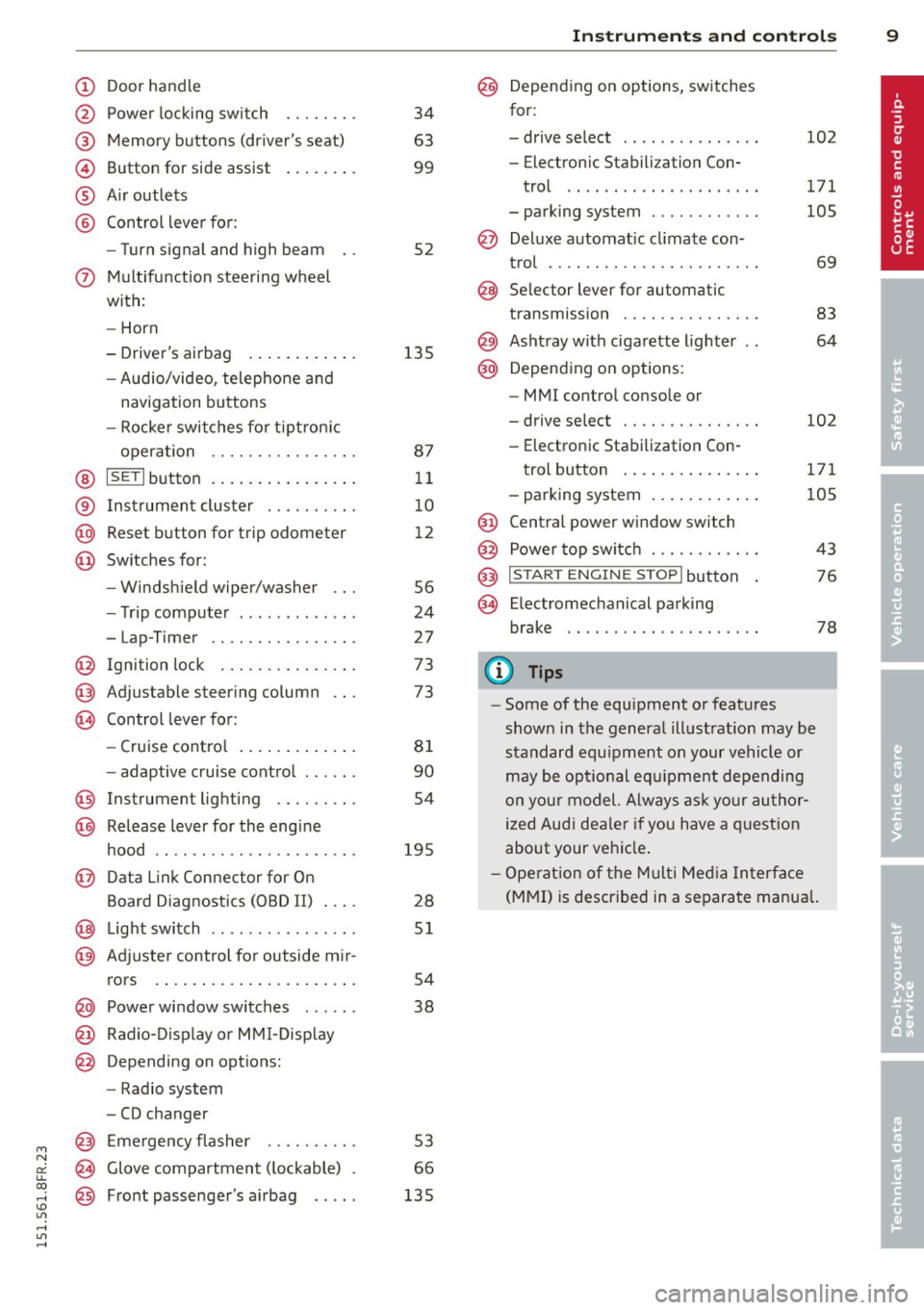
@
®
©
®
®
Door handle
Power locking switch
Memory buttons (driver's seat)
Button for side assist
A ir outlets
Control leve r for :
- Turn signal and high beam
0 Multifunction steering wheel
with:
- Horn
- Driver's airbag ...... ... .. .
- Audio/video, telephone and
navigation buttons
- Rocker switches for tiptron ic
operation ............... .
@ ISETI button ............... .
® Instrument cluster ..... .. .. .
@ Reset button for trip odometer
@ Switches for:
- Windsh ield wiper/washer .. .
- Trip computer ..... ... .. .. .
- Lap-Timer .... .... ... .. .. .
@ Ignition lock .............. .
@ Adjustable steering column
@ Control lever for:
- Cruise contro l ....... ... .. .
- adaptive cruise cont ro l ..... .
@ Instrument lighting ........ .
@ Release lever for the engine
hood .. .. ................. .
@ Data Link Connector for On
Board Diagnostics (OBD II) .... 34
63
99
52
135 87 11
1 0
1 2
56
24
27
73
73
81
90
54
195 28
@ Lig ht switch .. .. .. .. .. .. .. .. 51
@ Adjuster control fo r outside mi r-
rors . . . . . . . . . . . . . . . . . . . . . . 54
@ Power window switches . . . . . . 38
@ Radio-Disp lay o r MM I-Disp lay
@ Depending on options:
- Radio system
- CD changer
@ Emergency flasher ......... .
@ Glove compartment ( lockable)
@ Front passenger's a irbag .. .. . 53
66
135
In
strument s and control s 9
@ Depending on options, switches
for:
- drive select .. .. . .. .... ... . 102
- Electron ic Stabilization Con-
trol .... .. .. ............ .
- parking system ........... . 171
105
@ Deluxe automat
ic cl imate con-
t ro l .... .. .. .............. .
69
@ Se lector lever for automatic
transmission .............. .
83
@) Ashtray with cigarette lighter 64
@ Depending on options:
- MMI control console or
- drive select . . . . . . . . . . . . . . . 102
- Electronic Stabilization Con-
trol button . . . . . . . . . . . . . . . 171
- parking system . . . . . . . . . . . . 105
@ Central power w indow switch
@ Power top switc h . . . . . . . . . . . . 43
@ I START ENGINE STOPI button 76
§) Electromechanical parking
brake . . . . . . . . . . . . . . . . . . . . . 78
(D Tips
-Some of the equipment or features
show n in the general illustration may be
standard equ ipment on your vehicle or
may be opt ional equ ipment depending
on your model. Always as k yo ur au thor
ized Audi dea ler if you have a q uest ion
about your ve hicle .
- Ope rat ion of the Multi Med ia In terface
(MMI) is described in a separa te manua l.
Page 16 of 284
14 Instruments and warning/indicator lights
TPMS
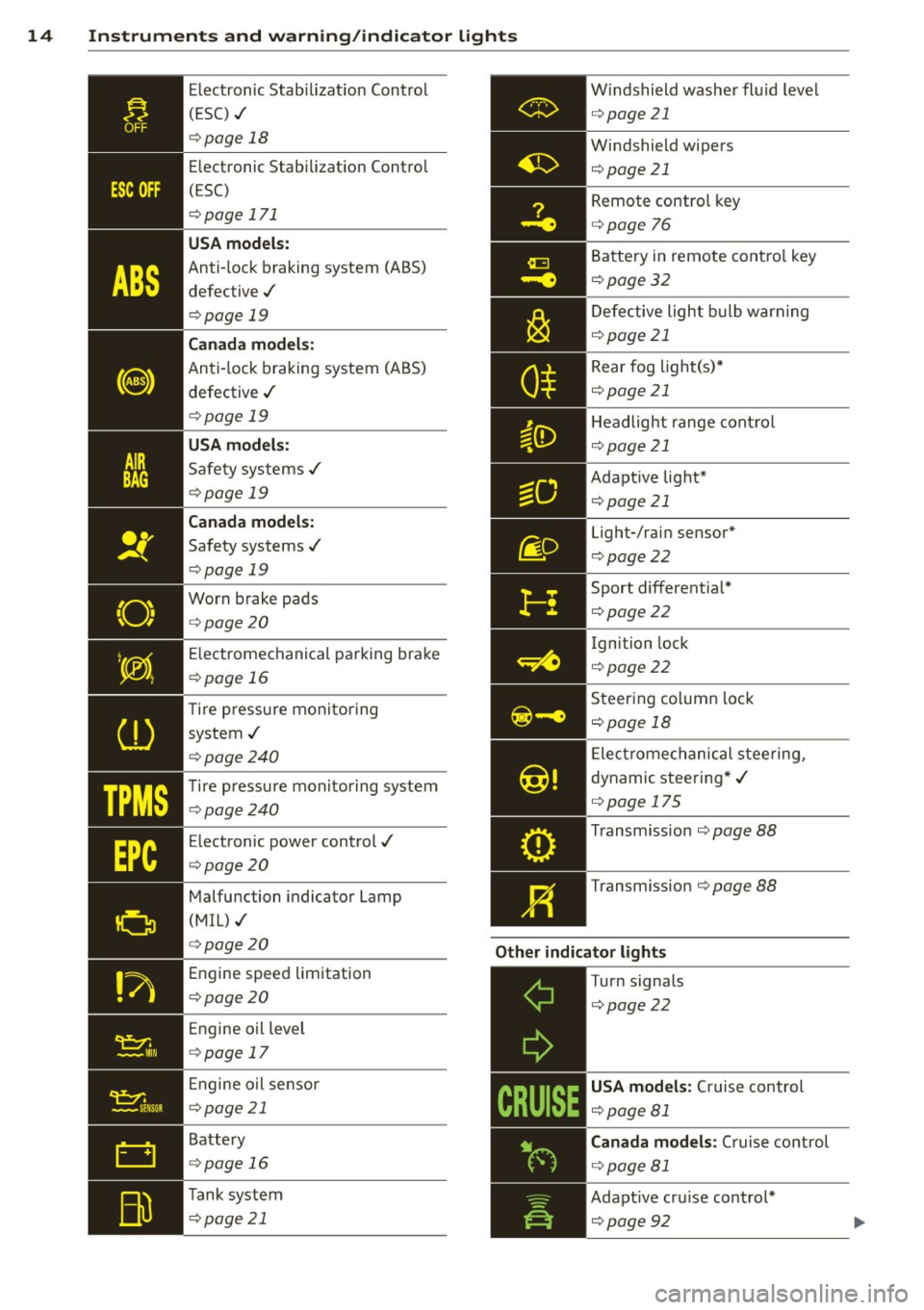
Electronic Stabilization Control
( ES C) ./
¢page 18
Electronic Stabilization Control
(ESC)
¢ page 171
USA models:
Anti-lock braking system (ABS)
defective ./
¢ page 19
Canada models:
Anti-lock braking system (ABS)
defective ./
¢ page 19
USA models:
Safety systems ./
¢page 19
Canada models:
Safety systems ./
¢ page 19
Worn brake pads
¢ page 20
E lectromechanical parking brake
¢ page 16
T ire pressu re monitoring
system ./
¢ page240
Tire pressure mon itoring system
¢page240
Electronic power control./
¢ page20
Malfunction indicator Lamp
(MIL) ./
¢ page 20
Engine speed limitation
¢ page20
Engine oil leve l
¢ page 17
Engine oil sensor
¢page 21
Battery
¢ page 16
Tank system
¢ page 21 Windshield
washer fluid level
¢ page21
Windshield wipers
¢page21 Remote control key
¢page
76
Battery in remote control key
¢page32
Defective light bulb warning
¢page21
Rear fog light(s)*
¢page21
Headlight range control
¢page 21
Adapt ive light*
¢page21
Light-/rain sensor*
¢page22
Sport differentia l*
¢page22
Ignition lock
¢ page22
Steering column lock
¢page 18
Electromechanical steering,
dynamic steering*./
¢ page 175
Transm ission ¢page 88
Transm ission ¢page 88
Other indicator lights
-------------
Turn signals
¢page22
USA models : Cru ise control
¢page 81
Canada models : Cruise control
¢ page81
Adapt ive cru ise control*
¢page92
Page 23 of 284
M N
er
u..
co ,...., \!) er, ,...., er, ,....,
Instruments and warning/indicator lights 21
Drive to your authorized Aud i dealer immedi
ately to have the malfunction corrected .
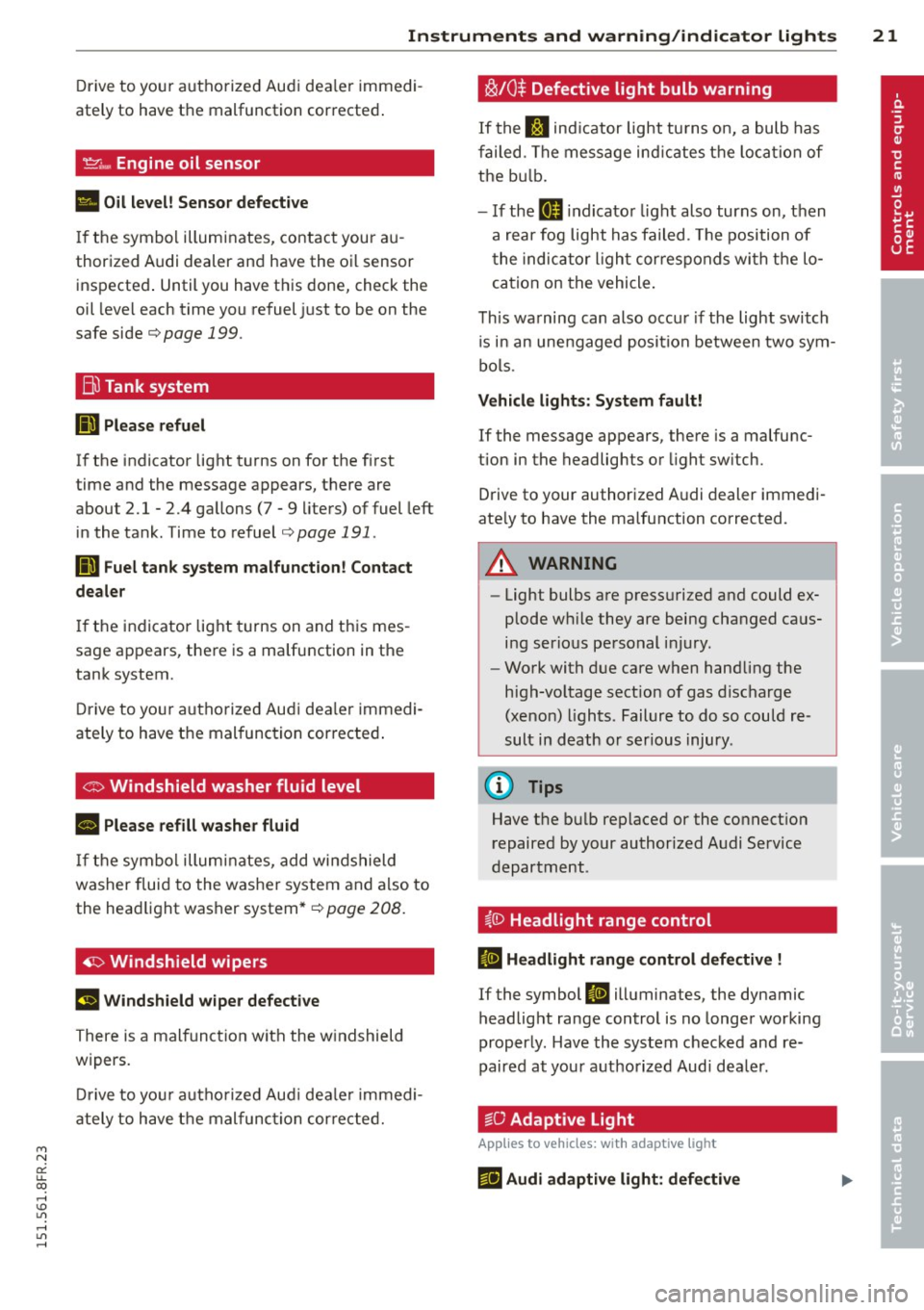
~ .... Engine oil sensor
• Oil level! Sensor defective
If the symbol illuminates, contact your au
thorized Audi dealer and have the oi l sensor
inspected . Until you have this done, check the
oil leve l each time you refuel just to be on the
safe side
,=;,page 199.
Bil Tank system
liD Please refuel
If the indicator light turns on for the first
time and the message appears, there are
about 2.1- 2.4 gallons (7 -9 liters) of fuel left
in the tank. Time to refuel
,=;,page 191.
Ii'] Fuel tank system malfunction! Contact
dealer
If the indicator light turns on and this mes
sage appears, there is a malfunction in the
tank system.
Drive to your au thorized Aud i dea ler immedi
ately to have the mal function corrected .
If the symbol illuminates, add windshield
washer fluid to the washer system and also to
the headlight washer system*¢
page 208.
~ Windshield wipers
E!I Windshield wiper defective
There is a malfunction with the windshield
wipers.
Drive to you r autho rized Aud i dealer immedi
ately to have the malfunction corrected.
~/0$ Defective light bulb warning
If the J:I ind icat or light turns on, a bulb has
failed . The message indicat es the location of
the bulb .
- If the
II indicator light also turns on, then
a rear fog light has failed . Th e position of
the indicator l ight cor responds with the lo
cation on the vehicle.
This warning can also occur if the light switch
is in an unengaged position between two sym
bols .
Vehicle lights : System fault!
If the message appears, there is a malfunc
tion in the headlights or light switch.
Drive to your authorized Audi dealer immedi
ate ly to have the malfunction corrected.
_& WARNING
- Light bulbs are pressurized and could ex
plode wh ile they are being changed caus
ing serious personal injury.
- Work with due care when handling the
high-voltage sect ion of gas discharge
(xenon) lights. Failure to do so could re
sult in death or serious injury.
@ Tips
Have the bulb replaced or the connect ion
repaired by your authorized Audi Service
department .
i,0 Headlight range control
ID Headlight range control defective !
If the symbol ID illuminates, the dynamic
headlight range control is no longer working
properly . Have the system checked and re
paired at your authorized Audi dea ler.
§0 Adaptive Light
App lies to vehicles: with adaptive ligh t
f!J Audi adaptive light: defective
Page 58 of 284

56 Clear vision
-If swallowed and person is conscious,
rinse mouth with water for at least 15
minutes. Do not induce vomiting unless
instructed to do so by medical professio
nal. Get medical attention immediately.
d) Note
Liquid electrolyte leaking from broken mir
ror glass will damage any plastic surfaces
it comes in contact with. Clean up spilled
electrolyte immediately with clean water
and a sponge.
@ Tips
- Switching off the dimming function of
the inside rear view mirror also deacti
vates the automatic dimming function of
the exterior mirrors.
-Automatic dimming for the mirror only
operates properly if the light striking the inside mirror is not hindered by other ob
jects.
- The automatic dimming mirrors do not
dim when the interior lighting is turned
on or the reverse gear is selected.
Sun visors
1--~---'
Fig. 63 Driver's side: sun visor
The sun visors for the driver and passenger
can be pulled out of their brackets in the cen
ter of the vehicle and turned towards the
doors @.
The mirror light switches on when the cover over the vanity mirror@ opens.
Wiper and washer
system
Switching the windshield wipers on
Fig. 64 W indshield w iper lever
Move the windshield wiper lever to the corre
sponding position:
@ -Windshield wiper off
@ -Interval mode. To extend/shorten the
wiper intervals, move the switch@ to the
left/right. In vehicles with a rain sensor* the
wipers turn on in the rain once the vehicle
speed exceeds approximately 2 mph (4 km/h).
The higher the sensitivity of the rain sensor* is
set (switch @ to the right), the earlier the
windshield wipers react to moisture on the
windshield. In some models, you can switch
rain sensor mode off and switch intermittent
mode on in the MMI*. Select:
!CARI function
button
> Car systems* control button > Driver
assist
> Rain sensor . In intermittent mode,
you can adjust the interval time using the@
switch.
@ -Slow wiping
@ -Fast wiping
@-Single wipe
® -Clean the windshield. To eliminate water
droplets, the windshield wiper performs one
afterwipe operation after several seconds
while driving . You can switch this function off
by moving the lever to position ® within 10
seconds of the afterwipe operation. The after
wipe function is reactivated the next time the
ignition is switched on.
Page 59 of 284

M N
er
u..
co ,...., \!) 1.1'1 ,...., 1.1'1 ,....,
Cleaning the headlights*. The headlight wash
er system* operates only when the headlights
are on. If you move the lever to position@,
the headlights a re washed in intervals .
_& WARNING
-The rain sensor is only intended to assist
the driver. The driver is still responsible
for manually switching the wipers on ac cording to the visibility conditions.
- The windshield may not be treated with
water-repelling windshield coating
agents. Unfavorable conditions, such as
wetness , darkness, low sun, can result in
increased glare. Wiper blade chatter is
also possible.
- Properly functioning windshield wiper
blades are required for a clear view and
safe driving ¢
page 57, Replacing
windshield wiper blades.
(D Note
- In the case of frost, check whether the
windshield wiper blades are frozen to
the windshield. Switching on the wind
shield wipers can damage the wiper blades!
- Prior to using a car wash, the windshield
wiper system must be switched
off (lever
in position @). This helps to prevent un
intentional switching on and damage to
the windshield wiper system .
- The windshield wipers are switched
off
when the ignition is turned off . Activate
the windshield wipers after the ignition is switched back on by moving the wind
shield wiper lever to any position.
- Worn or dirty windshield wiper blades result in streaking . This can affect the
rain sensor* function . Check your wind
shield wiper blades regularly.
- The washer fluid nozzles of the wind
shield washer system are heated at low
temperatures when the ignition is on.
- When stopping temporarily, (e.g . at a
traffic light) the set speed of the wind-
Clear vision 5 7
shield wipers is automatically reduced by
one speed.
· Cleaning windshield wiper blades
Clean the windshield wiper blades when they
begin to leave streaks. Use a soft cloth and
glass cleaner to clean the windshield wiper blades.
.. Place the windshield wiper arms in the se rv
ice position. Refer to¢
page 57.
.. Lift the wiper arm away from the front win
dow.
_& WARNING
Dirty windshield wiper blades can impair
your view. This can lead to accidents.
Replacing windshield wiper blades
Fig. 65 Remov ing w in d sh iel d w iper blade
Wiper service position/blade replacement
position
.. Switch the ignition off and move the wind
shield wiper lever to position©¢
page 56,
fig . 64.
The windshield wipers move into the
service position.
.. To bring the wipers back into the original
position, switch the ignition on and press
the windshield wiper lever.
You can also turn the service position on or
off
in the radio/MM!*:
.. Switch the windshield wipers
off (position
@ ¢page 56, fig. 64).
.. Select: !CAR ! function button > Windshield
wipers
> Service position > on/off . Or ..,_
Page 71 of 284

M N
er
u..
co ,...., \!) 1.1'1 ,...., 1.1'1 ,....,
Warm and cold Climate controls
Description
Th e climate control sy stem warms, cools and
adds humidity to the a ir in the veh icle inter io r.
It is the most effect ive when the windows and
power top are closed. If there is a build-up of
h eat inside the vehicle, ventilation can help to
speed up the cooling process .
I n all he ating mode f unctions except
defrost,
the blower on ly switches to a higher speed
once the engine coolant has reached a certain
temp erature.
Condensat ion from the cooling sys tem can
d rip and form a puddle of water under the ve
h icle. This is normal and does not mean there
is a leak .
Pollutant filter
The po llutant filte r removes po llutants s uch
as dus t and pollen from the air.
The air pollutants filte r must be changed at
the intervals spec ified in you r Wa rra nty
&
M aintenance book let, so tha t the air condi
tioner can prope rly work .
If you drive your vehicle in an area w ith h igh
a ir po llution , the fi lter may need to be
changed more frequent ly than specified in
your Aud i Warranty
& Ma intenance bookle t. If
in doubt, ask your authorized A udi Service Ad
v isor for advice .
Key coded settings
The clima te control sett ings are automat ically
stored and assigned to the remote co ntro l key
that is in use. These set tings are differe nt
when the power top is open or closed .
& WARNING
Reduced visibility is dangero us and can
cause accidents . -
Warm and cold 69
-For safe driving it is very important that
all windows be free of ice, snow and con
densat ion.
- Comp letely fam iliarize yourse lf with the
proper use and funct ion of the heat ing
and ve nti lation system and especially
how to defog and defrost the w indows.
- Never use the windshield wiper/washer
system in freez ing weather unt il you
have warmed the w indshield first, using
the heating and ventilation system. The
washer sol ution may free ze o n the wind
shie ld an d red uce visib ility.
(D Note
- If you s uspect that the air conditioner
has been damaged, switch the system
off to avoid furt her damage and have it
i n spected by a q ua lified dea lership.
- Repairs to the Audi air condition er re
quire specia l techni cal know ledge and
speci al tools. Contact an autho rized Aud i
dealer fo r ass istance.
@ For the sake of the environment
B y reduci ng the amou nt of f uel you use,
you also re duce the amount of pollu tan ts
emitted in to the a ir .
(D Tips
- Keep the air intake s lo ts ( in fro nt of the
w indshield) free from ice, snow and de
br is in order to maintai n the proper f unc
tion of the climate control system.
- T he energy m anagement system may
switch the seat heating* or rear window
defroster off temporar ily . These systems
are available again as soon as the energy
balance has been restored .
- Air escapes through vents under the rear
window. When placing items of clothing
on the luggage compartment cover, en
sure that the openings are not covered.
Page 186 of 284

184 Vehicle care and cleaning
Vehicle care and
cleaning
General information
Regular, proper care helps to maintain your
ve hicle 's value. It can also be a requirement
when subm itting warranty claims for corro
sion damage and paint defects on the body .
The required cleaning and care prod ucts can
be obtained from your authorized Audi dea ler
or qualified workshop . Read and follow t he in
structions fo r use on the pac kaging .
A WARNING
-Us ing cleaning and care products incor
rect ly can be dange rous to your he alth .
- Always store cleaning and care products
o ut of rea ch of children to redu ce the r is k
of po ison ing.
@ For the sake of the environment
- Preferably use environmentally-friendly
products when buying cleaning agents .
- Do not d ispose of leftover cleaning and
ca re p rod ucts with household trash .
Car washes
-
The longer deposits remai n on t he veh icle, the
mo re the surface ca n be damaged. H igh tem
pe rat ures such as those caused by su nlight in
crease the d amaging effe cts.
Before washing, wet heavy deposi ts w ith p len
ty of wate r.
Stubbor n depos its s uch as bird dropp ings or
tree sap are best removed with plen ty of wa
ter and a m icrofiber cloth .
A lso, was h the underside of your vehicle once
road salt stop s be ing used for the season.
Pres sure washers
When washing your ve hicles w ith a pressure
washer, always follow the operating instr uc
tions provided w ith the pressure washe r. T his
is especially important in regard to the pres- s
u re and sp raying dis tance. Do not aim the
s p ray direct ly at sea ls on side windows, doo rs,
t h e hood o r the rear lid or at t ires, r ubber ho
ses, insulat ing mater ial, power top, sensors *
or camera lenses*. Keep a distance of at least
16 inches (40 cm).
Do not remove snow and ice with a pressure
washer.
Never use rotary nozzles or high pressure noz
zles .
T he wate r temperature m ust not be above
1 4 0 ° F (6 0 °C ).
Automatic car washes
Sp ray off the ve hicle befo re washing .
Make sure that the w indows and power top
are closed and the winds hield wipers are off.
Fo llow i nstructions from the car wash opera
tor, especially if the re a re accessor ies attach
ed to yo ur vehicle .
If possible, use car washes that do not have
brushes .
Only use car washes where the vehicle re
mains stat ionary and the was hing equipment
moves around the ve hicle when washing and
dry ing . Car washes that move the veh icle
t hr ough the car wash us ing a chain are no t
recommend ed .
Wa shing by hand
Clean the ve hicle starting from the top and
worki ng down using a soft sponge or cleaning
brush . Use solvent -free clean ing products .
Washing vehicles with matte finish paint
by hand
To avoid damaging the paint when washing,
first remove dust and large particles from
you r vehicle . Ins ects, grease spots and fi nger
prints are best removed w ith a spec ial cleane r
f o r matte finish paint .
Apply t he prod uct us ing a mic rofiber cloth . To
avo id damaging the pa int surface, do not use
too much pr essure .
Page 187 of 284

M N
er
u..
co ,...., \!) ..,.,
,...., ..,., ,....,
Vehicl e ca re a nd cl eanin g 18 5
Rinse the vehicle thoroughly with water. Then
clean using a neutral shampoo and a soft mi
crofiber cloth.
Rinse the vehicle tho roughly again and let it
air dry. Remove any water residue using a
shammy .
A WARNING
-Only wash the vehicle when the ignition
is off and follow the instructions from
the car wash operator to reduce the risk of accidents .
- To reduce the risk of cuts, protect your
self from sharp metal components when
wash ing the underbody or the inside of
the wheel housings .
- After washing the vehicle, the braking ef
fect may be delayed due to mo isture on
the brake rotors or ice in the winter. The
brakes must be dried first with a few
careful brake applicat ions.
- If you wash the vehicle in an automatic car wash, you must fold the exterior m ir
rors in to reduce the r is k of damage to
the mirrors. Power folding exterior m ir
rors* must only be folded in and out us
i ng the power folding function. -
To prevent paint damage, do not wash
the vehicle in direct sunlight.
- T o reduce the r isk o f damage, do not
wash the power top with a pressure
washer.
- To reduce the risk of damage to the sur
face, do not use insect removing spong
es, kitchen sponges or similar items.
- Matte finish painted vehicle compo nents:
- To reduce the risk of damage to the surface, do not use polishing agents or hard wax.
- Never use car wash cycles that apply
protective wax. It can destroy the
matte fin ish effect.
- Do not place any stickers or magnet ic
signs on vehicle parts painted w ith
matte fin ish paint. The paint cou ld be
damaged when the stickers o r magnets
are removed.
@ For the sake of the environment
Only wash the vehi cle in facilities spec ial ly
designed for that purpose. This will red uce
the risk of dirty water contaminated with
oil from entering the sewer system.
Cleaning and care information
When clean ing and caring for individua l vehi
cle components, refer to the fo llowing tab les.
The information contained there is simply rec ommendations . For questions or for compo- nents that are not listed, re
fer to an author
ized Audi dea ler or qualified workshop . A lso
follow the information found in
Q & .
Cle anin g ext erio r
Component Situation Solution
Wipe r bl ade s
Dirty <=> page 5 7, Cleaning windshield wiper blades
Hea dli ght s/ Dir ty Soft sponge with a m
ild soap solutional
tail li ghts
S en so rs /
Dirty Sensors: soft cloth with a so lvent-free cleaning product
c a mera l ense s Camera lenses: soft cloth with an alcohol -free cleaning
solution
Snow/ice Hand brush/so
lvent-free de-icing spray
•
•