park assist AUDI RS5 COUPE 2015 User Guide
[x] Cancel search | Manufacturer: AUDI, Model Year: 2015, Model line: RS5 COUPE, Model: AUDI RS5 COUPE 2015Pages: 254, PDF Size: 64.12 MB
Page 108 of 254

Parking Sy stem
General Information
App lies to veh icles: w ith pa rk in g system (rear, w ith rear v iew
camera)
F ig . 112 Covered area(!) and uncovered a rea @ of the rear
v iew came ra
• 0
F ig. 1 13 Tru nk lid: Locat io n of the rear v iew camera
Sens ors i n the bumper
Sensors are located in the front and rear bump
ers . If these detect an obstacle, aud ible and v isu
al signals warn you. The range at which the sen
sors beg in to measure is approximate ly:
side 3 ft (0.90 m)
front center 4 ft (1.20 m)
side 2 ft (0.60 m)
rear center 5.2 ft (1.60 m)
Distance warning when reversing starts when an
obstacle is detected in the range of the parking
assist sys tem. As the d istance decreases, the
time interva l between the audib le tones becomes
shorter.
When the d istance is less than 1 ft (0 .30 m), the
tone becomes contin uous . At th is point you
should stop backing up.
If the d istance to an obstacle stays the same , the
volume of the d istance signa l chime is gradua lly
red uced after about 4 se conds (does no t affect
106
the continuous signal tone) . Approach ing anoth
er obstacle wi ll ca use the distance signal to
sound again at the norma l volume .
Rear view cam era coverage area
The M MI display shows the area covered by the
rear view camera
r=> fig. 112 @ . Objects that are
not in the a rea covered @are not shown on the
MMI display .
We recommend tha t you pract ice pa rking with
the rear view came ra in a traffic-free location or
parking lot to become familiar with the system,
the or ientation lines , and their function. When
doing this, there sho uld be good light and weath
er condit ions.
In the MMI display, objects or vehicles appear
closer or further away if:
- you are driving i n reverse gear from a level sur
face on to an incline, or a downwa rd s lope,
- you a re driving i n reverse gear towa rd p rotr ud
ing objects ,
- the vehicle is carrying too mu ch load in the
rea r.
The acc uracy of the o rientation l ines and blue
su rfaces dim inishes if:
- the rear view camera does not provide a reliable
image, for example, in poor visib ility condit ions
or if the lens is dirty,
- the image on the screen is not visib le due to
sun glare and reflection .
Caring for the rear v iew camera lens
The rear view camera is located above the rear li
cense p late bracket. For the parking assist to op
erate, the lens
r=> fig . 113 must be kept clean :
- Dampen t he lens with a household a lcohol-
based g lass cleaner, and clean the lens with a
dry cloth
<=> @) .
-Remove snow with a hand brus h and ice pref
erab ly w ith a de-icing spray
q Q) _
A WARNING
-The parking aid cannot replace the driver's
attention. The driver alone is respons ible for
parking and simi lar driving maneuvers .
~
Page 109 of 254

M N
0:: loo ,...., \!) 1./'1
N 1./'1 ,....,
-Always keep your eyes on the vehicle's sur
roundings, us ing the rear view m irror as
well.
- Do not a llow yourse lf to be distracted from
traffic by the rear view camera pictures.
- If the position and the installation ang le of
the camera has changed, for example, after
a rear end collision, do not continue to use
the system for safety reasons. Have it
checked by a qualified dealership.
(D Note
- Low obstacles already signaled by a warning
can d isappear from the system's detection
range as they are approached and will not
continue to be signaled. Objects such as barrier chains, tra ile r draw bars, thin paint
ed ve rtical po les or fences may not be de
tected by the sys tem, posing r isk of dam
age.
- Never use warm or hot water to remove
snow or ice from the rear view c amera lens -
danger of crack fo rmation on the lens!
- When cleaning the lens, never use p roducts
t h at are abr asive.
Switching on/off
Applies to vehicles: with pa rk in g system plus w it h rear view
camera
The rear view camera switches on automatically
together with the acoustic park assist when you
put the vehicle in reverse.
Sw itching on
"' Switch the MMI on and sh ift into reverse or
"' press the
Pw A button in the center console
<=> page 104, fig. 108. A short confirmation
tone sounds and the LED in the button turns
on.
Switching between the rear v iew camera and
optical display
"' Press the G raphic control button®
<=>page 108, fig . 114 to see the opt ica l display .
"' Press the
Rear view control button to see the
rear view camera image.
Parking Syste m
Switching off
"' Dr ive faste r than 6 mp h (10 km/h) , or
"' press the
P111A but ton, or
"' switch off the ignition.
If you press a function bu tton on the MMI con tro l
console, the rear view camera pictu re d isappears .
The rear view camera picture reappears the next
time you park .
A WARNING ,=-
-The MMI d isplay cannot show, or cannot ad
equate ly show, certa in objects (such as
small posts or grating), recesses in the
ground and p rotruding parts on another car.
- Only use the rearview camera to assist you if
it shows a good, clear picture. For examp le,
the image may be affected by t he su n shi n
i n g into the lens, dirt on the lens o r if the re
is a defect.
- Use the rearv iew camera only with the rear
lid compl etely closed . Make sure any objects
you may have mounted on the rear lid do
no t block the re arv iew came ra.
(0 Tips
- The rear view came ra picture is available as
soon as the MMI Disp lay or t he M MI is
sw itched on, o r the start- up phase is com
ple ted .
- T he se nsors m ust be kept clean and free of
snow and ice fo r the pa rk ass ist to operate .
- Yo u can change the volum e and pitch of the
signa ls as well as the d isplay
<=> page 110.
-What appea rs in the display is time-delayed.
107
Page 112 of 254
Pa rkin g Sys tem
swings out more than the vehicle rear. Main
tain plenty of distance from an obstacle so
that yo ur o utside mirror or a corner of your
vehicle does not coll ide with any obstacles -
danger of accident!
- Remember to ma intain sufficient clearance
from the curb to avoid damaging the wheel rims .
(D Tips
The left or right orientation lines and surfaces
will be displayed, depending on the turn sig
nal being used.
Adjusting the display and warning tones
App lies to vehicles: with parking system plus/parking system
plus w ith rea r view camera
The display* and warning tones are adjusted in
the radio or MMI*.
" Selec t:
I CARI funct ion button > Park ing s ystem .
Or
"Select : ICARI function button> Car sy stem s*
control button> Driver assi st> Par kin g aid .
D ispl ay*
-Off -when the parking system is switched on,
only audible signals are given.
- On -when the parking sy stem is switched on,
the p ic ture from the rear view came ra is dis
played .
Warning t one s
- Re ar volume -
rear sensor volume
-Rea r fr equency -rear sensor frequency
- Fro nt vo lume -front sensor volume
- Fron t frequenc y -front sensor frequency
- Mu sic volum e w hile pa rking -when the park -
ing system is switched on, the volume of the
active aud io source is lowered.
The newly adjusted value is br iefly heard from
the signal generator . The settings are automati
cally stored and assigned to the remote cont ro l
key.
110
A WARNING
-
- Always make sure that the vo lume and fre-
quency of the warning tones is adjusted so
that you can easily hear the acoustic d is
tance s ignal even if the radio is playing, the
air-condi tioner blowe r is on High or there is
a high level of outside noise.
- Check the settings whenever someone else
has dr iven the vehicle befo re you .
@ Tips
- The warn ing tones can also be adjusted di
rectly from the rear v iew camera image .
Simply press the Settings* cont ro l button.
- Changed settings are activated when park
ing assist is switched on again .
Error messages
Applies to vehicles: with parking system plus with rear view
camera
T here is an erro r in the system if the L ED on the
PwJl. switch is b link ing and you hear a continuous
alarm for a few seconds after switching on the
parking system or when the parking system is al
ready act ivated. Have your authorized Audi dealer
cor rect the erro r.
Keep the sen so rs in the rear bumper clea n and
free from ice so that the acoustic park assist sys
tem can function properly .
(D Tips
If the error is not corrected before you switch
off the ignition, when you switch on the park
i ng system again, the LED in the
Pw A sw itch
will blin k.
Page 219 of 254
"' N
0:: loo
rl I.O
"' N
"' rl
TMS can be used at temperatures down to -4 °F
(- 20 °C).
A WARNING
Take the following precautions after repairing
the tire:
- Do not drive faster than 50 mph (80 km/ h)!
- Avoid full -throttle acceleration, heavy brak -
ing and fast corner ing.
- T he ve hicle's road behavior can be affec ted.
- T ir es sealed w ith
TMS a re intended only for
temporary , short-t erm use. Damaged t ires
must be replaced. D rive carefully to the nex t
professional repair facility .
- After using the tire sea lant the tire pressure
monitoring system may no longer work
properly . Drive ca refully to the next profes
sional repair facility.
- TMS must NOT be used,
- for cuts or punctures in the tire which a re
larger than 0.16 inch (4 mm)
- for damage to the rim
- if you have been driv ing with very low tire
pressures or tires with no air
- Seek profess ional assistance if it is not pos
sible to repair the tire with the tire sealant.
- The tire sealant must not come into contact
with skin, eyes or clothing.
- If you get any tire sealant in your eyes or
come into contact with it, rinse the affected
area thoroughly with clean water. F ind a
physician immediately!
- Change any cloth ing contaminated with t ire
sealant immediately.
- Do not inhale the vapor!
- If you have swallowed tire sealant, rinse
yo ur mouth thorough ly right away and drink
plenty of water.
- Do not induce vomiting! F ind a phys ic ian
immed iate ly!
- If you have allergic reactions, find a physi
cian immediately.
- Keep the t ire sealant away from chi ldren.
(D Note
Do not use commerc ia lly available tire sea l
ants. The electrical components of the tire
Em erg en cy ass is tan ce
press ure monitoring system w ill no longe r
work properly .
@ For the sake of the environment
Used sealant bottles ca n be dropped off a t a
recycling fac ility.
© Tips
- If sea la nt has run o ut, allow i t to d ry. Then
yo u ca n pee l it off.
- Have the tire sea lant rep laced eve ry 4 years
at a de alership.
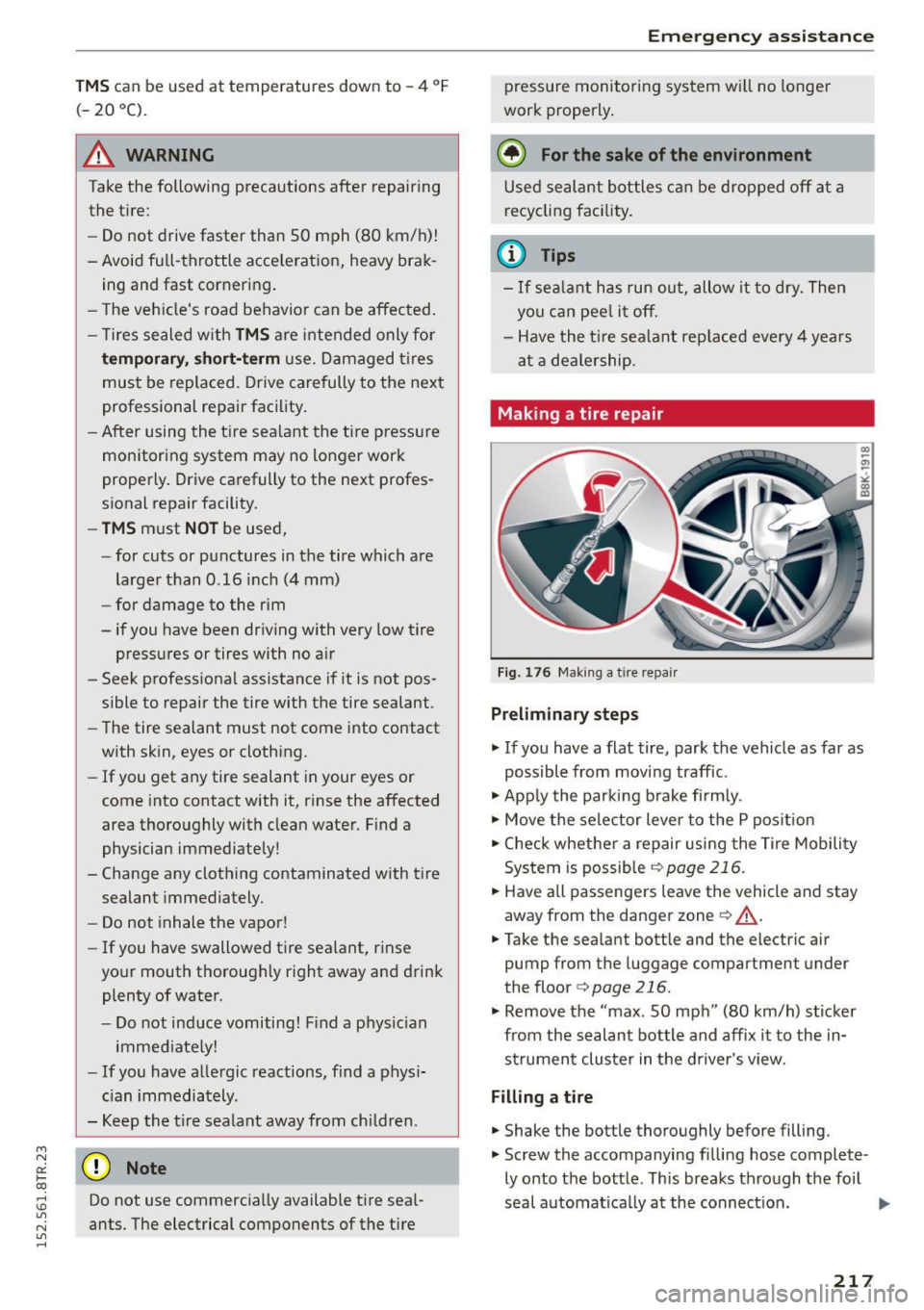
Making a tire repair
Fig. 176 Maki ng a t ire repair
Pr eliminary steps
"' If you have a flat tire, park the vehicle as far as
possible from moving traffic .
"' App ly the parking b rake firmly.
"' Move the selector lever to the P pos ition
"' Check whether a repair using the Tire Mobility
System is possib le
~ page 216.
"' Have all passengers leave the vehicle and stay
away from the danger zone
Q _A .
"'Take the sea lant bottle and the electric air
pump from the luggage compartment under
the floor <=>
page 216.
"' Remove the "max . 50 mph" (80 km/h) sticker
from the sealant bottle and aff ix it to the in
s trument cluster in the driver 's view.
Filling a tire
"' Shake the bott le thoroughly before filling.
"' Screw the accompanying fi lling hose complete-
ly onto the bottle . This breaks through the foil
s e al automat ica lly a t the connect ion.
217
Page 220 of 254
Emerg enc y ass is tance
"' Remove the valve cap from the tire valve and
unscrew the valve insert using the accompany
ing valve insert tool¢
fig. 176.
"'Lay the valve insert on a clean surface.
"' Remove the sealing plug from the filling hose
and connect the hose to the tire valve .
"' Hold the bottle w ith the bottom facing upward
and empty the ent ire contents into the tire .
"'T hen pull out the hose and screw the valve in
sert t ight ly back into the tire va lve.
Inflating a ti re
"' Screw the filling hose for the electric air pump
onto the tire valve and insert the connector into
the cigarette lighter .
"' Inflate the tire between 2.0 and 2.5 ba r and
read the pressure from the ga uge .
"' If this tire pressu re is not reached, drive your
vehicle approximate ly 10 meters forward or
backward so that the sea lant can be redistribut
ed inside the tire. If at this time the required air
pressure st ill cannot be reached, the tire is too
badly damaged and cannot be repa ired with the
ti re sealant.
F in al ch eck
"' After driving for about 10 minutes, stop and
check the tire press ure.
"' If tire pressure is less than 1.3 bar, the tire is
too severely damaged . Do not cont inue to
drive. Seek professional assistance .
A WARNING
- Turn on the eme rgency flashers and set up
the emergen cy tr iangle if you have flat tire
wh ile in moving traffic. Th is is for yo ur pro
tection and the for the safety o f other driv
ers.
- Have all passengers leave the vehi cle and
stay away from the danger zone (for exam
ple, behind a guard rail).
- Read and fo llow the manufacturer's safety
precautions on the compressor and in the
instructions on the bottle of sealant!
- If a t ire pressure of 2.0 bar cannot reached
after inflating for six minutes, then the tire is too severe ly damaged . Do not contin ue
dr iv ing !
218
-Obtain qua lified help i f it is not possible to
perform the repair w ith the t ire sea lant.
- If the tire pressure is less than 1 .3 bar after
10 minutes of driving, then the the t ire is
too severe ly damaged. Do not continue driv
ing. Seek professional assistance.
(D Note
Partic ular care is necessary if you are mak ing
a tire repa ir on a steep incl ine.
(D Tips
- Do not operate the electric air pump for
more than 6 minutes witho ut stopp ing, oth
erwise it can overheat. When the air pump
has cooled down, you can continue to use it.
- If sea lant has spilled out, let it dry and then
you can remove it by peeling it away like a
foil.
- Remember to obtain a new bott le of sealant
from your authorized Audi dealer after re pairing a tire. After this, the functionality of
the tire repair set is restored .
- Obey all laws.
Replacing wheels
Before changing a wheel
Observe the following precautions for your own
and your passenger's safety when changing a
wheel.
"' After you experience a t ire failure, pull the ca r
well away from mov ing traffic and t ry to reac h
l e vel ground before you stop
~ ,&.
"' All passengers should leave the car and move
to a safe location ( for ins tance , behind the
guardrail) ¢,& .
"' Engage the parking brake to prevent your ve hi
cle from ro lling unintent iona lly ¢ ,& .
"' Move the selector le ver to the P position .
"' Take the jack
¢page 216 out of the luggage
compartment .
Page 227 of 254
"' N
0:: loo
rl I.O
"' N
"' rl
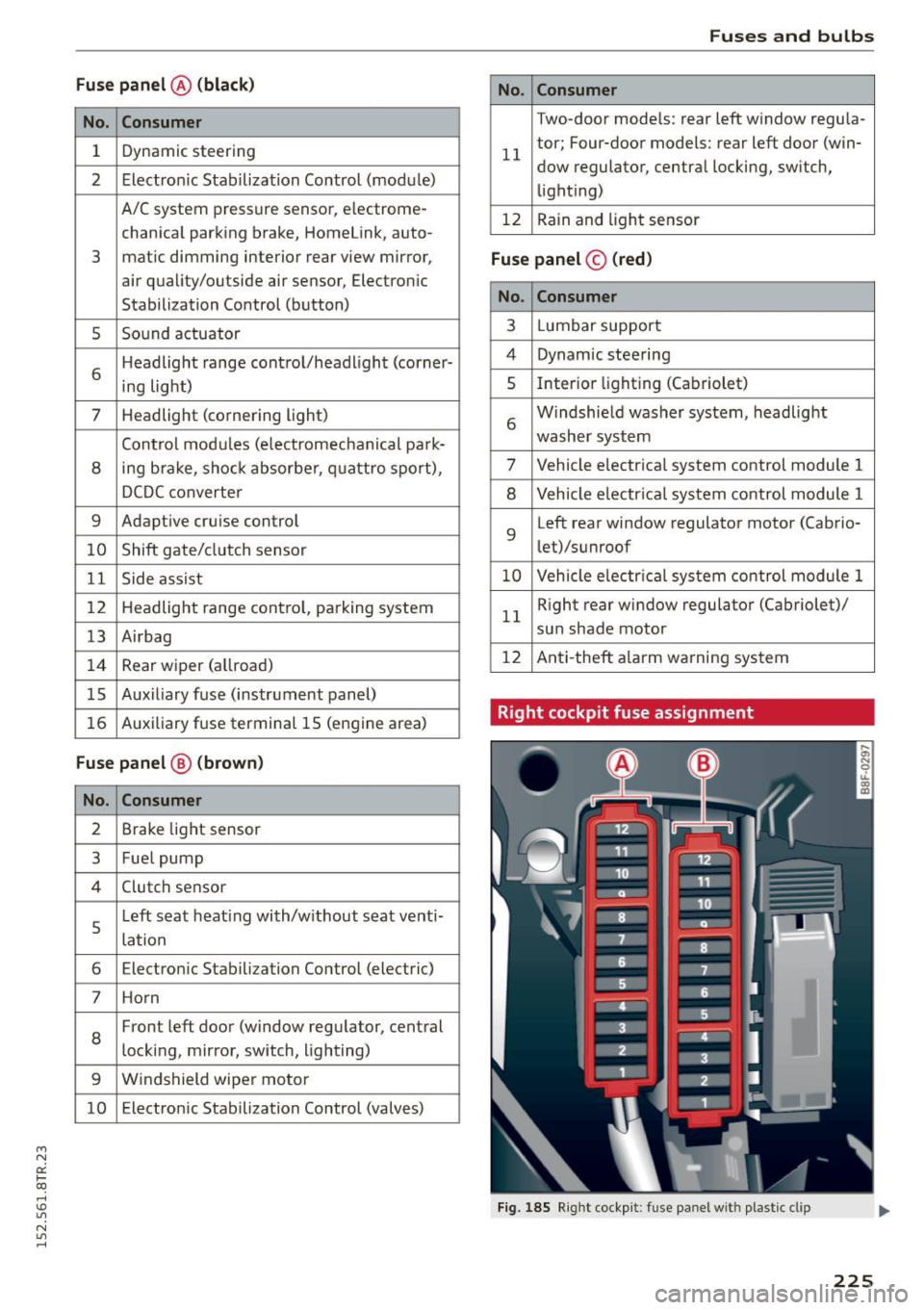
Fu se pa nel @ (black )
No. Consumer
1 Dynamic steering
2 Electron ic Stabilization Control (module)
A/C system pressure sensor, electrome-
chanical parking brake, HomeLink, auto-
3 mat
ic dimming interior rear view mirror,
air quality/outside air sensor, Electron ic
Stabilization Control (button)
s Sound actuator
6 Headlight range control/headl
ight (corner-
ing light)
7 Headlight (cornering light)
Control modu les (electromechanical park-
8 ing brake, shock absorber, q uattro sport),
DCDC converte r
9 Adaptive
cruise control
10 Shift gate/clutch sensor
11 Side assist
1 2 Headlight range cont ro l, parking system
13 Airbag
14 Rear
wiper (a llroad)
15 Auxiliary fuse (instrument panel)
16 Auxiliary
fuse termina l 15 (engine area)
Fuse p anel @ (brown )
No. C onsumer
2 Brake light sensor
3 Fuel pump
4 Clutch sensor
5
Left seat heating with/without seat venti-
lation
6 Electronic Stabilization Control (electric)
7 Ho rn
8
Front left door (window regulator, central
locking, mirror, switch, lighting)
9 Windshield wiper motor
10 Electronic Stabilization Control (valves) Fu
ses a nd bulb s
No. Consumer
Two-door mode ls: rear left window regula-
11 tor; Four-door
models: rear left door (win-
dow regulator, central locking, switch,
light ing)
12 Rain and l
ight sensor
Fuse panel © (r e d )
No . Con sumer
3 Lumbar support
4 Dynamic steering
5 Inter
ior l ight ing (Cabriolet)
6 Windshie
ld washer system, headlight
washer system
7 Vehicle electrica l system control module 1
8 Vehicle electr ica l system control module 1
9 Left rear
window regulator motor (Ca brio-
let)/su nroof
10 Vehicle electr ica l system co ntrol module 1
11 Right rear
window regulator (Cabriolet)/
sun shade motor
12 Anti-theft
alarm warning system
Right cockpit fuse assignment
Fig. 185 Right cockpit: fu se panel with plastic cl ip
225
Page 243 of 254
M N
0:: loo ,...., \!) 1.1"1
N 1.1"1 ,....,
B
Battery ..... .. ................ ..... . .
16
Battery location inside the luggage compart-
ment. ..... .. ................ ..... . 197
Charge level . . . . . . . . . . . . . . . . . . . . . . . . 17 5
Charging . . . . . . . . . . . . . . . . . . . . . . . . . . . 198
Energy management .... .. .. .. .. .. .. .
Important warnings when working on the
battery .. ... ............. ...... ... .
Jump starting ............ .. .. .. .... .
Replacing the battery ..... .. .. .. .. .. .
Working on the battery .... .. .. .. .. .. .
Before driving ................ ... ... . .
Belt tensioners ...................... .
Blended gasoline .......... .... .. .. .. .
Blower (automatic climate control) .. .. .. . .
Booster seats ................ ... .... .
Brake flu id 175
197
228
199 197
111
126
183
69
158
Changing the brake flu id . . . . . . . . . . . . . . 196
Checking the brake fluid level . . . . . . . . . . 195
Brake system Anti -lock braking system . . . . . . . . . . . . . . . 18
Brake fluid specifications for refill and re
placement . . . . . . . . . . . . . . . . . . . . . . . . . 196
Brake light defect ive . . . . . . . . . . . . . . . . . . 21
Brake power assist unit . . . . . . . . . . . . . . . 172
Brakes ..... .. ................ ..... . 172
Ceramic brakes.............. ... .... . 172
Electromechanical parking brake . . . . . . . . 75
Warning/indicator lights . . . . . . . . . . . . . . . 15
Worn brake pads symbol . . . . . . . . . . . . . . . 19
Braking Brake assist . . . . . . . . . . . . . . . . . . . . . . . . 169
Emergency braking function . . . . . . . . . . . . 77
brak ing guard . . . . . . . . . . . . . . . . . . . . . . . . . 88
Messages
Settings
. . . . . . . . . . . . . . . . . . . . . . . . . . .
... ................ ... .... ..
Break-in period
Brake pads ............... ... ... ... .
Tires .... .. .......... · · · · · · · · · · · · · ·
Breaking in .. ............. .... .. .... . 95
95
172
177 177
New tires . . . . . . . . . . . . . . . . . . . . . . . . . . 203
Bulbs . . . . . . . . . . . . . . . . . . . . . . . . . . . . . . . 227
Index
C
California Proposition 65 Warning ... .. . .
Battery specific . ................. .. .
Capacities .. .. .. .. .... ...... ... .. .. . .
Engine oil ... .. . .. ............ .. .. . .
Care ... .... .... ................... . .
Cargo area 188
198
234 189
181
refer to Luggage compartment . . . . . . 62, 117
Catalytic converter . . . . . . . . . . . . . . . . . . . . 178
Center armrest . . . . . . . . . . . . . . . . . . . . . . . . 56
Central locking . . . . . . . . . . . . . . . . . . . . . . . . 30
Central locking switch . . . . . . . . . . . . . . . . . 34
Convenience key . . . . . . . . . . . . . . . . . . . . . . 33
Remote contro l key . . . . . . . . . . . . . . . . . . . 33
Ceram ic brake rotors
New brake pads . . . . . . . . . . . . . . . . . . . . . 172
Certification . . . . . . . . . . . . . . . . . . . . . . . . . 239
Changing engine oil . . . . . . . . . . . . . . . . . . . 192
Checking Engine coolant level. . . . . . . . . . . . . . . . . . 193
Child restraints
Danger of using child restraints in the front
seat.. .. .. .. .. .. ............... .. .. 129
Where can I get additional informat ion
about child restraints and their use? . . . . 167
Child restraint system anchors . . . . . . . . . . 163
Child safety . . . . . . . . . . . . . . . . . . . . . . . . . . 150
Important safety instructions for using child
safety seats . . . . . . . . . . . . . . . . . . . . . . . . 153
Installing a child restraint using the LATCH
system ....... .. ..... ........... .. .
Lower anchorages ................ .. .
Mounting and releasing the anchorage
hook ..... .. .. .. .. ............... . .
Tether anchors
Tether straps .... ................ .. .
Child safety seats 164
164
164
165
165
Booster seats . . . . . . . . . . . . . . . . . . . . . . . 158
Convertib le child seats . . . . . . . . . . . . . . . 156
Danger of using child restraints in the front
seat . . . . . . . . . . . . . . . . . . . . . . . . . . . . . . . 129
How do I properly install a child safety seat
in my vehicle? .... ................ ... 153
I nfant seats . . . . . . . . . . . . . . . . . . . . . . . . 155
LATCH system . . . . . . . . . . . . . . . . . . . . . . . 164
Safety instruc tions . . . . . . . . . . . . . . . . . . . 153
Unused safety belts on the rear seat 155
241
Page 245 of 254

M N
0:: loo ,...., \!) 1.1'1
N 1.1'1 ,....,
Electromechanical parking brake
Emergency braking . . . . . . . . . . . . . . . . . . . 77
Indicator light . . . . . . . . . . . . . . . . . . . . . . . 7 5
Parking . . . . . . . . . . . . . . . . . . . . . . . . . . . . . 76
Releasing and closing . . . . . . . . . . . . . . . . . 75
Starting assist . . . . . . . . . . . . . . . . . . . . . . . 76
Starting from rest . . . . . . . . . . . . . . . . . . . . 76
Warning/indicator lights . . . . . . . . . . . . . . . 16
Electronic differential lock
Warning/indicator lights . . . . . . . . . . . . . . . 18
Electronic Differential Lock . . . . . . . . . . . . . 169
E lect ronic different ial lock (EDL)
Warn ing/ indicator lights . . . . . . . . . . . . . . . 18
Electronic immobilizer . . . . . . . . . . . . . . . 12, 36
Electronic power control
(EPC) warning/indicator light . . . . . . . . . . . 20
Electronic stabilization control
Sport mode . . . . . . . . . . . . . . . . . . . . . . . . 170
Electro nic Stabilization Control . . . . . . . . . . 169
E lectronic Stabilization Control (ESC)
Warning/indicator lights . . . . . . . . . . . . . . . 18
Emergency actuation
Doors . . . . . . . . . . . . . . . . . . . . . . . . . . . . . . 35
I gnition key . . . . . . . . . . . . . . . . . . . . . . . . . 33
Panoram ic tilting sunroof . . . . . . . . . . . . . . 39
Sun shade (roof) . . . . . . . . . . . . . . . . . . . . . 39
Emergency braking . . . . . . . . . . . . . . . . . . . . . 77
Emergency flasher . . . . . . . . . . . . . . . . . . . . . 45
Warning/indicator lights . . . . . . . . . . . . . . . 22
Emergency key . . . . . . . . . . . . . . . . . . . . . . . . 31
Starting engine . . . . . . . . . . . . . . . . . . . . . . 72
E mergency operation
Emergency braking function (parking brake) .7.7
Emergency sta rting . . . . . . . . . . . . . . . . . . . 228
Energy management . . . . . . . . . . . . . . . . . . 17 5
Battery power . . . . . . . . . . . . . . . . . . . . . . . 16
Driver notification . . . . . . . . . . . . . . . . . . . . 16
E ng ine
Compartment. . . . . . . . . . . . . . . . . . . . . . . 189
Coolant . . . . . . . . . . . . . . . . . . . . . . . . . . . . 192
Hood . . . . . . . . . . . . . . . . . . . . . . . . . . . . . . 187
Starting . .. .... ............. .. .. . 71, 73
Starting with jumper cables . . . . . . . . . . . 228
Stopping . . . . . . . . . . . . . . . . . . . . . . . . . 73, 74
Engine compartment . . . . . . . . . . . . . . . . . . 189
Safety instructions . . . . . . . . . . . . . . . . . . . 187
Working the engine compartment . . . . . . 187
Index
Engin e coolant
In dicato r light . . . . . . . . . . . . . . . . . . . . . . . 17
Engine coolant system . . . . . . . . . . . . . . . . . 192
Adding coolant. .. ............. .. .. .. 193
Checking coolant level . . . . . . . . . . . . . . . . 193
Checking the engine coo lant level. . . . . . . 193
Radiator fan . . . . . . . . . . . . . . . . . . . . . . . . 195
Engine coolant temperature
Temperature gauge . . . . . . . . . . . . . . . . . . . 10
Engine hood Closing . . . . . . . . . . . . . . . . . . . . . . . . . . . . 187
How to release the hood . . . . . . . . . . . . . . 187
Engine oil . . . . . . . . . . . . . . . . . . . . . . . . . . . 189
Adding . . . . . . . . . . . . . . . . . . . . . . . . . . . . 191
Additives. . . . . . . . . . . . . . . . . . . . . . . . . . . 191
Changing . . . . . . . . . . . . . . . . . . . . . . . . . . 192
Check oil level . . . . . . . . . . . . . . . . . . . . . . 191
Consumption . . . . . . . . . . . . . . . . . . . . . . . 191
Indicator light . .. ............. .... 17 , 20
Oil consumpt ion . . . . . . . . . . . . . . . . . . . . . 190
Pressure malfunction . . . . . . . . . . . . . . . . . . 16
Sensor defective . . . . . . . . . . . . . . . . . . . . . . 20
Specification and viscosity . . . . . . . . . . . . . 189
temperature indicator . . . . . . . . . . . . . . . . . 26
Engine speed limitation . . . . . . . . . . . . . . . . . 20
E nvironment
Catalytic converter . . . . . . . . . . . . . . . . . . . 178
Disposing of your vehicle battery ....... 199
Driving at high speeds . . . . . . . . . . . . . . . . 179
Fuel ............................... 185
Leaks under your vehicle . . . . . . . . . . . . . . 187
Letting the vehicle stand and warm up . . . 179
Proper disposal of drained brake fluid . . . 196
Proper disposal of drained engine coolant 193
Proper disposal of drained engine oil 191,192
Recycling used engine oil.......... .. . . 191
Roof rack . . . . . . . . . . . . . . . . . . . . . . . . . . . 62
Unleaded fuel . . . . . . . . . . . . . . . . . . . . . . . 183
What should I do with an old battery? . . . 199
EPC
refer to Electronic power control . . . . . . . . 20
Event Data Recorder (EDR) . . . . . . . . . . . . . . 168
Expansion tank . . . . . . . . . . . . . . . . . . . . . . . 193
Exterior lighting . . . . . . . . . . . . . . . . . . . . . . . 43
243
Page 249 of 254
M N
0:: loo ,...., \!) ..,.,
N ..,., ,....,
Parking system p lus with rear view camera
Parking mode
1 . . . . . . . . . . . . . . . . . . . . . 108
Park ing mode 2 . . . . . . . . . . . . . . . . . . . . . 109
Safety p recautions . . . . . . . . . . . . . . . . . . . 106
Switching on/off . . . . . . . . . . . . . . . . . . . . 107
Switching rear view camera on/off . . . . . . 110
Parts replacement . . . . . . . . . . . . . . . . . . . . 238
Pass-through . . . . . . . . . . . . . . . . . . . . . . . . . . 64
PASS ENGER AIR BAG OFF light . . . . . . . . . . 138
Pedals . . . . . . . . . . . . . . . . . . . . . . . . . . . . . . 116
Physical principles of a frontal collision 121
Pollutant filter (automatic A/C system) . . . . 67
Power
seat adjustment . . . . . . . . . . . . . . . . . . . . . .
54
Windows . . . . . . . . . . . . . . . . . . . . . . . . . . . 37
Power locking system
Emergency locking . . . . . . . . . . . . . . . . . . . .
35
Panoramic tilting sunroof . . . . . . . . . . . . . . 38
Power windows . . . . . . . . . . . . . . . . . . . . . . 38
Rear lid . . . . . . . . . . . . . . . . . . . . . . . . . . . . . 36
Selective unlock feature . . . . . . . . . . . . . . . 35
Settings . . . . . . . . . . . . . . . . . . . . . . . . . . . . 35
Power steering
refer to Electro-mechanical power assist 174
Power window
Conven ience opening/closing . . . . . . . . . . .
38
Power windows
Malfunctions . . . . . . . . . . . . . . . . . . . . . . . .
38
Pregnant women
Special considerations when wearing a safe-
ty belt . . . . . . . . . . . . . . . . . . . . . . . . . . . . .
125
Pressure (tires) . . . . . . . . . . . . . . . . . . . . . . . 214
Proper occupant seating positions . . . . . . . 112
Proper safety belt position . . . . . . . . . . . . . . 124
Proper seating position
Front passenger . . . . . . . . . . . . . . . . . . . . .
113
Occupants .. .... ........... .. .. .. .. . 112
Rear passengers . . . . . . . . . . . . . . . . . . . . . 114
Q
Quartz clock . . . . . . . . . . . . . . . . . . . . . . . . . . 12
quattro
refer to all-wheel drive . . . . . . . . . . . . . . . 174
Question
What happens to unbelted occupants? . .
121
Index
R
Radiator fan . . . . . . . . . . . . . . . . . . . . . . . . . 195
Rain/light sensor
Headlights . . . . . . . . . . . . . . . . . . . . . . . . . .
43
Intermittent (w indshield w ipers) . . . . . . . . 49
Sensor defective . . . . . . . . . . . . . . . . . . . . . . 21
Raising the vehicle . . . . . . . . . . . . . . . . . . . . 232
Reading lights . . . . . . . . . . . . . . . . . . . . . . . . . 46
Rear fog lights . . . . . . . . . . . . . . . . . . . . . . . . 43
Rear lid
Escape handle ..... .... .... ... .. .. .. .
37
Opening and closing . . . . . . . . . . . . . . . . . . 36
Rear light
Defective . . . . . . . . . . . . . . . . . . . . . . . . . . .
21
Rear spo iler . .. .. .. ......... .... .. .. .. 171
Rear view camera
Parking mode 1
Parking mode 2
108
109
Rear view mirror . . . . . . . . . . . . . . . . . . . . . . . 47
Rear window heating . . . . . . . . . . . . . . . . . . . 69
Rear window sun shade . . . . . . . . . . . . . . . . . 48
Recirculation mode (automatic climate con-
trol) . . . . . . . . . . . . . . . . . . . . . . . . . . . . . . . . . 69
Refuell ing . . . . . . . . . . . . . . . . . . . . . . . . . . .
185
Release lever for hood . . . . . . . . . . . . . . . . . 187
Remote control
Garage door op ener (Homelink) . . . . . . . . .
40
Remote control key . . . . . . . . . . . . . . . . . . . . . 31
Personalizing . . . . . . . . . . . . . . . . . . . . . . . . 31
unlocking/locking . . . . . . . . . . . . . . . . . . . . 33
Remote rear lid release . . . . . . . . . . . . . . . . . 36
Repair manuals . . . . . . . . . . . . . . . . . . . . . . . 236
Repairs
Airbag system . . . . . . . . . . . . . . . . . . . . . .
141
Replacement key . . . . . . . . . . . . . . . . . . . . . . 31
Replacing bulbs . . . . . . . . . . . . . . . . . . . . . . 227
Replacing wiper blades . . . . . . . . . . . . . . . . . SO
Reporting Safety Defec ts ......... ..
118, 119
Reset button . . . . . . . . . . . . . . . . . . . . . . . . . . 12
Retractor . . . . . . . . . . . . . . . . . . . . . . . . . . . . 123
Right hand drive . . . . . . . . . . . . . . . . . . . . . . . 45
Rims . . . . . . . . . . . . . . . . . . . . . . . . . . . . . . . 210
Roof rack . . . . . . . . . . . . . . . . . . . . . . . . . . . . . 6 1
Roof load . . . . . . . . . . . . . . . . . . . . . . . . . . . 62
Roof weight . . . . . . . . . . . . . . . . . . . . . . . . . 62
247