phone AUDI RS5 COUPE 2015 Owners Manual
[x] Cancel search | Manufacturer: AUDI, Model Year: 2015, Model line: RS5 COUPE, Model: AUDI RS5 COUPE 2015Pages: 254, PDF Size: 64.12 MB
Page 7 of 254
M N
0:: loo ,...., \!) 1.1'1
N 1.1'1 ,....,
In addition to t his Owner's Man ual , your A udi
comes w ith the
- MM I Operating In str uction s
- W arranty
& Maintenanc e boo klet.
If you are m iss ing one of these p ublicat io ns, or if
you beli eve that the information is not complete,
contact your author ized A udi dealer for assis
tanc e.
MMI Operating Instructions
contain detailed description of the Aud i M ulti
Media I nterface (MMI) including t he nav igation
system , the sou nd system and the hand held
phone.
The Warranty & Maintenance booklet
e x plains how yo u can keep your A udi i n top driv
i n g cond ition by having it serviced regu larly and
contains detailed inf ormation about the war ran
ties cove ring your Audi. Always have the booklet
w ith you w hen you ta ke your v ehicl e to an autho r
iz ed A udi dealer for service. Yo ur Audi Se rv ice Ad
v isor w ill record ea ch sc he du led se rv ic e an d ca n
a nswer any ques tions yo u m ay h ave reg arding
h ow to maintain your vehicle.
In Canada,
the v eh icl e li teratu re is also availab le in Fren ch.
To ob ta in a copy, co nt ac t yo ur deale r or write to:
Au Canada, on peut se procure r un exemp la ire e n
fran~ais de ce doc ume nt aupres du concession
n a ir e ou de:
Aud i Canada
Clie nt Assistance
Assistanc e a la Cli entel e
777 Bayly S tre et, West,
A jax, On tario L lS 7G 7
If you sell your Audi
all literature should be left in the ve hicle to make
the War ranty terms as well as all operating, safe
ty and mai nte nance informa tion ava ilab le to the
next owner .
Owner's Literature
If you change your address or if you bought
this Aud i used
b e s ure to send in a "Notice of Address C hange"/
"Not ice of Used Car P urchase" post card . T hi s
ca rd ca n be found in the Warranty
& Maintena nce
booklet or obtai ned from you r authorized Aud i
dealer .
It is in your own interest that we are able to
contact you should the need arise .
5
Page 11 of 254
M N
0:: loo ,...., \!) ..,.,
N ..,., ,....,
(!) Door handle
@
®
©
®
®
Power locking swi tch
Memory buttons (driver's seat) . .
Button for side assist
A ir outlets
Control lever for :
- Turn signal and high beam
0 Multifunction steering wheel with :
- Horn
- Driver 's airbag ....... .. .. .. .
- Audio/video , telephone, naviga -
t ion and voice recognition but
tons
- Rocker switches for tiptron ic op-
eration ...... .... ... .... .. .
@ ISETI button .... ..... .. .... .. .
® Instrument cluster ........... .
@ Reset button for trip odometer
@ Switches for:
- Windsh ield wiper/washer
- Trip computer .............. .
- Lap -Timer ............ ... .. .
@ Ignition lock ... .... ... .... .. .
@ Adju stable steering column
@ Control lever for:
- Cruise control .............. .
- adaptive cruise control ... .. .. .
@ Instrument lighting .... .. .. .. .
@ Release lever for the engine hood
@ Data Link Connector for On Board
Diagnostics (OBD II) ....... ... .
@ Light switch ................. .
@) Switch for unlock ing the trunk lid
@ Adjuster control for outside
mirrors .. .. .. ........... .. .. .
@ Power window switches . .. .. .. .
@ Radio-Display or MMI-Display 34
57
97
44
132
85
11
10
12
49
24
2 7
71
71
78
88
46
187
28
43
36
46
37
Cockpit
@) Depending on options:
- Radio system
- CD changer
@ Emergency flasher
@
@
@ Glove compartment (lockable) ...
F ront p assenger's airbag . .. .. . .
Depend ing on options, switches
for:
- drive select .. .... ... .... .. . .
- Electronic Stabilization Control .
- Rear window sun shade ...... .
- parking system ...... ..... .. .
@ Deluxe automat ic climate control
@ Selector lever for automatic trans-
mission .. .. .. ..... ......... .
@ Ashtray with cigarette lighter ... .
@ Button for retractable rear spoiler
@ Depend ing on options:
- MM I control console or
- drive select . ............... .
- Electron ic Stabilization Control
45
60
132
101
169
48
104
67
81
58
171
101
button . . . . . . . . . . . . . . . . . . . . . 169
- Power switch for rear window sun
shade . . . . . . . . . . . . . . . . . . . . . 48
- parking system . . . . . . . . . . . . . . 104
@ I S TAR T ENG INE ST OPI button . . . 73
@ Electromechanical parking brake 75
(D Tips
- Some of the equipment or features shown
in the general illustration may be standard
equipment on your vehicle or may be op
tional equipment depending on your model.
Always ask your author ized Audi dealer if
you have a question about your vehicle.
- Operat ion of the Multi Media Interface
(MMI) is described in a separate manual.
9
Page 34 of 254
Opening and closing
- Do not remove the key from the ignition lock
unt il the vehicle has come to a complete
stop. Otherwise the steering column lock
could sudden ly engage - causing the risk of
an accident.
(D Tips
- The operati on of the remote control key can
be temporar ily disrupted by i nte rference
from t ransmitters in the v ici ni ty of the ve hi
cle wor king in the same frequency range
(e .g . a cel l phone, rad io equipm ent) .
- Fo r secu rity reasons, replacement keys are
o nly availabl e from authori zed A udi dealer .
- Fo r Declarat ion of Compliance to United
Sta tes FCC an d Industry Canada regulations
<::;> page 239 .
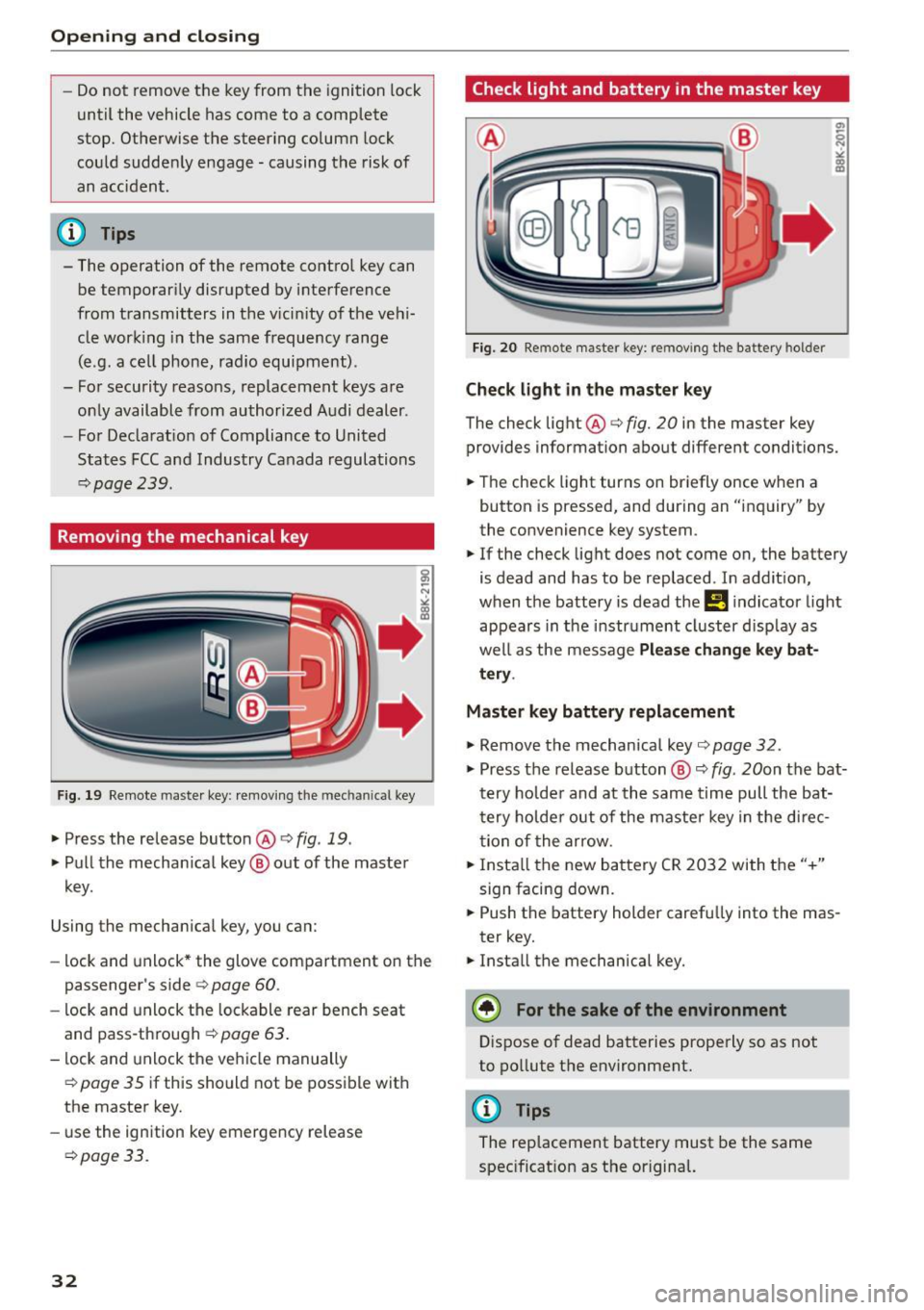
Removing the mechanical key
Fig . 19 Rem ote maste r key : rem ov ing th e m ec hani ca l key
.,. Press the release button@ c> fig. 19 .
.,. Pu ll t he mecha nica l key @ out of the master
key.
Using the mecha nica l key , you can:
- lock and unlock * the glove com partment on t he
passenger's side c>
page 60.
-lock and unlock the lockable rear bench seat
and pass-th rough ¢
page 63.
-lock and unlock the ve hicle manually
¢page 35 if this sho uld not be poss ible with
the maste r key.
- use the ign ition key emergency release
¢ page 3 3.
32
Check light and battery in the master key
Fig. 20 Remote maste r key: re m ovin g th e bat tery hol der
Check light in the ma ster key
The check light@c> fig. 20 in the master key
provides information about different conditions.
.,. The check light turns on br iefly once w he n a
button is pressed, and during an "inquiry" by
the convenience key system .
.,. If the check light does not come on, the battery
is dead and has to be replaced . In addit ion,
when the battery is dead the
!I i ndicator light
appears in the instr ument cluster d isp lay as
we ll as the message
Please change key bat
tery .
Master key battery replacement
.,. Remove the mechanical key c> page 32 .
.,. Press the release b utton @ c> fig. 20on the bat
t e ry ho lde r and at the same time pull the bat
t ery ho lde r out of the maste r key in t he d irec
t ion of the arrow .
.,. Insta ll th e new ba ttery CR 20 32 wi th t he "+"
sign facing down .
.,. Push the battery holder carefu lly into the mas
ter key.
.,. Install the mechanical key.
(® For the sake of the environment
Dispose of dead batteries properly so as not
to po llute t he environment.
@ Tips
The replacement battery must be the same
spec ificat ion as t he or igina l.
Page 77 of 254
"' N
0:: loo
rl I.O
"' N
"' rl
-For safety reasons, you should always park
your vehicle with the selector lever in P. Oth
erwise, the vehicle could inadvertently roll
away .
- The rad iator fan can continue to run for up
to 10 m inutes even after you have turned
off the engine and removed the ignition key .
The rad iator fan can also turn on aga in if the
engine coolant heats up be cause of intense
s u nlight or heat bui ld-up in the engine com
partment.
- Always ta ke t he key with you wheneve r you
leave your vehicle. Otherwise, the eng ine
cou ld be started or electrical eq uipment
s u ch as the power windows cou ld be operat
ed. This can lead to serious injury.
(D Note
If the e ng ine has been under heavy load for
an extended per iod, heat builds up in the en
gine compartment after the engine is swi tch
ed off -there is a risk of damag ing the engine.
Allow the engine to run at idle for about two
m inutes before switch ing it off.
Driver messages
Ignitio n is on
This message appears and a war ning tone sounds
if you open the driver's door when the ignition is
switched on.
No ke y ide ntifi ed
This message appears when the
I STAR T ENGIN E STOP I button is pressed if t here
i s no master key inside the vehicle o r if the sys
tem does not recogni ze it. For example, the mas
ter key ca nnot be recognized if it is covered by an
object (e .g . alum inum br ie f case) which
screens
the radio signal. Electronic devices such as cell
phones can also interfere w ith the rad io signa l.
Press br ake pedal to sta rt engine
This message appears if you do not press the
b rake peda l to s tart the engine.
Shift to N or P to start engine
Dr ivi ng
This message appears when attempt ing to start
t h e engine if the se lector lever for the automatic
transmission is not in the P or N position. The en
gine can on ly be started w ith the selector in
these positions.
El I s the key in the vehicle?
T his mess age appears if the mas ter key is re
moved from the vehicle wi th the e ngine runn ing .
If the master key is no longer in the ve hicle, you
cannot switch on the ignition after stopping the
engine and you also cannot start the engine
again . Moreover, you cannot lock the vehicle from
t h e outside with the key.
Shift to P otherwise vehicle can roll away . Door s
do not lo ck
if le ve r is not in P.
This message appears for safety reasons along
with a warning signal. It appea rs if the selector
lever for the automatic transmission is not in the
P position when switch ing off the ignition. Move
the selector lever to the P position, otherwise the
vehicle is not secured against rolling away. You
also cannot lock the vehicle us ing the locking
button* on the door handle o r us ing t he remote
key .
Convenience key defe cti ve! Use ign ition lock
This message appears if the engine must be
started or stopped using the ign ition key and not
the
I STAR T ENGINE ST OP ! button.
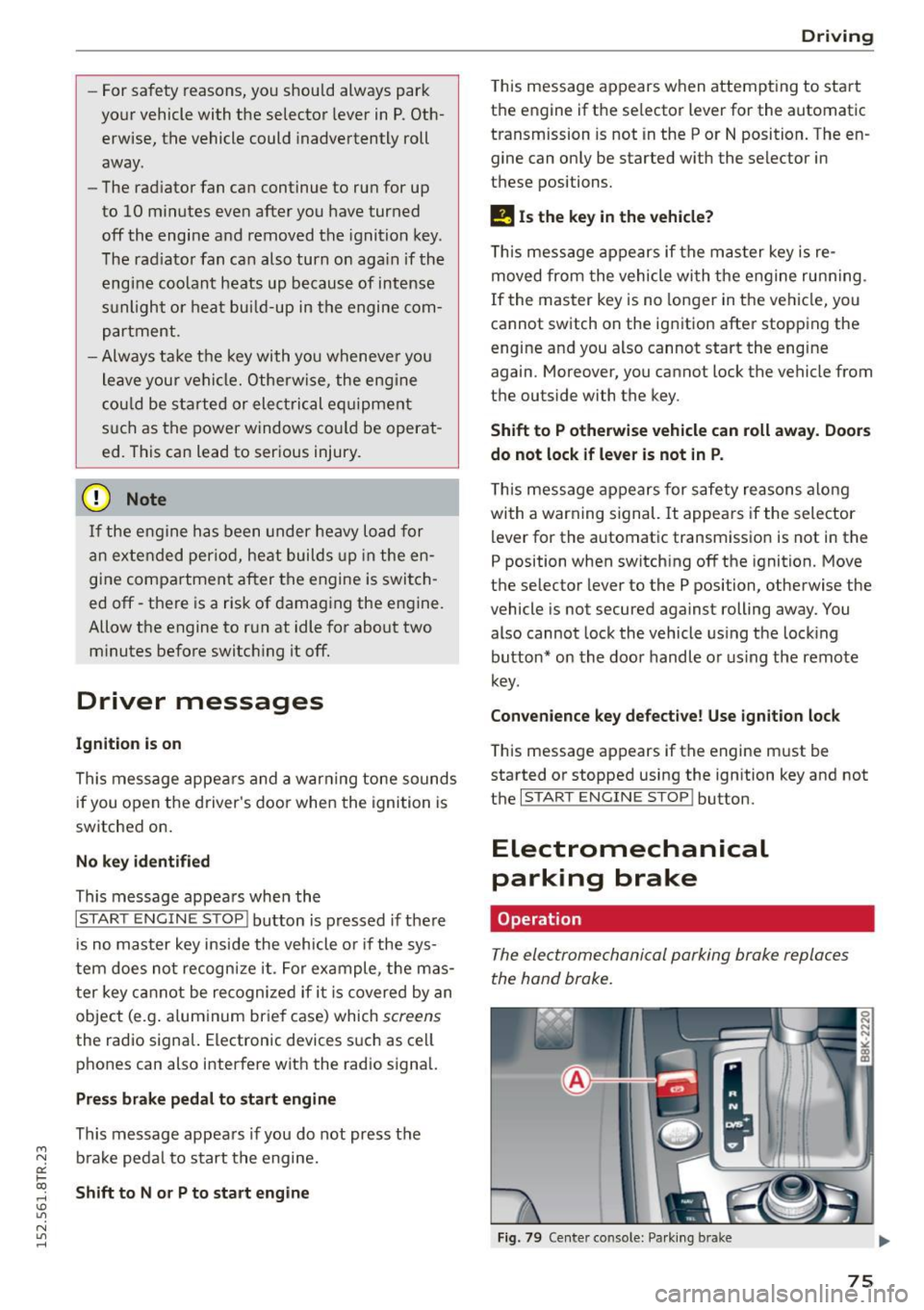
Electromechanical
parking brake
Operation
The electromechanical parking broke replaces
the hand broke.
Fig . 79 Center co nso le: Pa rk in g b ra ke
75
Page 114 of 254

Driving safet y
• Fasten your safety belt and wear it properly . Al
so instruct your passengers to fasten the ir safe
ty belts properly ¢
page 120 .
What impairs driving safety?
Safe driving is directly related to the condition of
the vehicle, the driver as well as the driver 's abili
ty to concentrate on the road without being dis
tracted .
The driver is responsible for the safety of the ve
hicle and all of its occupants. If your ability to
drive is impaired, safety risks for everybody in the
veh icle increase and you also become a hazard to
everyone else on the road ¢,&. .Therefore:
• Do not let yourself be distracted by passengers
or by using a cellular telephone .
• NEVER drive when your driv ing ability is im
paired (by medicat ions, alcohol, drugs, etc .).
• Observe all traffic laws, rules of the road and
speed limits and plain common sense .
• ALWAYS adjust your speed to road, t raff ic and
weather cond itions .
• Take frequent breaks on long trips . Do not dr ive
f or more than two hours at a stretch.
• Do NOT drive when you are tired, under pres
sure or when you are stressed.
A WARNING
Impaired driving safety increases the risk of
ser ious personal injury and death whenever a
vehicle is being used.
112
.
Correct passenger
seating positions
Proper seating position for the driver
The proper driver seating position is important
for safe, relaxed driving.
Fig. 118 Co rrect seat ing position
For your own safety and to reduce the risk of in
jury in the event of an accident, we recommend
that you adjust the driver's seat to the following pos ition:
• Adjust the driver 's seat so that you can easily
push the pedals all the way to the floor while
keeping your knee(s) slightly bent¢,&..
• Adjust the angle of the seatback so that it is in
an upright position so that your back comes in
full contact with it when you dr ive.
• Ad just the steering wheel so th at there is a dis
tance of at least 10 inches (25 cm) between the
steering whee l and your breast bone
¢ fig. 118.
If not possible, see your authorized A udi dealer
about adaptive equipment.
• Adjust the steering wheel so that the steering
wheel and airbag cover points at your chest and
not at your face.
• Grasp the top of the steer ing wheel with your
elbow(s) slightly bent.
• App lies to veh icles with adjustable head re
straints: Adjust the head res traint so the upper
edge is as even as possible with the top of your
head . If that is not possible, try to adjust the
head restraint so that it is as close to this posi
tion as possible.
• Fasten and wear safety belts correctly
¢page 123.
• Always keep both feet in the footwell so that
you are in control of the vehicle at all times .
Page 140 of 254

Airb ag syst em
-Never place or attach accessories or other
objects (such as cupholders, telephone
brackets, large, heavy or bulky objects) on
the doors, over or near the area marked "AIRBAG" on the steer ing wheel, instru
ment pane l, seat backrests or between
those areas and yourself. These obje cts
could cause injury in a crash, e specially
when the airbags inflate.
- Never recline the front passenger's seat to
transport objec ts . Items can also move into
t h e area of the side airbag or the front air
bag dur ing braking or in a sudden maneu·
ver. Objects near the airbags can become
projectiles and cause injury, part icularly
when the seat is reclined.
A WARNING
The f ine dust created when a irbags dep loy can
cause breathing problems for people with a
history of asthma or other breathing condi
tions .
- To reduce the r isk of breathing problems,
those w ith asthma or other resp iratory con
ditions should g et fr esh air r ight away by
get ting out of the vehicle o r opening w in
dows or door s.
- If you are in a col lision in w hich a irbags de
p loy, wash your hand s and fa ce wi th mild
soap and water before eating.
- Be caref ul not to get the dus t into you r eyes,
or into any cuts or s cratches.
- If the residue should get into you r eyes,
flush them with water.
Monitoring the
Advanced Airbag System
Airbag monitoring indicator light
Two separa te indicators monitor the function of
the Advanced Airbag System: the airbag moni
toring indicator light and the
PASSENGER AIR
BAG OFF
light.
The Advanced Airbag System (including the elec· tronic control unit, sensor circuits and system
w iri ng) is monitored cont inuous ly to make sure
that it is funct ion ing properly whenever the ign i·
138
tion is on . Each time you t urn on the ignit ion, the
fl airbag monitoring indicator light wi ll come on
for a few seconds (self diagnostics).
The sy stem must be inspected when th e II
indicator light :
-does not come on when the ignition is sw itched
on,
- does not go out a few seconds after you have
switched on t he ignit ion, or
- comes on wh ile driving.
If an airbag system malfunction is detected, t he
i ndic ator light will fi rst s tart flashing to catch the
dr ive r's at ten tion and the n stay on con tinuou sly
to serve as a constant reminder to have the sys
tem inspected immediately .
If a malfu nction occurs that turns the front air
bag on the passenge r side off, the
PASSENGER
AIR BAG OFF
light will come on and stay on
whenever the ignit ion is on .
A WARNING
An airbag system that is not functioning prop
erly cannot provide supp lemental protection
in a frontal crash.
- If the airbag ind icator light
c> page 19
comes when the vehicle is being used, have
the system inspected immediately by your
author ized Audi dealer .
It is possible that
the airbag will inflate when it is not sup·
posed to, or will not inflate when it should.
PASSENGER AIR BAG OFF light
Fig. 134 Sec tion fro m t he in strument panel: PASSENGER
AIR BAG O FF ligh t
The PASSENGER AIR BAG OFF light is loca ted in
the center of the inst rument panel
c> fig . 134. ..,.
Page 143 of 254

M N
0:: loo ,...., \!) 1.1"1
N 1.1"1 ,....,
@ Tips
If the weight-sensing mat in the front passen
ger seat detects an empty seat, the front air
bag on the passenger side will be turned off,
and
PASSENGER AIR BAG OFF will stay on.
Repair, care and disposal of the airbags
Parts of the airbag system are installed at many
different places on your Audi. Installing, remov ing , servicing or repairing a part in an area of the
vehicle can damage a part of an airbag system and prevent that system from working properly in a collision.
There are some important things you have to know to make sure that the effectiveness of the
system will not be impaired and that discarded
components do not cause injury or pollute the
environment.
A WARNING
-
Improper care, servicing and repair proce
dures can increase the risk of personal injury
and death by preventing an airbag from de
ploying when needed or deploying an airbag
unexpectedly:
- Never cover, obstruct, or change the steer
ing wheel horn pad or airbag cover or the in
strument panel or modify them in any way .
- Never attach any objects such as cup holders
or telephone mountings to the surfaces cov
ering the airbag units .
- For cleaning the horn pad or instrument panel, use only a soft, dry cloth or one mois
tened with plain water. Solvents or cleaners could damage the airbag cover or change
the stiffness or strength of the material so
that the airbag cannot deploy and protect
properly.
- Never repair, adjust, or change any parts of
the airbag system.
- All work on the steering wheel, instrument
panel, front seats or electrical system (in
cluding the installation of audio equipment,
cellular telephones and CB radios, etc.)
must be performed by a qualified technician
Airbag system
who has the training and special equipment
necessary.
- For any work on the airbag system, we
strongly recommend that you see your au
thorized Audi dealer or qualified workshop.
- Never modify the front bumper or parts of
the vehicle body.
- Always make sure that the side airbag can
inflate without interference:
- Never install seat covers or replacement
upholstery over the front seatbacks that
have not been specifically approved by
Audi .
- Never use additional seat cushions that
cover the areas where the side airbags in
flate.
- Damage to the original seat covers or to
the seam in the area of the side airbag
module must always be repaired immedi
ately by an authorized Audi dealer.
- The airbag system can be activated only
once. After an airbag has inflated, it must
be replaced by an authorized Audi dealer or
qualified technician who has the technical
information, training and special equipment
necessary.
- The airbag system can be deployed only
once . After an airbag has been deployed, it
must be replaced with new replacement
parts designed and approved especially for
your Audi model version. Replacement of complete airbag systems or airbag components must be performed by qualified work
shops only. Make sure that any airbag serv
ice action is entered in your Audi Warranty
&
Maintenance booklet under AIRBAG RE
PLACEMENT RECORD.
- In accidents when an airbag is deployed, the
vehicle battery separates the alternator and
the starter from the vehicle electrical sys tem for safety reasons with a pyrotechnic
circuit interrupter .
- Work on the pyrotechnic circuit interrupt
er must only be performed by a qualified
dealer -risk of an accident!
- If the vehicle or the circuit interrupter is
scrapped, all applicable safety precautions
must be followed.
141
Page 149 of 254

"' N
0:: loo
rl I.O
"' N
"' rl
by being pushed into you as the airbag in
flates.
- Never p lace or attach accessories or other
objects (such as cupholders, telephone
b rac ke ts, or even large, bulky objects) on
the doors, over or near t he area marked
"AIRBAG" on the seat backrests .
- Such ob jects and accessories can become
dangerous projecti les and cause injury
when the supplementa l side airbag de
ploys .
- Never carry any objects or pets in the de
p loyment space between them and the
airbags or allow chi ldren or other passen
gers to travel in this position .
- Always use the built-in coat hooks only for
lightweight clothing. Never leave any heavy
or sharp-edged objects in the pockets that
may interfere with side airbag deployment
and can cause personal injury in an accident .
- Always prevent the side a irbags from be ing
damaged by heavy objects knocking against
or hitt ing the sides of the seatbacks.
- The airbag system can only be triggered
once. If the a irbag has been triggered, the
system must be rep laced by an authorized
Audi dealership.
- Damage (cracks, deep scratches etc.) to the
o rigi nal seat cove rs or to the seam in the
area o f the side airbag module must always
be repaired immedia tely by an authorized
Audi dealer .
- If children a re seated improperly, their risk
of inj ury in crea ses in the case of an a ccident
c;, page 150, Child safety.
-Never attempt to modify any compo nents of
the a irbag sys tem in any way.
- In a side collision, s ide a irbags will not func
t io n properly if senso rs ca nnot correctly
measu re increasing air pressure inside the
doors when air escapes through larger, un
closed openings in the door pane l.
- Never drive w ith inter ior door trim pane ls
removed .
- Never drive when parts have been re
moved from the ins ide door panel and the
open ings they l eave have not been p rope r
ly closed.
Ai rb ag system
- Never drive when loudspeakers in the
doors have been removed unless the
speaker holes have been properly closed.
- Always make certain that openings are
covered or filled if add itiona l speakers or
other equipment is installed in the inside
door panels.
- Always have work on the doors done by an
authorized Audi dea ler or qualified work
shop.
Side curtain airbags
Description of side curtain airbags
The side curtain airbag system can provide sup
plemental protec tion to properly restrained oc
cupants.
F ig. 139 S ide curta in system, driver's s ide : side c urtain ai r
bag loca tion
The side c urta in airbags are loc ated on bot h sides
of the inter ior above the front and rear side w in
dows
c;, fig. 139 . They are identified by the word
"AIRBAG" on the windsh ield frame and the cen
ter roof pi llar.
T he side c urtain airbag system supplements t he
sa fety belts and can help to reduce the risk o f in
jury for occupants ' heads and upper torso on the
side of the vehicle that is struck in a side coll i
s ion. The side curtain airbag inflates in side im
pacts and only when the vehicle acce leration reg
istered by the contro l unit is high enough . If this
rate is below the reference va lue programmed in
to the control un it, the side a irbags w ill not be
t riggered , even thoug h the car may be bad ly
damaged as a result of the collision.
It is not pos
s ible to define an airbag t riggering range that
will cover every possible angle of impact, since .,,.
147
Page 187 of 254

"' N
0:: loo
rl I.O
"' N
"' rl
the exhaust system and damage the catalytic
converter.
Refuelling
Fig . 155 Rig ht re ar v ehicl e sid e: Op enin g the fuel fille r flap
Fig. 156 Fuel f ill er fla p with atta ched fuel cap
When activating the central locking, the fuel fi ll
er flap is automatically un locked or locked . Re
fuel the veh icle with the ignition turned
off.
Taking the fuel cap off
~T urnoff the ignition.
~ Press the left side of the fue l filler flap to open
it
q fig. 155 -arrow -.
~ Unscrew fuel cap count er-clockw ise and hang it
on the fuel filler flap~
fig. 156.
Refuelling procedure
~ Insert the fuel nozzle from the gasol ine pump
into the fuel filler neck as far as it will go.
~ Select a medium refuelling rate so that the
nozzle switches off automat ica lly when the
tank is full.
Putting the fuel cap back on
~ After filling your tank, tw ist the f uel cap clock
wise as far as it wi ll go.
~ Close the fuel filler flap.
Fuel and Refueling
To avoid fuel spilling or evaporating from the fuel
tank always close fue l cap proper ly and com
pletely .
A WARNING
--
Improper refueling or handling of fuel can
cause fire, explosion and severe burns.
- Fuel is highly flammable and can cause se
vere burns and other injuries.
- Failure to shut the engine off while refuel
ing and/or to insert the pump noz zle fully
into the fue l filler neck could cause fuel to
spray out of filler neck or to overflow . Fuel
spray and overflowing fuel can cause a fire.
- Never use a cellular telephone while refuel
ing. The electromagnetic radiation can
cause sparks that can ignite fuel vapors and
cause a fire .
- Never get back into your vehicle while refu
eling. If in exceptional circumstances you
must get back in your vehicle whi le refuel
ing, make certain that you close the door
and touch metal to discharge static electric
ity before touching the filler nozzle again.
Static electricity can cause sparks that can ignite fue l vapors re leased during refueling.
- Never smoke or have an open f lame any
where in or near your vehicle when refueling
or filling a portable fue l conta iner .
- For your safety, we strongly recommend
that you do not travel with a portable f uel
container in your vehicle. The container, full
or empty may leak and cou ld cause a fire,
especially in a crash.
- If, under exceptional circumstances, you
must transport a portable fuel container,
ple ase observe the following:
- Never fill a portable fuel container while it
is anywhere in or on the veh icle (for exam
ple, in the luggage compartment, or on
the trunk). Static e lectricity can build up
while filling and can ignite fuel vapors
causing a f ire.
- Always place a portab le fue l container on
the ground before filling .
185
Page 229 of 254
M N
0:: loo ,...., \!) 1.1'1
N 1.1'1 ,....,
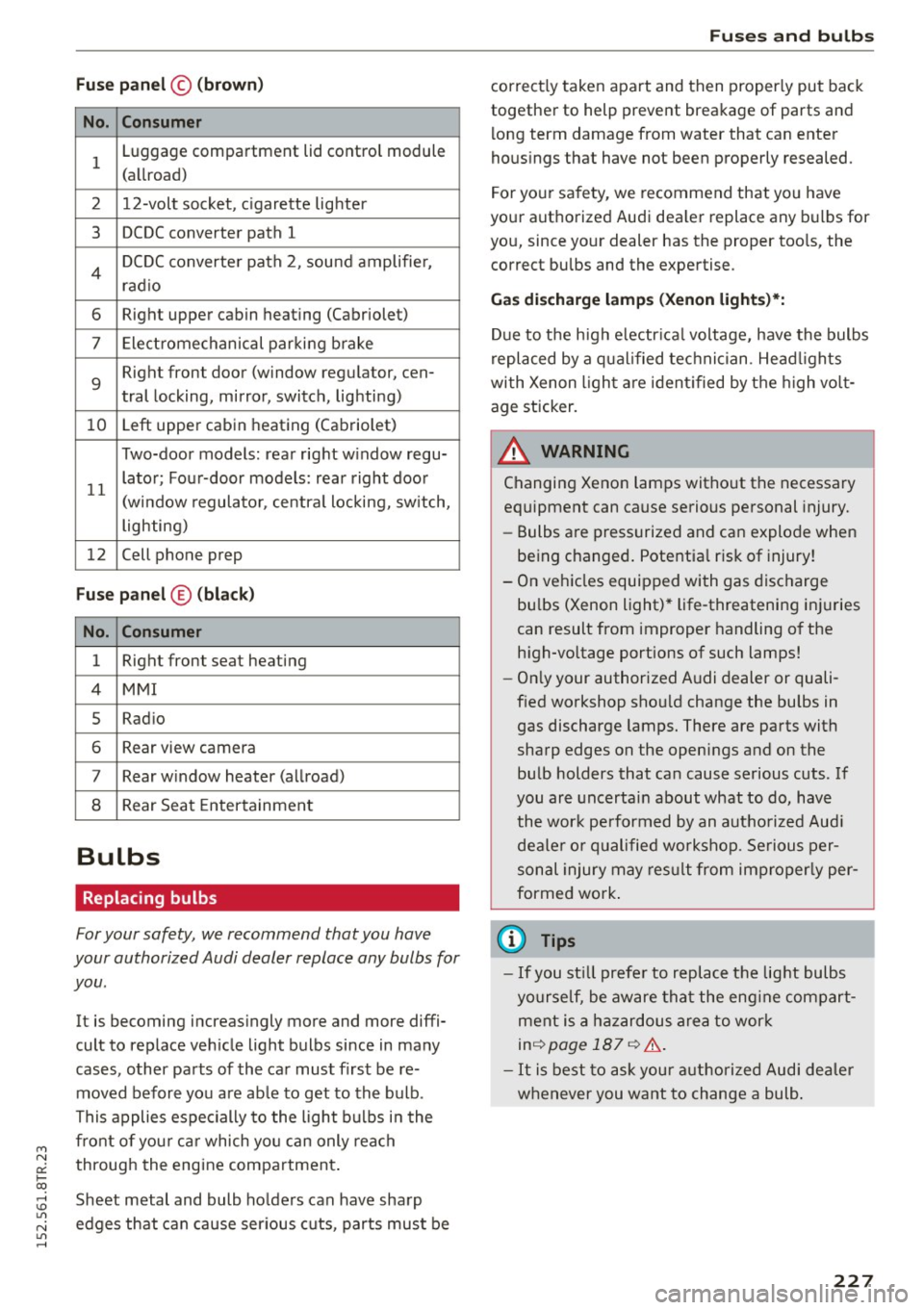
Fuse panel© (brown)
No. Consumer
1 Luggage compartment lid control module
(allroad)
2 12-volt socket, cigarette lighter
3 DCDC converter path 1
4 DCDC converter path 2, sound amplifie r,
rad io
6 Right upper cabin heating (Cabriolet)
7 Electromechanical parking brake
9
Right front door (window regulator, cen-
tral locking, mirror, switch, lighting)
10 Left upper cabin
heating (Cabriolet)
Two-door models: rear right w indow regu-
11 lator; Four-door models: rear
right door
(window regulator, central locking, switch,
lighting)
12 Cell phone prep
Fuse
panel © (black)
No. Consumer
1 Right front seat heating
4 MMI
5 Radio
6 Rear view camera
7 Rear window heater (allroad)
8 Rear
Seat Entertainment
Bulbs
Replacing bulbs
For your safety, we recommend that you have
your authorized Audi dealer replace any bulbs for
you .
It is becoming increasingly more and more diffi
cult to replace vehicle light bulbs since in many
cases , other parts of the car must first be re
moved before you are ab le to get to the bulb .
This applies especially to the light bulbs in the
front of you r ca r which you can only reach
through the engine compartment .
Sheet metal and bulb holders can have sharp
edges that can cause ser ious cuts, parts must be
Fuses and bulbs
correct ly taken apart and then properly put back
together to help prevent breakage of parts and
long term damage from water that can enter
housings that have not been properly resealed.
For your safety, we recommend that you have
your authorized Audi dea ler replace any bulbs for
you, since your dealer has the proper tools, the
correct bulbs and the expertise.
Gas discharge lamp s (Xenon lights)*:
Due to the high electr ical voltage, have the bulbs
replaced by a qualified technician . Head lights
with Xenon light are identified by the high volt
age sticker.
A WARNING
Changing Xenon lamps without the necessary
equipment can cause serious personal injury.
- Bulbs are pressurized and can explode when
being changed . Potential risk of injury!
- On vehicles equipped with gas discharge
bu lbs (Xenon light) * life -threatening injuries
can result from improper handling of the
high -vo ltage portions of such lamps!
-On ly your authorized Audi dealer or quali
fied workshop shou ld change the bulbs in
gas discharge lamps. There are parts with
sharp edges on the openings and on the
bulb holders that can cause serious cuts . If
you are uncertain about what to do, have
the wor k performed by an autho rized Audi
dealer or qualified workshop. Serious per
sonal injury may result from improperly per
formed work .
(D Tips
-If you st ill prefer to replace the light bulbs
yourself, be aware that the eng ine compart
ment is a hazardous area to work
inq page 187 q &..
-It is best to ask your authorized Audi dealer
whenever you want to change a bulb.
227