cruise control AUDI RS7 SPORTBACK 2014 Owner's Manual
[x] Cancel search | Manufacturer: AUDI, Model Year: 2014, Model line: RS7 SPORTBACK, Model: AUDI RS7 SPORTBACK 2014Pages: 292, PDF Size: 73.56 MB
Page 100 of 292
98 Audi drive select
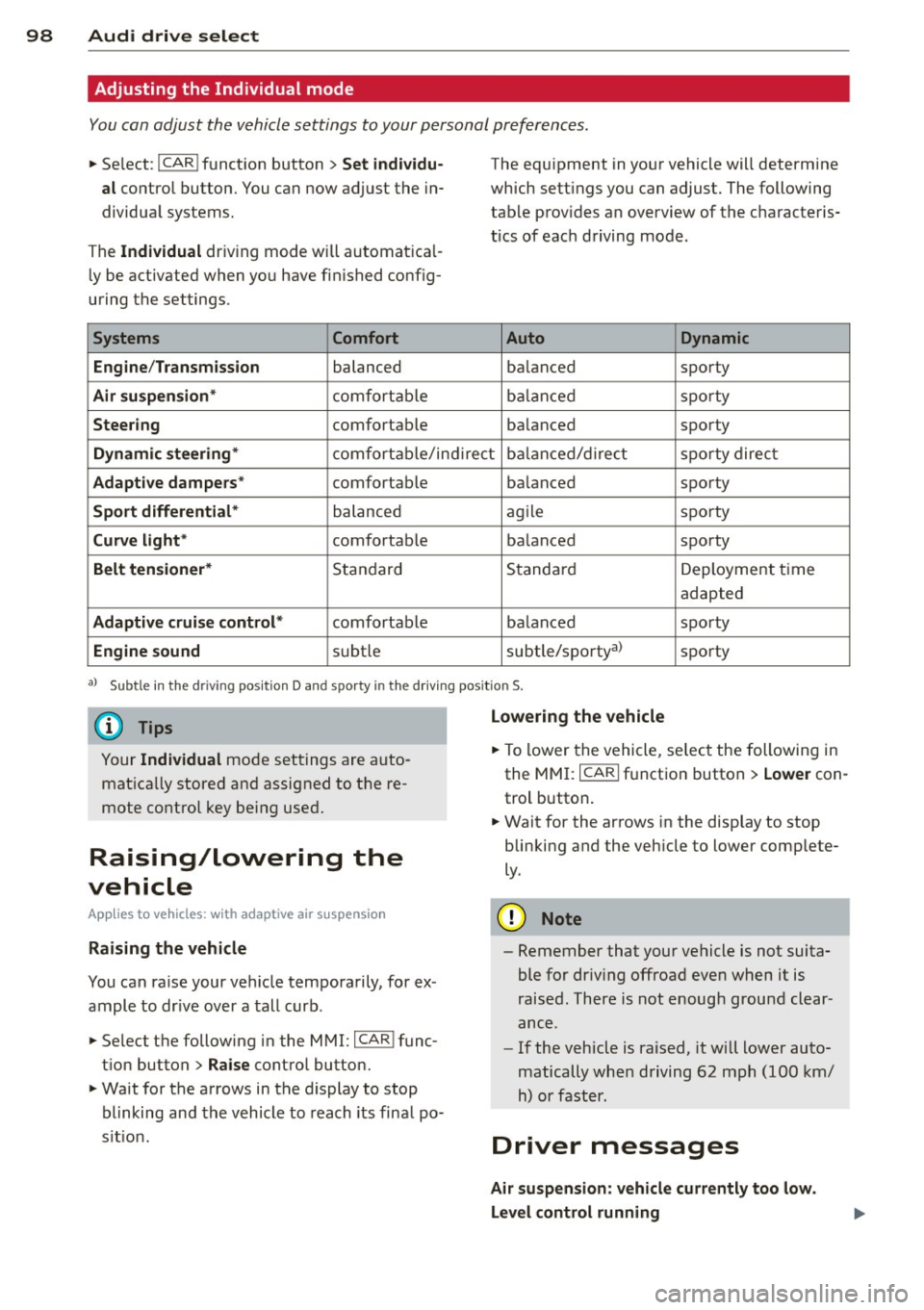
Adjusting the Individual mode
You can adjust the vehicle settings to your personal preferences .
• Se lect : I CAR ! function button > Set individu
al
control button. You can now adjust the in
dividual systems.
The
Individual dr iving mode will automatica l
ly be activated when you have finished config
uring the settings .
Systems Comfort
Engine /Transmission
balanced
Air suspension* comfortable
Steering comfortable The equipment
in your vehicle will determine
which settings you can adjust. The following
table provides an overview of the characteris
tics of each driving mode.
Auto Dynamic
balanced sporty
balanced sporty
balanced sporty
Dynamic steering* comfortable/indirect balanced/direct sporty direct
Adaptive dampers* comfortable balanced sporty
Sport differential* balanced agile sporty
Curve
light* comfortable balanced sporty
Belt tensioner* Standard Standard
Deployment time
adapted
Adaptive cruise control* comfortable balanced sporty
Engine sound subtle subtle/sportyal sporty
al
Sub tle in th e d riving po sit ion D an d sp orty in the driv ing pos itio n S.
(D Tips
Your Individual mode settings are auto
matically stored and assigned to the re
mote control key being used.
Raising/lowering the
vehicle
App lies to vehicles: with adaptive air suspension
Raising the vehicle
You can raise your vehicle temporarily, for ex
ample to drive over a tall curb.
• Se lect the following in the MMI: ICAR!func
tion button>
Raise control button.
• Wait for the arrows in the display to stop
blinking and the vehicle to reach its final po
s it ion .
Lowering the vehicle
• To lower the vehicle, select the following in
the MMI: ICARI function button >
Lower con
trol button.
• Wait for the arrows in the display to stop
blinking and the vehicle to lower complete
ly .
(D Note
- Remember that your vehicle is not suita
ble for dr iv ing offroad even when it is
raised. There is not enough ground clear
ance .
- If the vehicle is raised, it will lower auto
matically when driving 62 mph (100 km/
h) or faster.
Driver messages
Air suspension: vehicle currently too low.
Level control running
Page 109 of 292

activate the parking brake and move the
selector lever to P.
- Power is sti ll transmitted to the wheels
when the engine is running at idle. To
prevent the vehicle from "creeping", you
must keep your foot on the brake when
the engine is running and the selector
lever is in D/S or R or "tiptronic" mode is
selected.
- Do not press the accelerator pedal when changing the selector lever pos ition
wh ile the vehicle is stat ionary and the
engine is running .
- Never shift into
R or P wh ile driving .
- Before driv ing down a steep slope, re -
duce your speed and shift into a lower
gear with "tiptronic".
- Do not ride the brakes or press the brake
peda l too often or too long when dr iv ing
down a hill. Constant braking causes the brakes to ove rheat and substant ially re
duces braking performance, increases
braking distance or ca uses comp lete fail
vre of the brake system .
- To prevent the vehicle from rolling back
when stopping on inclines, always hold it in place with the brake pedal or parking
brake.
- Never hold the vehic le on an incline with
a slipping clutch . The clutch opens auto
matically when it becomes too hot from
the overload. An indicator lamp
[O] illu
minates and a dr iver message appears
~ page 108 when the clutch is overload
ed .
- If the engine must remain running, never have any driv ing position engaged when
check ing under the hood.
M ake sure the
selector lever has secure ly engaged and
is locked in P with the parking bra ke set
¢ page 213 . Otherwise, any increase in
engine speed may set the vehicle in mo
t ion, even with the park ing brake ap
plied.
(D Note
- When stopping on an incline, do not try to hold the vehicle in place by pressing
Aut omat ic Tr ans missio n 107
the acce lerator pedal while a d riving gea r
is se lected. This can cause the transmis
sion to ove rheat and can damage it. Acti
vate the parking brake or press the brake peda l to prevent the vehicle from rolling .
- Allowing the vehicle to roll when the en gine is stopped and the selector lever is
in N will damage the transmission be
cause
i t is not lubricated under those cir
cumstances.
(D Tips
For safety reasons, the parking brake is re
leased automatically o nly when the driv
e r's safety belt is engaged in the buckle .
, Hill descent control
The hill descent control system assists the
driver when driving down declines .
Hill descent contro l is activa ted when these
lector lever is in D/S and you press the brake
pedal. The transmission automatically selects
a gear that is suitable for the incline . H ill de
scent cont ro l t ries to ma inta in the speed ach
ieved a t the t ime of braking, with in phys ica l
and tec hni cal lim itations. If may st ill be nec
essary to adj ust the speed with the brakes .
Hill descent contro l sw itches off once the de
cl in e leve ls out or yo u press the acce le rato r
pedal.
On vehicles with the cruise cont ro l system*
¢ page 79 , hill descent control is also activat
ed whe n the speed is set.
&_ WARNING
-
Hill descent co nt rol cannot overcome
physical lim itations, so it may not be ab le
to maintain a constant speed under a ll
conditions. A lways be ready to apply the
brakes .
Page 189 of 292
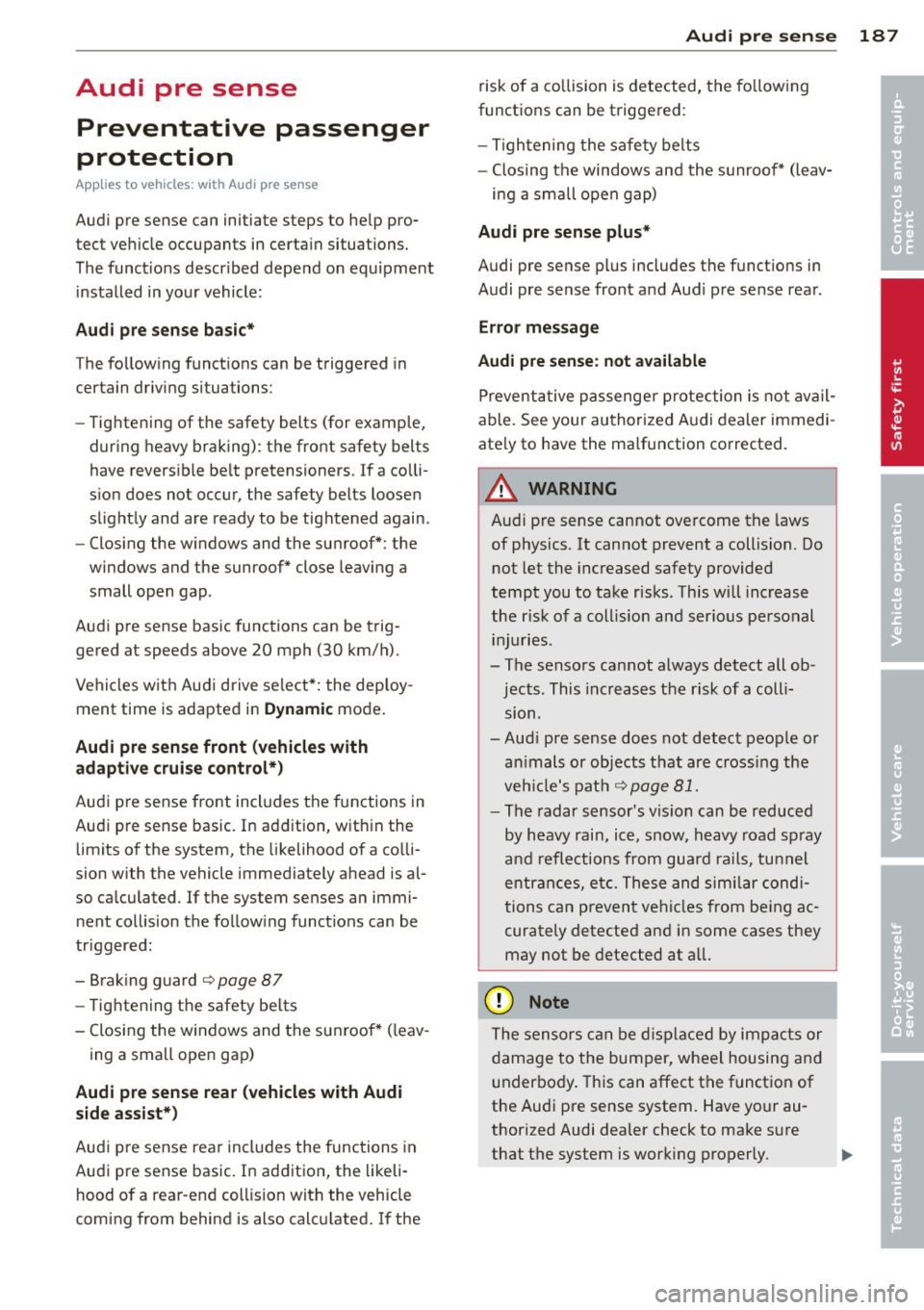
Audi pre sense Preventative passenger
protection
App lies to veh icles: with Audi p re se nse
Audi pre sense can initiate steps to help pro
tect vehicle occupants in certain situations.
The funct ions descr ibed depend on equipment
installed in your vehicle:
Audi pre sense basic*
The following functions can be triggered in
certain driving situations:
- Tightening of the safety belts (for example,
during heavy braking) : the front safety belts
have reversible belt pretensioners. If a colli
sion does not occur, the safety belts loosen
slightly and are ready to be tightened again.
- Closing the windows and the sunroof* : the
windows and the sunroof* close leaving a
small open gap .
Audi pre sense basic functions can be trig
gered at speeds above 20 mph (30 km/h).
Vehicles with Audi drive select*: the deploy
ment time is adapted in Dynamic mode.
Audi pre sense front (vehicles with
adaptive cruise control*)
Audi pre sense front includes the functions in
Audi pre sense basic. In addition, within the limits of the system, the likelihood of a colli
sion with the vehicle immediately ahead is al
so calculated . If the system senses an immi
nent collision the following functions can be
tr iggered:
- Braking guard
¢ page 87
-Tightening the safety belts
- Closing the windows and the sunroof* ( leav-
ing a small open gap)
Audi pre sense rear (vehicles with Audi
side assist*)
Audi pre sense rear includes the functions in
Audi pre sense basic. In addition, the likeli
hood of a rear-end col lision with the vehicle
coming from behind is also calculated. If the
Audi pre sense 187
risk of a collision is detected, the following
functions can be triggered:
- Tightening the safety belts
- Closing the windows and the sunroof* (leav-
ing a small open gap)
Audi pre sense plus*
Audi pre sense plus includes the functions in
Audi pre sense front and Aud i pre sense rear .
Error message
Audi pre sense: not available
Preventative passenger protection is not avail
able. See your authorized Audi dealer immedi
ate ly to have the malfunction corrected.
A WARNING
-=
Audi pre sense cannot overcome the laws
of physics. It cannot prevent a collision. Do
not let the increased safety provided
tempt you to take risks . This will increase
the risk of a coll is ion and serious personal
injuries .
- The sensors cannot always detect all ob jects. This increases the risk of a colli
s10n .
- Aud i pre sense does not detect people or
an imals or objects that are crossing the
veh icle's path
¢page 81.
-The radar sensor's v is ion can be reduced
by heavy rain, ice, snow, heavy road spray
and reflections from guard rails, tunnel
entrances, etc. These and similar condi
tions can prevent vehicles from being ac
curately detected and in some cases they may not be detected at all.
Q) Note
The sensors can be displaced by impacts or
damage to the bumper, wheel housing and
underbody. This can affect the function of
the Audi pre sense system. Have your au
thorized Audi dealer check to make sure
that the system is working properly.
•
•
Page 193 of 292
-You may hear noises when the systems
described are working.
- If the indicator ligh t
DJ or flB (USA
models) @ (Canada models) appears,
Switching on and off
Intelligen t technolog y 191
there may be a malfunc tion c> page 19,
c> page 18 .
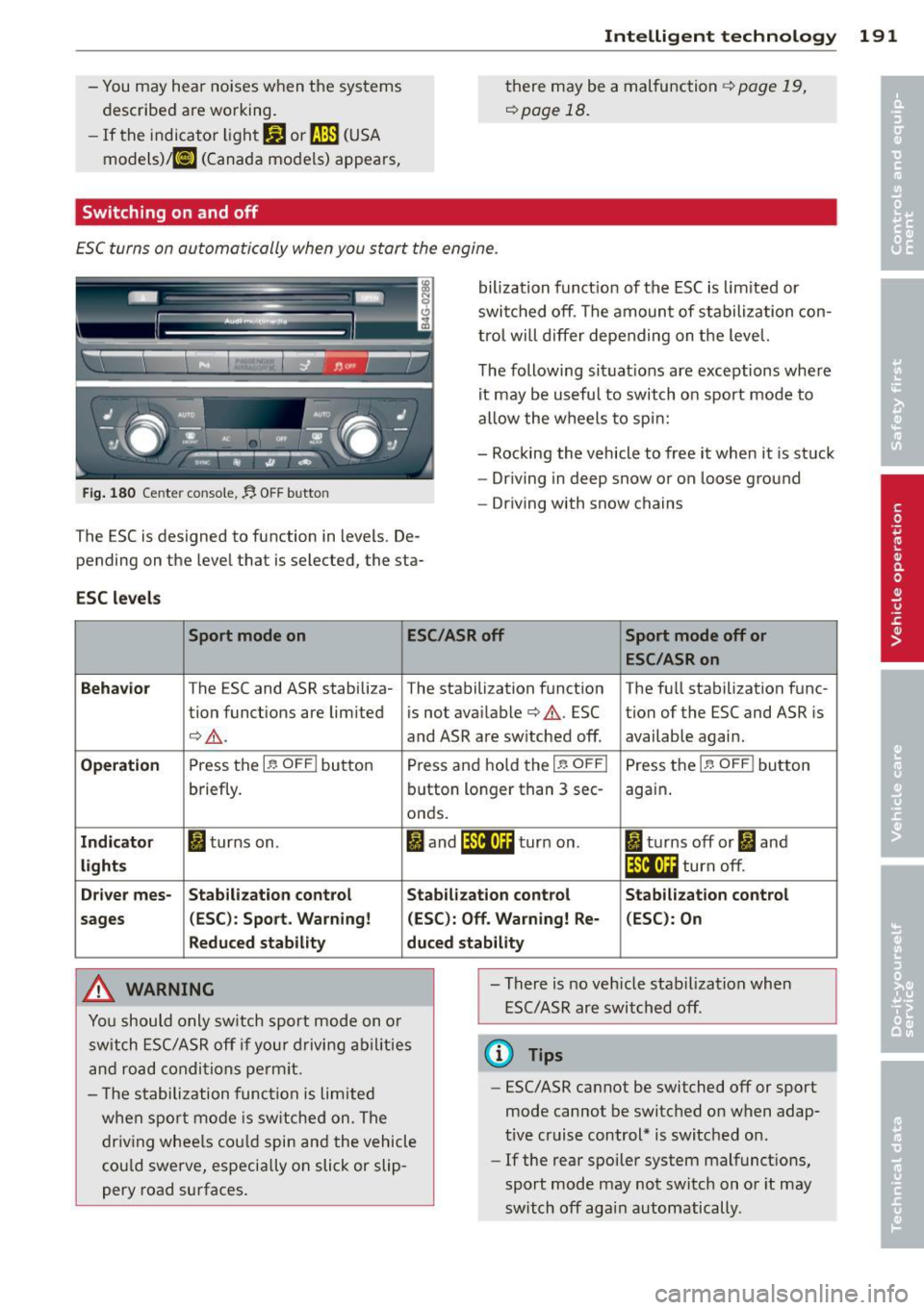
ESC turns on automatically when you s tart the engine .
Fig. 180 Cente r con sole,.$ OFF b utto n
The ESC is des igned to function in levels . De
pend ing on the leve l that is selected, the sta-
ESC l evels
bilization funct ion of the ESC is lim ited or
swi tched off . The amoun t of s tabilization con
tro l will d iffer depending on the level.
T he following situat ions are exceptions where
it may be usefu l to switch on sport mode to
allow the w heels to spi n:
- Rocking the vehicle to free it when it is stuck
- Dr iving in deep snow or on loose ground
- Driving with snow chains
Sport mode on ESC/ASR off Sport mode off or
ESC/ASRon
Behavior
T he ESC and ASR stabili za- The stabili zation function The fu ll stabili zation f unc -
tion funct ions are lim ited is not ava ilable
c> & . ESC tion of the ESC and ASR is
¢ & . and ASR are sw itched off. available agai n.
Operati on Press the I~ O FF I button Press and hold the 1-~ O FFI Press the 1-~ O FF I button
briefly. button longer than 3 sec-again .
o nds.
Ind ic a to r I turns on . I and ifil•)H turn on . II turns off or II and
light s If i4•)ii turn off.
Dr iver mes- Stab ilization control Stabilization control Stabilization control
s ages (
ESC ): Spo rt. Warning! (ESC ): Off. Warning! Re· (ESC) : On
Reduced stabil ity duc ed stab ility
A WARNING
.
You should only sw itch sport mode on o r
switch ESC/ASR off if your drivi ng ab il ities
and road condi tions perm it. -
There is no vehicle stabilization when
ESC/ASR are switched off .
@ Tips
-The s tabilization func tion is limited
w he n spor t mode is sw itched on . The
dr iv ing whee ls cou ld spin and the vehicle
cou ld swe rve, especially on slick or slip
pery road surfaces. -
ESC/ASR cannot be switched off or sport
mode cannot be switched on when adap·
tive cruise control* is switched on .
-If the rear spoiler system malfunctions,
sport mode may not switch on o r it may
switch off again automatically .
Page 263 of 292
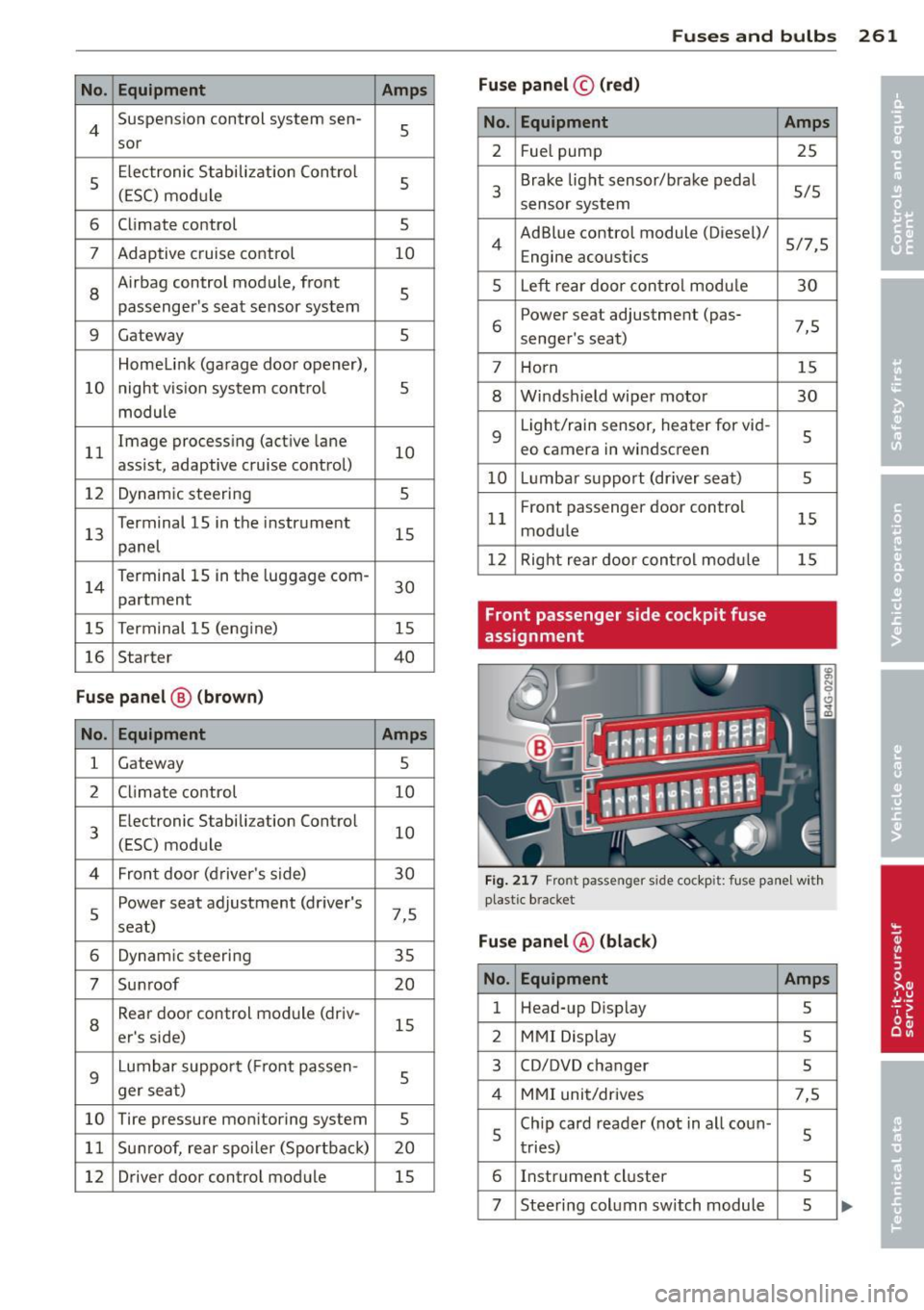
No. Equ ipment Amps
4 Suspension control system sen-s sor
s
E
lectronic Stabilization Cont rol
s (ESC) module
6 Climate control
5
7 Adaptive cruise control 10
8
Airbag control module, front
5
passenger's seat sensor system
9 Gateway 5
Homelink (garage doo r opener),
10 night vis ion system cont ro l 5
module
11 Image
processing (active lane
10
ass ist, adaptive cruise control)
12 Dynamic steering 5
13 Terminal 15 in
the instrument
15
panel
14 Terminal 15
in the luggage com-
partment 30
15 Terminal 15
(engine)
15
16 Starter 40
Fu se pa nel ® (b rown )
No . Equipment Amps
1 Gateway
5
2 C limate control 10
3 E
lectronic Stabili zation Contro l
10
(ESC) module
4 Fron
t door (driver 's side)
30
s
Power seat adjustment (driver's
7,5
seat)
6 Dynam
ic steering
35
7 Sunroof 20
8
Rear door control module (driv-
15
er 's side)
9 Lumbar support (
Front passen-
s ger seat)
10 Tire pressure
monitoring system
5
11 Su
nroof, rear spoi ler (Sportba ck)
20
12 Driver
door control module
15
Fuse s and bulb s 261
Fuse pan el© (r e d )
No . Equipment
2 Fuel pump
3 Brake light sensor/brake pedal
sensor system
AdBlue control module (Diesel)/
4 Engine acoust ics
5 Left rear door cont rol modu le
6 Power seat adjustment
(pas-
senge r's seat)
7 Horn
8 Windshield wiper motor
9 Light/rain sensor, heater
for vid-
eo camera in windscreen
10 L umba r support (driver seat)
1 1 Front
passenger door control
modu le
12 Right rea r door cont rol modu le
Front passenger side cockpit fuse
assignment Amp
s
25
5/5
5/7,S 30
7,5 15
30
s
5
15
15
F ig . 217 Front passenger side cockpit: fuse pa nel w it h
plast ic brac ket
Fuse panel @ (bla ck)
No . Equipment Amps
1 Head-up
Display
5
2 MMI Display 5
3 CO/DVD changer
5
4 MMI unit/drives 7,5
5 Chip
card reader (not in all coun-
5
tries)
6 Instrument
cluster
5
7 Steering column switch module 5 ...
Page 278 of 292
2 76 Consumer Information
This will help ensure that vehicle function,
performance and safety are not impaired
c:::> &. .
Attempting to work on electronic components
and the software used with them can cause
malfunctions. Because of the way electronic
components are interconnected with each
other, such malfunctions can also have an ad
verse affect on other systems that are not di rectly involved . Th is means that you risk both
a substantial reduction in the operational
safety of your vehicle and an increased wear of
vehicle pa rts
c:::> &. .
Author ized Audi dealers will perform this
work in a p rofessional and competent manner
or, in special cases, refer you to a professional
company that specializes in such mod ifi ca
tions.
& WARNING
Improper repairs and modifications can
change the way vehicle systems work and
cause damage to the vehicle and serious
personal injury.
-
(D Note
If emergency repairs must be performed
elsewhere, have the vehicle examined by
an authorized Audi dealer as soon as possi
ble.
Declaration of
Compliance, Telecom
munication and
Electronic Systems
Radio Frequency Devices and Radiocommuni
cation Equipmen t User Manual Notice.
The manufacturer is not responsible for any
radio or TV interference caused by unauthor
ized modifications to this equipment.
Devices
The following devices each comp ly with FCC
Part 15.19, FCC 15.21 and RSS-Gen Issue 1:
- Adaptive cruise control* -
Audi side assist*
- Cell phone package*
- Convenience key*
- Electron ic immobilizer
- Homelink un iversal remote control*
- Remote control key
- Tire pressure monitoring system
FCC Part 15.19
Th is device complies with part 15 of the FCC
Ru les . Operation is subject to the following
two conditions :
(1) This device may not cause harmful inter
ference, and
(2) this device must accept any interference
received, including interference that may
cause undesired operation .
FCC Part 15.21
CAUTION:
Changes or modifications not expressly ap
proved by the party responsible for compli
ance could void the user's authority to operate
the equipment.
RSS-Gen Issue 1
Operation is subject to the following two con
ditions:
(1) this device may not cause interference ,
and
(2) this device must accept any interference ,
including interference that may cause unde
s ir ed operation of the device.
Page 279 of 292
A
Accessories . . . . . . . . . . . . . . . . . . . . . . . . 2 7 5
Active lane assist . . . . . . . . . . . . . . . . . . . . 90
Activating and deactivating . .. .. .. .. .. 91
C leaning the camera area .. .. .. .. .. . 204
Description .............. .... .. .... 90
Instrument cluster indicator light . . . . . 91
Messages .. ................ ... .... 91
Notes on instrument cluster display . . . . 91
Setting the steering wheel vibration .. .. 92
AC (automatic climate control) . .. .. .. .. 70
Adaptive air suspension/sport .. .. ... ... 96
Adaptive cruise control ......... ... .... 81
Cleaning the sensor .......... ..... . 204
Messages .. ............. .... .. .... 88
Request for driver intervention . . . . . . . . 86
Stop-and-go traffic . . . . . . . . . . . . . . . . . 85
Adaptive Light (defective) ............. 21
Adding Engine coolant ........... .. .. .. .. . 221
Engine oil .. ............. .... .. ... 218
Windshield washer fluid ............ 227
Additives Engine oil .. ....... ...... .... .. .. . 218
Adjusting Air distribution (automatic climate con-
trol) ..... ... ...... ....... ...... ... 71
Front seats . . . . . . . . . . . . . . . . . . . . . . . . 53
Instrument illumination ... .. .. .. .. .. 47
Steering column e lectrically .. .. .. .. .. 73
Steering column manually . .. .. .. .. .. 73
Temperature (automatic climate control) 71
Airbag system . . . . . . . . . . . . . . . . . 142, 163
Advanced Airbag System . . . . . . . . . . . . 146
Advanced Airbag System components . 150
Care . .. .. .. .... ............. .. .. . 158
Children ... ................ ... ... 170
Child restraints .............. ... ... 170
Components (front airbags) . ... .. .. . 150
Danger of fitting a child seat on the front
passenger seat . . . . . . . . . . . . . . . . . . . . 144
Disposal . .. ............. .... .. .. . 158
Front airbags . . . . . . . . . . . . . . . . 146, 148
How do the front airbags work? . ..... 152
H ow many airbags does my vehicle
have? ... .. .... ............. .. .. . 150
Index 277
How the Advanced Airbag System com-
ponents work together ............ . 152
Important safety instructions on the
knee airbag system ................ 161
Important things to know ......... .. 142
Knee airbags . .. .. .. ............... 159
Monitoring .. .. .. .. . .. .... ........ 154
PASSENGER AIR BAG OFF light ....... 155
Repairs . . . . . . . . . . . . . . . . . . . . . . . . . . 158
Safety instructions .... ......... .. .. 157
Side airbags ... .. .. ............... 162
Side curtain airbags ............... . 165
Warning/indicator lights ............ . 18
Warning/Indicator lights ....... .. .. 154
When must the system be inspected? 154
Aircraft Transporting your vehicle
Alcantara 268
Cleaning .. .. .. .. .... ........... .. 206
All-wheel drive .. .. .. ............... 195
Winter tires . .. .. .... ... .... .... .. 243
Alternator ... ..... .. ................ 16
Ambience lighting ... ... ..... ... .... . 47
Anti-freeze
refer to Engine coolant ............. 220
Anti-lock braking system ............ . 189
Warning/indicator lights . . . . . . . . . 18, 19
Anti-s lip regu lation .... ......... .. .. 189
Warning/indicator lights ........ .. .. . 18
Anti-theft systems Electronic immobilizer ............. .. 33
Ashtray ..... ... .... ................ 59
Audi braking guard
refer to brak ing guard .......... .... . 81
Audi drive select
refer to drive select ... .. ...... .... .. 96
Audi Serv ice Repair Manuals and Litera-
ture ......... .. .. ................. 273
AUTO automatic climate control .......... .. 71
Automatic headlights ............... 44
Auto Lock . . . . . . . . . . . . . . . . . . . . . . . . . . 34
Automatic belt retractor ......... .. .. 136
Automatic climate control
Air vents .. .. .... .. ................ 71
Automatic recirculation ............ .. 72
Operation . . . . . . . . . . . . . . . . . . . . . . . . . 70
•
•
Page 281 of 292
Child restraints
Dang er of using chi ld rest raints in th e
front seat . . . . . . . . . . . . . . . . . . . . . . . . 144
Where can I get addit ional information
about child restra ints and their use? . . 186
Ch ild restra int system anchors ... .. .. . 182
Ch ild safety .. ................ ... ... 168
Convertible locking retracto r . . . . . . . . . 179
I mportant safety instr uctions fo r using
ch ild safety seats ......... .. .. .. .. . 172
I mportant things to know when dr iv ing
with chi ld ren .... ..... ... .. .. .. ... 168
T ether anchors . . . . . . . . . . . . . . . . . . . . 185
Tether straps ............ .... .. .. . 185
C hild safety loc k
Rear doors ..... .. .... ... .. .. .. .... 4 0
Ch ild safety seats . . . . . . . . . . . . . . . . . . . 17 4
B ooste r seats . .. .. .... ... .. .. .. .. . 177
Conver tible c hild seats .... .. .. .. .. . 175
Conve rtible locking re tra cto r .. .. .. .. . 179
H ow do I properly ins tall a child safety
seat in my vehicle? ..... ... .. .. .. .. . 172
Infant seats . . . . . . . . . . . . . . . . . . . . . . 17 4
Instal ling .. ............. .... .. ... 179
Instal ling a child restraint us ing the
LATC H system ... .... ... .. .. .. .. .. . 184
LA TC H system ............... ... ... 184
L ower ancho rages ......... ... ... .. 183
M ount ing and releas ing the ancho rage
hook .. .. .. .. ............. .. .. ... 184
Safety ins truc tions ........ .. .. .. .. . 172
Unused safety belts on the rear seat .. 17 4
Cigarette lig hter . . . . . . . . . . . . . . . . . . . . . 59
C leaning ... . ............. .... .. .. . 203
Climate con trol (four-zone)
Operation . . . . . . . . . . . . . . . . . . . . . . . . . 70
Clock ..... ... ...... ............. ... 26
C losing
Rear lid . . . . . . . . . . . . . . . . . . . . . . . . . . . 38
Sliding/tilting su nroof ..... .. .. .. .. .. 42
Cold ti re inflat ion pressure ... .. .. .. .. . 23 2
Com ing home ..... .. ...... .. .. .. .. .. 4 6
Compartments . ........... .. .. .. .... 60
Com plian ce .. ............. .... .. .. . 276
Consume r Info rmation . . . . . . . . . . 131, 273
Consumption (fue l) . . . . . . . . . . . . . . . . . . 24
Contact ing N HTSA ......... .. .. .. .. . 13 1
Inde x 279
Controls
Cleaning . ... .. .... . ... ...... ... .. 205
Convenie nce key . . . . . . . . . . . . . . . . . . . . . 36
Star ting the engine ............ .. .. . 74
Stopping the eng ine (STAR T ENGIN E
STOP b utton) .. .... . ... ...... ... .. . 7S
Switching the ignition on .... ... .. .. . 74
U nlocking and loc king vehicle . ... .. .. . 36
Conve rtib le child sa fe ty seats ..... .. .. 17S
Convertib le locking retractor
Activati ng .... ... .. ..... .......... 181
Deact ivati ng .. ... .. ..... .......... 181
U sing to secure a child safety seat l.79, 181
Coolant
refer to Eng ine coolant ......... .. .. 220
Cooling mode (automatic climate control) 70
Cruise cont ro l
Changi ng speed .. ................. . 80
P rese tt ing your speed .......... .. .. . 80
S wi tching off .. .. .. . .. ... .... ... .. . 80
Switching on . . . . . . . . . . . . . . . . . . . . . . . 79
Warning/indicator lights ..... ... .. .. . 22
( upholder .. .. .. .. .... ........... .. . 60
Curve light .. .. .. .. .. ............... . 96
Cylinder on demand System ... ... .. .. . 26
D
Data recorde r . . . . . . . . . . . . . . . . . . . . . . 189
Date d isp lay .. .. .. .. . .. .. ..... ... .. . 26
Daytime running lights . ... .... ... .. .. . 44
Decla rat io n of compliance
Adaptive c ruise cont ro l ......... .. .. 276
A udi s ide ass ist ...... ......... .. .. 276
C e ll phone package ... ...... ... .. .. 276
Co nvenience key .... . .. ..... ... .. .. 276
E lectronic immobi lizer .. ..... ... .. .. 276
Homelink universal remote control . .. 276
Remote contro l key ............ .. .. 276
Tire pressure mo nitor ing system . .. .. 276
Decorative pa rts/trim
Cleaning . ... .... .. . .. .. ..... ... .. 205
D EF
Wh at does this mea n when it appears in
t h e tr ip odomete r display? ...... .. .. . 26
Defec tive light bu lb warni ng ......... .. 21
•
•