change time AUDI RS7 SPORTBACK 2014 Owners Manual
[x] Cancel search | Manufacturer: AUDI, Model Year: 2014, Model line: RS7 SPORTBACK, Model: AUDI RS7 SPORTBACK 2014Pages: 292, PDF Size: 73.56 MB
Page 4 of 292
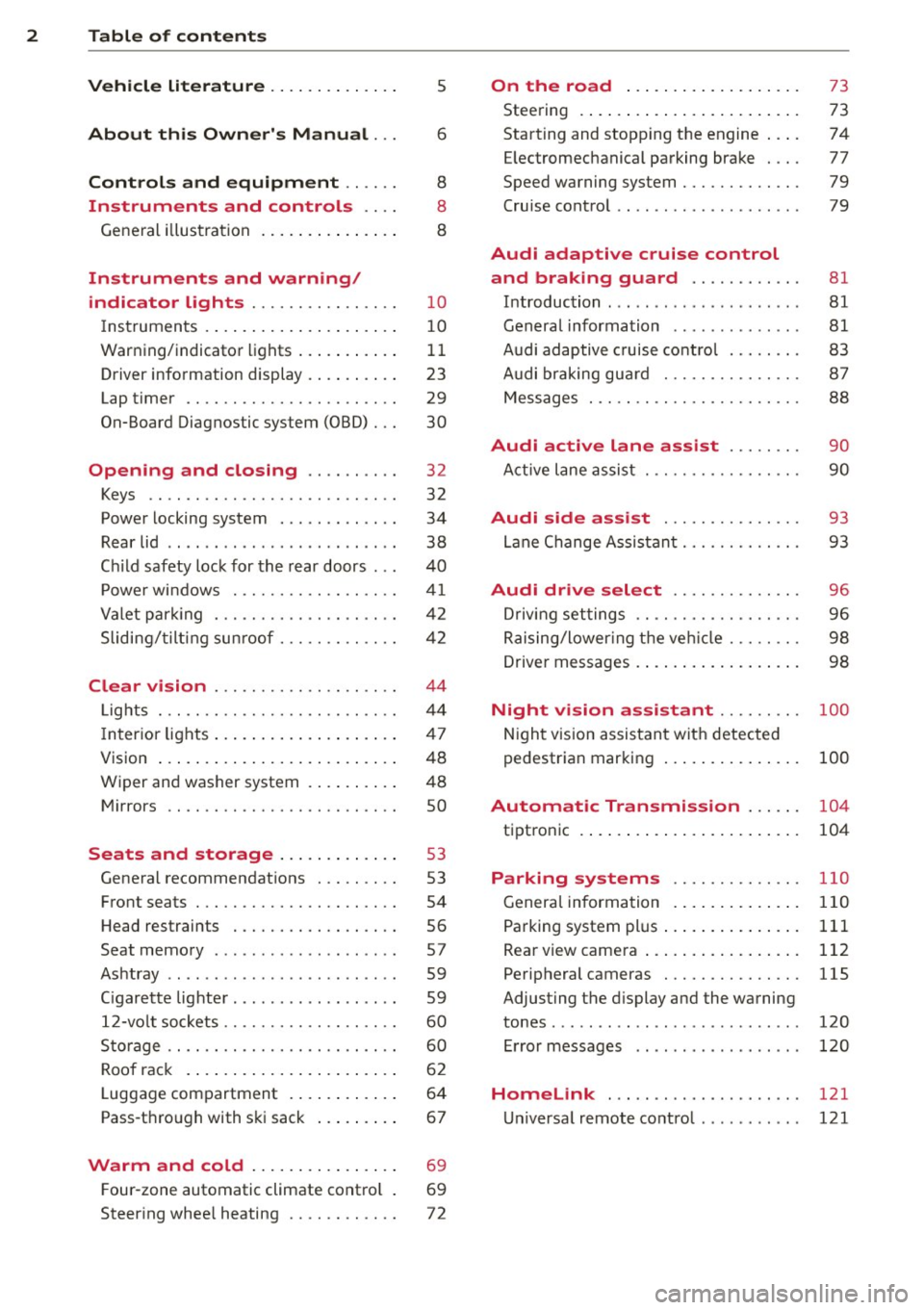
2 Table of content s
Vehicle lite ratu re .. .. .. .. .. ... .
About thi s Owner' s Manual ...
C ontr ols and equi pm ent .. ... .
Instruments and controls .. . .
General illustration ...... ... .. ... .
Instruments and warning/
indicator lights ............... .
Instruments ............ ... .. ... .
Warning/indicator lights .. ... ... .. .
Driver information display ... ... ... .
Lap timer .. ................ ... . .
On-Board Diagnostic system (OBD) .. .
Opening and closing ......... .
Keys .. .. .................. ... . .
Power locking system .......... .. .
Rear lid .... .................. .. .
5
6
8
8
8
10
10
11
23
29
30
32
32
34
38
Child safety lock for the rear doors . . . 40
Power windows ................. .
Valet park ing ................... .
Sliding/ tilting sunroof ............ .
Clear vision ................... .
Lights ... .. ................ ... . .
I nterior lights .... ......... ... ... .
V1s1on ..... ... ............. .... .
Wiper and washer system ...... .. . .
Mirrors .. ............... ....... . 4
1
42
42
44
44
47
48
48
so
Seats and storage . . . . . . . . . . . . . 53
General recommendations ........ .
Front seats .................. ... .
Head restraints ................. .
Seat memory .. .... ...... .. .. .. . .
Ashtray .. .. ................ ... . .
C igarette lighter ................. .
12-vo lt sockets .................. .
Storage .. ............... ...... . .
Roof rack .. ... ............. .... .
Luggage compartment ..... ... ... .
Pass-through with ski sack ....... . . 53
54
56
57
59
59
60
60
62
64
67
Warm and cold . . . . . . . . . . . . . . . . 69
F our-zone automatic climate control . 69
Steering wheel heating . . . . . . . . . . . . 72
On the road ... .......... ... .. .
Steering .. .... .. .. ............. .
Starting and stopping the engine ... .
E lectromechanical parking brake ... .
Speed warning system ............ .
Cruise contro l .. .. ............... .
Audi adaptive cruise control
and braking guard .......... . .
Introduction ... .. ... .... ........ .
General information ............. .
Audi adaptive cruise control ....... .
Audi braking gua rd ............ .. .
Messages . .... .. ............. .. .
73
73
74
77
79
79
81 81
81
83
87
88
Audi active lane assist . . . . . . . . 90
Active lane assist .............. .. .
Audi side assist .............. .
Lane Change Assistant ............ .
90
93
93
Audi drive select . . . . . . . . . . . . . . 96
Driving settings . . . . . . . . . . . . . . . . . . 96
Raising/lower ing the veh icle . . . . . . . . 98
Driver messages . . . . . . . . . . . . . . . . . . 98
Night vision assistant . . . . . . . . . 100
Night vision assistant with detected
pedestrian marking . . . . . . . . . . . . . . . 100
Automatic Transmission . . . . . . 104
tiptronic . . . . . . . . . . . . . . . . . . . . . . . . 104
Parking systems ........... .. .
General information ............. .
Parking system plus ......... ... .. .
Rear view camera ................ .
Peripheral cameras .............. .
Adjusting the display and the warning
tones ........ .... .............. .
Error messages
Homelink .................... .
Universal remote control .......... . 110
110
111
112
115
120
120
121
121
Page 23 of 292
Instruments and warning/indicator lights 21
't'::1".., Engine oil sensor
II Oil level! Sensor defective
If the symbol illuminates, contact your au
thor ized Audi dealer and have the oil sensor
in spected. Until you have th is done, check the
oil level each time you refuel just to be on the
safe side
¢ page 218.
Bil Fuel level indicator
lilJ Please refuel
If the indicator light turns on for the first
time and the message appears, there are
about 2.6 gallons (10 liters) of fuel left in the
tank. Time to refue l
r=;,page 209.
II) Tank system malfunction! Contact dealer
If the indicator light turns on and th is mes
sage appears, there is a malfunction in the
tank system .
Drive to your authori zed Aud i dea ler immedi
ately to have the malfunction corrected.
<;;> Windshield washer flu id level
II Please refill washer fluid
If the symbol illuminates, add windshield
washer fluid to the washer system/headlight
washer system*
r=;, page 22 7 .
'1:> Windshield wipers
E•$ vVindshield wiper defective
There is a malfunct ion with the w indshield
wipers .
Drive to your authorized Audi dea ler immedi
ately to have the malfunction corrected.
~ /0$ Defective light bulb warning
1;1 -If the indicator light turns on, a bulb has
fa iled . The message indicates the location of
the bulb.
an-if a rear fog lamp has failed, the indicator
light turns on to indicate the location on the
vehicle.
Vehicle lights : malfunction
If the message appears, there is a malfunc
tion in the headlights or li ght sw itch.
Drive to your authorized Audi dealer immedi
ately to have the malfunction corrected .
A WARNING
-Light bulbs are press urized and could ex
p lo de while they are being changed caus
ing serious personal injury.
- Work with due care when handling the
high-voltage section of gas discharge
(xenon) lights. Failure to do so could re
sult in death or serious injury.
(D Tips
Have the bu lb replaced or the connection
repaired by your authorized Audi Service
department .
~(D Headlight range control
IS Headlight range control: defective!
If the symbol illum inates, the headlig ht range
control is no long er work ing properly. Have
the system checked and repaired at your Audi
dealer.
:gD Adaptive Light
Applies to vehicles: with Adaptive Light
mil Audi adaptive light: system fault
If the indicator light turns on and this mes
sage appears, there is a malfunction in the
adaptive light system . The headlights sti ll
function .
Go to an authorized dealership to have the
headlights or the control unit for the Adaptive
Light repaired.
Page 29 of 292
Instrument s and warning /indicator lights 2 7
You can set the time and the date display in
the MMI. Refer to the MMI owner's manua l
for instructions.
When you open the drive r's door, the date and
time appear in the inst rument cluste r display
for 30 seconds .
Service interval display
Th e service int erval display r eminds you when
your next service is due.
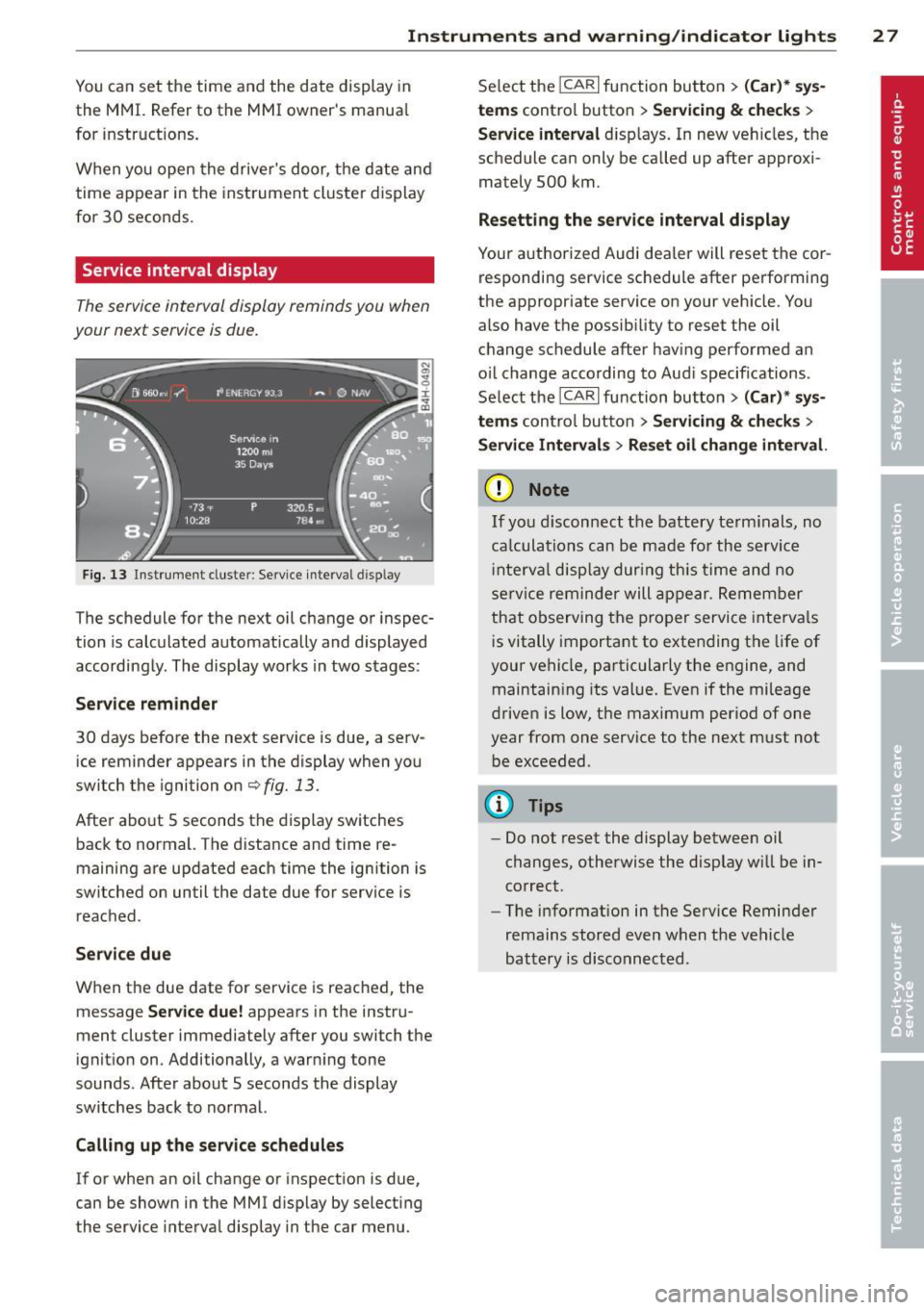
F ig . 13 Inst ru m en t cl uste r: Service inte rva l d is pl ay
The schedule for the next oil change or inspec
tion is calculated automatically and displayed
according ly . The display works in two stages :
Serv ice reminder
30 days before the next service is due, a serv ice reminder appears in the display when yo u
switch the ignition on
c::;, fig. 13 .
Afte r abo ut 5 seconds the display sw itches
back to normal. The d istance and time re
maining are updated each time the ignition is
switched on un til the date due for service is
reac hed .
Service due
W hen the due date for service is reached, the
message
Service due! appears in the instru
ment cluster immediately after you switch the
ignit io n on . Additionally, a warn ing tone
sounds. After about 5 seconds the display
switches back to normal.
Calli ng up the service schedules
If or when an oil change or inspection is due,
can be shown in the MMI d isplay by select ing
the service interva l disp lay in the car menu . Se
lect the
ICAR I function button > (Car )* sys
tems
control button > Ser vicing & checks >
Service interval d isp lays. In new ve hicles, the
schedule can only be called up after approxi
mately 500 km.
Resetting the service interval display
Your a uthorized Audi dea le r will reset the cor
responding service sc hedule after pe rforming
the appropriate service on your veh icle . You
also have the possib ility to reset the oil
c h ange schedule after hav ing performed an
o il change according to Aud i specifications.
Se lect the
ICA RI function button> (Car )* sys
tems
control button > S ervicing & checks >
Servi ce Interval s > Reset oil change interval.
(D Note
If you discon nect t he batt ery te rminals, no
ca lculatio ns can b e ma de fo r the s ervic e
i nte rva l di sp lay dur ing th is time and n o
se rv ice re minder will ap pea r. R emem ber
that o bserving t he prop er servi ce inte rva ls
i s vitally important to extending the life of
your vehicle, pa rtic ularly the engine, and
maintain ing its val ue. Eve n if the mileage
driven is low, the max imum per iod of one
year from one service t o the next must not
b e exceeded .
(D Tips
- Do not reset the display betwee n oil
changes, otherwise the disp lay will be in
co rrect.
- The info rmation in t he Service Reminder
remains st ored eve n w hen t he ve hicle
bat tery is disco nnec ted .
Page 35 of 292
Removing the mechanical key
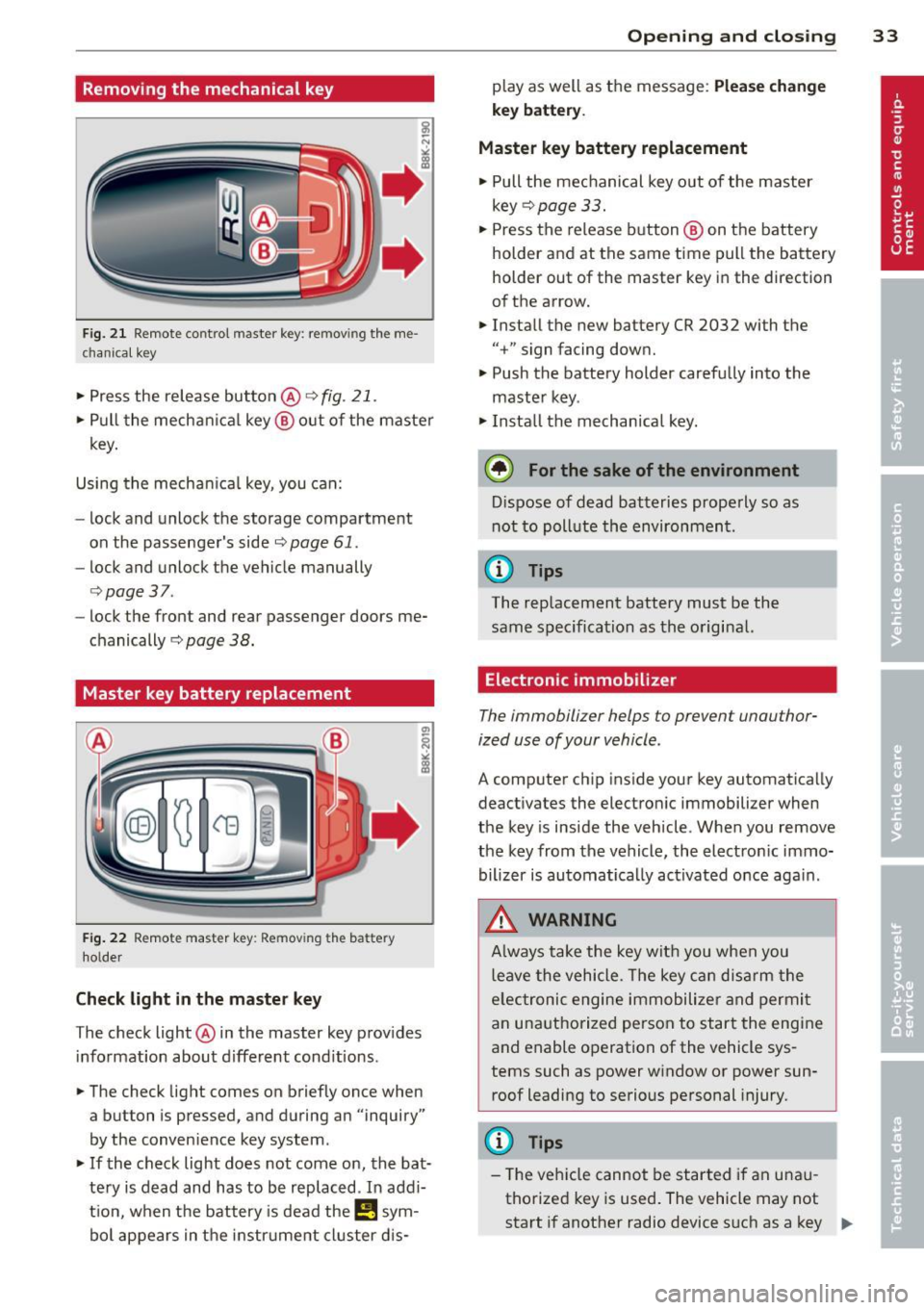
Fig. 21 Remote control maste r key : re mov ing the me
c han ical key
• Press the release button @ c:> fig. 21.
• Pull the mechanica l key @ out of the master
key.
Using the mechan ica l key, you can:
- lock and unlock the storage compartment
on the passenger's side
c::> page 61.
- lock and unlock the vehicle manually
c::>page 37 .
-lock the front and rear passenger doors me
chanically
c:> page 38.
Master key battery replacement
Fig . 22 Remote master key : Re mov ing the ba ttery
holde r
Check light in the master key
The check light @ in the master key provides
information about different cond itions .
• The check light comes on briefly once when
a button is pressed, and during an "inquiry"
by the conven ience key system .
• If the check light does not come on, the bat
tery is dead and has to be replaced . In add i
t ion, when the battery is dead the
I!! sym
bol appears in the instrument cluster dis-
Opening and closing 33
play as well as the message : Please change
key battery .
Master key battery replacement
• Pull the mechanical key out of the master
key
c::> page 33.
• Press the release button @ on the battery
holder and at the same time pull the battery
holder out of the master key in the direction
of the arrow.
• Install the new battery CR 2032 with the
"+ " sign facing down.
• Push the battery holder carefully into the
maste r key .
• Install the mechanical key.
@ For the sake of the environment
Dispose of dead batteries properly so as
not to poll ute the environment .
(D Tips
The replacement battery must be the
same specification as the original.
, Electronic immobilizer
The immobilizer helps to prevent unauthor
ized use of your vehicle .
A computer chip inside your key automatically
deactivates the electronic immobilizer when
the key is inside the vehicle. When you remove
the key from the vehicle, the electronic immo
bilizer is automatically activated once again .
A WARNING
-
Always take the key with you when you
leave the vehicle. The key can disarm the
e lectronic engine immobilizer and permit
an unauthorized person to start the engine
and enable operation of the vehicle sys
tems such as power window or power sun
roof leading to serious personal injury.
(D Tips
- Th e veh icle cannot be started if an unau
thorized key is used. The vehicle may not
start if another radio device such as a key .,.
Page 46 of 292
44 Clear vis ion
Clear vision
Lights
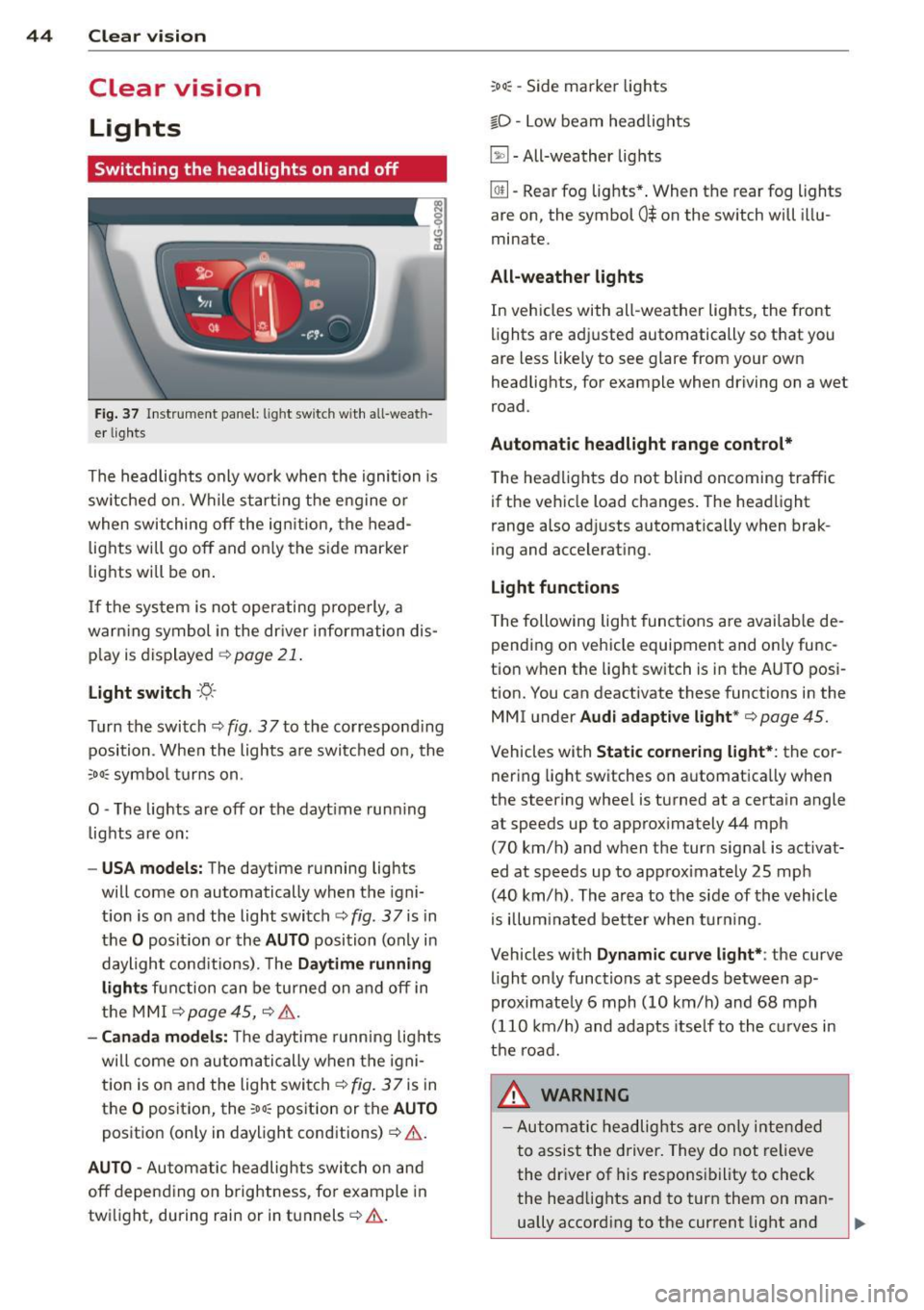
Switching the headlights on and off
Fig . 37 Instr ument pane l: light sw itch w it h all -weath
er lig hts
The headlights only wo rk when the ignition is
sw itched on. Wh ile start ing the eng ine or
when switching off the ig nition, the head
lights will go off and on ly the s ide marker
lights w ill be on .
I f the sys tem is not operating properly, a
warn ing symbol in the dr iver inform ation dis
p lay is dis played ¢
page 21.
Light switch -~ -
Turn the switch ¢ fig. 37to the co rrespond ing
position . When the lights a re switched o n, the
:oo: symbo l turns on.
0 -The lights are off or the dayt ime run ning
lights are on:
- USA model s: The daytime running lights
will come on automatically when the igni
t ion is on and the light switch¢
fig. 37 is in
the
O posit ion or the A UTO position (only in
daylight cond itions). The
Daytime running
lights function can be tu rned on and off in
the MMI ¢
page 45, ¢ .& .
-Canada model s: T he daytime running lig hts
will come on au toma tically when the igni
t ion is on and the light switch¢
fig. 37 is in
the
O posit io n, the :oo~ position or the AUTO
posit ion (on ly in daylight conditions)¢ .&.
AUTO -Automatic headlights swi tch on and
off depend ing o n brightness, fo r example in
tw ilight, during rain or in tunnels¢.&.
:oo~ -Side marker lights
io -Low beam head lights
~ -All-weather lig hts
@!l -Rear fog lights *. When the rear fog lights
are on, the symbol
0$ on the sw itch will i llu
minate.
All-weather light s
In vehicles with all -weather lights, the front
lights are ad justed automatically so that you
are less like ly to see glare from your own
headlig hts, for example when driving on a wet
road .
Automatic headlight range cont rol*
T he headlights do not blind oncoming traffic
if the veh icle load changes . The head light
range also ad justs automatica lly when brak
ing and accelerating .
Light functions
The following light funct ions are availab le de
pending on vehicle equipment and o nly func
tion when the lig ht switch is i n the AUTO posi
t ion. You can deactivate these functions in the
MMI u nder
Audi adapt ive light *¢ page 45.
Vehicles with Static corneri ng light*: the cor
nering light switches on a utomatica lly when
the steering whee l is turned at a certa in angle
at speeds up to app rox imately 44 mph
(70 km/h) and when the turn signal is activat
ed at speeds up to app rox imately 25 mph
(40 km/h) . Th e ar ea to the side of th e vehicle
is illum inated better when turn ing .
Vehicles with
Dynamic curve light*: the curve
light only functions at speeds between ap
proximate ly 6 mph (10 km/h) and 68 mph
(110 km/ h) and adapts itse lf to the cu rves in
the road.
A WARNING
- Automatic he adlights are only inte nded
t o assist the driver. They do not relieve
the dr iver of his respons ibility to check
the head lights and to turn them on ma n-
ually accord ing to the current light and ,..
Page 81 of 292
even with ESC and its associated
components (ABS, ASR, EDL). In corners
and when road or weather conditions are
bad, a full brake application can cause the
vehicle to skid or the rear end to break
away· risking an accident.
Speed warning system
Introduction
The speed warning system helps you to stay
under a specified maximum speed.
The speed warning system wa rns you if you
are exceeding the maximum speed that you
have set. You will hear a warn ing tone when
your speed exceeds the stored value by ap
proximately 3 mph (3 km/h). An indicator
light . (USA models)/ . (Canada models) in
the instrument cluster display also turns on at
the same time. The indicator light ••
turns off when the speed decreases below the
stored maximum speed .
Setting a threshold is recommended if you
would like to be reminded when you reach a certain max imum speed . Situations where you
may want to do so include driving in a country
with a general speed limit or if there is a
specified maximum speed for winter tires.
@ Tips
Even though your vehicle is equipped with
a speed warning system, you should st ill
watch the speedometer to make sure you
are not driving faster than the speed limit.
Setting the threshold
You can set, change and delete the threshold
in the MMI.
.. Se lect : I CARI function button > (Car)* sys
tems
control button > Driver assist > Speed
warning .
You can set any threshold between 20 mph
(30 km/h) and lS0 mph (240 km/h) . Settings
can each be adjusted in inc rements of 6 mph
(10 km/h).
On the road 79
Cruise control
Switching on
Applies to veh icles: w ith cruise control
The cruise control system makes it possible to
drive at a constant speed starting at 20 mph (30km/h) .
0
f
®t
0
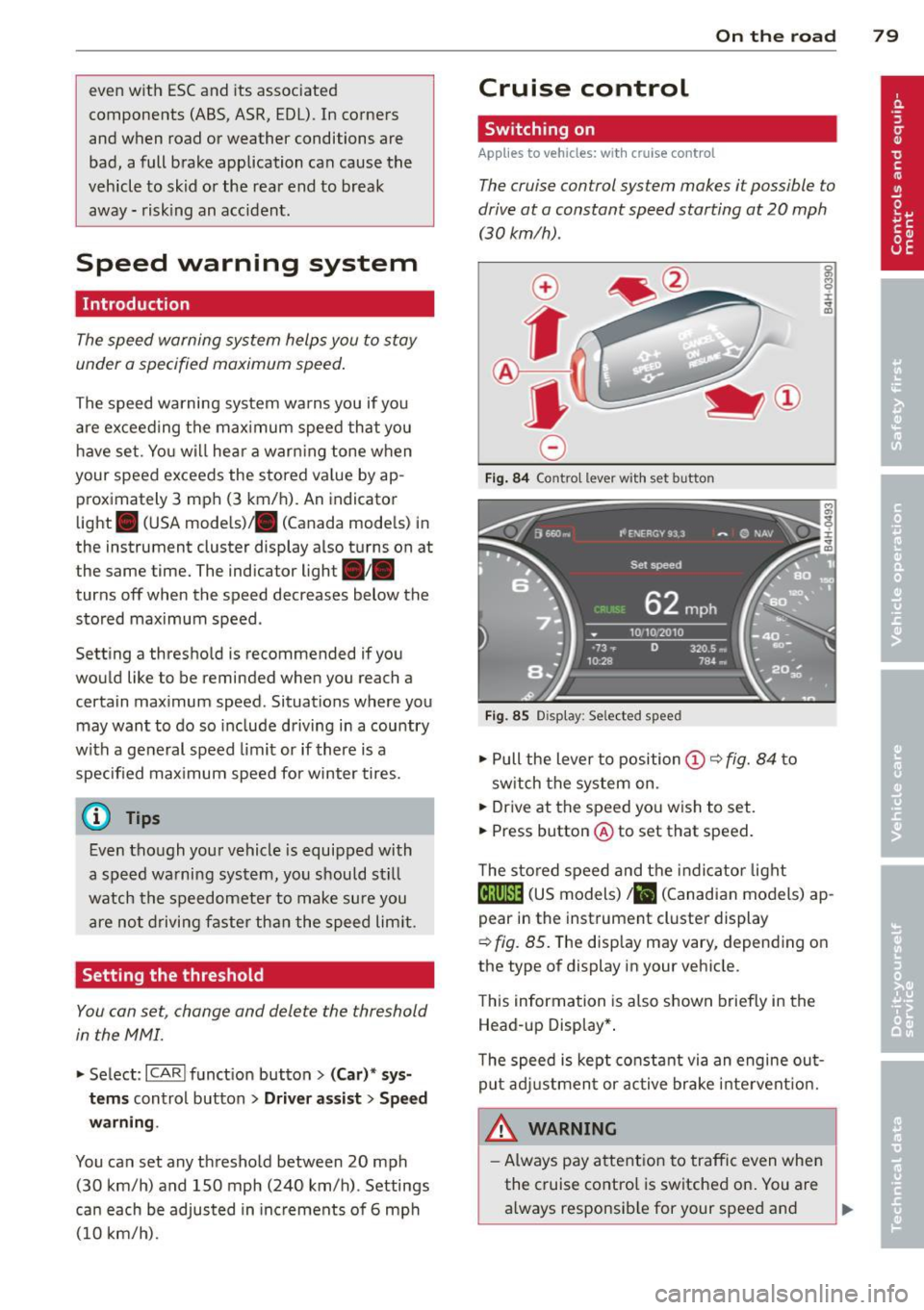
Fig. 84 Contro l lever w ith set b utto n
Fig. 85 Display: Se lected speed
.. Pull the lever to position@¢ fig. 84 to
sw itch the system on .
.. Drive at the speed you wish to set.
.. Press button @ to set that speed.
T he stored speed and the indicator light
@;\1)~14 (US models) Iii (Canadian models) ap
pear in the instrument cluster display
¢
fig. 85. The disp lay may vary, depending on
the type of display in your veh icle.
This information is also shown briefly in the
Head -up Display*.
T he speed is kept constant via an engine out
put adjustment or active brake intervent ion.
A WARNING .c
- Always pay attention to traffic even when
the cruise control is switched on. You are always responsib le for your speed and ...
Page 85 of 292
Audi adaptive cruise control and braking guard 83
@ is located in front o f that veh icle, the sys
tem wi ll not react to the stationary vehicle.
Audi adaptive cruise
control
Description
Applies to vehicles: with Audi adaptive cruise co ntrol
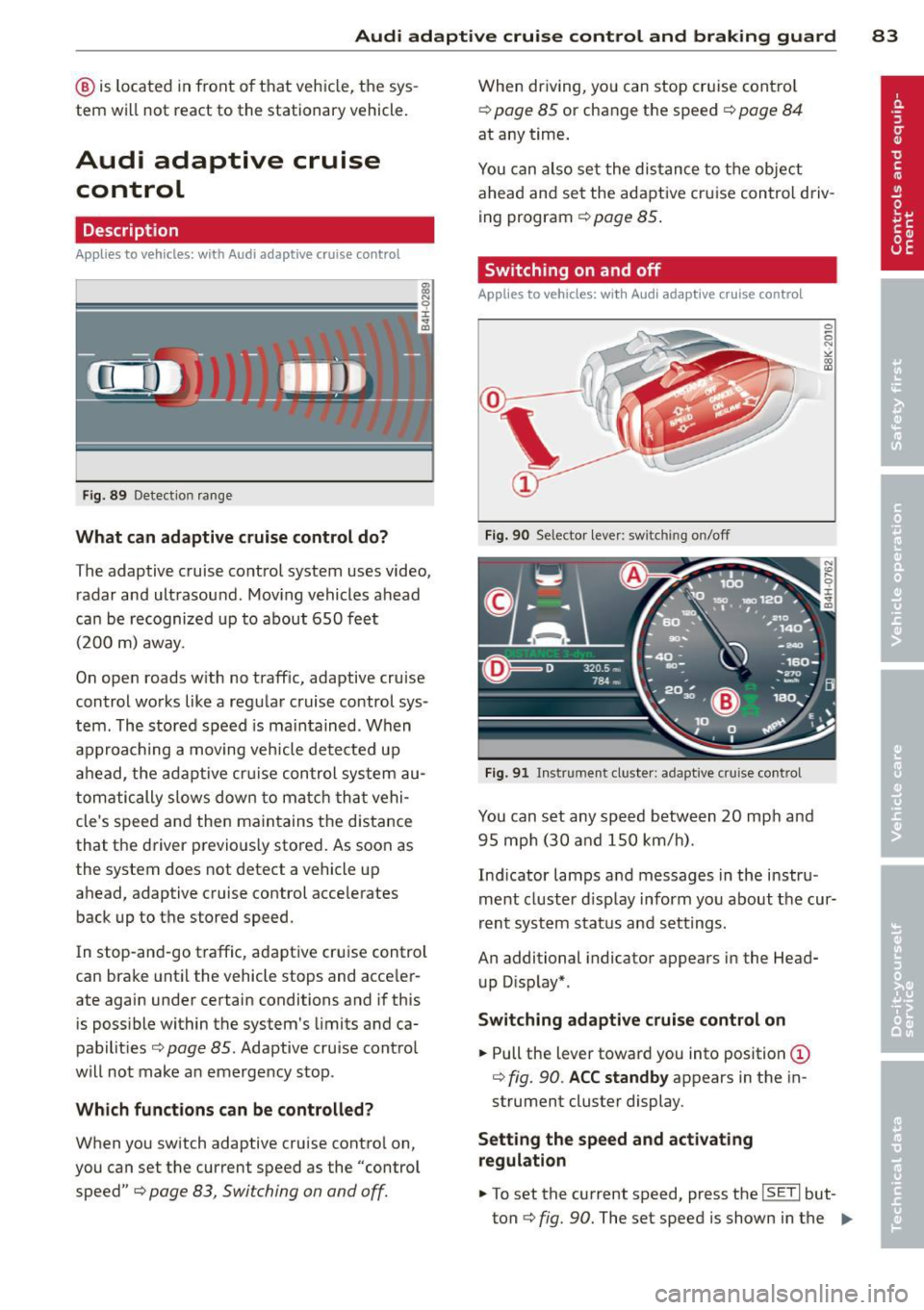
Fig . 8 9 Detection ra nge
What can adaptive cruise control do?
The adaptive cruise co ntrol system uses video,
radar and ultrasound . Mov ing vehicles ahead
can be r ecognized up to about 650 fe et
(200 m) away.
On ope n roads w ith no traff ic, adaptive cruise
contro l works like a reg ular cruise control sys
tem. The stored speed is ma in tained . When
approaching a moving veh icle detected up
ah ead, the adap tive cr uise control sys tem au
tom atically s lows dow n to matc h that vehi
cle's speed and the n main tains t he d istance
that the driver p revio usly sto red. As soon as
the system does not detect a vehicle up
ahead, adaptive cruise control acce lerates
back up to t he stored speed.
I n stop-an d-go t raffic, adapt ive cr uise contro l
can bra ke until the vehicle stops and acce le r
ate again under certain conditions and if this
is poss ible within the system's limits and ca
pabilit ies
c> page 85. Adaptive cru ise cont ro l
will not make a n emerge ncy stop .
Which functions can be controlled?
When you switch adaptive cruise contro l on,
you can set the current speed as the "control speed"
c> page 83, Switching on and off.
When driving, yo u can stop cruise cont ro l
c> page 85 or change the speed c> page 84
at any time .
You can also set the dis tan ce to the object
ahead and se t the adapt ive cr uise control d riv
ing program
c> page 85 .
Switching on and off
Applies to vehicles: with Audi adaptive cruise control
Fig. 90 Selector lever: switching o n/off
Fig . 91 Instrument cluste r: adaptive cru ise control
You can set any sp eed between 20 mp h and
9 5 mp h (3 0 and 150 km/h).
Ind icator lamps a nd messages in the i nstru
ment cluster d isp lay inform yo u about t he cur
r ent syst em stat us and sett ing s.
An additional indicator appears in the Head
u p D isp lay* .
Switching adaptive cruise control on
.,. Pull the lever toward you into position (D
c> fig. 90. ACC standby appears in the in
strument cluster display .
Setting the speed and activating
regulation
.,. To set the current speed, press the ISETI but
ton
c> fig. 90 . The set speed is shown in the ..,.
Page 88 of 292
86 Audi adaptive cruise control and braking guard
When approaching a moving vehicle up ahead,
the adaptive cruise control system automati
cally brakes to match that object's speed and
then maintains the stored distance. If the ve
h icle ahead accelerates, adaptive cruise con
trol will also accelerate up to the stored
speed.
The higher the speed , the greater the distance
in yards (meters)
c::> & . The Distance 3 setting
is recommended .
The distances prov ided are spec ified values .
Depending on the driving situation and the
how the vehicle ahead is driving, the actual
d istance may be more or less than these tar
get distances.
The various symbols for the time increments
appear briefly in the information line @
c::> page 83, fig . 91 when you change the set
tings .
~-~- --Distance 1 : This setting corre
sponds to a distance of 92 feet/28 meters
when traveling at 62 mph (100 km/h), or a
time interval of 1 second.
~--~- -Distance 2: This setting corre
sponds to a distance of 118 feet/36 meters
when traveling at 62 mph (100 km/h), or a
time inte rval of 1.3 seconds .
~--- ~-Distance 3: This setting corre
sponds to a distance of 164 feet/SO meters
when traveling at 62 mph (100 km/h), or a
time interval of 1.8 seconds .
~---- ~ Distance 4: This setting corre
sponds to a distance of 210 feet/64 meters
when traveling at 62 mph (100 km/h), or a
time interval of 2.3 seconds .
A WARNING ,. -
Following other vehicles too closely in
creases the risk of collisions and serious
personal inj ury.
- Setting short distances to the traffic
ahead reduces the time and distance
available to bring your vehicle to a safe
stop and makes it even more necessary
to pay close attention to traffic. -
Always obey applicable traffic laws, use
good judgment, and select a safe follow ing d istance for the traff ic, road and
weather conditions.
@ Tips
- Distance 3 is set automatically each time
you switch the ignition on.
- Your standard settings are automatically
stored and assigned to the remote con
trol key being used.
Selecting the driving mode
Applies to veh icles: w ith Audi adaptive cruise co ntrol
.,. Select the desired driving mode in drive se
lect
c::> page 96 .
(D Tips
Your settings are automatically stored and
ass igned to the remote control key being
used.
Prompt for dr iver intervention
Applies to veh icles: w ith Audi adaptive cruise co ntro l
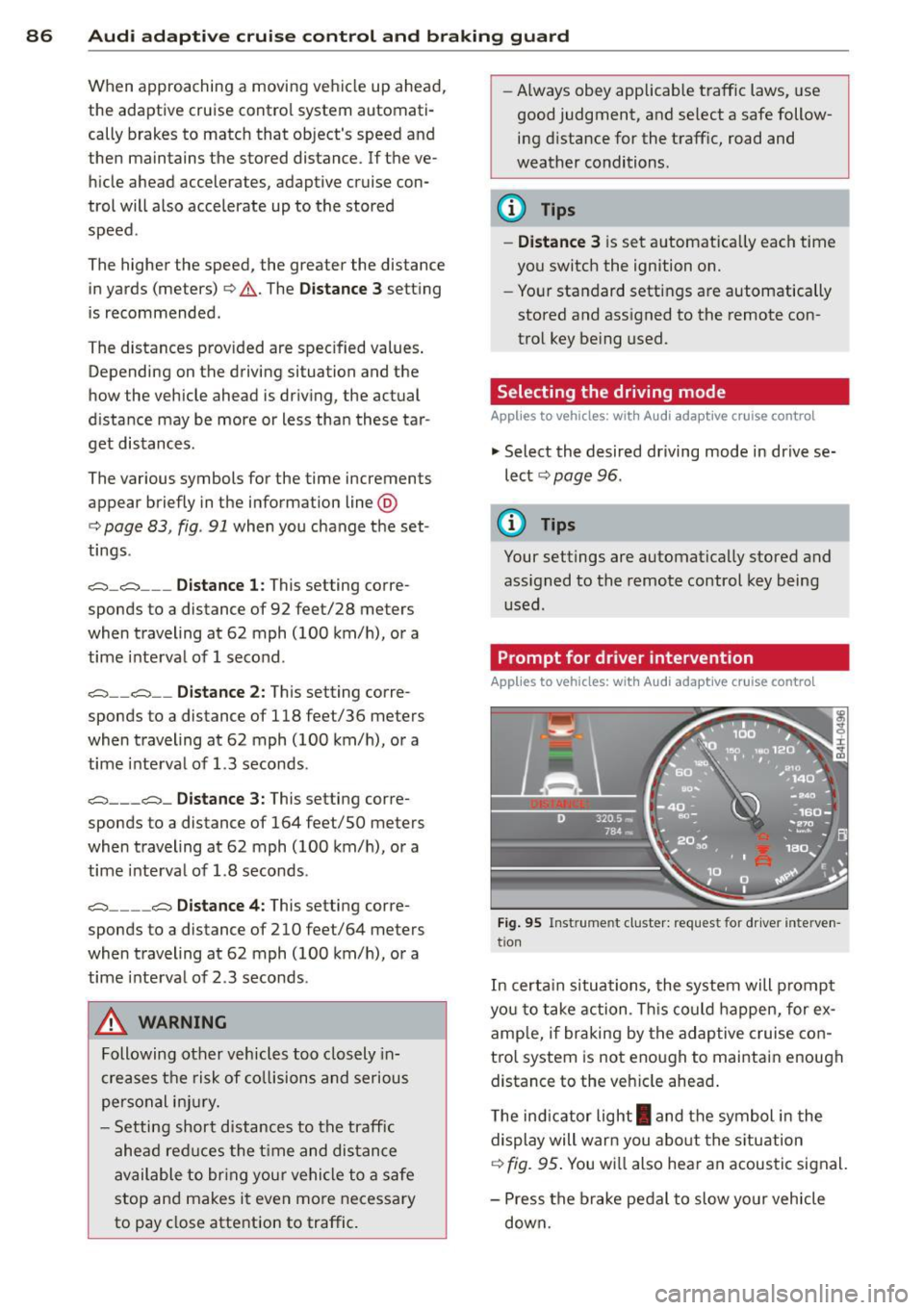
Fig. 95 Instrume nt cluster: req uest fo r drive r inte rven
t ion
In certain situations, the system will prompt
yo u to take action . This could happen, for ex
amp le, if braking by the adap tive cruise con
tro l system is not enough to maintain enough
distance to the veh icle ahead .
T he indicator light
I and the symbol in the
display will war n you abo ut the situat ion
c::>fig. 95 . You wi ll also hear an acoustic signal.
- Press the brake pedal to slow yo ur vehicle
down.
Page 92 of 292
90 Audi acti ve lane a ssi st
Audi active lane assist
Active lane assist
Description
App lies to vehicles: with active lane assist
Active lane assist helps you keep your vehicle
in your lane .
Active lane assist detects lane marker lines
within the limits of the system using a camera
in the windshield . If you are approaching a de
tected lane marker line and it appears likely
that you w ill leave the lane, the system will
warn you by means of corrective steer ing . T he
d river can over ride the correct ive steer ing at
any time. If the veh icle crosses a line, the d riv
er is also warned by a light
vibration in the
steering wheel. The vibration warning must be switched on in the MMI for this to happen.
Active lane ass ist is operable when the line
marking the lane is detected on at least one
side of the vehicle .
If the system is in active standby mode and
the turn signa l is activated before driving over
the lane marker line, the warning does not oc
cur since the system allows for intentional lane changes.
The system is designed for driv ing on free
ways and expanded highways and thus works
only at speeds of 40 mph (65 km/h) or more .
If the vehicle is also equ ipped with Audi adap
tive cruise control*, the corrective steering
will be more specific in regard to the driving
situation . In addition to the lane marker lines,
the system can also take into account other
objects such as guard rails . If they are detect
ed i n close prox imity to the veh icle, Audi ac
tive lane ass ist helps prevent the vehicle from
driving too close to them . There is also pass
ing assistance. The system does not provide
any corrective steering if it detects that you
are passing another vehicle.
A WARNING , ~
- The system warns the driver that the ve
hicle is leaving the lane us ing corrective steer
ing. The driver is always responsible
for keeping the vehicle within the lane .
- The system can assist the driver in keep
ing the vehicle in the lane, but it does
not steer by itself. Always keep your
hands on the steering wheel.
- Corrective steer ing may not occur in cer
tain situat ions, such as dur ing heavy
brak ing .
- The camera does not recognize all lane
marker lines. Corrective steer ing can only
take p lace on the side of the vehicle
where lane marker lines are detected .
- Other road structures or objects cou ld
possibly be identified un intent ional ly as
lane marker lines . As a res ult, correct ive
steer ing may be unexpected or may not
occ ur.
- The camera view can be restricted, for
examp le by vehicles driving ahead o r by
r ai n, snow, heavy spray or light shining
into the camera. T his can result in act ive
lane assist not detecting the lane marker
lines or detect ing them incorrectly .
- Unde r ce rtain condi tions such as ruts in
the road, a banked roadway or cross
winds, the co rrective steering alone may
not be eno ugh to keep the vehicle in the
lane.
- For safety reasons, active lane ass ist
must not be used when there are poor
road and/or weather conditions such as
slippery roads, fog, grave l, heavy rain,
snow and the potential for hydroplaning.
Using act ive lane assist under these con
d itions may increase the risk of a crash.
Page 96 of 292
94 Audi side assist
Side assist functions at speeds above approxi
mately 19 mph (30 km/h).
(D Vehicles that are approaching
I n certain cases, a vehicle will be classified as
cr itica l for a lane change even if it is still
somewhat far away . The faster a vehicle ap
proaches, the sooner the display in the exteri
or mirror will turn on.
@ Vehicles traveling with you
Vehicles traveling with you are indicated in the
exterior m irror if they are classified as critica l
for a lane change. All vehicles detected by
side assist are indicated by the time they en
ter your "blind spot", at the latest.
@ Vehicles left behind
If you slowly pass a vehicle that side assist has
detected (the difference in speed between the
vehicle and your vehicle is less than 9 mph or
15 km/h), the disp lay in the exterior mirror
turns on as soon as the vehicle enters your blind spot.
The display will not turn on if you quickly pass
a vehicle that side assist has detected (the dif
ference in speed between the vehicle and your
vehicle is greater than 9 mph or 15 km/h).
Functional limitations
The radar sensors are designed to detect the
left and right adjacent lanes when the road
lanes are the normal width. In certain situa
tions, the display in the exterior mirror may
turn on even though there is no vehicle locat
ed in the area that is critical for a lane change.
For example:
- if the lanes are narrow or if your are driving
on the edge of your lane. If this is the case,
the system may have detected the vehicle in
another lane that is
not adjacent to your
current lane.
- if you are driving through a curve. Side assist
may react to a veh icle that is one lane over
from the adjacent lane.
- if side assist reacts to other objects (such as
high or displaced guard ra ils). -
In poor weather conditions . The side assist
functions are limited.
Do not cover the rada r senso rs
~ fig. 104 with
stickers, deposits, bicycle wheels or other ob
jects, because this will affect the funct ion . For
information on cleaning, refer to
~ page 203.
A WARNING
-
- Always pay attention to traffic and to the
area around your vehicle. Side assist can
not replace a driver's attention. The driv
er alone is always responsible for lane
changes and similar dr iving maneuvers .
- Improper reliance on the side assist sys
tem can cause coll is ions and serious per
sonal injury:
- Never rely on ly on side assist when
changing lanes.
- Always check rear view mirrors to make
sure that it is safe to change lanes.
- Side assist cannot detect all vehicles un
der all conditions -danger of accident!
- Please note that side assist indicates
there are approaching vehicles, or
vehicles in your blind spot, only after
your vehicle has reached a driving speed
of at least 19 mph (30 km/h).
- In certain sit uations, the system may not
function or its function may be limited.
For example:
- if vehicles are approaching or being left
behind very quickly. The disp lay may
not turn on in time.
- in poor weather conditions such as
heavy rain, snow o r heavy mist.
- on very wide lanes, in tight curves or if
there is a rise in the road surface.
Vehicles in the adjacent lane may not
be detected because they are outside
of the sensor range .
([) Note
The sensors can be displaced by impacts or
damage to the bumper, wheel housing and
u nderbody. This can affect the system. .,..