turn signal AUDI RS7 SPORTBACK 2015 User Guide
[x] Cancel search | Manufacturer: AUDI, Model Year: 2015, Model line: RS7 SPORTBACK, Model: AUDI RS7 SPORTBACK 2015Pages: 302, PDF Size: 74.76 MB
Page 95 of 302
"' N
a:: I.J "". rl I.O
"' rl
"' rl
Audi side assist Lane Change Assistant
Description
App lies to vehicles: with side assist
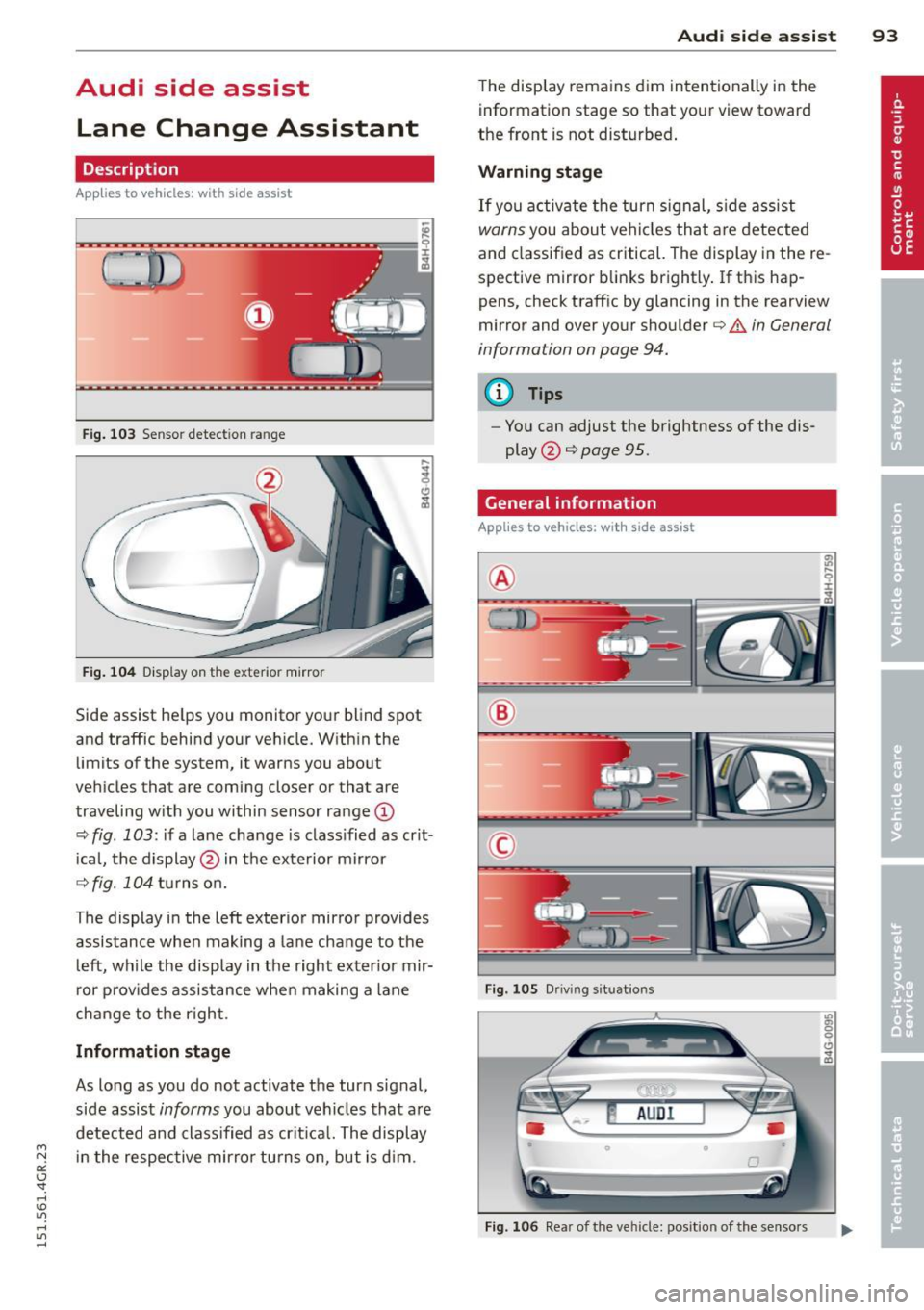
Fig. 103 Sensor detection range
Fig. 104 Display on the exterior mirror
Side assist he lps you monitor your blind spot
and traffic behind your veh icle. With in the
limits of the system, it warns you about
vehicles that are coming closer or that are
traveling w ith you within sensor range
(D
c::, fig . 103: if a lane change is class ified as crit
ical, the display@ in the exterior mirror
c::>fig.1 04turnson.
Th e display in the left exterior mirror provides
assistance when making a lane change to the
le ft, while the display in the right exterior mir
r or provides assistance when making a lane
change to the right.
Information stage
As long as you do not activate the turn signal,
side assist
informs you about vehicles that are
detected and classified as crit ical. The display
in the respective mirror turns on, but is d im.
Audi side assist 93
The display remains dim intentionally in the
information stage so that your view toward
the front is not disturbed .
Warning stage
If you activate the turn signal, side assist
warns you about vehicles that are detected
and classified as critical. The display in the re
spective mirror blinks brightly . If this hap
pens, check traff ic by glancing in the rearview
mirror and over your shoulder
c::> A in General
information on page 94.
@ Tips
- Yo u can adjust the brightness of the dis
play @ c::>
page 95.
General information
Applies to vehicles: with side assist
®
®
©
Fig. 105 Driving situations
Fig . 106 Rear of the vehicle: position of the senso rs
Page 112 of 302
110 Parking systems
Parking system plus
Description
Applies to vehicles: wit h park ing system p lus
Audi parking system plus provides audio and
visual signals when parking.
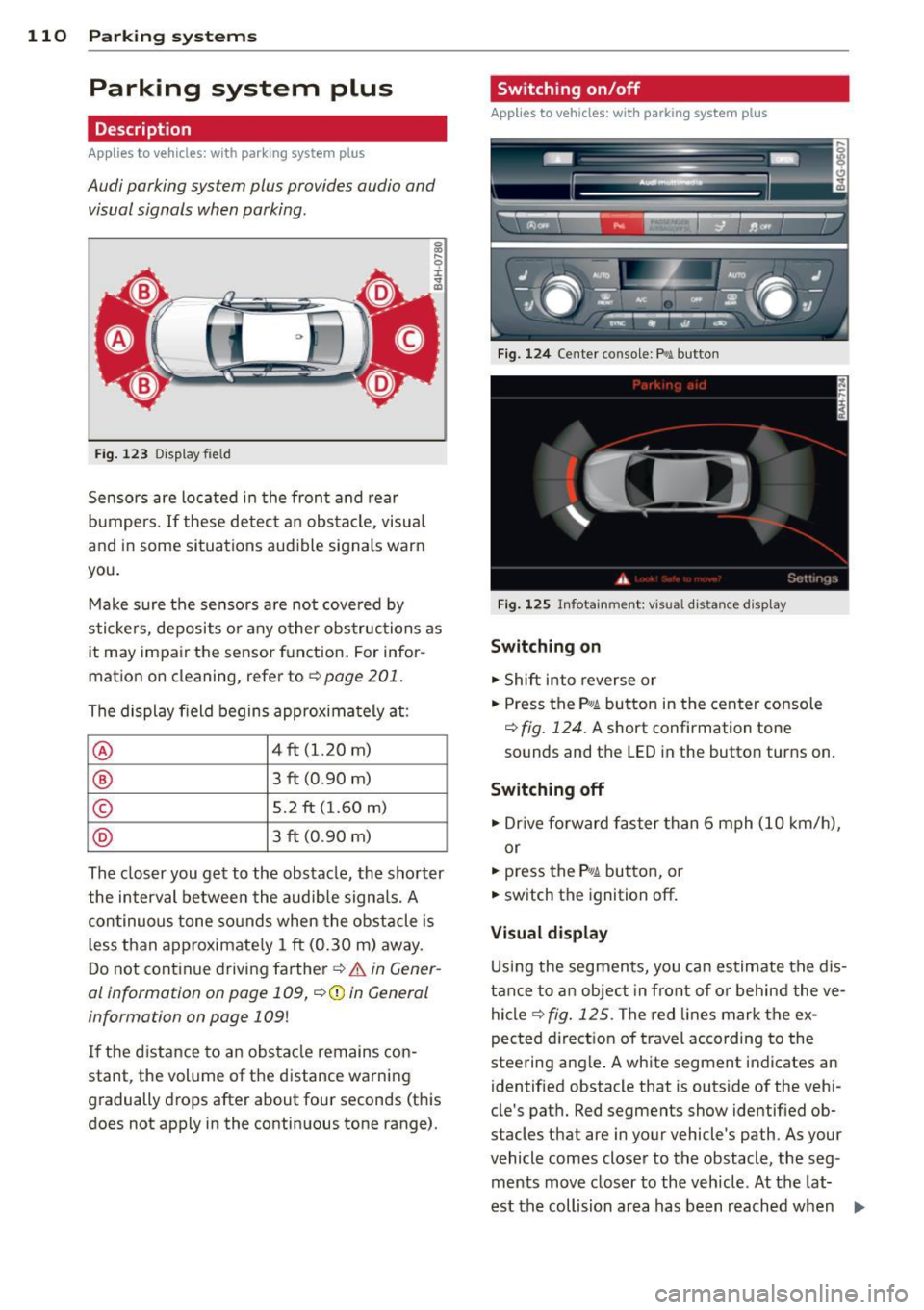
Fig. 123 Display field
Sensors are located in the front and rear
bumpers.
If these detect an obstacle, visual
and in some situations audible signals warn
you.
Make sure the sensors are not covered by
stickers, deposits or any other obstructions as
it may impair the sensor function. For infor
mation on cleaning, refer to
~ page 201.
The display field begins approximately at :
@ 4 ft (1.20 m)
® 3 ft (0.90 m)
© 5.2 ft (1.60 m)
@ 3 ft (0 .90 m)
The closer you get to the obstacle, the shorter
the interval between the audible signals. A
continuous tone sounds when the obstacle is
less than approximately 1 ft (0.30 m) away.
Do not continue driving farther~&.
in Gener
al information on page 109,
~CD in General
information on page 109!
If the distance to an obstacle remains con
stant, the volume of the distance warning
gradually drops after about four seconds (this
does not apply in the continuous tone range).
Switching on/off
Applies to vehicles : w it h park ing system pl us
Fig. 124 Center console :
P.! button
Fig. 125 Infotainment: visual distance d isplay
Switching on
.,. Shift into reverse or
.,. Press the
P"1A button in the center console
~ fig. 124. A short confirmation tone
sounds and the
LED in the button turns on.
Switching off
.. Dr ive forward faster than 6 mph (10 km/h),
or
.,. press the
Pif.lA button, or
.,. switch the ignition off.
Visual display
Using the segments, you can estimate the dis
tance to an object in front of or behind the ve
hicle~
fig . 125 . The red lines mark the ex
pected direction of travel according to the
steering ang le . A wh ite segment indicates an
identified obstacle that is outside of the vehi
cle's path. Red segments show identified ob
stacles that are in your vehicle's path. As your
vehicle comes closer to the obstacle, the seg ments move closer to the vehicle. At the lat-
est the collision area has been reached when ..,.
Page 115 of 302
"' N
a:: I.J "". rl I.O
"' rl
"' rl
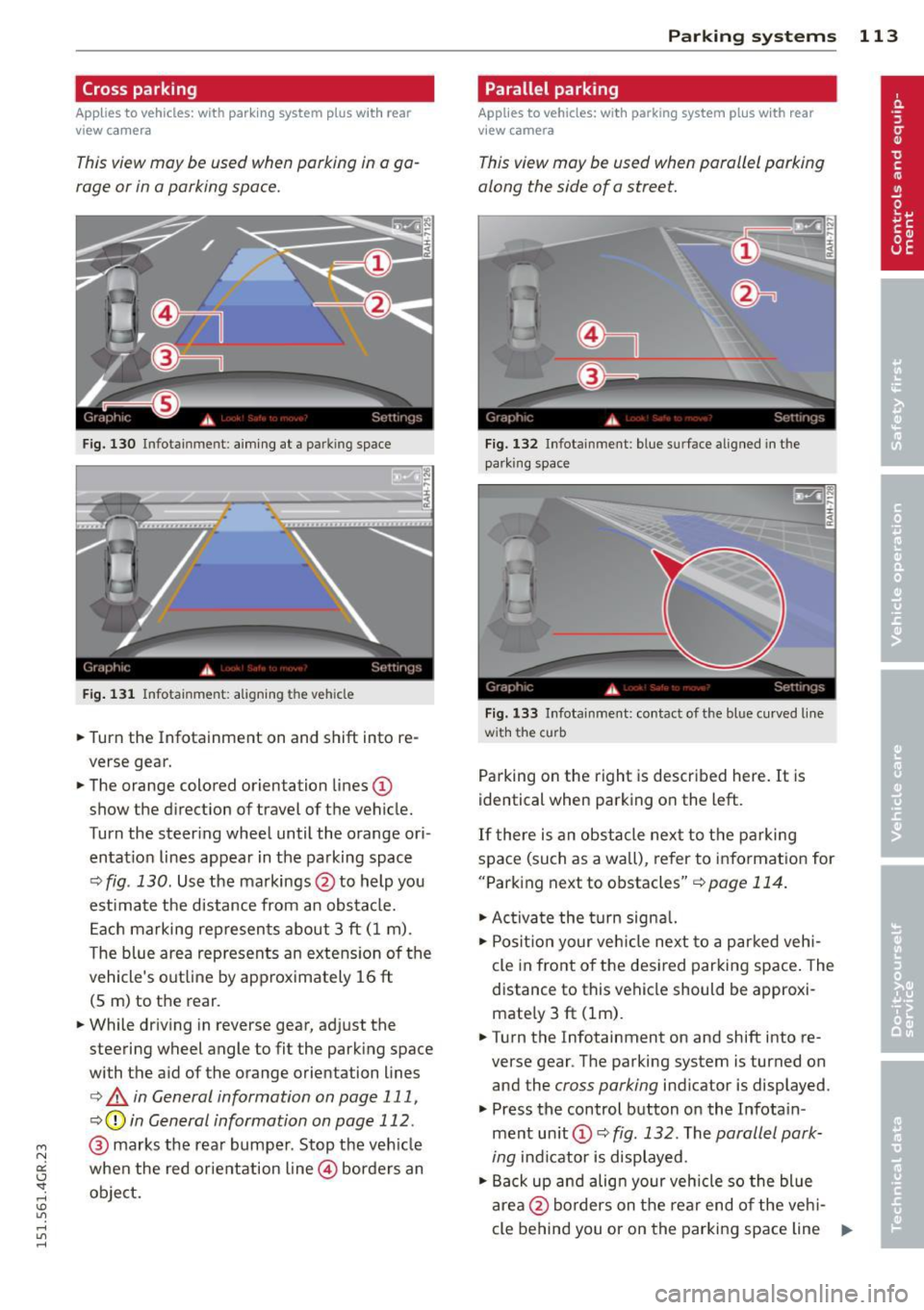
Cross parking
Applies to vehicles: with parking system p lus wit h rear
view ca mera
This view may be used when parking in a ga
rage or in a parking space.
Fig. 130 Infotainment: aiming at a parking space
Fig. 131 Infotainment: aligning the vehicle
• Turn the Infotainment on and shift into re
verse gear.
• The orange colored orientation lines@
show the direction of travel of the vehicle.
Turn the steering wheel until the orange ori
entation lines appear in the parking space
¢
fig . 130. Use the markings @to help you
estimate the distance from an obstacle.
Each marking represents about 3 ft (1 m).
The blue area represents an extension of the
vehicle's outline by approximately 16 ft
(5 m) to the rear .
• While driving in reverse gear, adjust the
steering wheel angle to fit the parking space
with the aid of the orange orientation lines
¢.&, in General information on page 111,
¢(]) in General information on page 112 .
@ marks the rear bumper. Stop the vehicle
when the red orientation line@ borders an
object.
Parking systems 113
Parallel parking
Applies to vehicles: wit h parking system plus with rear
vi ew camera
This view may be used when parallel parking
along the side of a street.
Fig. 132 Infotainment : blue surface aligned in the
parking space
Fig. 133 Infotainment: contact of the blue curved line
w ith the curb
Parking on the right is described here. It is
identical when parking on the left.
If there is an obstacle next to the parking
space (such as a wall), refer to information for
"Parking next to obstacles"¢
page 114.
• Activate the turn signal.
• Position your vehicle next to a parked vehi
cle in front of the desired parking space. The
distance to this vehicle should be approxi
mately 3 ft (lm).
• Turn the Infotainment on and shift into re
verse gear . The parking system is turned on
and the
cross parking indicator is displayed.
• Press the control button on the Infotain
ment unit(!)¢
fig. 132 . The parallel park
ing
indicator is displayed.
•Backup and align your vehicle so the blue
area @ borders on the rear end of the vehi-
cle behind you or on the parking space line ..,..
Page 116 of 302
114 Park in g s yste m s
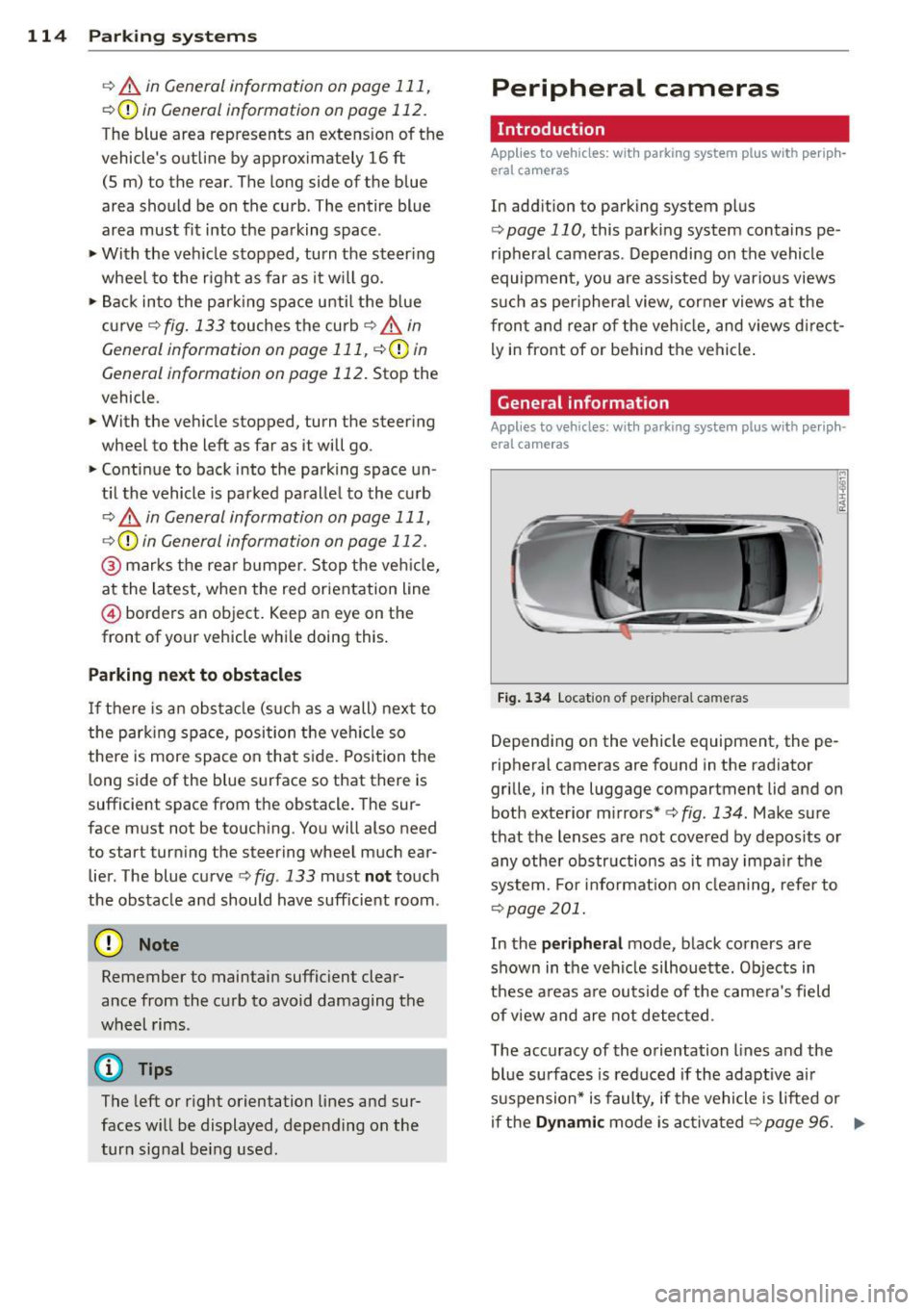
c> A in General information on page 111,
r=.>(D in General information on page 112.
The blue area represents an extens ion of the
vehicle's outline by approximately 16 ft
(5 m) to the rear . The long side of the blue
area should be on the curb. The entire blue
area must fit into the parking space .
~ With the vehicle stopped, turn the steer ing
wheel to the r ight as far as it w ill go.
~ Back in to the par king spa ce until the b lue
curve
r=.> fig. 133 touches the curb c> A in
General information on page 111,
¢ (Din
General information on page 112 . Stop the
vehicle.
~ With the veh icle stopped, turn the steer ing
wheel to the left as far as it will go.
~ Continue to back into the parking space un
t il the vehicle is parked pa ralle l to the curb
r=.> A in General information on page 111,
r::> Q) in General information on page 112 .
@ marks the rear bumper . Stop the ve hicle,
at the latest, when the red orientation line
@ borders an object. Keep an eye on the
front of your vehicle whi le doing this .
Parking next to obstacles
If there is a n obsta cle (s uch as a wall) next to
the park ing space, position the ve hicle so
the re is more space o n that s ide. Position the
long side of the b lue surface so that there is
sufficient space from the obstacle . The sur
face m ust not be touch ing . You will also need
to start tur ning the steering wheel much ear
lier . The blue curve
r::> fig. 133 must not touch
the obstacle and should have sufficient room .
(D Note
Remember to maintain sufficient clear
ance from the curb to avoid damaging the
wheel rims .
(!) Tips
The left or right orientation lines and sur
faces will be displayed, depe nding on the
turn signal be ing used .
Peripheral cameras
Introduction
Applies to vehicles: wi th parking system pl us with per ip h
eral c ameras
In add ition to parking system p lus
r=.> page 110, this parking system conta ins pe
ripheral cameras . Depending on the vehicle
equipment, you are assisted by vario us views
s u ch as per iphera l view , corner views at the
fron t and rear of the veh icle, and views d irect
ly in front of or behind the vehicle .
General information
Applies to v ehicl es: wi th parking sys te m plus with pe riph
eral ca meras
F ig . 1 34 Location of per iphera l came ras
Depending on the vehicle equipment, the pe
ripheral cameras are found in the radiator
grille, in the luggage compartment lid and on
both exterior m irrors *
c> fig. 134. Make sure
that the lenses a re not covered by depos its or
any othe r obstructions as it may impa ir the
system. For informat ion on clean ing, refe r to
r::>page 201.
In the peripheral mode, black corners are
shown in the vehicle silhouette . Objects in
these areas a re ou ts ide of the came ra's field
of view and are not detected.
T he accuracy of the orientation lines and the
blue surfaces is reduced if the adaptive ai r
suspension* is faulty, if the vehicle is lifted or
i f th e
D ynamic mode is activa ted c> page 96. ..,.
Page 121 of 302
M N
0:: <.J 'SI: ,...., \!) 1.1'1 ,...., 1.1'1 ,....,
Setting the mode
Applies to vehicles: with parking system with peripheral
cameras
.,. Select : I CARI function button > (Car)* sys
tems
control button > Driver assist > Park
ing aid
> Change to front /rear > Auto or
Manual.
Auto -
This view behind the vehicle (Rear
mode) is displayed automatically when you
shift into reverse. This view in front of the ve
hicle
( Front mode) is d isp layed automatically
when yo u sh ift i nto the forward gea rs.
Manual -This view beh ind the vehicle ( Rear
mode) is a lways d isp layed when you turn on
the system .
Adjusting the display
and the warning tones
Appl ies to vehicles: with parking system plus/r ear view
camera/peripheral cameras
The display and warning tones can be adjust
ed in the Infotainment.
.,. Select : I C ARI function button > (Car)* sys
tems
control button > Driver assist > Park
ing aid.
Display
On * -
optical d isplay is shown for the parking
system plus, rear view camera image is shown
for parking system plus with rear view cam
e ra* .
Off -when the park ing system is sw itched on,
only audible signa ls are given .
Warning tones
Front volume -
Volume for the front area
Rear volume -Volume for the rear area
Front frequency -Frequency for the front area
Rear frequency -Frequency for the rear area
Music volume while parking -When the park
ing system is turned on , the volume of the au
dio/video source is lowered.
Parking systems 119
The newly adjusted va lue is briefly heard from
the signal generator.
(0 Tips
- Th e warn ing tones can also be adjusted
directly from the visua l display o r the
camera image. Simply press the
Settings
control button.
- Changed settings are activated when the
parking system is switched on again.
- The settings are automatica lly stored
and assigned to the remote contro l key
that is in use.
Error messages
Applies to vehicles: with parking system plus/ rear view
camera/periphera l cameras
T he re is an er ror in the system if the LED in
the
p, q! button is blinking and you hear a con
tinuous alarm for a few seconds after switch
ing on the parking system or when the park
ing system is already activated . If the error is
not corrected before you switch off the igni
tion, the LED in the P, #~ button will blink the
next t ime you switch on the parking system by
shifting into reverse.
Parking system plus
If a sensor is faulty, the~ symbol will appear
in front of/behind the vehicle in the Infotain
ment display . If a rear sensor is faulty, only
obstacles that are in areas @ and @ are
shown
~ page 110, fig . 123. If a front sensor
is fau lty, on ly obstacles that are in areas ©
and @are shown.
Peripheral cameras*
There is also a system error if:
- the
'C&l " symbol appears in the display and
the corresponding display area is shown in
blue. The camera is not work ing in this area.
- all segments aro und the vehicles are red or
if no segments are displayed.
Drive to your authorized Audi dealer or au
thorized repair facility immediately to have
the malfunction corrected .
Page 145 of 302
"' N
a:: I.J "". rl I.O
"' rl
"' rl
-Always carefully follow instructions from
child restraint manufacturers when in
stalling child restraints.
A WARNING
If, in exceptional circumstances, you must
install a forward or rearward-facing child
restraint on the front passenger's seat:
- Improper installation of child restraints
can reduce their effectiveness or even
prevent them from providing any protec
tion.
- An improperly installed child restraint
can interfere with the airbag as it de
ploys and seriously injure or even kill the
child - even with an Advanced Airbag
System.
- Always carefully follow the manufactur
er's instructions provided with the child
seat or carrier .
- Always make sure that there is nothing
on the front passenger seat that will
cause the capacitive passenger detection
system in the seat to signal to the Airbag
System that the seat is occupied by a person when it is not, or to signal that it
is occupied by someone who is heavier
than the person actually sitting on the
seat . The presence of additional objects
could cause the passenger front airbag
to be turned on when it should be off, or
could cause the airbag to work in a way
that is different from the way it would
have worked without the object on the
seat .
Airbag system 143
Front airbags
Description of front airbags
The airbag system can provide supplemen tal
protection to properly restrained front seat occupants.
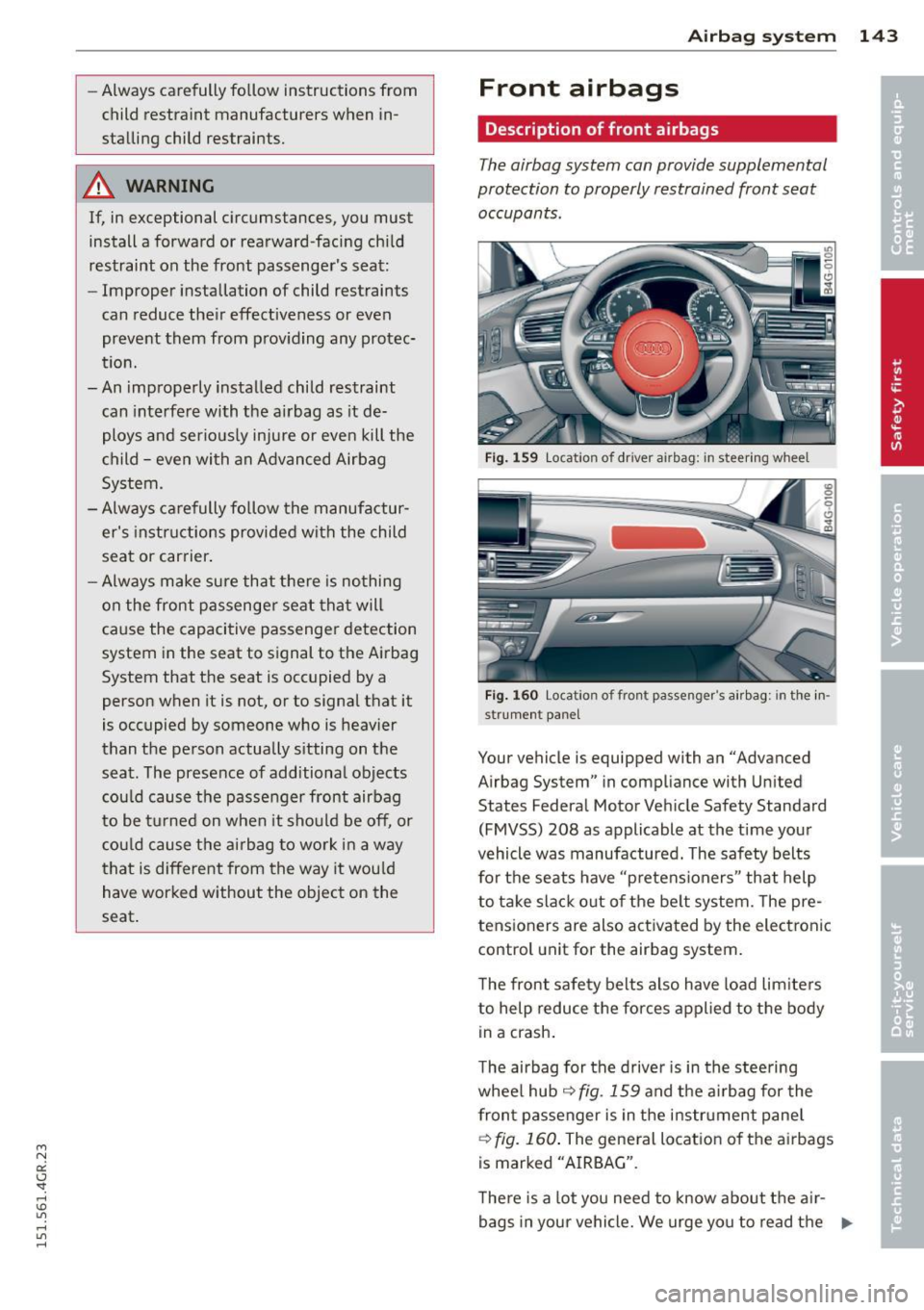
Fig. 159 Locat io n of drive r airbag : in steering wheel
Fig. 160 Locat ion of fron t pa ssenger' s airbag: in the in·
st rument panel
Your vehicle is equipped with an "Advanced
Airbag System" in compliance with United
States Federal Motor Vehicle Safety Standard
(FMVSS) 208 as applicable at the time your
vehicle was manufactured. The safety belts
for the seats have "pretens ioners " that help
to take slack out of the belt system. The pre
tensioners are also activated by the electronic
control unit for the airbag system.
The front safety belts also have load limiters
to help reduce the forces applied to the body
in a crash.
The airbag for the driver is in the steering
wheel hub~
fig. 159 and the airbag for the
front passenger is in the instrument panel
¢ fig. 160. The general location of the airbags
is marked "AIRBAG".
There is a lot you need to know about the a ir
bags in your vehicle. We urge you to read the .,..
Page 149 of 302
M N
0:: <.J 'SI: ,...., \!) 1.1'1 ,...., 1.1'1 ,....,
-Always make sure that there is nothing
on the front passenger seat that will
cause the capacitive passenger detection
system in the seat to s ignal to the A irbag
System that the seat is occupied by a person when it is not, or to signal that it
is occupied by someone who is heavier
than the person actually s itting on the
seat . The presence of additiona l objects
cou ld cause the passenger front airbag
to be t urned on when it sho uld be off, or
cou ld cause the airbag to work in a way
that is different from the way it wou ld
have worked without the object on the
seat .
- Make sure that the
PASSENGER AIR BAG
OFF
light comes on and stays on all the
t ime whenever the ignition is switched
on.
Advanced Airbag System components
The front passenger seat in your vehicle has a
l ot of very important parts of the Advanced
Ai rbag System in it. These parts incl ude the
capacitive passenger detect ion system, wir
i n g, brackets, and more . The control unit
monitors the system o n the front passenger
seat when the ign ition is switched on and
turns the airbag indicator light on when a
malfunct ion in the one of the system compo
nents is detected ¢ page
152 . Because the
fro nt passenger seat contains important parts
of the Advanced Airbag System, you must
t ake care to p reven t it from being damaged.
D amage to the seat may preven t the Ad
vanced A irbag System for the front passenger
seat from doing its job in a crash .
The front Advanced Airbag System
consists of the following:
-Crash sensors in the front o f the veh icle that
measure vehicle acceleration/dece leration
to provide information to the Advanced Air
bag System about the severity of the crash .
- An electronic co ntrol unit, with integrated
crash sensors for front and side impacts .
The contro l unit "decides" whether to fire
A irbag system 147
the front a irbags based on the in format ion
received from the crash sensors. The contro l
unit also "decides" whether the safety be lt
pretens ioners sho uld be activated .
- An Advanced Airbag with gas generator and
contro l valve for the driver ins ide the steer
ing wheel hub.
- An Advanced Airbag with gas gene rator and
cont ro l valve inside the instrument pane l for
the front passenger.
- A capacitive passenger detection system un
derneath the front passenger seat cover.
This system measures the electrical capac i
tance of the person in the seat. The informa
tion registered is se nt cont inuously to the
el ectr onic contro l un it to regu late deploy
ment of the front Advan ced A irbag on the
passenger side .
- An airbag monitoring system and ind icator
light in the instr ument cluster ¢page
151 .
-A sensor in each front seat registers the dis
tance be twee n the respec tive seat a nd the
s teer ing whee l or inst rument p anel. The i n
forma tion regis tered is sent cont inuo usly to
the electronic cont ro l unit to regulate de
p loyment of the front Adv a need Airbags.
- The
PASSENGER AIR BAG OFF light comes
on and stays on in the center of the instr u
ment panel ¢ pag e
152, fig. 162 and tells
you when the front Advanced Airbag on the passenger side has been turned off.
- A sensor in the safety belt latch for the driv
er and for the front seat passenger that
senses whether that safe ty belt is latched or
not and transmits this information to the
electronic control un it .
.&_ WARNING
D amage to the front passe nger seat can
p revent the front air bag from wor king
properly.
- I mp roper repa ir or d isassembly of the
fro nt pa ssenge r and dr iver seat will pre
vent the Advanced Airbag System from
functioning p roperly.
- Repair s to t he front passenge r seat m ust
be pe rformed by qualified and p roperly
-
trained workshop person ne l. 111>
•
•
Page 154 of 302
152 Airbag system
-If the air bag indicator light ¢ page 18
comes when the vehicle is be ing used,
have the system inspected immediately
by your autho rized Aud i dea ler . It is pos
s ible that the airbag will inflate when it
is not s upposed to, or w ill not inflate
when it sho uld.
PASSENGER AIR BAG OFF light
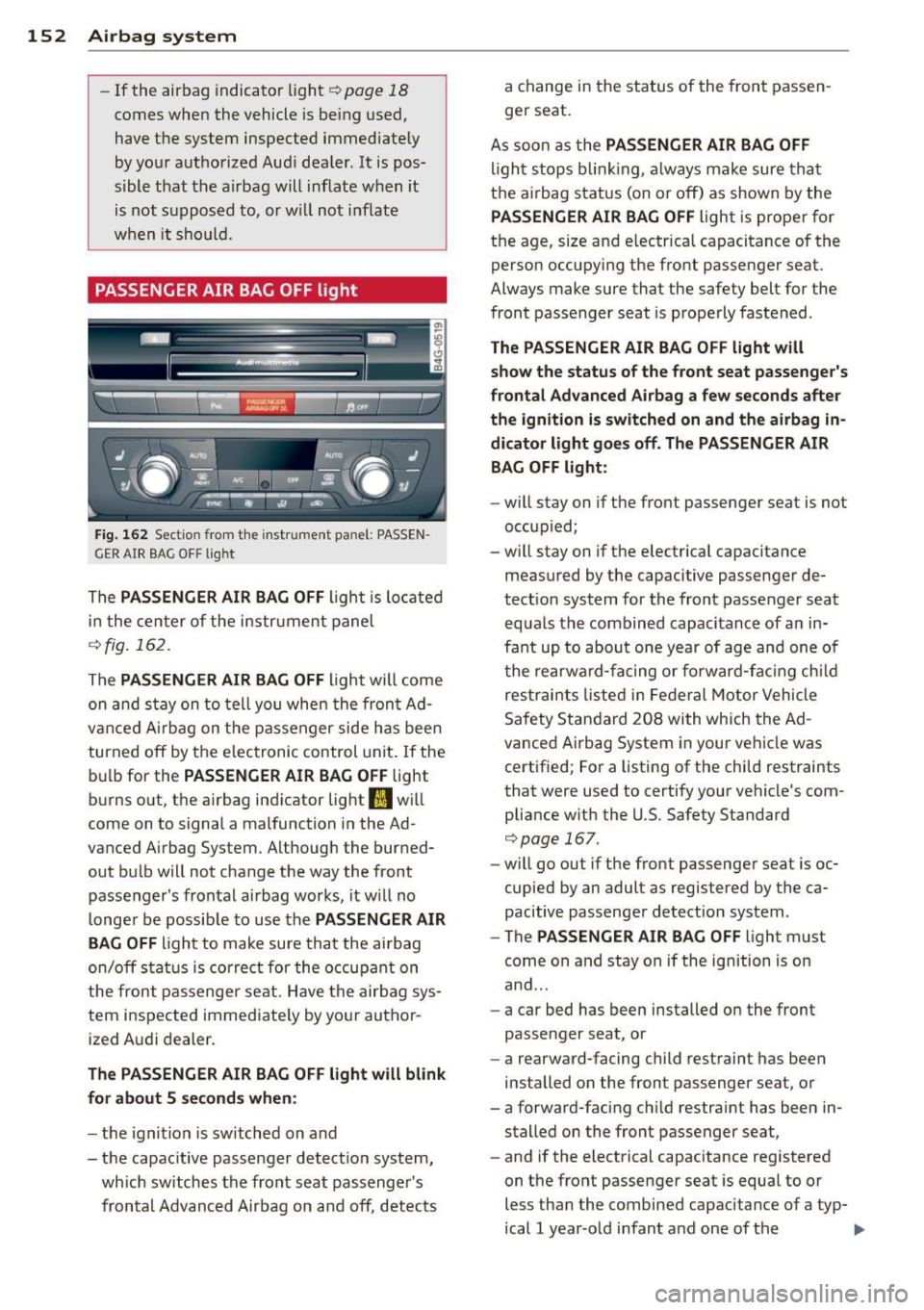
Fig. 162 Sect ion from t he in st rument pa nel : PASS EN
GER AIR BAG O FF ligh t
The PASSENGER AIR BAG OFF light is located
in the cen ter o f the instr ument panel
¢ fig . 162.
The PASSENGER AIR BAG OFF light will come
on an d stay on to te ll you when the fron t Ad
v a nce d Airb ag on t he passenger side h as been
turned off by the e lectronic control unit . If the
b ul b for the
PASSENGER A IR BAG O FF light
burns o ut, the airbag ind icator light
II wi ll
come on to signal a malfunction in the Ad
vanced A irbag System . Although the burned
out bulb w ill not change the way the front
passenger's frontal airbag works, it w ill no
longer be possib le to use the
PASSENGER AIR
BAG OFF
light to make sure that the ai rbag
on/off s tat us is correct for the occupant on
the front passenger seat. Have the airba g sys
tem i nspected immediate ly by your autho r
ized A udi dealer.
The PASSENGER AIR BAG OFF light will blink
for about 5 se cond s when :
-the ignit ion is switched on and
- the capac itive passenger detect ion system,
wh ich sw itches the front seat passenger 's
fron tal Advanced Airbag on and off, detects a change in the status of the front passen
ger seat.
As soon as the
PASSENGER AIR BAG OFF
li gh t stops b linking, a lways make sure tha t
the airbag s tatus (on or off) as shown by the
PASSENGER AIR BAG OFF light is proper for
the age, size and e lectrica l capacitance of the
person occupy ing the front passenge r seat.
Always make sure that the safety belt for the
front passenger seat is properly fastened .
The PASSENGER AIR BAG OFF light will
show the status of the front seat passenger 's
frontal Advanced Airbag a few seconds after
the ignition is sw itched on and the airbag in
dicator light go es off . The PASSENGER AIR
BAG OFF light :
-will stay on if the front passenger seat is not
occ upied;
- will stay on if the electrical capacitance
measured by the capacitive passenger de
tect ion system for the front passenger seat
equa ls the combined capacitance of an in
hnt up to abou t one year of age and one of
the rearw ard-facing o r forward-fac ing ch ild
restrai nts listed i n Fede ral Motor Vehicle
Safety Stan dard 2 08 wi th which the Ad
vanced Airbag System in your vehicle was certified; For a listing of the child restraints
that we re used to certify your vehicle's com
pliance w ith the U.S. Safety Standard
¢ page 167.
-will go out if the front passenger seat is oc
cupied by an adult as registered by the ca
pacitive passenger detection system .
- The
PASSENGER AIR BAG OFF light must
come on and stay on if the ignition is on
and ...
- a car bed has been installed on the front
passenger seat, or
- a rearward-facing child restraint has been
installed on the front passenger seat, or
- a forward-facing ch ild restra int has been in
stalled on the front passenger seat,
- and if the electrical capacitance registered
on t he front passenger seat is equal to or
less than the combined capaci tance of a typ-
ical 1 year-o ld i nfant and one of the
1111>