wheel AUDI RS7 SPORTBACK 2015 Manual Online
[x] Cancel search | Manufacturer: AUDI, Model Year: 2015, Model line: RS7 SPORTBACK, Model: AUDI RS7 SPORTBACK 2015Pages: 302, PDF Size: 74.76 MB
Page 257 of 302
M N
0:: <.J 'SI: ,...., \!) 1.1'1 ,...., 1.1'1 ,....,
thro ugh or over such obstacles can damage
your tires. Impact with a curb may a lso
cause damage to your tires .
- After any impact, immediately inspect your
tires or have them inspected by the nearest
authorized Audi dea ler. Replace a damaged
t ire as soon as possible.
- Inspect yo ur tires every 2,000 miles (3,000
km) for damage and wear . Damage is not al
ways easy to see. Damage can lead to loss of
air and underinflation, wh ich could eventu
ally cause tire fa ilure . If you be lieve that a
t ire may have been damaged, replace the
t ir e as soo n as possible.
- T hese tires may wear more quickly than oth
ers .
- Please also remember that, while these tires deliver respons ive handling, they may ride
less comfortably and make mo re no ise than
othe r cho ices .
Reduced performance in winter /cold
season conditions
A ll t ires are des igned for certain pu rposes.
The low aspect ratio, ultra hig h pe rformance
tires orig inally installed o n your veh icle are in
tended for maximum dry and wet road per
formance and handling . They are not s uitable
for cold, snowy or icy weather conditions. If
you dr ive under those circumstances, you
should equip your vehicle with all-season or
winter tires, which offer better traction under
those cond itions . We suggest you use the rec
ommended snow or all-season tires specified
fo r your ve hicle, or their equ ivalent.
Refer to¢
page 252 for mo re deta iled infor
mat io n regarding winter t ires .
Tire pressure
monitoring system
U) General notes
Each t ire, includ ing the spare (if provided),
should be checked month ly when cold and in
flated to the inflation pressure recommended by the vehicle manufacture r o n the vehicle
p lacard or tire inflation pressure label. (If yo ur
Tire s an d wheel s 255
vehicle has tires of a different size than the
size indicated on the vehicle placard or tire in
flat ion pressure labe l, you sho uld determine
the proper t ire inflation press ure for those
tires).
As an added safety feature, your vehicle has been equipped with a tire pressure monitoring
system (TPMS) that illum inates a low tire
pressure telltale when one or more of your
ti res is s ignificant ly under-inflated. According
ly, when the low tire pressure telltale illumi
nates, you shou ld stop and check you r tires as
soon as possib le, and inflate them to the
proper pressu re. Driving on a sign ifican tly un
der -infla ted ti re causes the tire to overhea t
and can lead to tire fai lure . Under-inflation al
so reduces fuel efficiency and tire tread life,
and may affect the vehicle 's hand ling and
stopp ing ability.
Please note that the TPMS is not a substitute
for proper tire maintenance, and it is the driv er's respons ibility to maintain correct tire
pressure, even if under-inflation has not
reached the level to tr igger illuminat ion of t he
TPMS low tire pressu re tellta le.
Your vehicle has also been equipped with a
TPMS malfunction indicator to ind icate when
the system is not operating properly. The
TPMS ma lfunction indicator is combined with
the low t ire pressure telltale . Whe n the sys
tem detects a malfunction, the telltale will
flash fo r approximate ly one m inute and then
r em ain continuously illum ina ted . Thi s se
quence will continue upon s ubsequent vehicle
start-ups as long as the malfunction exists .
When the malfunction indicato r is illum ina t
ed, the sys tem may no t be ab le to detec t or
s ignal low tire pressure as in tended . TPMS
malfu nctions may occur for a var iety of rea
sons, incl uding the insta llation of rep lace
ment or a lternate tires or wheels on the vehi
cle that prevent the TPMS from functioning properly. Always check the TPMS malfunction
telltale after rep laci ng one or more tires or
whee ls on your vehicle to ensu re that the re
placement o r alternate tires and wheels a llow
the TPMS to con tinue to funct ion p ro perly .
•
•
Page 258 of 302
256 Tire s and wheel s
Description
The tire pressure monitoring system monitors
th e pressure in the four tir es when driving .
The system uses sensors that measure the
temperature and pressure in the tires. Theda
ta is sent from these sensors to the control
module by rad io frequency .
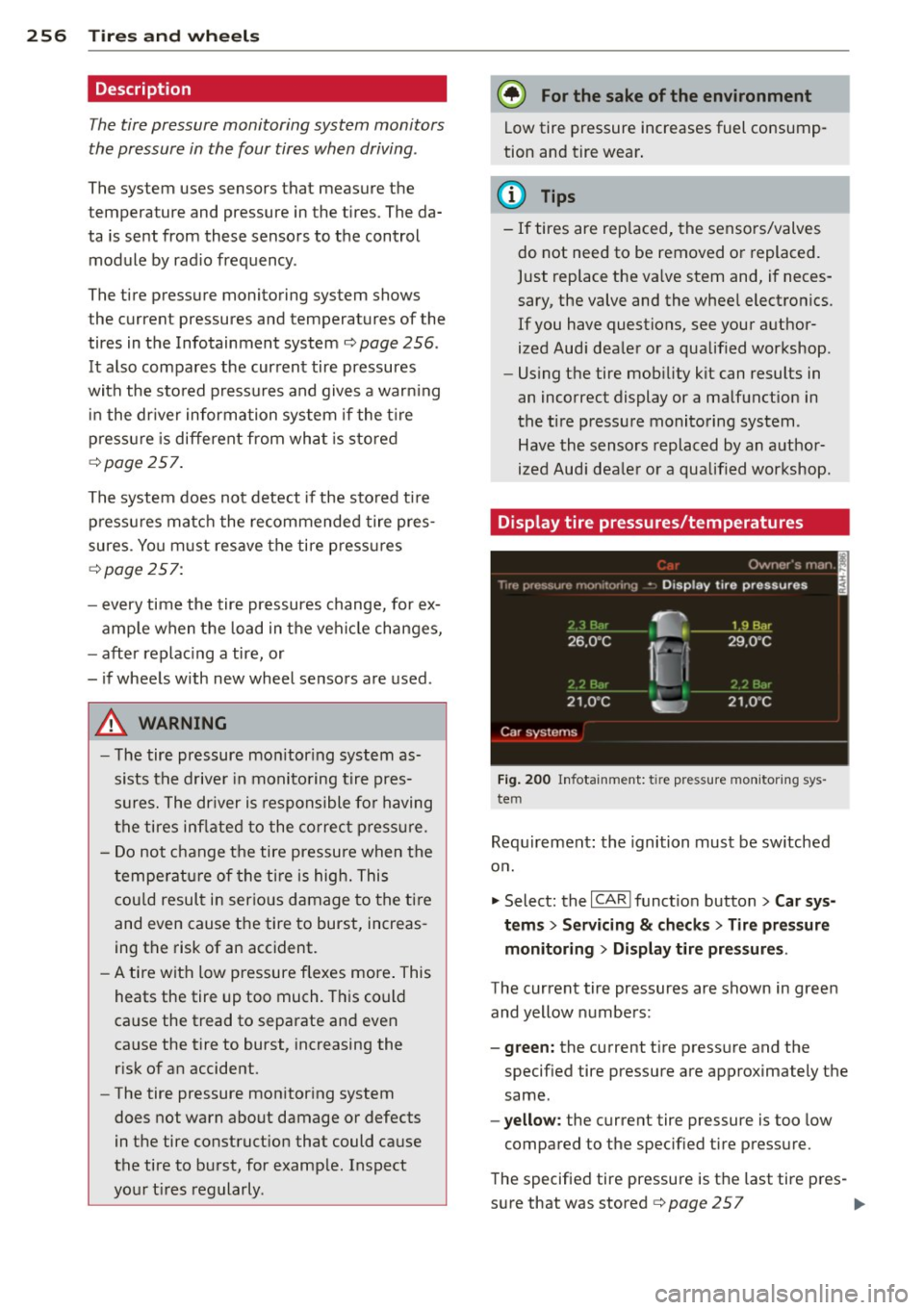
The tire pressure monitoring system shows
the current pressures and temperatures
of the
tires in the Infotainment system
c:> page 256 .
It also compares the current tire pressures
with the sto red press ures and gives a warn ing
in the dr iver information system if the t ire
p ressu re is different from what is sto red
<=:> page 257.
The system does not detect if the sto red ti re
p ressu res matc h the recommended tire pres
sures . Yo u must resave the tire p ress ures
<=:> page 257:
- every time the tire pressures change, for ex
amp le when the load in the veh icle changes,
- after replac ing a tire, or
- i f wheels with new wheel sensors are used .
.,&. WARNING
- The tire pressure mo nitor ing system as
sists t he d rive r in monito ring t ire pres
s ur es. The dr iver is responsible fo r having
the tires in flated t o the co rrec t press ure.
- Do not change t he tire pressu re when the
t empe rat ure of the ti re is high. This
cou ld resul t in ser io us damage to the ti re
and even cause t he tire to burst, increas
ing th e risk of an accident.
- A tire with low pressure flexes more . This
heats the tire up too much. This could
cause the tread to separate and even
cause the tire to burst, increasing the
risk
of a n accident.
- The tire pressure mon itor ing system
does not warn about damage or defects
in the tire construct ion that could ca use
the tire to b urst, for examp le . Inspect
yo ur t ires regularly .
{® For the sake of the environment
Low tire pressure increases fuel consump
tion and tire wear .
(D Tips
- If tires are replaced, the senso rs/valves
do not need to be removed o r replaced.
Just replace the va lve stem and, if neces
sary, the valve and the whee l electronics .
If you have questions, see your a uthor
ized Aud i dea ler o r a qualified workshop .
- Us ing the tire mob ility kit can results in
an incorrect display or a ma lfunction in
t he tire pressure monito ring system .
Have the sensors replaced by an a uthor
ized Aud i dea le r o r a qua lified workshop.
Display tire pressures/temperatures
Fi g. 2 00 In fotainme nt: t ire press ure moni tor ing sys
tem
Requ irement : the ignition must be sw itched
o n .
.,. Select: the
I CAR I funct io n button > Car sy s
tem s
> Servicing & ch eck s > Tire pressure
monitoring
> Disp lay tire pr essures .
The current tire pressures are shown in green
and yellow numbers:
- green: the current tire press ure and the
specified tire pressure are approximately the
same .
-yellow : the current tire pressure is too low
compared to the specified tire pressu re.
The specified tire pressure is th e last tire pres -
s u re that was stored
c:> page 2 5 7 ..,
Page 259 of 302
"' N
a:: I.J "". rl I.O
"' rl
"' rl
Note that the tire pressure also depends on
the tempe rature of the tire . Every 50 °F
(10 °C) increase in tire temperature results in
the tire pressure increasing by approximately
0 .1 bar. The tire pressure increases as the en
g ine becomes warmer while drivi ng .
A WARNING
Read and follow the impo rtant informa
tion and notes
c::> page 2 56.
(D Tips
The tire pressure or temperature are not disp layed i n adaptation mode . Dashes --,-
are show n in p lace o f the pressure and
t em peratur e.
(J) Tire pressure loss
Fig. 201 D isp lay : in dicato r light w it h a message
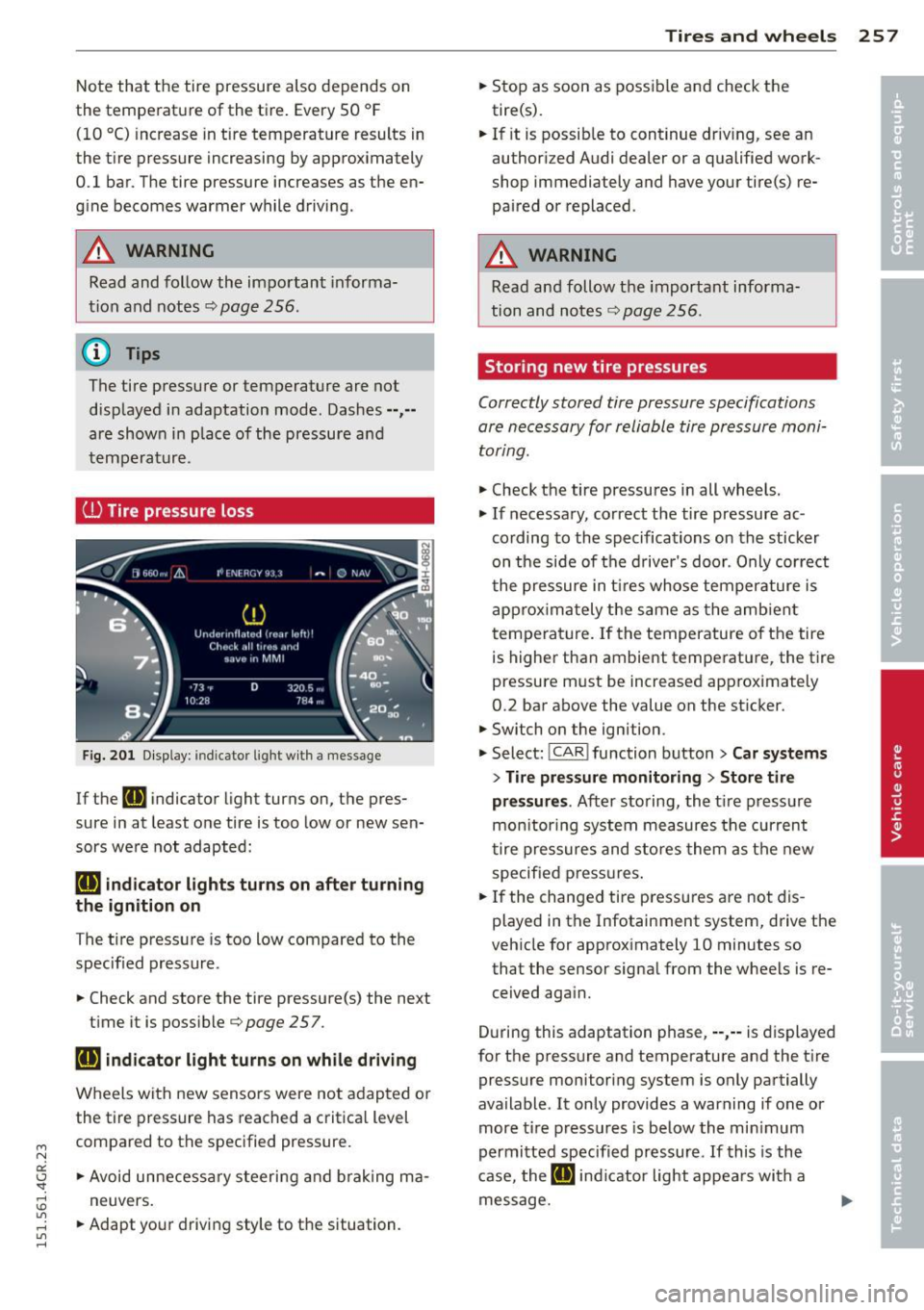
If the [I] indicator light turns on, t he pres
sure in at least one tire is too low or new sen
sors were not adapted:
[I] indicator lights turns on after turning
the ignition on
The ti re pressu re is too low compared to the
specified pressure .
.. Check and store t he tire pressure(s) the next
time it is poss ible
c::> page 257.
[I] indicator light turns on while driving
Wheels with new senso rs were no t adap ted o r
the tire pressure has reached a critica l level
compared to the specified pressure.
.. Avoid unne cess ary steeri ng and braking m a
neuvers.
.. Adapt yo ur driving style to the s ituation.
Tires and wheels 25 7
.. Stop as soon as poss ible and check the
tire(s) .
.. If it is possib le to continue driv ing, see an
author iz ed Audi dealer or a qualified work
shop immediately and have your tire(s) re
paired or replaced .
A WARNING
Read and follow t he important informa
tion and notes
c::> page 256 .
Storing new tire pressures
-
Correctly stored tire pressure specifications
are necessary for reliable tire pressure moni
toring .
.. Check t he tire pressures in all wheels.
.,. If necessary, correct the tire pressure ac
cording to the specifications on the sticker
on t he side of the d rive r's door . Only correct
t he pressure in t ires whose temperature is
app rox im ately the s ame as th e amb ient
t emperat ure. If the temperature o f the tire
is highe r than ambient tempe rat ure, the t ire
pressure m ust be increased approximately
0.2 bar above the value on the st icker .
.. Switch on the ignition .
.,. Select:
!CAR ! function butt on> Car systems
> Tire pressure mon itoring > Store tire
pressures .
After storing, th e tir e p ress ure
m oni tor ing system measures the cur ren t
t ire pre ssures and st ores them a s the new
specified press ures .
.. If the changed ti re pressu res a re not dis
played in the Infotainment system, drive t he
veh icle for approximately 10 minutes so
that the sensor signa l from the wheels is re
ceived aga in .
D uring this adaptation phase, ··,·· is displayed
for the pressure and temperature and the t ire
pressure monitoring system is only partially
available . It only provides a warning if one or
more t ire press ures is be low the min imum
permi tted specified pr essure . If this is the
case, the
[I] ind ic a tor light appea rs with a
message.
Page 260 of 302
258 Tires and wheels
WARNING
Read and follow the important informa
tion and notes
~ page 2 56.
Malfunctions
Fig. 202 Display: indicator light wit h a message
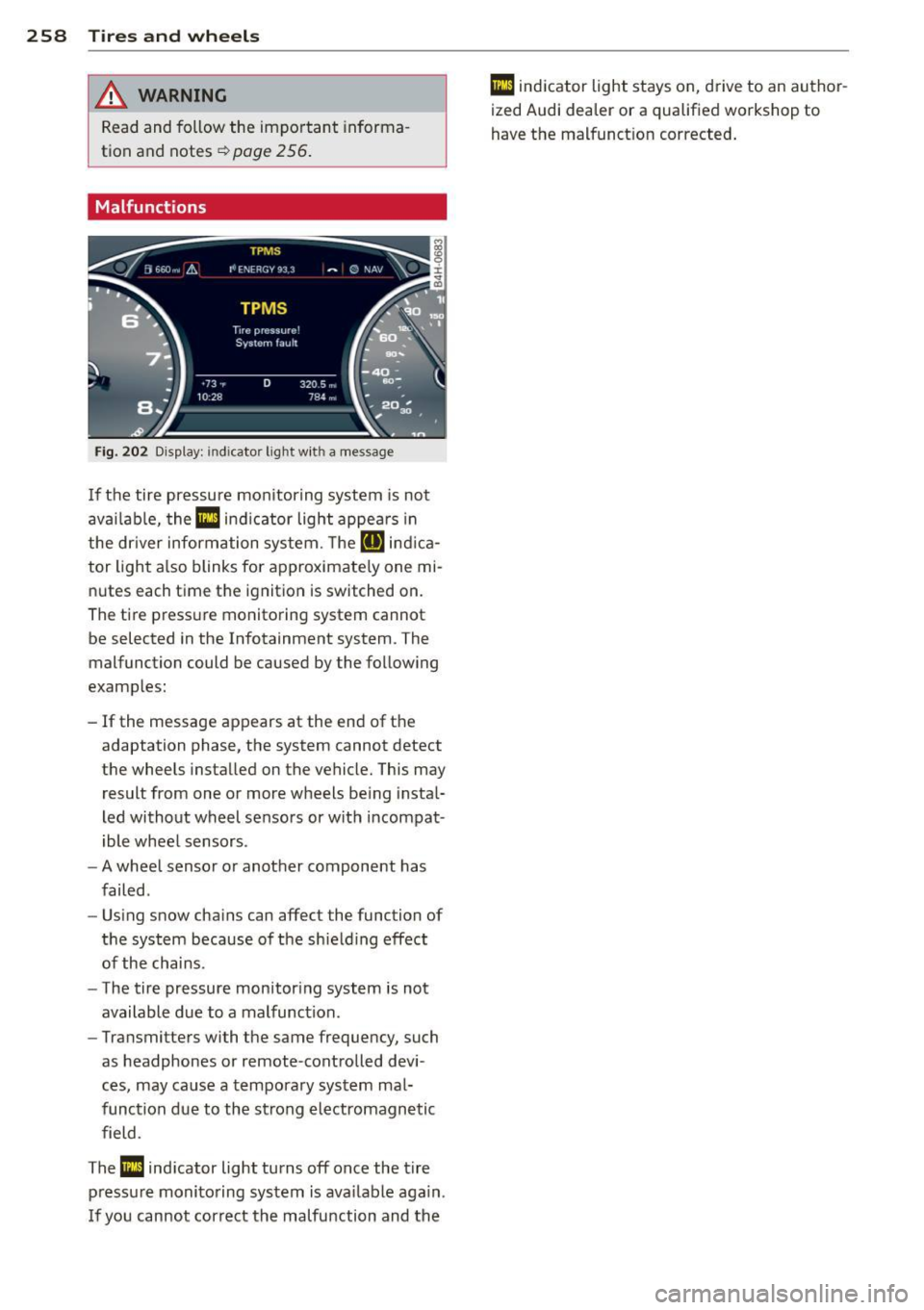
If the tire pressure monitoring system is not
available, the
Ill ind icator light appears in
the dr iver information system. The
RIJ ind ica
tor light also blinks for approximate ly one mi
nutes each time the ignit ion is switched on.
The tire pressure monitoring system cannot be selected in the Infotainment system. The
malfunction could be caused by the following
examples:
- If the message appears at the end of the
adaptation phase, the system cannot detect
the wheels installed on the vehicle. This may
result from one or more wheels being instal
led without wheel sensors or with incompat
ible wheel sensors .
- A wheel sensor or another component has
failed .
- Using snow chains can affect the function of
the system because of the shielding effect
of the chains.
- The tire pressure monitoring system is not
available due to a malfunction.
- Transmitters with the same frequency, such
as headphones or remote-controlled devi
ces, may cause a temporary system mal
function due to the strong electromagnetic
field .
The
Ill indicator light turns off once the tire
pressure monitoring system is available again.
I f you cannot correct the malfunction and the
Ill indicator light stays on, drive to an author
ized Audi dealer or a qualified workshop to
have the malfunct ion corrected.
Page 261 of 302
"' N
a:: I.J "". rl I.O
"' rl
"' rl
What do I do now? Emergency warning
triangle
App lies to vehicles: with emerge ncy warning triangle
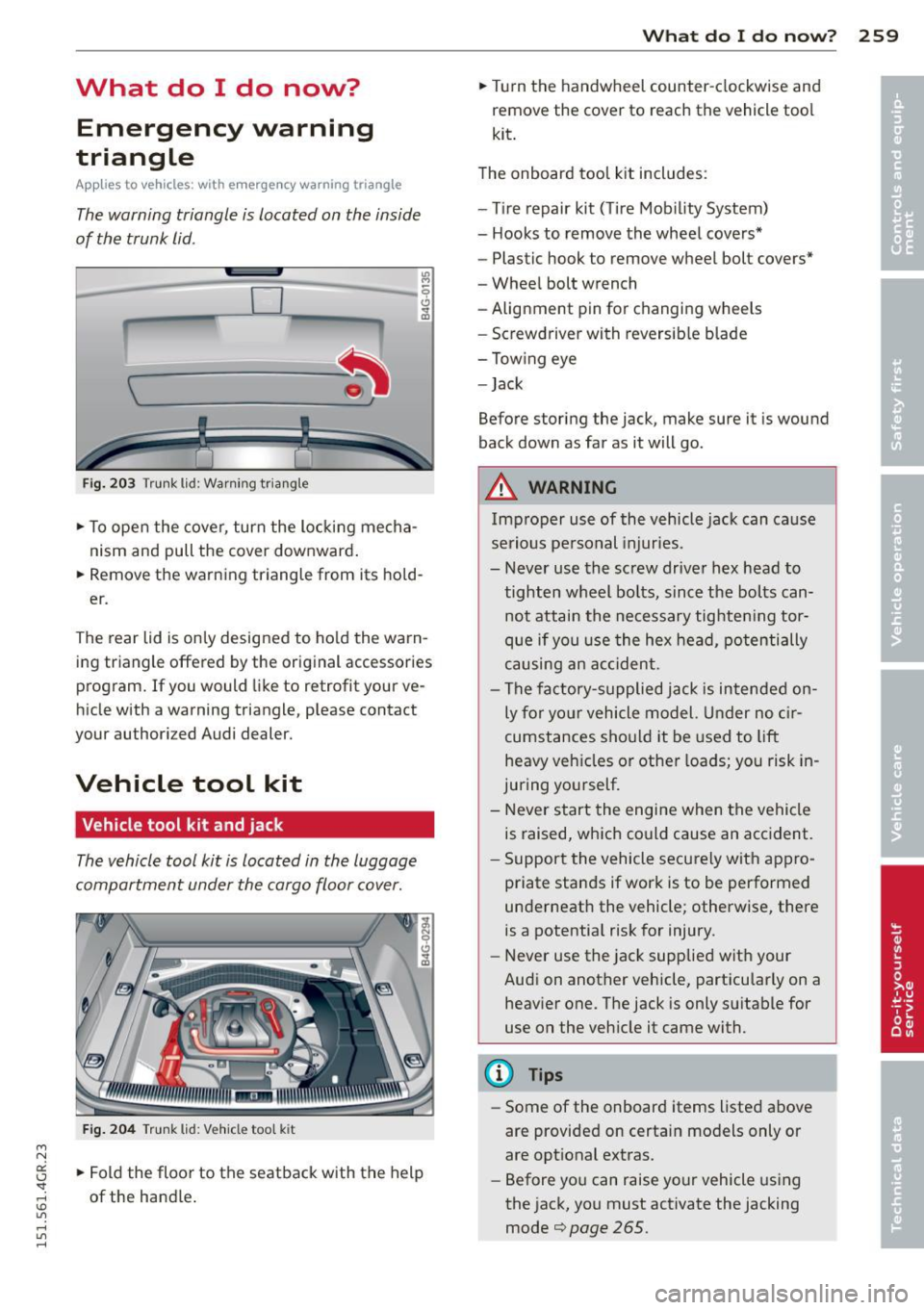
The warning triangle is located on the inside
of the trunk lid .
D -
!I l
Fig. 203 Trun k lid: Warn ing triang le
.,. To open the cover, turn the locking mecha
nism and pull the cover downward . "'
M ~
~ .. m
.,.
Remove the warning triangle from its hold
er .
The rear lid is only designed to ho ld the warn
ing triangle offered by the original accessories
program. If you would like to retrofit your ve
hicle with a warning triangle, p lease contact
your authori zed Audi dealer.
Vehicle tool kit
Vehicle tool kit and jack
The vehicle tool kit is located in the luggage
compartment under the cargo floor cover.
F ig . 204 Trunk lid: V eh icl e too l kit
.,. Fold the floor to the seatback with the help
of the handle .
What do I d o now ? 259
.,. Turn the handwheel counter-clockwise and
remove the cover to reach the vehicle tool
kit .
T he onboard too l kit includes:
- T ire repair kit ( Tire Mobility System)
- Hooks to remove the wheel covers*
- Plastic hook to remove wheel bolt covers*
- Wheel bolt wrench
- Alignment pin for changing wheels
- Screwdriver with reversib le blade
- Tow ing eye
- Jack
Before storing the jack, make sure it is wound
back down as far as it will go.
A WARNING
Imp roper use of the vehicle jack can ca use
serious pe rsonal injur ies.
- Never use the screw driver hex head to
tighten wheel bo lts, since the bolts can
not attain the necessary tighten ing tor
que if you use the hex head, potentially
causing an ac cident .
- The fac tory-supplied jack is intended on
ly for yo ur vehicle model. Under no c ir
cumstances should it be used to lift
heavy vehicles or other loads; you risk in
juring yourself.
- Never start the engi ne when the vehicle
is raised, which could cause an acc ident.
- Support the vehicle securely with appro
priate stands if work is to be performed
underneat h the vehicle ; otherwise, there
is a potentia l risk for injury.
- Never use the jack supplied wit h your
Audi on another vehicle, particularly on a heav ier one. The jack is only su itable for
use on the veh icle it came with.
@ Tips
- Some of the on board items listed above
are provided on certa.in models only or
are opt ional extras.
- Before you can raise your vehicle using
the jack, you must activate the jacking
mode¢
page 265 .
Page 265 of 302
M N
0:: <.J 'SI: ,...., \!) ..,.,
,...., ..,., ,....,
@ Tips
After a tire repair, have the sealant bottle replaced at a dealership. This restores full
functionality to the Tire Mobility System.
Changing a wheel
Before changing a wheel
Observe the following precautions for your
own and your passenger's safety when chang
ing a wheel .
.. After you experience a tire failure, pull the
car well away from moving traffic and try to
reach
level ground before you stop c:> &, .
.. All passengers should leave the car and
move to a safe location (for instance, behind
the guardrail)
c:> &, .
.. Engage th e parking brake to prevent your
vehicle from rolling unintentionally
c:> &, .
.. Move selector lever to position Pc:> &, .
.. Take the jack out of the luggage compart
ment
c> page 259.
A WARNING
You or your passengers could be injured
while changing a wheel if you do not fol
low these safety precautions:
- If you have a flat tire, move a safe dis
tance off the road. Turn off the engine,
turn the emergency flashers on and use
other warning devices to alert other mo
torists.
- Make sure that passengers wait in a safe
place away from the vehicle and well
away from the road and traffic.
- To help prevent the vehicle from moving
suddenly and possibly slipping off the
jack, always fully set the parking brake
and block the wheel diagonally opposite
the wheel being changed . When one
front wheel is lifted off the ground, plac ing the Automatic Transmission in P
(Park) will
not prevent the vehicle from
moving.
What do I do now? 263
- Before you change a wheel, be sure the
ground is level and firm. If necessary,
use a sturdy board under the jack.
- Always store the vehicle tool kit, the jack
and the replaced tire in the luggage com
partment
c:>page 126.
([) Note
If you are changing the wheel on a steep
incline, use a rock or similar object to
block the opposite wheel to prevent the
vehicle from moving .
(l) Tips
- Before changing the wheel, you must ac
tivate the jacking mode, so that the au
tomatic controls for the Adaptive Air
Suspension* do not make it more diffi
cult to lift the vehicle with the jack
c:>page265 .
-Obey all laws .
Changing a wheel
When you change a wheel , follow these
quence described below step -by -step and in
exactly that order.
l. Activate the vehicle jack mode"
c:>page 265.
2. Remove the wheel bolt caps* . For more
details see also
c:> page 264, Wheels with
wheel bolt caps.
3. Loosen the wheel bolts c:>page 264.
4. Locate the proper mounting point for the
jack and align the jack below that point
c:> page 2 65.
5. Raise the car with the jack r::> page 265.
6. Remove the wheel with the flat tire and
t hen in stall the other wheelr::>
page 267 .
7. Tighten all wheel bolts lightly .
8.
Lower the vehicle with the jack .
9 . Use the wheel bolt wrench and
firmly
tighten all wheel bolts c:> page 264.
10. Replace the wheel bolt caps*.
•
•
Page 266 of 302
26 4 What do I do n ow ?
11. Deactivate the vehicle jack mode* in the
MMI:
! CARI funct ion button> (Ca r)* sys
tems
control button > S er vicing & checks
> A ir su sp. : ja ck mode > Off.
The vehicle jack mode* switches off automati
cally at speeds above 6 mph (10 km/h).
A WARNING
Always read and follow all WARNINGS and information
Q A in Raising the vehicle on
page 266
and Q page 268 .
After changing a wheel
A wheel change is not complete without the
doing the following.
• Always store the vehicle tool kit, the jack *
and the replaced tire in the luggage com
partment
Q page 126.
• As soon as possible, have the tighten ing
torques
on all wheel bolts checked with a
torque wrench . The correct tightening tor
que is 90 ft lb ( 120 Nm) .
• Have the flat tire
re pl ac ed as soo n as poss i
ble .
@ Tips
- If you notice that the wheel bolts are
corroded and difficult to t urn w hile
changing a t ire, they should be replaced
before yo u check the tighten ing torque .
- Drive at reduced speed unt il you have the
tightening torques checked.
- After changing a wheel, t he tire pressure
i n a ll four tires must be checked/cor re ct
ed and the tire pressure mon itoring indi
cator must be stored in the MM I
¢page 257.
' Wheels with wheel bolt caps
Applies to vehicles: with wheel bolts with caps
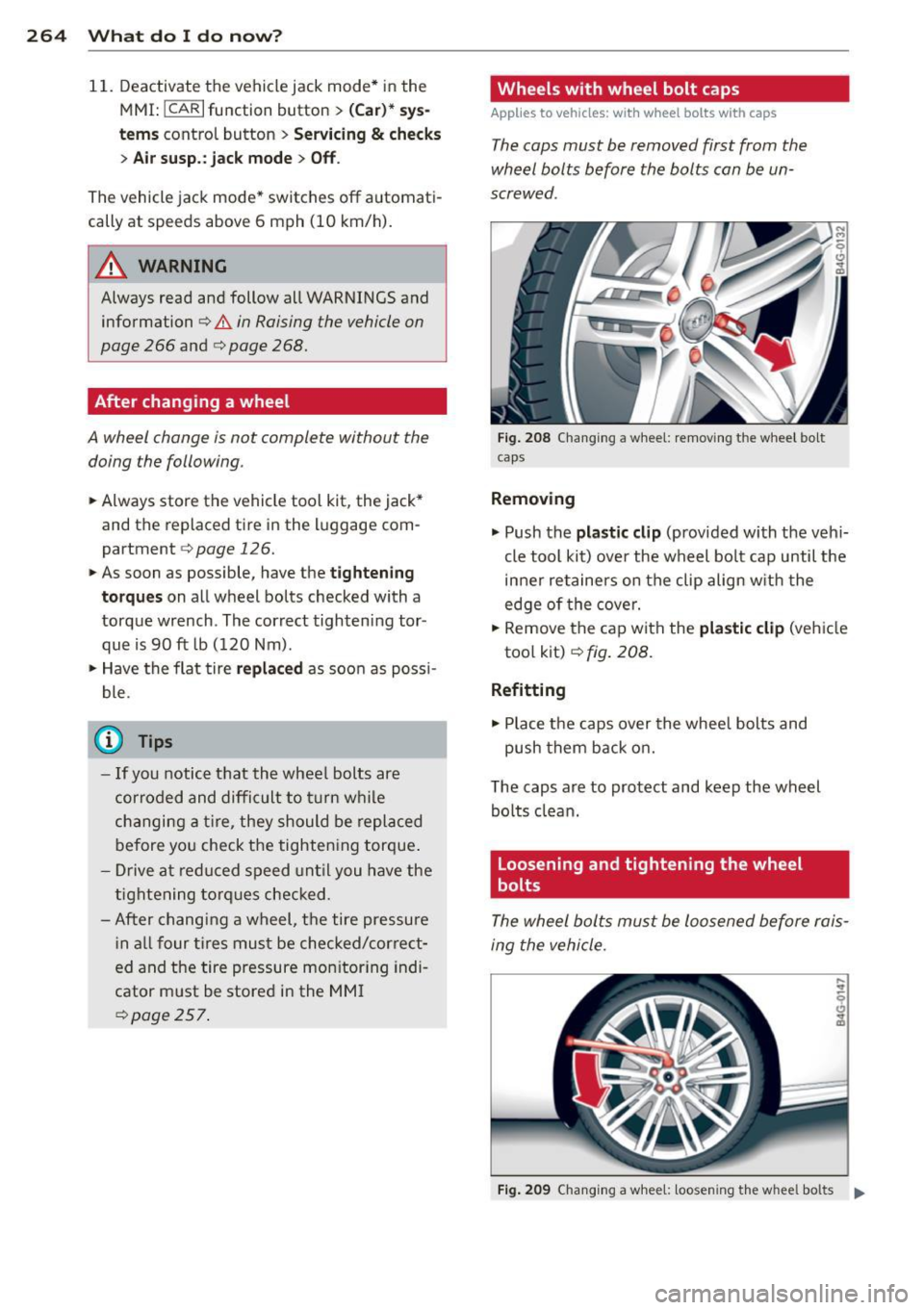
The caps must be removed first from the
wheel bolts before the bolts can be un
screwed .
Fig. 208 Cha nging a whee l: removing t he wheel bo lt
c aps
Removing
.. Push the
pla st ic clip (prov ided with the veh i
cle tool kit) over the wheel bo lt cap until the
inner retainers on the clip align w ith the
edge of the cover.
• Remove the cap with the
pl as tic clip (vehicle
too l kit)
~ fig. 208.
Refitting
.. Place the caps over the whee l bolts and
push them back on.
The caps are to protect and keep the wheel bolts clean.
Loosening and tightening the wheel
bolts
The wheel bolts must be loosened before rais
ing the vehicle.
F ig . 209 Chang ing a whee l: loosening t he w hee l bolts .,.
Page 267 of 302
"' N
a:: I.J "". rl I.O
"' rl
"' rl
Loosening
• Slide the wh eel wr ench onto the wheel bolt
as far as it will go.
• Take tight hold of the
end of the wrench
handle and turn the whee l bolts
counter
cl oc kwis e
about one single turn in the direc
tion of arrow c:>
fig. 209.
Tightening
• Slide the wheel wrench onto the whee l bolt
as far as it will go.
• Take tight hold of the
end of the wrench
handle and turn each wheel bolt
clockwi se
until it is seated.
A WARNING
- Do not use force or hurry when chang ing
a wheel -you can cause the vehicle to slip
off the jack and cause serious persona l
injuries.
- Do not loosen the wheel bolts more than
one turn
before you raise the veh icle w ith
the jack. -You risk an injury .
@ Tips
-Never use the hexagonal socket in the
handle of the screwdrive r to loosen or
tighten the wheel bo lts.
- If a whee l bolt is very tight, yo u may find
i t easier to loosen by ca refully push ing
down on the end of the wheel bolt
wre nch w ith
one foot only. As yo u do so,
ho ld on to the car to keep your ba lance
and take care not to slip .
What do I d o now ? 265
Raising the vehicle
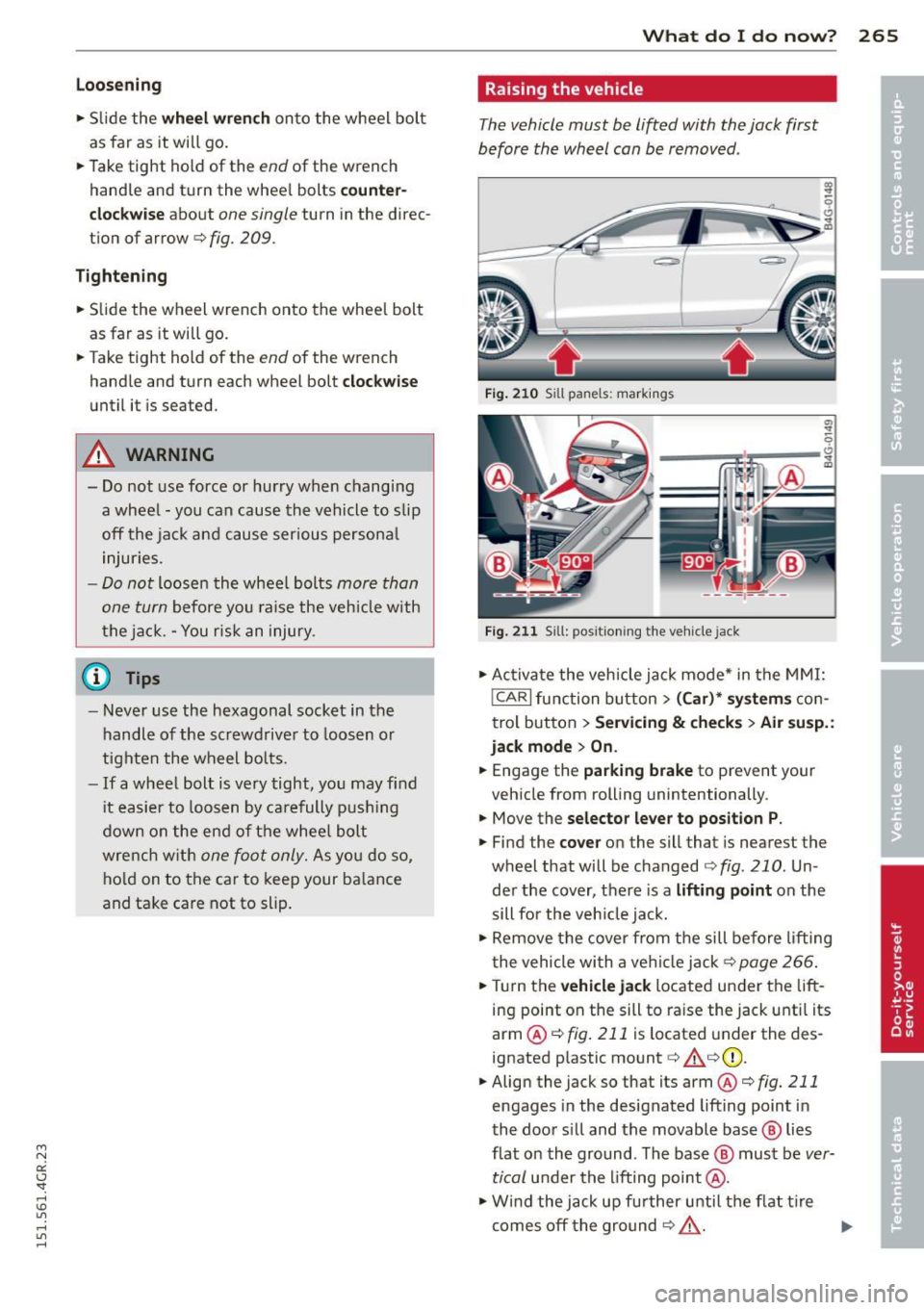
The vehicle must be lifted with the jack first
before the wheel can be removed .
Fig . 210 Sill panels: markings
Fig. 211 Sill: pos ition ing the veh icle jack
• Ac tiva te the vehicle jack mode* in the MM I:
!CAR I fu nction button > (Car) * system s con
trol button>
Se rvicing & ch eck s> Air susp. :
jack mode > On .
• Engage the parking brake to prevent your
veh icle from rolling unintentionally .
• Move the
selector le ver to position P .
• Find the co ver on the sill that is nearest the
wheel that will be changed c:>
fig. 210. Un
de r the cover, t here is a
lifting po int on the
sill for the veh icle jack.
• Remove the cover from the sill before l ifting
the vehicle with a ve hicle jack c:>
page 266.
•Turn the vehicle jack located under the lift
ing point on the sill to raise the jack unti l its
arm @ c:>
fig. 211 is located under the des
ignated plastic mount c:> &_ c:>(D.
• Align the jack so that its arm @c:>
fig. 211
engages in the designated lifting point in
the door s ill and the movable base @ lies
flat on the ground. The base@ must be
ver
tical
under the lifting point @.
• W ind the jack up fu rther until the flat t ire
comes off the ground c:> &_ .
~
Page 268 of 302
266 What do I do now?
Position the vehicle jack only under the desig
nated lifting points on the sill
r::!;> fig. 210.
There is exactly one location for each wheel.
The jack must not be positioned at any other location¢ ,&.¢(D .
An
un stable surfa ce under the jack can cause
the vehicle to slip off the jack. Always prov ide
a firm base for the jack on the ground. If nec
essary place a sturdy board or similar support
under the jack . On
hard, slippery surfaces
(such as tiles) use a rubber mat or sim ilar to
prevent the jack from slipping¢.&..
A WARNING
-You or your passengers could be injured
wh ile chang ing a wheel if you do not fol
low these safety precautions:
- Position the vehicle jack only at the
designated lifting points and align the
jack . Otherwise, the vehicle jack could
slip and cause an injury if it does not
have sufficient hold on the vehicle.
-A soft or unstable surface under the
jack may cause the veh icle to slip off
the jack. Always provide a firm base for
the jack on the ground.
If necessary,
use a sturdy board under the jack.
- On hard, slippery surface (such as tiles)
use a rubber mat or sim ilar to prevent
the jack from s lipping.
- T o help prevent injury to yourself and
yo ur passenge rs:
- Do not raise the vehicle unti l you are
sure the jack is securely engaged.
- Passengers must not remain in the ve
hicle when it is jacked up.
- Make sure that passengers wait in a
safe p lace away from the vehicle and
well away from the road and traffic.
- Make sure jack position is correct, ad
just as necessary and then continue to ra ise the jack.
- Changes in temperature or load can af
fect the height of the vehicle.
(D Note
Do not lift the vehicle by the sill. Position
the veh icle jack only at the designated lift
ing points on the sill. Otherwise, your vehi
cle will be damaged.
(D Tips
The vehicle jack mode * switches off auto
matically at speeds above 6 mph (10 km/
h).
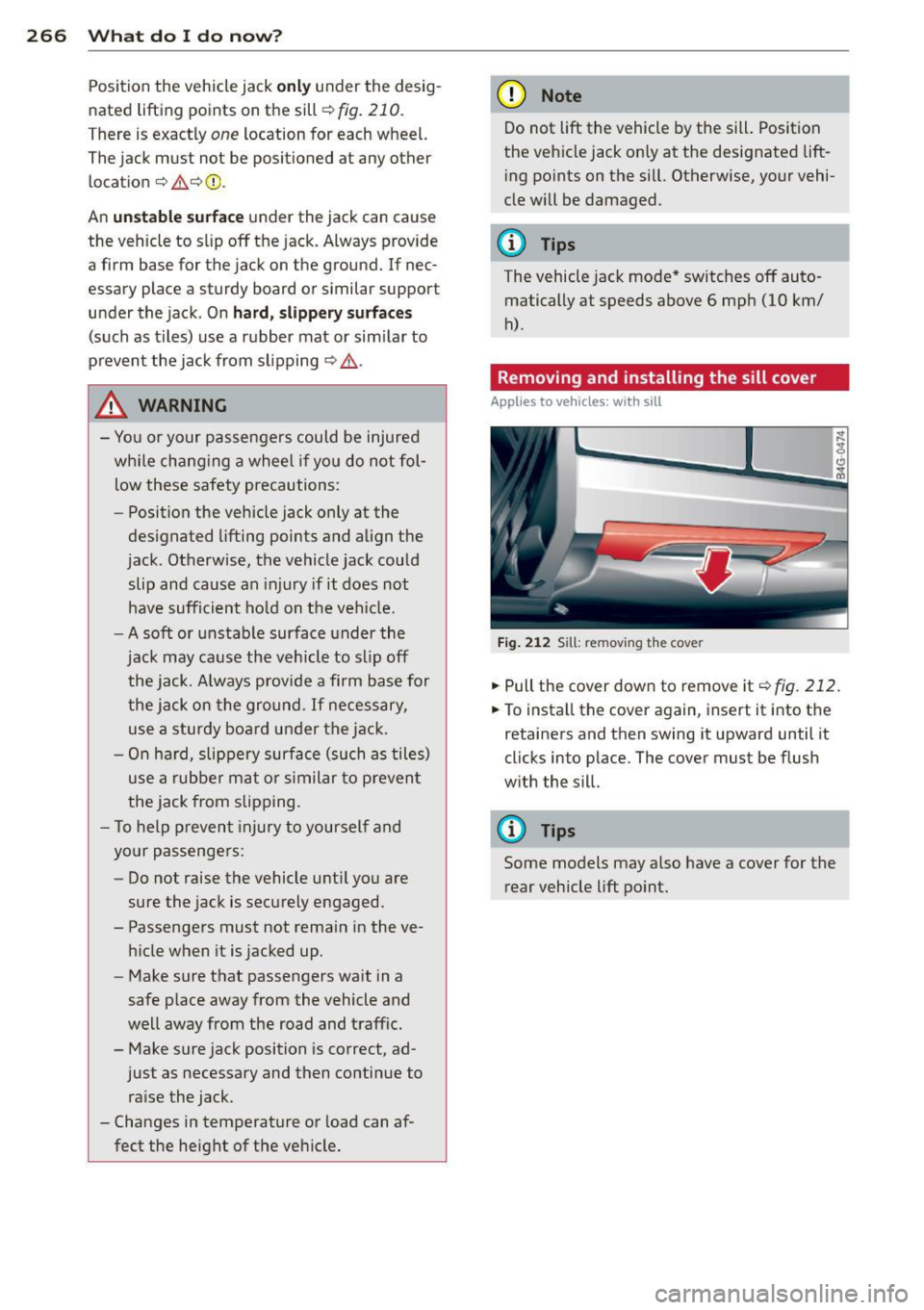
Removing and installing the sill cover
Applies to vehicles: with sill
Fig. 212 Sill: remov ing the cover
.. Pull the cover down to remove it¢ fig. 212.
.. To install the cover again, insert it into the
retainers and then swing it upward until it
clicks into place. The cover must be flush
with the sill.
@ Tips
Some models may also have a cover for the
rear vehicle lift point.
Page 269 of 302
Taking the wheel off/installing a wheel
Follow these instructions step-by-step for
changing the wheel.
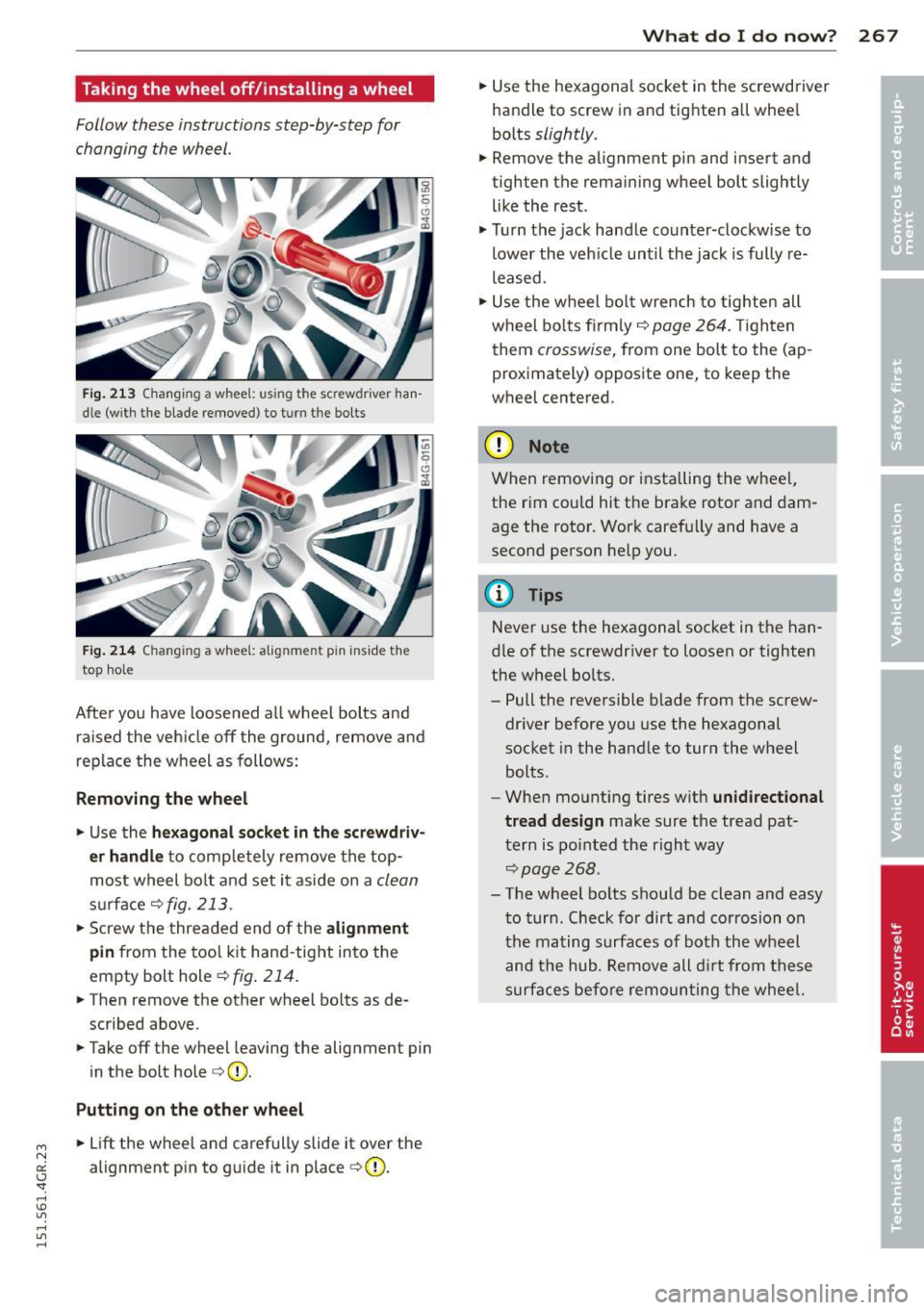
Fig. 213 Changing a wheel: using the screwdriver han
dle (with the blade removed) to turn the bo lts
F ig . 214 Changing a wheel: alignment pin ins ide the
top hole
After you have loosened a ll wheel bolts and
ra ised the veh icle off the ground, remove and
replace the wheel as follows:
R emoving the wheel
.. Use the hex agon al so ck et in th e screw driv
e r handle
to comp letely remove the top
most wheel bo lt and set it aside on a
clean
s u rface ¢fig. 213.
.. Screw the threaded end of the alignm ent
pin from the tool k it hand -tight into the
empty bolt hole¢
fig. 214.
.. Then remove the other wheel bo lts as de
scribed above .
.. Take off the wheel leaving the alignment pin
in the bolt hole ¢(D .
Putting on the oth er w heel
"' .. Lift the wheel and carefully slide it over the N
a:: alignment pin to guide it in place ¢(D. I.J -
"' rl
What do I d o now ? 267
.. Use the hexagonal socket in the screwdriver
handle to screw in and tighten all wheel
bolts
slightly.
.. Remove the alignment pin and insert and
tighten the remaining wheel bolt slightly like the rest.
.. Turn the jack handle counter-clockwise to
lower the veh icle until the jack is fully re
leased .
.. Use the wheel bo lt wrench to tighten all
wheel bo lts firm ly¢
page 264. Ti ghten
them
crosswise, from one bolt to the (ap
proximately) opposite one, to keep the
wheel centered.
(D Note
When removing or installing the whee l,
the rim could hit the brake rotor and dam
age the rotor. Work carefully and have a
second person help you.
@ Tips
Never use the hexagonal socket in the han
dle of the screwdriver to loosen or tighten
the w heel bolts.
- Pull the reversible blade from the screw
dr iver before you use the hexagonal
socket in the handle to turn the wheel
bolts.
- When mounting tires w ith
unidi rectional
tread design
make sure the tread pat
tern is po inted the right way
~page 268.
-The wheel bo lts shou ld be clean and easy
to turn. Check for dirt and corrosion on
the mating surfaces of both the wheel
and the hub. Remove all d irt from these
surfaces before remounting the whee l.