key battery AUDI RS7 SPORTBACK 2015 Owners Manual
[x] Cancel search | Manufacturer: AUDI, Model Year: 2015, Model line: RS7 SPORTBACK, Model: AUDI RS7 SPORTBACK 2015Pages: 302, PDF Size: 74.76 MB
Page 15 of 302
M N
0:: <.J 'SI: ,...., \!) 1.1'1 ,...., 1.1'1 ,....,
Instrument s and warnin g/indic ator ligh ts 13
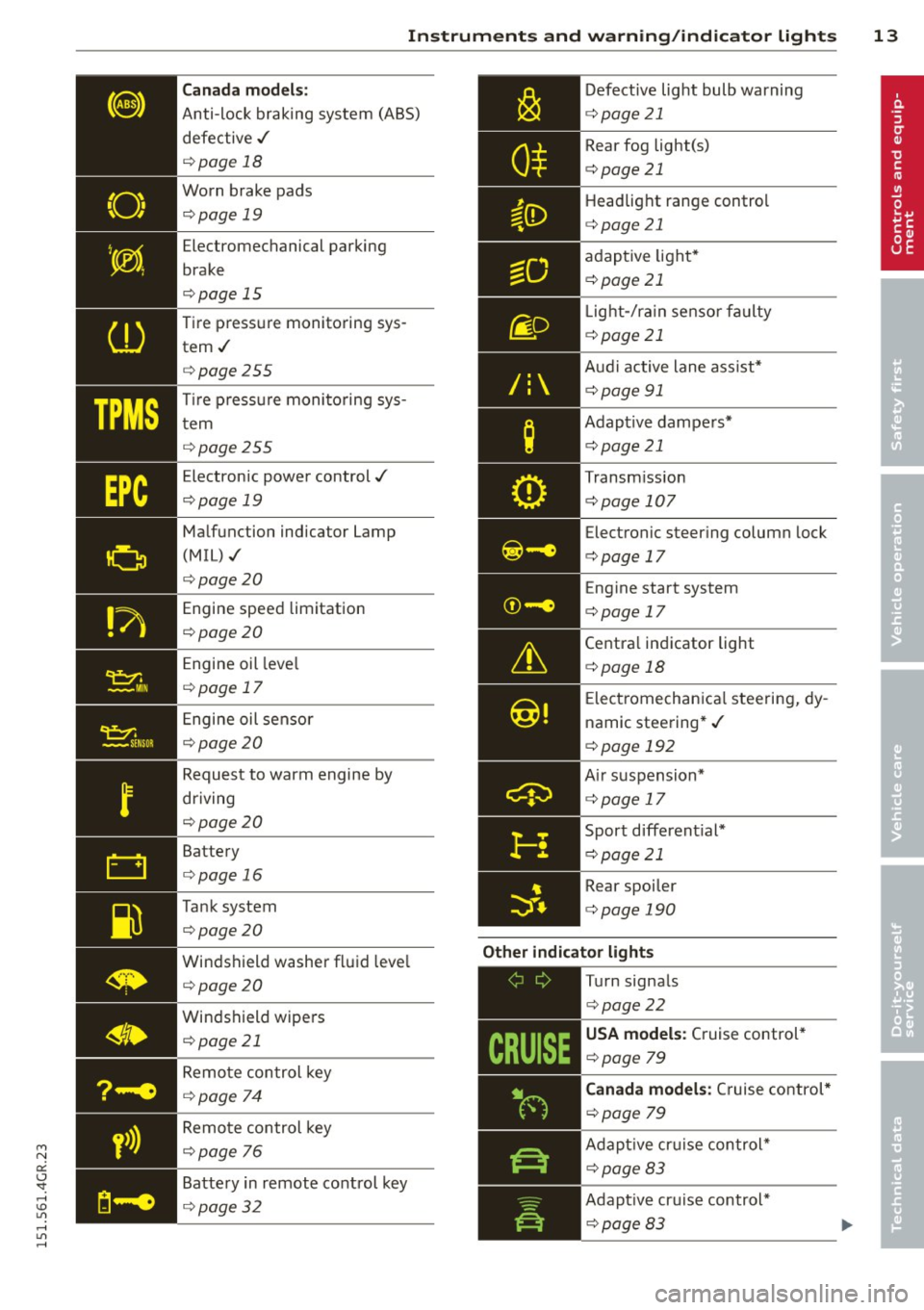
Canada m odel s:
Anti-lock braking system (ABS)
defective ,/
¢ page 18
Worn brake pads ¢page 19
Electromechanical parking
brake
¢ page 15
Tire pressure monitoring sys tem./
¢ page 255
Tir e p ress ure monitoring sys
tem
¢ page 255
Electronic power control./
¢ page 19
Malfunction indicator Lamp
(MIL),/
¢page 20
Engine speed limitation
¢ page 20
Engine oil leve l
¢ page 17
Engine oil sensor
¢ page 20
Request to warm engine by
driving
¢ page 20
Battery
¢ page 16
Tank system
¢page 20
Windshield washer fluid leve l
¢ page 20
Windshield wipers ¢ page 21
Remote control key
¢ page 74
Remote control key
¢ page 76
Battery in remote control key
¢ page 32
/:
Defective light bulb warning
c:::> page 21
Rear fog light(s)
c:::> page 21
Headlight range control
c:::> page 21
adaptive light*
c:::> page 21
L ight-/ra in sensor fa ulty
c:::>page 21
Aud i active lane ass ist*
c:::> page 91
Adapt ive dampers*
c:::>page 21
Transm iss ion
c:::> page 107
Electronic steering column lock
c:::> page 17
Eng ine start system
c:::>page 17
Centra l ind icator light
c:::> page 18
E lectromechanica l steering, dy
namic steering* ,/
c:::> page 192
A ir suspension*
c:::> page 17
Sport d ifferent ial*
c:::> page 21
Rear spoiler
c:::> page 190
Other indicator light s
-------------
Turn signals
c:::> page22
USA model s: Cruise control *
c:::> page 79
Canada models: C ruise control*
c:::> page 79
Adapt ive cr uise control*
c:::> page 83
Adapt ive cr uise control*
c:::> page 83
Page 34 of 302
32 Opening and clo sing
Remov ing the mechanical key
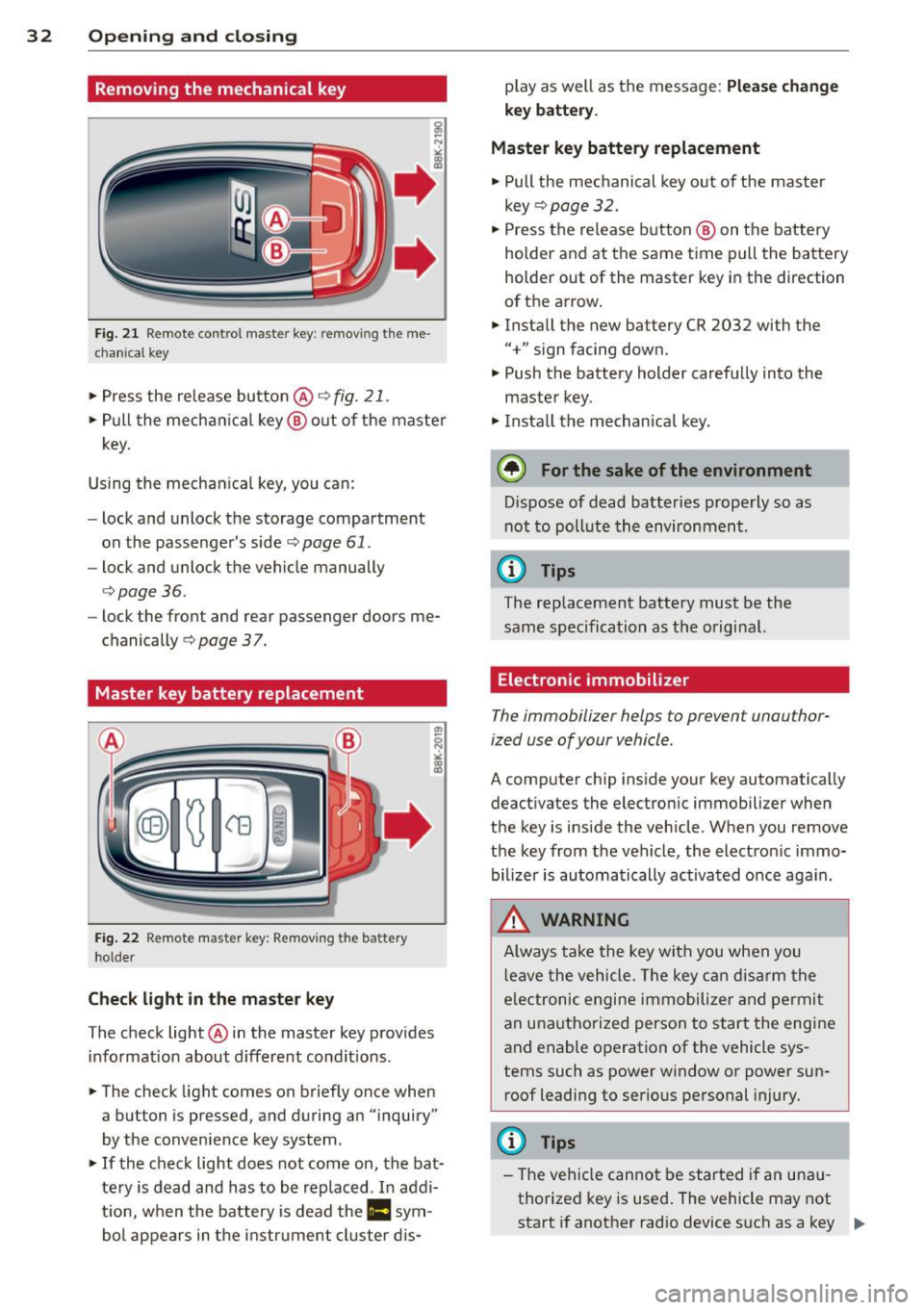
Fig. 21 Remote control master key : removing the me
chanical key
"'Press the release button@r=>.> fig. 21.
.. Pull the mecha nica l key @ out of the master
key.
Using the mechan ica l key, you can:
- lock and unlock the storage compartment
on the passenger's side
c::> page 61.
- lock and unlock the vehicle manually
<=>page 36.
-lock the front and rear passenger doors me
chanically
c::> page 37.
Master key battery replacement
Fig . 22 Remote master key: Removing the battery
holder
Ch eck light in the master ke y
The check light @in the master key provides
information about d ifferent cond itions .
.. The check light comes on briefly once when
a button is pressed, and during an "inquiry"
by the convenience key system .
.. If the check light does not come on, the bat
tery is dead and has to be rep laced. In addi
t ion, when the battery is dead the
II sym
bol appears in the instrument cluster dis- play as well as the message:
Plea
se ch ange
key b attery.
Ma ster key battery replacement
.. Pull the mechanical key out of the master
key
c::> page 32 .
.. Press the release button @ on the battery
holder and at the same time pull the battery
holder out of the master key in the direction
of the arrow .
.. Install the new battery CR 2032 with the
"+" sign facing down.
.. Push the battery holder carefully into the
maste r key .
.. Insta ll the mechan ica l key.
@ For the sake of the environment
D ispose of dead batteries properly so as
not to poll ute the environment.
(D Tips
The replacement battery must be the
same specification as the original.
Electronic immobilizer
The immobilizer helps to prevent unauthor
ized use of your vehicle.
A computer chip ins ide your key automatically
deactivates the electron ic immobilizer when
the key is inside the vehicle . When you remove
the key from the vehicle, the electron ic immo
bilizer is automatically ac tivated once aga in.
_& WARNING
-
A lways take the key with you when you
l eave the vehicle. The key can disarm the
e lectronic engine immobilize r and permi t
an unauthorized person to start the engine
and enable operation of the vehicle sys
tems such as power window or power sun
roof leadi ng to serious personal injury.
(D Tips
- The vehicle cannot be started if an una u
thorized key is used . The vehicle may not
start if another radio device s uch as a key .,..
Page 38 of 302
36 Opening and clo sing
@ Tips
If your vehicle has been standing for an ex
tended period, please note the following:
- The proximity sensors are deactivated af-
ter a few days to save power. You then
have to pull on the door handle once to
unlock the vehicle and a second time to
open the vehicle.
- To prevent the battery from being dis
charged and to preserve your vehicle's
ability to start for as long as possible,
the ene rgy management system gradu
ally switches off unnecessary conven i ence functions.
It i s possible that you
will not be able to unlock your vehicle us
i ng these conven ience f unctions .
- For Declaration of Compliance to United
States FCC and Industry Canada regula
tions ¢
page 285.
Operating locks with the key
In the event of a failure of the power locking
system, the driver 's door can be locked and
unlocked at the lock cylinder.
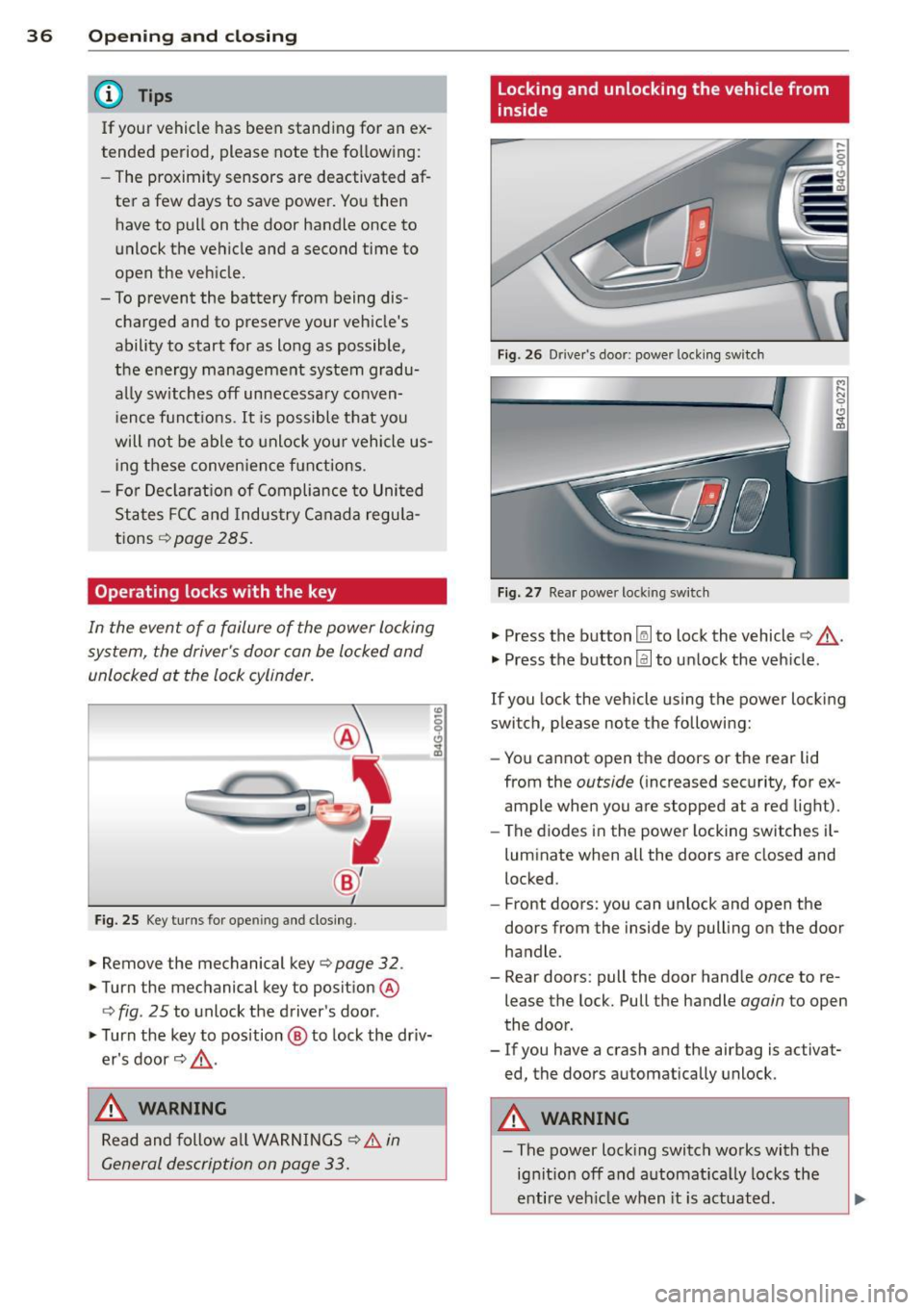
Fig. 25 Key turns for ope ning and closing .
.. Remove the mechanical key¢ page 32 .
.. Turn the mechanical key to position @
¢
fig . 25 to unlock the driver's door .
.. Turn the key to position @ to lock the driv
er's door ¢.&, .
_& WARNING
Read and follow all WARNINGS¢ & in
General description on page 33.
Locking and unlocking the vehicle from
inside
Fig. 26 Drive r's door; power locking sw itch
Fig. 27 Rear powe r lock ing switch
.. Press the button~ to lock the vehicle¢.&, .
.. Press the button@] to unlock the veh icle .
If you lock the vehicle using the power locking
switch, please note the following:
- You cannot open the doors or the rear lid
from the
outside (increased security, for ex
ample when you are stopped at a red light).
- The diodes in the power locking switches i l-
luminate when all the doors are closed and
locked .
- Front doors: you can unlock and open the
doors from the inside by pulling on the door
handle .
- Rear doors: pull the door handle
once to re
lease the lock. Pull the handle
again to open
the door .
- If you have a crash and the airbag is activat
ed, the doors automatically unlock.
A WARNING
-==
-The power lock ing switch works with the
ignition off and automatica lly locks the
entire veh icle when it is actuated .
Page 43 of 302
"' N
a:: I.J "". rl I.O
"' rl
"' rl
door is opened . The window will Lower
again when you close the door .
- After the ignition has been switched off,
the windows can still be opened or
closed for about 10 minutes . The power
windows are not switched off until the
driver's door or passenger's door has
been opened.
What to do after a malfunction
The one -touch open and close function must
be reactivated if the battery has been discon
nected .
.. Pull and hold the power window switch until
the window is fully closed.
.. Release the switch and then pull it again for
at least one second .
Valet parking
The valet parking feature protects the lug
gage compartment from unauthorized access from the outside.
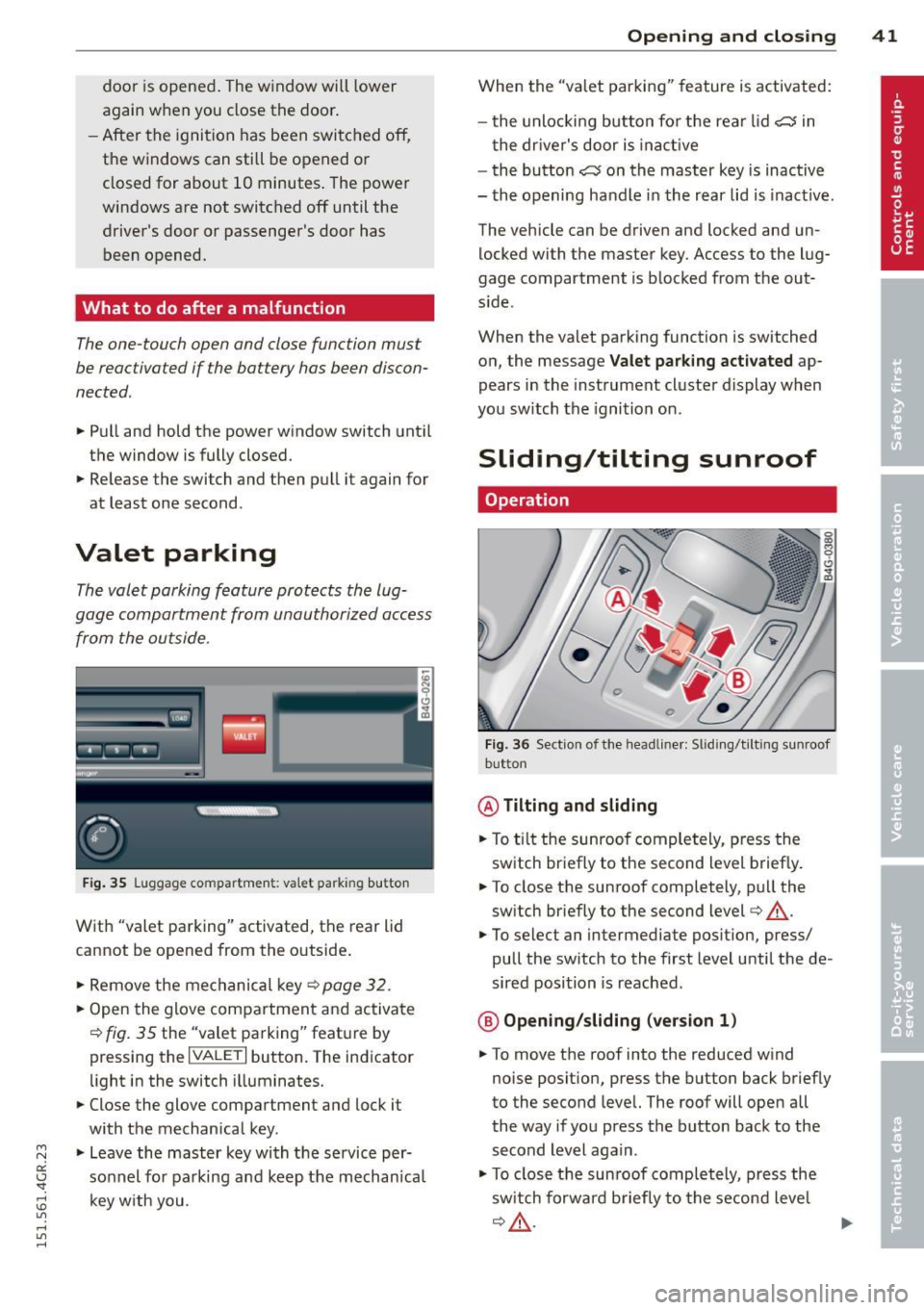
Fig. 35 Luggage compartment: valet parking button
With "valet parking" activated, the rear lid
cannot be opened from the outside .
.. Remove the mechanical key ¢
page 32 .
.. Open the glove compartment and activate
¢
fig. 35 the "valet parking" feature by
pressing the
I VALET I button. The indicator
light in the switch illuminates.
.. Close the glove compartment and lock it
with the mechanical key.
.. Leave the master key with the service per
sonnel for parking and keep the mechanica l
key with you .
Opening and closing 41
When the "valet parking" feature is activated:
- the unlocking button for the rear lid
c:s in
the driver's door is inact ive
- the button
c:s on the master key is inactive
- the opening handle in the rear lid is inact ive.
The vehicle can be driven and locked and un
locked with the master key. Access to the lug
gage compartment is blocked from the out
s ide .
When the valet parking function is switched
on, the message
Valet parking activated ap
pears in the instrument cluster display when
you switch the ignition on .
Sliding/tilting sunroof
Operation
Fig. 36 Sect ion of the headliner: Sliding/t ilting sunroof
button
@ Tilting and sliding
.. To ti lt the sunroof completely, press the
switch briefly to the second level briefly.
.. To close the sunroof completely, pull the
sw itch briefly to the second level¢_&..
.. To select an intermediate position, press/
pull the switch to the first level until the de
sired position is reached .
@ Opening/sliding (version 1)
.. To move the roof into the reduced wind
noise position, press the button back briefly
to the second level. The roof will open all
the way if you press the button back to the
second Level again.
.. To close the sunroof completely, press the
sw itch forwa rd b riefly to the second level
~A -~
Page 62 of 302
60 Seats and st o rage
12-volt sockets
Appl ies to vehicles: wit h 12-volt sockets
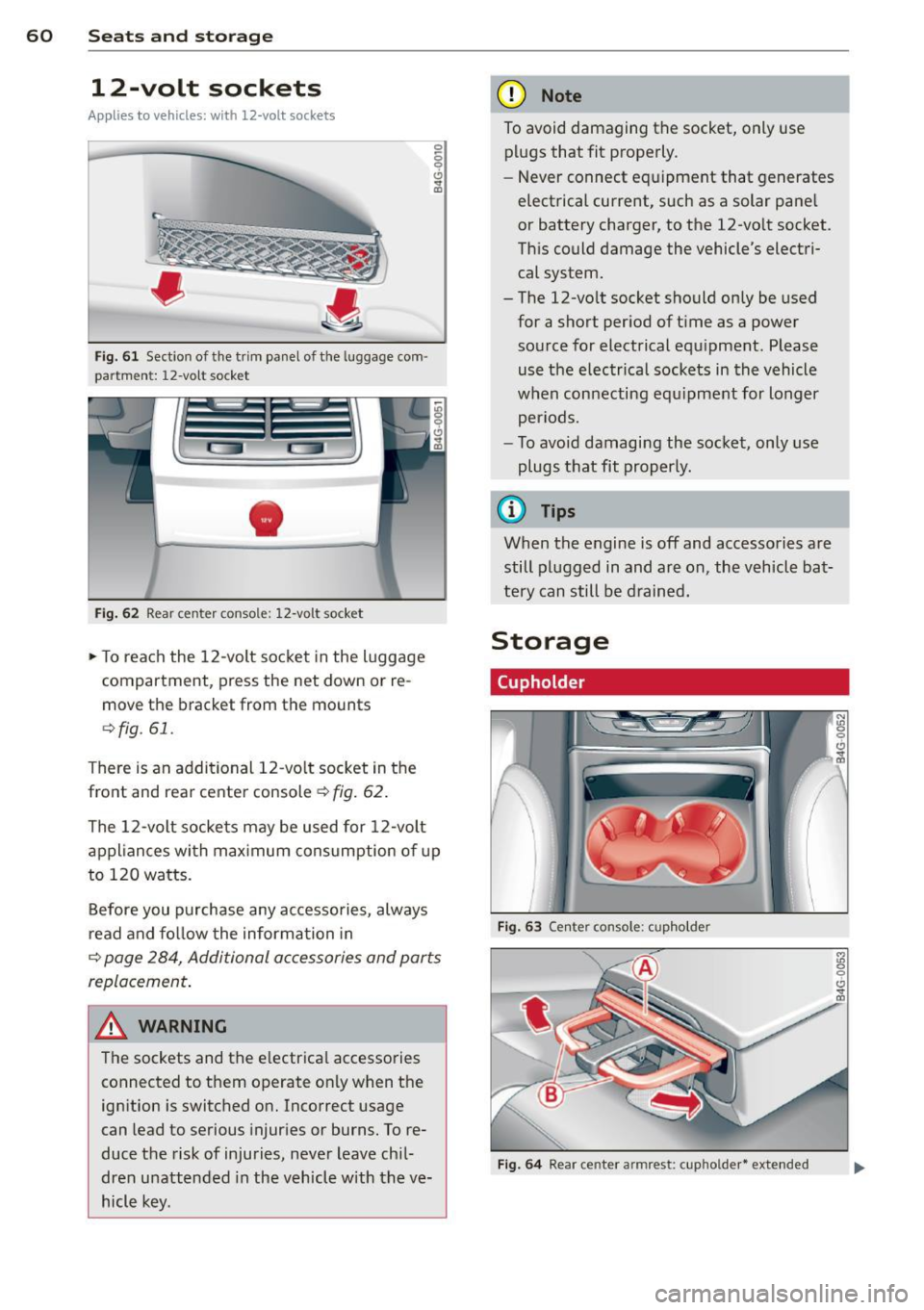
Fig. 61 Sect ion of the trim panel o f th e luggage com ·
par tm ent: 12-vol t so cket
-
Fig. 62 R ear cente r co nso le: 12-vo lt s ocke t
,. To reach the 12-volt socket in the luggage
compartment, press the net down or re
move the bracket from the mounts
¢ fig . 61.
There is an additional 12-vo lt socket in the
front and rear center console~
fig. 62.
0 5 0 6
~
The 12-volt sockets may be used for 12-volt
appliances with maximum consumption of up
to 120 watts.
Before you purchase any accessories, always
read and fo llow the information in
¢ page 284, Additional accessories and parts
replacement .
A WARNING
The sockets and the e lectrical accessories
connected to them operate only when the
ign ition is switched on. Incorrect usage
can lead to serious injur ies or burns. To re·
duce the risk of injuries, never leave chi l
dren unattended in the vehicle w ith the ve
hicle key.
(D Note
To avoid damaging the socket, only use plugs that fit properly.
- Never connect equipment that generates
electrical current, such as a solar pane l
or battery charger, to the 12-vo lt socket.
This could damage the vehicle's electri cal system.
- The 12-volt socket should on ly be used
for a short period of ti me as a power
source for electrical equ ipment . Please
use the electrical sockets in the vehicle
when connecting equ ipment for longer
periods.
- To avoid damaging the socket , only use
plugs that fit properly.
(0 Tips
When the engine is off and accessories are
still plugged in and are on , the vehicle bat
tery can still be drained.
Storage
Cupholder
F ig. 63 Cen ter co ns ole: c upho lde r
Fig. 6 4 Rear ce nter a rmrest: c upho ld er* extend ed
Page 78 of 302
76 On the road
Driver message in the instrument
cluster display
Turn off ignition befor e le a v ing car
This message appears and a warning tone
sounds if yo u open the dr iver's door when the
ignition is switched on.
Press brake p edal to start engin e
This message appears if you press the
I STAR T ENGINE ST OP ! button to start the en
g ine and do not depress the brake pedal. The
engine can on ly be started if the brake pedal
is depressed.
II Is key in th e vehicle ?
If the indicator light turns on and the mes
sage appears, the remote control key was re
moved from the vehicle while the engine was
running. If the ig nit ion key is not in the vehi
cle you w ill not be able to sw itch on the ign i
tion or resta rt the engine after it has been
switched off. You w ill also not be ab le to lo ck
the veh icle from the outside.
Shift to P , otherwise vehicle can roll away .
Doors do not lo ck if lever i s not in P .
This message appears for safety reasons
along w ith an audib le warn ing tone if the P
selector lever posit io n is not engaged when
stopping the engine with the
I STAR T ENGINE ST OP ! button. Select the P se
lec tor lever po sition. Othe rwise the veh icle
could ro ll and it cannot be locked.
II Ke y is n ot r ecogniz ed . Hold ba ck of key
aga in st marked area . Se e owner' s manual.
If the indicator light turns on and th is mes
sage appears, there is a malfunction
c::> page 76.
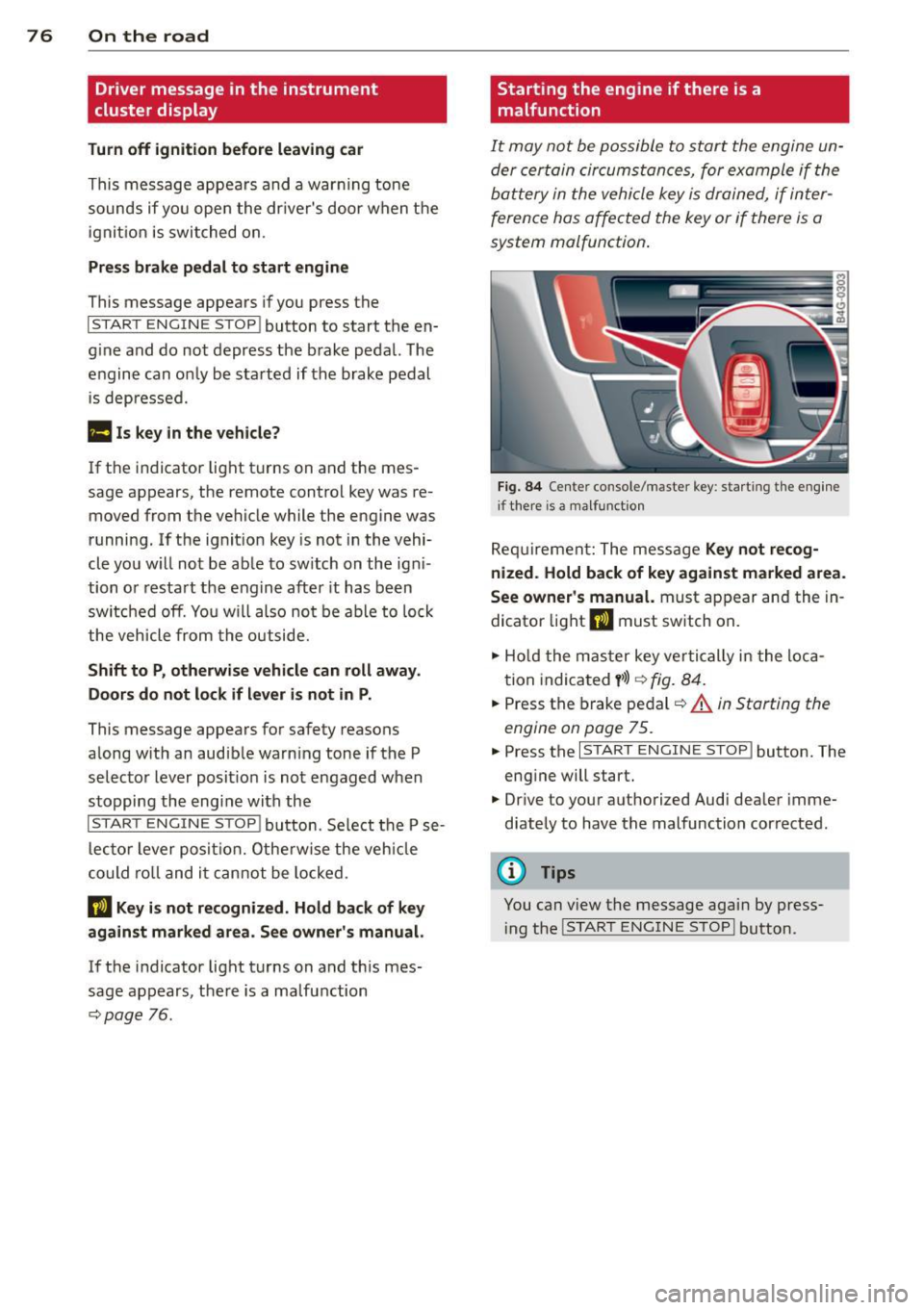
Starting the engine if there is a
malfunction
It may not be possible to start the engine un
der certain circumstances, for example if the
battery in the vehicle key
is drained, if inter
ference has affected the key or if there
is a
system malfunction .
Fig . 8 4 Center console/master key: start ing the eng ine
i f there is a malfunction
Req uirement: The mess age Ke y not r ecog
ni ze d. H old back of ke y again st ma rked are a.
See owne r's manual.
must appear and the in
dicator light
II must sw itch on.
.,. Ho ld the mas ter key vertically in the loca
tion indicated
y >l) r=:> fig. 84 .
.,. Press the brake pedal c::> A in Starting the
engine on page 75 .
... Press the I S TART ENGINE S T OP ! button. The
eng ine will start.
.,. Dr ive to your authorized Audi dealer imme
diately to have the malfunction corrected .
(D Tips
You can view the message again by press
i ng the
I STAR T ENGINE STOP I button.
Page 97 of 302
"' N
a:: I.J "". rl I.O
"' rl
"' rl
Have your authorized Audi dealer or au
thorized A udi Service Facility check the ir
function.
@ Tips
- If the win dow g lass in the driver 's door
or front passenger's door has been tint
ed, the disp lay in the exterior m irror may
be misinterp reted .
- For Decla rat ion of Compliance to United
States FCC and Industry Canada regula
tions ¢
page 285.
Activating and deactivating
Applies to vehicles: mit side assist
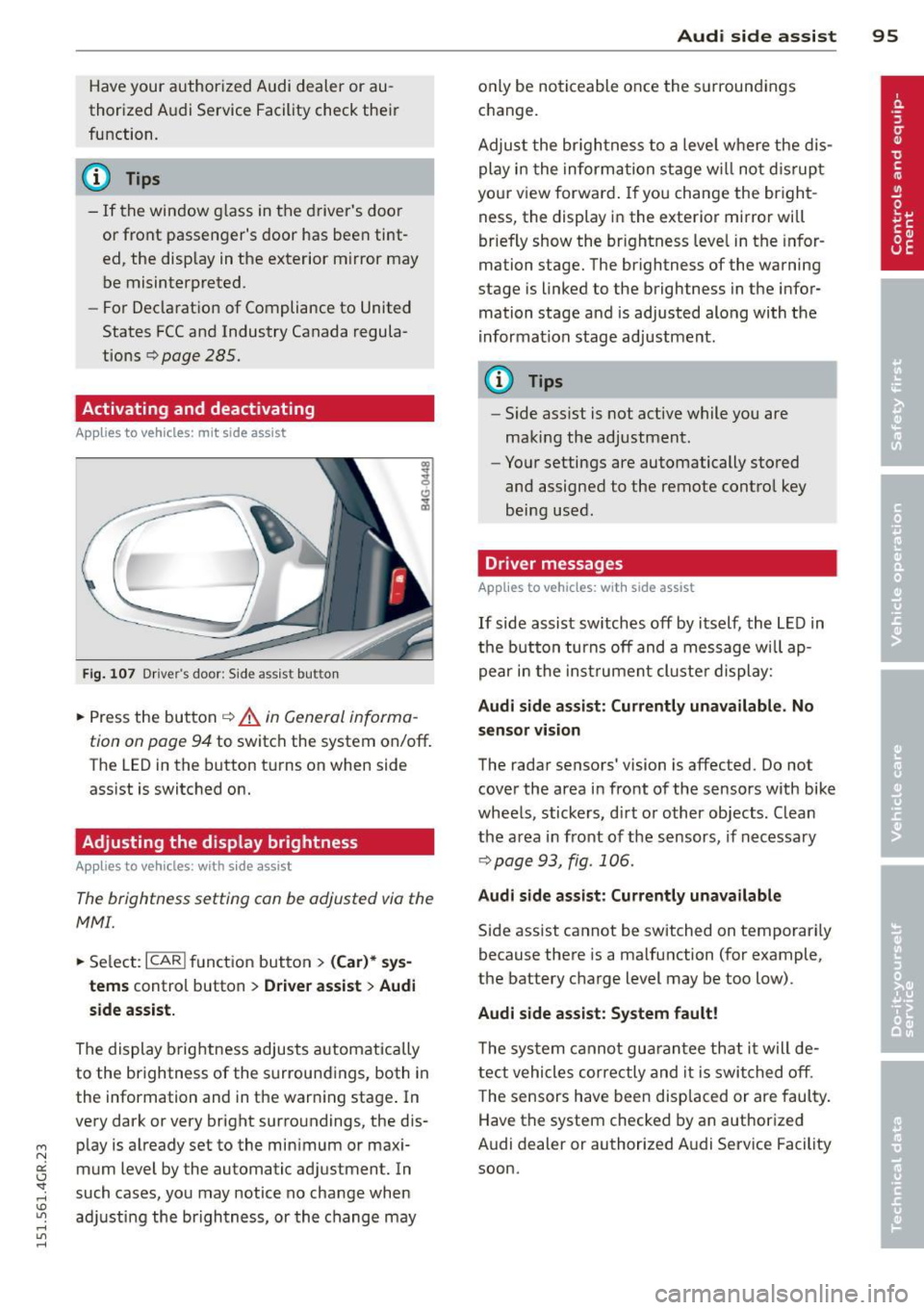
Fig. 107 Dr ive r's d oor : Sid e ass is t butt on
.. Press the but ton ¢ .&. in General informa
tion on page 94
to switch the system on/off .
The LED in the button t urns on when side
ass ist is switc hed on.
Adjusting the display brightness
Applies to vehicles: with side assist
The brightness setting can be adjusted via the
MMI.
.. Se lect : ICAR I function button> (Car)* sys
tems
contro l button > Drive r assist > Audi
side assist.
The display brig htness adjusts a utomatically
to the brightness of the surroun dings, both in
the information and in the warn ing stage . In
very dark or very bright surro undings, the dis
p lay is a lready set to the min imum or maxi
mum Level by the automatic ad justment. In
such cases, you may notice no cha nge when
a d ju sting the brightness, or the change may
Aud i side assist 95
only be no ticeable once the s urround ings
c hange.
Adjus t the br igh tness to a leve l where the dis
play i n the informa tion stage w ill no t dis rup t
your view forward . If you change the br igh t
ness, the display in the exterior mirror will
brief ly show the br ightness leve l in the infor
mation stage. The brightness of the warning
stage is linked to the brightness in the infor
mation stage and is adjusted along with the
i nfor mation stage ad justment.
(D Tips
- Side ass ist is not act ive while you are
making the adjustment .
- Yo ur settings are automatically stored
and assigned to the remote contro l key
being used.
Driver messages
Applies to vehicles: with side assist
If side assist sw itches off by itself, the L ED in
t he b utto n turns off and a message wi ll ap
pe ar in the inst rume nt cl uste r d is play:
Audi side assist: Currently unavailable. No
sensor vi sion
The rada r sensors' vision is affected. Do not
cover the area in fro nt of the sensors with bike
whee ls, sticke rs, d irt o r other objects. Clean
the a rea in front of the sensors, if necessary
¢page 93, fig . 106.
Audi side assist: Currently unavailable
Side assist cannot be switched on temporari ly
because there is a malfunction (for example,
the battery c ha rge level may be too low) .
Audi side assist: System fault !
The sy stem cannot gu arant ee th at it w ill de
tect vehicles correctly and it is swi tched o ff.
T he sensors have been disp laced or are faul ty .
Have the system checked by an authorized
A udi dealer or authorized A udi Service Facility
soon.
Page 273 of 302
"' N
a:: I.J "". rl I.O
"' rl
"' rl
No. Equ ipment Amps
8
Headlight range adjustment/ 5/7,5
adaptive lighting system
10
Left headlight (headlight with 7,5 adaptive light)
11 Supplementary heater s
Fuse p anel @ (bro wn)
No . Equipment Amps
1 Climate control 10
2
Climate control system blower 40
3
Diagnostic interface 10
4
E lectrical ignition lock 5
5
Power steering column adjust-
ment
5
6 Steering column switch module 10
7
Power steering column adjust-
ment
25
8 Light switch 5
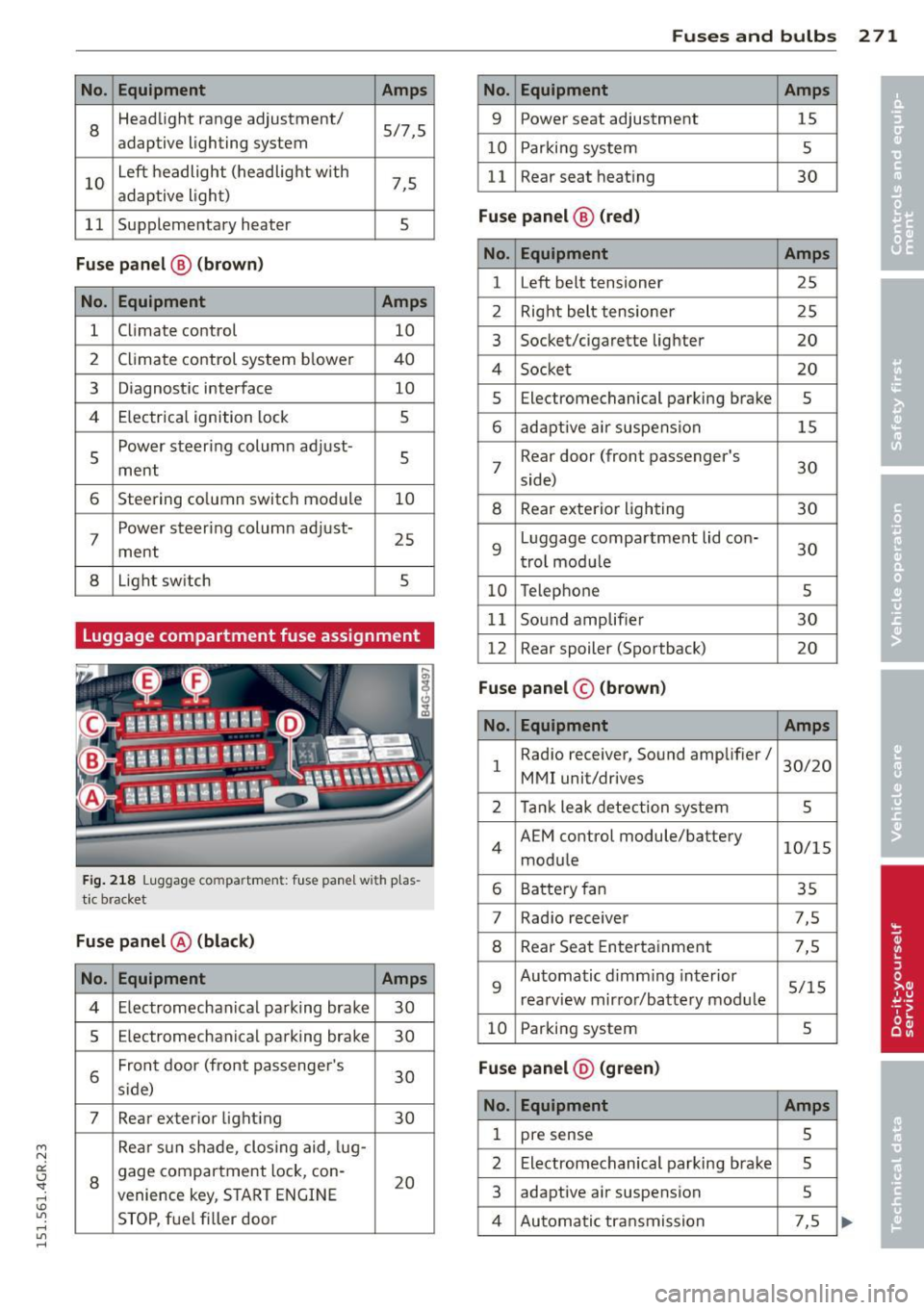
Luggage compartment fuse assignment
Fig . 218 Luggage compartment: fuse panel with plas
tic bracket
Fuse p anel @ (black )
No. Equipment Amps
4 Electromechan ical parking brake 30
5
Electromechanical parking brake 30
6
Front door (front passenge r's
30 s ide)
7 Rear exterior light ing 30
Rea r sun shade, closing aid, lug-
8
gage compartment lock, con-
20 venience key, S TART ENGINE
STOP, fuel filler door
Fu se s and bulb s 2 71
No. Equipment Amps
9 Power seat adjustment 15
10
Parking system 5
11
Rear seat heating 30
Fu se pan el@ (r e d )
No . Equipment Amps
1 Left belt tensioner 25
2
Right belt tensioner 25
3
Socket/cigarette lighter 20
4
Socket 20
5
Electromechanical parking brake 5
6 adaptive air suspension 15
7
Rear door (front passenger's
30 side)
8 Rear exterior lighting 30
9
Luggage compartment lid con-
30 trol mod ule
10 Telephone 5
11
Sound amplifier 30
12
Rear spoiler (Sportback) 20
Fuse panel © (brown)
No . Equipment Amps
1
Radio receiver, Sound amplifier/
30/20
MMI unit/drives
2 Tank leak detection system 5
4
AEM control module/battery 10/15
module
6 Battery fan 35
7
Rad io receiver 7,5
8 Rear Seat Entertainment 7,5
9
Automatic d imm ing interior 5/15
rearview mirror/battery mod ule
10 Parking system 5
Fu se pan el@ (gre en)
No . Equipment Amps
1 pre sense 5
2
Electromechanical parking brake 5
3
adaptive air suspension 5
4 Automatic transmission 7,5
Page 293 of 302
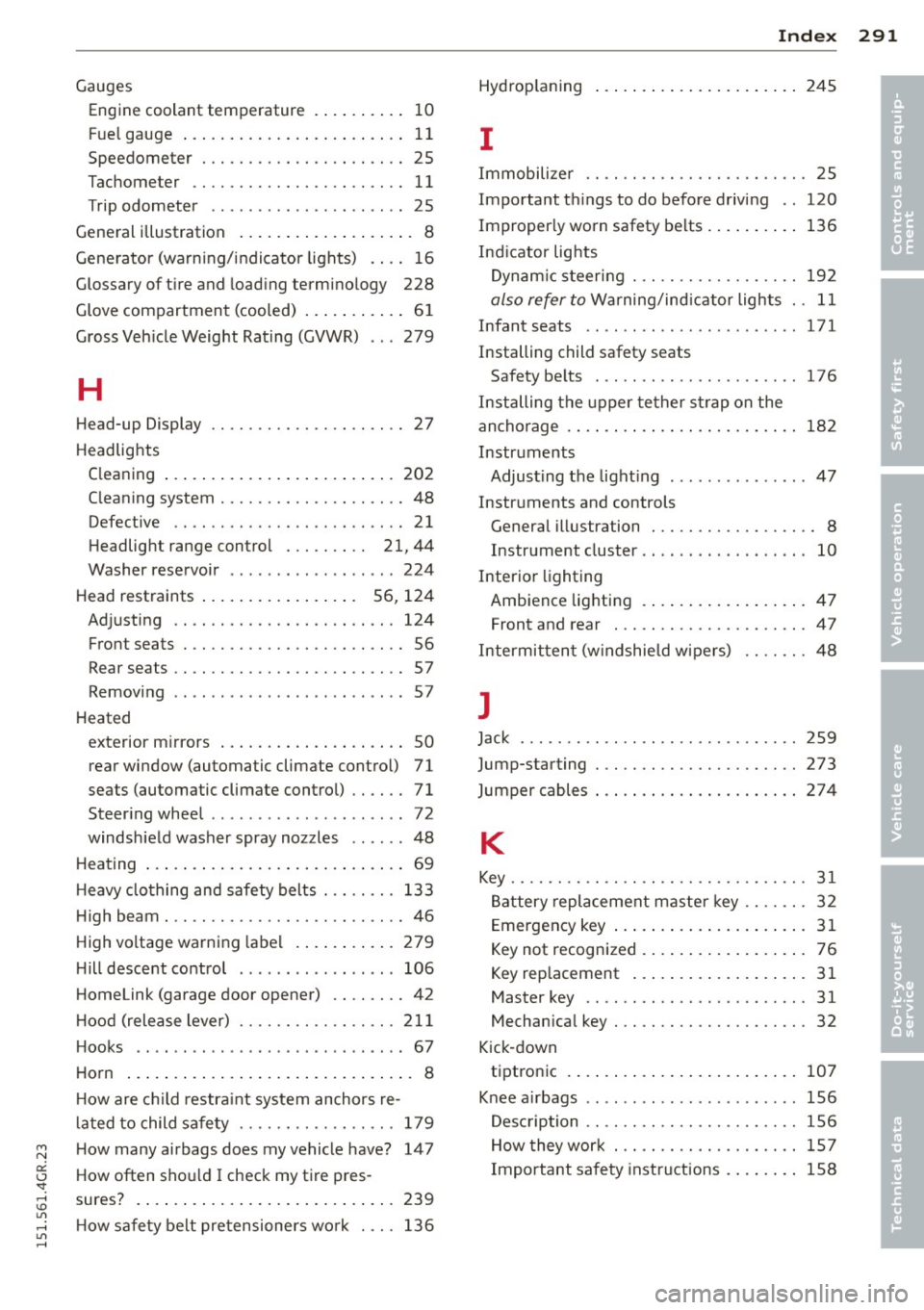
Gauges Engin e coolant temperature . ... .. .. .. 10
Fue l gauge . . . . . . . . . . . . . . . . . . . . . . . . 11
Speedometer . . . . . . . . . . . . . . . . . . . . . . 25
Tachometer . . . . . . . . . . . . . . . . . . . . . . . 11
T rip odometer . . . . . . . . . . . . . . . . . . . . . 25
General illustration . . . . . . . . . . . . . . . . . . . 8
Generator (warn ing/indicator lights) .. .. 16
Glossary of tire and loading terminology 228
Glove compartment (cooled) ........... 61
Gross Veh icle Weight Rating (GVWR) .. . 279
H
Head-up Display ........... .... .. .... 27
Headlights Cleaning ... .. .............. ... ... 202
C leaning system .......... .. .. .. .. .. 48
Defective . . . . . . . . . . . . . . . . . . . . . . . . . 21
Headlight range control . . . . . . . . . 21, 44
Washer reservoir ................ .. 224
Head restraints . . . . . . . . . . . . . . . . . 56, 124
Adjusting .. .. ........... .. .. .. ... 124
Front seats . . . . . . . . . . . . . . . . . . . . . . . . 56
Rear seats .. .. ........... .. .. .. .... 57
Removing ................ ... ... ... 57
Heated exterior mirrors .................... 50
rear window (automatic climate control) 71
seats (automatic climate control) . . . . . . 71
Steer ing wheel ... ... ..... .. .. .. .. .. 72
windshield washer spray nozzles ...... 48
Heating ..... .. .............. ... .... 69
H eavy clothing and safety belts . .. .. .. . 133
High beam . .. ............. .... .. .... 46
High voltage warning label ... ... .. .. . 279
H ill descent control ............... .. 106
Homelink (garage door opener) .. .. .. .. 42
H ood (release lever) ........ .. .. .. .. . 211
H ooks .. .. ... ................... ... 67
Horn ............................... 8
H ow are child restraint system anchors re-
l ated to child safety ........ .. .. .. .. . 179
How many airbags does my vehicle have? 147
How often shou ld I check my tire pres-
sures? . ... .. .. ................ .... 239
H ow safety belt pretensioners work ... . 136
Index 291
Hydrop laning ..... .. ............... 245
I
Immobilize r .. .. .. .. .. ........... .. . 25
Important things to do before driving .. 120
Improper ly worn safety belts ........ .. 136
Ind icator lights
Dynamic steering . .. .. ......... .. .. 192
also refer to Warning/ind icator lights . . 11
Infant seats ...... .. ............... 171
Installing child safety seats Safety belts . . . . . . . . . . . . . . . . . . . . . . 176
Installing the upper tether strap on the
anchorage . . . . . . . . . . . . . . . . . . . . . . . . . 182
Instruments Adjusting the light ing ............. .. 47
Instruments and controls General illustration . . . . . . . . . . . . . . . . . . 8
Instrument cluster .... ... .... .... .. . 10
Interior lighting
Ambience lighting .. .............. .. 47
Front and rear . .. ................. . 47
Intermittent (w indshield wipers) .. .. .. . 48
J
Jack ..... .. .. .. .. .. . .. .......... .. 259
Jump-starting . .. .. .... ........... .. 273
Jumper cables ... .. .. ............... 274
K
Key ........ .. .. .. ... ............ ... 31
Battery replacement master key . . . . . . . 32
Emergency key ..... ................ 31
Key not recognized . . . . . . . . . . . . . . . . . . 76
Key replacement . . . . . . . . . . . . . . . . . . . 31
Master key . . . . . . . . . . . . . . . . . . . . . . . . 31
Mechanical key . .. ............... .. . 32
Kick-down tiptronic ... ... .. .. ............... 107
Knee a irbags .. .. .. .. .......... ..... 156
Description .. .. .. ................. 1S6
How they work . .. .... ............. 157
Important safety instructions ........ 158
•
•