phone AUDI RS7 SPORTBACK 2015 Owners Manual
[x] Cancel search | Manufacturer: AUDI, Model Year: 2015, Model line: RS7 SPORTBACK, Model: AUDI RS7 SPORTBACK 2015Pages: 302, PDF Size: 74.76 MB
Page 11 of 302
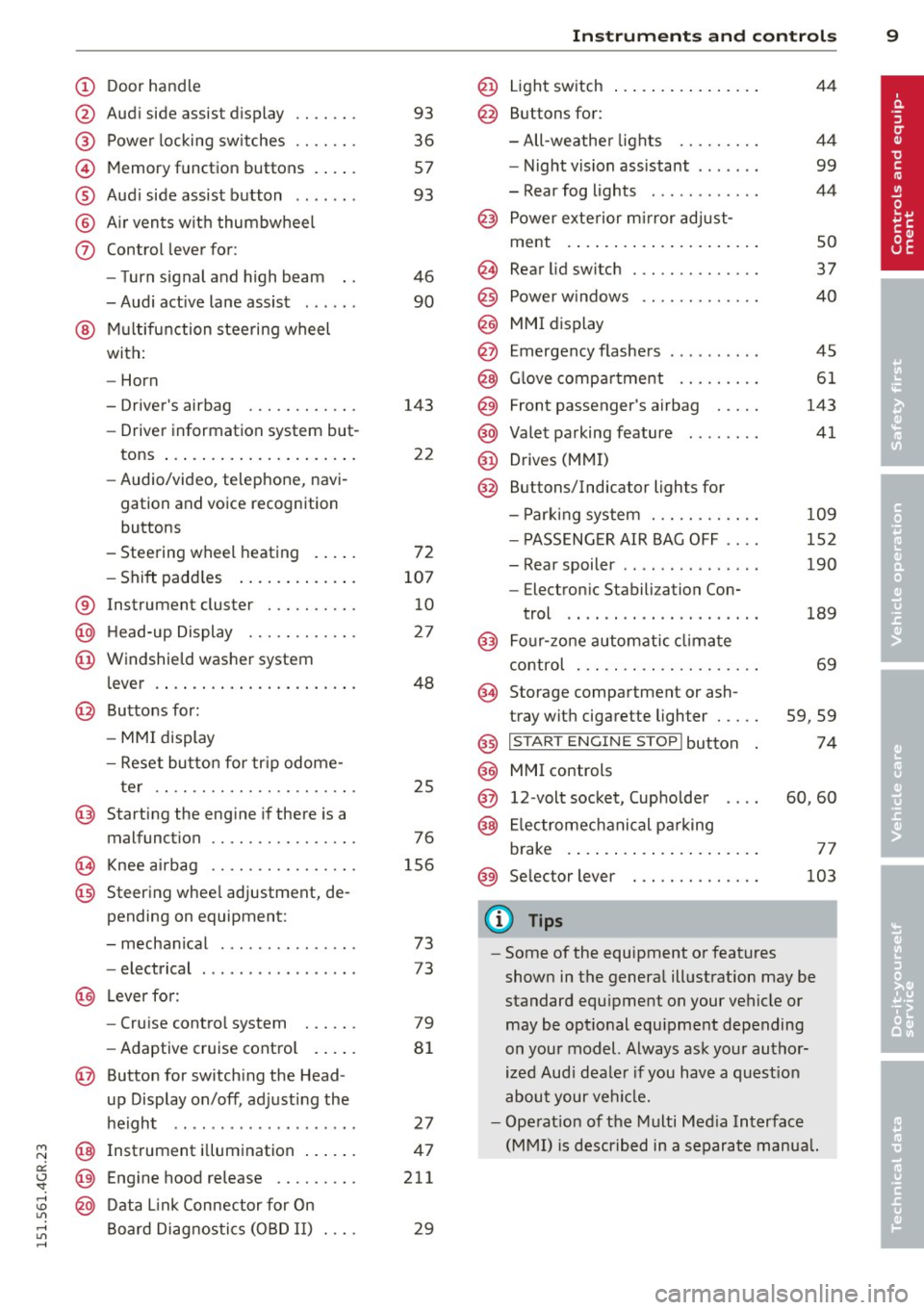
(!) Door handle
@
®
©
®
®
(j)
Audi side assist d isplay
Power locking sw itches
Memory function buttons . ... .
Aud i side assist button .. .. .. .
A ir vents with thumbwheel
Control lever for :
- T urn signal and high beam
- Audi act ive lane assist . .. .. .
@ Mu ltifunction steering wheel
with:
- Horn
- Driver's airbag
- Driver information system but-
tons ... ..... ....... ... .. .
- Audio/video , telephone, navi
gation and voice recognition
buttons
- Steering wheel heating . ... .
- Shift padd les ..... ... .. .. .
® Instrument cluster ..... .. .. .
@ H ead-up Display ....... .. .. .
@ Windsh ield washer system
l ever .... .... ...... ... .. .. .
@ Buttons for :
- MM I display
- Reset button for tr ip odome-
ter .. .. ............. .... .
@ Starting the eng ine if there is a
malfunction
~ Knee airbag ........... .... .
@ Steering whee l adjustment, de
pending on equipment:
- mechanical . ............. .
- electrical
@ Leverfo r:
- Cru ise contro l system
- Adaptive cruise cont ro l .. .. .
@ Button for switch ing the Head
up Display on/off , adjusting the
h eight .. ................ . .
@ Instrument illuminat ion ... .. .
@ Eng ine hood release .... .. .. .
@ D ata Link Connector for On
Board Diag nos tics ( OBD II) . .. .
93
36
57
93
46
90
143
22
72
107 10
27
48
25
76
156
73
73
79
8 1
27
47
211
29
In strument s and control s 9
@ Light switch ..... . .. .. ..... .
@ Buttons for :
- All -weathe r lights
- Night vision assistant . .. ... .
- Rear fog lights . .......... .
@ Power exterior mirror adjust-
ment . ... .... .. . .. .. ..... .
@ Rear lid switc h ............. .
@) Power w indows .... ........ .
@ MMI display
@ Emergency flashers .. .. .. ... .
@ Glove compar tment ........ .
@ Front passenger's airbag .... .
@ Valet parking feature ....... .
@ Drives (MMI)
@ Buttons/Indicator ligh ts for
- P arking system ........... .
- PASSENG ER AIR BAG OFF ... .
- Rear spoiler .. .. . .. .... ... .
- E lectron ic Stabili zation Con-
trol .. .. .. .. .. . ... ...... .
@) Four-zone automatic climate
control . .. .. .. .. .. ........ .
@ Storage compartment or ash-
tray with cigarette ligh ter .....
@) I STAR T ENGIN E ST OPI button
@ MMI controls
@ 12-volt socket , (upholde r
@ Elec tromechanical pa rking
brake . ... .. .... . ... ...... .
@ Selector lever
(D Tips
44
4 4
99
44
so
37
40
45
61
143
41
109
152
190
189
69
59,59
74
60,60
77
103
- Some of the equipment or features
shown in the genera l ill ustration may be
standard equ ipment on your vehicle or
may be opt ional equ ipment depending
on you r model. Always ask your autho r
ized Aud i dea le r i f you have a quest ion
about your ve hicl e.
- Ope rat ion of the Multi Med ia Interface
(MMI) is described in a separate manua l.
Page 25 of 302
"' N
a:: I.J "". rl I.O
"' rl
"' rl
Instrument s and warning /indicator lights 23
® ®
Tab Content
2 Indicator lights and messages
Warning when a door, the hood or
the rear lid is not closed
Service interval display<=>
page 26
Speed warning system <=> page 78
3 Night vision assistant* <=> page 99
4 Audio/video
5 Telephone*
6 Navigation*
The second and third tabs are only visib le if at
l east one indicator light or message is shown
or if that system is switched on .
The status line © is located in the bottom
part of the display¢
fig. 4. It displays the ex
terior temperature, time, selector lever posi
tion, trip odometer and odometer .
F or some veh icle functions, you can access the
trip information from the temporary memory
<=> page 24 in the line(!)<=> fig. 5.
A WARNING 1= -
- Never rely exclusively on the outside
temperature display to determine if a
road surface is icy or not. Keep in mind
that road surfaces, especially bridges
and overpasses, could be ice covered and
slippery even at an outside temperature above
41 °F (+5 °().
- Always reduce your speed and dr ive with
special care in cold weather conditions
when the chance of encountering icy
road surfaces increases.
@ Tips
-If the vehicle is stationary, or if you are
driving at a very low speed, the tempera
ture shown in the display might be
s light ly higher than the actual outside
temperature. This is caused by the heat
being radiated from the eng ine.
- You can select the units used for temper
ature, speed and other measurements in
the MMI. -
For information on the audio/video and
navigation* functions, refer to the sepa
rate MMI owner's manua l.
Operation
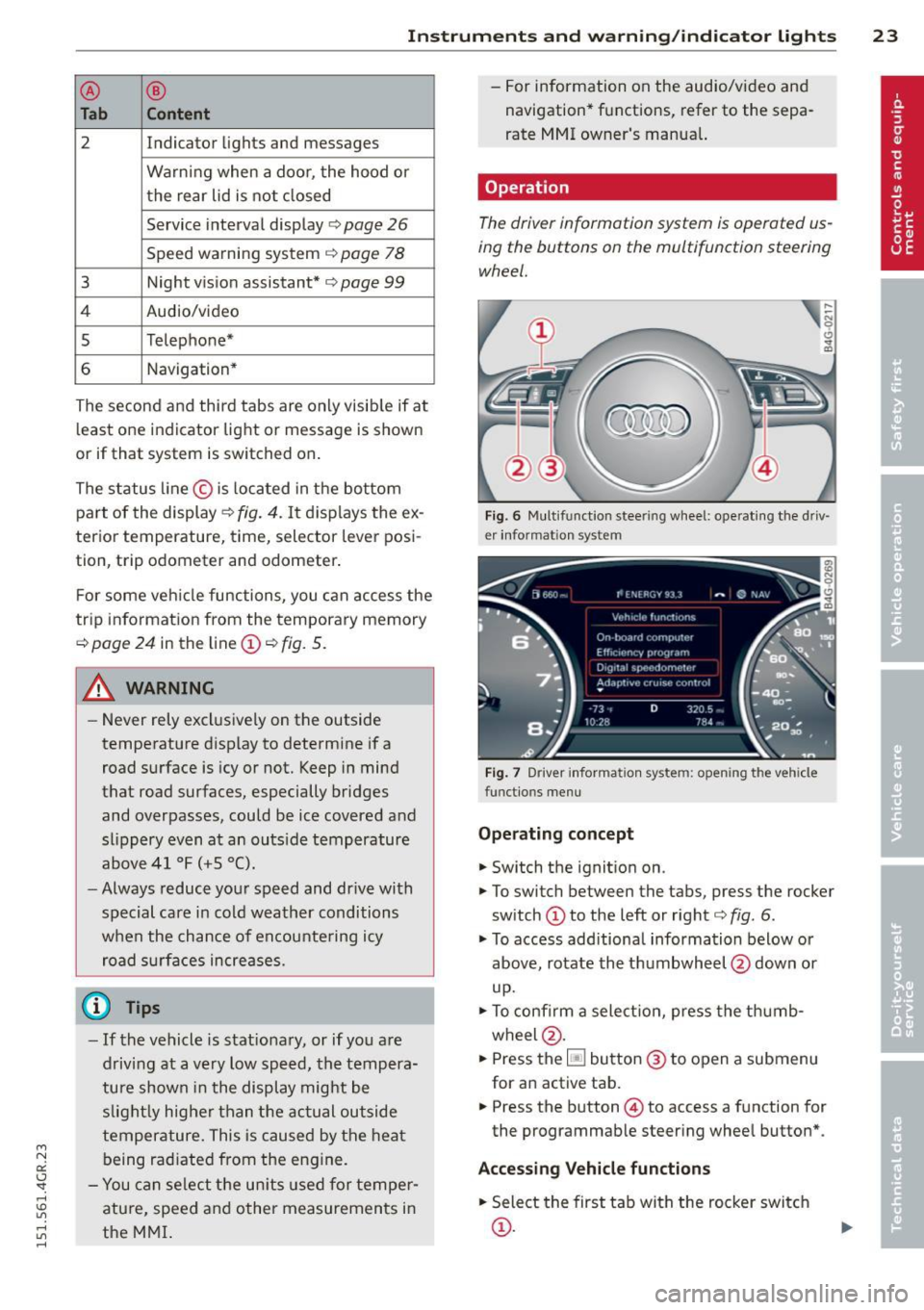
The driver information system is operated us
ing the buttons on the multifunction steering
wheel.
Fig. 6 Multifunction steering wheel: operating the driv
er in formation system
Fig. 7 Driver informat ion system: opening the vehicle
func tions menu
Operating concept
.,. Switch the ignition on.
.,. To switch between the tabs, press the rocker
switch
(D to the left or rig ht <=> fig. 6.
.,. To access additional information below or
above, rotate the t humbwheel @down or
up.
.,. To confirm a selection, press the thumb
wheel @.
.,. Press the~ button @ to open a submenu
for an active tab.
.,. Press the button@) to access a function for
the prog rammab le steering whee l button* .
Accessing Vehicle functions
.,. Select the first tab with the rocker switch
(D.
Page 33 of 302
"' N
a:: I.J "". rl I.O
"' rl
"' rl
Opening and closing Keys
Key set
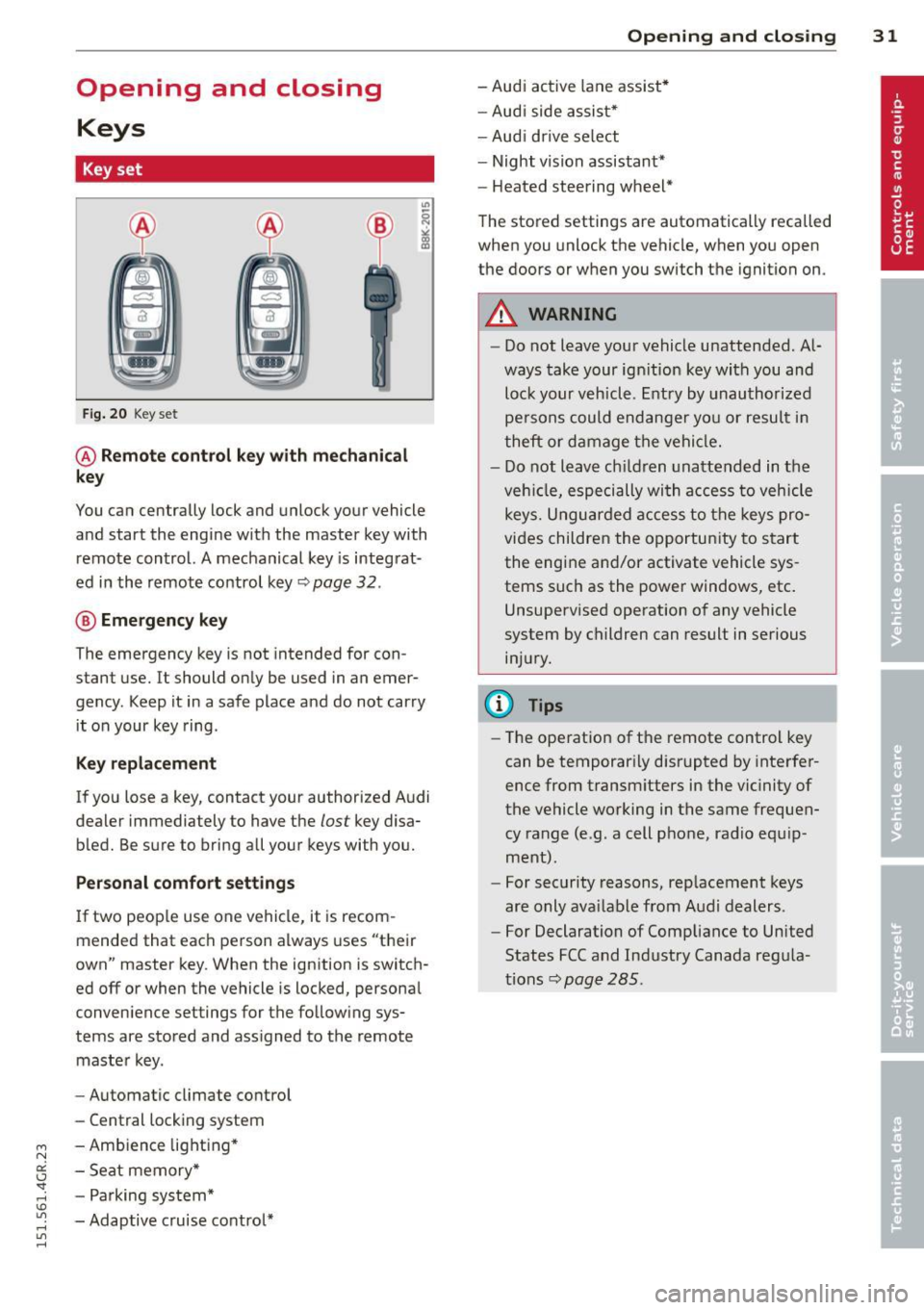
Fig. 20 Key set
@ Remote control key with mechanical
key
You can centrally lock and unlock your vehicle
and start the engine with the master key with
remote control. A mechanical key is integrat
ed in the remote control key~ page
32 .
® Emergency key
The emergency key is not intended for con
stant use.
It should only be used in an emer
gency. Keep it in a safe place and do not carry
it on your key ring .
Key replacement
If you lose a key, contact your authorized Audi
dealer immed iately to have the
lost key disa
bled. Be sure to bring all your keys with you.
Personal comfort settings
If two people use one vehicle, it is recom
mended that each person always uses "their
own" master key. When the ignition is switch
ed off or when the vehicle is locked, personal
convenience settings for the following sys
tems are stored and assigned to the remote
master key.
- Automatic climate control
- Central locking system
- Ambience lighting*
- Seat memory*
- Parking system*
- Adaptive cruise control*
Opening and closing 31
- Audi active lane assist*
- Audi side assist*
-Audi drive select
- Night vision assistant*
- Heated steering wheel*
The stored settings are automatically recalled
when you unlock the vehicle, when you open
the doors or when you switch the ignition on.
A WARNING
-Do not leave your vehicle unattended. Al
ways take your ignition key with you and
lock your vehicle. Entry by unauthorized
persons could endanger you or result in
theft or damage the vehicle.
- Do not leave children unattended in the
vehicle, especially with access to vehicle
keys. Unguarded access to the keys pro
vides children the opportunity to start
the engine and/or activate vehicle sys
tems such as the power windows, etc.
Unsupervised operation of any vehicle
system by children can result in serious
injury.
(D Tips
- The operation of the remote control key
can be temporarily disrupted by interfer
ence from transmitters in the vicinity of
the vehicle working in the same frequen
cy range (e.g. a cell phone, radio equip
ment).
- For security reasons, replacement keys
are only available from Audi dealers.
- For Declaration of Compliance to United
States FCC and Industry Canada regula
tions~ page
285.
Page 41 of 302
"' N
a:: I.J "". rl I.O
"' ....
"' rl
-The following applies to vehicles equip
ped with the Convenience key* feature: if
the remote control key is left in the lug
gage compartment, luggage compart
ment will automatically unlock itself af
ter you lock the vehicle . This prevents
you from un intent ionally locking your
key in the luggage compartment .
- When the vehicle is locked, the rear lid
can be unlocked separately by pressing
the button
las! on the master key. When
the rea r lid is closed aga in, it locks auto
matically.
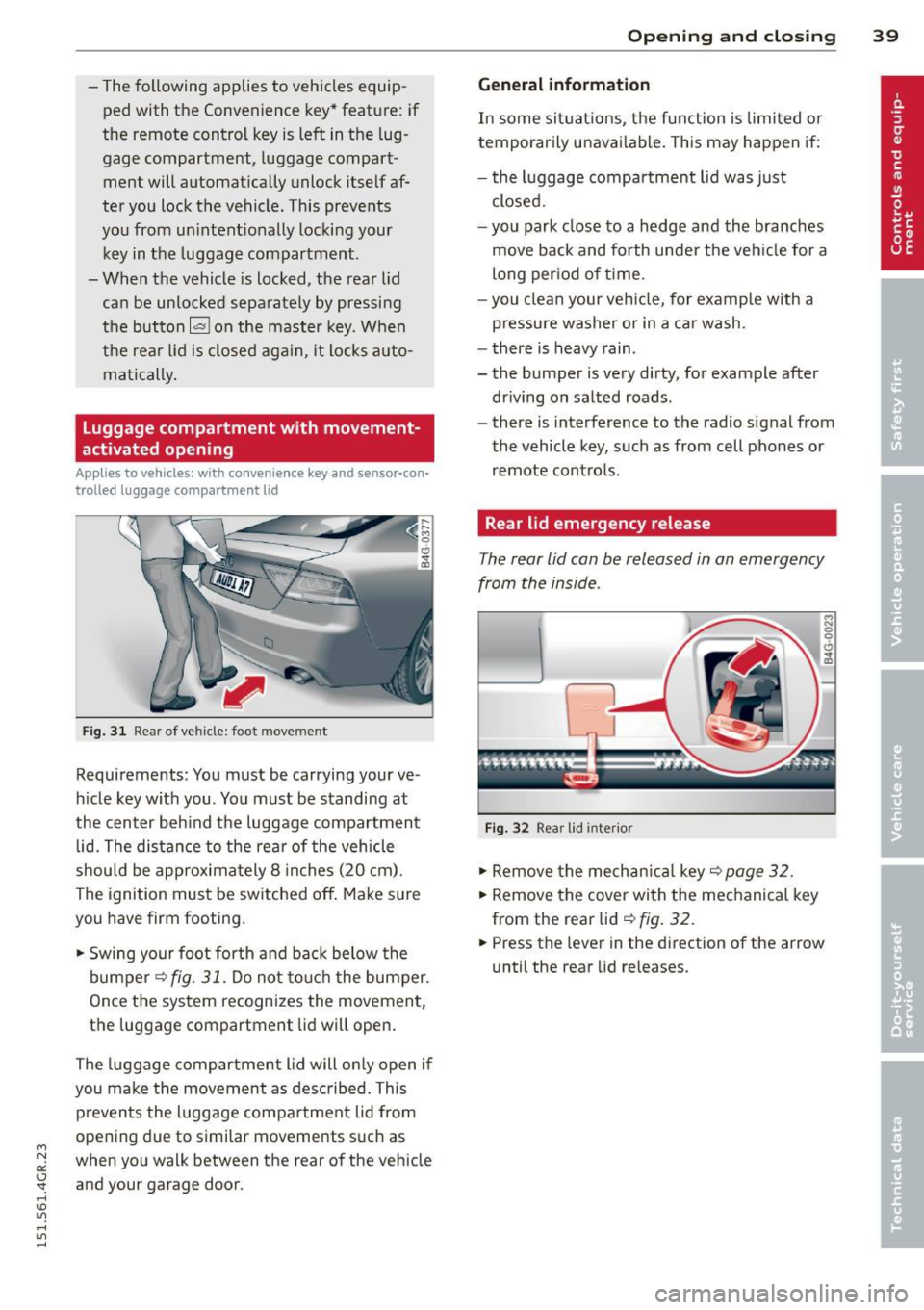
Luggage compartment with movement
activated opening
Applies to vehicles: with conve nience key and sensor-con·
trolled luggage compartment lid
Fig. 31 Rear of ve hicle: foot move ment
Requirements : You must be carrying your ve
h icle key with you . You must be standing at
the center beh ind the luggage compartment
lid. The distance to the rea r of the vehicle
should be approxima tely 8 inches (20 cm).
The ignition must be switched off . Make sure
you have firm footing .
.. Swing your foot for th and back below the
bumper ¢
fig. 31. Do not to uch the bumper.
Once the system recognizes the movement,
the luggage compartment lid will open.
The luggage compartment lid will on ly open if
you make the movement as described . This
prevents the luggage compa rtment lid from
opening due to similar movements such as
when you walk between the rear of the vehicle
and your garage door.
Op enin g an d clos ing 39
Gen eral information
In some sit uatio ns, the function is limited or
temporarily unavai lable . This may happen if:
- the luggage compartment lid was just
closed.
- you park close to a hedge and the bra nches
move back and forth unde r the veh icle for a
long per iod of t ime .
- you clean your veh icle, for examp le with a
pressure washer or in a car wash .
- there is heavy rain .
- the bumper is very dirty, for example after
driving on salted roads .
- there is interference to the radio signal from
the vehicle key, such as from cell phones or
remote cont ro ls .
Rear lid emergency release
The rear lid con be released in on emergency
from the inside .
Fig . 32 Rea r lid inter ior
.. Remove the mechan ica l key ¢ page 32.
.. Remove the cover with the mechanical key
from the rear lid ¢
fig. 32 .
.. Press the leve r in the direction of the arrow
until the rear lid re leases.
Page 123 of 302
"' N
a:: I.J "". rl I.O
"' rl
"' rl
.. Make sure to use the right child rest raint
correct ly to protect children
Q page 165,
Child Safety .
.. Sit properly in your seat and make sure that
your passengers do the same¢
page 53,
General recommendations .
.. Fasten your safety belt and wear it properly.
Also instruct your passengers to fasten their
safety belts properly ¢
page 130 .
What impairs driving safety?
Safe driving is directly related to the condi
tion of the vehicle, the driver as well as the
driver 's ability to concentrate on the road
without being distracted.
The driver is respons ible for the safety of the
veh icle and all of its occupants.
If your ability
to drive is impai red, safety r isks for everybody
in the vehicle increase and you also become a
hazard to everyone else on the road ¢
A.
Therefore:
.. Do not let yourself be distracted by passen
gers or by using a cellular telephone.
.. NEVER drive when your driving ability is im
paired (by medications, alcohol, drugs, etc.).
.. Observe all traffic laws, rules of the road
and speed limits and plain common sense .
.. ALWAYS adjust your speed to road, traff ic
and weather conditions .
.,. Take frequent breaks on long trips. Do not
drive for more than two hours at a stretch.
.. Do NOT drive when you are t ired, under
pressure or when you are stressed.
A WARNING
Impaired driving safety increases the risk
of serious personal injury and death when
ever a vehicle is being used.
Driving Safely 121
Proper occupant
seating positions
Proper seating position for the driver
The proper driver seating position is impor
tant for safe, relaxed driving .
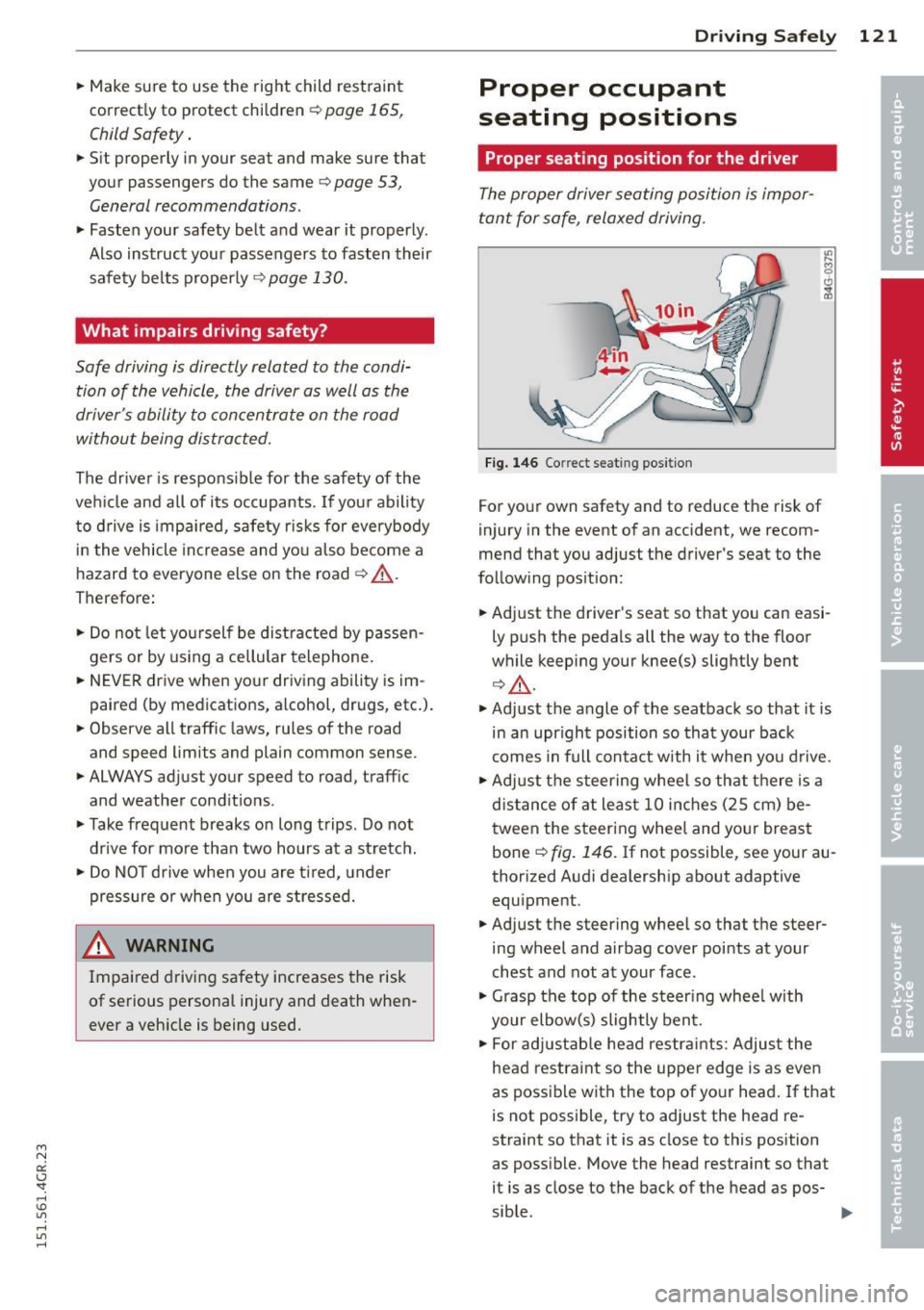
Fig. 146 Correct seat ing pos it ion
For your own safety and to reduce the risk of
injury in the event of an accident, we recom
mend that you adjust the driver's seat to the
follow ing position:
.. Adjust the driver's seat so that you can easi
ly push the pedals all the way to the floor
wh ile keeping your knee(s) slightly bent
¢.&_ .
.. Adjust the angle of the seatback so that it is
in an upr ight position so that your back
comes in full contact w ith it when you drive.
.. Adjust the steering wheel so that th ere is a
distance of at least 10 inches (25 cm) be
tween the steering wheel and yo ur breast
bone
Q fig. 146. If not possible, see your au
thorized Audi dealership about adaptive
equipment .
.. Adjust the steering wheel so that the steer
ing wheel and airbag cover points at your
chest and not at your face.
.,. Grasp the top of the steer ing whee l with
your elbow(s) slightly bent.
.. For adjustable head restra ints: Adjust the
head restraint so the upper edge is as even
as possible with the top of your head. If that
is not possible, try to adjust the head re
straint so that it is as close to this position
as poss ible. Move the head restraint so that
it is as close to the back of the head as pos-
sible . .,.
Page 146 of 302
144 Airbag system
detailed information about airbags, safety
belts and child safety in this and the other
chapters that make up the owner's literature.
Please be sure to heed the WARNINGS -they
are extremely important for your safety and
the safety of your passengers, especially in
fants and small children.
A WARNING
Never rely on airbags alone for protection.
- Even when they deploy, airbags provide only supplemental protection .
- Airbag work most effectively when used
with properly worn safety belts.
- Therefore, always wear your safety belts
and make sure that everybody in your ve
hicle is properly restrained .
- Always hold the steering wheel with both
hands on the outside of the steering
wheel rim at the 9:00 o'clock and 3:00
o'clock positions to help reduce the risk
of personal injury if the driver's airbag in
flates.
- Never hold the steering wheel at the 12
o'clock position or with your hands any
where inside the steering wheel or on the
steering wheel hub. Holding the steering
wheel the wrong way increases the risk of severe injury to the arms, hands, and
head if the driver airbag deploys.
A WARNING
Objects between you and the airbag will
increase the risk of injury in a crash by in
terfering with the way the airbag unfolds
and/or by being pushed into you as the air
bag inflates.
-Always make sure nothing is in the front
airbag deployment zone that could be
struck by the airbag when it inflates.
- Objects in the zone of a deploying airbag
can become projectiles when the airbag
deploys and cause serious personal in
Jury.
- Never hold things in your hands or on
your lap when the vehicle is in use .
-
-Never place accessories or other objects
(such as cup holders, telephone brackets,
note pads, navigation systems, or things
that are large, heavy, or bulky) on the
doors; never attach then to the doors or
the windshield; never place them over or
near or attach them to the area marked
.,AIRBAG" on the steering wheel, instru
ment panel or the seat backrests; never place them between these areas and you
or any other person in the vehicle.
- Never attach objects to the windshield
above the passenger front airbag, such
as accessory GPS navigation units or mu
sic players. Such objects could cause seri
ous injury in a collision, especially when
the airbags inflate.
- Never recline the front passenger seat to
transport objects. Items can also move
into the deployment area of the side air
bags or the front airbag during breaking
or in a sudden maneuver. Objects near
the airbags can fly dangerously through
the passenger compartment and cause
injury, particularly when the seat is re
clined and the airbags inflate.
A WARNING
A person on the front passenger seat, es
pecially infants and small children, will re
ceive serious injuries and can even be kil
led by being too close to the airbag when
it inflates.
- Although the Advanced Airbag System in
your vehicle is designed to turn off the front passenger airbag if an infant or a
small child is on the front passenger
seat, nobody can absolutely guarantee
that deployment under these special
conditions is impossible in all conceiva
ble situations that may happen during
the useful life of your vehicle.
- The Advanced Airbag System can deploy
in accordance with the ,,low risk" option
for 3- and 6-year-old children under the
Page 157 of 302
M N
0:: <.J 'SI: ,...., \!) 1.1"1 ,...., 1.1"1 ,....,
Repair, care and disposal of the airbags
Parts of the airbag sys tem are installed at
many different pla ces on your Audi. Installing,
removing, servicing or repairing a part in an
area of the vehicle can damage a part o f an
airbag system and prevent that system from
working properly in a co llision.
There are some important things you have to know to make sure that the effectiveness of
the system will not be impaired and that dis
carded components do not cause injury or po l
lute the env ironment.
A WARNING
Improper care, servicing and repair proce
dures can increase the risk of personal in
jury and death by preventing an airbag from deploy ing when needed or deploying
an airbag unexpected ly:
- Never cover, obstr uct, or change the
steering wheel horn pad or airbag cover
o r the instr ument pane l or modify them
in any way.
- Never attach any objects such as cup
holders or telephone mountings to the
su rfaces covering the airbag uni ts .
- For cleaning the ho rn pad or ins trumen t
pane l, use only a soft, dry cloth or one
moistened w ith plain water . Solvents or
cleaners co uld damage the airbag cover
or change the stiffness or strength of the
material so that the airbag cannot de
ploy and protect properly.
- Never repair, adjust, or change any parts
of the airbag system.
- All work on the stee ring wheel, instru
ment pane l, front seats or electrical sys
tem (including the installation of aud io
equipment, cellular telephones and CB
radios, etc.) must be performed by a
qualified technician who has the training
and special equipment necessa ry.
- For any wor k on the ai rbag system, we
st rongly recommend that you see you r
au thori zed Aud i dealer o r qualified wo rk
s hop.
A irbag system 15 5
-Never modify the front bumper or parts
of the vehicle body.
- Always make sure that the side airbag
can inflate without interference:
- Never install seat covers or replace
ment upholste ry over the front seat
backs that have not been specifically
approved by Audi.
- Never use additional seat c ushions that
cover the areas where the side a irbags
i nfla te.
- Damage to the orig inal seat cove rs or
to the seam in the area of the si de a ir
bag module mus t always be repaired
immediately by an authorized Audi
dealer.
- The airbag system can deploy on ly once.
After an ai rbag has been deployed, it
m ust be replaced with new replacement
parts des igned and app roved espec ially
for your Aud i model version. Replace
ment of complete airbag systems or air
bag components must be performed by
qua lified workshops only . Make sure that
any airbag servi ce action is ente red in
your Aud i Warran ty
& M aintenance book
le t under
AIRBAG REP LAC EMENT RE
CORD .
-For safety re aso ns in severe a cci den ts,
the alte rnator and starter a re sepa rated
from the veh icle battery with a pyrotech
nic circuit inte rrupte r.
- Work on the pyrotechnic ci rcuit inte r
r upter m ust only be pe rformed by a
qualified te chnicians who have t he ex
per ien ce, info rmation an d speci al tool s
ne cessary to perform the work sa fely.
- If the vehicle or the circuit interr upter
i s scr apped, all applicable saf ety pre
cautions must be fo llowe d.
@) For the sake of the environment
Undeployed airbag modules and p reten
sione rs might be classified as Per chlorate
Ma teri al - specia l h and ling may apply, see
•
•
Page 163 of 302
"' N
a:: I.J "". rl I.O
"' rl
"' rl
-Never use additional seat cushions that
cover the areas where the side airbags
deploy.
- Damage to the original seat covers or
to the seam in the area of the side air
bag module must always be repaired
immediately by an authorized Audi
dealer .
- Objects between you and the airbag can
increase the risk of injury in an accident
by interfering with the way the airbag
unfolds or by being pushed into you as
the airbag inflates.
- Never place or attach accessories or
other objects (such as cup holders., tel
ephone brackets, or even large, bulky
objects) on the doors, over or near the
area marked "AIRBAG" on the seat
backrests .
- Such objects and accessories can be come dangerous projectiles and cause
injury when the supplemental side air
bag deploys.
- Never carry any objects or pets in the
deployment space between them and
the airbags or allow children or other
passengers to travel in this position.
- Always use the built-in coat hooks only
for lightweight clothing. Never leave any
heavy or sharp-edged objects in the
pockets that may interfere with side air
bag deployment and can cause personal
injury in an accident.
- Always prevent the side airbags from be
ing damaged by heavy objects knocking
against or hitting the sides of the seat
backs.
- The airbag system can only be triggered
once. If the airbag has been triggered,
the system must be replaced by an au
thorized Audi dealership.
- Damage (cracks, deep scratches etc.) to
the original seat covers or to the seam in
the area of the side airbag module must
always be repaired immediately by an au
thorized Audi dealer.
Airbag system 161
-If children are seated improperly, their
risk of injury increases in the case of an
accident
Q page 165, Child Safety.
- Never attempt to modify any compo
nents of the airbag system in any way .
- In a side collision, side airbags will not
function properly if sensors cannot cor
rectly measure increasing air pressure in
side the doors when air escapes through
larger, unclosed openings in the door
panel.
- Never drive with interior door trim pan els removed.
- Never drive when parts have been re
moved from the inside door panel and
the openings they leave have not been
properly closed.
- Never drive when loudspeakers in the
doors have been removed unless the
speaker holes have been properly
closed.
- Always make certain that openings are
covered or filled if additional speakers
or other equipment is installed in the
inside door panels.
- Always have work on the doors done by
an authorized Audi dealer or qualified
workshop .
Side curtain airbags
Description of side curtain a irbags
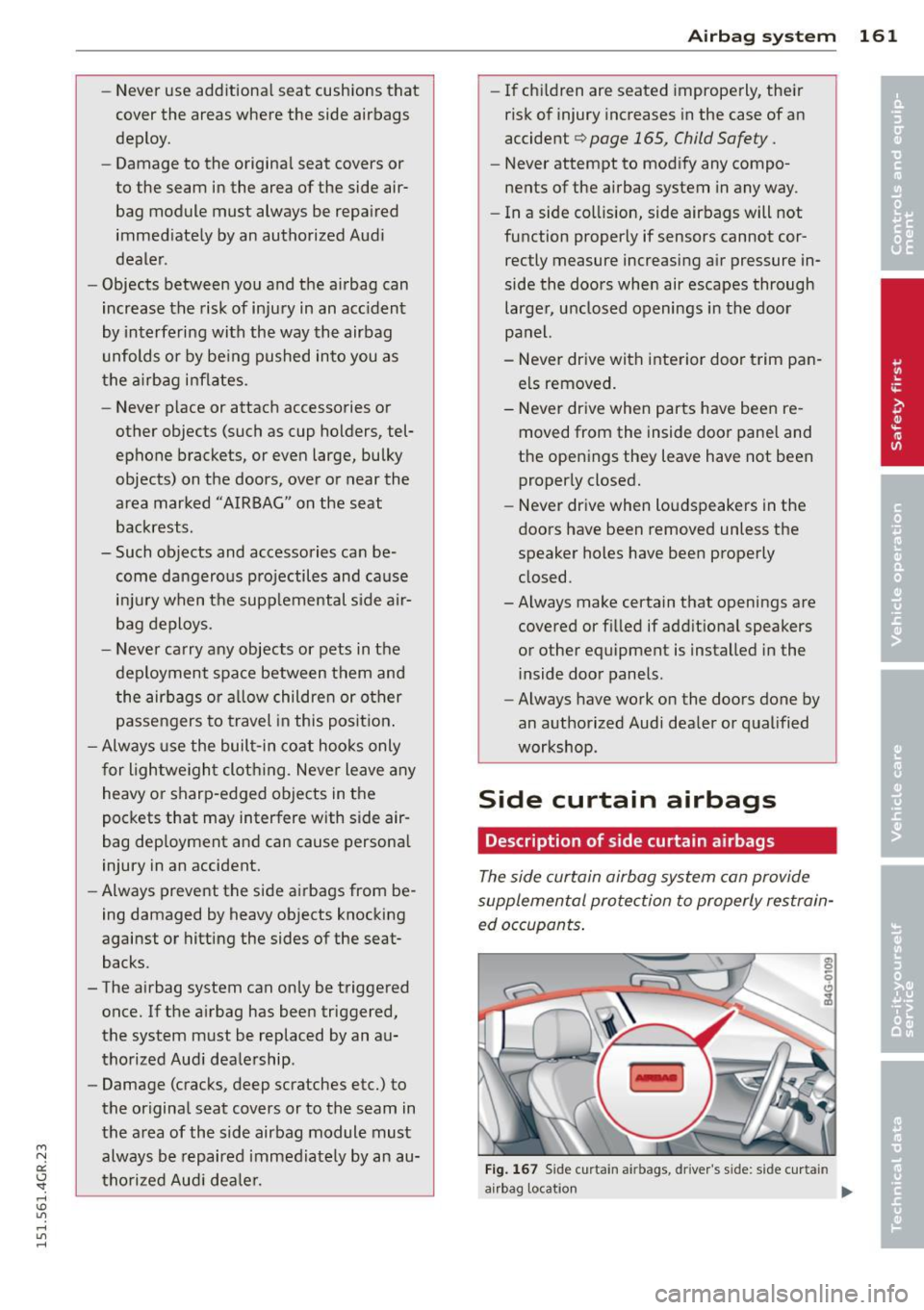
The side curtain airbag system can provide
supplemental protection to properly restrain
ed occupants.
Fig. 167 Sid e curta in airbag s, driver's sid e: s ide curta in
airbag locatio n ....
Page 210 of 302
208 Fuel suppl y and filli ng your fuel t ank
transport fue l to use for your lawn mower,
snow blower, etc., be very careful and al
ways observe local and state laws regard
ing the use, transportat ion and storage of
such fuel containers . Make certain the con
tainer meets industry standards (ANSI/
AS TM F852 -86) .
(D Note
Never drive your vehicle until the fuel tank
is completely empty. The irregular supply
of fuel can cause misfiring . Gasoline could
e nte r the exhaust sys tem and damage t he
catalyt ic converter.
Refuelling
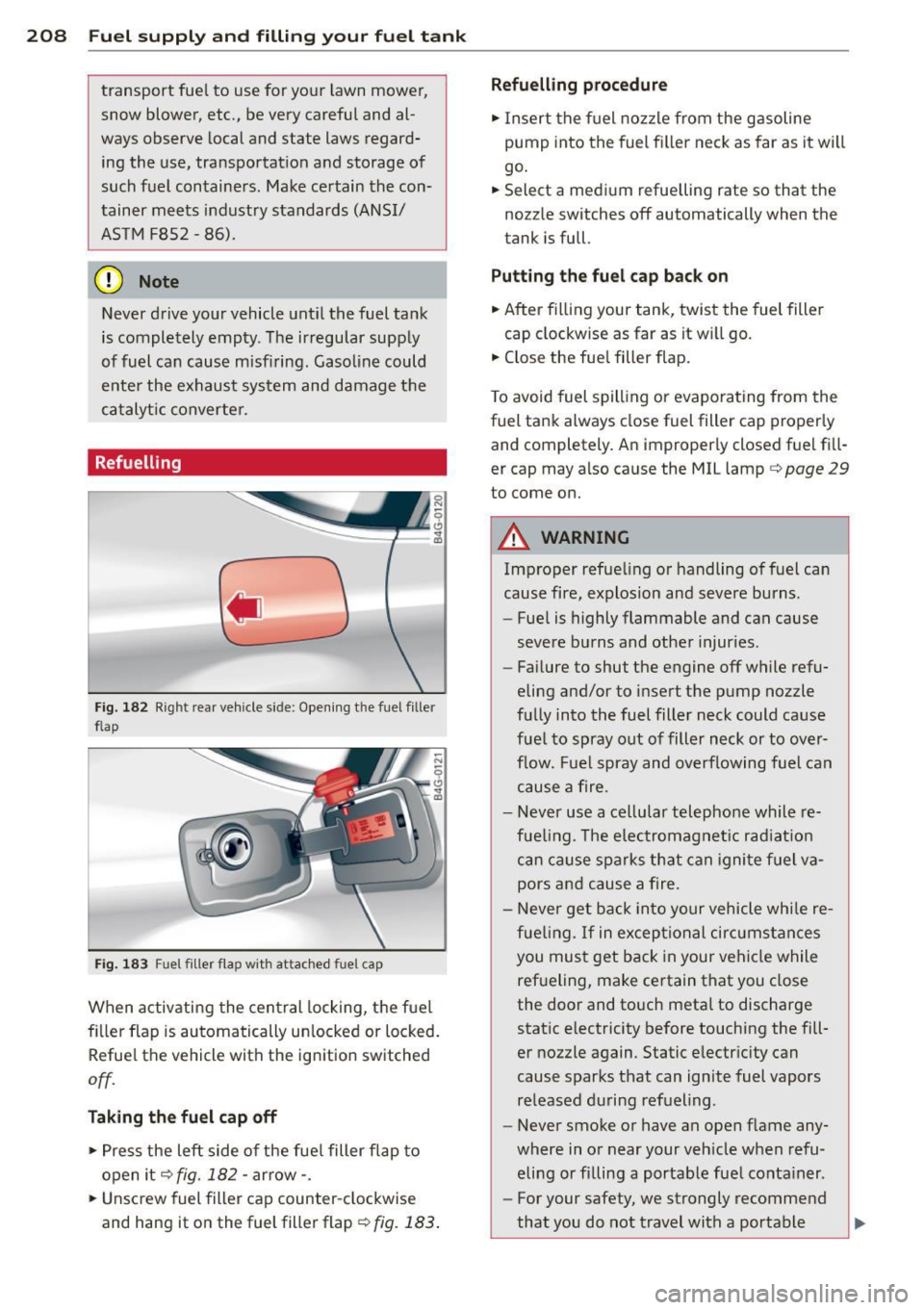
Fig. 18 2 Rig ht rea r veh icle s ide: Ope ning the fuel fille r
f lap
Fi g. 1 83 Fuel filler fla p with attached fuel c ap
When activating the central locking, the fuel
fi ller flap is automatically un locked or locked.
Refue l the vehicle with the ignition switched
off.
Taking the fu el cap off
• Press the left side of the fue l filler flap to
open it
q fig . 182 -arrow-.
• Unsc rew fuel filler cap counter-clockwise
and hang it on the fuel fill er flap
¢ fig. 183 .
Refuelling proc edur e
• Insert the fuel nozzle from the gasoline
pump into the fuel fi ller neck as far as it wi ll
go .
• Sele ct a med ium r efuelling rate so that the
no zz le switches off automatically when the
tank is full.
Putting the fu el cap back on
• After fi lling your tank, twist the fuel filter
cap clockwise as far as it w ill go.
• Close the fue l fill er flap.
T o avoid fuel spilling or evaporating from the
fuel tank always close fuel filter cap properly and completely. An improperly closed fuel fi ll
er cap may also cause the MIL lamp¢
page 29
to come on.
A WARNING
Improper refue ling or handling of fuel can
cause fire, explosion and severe burns.
- Fuel is highly flammable and can cause
severe burns and other injur ies .
- Fai lure to shut the engine off while refu
eling and/or to insert the pump nozzle
fully into the fuel filter neck could cause
fuel to spray out of filler neck or to over
flow. Fue l spray and overflowing fuel can
cause a fire.
- Never use a ce llular telephone while re
fue ling . Th e electromagnet ic rad iat io n
can cause sparks that can igni te fuel va
pors and cause a fire.
- Never get back into your vehicle whi le re
fue ling.
If in exceptional circumstan ces
you must get back in your vehicle while
ref ueling, make certain that you close
the door and touch metal to discharge
static electricity before touching the fill
er nozzle again . Static electricity can
cause sparks that can ignite fuel vapors
re leased during refueling .
- Never smoke or have an open f lame any
where in or near your veh icle when refu
eling or filling a portable fue l conta iner .
- For your safety, we strongly recommend
that you do not travel with a portable
Page 260 of 302
258 Tires and wheels
WARNING
Read and follow the important informa
tion and notes
~ page 2 56.
Malfunctions
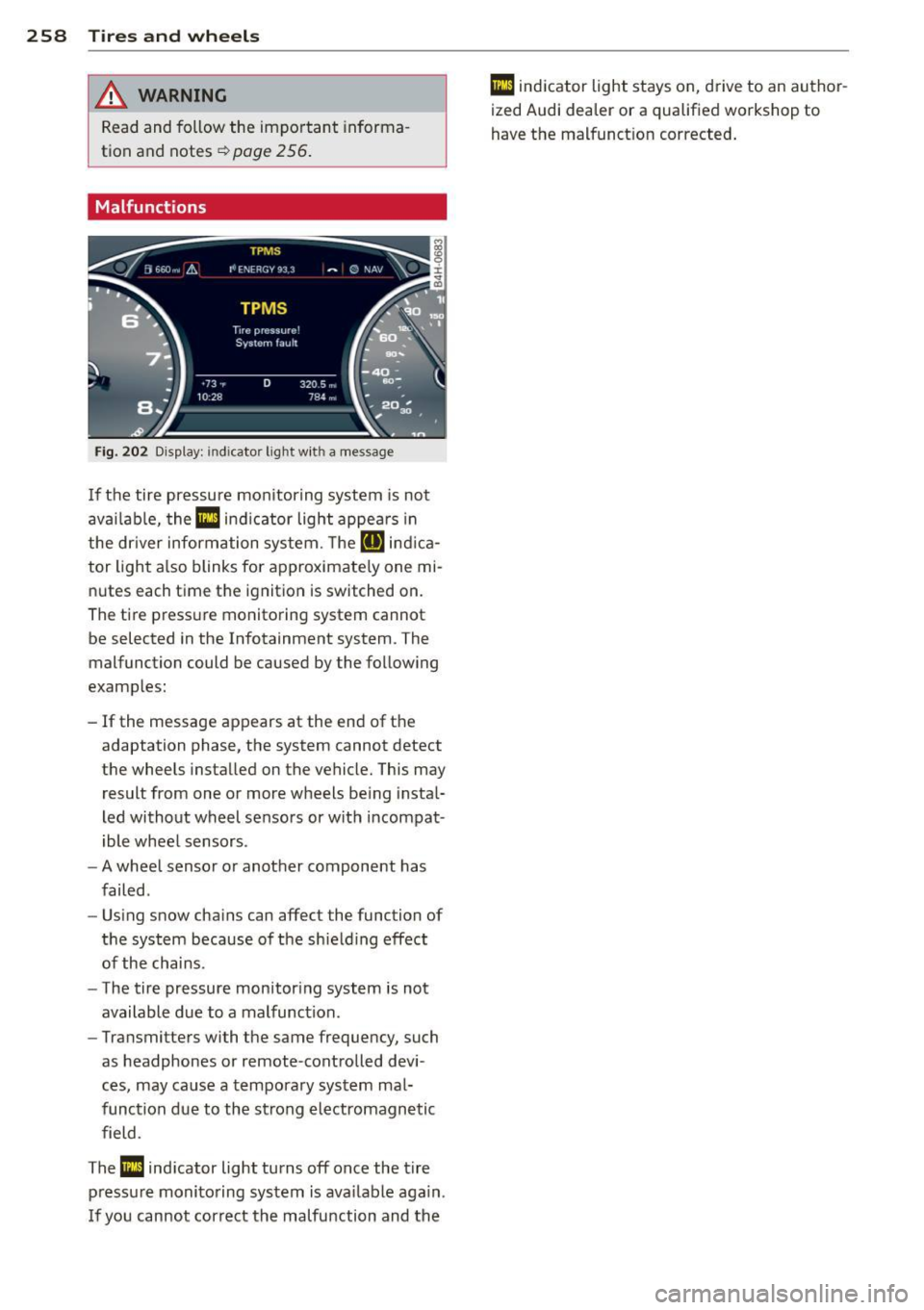
Fig. 202 Display: indicator light wit h a message
If the tire pressure monitoring system is not
available, the
Ill ind icator light appears in
the dr iver information system. The
RIJ ind ica
tor light also blinks for approximate ly one mi
nutes each time the ignit ion is switched on.
The tire pressure monitoring system cannot be selected in the Infotainment system. The
malfunction could be caused by the following
examples:
- If the message appears at the end of the
adaptation phase, the system cannot detect
the wheels installed on the vehicle. This may
result from one or more wheels being instal
led without wheel sensors or with incompat
ible wheel sensors .
- A wheel sensor or another component has
failed .
- Using snow chains can affect the function of
the system because of the shielding effect
of the chains.
- The tire pressure monitoring system is not
available due to a malfunction.
- Transmitters with the same frequency, such
as headphones or remote-controlled devi
ces, may cause a temporary system mal
function due to the strong electromagnetic
field .
The
Ill indicator light turns off once the tire
pressure monitoring system is available again.
I f you cannot correct the malfunction and the
Ill indicator light stays on, drive to an author
ized Audi dealer or a qualified workshop to
have the malfunct ion corrected.