display AUDI RS7 SPORTBACK 2016 User Guide
[x] Cancel search | Manufacturer: AUDI, Model Year: 2016, Model line: RS7 SPORTBACK, Model: AUDI RS7 SPORTBACK 2016Pages: 282, PDF Size: 70.78 MB
Page 27 of 282
Economy tips
In certain situations, economy tips appear auto
matica lly for a short time in the efficiency pro
gram~
fig. 10. If you fo llow these economy tips,
you can reduce your vehicle's fuel consumption.
To turn an economy tip
off immediately after it
appears, press any button on the mult ifunction
steering whee l.
(D Tips
- If you erase the data in the efficiency pro
gram, the values in the on-board computer
will a lso be reset.
- Once you have turned an economy tip off, it
will only appear again after you turn the ig
nition on again .
- The economy tips are not displayed in every
instance, but rather in intervals over a peri
od of time.
Odometer
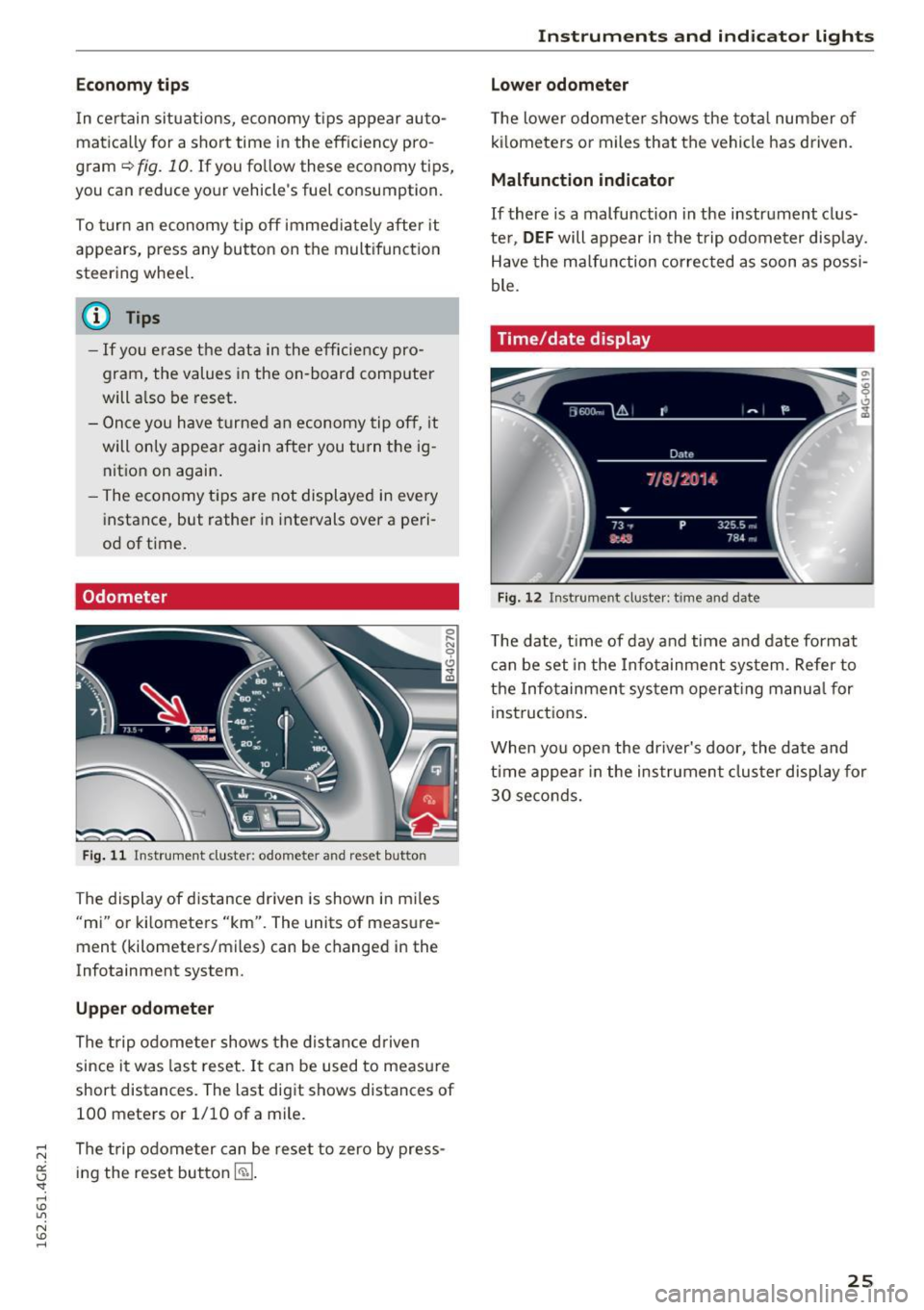
Fig . 11 Instrument cluster: odometer and reset butto n
The display of distance dr iven is shown in miles
"mi" or kilometers "km". The units of measure
ment (kilometers/miles) can be changed in the
Infotainment system.
Upper odometer
The trip odome ter shows the distance driven
since it was last reset.
It can be used to measu re
short distances. The last digit shows distances of
100 meters or 1/10 of a mile.
The trip odome ter can be reset to zero by press
ing the reset button
I ~ ].
Instruments and indicator lights
Lower odometer
The lower odomete r shows the tota l number of
kilometers or miles that the vehicle has driven.
Malfunction indicator
If there is a malfunction in the instrument clus
te r,
DEF will appear in the trip odometer display.
Have the malfunction corrected as soon as possi
ble.
Time/date display
Fig. 12 Instrument cluste r: time and date
The date, time of day and time and date format
can be set in the Infotainment system. Refer to
the Infotainment system operat ing manua l for
instructions .
When you open the driver's door, the date and
time appear in the instrument cluster display for
30 seconds.
25
Page 28 of 282
Instruments and indicator lights
Head-up display
Applies to: vehicles with Head-up display
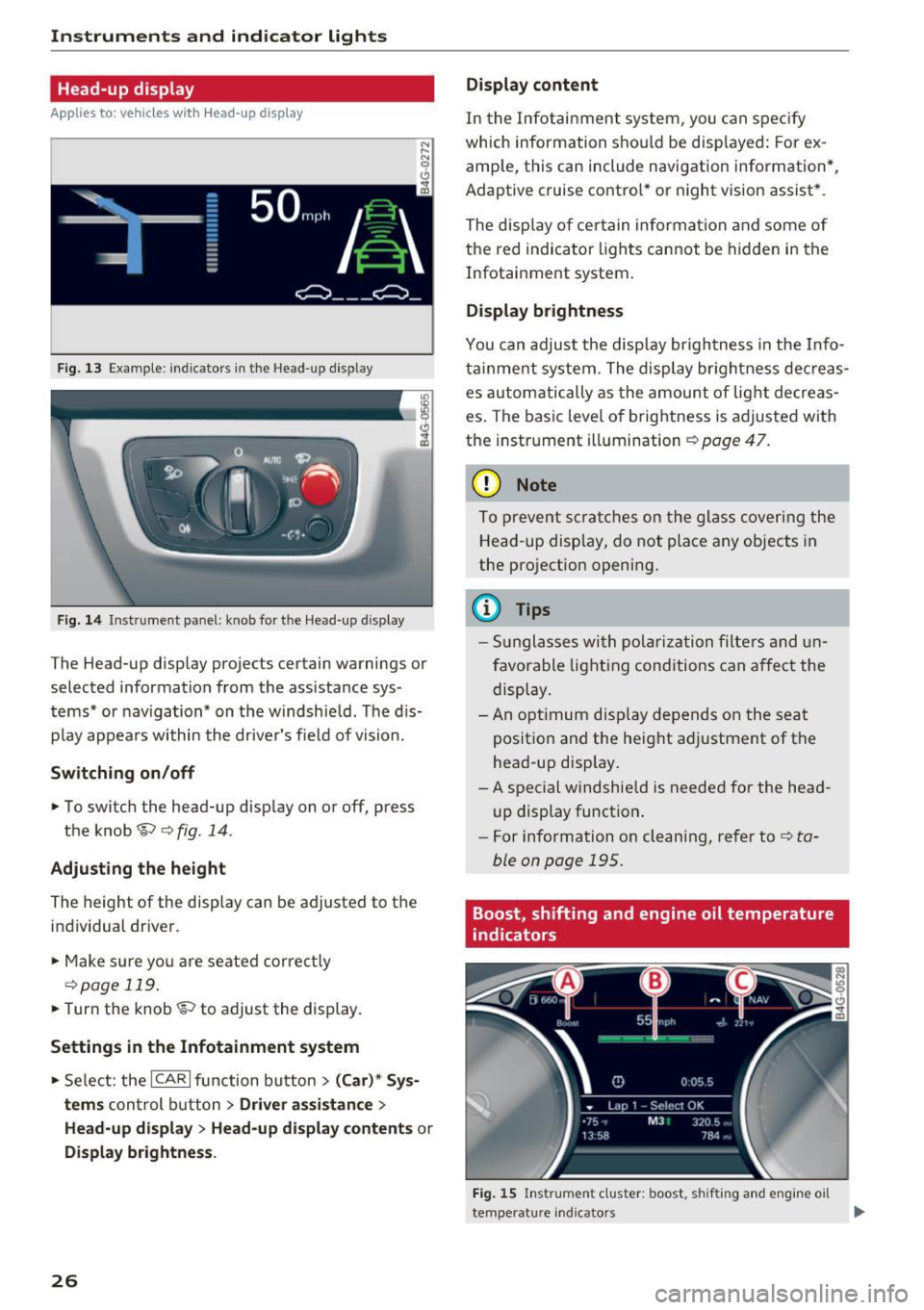
Fig. 13 Example: indicators in the Head-up display
F ig. 14 Inst rument panel: knob for the Head-up display
The Head-up display projects certain warnings or
selected information from the ass istance sys
tems* or navigation* on the windshie ld. The d is
p lay appears within the driver's fie ld of vision.
Switching on/off
• To switch the head-up disp lay on or off, press
the knob~
c:> fig. 14.
Adjusting the height
The height of the display can be adjusted to the
individual driver.
• Make sure yo u are seated correct ly
c:> page 119.
• Turn the knob~ to adjust the display.
Settings in the Infotainment system
• Select: the ICAR I function bu tton > (Car)* Sys
tems
control b utton > Driver assistance >
Head-up displ ay> Head-up di splay contents or
Display brightness .
26
Display content
In the Infotainment system, you can spec ify
which information shou ld be disp layed: For ex
amp le, this can include navigation information*,
Adaptive cruise contro l* or night vision assist *.
The display of certain information and some of
the red indicator lights cannot be hidden in the
Infotainment system.
Display brightness
You can adjust the display brightness in the Info
ta inment system . The display br ightness dec reas
es automatically as the amount of light decreas
es . The basic leve l of brightness is adjusted with
the instrument illumination
c:> page 47.
(D Note
To prevent scratches on the glass covering the
Head-up display, do not place any objects in
the projection opening.
(D Tips
- Sunglasses with polarization filters and un
favorable lighting conditions can affect the
display.
- An optimum display depends on the seat
position and the height adjustment of the
head-up display.
- A special windshie ld is needed for the head
up display function .
- For information on cleaning, refer to
c:> ta
ble on page 195.
Boost, shifting and engine oil temperature
indicators
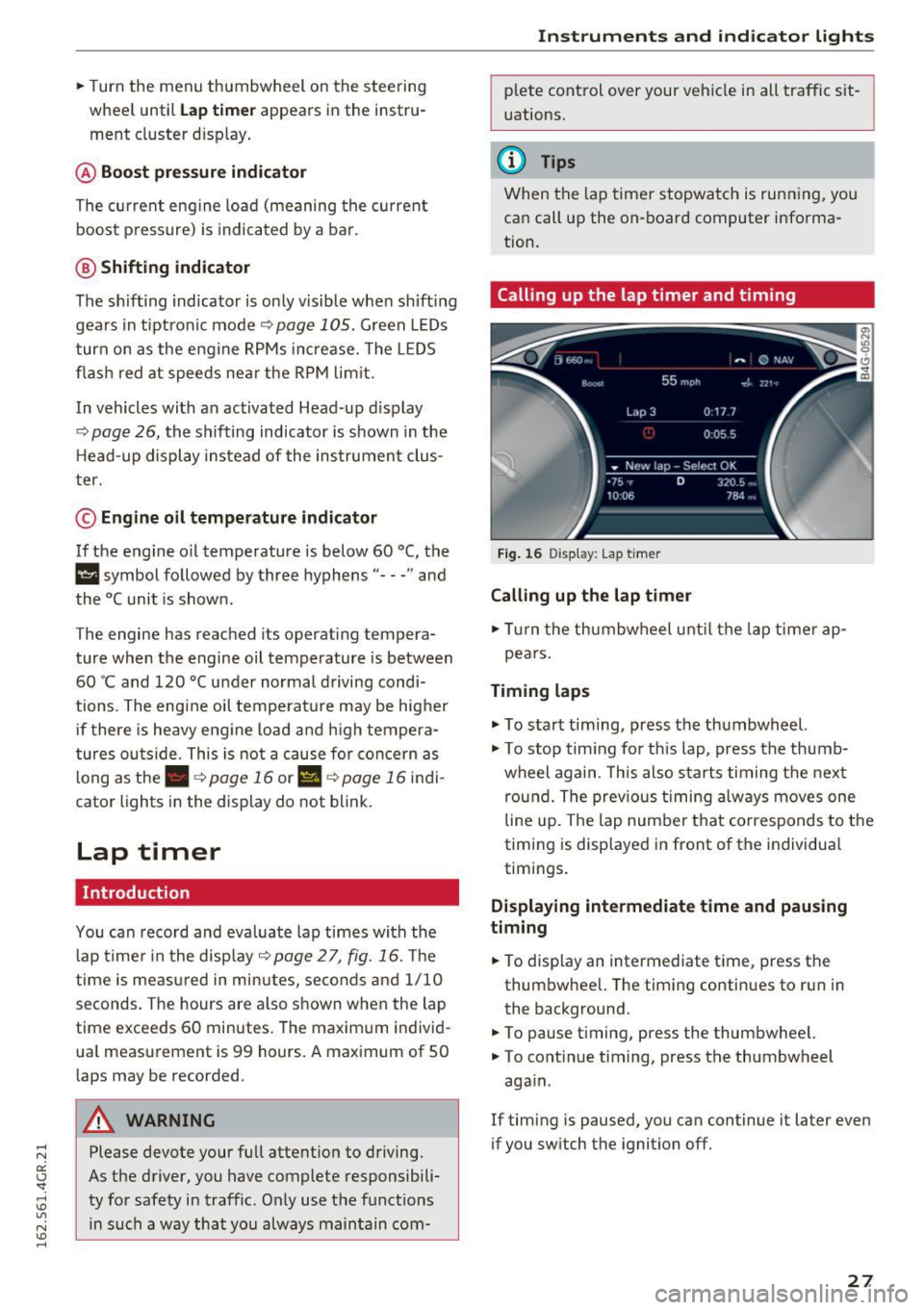
Fig. 15 Instrument cluster: boost, shifting and engine oil
temperature indicators
Page 29 of 282
.. Turn the menu thumbwheel on the steering
whee l until
Lap timer appears in the instru
ment cluster display .
@ Boost pressure indicator
The current engine load (meaning the current
boost pressure) is indicated by a bar.
@ Shifting indicator
The shifting indicator is only visible when shift ing
gears in tiptronic mode
~ page 105. Green LEDs
turn on as the eng ine RPMs increase. The LE DS
flash red at speeds nea r the RPM lim it.
In vehicles with an activated Head-up display
<=>
page 26, the shifting indicator is shown in the
H ead-up display instead of the instrument clus
ter.
© Engine oil temperature indicator
If the engine oil temperature is below 60 °C, the
II symbol followed by three hyphens"---" and
the °C unit is shown.
The engine has reached its operat ing tempera
ture when the engine oil temperature is between
60
· c and 120 °C under normal driving condi
tions . The engine oil tempe rature may be higher
if there is heavy eng ine load and high tempera
tures outside . This is not a cause for concern as
long as the .
~page 16 or Ill ~page 16 indi
cator lights in the display do not blink.
Lap timer
Introduction
You can record and evaluate lap times with the
lap timer in the display <=>
page 2 7, fig. 16. The
time is measured in minutes, seconds and 1/10
seconds. The hours are also shown when the lap
time exceeds 60 minutes. The maxim um individ
ua l measurement is 99 hours. A maximum of SO
laps may be recorded.
A WARNING
Please devote your full attention to driving.
As the driver, you have complete responsibili
ty for safety in traffic. Only use the functions
in such a way that you always maintain com-
-
Instruments and indicator lights
plete control over your vehicle in all traffic sit
uations.
(D Tips
When the lap timer stopwatch is running, you
can call up the on-board computer informa
tion.
Calling up the lap timer and timing
Fig. 16 Display : Lap timer
Calling up the lap timer
.. Tu rn the thumbwheel unti l the lap timer ap-
pears.
Timing laps
.,. To start tim ing, press the thumbwheel.
.,. To stop tim ing for this lap, press the thumb
wheel again . T his also starts timing the next
round. The previous timing always moves one
line up. The lap number that corresponds to the
timing is displayed in front of the individua l
timings.
Displaying intermediate time and pausing
timing
.. To display an intermediate time, press the
thumbwheel. The timing continues to run in
the background.
.. To pause timing, press the thumbwheel.
.. To continue timing, press the thumbwheel
aga in .
If timing is paused, you can continue it later even
if you switch the ignition off.
27
Page 30 of 282
Instruments and indicator lights
Evaluating times and continuing or
resetting timing
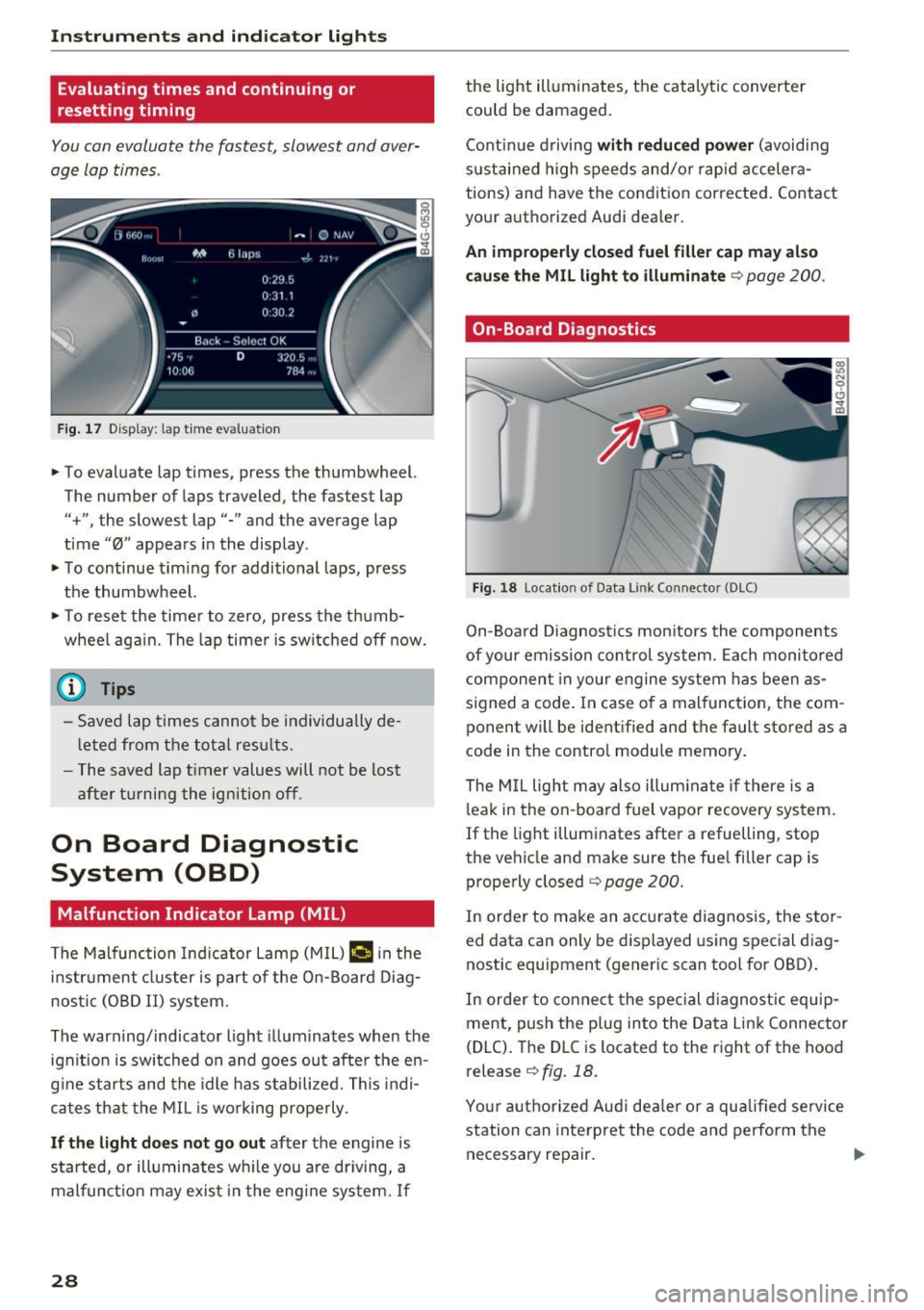
You can evaluate the fastest, slowest and aver
age Lap times .
Fig. 17 Display: lap time evaluation
... To evaluate lap times, press the thumbwheel.
The number of laps traveled, the fastest lap
"+", the slowest lap"-" and the average lap
time "0" appears in the display .
... To continue timing for additional laps, press
the thumbwheel.
... To reset the timer to zero, press the thumb
whee l again. The lap timer is switched off now.
(D Tips
-Saved lap times cannot be individually de
l eted from the total results .
- The saved lap timer values will not be lost
after turning the ignition off.
On Board Diagnostic
System (OBD)
Malfunction Indicator Lamp (MIL)
The Malfunction Indicator Lamp (MIL) I! in the
i n str ument cluster is part of the On-Board Diag
nostic (OBD II) system.
The warning/indicator light illuminates when the
ignit ion is switched on and goes ou t after the en
g in e starts and the idle has st abilized. This indi
cates that the MIL is working properly .
If the light does not go out after the engine is
started, or illuminates wh ile you are dr iving, a
malfunct ion may exis t in the engine system.
If
28
the light illuminates, the catalyt ic converte r
could be damaged.
Continue driving
with reduced power (avoidi ng
sustai ned high speeds and/or rapid accelera
tions) and have the condition corrected. Contact
your authorized Audi dealer.
An improperly closed fuel filler cap may also
cause the MIL light to illuminate
q page 200.
On-Board Diagnostics
Fig. 18 Location of Data Link Connector (DLC)
On-Boa rd Diagnostics monitors the components
of your emission control system. Each monitored
component in your engine system has been as
s ig ned a code . In case o f a malfunct ion, the com
ponent will be identified and the fault stored as a
code in the contro l module memory.
The MIL light may also illuminate if there is a
leak in the on-board fuel vapor recovery system.
If the light illuminates after a refuelling, stop
the vehicle and make sure the fuel filler cap is properly closed
q page 200.
In order to make an accurate diagnosis, the stor
ed data can only be displayed using special diag
nostic equipment (generic scan tool for OBD) .
In order to connect the special diagnostic equip
ment, push the plug into the Data Link Connector
(DLC). The DLC is located to the right of the hood
release <=>
fig. 18.
Your authorized Audi dealer or a qua lified service
station can interpret the code and perform the
necessary repair. .,.
Page 47 of 282
~ To activate the headlight assistant, tap the lev
er forward (!). The
112 indicator light appears
in the instrument cluster disp lay and the head
light assistant is switched on/off automatically .
The
El indicator light also turns on if the high
beams are switched on .
Switching the high beams on/off manually
If the high beams did not switch on/off automat
ically as expected, you may switch them on or off
manually instead:
~ To switch the high beams on manually, tap the
l ever forward (!). The
El indicator light turns
on.
~ To switch the high beams off manually, pull the
lever back@. The headlight assistant is deacti
vated .
Operating the headlight flasher
~ To operate the headlight flasher when the
headlight assistant is activated and h igh beams
are switched off, pull the lever back@. The
headlight assistant remains active .
Messages in the instrument cluster display
r!IJ Audi adaptive light: system fault!
Headlight assist: System fault
Drive to an authorized Aud i dealer or authorized
Aud i Service Facility immediately to have the
malfunction corrected. You can still switc h the
high beams on or off manually.
Headlight assist: Unavailable. No camera view
The camera view is blocked, for example by a
sticker or debris.
The sensor is located between the interior rear
view mirror and the windshield. Therefore, do not p lace any st ickers in this area on the windshie ld.
A WARNING
Headlight ass istant is only intended to assist
the driver . The dr iver is still responsible for
controll ing the headlights and switching
them manually depending on light and visibil
i t y cond itions.
It may be necessary to operate
them manually in situations such as:
Lights and Vision
-In adverse weather conditions such as fog,
heavy rain, blowing snow or spraying water.
- On roads where oncoming traffic may be
partially obscured, such as expressways.
- When there are road users that do not have
suff icient lighting, such as b icyclers or
veh icles with dirty tail lamps.
- In tight curves and on steep slopes.
- I n poorly lit areas.
- With strong reflectors, such as signs.
- If the area of the w indshield near the sensor
is fogged over, dirty, icy or covered with a
sticker.
Adjusting the exterior lighting
The settings are adjusted in the MMI .
~ Select: !CAR ! function button> (Car) " systems
control button > Vehicle settings> Exterior
lighting .
Automatic headlights
You can adjust the following settings in the Au
tomatic headlights
menu:
Headlights activation time -You can adjust if the
headlights switch on
Early , Med . or Late accord
ing to the sensit ivity of the light sensor.
Audi adaptive light* -You can switch adaptive
light
On and Off .
Automatic high beams*
You can switch t he h igh beam assist on and off.
Daytime running lights
USA models:
You can switch the daytime running
lights
on and off .
Canada models:
The function cannot be turned
off. It is activated automatically each time the ig
nition is switched on. This menu item is shown
"greyed out" .
Coming home, Leaving home
The coming home function illuminates the area
outside the vehicle when you switch the ignition
off and open the driver's door. To turn the func-
tion on, select
Lights when leaving car> On. .,.
45
Page 49 of 282
.. To increase or reduce the brightness, turn the
knob and press it.
The interior lig hting turns on when you switch
the headlights on whi le the ignition is on .
(D Tips
The setting is automat ically stored and as
signed to the remote control key that is in
use.
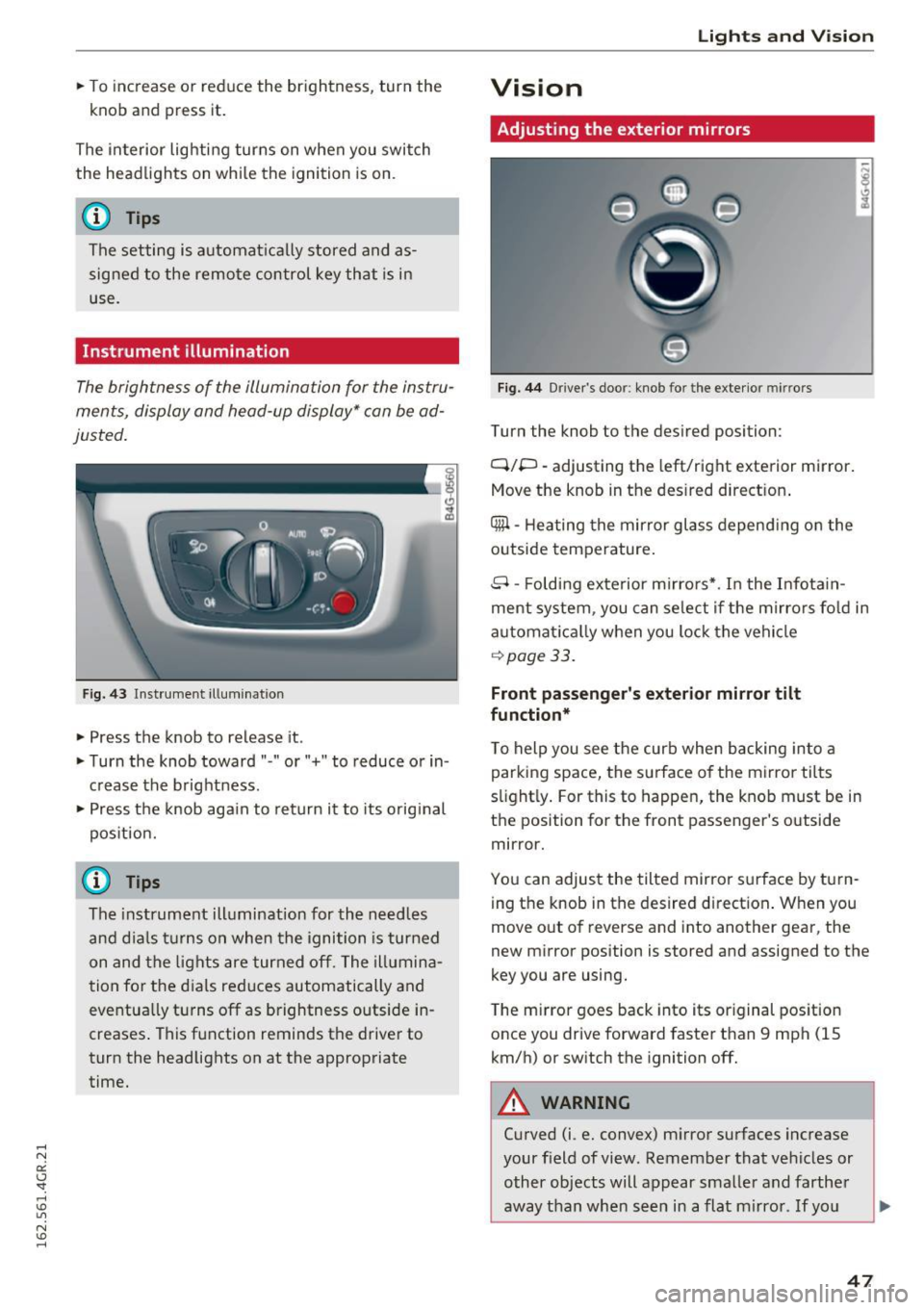
Instrument illumination
The brightness of the illumination for the instru
ments, display and head-up display* can
be ad
justed .
Fig. 43 Instrument illum ination
.. Press the knob to release it .
.. Turn the knob toward " -" or" +" to reduce or in
crease the brightness .
.. Press the knob aga in to return it to its o riginal
pos it ion.
@ Tips
The instrument illumination for the need les
and d ia ls t urns on when the ignition is turned
on and the lights are turned off. The illumina
tion for the dials reduces automatically and
eventua lly turns off as brightness outside in
creases . This function reminds the driver to
turn the headlights on at the appropriate
time.
Lights and V ision
Vision
Adjusting the exterior mirrors
Fig. 44 Driver 's doo r: knob fo r the exterio r mirrors
Turn the knob to the desired position:
Q/P -adjusting the left/right exterior mirror.
Move the knob in the des ired direct ion .
Qill -Heating the mir ror glass depend ing on the
outside temperature .
8- Folding exte rior mirro rs* . In the Infota in
ment system , you can se lect if t he mirro rs fo ld in
automat ica lly when you lock the vehicle
~ page 33.
Front passenger 's e xterior mirror tilt
function *
To help you see the curb when backing into a parking space, the surface of the mirro r tilts
slight ly . For this to happen, the knob must be in
the position for the front passenger's outside
mirror.
You can adjust the tilted mir ror surface by turn
ing the knob in the desired direction . When you
move out of reverse and into another gear, the
new mirror position is stored and assigned to the
key you are using.
The m irror goes back into its or iginal pos ition
once you drive forward faster than 9 mph (15
km/h) or switch the ignition off.
A WARNING
-Curved (i .e. convex) m irror surfaces increase
your f ield of view. Remember that vehicles or
other objects will appear smaller and farther
away than when seen in a flat m irro r. If yo u
47
Page 56 of 282
Sea ts and stor age
Multifunction button
Applies to: ve hicles w ith memory funct ion
You con adjust the massage function, lumbar
support, side bolsters and seating surface using
the multifunction button .
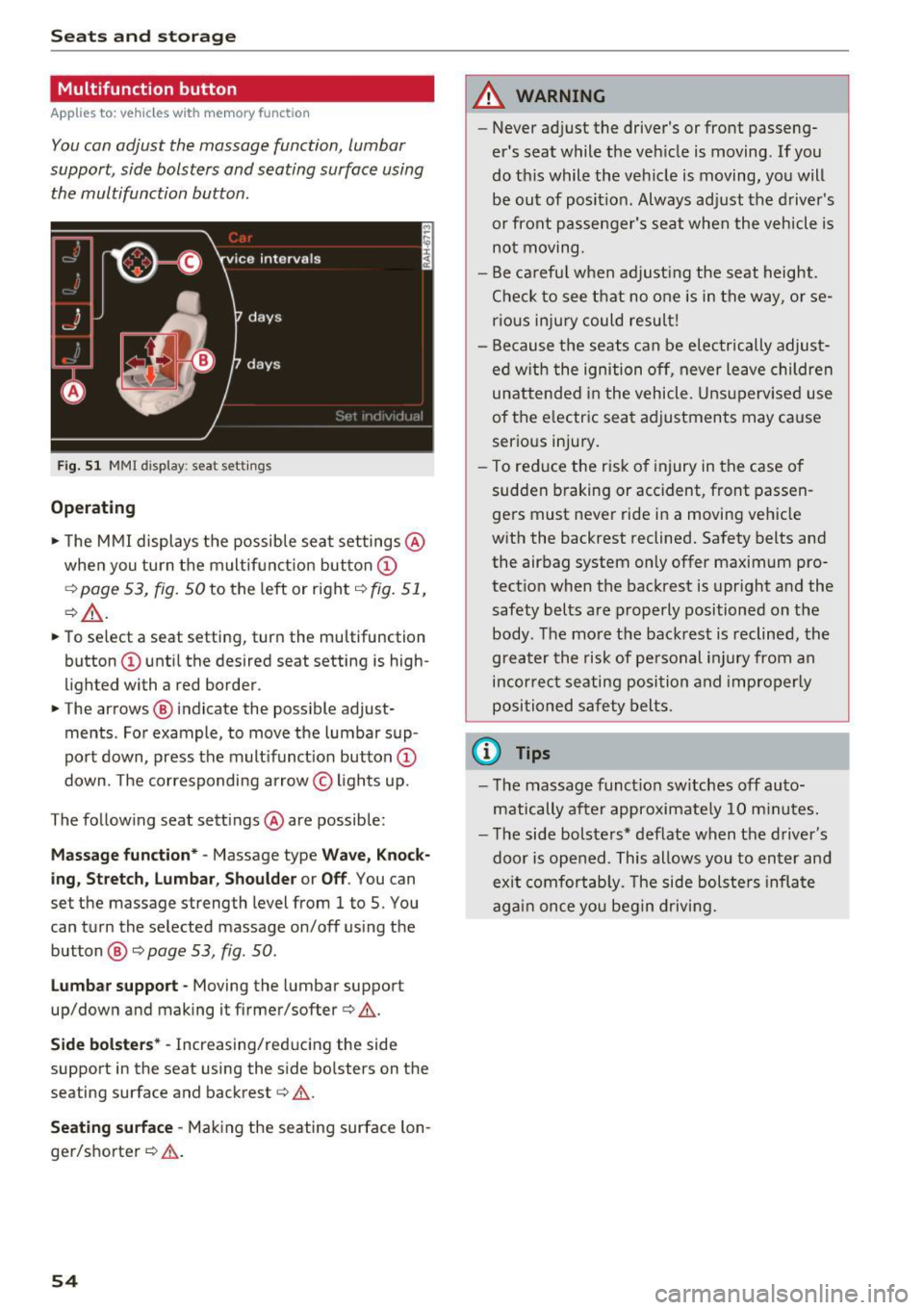
Fig . 5 1 MMI display: seat settings
Operating
.. The MMI displays the possible sea t settings @
when you turn the m ultif unct ion button
CD
¢ page 53, fig. 50 to the left or right¢ fig. 51,
¢ £ .
.. To select a seat setting, turn the multifunction
button
CD until the desired seat setting is high
lighted with a red border .
.. The arrows @ indicate the possible adjust
ments . For example, to
move the lumbar sup
port down, press the mult ifunct ion button
CD
down. The corresponding arrow © lights up.
The following seat sett ings @are possible:
Massage function* -Massage type Wave, Kno ck
ing, Stretch , Lumb ar, Shoulder or Off .
You can
set the massage strength level from 1 to S. You
can turn the selected massage on/off us ing the
button @¢
page 53, fig . 50 .
Lumbar support -Moving the lumbar support
up/down and making it firmer/softer¢&.
Side bolste rs* -Increasing/reducing the side
support in the seat using the side bo lsters on the
seating surface and backrest¢& .
Seating surfac e -Mak ing the seating surface lon
ger/shorter ¢& .
54
A WARNING
-Never adjust the driver's or front passeng
er's seat while the veh icle is moving. If you
do this while the veh icle is moving, you will
be out of posit ion . Always ad just the d river 's
or front passenger's seat when the vehicle is
no t moving.
- Be ca refu l when adjust ing the seat height .
Check to see t hat no one is in the way, or se
rio us inju ry could resu lt!
- Because the seats can be electrically adjust
ed w ith the ignition off,
never leave children
unattended in the vehicle . Unsupervised use
of the e lectric seat adjustments may cause
serious injury.
- To reduce the risk of injury in the case of
sudden braking or accident, front passen
ge rs must never ride in a moving veh icle
with the backrest reclined. Safety belts and
the airbag system only offer maximum pro
tect ion when the backrest is upr ight and the
safety bel ts are properly positioned on the
body. T he mo re the backrest is reclined, the
greater the risk of pe rsonal inju ry from an
incor rect seating posi tion and imprope rly
positioned safety belts .
(D Tips
- T he massage funct io n sw itches off auto
matically after approximate ly 10 m inutes.
- T he side bolsters* deflate when the driver's
door is opened . This allows you to enter and
ex it comfortab ly. The side bolste rs infla te
again once you begin driving.
Page 70 of 282
Warm and cold
Operating
Applies to: vehicles with 4-zone deluxe automatic climate control
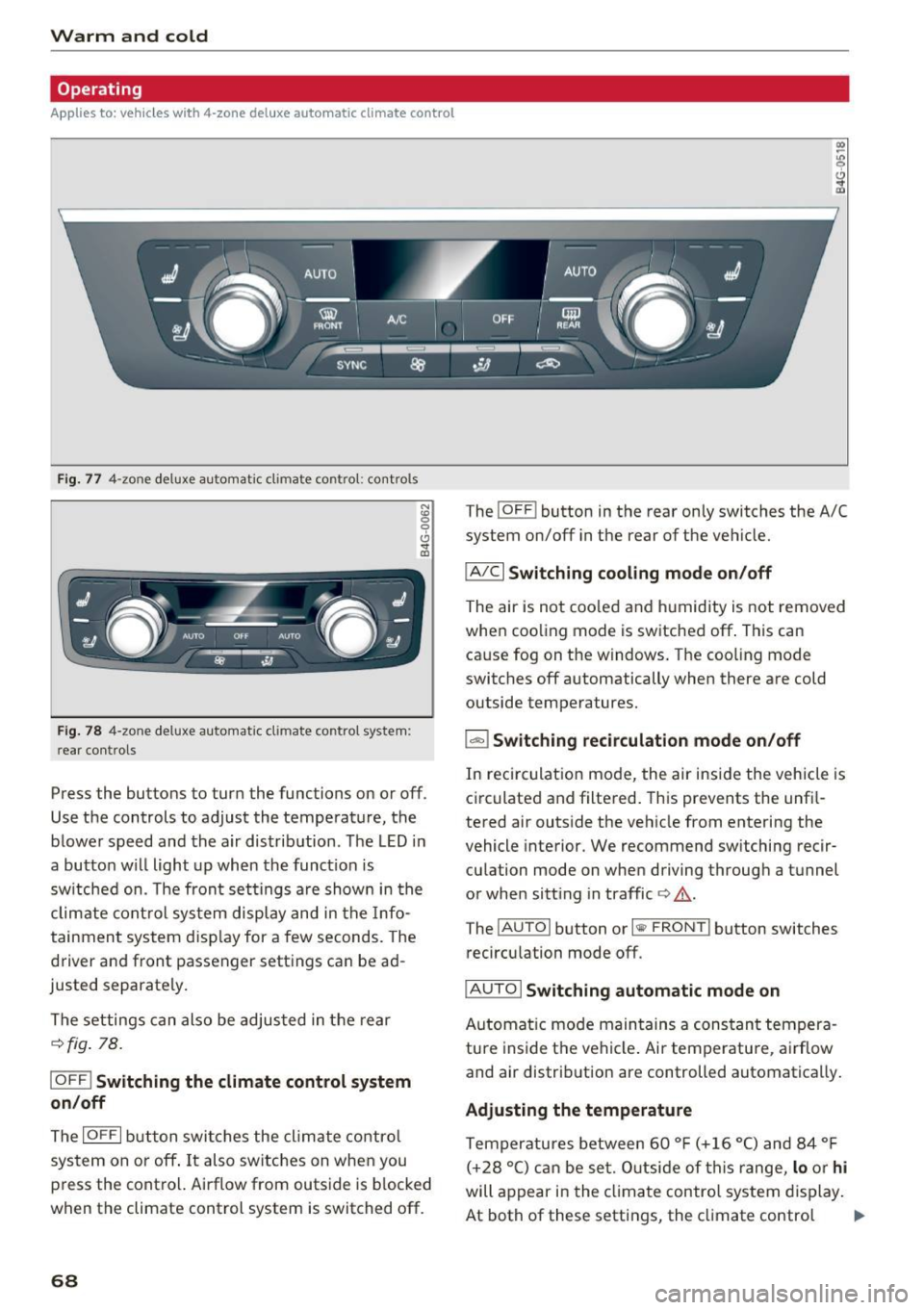
Fig . 77 4-zone deluxe a utomat ic climate contro l: cont rols
F ig. 78 4-zone deluxe automat ic climate contro l syste m:
rear controls
N :g
9 CJ
" lD
Press the buttons to turn the functions on or off.
Use the controls to adjust the temperature, the
b lower speed and the a ir distribution . The LED in
a butto n wi ll light up when the funct ion is
sw itched on. The front settings a re shown in the
clim ate cont rol sys tem display and in the Info
tainment system disp lay for a few seconds. The
driver and front passenger settings can be ad
justed separately.
The settings can also be adjus ted in the rear
¢fig . 78.
IOFF ! Switching the climate control syst em
on /off
The I OFF I b utton swi tc h es the clima te contro l
system on or off . It also switches on whe n you
p ress the control. Airflow from outside is b locked
when the climate control system is switched off.
68
The ! O FF ! button in the rear only switches the A/C
system on/off in the rear of the ve hicle.
IA/C l Switching cooling mode on /off
The air is not coo led and h umid ity is not removed
when coo ling mode is switched off . This can
cause fog on the windows. The coo ling mode
switches off automatically when there are cold outside temperatures.
l ""-'I Switching recirculation mode on /off
In recirculat ion mode, the air inside the vehicle is
c irculated and filtered. This prevents the unf il
tered air outs ide the ve hicle from entering the
vehicle interior. We recommend sw itching recir
cu lation mode on when driving throug h a tunnel
or when sitt ing in traffic ¢,&. .
The
! AUTOI button or l lllP FRONT ! button switches
recircu lation mode off.
IAUTO I Switching automatic mode on
Automat ic mo de main tains a constan t tempera
ture inside t he vehi cle. Ai r temperatu re, a irflow
and air distrib ution are controlled automatically.
Adjusting the temperature
Temperatures between 60 ° F (+ 16 °C) and 84 ° F
( + 28 °C) c an be se t. O utsi de of t his range,
lo o r hi
will appear in the cl imate control system display .
At both of these settings, the cl imate contro l
1111-
Page 72 of 282
Warm and cold
Basic settings
Applies to: vehicles w ith 4 -zone del uxe automatic climate
co ntrol
The climate control system basic settings ore ac
cessed in the Infotainment system.
.. Select : the ICARI function button > (Car)* Sys-
tems
control button > AC.
Rear seat settings
When this function is selected, all settings for
the rear can be adjusted through the climate con
trol system in the cockpit. The climate control
system settings cannot be adjusted in the rear
seat at the same time. This function switches off
after a certa in period of time or when one of the
controls in the cockpit is pressed .
Recirculation mode
The sensit iv ity level of the automa tic recircula
tion mode can be set at various levels from
Off to
Sensitive. Recirculation mode is controlled auto
matically. If the windows fog up, press the
I @ FRONT I button .
Footwell temperature
You can adjust the footwell temperature so that
it is coo le r or warmer .
Steering wheel heating
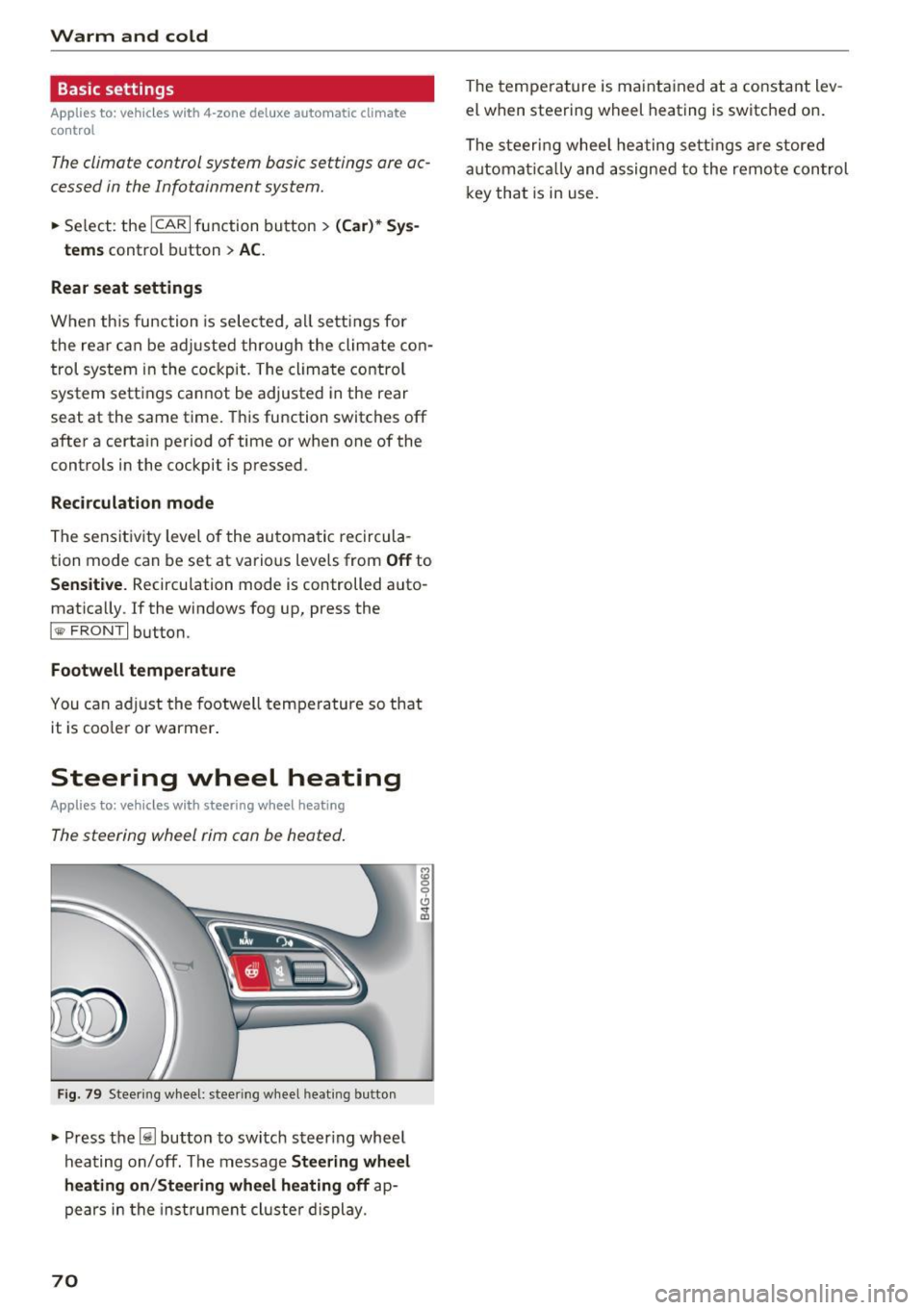
Applies to: ve hicles w ith steering wheel heat ing
The steering wheel rim con be heated.
Fig . 79 Steering wheel: steer ing w heel heating b utton
• Press the~ button to switch steering whee l
hea ting on/off. The message
Steering wheel
heating on /Steering wheel heating off
ap
pears in the inst rument cl uste r display.
70
The temperature is maintained at a constant lev
el when steering wheel heating is switched on.
The steeri ng wheel heating settings are stored
automat ically and assigned to the remote control
key that is in use .
Page 76 of 282
Driving
This message appea rs and a warning tone sounds
if you open the driver's door when the ignition is
sw itched on.
Pr es s brake pedal to start engine
This message appears if you do not press the
brake pedal whe n starting the eng ine.
fll I s key in the veh icle?
This indicator light turns on and th is message ap
pears if the ignition key was removed from the
ve hicle when the engine was running . If the igni
tion key is no longer in the veh icle, you can not
sw itch on the ig nit ion or start t he eng ine once
you stop i t. You also cannot loc k the vehicle from
the o utside.
Shift to P , otherwise vehicle can roll away .
Doors do not lock if lever i s not
in P.
This message appears for safety reasons if the
transmission is not in the P position when you
sw itch the ignition off . Move the selector lever to
the P pos ition. Otherwise the veh icle is not pro
tected from rolling and it ca nnot be locked .
II Key is not recogn ized. Hold back of key
against marked area. Se e owner's manual
If the indicator light t urns on and th is message
appears, there is a malfunction
c:;, page 74.
Starting the engine when there is a
malfunction
It may not be possible to s tart the engine under
certain circumstances, for example if the battery
in the vehicle key is drained, if interference is af
fected the key or if there is a system malfunc tion.
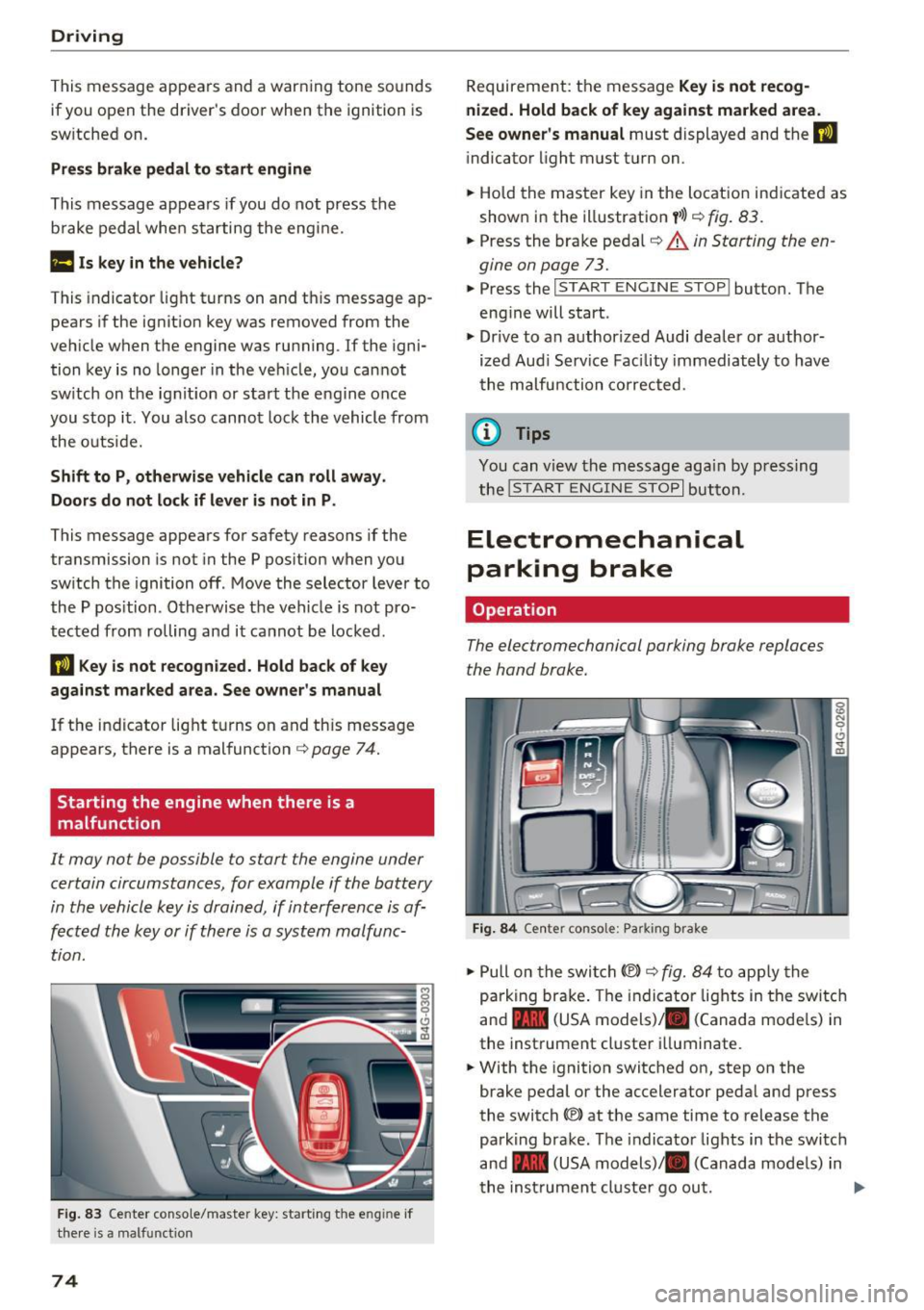
F ig. 83 Center conso le/ ma ster key: sta rt in g t he e ng in e if
t h e re is a ma lfunction
74
Requirement : the messa ge Key i s not recog
nized. Hold back of key against marked area .
See owner's manual
must displayed and the II
indicator light must tu rn on .
.,. Ho ld the m aster key in the locat ion ind icated as
shown in the illustration
f >l) c:;, fig . 83.
.,. Press the brake pe dal c:;, &. in Starting the en
gine on page 73 .
.,. Press the ~ I S _T _A _ R_ T_ E_N _G _I _N _E _ S_ T_ O_ P~ I button. The
eng ine will start .
.,. Dr ive to an author ized Audi dealer or author
ized Aud i Serv ice Facility immediately to have
t he malfu nction corrected.
@ Tips
You can v iew the message aga in by pressing
the
! S TA RT ENGI NE S TOP I button.
Electromechanical
parking brake
Operation
The elec tromechanical parking broke replaces
the hand broke.
Fig. 84 Ce nte r conso le: Pa rk ing brake
.,. Pull on the swi tch@) c:;, fig. 84 to app ly the
parking br ake. T he indicator lights in the switc h
and - (USA models)/ . (Canada mode ls) in
the inst rument cluste r ill uminate .
.,. With the ignition switched on, step on the
brake pedal or the accelerator pedal and press
the switch ®lat the same time to release the
park ing brake. The indicator lights in the switc h
and - (USA models)/ . (Canada mode ls) in
t he inst rument cl uste r go ou t.