display AUDI RS7 SPORTBACK 2016 Workshop Manual
[x] Cancel search | Manufacturer: AUDI, Model Year: 2016, Model line: RS7 SPORTBACK, Model: AUDI RS7 SPORTBACK 2016Pages: 282, PDF Size: 70.78 MB
Page 186 of 282
Intelligent Technology
-Driving for an extended period of time on
salt-covered roads without using your
brakes can also affect braking efficiency .
Clean off accumulated salt coating from
brake discs and pads with a few careful
brake applications .
- If you damage the front spoiler, or if you in stall a different spoiler, be sure the air flow
to the front brakes is not obstructed. Other
wise the brake system could overheat reduc
ing the effectiveness of the entire brake sys
tem.
- Failure of one brake circuit will impair the
braking capability resulting in an increased
stopping distance. Avoid driving the vehicle
and have it towed to the nearest Audi dealer
or qualified workshop.
- Never let the vehicle roll to a stop with the
engine shut off.
- If the brake booster is not working, the
brake pedal must be pressed considerably
harder to make up for the lack of booster
assistance.
Electromechanical
steering, dynamic
steering
The electromechanical steering supports the
driver's steering movements.
Power steering adapts electronically based on
the vehicle speed .
Indicator lights and messages
• Do not drive vehicle: Steering defective
If this indicator light turns on and stays on and
this message appears, the power steering may
have failed .
Stop the vehicle in a safe location as soon as pos
sible. Do
not continue driving. See an authori zed
Audi dealer or authorized Audi Service Facility for
assistance.
'Jij Steering: System fault You can continue
driving
184
If the indicator light turns on and the message
appears, the steering may be more difficult to move or more sensitive than usual. The steering
wheel may also be at an angle when driving
straight.
Drive slowly to your authorized Audi dealer or au
thorized Audi Service Facility to have the mal
function corrected.
':r-ij Dynamic steering: Initializing
If the indicator l ight is blinking and this message
appears, dynamic steering* is being initialized.
The steering wheel will be easy to move after
starting the engine. Re-initialization might be
necessary if the steering wheel was moved hard
to the left and right while the veh icle was not
moving. The display turns off if the initialization
was successful.
(D Tips
- If the . or ':r-ij indicator light only stays on
for a short time, you may continue driving.
- The dynamic steering stability systems
opage 180 are not availab le in the event of
a system malfunction.
- For additional information on dynamic
steering, refer to
c> page 95.
All wheel drive (quattro)
Applies to: vehicles with all wheel drive
In all wheel drive, all four wheels are powered.
General information
In all wheel drive, the driving power is divided be
tween all four wheels. This happens automatical
ly depending on your driving behavior as well as
the current road conditions. Refer to
c> page 180,
Electronic Stabilization Control (£SC).
A center differential distributes the driving power
variably to the front and rear axle. It works to
gether with selective wheel torque control, which
activates when driving through curves
<=> page 181 . With the sport differential*, power
distribution to the rear wheels is variable and can
be adjusted with drive select
q page 95 . .,..
Page 197 of 282
Care and cleaning
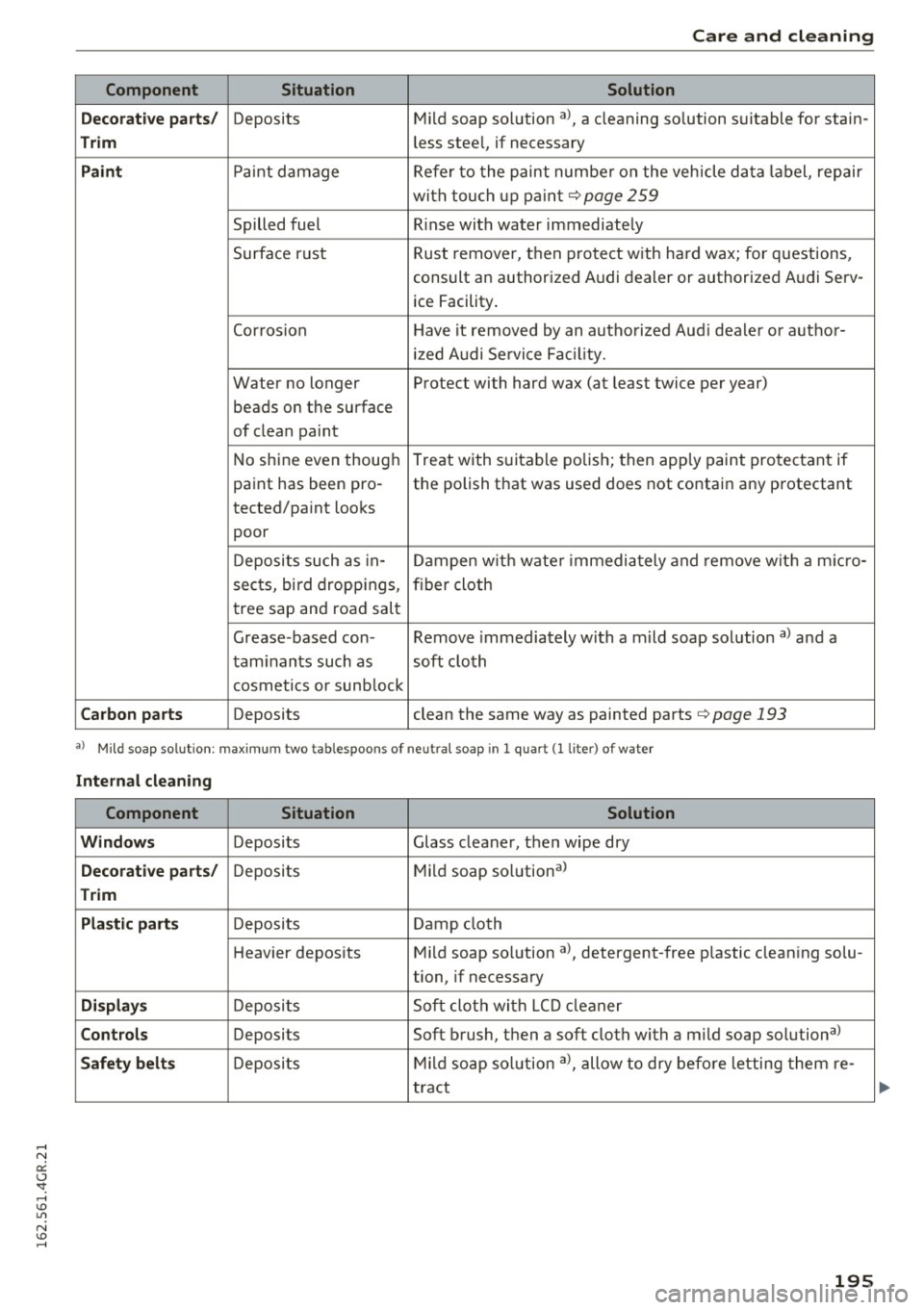
Component Situation Solution
Decorati ve parts/
Deposits Mild
soap solution al, a cleaning so lution suitable for stain-
Trim less stee l, if necessary
Paint Pain t damage Refer to the paint number on the veh icle data label, repair
with touch up paint
q page 259
Spilled fuel Rinse with water immediately
Surface rust Rust remover,
then protect with hard wax; for questions,
consult an authorized Audi dealer or authorized Audi Serv- ice Facility.
Corrosion Have it removed by an authorized Aud i dealer or author-
ized Audi Se rvice Fac ility.
Water no longer Protect with hard wax (at least twice per year) beads on the surface
of clean paint
No shine even though Treat with suitable
polish; then apply paint protectant if
paint has been pro -the polish that was used does not contain any protectant
tected/paint looks
poor
Deposits such as in-Dampen with wate r immediately and remove wit h a m icro -
sects, bird droppings, fiber cloth
tree sap and road salt
Grease -based con- Remove immediately with a mild soap solution al and a
taminants such as soft cloth
cosmetics or sunb lock
Carbon parts Deposits clean the same way as painted parts q page 193
a) M ild soap so lu tio n: maxim um two ta blespoons of ne utra l s oap in 1 quar t (l li te rl of water
Internal cleaning
Component Situation Solution
Windows
Deposits Glass cleaner, then wipe dry
Decorative parts/ Deposits Mild
soap solution al
Trim
Plastic part .s
Deposits Damp cloth
Heavier deposits Mild soap solution al, detergent-free p lastic clean ing solu-
tion, if necessary
Displays Deposits Soft cloth with LCD cleaner
Controls Deposits Soft brush, then a soft cloth with a mild soap solutional
Safety belts Deposits Mild
soap solution al, allow to dry before letting them re-
tract
195
Page 199 of 282
avoid scratches, move the scraper only in
one direction and not back and forth.
- Never remove snow or ice from door win
dows and mirrors using warm or hot water
because this could cause cracks to form.
- To avoid damage to the rear window de
fogger , do not apply any stickers on the
heating wires on the inside of the window.
- Decorative parts/trim
- Never use chrome care or cleaning prod-
ucts .
-Paint
- To reduce the risk of scratches, the vehicle
must be free of dirt and dust before pol
ishing or waxing .
- To prevent paint damage, do not polish or
wax the vehicle in direct sunlight .
- To reduce the risk of paint damage, do not
polish away rust spots .
- Remove cosmetics and sunscreen immedi
ately- these could damage the paint.
-Displays
-To avoid scratches, do not use dry cleaning
methods on displays.
- Controls
- Make sure that no fluids enter the con-
trols, because this could cause damage.
- Safety belts
- Do not remove the safety belts to clean
them.
- Never clean safety belts or their compo
nents chemically or with corrosive fluids
or solvents and never allow sharp objects
to come into contact with the safety belts.
This could cause damage to the belt web
bing .
-If there is damage to the webbing, the
connections, the retractors or the buckles,
have them replaced by an authorized Audi
dealer or authorized Audi Service Facility.
- Textiles/artificial leather/ Alcantara
- Never treat artificial leather/ Alcantara
with leather care products, solvents, floor
polish, shoe polish, spot remove or similar
products .
Care and cleaning
- Have an authorized Audi dealer or author
ized Audi Service Facility remove stubborn
stains to prevent damage.
- Never use steam cleaners, brushes , hard
sponges, etc. when cleaning.
- Do not turn on the seat heating* to dry the
seat.
- Objects with sharp edges such as zippers,
rivets on clothing or belts can cause dam
age to the surface.
- Open hook and loop fasteners, for exam ple on clothing, can damage seat covers.
Make sure hook and loop fasteners are
closed .
-Natural leather
- Never treat leather with solvents, floor
polish, shoe polish, spot remover or simi
lar products.
- Objects with sharp edges such as zippers,
rivets on clothing or belts can cause dam
age to the surface.
- Never use steam cleaners, brushes, hard
sponges, etc. when cleaning.
- Do not turn on the seat heating* to dry the
seat.
- To help prevent the leather from fading, do not leave the vehicle in direct sunlight
for long periods of time.
If leaving the ve
hicle parked for long periods of time, you
should cover the leather to protect it from
direct sunlight.
(D Tips
-Insects are easier to remove from paint that
has been freshly waxed.
- Regular waxing can prevent rust spots from
forming.
197
Page 207 of 282
Checking and Filling
Engine compartment
Engine compartment overview
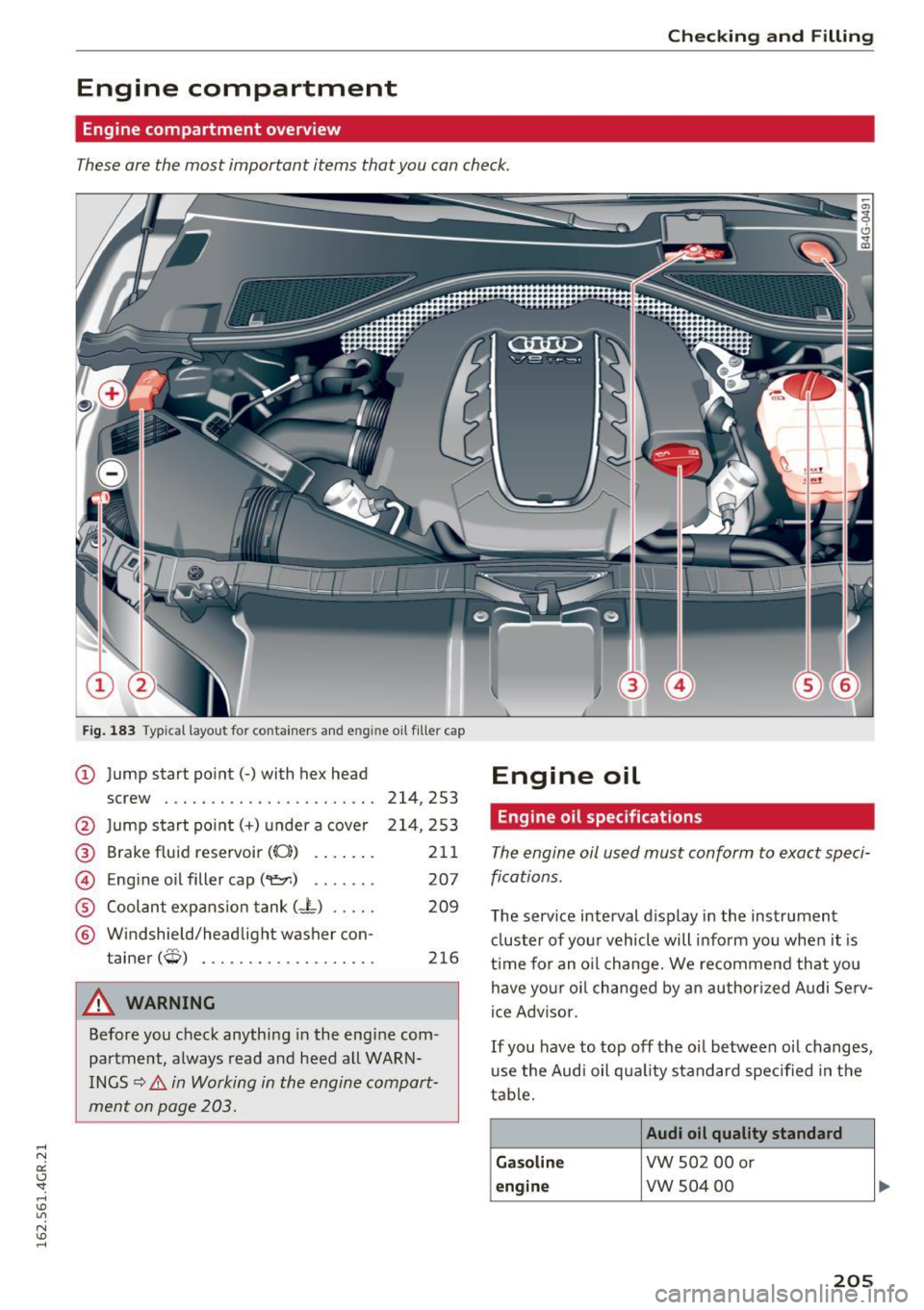
These are the most important items that you can check.
Fig. 183 Typical layout for containers and e ngine oil fille r cap
(D Jump start point(-) with hex head Engine oil
screw . .. .... .... .... ..... .. . 214, 253
@ Jump start po int( +) under a cover 214 ,253
@ Brake fluid reservoir (0:) . . . . . . . 211
@ Eng ine oil filler cap(~) . . . . . . . 207
® Coolant expans ion tank (- L) . . . . . 209
® Windshield/headlight washer con-
tainer
(W) . . . . . . . . . . . . . . . . . . . 216
A WARNING
Before you check anything in the engine com
partment, always read and heed all WARN
INGS
¢ .&. in Working in the engine compart
ment on page 203.
Engine oil specifications
The engine oil used must conform to exact speci
fications.
The service interval display in the instrument
cluster of your vehicle will inform you when it is
t ime for an o il change. We recommend that you
have your oil changed by an authorized Audi Serv-
ice Adv isor.
If you have to top off the oi l between oil changes,
use the Audi oil quality standard specified in the
table.
Audi oil quality standard
Gasoline
VW 502 00 or
engine VW S04 00
205
Page 209 of 282
diagnosed. Keep in mind that the accurate
measurement of oil consumption requires
great care and may take some time. Your
Audi dealer has instructions about how to measure oil consumption accurately.
Checking the engine oil level
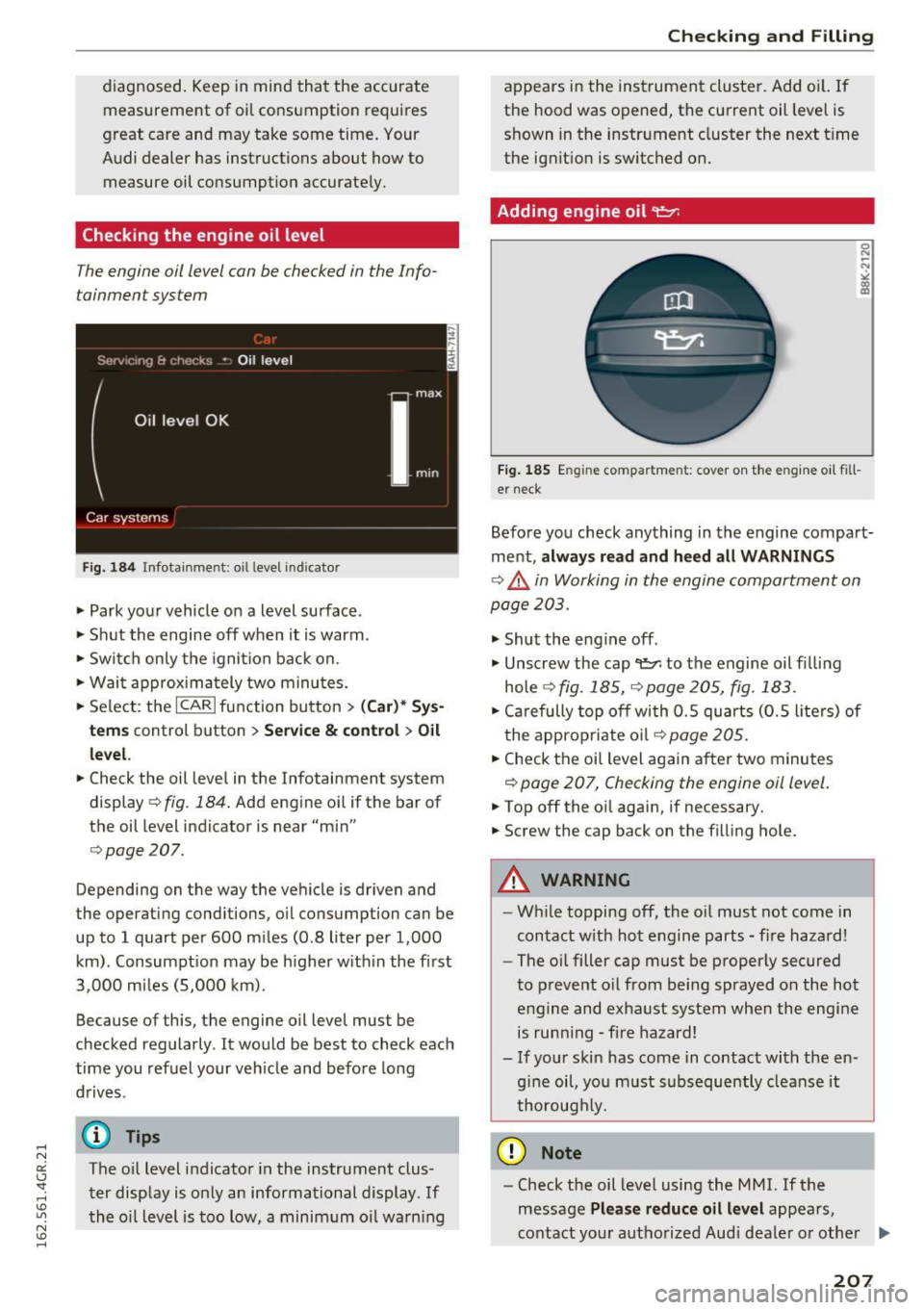
The engine oil level con be checked in the Info
tainment system
Fig. 184 Infotainment: oil level indicator
~ Park your vehicle on a level surface .
~ Shut the engine off when it is warm .
~ Switch only the ignition back on.
~ Wait approximately two minutes.
~ Select: the ICARI function button > (Ca r)* Sys
tems
control button > Service & control > Oil
level.
~ Check the oil level in the Infotainment system
display ¢
fig. 184. Add engine oil if the bar of
the oil level indicator is near "min"
¢page 207.
Depending on the way the vehicle is driven and
the operating conditions, oil consumption can be
up to 1 quart per 600 miles (0.8 liter per 1,000
km) . Consumpt ion may be higher within the first
3,000 miles (5,000 km).
Because of this, the engine oil level must be
checked regularly . It would be best to check each
time you refuel your veh icle and before long
drives .
(D Tips
The oil level indicator in the instrument clus
ter display is only an informational display. If
the oil level is too low, a minimum oil warn ing
Checking and Filling
appears in the instrument cluster. Add oil. If
the hood was opened, the current oil level is
shown in the instrument cluster the next t ime
the ignition is switched on.
Adding engine oil 9:::7:
Fig. 185 E ngine compar tmen t: cover on the engine oil fill
er neck
Before you check anything in the engine compart
ment,
always read and heed all WARNINGS
¢.,&. in Working in the engine compartment on
page 203 .
~ Shut the engine off .
~ Unscrew the cap~ to the engine oil filling
hole
q fig . 185, ¢page 205, fig. 183 .
~ Carefully top off with 0.5 quarts (0.5 liters) of
the appropriate oil
q page 205.
~ Check the oil level again after two minutes
q page 207, Checking the engine oil level.
~ Top off the oil again, if necessary.
~ Screw the cap back on the filling hole.
A WARNING
--While topping off, the o il must not come in
contact with hot engine parts - fire hazard!
- The oil filler cap must be properly secured
to prevent oil from being sprayed on the hot
engine and exhaust system when the engine
is running -fire hazard!
- If your skin has come in contact with the en
g in e oil, you must subsequently cleanse it
thoroughly.
(D Note
- Check the oil level using the M MI. If the
message
Please reduce oil level appears,
contact your authorized Aud i dea ler or other .,.
207
Page 218 of 282
Check ing and F illing
througho ut your vehicle ¢ page 186 . The intelli
gent energy management system wi ll keep the
engine battery charged better than veh icles with
out this system . To make sure the addit ional
electrical energy is avai lab le once again after you
have changed the battery, we recommend that
you install batter ies of t he same type and manu
facture on ly (the same as those insta lled at the
time your veh icle was delive red). Spec ificat ions
are listed on t he b attery housing. Your author
i z ed dealer must code the battery in the energy
management system to enable you to use the en
ergy manag ement functions correctly after re
p lacing the battery.
The new battery must have the same capac ity,
voltage (12 -vo lt), amperage, const ruction and
p lug sealing .
W hen insta lling the ba tte ry, make sure the igni
tion and all elec trical consumers are sw itched
off .
(D Note
Mak e sure the ve ntila tio n hose on t he side of
the batte ry is connecte d, othe rw ise f umes o r
battery acid can lea k out .
@) For the sake of the environment
Because of the prob lem of pr oper disposal of
a ba ttery, we recommen d your au thor ized
Audi dea le r change the battery fo r you. Bat
teries contain su lf u ric acid and lea d and must
always be disposed o f prope rly in comp liance
w ith all environmental regulations. D isposing
of vehicle batteries improperly is very danger
ous to the e nvironment.
216
Windshield washer
system
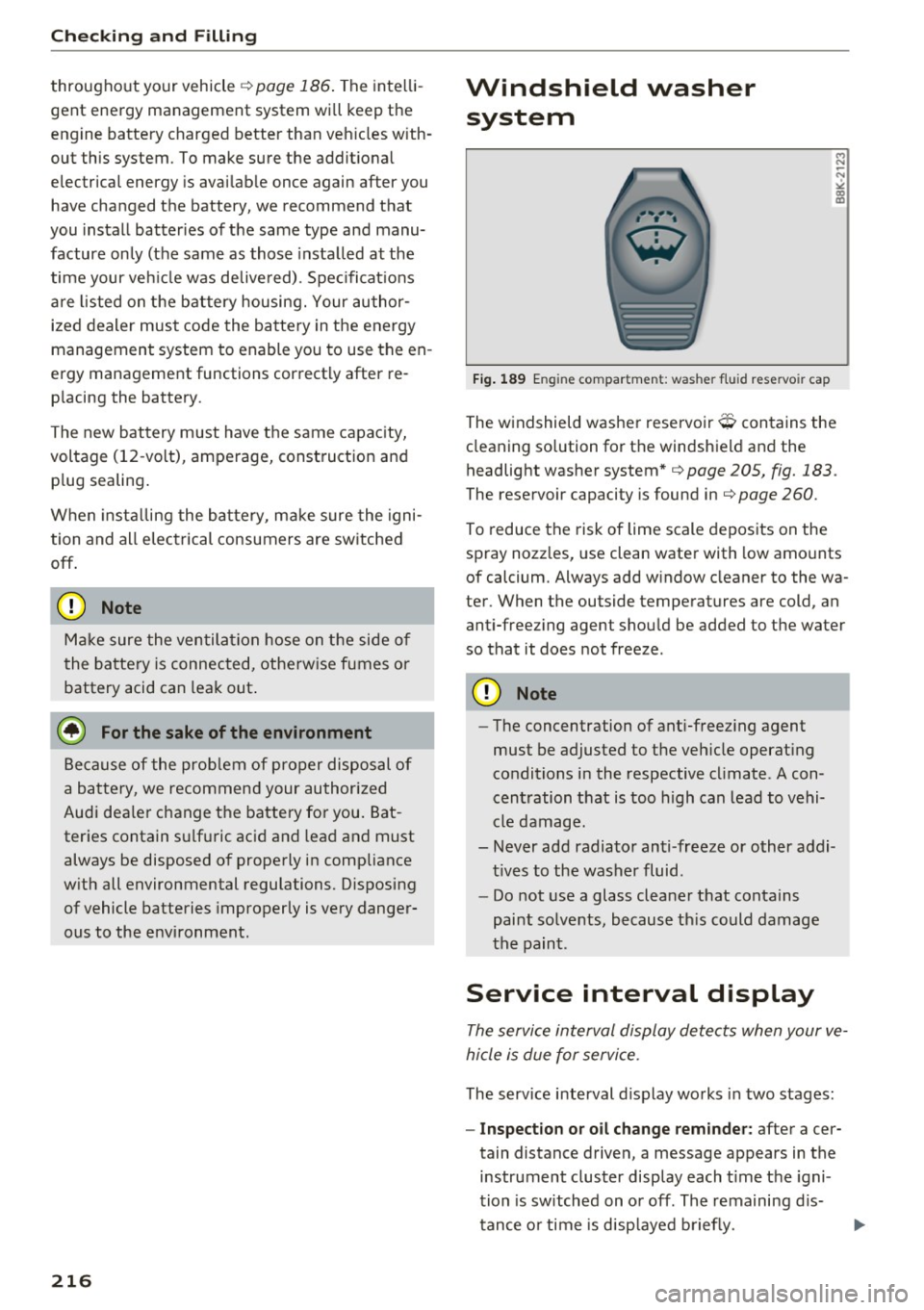
Fi g. 189 En gin e compar tm en t: was her flui d rese rvoir cap
.., N
-N ~ a, m
The w indshield washer reservoir O contains the
cleaning so lution for the windshie ld and the
headlight washer system *
9 page 205, fig. 183.
The reservoir capacity is found in 9 page 260 .
To reduce the risk of lime scale depos its on the
spray nozzles, use clean water with low amo unts
of calcium. Always add w indow cleaner to the wa
ter. When the outside temperatures are cold, an anti-freez ing agent shou ld be added to the water
so that it does not freeze .
(D Note
-The concentration of ant i-f reez ing agent
must be adjusted to the ve hicle operat ing
conditions i n the respective cl imate . A con
cen tration t hat is too high can lead to vehi
cle damage.
- Never ad d radia tor an ti-freeze or other addi
t ives to the washer fluid .
- Do not use a glass cleaner t hat contains
paint so lvents, because th is could damage
the pain t.
Service interval display
The service interval display detects when your ve
hicle is due for service .
The service interval d isplay wo rks i n two stages:
- Inspection or oil change rem inder: after a cer-
tain distance drive n, a message appears in the
instrument cluster display each t ime t he igni
tion is switched on o r off . The remaining d is-
t ance o r time is disp layed b riefly. .,..
Page 238 of 282
Wheels
Your vehicle has also been equipped with a TPMS
malfunction indicator to indicate when the sys
tem is not operat ing properly . The TPMS mal
function indicator is combined with the low tire pressure telltale. When the system detects a
malfunction, the telltale will flash for approxi
mately one minute and then remain cont inuously
illum inated . This sequence will continue upon
subsequent veh icle start-ups as long as the ma l
function ex ists .
When the malfunct io n indicator is illuminated,
the system may not be able to detect or signal low tire pressu re as intended . TP MS ma lfunctions
may occur for a variety of reasons, including the
installation of replacement or alternate ti res or
wheels on the vehicle that prevent the TPMS
from functioning properly. A lways check the
TPMS malfunction telltale after replacing one or
more tires or wheels on your vehicle to ensure
t hat the replacement or alternate tires and
wheels allow the TPMS to continue to function
properly.
Description
The tire pressure monitoring system monitors
the pressure in the four tires when driving .
The system uses sensors that measure the tem
perature and pressure in the tires. The data is
sent from these sensors to the control module by
radio frequency .
The tire pressure monitoring system shows the current pressures and temperatures of the tires in the Infotainment system
c.>page 236. It also
compares the current t ire pressures with the
stored tire pressures and gives a warning in the
driver information system if the tire pressure is
d ifferent from what is stored¢
page 237.
The system does not detect if the stored t i re
pressures match the recommended tire pres
sures. You must resave the tire pressures
c.> page 23 7:
-every time the tir e pressures change, for exam
ple when the load in the vehicle changes,
- after replac ing a tire, or
- if wheels with new wheel sensors are used .
236
A WARNING ,_
- The tire pressure monitoring system ass ists
the dr iver in monitoring tire pressures. The
driver is responsible for having the tires in
flated to the correct pressure.
- Do not change the t ire pressure when the
temperature of the tire is high . This could
result in serious damage to the tire and
even cause the tire to burst, increasing the
ris k of an accident.
- A tire with low pressure flexes more. This
heats the tire up too much. This could cause
the tread to separate and even cause the
tire to burst, increasing the risk of an acci
dent .
- The tire pressure monitoring system does
not warn about damage or defects in the
tire construction that could cause the tire to burst, for example. Inspect your t ires regu
larly.
@ Tips
- If tires are replaced, the sensors/va lves do
not need to be removed or replaced. Just re
placed the va lve stem and, if necessary, the
valve and the wheel electronics. If you have
questions, see your authorized Audi dealer
or authorized Audi Service Facility.
- An incorrect display or a malfunction in the
tire pressure monitoring system can occur
after using the tire mobility kit. Have the
sensors rep laced by an authorized Audi
dealer or authorized Audi Service Facility.
Display tire pressures/temperatures
Requirement: the ignition must be switched off.
.,. Select: the
I CARI funct ion button > Car systems
> Service & control > Tire pressure monitor >
Display tire pre ssure .
The current tire pressures are shown in green and
yellow numbers in the Infotainment system:
-green: the current tire pressure and the spec i
fied tire pressure are approx imately the same .
-yellow: the current tire pressure is too low
compared to the spec ified t ire pressure .
Page 239 of 282
The specified tire pressure is the last tire pres
sure that was stored
¢ page 2 3 7 .
Note that the tire p ressure also depends on the
temperature of the t ire . Every 10 °C increase in
tire temperature results in the tire pressure in
creasing by approximate ly 0 .1 bar. The tire pres
sure increases as the eng ine becomes warmer
while driving.
A WARNING
Read and follow the important information
and notes <=>
page 236.
@ Tips
The tire pressure or temperature are not dis played in adaptation mode. Dashes ··.·· are
shown in place of the pressure and tempera
ture .
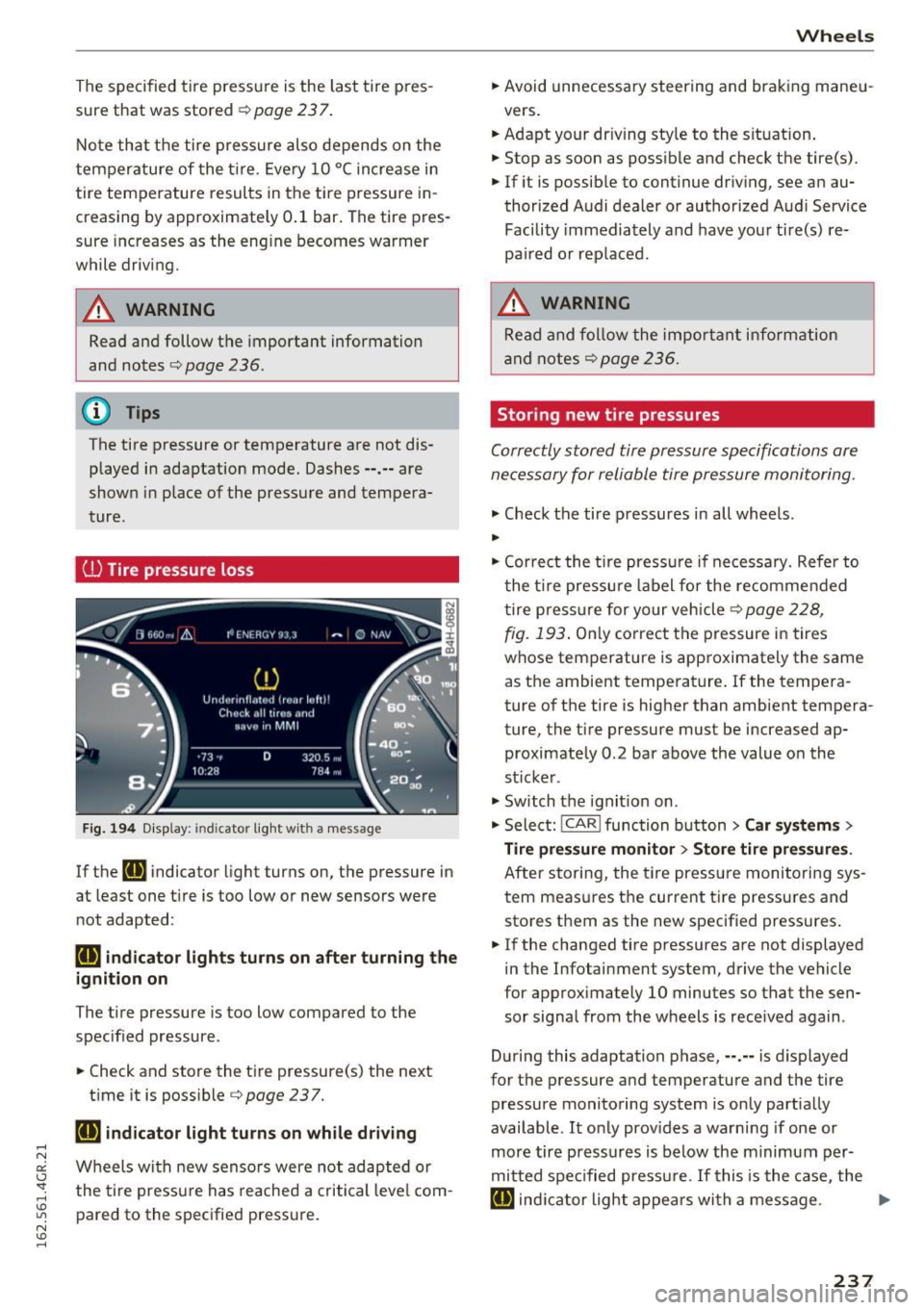
(D Tire pressure loss
Fig. 194 Display : indic ato r light with a message
If the [IJ indicator light turns on, the pressure in
at least one t ire is too low or new sensors were
not adapted :
rt] indicator lights turns on after turning the
ignition on
The tire pressure is too low compared to the
specified pressure.
"' Check and store the tire pressure{s) the next
time it is possible<=>
page 237.
rt] indicator light turns on while driving
Wheels with new senso rs were not adapted or
the tire pressure has reached a critical leve l com
pared to the specified pressure.
Wheels
"' Avoid unnecessary steering and braking maneu-
vers .
"' Adapt your dr iving sty le to the situation .
"' Stop as soon as possible and check the tire(s).
"' If it is possib le to continue driving, see an au-
thorized Audi dealer or authorized A udi Service
Facility immediately and have your tire(s) re
pa ired or rep laced.
A WARNING
Read and follow the important i nformation
and notes
¢page 236.
Storing new tire pressures
Correctly stored tire pressure specifications are
necessary for reliable tire pressure monitoring.
"' Check the tire pressures in all wheels .
..
"'Cor rect the tire pressure if necessa ry. Refer to
the tire pressure label for the re commended
t ire pressure for your vehicle
c> page 228,
-
fig. 193 . Only correct the pressure in tires
whose temperature is approximately the same
as the ambient temperature. If the tempera
ture of the tire is higher than ambient tempera
ture, the tire pressure must be increased ap
proximately 0 .2 bar above the value on the
sticker .
"' Switch the ignition on .
"' Select:
!CAR ! function button> Car systems>
Tire pressure monitor > Store tire pressures .
After storing, the tire pressure monitoring sys
tem measures the current tire pressures and
stores them as the new specified pressures .
"'If the changed tire pressures are not displayed
in the Infotainment system, drive the vehicle
for approximately 10 minutes so that the sen
sor signal from the wheels is received again .
During this adaptation phase, ··.·· is displayed
for the pressure and temperature and the tire
pressure monitoring system is only partially
available .
It only prov ides a warning if one or
more tire pressures is below the minimum per
mitted spec ified pressu re. If this is the case, the
[IJ indic ator light appea rs with a message . ""
237
Page 253 of 282
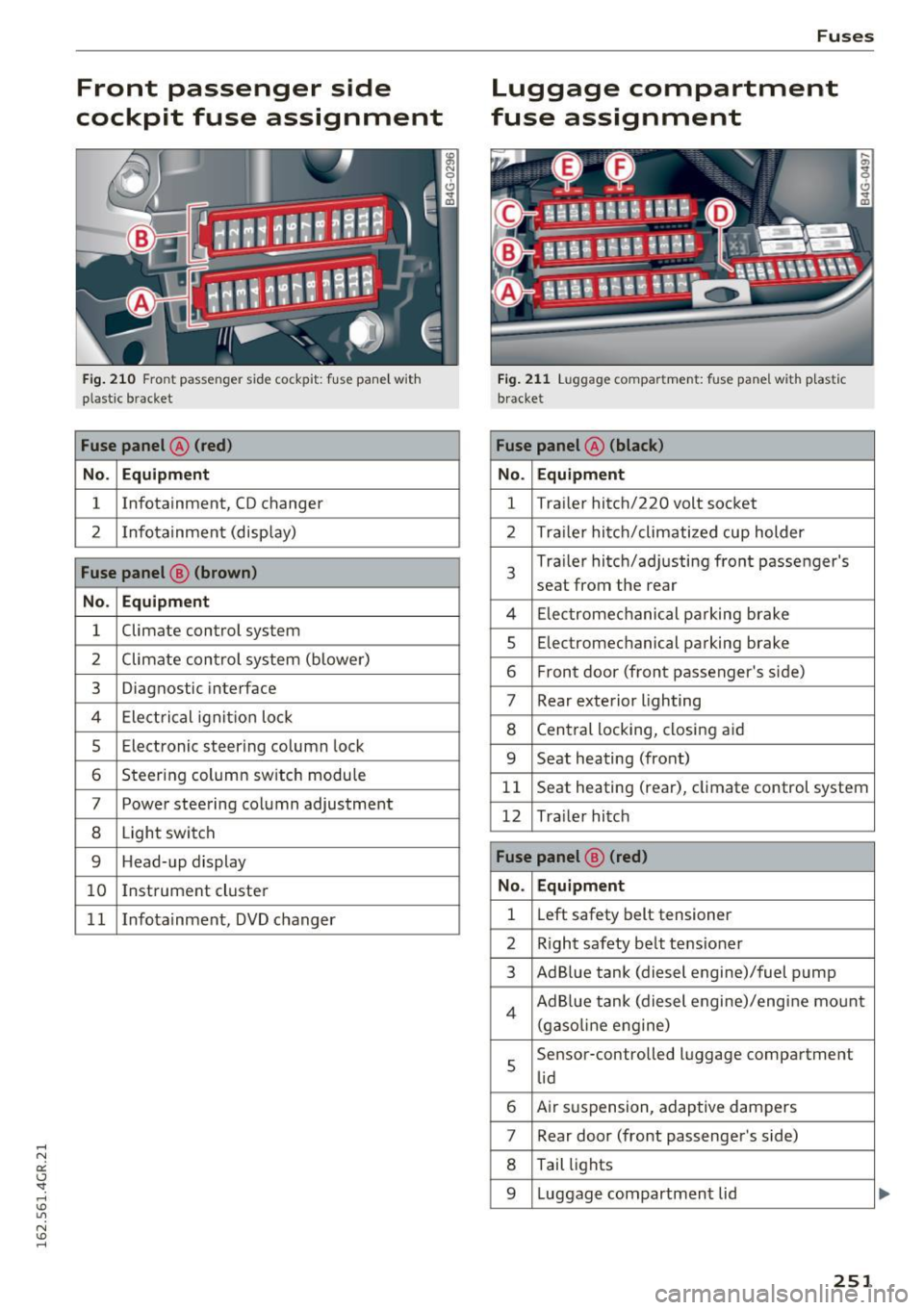
Front passenger side
cockpit fuse assignment
F ig. 21 0 Front passenger side cockpit: f use pane l w it h
p las tic bracket
Fuse panel @ (red )
No . Equipment
1 Infotainment, CD changer
2 I
nf otainment (disp lay)
Fuse panel @ (brown )
No . Equipment
1 Climate control system
2 Climate cont
rol sys tem (blowe r)
3 Diagnostic interface
4 Ele ctrical ignit io n lock
5 Electronic steering column lock
6 Steer ing col umn sw itch module
7 Power steering column adjustment
8 Light switch
9 Head-up display
1 0 I
nst rument cluste r
1 1 Infotainment, DVD changer
Fuses
Luggage compartment
fuse assignment
F ig . 2 1 1 Luggage compa rtment: fuse panel with p last ic
b racket
Fuse panel @ (black )
No . Equipment
1 Tra
iler hitc h/220 volt socket
2 Tra ile r hi tc h /climati zed cup holder
3
Tra iler hitch/ad justing front passenger's
seat from the rear
4 El ec tromec ha nic al pa rking brake
5 Electromec hanical parking brake
6 F ront door (front passenger's s ide)
7 Rear exterior lighting
8 Cen tral locking, closi ng a id
9 Seat heating (front)
1 1 Seat heating (rear), climate control system
12 Tra ile r hitc h
Fuse panel @ (red)
No . Equipment
1 L
eft safety belt tensioner
2 R igh t safety be lt tens ione r
3 Ad B lue tank (diesel engine)/fuel pump
4 Ad B lue tank (diesel engine)/eng ine mo unt
(gaso line e ngine)
s
Sensor-controlled l uggage compartment
li d
6 Air s uspension, adaptive dampers
7 Rear door (front passenger's side)
8 Tail lights
9 Luggage compartmen t lid
251
...
Page 269 of 282
Anti-theft systems Electronic immobilizer . . . . . . . . . . . . . . . . . 31
Ashtray . . . . . . . . . . . . . . . . . . . . . . . . . . . . . . 58
Audi drive select
refer to Drive select . . . . . . . . . . . . . . . . . . . 95
Audi Service Repair Manuals and Literature 262
AUTO 4-z one deluxe automatic climate control . . 68
Automatic headlights . . . . . . . . . . . . . . . . . 43
Auto Lock . . . . . . . . . . . . . . . . . . . . . . . . . . . . 32
Automatic belt retractor . . . . . . . . . . . . . . . 130
Automatic post-collision brak ing system . . 181
Automatic Shift Lock (ASL) . . . . . . . . . . . . . 102
Automatic transmission . . . . . . . . . . . . . . . . 101
Automatic Shift Lock (ASL) . . . . . . . . . . . . 102
Driving . . . . . . . . . . . . . . . . . . . . . . . . . . . . 103
E mergency mode . . . . . . . . . . . . . . . . . . . . 105
Emergency release . . . . . . . . . . . . . . . . . . . 106
Kick-down . . . . . . . . . . . . . . . . . . . . . . . . . . 105
Manual shift program . . . . . . . . . . . . . . . . 105
Selector lever . . . . . . . . . . . . . . . . . . . . . . . 101
Automatic wipe/wash system . . . . . . . . . . . . 49
Auto Safety Hotline . . . . . . . . . . . . . . . . . . . 125
Average consumption . . . . . . . . . . . . . . . . . . . 23
Average speed . . . . . . . . . . . . . . . . . . . . . . . . 23
Avoid damaging the vehicle . . . . . . . . . . . . . 188
B
Battery . . . . . . . . . . . . . . . . . . . . . . . . . . . . . 212
Charge level . . . . . . . . . . . . . . . . . . . . . . . . 186
Charg ing ... .. ............... .. .... . 214
Energy management . . . . . . . . . . . . . . . . . 186
I mportant warn ings .......... .. .. .. . 213
Jump starting . . . . . . . . . . . . . . . . . . . . . . . 253
Location . . . . . . . . . . . . . . . . . . . . . . . . . . . 213
Replacing the battery . . . . . . . . . . . . . . . . 215
Winter operation . . . . . . . . . . . . . . . . . . . . 212
Working on the battery . . . . . . . . . . . . . . . 213
Before driving . . . . . . . . . . . . . . . . . . . . . . . . 118
Belt tensioners . . . . . . . . . . . . . . . . . . . . . . . 133
Blended gasoline . . . . . . . . . . . . . . . . . . . . . 198
Blower (4-zone deluxe automatic climate con-
trol) . . . . . . . . . . . . . . . . . . . . . . . . . . . . . . . . . 69
Boost display . . . . . . . . . . . . . . . . . . . . . . . . . 26
Booster seats . . . . . . . . . . . . . . . . . . . . . . . . 168
Boost pressure indicator . . . . . . . . . . . . . . . . 26
Index
Brake fluid
Changing the brake fluid . . . . . . . . . . . . . . 212
Checking the brake fluid level . . . . . . . . . . 211
Brakes Indicator light . . . . . . . . . . . . . . . . . . . . . . . 20
Brake system Anti-lock braking system . . . . . . . . . . . . . . . 18
Brake booster . . . . . . . . . . . . . . . . . . . . . . . 183
Brake fluid . . . . . . . . . . . . . . . . . . . . . . . . . 211
Brake fluid specifications for refill and re
placement . . . . . . . . . . . . . . . . . . . . . . . . . 212
Brake power assist unit . . . . . . . . . . . . . . . 182
Brakes..... ... .. .. ................ . 182
Electromechanical parking brake . . . . . . . . 7 4
Fluid reservoir . .. .. ............... .. 211
Warning/indicator lights . . . . . . . . . . . . . . . 14
Worn brake pads symbol . . . . . . . . . . . . . . . 19
Braking Brake assist . . . . . . . . . . . . . . . . . . . . . . . . 180
Emergency braking function . . . . . . . . . . . . 76
Braking guard . . . . . . . . . . . . . . . . . . . . . . . . . 79
Messages . . . . . . . . . . . . . . . . . . . . . . . . . . . 86
Settings . . . . . . . . . . . . . . . . . . . . . . . . . . . . 86
Break-in period
Brake pads . . . . . . . . . . . . . . . . . . . . . . . . . 182
T ires ......... .... ................ .
Breaking in
New tires
C
188
188
225
California Proposition 65 Warning . . . . . . . 204
Battery specific . . . . . . . . . . . . . . . . . . . . . 214
Capacities . . . . . . . . . . . . . . . . . . . . . . . . . . . 260
Engine oil . . . . . . . . . . . . . . . . . . . . . . . . . . 205
Car carrier Transporting your vehicle . . . . . . . . . . . . . 256
Care . . . . . . . . . . . . . . . . . . . . . . . . . . . . . . . . 193
Cargo area . . . . . . . . . . . . . . . . . . . . . . . . . . . 124
Cargo net . . . . . . . . . . . . . . . . . . . . . . . . . . . . 64
Catalytic converter . . . . . . . . . . . . . . . . . . . . 189
Center armrest Cockpit . . . . . . . . . . . . . . . . . . . . . . . . . . . . . 55
Central locking . . . . . . . . . . . . . . . . . . . . . . . . 31
Emergency locking . . . . . . . . . . . . . . . . . . . . 36
Power windows . . . . . . . . . . . . . . . . . . . . . . 40
Setting . . . . . . . . . . . . . . . . . . . . . . . . . . . . . 33
Sunroof. . . . . . . . . . . . . . . . . . . . . . . . . . . . . 40
267