display AUDI RS7 SPORTBACK 2016 Owner's Manual
[x] Cancel search | Manufacturer: AUDI, Model Year: 2016, Model line: RS7 SPORTBACK, Model: AUDI RS7 SPORTBACK 2016Pages: 282, PDF Size: 70.78 MB
Page 79 of 282
Cruise control system
Switching on
Applies to: vehicles with cruise control system
The cruise control system makes it possible to
drive a constant speed that is 30 km/h or higher.
0
f
®t
0
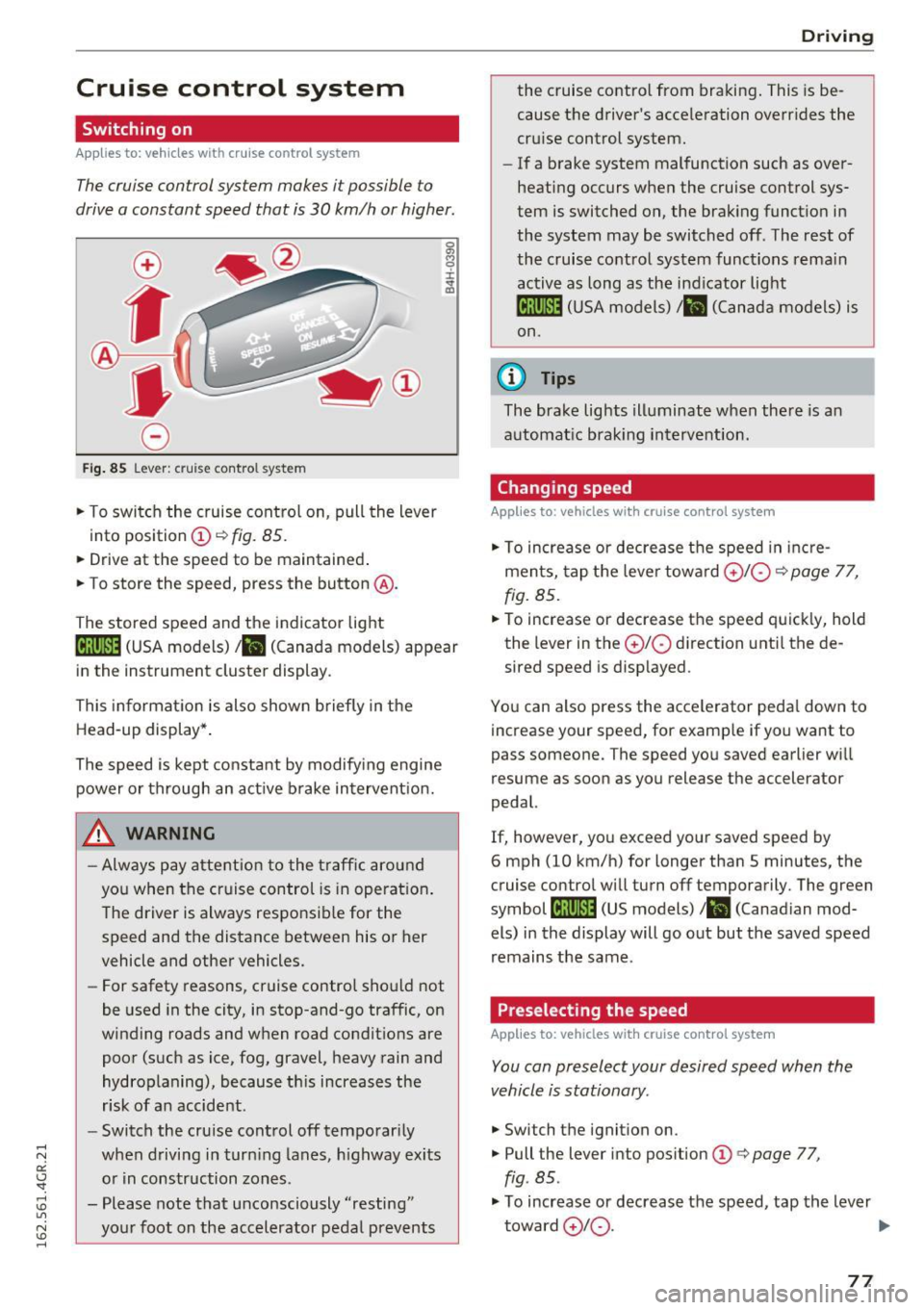
Fig . 85 Lever : cruise control system
.,. To switch the cruise control on, pull the lever
into position
(D ~ fig. 85.
.. Drive at the speed to be maintained .
.. To store the speed, press the button @.
The stored speed and the indicator light
tij;jl)~i4 (USA models)/ .. (Canada models) appear
in the instrument cluster display .
This informat ion is also shown briefly in the
Head-up display* .
The speed is kept constant by modify ing engine
power or through an act ive brake intervent ion.
_& WARNING
- Always pay attention to the traff ic around
you when the cruise control is in operat ion .
T he driver is always respo nsib le for the
speed and the distance between his or her
vehicle and other vehicles.
- For safety reasons, cruise control should not
be used in the city, in stop-and-go traffic, on
winding roads and w hen road condit ions are
poor (such as ice, fog, gravel, heavy rain and
hydroplaning), because th is increases the
r isk of a n accident.
- Switch the cruise control off temporar ily
when driving in turn ing lanes, h ighway exits
o r in construction zones .
- Please note that unconsciously "resting" yo ur foot on the accelerator pedal prevents
-
D rivi ng
the cruise co ntro l from bra king . This is be
cause the d river's accele ration overr ides the
cru ise control system.
- If a brake system malfunction such as over
heating occurs when the cruise control sys
tem is switched on, the brak ing funct io n in
the system may be switched off . The rest of
the cruise contro l system functions rema in
active as long as the ind icator light
ml1Jlm (USA models) / .. (Canada models) is
on.
(0 Tips
The brake lights illuminate when the re is an
automat ic brak ing intervent ion.
Changing speed
Applies to: vehicles with cruise control system
.,. To increase or dec rea se t he speed in inc re
ments, tap the leve r towa rd
0 10 ¢ page 77,
fig. 85 .
.. To increase or decrease the speed quick ly, hold
the lever in the
0 10 d irection unti l the de
sired speed is disp layed.
You can also press the accele rator peda l dow n to
increase your speed, for example if you want to
pass someone. The speed yo u saved earlier wi ll
resume as soon as you release the accelerator
pedal.
If, however, you exceed your saved speed by
6 mph (10 km/h) for longer than 5 minutes, the
cruise contro l will turn off temporarily . The green
symbol
li! j(9~14 (US models)/ .. (Canad ian mod
els) in the display will go out but the saved speed
remains the same.
Preselecting the speed
Applies to: vehicles with cruise control system
You can preselect your desired speed when the
vehicle is stationary.
.,. Switch t he ignition on .
.,. Pull the lever into pos ition
(D q page 77,
fig . 85.
.,. To increase or decrease t he speed, tap the lever
toward
0 10 . .,,_
77
Page 80 of 282
Driving
"'T o sto re the speed displayed, release the lever .
This f unction ma kes it possib le, for examp le, to
save the desired speed be fore dr iving on the
h ighway . Once on t he h ighway, act iva te the
cru ise control by pu lling the lever toward
(D .
Switching the system off
Applies to: veh icles w ith c ruise control
Temporary d eactivation
"' Press the brake peda l, o r
"' Press the lever into position @(not clicked i nto
place)
¢ page 77, fig. 85, or
"' Drive for longer than
5 minutes at more than
5 mph (10 km/h) above the stored speed .
Switching off completely
"' Press lever into position @(clicked into place),
o r
"' Switc h the ignition off .
The system retains the saved speed if you deact i
vate the cruise control temporarily. To resume
the saved speed, re lease the brake pedal and p ull
the lever to position
(D .
Sw itching the ign ition off erases the saved speed.
A WARNING
You should only ret urn to the saved s peed if it
is not too fast for the current tra ffic condi
tions - risk of an accident!
78
Page 83 of 282
Audi adaptive cruise control and braking guard
Audi adaptive cruise
control
Description
Applies to: vehicles with Audi adaptive cruise control
Fig. 89 Detectio n ra n ge
What can adaptive cruise control do?
The adaptive cruise control system uses video, ra
dar and ultrasound . Moving vehicles ahead can
be recognized up to about 650 feet (200 m)
away .
On open roads with no traffic, adaptive cruise
control works like a regu lar cruise contro l sys
tem. The stored speed is ma intained . When ap
proaching a moving vehicle detected up ahead,
the adaptive cruise control system automatically
slows down to match that vehicle's speed and
then maintains the distance that the driver previ
ously stored. As soon as the system does not de
tect a vehicle up ahead, adaptive cruise control
accelerates back up to the stored speed.
In stop-and-go traff ic, adaptive cruise control can
brake until the vehicle stops and accelerate again
under certain conditions and if this is possible
within the system's limits and capabilities
c;, page 83 . Adaptive cru ise control will not
make an emergency stop .
Which functions can be controlled?
When you switch adaptive cruise control on, you
can set the current speed as the "control speed"
c;, page 81, Switching on and off.
When driving, you can stop cruise control
c;, page 83 or change the speed ¢ page 82 at
any time. You can also set the distance to the object ahead
and set the adapt ive cruise control driv ing pro
gram
c;, page 83.
Switching on and off
Applies to : vehicles wit h Aud i adaptive cruise control
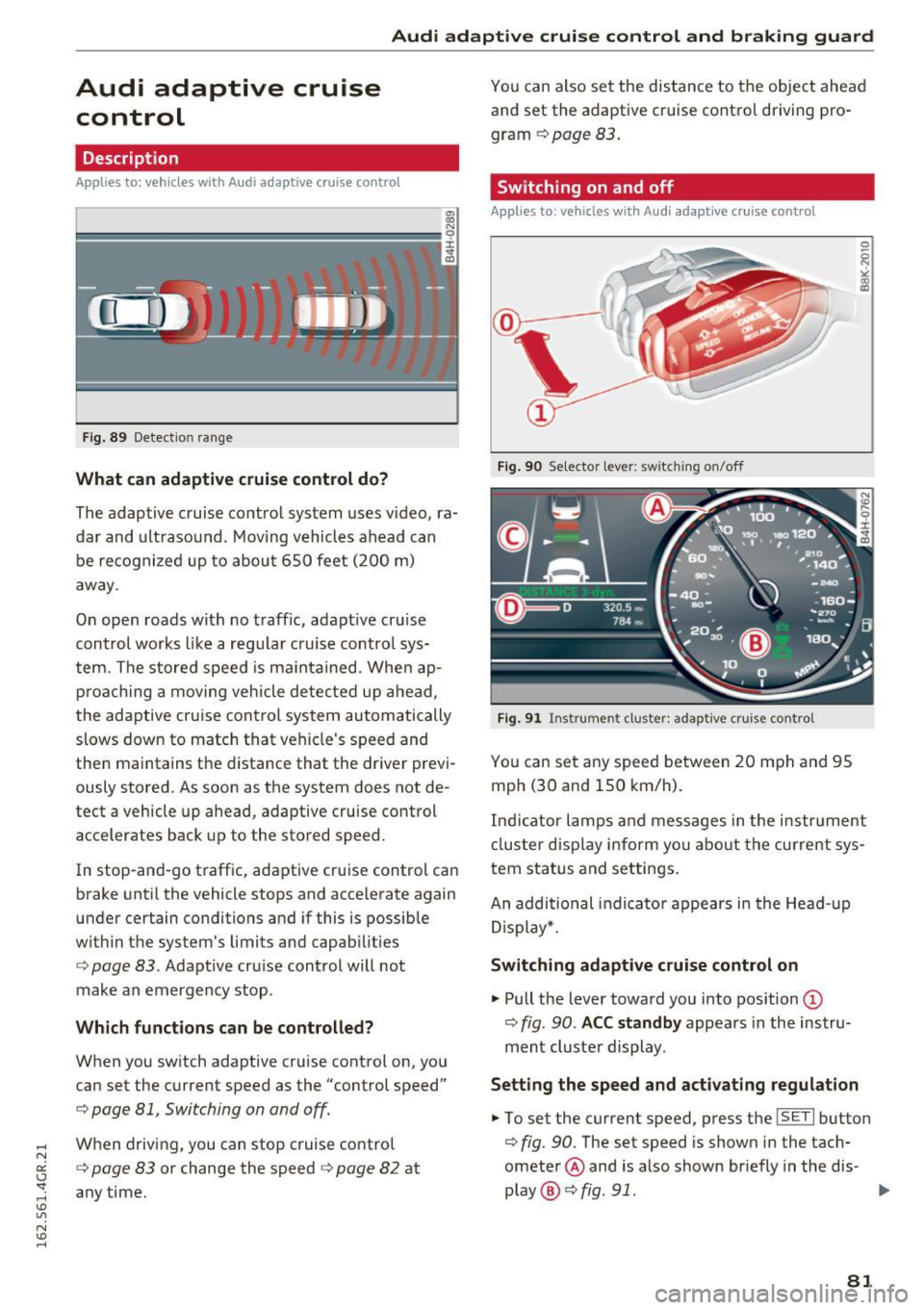
Fig. 90 Se lecto r lever: sw itc hin g on/off
Fig. 91 Instrume nt cluster: adapt ive cru ise con tro l
You can set any speed between 20 mph and 95
mph (30 and 150 km/h) .
0 5 N ~ co
co
Indicator lamps and messages in the instrument
cluster display inform yo u about the current sys
tem status and settings.
An additional indicator appears in the Head -up
Display*.
Switching adaptive cruise control on
"' Pull the lever toward you into position @
c;, fig. 90 . ACC standby appears in the instru
ment cluster display .
Setting the speed and activating regulation
"'To set the current speed, press the ISETI button
c;, fig. 90 . The set speed is shown in the tach
ometer @and is also shown briefly in the dis-
play @¢
fig. 91. .,._
81
Page 84 of 282
Audi adaptive cruise control and braking guard
• You must also press the brake pedal when the
vehicle is stopped.
Switching adaptive cruise control off
• Push the lever away from you into position @
until it clicks into place. The message
ACC off
appears.
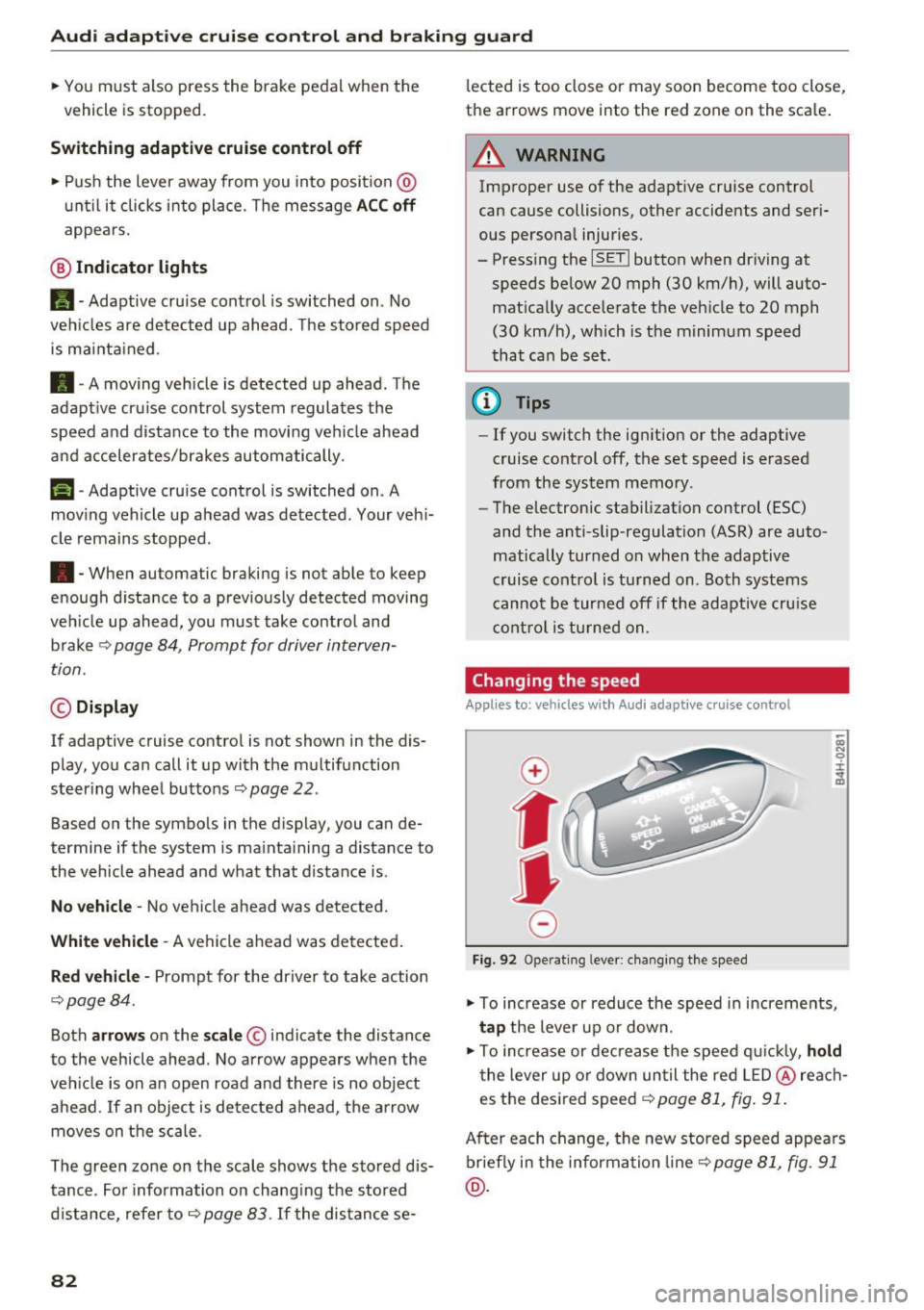
@ Indicator lights
• • Adaptive cruise control is switched on. No
vehicles are detected up ahead. The stored speed
is maintained .
• · A moving vehicle is detected up ahead. The
adaptive cruise control system regulates the
speed and distance to the moving vehicle ahead
and accelerates/brakes automatically.
r -.j · Adaptive cruise control is switched on . A
moving vehicle up ahead was detected. Your vehi
cle remains stopped.
• • When automatic braking is not able to keep
enough distance to a previously detected moving
vehicle up ahead, you must take control and brake
9 page 84, Prompt for driver interven
tion.
© Display
If adaptive cruise contro l is not shown in the dis
play, you can call it up with the multifunction
steering wheel buttons
9 page 22.
Based on the symbols in the display, you can de
termine if the system is maintaining a distance to
the vehicle ahead and what that distance is.
No vehicle· No vehicle ahead was detected.
White vehicle· A vehicle ahead was detected.
Red vehicle · Prompt for the driver to take action
9page84.
Both arrows on the scale© indicate the distance
to the vehicle ahead. No arrow appears when the
vehicle is on an open road and there is no object
ahead . If an object is detected ahead, the arrow
moves on the scale.
The green zone on the scale shows the stored dis·
tance. For information on changing the stored
distance, refer to
9 page 83. If the distance se·
82
lected is too close or may soon become too close,
the arrows move into the red zone on the scale.
A WARNING
Improper use of the adaptive cruise control
can cause collisions, other accidents and seri
ous personal injuries.
- Pressing the
ISETI button when driving at
speeds below 20 mph (30 km/h), will auto
matically accelerate the vehicle to 20 mph (30 km/h), which is the minimum speed
that can be set.
@ Tips
-If you switch the ignition or the adaptive
cruise control off, the set speed is erased
from the system memory.
- The electronic stabilization control (ESC)
and the anti-slip-regulation (ASR) are auto·
matically turned on when the adaptive
cruise control is turned on. Both systems
cannot be turned off if the adaptive cruise
control is turned on .
Changing the speed
Applies to: vehicles with Audi adapt ive cru ise control
0
f
JJ
0
Fig. 92 Operating lever: changing the speed
;;; N 9 :c .., m
• To increase or reduce the speed in increments,
tap the lever up or down.
• To increase or decrease the speed quickly,
hold
the lever up or down until the red LED@reach
es the desired speed
9 page 81, fig. 91.
After each change, the new stored speed appears
briefly in the information line¢
page 81, fig. 91
@.
Page 85 of 282
Audi adaptive cruise control and braking guard
Driving in stop-and-go traffic
Applies to: vehicles with Audi adaptive cruise contro l
The adap tive cruise co nt rol sys tem also assis ts
y o u in stop- and-go t raffic.
Stopping automatically
If an object ahead stops, your ve hicle w ill bra ke
a nd stay a t a stop, w ith in th e lim its of the sys
tem.
Driving manually
.. Tap the acce lerato r pedal, o r
.. pull the lever toward you into position @.
{D) Tips
- If an o bstacle is detecte d w hen yo ur vehicle
starts movi ng , the dr iver intervent io n re
quest appears
c:> page 84 . You r vehicle
will drive more slowly w hen starti ng. This
m ay also happen in so me situati ons whe n
th ere is no appa rent o bstacle .
Interrupting cruise control
Applies to: vehicles with Audi adaptive cruise control
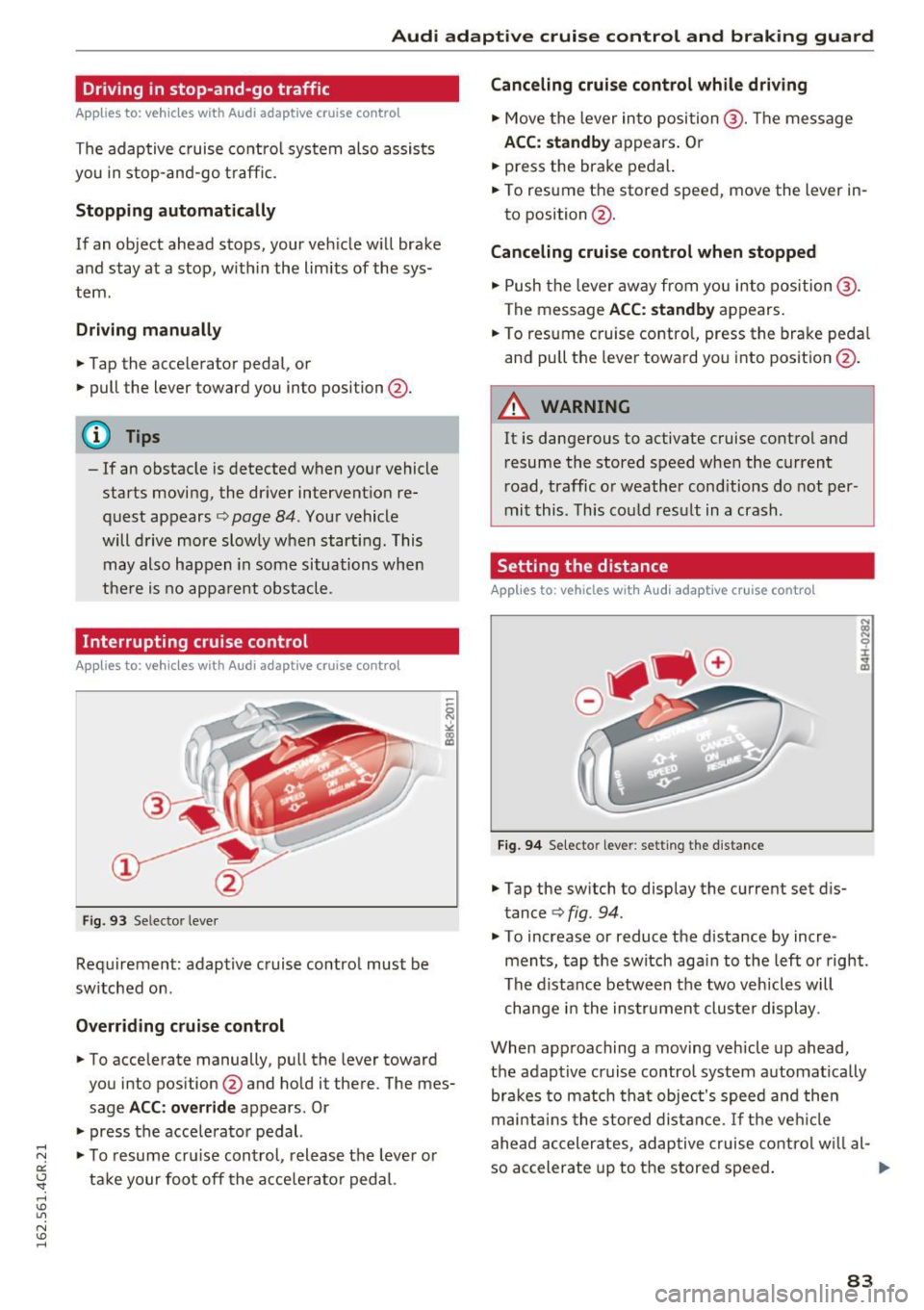
Fig . 93 Se lecto r leve r
Requi rement: adapt ive c ruise contro l must be
sw itched on .
Overriding cruise control
.. To accelera te manually, p ull the lever toward
you into pos ition @and hold it there. The mes
sage
ACC: override a ppears. Or
.. press the acce lera tor pedal.
.,. To resu me cr uise con trol , release t he leve r or
t ak e your foot off the a cce le rator pedal.
Canceling cruise control while driving
.. Move the lever in to position @. Th e message
ACC: standby appears . Or
.. press the brake pedal.
.. To resume the stored speed, move the lever in
to position @.
Canceling cruise control when stopped
.. Push the lever aw ay fr om yo u into position @.
The message
ACC: standby ap pears.
.. To res ume c ruise contro l, press the bra ke peda l
an d pu ll the leve r towa rd yo u into posit io n @ .
A WARNING
=
It is dangerous to activate cruise cont rol and
r esume the stored speed when the current
r oad, traffic or weathe r cond itio ns do not per
mi t this . T hi s co uld res ult in a crash.
Setting the distance
Applies to: vehicles with Audi adaptive cru ise control
Fi9 . 94 Selecto r lever : setting t he d istance
.. Tap the sw itch to display the current set d is
tance
c:> fig. 94.
.. To increase or reduce the d istance by incre
ments , tap the switch aga in to the l eft o r right.
T he di sta nce between t he two v eh icles w ill
c hange i n the ins trumen t clu ste r dis play.
When app roaching a moving veh icle up ahead ,
the adaptive cruise contro l system a utomat ically
br ak es to match tha t obje ct's spee d an d t hen
m ainta in s the stored dist an ce.
If th e ve hicle
ahe ad acc eler ates, a daptive cruise co ntro l w ill a l-
so accelerate up to t he store d speed .
llll>
83
Page 87 of 282
Audi adaptive cruise control and braking guard
.... N
a:: CJ '
Description
Applies to: vehicles with Audi adaptive cruise contro l
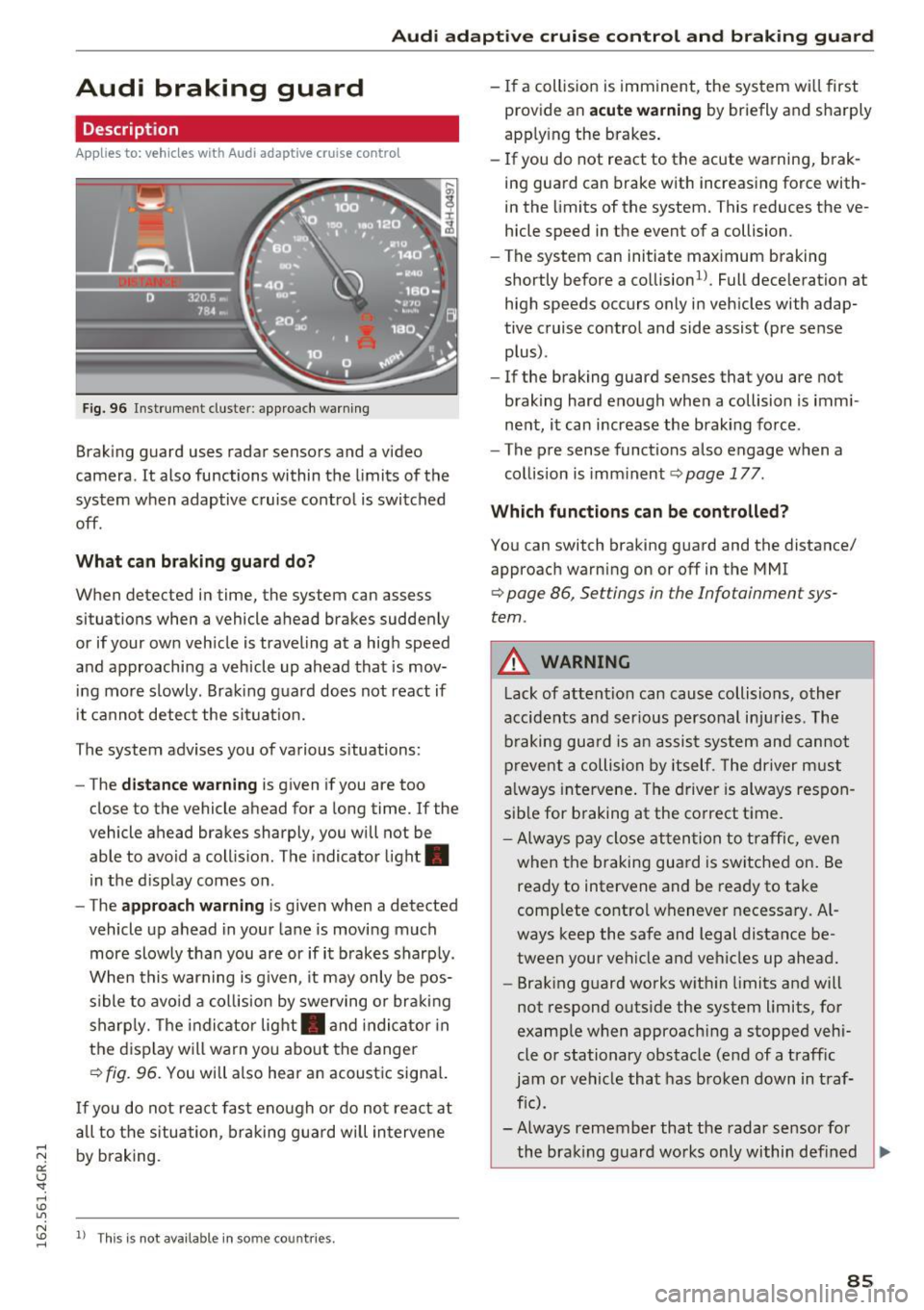
Fig. 96 Instrument cluster: approach warning
Braking guard uses radar sensors and a video
camera. It also functions within the limits of the
system when adaptive cruise control is switched
off.
What can braking guard do?
When detected in time, the system can assess
situations when a vehicle ahead brakes suddenly
or if your own veh icle is traveling at a high speed
and approaching a vehicle up ahead that is mov
ing more slowly. Braking guard does not react if
it cannot detect the si tuat ion.
The system advises you of various situations:
- The
distance warning is given if you are too
close to the vehicle ahead for a long time. If the
vehicle ahead brakes sharply, you will not be
able to avoid a collision . T he indicator light .
in the d isplay comes on .
- The
approach warning is given when a detected
vehicle up ahead in your lane is moving much
more slowly than you are or if it brakes sharply.
When this warning is g iven, it may only be pos
s ib le to avoid a collision by swerving or braking
sharp ly. The indicator light. and indicator in
the display will warn yo u about the danger
¢
fig. 96. You will also hear an acoustic signa l.
If you do not react fast enough or do not react at
all to the situation, braking guard will intervene
by braking.
N "' ll This is not available in some countries . ......
-If a collision is imminent, the system wi ll first
provide an
acute warning by briefly and sharply
apply ing the brakes .
- If you do not react to the acute warning, brak
ing guard can brake with increas ing force with
in the limits of the system. This reduces the ve
hicle speed in the event of a collision.
- The system can initiate maximum braking
shortly before a collision
1 ). Full dece leration at
high speeds occurs only in vehicles with adap
tive cruise control and side assist (pre sense plus).
- If the braking guard senses that you are not
braking hard enough when a collision is immi
nent, it can increase the braking force.
- The pre sense functions also engage when a
collision is imm inent ¢
page 177.
Which functions can be controlled?
You can switch braking guard and the distance/
approach warning on or off in the MMI
¢ page 86, Settings in the Infotainment sys
tem .
A WARNING
--
Lack of attention can cause collisions, other
accidents and serious personal injuries. The
braking guard is an assist system and cannot
prevent a collision by itself . Th e driver must
always intervene. The driver is always respon
sib le for b raking at the co rrect time.
- Always pay close attention to traffic, even
when the braking guard is switched on. Be
ready to intervene and be ready to take
complete control whenever necessary. Al
ways keep the safe and legal distance be
tween your vehicle and vehicles up ahead.
- Brak ing guard works with in limits and will
not respond outside the system limits, for
example when approach ing a stopped vehi
cle or stationary obstacle (end of a traffic
jam or vehicle that has broken down in traf
f ic).
- Always remember that the radar sensor for
the braking guard works only within defined
~
85
Page 88 of 282
Audi adaptive cruise control and braking guard
detection and range limits that may prevent
the proper detection of other vehicles .
- The radar sensor's function and range can
be reduced by rain, snow and heavy spray.
Moving vehicles up ahead may not be
promptly detected or may not be detected
at all.
- Reflective surfaces including crash barriers
or tunnel entrances may impair the function
of the radar sensor.
@ Tips
- You can cancel the braking with increasing
force that is initiated by the system by brak
ing yourself, by accelerating noticeably or
by swerving .
- Braking guard error messages¢
page 86.
- Keep in mind that braking guard can brake
unexpectedly. Always secure any cargo or
objects that you are transporting to reduce
the risk of damage or injury.
Settings in the Infotainment system
Applies to: vehicles with Audi adapt ive cruise contro l
~ Select: the ICARI function button > (Car)* Sys
tems
control button > Driver assistance > Audi
braking guard.
System -
Switch the braking guard On/Off . When
you switch the ignition on, the message
Braking
guard: Off
appears if the system is switched off.
Early warning -The distance and approach warn
ings in the display can be switched
On/Off .
(D Tips
-Your settings are automatically stored and
assigned to the remote control key being
used.
- If you restrict or switch off the ESC, the braking guard also switches itself off
¢page 181 .
- Switch braking guard off when you are load
ing the vehicle onto a vehicle carrier, train,
ship or other type of transportation. This
can prevent undesired warnings from the
braking guard system.
86
Messages
Applies to: vehicles with Audi adapt ive c ru ise control
Braking guard: off
This driver message appears if the system is
turned off via the infotainment . Otherwise, if the
system is turned off, the information appears ev
ery time shortly after the start of the trip.
The driver message also appears if the system is
not available due to a malfunction or if the ESC is
not switched on¢
page 181. If this is the case,
the system will not provide warnings about a
possible collision.
Braking guard: activated
This driver message appears if sharp brake pres
sure was applied due to an acute warning .
ACC: Unavailable!
ACC and Audi braking guard: not available
The system cannot detect moving vehicles up
ahead correctly and is switched off. The sensors
have been displaced or are not working properly.
T he Audi pre sense funct ions may also be affect
e d. Dr ive to your authorized Audi dealer or au
thori zed Audi service facility immediately to have
the malfunction corrected.
ACC: currently unavailable. No sensor vision
ACC and braking guide: currently unavailable.
No sensor vision
This message appears if the sensor view is obstructed, for example by leaves, snow , heavy
spray or dirt. Clean the sensors ¢
page 79,
fig. 86.
ACC: Currently unavailable. Gradient too steep
The road exceeds the maximum possible angle
for proper adaptive cruise control operation .
Adaptive cruise control is switched off .
ACC: Only available in D, S or M
Select the D/S or M selector lever position.
ACC: currently unavailable. Parking brake ap
plied
Page 91 of 282
Switching on and off
App lies to: ve hicles with Audi active lane assist
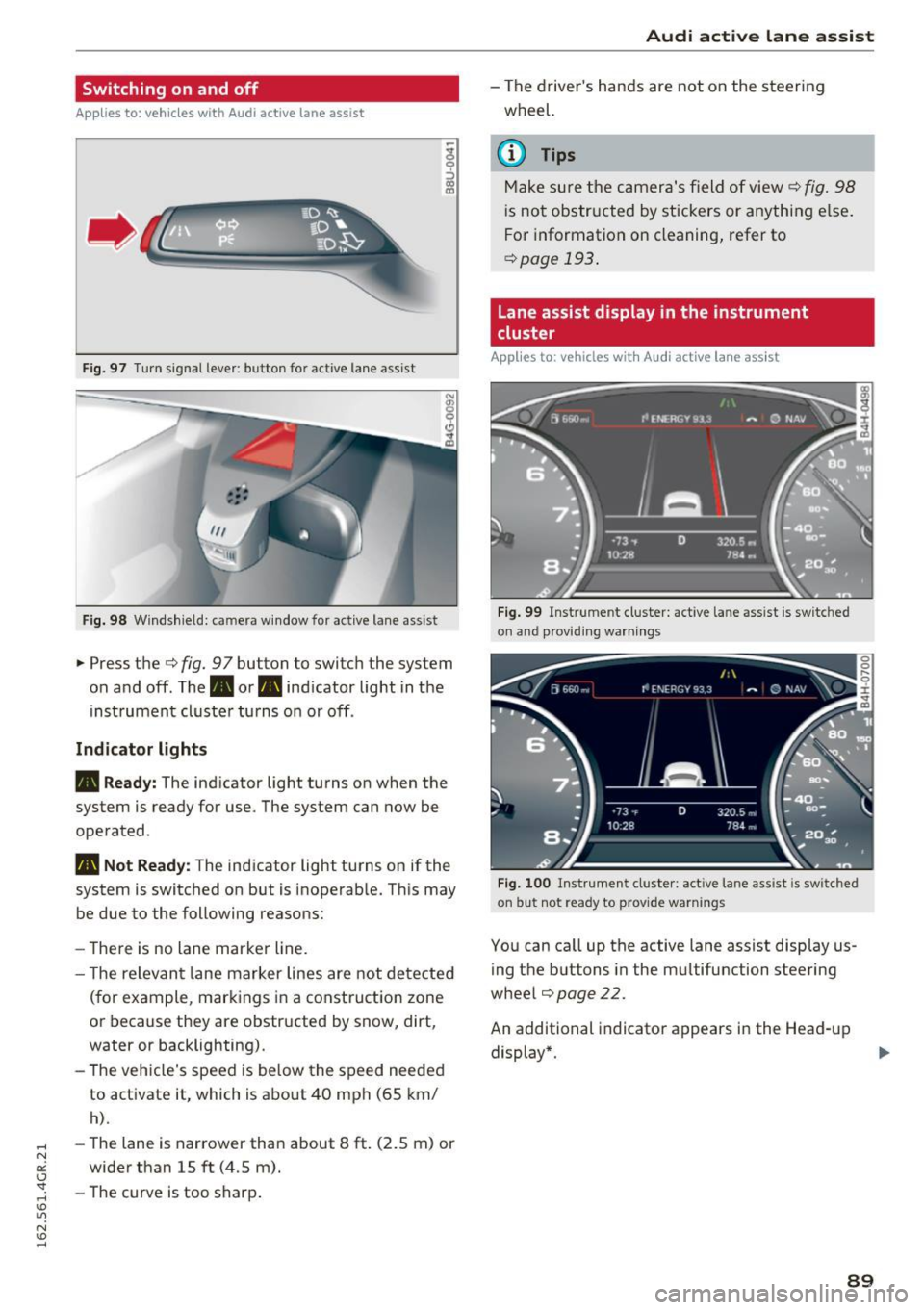
Fig. 97 T urn signal lever: button for act ive lane assist
F ig. 98 W indsh ield: camera window for active lane assist
... Press the c:> fig. 9 7 button to switch the system
on and off. The. or
Pl1 indicator light in the
instrument cluster turns on or off.
Indic ator light s
• Rea dy : The indicator light turns on when the
system is ready for use. The system can now be
operated .
Pl1 Not Read y: The indicator light turns on if the
system is switched on but is inoperable. Th is may
be due to the following reasons:
- There is no lane marker line.
- T he relevant lane marker lines are not detected
(for example, markings in a construction zone
or because they are obstructed by snow, dirt,
water or backlighting).
- The vehicle's speed is below the speed needed
to activate it, which is about 40 mph (65 km/
h).
-The lane is narrower than about 8 ft. (2.5 m) or
wider than 15 ft (4.5 m).
- The curve is too sharp.
Audi act ive lane ass is t
- The driver 's hands are not on the steering
wheel.
(D Tips
Make sure the camera's field of view c:> fig. 98
is not obstructed by stickers or anything else.
For information on cleaning, refer to
c:> page
193 .
Lane assist display in the instrument
cluster
App lies to: vehicles wit h Audi active la ne ass ist
F ig . 99 Inst rum ent clus ter: active la n e assis t is switc hed
on and provid ing warn ing s
Fig. 100 Instrument cluster: act ive lane assist is sw itched
on but not ready to provide warnings
You can ca ll up the active lane assist display us
ing the buttons in the mu ltifunction steering
wheel
c:> page 22.
An additional indicato r appears in the Head-up
display*.
8 9
Page 92 of 282
Audi active lane assist
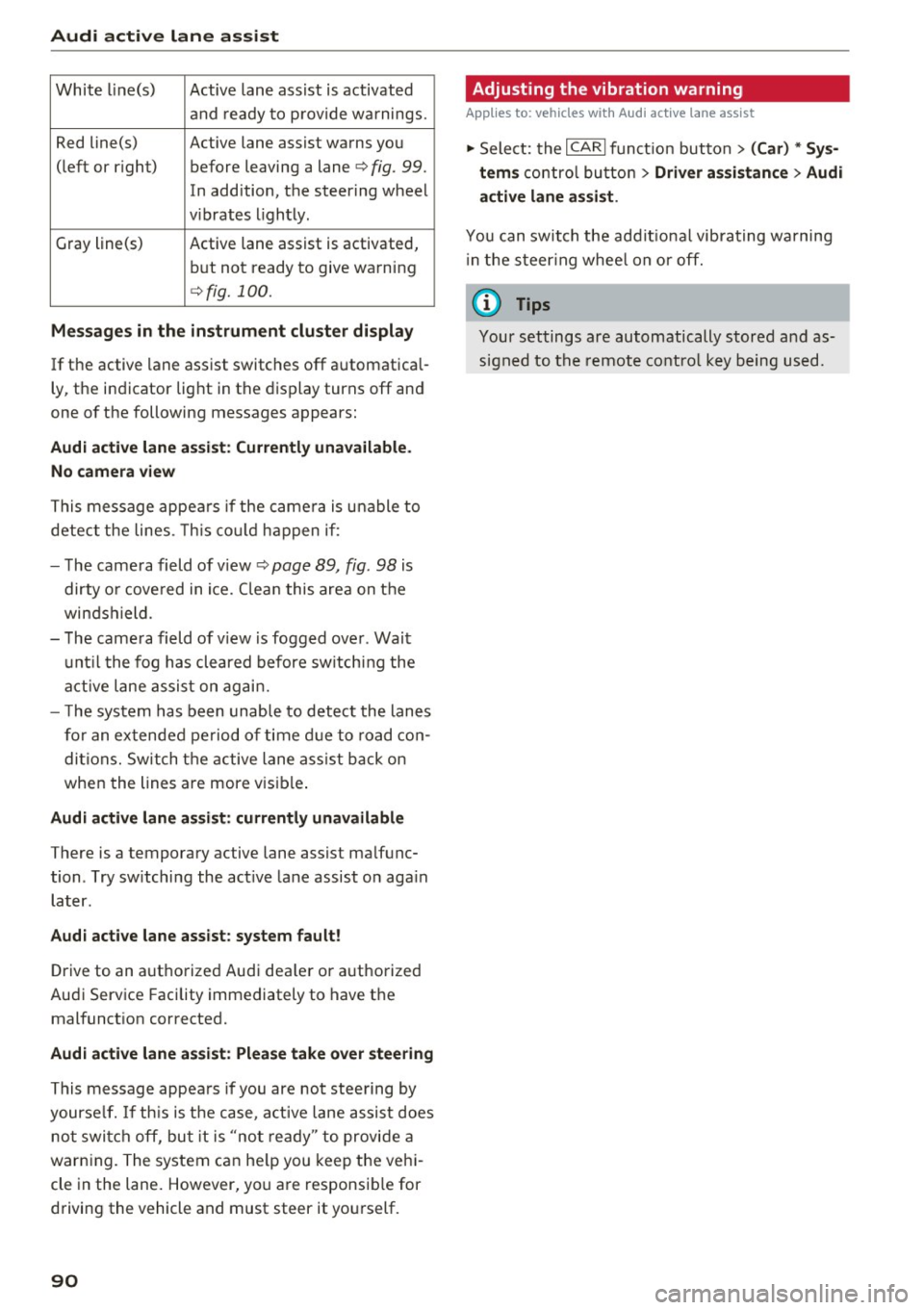
White line(s) Active lane assist is activated
and ready to provide warnings.
Red line(s) Active lane assist warns you
(left or r ig ht) before leaving a lane¢
fig. 99.
In addition, the steering wheel
v ib rates lightly.
Gray line(s)
Active lane assist is activated,
but not ready to give warning
¢fig. 100.
Messages in the instrument cluster display
If the active lane assist switches off automatical
ly, the indicator light in the display turns off and
one of the following messages appears:
Audi active lane a ssist: Currently unavailable.
No camera view
This message appears if the came ra is unable to
detect the lines. This could happen if:
- The camera field of view ¢
page 89, fig. 98 is
dirty o r covered in ice. Clean this area on the
windshield.
- The camera field of v iew is fogged over . Wait
until the fog has cleared before switching the
active lane assist on again.
- T he system has been unable to detect the lanes
for an extended period of time due to road con
ditions. Switch the active lane assist back on
when the lines are more vis ible.
Audi active lane assist: currently unavailable
There is a temporary active lane assist malfunc
tion . Try sw itching the act ive lane assist on aga in
later.
Audi active lane assist: system fault!
Drive to an authorized Aud i dea ler or authorized
Audi Service Facility immediately to have the
malfunct ion corrected.
Audi active lane assist: Please take over steering
This message appears if you are not steering by
yourse lf. If th is is the case, active lane assist does
not switch off, but it is "not ready" to provide a
warn ing. The system can he lp you keep the vehi
cle in the lane. However, you are responsib le for
driving the vehicle and must steer it yourself.
90
· Adjusting the vibration warning
Applies to: vehicles with Audi active lane assist
.,. Select: the I CARI function button > (Car) * Sys
tems
control button > Driver assistance > Audi
active lane assist .
You can switch the addit ional vibrating warning
i n the steer ing whee l on or off.
(D Tips
Your settings are automatically stored and as
signed to the remote control key being used.
Page 93 of 282
Audi side assist Side assist
Description
App lies to: veh icles with Audi side assist
Fig. 101 Se nsor dete ction rang e
Fig. 102 Display o n the exterio r mirror
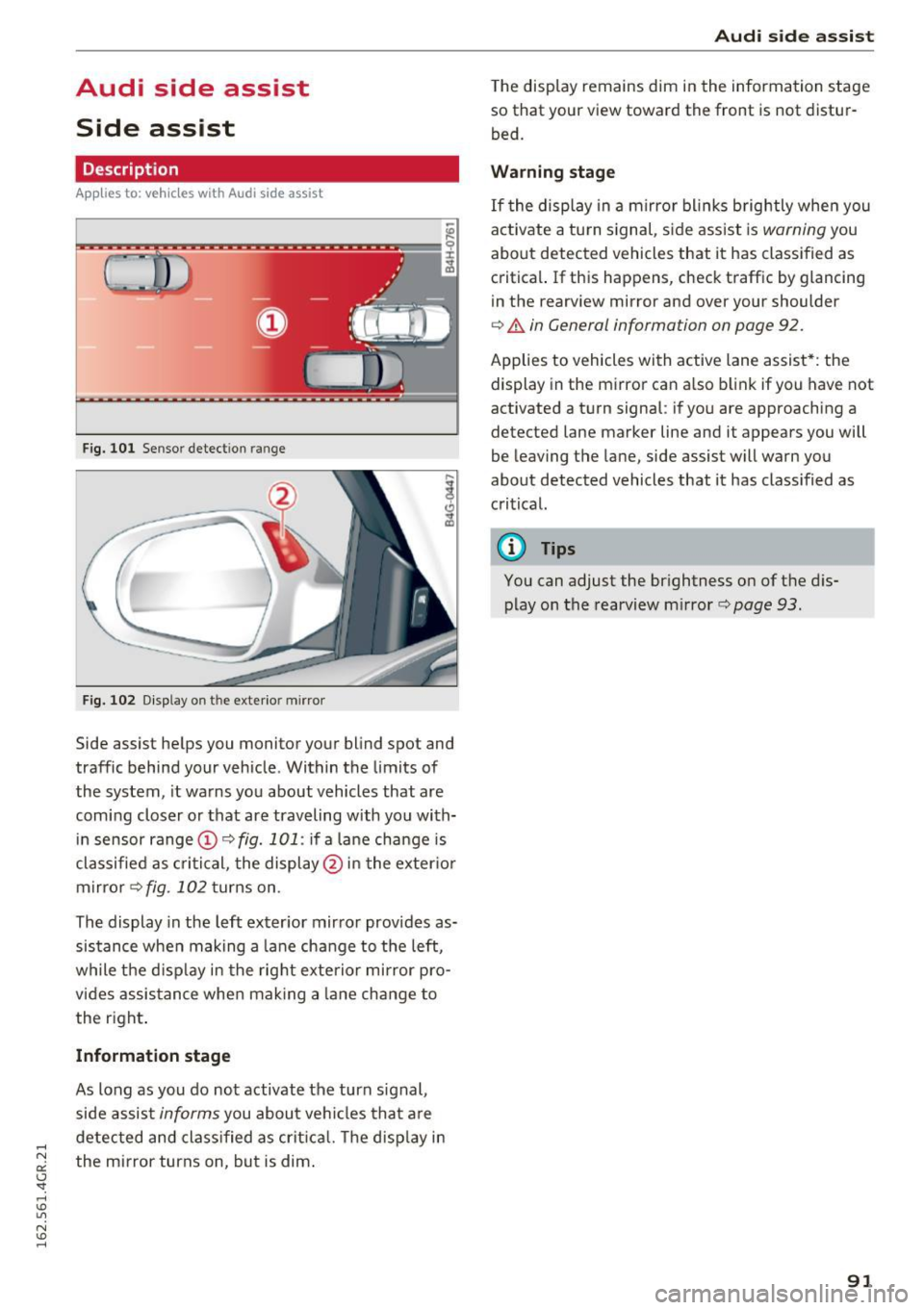
Side assist helps you monitor your blind spot and
traffic behind your vehicle . Within the limits of
the system , it warns you about vehicles that are
coming closer or that are traveling with you with
in sensor range ©
c> fig. 101: if a lane change is
classified as critical, the display @ in the exter ior
mirror
c> fig . 102 turns on .
The display in the left exterior mirror provides as
sistance when making a lane change to the left,
while the d isplay in the right exterior mirror pro
vides assistance when making a lane change to
the right .
Information stage
As long as you do not activate the turn signal,
side assist
informs you about vehicles that are
detected and classified as critica l. The disp lay in
the mirror turns on, but is dim.
Audi side assist
The display remains dim in the information stage
so that your view toward the front is not distur
bed.
Warning stage
If the display in a mirror bl inks brightly when you
act ivate a tu rn s ignal , sid e assist is
warning you
about detected vehicles that it has classified as
critical. If this happens, check traffic by glancing
in the rearview mirror and ove r you r shoulde r
c> .&. in General informa tion on page 92.
Applies to vehicles w ith active lane assist* : the
display in the mirror can also blink if you have not
activated a turn signal : if you a re approaching a
detected lane marker line and it appears you will
be leaving the lane , side assist will warn you
about detected vehicles that it has class ified as
critical.
@ Tips
You can adjust the brightness on of the dis
play on the rearview mirror
c> page 93 .
91