remote control AUDI RS7 SPORTBACK 2016 User Guide
[x] Cancel search | Manufacturer: AUDI, Model Year: 2016, Model line: RS7 SPORTBACK, Model: AUDI RS7 SPORTBACK 2016Pages: 282, PDF Size: 70.78 MB
Page 59 of 282
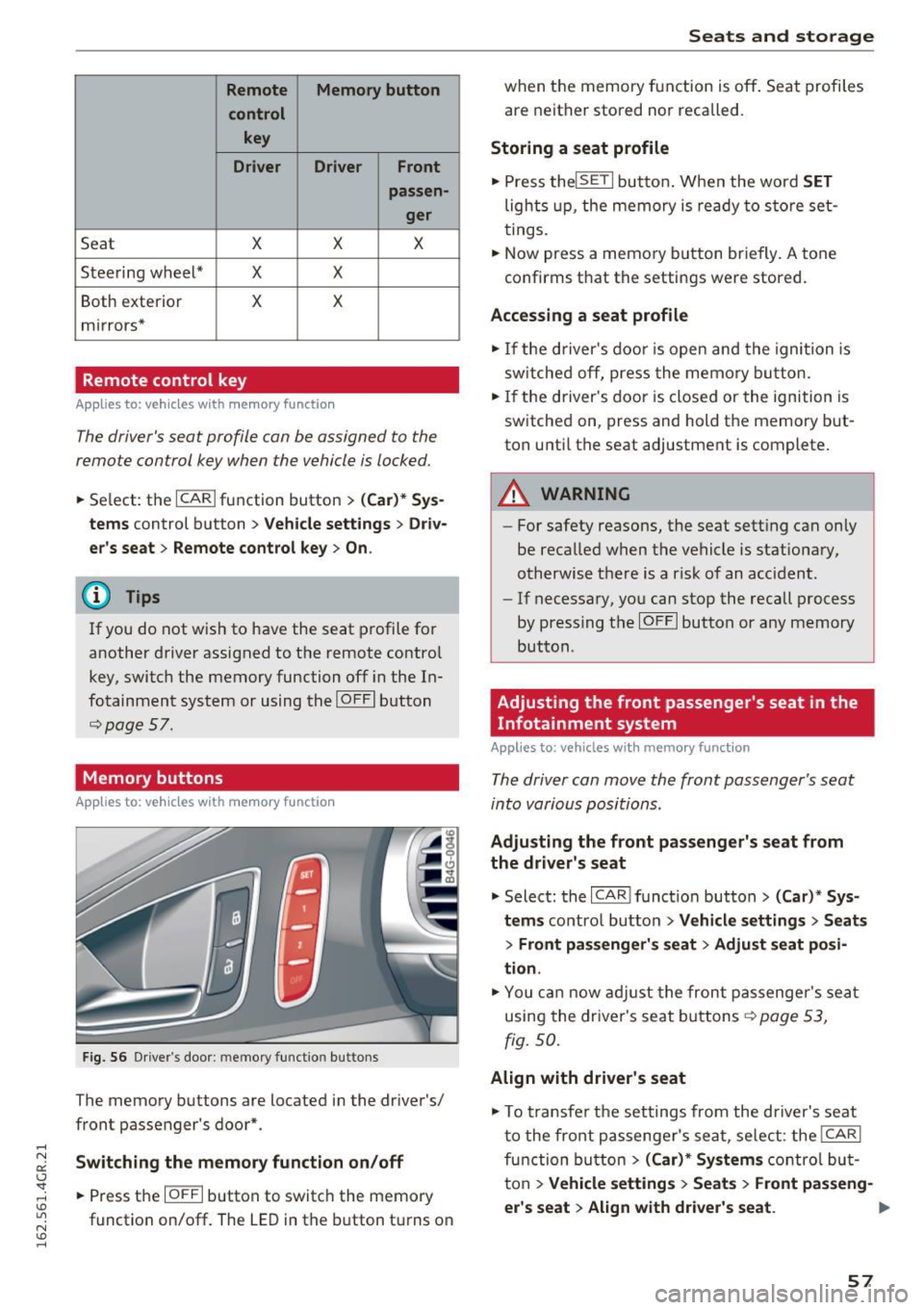
Remote Memory button control key
Driver D river Front
passen-ger
Seat X X X
Steering wheel* X X
Both
exterior X X
mirrors*
Remote control key
Applies to: vehicles with memory function
The driver's seat profile can be assigned to the
remote control key when the vehicle is locked.
• Select: the ICARI function button > (Car)* Sys
tems
control button > Vehicle settings > Driv
er's seat
> Remote control key > On .
(D Tips
If you do not wish to have the seat profile for
another driver assigned to the remote control
key, switch the memory function off in the In
fotainment system or using the IOFFI button
r:::;,pag e 57.
Memory buttons
Applies to: vehicles with memory function
Fig. S6 Driver 's door: memory function buttons
The memory buttons are located in the driver's/
front passenger's door*.
Switching the memory function on/off
• Press the IOFFI button to switch the memory
function on/off. The
LED in the button turns on
Seats and storage
when the memory function is off . Seat profiles
are neither stored nor recalled.
Storing a seat profile
• Press thelSETI button. When the word SET
lights up, the memory is ready to store set
tings .
• Now press a memory button briefly.
A tone
confirms that the settings were stored.
Accessing a seat profile
• If the driver's door is open and the ignition is
sw itched off, press the memo ry button.
.. If the driver's door is closed or the ignition is
switched on, press and hold the memory but
ton until the seat adjustment is complete .
A WARNING
-For safety reasons, the seat setting can only
be recalled when the vehicle is stationary,
otherwise the re is a risk of an accident.
- If necessary, you can stop the recall process
by press ing the IOFFI button or any memory
button.
Adjusting the front passenger's seat in the
Infotainment system
Applies to: vehicles with memory function
The driver can move the front passenger's seat
into various positions.
Adjusting the front passenger's seat from
the driver's seat
• Select: the I CAR I funct ion button > (Car) * Sys
tems
contro l button > Vehicle settings > Seats
> Front passenger's seat > Adjust seat posi
tion .
• You can now adjust the front passenger's seat
using the driver's seat buttons
r:::;, page 53,
fig.
so.
Align with driver's seat
• To transfer the settings from the driver's seat
to the front passenger's seat, select: the I CAR I
fu nction button
> (Car)* Systems control but
ton >
Vehicle settings> Seats > Front passeng-
er 's seat > Align with driver 's seat. ..,.
57
Page 72 of 282
Warm and cold
Basic settings
Applies to: vehicles w ith 4 -zone del uxe automatic climate
co ntrol
The climate control system basic settings ore ac
cessed in the Infotainment system.
.. Select : the ICARI function button > (Car)* Sys-
tems
control button > AC.
Rear seat settings
When this function is selected, all settings for
the rear can be adjusted through the climate con
trol system in the cockpit. The climate control
system settings cannot be adjusted in the rear
seat at the same time. This function switches off
after a certa in period of time or when one of the
controls in the cockpit is pressed .
Recirculation mode
The sensit iv ity level of the automa tic recircula
tion mode can be set at various levels from
Off to
Sensitive. Recirculation mode is controlled auto
matically. If the windows fog up, press the
I @ FRONT I button .
Footwell temperature
You can adjust the footwell temperature so that
it is coo le r or warmer .
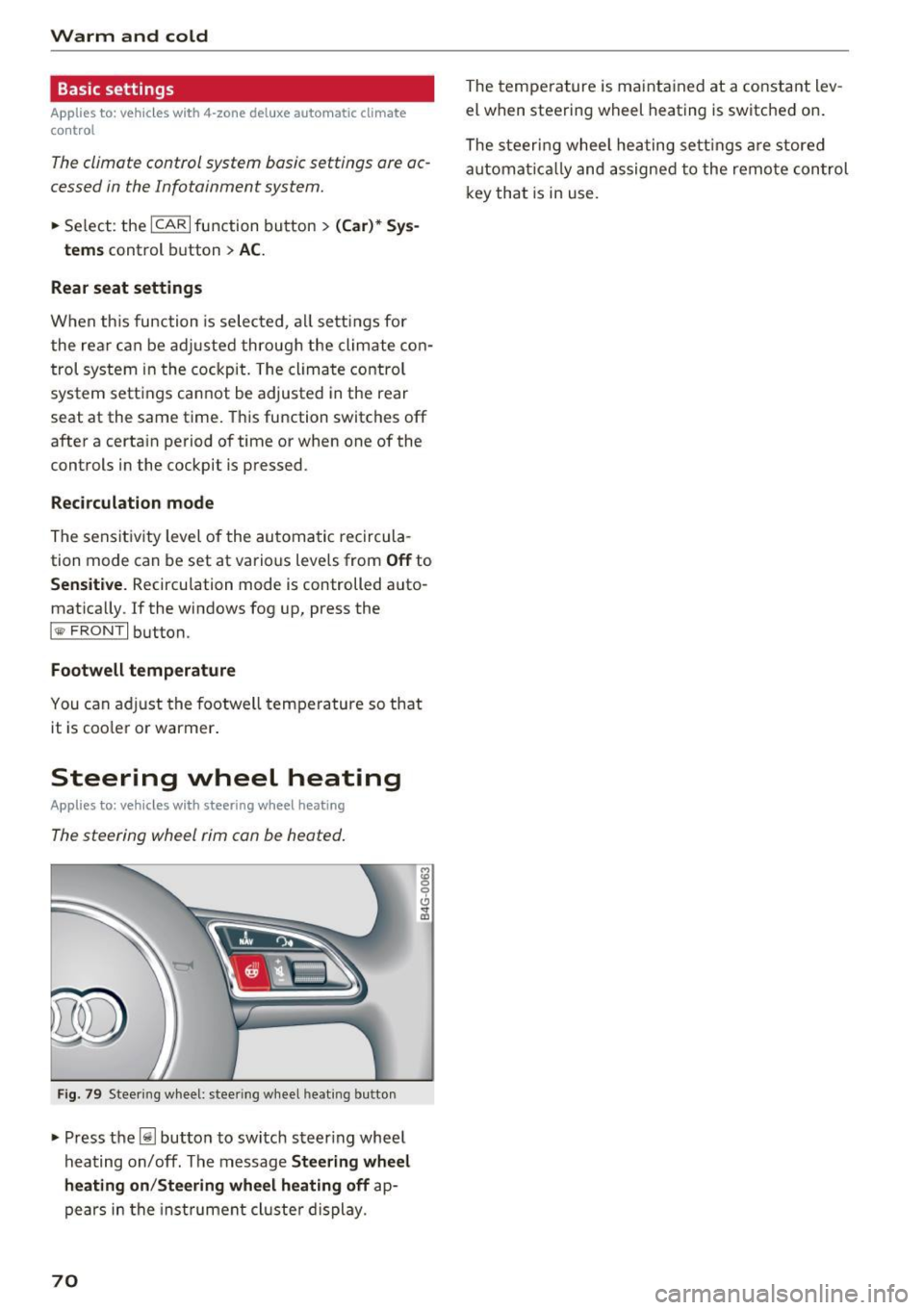
Steering wheel heating
Applies to: ve hicles w ith steering wheel heat ing
The steering wheel rim con be heated.
Fig . 79 Steering wheel: steer ing w heel heating b utton
• Press the~ button to switch steering whee l
hea ting on/off. The message
Steering wheel
heating on /Steering wheel heating off
ap
pears in the inst rument cl uste r display.
70
The temperature is maintained at a constant lev
el when steering wheel heating is switched on.
The steeri ng wheel heating settings are stored
automat ically and assigned to the remote control
key that is in use .
Page 86 of 282
Audi adapt ive crui se con trol a nd b rakin g guar d
The higher the speed, the greater the distance in
yards (meters)
c::;, .&. . The Distanc e 3 setting is
recommended .
The distances provided are specified values. De
pending on the driving situat ion and the how the
vehicle ahead is driving, the actual distance may
be more or less than these target d istances.
The various symbols for the time increments ap
pear briefly in the information line@q
page 81,
fig. 91
when you change the settings.
c:::, _c:::, __ _ Dist ance 1 : This setting co rresponds
to a distance of 92 feet/28 meters when travel ing at 62 mph (100 km/h), or a time interval of 1
second.
c:::, __ c:::, __ Dista nc e 2 : This setting corresponds
to a distance of 118 feet/36 mete rs when trave l
ing at 62 mph (100 km/h), or a time interval of
1.3 seconds .
c:::, ___ c:::,_ Distance 3: This setting corresponds
to a distance of 164 feet/SO mete rs when trave l
ing at 62 mph (100 km/h), or a time interval of
1.8 seconds .
c:::, __ __ c:::, Distance 4 : This setting corresponds
to a distance of 210 feet/64 mete rs when trave l
ing at 62 mph (100 km/h), or a time interval of
2.3 seconds .
A WARNING
Following other vehicles too closely increases
the risk of collisions and ser ious personal in
jury.
- Setting short distances to the traffic ahead
reduces the time and distance available to
br ing your vehicle to a safe stop and makes
it eve n mo re necessary to pay close atten
tion to traffic .
- Always obey applicable traffic laws, use
good judgme nt, and select a safe following
distance for the traffic, road and weathe r
condit ions.
(0 Tips
- Distanc e 3 is set automatically each time
you switch the ignit ion on .
84
- Your standard settings are automatically
stored and assigned to the remote control
key being used.
Selecting the driving mode
App lies to: vehicles with Aud i adapt ive cru ise control
.,. Select the desired driving mode in drive select
c::;,page95.
@ Tips
Your settings are automatically stored and as
signed to the remote contro l key being used.
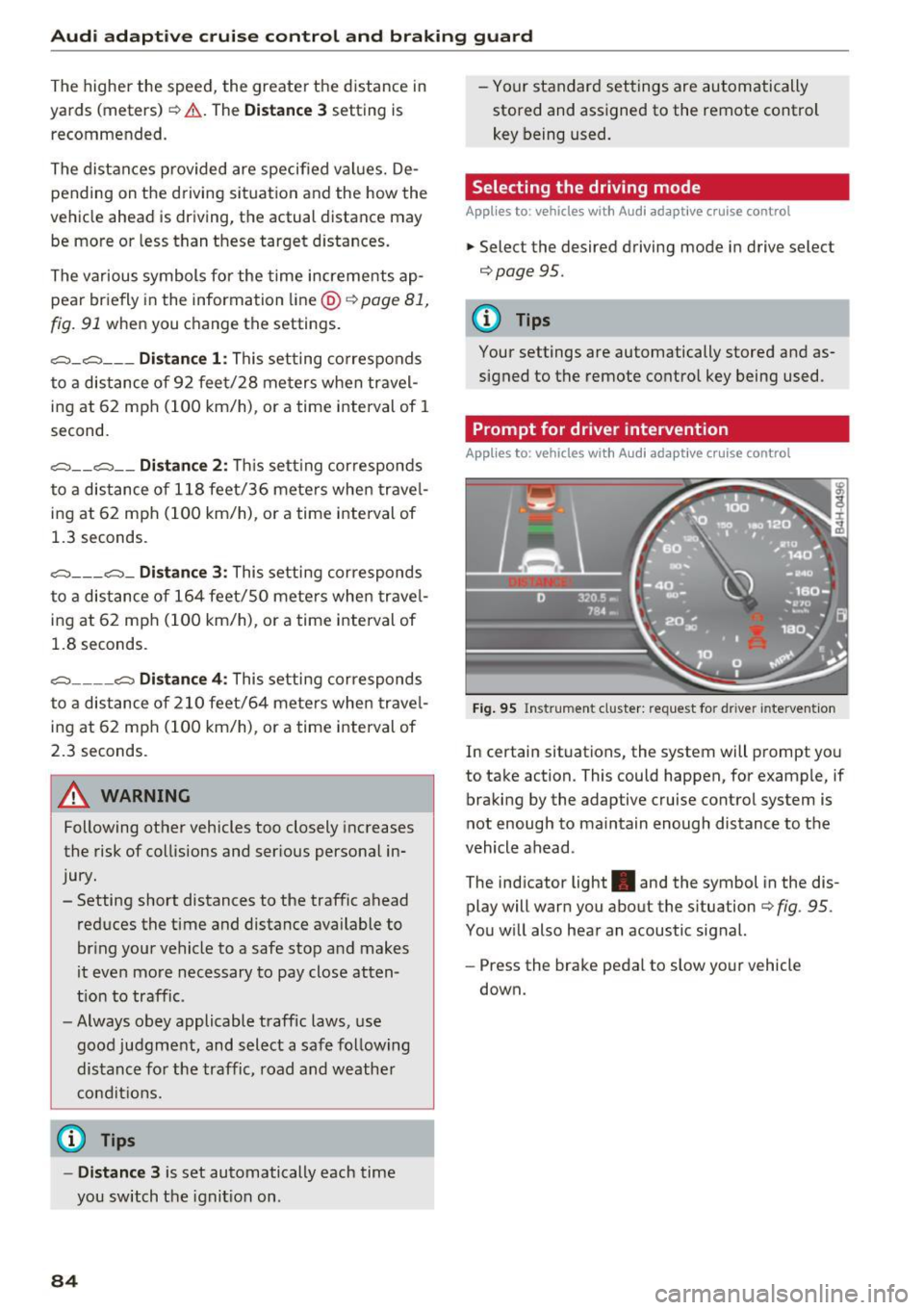
Prompt for driver intervention
App lies to : vehicles with A udi ada ptive c ruise control
Fig . 95 Ins trume nt cluster: request for d river intervention
In c ertain situations, the system w ill prompt you
to take action. This could happen, for example, if
braking by the adaptive cruise control system is
not enough to maintain enough distance to the
vehicle ahead .
The ind icator light . and the symbol in the dis
play will warn you about the s ituation
c::;, fig . 95 .
You w ill also hear an acoustic signal.
- Press the brake pedal to slow your vehicle
down.
Page 88 of 282
Audi adaptive cruise control and braking guard
detection and range limits that may prevent
the proper detection of other vehicles .
- The radar sensor's function and range can
be reduced by rain, snow and heavy spray.
Moving vehicles up ahead may not be
promptly detected or may not be detected
at all.
- Reflective surfaces including crash barriers
or tunnel entrances may impair the function
of the radar sensor.
@ Tips
- You can cancel the braking with increasing
force that is initiated by the system by brak
ing yourself, by accelerating noticeably or
by swerving .
- Braking guard error messages¢
page 86.
- Keep in mind that braking guard can brake
unexpectedly. Always secure any cargo or
objects that you are transporting to reduce
the risk of damage or injury.
Settings in the Infotainment system
Applies to: vehicles with Audi adapt ive cruise contro l
~ Select: the ICARI function button > (Car)* Sys
tems
control button > Driver assistance > Audi
braking guard.
System -
Switch the braking guard On/Off . When
you switch the ignition on, the message
Braking
guard: Off
appears if the system is switched off.
Early warning -The distance and approach warn
ings in the display can be switched
On/Off .
(D Tips
-Your settings are automatically stored and
assigned to the remote control key being
used.
- If you restrict or switch off the ESC, the braking guard also switches itself off
¢page 181 .
- Switch braking guard off when you are load
ing the vehicle onto a vehicle carrier, train,
ship or other type of transportation. This
can prevent undesired warnings from the
braking guard system.
86
Messages
Applies to: vehicles with Audi adapt ive c ru ise control
Braking guard: off
This driver message appears if the system is
turned off via the infotainment . Otherwise, if the
system is turned off, the information appears ev
ery time shortly after the start of the trip.
The driver message also appears if the system is
not available due to a malfunction or if the ESC is
not switched on¢
page 181. If this is the case,
the system will not provide warnings about a
possible collision.
Braking guard: activated
This driver message appears if sharp brake pres
sure was applied due to an acute warning .
ACC: Unavailable!
ACC and Audi braking guard: not available
The system cannot detect moving vehicles up
ahead correctly and is switched off. The sensors
have been displaced or are not working properly.
T he Audi pre sense funct ions may also be affect
e d. Dr ive to your authorized Audi dealer or au
thori zed Audi service facility immediately to have
the malfunction corrected.
ACC: currently unavailable. No sensor vision
ACC and braking guide: currently unavailable.
No sensor vision
This message appears if the sensor view is obstructed, for example by leaves, snow , heavy
spray or dirt. Clean the sensors ¢
page 79,
fig. 86.
ACC: Currently unavailable. Gradient too steep
The road exceeds the maximum possible angle
for proper adaptive cruise control operation .
Adaptive cruise control is switched off .
ACC: Only available in D, S or M
Select the D/S or M selector lever position.
ACC: currently unavailable. Parking brake ap
plied
Page 92 of 282
Audi active lane assist
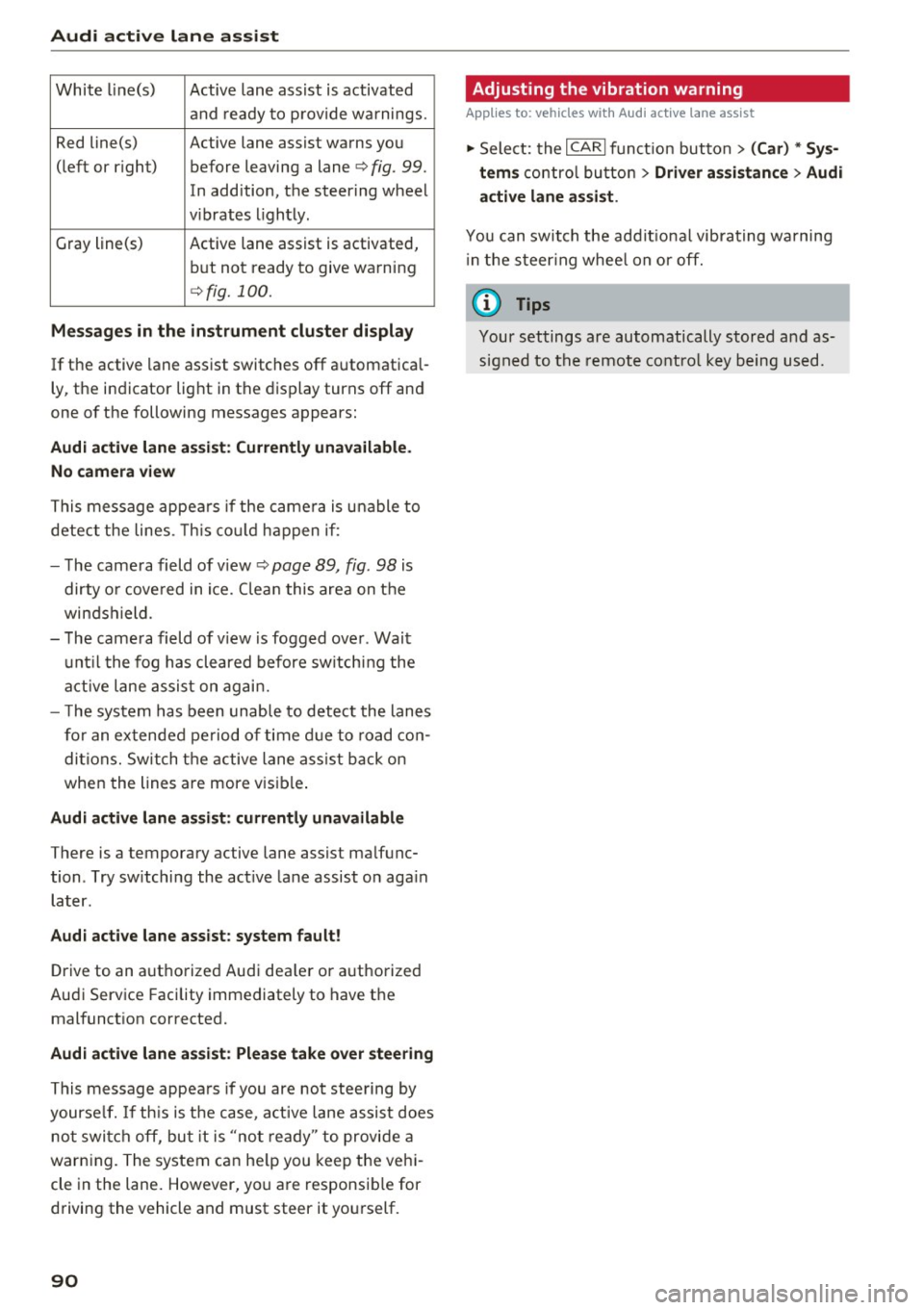
White line(s) Active lane assist is activated
and ready to provide warnings.
Red line(s) Active lane assist warns you
(left or r ig ht) before leaving a lane¢
fig. 99.
In addition, the steering wheel
v ib rates lightly.
Gray line(s)
Active lane assist is activated,
but not ready to give warning
¢fig. 100.
Messages in the instrument cluster display
If the active lane assist switches off automatical
ly, the indicator light in the display turns off and
one of the following messages appears:
Audi active lane a ssist: Currently unavailable.
No camera view
This message appears if the came ra is unable to
detect the lines. This could happen if:
- The camera field of view ¢
page 89, fig. 98 is
dirty o r covered in ice. Clean this area on the
windshield.
- The camera field of v iew is fogged over . Wait
until the fog has cleared before switching the
active lane assist on again.
- T he system has been unable to detect the lanes
for an extended period of time due to road con
ditions. Switch the active lane assist back on
when the lines are more vis ible.
Audi active lane assist: currently unavailable
There is a temporary active lane assist malfunc
tion . Try sw itching the act ive lane assist on aga in
later.
Audi active lane assist: system fault!
Drive to an authorized Aud i dea ler or authorized
Audi Service Facility immediately to have the
malfunct ion corrected.
Audi active lane assist: Please take over steering
This message appears if you are not steering by
yourse lf. If th is is the case, active lane assist does
not switch off, but it is "not ready" to provide a
warn ing. The system can he lp you keep the vehi
cle in the lane. However, you are responsib le for
driving the vehicle and must steer it yourself.
90
· Adjusting the vibration warning
Applies to: vehicles with Audi active lane assist
.,. Select: the I CARI function button > (Car) * Sys
tems
control button > Driver assistance > Audi
active lane assist .
You can switch the addit ional vibrating warning
i n the steer ing whee l on or off.
(D Tips
Your settings are automatically stored and as
signed to the remote control key being used.
Page 99 of 282
Audi drive select
Adjusting the Individual mode
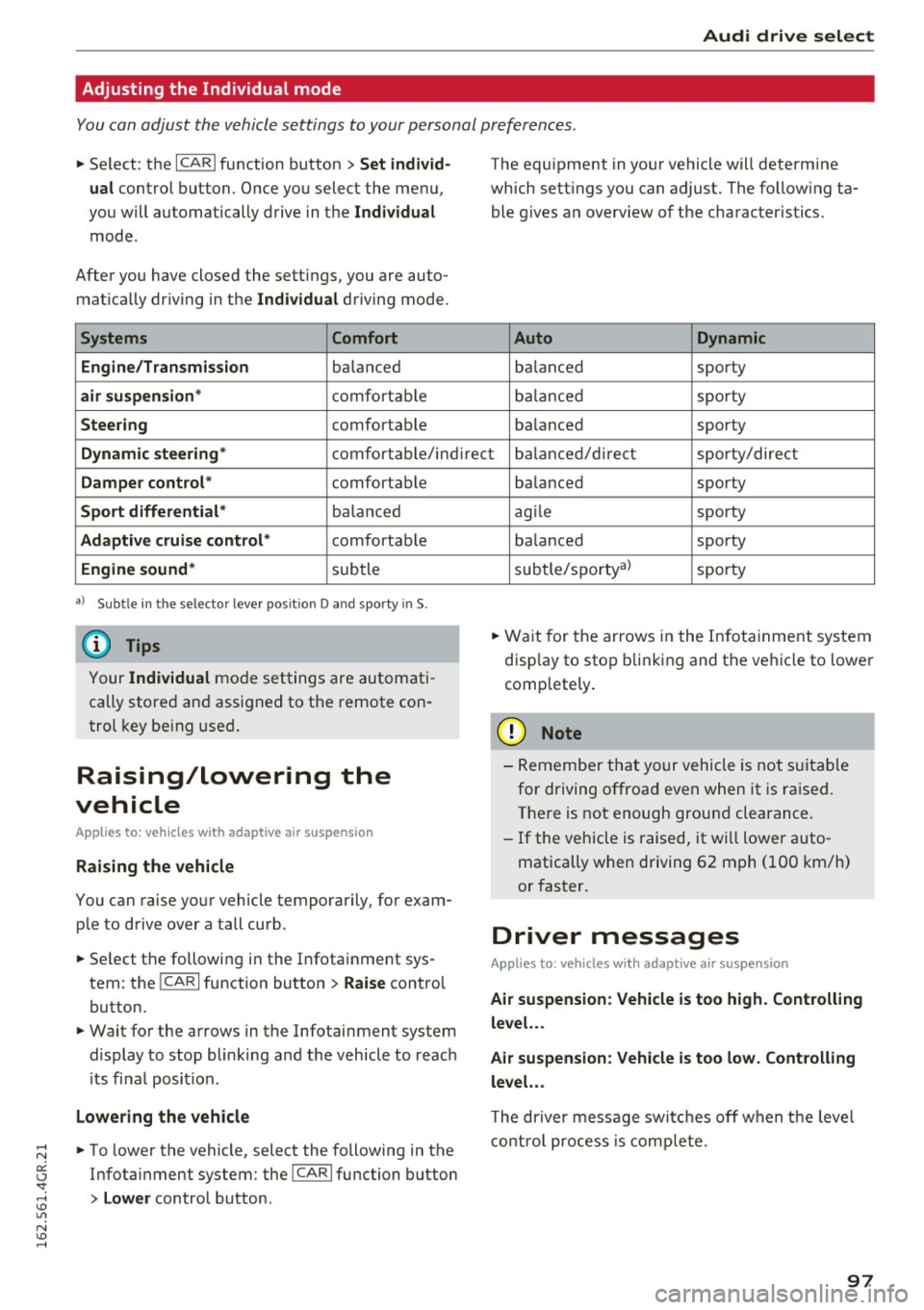
You can adjust the vehicle settings to your personal preferences.
~ Se lect : the ICARI function button > Set indiv id
ual
control button . Once you select the menu,
you wi ll automatically drive in the
Individual
mode .
After you have closed the sett ings, you are auto
mat ica lly dr iv ing in the
Individua l driving mode.
Systems Comfort
Engine/Transmission
balanced
air suspension * comfortable
Steer ing comfortable The equipment in yo
ur vehicle will determine
which sett ings you can adjust. The fo llow ing ta
ble g ives a n overview of the characteristics.
Auto Dynamic
balanced sporty
b alan ced sporty
ba lanced sporty
Dynamic steering * comfort able/in direc t bala nce d/d irect sporty/dire ct
Damper control * comfortable
Sport differential* balan ced
Adaptive cruise control * comfortable
Engine sound * subtle
a} Sub tle in th e se lector leve r po sitio n D a nd sporty in S.
(D Tips
Your Indiv idual mo de settings are automati
cally store d an d assigned to the remote con
t rol key be ing used.
Raising/lowering the
vehicle
Applies to: vehicles with adaptive air suspension
Raising the vehicle
You can raise yo ur vehicle temporarily, for exam
p le to drive ove r a tall curb .
~ Select the followin g in the Infota inment sys
tem : the
ICARI function button > Raise control
button.
~ Wait for the arrows in the Infotainment system display to stop blinking and the vehicle to reac h
its fi na l posi tion.
Lowe ring the vehicle
~ To lower the vehicle, select the following in the
Infotai nment system: the
!CAR I function button
> Lower control button . ba
lanced sporty
ag ile sporty
ba lanced sporty
subtle/sportyal sporty
~ Wa it for the arrows in the In fot ainme nt system
disp lay to stop b linking and the ve hicl e to lowe r
completely.
(D Note
- Remembe r that your vehicle is not s uita ble
for driving offroad even when it is ra ised.
There is not enough ground clearance.
- If the vehicle is raised, it wi ll lower auto
matically when driving 62 m ph (100 km/h)
or faster.
Driver messages
Applies to: vehicles with adaptive air suspension
Air suspension : Veh icle is too high . Controlling
level. . .
Air su spension : Vehicle is too low. Controlling
level. ..
T he driver message switc hes off w hen the leve l
con trol p rocess is com plete.
97
Page 240 of 282
Wheels
_& WARNING
Read and follow the important information
and notes¢
page 236.
Malfunctions
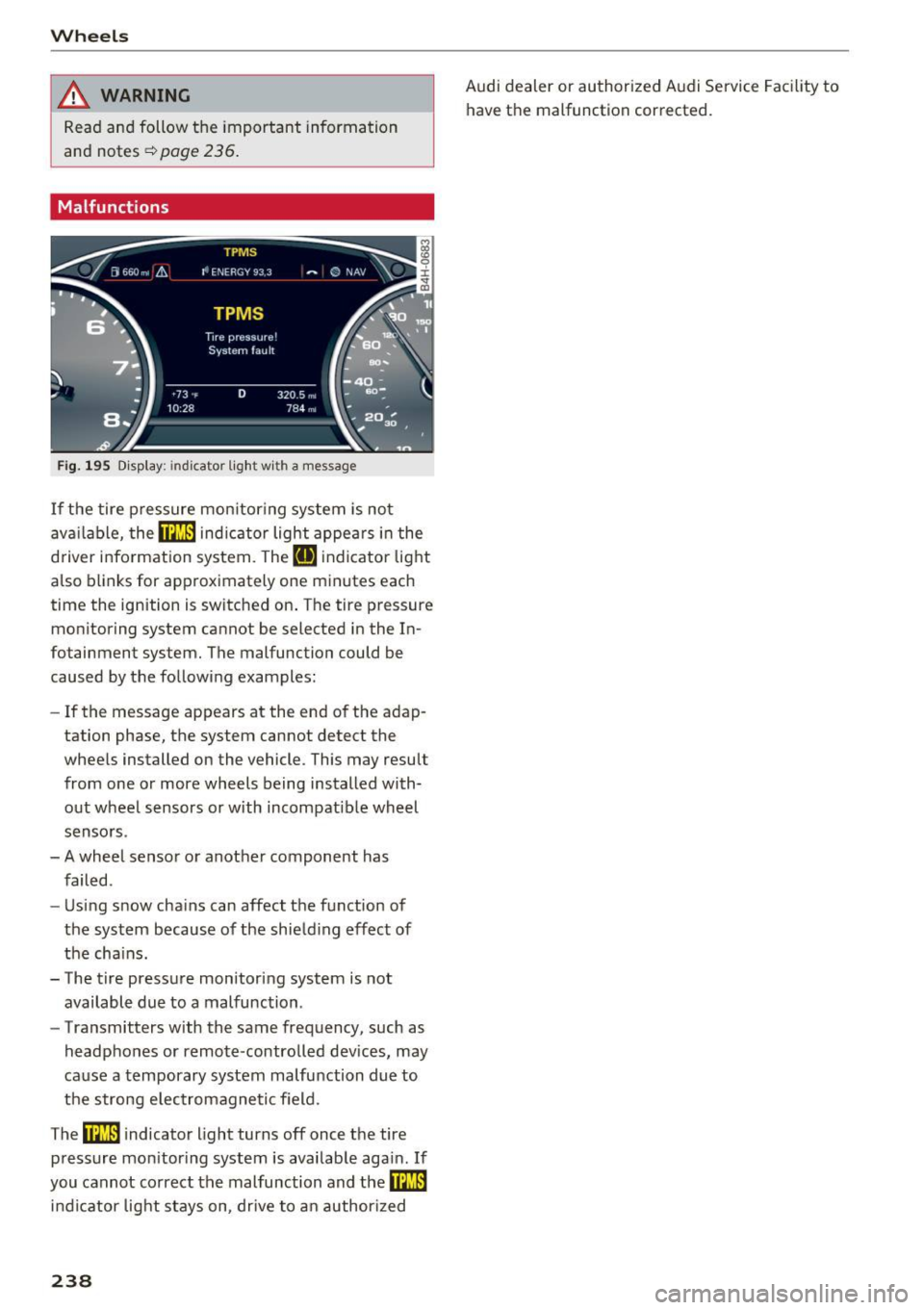
Fig . 195 D isp lay: indicator lig ht w ith a message
If the tire p ressure mon itoring system is not
ava ilable,
the m indic a tor light appea rs i n the
d river information system. The
RI] ind icato r light
also blinks for approximately one minutes each
time the ignition is switched on . The tire pressure
monitoring system cannot be selected in the In
fotainment system. The malfunction could be
caused by the following examples:
- If the message appears at the end of the adap
tation phase, the system cannot detect the
whee ls installed on the vehicle. This may result
from one o r more wheels being installed with
out wheel sensors or with incompatible wheel
senso rs.
- A wheel senso r or anot her component has
failed .
- Using snow cha ins can affect the function of
the system because of the shie ld ing effect of
the cha ins.
- The t ire pressure monitoring system is not
available due to a malfunction .
- Transmitters with the same frequency, such as
headphones or remote-controlled devices, may
ca use a temporary system malfu nction due to
the strong e lec trom agne tic field.
The
ffim i ndicator light turns off once the tire
pressure mon itor ing system is available aga in . If
you cannot correct the malfunction and
the m
in dicator light stays on, drive to an author ized
238
Audi dealer or authorized Audi Service Facility to
have the malfunction corrected.
Page 267 of 282
means that you risk both a substant ia l reduction
in the operationa l safety of your vehicle and an
increased wear of vehicle parts¢
A.
Author ized Audi dealers w ill per form this wor k in
a professional and competent manner or, in spe
cial cases, refer you to a professional company
that spec ializes in such modifications.
A WARNING
Improper repairs and mod ificat ions can
change the way veh icle systems work and
cause damage to the veh icle and ser ious per
sonal injury.
If emergency repa irs must be pe rformed else
where, have the vehicle examined by an au thorized A udi dealer as soon as possib le .
Declaration of
Compliance, Telecom munication and
Electronic Systems
Radio Frequency Devices and Radiocommunica
tion Equipment User Manual Notice.
T he manufacturer is not respons ible for any radio
or TV interference caused by unauthor ized modi
fications to this equ ipment .
Devices
The fo llow ing devices each comp ly w ith FCC Part
15.19, FCC 15.21 and RSS-Gen Issue
1:
- Adaptive cruise control*
- Audi s ide ass ist*
- Cell p ho ne pac kage*
- Convenience k ey*
- E lectron ic immobilizer
- Garage door opener (Homelink)"
- Remote contro l key
- Tire pressure monitoring system
.-. FCC Part 15.19 N
er:
~ This device comp lies wi th pa rt 15 of the FCC
~ Ru les. Ope ra tion is s ubjec t to the following two Lil
N conditions : v:, ......
Consumer inf ormation
(1) This dev ice may not ca use ha rmf ul inter fer
ence, and
( 2 ) th is devi ce m us t ac cep t any inte rference re
ce ived, in clu ding in terference tha t may c ause un
desired ope ra tion.
FCC Part 15.21
CAU TION:
Changes or mod ificat ions not express ly approved
by the party responsible for compliance cou ld
vo id the user's a uth ori ty to ope rate t he equ ip
me nt.
RSS-Gen Issue 1
Operat ion is subject to the following two cond i
t ions:
(1) this device may not cause inte rfe rence, and
( 2 ) this devi ce m us t a cc ep t any inte rference, in
cl udi ng interference tha t may cause undes ired
operation of the device .
265
Page 271 of 282
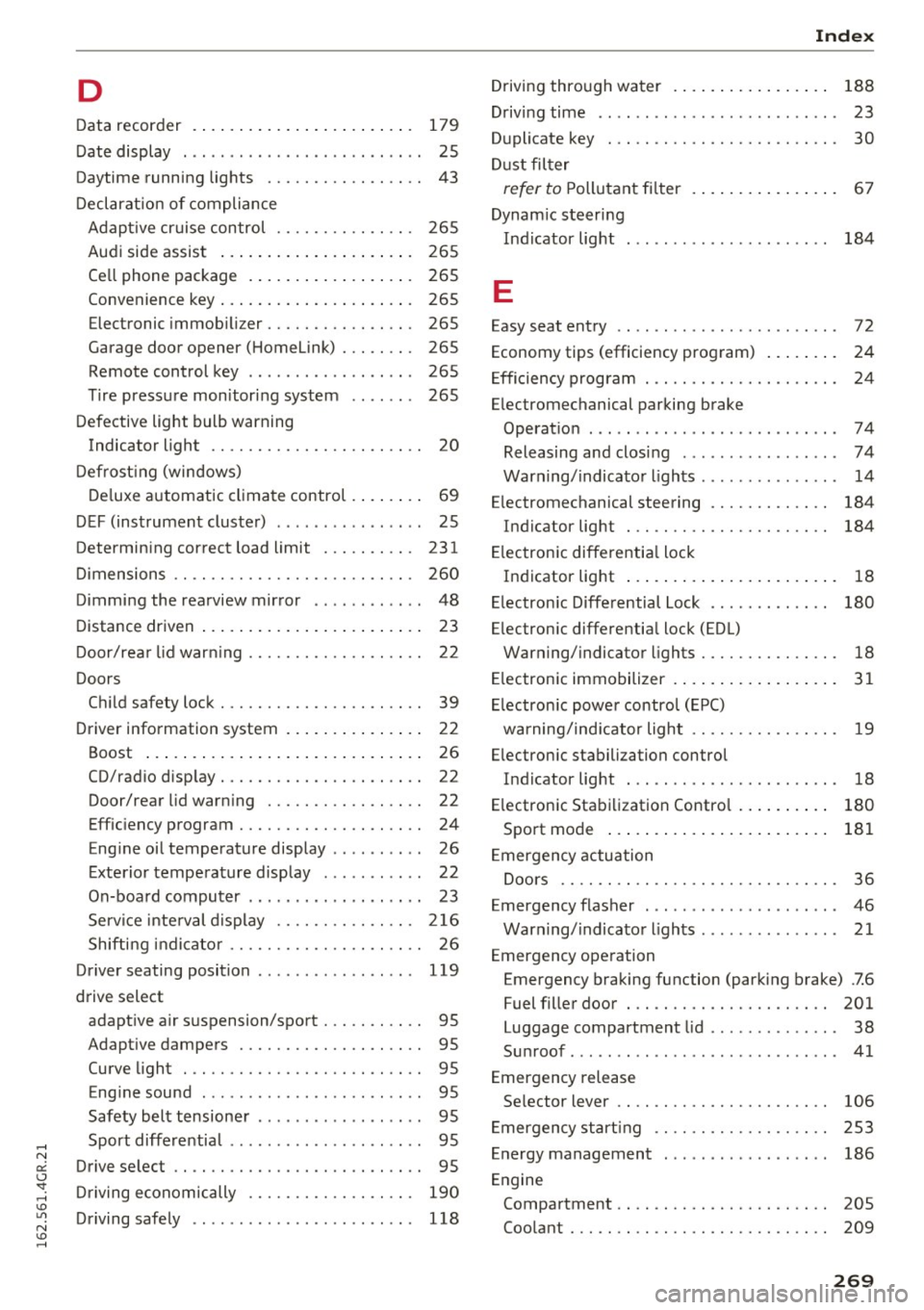
D
Data recorder . . . . . . . . . . . . . . . . . . . . . . . . 179
Date display . . . . . . . . . . . . . . . . . . . . . . . . . . 25
Daytime running lights . . . . . . . . . . . . . . . . . 43
Declaration of compliance
Adapt ive cruise control . . . . . . . . . . . . . . . 265
Audi side assist . . . . . . . . . . . . . . . . . . . . . 265
Cell phone package . . . . . . . . . . . . . . . . . . 265
Convenience key . . . . . . . . . . . . . . . . . . . . . 265
Electronic immobilizer. . . . . . . . . . . . . . . . 265
Garage door opener (Homelink) . . . . . . . . 265
Remote control key . . . . . . . . . . . . . . . . . . 265
Tire pressure monitoring system . . . . . . . 265
Defective light bulb warning Indicator light . . . . . . . . . . . . . . . . . . . . . . . 20
Defrosting (windows)
Deluxe automatic climate control . . . . . . . .
69
DEF (instrument cluster) . . . . . . . . . . . . . . . . 25
Determining correct load limit ... .. .. .. . 231
Dimensions . . . . . . . . . . . . . . . . . . . . . . . . . . 260
Dimming the rearview mirror . . . . . . . . . . . .
48
Distance driven . . . . . . . . . . . . . . . . . . . . . . . . 23
Door/rear lid warning . . . . . . . . . . . . . . . . . . . 22
Doors Child safety lock . . . . . . . . . . . . . . . . . . . . . . 39
Driver information system . . . . . . . . . . . . . . . 22
Boost . . . . . . . . . . . . . . . . . . . . . . . . . . . . . . 26
CD/radio display. . . . . . . . . . . . . . . . . . . . . . 22
Door/rear lid warning . . . . . . . . . . . . . . . . . 22
Efficiency program . . . . . . . . . . . . . . . . . . . . 24
Engine oil temperature display . . . . . . . . . . 26
Exterior temperature display . . . . . . . . . . . 22
On-board computer . . . . . . . . . . . . . . . . . . . 23
Service interval display . . . . . . . . . . . . . . . 216
Shifting indicator . . . . . . . . . . . . . . . . . . . . . 26
Driver seating position . . . . . . . . . . . . . . . . .
119
drive select
adaptive air suspension/sport . . . . . . . . . . . 95
Adaptive dampers . . . . . . . . . . . . . . . . . . . . 95
Curve light . . . . . . . . . . . . . . . . . . . . . . . . . . 95
Engine sound . . . . . . . . . . . . . . . . . . . . . . . . 95
Safety belt tensioner . . . . . . . . . . . . . . . . . . 95
Sport differential . . . . . . . . . . . . . . . . . . . . . 95
Drive select . . . . . . . . . . . . . . . . . . . . . . . . . . . 95
Driving economically . . . . . . . . . . . . . . . . . .
190
Driving safely . . . . . . . . . . . . . . . . . . . . . . . . 118
Index
Driving through water . . . . . . . . . . . . . . . . . 188
Driving time . . . . . . . . . . . . . . . . . . . . . . . . . . 23
Duplicate key . . . . . . . . . . . . . . . . . . . . . . . . . 30
Dust filter
refer to Pollutant filter . . . . . . . . . . . . . . . . 67
Dynam ic steering
Indicator light
E
184
Easy seat entry . . . . . . . . . . . . . . . . . . . . . . . . 72
Economy tips (efficiency program) . . . . . . . . 24
Efficiency program . . . . . . . . . . . . . . . . . . . . . 24
Electromechanical parking brake Operation . . . . . . . . . . . . . . . . . . . . . . . . . . .
74
Releasing and closing . . . . . . . . . . . . . . . . . 7 4
Warning/indicator lights . . . . . . . . . . . . . . .
14
Electromechanical steering . . . . . . . . . . . . . 184
Indicator light . . . . . . . . . . . . . . . . . . . . . . 184
Electronic differential lock
Indicator light . . . . . . . . . . . . . . . . . . . . . . .
18
Electronic Differential Lock . . . . . . . . . . . . . 180
Electronic differential lock (EDL)
Warning/indicator lights . . . . . . . . . . . . . . . 18
Electronic immobilizer . . . . . . . . . . . . . . . . . . 31
Electronic power control (EPC)
warning/ind icator light . . . . . . . . . . . . . . . .
19
Electronic stabili zation control
Indicator light . . . . . . . . . . . . . . . . . . . . . . .
18
Electronic Stabilization Contro l . . . . . . . . . . 180
Sport mode . . . . . . . . . . . . . . . . . . . . . . . . 181
Emergency actuation
Doors . . . . . . . . . . . . . . . . . . . . . . . . . . . . . . 36
Emergency flasher . . . . . . . . . . . . . . . . . . . . .
46
Warning/indicator lights . . . . . . . . . . . . . . . 21
Emergency operation Emergency braking function (parking brake) .7.6
Fuel filler door . . . . . . . . . . . . . . . . . . . . . .
201
Luggage compartment lid . . . . . . . . . . . . . . 38
Sunroof . . . . . . . . . . . . . . . . . . . . . . . . . . . . .
41
Emergency release
Selector lever . . . . . . . . . . . . . . . . . . . . . . . 106
Emergency starting . . . . . . . . . . . . . . . . . . . 253
Energy management . . . . . . . . . . . . . . . . . .
186
Engine
Compartment . . . . . . . . . . . . . . . . . . . . . . . 205
Coolant . . . . . . . . . . . . . . . . . . . . . . . . . . . . 209
269
Page 274 of 282
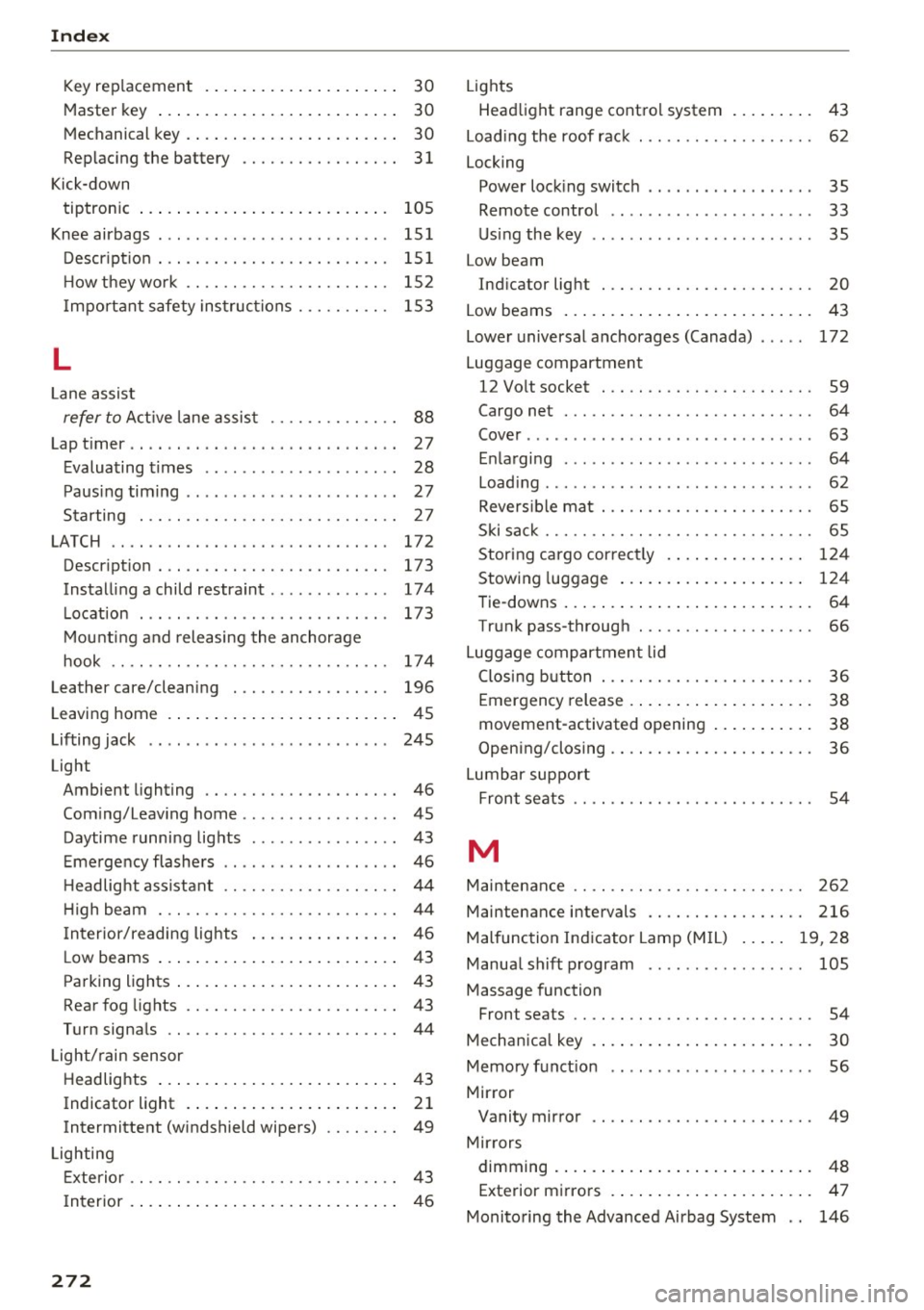
Index
Key replacement . . . . . . . . . . . . . . . . . . . . . 30
Master key . . . . . . . . . . . . . . . . . . . . . . . . . . 30
M echanical key . . . . . . . . . . . . . . . . . . . . . . . 30
Replac ing the battery . . . . . . . . . . . . . . . . . 31
Kick-down tiptron ic . . . . . . . . . . . . . . . . . . . . . . . . . . . 105
Knee airbags . . . . . . . . . . . . . . . . . . . . . . . . . 15 1
D escr ipt io n . . . . . . . . . . . . . . . . . . . . . . . . . 151
H ow t hey wo rk . . . . . . . . . . . . . . . . . . . . . . 15 2
I mport ant safety ins truc tions . . . . . . . . . . 15 3
L
Lane assist
refer to A ct ive lane assis t . . . . . . . . . . . . . . 88
Lap t imer . . . . . . . . . . . . . . . . . . . . . . . . . . . . . 27
E valuating t imes . . . . . . . . . . . . . . . . . . . . . 28
P aus ing timing . . . . . . . . . . . . . . . . . . . . . . . 27
Starting . . . . . . . . . . . . . . . . . . . . . . . . . . . . 27
LATCH .............................. 172
Descr ipt io n . . . . . . . . . . . . . . . . . . . . . . . . . 173
Installing a child restraint ............ . 174
L ocation . . . . . . . . . . . . . . . . . . . . . . . . . . . 173
M ount ing and releasing the anchorage
hook . . . . . . . . . . . . . . . . . . . . . . . . . . . . . . 174
Leather care/cleaning . . . . . . . . . . . . . . . . . 196
L eaving home . . . . . . . . . . . . . . . . . . . . . . . . . 4 5
Lifting jack . . . . . . . . . . . . . . . . . . . . . . . . . . 24 5
Light Ambient lighting . . . . . . . . . . . . . . . . . . . . . 46
Com ing/Leav ing home ... ... ... .. .. .. .. 45
Daytime runni ng lights . . . . . . . . . . . . . . . . 43
E me rgency flashe rs . . . . . . . . . . . . . . . . . . . 46
H eadlig ht assistant . . . . . . . . . . . . . . . . . . . 44
H igh beam . . . . . . . . . . . . . . . . . . . . . . . . . . 44
I n terior/reading lig hts . . . . . . . . . . . . . . . . 4 6
L ow beams . . . . . . . . . . . . . . . . . . . . . . . . . . 43
Parking lights . . . . . . . . . . . . . . . . . . . . . . . . 43
Rear fog lights . . . . . . . . . . . . . . . . . . . . . . . 43
Turn signa ls . . . . . . . . . . . . . . . . . . . . . . . . .
44
Light/ rain sensor
Headlig hts . . . . . . . . . . . . . . . . . . . . . . . . . . 4 3
Indicator light . . . . . . . . . . . . . . . . . . . . . . . 21
Intermittent (w indshield wipers) . . . . . . . . 49
Lighting Exterior . . . . . . . . . . . . . . . . . . . . . . . . . . . . . 43
I nterior . . . . . . . . . . . . . . . . . . . . . . . . . . . . . 46
272
Lights
Head light range cont rol system . . . . . . . . .
43
Load ing the roof rac k . . . . . . . . . . . . . . . . . . . 62
Locking
Power lock ing switc h . . . . . . . . . . . . . . . . . . 35
Remote control . . . . . . . . . . . . . . . . . . . . . . 33
U sing the key . . . . . . . . . . . . . . . . . . . . . . . . 35
Low beam Ind icator light . . . . . . . . . . . . . . . . . . . . . . . 20
Low beams . . . . . . . . . . . . . . . . . . . . . . . . . . . 43
Lowe r universal anchorages (Canada) . . . . . 172
Luggage compartment 12 Vo lt socket . . . . . . . . . . . . . . . . . . . . . . . 59
Cargo net . . . . . . . . . . . . . . . . . . . . . . . . . . . 64
Cover ..... ... ... ... ...... ....... .. .. 63
E nla rgi ng . . . . . . . . . . . . . . . . . . . . . . . . . . . 64
Load ing ...... ... .... ..... ...........
62
Revers ib le mat . . . . . . . . . . . . . . . . . . . . . . . 65
Ski sa ck . . . . . . . . . . . . . . . . . . . . . . . . . . . . . 65
Storing c argo cor rec tly . . . . . . . . . . . . . . . 124
Stowing luggage . . . . . . . . . . . . . . . . . . . . 124
Tie-downs . . . . . . . . . . . . . . . . . . . . . . . . . . . 64
Tr unk pass-throug h . . . . . . . . . . . . . . . . . . .
66
Luggage compartmen t lid
Closi ng b utton . . . . . . . . . . . . . . . . . . . . . . . 36
Emergency release . . . . . . . . . . . . . . . . . . . . 38
movement-activated opening . . . . . . . . . . . 38
Opening/closing . . . . . . . . . . . . . . . . . . . . . . 36
Lumbar sup port
Front seats . . . . . . . . . . . . . . . . . . . . . . . . . . 54
M
Maintenance . . . . . . . . . . . . . . . . . . . . . . . . . 262
Maintenance intervals . . . . . . . . . . . . . . . . . 216
Malfunc tion Ind icator Lamp (M IL) . . . . . 19, 28
Manua l shift p rogram . . . . . . . . . . . . . . . . . 105
Massage function Front seats . . . . . . . . . . . . . . . . . . . . . . . . . . 54
Mech anica l key . . . . . . . . . . . . . . . . . . . . . . . . 30
Memory f unct io n
56
Mirror Vanity mirror . . . . . . . . . . . . . . . . . . . . . . . . 49
Mir rors
dimming . ... .. .. .. .. ... .. ..... ... .. . 48
Exterior mi rro rs . . . . . . . . . . . . . . . . . . . . . . 47
Monito ring the Advanced Airbag System . . 146