height AUDI RS7 SPORTBACK 2016 Owners Manual
[x] Cancel search | Manufacturer: AUDI, Model Year: 2016, Model line: RS7 SPORTBACK, Model: AUDI RS7 SPORTBACK 2016Pages: 282, PDF Size: 70.78 MB
Page 11 of 282
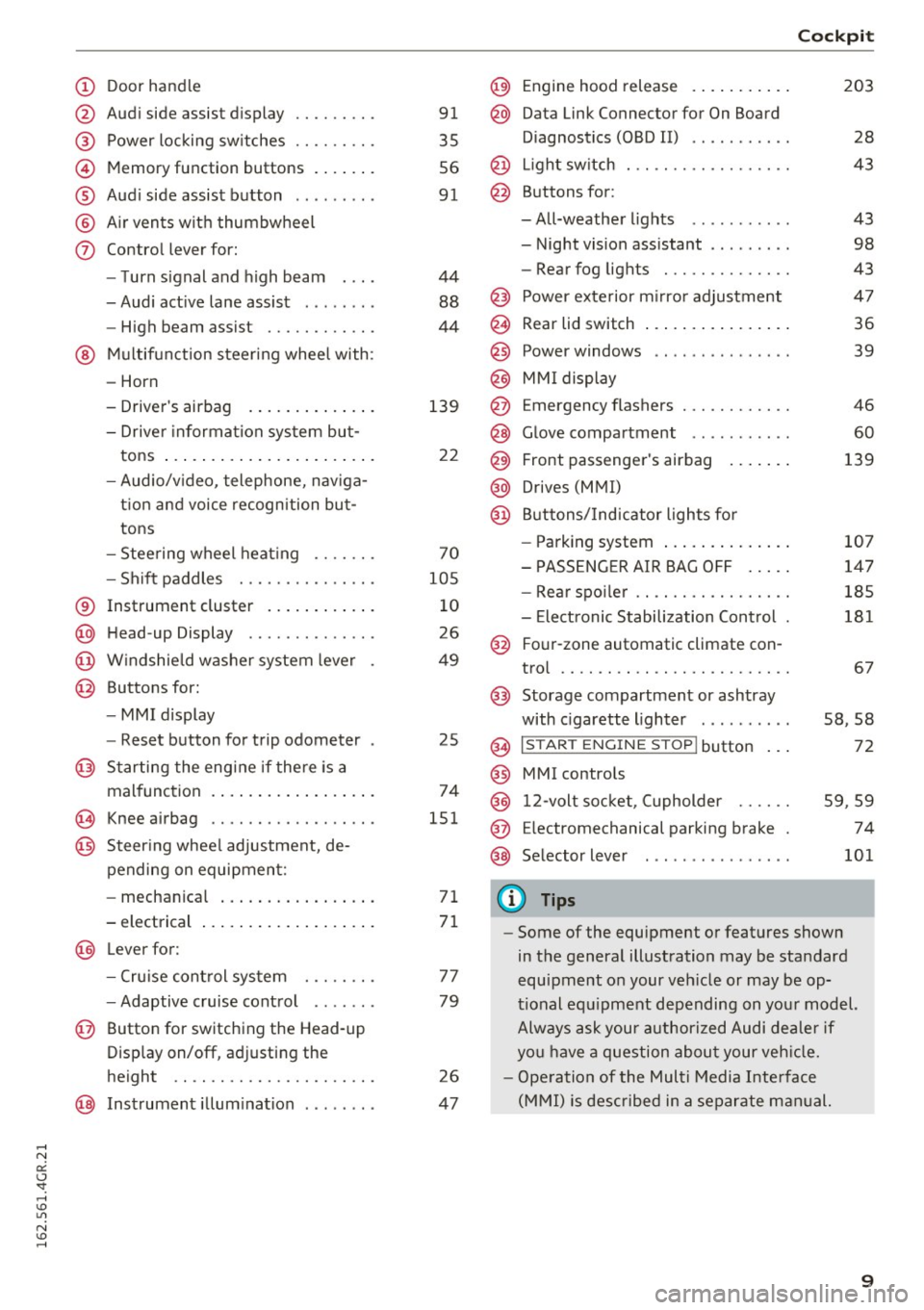
(!) Door handle
@
®
©
®
®
(j)
Audi side assist display
Power locking switches ...... .. .
Memory function buttons ...... .
Audi side assist button .. .. ... . .
Air vents with thumbwheel
Control lever for:
- Turn signal and high beam
- Audi active lane assist . .. ... . .
- High beam assist ......... .. .
@ Multifunction steering wheel with:
- Horn
- Driver's airbag
- Driver information system but-
tons ...................... .
- Audio/video, telephone, naviga
tion and voice recognition but
tons
- Steering wheel heating ...... .
- Shift paddles ............ .. .
® Instrument cluster ........... .
@ Head-up Display ............ . .
@ Windshield washer system lever
@ Buttons for:
- MMI display
- Reset button for trip odometer
@ Starting the engine if there is a
malfunction ................. .
~ Knee airbag .. ............. .. .
@ Steering wheel adjustment, de
pending on equipment:
- mechanical ................ .
- electrical
@ Lever for :
- Cruise control system ... .. .. .
- Adaptive cruise control ...... .
@ Button for switching the Head-up
Display on/off, adjusting the
height .. .. ............... .. .
@ Instrument illumination ....... .
91
35
56
91
44
88
44
139
22
70
105
10
26
49
25
74
151
71
71
77
79
26
47
@) Engine hood release .......... .
@ Data Link Connector for On Board
Diagnostics (OBD II) .... ...... .
@ Light switch . .. .............. .
@ Buttons for :
-All-weather lights - Night vision assistant .. ...... .
- Rear fog lights ............. .
@ Power exterior mirror adjustment
@ Rear lid switch ............... .
@
@
@ Power windows
MMI display
E mergency flashers
@ Glove compartment .......... .
@ Front passenger's airbag ...... .
@ Drives (MMI)
@ Buttons/Indicator lights for
- Parking system ............. .
- PASSENGER AIR BAG OFF .... .
- Rear spoiler .. .............. .
- Electronic Stabilization Control .
@ Four-zone automatic climate con-
trol .... .... .. .............. .
@) Storage compartment or ashtray
with cigarette lighter ......... .
@ I ST AR T ENGINE ST OP ! button
@ MMI controls
@
@
@ 12-volt socket, (upholder
E lectromechanical parking brake
Selector lever
(D Tips
Cockpit
203
28
43
43
98
43
47
36
39
46
60
139
107
147
185
181
67
58,58
72
59 ,59
74
101
- Some of the equipment or features shown
in the general illustration may be standard
equipment on your vehicle or may be op
tional equipment depending on your model.
Always ask your authorized Audi dealer if
you have a question about your vehicle.
- Operation of the Multi Media Interface
(MMI) is described in a separate manual.
9
Page 28 of 282
Instruments and indicator lights
Head-up display
Applies to: vehicles with Head-up display
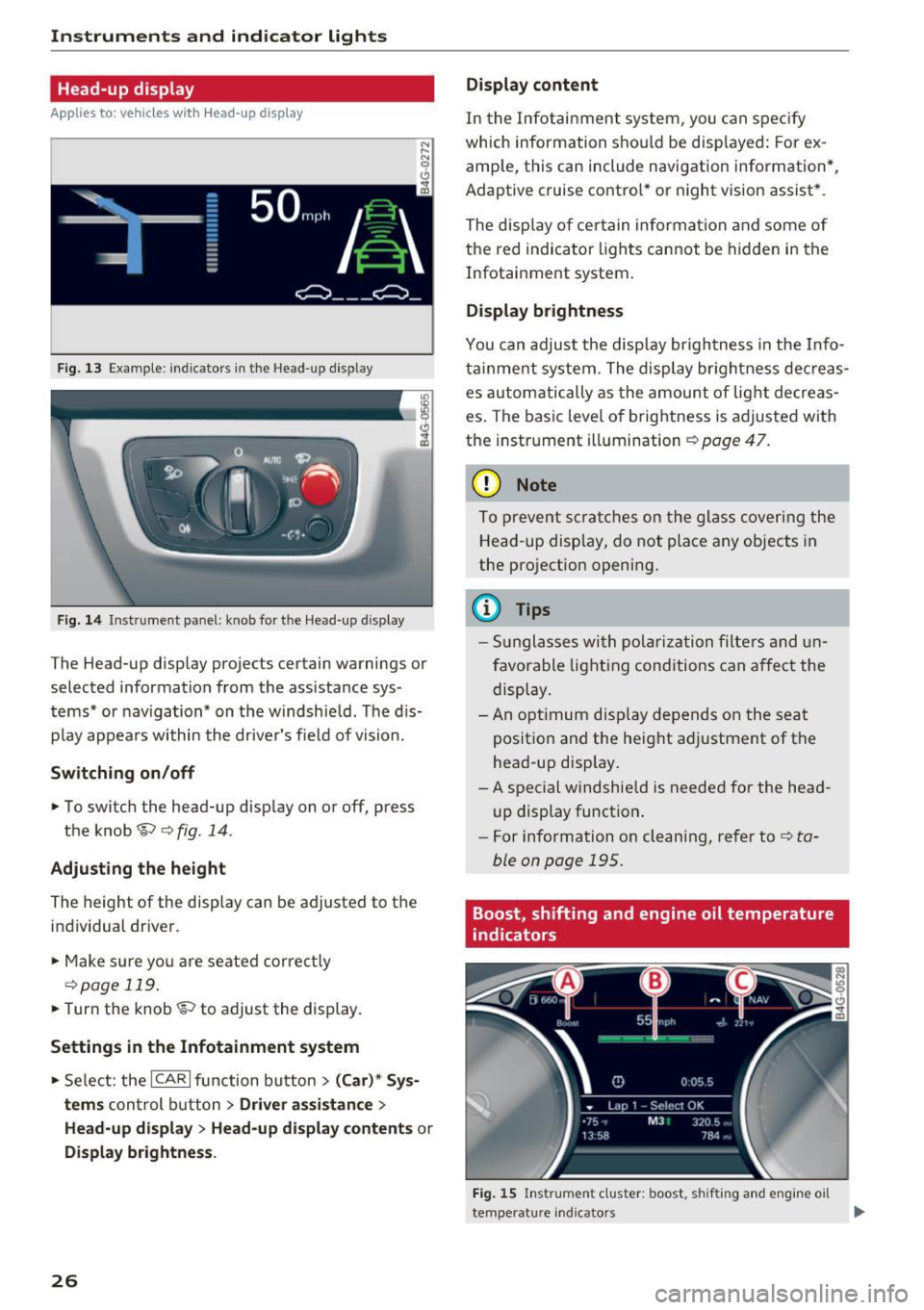
Fig. 13 Example: indicators in the Head-up display
F ig. 14 Inst rument panel: knob for the Head-up display
The Head-up display projects certain warnings or
selected information from the ass istance sys
tems* or navigation* on the windshie ld. The d is
p lay appears within the driver's fie ld of vision.
Switching on/off
• To switch the head-up disp lay on or off, press
the knob~
c:> fig. 14.
Adjusting the height
The height of the display can be adjusted to the
individual driver.
• Make sure yo u are seated correct ly
c:> page 119.
• Turn the knob~ to adjust the display.
Settings in the Infotainment system
• Select: the ICAR I function bu tton > (Car)* Sys
tems
control b utton > Driver assistance >
Head-up displ ay> Head-up di splay contents or
Display brightness .
26
Display content
In the Infotainment system, you can spec ify
which information shou ld be disp layed: For ex
amp le, this can include navigation information*,
Adaptive cruise contro l* or night vision assist *.
The display of certain information and some of
the red indicator lights cannot be hidden in the
Infotainment system.
Display brightness
You can adjust the display brightness in the Info
ta inment system . The display br ightness dec reas
es automatically as the amount of light decreas
es . The basic leve l of brightness is adjusted with
the instrument illumination
c:> page 47.
(D Note
To prevent scratches on the glass covering the
Head-up display, do not place any objects in
the projection opening.
(D Tips
- Sunglasses with polarization filters and un
favorable lighting conditions can affect the
display.
- An optimum display depends on the seat
position and the height adjustment of the
head-up display.
- A special windshie ld is needed for the head
up display function .
- For information on cleaning, refer to
c:> ta
ble on page 195.
Boost, shifting and engine oil temperature
indicators
Fig. 15 Instrument cluster: boost, shifting and engine oil
temperature indicators
Page 39 of 282
the luggage compartment lid. There should be
at least 9 ft (3) of distance. Or
~ Press the Im button in the luggage compart
ment lid
c> fig. 29 (vehicles with convenience
key*). The remote control key must not be
more than approximately 4 ft (1.5 m) away
from the luggage compartment and it must not
be inside the vehicle . The luggage compart
ment lid will automatically close and lock. The
vehicle locks
c> & . Or
~ Press the handle in the luggage compartment
lid . The luggage compartment lid will automat
ica lly close and lock¢.&, .
Setting the luggage compartment lid open
po sit ion
~ Bring the l uggage compartment lid into the de
sired open position
c> (D. The position can be
stored at only one specific height.
~ Press and hold the~ button for at least four
seconds to store the new open posit ion. A visu
al and audio signal w ill follow.
~ T o set a higher open position, wait at least five
seconds and then carefully press the luggage
compartmen t lid upward.
~ Press and hold the l= I button again for at least
f o ur seconds and this wi ll store the new open
position .
The opening/closing p rocess w ill stop immed i
ately if:
- You pull the~ button in the d river's doo r, o r
- You release the
l = I button on the remote con-
trol master key (veh icles with convenience
key*), or
- You press the~ button or
Im button (veh icles
with convenience key*) in the luggage compart
ment l id , or
- You push the hand le in the luggage compart
me nt l id, or
- You press against the luggage compartment l id
against the d irect ion it is mov ing, or
- when someth ing blocks the luggage compart
ment lid or makes it diff icult for the lid to
move .
If you press the handle or one of the~ or
Im but
tons (vehicles w it h convenience key *) now, the
Op ening and cl osing
luggage compartment lid will either open or
close, depending on what angle it was at .
A WARNING
-Read and follow all WARNINGS ¢ page 31,
General description.
- After closing the rear lid, always pull up on
it to make sure that it is p roperly closed.
Otherw ise it could open s uddenly when the
veh icle is moving.
- To help prevent po isonous exha ust gas from
be ing drawn into the vehicle, a lways keep
the rear lid closed whi le dr iving . Never
transport objects larger than those which fit
comp lete ly into the l uggage area, beca use
t hen the rea r lid can not be f ully closed.
- Never leave your ve hicle unattended espe
cially with t he rear lid left ope n. A c hild
could craw l in to the car th rough the luggage
compa rtment and pull the lid shut, becom
in g trapped and unab le to get o ut. To re
duce the risk of pe rsonal inj ury, never let
chi ldren play in or aro und yo ur vehicle . Al
ways keep the rea r lid as we ll as the veh icle
doors closed when not in use .
- Never close the rear lid inattentive ly or with
out checking first. Although the closing
force of the rear lid is limited, you can still
serio usly injure you rself or others .
- Always ensure t hat no one is w ith in range of
the rea r lid when it is moving, in part ic ul ar
close to the hi nges and the uppe r and lower
edges -finge rs or hands can be pinc hed.
- Never try to i nte rfere with the rear lid or
he lp it whe n it is be ing opened o r closed au
tomatically.
@ Note
The luggage compartment lid can bump into
objects s uch as the garage ceiling when open
i ng and become damaged .
(D Tips
-The settings in the Infotainment system de
termine if the luggage compartment lid can
-
be opened using the hand le ¢page 33. 11111-
37
Page 55 of 282
Front passenger's seat
Always move the front passenger seat into the
rearmost position .
To avoid contact with the airbag while it is de
ploying, do not sit any closer to the instrument
panel than necessary and always wear the three
point safety belt provided adjusted correctly. We
recommend that you adjust the passenger's seat
in the following manner:
.. Bring the backrest up to an (almost) upright
posit ion . Do not ride with the seat reclined .
.. For adjustable head restraints: adjust the head
restraint so the upper edge is as even as poss i
ble with the top of your head. If that is not pos
sible, try to adjust the head restraint so that it
is as close to this position as possible
¢ page 55. Mov e the head restraint so that it
is as close to the back of the head as possible.
.. Place your feet on the floor in front of the pas
senger's seat.
Front seats
Controls
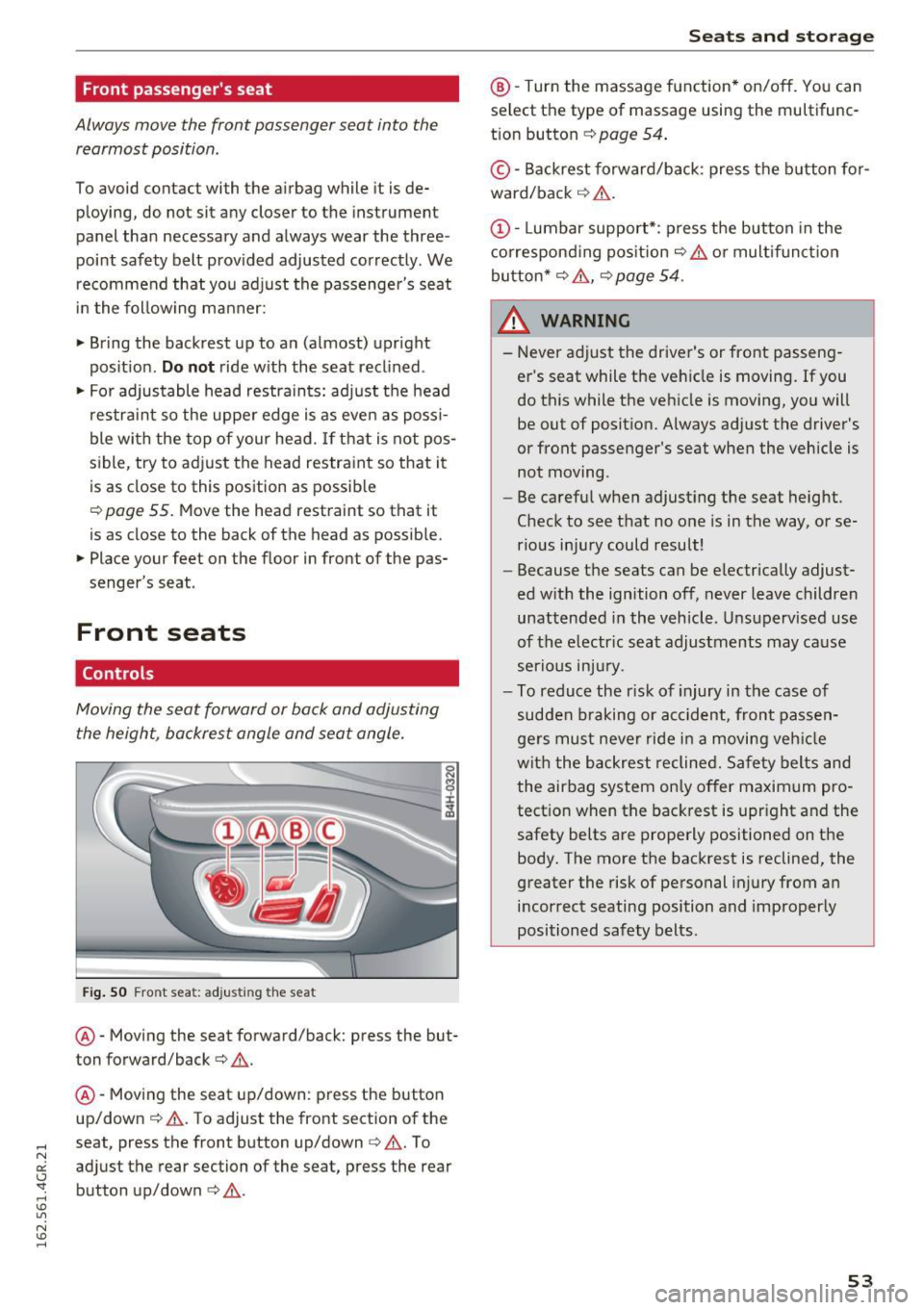
Moving the seat forward or back and adjusting
the height, backrest angle and seat angle.
Fig. SO Front seat: adjusting the seat
@ -Moving the seat forward/back: press the but
ton forward/back¢
A.
@ -Moving the seat up/down: press the button
up/down ¢
A. To adjust the front section of the
seat, press the front button up/down¢
A. To
adjust the rear section of the seat, press the rear
button up/down
c> A .
Seats and storage
@-Turn the massage function* on/off. You can
select the type of massage using the multifunc
tion button
¢ page 54 .
© -Backrest forward/back : press the button for
ward/back ¢
A.
(D -Lumbar support*: press the button in the
corresponding position¢
A or multifunction
button*¢
A , ¢ page 54 .
& WARNING
=
-Never adjust the driver's or front passeng-
er 's seat while the vehicle is moving. If you
do this while the vehicle is moving, you will
be out of position. Always adjust the driver's
or front passenger's seat when the vehicle is
not moving.
- Be careful when adjusting the seat height.
Check to see that no one is in the way, or se
rious injury could result!
- Because the seats can be electrically adjust
ed with the ignition off, never leave children
unattended in the vehicle . Unsupervised use
of the electric seat adjustments may cause
serious injury.
- To reduce the r isk of injury in the case of
sudden braking or accident, front passen
gers must never ride in a moving vehicle
with the backrest reclined. Safety belts and
the airbag system only offer maximum pro
tection when the backrest is upright and the
safety belts are properly positioned on the body. The more the backrest is reclined, the
greater the risk of personal injury from an
incorrect seating position and improperly
positioned safety belts.
-
53
Page 56 of 282
Sea ts and stor age
Multifunction button
Applies to: ve hicles w ith memory funct ion
You con adjust the massage function, lumbar
support, side bolsters and seating surface using
the multifunction button .
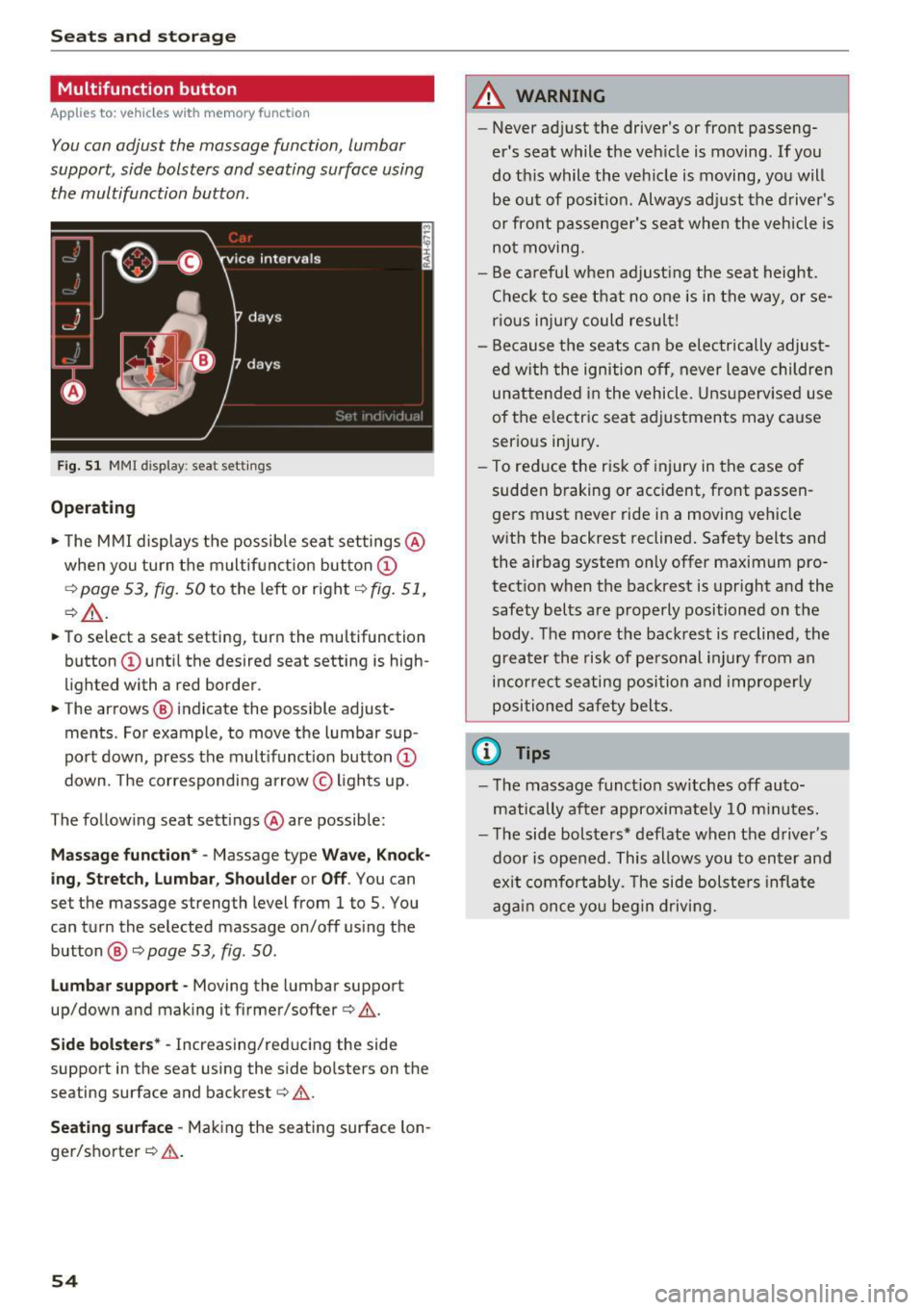
Fig . 5 1 MMI display: seat settings
Operating
.. The MMI displays the possible sea t settings @
when you turn the m ultif unct ion button
CD
¢ page 53, fig. 50 to the left or right¢ fig. 51,
¢ £ .
.. To select a seat setting, turn the multifunction
button
CD until the desired seat setting is high
lighted with a red border .
.. The arrows @ indicate the possible adjust
ments . For example, to
move the lumbar sup
port down, press the mult ifunct ion button
CD
down. The corresponding arrow © lights up.
The following seat sett ings @are possible:
Massage function* -Massage type Wave, Kno ck
ing, Stretch , Lumb ar, Shoulder or Off .
You can
set the massage strength level from 1 to S. You
can turn the selected massage on/off us ing the
button @¢
page 53, fig . 50 .
Lumbar support -Moving the lumbar support
up/down and making it firmer/softer¢&.
Side bolste rs* -Increasing/reducing the side
support in the seat using the side bo lsters on the
seating surface and backrest¢& .
Seating surfac e -Mak ing the seating surface lon
ger/shorter ¢& .
54
A WARNING
-Never adjust the driver's or front passeng
er's seat while the veh icle is moving. If you
do this while the veh icle is moving, you will
be out of posit ion . Always ad just the d river 's
or front passenger's seat when the vehicle is
no t moving.
- Be ca refu l when adjust ing the seat height .
Check to see t hat no one is in the way, or se
rio us inju ry could resu lt!
- Because the seats can be electrically adjust
ed w ith the ignition off,
never leave children
unattended in the vehicle . Unsupervised use
of the e lectric seat adjustments may cause
serious injury.
- To reduce the risk of injury in the case of
sudden braking or accident, front passen
ge rs must never ride in a moving veh icle
with the backrest reclined. Safety belts and
the airbag system only offer maximum pro
tect ion when the backrest is upr ight and the
safety bel ts are properly positioned on the
body. T he mo re the backrest is reclined, the
greater the risk of pe rsonal inju ry from an
incor rect seating posi tion and imprope rly
positioned safety belts .
(D Tips
- T he massage funct io n sw itches off auto
matically after approximate ly 10 m inutes.
- T he side bolsters* deflate when the driver's
door is opened . This allows you to enter and
ex it comfortab ly. The side bolste rs infla te
again once you begin driving.
Page 57 of 282
Armrest
There is a storage compartment under the arm
rest.
~ 0
CJ ..,. ID
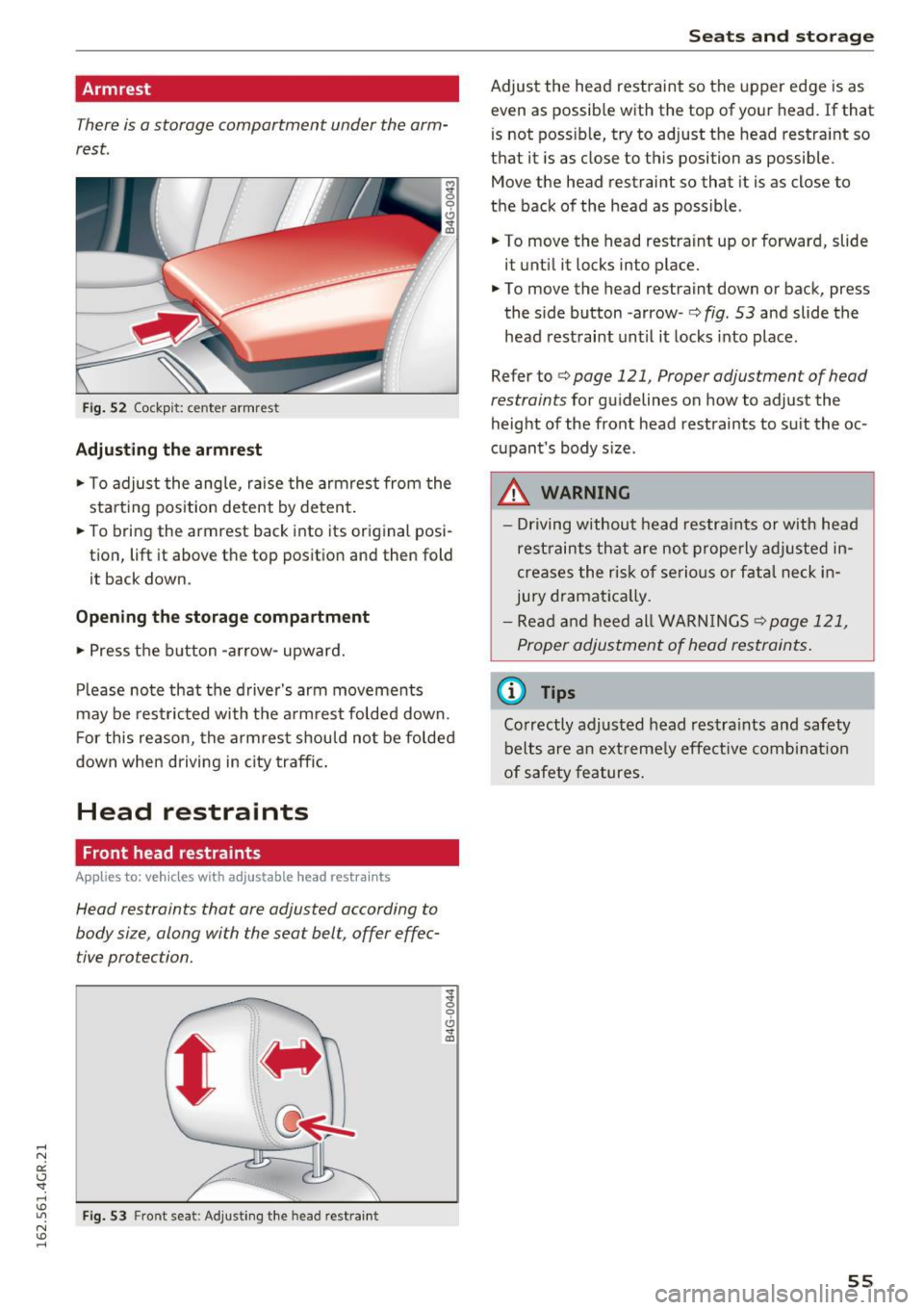
Fi g. 52 Cockpit: center armrest
Adjusting the armrest
... To adjust the ang le, raise the armrest from the
starting position detent by deten t.
... To bring the armrest back into its original posi
tion, lift it above t he top position and then fold
it back down .
Opening the storage compartment
.,. Press t he b utton -arrow- upward.
P lease no te that the driver 's arm movements
may be res tric ted with t he a rm rest folded down.
F or this reason, the armrest should no t be folded
down when driving in city traffic .
Head restraints
Front head restraints
Applies to: veh icles with adjustable head restraints
Head restraints that are adjusted according to
body size, along with the seat belt, offer effec
tive protection.
F ig. 53 F ront seat: Adjust ing t he head restra int
g
0
CJ ..,. ID
Seats and storag e
Adjust the head restraint so the upper edge is as
even as possib le with the top of your head. If that
is not poss ib le, try to adjust the head restraint so
that it is as close to this position as possible .
Move the head restraint so that it is as close to
the back of the head as possible.
... To move the head restraint up or forward, slide
it unti l it locks into place .
... To move the head restraint down or back, press
the s ide button -a rrow-
r::;, fig . 53 and slide the
head restraint un til it locks into place .
Refer tor::;,
page 121, Proper adjustment of head
restraints
for gu idelines on how to adjust the
height of the front head restraints to s uit the oc
cupant's body s ize .
.&, WARNING
-Driving w ithou t head res tra ints or with head
rest raints that are not properly ad justed in
creases the risk of se rio us or f atal neck in
jury dramat ica lly.
- Re ad and heed all WAR NINGS
r::;,page 121,
Proper adjus tment of head restraints .
@ Tips
Correctly adjusted head restra ints and safety
belts are an ext reme ly effe ctive combi nat ion
of safety features.
55
Page 64 of 282
Sea ts and stor age
by Aud i for your vehicle . The same applies to
damage resulting from incorrect roof rack
i nstallation.
- Always check the roof rack mo untings and
hardware before each trip and during a trip
to make sure everyth ing is securely tight
ened . If necessary, ret ighten the mo untings
and check the ent ire system from time to
time .
- After mounting a roof rack system, or when
you transport objects on the roof of your ve hicle, the height of the veh icle is nat urally
i nc reased . Be careful when d riving under
l ow b ridges or in par king ga rages for exam
ple. This could ca use damage to the load
and even the vehi cle itself.
- M ake su re the open rear lid and the sun
r oof* do not come into contac t with the roof
rack .
Loading the roof rack
Always distribute loads evenly. Make sure any
t hing on the roof rack is securely tied down .
• Always distribute the loads on the roof rack
evenly .
• Always attach i tems to the roof rack securely
before you drive off .
The max imum pe rm iss ib le roof weigh t is
220 lb
( 100 kg ).
The roof weight is the tota l of the
weight of the roof rack , the atta chments and the
cargo you are carrying. You must also not exceed
the maximum load we ight for the roof rack you
are us ing .
When using a roof rack system wh ich has a lower
load carrying capacity, you must not use up the
tota l maximum p erm issible load carry ing capac i
ty specified above . Instead, you shou ld load the
r oof rack system only to the maximum capac ity
specified by the manufacturer of the roof rack
system .
.,&. WARNING
Weak, damaged o r improper straps used to
secure items to the roof rack ca n fa il dur ing
62
hard brak ing or in a collision and cause seri
ous persona l injury.
- Make sure the roof rack is installed exactly
as specified above
c> page 61 .
-Always use suitable mo unting straps for se
cur ing items to the roof rack to he lp prevent
items from shifting or flying forward.
- Items on the roof rack must always be se
curely mounted .
- The use of a roof rack can negative ly affect
the way a vehicle handles . Cargo that is
large, heavy, b ulky, long or flat will have a
greater negative influence on the vehicle 's
aerodynamics, center o f grav ity and overall
handling . Always drive slowly, avo id sudden
braking and maneuvers when transporting
cargo on t he roof of your vehicle.
- Never exceed the maximum permissib le
load ca rry ing capacity of the roof of yo ur ve
hicle, t he pe rm iss ible axle weights and the
pe rm issib le tota l we igh t of yo ur vehicle
~ page 259, Weights.
@ For the sake of the environment
As a resu lt of the increased wind resistance
crea ted by a roof ra ck, yo ur vehicle is using
f u el u nnecessa rily . S o remove the roof r ack
a fte r using it .
Luggage compartment
Loading luggage compartment
Luggage items must be stowed securely.
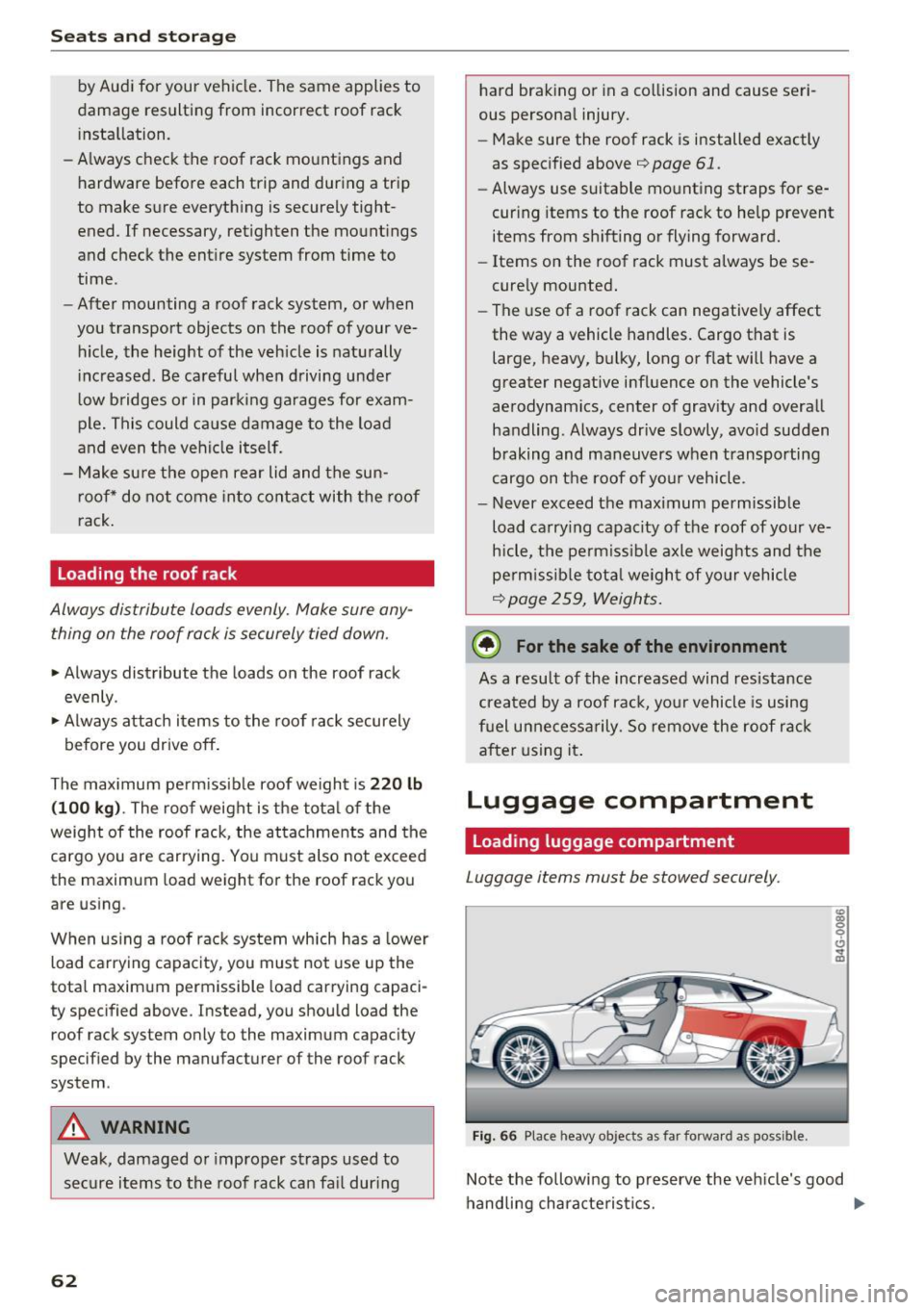
Fig. 66 Place heavy objects as far forwa rd a s po ssib le.
Note the following to p reserve the veh icle's good
handling chara cte ris tics. ..,.
Page 73 of 282
Driving
Steering
Manually adjustable steering wheel
A pplies to: ve hicles with man ually adjustable steering whee l
The height and reach of the steering wheel can
be adjusted .
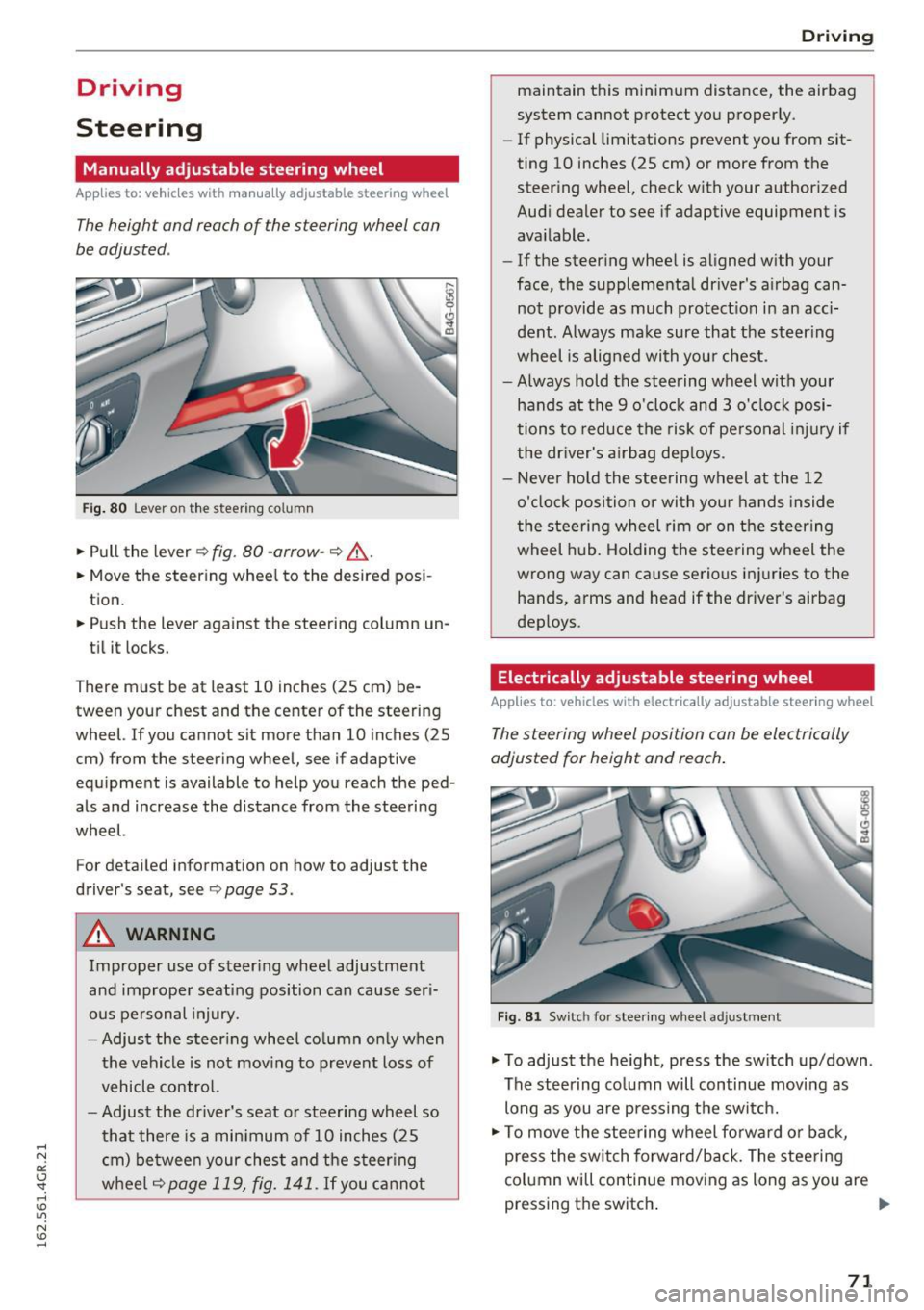
Fig. 80 Lever on the steer ing co lumn
.,. Pull the lever 9 fig . 80 -arrow -9 ,&..
.. Move the steer ing wheel to the desired pos i
tion.
.. Push the lever against the steering column un -
ti l it locks.
There must be at least 10 inches (25 cm) be tween your chest and the center of the steering
wheel. If you cannot sit more than 10 inches (25
cm) from the steering wheel, see if adaptive
equ ipment is available to help you reach the ped
als and increase the distance from the steering
wheel.
For detailed information on how to adjust the
driver's seat, see
9page 53.
A WARNING
Improper use of steer ing whee l adjustment
and improper seating position can cause ser i
ous pe rsonal injury.
- Adjust the s teer ing whee l co lumn only when
the vehicle is not mov ing to prevent loss of
vehicle contro l.
- Adjust the driver's seat or steering wheel so
that there is a min imum of 10 inches (25
c m) be twee n your ches t and the steer ing
w heel
9page 119, fig. 141. If you ca nnot
D rivi ng
maintain this minimum distance, the airbag
system cannot protect yo u proper ly.
- If physical limitations prevent you from sit
ting 10 inches (25 cm) or more from the
steer ing whee l, check with your author ized
Audi dealer to see if adaptive equipment is
available.
- If the steer ing whee l is aligned w ith your
face, the supplementa l driver's a irbag can
not provide as much protect io n in an acci
dent. Always make sure that the steer ing
wheel is aligned with you r chest.
- Always hold the steering wheel with your
hands at the 9 o'clock and 3 o'clock posi
tions to reduce the risk of pe rsonal inju ry if
the dr iver's a irbag dep loys .
- Never ho ld the stee ring wheel at the 12
o'clock position or with you r hands inside
the stee rin g wheel rim or on t he steer ing
wheel hub. Holding the stee ring w heel the
wrong way can cause serious inj uries to the
hands, arms and head if the driver's airbag
deploys .
Electrically adjustable steering wheel
Applies to : vehicles wit h electrically adjustable stee ring wheel
The steering wheel position can be electrically
adjusted for height and reach .
Fig . 81 Sw itc h for stee ring wheel adju stment
.,. To adjust the he ight, press the sw itch up/down .
The steering co lumn will continue moving as
long as you are press ing the sw itch.
.,. To move the stee ring wheel fo rwa rd or back,
press the switch forward/back. The stee ring
column will continue mov ing as long as you are
pressing the switch . ""
71
Page 98 of 282
Audi dri ve s elec t
Cur ve ligh t*
The curve ligh t adapts to driving on curves . The
pivoting action and the lighting are also adapted
to the mode .
Adaptive cru is e control *
The behavior when accele rating can be adjusted
from comfortab le to sporty, depending on the
drive select mode. Adaptive cru ise control also
responds to the driving behavior of the vehicle
ahead in a more conservative or sporty manner.
Engine sound
The sound of the engine is adapted to the select
ed mode and ranges from subt le to sporty.
(D Note
- Make sure there is enough clearance above
and below the veh icle when parking. The
height of the vehicle can change once it is
parked due to temperature f luctuations,
changes to the load conditions and changes
to the driving modes, which can affect clear
ance.
- When transporting the vehicle on a car car
rier, train, ship or by other means, only tie
the vehicle down at the running surface of
the tires, which is the outer circumference.
Securing the vehicle at the axle compo
nents, suspension struts or towing eyes is
not permitted because the pressu re in the
a ir suspension struts can change dur ing
transport. The vehicle may not be secured
sufficiently if this happens.
@ Tips
- In some models, the maximum vehicle
speed can only be reached in the
Auto and
D ynami c modes.
- Se lec ting the
D ynami c mode results in spor
ty shifting characterist ics. The S gear posi
tion engages automatica lly.
96
- In veh icles that have dynamic steering *, op
erating noise is heard when starting or stop
ping the engine . This does not indicate a
problem.
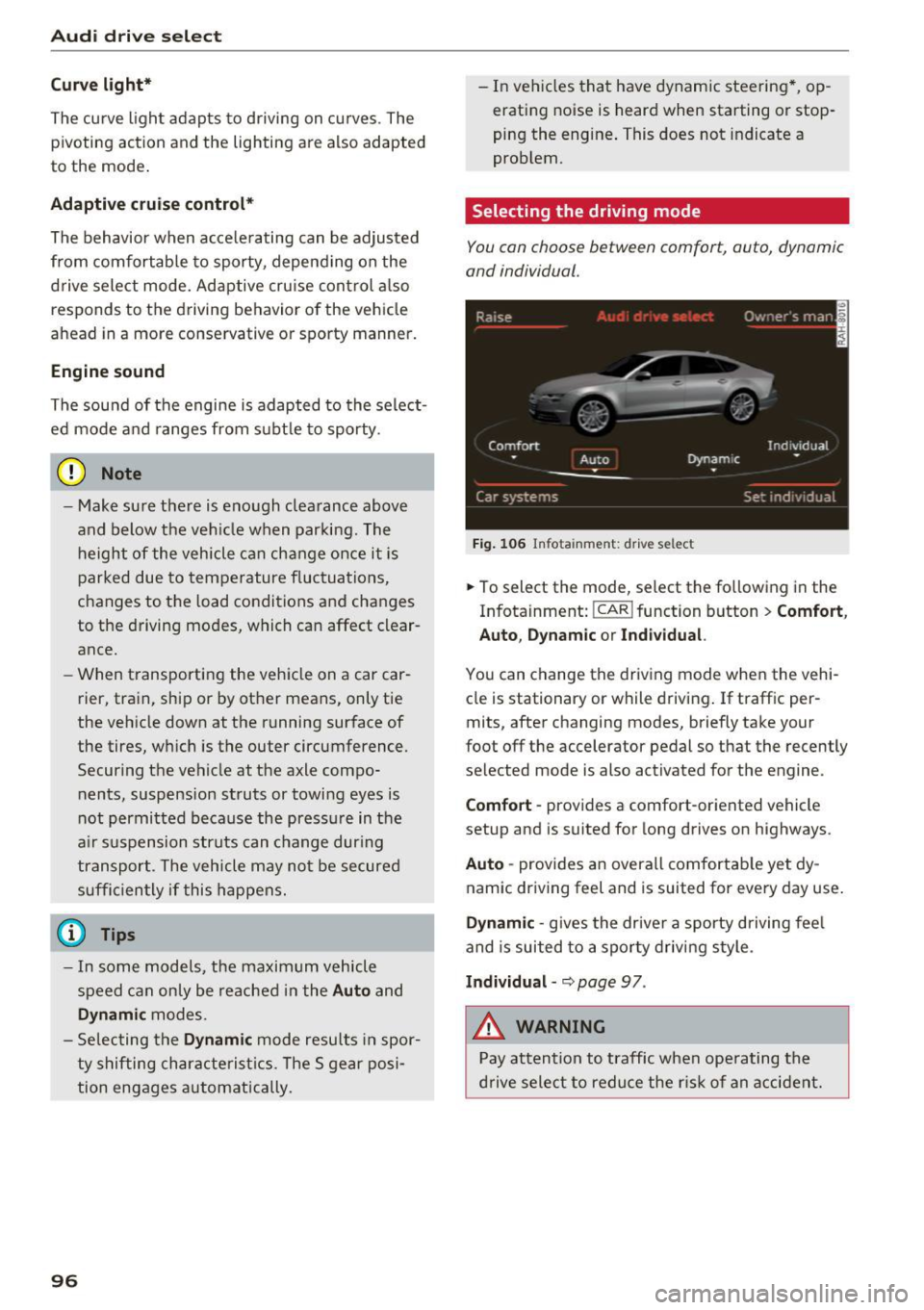
Selecting the driving mode
You con choose between comfort, auto, dynamic
and individual .
Fig. 106 Infota inment: drive se lect
.,. To select the mode, select the following in the
Infotainment:
! CAR ! function button > Comf ort ,
Auto , Dyn amic or In d iv idual.
You can change the driv ing mode when the vehi
cle is stationary or while driving . If traffic per
mits, after changing modes, briefly take your
foot off the accelerator pedal so that the recently
selected mode is also activated for the engine .
Comfo rt -prov ides a comfort-oriented vehicle
setup and is suited for long drives on highways.
Aut o -provides an overall comfortab le yet dy
namic driving feel and is suited for every day use.
Dynami c -gives the drive r a sporty d riving feel
and is suited to a sporty driving style .
Indi vidua l -~ page 97 .
&_ WARNING
Pay attention to traffic when ope rating the
d rive select to reduce the r is k of an accident.
-
Page 120 of 282
Driving sa fe ty
Driving safety
Basics
Safe driving habits
Please remember -safety first!
This chapter contains important information,
tips, instruct ions and warn ings that you need to
read and observe for your own safety, the safety
of your passengers and others. We have summar ized here what you need to know about safety
be lts, a irbags, child restra ints as well as child
safety. Your safety is for us
priority number 1 . Al
ways observe the i nfo rmation and wa rn ings in
this section - for your own safety as well as that
of your passengers.
The information i n this section applies to all
model versions of yo ur vehicle . Some of the fea
tures descr ibed in t his sections may be s tanda rd
equipment on some models, or may be optional
equipment on others . If you are not sure, ask
your authorized Audi dealer.
A WARNING
- Always make sure that you follow the in
structions and heed the WARNINGS in th is
Manual.
It is in your interest and in the in
te rest of your passengers.
- Always keep the comp lete Owner's Litera
ture in your A udi when you lend or sell your
vehicle so that this important information
will always be available to the d river and
passenge rs.
- Always keep the Owner 's literature handy so
that you can find it easily if you have ques
t ions.
Safety equipment
The safety features are part of the occupant re
straint system and work together to help reduce
the risk of injury in a wide variety of occident si t
uations.
Your safety and the safety of your passenge rs
should not be left to chance. Advan ces i n tech
nology have made a var iety of features avai lab le
to help reduce t he risk of injury in an accident .
118
The following is a list of just a few of the sa fety
features in your Audi :
- sophis tica ted safety be lts fo r dr ive r and all pas-
senge r seat ing pos itions,
- safety belt p retensioners,
- safety belt force lim ite rs fo r th e front seats,
- safety belt he ight adjustment systems for the
front seats,
- front airbags,
- knee airbags for the front seats*
- side airbags in the front seats and outer rear
seats*,
- side curtain airbags with ejection mitigation
features,
- special LATCH anchorages for child restraints,
- head rest raints fo r ea ch seating position,
- adj ustab le steering col umn.
These ind iv idual safety features, can work to
ge ther as a system to help protect you and your
passengers in a wide range of acc idents. These
features canno t wo rk as a sys tem if they are not
alw ays cor rec tly adj usted and cor rect ly used.
Safety is everybody' s re sponsibility!
Important things to do before driving
Safety is everybody's job! Vehicle and occupant
safety always depends on the informed and care
ful driver .
For your safety and the safety of your passen
gers,
before driving alway s:
.. Make sure that a ll lights and signals are operat
ing correctly.
.. Make sure that the tire pressure is correct.
.,. Make sure that all windows are clean and afford
good visibility to the outs ide .
.. Sec ure all luggage and othe r items carefully
~page 62, ~ page 60.
.. Ma ke sure that noth ing ca n interfere wi th the
peda ls .
.. Adjust front seat, head restraint and mirrors
correctly for yo ur height .
.. Instruct passengers to adjust the head re
straints according to their he ight.