steering AUDI RS7 SPORTBACK 2016 User Guide
[x] Cancel search | Manufacturer: AUDI, Model Year: 2016, Model line: RS7 SPORTBACK, Model: AUDI RS7 SPORTBACK 2016Pages: 282, PDF Size: 70.78 MB
Page 45 of 282
Lights and Vision
Exterior Lighting
Switching the lights on and off
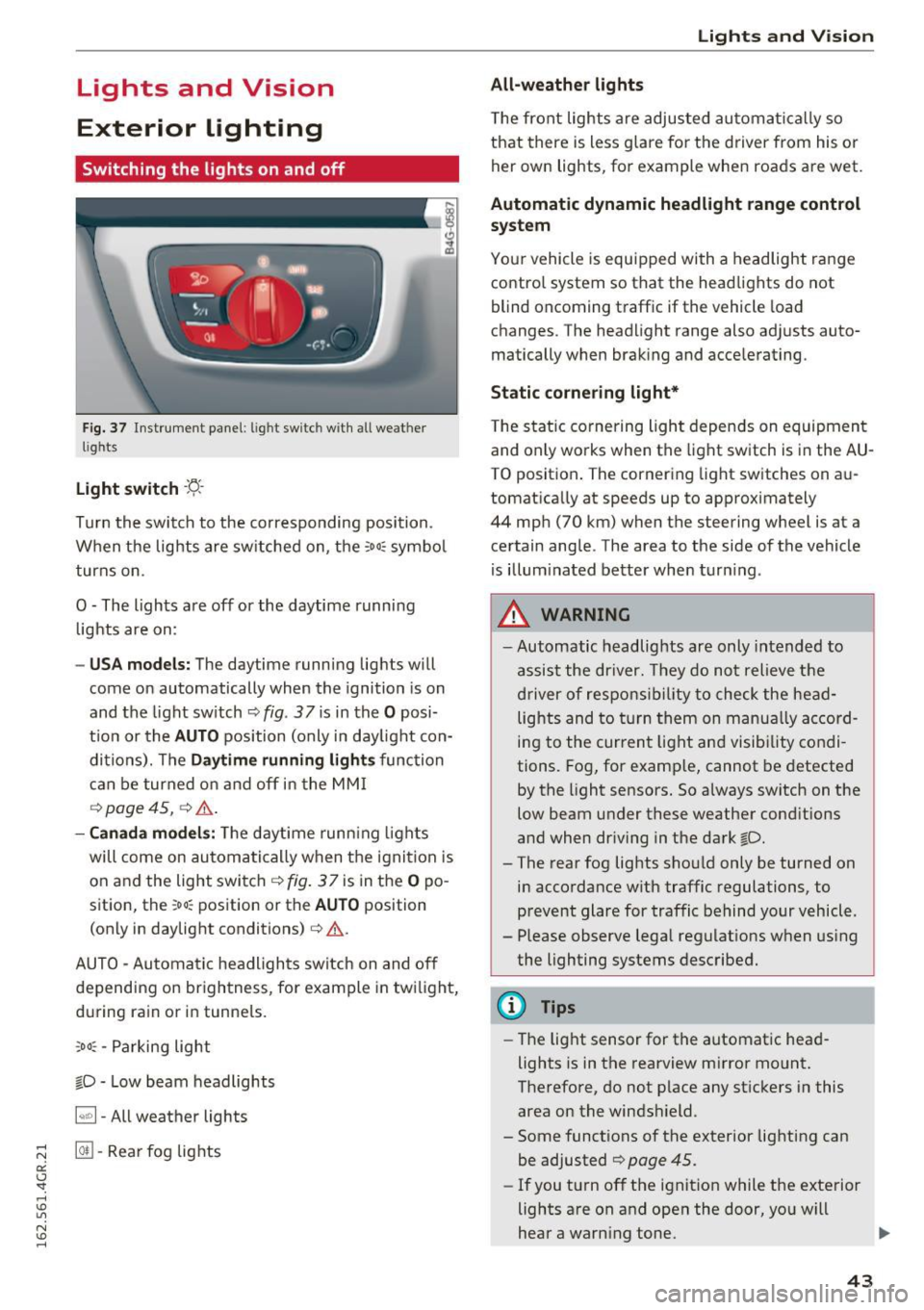
Fig. 3 7 Instrument panel: l ig ht sw itc h w ith all we ath er
li g hts
Light switch -f/
Tu rn the switch to the co rresponding posi tion .
When the lights are sw itched on, the
:oo: symbo l
turns on .
O -The lights are off or the daytime running
l ights are on :
-USA models: The daytime running lig hts will
come on automatically when the ignition is on
and the light sw itch
9 fig . 37 is in the O posi
t io n or th e
AUTO pos ition (only i n day light con
di tions). The
Daytime running lights func tion
c an be turned on and off in the MM I
q page 45, q .&..
-Canada models : The daytime runn ing ligh ts
will come on au toma tically when t he ig nit ion is
on a nd the light swi tch
q fig . 37 is in the O po
sition, the
: oo: position or the AUTO position
(only in daylig ht conditions) ¢,&. .
AUTO -Au tomatic hea dligh ts switc h on and o ff
depending on br igh tness, for example in tw ilight,
d ur ing ra in or in tunne ls.
,oo : -Parking light
io -Low beam headlights
~ - All weather lights
@II -Rea r fo g lig hts
Lights and V ision
All-weather lights
T he front lights a re adju sted au toma tic a lly so
that there is less g lare for the driver from his or
her own lights, fo r example whe n roa ds are wet.
Automatic dynamic headlight range control
system
Yo ur vehicle is equip ped with a headlight r ange
contro l system so that the headlights do not
blind oncoming t raffic if the vehicle load
c h anges . The head light range also ad justs auto
matically when brak ing and acce lerating.
Static cornering light*
T he s tat ic cornering li ght depends on equipment
and only wo rks when the lig ht switch is in the AU·
TO position . The cornering light switches on au
tomat ica lly at speeds up to approximately
44 mp h (70 km) when the steering wheel is a t a
ce rtain ang le . The area to the side of the vehicle
is illum inated bette r when turn ing .
A WARNING
-Automatic headlights are only intended to
a ssi st the driver. They do no t relieve the
dr iver of resp ons ibility to check the head
lig hts and to turn them on manu ally a ccord
i ng to the cur rent light and visib ility co ndi
tions. Fog, for e xamp le , cannot be detected
by the ligh t sensors. So always switch on the
low beam under these weather cond itions
and when dr iving in the da rk
io.
- The rear fog lights sho uld only be turned on
in accordance w ith traffic regulations, to
p revent glare for traffic behind your vehicle.
- Please observe lega l regulat ions w hen us ing
the lighting systems described .
(D Tips
-The lig ht sensor for the automat ic head
lights is in t he rearview m irror mount.
Therefore, do not p lace any st ic kers i n this
area on the winds hield.
- Some functions of the exterior lighting can
be adjusted ¢
page 45.
-If you t urn off the i gnit io n while the exte rior
lights a re on a nd open the d oor, yo u will
hear a warn ing tone.
1J,,
43
Page 46 of 282
Lights and Vision
-In cool or damp weather, the inside of the
headlights, turn signals and tail lights can
fog over due to the temperature difference between the inside and outs ide. They will
clear short ly after sw itching them on. This
does not affect the service life of the light i ng.
Turn signals and high beam lever
The lever on the left side of the steering column
is used to operate the turn signals and the high
beam as well as the headlight flasher.
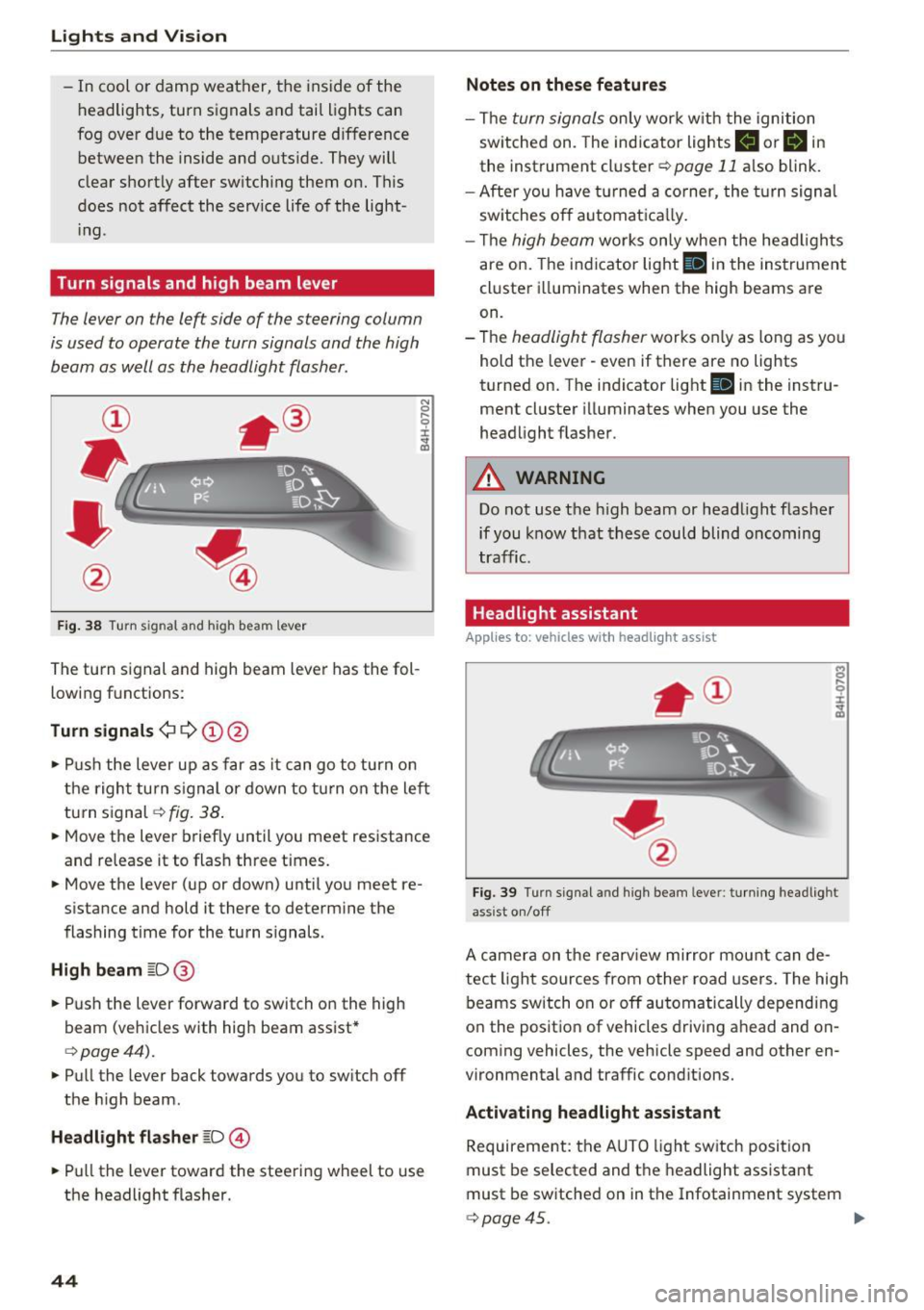
F ig . 38 Turn signal and high beam lever
The turn s ignal and high beam lever has the fol
lowing f unctions:
Turn signals ¢¢@@
N
0 ,.._ 0 ±
~
• Pu sh the lever u p as far as it can go to turn on
t he righ t turn s ignal or down to t urn on the left
turn s ignal
c:> fig. 38 .
• Move the lever briefly until you meet resistance
and release it to flash three t imes.
• Move the lever (up or down) until you meet re
s istance and hold it there to determine the
flashing time for the tu rn signals.
High beam ~D @
• Push the lever forward to switch on the high
beam (veh icles with high beam assist*
c:> page44).
• Pull the lever back towards you to sw itch off
the h igh beam.
Headlight flasher ~D ©
• Pull the lever toward the steering wheel to use
the headlight flasher.
44
Notes on these features
- The turn signals on ly wor k w it h the ignition
sw itched on. The ind icator lights
II or B in
the instrument cluster c:> page 11 also blink.
- After you have turned a co rner, the turn signa l
sw itches o ff automat ica lly.
- Th e
high beam works only when the head ligh ts
are on. The indicator light
Bl in the instrumen t
cl uster illuminates when the high beams are
on.
- The
headlight flasher works o nly as long as yo u
hold the lever - even if there are no lights
turned on. T he indicator light
Bl in the instru
ment cluster i lluminates when you use the
headlight flas her .
A WARNING
Do not use the h igh beam or head light flasher
if you know that these could blind oncoming
traffic.
Headlight assistant
App lies to: vehicles with headlight assist
Fig. 39 Turn s ig nal and high beam leve r: turn ing headlight
ass ist o n/off
A camer a on the rearv iew mirror mou nt can de
tect light sources from other road users. The high
beams switch on or off automatically depending
o n the positio n of vehicles driving ahead and on
coming vehicles, the vehicle speed and other en
vironmental and traffic cond itions.
Activ ating headlight assistant
Requirement: the AUTO light sw itch posit ion
must be selected and t he headlight assistant
must be sw itched on in the Infotainment system
c:> page45. "'
Page 54 of 282
Seat s and sto rage
Seats and storage
General information
Why is your seat adjustment so important?
The safety belts and the airbag system can only
provide maximum protection if the front seats are correctly adjusted .
There are various ways of adjusting the front
seats to provide safe and comfortable support
for the dr iver and the front passenger . Adjust
your seat properly so that:
- you can easily and quickly reach all the switches
and controls in the instrument panel
- your body is properly supported thus reducing
physical stress and fatigue
- the safety belts and a irbag system can offer
maximum protection ¢
page 135.
In the following sections, you will see exact ly
how you can best adjust your seats.
There are spec ial regulat ions and instr uctions for
installing a c hild seat on the front passenger's
seat. Always follow the information regarding
child safety provided in ¢
page 159, Child safe
ty .
A WARNING
Incorrect seating position of the driver and all
other passengers can result in serious person
al injury.
- Always keep your feet on the floor when the
vehicle is in motion - never put your feet on
top o f the instr ument pane l, o ut of the win
dow o r on top of the sea t cushion. This ap
plies espe cially to the passenge rs.
If your
seat ing pos ition is inco rre ct, you increase
the risk of injury in the case of sudden brak
ing or an accident . If the airbag inf lates and
the seating position is incor rect, this could
result in personal injury or even death.
- It is important for both the driver and front
passenge r to keep a d istance o f at least
10 inches (25 cm) between themselves and
the steering wheel and/or instrument pan el. If you're s itting any closer than this, the
airbag system cannot pro tect you properly.
52
In addition, the front seats and head re
straints must be adjusted to your body
he ight so that they can give you maximum
protection .
- Always try to keep as much distance as pos
sible between yourself and the steer ing
wheel or instrument panel.
- Do not adjust the driver's or front passeng
er's seat while the veh icle is moving. Yo ur
seat may move unexpectedly, causing sud
den loss of vehicle contro l and personal in
jury. If you ad just yo ur seat while the veh icle
is moving, you a re o ut of po sition.
, Driver's seat
The correct seat position is important for safe
and relaxed driving .
We recommend that you adjust the dr iver's seat
i n the following manner:
.. Adjust the seat in fore and aft direction so that
you can easi ly push the pedals to the floor
while keep ing your knees slightly bent¢
A. in
Why is your seat adjustment so important? on
page 52 .
.. Adjust the bac krest so that whe n you s it w it h
your back agains t the backrest, yo u can s till
gras p the top of the steering wheel.
.. For adj ustab le head rest raints: adj ust the head
restraint so t he upper edge is as even as possi
ble with the top of your head . If that is not pos
sible, try to adjust the head restraint so that it
is as close to this posit io n as poss ible
¢ page 55 . Move the head restraint so that it
is as close to the back of the head as poss ible .
A WARNING
Neve r place a ny objec ts in the dr iver's foo t
well. An objec t could get into the pedal a rea
a nd interfere with pedal func tion. In c ase of
sud den bra king or an accident, you would not
be ab le to b rake or accelerate .
-
Page 59 of 282
Remote Memory button control key
Driver D river Front
passen-ger
Seat X X X
Steering wheel* X X
Both
exterior X X
mirrors*
Remote control key
Applies to: vehicles with memory function
The driver's seat profile can be assigned to the
remote control key when the vehicle is locked.
• Select: the ICARI function button > (Car)* Sys
tems
control button > Vehicle settings > Driv
er's seat
> Remote control key > On .
(D Tips
If you do not wish to have the seat profile for
another driver assigned to the remote control
key, switch the memory function off in the In
fotainment system or using the IOFFI button
r:::;,pag e 57.
Memory buttons
Applies to: vehicles with memory function
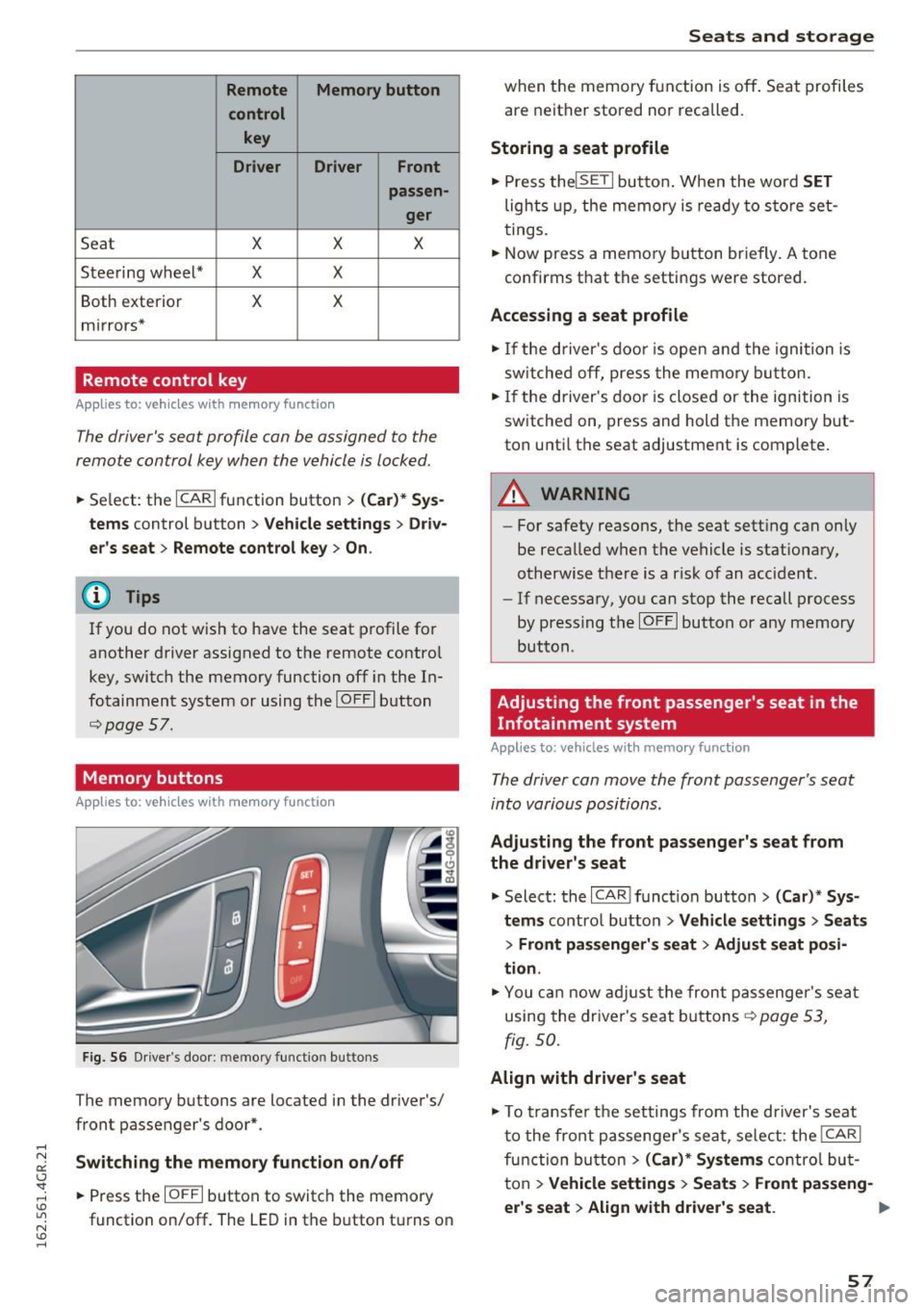
Fig. S6 Driver 's door: memory function buttons
The memory buttons are located in the driver's/
front passenger's door*.
Switching the memory function on/off
• Press the IOFFI button to switch the memory
function on/off. The
LED in the button turns on
Seats and storage
when the memory function is off . Seat profiles
are neither stored nor recalled.
Storing a seat profile
• Press thelSETI button. When the word SET
lights up, the memory is ready to store set
tings .
• Now press a memory button briefly.
A tone
confirms that the settings were stored.
Accessing a seat profile
• If the driver's door is open and the ignition is
sw itched off, press the memo ry button.
.. If the driver's door is closed or the ignition is
switched on, press and hold the memory but
ton until the seat adjustment is complete .
A WARNING
-For safety reasons, the seat setting can only
be recalled when the vehicle is stationary,
otherwise the re is a risk of an accident.
- If necessary, you can stop the recall process
by press ing the IOFFI button or any memory
button.
Adjusting the front passenger's seat in the
Infotainment system
Applies to: vehicles with memory function
The driver can move the front passenger's seat
into various positions.
Adjusting the front passenger's seat from
the driver's seat
• Select: the I CAR I funct ion button > (Car) * Sys
tems
contro l button > Vehicle settings > Seats
> Front passenger's seat > Adjust seat posi
tion .
• You can now adjust the front passenger's seat
using the driver's seat buttons
r:::;, page 53,
fig.
so.
Align with driver's seat
• To transfer the settings from the driver's seat
to the front passenger's seat, select: the I CAR I
fu nction button
> (Car)* Systems control but
ton >
Vehicle settings> Seats > Front passeng-
er 's seat > Align with driver 's seat. ..,.
57
Page 72 of 282
Warm and cold
Basic settings
Applies to: vehicles w ith 4 -zone del uxe automatic climate
co ntrol
The climate control system basic settings ore ac
cessed in the Infotainment system.
.. Select : the ICARI function button > (Car)* Sys-
tems
control button > AC.
Rear seat settings
When this function is selected, all settings for
the rear can be adjusted through the climate con
trol system in the cockpit. The climate control
system settings cannot be adjusted in the rear
seat at the same time. This function switches off
after a certa in period of time or when one of the
controls in the cockpit is pressed .
Recirculation mode
The sensit iv ity level of the automa tic recircula
tion mode can be set at various levels from
Off to
Sensitive. Recirculation mode is controlled auto
matically. If the windows fog up, press the
I @ FRONT I button .
Footwell temperature
You can adjust the footwell temperature so that
it is coo le r or warmer .
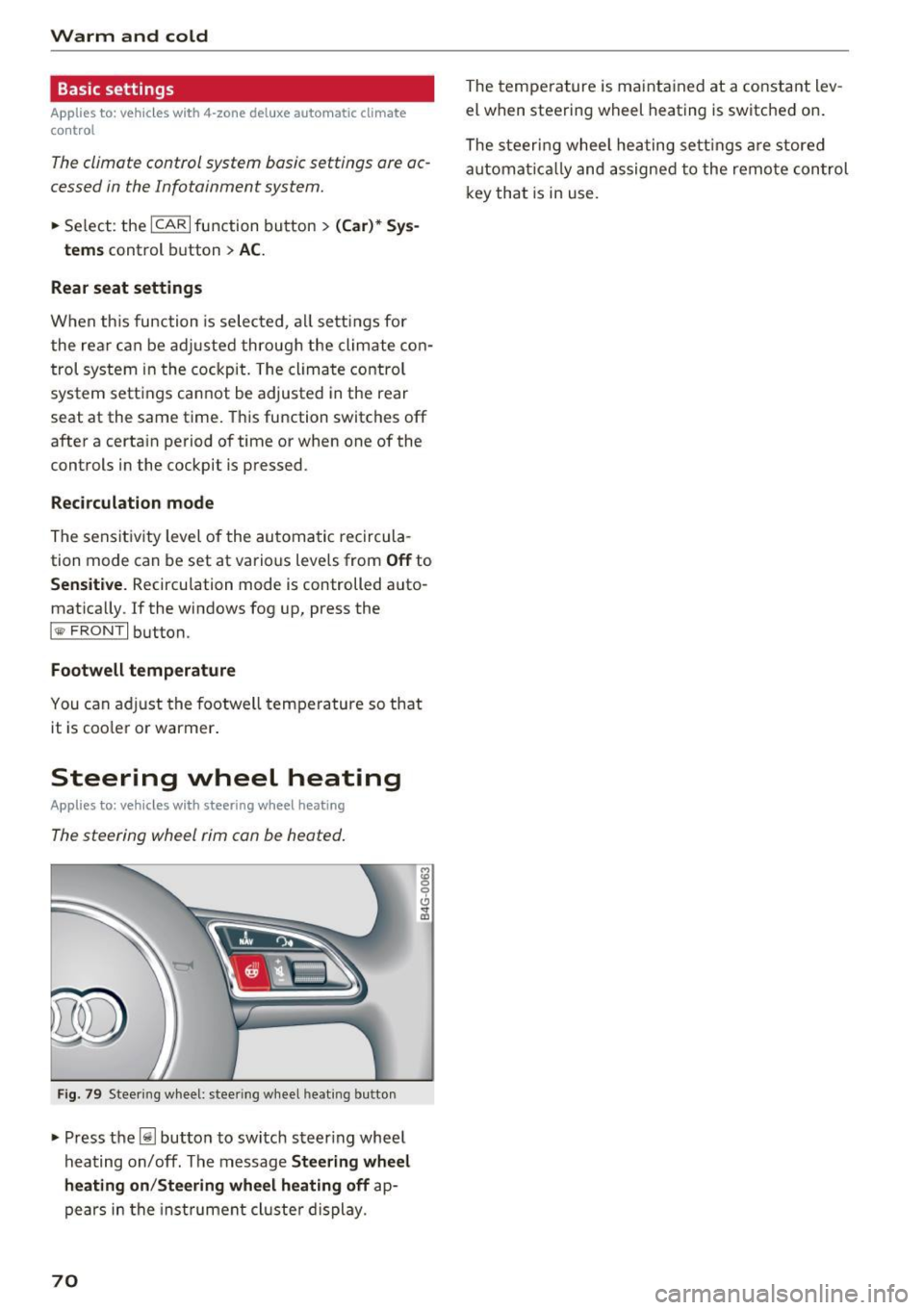
Steering wheel heating
Applies to: ve hicles w ith steering wheel heat ing
The steering wheel rim con be heated.
Fig . 79 Steering wheel: steer ing w heel heating b utton
• Press the~ button to switch steering whee l
hea ting on/off. The message
Steering wheel
heating on /Steering wheel heating off
ap
pears in the inst rument cl uste r display.
70
The temperature is maintained at a constant lev
el when steering wheel heating is switched on.
The steeri ng wheel heating settings are stored
automat ically and assigned to the remote control
key that is in use .
Page 73 of 282
Driving
Steering
Manually adjustable steering wheel
A pplies to: ve hicles with man ually adjustable steering whee l
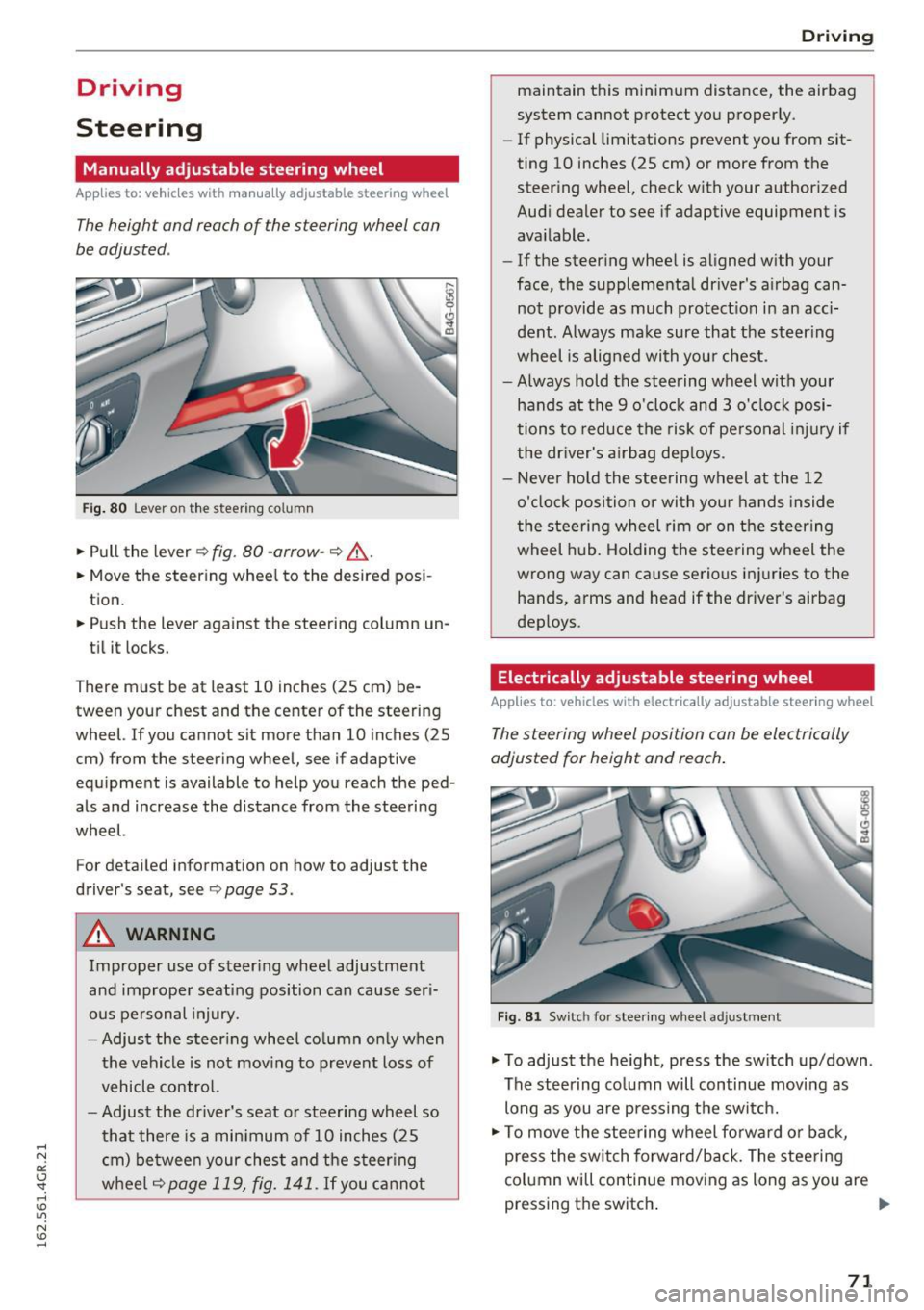
The height and reach of the steering wheel can
be adjusted .
Fig. 80 Lever on the steer ing co lumn
.,. Pull the lever 9 fig . 80 -arrow -9 ,&..
.. Move the steer ing wheel to the desired pos i
tion.
.. Push the lever against the steering column un -
ti l it locks.
There must be at least 10 inches (25 cm) be tween your chest and the center of the steering
wheel. If you cannot sit more than 10 inches (25
cm) from the steering wheel, see if adaptive
equ ipment is available to help you reach the ped
als and increase the distance from the steering
wheel.
For detailed information on how to adjust the
driver's seat, see
9page 53.
A WARNING
Improper use of steer ing whee l adjustment
and improper seating position can cause ser i
ous pe rsonal injury.
- Adjust the s teer ing whee l co lumn only when
the vehicle is not mov ing to prevent loss of
vehicle contro l.
- Adjust the driver's seat or steering wheel so
that there is a min imum of 10 inches (25
c m) be twee n your ches t and the steer ing
w heel
9page 119, fig. 141. If you ca nnot
D rivi ng
maintain this minimum distance, the airbag
system cannot protect yo u proper ly.
- If physical limitations prevent you from sit
ting 10 inches (25 cm) or more from the
steer ing whee l, check with your author ized
Audi dealer to see if adaptive equipment is
available.
- If the steer ing whee l is aligned w ith your
face, the supplementa l driver's a irbag can
not provide as much protect io n in an acci
dent. Always make sure that the steer ing
wheel is aligned with you r chest.
- Always hold the steering wheel with your
hands at the 9 o'clock and 3 o'clock posi
tions to reduce the risk of pe rsonal inju ry if
the dr iver's a irbag dep loys .
- Never ho ld the stee ring wheel at the 12
o'clock position or with you r hands inside
the stee rin g wheel rim or on t he steer ing
wheel hub. Holding the stee ring w heel the
wrong way can cause serious inj uries to the
hands, arms and head if the driver's airbag
deploys .
Electrically adjustable steering wheel
Applies to : vehicles wit h electrically adjustable stee ring wheel
The steering wheel position can be electrically
adjusted for height and reach .
Fig . 81 Sw itc h for stee ring wheel adju stment
.,. To adjust the he ight, press the sw itch up/down .
The steering co lumn will continue moving as
long as you are press ing the sw itch.
.,. To move the stee ring wheel fo rwa rd or back,
press the switch forward/back. The stee ring
column will continue mov ing as long as you are
pressing the switch . ""
71
Page 74 of 282
Driving
There must be at least 10 inches (25 cm) be
tween your chest and the center of the steering
wheel. If you cannot sit more than 10 inches (25
cm) from the steer ing wheel, see if adaptive
equipment is available to help you reach the ped
als and increase the distance from the steering
wheel.
For detai led information on how to adjust the
driver's seat, see
¢ page 53.
In vehicles with the memory function*, the steer
ing column sett ings are stored together with the
seat position.
A WARNING
Improper use of steer ing whee l adjustment
and improper seating position can cause ser i
ous pe rsonal injury.
- Adjust the steering wheel column only when
the vehicle is not moving to prevent loss of
vehicle control.
- Adjust the driver's seat or steering wheel so
that there is a minimum of 10 inches (25
cm) between your chest and the steer ing
wheel
r::.> page 119, fig. 141. If you cannot
mainta in this min imum distance, the airbag
system cannot protect you properly.
- If phys ica l limitations prevent you from sit
t ing 10 inches (25 cm) or more from the
steering wheel , check with your authorized
Audi dealer to see if adaptive equ ipment is
available.
- If the steering wheel is aligned with your
face, the supp lemental driver's airbag can
not provide as m uch protection in an acci
dent. Always make sure that the steering
wheel is aligned w ith your chest.
- Always hold the steer ing whee l with your
hands at the 9 o'clock and 3 o'clock posi
tions to reduce the risk of personal injury if
the driver's airbag deploys .
- Never hold the steer ing wheel at the 12
o'clock posit ion or w ith your hands inside
the steering wheel rim or on the steering
wheel hub . Holding the steer ing whee l the
wrong way can cause ser ious injuries to the
hands, arms and head if the driver's airbag
deploys.
72
-
Easy seat entry
Applies to: vehicles with power steering wheel adjustment
Easy seat entry makes it easier to enter and exit
the vehicle by adjusting the steering column au
tomatically .
.,. In the Infotainment system, select the ICARI
function button > ( Car )* Systems control but
ton
> Vehicle settings > Seats > Driver's seat>
Easy seat entry > On .
When easy seat entry is switched on, the steer ing
column goes back up into the park position when
the ignit ion is switched off . After enter ing the ve
hicle, the steering col umn returns to t he sto red
pos ition once the ign it ion is swi tched on.
Starting and stopping
the engine
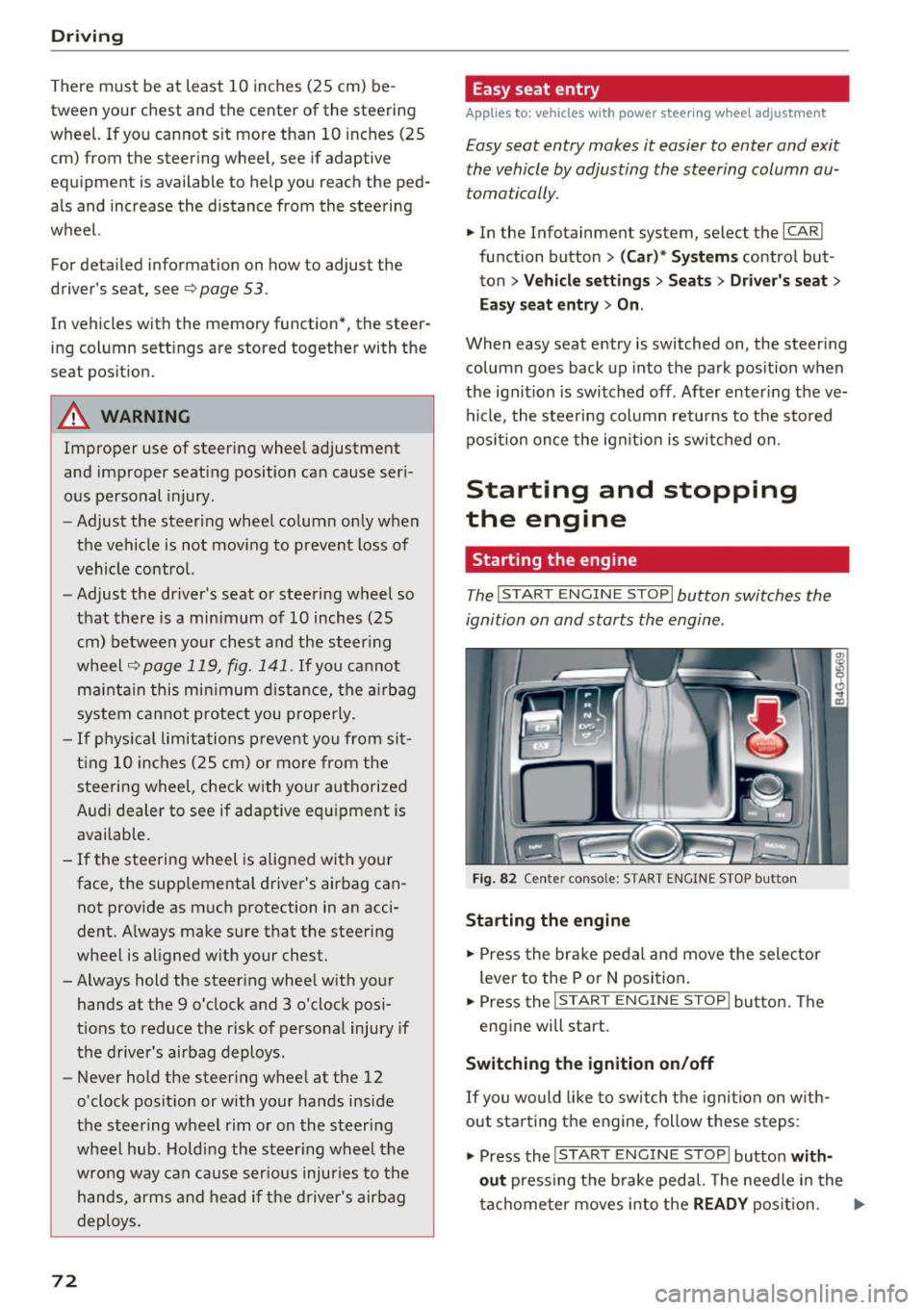
Starting the engine
The I START ENGINE STOP I button switches the
ignition on and starts the engine .
Fig. 82 Cente r conso le: S TART ENGINE STOP b utt on
Starting the engine
.,. Press the brake pedal and move the selector
lever to the P or
N position.
... Press the
!STAR T ENGINE ST OP ! button. The
engine will start.
Switching the ignition on/off
If you would like to switch the ignition on w ith
out sta rting the engine, follow these steps:
.,. Press the
I START ENGINE STOP ! button with
out
pressing the brake pedal. The needle in the
tachometer moves into the
READY position. II>-
Page 75 of 282
~ To switch the ignition off, press the button
again. The needle in the tachometer moves into
the
OFF position .
Equipment that uses a lot of electricity is switch
ed off temporar ily when you start the engine .
I f the engine does not start immediately, the
starting p rocedure is automat ica lly stopped a fter
a short time . Repeat the starting p rocedure.
A WARNING
- Never allow the engine to run in confined
spaces, because this increases the risk of as
phyxiation.
- Never turn off the engine before the vehicle
has come to a comp lete stop.
- The brake booster and power steering only
work when the engine is running . If the en
gine is off, you have to use more force when
brak ing or steering . Because you cannot
brake and steer as you usually would, this
could lead to acc idents and serious injuries .
(D Note
Avoid high engine speed, full throttle, and
heavy engine load as long as the engine has
not reached operating temperature yet. You
could damage the engine .
@ For the sake of the environment
Do not let the engine run while parked to
warm up. Begin driving immediately . This re
duces unnecessary emissions.
@ Tips
- Some noise after starting the engine is nor
mal and is no cause for concern .
- If you leave the vehicle with the ignition
switched on, the ignition will switch off af
ter a certain amount of time . Make sure that
electr ical equ ipment such as the exter ior
li ghts are switched off.
Stopping the engine
~ Bring your vehicle to a complete stop.
~ Move the se lector lever to the P or N pos ition.
-
D riving
~ Press the !S T ART ENGINE STOP ! button
¢page 72, fig. 82 .
Steering lock
The steering locks when you turn the engine off
using the
!S TART ENGINE STOPI button and
open the driver's door. The locked steering helps
prevent vehicle theft.
Emergency off
If necessary, the eng ine can be switched off w ith
the selecto r lever in the R or D/S posit io n . The
engine stops if you press and hold the
!STAR T ENGINE ST OP ! button at speeds below
6 mph (10 km/h) and press the brake pedal.
A WARNING
-Never turn off the engine until the vehicle
has come to a complete stop.
- The brake booster and power steering only
work when the engine is running.
If the en
gine is off, you have to use more force when
steering or braking. Because you cannot
steer and brake as you usually would, this
could lead to crashes and serious injuries.
- For safety reasons, you should always park
your veh icle w ith the selector lever in P.
Otherw ise, the vehicle could inadvertently
ro ll away.
- After the eng ine has been switched off, the
radiator fan can continue to run for up to 10
minutes -even with the ignition switched
off. It can also switch on again after some
time if the coolant temperature rises as the
result of a heat buildup or if the engine is
hot and the engine compartment is addi
tionally heated by the sun's rays.
(D Note
Do not stop the engine immediately after
hard or extended driving. Keep the engine
running for approximately two minutes to
prevent excessive heat build-up.
Messages
Turn off ignition before leaving car
.
73
Page 77 of 282
Your vehicle is equipped with an electromechani
cal parking brake. The parking brake is designed
to prevent the vehicle from rolling unintentional
ly and replaces the hand brake.
I n addition to the norma l functions of a tradi
tional hand brake, the electromechanica l parking
brake provides various convenience and safety
functions.
When starting from rest
- The integ ral starting assist helps you w hen
driving by automatically releasing the parking
brake
r=:> page 75, Starting from o stop .
-When starting on inclines, the starting assist
prevents the vehicle from unintentiona lly roll
ing back . The braking force of the parking brake
is not released until sufficient driving force has
been built up at the wheels.
Emergency brake function
An emergency brake ensures that the vehicle can
be slowed down even if the
normal brakes fai l
r=:> page 76, Emergency broking function.
A WARNING
-
Do not press the accelerator pedal inadver
tently if the vehicle is stat ionary but the en
gine is running and a gear is selected. Other
w ise the vehicle will start to move immediate
ly and could result in a crash.
(D Tips
- If the parking brake is applied with the igni
tion switched off, the indicator lights in the
switch and -(USA models)/ . (Cana-
da models) in the instrument cluster will go
out after a certain period of time.
- Occasiona l noises when the park ing brake is
applied and released a re normal and are not
a cause for concern.
- When the vehicle is parked, the park ing
brake goes th rough a se lf-test cycle at regu
lar int ervals. Any associated noises are nor
mal.
Parking
• Press the brake pedal to stop the vehicle.
D riving
• Pull the switch~ to set the parking brake .
• Place the selector lever in P .
• Turn the engine off
r=:> .&, .
• Turn the steering wheel when parking on in
clines so that the wheels w ill roll into the curb
if the vehicle starts moving .
A WARNING
=
-Always take the vehicle key with you when
leaving the vehicle, even for a sho rt period
of time. This applies particularly when chil
d ren remain in the vehicle. Otherwise chil
dren cou ld start the engine, release the
parking brake or operate e lectrical equip
ment such as power windows, which in
creases the risk of an accident.
- No one should remain in the vehicle when it
is locked, especially chi ldren. Locked doors
make it more d ifficult for emergency work
ers to get into the vehicle, wh ich puts lives
at risk.
Starting from a stop
The start assist function ensures that the park
ing broke is released automatically upon start
ing.
Stopping and setting the parking brake
• Pull the switch~ to set the parking brake .
Starting and automatically releasing the
parking brake
• When you press the acce lerator peda l, the
parking brake is automatica lly re leased and
your veh icle begins to move .
T he parking brake can be set if you must stop the
vehicle at a stop light or in traffic. The vehicle does not have to be held with the brake pedal.
The parking brake elim inates the tendency to
creep when a selector lever posit ion is engaged.
The parking brake releases automatically and the
vehicle begins to move as soon as you press the
accelerator pedal as usual.
Starting on hills
When starting on incl ines, the hill start assist
prevents the vehicle from unintentionally rolling
Ill>
75
Page 84 of 282
Audi adaptive cruise control and braking guard
• You must also press the brake pedal when the
vehicle is stopped.
Switching adaptive cruise control off
• Push the lever away from you into position @
until it clicks into place. The message
ACC off
appears.
@ Indicator lights
• • Adaptive cruise control is switched on. No
vehicles are detected up ahead. The stored speed
is maintained .
• · A moving vehicle is detected up ahead. The
adaptive cruise control system regulates the
speed and distance to the moving vehicle ahead
and accelerates/brakes automatically.
r -.j · Adaptive cruise control is switched on . A
moving vehicle up ahead was detected. Your vehi
cle remains stopped.
• • When automatic braking is not able to keep
enough distance to a previously detected moving
vehicle up ahead, you must take control and brake
9 page 84, Prompt for driver interven
tion.
© Display
If adaptive cruise contro l is not shown in the dis
play, you can call it up with the multifunction
steering wheel buttons
9 page 22.
Based on the symbols in the display, you can de
termine if the system is maintaining a distance to
the vehicle ahead and what that distance is.
No vehicle· No vehicle ahead was detected.
White vehicle· A vehicle ahead was detected.
Red vehicle · Prompt for the driver to take action
9page84.
Both arrows on the scale© indicate the distance
to the vehicle ahead. No arrow appears when the
vehicle is on an open road and there is no object
ahead . If an object is detected ahead, the arrow
moves on the scale.
The green zone on the scale shows the stored dis·
tance. For information on changing the stored
distance, refer to
9 page 83. If the distance se·
82
lected is too close or may soon become too close,
the arrows move into the red zone on the scale.
A WARNING
Improper use of the adaptive cruise control
can cause collisions, other accidents and seri
ous personal injuries.
- Pressing the
ISETI button when driving at
speeds below 20 mph (30 km/h), will auto
matically accelerate the vehicle to 20 mph (30 km/h), which is the minimum speed
that can be set.
@ Tips
-If you switch the ignition or the adaptive
cruise control off, the set speed is erased
from the system memory.
- The electronic stabilization control (ESC)
and the anti-slip-regulation (ASR) are auto·
matically turned on when the adaptive
cruise control is turned on. Both systems
cannot be turned off if the adaptive cruise
control is turned on .
Changing the speed
Applies to: vehicles with Audi adapt ive cru ise control
0
f
JJ
0
Fig. 92 Operating lever: changing the speed
;;; N 9 :c .., m
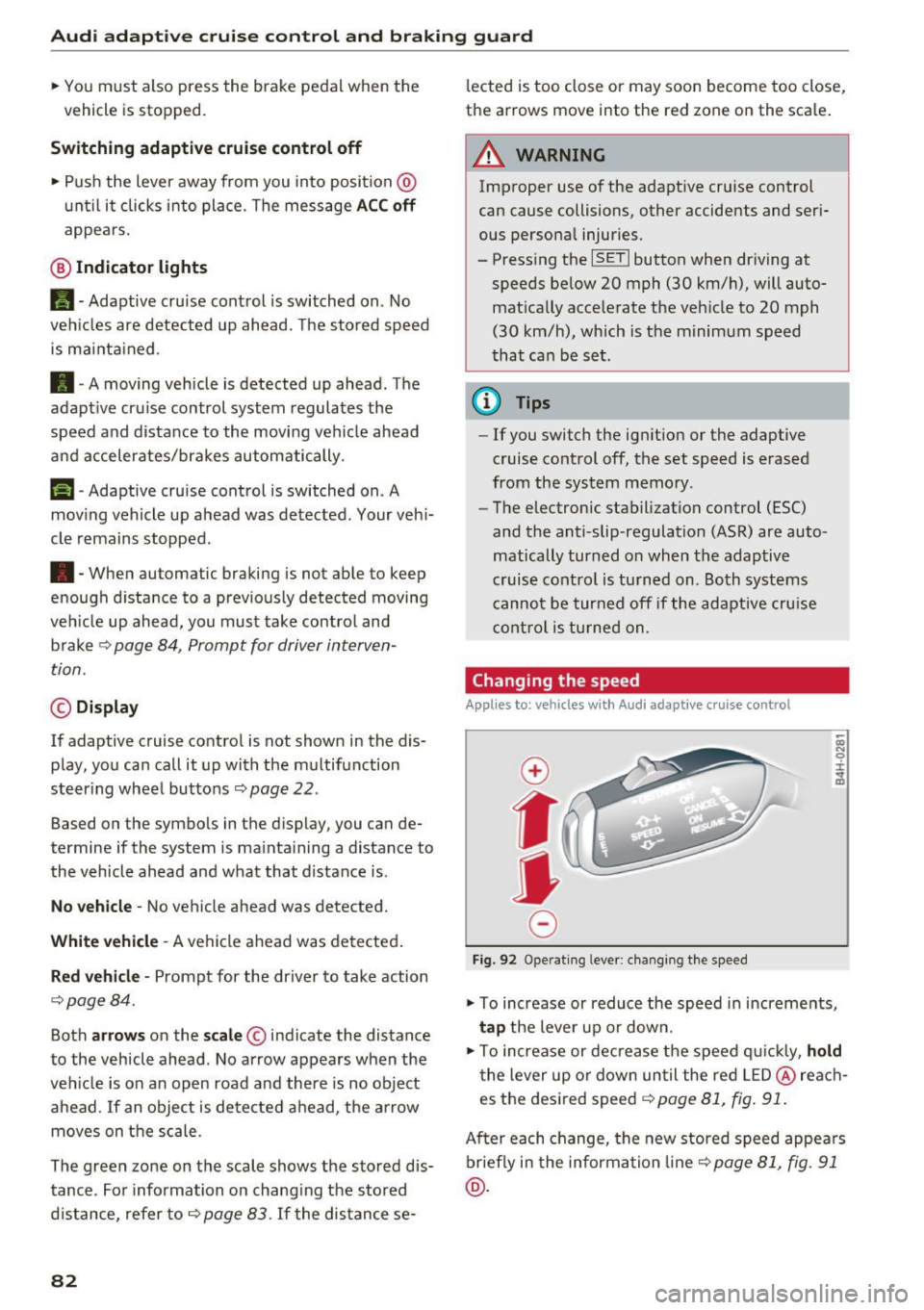
• To increase or reduce the speed in increments,
tap the lever up or down.
• To increase or decrease the speed quickly,
hold
the lever up or down until the red LED@reach
es the desired speed
9 page 81, fig. 91.
After each change, the new stored speed appears
briefly in the information line¢
page 81, fig. 91
@.