tow AUDI RS7 SPORTBACK 2016 User Guide
[x] Cancel search | Manufacturer: AUDI, Model Year: 2016, Model line: RS7 SPORTBACK, Model: AUDI RS7 SPORTBACK 2016Pages: 282, PDF Size: 70.78 MB
Page 80 of 282
Driving
"'T o sto re the speed displayed, release the lever .
This f unction ma kes it possib le, for examp le, to
save the desired speed be fore dr iving on the
h ighway . Once on t he h ighway, act iva te the
cru ise control by pu lling the lever toward
(D .
Switching the system off
Applies to: veh icles w ith c ruise control
Temporary d eactivation
"' Press the brake peda l, o r
"' Press the lever into position @(not clicked i nto
place)
¢ page 77, fig. 85, or
"' Drive for longer than
5 minutes at more than
5 mph (10 km/h) above the stored speed .
Switching off completely
"' Press lever into position @(clicked into place),
o r
"' Switc h the ignition off .
The system retains the saved speed if you deact i
vate the cruise control temporarily. To resume
the saved speed, re lease the brake pedal and p ull
the lever to position
(D .
Sw itching the ign ition off erases the saved speed.
A WARNING
You should only ret urn to the saved s peed if it
is not too fast for the current tra ffic condi
tions - risk of an accident!
78
Page 81 of 282
Audi ada pti ve c ruise contr ol and br akin g gu ard
Audi adaptive cruise
control and braking
guard
Introduction
A ppl ies to: ve hicles with Audi adaptive cruise co ntro l
The adaptive cruise contro l system assists the
driver by regulat ing vehicle speed and helping to
maintain a set distance to the vehicle ahead,
within the limits of the system.
If the system de
tects a moving vehicle up ahead, adaptive cruise
control can brake and then accelerate your veh i
cle. This helps to make driving more comfortable
both on long highway stretches and in stop-and
go traffic.
The braking guard system can warn you about an impending collision and initiate braking maneu
vers¢
page 85.
Adaptive cruise control and braking guard have
technical limitations that you m ust know, so
please read this section carefully, understand
how the system works and use them properly at
all times.
General information
General information
App lies to: ve hicles with Audi adaptive cruise contro l
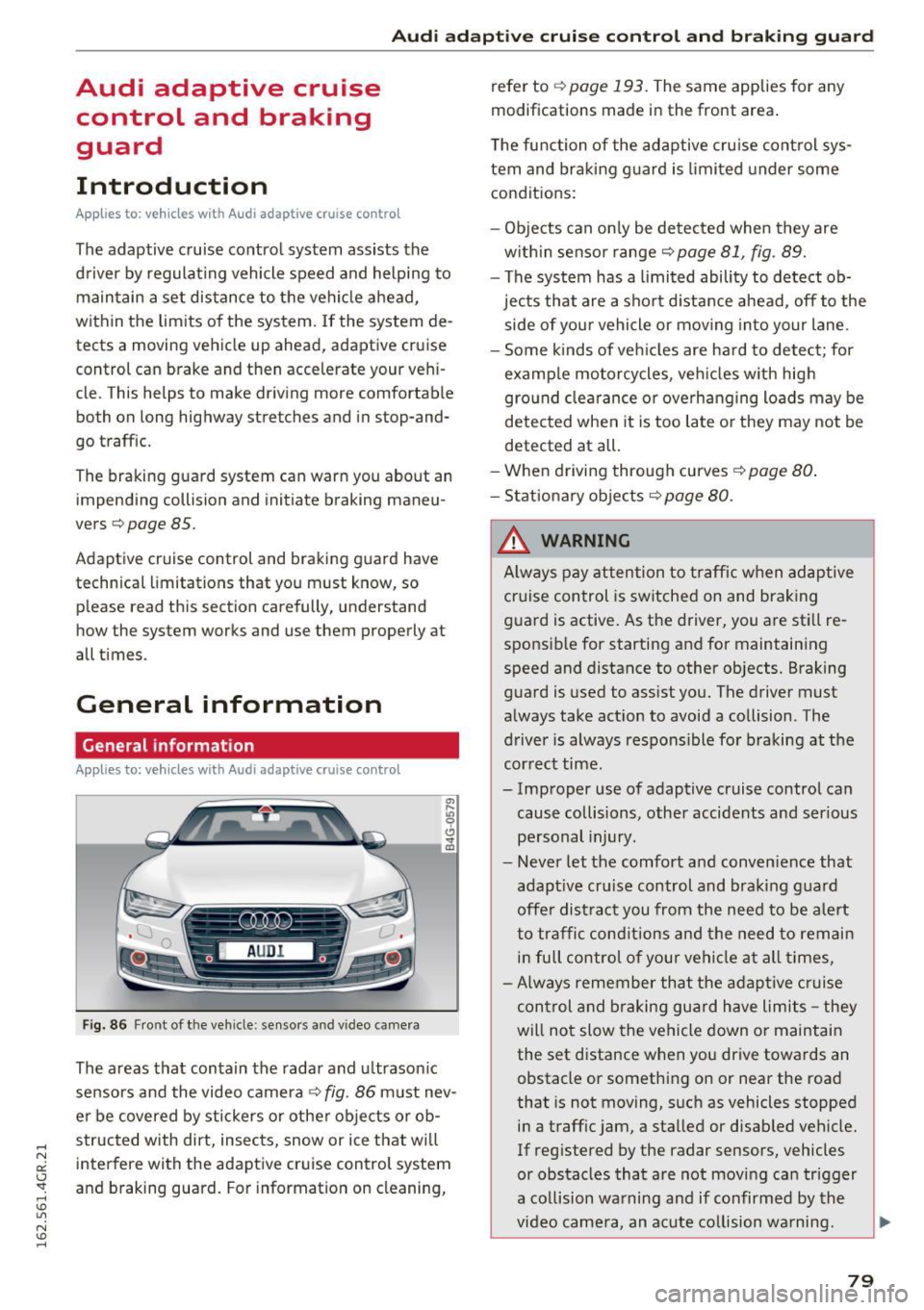
Fig. 86 Front of th e veh icle: sensors and vi deo camera
The areas that contain the radar and u ltrason ic
sensors and the video camera¢
fig. 86 must nev
er be covered by stickers o r other objects or ob
structed with dirt, insects, snow or ice that wi ll
interfere with the adaptive cruise control system
and braking guard. For information on cleaning, refer to
¢
page 193. The same applies for any
modifications made in the front area.
The function of the adaptive cru ise control sys
tem and braking g uard is limited under some
conditions:
- Objects can on ly be de tected when they are
w ith in sensor range¢
page 81, fig. 89.
- The system has a limited ability to detect ob
jects that are a short d istance ahead, off to the
side of your vehicle or mov ing into your lane .
- Some kinds of veh icles are hard to detect; for
examp le motorcycles, veh icles w ith high
gro und clea rance or overhanging loads may be
detected when it is too late o r they may not be
detected at all.
-When driving through curves
¢page 80 .
- Stat iona ry obje cts¢ page 80.
_& WARNING
A lways pay attention to traff ic when adaptive
cruise control is sw itched on and brak ing
guard is active . As the driver, you are still re
sponsible for starting and for maintaining
speed and distance to other objects. Braking
guard is used to assist you. The driver must
always take act ion to avoid a collision . The
driver is always respons ible for braking at the
cor rect time.
- Improper use of adaptive cruise control can cause collisions, other accidents and ser ious
pe rsonal injury.
- Never let the comfort and conven ience that
adapt ive cr uise control and braking g ua rd
offe r dist ract you from the need to be a lert
to traffic conditions and the need to remain
in full control of your vehicle at all times,
- Always remember that the adaptive c ruise
control and braking gua rd have limits -they
will not slow the vehicle down or maintain the set distance when you drive towards an
obstacle or something on or near the road
that is not moving, such as vehicles stopped
in a traffic jam, a stalled or disabled vehicle.
If reg istered by the radar sensors, vehicles
or obstacles that are not moving can trigger
a collision wa rning and if confirmed by the
video came ra, an acute co llision wa rning.
~
79
Page 83 of 282
Audi adaptive cruise control and braking guard
Audi adaptive cruise
control
Description
Applies to: vehicles with Audi adaptive cruise control
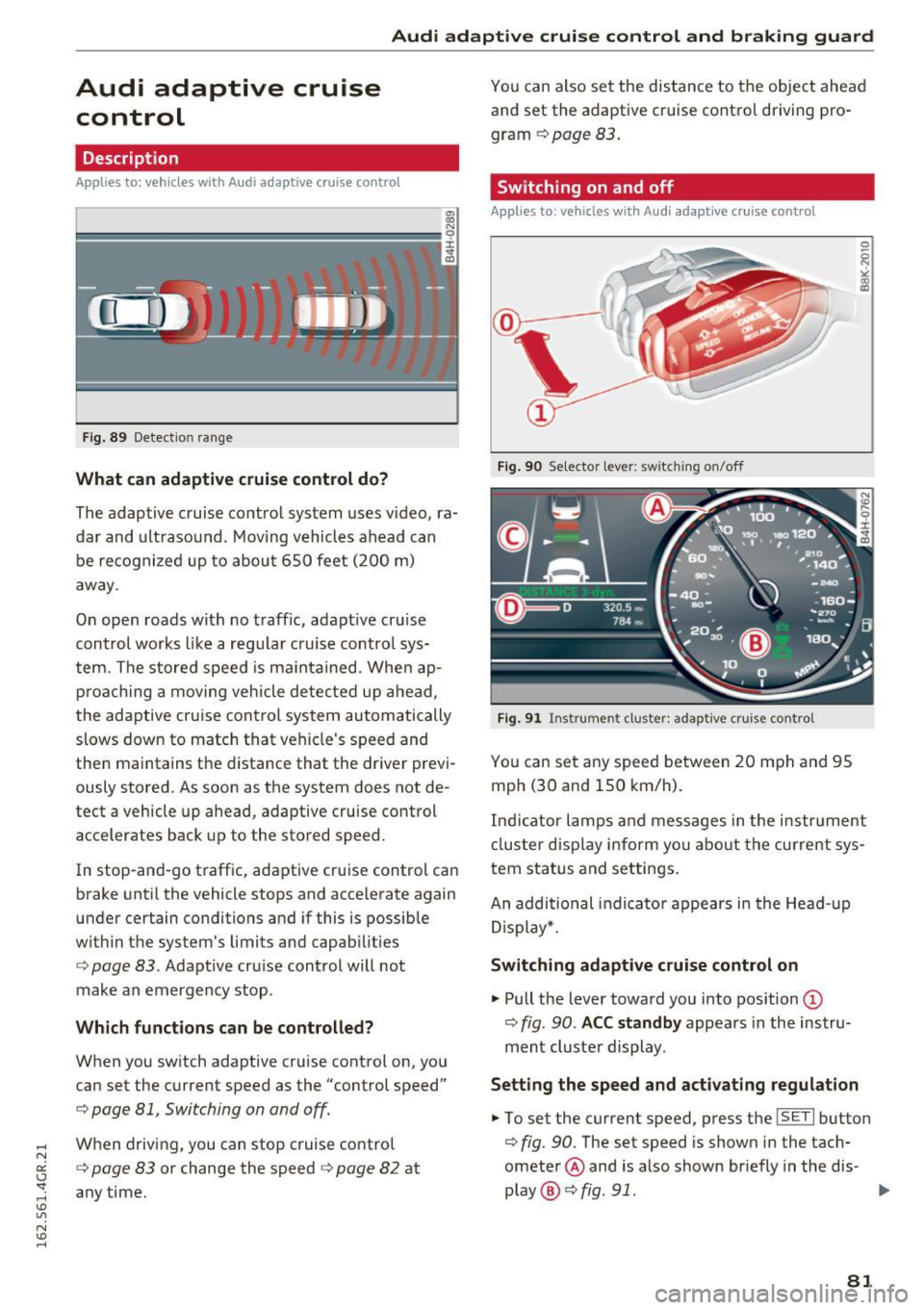
Fig. 89 Detectio n ra n ge
What can adaptive cruise control do?
The adaptive cruise control system uses video, ra
dar and ultrasound . Moving vehicles ahead can
be recognized up to about 650 feet (200 m)
away .
On open roads with no traffic, adaptive cruise
control works like a regu lar cruise contro l sys
tem. The stored speed is ma intained . When ap
proaching a moving vehicle detected up ahead,
the adaptive cruise control system automatically
slows down to match that vehicle's speed and
then maintains the distance that the driver previ
ously stored. As soon as the system does not de
tect a vehicle up ahead, adaptive cruise control
accelerates back up to the stored speed.
In stop-and-go traff ic, adaptive cruise control can
brake until the vehicle stops and accelerate again
under certain conditions and if this is possible
within the system's limits and capabilities
c;, page 83 . Adaptive cru ise control will not
make an emergency stop .
Which functions can be controlled?
When you switch adaptive cruise control on, you
can set the current speed as the "control speed"
c;, page 81, Switching on and off.
When driving, you can stop cruise control
c;, page 83 or change the speed ¢ page 82 at
any time. You can also set the distance to the object ahead
and set the adapt ive cruise control driv ing pro
gram
c;, page 83.
Switching on and off
Applies to : vehicles wit h Aud i adaptive cruise control
Fig. 90 Se lecto r lever: sw itc hin g on/off
Fig. 91 Instrume nt cluster: adapt ive cru ise con tro l
You can set any speed between 20 mph and 95
mph (30 and 150 km/h) .
0 5 N ~ co
co
Indicator lamps and messages in the instrument
cluster display inform yo u about the current sys
tem status and settings.
An additional indicator appears in the Head -up
Display*.
Switching adaptive cruise control on
"' Pull the lever toward you into position @
c;, fig. 90 . ACC standby appears in the instru
ment cluster display .
Setting the speed and activating regulation
"'To set the current speed, press the ISETI button
c;, fig. 90 . The set speed is shown in the tach
ometer @and is also shown briefly in the dis-
play @¢
fig. 91. .,._
81
Page 85 of 282
Audi adaptive cruise control and braking guard
Driving in stop-and-go traffic
Applies to: vehicles with Audi adaptive cruise contro l
The adap tive cruise co nt rol sys tem also assis ts
y o u in stop- and-go t raffic.
Stopping automatically
If an object ahead stops, your ve hicle w ill bra ke
a nd stay a t a stop, w ith in th e lim its of the sys
tem.
Driving manually
.. Tap the acce lerato r pedal, o r
.. pull the lever toward you into position @.
{D) Tips
- If an o bstacle is detecte d w hen yo ur vehicle
starts movi ng , the dr iver intervent io n re
quest appears
c:> page 84 . You r vehicle
will drive more slowly w hen starti ng. This
m ay also happen in so me situati ons whe n
th ere is no appa rent o bstacle .
Interrupting cruise control
Applies to: vehicles with Audi adaptive cruise control
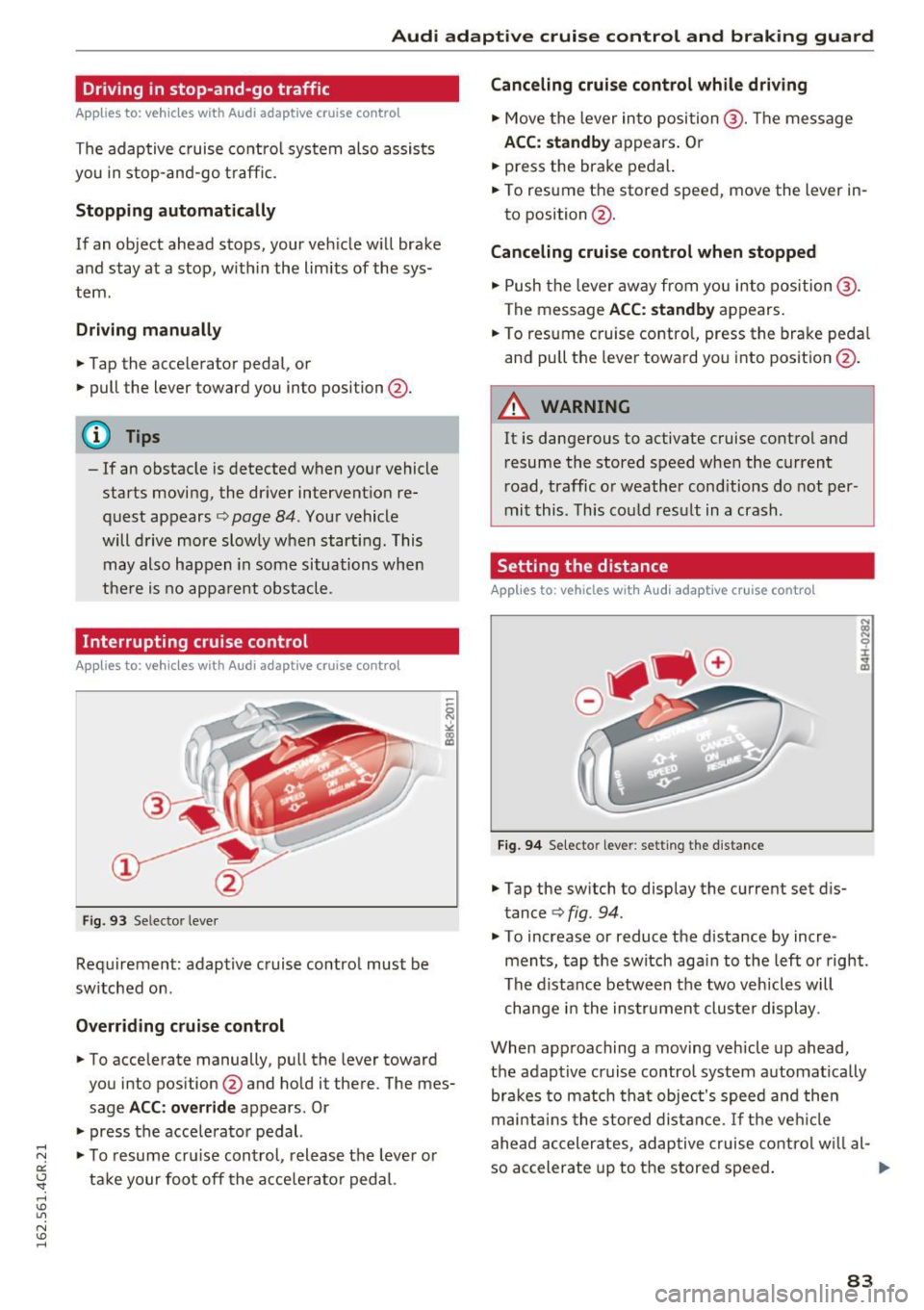
Fig . 93 Se lecto r leve r
Requi rement: adapt ive c ruise contro l must be
sw itched on .
Overriding cruise control
.. To accelera te manually, p ull the lever toward
you into pos ition @and hold it there. The mes
sage
ACC: override a ppears. Or
.. press the acce lera tor pedal.
.,. To resu me cr uise con trol , release t he leve r or
t ak e your foot off the a cce le rator pedal.
Canceling cruise control while driving
.. Move the lever in to position @. Th e message
ACC: standby appears . Or
.. press the brake pedal.
.. To resume the stored speed, move the lever in
to position @.
Canceling cruise control when stopped
.. Push the lever aw ay fr om yo u into position @.
The message
ACC: standby ap pears.
.. To res ume c ruise contro l, press the bra ke peda l
an d pu ll the leve r towa rd yo u into posit io n @ .
A WARNING
=
It is dangerous to activate cruise cont rol and
r esume the stored speed when the current
r oad, traffic or weathe r cond itio ns do not per
mi t this . T hi s co uld res ult in a crash.
Setting the distance
Applies to: vehicles with Audi adaptive cru ise control
Fi9 . 94 Selecto r lever : setting t he d istance
.. Tap the sw itch to display the current set d is
tance
c:> fig. 94.
.. To increase or reduce the d istance by incre
ments , tap the switch aga in to the l eft o r right.
T he di sta nce between t he two v eh icles w ill
c hange i n the ins trumen t clu ste r dis play.
When app roaching a moving veh icle up ahead ,
the adaptive cruise contro l system a utomat ically
br ak es to match tha t obje ct's spee d an d t hen
m ainta in s the stored dist an ce.
If th e ve hicle
ahe ad acc eler ates, a daptive cruise co ntro l w ill a l-
so accelerate up to t he store d speed .
llll>
83
Page 93 of 282
Audi side assist Side assist
Description
App lies to: veh icles with Audi side assist
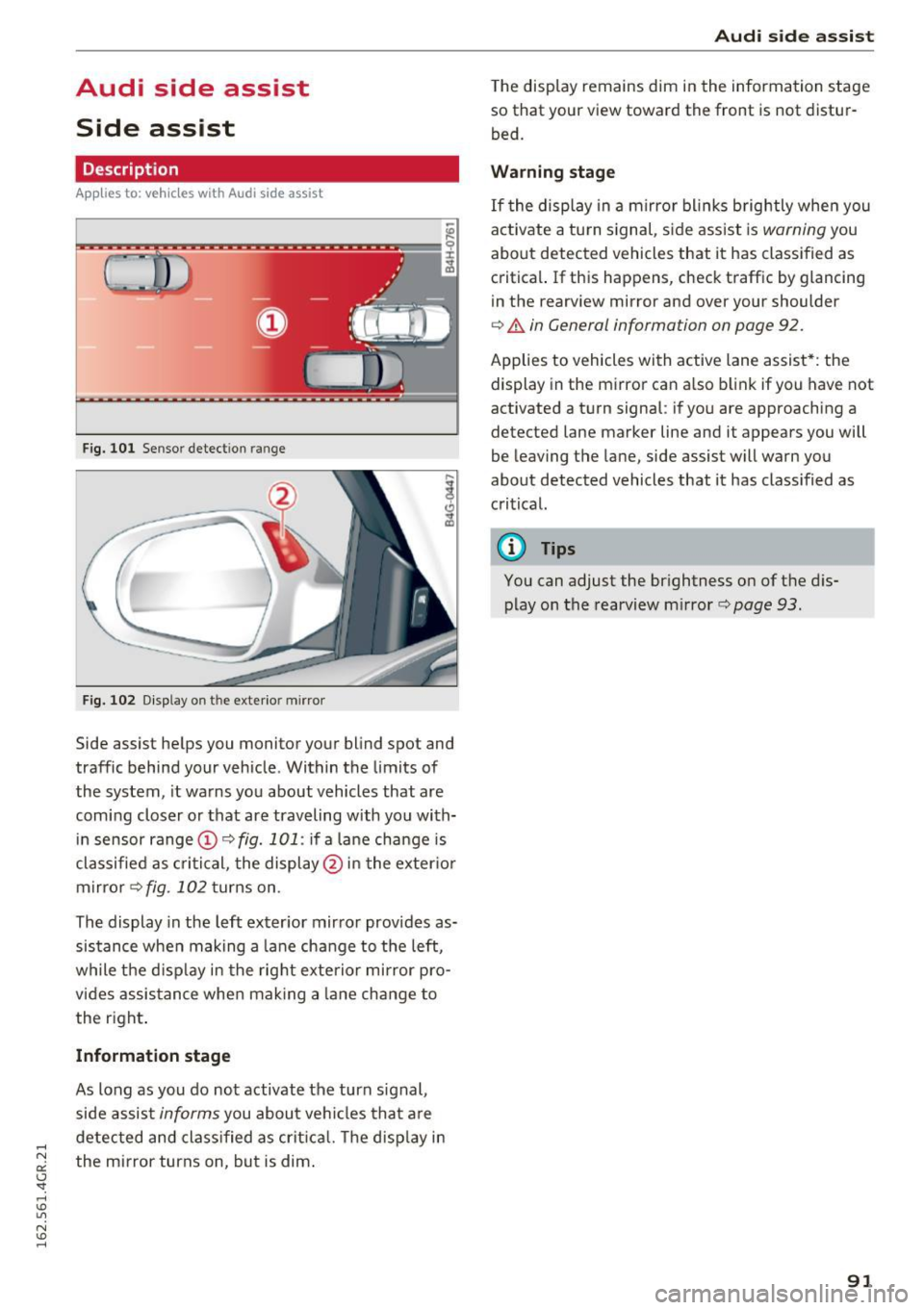
Fig. 101 Se nsor dete ction rang e
Fig. 102 Display o n the exterio r mirror
Side assist helps you monitor your blind spot and
traffic behind your vehicle . Within the limits of
the system , it warns you about vehicles that are
coming closer or that are traveling with you with
in sensor range ©
c> fig. 101: if a lane change is
classified as critical, the display @ in the exter ior
mirror
c> fig . 102 turns on .
The display in the left exterior mirror provides as
sistance when making a lane change to the left,
while the d isplay in the right exterior mirror pro
vides assistance when making a lane change to
the right .
Information stage
As long as you do not activate the turn signal,
side assist
informs you about vehicles that are
detected and classified as critica l. The disp lay in
the mirror turns on, but is dim.
Audi side assist
The display remains dim in the information stage
so that your view toward the front is not distur
bed.
Warning stage
If the display in a mirror bl inks brightly when you
act ivate a tu rn s ignal , sid e assist is
warning you
about detected vehicles that it has classified as
critical. If this happens, check traffic by glancing
in the rearview mirror and ove r you r shoulde r
c> .&. in General informa tion on page 92.
Applies to vehicles w ith active lane assist* : the
display in the mirror can also blink if you have not
activated a turn signal : if you a re approaching a
detected lane marker line and it appears you will
be leaving the lane , side assist will warn you
about detected vehicles that it has class ified as
critical.
@ Tips
You can adjust the brightness on of the dis
play on the rearview mirror
c> page 93 .
91
Page 98 of 282
Audi dri ve s elec t
Cur ve ligh t*
The curve ligh t adapts to driving on curves . The
pivoting action and the lighting are also adapted
to the mode .
Adaptive cru is e control *
The behavior when accele rating can be adjusted
from comfortab le to sporty, depending on the
drive select mode. Adaptive cru ise control also
responds to the driving behavior of the vehicle
ahead in a more conservative or sporty manner.
Engine sound
The sound of the engine is adapted to the select
ed mode and ranges from subt le to sporty.
(D Note
- Make sure there is enough clearance above
and below the veh icle when parking. The
height of the vehicle can change once it is
parked due to temperature f luctuations,
changes to the load conditions and changes
to the driving modes, which can affect clear
ance.
- When transporting the vehicle on a car car
rier, train, ship or by other means, only tie
the vehicle down at the running surface of
the tires, which is the outer circumference.
Securing the vehicle at the axle compo
nents, suspension struts or towing eyes is
not permitted because the pressu re in the
a ir suspension struts can change dur ing
transport. The vehicle may not be secured
sufficiently if this happens.
@ Tips
- In some models, the maximum vehicle
speed can only be reached in the
Auto and
D ynami c modes.
- Se lec ting the
D ynami c mode results in spor
ty shifting characterist ics. The S gear posi
tion engages automatica lly.
96
- In veh icles that have dynamic steering *, op
erating noise is heard when starting or stop
ping the engine . This does not indicate a
problem.
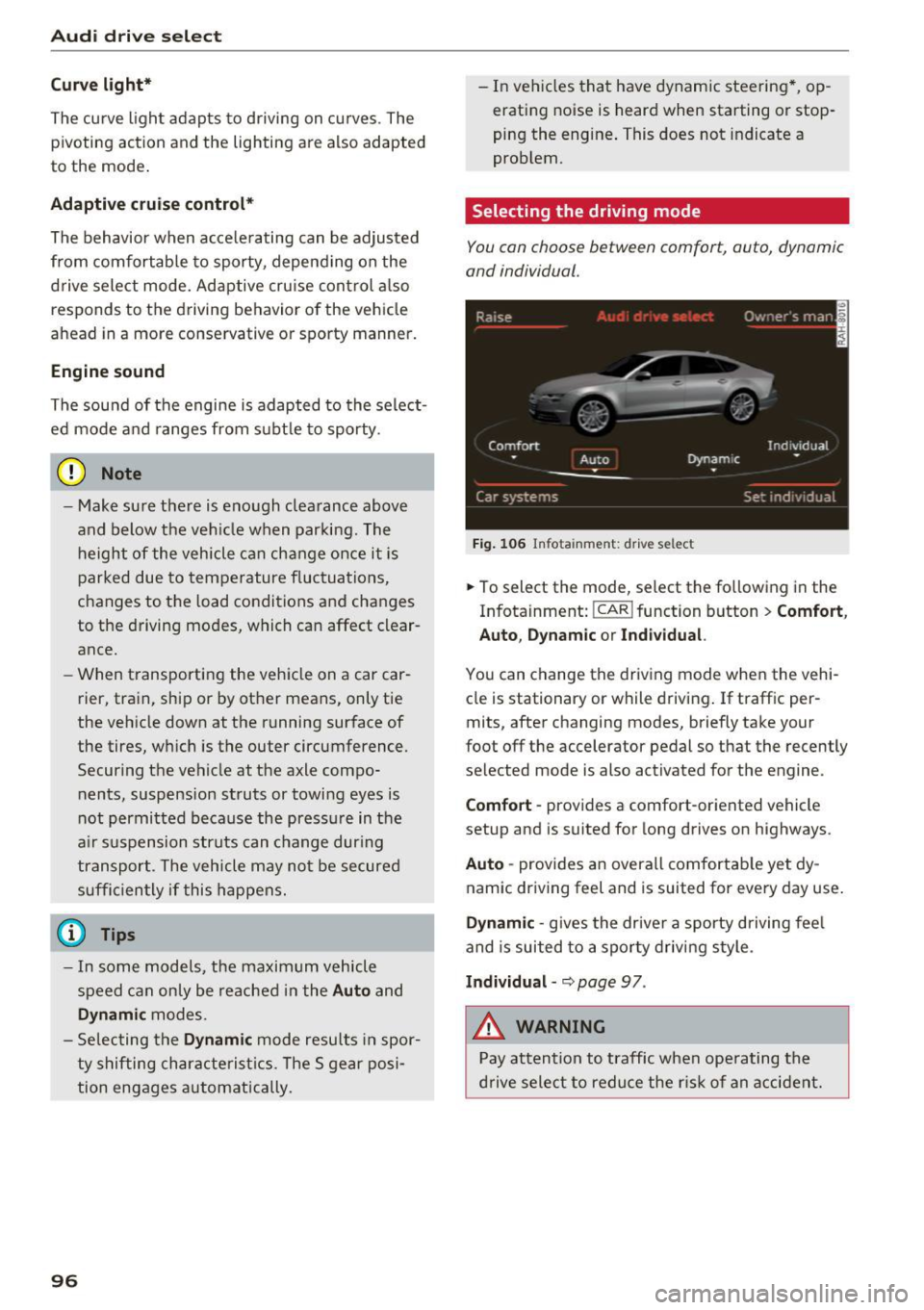
Selecting the driving mode
You con choose between comfort, auto, dynamic
and individual .
Fig. 106 Infota inment: drive se lect
.,. To select the mode, select the following in the
Infotainment:
! CAR ! function button > Comf ort ,
Auto , Dyn amic or In d iv idual.
You can change the driv ing mode when the vehi
cle is stationary or while driving . If traffic per
mits, after changing modes, briefly take your
foot off the accelerator pedal so that the recently
selected mode is also activated for the engine .
Comfo rt -prov ides a comfort-oriented vehicle
setup and is suited for long drives on highways.
Aut o -provides an overall comfortab le yet dy
namic driving feel and is suited for every day use.
Dynami c -gives the drive r a sporty d riving feel
and is suited to a sporty driving style .
Indi vidua l -~ page 97 .
&_ WARNING
Pay attention to traffic when ope rating the
d rive select to reduce the r is k of an accident.
-
Page 108 of 282
Automatic transmission
rm Transmi ssi on malfunction: You can continue
driving
There is a system malfunc tion in the t ransm is
sion . Yo u may con tinue dr iving . Drive to your au
thor ized Audi dealer or qualified repair fac ility
soon to have th e malfunction cor rected.
rm Transmi ssion malfunction: You can continue
driving with limited functionality
There is a system malfunct ion i n the transm is
sion . T he transmission is sw itching to emergency
mo de. This mode only shifts in to certa in gears o r
will no longer shift at all. The engine may st all.
Drive to you r aut ho rized Aud i dea ler o r q ualified
repair faci lity immediately to have the malfunc
tion corrected .
rm Transmission malfunction: Stop vehicle and
shift to P
D o not cont inue d riving. Select the P se lector lev
er position and see yo ur author ized Aud i de aler
or qu alified repa ir fa cility for assis tance .
(D Note
If the tran smissi on switches to emergency
m ode, you s ho uld t ake the veh icle to an au
t hori zed A udi dealer sh ip a s soon as po ssible
t o have the condi tion corrected.
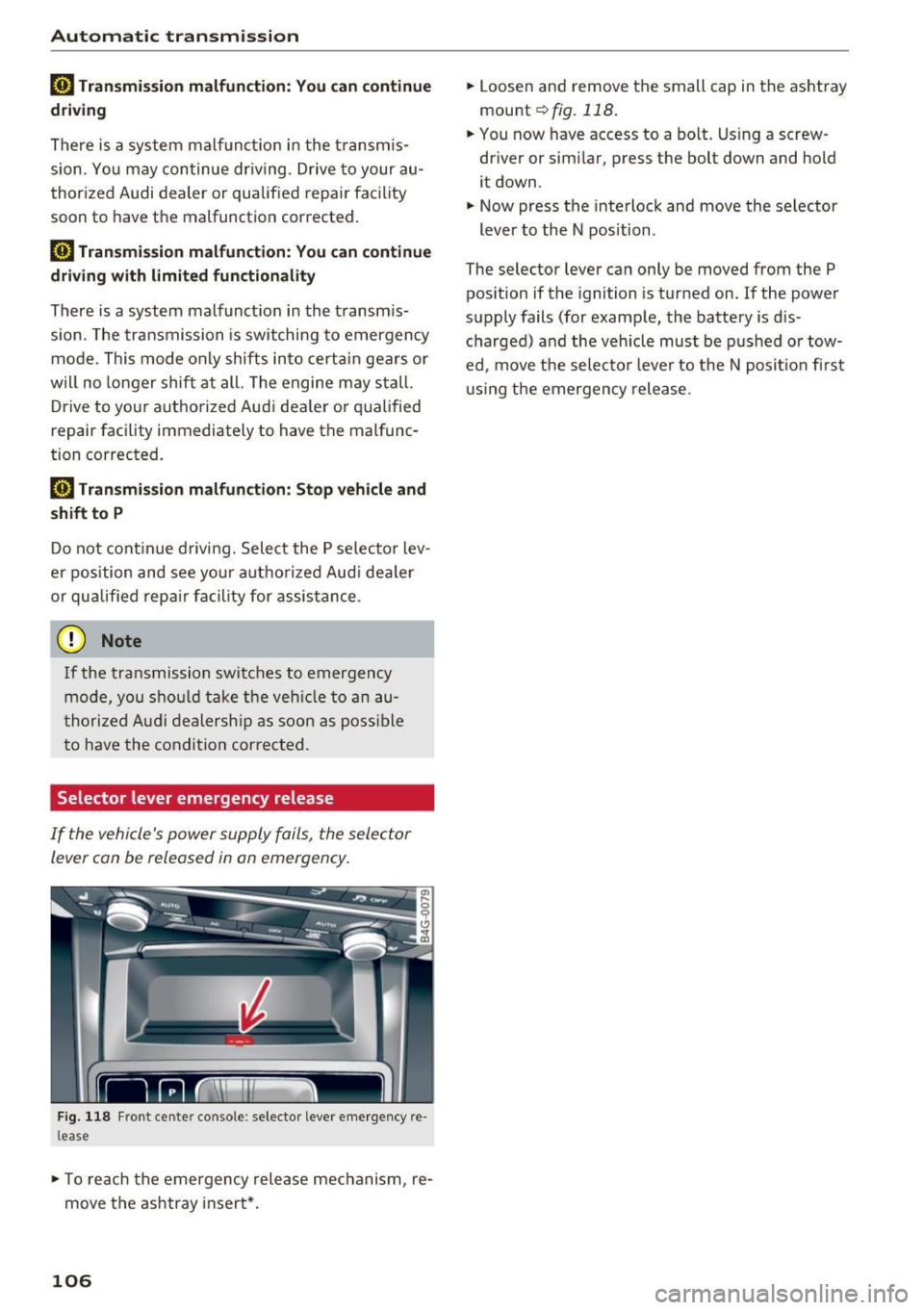
Selector lever emergency release
If the vehicle's power supply fails, the sele ctor
lever can be released in an emerg ency .
Fig . 118 Fro nt cen te r co nso le : selec to r lever e mergency re
l ease
.,. To re ach the emergency rele ase mech anism, re
move t he ashtray insert* .
106
.,. Loosen and remove the small cap in the as htray
mou nt
~ fig. 118 .
.,. You now have access to a bo lt. Using a screw
driver or simi lar , press the bolt down and hold
it down .
.,. Now press t he interlock and move the selector
lever to the N position .
The selector lever can only be moved from the P pos ition if the ignition is tur ned on.
If the powe r
supply fails (for examp le, the battery is d is
cha rged) and the veh icle must be p ushed o r tow
ed, move the selecto r lever to the N posit io n firs t
u sing the emergen cy rele ase .
Page 112 of 282
Parking systems
-The camera lens enlarges and distorts the
field of vision. The object appears both al
tered and inaccurate on the screen.
- In certain situations, people or objects in
the display appear closer or farther away:
- For objects that do not touch the ground,
such as the bumper of a parked vehicle, a
trailer hitch or the rear of a truck. Do not
use the help lines in this case.
- If driven from a level surface onto an in
cline, or a downward slope.
- If driven toward protruding objects.
- If the vehicle is carrying too much load in
the rear.
(D Note
- Always read and follow the applicable warn
ings r::!>(D
in General information on
page 107 .
-The orange colored orientation lines in the
Infotainment display show the vehicle path
depending on the steering wheel angle. The
front of the vehicle swings out more than
the rear of the vehicle. Maintain plenty of
distance so that your outside mirror or a
corner of your vehicle does not collide with
any obstacles.
Switching on/off
Applies to: vehicles with rearview camera
Switching on
.,. Shift into reverse, or
.,. Press the
P,,, A button in the center console
r:=> page 108, fig. 120. A short confirmation
tone sounds and the LED in the button turns
on.
Switching between the rearview camera and
optical display
.,. Press the Graphic control button ®
r:=> page 110, fig. 125 to see the optical display .
.,. Press the
Rear view control button to see the
. . rearv1ew camera image.
Switching off
.,. Drive forward faster than 10 km/h, or
.,. press the
P,1
1.A button, or
110
.,. Switch the ignition off.
@ Tips
- The visual display in the left part of the dis
play should help you detect the critical vehi
cle areas.
- You can change the volume and pitch of the
signals as well as the display
r:=> page 116.
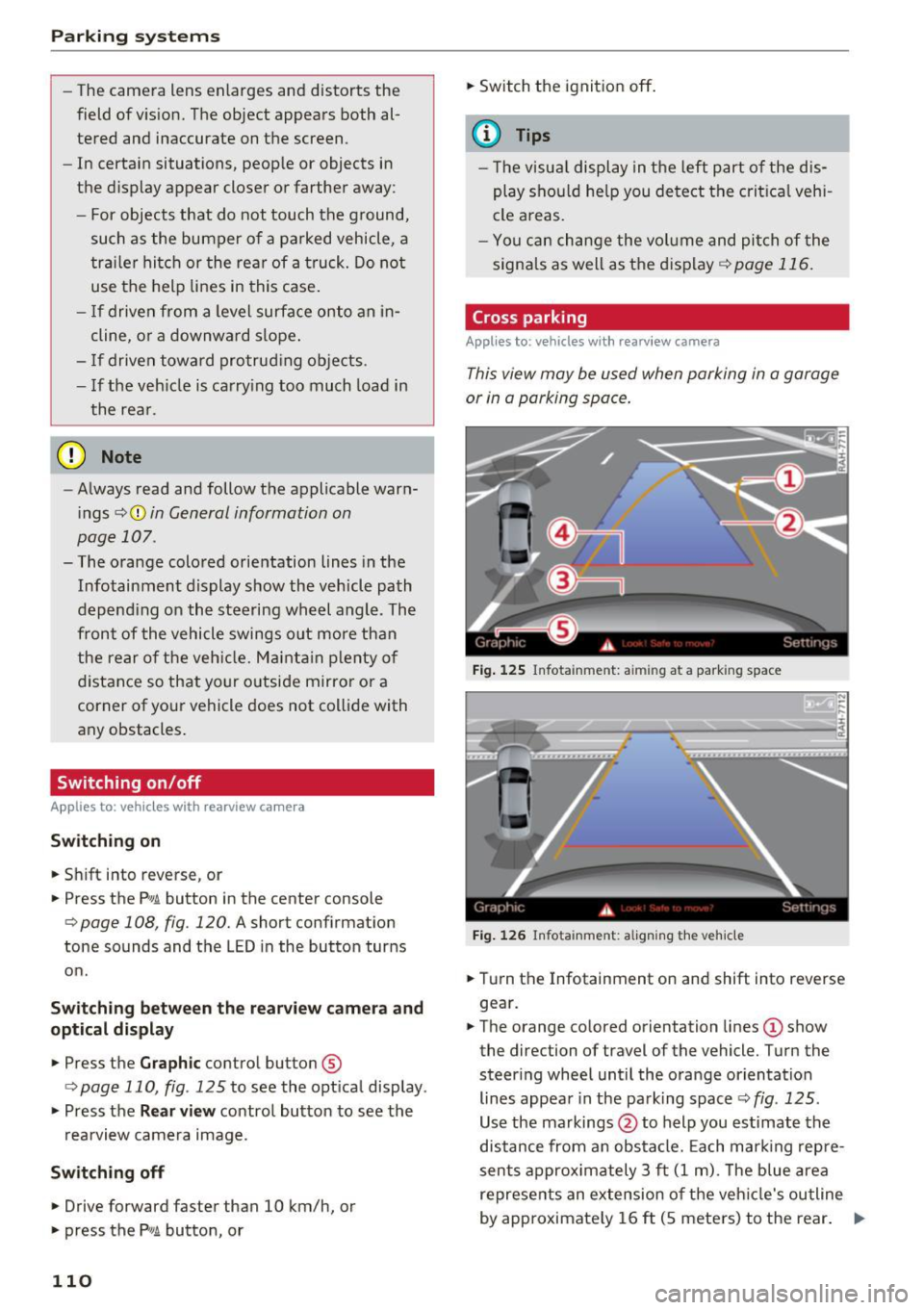
Cross parking
Applies to: vehicles with rearview camera
This view may be used when parking in a garage
or in a parking space.
Fig. 125 Infotainment: aiming at a parking space
Fig. 126 Infota inment: aligning the vehicle
.,. Turn the Infotainment on and shift into reverse
gear.
.,. The orange colored orientation lines
(D show
the direction of travel of the vehicle. Turn the
steer ing wheel until the orange orientation
lines appear in the parking space r::!>
fig. 125 .
Use the markings @to help you estimate the
distance from an obstacle. Each marking repre
sents approximately 3 ft
(1 m). The blue area
represents an extension of the vehicle's outline
by approximately
16 ft (5 meters) to the rear. ..,.
Page 116 of 282
Parking system s
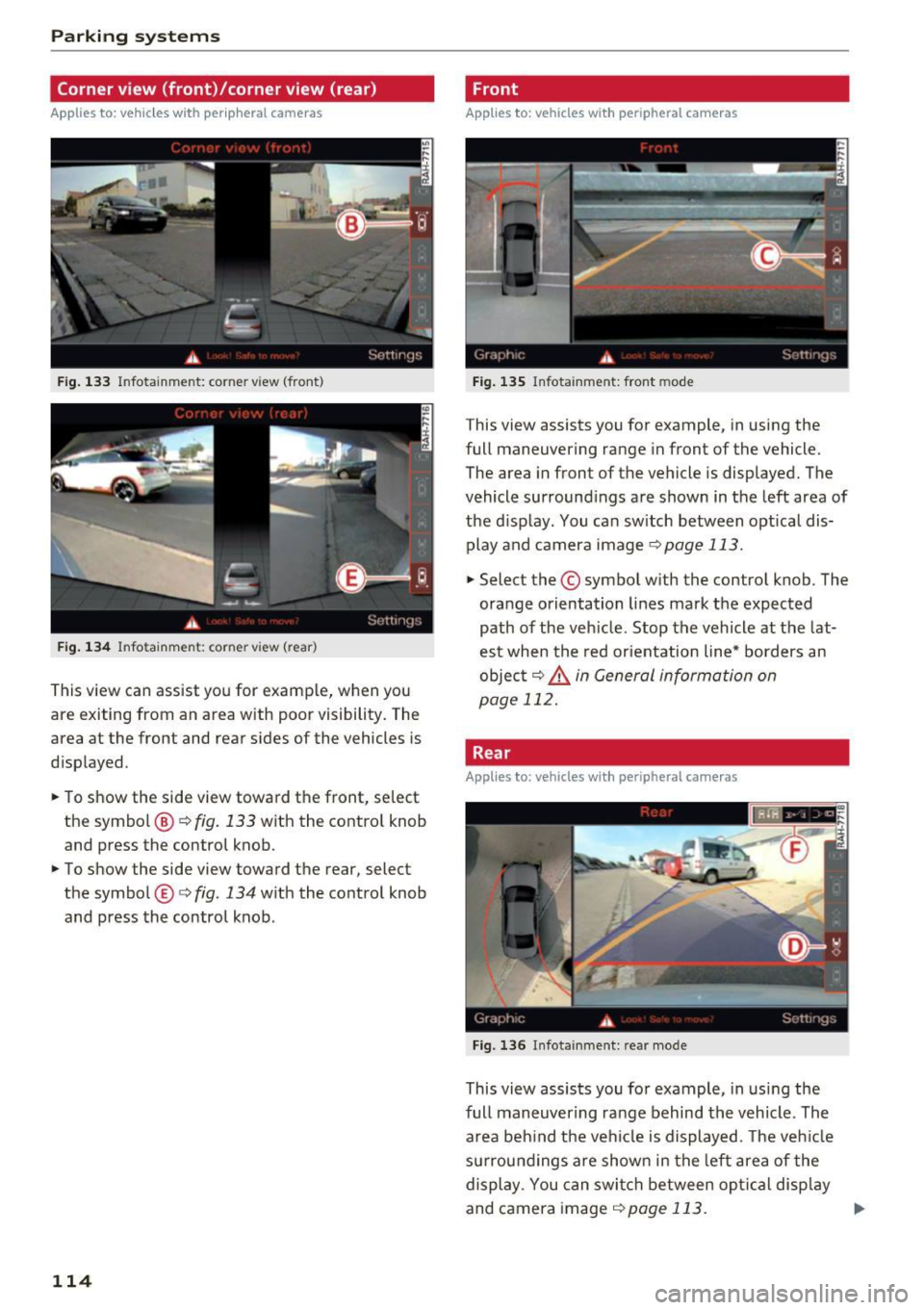
Corner view (front)/corner view (rear)
Applies to: vehicles with peripheral cameras
Fig . 1 33 In fo ta inme nt: co rner v iew (front )
Fig . 134 In fo tainme nt: corner vie w (r ea r)
This view can assist you for examp le, when you
are exiting from an area with poor visibility. The
area at the front and rear sides of the vehicles is
d isp layed.
~ To show the side view toward the front, se lect
the symbol @¢
fig. 133 with the contro l knob
and press the control knob.
~ To show the side view toward the rear, selec t
the symbol ®¢
fig. 134 w ith the control knob
and press the control knob .
114
Front
Applies to: vehicles with peripheral cameras
Fig . 135 Infot ainm ent: fro nt m ode
This view assists you for example, in using the
full maneuve ring range in front of the vehicle.
The area in front of the vehicle is displayed. The
vehicle surround ings are shown in the left area of
the d isplay . You can sw itch between optical dis·
play and camera image
¢ page 113.
~ Select the © symbol with the con trol knob . The
orange orientation lines mark the expected
path of the veh icle . Stop the vehicle at the lat·
est when the red orientation line* borders an
objec t
9 &. in General information on
page 112.
Rear
Applies to: vehicles with peripheral cameras
F ig. 136 Infota inmen t: rea r mo de
This view assists you fo r example, in usi ng the
full maneuver ing ra nge behind the vehicle. The
area beh ind the vehicle is displayed . T he ve hicle
su rrou nd ings a re shown in the left area of the
display . You can swi tch between op tical disp lay
and camera image
9 page 113. ..,.
Page 122 of 282
Driving safety
"' Always keep both feet in the footwell so that
you are in control of the vehicle at all times.
For detailed information on how to adjust the
driver's seat, see
c;, page 53.
A WARNING
Drivers who are unbelted, out of position or
too close to the airbag can be seriously in
jured by an airbag as it unfolds . To help re
duce the risk of serious personal injury:
- Always adjust the driver's seat and the
steering wheel so that there are at least
10 inches (25 cm) between your breastbone
and the steering wheel.
- Always adjust the driver's seat and the
steering wheel so that there are at least
4 inches (10 cm) between the knees and the
lower part of the instrument panel.
- Always hold the steering wheel on the out
side of the steering wheel rim with your
hands at the 9 o'clock and 3 o'clock posi
tions to help reduce the risk of personal in
jury if the driver's airbag inflates.
- Never hold the steering wheel at the
12 o'clock position or with your hands at
other positions inside the steering wheel
rim or on the steering wheel hub. Holding
the steering wheel the wrong way can cause
serious injuries to the hands, arms and head if the driver's airbag inflates.
- Pointing the steering wheel toward your
face decreases the ability of the su pplemen
tal driver's airbag to protect you in a colli
sion.
- Always sit in an upright position and never lean against or place any part of your body
too close to the area where the airbags are
located .
- Before driving, always adjust the front seats
properly and make sure that all passengers
are properly restrained .
- For adjustable head restraints: before driv
ing, always also adjust the head restraints
properly .
- Never adjust the seats while the vehicle is
moving. Your seat may move unexpectedly
and you could lose control of the vehicle.
120
-
-Never drive with the backrest reclined or
tilted far back! The farther the backrests are
tilted back, the greater the risk of injury due
to incorrect positioning of the safety belt
and improper seating position .
- Children must always ride in child seats
c:;, page 159 . Special precautions apply
when installing a child seat on the front
passenger seat
c:;, page 135.
Proper seating position for the front
passenger
The proper front passenger seating position is
important for safe, relaxed driving.
For your own safety and to reduce the risk of in
jury in the event of an accident , we recommend
that you adjust the seat for the front passenger
to the following position:
"'Adjust the angle of the seatback so that it is in
an upright position and your back comes in full
contact with it whenever the vehicle is moving.
"'For adjustable head restraints: adjust the head
restraint so the upper edge is as even as possi
ble with the top of your head. If that is not pos
sible, try to adjust the head restraint so that it
is as close to this position as possible
c:;, page 121 . Move the head restraint so that it
is as close to the back of the head as possible.
"' Keep both feet flat on the floor in front of the
front passenger seat .
"' Fasten and wear safety belts correctly
c;,page 130.
For detailed information on how to adjust the
front passenger's seat, see
c:;, page 52 .
A WARNING
Front seat passengers who are unbelted, out
of position or too close to the airbag can be
seriously injured or killed by the airbag as it
unfolds. To help reduce the risk of serious
personal injury:
- Passengers must always sit in an upright po
sition and never lean against or place any part of their body too close to the area
where the airbags are located.
Ill-