ESP AUDI RS7 SPORTBACK 2016 Owner's Manual
[x] Cancel search | Manufacturer: AUDI, Model Year: 2016, Model line: RS7 SPORTBACK, Model: AUDI RS7 SPORTBACK 2016Pages: 282, PDF Size: 70.78 MB
Page 63 of 282
pockets on the coat hooks. During sudden
braking or in an accident- especially if the
airbag is deployed -these objects could in
jure any passengers inside the vehicle .
- To reduce the risk of personal injury in an
accident or sudden stop, always keep the
glove compartment closed while driving.
- Read and follow all WARNINGS
q page 155, Important safety instructions
on the side airbag system.
- Hang clothes in such a way that they do not
impair the driver's vision.
- The coat hooks must only be used for light
weight clothing . Do not leave any heavy or
sharp edged objects in the pockets which
may interfere with the side curtain airbag
deployment and can cause personal injury in
a crash .
- Do not use coat hangers for hanging cloth
ing on the coat hooks as this can interfere
with proper deployment of the side curtain
airbags in an accident.
- Do not hang heavy objects on the coat
hooks, as they could cause personal injury in
a sudden stop.
CD Note
Objects located on the rear shelf that rub
against the rear window could damage the
heat ing wires for the rear window defogger.
Roof rack
Description and mounting locations
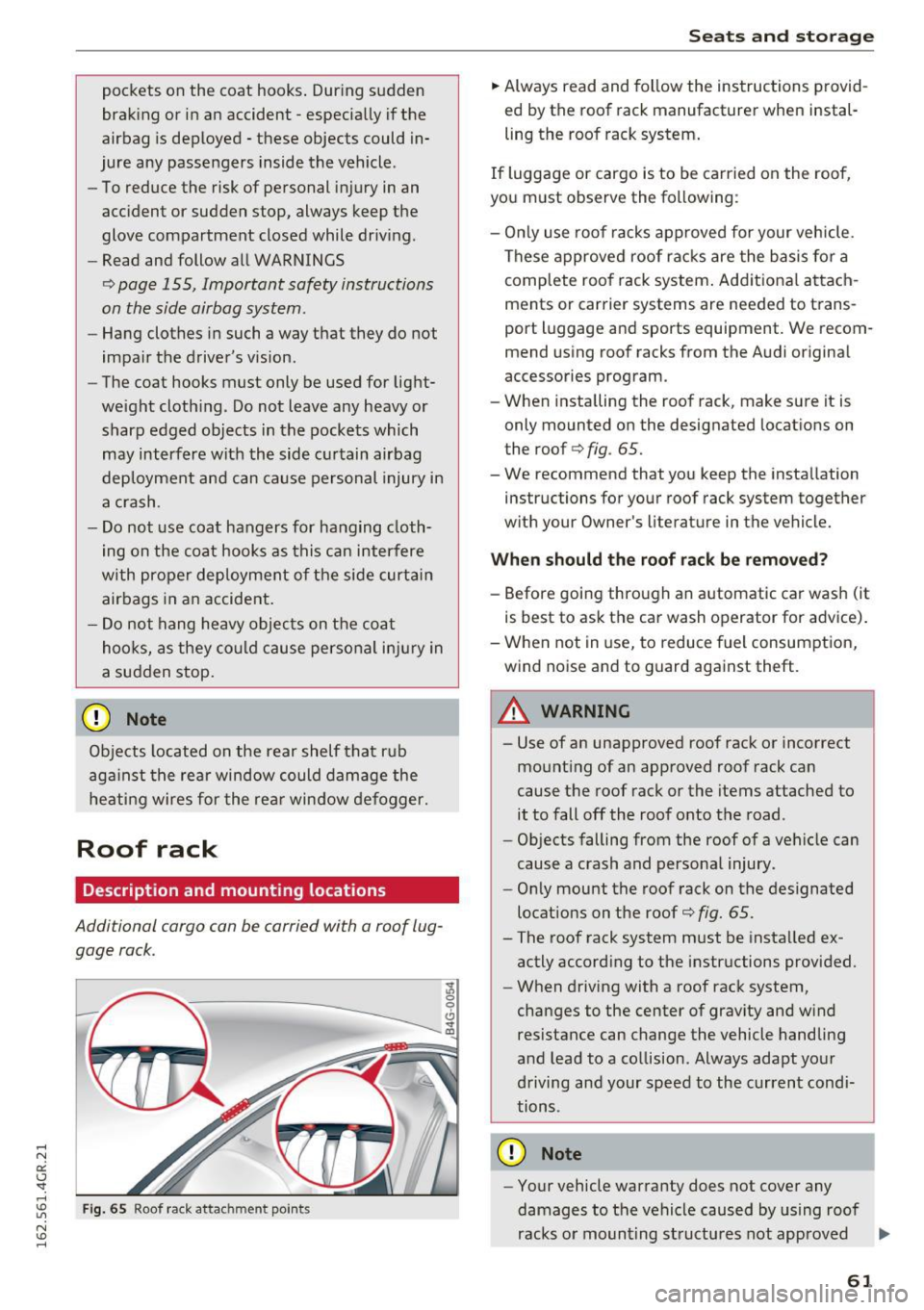
Additional cargo can be carried with a roof lug
gage rack.
Fig. 65 Roof rack attac hment point s
'J, 0 9 Cl sr CD
Seats and storage
.,. Always read and follow the instructions provid
ed by the roof rack manufacturer when instal
ling the roof rack system.
If luggage or cargo is to be carried on the roof,
you must observe the following :
- Only use roof racks approved for your vehicle.
These approved roof racks are the basis for a
complete roof rack system. Additional attach
ments or carrier systems are needed to trans
port luggage and sports equipment. We recom mend using roof racks from the Audi original
accessories program.
- When installing the roof rack, make sure it is
only mounted on the designated locations on
the roof
q fig. 65.
- We recommend that you keep the installation instructions for your roof rack system together
with your Owner's literature in the vehicle.
When should the roof rack be removed?
-Before going through an automatic car wash (it
is best to ask the car wash operator for advice).
- When not in use, to reduce fuel consumption,
wind noise and to guard against theft.
_8 WARNING
=
- Use of an unapproved roof rack or incorrect
mounting of an approved roof rack can
cause the roof rack or the items attached to it to fall off the roof onto the road.
- Objects falling from the roof of a vehicle can
cause a crash and personal injury.
- Only mount the roof rack on the designated
locations on the roof¢
fig. 65.
- The roof rack system must be installed ex
actly according to the instructions provided.
- When driving with a roof rack system,
changes to the center of gravity and wind
resistance can change the vehicle handling
and lead to a collision. Always adapt your
driving and your speed to the current condi
tions.
CD Note
- Your vehicle warranty does not cover any
damages to the vehicle caused by using roof
racks or mounting structures not approved ..,.
61
Page 69 of 282
Warm and cold 4-zone deluxe automatic
climate control
Description
A pplies to: ve hicles with four -zone auto matic clim ate con trol
The climate control system warms, cools and
adds humidity to the air in the vehicle interior. It
is the most effective when the windows and sun
roof* are closed. If the temperature ins ide the
parked vehicle becomes very warm, opening the
window briefly will speed up the cooling process.
In a ll heating mode functions except
defrost, the
b lower only sw itches to a higher speed once the
engine coolant has reached a certain tempera
ture.
Condensation from the cooling system can drip
and form a puddle of water under the veh icle.
This is normal and does not mean there is a leak.
Pollutant filt er
The po llutant filter removes pollutants such as
dust and pollen from the air.
The air poll utants filter must be changed a t the
intervals specified in you r Warranty
& Mainte
nance booklet, so that the air conditioner can
properly work .
I f yo u drive you r vehicle in a n area with high air
pollu tion, the fil ter may need to be changed
more frequently than specified in your Audi War
ranty & Maintenance booklet . If in doubt, ask
your author ized Audi Service Advisor for advice.
Key coded settings
The clima te con trol settings are autom atically
stored and assigned to the remo te control key
that is in use.
A WARNING
Reduced visibi lity is dangerous and can ca use
accidents.
Warm and c old
- For safe driving it is very important t hat all
windows be free of ice, snow and condensa
tion.
- Complete ly familiar ize yourself with the
proper use and function of the heating and
ventilation system and especially how to de
fog and defrost the windows .
- Never use the windshield wiper/washer sys
tem in freezing weather until you have
warmed the windshield fi rst, using the heat
i n g and vent ilation system . The was he r so lu
tion may freeze on the w indshield and re
duce visibili ty.
(D Note
- If you suspect that the air conditioner has
been damaged, sw itch the system off to
avoid furthe r damage and have it inspected
by a qualified dea lership.
- Repa irs to the Aud i a ir cond itione r requ ire
special techn ica l know ledge and s pe ci al
t oo ls. Cont act an a uthorized Audi de aler fo r
assistance .
@ For the sake of the environment
By red ucing t he amo unt of fuel you use, yo u
also red uce the amount of pollu tan ts emitte d
i nto the air.
(D Tips
- K eep the air intake s lots (in fro nt of the
w indshield) free from i ce , sn ow and debr is
in orde r to maint ain the proper func tion of
the climate control system .
- Th e energy m anagemen t sys tem may switch
t he seat heating* or rear window defros ter
off temporarily. These systems are availab le
agai n as soon as t he energy ba lance has
been restored.
- Air escapes through vents under the rear
w indow . When placing items of clothing on
the luggage compartment cover, ensure
that the openings are not covered.
67
Page 77 of 282
Your vehicle is equipped with an electromechani
cal parking brake. The parking brake is designed
to prevent the vehicle from rolling unintentional
ly and replaces the hand brake.
I n addition to the norma l functions of a tradi
tional hand brake, the electromechanica l parking
brake provides various convenience and safety
functions.
When starting from rest
- The integ ral starting assist helps you w hen
driving by automatically releasing the parking
brake
r=:> page 75, Starting from o stop .
-When starting on inclines, the starting assist
prevents the vehicle from unintentiona lly roll
ing back . The braking force of the parking brake
is not released until sufficient driving force has
been built up at the wheels.
Emergency brake function
An emergency brake ensures that the vehicle can
be slowed down even if the
normal brakes fai l
r=:> page 76, Emergency broking function.
A WARNING
-
Do not press the accelerator pedal inadver
tently if the vehicle is stat ionary but the en
gine is running and a gear is selected. Other
w ise the vehicle will start to move immediate
ly and could result in a crash.
(D Tips
- If the parking brake is applied with the igni
tion switched off, the indicator lights in the
switch and -(USA models)/ . (Cana-
da models) in the instrument cluster will go
out after a certain period of time.
- Occasiona l noises when the park ing brake is
applied and released a re normal and are not
a cause for concern.
- When the vehicle is parked, the park ing
brake goes th rough a se lf-test cycle at regu
lar int ervals. Any associated noises are nor
mal.
Parking
• Press the brake pedal to stop the vehicle.
D riving
• Pull the switch~ to set the parking brake .
• Place the selector lever in P .
• Turn the engine off
r=:> .&, .
• Turn the steering wheel when parking on in
clines so that the wheels w ill roll into the curb
if the vehicle starts moving .
A WARNING
=
-Always take the vehicle key with you when
leaving the vehicle, even for a sho rt period
of time. This applies particularly when chil
d ren remain in the vehicle. Otherwise chil
dren cou ld start the engine, release the
parking brake or operate e lectrical equip
ment such as power windows, which in
creases the risk of an accident.
- No one should remain in the vehicle when it
is locked, especially chi ldren. Locked doors
make it more d ifficult for emergency work
ers to get into the vehicle, wh ich puts lives
at risk.
Starting from a stop
The start assist function ensures that the park
ing broke is released automatically upon start
ing.
Stopping and setting the parking brake
• Pull the switch~ to set the parking brake .
Starting and automatically releasing the
parking brake
• When you press the acce lerator peda l, the
parking brake is automatica lly re leased and
your veh icle begins to move .
T he parking brake can be set if you must stop the
vehicle at a stop light or in traffic. The vehicle does not have to be held with the brake pedal.
The parking brake elim inates the tendency to
creep when a selector lever posit ion is engaged.
The parking brake releases automatically and the
vehicle begins to move as soon as you press the
accelerator pedal as usual.
Starting on hills
When starting on incl ines, the hill start assist
prevents the vehicle from unintentionally rolling
Ill>
75
Page 79 of 282
Cruise control system
Switching on
Applies to: vehicles with cruise control system
The cruise control system makes it possible to
drive a constant speed that is 30 km/h or higher.
0
f
®t
0
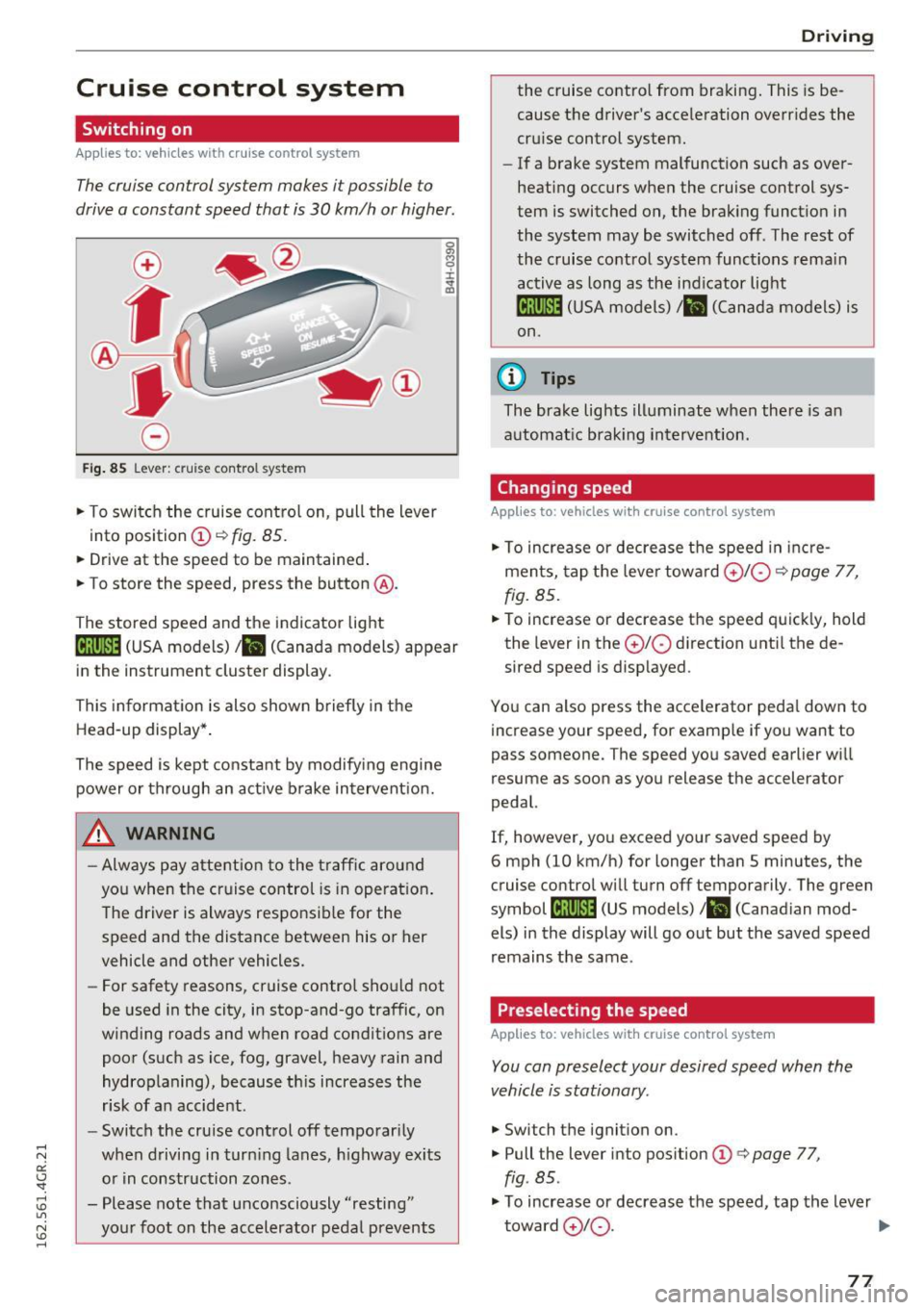
Fig . 85 Lever : cruise control system
.,. To switch the cruise control on, pull the lever
into position
(D ~ fig. 85.
.. Drive at the speed to be maintained .
.. To store the speed, press the button @.
The stored speed and the indicator light
tij;jl)~i4 (USA models)/ .. (Canada models) appear
in the instrument cluster display .
This informat ion is also shown briefly in the
Head-up display* .
The speed is kept constant by modify ing engine
power or through an act ive brake intervent ion.
_& WARNING
- Always pay attention to the traff ic around
you when the cruise control is in operat ion .
T he driver is always respo nsib le for the
speed and the distance between his or her
vehicle and other vehicles.
- For safety reasons, cruise control should not
be used in the city, in stop-and-go traffic, on
winding roads and w hen road condit ions are
poor (such as ice, fog, gravel, heavy rain and
hydroplaning), because th is increases the
r isk of a n accident.
- Switch the cruise control off temporar ily
when driving in turn ing lanes, h ighway exits
o r in construction zones .
- Please note that unconsciously "resting" yo ur foot on the accelerator pedal prevents
-
D rivi ng
the cruise co ntro l from bra king . This is be
cause the d river's accele ration overr ides the
cru ise control system.
- If a brake system malfunction such as over
heating occurs when the cruise control sys
tem is switched on, the brak ing funct io n in
the system may be switched off . The rest of
the cruise contro l system functions rema in
active as long as the ind icator light
ml1Jlm (USA models) / .. (Canada models) is
on.
(0 Tips
The brake lights illuminate when the re is an
automat ic brak ing intervent ion.
Changing speed
Applies to: vehicles with cruise control system
.,. To increase or dec rea se t he speed in inc re
ments, tap the leve r towa rd
0 10 ¢ page 77,
fig. 85 .
.. To increase or decrease the speed quick ly, hold
the lever in the
0 10 d irection unti l the de
sired speed is disp layed.
You can also press the accele rator peda l dow n to
increase your speed, for example if you want to
pass someone. The speed yo u saved earlier wi ll
resume as soon as you release the accelerator
pedal.
If, however, you exceed your saved speed by
6 mph (10 km/h) for longer than 5 minutes, the
cruise contro l will turn off temporarily . The green
symbol
li! j(9~14 (US models)/ .. (Canad ian mod
els) in the display will go out but the saved speed
remains the same.
Preselecting the speed
Applies to: vehicles with cruise control system
You can preselect your desired speed when the
vehicle is stationary.
.,. Switch t he ignition on .
.,. Pull the lever into pos ition
(D q page 77,
fig . 85.
.,. To increase or decrease t he speed, tap the lever
toward
0 10 . .,,_
77
Page 81 of 282
Audi ada pti ve c ruise contr ol and br akin g gu ard
Audi adaptive cruise
control and braking
guard
Introduction
A ppl ies to: ve hicles with Audi adaptive cruise co ntro l
The adaptive cruise contro l system assists the
driver by regulat ing vehicle speed and helping to
maintain a set distance to the vehicle ahead,
within the limits of the system.
If the system de
tects a moving vehicle up ahead, adaptive cruise
control can brake and then accelerate your veh i
cle. This helps to make driving more comfortable
both on long highway stretches and in stop-and
go traffic.
The braking guard system can warn you about an impending collision and initiate braking maneu
vers¢
page 85.
Adaptive cruise control and braking guard have
technical limitations that you m ust know, so
please read this section carefully, understand
how the system works and use them properly at
all times.
General information
General information
App lies to: ve hicles with Audi adaptive cruise contro l
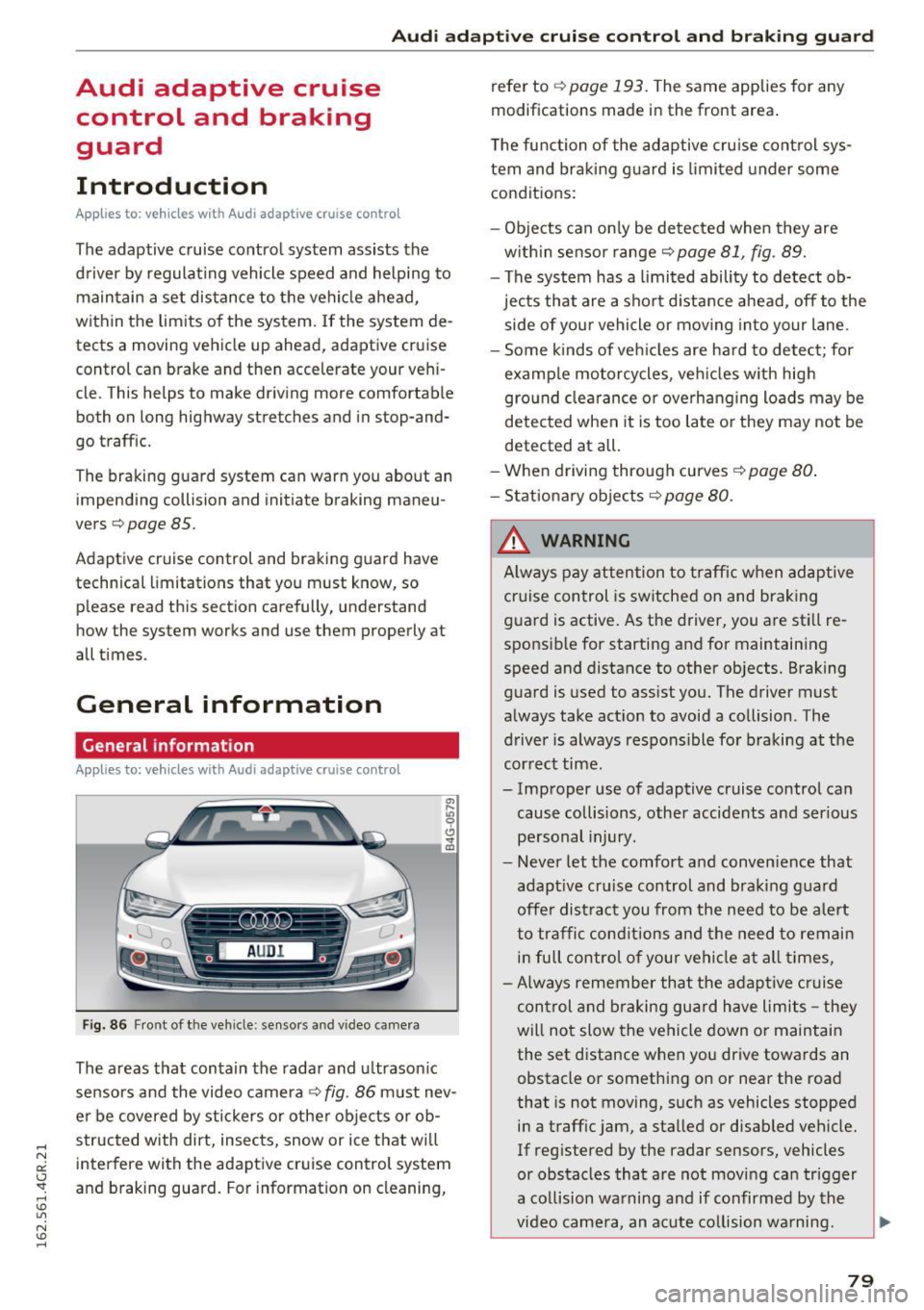
Fig. 86 Front of th e veh icle: sensors and vi deo camera
The areas that contain the radar and u ltrason ic
sensors and the video camera¢
fig. 86 must nev
er be covered by stickers o r other objects or ob
structed with dirt, insects, snow or ice that wi ll
interfere with the adaptive cruise control system
and braking guard. For information on cleaning, refer to
¢
page 193. The same applies for any
modifications made in the front area.
The function of the adaptive cru ise control sys
tem and braking g uard is limited under some
conditions:
- Objects can on ly be de tected when they are
w ith in sensor range¢
page 81, fig. 89.
- The system has a limited ability to detect ob
jects that are a short d istance ahead, off to the
side of your vehicle or mov ing into your lane .
- Some kinds of veh icles are hard to detect; for
examp le motorcycles, veh icles w ith high
gro und clea rance or overhanging loads may be
detected when it is too late o r they may not be
detected at all.
-When driving through curves
¢page 80 .
- Stat iona ry obje cts¢ page 80.
_& WARNING
A lways pay attention to traff ic when adaptive
cruise control is sw itched on and brak ing
guard is active . As the driver, you are still re
sponsible for starting and for maintaining
speed and distance to other objects. Braking
guard is used to assist you. The driver must
always take act ion to avoid a collision . The
driver is always respons ible for braking at the
cor rect time.
- Improper use of adaptive cruise control can cause collisions, other accidents and ser ious
pe rsonal injury.
- Never let the comfort and conven ience that
adapt ive cr uise control and braking g ua rd
offe r dist ract you from the need to be a lert
to traffic conditions and the need to remain
in full control of your vehicle at all times,
- Always remember that the adaptive c ruise
control and braking gua rd have limits -they
will not slow the vehicle down or maintain the set distance when you drive towards an
obstacle or something on or near the road
that is not moving, such as vehicles stopped
in a traffic jam, a stalled or disabled vehicle.
If reg istered by the radar sensors, vehicles
or obstacles that are not moving can trigger
a collision wa rning and if confirmed by the
video came ra, an acute co llision wa rning.
~
79
Page 82 of 282
Audi adapt ive crui se con trol a nd b rakin g guar d
-For safety reasons, do not use adaptive
cruise control when driving on roads with
many curves, when the road surface is in
poor condition and/or in bad weather (such
as ice, fog, gravel, heavy ra in and hydroplan
ing). Using the system under these condi·
tions co uld result in a collision.
- Switch adaptive cruise control off tempora
rily when driving in turn ing lanes, on ex
pressway exits or in construction zones. Th is
prevents the vehicle from accelerating to
the set speed when in these situat ions .
- The adapt ive cr uise control system will not
brake by itself if you put your foot on the ac
celerator peda l. Doing so can override the
speed and distance regu lation.
- When approaching stat ionary objects such
as stopped traffic, adaptive cruise control
will not respond and braking guard will have limited function.
- The adaptive cruise control system and
braking guard do not react to people, ani
mals, objects crossing the road or oncom ing
objects.
- The function of the radar sensors can be af
fected by reflective objects such as guard
rails, the entrance to a tunnel, heavy rain or
ice.
- Never follow a vehicle so closely that you
cannot stop your vehicle safely. The adap·
t ive cruise control cannot slow or brake the
vehicle safely when you fo llow another veh i
cle too close ly. Always remember that the
automatic braking function ca nnot br ing the
vehicle to a sudden o r emergency stop un
der these conditions .
- To prevent unintended operation, always
switch ACC off when it is not be ing used .
(D Note
The sensors can be displaced by impacts or
damage to the bumpe r, whee l housing and
unde rbody. That co uld affect the adaptive
cruise control system and braking guard .
Have your authorized Audi dealer or author
ized Audi Service Facility check their function.
80
In curves
Applies to: vehicles with A udi adaptive cruise control
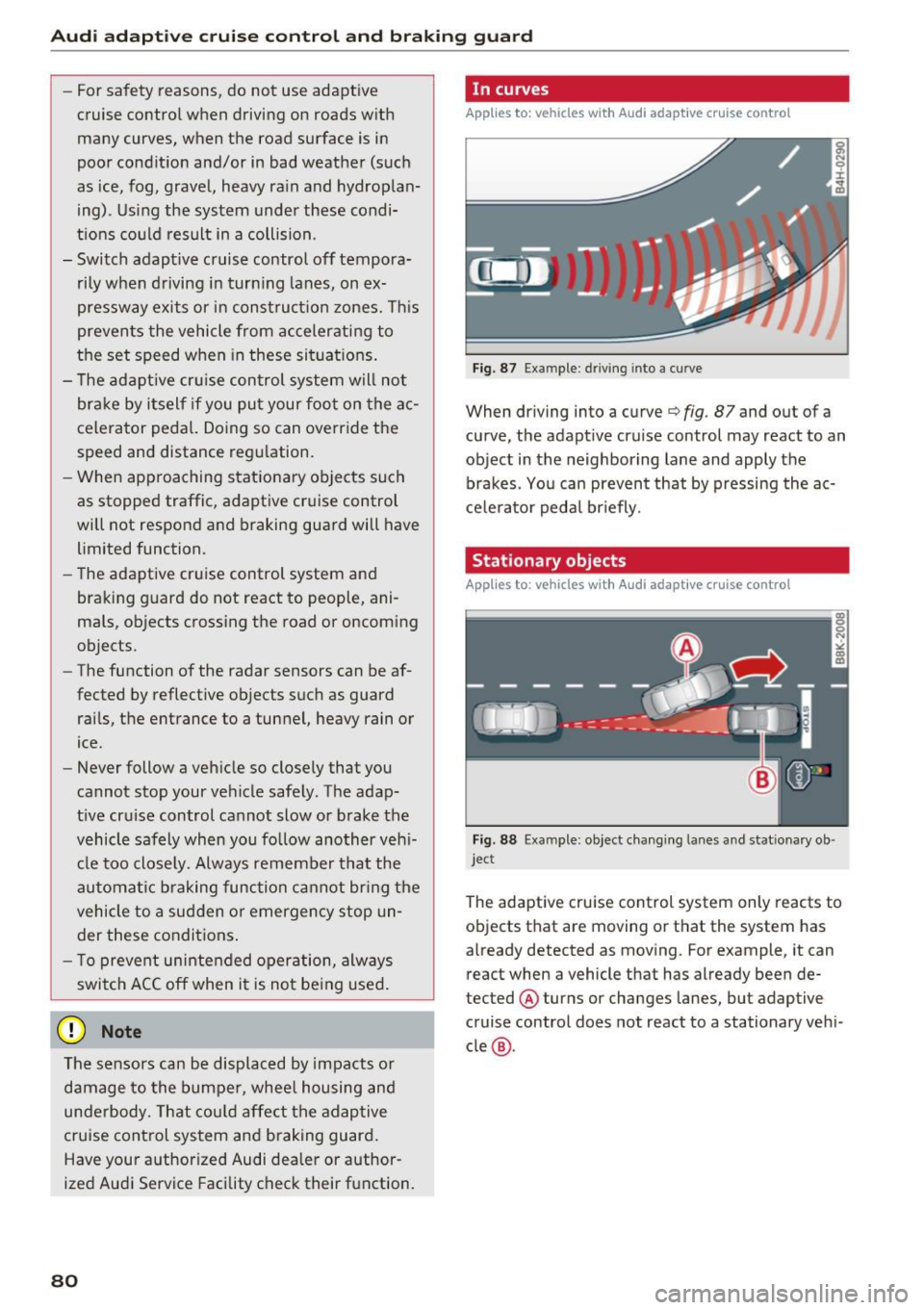
Fig. 87 Example : dr iving into a curve
When driving into a curve c:::> fig. 87 and out of a
curve, the adapt ive cruise control may react to an
object in the neighboring lane and apply the
brakes . You can prevent that by pressing the ac
ce lerator pedal br iefly.
Stationary objects
Applies to: vehicles with Audi adaptive cruise control
Fig. 88 Example: object chang ing lanes and stat ionary ob ·
jec t
The adaptive cruise control system only reacts to
objects that are moving or that the system has
already detected as moving . For example, it can
react when a vehicle that has already been de·
tected @ turns or changes lanes, but adaptive
cruise control does not react to a stationary vehi
cle @.
Page 86 of 282
Audi adapt ive crui se con trol a nd b rakin g guar d
The higher the speed, the greater the distance in
yards (meters)
c::;, .&. . The Distanc e 3 setting is
recommended .
The distances provided are specified values. De
pending on the driving situat ion and the how the
vehicle ahead is driving, the actual distance may
be more or less than these target d istances.
The various symbols for the time increments ap
pear briefly in the information line@q
page 81,
fig. 91
when you change the settings.
c:::, _c:::, __ _ Dist ance 1 : This setting co rresponds
to a distance of 92 feet/28 meters when travel ing at 62 mph (100 km/h), or a time interval of 1
second.
c:::, __ c:::, __ Dista nc e 2 : This setting corresponds
to a distance of 118 feet/36 mete rs when trave l
ing at 62 mph (100 km/h), or a time interval of
1.3 seconds .
c:::, ___ c:::,_ Distance 3: This setting corresponds
to a distance of 164 feet/SO mete rs when trave l
ing at 62 mph (100 km/h), or a time interval of
1.8 seconds .
c:::, __ __ c:::, Distance 4 : This setting corresponds
to a distance of 210 feet/64 mete rs when trave l
ing at 62 mph (100 km/h), or a time interval of
2.3 seconds .
A WARNING
Following other vehicles too closely increases
the risk of collisions and ser ious personal in
jury.
- Setting short distances to the traffic ahead
reduces the time and distance available to
br ing your vehicle to a safe stop and makes
it eve n mo re necessary to pay close atten
tion to traffic .
- Always obey applicable traffic laws, use
good judgme nt, and select a safe following
distance for the traffic, road and weathe r
condit ions.
(0 Tips
- Distanc e 3 is set automatically each time
you switch the ignit ion on .
84
- Your standard settings are automatically
stored and assigned to the remote control
key being used.
Selecting the driving mode
App lies to: vehicles with Aud i adapt ive cru ise control
.,. Select the desired driving mode in drive select
c::;,page95.
@ Tips
Your settings are automatically stored and as
signed to the remote contro l key being used.
Prompt for driver intervention
App lies to : vehicles with A udi ada ptive c ruise control
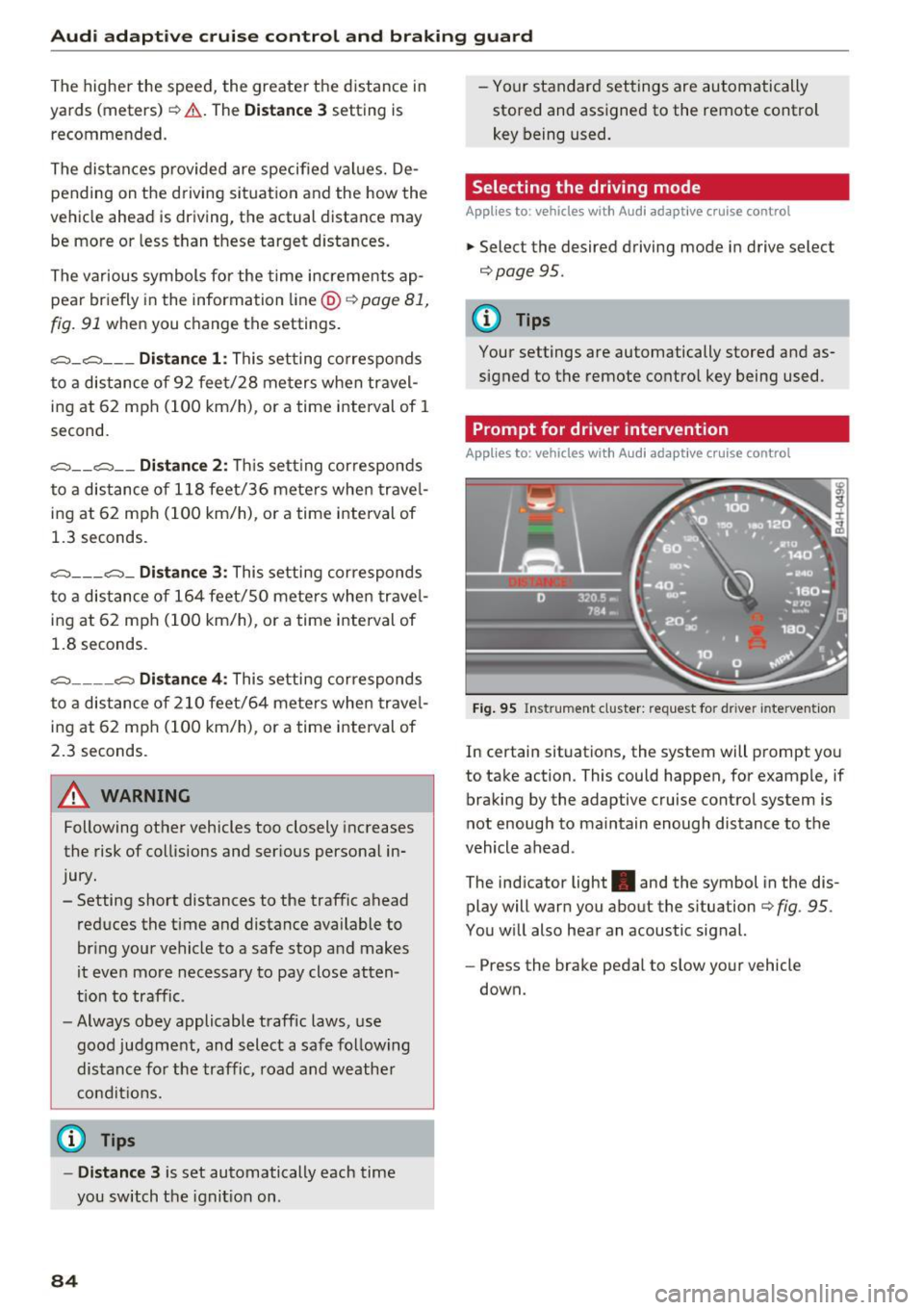
Fig . 95 Ins trume nt cluster: request for d river intervention
In c ertain situations, the system w ill prompt you
to take action. This could happen, for example, if
braking by the adaptive cruise control system is
not enough to maintain enough distance to the
vehicle ahead .
The ind icator light . and the symbol in the dis
play will warn you about the s ituation
c::;, fig . 95 .
You w ill also hear an acoustic signal.
- Press the brake pedal to slow your vehicle
down.
Page 87 of 282
Audi adaptive cruise control and braking guard
.... N
a:: CJ '
Description
Applies to: vehicles with Audi adaptive cruise contro l
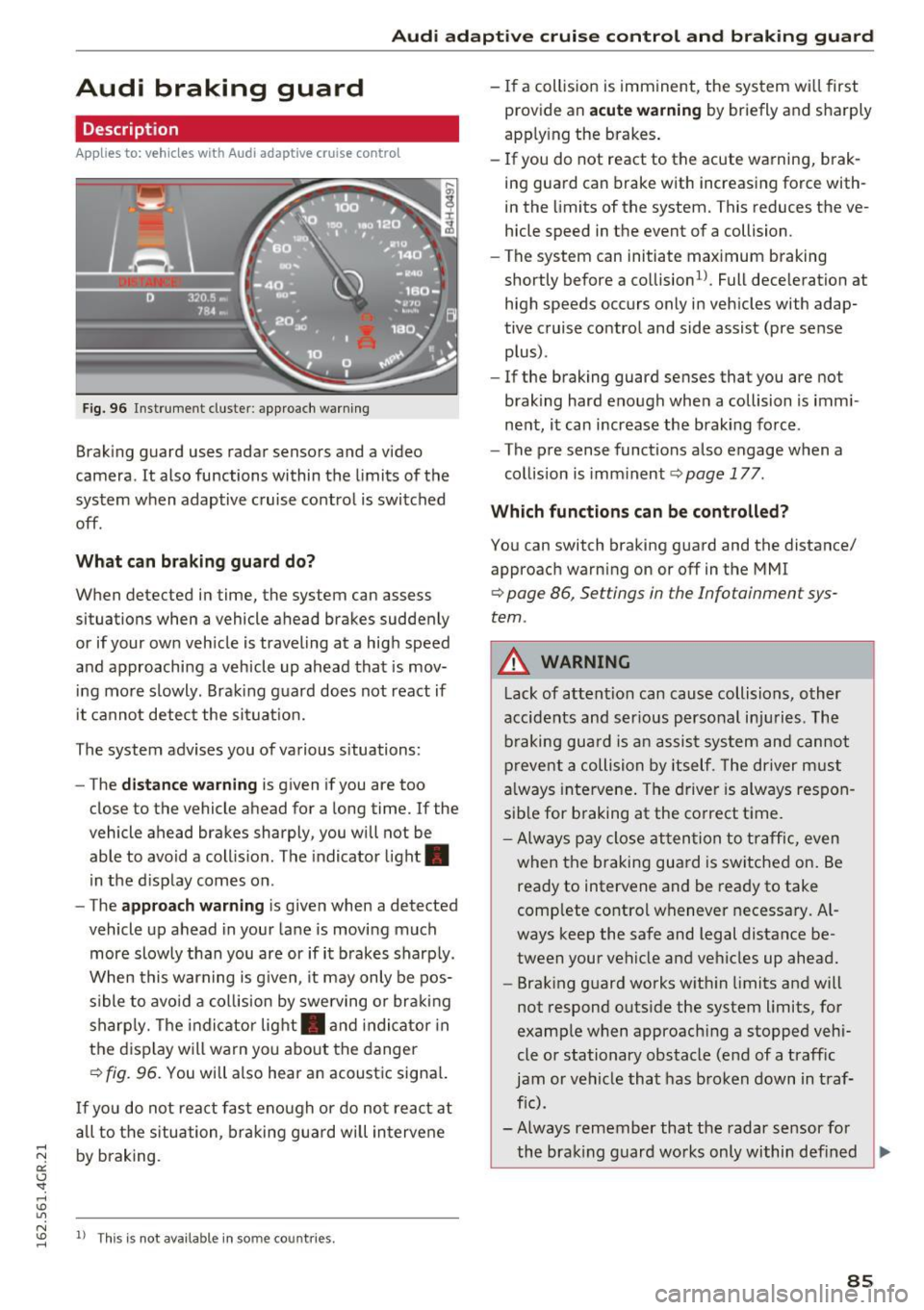
Fig. 96 Instrument cluster: approach warning
Braking guard uses radar sensors and a video
camera. It also functions within the limits of the
system when adaptive cruise control is switched
off.
What can braking guard do?
When detected in time, the system can assess
situations when a vehicle ahead brakes suddenly
or if your own veh icle is traveling at a high speed
and approaching a vehicle up ahead that is mov
ing more slowly. Braking guard does not react if
it cannot detect the si tuat ion.
The system advises you of various situations:
- The
distance warning is given if you are too
close to the vehicle ahead for a long time. If the
vehicle ahead brakes sharply, you will not be
able to avoid a collision . T he indicator light .
in the d isplay comes on .
- The
approach warning is given when a detected
vehicle up ahead in your lane is moving much
more slowly than you are or if it brakes sharply.
When this warning is g iven, it may only be pos
s ib le to avoid a collision by swerving or braking
sharp ly. The indicator light. and indicator in
the display will warn yo u about the danger
¢
fig. 96. You will also hear an acoustic signa l.
If you do not react fast enough or do not react at
all to the situation, braking guard will intervene
by braking.
N "' ll This is not available in some countries . ......
-If a collision is imminent, the system wi ll first
provide an
acute warning by briefly and sharply
apply ing the brakes .
- If you do not react to the acute warning, brak
ing guard can brake with increas ing force with
in the limits of the system. This reduces the ve
hicle speed in the event of a collision.
- The system can initiate maximum braking
shortly before a collision
1 ). Full dece leration at
high speeds occurs only in vehicles with adap
tive cruise control and side assist (pre sense plus).
- If the braking guard senses that you are not
braking hard enough when a collision is immi
nent, it can increase the braking force.
- The pre sense functions also engage when a
collision is imm inent ¢
page 177.
Which functions can be controlled?
You can switch braking guard and the distance/
approach warning on or off in the MMI
¢ page 86, Settings in the Infotainment sys
tem .
A WARNING
--
Lack of attention can cause collisions, other
accidents and serious personal injuries. The
braking guard is an assist system and cannot
prevent a collision by itself . Th e driver must
always intervene. The driver is always respon
sib le for b raking at the co rrect time.
- Always pay close attention to traffic, even
when the braking guard is switched on. Be
ready to intervene and be ready to take
complete control whenever necessary. Al
ways keep the safe and legal distance be
tween your vehicle and vehicles up ahead.
- Brak ing guard works with in limits and will
not respond outside the system limits, for
example when approach ing a stopped vehi
cle or stationary obstacle (end of a traffic
jam or vehicle that has broken down in traf
f ic).
- Always remember that the radar sensor for
the braking guard works only within defined
~
85
Page 90 of 282
Audi acti ve la n e ass is t
Audi active lane assist
Lane assist
Description
A pp lies to: ve hicles w ith Audi active lane assist
Active lane ass ist detects lane marker lines with
in the limits of the system us ing a camera in the
windshie ld. If you are approaching a detected
lane marker line and it appears likely that you
will leave the lane, the system will warn you with
corrective steering. You can override this steering
at any time. If you pass over a line, the steering
wheel will vibrate lightly. In order for this warn ing vibration to occur, it must first be switched
on in the Infotainment system. Act ive lane assist
is operable when the lane marker line is detected
on at least one side of the vehicle.
The system is designed for driving on freeways
and expanded highways and thus works only at
speeds of 40 mph (65 km/h) or more.
Applies to vehicles w ith side assist*: if you act i
vate a turn s ignal when active lane assist is ready
and it classif ies a lane change as critical because
of vehicles traveling alongside you or approach ing you, there w ill be not iceable correct ive steer
i n g short ly before you leave the lane. This will at
tempt to keep your vehicle in the lane.
Appl ies to veh icles w ithout s ide ass ist* : the sys
tem does not warn when it is ready if you activate
the t urn signa l before crossing the lane marker
line. In this case, it ass umes that you a re chang
ing lanes intentionally.
Applies to vehicles w ith adapt ive cr uise control*
or pa rk ing aid*: the co rrective steering is ta rget
ed based on the d riving situation. In addition to
the lane marker lines, the system can also take
into account other objects such as guard rails. If
they are detected in close proximity to the vehi
cle, active lane assist helps prevent the vehicle
from dr iv ing too close to them. There is a lso
passing assistance . The system does not provide
any corrective steer ing if it detects that you are
passing anothe r vehicle.
88
A WARNING
-
- The system warns the driver that the vehicle
is leaving the lane using correct ive steering.
The driver is always responsible for keeping
the vehicle within the lane.
- The system can help you keep the vehicle in the lane, but it does not drive by itse lf. Al
ways keep your hands on the steering
wheel.
- Cor rective steering may not occur in certain
situations, such as du ring heavy braking.
- There may be cases whe re the camera does
not recognize all lane marker lines. Correc
tive stee ring can only take place on the s ide
of the vehicle where lane marker lines are
detected.
- Othe r road stru ctures or objects could poss i
bly be identified un intent ionally as lane
marker lines . As a result, corrective steering
may be unexpected or may not occ ur.
- The camera view can be restricted, for ex
ample by vehicles driving ahead or by rain,
snow, heavy spray or lig ht shining into t he
camera. Th is can result in active lane ass ist
not detecting the lane marker lines or de
tect ing them incorrectly.
- Under certain cond it ions such as r uts in the
road, a banked roadway or crosswinds, the
corrective steer ing alone may not be enough
to keep the vehicle in the m iddle of the lane .
- For safety reasons, act ive lane assist must
not be used when there are poor road and/
or weather conditions such as slippery
roads, fog, gravel, heavy rain, snow and the po tential fo r hydrop laning. Using active lane
assist under these cond it ions may increase
the risk of a crash .
Page 92 of 282
Audi active lane assist
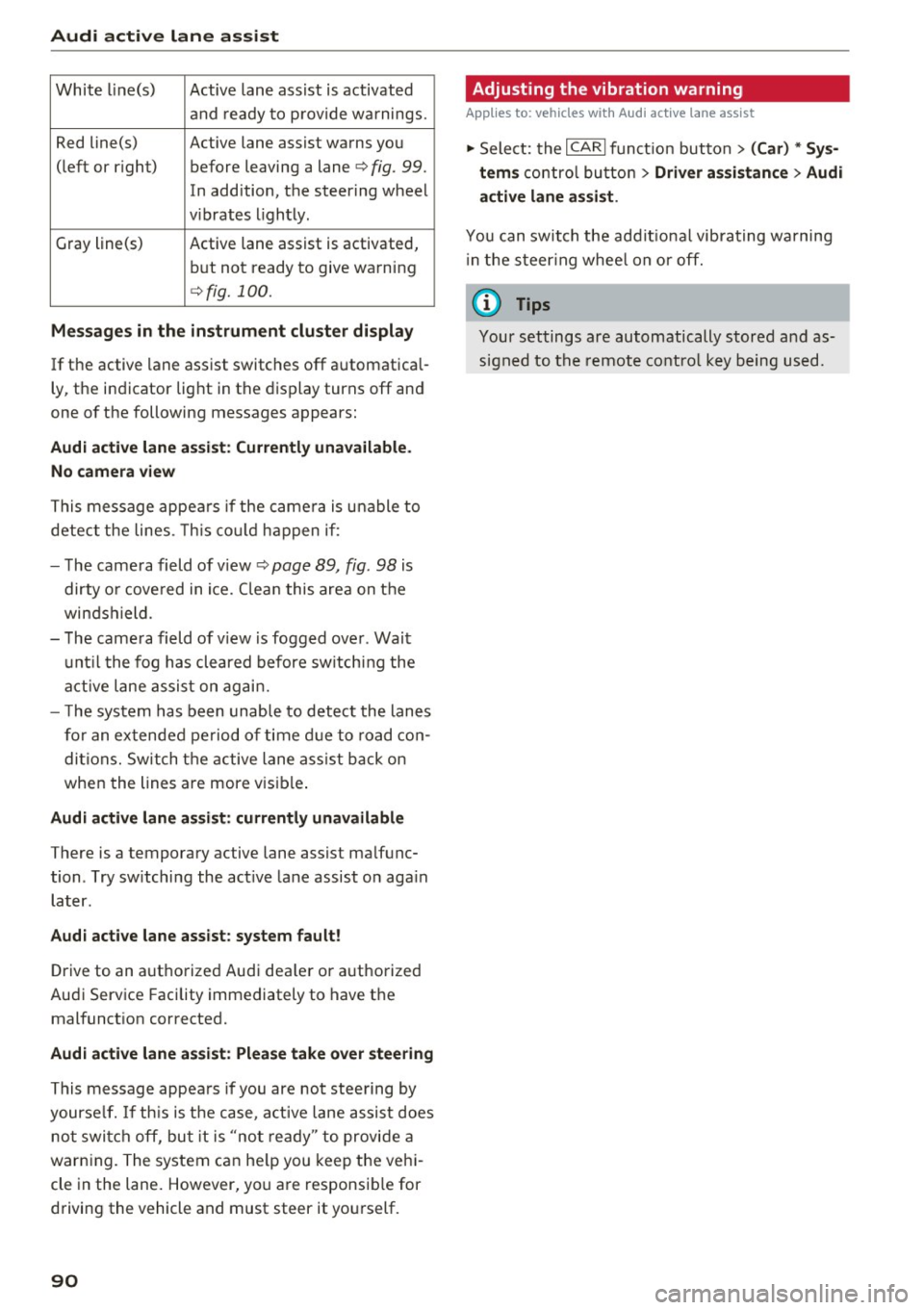
White line(s) Active lane assist is activated
and ready to provide warnings.
Red line(s) Active lane assist warns you
(left or r ig ht) before leaving a lane¢
fig. 99.
In addition, the steering wheel
v ib rates lightly.
Gray line(s)
Active lane assist is activated,
but not ready to give warning
¢fig. 100.
Messages in the instrument cluster display
If the active lane assist switches off automatical
ly, the indicator light in the display turns off and
one of the following messages appears:
Audi active lane a ssist: Currently unavailable.
No camera view
This message appears if the came ra is unable to
detect the lines. This could happen if:
- The camera field of view ¢
page 89, fig. 98 is
dirty o r covered in ice. Clean this area on the
windshield.
- The camera field of v iew is fogged over . Wait
until the fog has cleared before switching the
active lane assist on again.
- T he system has been unable to detect the lanes
for an extended period of time due to road con
ditions. Switch the active lane assist back on
when the lines are more vis ible.
Audi active lane assist: currently unavailable
There is a temporary active lane assist malfunc
tion . Try sw itching the act ive lane assist on aga in
later.
Audi active lane assist: system fault!
Drive to an authorized Aud i dea ler or authorized
Audi Service Facility immediately to have the
malfunct ion corrected.
Audi active lane assist: Please take over steering
This message appears if you are not steering by
yourse lf. If th is is the case, active lane assist does
not switch off, but it is "not ready" to provide a
warn ing. The system can he lp you keep the vehi
cle in the lane. However, you are responsib le for
driving the vehicle and must steer it yourself.
90
· Adjusting the vibration warning
Applies to: vehicles with Audi active lane assist
.,. Select: the I CARI function button > (Car) * Sys
tems
control button > Driver assistance > Audi
active lane assist .
You can switch the addit ional vibrating warning
i n the steer ing whee l on or off.
(D Tips
Your settings are automatically stored and as
signed to the remote control key being used.