instrument cluster AUDI RS7 SPORTBACK 2016 Owner's Manual
[x] Cancel search | Manufacturer: AUDI, Model Year: 2016, Model line: RS7 SPORTBACK, Model: AUDI RS7 SPORTBACK 2016Pages: 282, PDF Size: 70.78 MB
Page 92 of 282
Audi active lane assist
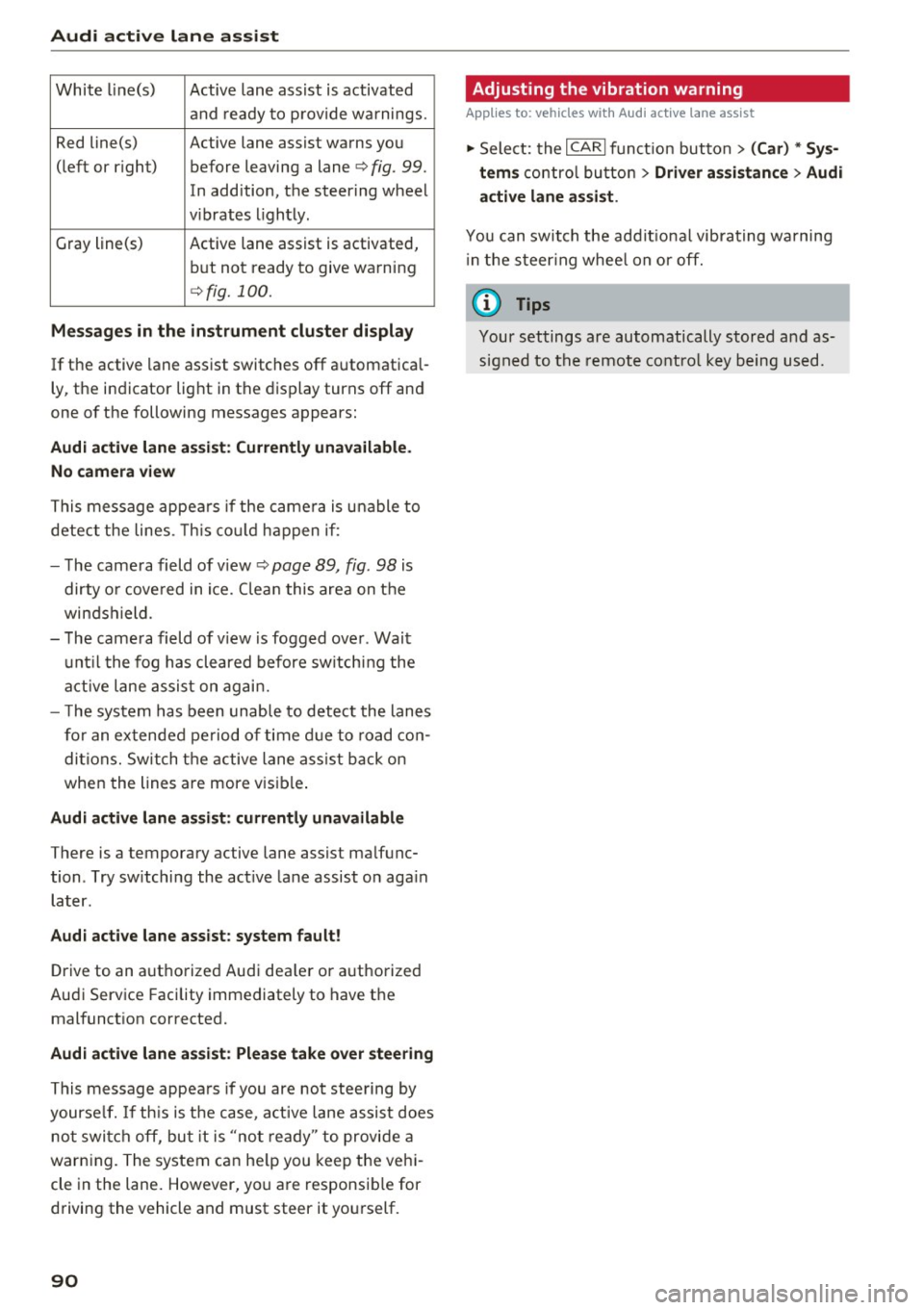
White line(s) Active lane assist is activated
and ready to provide warnings.
Red line(s) Active lane assist warns you
(left or r ig ht) before leaving a lane¢
fig. 99.
In addition, the steering wheel
v ib rates lightly.
Gray line(s)
Active lane assist is activated,
but not ready to give warning
¢fig. 100.
Messages in the instrument cluster display
If the active lane assist switches off automatical
ly, the indicator light in the display turns off and
one of the following messages appears:
Audi active lane a ssist: Currently unavailable.
No camera view
This message appears if the came ra is unable to
detect the lines. This could happen if:
- The camera field of view ¢
page 89, fig. 98 is
dirty o r covered in ice. Clean this area on the
windshield.
- The camera field of v iew is fogged over . Wait
until the fog has cleared before switching the
active lane assist on again.
- T he system has been unable to detect the lanes
for an extended period of time due to road con
ditions. Switch the active lane assist back on
when the lines are more vis ible.
Audi active lane assist: currently unavailable
There is a temporary active lane assist malfunc
tion . Try sw itching the act ive lane assist on aga in
later.
Audi active lane assist: system fault!
Drive to an authorized Aud i dea ler or authorized
Audi Service Facility immediately to have the
malfunct ion corrected.
Audi active lane assist: Please take over steering
This message appears if you are not steering by
yourse lf. If th is is the case, active lane assist does
not switch off, but it is "not ready" to provide a
warn ing. The system can he lp you keep the vehi
cle in the lane. However, you are responsib le for
driving the vehicle and must steer it yourself.
90
· Adjusting the vibration warning
Applies to: vehicles with Audi active lane assist
.,. Select: the I CARI function button > (Car) * Sys
tems
control button > Driver assistance > Audi
active lane assist .
You can switch the addit ional vibrating warning
i n the steer ing whee l on or off.
(D Tips
Your settings are automatically stored and as
signed to the remote control key being used.
Page 100 of 282
Night vision assist
Night vision assist
Night vision assist with
pedestrian and wild
animal highlighting
Description
A pp lies to: ve hicles w ith night v isio n ass ist
The night vision assist can detect, highlight and,
if necessary, warn about pedestrians and large
wild animals.
Night vision assistant with pedestrian and wild
animal detection assists you in darkness by using
an infrared camera to monitor the area in front of
your vehicle, within the limits of the system.
It
can display objects up to approximately 1000 feet (300 meters) away . The heat image
detected by the camera is shown in th e instru
ment cluster display . Warm areas appear lighter
and cold areas appear darker.
Highlighting detected pedestrians and wild
animals
Applies to: ve hicles w ith n ig ht v isio n ass ist
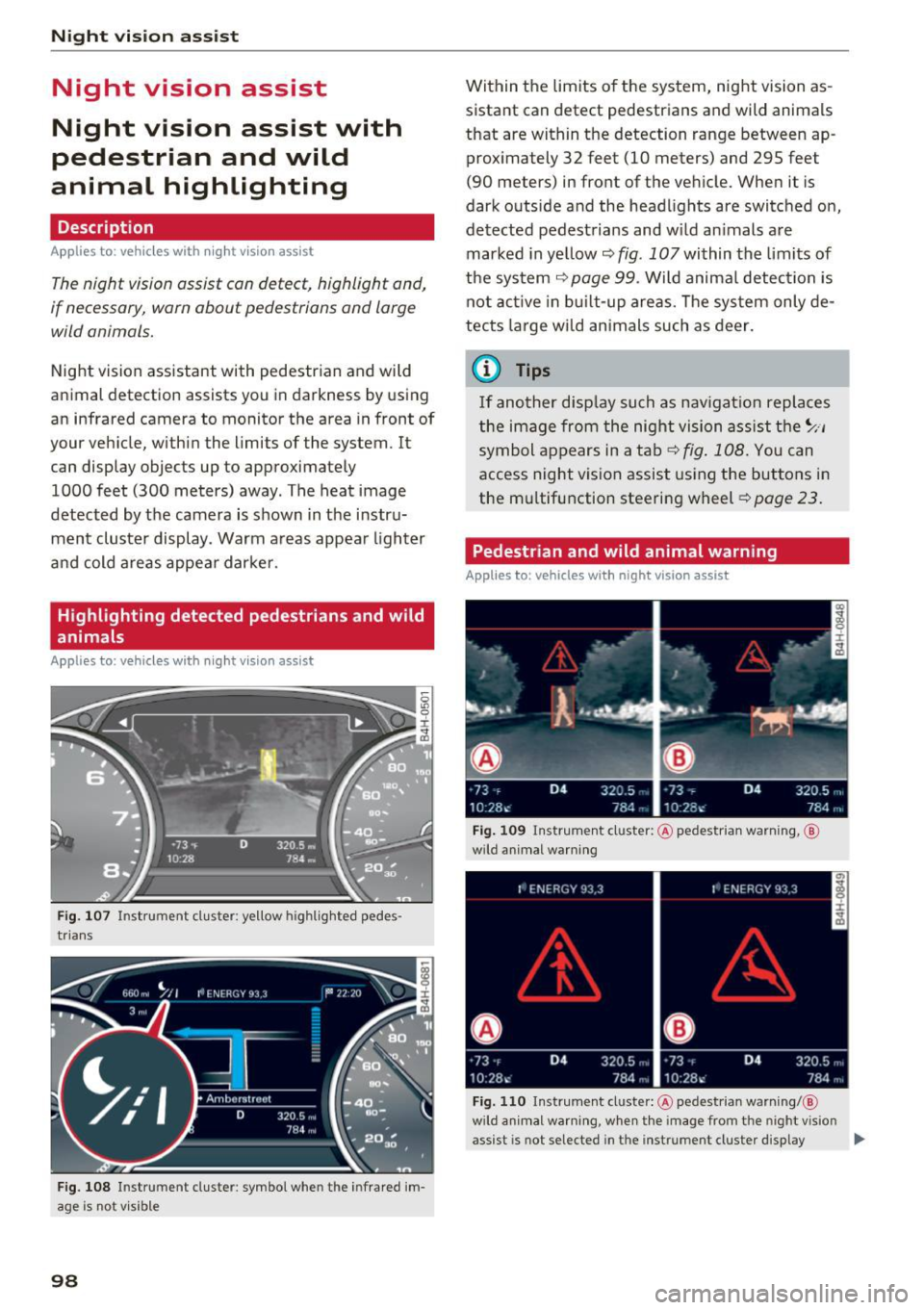
Fig . 107 Instrument cluster: ye llow h ighlig hted pedes
trians
Fig. 108 I n stru ment cluste r: symbol when the i nfrared im
age is not v isible
98
Within the limits of the system, night vision as
sistant can detect pedestrians and wild animals
that are within the detection range between ap
proximately 32 feet (10 meters) and 295 feet
(90 meters) in front of the vehicle. When it is
dark outside and the headlights are switched on,
detected pedestrians and w ild animals are
marked in ye llow
c::> fig. 107 within the limits of
the system
c::> page 99. Wild animal detection is
not active in built-up areas. The system only de
tects large wild animals such as deer.
@ Tips
If another display such as navigation replaces
the image from the night vision assist the~ .. ,
symbol appears in a tab
c::>fig . 108. You can
access night vision assist using the buttons in
the mu ltifunction steering wheel
c::> page 23.
Pedestrian and wild animal warning
Applies to: vehicles wit h night vision assist
Fig. 109 Instrument cl uster: @pedestrian warning, ®
w ild animal warning
Fig. 110 Instrument cluste r: @ pedes trian warning/ @
wild a nimal warning, w hen the image from the n ight v ision
assist is not selected in t he instrument cluster display ...
Page 101 of 282
Display in the instrument cluster/head-up
display*
If there are pedestrians or wild animals in an
area in front of you r vehicle that is classified as
critical, the system will direct your attention to
this :
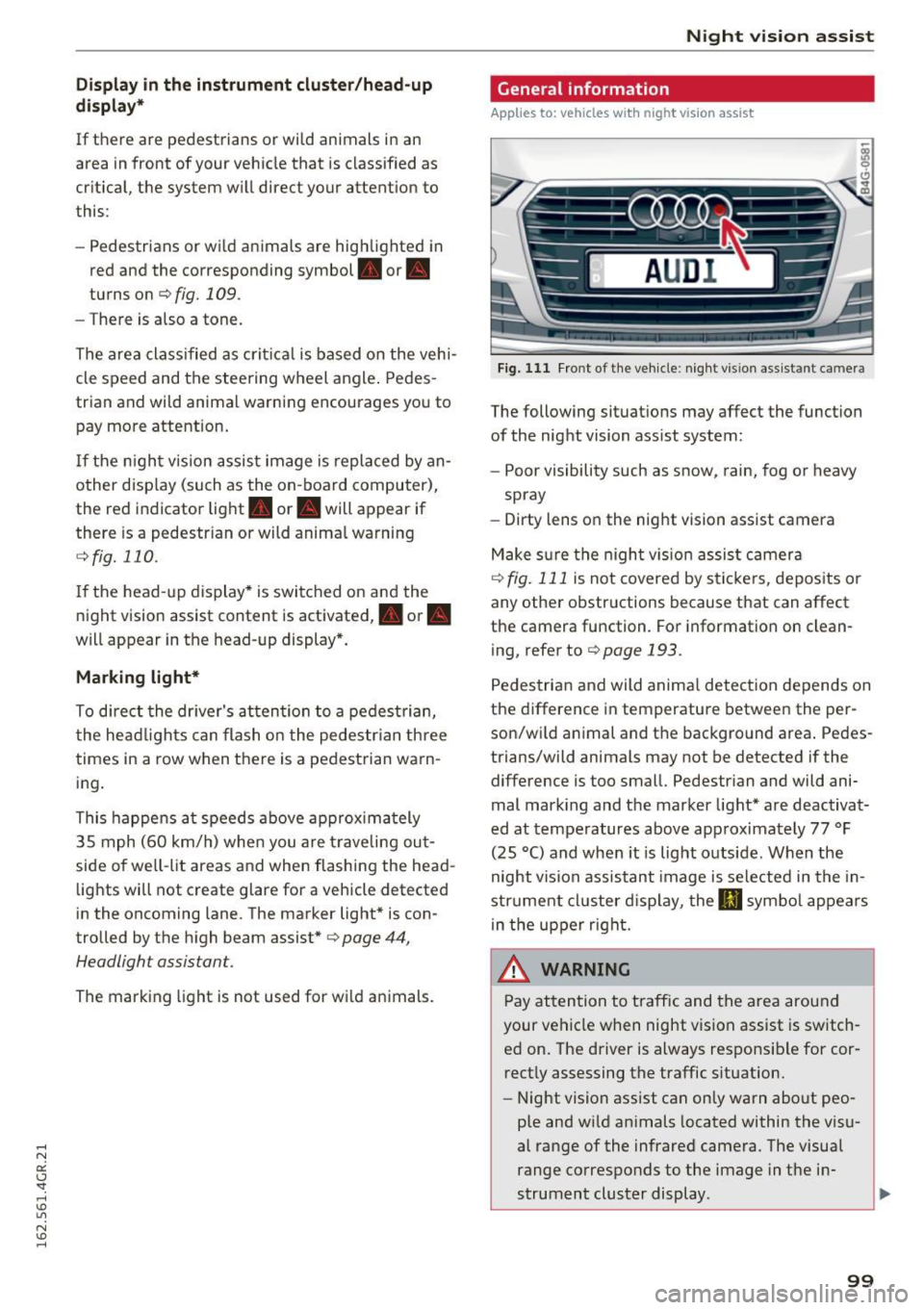
- Pedestrians or wild animals are highlighted in
red and the corresponding symbol. or.
turns on
¢fig. 109.
-There is also a tone.
The area classified as critical is based on the vehi
cle speed and the steering wheel angle. Pedes
trian and wild animal warning encourages you to
pay more attention.
If the night vision assist image is replaced by an
other display (such as the on-board computer),
the red indicator light . or. will appear if
there is a pedestrian or wild animal warning
¢ fig. 110 .
If the head-up display* is switched on and the
night vision assist content is activated, . or.
will appear in the head-up display*.
Marking light*
To direct the driver's attention to a pedestrian,
the headlights can flash on the pedestrian three
times in a row when there is a pedestrian warn
ing.
This happens at speeds above approximately
35 mph (60 km/h) when you are traveling out
side of well-lit areas and when flashing the head lights will not create glare for a vehicle detected
in the oncoming lane . The marker light* is con
trolled by the high beam assist*
c::;, page 44,
Headlight assistant .
The marking light is not used for wild animals.
Night vision assist
General information
Applies to : vehicles wit h night vision assist
Fig. 111 Front of the vehicle : night vis ion assist ant ca mera
The following situations may affect the function
of the night vision assist system:
- Poor visibility such as snow, rain, fog or heavy
spray
- Dirty lens on the night vision assist camera
Make sure the night vision assist camera
c::;, fig. 111 is not covered by stickers, deposits or
any other obstructions because that can affect
the camera function . For information on clean
ing, refer to
c::;, page 193.
Pedestrian and wild animal detection depends on
the difference in temperature between the per
son/wild animal and the background area. Pedes
trians/wild animals may not be detected if the difference is too small. Pedestrian and wild ani
mal marking and the marker light* are deactivat
ed at temperatures above approximately 77 °F
(25 °C) and when it is light outside . When the
night vision assistant image is selected in the in
strument cluster display, the
II symbol appears
in the upper right.
A WARNING
Pay attention to traffic and the area around
your vehicle when night vision assist is switch
ed on. The driver is always responsible for cor
rectly assessing the traffic situation.
- Night vision assist can only warn about peo
ple and wild animals located within the visu
al range of the infrared camera. The visual
range corresponds to the image in the in
strument cluster display .
-
99
Page 102 of 282
Night vision assist
-Night vision assist may not detect people or
wild animals and mark them if
- they are not in an upright posit ion, for ex
ample if they are sitting or lying down
and/or
- the silhouette in the display appears in
comp lete or interrupted, for example be
cause the person is partia lly covered by a
veh icle or an animal by tall grass. This
could increase the risk of an accident.
- Never try to swerve around animals if doing
so wi ll endanger you o r other road users, be
cause this increases the risk of an accident.
- Ev en though the system evaluat es the
shape and heat given off by all detected ob
j ects, there are limits to the system. There
may be false warnings.
- For technical reasons, the image pauses in
sp lit second intervals.
Switching on/off
Applies to: ve hicles w ith night visio n ass ist
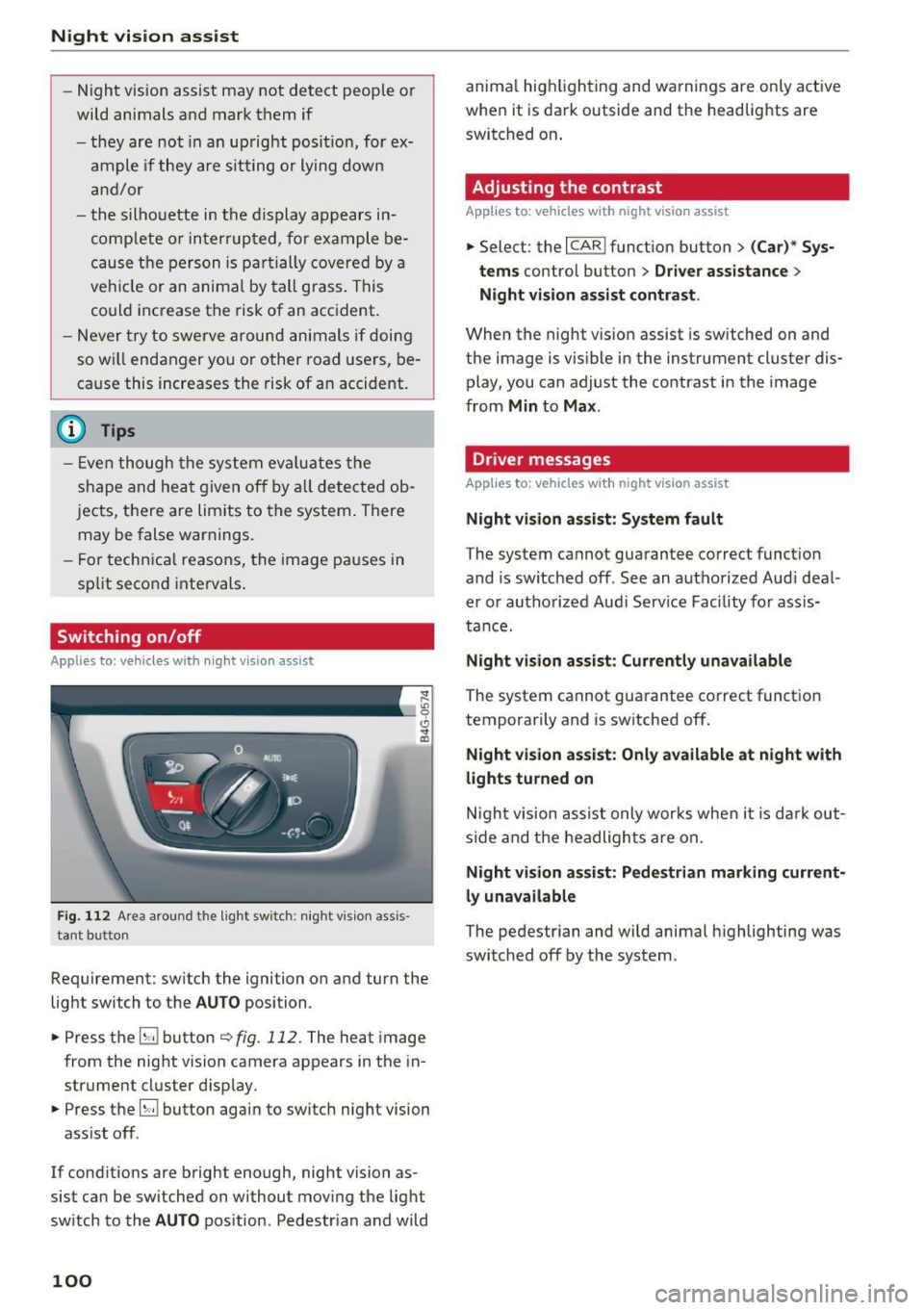
Fig. 112 Area arou nd th e light switch: nigh t v is ion ass is ·
tant bu tto n
Requirement: switch the ignition on and turn the
light switch to the
AUTO position .
.,. Press the
5J button ~ fig. 112. The heat image
from the night vision camera appears in the in
strument cluster display .
.,. Press the
B button again to switch night vision
ass ist off .
If cond itions are bright enough, night vision as
sist can be switched on without moving the light
switch to the
AUTO position . Pedestr ian and wild
100
anima l hig hlighting and warnings are only active
when it is dark outside and the headlights are
switched on .
Adjusting the contrast
Applies to : vehicles with night vision assist
.,. Select: the I CARI function button > (C ar)* Sys
tems
contro l button > Driver assistance >
Night vision assist contrast .
When the night vis ion assist is switched on and
the image is v is ib le in the instrument cluster dis
play, you can adjust the contrast in the image
from
Min to Max .
Dr iver messages
Applies to: vehicles with night vision assist
Night vision assist: System fault
The system cannot guarantee correct funct ion
and is switched off. See an authorized Audi deal
er or authorized Aud i Service Facility for assis
tance.
Night vision assist: Currently unavailable
The system cannot guarantee correct funct io n
temporarily and is switched off.
Night vision assist: Only available at night with
lights turned on
Night vision assist only works when it is dark out
side and the headlights are on.
Night vision assist: Pedestrian marking current
ly unavailable
The pedestrian and wild animal highlighting was
switched off by the system .
Page 103 of 282
Automatic transmission tiptronic
Introduction
The automat ic transmission is controlled e lec
tron ically. The transmission upshifts or down
shifts automatically depending on wh ich drive
p rogram is selected.
When a
moderate driving style is used , the
transmission selects the most economical driving
mode.
It will then change up early and delay the
downshifts to give bette r fu el economy .
The transm iss ion switches to a sporty mode after
a kick-down or when the driver uses a
sporty
driving style
character ized by quick accelerator
pedal movements, heavy acceleration, frequent
changes in speed and traveling at the maximum
speed.
If desired, the dr iver can also select the gears
manually (tiptronic mode) ¢page 105.
In the tiptron ic transmission, power is transfer
red by a torque converte r.
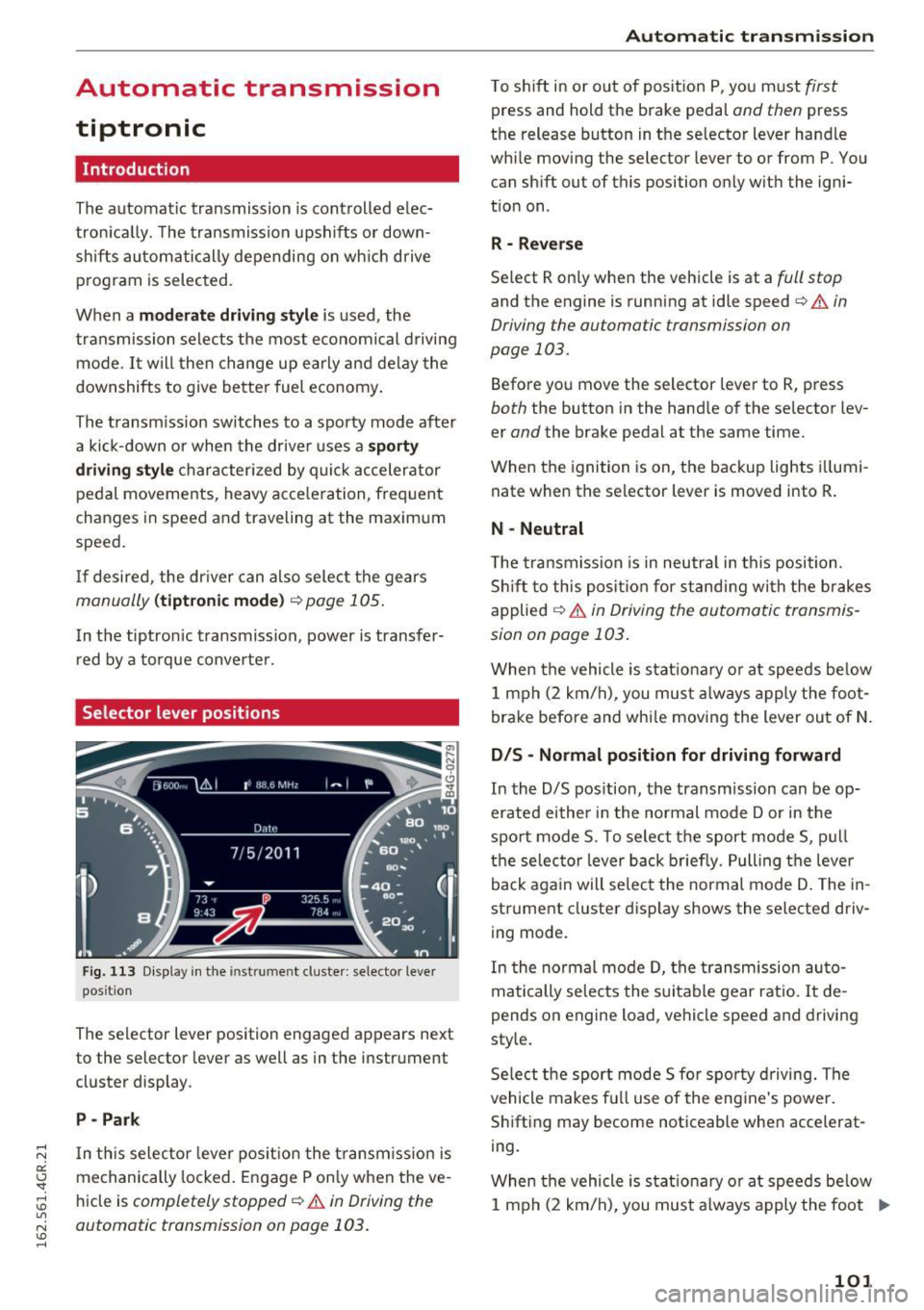
Selector lever positions
Fig. 113 Display in the instrument cluster : selector lever
position
The selector lever position engaged appears next
to the selector lever as well as in the instrument
cluster display .
P -Park
In th is selector lever pos ition the transm iss ion is
mechanically locked . Engage P only when the ve
hicle is
completely stopped¢.&. in Driving the
automatic transmission on page 103.
Automatic transmission
T o shift in or out of position P, you must first
press and hold the brake pedal and then press
the release button in the selector lever handle
while moving the selector lever to or from P . You
can shift out of this position only with the igni
tion on .
R - Reverse
Select R only when the vehicle is at a full stop
and the engine is running at idle speed¢ & in
Driving the automatic transmission on
page 103.
Before you move the selector lever to R, press
both the button in the hand le of the selector lev
er
and the brake pedal at the same time.
When the ignition is on, the backup lights illumi
nate when the selector lever is moved into R .
N -Neutral
The transmission is in neutra l in this position .
Shift to this position for standing with the brakes
applied
¢ & in Driving the automatic transmis
sion on page 103 .
When the vehicle is stat ionary or at speeds be low
1 mph (2 km/h) , you must always apply the foot
brake before and whi le moving the lever out of N.
DIS -Normal position for driving forward
In the D/S position, the transmission can be op
erated either in the normal mode Dor in the
sport mode S. To select the sport mode S, pull
the selec tor lever back briefly. Pulling the leve r
back again will select the normal mode D . The in
strument cluster display shows the selected driv
ing mode.
In the normal mode D, the transmission auto
matically selects the suitable gear ratio. It de
pends on engine load, vehicle speed and drivin g
style.
Select the sport mode S fo r spo rty driving. The
vehicle makes full use of the engine 's powe r.
Shifting may become noticeable when accelerat
ing.
When the vehicle is stat ionary or at speeds below
1 mph (2 km/h), you must always apply the foot ..,.
101
Page 104 of 282
Automatic transmission
brake before and while moving the lever to D/S
out of N.
A WARNING
Read and follow all WARNINGS r=':> & in Driv
ing the automatic transmission on
page 103.
(D Note
Coasting downhill with the transmission in N
and the engine not running will result in dam
age to the automatic transmission and possi
bly the catalytic converter.
{!) Tips
- Audi drive select: you can adjust the sporty
shift characteristics in the
Dynamic driv ing
mode .Swill appear in the instrument clus
ter display instead of D .
- If you accidentally select
N while driving,
take your foot off the accelerator pedal im
mediately and wa it for the engine to slow
down to idle before selecting D/S .
- If there is a power failure, the selector lever
will not move out of the P posit ion . The
emergency release can be used if this hap
pens
r=':> poge 106.
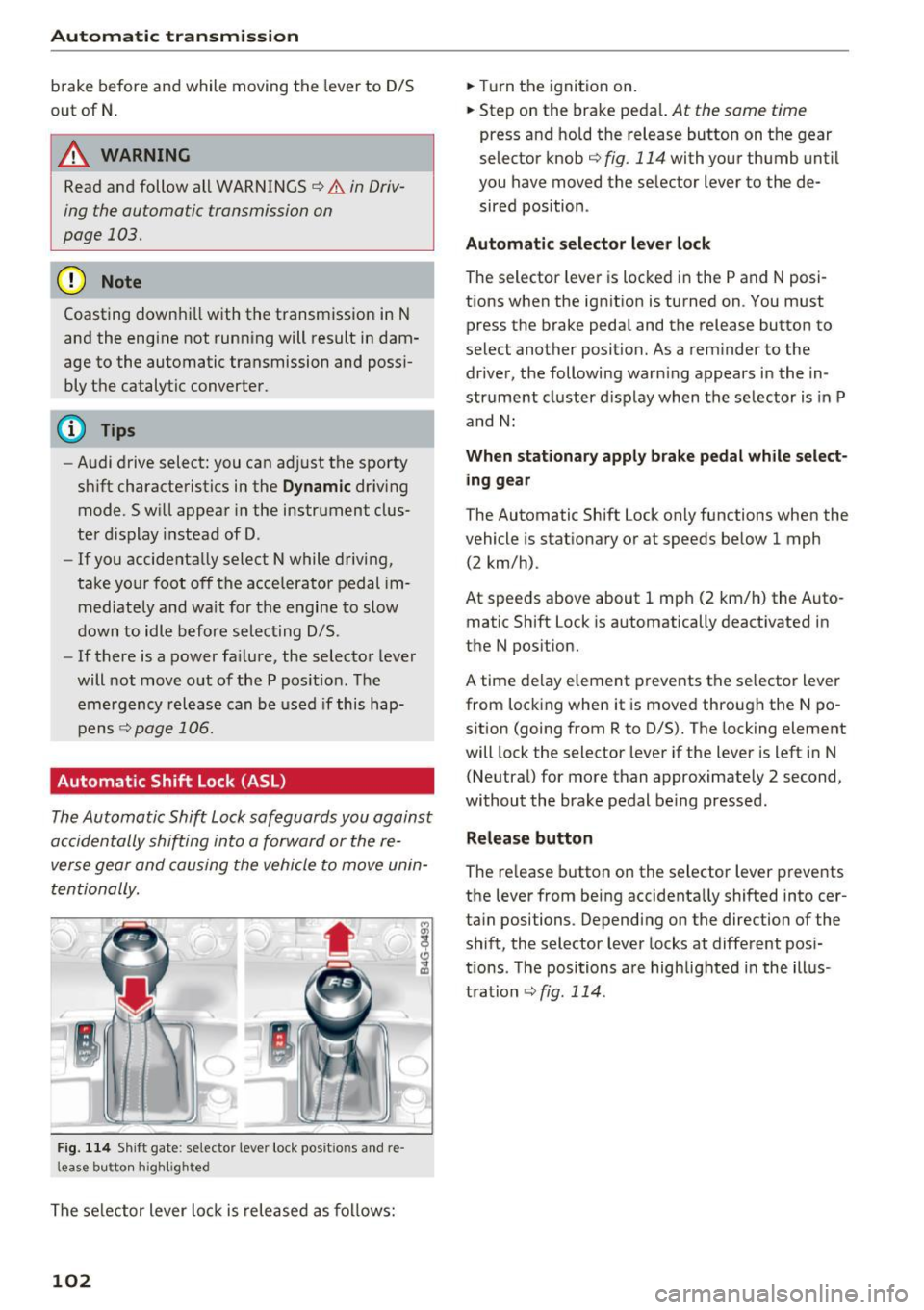
Automatic Shift Lock (ASL)
.
The Automatic Shift Lock safeguards you against
occidentally shifting into o forward or the re
verse gear and causing the vehicle to move unin
tentionally.
F ig. 114 Shift gate : selecto r lever lock posit io ns and re
l ease bu tton high light ed
The selector lever lock is released as follows:
102
.,. Turn the ignition on .
.,. Step on the brake pedal.
At the some t ime
press and hold the release button on the gear
selector knob
c::> fig. 114 with your thumb until
you have moved the selector lever to the de sired position .
Automatic selector lever lock
The sel ector lever is locked in the P and N posi
tions when the ignition is turned on . You must
press the br ake pedal and the release button to
select another position. As a reminder to the driver, the following warn ing appears in the in
strument cluster display when the selector is in P
and N:
When stationary apply brake pedal while select
ing gear
The Automatic Shift Lock only functions when the
vehicle is sta tionary or at speeds below 1 mph
(2 km/h) .
At speeds above about 1 mph (2 km/h) the Auto
matic Shift Lock is automatically deactivated in
the N position.
A t ime delay element prevents the selector lever
from locking when it is moved through the N po
sition (going from R to D/S). The locking element
will lock the selector lever if the lever is left in N
(Neutral) for more than approximately 2 second,
without the brake pedal being pressed .
Release button
The release button on the selector lever prevents
the lever from being accidentally shifted into cer
tain positions . Depending on the direction of the
shift, the selector lever locks at different posi
tions . The positions are highlighted in the illus
tration
<=:> fig . 114.
Page 129 of 282
....
Safety belts
General information
Always wear safety belts!
Wearing safety belts correctly saves lives!
This chapter explains why safety belts are neces
sary, how they work and how to adjust and wear
them correctly.
~ Read all the information that follows and heed
all of the instructions and WARNINGS.
A WARNING
Not wearing safety belts or wearing them im
properly increases the risk of serious personal
injury and death.
- Safety belts are the single most effective
means available to reduce the risk of serious
injury and death in automobile accidents.
For your protection and that of your passen
gers, always correctly wear safety belts
when the vehicle is moving.
- Pregnant women, injured, o r physically im
paired persons must also use safety belts.
Like all vehicle occupants, they are more
likely to be seriously injured if they do not
wear safety belts. The best way to protect a
fetus is to protect the mother -throughout
the entire pregnancy.
Number of seats
Your Audi has a total of four seating positions:
two in the front and two in the rear. Each seating position has a safety belt.
A WARNING
Not wearing safety belts or wearing them im
properly increases the risk of serious personal
injury and death.
- Never strap more than one person, includ
ing small children, into any belt.
It is espe
cially dangerous to place a safety belt over a
N child sitting on your lap. er:
~ -Never let more people ride in the vehicle
~ than there are safety belts available. Lil
N v:, ......
Safety belts
-Be sure everyone riding in the vehicle is
properly restrained with a separate safety
belt or child restraint.
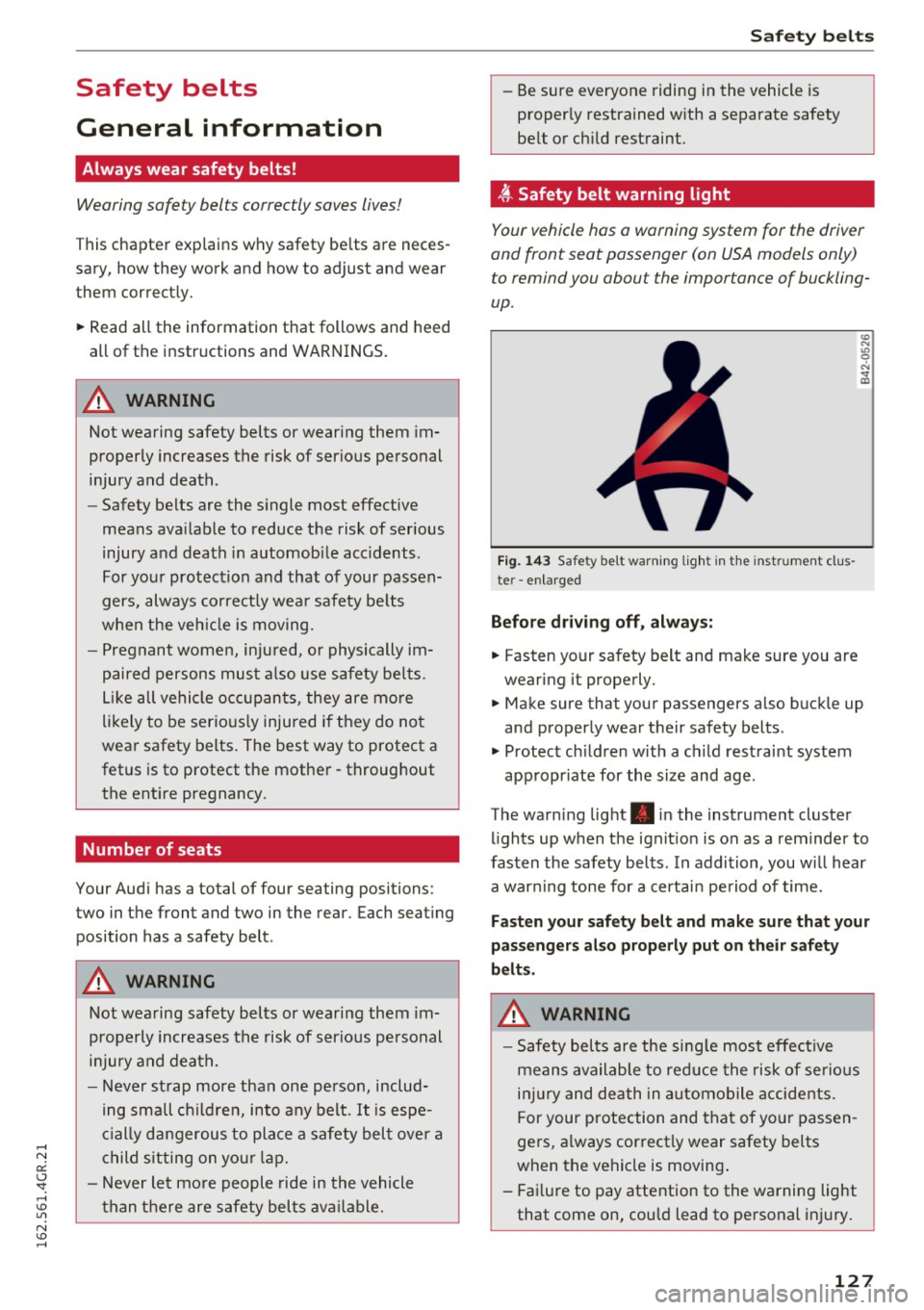
, ff. Safety belt warning light
Your vehicle has a warning system for the driver
and front seat passenger (on USA models only)
to remind you about the importance of buckling
up .
Fig. 143 Safety belt warn ing light in the instrument clus
te r -enlarged
Before driving off, always:
.. Fasten your safety belt and make sure you are
wearing it properly.
.,, N
"' 0 ..:, ., m
~ Make sure that your passengers also buckle up
and properly wear their safety belts .
~ Protect children w ith a ch ild restraint system
appropr iate for the size and age .
The warning light . in the instrument cluster
lights up when the ignit ion is on as a reminder to
fasten the safety belts. In addition, you wil l hear
a warning tone for a certain period of time.
Fasten your safety belt and make sure that your
passengers also properly put on their safety
belts.
A WARNING
-
- Safety belts are the sing le most effective
means available to reduce the risk of serious
injury and death in automobile accidents.
For your protection and that of your passen
gers, a lways correctly wear safety belts
when the vehicle is moving .
- Failure to pay attention to the warning light
that come on, could lead to personal injury.
127
Page 145 of 282
-An Advanced Airbag with gas generator and
control valve for the driver inside the steering
wheel hub.
- An Advanced Airbag with gas generator and
control valve inside the instrument panel for
the front passenger.
- A capacitive passenger detection system under
neath the front passenger seat cover. This sys
tem measures the electrical capacitance of the
person in the seat. The information registered
is sent continuously to the electronic control
unit to regulate deployment of the front Ad
vanced Airbag on the passenger side .
- An airbag monitoring system and indicator
light in the instrument cluster
~ page 146.
-A sensor in each front seat registers the dis
tance between the respective seat and the
steering wheel or instrument panel. The infor
mation registered is sent continuously to the
electronic control unit to regulate deployment
of the front Advanced Airbags.
- The
PASSENGER AIR BAG OFF light comes on
and stays on in the center of the instrument
panel ~
page 147, fig. 157 and tells you when
the front Advanced Airbag on the passenger side has been turned off.
- A sensor in the safety belt latch for the driver
and for the front seat passenger that senses
whether that safety belt is latched or not and
transmits this information to the electronic control unit.
A WARNING
Damage to the front passenger seat can pre
vent the front airbag from working properly.
- Improper repair or disassembly of the front
passenger and driver seat will prevent the
Advanced Airbag System from functioning properly.
- Repairs to the front passenger seat must be
performed by qualified and properly trained
workshop personnel.
- Never remove the front passenger or driver
seat from the vehicle.
- Never remove the upholstery from the front
passenger seat.
- Never disassemble or remove parts from the
seat or disconnect wires from it.
Airbag system
-Never carry sharp objects in your pockets or
put them on the seat. The capacitive pas
senger detection mat in the front passenger
seat will not function properly if it is punc
tured.
- Never carry things on your lap or carry ob
jects on the front passenger seat. Such ob
jects can influence the capacitance regis
tered by the capacitive passenger detection
system, so that incorrect information is pro
vided to the airbag control unit.
- Never store items under the front passenger
seat. Parts of the Advanced Airbag System
under the passenger seat could be dam
aged, preventing them and the airbag sys
tem from working properly.
- Never place seat covers or replacement up
holstery that have not been specifically ap
proved by Audi on the front seats.
- Seat covers can prevent the Advanced Air
bag System from recognizing child re
straints or occupants on the front passenger
seat and prevent the side airbag in the seat
backrest from deploying properly.
- If a seat heater has been retrofitted or oth
erwise added to the front passenger seat,
never install any child restraint system on
this seat.
- Never use cushions, pillows, blankets, or
similar items on the front passenger seat.
The additional layers prevent the capacitive
passenger detection system from accurately
measuring the capacitance of the child safe
ty seat and/or the person on the seat and
thus keep the Advanced Airbag System from
working properly.
- Never place or use any electrical device
(such as a laptop, CD player, electronic
games device, power inverter or seat heater
for child seats) on the front passenger seat if the device is connected to the 12-volt
socket or the cigarette lighter socket. Such
devices can influence the capacitance regis
tered by the capacitive passenger detection
system, so that incorrect information is pro
vided to the airbag control unit.
- If you must use a child restraint on the front
passenger seat and the child restraint
~
143
Page 188 of 282
Intelligent Technology
Audi dealer immediately to have the malfunction
corrected. The color of the indicator light depends on the vehicle speed.
_& WARNING
-
Driving at higher speeds without the rear
spoiler deployed can impair handling charac
teristics, making the vehicle harder to con
trol.
- Always make sure that the spoiler is de
ployed when driving at speeds over 85 mph
(140 km/h) . If the rear spoiler warning/indi
cator light in the instrument cluster comes
on, the rear spoiler may not have deployed.
- Never drive at speeds higher than 85 mph
(140 km/h) if the spoiler is not deployed .
Have the spoiler inspected as soon as possi
ble by an authorized Audi dealer or qualified
workshop.
- Always obey speed limits and other traffic
laws.
_& WARNING
Improper operation of the rear spoiler can
cause crushing injuries.
- Always make sure that nobody, especially
children, is in the way when the rear spoiler
is deployed or retracted.
@) Note
- Never push on the vehicle on the rear spoil
er . This could cause damage.
- To prevent damage to the rear spoiler do
not lean or place anything on it.
-
- Only operate the rear spoiler manually when
the luggage compartment lid is close and
the rear spoiler moving parts are not
blocked. Otherwise, damage could occur.
(D Tips
Clean the rear spoiler compartment every 2 to
3 months. To function correctly, the rear
spoiler must be free of ice, snow and leaves.
186
Energy management
' The starting ability is optimized
The energy management system manages the
electrical energy distribution and optimizes the
availability of electrical energy for starting the
engine.
When a vehicle with a conventional energy sys
tem is not driven for a long time, the battery is
drained by equipment (for example the immobil
izer). In certain circumstances , there could may
not be enough energy to start the engine .
Your vehicle is equipped with an intelligent ener
gy management system for distributing electrici
ty. This significantly improves the starting ability
and increases the battery life.
The energy management system Is made up of
battery diagnosis , idling current management
and dynamic energy management.
Battery diagnosis
The battery diagnosis determines the battery charge level. The sensors detect the battery, the
battery current, and the battery temperature .
The current charge level and the performance of
the battery are determined based on this.
Idling current management
The idling current management decreases the
energy used while parked . With the engine
switched off, it manages the energy distribution
to the different electrical components. Date from
battery diagnosis is taken into account for this.
Depending on the battery charge level, electrical
equipment is switched off one item after the oth
er, to prevent the battery from draining and to
retain the starting ability.
Dynamic energy management
While driving, dynamic energy management dis
tributes the appropriate amount of energy to the
electrical equipment .
It controls the battery
charge level so that more energy is not used then
is being generated in order to maintain an opti-
mal battery charge level.
ll>
Page 207 of 282
Checking and Filling
Engine compartment
Engine compartment overview
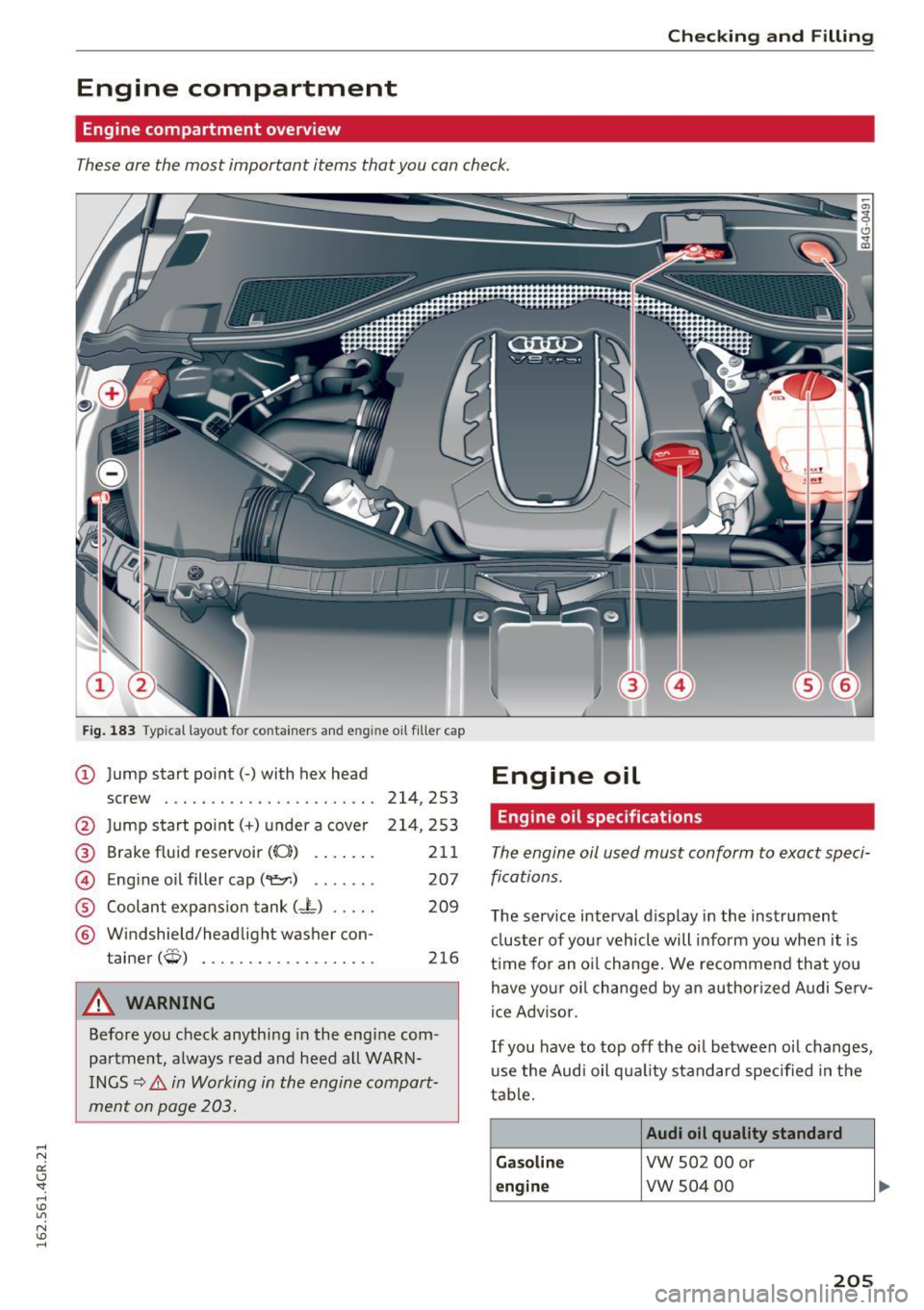
These are the most important items that you can check.
Fig. 183 Typical layout for containers and e ngine oil fille r cap
(D Jump start point(-) with hex head Engine oil
screw . .. .... .... .... ..... .. . 214, 253
@ Jump start po int( +) under a cover 214 ,253
@ Brake fluid reservoir (0:) . . . . . . . 211
@ Eng ine oil filler cap(~) . . . . . . . 207
® Coolant expans ion tank (- L) . . . . . 209
® Windshield/headlight washer con-
tainer
(W) . . . . . . . . . . . . . . . . . . . 216
A WARNING
Before you check anything in the engine com
partment, always read and heed all WARN
INGS
¢ .&. in Working in the engine compart
ment on page 203.
Engine oil specifications
The engine oil used must conform to exact speci
fications.
The service interval display in the instrument
cluster of your vehicle will inform you when it is
t ime for an o il change. We recommend that you
have your oil changed by an authorized Audi Serv-
ice Adv isor.
If you have to top off the oi l between oil changes,
use the Audi oil quality standard specified in the
table.
Audi oil quality standard
Gasoline
VW 502 00 or
engine VW S04 00
205