ignition AUDI RS7 SPORTBACK 2016 Owner's Guide
[x] Cancel search | Manufacturer: AUDI, Model Year: 2016, Model line: RS7 SPORTBACK, Model: AUDI RS7 SPORTBACK 2016Pages: 282, PDF Size: 70.78 MB
Page 80 of 282
Driving
"'T o sto re the speed displayed, release the lever .
This f unction ma kes it possib le, for examp le, to
save the desired speed be fore dr iving on the
h ighway . Once on t he h ighway, act iva te the
cru ise control by pu lling the lever toward
(D .
Switching the system off
Applies to: veh icles w ith c ruise control
Temporary d eactivation
"' Press the brake peda l, o r
"' Press the lever into position @(not clicked i nto
place)
¢ page 77, fig. 85, or
"' Drive for longer than
5 minutes at more than
5 mph (10 km/h) above the stored speed .
Switching off completely
"' Press lever into position @(clicked into place),
o r
"' Switc h the ignition off .
The system retains the saved speed if you deact i
vate the cruise control temporarily. To resume
the saved speed, re lease the brake pedal and p ull
the lever to position
(D .
Sw itching the ign ition off erases the saved speed.
A WARNING
You should only ret urn to the saved s peed if it
is not too fast for the current tra ffic condi
tions - risk of an accident!
78
Page 84 of 282
Audi adaptive cruise control and braking guard
• You must also press the brake pedal when the
vehicle is stopped.
Switching adaptive cruise control off
• Push the lever away from you into position @
until it clicks into place. The message
ACC off
appears.
@ Indicator lights
• • Adaptive cruise control is switched on. No
vehicles are detected up ahead. The stored speed
is maintained .
• · A moving vehicle is detected up ahead. The
adaptive cruise control system regulates the
speed and distance to the moving vehicle ahead
and accelerates/brakes automatically.
r -.j · Adaptive cruise control is switched on . A
moving vehicle up ahead was detected. Your vehi
cle remains stopped.
• • When automatic braking is not able to keep
enough distance to a previously detected moving
vehicle up ahead, you must take control and brake
9 page 84, Prompt for driver interven
tion.
© Display
If adaptive cruise contro l is not shown in the dis
play, you can call it up with the multifunction
steering wheel buttons
9 page 22.
Based on the symbols in the display, you can de
termine if the system is maintaining a distance to
the vehicle ahead and what that distance is.
No vehicle· No vehicle ahead was detected.
White vehicle· A vehicle ahead was detected.
Red vehicle · Prompt for the driver to take action
9page84.
Both arrows on the scale© indicate the distance
to the vehicle ahead. No arrow appears when the
vehicle is on an open road and there is no object
ahead . If an object is detected ahead, the arrow
moves on the scale.
The green zone on the scale shows the stored dis·
tance. For information on changing the stored
distance, refer to
9 page 83. If the distance se·
82
lected is too close or may soon become too close,
the arrows move into the red zone on the scale.
A WARNING
Improper use of the adaptive cruise control
can cause collisions, other accidents and seri
ous personal injuries.
- Pressing the
ISETI button when driving at
speeds below 20 mph (30 km/h), will auto
matically accelerate the vehicle to 20 mph (30 km/h), which is the minimum speed
that can be set.
@ Tips
-If you switch the ignition or the adaptive
cruise control off, the set speed is erased
from the system memory.
- The electronic stabilization control (ESC)
and the anti-slip-regulation (ASR) are auto·
matically turned on when the adaptive
cruise control is turned on. Both systems
cannot be turned off if the adaptive cruise
control is turned on .
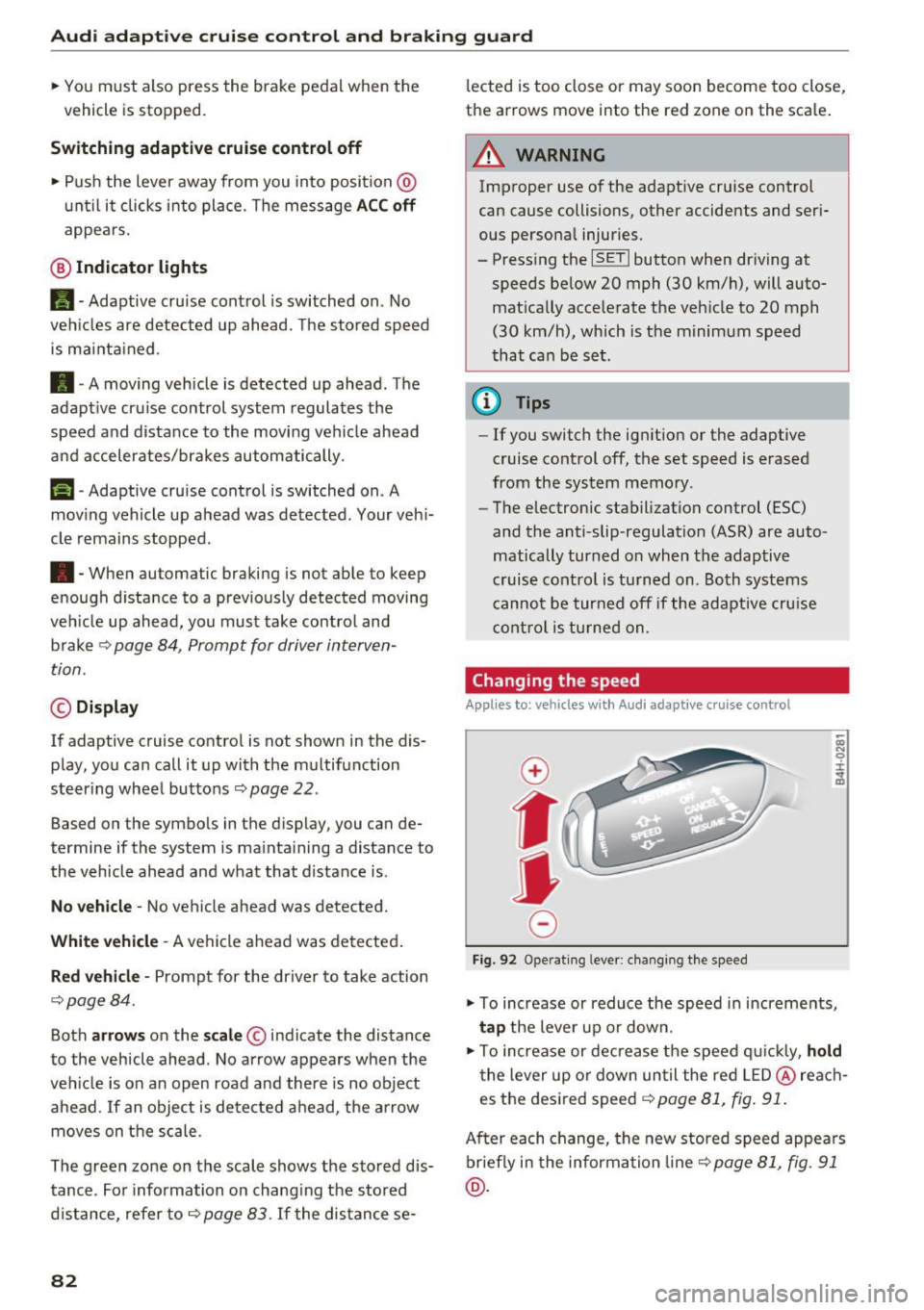
Changing the speed
Applies to: vehicles with Audi adapt ive cru ise control
0
f
JJ
0
Fig. 92 Operating lever: changing the speed
;;; N 9 :c .., m
• To increase or reduce the speed in increments,
tap the lever up or down.
• To increase or decrease the speed quickly,
hold
the lever up or down until the red LED@reach
es the desired speed
9 page 81, fig. 91.
After each change, the new stored speed appears
briefly in the information line¢
page 81, fig. 91
@.
Page 88 of 282
Audi adaptive cruise control and braking guard
detection and range limits that may prevent
the proper detection of other vehicles .
- The radar sensor's function and range can
be reduced by rain, snow and heavy spray.
Moving vehicles up ahead may not be
promptly detected or may not be detected
at all.
- Reflective surfaces including crash barriers
or tunnel entrances may impair the function
of the radar sensor.
@ Tips
- You can cancel the braking with increasing
force that is initiated by the system by brak
ing yourself, by accelerating noticeably or
by swerving .
- Braking guard error messages¢
page 86.
- Keep in mind that braking guard can brake
unexpectedly. Always secure any cargo or
objects that you are transporting to reduce
the risk of damage or injury.
Settings in the Infotainment system
Applies to: vehicles with Audi adapt ive cruise contro l
~ Select: the ICARI function button > (Car)* Sys
tems
control button > Driver assistance > Audi
braking guard.
System -
Switch the braking guard On/Off . When
you switch the ignition on, the message
Braking
guard: Off
appears if the system is switched off.
Early warning -The distance and approach warn
ings in the display can be switched
On/Off .
(D Tips
-Your settings are automatically stored and
assigned to the remote control key being
used.
- If you restrict or switch off the ESC, the braking guard also switches itself off
¢page 181 .
- Switch braking guard off when you are load
ing the vehicle onto a vehicle carrier, train,
ship or other type of transportation. This
can prevent undesired warnings from the
braking guard system.
86
Messages
Applies to: vehicles with Audi adapt ive c ru ise control
Braking guard: off
This driver message appears if the system is
turned off via the infotainment . Otherwise, if the
system is turned off, the information appears ev
ery time shortly after the start of the trip.
The driver message also appears if the system is
not available due to a malfunction or if the ESC is
not switched on¢
page 181. If this is the case,
the system will not provide warnings about a
possible collision.
Braking guard: activated
This driver message appears if sharp brake pres
sure was applied due to an acute warning .
ACC: Unavailable!
ACC and Audi braking guard: not available
The system cannot detect moving vehicles up
ahead correctly and is switched off. The sensors
have been displaced or are not working properly.
T he Audi pre sense funct ions may also be affect
e d. Dr ive to your authorized Audi dealer or au
thori zed Audi service facility immediately to have
the malfunction corrected.
ACC: currently unavailable. No sensor vision
ACC and braking guide: currently unavailable.
No sensor vision
This message appears if the sensor view is obstructed, for example by leaves, snow , heavy
spray or dirt. Clean the sensors ¢
page 79,
fig. 86.
ACC: Currently unavailable. Gradient too steep
The road exceeds the maximum possible angle
for proper adaptive cruise control operation .
Adaptive cruise control is switched off .
ACC: Only available in D, S or M
Select the D/S or M selector lever position.
ACC: currently unavailable. Parking brake ap
plied
Page 102 of 282
Night vision assist
-Night vision assist may not detect people or
wild animals and mark them if
- they are not in an upright posit ion, for ex
ample if they are sitting or lying down
and/or
- the silhouette in the display appears in
comp lete or interrupted, for example be
cause the person is partia lly covered by a
veh icle or an animal by tall grass. This
could increase the risk of an accident.
- Never try to swerve around animals if doing
so wi ll endanger you o r other road users, be
cause this increases the risk of an accident.
- Ev en though the system evaluat es the
shape and heat given off by all detected ob
j ects, there are limits to the system. There
may be false warnings.
- For technical reasons, the image pauses in
sp lit second intervals.
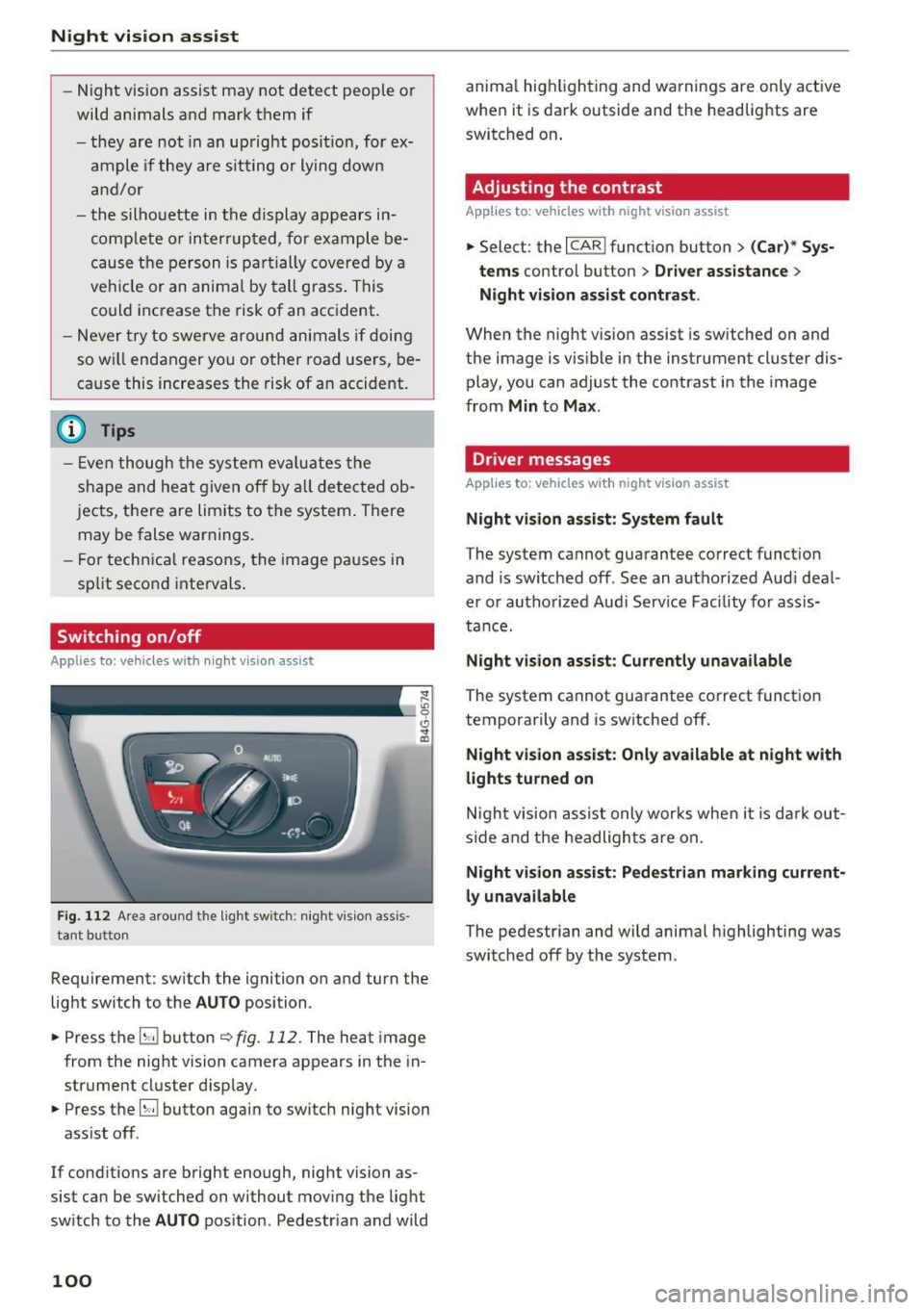
Switching on/off
Applies to: ve hicles w ith night visio n ass ist
Fig. 112 Area arou nd th e light switch: nigh t v is ion ass is ·
tant bu tto n
Requirement: switch the ignition on and turn the
light switch to the
AUTO position .
.,. Press the
5J button ~ fig. 112. The heat image
from the night vision camera appears in the in
strument cluster display .
.,. Press the
B button again to switch night vision
ass ist off .
If cond itions are bright enough, night vision as
sist can be switched on without moving the light
switch to the
AUTO position . Pedestr ian and wild
100
anima l hig hlighting and warnings are only active
when it is dark outside and the headlights are
switched on .
Adjusting the contrast
Applies to : vehicles with night vision assist
.,. Select: the I CARI function button > (C ar)* Sys
tems
contro l button > Driver assistance >
Night vision assist contrast .
When the night vis ion assist is switched on and
the image is v is ib le in the instrument cluster dis
play, you can adjust the contrast in the image
from
Min to Max .
Dr iver messages
Applies to: vehicles with night vision assist
Night vision assist: System fault
The system cannot guarantee correct funct ion
and is switched off. See an authorized Audi deal
er or authorized Aud i Service Facility for assis
tance.
Night vision assist: Currently unavailable
The system cannot guarantee correct funct io n
temporarily and is switched off.
Night vision assist: Only available at night with
lights turned on
Night vision assist only works when it is dark out
side and the headlights are on.
Night vision assist: Pedestrian marking current
ly unavailable
The pedestrian and wild animal highlighting was
switched off by the system .
Page 103 of 282
Automatic transmission tiptronic
Introduction
The automat ic transmission is controlled e lec
tron ically. The transmission upshifts or down
shifts automatically depending on wh ich drive
p rogram is selected.
When a
moderate driving style is used , the
transmission selects the most economical driving
mode.
It will then change up early and delay the
downshifts to give bette r fu el economy .
The transm iss ion switches to a sporty mode after
a kick-down or when the driver uses a
sporty
driving style
character ized by quick accelerator
pedal movements, heavy acceleration, frequent
changes in speed and traveling at the maximum
speed.
If desired, the dr iver can also select the gears
manually (tiptronic mode) ¢page 105.
In the tiptron ic transmission, power is transfer
red by a torque converte r.
Selector lever positions
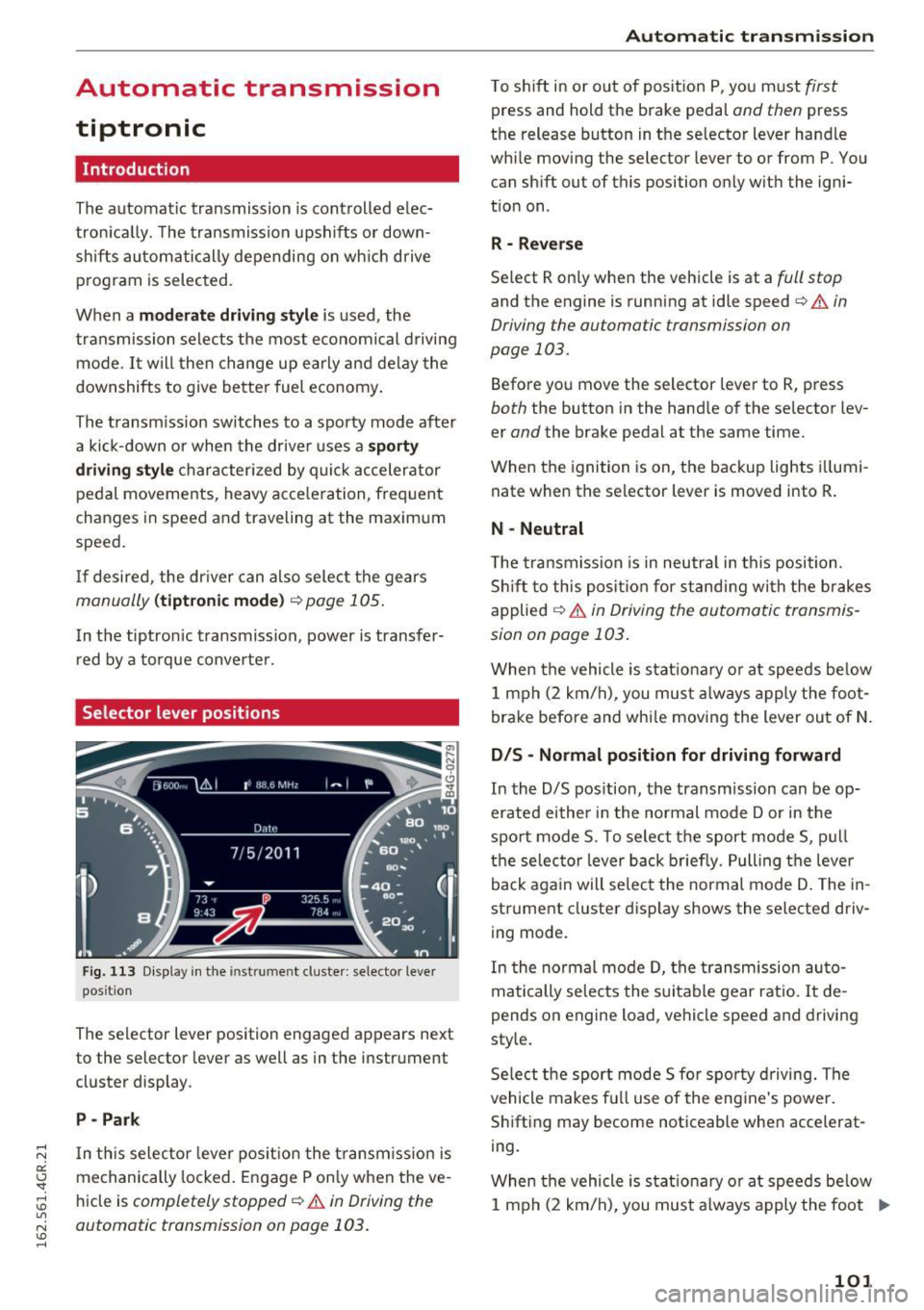
Fig. 113 Display in the instrument cluster : selector lever
position
The selector lever position engaged appears next
to the selector lever as well as in the instrument
cluster display .
P -Park
In th is selector lever pos ition the transm iss ion is
mechanically locked . Engage P only when the ve
hicle is
completely stopped¢.&. in Driving the
automatic transmission on page 103.
Automatic transmission
T o shift in or out of position P, you must first
press and hold the brake pedal and then press
the release button in the selector lever handle
while moving the selector lever to or from P . You
can shift out of this position only with the igni
tion on .
R - Reverse
Select R only when the vehicle is at a full stop
and the engine is running at idle speed¢ & in
Driving the automatic transmission on
page 103.
Before you move the selector lever to R, press
both the button in the hand le of the selector lev
er
and the brake pedal at the same time.
When the ignition is on, the backup lights illumi
nate when the selector lever is moved into R .
N -Neutral
The transmission is in neutra l in this position .
Shift to this position for standing with the brakes
applied
¢ & in Driving the automatic transmis
sion on page 103 .
When the vehicle is stat ionary or at speeds be low
1 mph (2 km/h) , you must always apply the foot
brake before and whi le moving the lever out of N.
DIS -Normal position for driving forward
In the D/S position, the transmission can be op
erated either in the normal mode Dor in the
sport mode S. To select the sport mode S, pull
the selec tor lever back briefly. Pulling the leve r
back again will select the normal mode D . The in
strument cluster display shows the selected driv
ing mode.
In the normal mode D, the transmission auto
matically selects the suitable gear ratio. It de
pends on engine load, vehicle speed and drivin g
style.
Select the sport mode S fo r spo rty driving. The
vehicle makes full use of the engine 's powe r.
Shifting may become noticeable when accelerat
ing.
When the vehicle is stat ionary or at speeds below
1 mph (2 km/h), you must always apply the foot ..,.
101
Page 104 of 282
Automatic transmission
brake before and while moving the lever to D/S
out of N.
A WARNING
Read and follow all WARNINGS r=':> & in Driv
ing the automatic transmission on
page 103.
(D Note
Coasting downhill with the transmission in N
and the engine not running will result in dam
age to the automatic transmission and possi
bly the catalytic converter.
{!) Tips
- Audi drive select: you can adjust the sporty
shift characteristics in the
Dynamic driv ing
mode .Swill appear in the instrument clus
ter display instead of D .
- If you accidentally select
N while driving,
take your foot off the accelerator pedal im
mediately and wa it for the engine to slow
down to idle before selecting D/S .
- If there is a power failure, the selector lever
will not move out of the P posit ion . The
emergency release can be used if this hap
pens
r=':> poge 106.
Automatic Shift Lock (ASL)
.
The Automatic Shift Lock safeguards you against
occidentally shifting into o forward or the re
verse gear and causing the vehicle to move unin
tentionally.
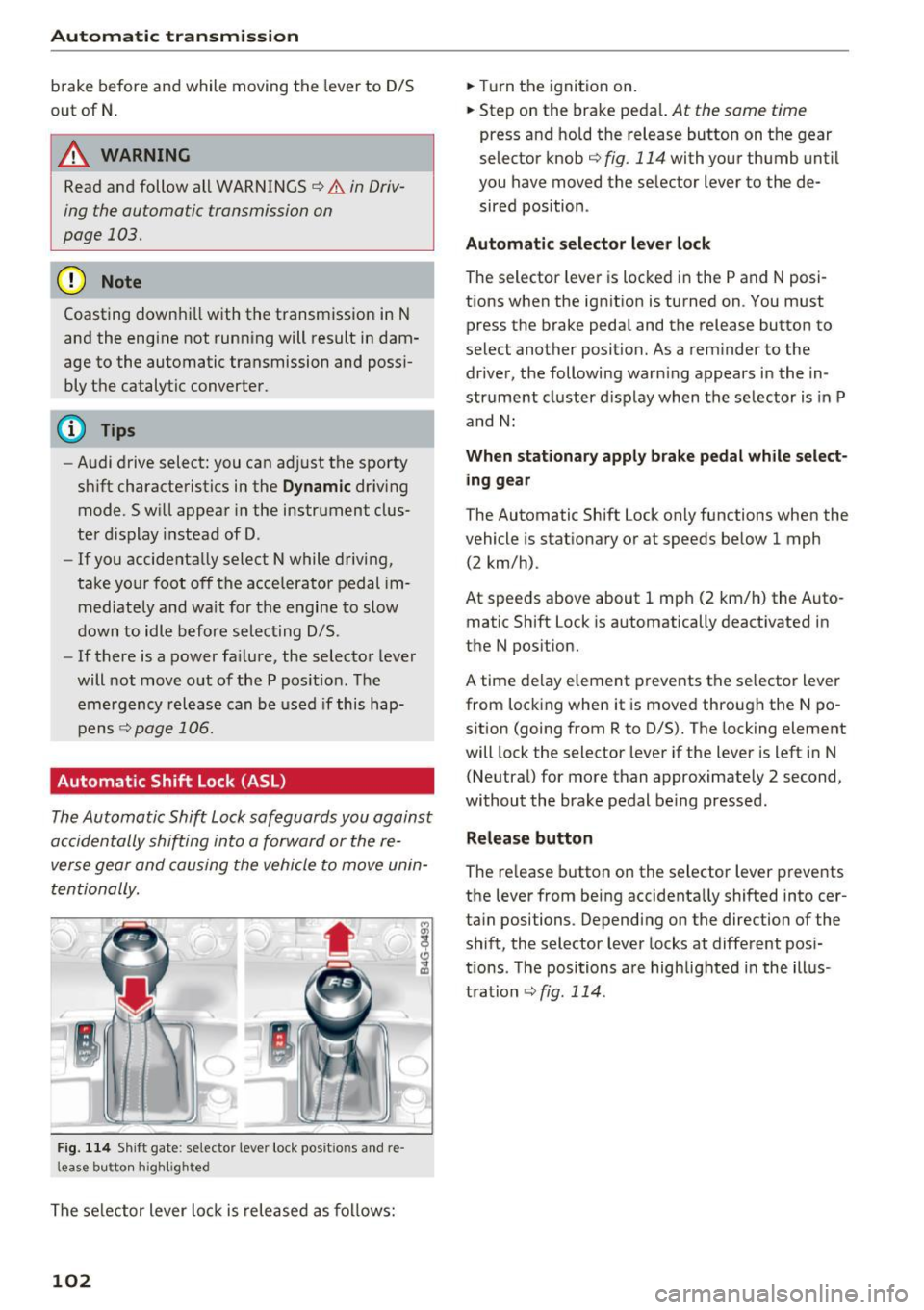
F ig. 114 Shift gate : selecto r lever lock posit io ns and re
l ease bu tton high light ed
The selector lever lock is released as follows:
102
.,. Turn the ignition on .
.,. Step on the brake pedal.
At the some t ime
press and hold the release button on the gear
selector knob
c::> fig. 114 with your thumb until
you have moved the selector lever to the de sired position .
Automatic selector lever lock
The sel ector lever is locked in the P and N posi
tions when the ignition is turned on . You must
press the br ake pedal and the release button to
select another position. As a reminder to the driver, the following warn ing appears in the in
strument cluster display when the selector is in P
and N:
When stationary apply brake pedal while select
ing gear
The Automatic Shift Lock only functions when the
vehicle is sta tionary or at speeds below 1 mph
(2 km/h) .
At speeds above about 1 mph (2 km/h) the Auto
matic Shift Lock is automatically deactivated in
the N position.
A t ime delay element prevents the selector lever
from locking when it is moved through the N po
sition (going from R to D/S). The locking element
will lock the selector lever if the lever is left in N
(Neutral) for more than approximately 2 second,
without the brake pedal being pressed .
Release button
The release button on the selector lever prevents
the lever from being accidentally shifted into cer
tain positions . Depending on the direction of the
shift, the selector lever locks at different posi
tions . The positions are highlighted in the illus
tration
<=:> fig . 114.
Page 108 of 282
Automatic transmission
rm Transmi ssi on malfunction: You can continue
driving
There is a system malfunc tion in the t ransm is
sion . Yo u may con tinue dr iving . Drive to your au
thor ized Audi dealer or qualified repair fac ility
soon to have th e malfunction cor rected.
rm Transmi ssion malfunction: You can continue
driving with limited functionality
There is a system malfunct ion i n the transm is
sion . T he transmission is sw itching to emergency
mo de. This mode only shifts in to certa in gears o r
will no longer shift at all. The engine may st all.
Drive to you r aut ho rized Aud i dea ler o r q ualified
repair faci lity immediately to have the malfunc
tion corrected .
rm Transmission malfunction: Stop vehicle and
shift to P
D o not cont inue d riving. Select the P se lector lev
er position and see yo ur author ized Aud i de aler
or qu alified repa ir fa cility for assis tance .
(D Note
If the tran smissi on switches to emergency
m ode, you s ho uld t ake the veh icle to an au
t hori zed A udi dealer sh ip a s soon as po ssible
t o have the condi tion corrected.
Selector lever emergency release
If the vehicle's power supply fails, the sele ctor
lever can be released in an emerg ency .
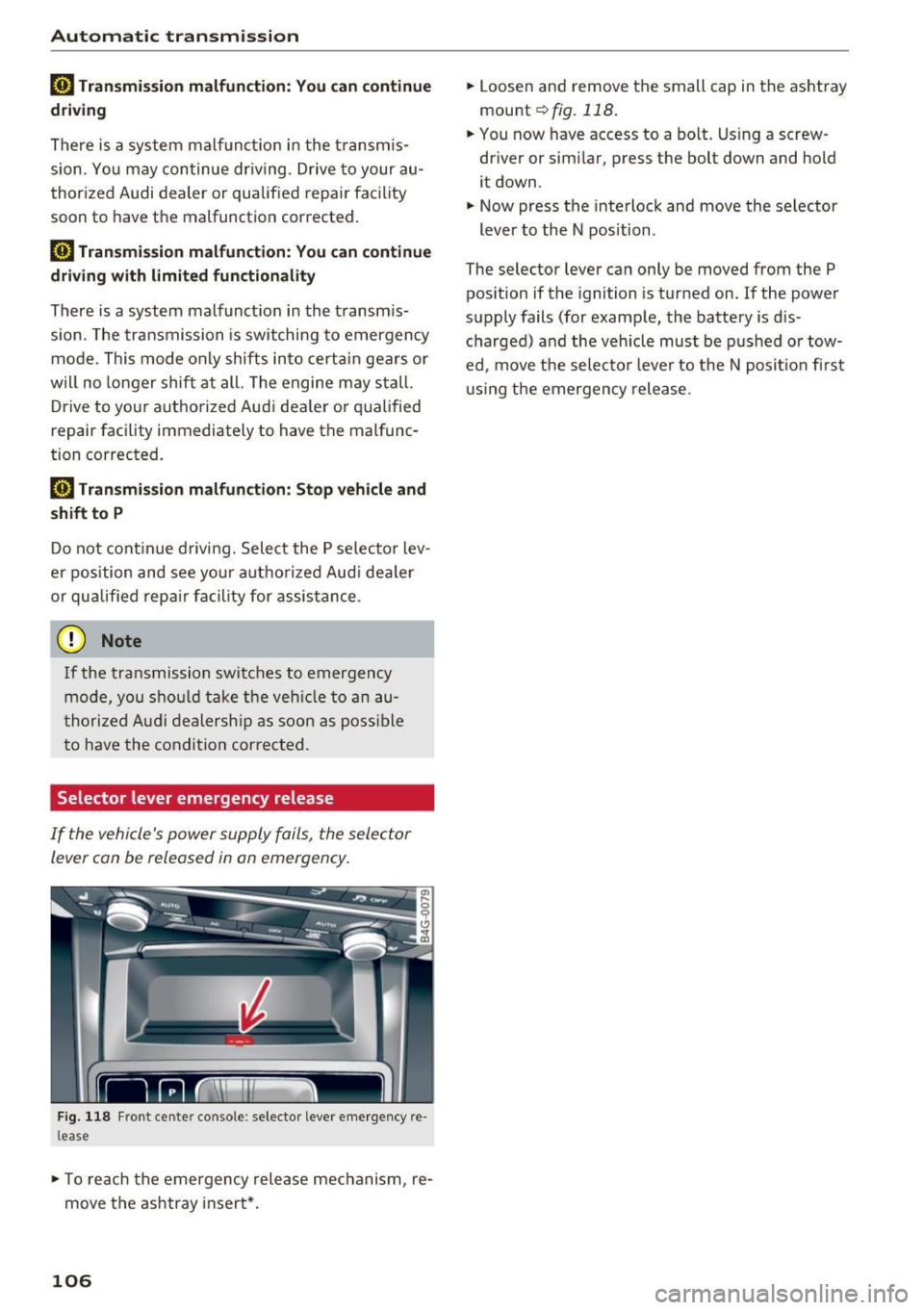
Fig . 118 Fro nt cen te r co nso le : selec to r lever e mergency re
l ease
.,. To re ach the emergency rele ase mech anism, re
move t he ashtray insert* .
106
.,. Loosen and remove the small cap in the as htray
mou nt
~ fig. 118 .
.,. You now have access to a bo lt. Using a screw
driver or simi lar , press the bolt down and hold
it down .
.,. Now press t he interlock and move the selector
lever to the N position .
The selector lever can only be moved from the P pos ition if the ignition is tur ned on.
If the powe r
supply fails (for examp le, the battery is d is
cha rged) and the veh icle must be p ushed o r tow
ed, move the selecto r lever to the N posit io n firs t
u sing the emergen cy rele ase .
Page 110 of 282
Parking systems
Parking system plus
Description
Applies to: ve hicles w ith park ing system p lus
Audi parking system plus provides audio and vis
ual signals when parking.
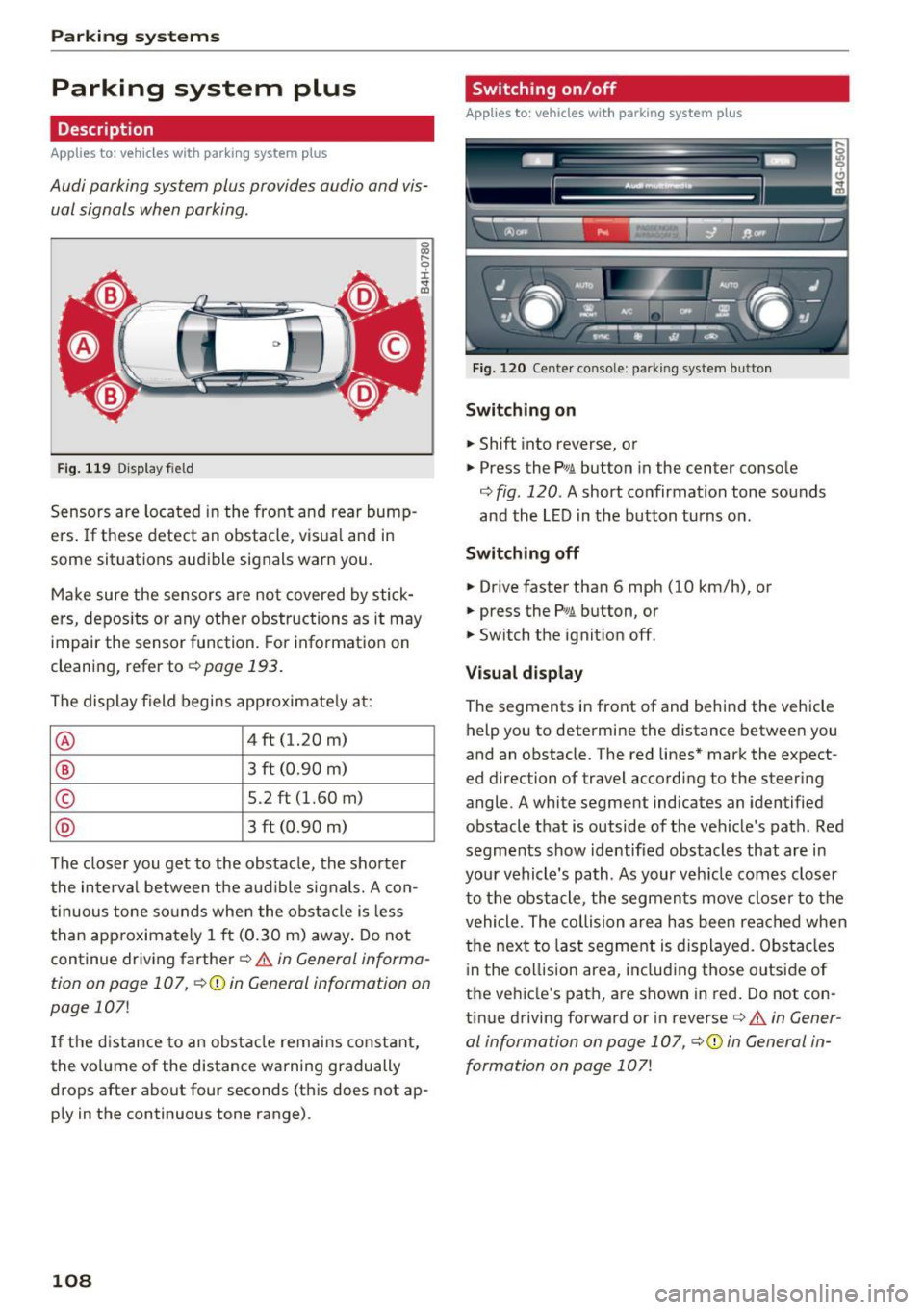
F ig . 119 D isp lay fiel d
Sensors are located in the front and rear bump
ers. If these detect an obstacle, visua l and in
some situations audible signals warn you.
Make sure the sensors are not covered by stick
ers, depos its or any other obstructions as it may
impair the sensor function. For information on
cleaning, refer to
¢ page 193.
The display field begins approximately at :
® 4 ft (1.20 m)
® 3 ft (0.90 m)
© 5.2 ft (1.60 m)
@ 3 ft (0.90 m)
The closer you get to the obstacle, the shorter
the interva l between the audible signals. A con
tinuous tone sounds when the obstacle is less
than approximately 1 ft (0.30 m) away . Do not
continue driving farther¢
& in General informa
tion on poge 107,
¢ @) in General information on
page
107!
If the distance to an obstacle remains constant,
the volume of the distance warning gradually
drops after about four seconds (this does not ap
p ly in the continuous tone range).
108
Switching on/off
App lies to : vehicles with parking system plus
Fig. 120 Center console : parkin g system button
Switching on
.. Shift into reverse, or
.. Press the
PwA button in the center console
¢
fig. 120 . A short confirmation tone sounds
and the LED in the button turns on .
Switching off
.. Drive faster than 6 mph (10 km/h), or
.. press the
p,qi button, or
.. Switch the ignition off.
Visual display
The segments in front of and behind the veh icle
help you to determine the distance between you
and an obstacle. The red lines* mark the expect
ed d irection of travel according to the steer ing
angle. A white segment indicates an identified
obstacle that is outside of the vehicle's path . Red
segments show identified obstacles that are in
your vehicle's path. As your veh icle comes closer
to the obstacle, the segments move closer to the
vehicle. The collision area has been reached when
the next to last segment is displayed. Obstacles
in the collision area, including those o utside of
the vehicle's path, are shown in red. Do not con
tinue driving forward or in reverse¢
A in Gener
al information on page 107, ¢(Din General in
formation on page
107!
Page 112 of 282
Parking systems
-The camera lens enlarges and distorts the
field of vision. The object appears both al
tered and inaccurate on the screen.
- In certain situations, people or objects in
the display appear closer or farther away:
- For objects that do not touch the ground,
such as the bumper of a parked vehicle, a
trailer hitch or the rear of a truck. Do not
use the help lines in this case.
- If driven from a level surface onto an in
cline, or a downward slope.
- If driven toward protruding objects.
- If the vehicle is carrying too much load in
the rear.
(D Note
- Always read and follow the applicable warn
ings r::!>(D
in General information on
page 107 .
-The orange colored orientation lines in the
Infotainment display show the vehicle path
depending on the steering wheel angle. The
front of the vehicle swings out more than
the rear of the vehicle. Maintain plenty of
distance so that your outside mirror or a
corner of your vehicle does not collide with
any obstacles.
Switching on/off
Applies to: vehicles with rearview camera
Switching on
.,. Shift into reverse, or
.,. Press the
P,,, A button in the center console
r:=> page 108, fig. 120. A short confirmation
tone sounds and the LED in the button turns
on.
Switching between the rearview camera and
optical display
.,. Press the Graphic control button ®
r:=> page 110, fig. 125 to see the optical display .
.,. Press the
Rear view control button to see the
. . rearv1ew camera image.
Switching off
.,. Drive forward faster than 10 km/h, or
.,. press the
P,1
1.A button, or
110
.,. Switch the ignition off.
@ Tips
- The visual display in the left part of the dis
play should help you detect the critical vehi
cle areas.
- You can change the volume and pitch of the
signals as well as the display
r:=> page 116.
Cross parking
Applies to: vehicles with rearview camera
This view may be used when parking in a garage
or in a parking space.
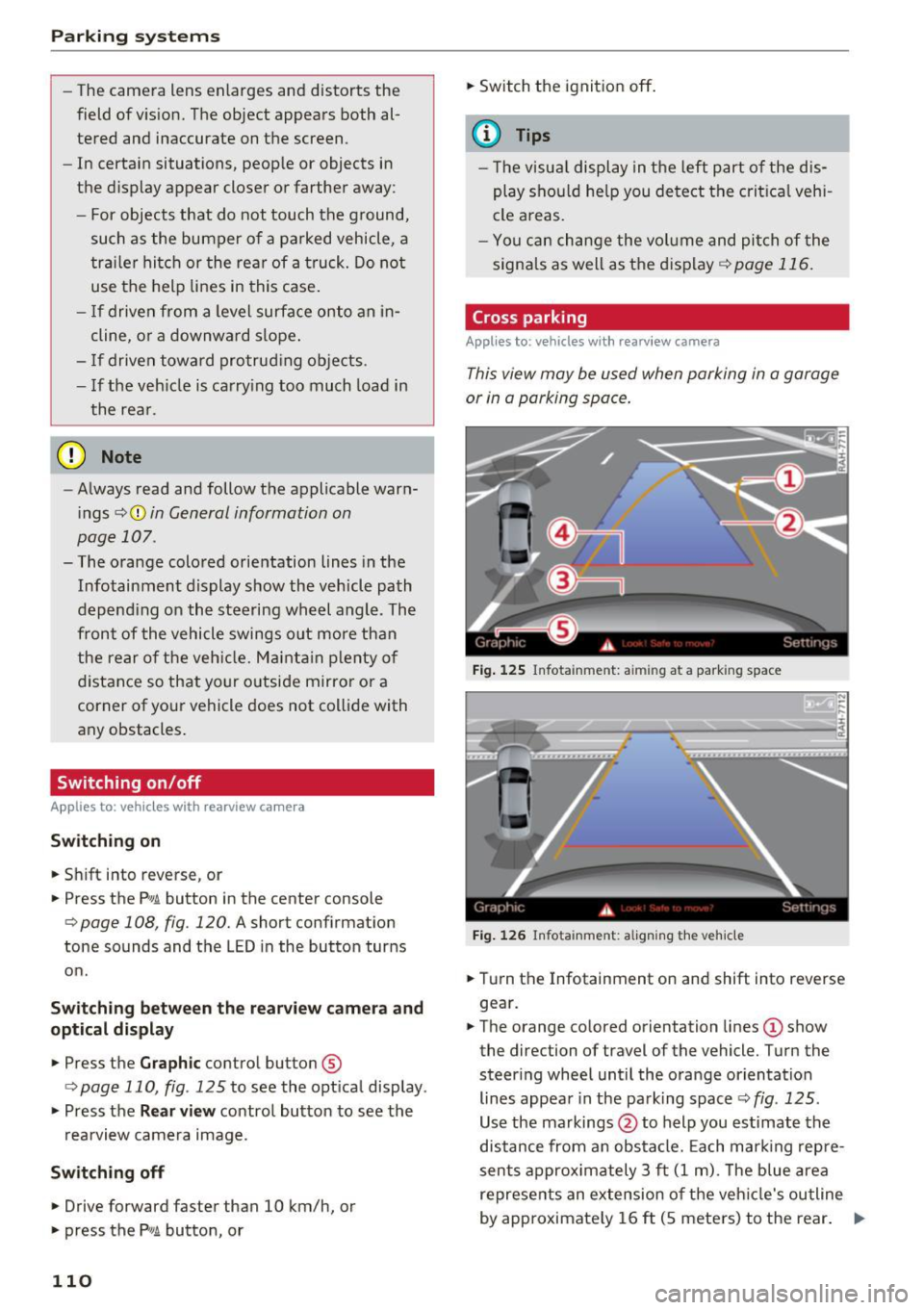
Fig. 125 Infotainment: aiming at a parking space
Fig. 126 Infota inment: aligning the vehicle
.,. Turn the Infotainment on and shift into reverse
gear.
.,. The orange colored orientation lines
(D show
the direction of travel of the vehicle. Turn the
steer ing wheel until the orange orientation
lines appear in the parking space r::!>
fig. 125 .
Use the markings @to help you estimate the
distance from an obstacle. Each marking repre
sents approximately 3 ft
(1 m). The blue area
represents an extension of the vehicle's outline
by approximately
16 ft (5 meters) to the rear. ..,.
Page 139 of 282
about children and Advanced Airbags
c::>page 159.
Even though yo ur vehicle is equipped with an Ad
vanced Airbag System, make certain that all chil
dren, especially those 12 years and younger, al
ways ride in the back seat properly restrained for
their age and size. The airbag on the passenger
side makes the front seat a potentially dangerous place for a child to ride. The front seat is not the
safest place for a child in a forward-facing child
seat .
It can be a very dangerous place for an in
fant or a child in a rearward-fac ing seat.
T he Advanced Airbag System in your veh icle has
been certified to comply with the requirements
of United States Federal Motor Vehicle Safety
Standa rd (FMVSS) 208, as well as Canada Motor
Veh icle Safety Standa rd (CMVSS) 208 as applica
b le a t the time your veh icle was m an ufact ured.
Accord ing to requirements, the front Advanced
Airbag System on the passenger side has been
certifi ed for "suppression" for infants of about
12 month old and younger and for "low risk de
ployment" for children aged 3 to 6 years old (as
defined in the standard) .
T he
PASSENGER AIR BAG O FF light in the instru
ment panel tells you when the front Advanced
Airbag on the passenger side has been turned
off
by the electronic control unit.
Each time yo u switch on the ignition, the
PAS ·
S ENGER AIR BAG OFF
light will come on for a
few seconds and:
- will stay on if the front passenger seat is not
occupied,
- will stay on if the electrical capacitance meas
ured by the capac itive passenger detection sys
tem for the front passenger seat equals the combined capacitance of an infant up to about
one year of age and one of the rearward-facing
or forward-facing child restraints listed in Fed
era l Moto r Vehicle Safety Standard (FMVSS)
208 with which the Advanced Airbag System i n
yo ur vehicle was ce rtified. For a l isting of the
child rest raints t hat were used to ce rtify your
vehicle's compliance with the Safety Standa rd
c::> page 161.
Airb ag sys tem
-wi ll stay on if there is a small child or c hild re
straint on the front passenger seat,
- will go
off if the front passenge r seat is occu
pied by an adult as registered by the capac itive
passenger detection system
c::, page 146, Mon
itoring the Advanced Airbag System.
T he PASSENGER AIR BAG OFF lig ht comes on
when e lectrica l capacitance registered on the
front passenger seat is equal to or less t han the
combined capacitance of a typical 1 year-old in
fant and one of the rearward-facing or forward
facing child restraints listed in Federal Motor Ve
hicle Safety Standard (FMVSS) 208 with wh ich
the Advanced Airbag System in yo ur vehicle was
ce rtified.
If the total e lec trical capacitance reg istered on
t h e front passenger seat is more than that of a
typ ical 1 year-old ch ild but less than the weight
of a sma ll adult, the front airbag on the passen
ger side can deploy (the
PASSENGER AIR BAG
OFF
light does not come on).
If the PASSENGER AIR BAG OFF light does not
come on, the front airbag on the passenger side
has not been turned off by the electron ic con trol
u nit and can dep loy if the control unit senses an
impact that meets the cond itions s tored in its
memory .
For example , th e airbag may deplo y if:
- a small ch ild that is heav ier than a typ ical 1
year-o ld child is on the front passenger seat
(regardless of whethe r the child is in one of the
child seats lis ted
c::> page 161), or
- a child who has outgrown c hild rest raints is on
the front passenge r seat.
If the front passenger airbag is turned off, the
PASSENGER AIR BAG OFF light comes on in the
inst rument cluste r and stays on .
If the front passenger airbag deploys, the Feder
al Standard requires the airbag to meet the " low
risk" deployment cr iteria to reduce the r isk of in
jury through interact ion w ith the airbag . "Low
r isk " dep loymen t occurs in those crashes that
t ak e place at lowe r decelerations as defined in
the e lectronic cont rol unit
c::, page 147, PASSEN -
GER AIR BAG OFF light.
Ill>
137