brake AUDI RS7 SPORTBACK 2016 Workshop Manual
[x] Cancel search | Manufacturer: AUDI, Model Year: 2016, Model line: RS7 SPORTBACK, Model: AUDI RS7 SPORTBACK 2016Pages: 282, PDF Size: 70.78 MB
Page 228 of 282
Wheels
-For technical reasons, it is not possible to use tires from oth
er vehicles - in some cases,
you cannot even use tires from
the same vehicle model.
-Make sure that the tires you select have enough clearance
to the vehicle. Replacement
tires should not be chosen
simply based on the nominal size, because tires with a dif
ferent construction can differ greatly even if they are the
same size. If there is not enough clearance, the tires or
the vehicle can be damaged and this can reduce driving
safety and increase the risk of
an accident.
-Only use tires that are more than 6 years old when abso
lutely necessary and drive
carefully when doing so.
-Do not use run-flat tires on your vehicle. Using them when
not permitted can lead to ve
hicle damage or accidents.
-If you install wheel covers on the vehicle, make sure they al
low enough air circulation to
cool the brake system. If they
do not, this could increase the
risk of an accident.
226
Tire wear/damage
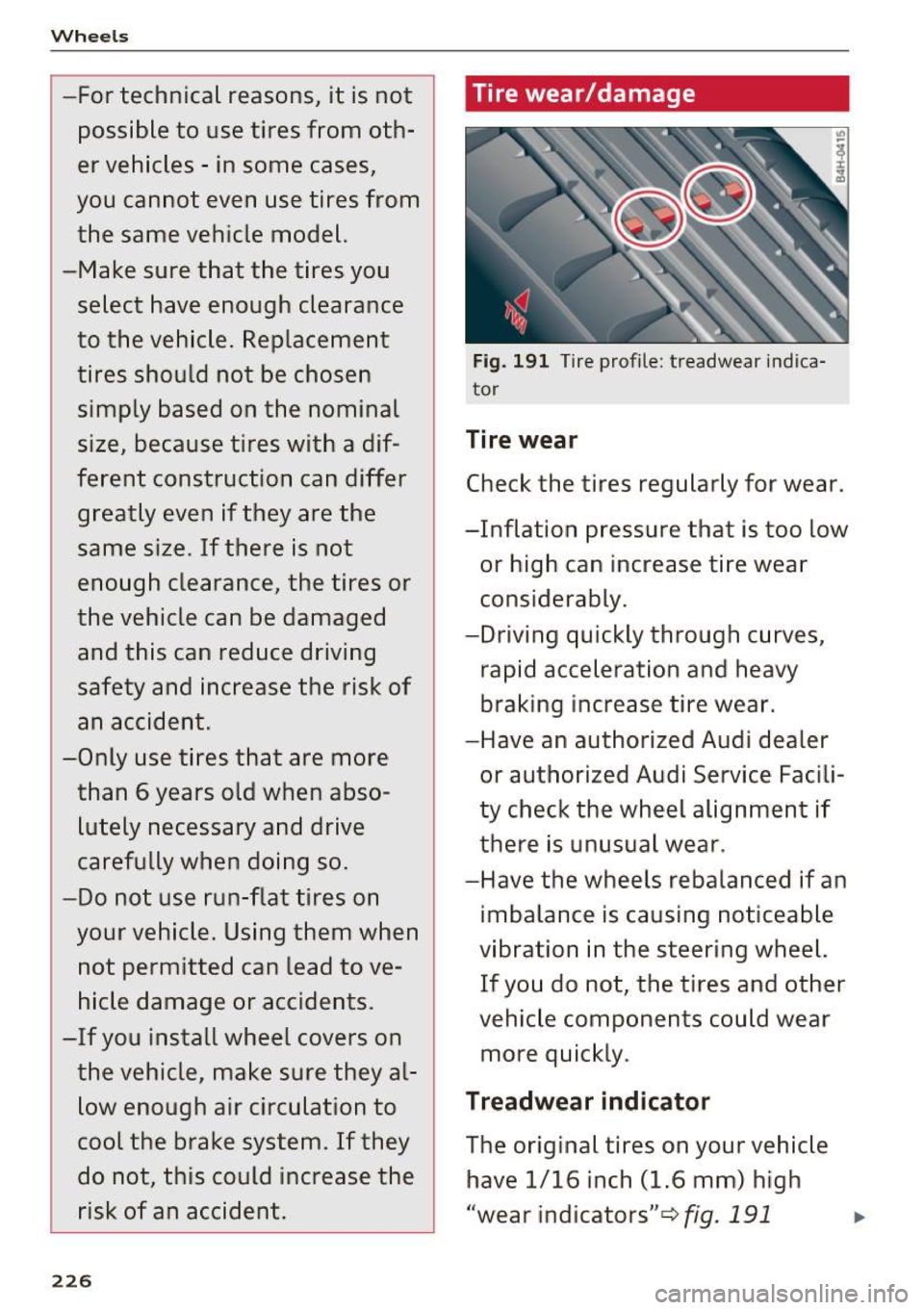
Fig. 191 Tire profile : treadwear indica
tor
Tire wear
Check the tires regularly for wear.
-Inflation pressure that is too low or high can increase tire wear
considerably.
-Driving quickly through curves, rapid acceleration and heavy
braking increase tire wear.
-Have an authorized Audi dealer
or authorized Audi Service Facili
ty check the wheel alignment if
there is unusual wear.
-Have the wheels rebalanced if an imbalance is causing noticeable
vibration in the steering wheel. If you do not, the tires and other
vehicle components could wear
more quickly.
Treadwear indicator
The original tires on your vehicle have 1/16 inch (1.6 mm) high
"wear indicators" ¢fig.
191 ...
Page 233 of 282
that can be applied at each of the
vehicle's two axles.
The fact that there is an upper
limit to your vehicle 's Gross Vehi
cle Weight Rating means that the
total weight of whatever is being carried in the vehicle (including
the weight of a trailer hitch and
the tongue weight of the loaded
trailer) is limited. The more pas sengers in the vehicle or passen
gers who are heavier than the
standard weights assumed mean
that less weight can be carried as luggage.
The Gross Vehicle Weight Rating and the Gross Axle Weight Rating
are listed on the safety compli
ance sticker label located on the
driver 's side 8-pillar
¢ page 228,
fig. 192.
& WARNING
-
Overloading a vehicle can cause
loss of vehicle control, a crash
or other accident, serious per
sonal injury, and even death.
-Carrying more weight than
your vehicle was designed to carry will prevent the vehicle
from handling properly and increase the risk of the loss of
vehicle control.
Wheels
-The brakes on a vehicle that
has been overloaded may not
be able to stop the vehicle
within a safe distance.
-Tires on a vehicle that has
been overloaded can fail sud
denly, including a blowout and
sudden deflation, causing loss
of control and a crash.
-Always make sure that the to
tal load being transported -
including the weight of a trail
er hitch and the tongue
weight of a loaded trailer - does not make the vehicle
heavier than the vehicle's
Gross Vehicle Weight Rating.
Determining correct load
limit
Use the example below to calcu
late the total weight of the pas
sengers and luggage or other
things that you plan to transport
so that you can make sure that
your vehicle will not be overload ed.
Steps for Determining Correct Load Limit
1. Locate the statement "THE
COMBINED WEIGHT OF OCCU-
PANTS AND CARGO SHOULD .,.
231
Page 243 of 282
Preliminary steps
Some preliminary steps are necessary for tire re
pair.
• If you have a flat tire, park the vehicle as far as
poss ible from moving traffic.
• Apply the
parking brake firmly .
• Move the
selector lever to the P position .
• Check whether a repair using the Tire Mobility
System is possible ¢
page 239, General and
safety pointers.
• Have all passengers leave the vehicle and stay
away from the danger zone
~ _& .
• Take the sealant bottle and the electric air
pump from the luggage compartment under
the floor
¢page 239, fig. 197 .
• Remove the "max . SO mph" (80 km/h) sticker
from the sealant bottle and affix it to the in
strument cluster in the dr iver's view .
..&, WARNING
- Turn the hazard flashers on and set up the
warning triangle* if you have a flat tire in
moving traffic. In this way you protect your
self and other road users.
- Make sure that all passengers are in a safe
place, out of the danger zone (for example,
behind a guard rail).
(D Note
Particular care is necessary if you are making
a tire repair on a steep incline.
{i) Tips
Obey all laws .
Emergency assistance
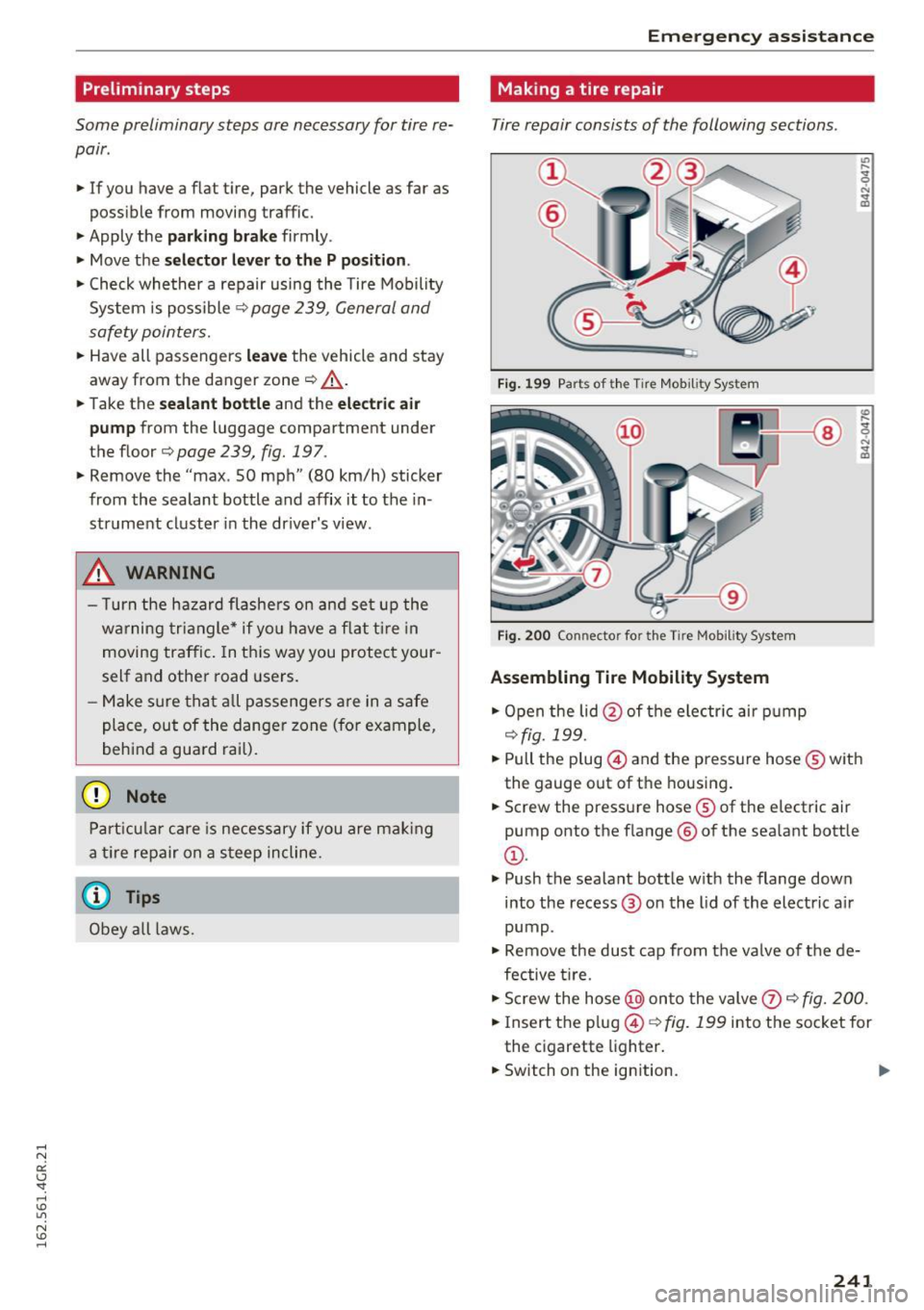
Making a tire repair
Tire repair consists of the following sections .
Fig. 199 Parts of th e Tire Mobility System
Fig. 200 Con necto r fo r t he Tire Mobi lity System
Assembling Tire Mobility System
• Open the lid@ of the electr ic air pump
¢fig. 199 .
• Pull the p lug @ and the pressure hose® with
the gauge out of the housing.
• Screw the pressure hose® of the electric air
pump onto the f lange ® of the sealant bottle
@.
• Push the sealant bottle w ith the flange down
into the recess @ on the lid of the electric a ir
pump .
• Remove the dust cap from the va lve of the de
fective ti re.
• Screw the hose@) onto the valve
(J) ~ fig. 200.
• Ins ert the plug @¢ fig. 199 into the socket for
the cigarette lighter.
• Switch on the ign ition.
241
Page 245 of 282
Replacing wheels
Before changing a wheel
Observe the following precautions for your own
and your passenger's safety when changing a
wheel.
.,. After you experience a tire failure, pull the car
well away from moving traffic and try to reach
level ground before you stop¢.,&..
.. All passengers should
leave the car and move
to a safe location (for instance, beh ind the
guardrail)¢ .,&. .
.,. Engage the
parking brake to prevent your vehi
cle from rolling unintentionally¢ .,&..
.. Move
selector lever to position P ¢ .,&. .
.. Take the
jack out of the luggage compartment
c:>page 239.
A WARNING
You or your passengers could be injured while
chang ing a wheel if you do not follow these
safety precautions:
- If you have a flat tire, move a safe distance
off the road. Turn off the engine, turn the
eme rgency flashers on and use other warn
ing devices to alert other motorists.
- Make sure that passengers wait in a safe
place away from the vehicle and well away
from the road and traffic.
- To help prevent the vehicle from moving
sudden ly and possibly slipping off the jack,
always fully set the parking brake and block
the wheel diagonally opposite the wheel be
ing changed . When one front wheel is lifted
off the ground, placing the Automatic
Transmission in P (Park) will
not prevent the
vehicle from moving.
- Before you change a wheel, be sure the
ground is level and firm. If necessary, use a
sturdy board under the jack.
- Always store the veh icle tool k it, the jack
and the replaced tire in the luggage com
partment
c> page 124.
(D Note
If you are changing the whee l on a steep in
cline, use a rock or similar object to b lock the
Emergency assistance
opposite wheel to prevent the vehicle from
moving.
(D Tips
- Before changing the wheel, you must acti
vate the jacking mode, so that the automat
ic controls for the Adaptive Air Suspension*
do not make it more difficu lt to lift the vehi
cle with the jack
c> page 245.
- Obey all laws .
Changing a wheel
When you change a wheel, follow the sequence
described below step-by-step and in exactly thot
order .
1. Activate the vehicle jack mode* c> page 245.
2. Remove the
wheel bolt caps*. For more de
tails see also
¢ page 244, Wheels with
wheel bolt caps.
3. Loosen the wheel bolts c:> page 244.
4. Locate the proper mounting point for the
jack and align the jack below that point
~page 245.
5. Raise the car with the jack c:> page 245.
6. Remove the
wheel with the flat tire and then
install the other whee l¢
page 246.
7. Tighten all whee l bolts lightly.
8.
Lower the vehicle with the jack.
9. Use the wheel bolt wrench and
firmly tighten
all wheel bolts
c> page 244.
10. Replace the
wheel bolt caps*.
11. Deact ivate the vehicle jack mode* in the
MMI:
I CARI funct ion button> (C ar )* systems
contro l butto n > Servicing & checks > Air
susp.: jack mode >
Off.
The vehicle jack mode* switches off automat ical
ly at speeds above 6 mph (10 km/h) .
A WARNING
-
Always read and follow all WARNINGS and in-
formation
¢ .&. in Raising the vehicle on
page
245 and ¢ page 247.
243
Page 248 of 282

Emergency assistance
-Passengers must not remain in the vehicle
when it is jacked up.
- Make sure that passengers wait in a safe
place away from the vehicle and well away
from the road and traffic.
- Make sure jack posit ion is correct, adjust
as necessary and then continue to raise
the jack.
- Changes in temperature or load can affect
the height of the vehicle.
(D Note
Do not lift the vehicle by the sill. Position the
vehicle jack only at the designated lifting
points on the sill. Otherwise, your vehicle will
be damaged.
@ Tips
The vehicle jack mode* switches off automati
cally at speeds
above 6 mph (10 km/h).
Removing and installing the sill extension
cover
Applies to: vehicles w ith sil l extension
Fig. 205 Sill: removing the cover
.,. Pull the cover down to remove it. c:> fig. 205
.,. To install the cover, insert i t in the mount and
press it upward until it clicks into place. The
cover must be flush with the surface of the sill
extension .
1
> A pp lies to vehicles wit h c eramic brake ro tor s*: Use a sec
on d alig nment pin* (sto re d in th e spare w hee l w ell mold
in g) fo r the lower hole, foll ow in g t he descrip tion for the
firs t alig nm ent pin.
246
@ Tips
Some models may also have a cover for the
rear vehicle lift point.
Taking the wheel off/installing a wheel
Follow these instructions step -by-step for chang
ing the wheel.
Fig. 206 Changing a wheel : using the sc rewdr iver han d le
(wi th t he blade re m oved) to turn the bol ts
Fig. 207 Changing a wh eel: alignment pin in side the t op
ho le
After you have loosened all wheel bolts and
raised the vehicle off the ground,
remove and re
place the wheel as follows:
Removing the wheel
.,. Use the hexagonal socket in the screwdriver
handle
to completely remove the topmost
wheel bolt and set it aside on a
clean surface
c::> fig. 206.
.,. Sc rew the threaded end of the alignment pin
from the tool kit hand-t ight into the empty bolt
hole
¢ fig . 2011>. .,.
Page 249 of 282
~ Then remove the other wheel bolts as described above.
~ Takeoff the wheel leaving the a lignment pin in
the bolt ho le ¢ (D.
Putting on th e oth er w heel
~ Lift the whee l and carefully slide it over the
alignment pin to guide it in place ¢(D.
~ Use the hexagonal socket in the screwdriver
handle to screw in and tighten all whee l bolts
sligh tly.
~ Remove the alignment pin and insert and tight
en the remaining wheel bolt slightly like the
rest .
~ Turn the jack handle counter-clockwise to lower
the vehicle until the jack is fu lly re leased.
~ Use the wheel bolt wrench to tighten all wheel
bolts firmly ¢
page 244 . Tighten them cross
wise,
from one bolt to the (approximately) op
posite one, to keep the whee l centered .
When removing or installing the whee l, the
rim could hit the brake rotor/ceramic brake
rotor* and damage the rotor. Work carefully
and have a second person help you.
(D Tips
Never use the hexagonal socket in the handle
of the screwdriver to loosen or tighten the
wheel bo lts.
- Pu ll the reversible blade from the screwdriv
er before you use the hexagonal socket in
the handle to turn the wheel bo lts.
- When mounting tires w ith
u nidirectio nal
tre ad design
make sure the tread pattern is
po inted the r ight way ¢
page 247.
-The wheel bolts should be clean and easy to
turn . Check for d irt and corrosion on the
mating surfaces of both the wheel and the
hub . Remove all dirt from these surfaces be
fo re remo unt ing the wheel.
Em ergenc y ass is tanc e
Tires with unidirectional tread design
Tires with unidirectional tread design must be
mounted with their tread pattern pointed in the
right direction .
Using a repl acement t ire w ith a tread pattern
intend ed for use in a sp ecific direction
When using a rep lacement tire with a tread pat
tern intended for use in a spec ific d irection ,
please note the follow ing:
- The direction of rotation is marked by an arrow
on the side of the tire .
- If the replacement tire has to be installed in
the incorrect direction, use the replacement tire only temporarily s ince the t ire w ill not be
ab le to achieve its optimum perfo rmance char
acter istics with rega rd to aquap lan ing, no ise
and wear.
- We recommend that you pay pa rt icu lar atten
tion to th is fact d uring wet weather and that
you adjust your speed to match road cond i
tions .
- Rep lace the flat tire w ith a new one and have it
installed on your veh icle as soon as possib le to
restore the hand ling advantages of a unidirec
tional tire.
Notes on wheel changing
Please read the information ¢ page 225, New
tires or wheels
if you a re go ing to u se a replace
ment t ire wh ich is different from the t ires on
you r vehicle .
After you change a tire:
- Check the tire pre ssure on the r epl acement
tire immed iatel y afte r in st a llat ion .
- Have th e whe el bolt tight ening torqu e
c hecked with a torque w rench as s oon as pos
s ible b y your authorized Audi de aler o r a
qualified ser vice st ation.
- With steel and allo y wheel rim s, the wheel
bolt s are co rr ectl y ti ghtened at a torque of 90
ft lb
( 1 20 Nm) .
-If you notice that the wheel bolts are corroded
and diffi cult to turn while changing a ti re ,
the y should be r eplaced before you chec k the
tightening torque. ..,.
247
Page 252 of 282
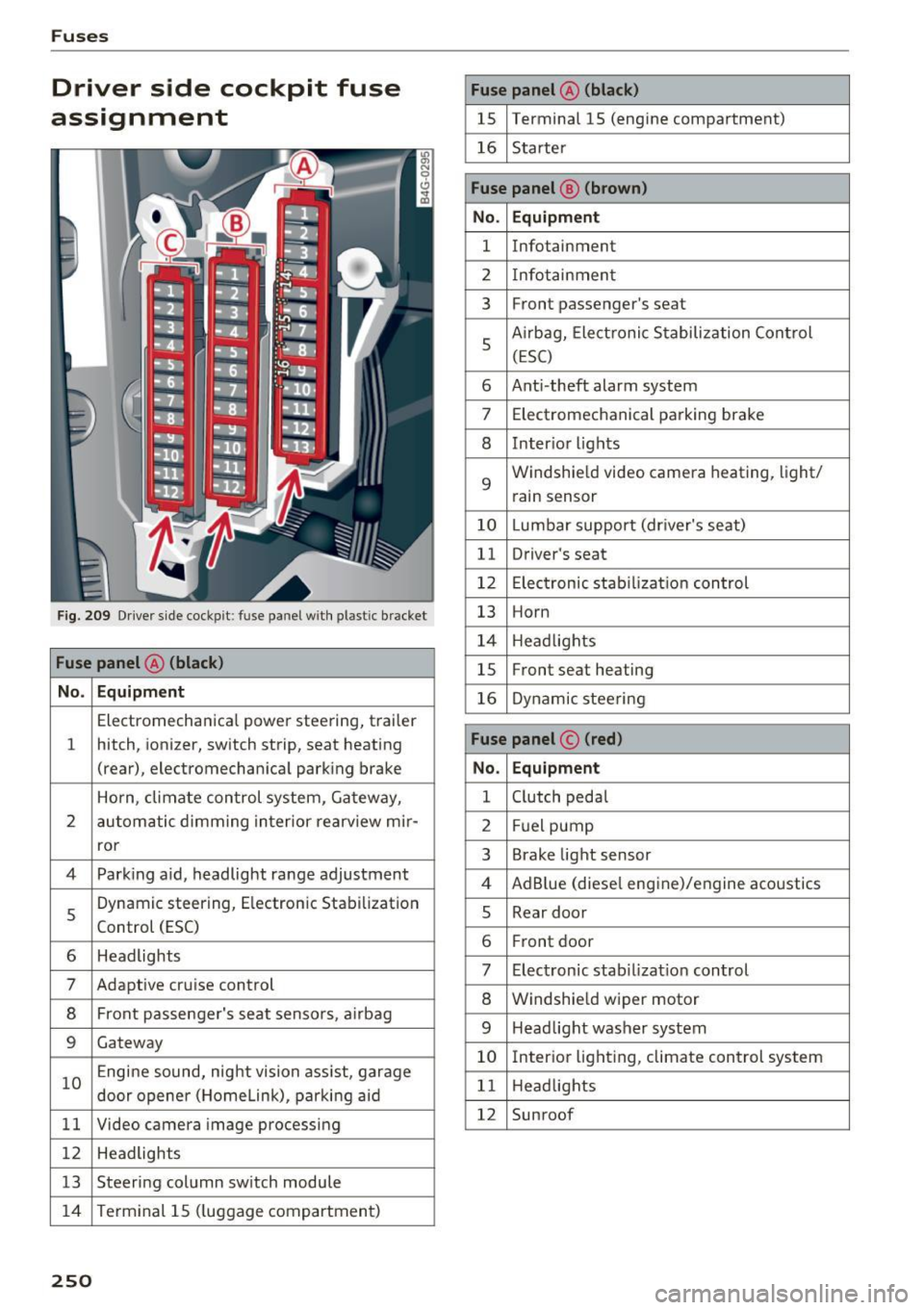
Fuses
Driver side cockpit fuse
assignment
Fig . 209 Driver side cockp it: fuse panel with plastic bracket
Fuse panel @ (black)
No . Equipment
Electromechanical power steering, trailer
1 hitch, ionizer, switch strip, seat heating
(rear), electromechanical parking brake
Horn, climate control system, Gateway,
2 automatic dimming interior rearv iew mir·
ror
4 Park ing aid, headlight range adjustment
5 Dynamic steering, Electron
ic Stabilization
Control (ESC)
6 Headlights
7 Adaptive cruise control
8 Front passenger's seat sensors, airbag
9 Gateway
10 Engine sound, night vision
assist, garage
door opener (Home Link), parking aid
11 Video camera
image processing
12 Headlights
13 Steering column switch module
14 Terminal 15 (luggage compartment)
250
Fuse panel
@ (black)
15 Terminal 15 (engine compartment)
16 Starter
Fuse panel @ (brown)
No. Equipment
1 Infotainment
2 Infotainment
3 F
ron t passenger's seat
5 Airbag, Elect
ronic Stabilization Control
(ESC)
6 Anti·theft alarm system
7 Electromechanical parking brake
8 Inter ior lights
9
Windshield video camera heating, light/
rain sensor
10 Lumbar support (driver's seat)
11 Driver's seat
12 Electronic stabilization control
13 Horn
14 Headlights
15 Front
seat heating
16 Dynamic steering
Fuse panel © (red)
No . Equipment
1 Clutch pedal
2 Fuel pump
3 Brake light sensor
4 AdBlue (diesel
engine)/engine acoustics
5 Rear door
6 Front
door
7 Electronic stab ilizat ion control
8 Windshield wiper motor
9 Headlight washer system
10 Interior
lighting, climate control system
11 Headlights
12 Sunroof
Page 253 of 282
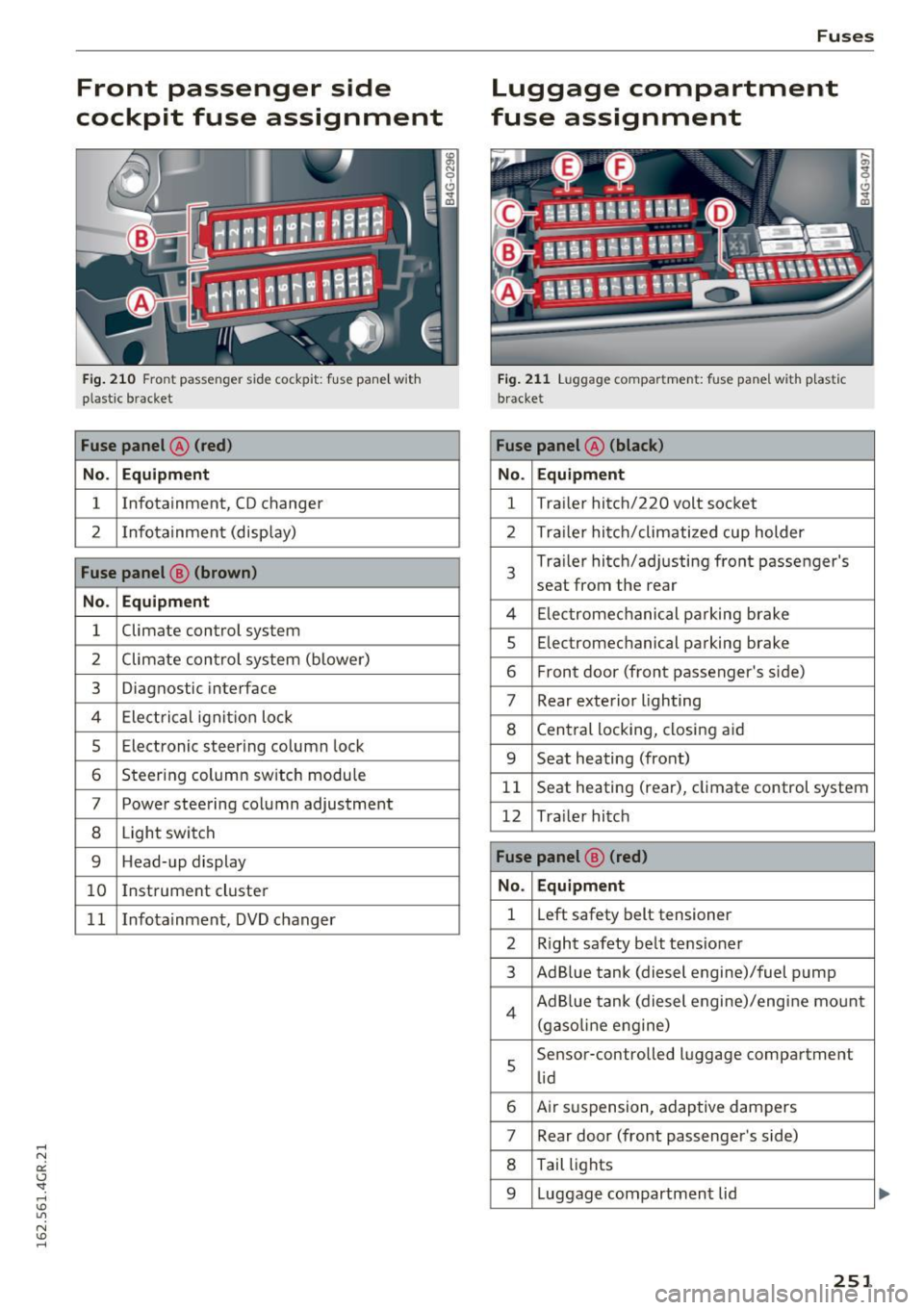
Front passenger side
cockpit fuse assignment
F ig. 21 0 Front passenger side cockpit: f use pane l w it h
p las tic bracket
Fuse panel @ (red )
No . Equipment
1 Infotainment, CD changer
2 I
nf otainment (disp lay)
Fuse panel @ (brown )
No . Equipment
1 Climate control system
2 Climate cont
rol sys tem (blowe r)
3 Diagnostic interface
4 Ele ctrical ignit io n lock
5 Electronic steering column lock
6 Steer ing col umn sw itch module
7 Power steering column adjustment
8 Light switch
9 Head-up display
1 0 I
nst rument cluste r
1 1 Infotainment, DVD changer
Fuses
Luggage compartment
fuse assignment
F ig . 2 1 1 Luggage compa rtment: fuse panel with p last ic
b racket
Fuse panel @ (black )
No . Equipment
1 Tra
iler hitc h/220 volt socket
2 Tra ile r hi tc h /climati zed cup holder
3
Tra iler hitch/ad justing front passenger's
seat from the rear
4 El ec tromec ha nic al pa rking brake
5 Electromec hanical parking brake
6 F ront door (front passenger's s ide)
7 Rear exterior lighting
8 Cen tral locking, closi ng a id
9 Seat heating (front)
1 1 Seat heating (rear), climate control system
12 Tra ile r hitc h
Fuse panel @ (red)
No . Equipment
1 L
eft safety belt tensioner
2 R igh t safety be lt tens ione r
3 Ad B lue tank (diesel engine)/fuel pump
4 Ad B lue tank (diesel engine)/eng ine mo unt
(gaso line e ngine)
s
Sensor-controlled l uggage compartment
li d
6 Air s uspension, adaptive dampers
7 Rear door (front passenger's side)
8 Tail lights
9 Luggage compartmen t lid
251
...
Page 254 of 282
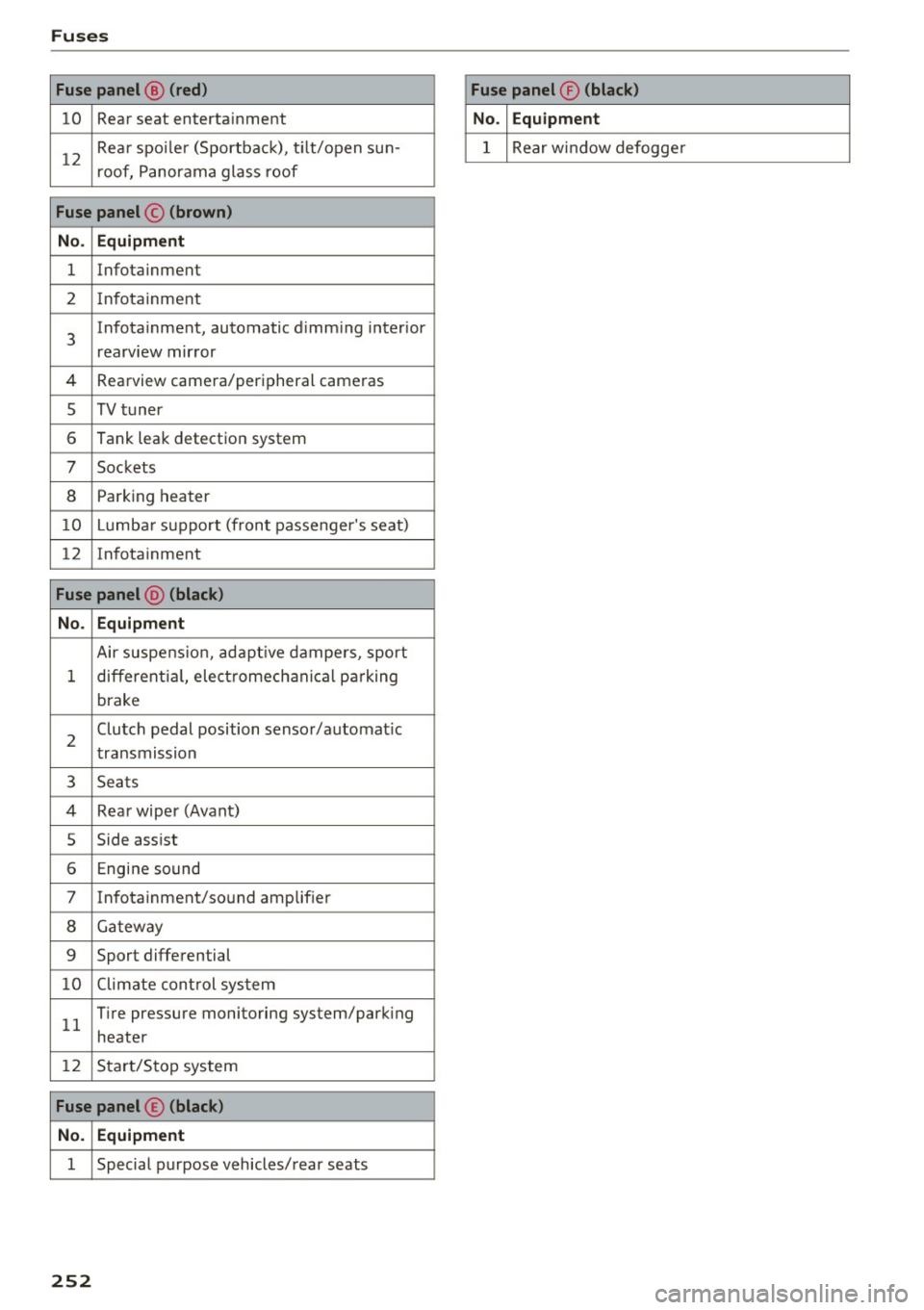
Fuses
Fuse panel@ (red ) Fuse panel® (black)
10 Rear seat enterta inment No. Equipment
12
Rea r spo ile r (Sportbac k), t ilt/open sun-
roof, P anorama glass roof 1 Rear window defogge
r
Fuse panel © (brown)
No . Equipment
1 Infotainment
2 In fota inment
3
Infotainment , automatic d imm ing inter ior
rearv iew mir ror
4 Rearview camera/peripheral cameras
s TV t uner
6 Tank leak detection system
7 Sockets
8 Park ing heater
10 Lumb ar su ppo rt (front passenger 's seat)
12 In fotainment
Fuse panel @ (black)
No. Equipment
Air suspe nsio n, ad aptive dampers, sport
1 different ia l, elect romech anic al par king
brake
2
Clutch pedal position sensor/automa tic
t ransmission
3 Seats
4 Rea r wiper (Avant)
5 Side assist
6 Engine sound
7 In fota inment/so und amplif ier
8 Ga tew ay
9 Sport differential
1 0 Climate cont rol sys tem
1 1
T ire pressure monitoring system/park ing
heater
12 S tar t/S to p sys tem
Fuse panel © (black)
No. Equipment
1 Special purpose vehicles/ rear seats
252
Page 256 of 282

Emergency situations
When jump starting or charging the battery,
never connect the negative ground cable to
the battery negative post because the battery
manager system must be able to detect the
battery's state of charge. Always connect the
negative ground cable to the negat ive ground
post of the battery manager control unit .
Use of jumper cables
Make sure to connect the jumper cable clamps in
exactly the order described below!
Fig. 212 Engine compartment: connectors for ju mp start
cab les a nd charger
® .--l @
Fig. 213 Ju mp start ing wit h the battery o f another vehicle:
@ -boos te r battery ,® -discharged vehicle battery
The procedure described below for connecting
jumper cables is intended to provide a jump start
for your vehicle.
Vehicle with discharged battery:
• Turn off lights and accessories , move lever of
automatic transmission to N (Neutral) or P
(Park) and set parking brake .
Connect POSITIVE(+) to POSITIVE(+) (red)
• Open the red cover on the positive term inal
~ fig . 212.
254
1. Connect one end of the red positive cable on
the
jump start bolt 9 fig. 213 @ (bolt under
the red cover= "positive") of the vehicle to be
started ®·
2. Connect the other end to the positive termi-
nal@ of the booster battery @.
Connect NEGATIVE (- ) to NEGATIVE (-)
(black)
3. Connect one end of the black negative cable
to the negative term inal @ of the booster
battery @.
4 . Connect the other end to the
jump start pin
@ (bolts with hex head bolt= "negat ive") of
the vehicle to be started ®·
Starting the engine
• Start the eng ine of the vehicle with the booster
battery @. Run the engine at a moderate
speed.
• Sta rt engine w ith discharged vehicle ba ttery @
in the usual manner.
• If the engine fails to start, do not keep the
starter cranking for longer than 10 seconds.
Wait for about 30 seconds and then try again.
• With engine running, remove jumper cables
from both vehicles in the exact
reverse order.
• Close the red cover on the positive terminal.
The battery is vented to the outside to prevent gases from entering the vehicle interior . Make
sure that the jumper clamps are well connected
with their metal parts in full contact with the battery terminals.
&_ WARNING
To avoid ser ious personal injury and damage
to the vehicle, heed all warnings and instruc
tions of the jumper cable manufacturer. If in
doubt, call for road service.
- Jumper cables must be long enough so that
the vehicles do not touch.
- When connecting jumper cables, make sure
that they cannot get caug ht in any moving
parts in the engine compartment.
- Before you check anything in the engine
compartment, always read and heed all
WARNINGS
¢ page 203.