brake AUDI RS7 SPORTBACK 2016 User Guide
[x] Cancel search | Manufacturer: AUDI, Model Year: 2016, Model line: RS7 SPORTBACK, Model: AUDI RS7 SPORTBACK 2016Pages: 282, PDF Size: 70.78 MB
Page 62 of 282
Seats and storage
-Never carry any beverage containers with
hot liquids, such as hot coffee or hot tea, in
the vehicle while it is moving. In case of an
accident, sudden braking or other vehicle movement, hot liquid could spill, causing
scalding burns. Spilled hot liquid can also cause an accident and personal injury .
- Use only soft cups in the cupholder. Hard
cups and glasses can cause injury in an acci
dent .
- Never use the cupholder or adapter as an
ashtray - risk of fire.
(D Note
Only drink containers with lids should be car
ried in the cupholder. Liquid could spill out
and damage your vehicle's electronic equip
ment or stain the upholstery, etc.
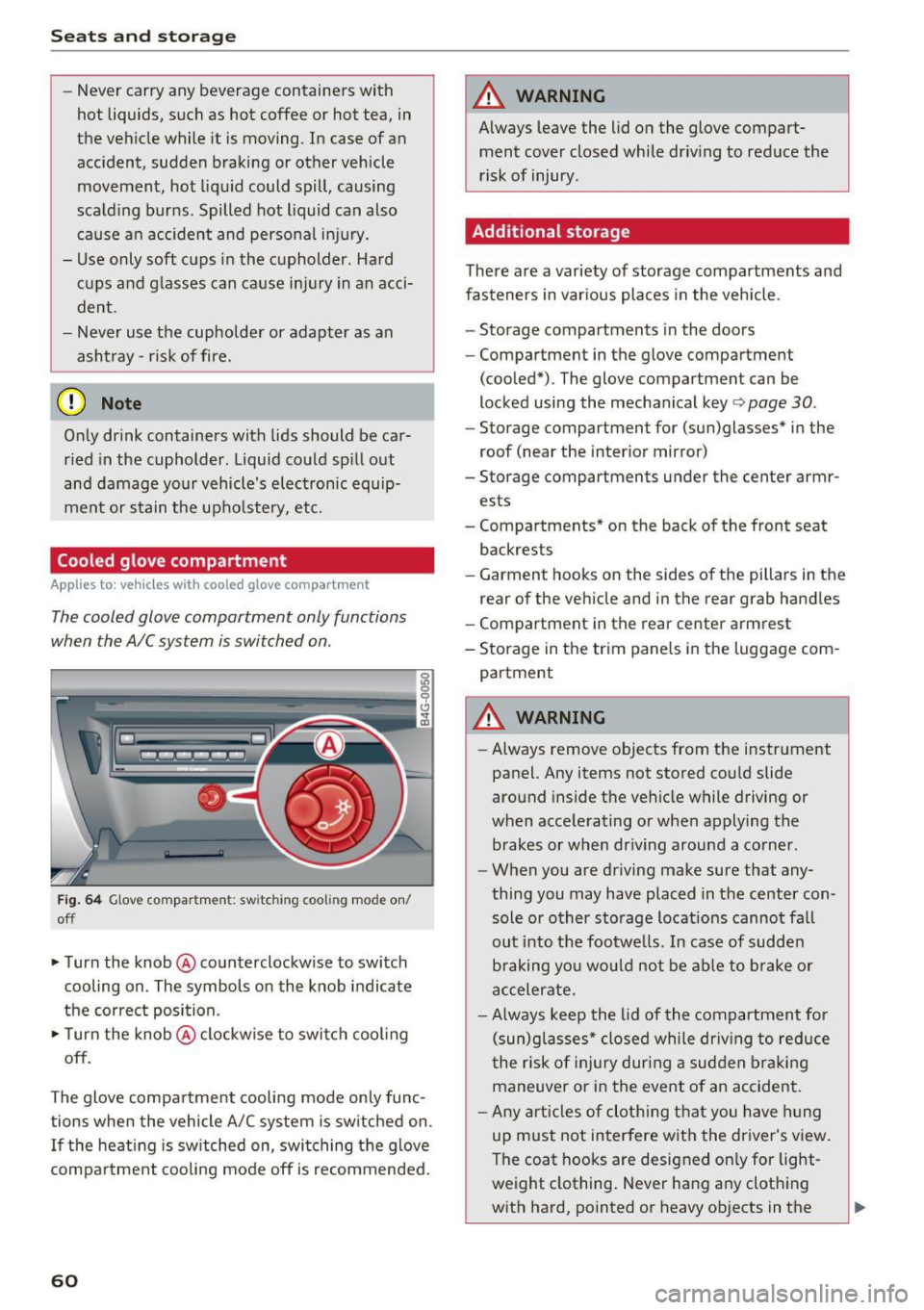
Cooled glove compartment
Applies to : ve hicles with coole d glove compar tme nt
The cooled glove compartment only functions
when the AIC system is switched on .
Fig. 64 Glove compar tment: sw itch in g coo ling mode on/
off
• Turn the knob @counterclockwise to switch
cooling on . The symbols on the knob indicate
the correct position.
• Turn the knob @clockwise to switch cooling
off.
The glove compartment cooling mode only func tions when the vehicle A/C system is switched on.
If the heating is switched on, switching the glove
compartment cooling mode off is recommended.
60
A WARNING
Always leave the lid on the glove compart
ment cover closed while driving to reduce the
risk of injury .
Additional storage
There are a variety of storage compartments and
fasteners in various places in the vehicle .
- Storage compartments in the doors
- Compartment in the glove compartment
(cooled*) . The glove compartment can be
locked using the mechanical key
r:::> page 30 .
-Storage compartment for (sun)glasses* in the
roof (near the interior mirror)
- Storage compartments under the center armr
ests
- Compartments* on the back of the front seat
backrests
- Garment hooks on the sides of the pillars in the
rear of the vehicle and in the rear grab handles
- Compartment in the rear center armrest
- Storage in the trim panels in the luggage com-
partment
A WARNING
- Always remove objects from the instrument
panel. Any items not stored could slide
around inside the vehicle while driving or
when accelerating or when applying the brakes or when driving around a corner.
- When you are driving make sure that any
thing you may have placed in the center con
sole or other storage locations cannot fall
out into the footwells . In case of sudden
braking you would not be able to brake or
accelerate.
- Always keep the lid of the compartment for
(sun)glasses* closed while driving to reduce
the risk of injury during a sudden braking
maneuver or in the event of an accident.
- Any articles of clothing that you have hung
up must not interfere with the driver's view.
The coat hooks are designed only for light
weight clothing. Never hang any clothing
with hard, pointed or heavy objects in the
Page 74 of 282
Driving
There must be at least 10 inches (25 cm) be
tween your chest and the center of the steering
wheel. If you cannot sit more than 10 inches (25
cm) from the steer ing wheel, see if adaptive
equipment is available to help you reach the ped
als and increase the distance from the steering
wheel.
For detai led information on how to adjust the
driver's seat, see
¢ page 53.
In vehicles with the memory function*, the steer
ing column sett ings are stored together with the
seat position.
A WARNING
Improper use of steer ing whee l adjustment
and improper seating position can cause ser i
ous pe rsonal injury.
- Adjust the steering wheel column only when
the vehicle is not moving to prevent loss of
vehicle control.
- Adjust the driver's seat or steering wheel so
that there is a minimum of 10 inches (25
cm) between your chest and the steer ing
wheel
r::.> page 119, fig. 141. If you cannot
mainta in this min imum distance, the airbag
system cannot protect you properly.
- If phys ica l limitations prevent you from sit
t ing 10 inches (25 cm) or more from the
steering wheel , check with your authorized
Audi dealer to see if adaptive equ ipment is
available.
- If the steering wheel is aligned with your
face, the supp lemental driver's airbag can
not provide as m uch protection in an acci
dent. Always make sure that the steering
wheel is aligned w ith your chest.
- Always hold the steer ing whee l with your
hands at the 9 o'clock and 3 o'clock posi
tions to reduce the risk of personal injury if
the driver's airbag deploys .
- Never hold the steer ing wheel at the 12
o'clock posit ion or w ith your hands inside
the steering wheel rim or on the steering
wheel hub . Holding the steer ing whee l the
wrong way can cause ser ious injuries to the
hands, arms and head if the driver's airbag
deploys.
72
-
Easy seat entry
Applies to: vehicles with power steering wheel adjustment
Easy seat entry makes it easier to enter and exit
the vehicle by adjusting the steering column au
tomatically .
.,. In the Infotainment system, select the ICARI
function button > ( Car )* Systems control but
ton
> Vehicle settings > Seats > Driver's seat>
Easy seat entry > On .
When easy seat entry is switched on, the steer ing
column goes back up into the park position when
the ignit ion is switched off . After enter ing the ve
hicle, the steering col umn returns to t he sto red
pos ition once the ign it ion is swi tched on.
Starting and stopping
the engine
Starting the engine
The I START ENGINE STOP I button switches the
ignition on and starts the engine .
Fig. 82 Cente r conso le: S TART ENGINE STOP b utt on
Starting the engine
.,. Press the brake pedal and move the selector
lever to the P or
N position.
... Press the
!STAR T ENGINE ST OP ! button. The
engine will start.
Switching the ignition on/off
If you would like to switch the ignition on w ith
out sta rting the engine, follow these steps:
.,. Press the
I START ENGINE STOP ! button with
out
pressing the brake pedal. The needle in the
tachometer moves into the
READY position. II>-
Page 75 of 282
~ To switch the ignition off, press the button
again. The needle in the tachometer moves into
the
OFF position .
Equipment that uses a lot of electricity is switch
ed off temporar ily when you start the engine .
I f the engine does not start immediately, the
starting p rocedure is automat ica lly stopped a fter
a short time . Repeat the starting p rocedure.
A WARNING
- Never allow the engine to run in confined
spaces, because this increases the risk of as
phyxiation.
- Never turn off the engine before the vehicle
has come to a comp lete stop.
- The brake booster and power steering only
work when the engine is running . If the en
gine is off, you have to use more force when
brak ing or steering . Because you cannot
brake and steer as you usually would, this
could lead to acc idents and serious injuries .
(D Note
Avoid high engine speed, full throttle, and
heavy engine load as long as the engine has
not reached operating temperature yet. You
could damage the engine .
@ For the sake of the environment
Do not let the engine run while parked to
warm up. Begin driving immediately . This re
duces unnecessary emissions.
@ Tips
- Some noise after starting the engine is nor
mal and is no cause for concern .
- If you leave the vehicle with the ignition
switched on, the ignition will switch off af
ter a certain amount of time . Make sure that
electr ical equ ipment such as the exter ior
li ghts are switched off.
Stopping the engine
~ Bring your vehicle to a complete stop.
~ Move the se lector lever to the P or N pos ition.
-
D riving
~ Press the !S T ART ENGINE STOP ! button
¢page 72, fig. 82 .
Steering lock
The steering locks when you turn the engine off
using the
!S TART ENGINE STOPI button and
open the driver's door. The locked steering helps
prevent vehicle theft.
Emergency off
If necessary, the eng ine can be switched off w ith
the selecto r lever in the R or D/S posit io n . The
engine stops if you press and hold the
!STAR T ENGINE ST OP ! button at speeds below
6 mph (10 km/h) and press the brake pedal.
A WARNING
-Never turn off the engine until the vehicle
has come to a complete stop.
- The brake booster and power steering only
work when the engine is running.
If the en
gine is off, you have to use more force when
steering or braking. Because you cannot
steer and brake as you usually would, this
could lead to crashes and serious injuries.
- For safety reasons, you should always park
your veh icle w ith the selector lever in P.
Otherw ise, the vehicle could inadvertently
ro ll away.
- After the eng ine has been switched off, the
radiator fan can continue to run for up to 10
minutes -even with the ignition switched
off. It can also switch on again after some
time if the coolant temperature rises as the
result of a heat buildup or if the engine is
hot and the engine compartment is addi
tionally heated by the sun's rays.
(D Note
Do not stop the engine immediately after
hard or extended driving. Keep the engine
running for approximately two minutes to
prevent excessive heat build-up.
Messages
Turn off ignition before leaving car
.
73
Page 76 of 282
Driving
This message appea rs and a warning tone sounds
if you open the driver's door when the ignition is
sw itched on.
Pr es s brake pedal to start engine
This message appears if you do not press the
brake pedal whe n starting the eng ine.
fll I s key in the veh icle?
This indicator light turns on and th is message ap
pears if the ignition key was removed from the
ve hicle when the engine was running . If the igni
tion key is no longer in the veh icle, you can not
sw itch on the ig nit ion or start t he eng ine once
you stop i t. You also cannot loc k the vehicle from
the o utside.
Shift to P , otherwise vehicle can roll away .
Doors do not lock if lever i s not
in P.
This message appears for safety reasons if the
transmission is not in the P position when you
sw itch the ignition off . Move the selector lever to
the P pos ition. Otherwise the veh icle is not pro
tected from rolling and it ca nnot be locked .
II Key is not recogn ized. Hold back of key
against marked area. Se e owner's manual
If the indicator light t urns on and th is message
appears, there is a malfunction
c:;, page 74.
Starting the engine when there is a
malfunction
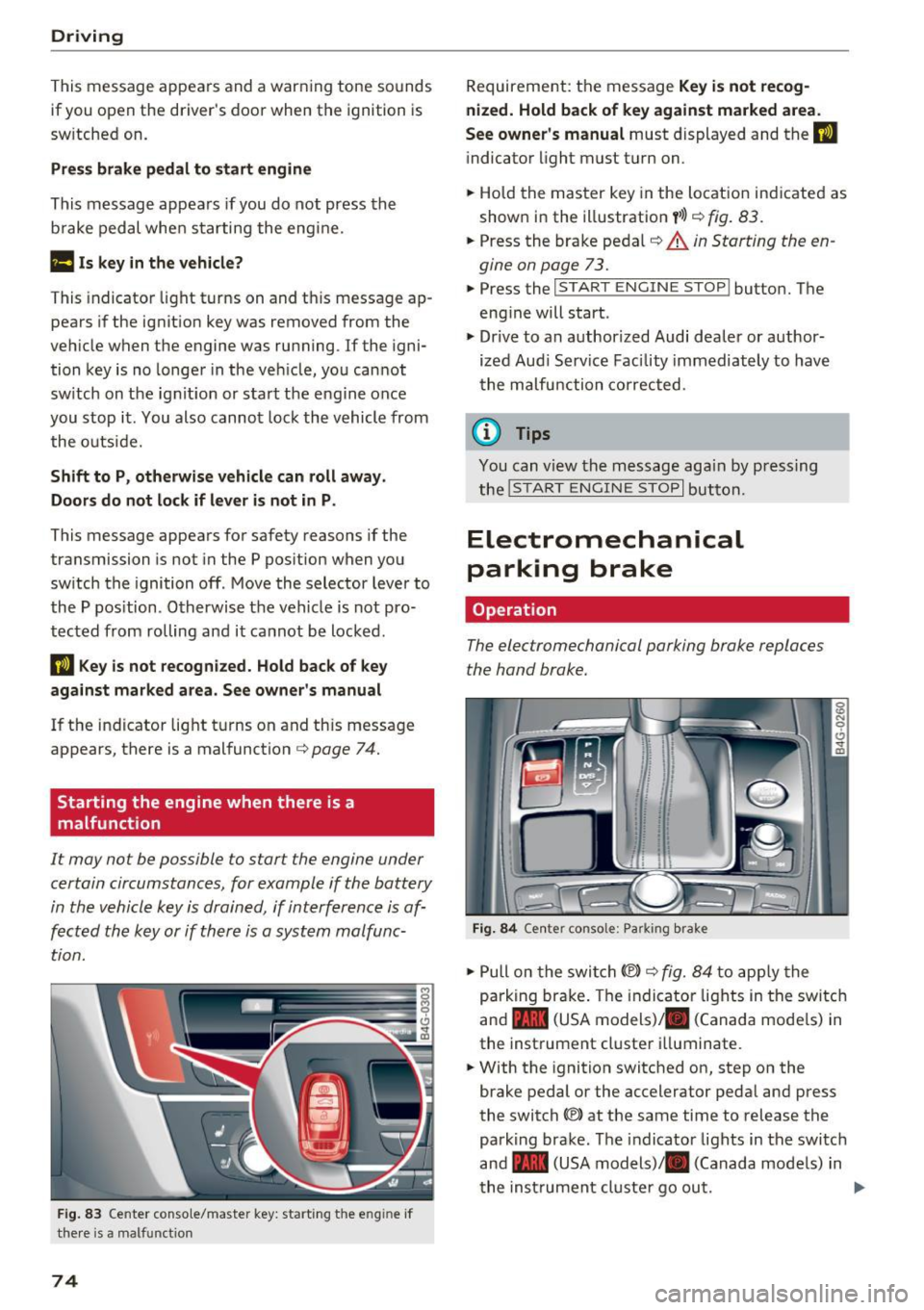
It may not be possible to s tart the engine under
certain circumstances, for example if the battery
in the vehicle key is drained, if interference is af
fected the key or if there is a system malfunc tion.
F ig. 83 Center conso le/ ma ster key: sta rt in g t he e ng in e if
t h e re is a ma lfunction
74
Requirement : the messa ge Key i s not recog
nized. Hold back of key against marked area .
See owner's manual
must displayed and the II
indicator light must tu rn on .
.,. Ho ld the m aster key in the locat ion ind icated as
shown in the illustration
f >l) c:;, fig . 83.
.,. Press the brake pe dal c:;, &. in Starting the en
gine on page 73 .
.,. Press the ~ I S _T _A _ R_ T_ E_N _G _I _N _E _ S_ T_ O_ P~ I button. The
eng ine will start .
.,. Dr ive to an author ized Audi dealer or author
ized Aud i Serv ice Facility immediately to have
t he malfu nction corrected.
@ Tips
You can v iew the message aga in by pressing
the
! S TA RT ENGI NE S TOP I button.
Electromechanical
parking brake
Operation
The elec tromechanical parking broke replaces
the hand broke.
Fig. 84 Ce nte r conso le: Pa rk ing brake
.,. Pull on the swi tch@) c:;, fig. 84 to app ly the
parking br ake. T he indicator lights in the switc h
and - (USA models)/ . (Canada mode ls) in
the inst rument cluste r ill uminate .
.,. With the ignition switched on, step on the
brake pedal or the accelerator pedal and press
the switch ®lat the same time to release the
park ing brake. The indicator lights in the switc h
and - (USA models)/ . (Canada mode ls) in
t he inst rument cl uste r go ou t.
Page 77 of 282
Your vehicle is equipped with an electromechani
cal parking brake. The parking brake is designed
to prevent the vehicle from rolling unintentional
ly and replaces the hand brake.
I n addition to the norma l functions of a tradi
tional hand brake, the electromechanica l parking
brake provides various convenience and safety
functions.
When starting from rest
- The integ ral starting assist helps you w hen
driving by automatically releasing the parking
brake
r=:> page 75, Starting from o stop .
-When starting on inclines, the starting assist
prevents the vehicle from unintentiona lly roll
ing back . The braking force of the parking brake
is not released until sufficient driving force has
been built up at the wheels.
Emergency brake function
An emergency brake ensures that the vehicle can
be slowed down even if the
normal brakes fai l
r=:> page 76, Emergency broking function.
A WARNING
-
Do not press the accelerator pedal inadver
tently if the vehicle is stat ionary but the en
gine is running and a gear is selected. Other
w ise the vehicle will start to move immediate
ly and could result in a crash.
(D Tips
- If the parking brake is applied with the igni
tion switched off, the indicator lights in the
switch and -(USA models)/ . (Cana-
da models) in the instrument cluster will go
out after a certain period of time.
- Occasiona l noises when the park ing brake is
applied and released a re normal and are not
a cause for concern.
- When the vehicle is parked, the park ing
brake goes th rough a se lf-test cycle at regu
lar int ervals. Any associated noises are nor
mal.
Parking
• Press the brake pedal to stop the vehicle.
D riving
• Pull the switch~ to set the parking brake .
• Place the selector lever in P .
• Turn the engine off
r=:> .&, .
• Turn the steering wheel when parking on in
clines so that the wheels w ill roll into the curb
if the vehicle starts moving .
A WARNING
=
-Always take the vehicle key with you when
leaving the vehicle, even for a sho rt period
of time. This applies particularly when chil
d ren remain in the vehicle. Otherwise chil
dren cou ld start the engine, release the
parking brake or operate e lectrical equip
ment such as power windows, which in
creases the risk of an accident.
- No one should remain in the vehicle when it
is locked, especially chi ldren. Locked doors
make it more d ifficult for emergency work
ers to get into the vehicle, wh ich puts lives
at risk.
Starting from a stop
The start assist function ensures that the park
ing broke is released automatically upon start
ing.
Stopping and setting the parking brake
• Pull the switch~ to set the parking brake .
Starting and automatically releasing the
parking brake
• When you press the acce lerator peda l, the
parking brake is automatica lly re leased and
your veh icle begins to move .
T he parking brake can be set if you must stop the
vehicle at a stop light or in traffic. The vehicle does not have to be held with the brake pedal.
The parking brake elim inates the tendency to
creep when a selector lever posit ion is engaged.
The parking brake releases automatically and the
vehicle begins to move as soon as you press the
accelerator pedal as usual.
Starting on hills
When starting on incl ines, the hill start assist
prevents the vehicle from unintentionally rolling
Ill>
75
Page 78 of 282
Driving
back. The braking force of the parking brake is
only released if sufficient drive power has been built up at the wheels.
(D Tips
For safety reasons, the parking brake is only
released automatically when the driver's safe
ty belt is buckled.
Emergency braking function
This is used if the conventional brake system
fails or locks up.
... To brake your vehicle in an emergency , pull the
~ switch and hold it pulled .
... As soon as you release the~ switch or acceler-
ate, the braking stops.
If you pull the switch(®) and hold it above a
speed of about 5 mph (8 km/h), the emergency
braking function is initiated. The vehicle is braked
at all four wheels by activating the hydraulic brake system. The brake performance is similar
to making an emergency stop¢.&..
In order not to activate the emergency braking by
mistake, an audible warning tone (buzzer)
sounds when the~ switch is pulled. As soon as
the ~ switch is released, or the accelerator pedal
is depressed, emergency braking stops .
A WARNING
Emergency braking should only be used in an
emergency, when the normal brake pedal has
failed or the brake pedal is obstructed. Using
the parking brake for emergency braking will
slow your vehicle down as if you had made a
full braking maneuver. ESC and the associat
ed components (ABS, ASR, EDL) cannot over
come the laws of physics. In corners and
when road or weather conditions are bad, a
full brake application can cause the vehicle to
skid or the rear end to break away, which in
creases the risk of an accident.
76
Speed warning system
' Introduction
The speed warning system helps you to stay un
der a specified maximum speed .
The speed warning system warns you if you are
exceeding the maximum speed that you have set.
You will hear a warning tone when your speed ex ceeds the stored value by approximately 3 mph
(3 km/h) . An indicator light. (USA models)/.
(Canada models) in the instrument cluster dis
play also turns on at the same time. The indicator
light./. turns off when the speed decreases
below the stored maximum speed.
Setting a threshold is recommended if you would
like to be reminded when you reach a certain
maximum speed. Situations where you may want
to do so include driving in a country with a gener
al speed limit or if there is a specified maximum
speed for winter tires.
(D Tips
Even though your vehicle is equipped with a
speed warning system, you should still watch
the speedometer to make sure you are not
driving faster than the speed limit.
' Setting the threshold
You can set, change and delete the warning
threshold in the Infotainment system.
... Select: the I CARI function button > (Car)* Sys
tems
control button > Driver assistance >
Speed warning .
You can set any threshold between 20 mph
(30 km/h) and 150 mph (240 km/h). Settings
can each be adjusted in increments of 5 mph (10
km/h).
Page 79 of 282
Cruise control system
Switching on
Applies to: vehicles with cruise control system
The cruise control system makes it possible to
drive a constant speed that is 30 km/h or higher.
0
f
®t
0
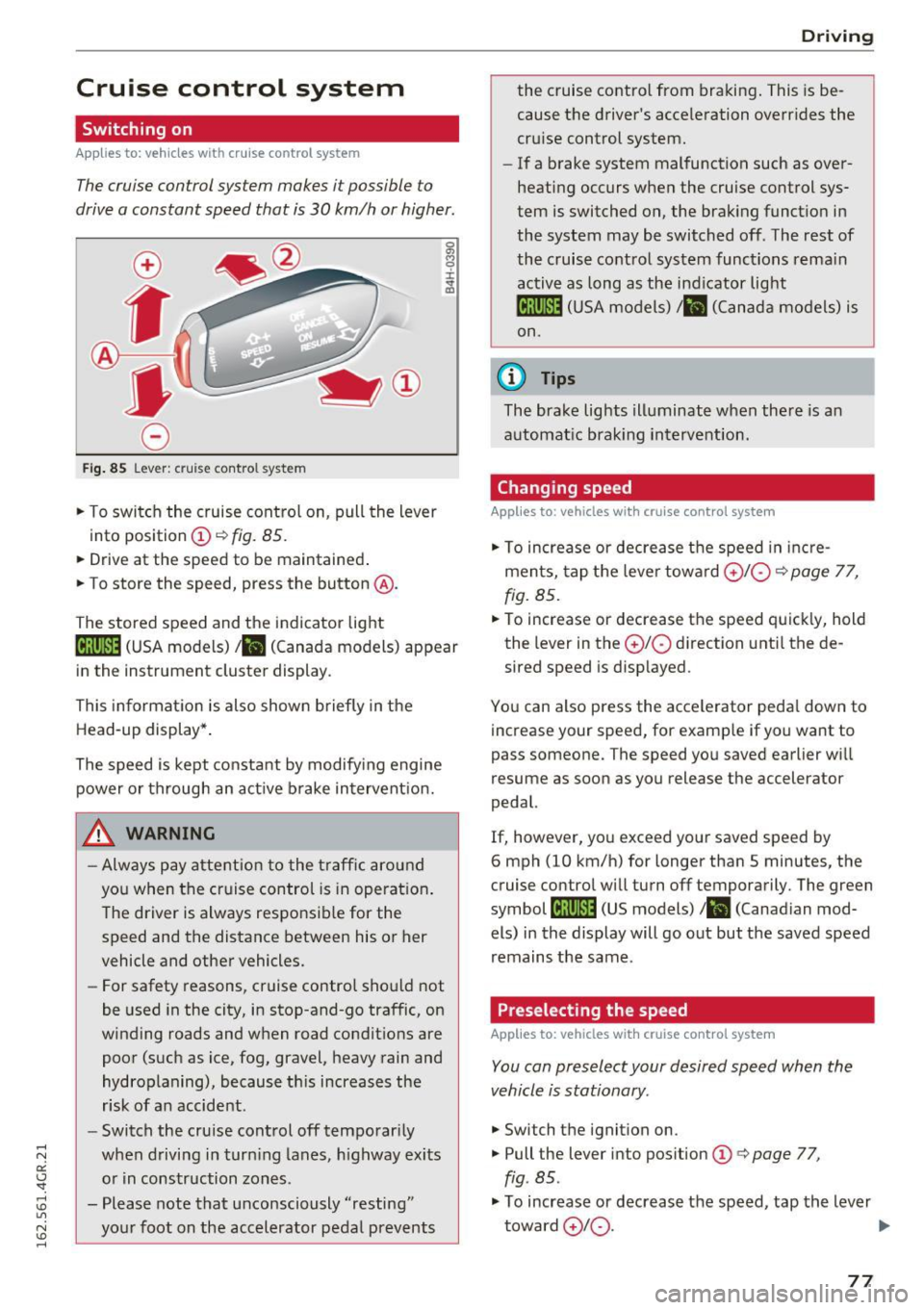
Fig . 85 Lever : cruise control system
.,. To switch the cruise control on, pull the lever
into position
(D ~ fig. 85.
.. Drive at the speed to be maintained .
.. To store the speed, press the button @.
The stored speed and the indicator light
tij;jl)~i4 (USA models)/ .. (Canada models) appear
in the instrument cluster display .
This informat ion is also shown briefly in the
Head-up display* .
The speed is kept constant by modify ing engine
power or through an act ive brake intervent ion.
_& WARNING
- Always pay attention to the traff ic around
you when the cruise control is in operat ion .
T he driver is always respo nsib le for the
speed and the distance between his or her
vehicle and other vehicles.
- For safety reasons, cruise control should not
be used in the city, in stop-and-go traffic, on
winding roads and w hen road condit ions are
poor (such as ice, fog, gravel, heavy rain and
hydroplaning), because th is increases the
r isk of a n accident.
- Switch the cruise control off temporar ily
when driving in turn ing lanes, h ighway exits
o r in construction zones .
- Please note that unconsciously "resting" yo ur foot on the accelerator pedal prevents
-
D rivi ng
the cruise co ntro l from bra king . This is be
cause the d river's accele ration overr ides the
cru ise control system.
- If a brake system malfunction such as over
heating occurs when the cruise control sys
tem is switched on, the brak ing funct io n in
the system may be switched off . The rest of
the cruise contro l system functions rema in
active as long as the ind icator light
ml1Jlm (USA models) / .. (Canada models) is
on.
(0 Tips
The brake lights illuminate when the re is an
automat ic brak ing intervent ion.
Changing speed
Applies to: vehicles with cruise control system
.,. To increase or dec rea se t he speed in inc re
ments, tap the leve r towa rd
0 10 ¢ page 77,
fig. 85 .
.. To increase or decrease the speed quick ly, hold
the lever in the
0 10 d irection unti l the de
sired speed is disp layed.
You can also press the accele rator peda l dow n to
increase your speed, for example if you want to
pass someone. The speed yo u saved earlier wi ll
resume as soon as you release the accelerator
pedal.
If, however, you exceed your saved speed by
6 mph (10 km/h) for longer than 5 minutes, the
cruise contro l will turn off temporarily . The green
symbol
li! j(9~14 (US models)/ .. (Canad ian mod
els) in the display will go out but the saved speed
remains the same.
Preselecting the speed
Applies to: vehicles with cruise control system
You can preselect your desired speed when the
vehicle is stationary.
.,. Switch t he ignition on .
.,. Pull the lever into pos ition
(D q page 77,
fig . 85.
.,. To increase or decrease t he speed, tap the lever
toward
0 10 . .,,_
77
Page 80 of 282
Driving
"'T o sto re the speed displayed, release the lever .
This f unction ma kes it possib le, for examp le, to
save the desired speed be fore dr iving on the
h ighway . Once on t he h ighway, act iva te the
cru ise control by pu lling the lever toward
(D .
Switching the system off
Applies to: veh icles w ith c ruise control
Temporary d eactivation
"' Press the brake peda l, o r
"' Press the lever into position @(not clicked i nto
place)
¢ page 77, fig. 85, or
"' Drive for longer than
5 minutes at more than
5 mph (10 km/h) above the stored speed .
Switching off completely
"' Press lever into position @(clicked into place),
o r
"' Switc h the ignition off .
The system retains the saved speed if you deact i
vate the cruise control temporarily. To resume
the saved speed, re lease the brake pedal and p ull
the lever to position
(D .
Sw itching the ign ition off erases the saved speed.
A WARNING
You should only ret urn to the saved s peed if it
is not too fast for the current tra ffic condi
tions - risk of an accident!
78
Page 81 of 282
Audi ada pti ve c ruise contr ol and br akin g gu ard
Audi adaptive cruise
control and braking
guard
Introduction
A ppl ies to: ve hicles with Audi adaptive cruise co ntro l
The adaptive cruise contro l system assists the
driver by regulat ing vehicle speed and helping to
maintain a set distance to the vehicle ahead,
within the limits of the system.
If the system de
tects a moving vehicle up ahead, adaptive cruise
control can brake and then accelerate your veh i
cle. This helps to make driving more comfortable
both on long highway stretches and in stop-and
go traffic.
The braking guard system can warn you about an impending collision and initiate braking maneu
vers¢
page 85.
Adaptive cruise control and braking guard have
technical limitations that you m ust know, so
please read this section carefully, understand
how the system works and use them properly at
all times.
General information
General information
App lies to: ve hicles with Audi adaptive cruise contro l
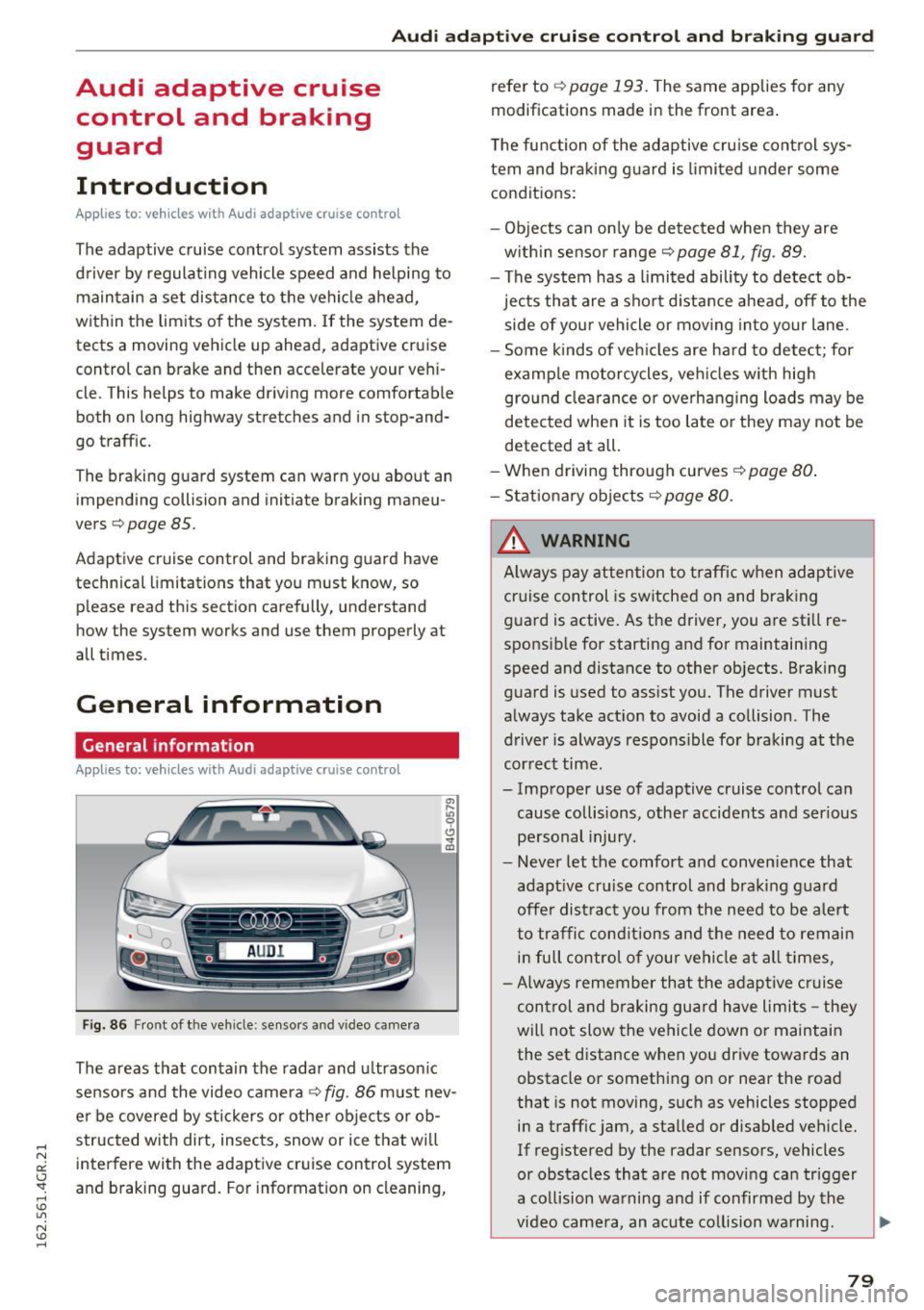
Fig. 86 Front of th e veh icle: sensors and vi deo camera
The areas that contain the radar and u ltrason ic
sensors and the video camera¢
fig. 86 must nev
er be covered by stickers o r other objects or ob
structed with dirt, insects, snow or ice that wi ll
interfere with the adaptive cruise control system
and braking guard. For information on cleaning, refer to
¢
page 193. The same applies for any
modifications made in the front area.
The function of the adaptive cru ise control sys
tem and braking g uard is limited under some
conditions:
- Objects can on ly be de tected when they are
w ith in sensor range¢
page 81, fig. 89.
- The system has a limited ability to detect ob
jects that are a short d istance ahead, off to the
side of your vehicle or mov ing into your lane .
- Some kinds of veh icles are hard to detect; for
examp le motorcycles, veh icles w ith high
gro und clea rance or overhanging loads may be
detected when it is too late o r they may not be
detected at all.
-When driving through curves
¢page 80 .
- Stat iona ry obje cts¢ page 80.
_& WARNING
A lways pay attention to traff ic when adaptive
cruise control is sw itched on and brak ing
guard is active . As the driver, you are still re
sponsible for starting and for maintaining
speed and distance to other objects. Braking
guard is used to assist you. The driver must
always take act ion to avoid a collision . The
driver is always respons ible for braking at the
cor rect time.
- Improper use of adaptive cruise control can cause collisions, other accidents and ser ious
pe rsonal injury.
- Never let the comfort and conven ience that
adapt ive cr uise control and braking g ua rd
offe r dist ract you from the need to be a lert
to traffic conditions and the need to remain
in full control of your vehicle at all times,
- Always remember that the adaptive c ruise
control and braking gua rd have limits -they
will not slow the vehicle down or maintain the set distance when you drive towards an
obstacle or something on or near the road
that is not moving, such as vehicles stopped
in a traffic jam, a stalled or disabled vehicle.
If reg istered by the radar sensors, vehicles
or obstacles that are not moving can trigger
a collision wa rning and if confirmed by the
video came ra, an acute co llision wa rning.
~
79
Page 82 of 282
Audi adapt ive crui se con trol a nd b rakin g guar d
-For safety reasons, do not use adaptive
cruise control when driving on roads with
many curves, when the road surface is in
poor condition and/or in bad weather (such
as ice, fog, gravel, heavy ra in and hydroplan
ing). Using the system under these condi·
tions co uld result in a collision.
- Switch adaptive cruise control off tempora
rily when driving in turn ing lanes, on ex
pressway exits or in construction zones. Th is
prevents the vehicle from accelerating to
the set speed when in these situat ions .
- The adapt ive cr uise control system will not
brake by itself if you put your foot on the ac
celerator peda l. Doing so can override the
speed and distance regu lation.
- When approaching stat ionary objects such
as stopped traffic, adaptive cruise control
will not respond and braking guard will have limited function.
- The adaptive cruise control system and
braking guard do not react to people, ani
mals, objects crossing the road or oncom ing
objects.
- The function of the radar sensors can be af
fected by reflective objects such as guard
rails, the entrance to a tunnel, heavy rain or
ice.
- Never follow a vehicle so closely that you
cannot stop your vehicle safely. The adap·
t ive cruise control cannot slow or brake the
vehicle safely when you fo llow another veh i
cle too close ly. Always remember that the
automatic braking function ca nnot br ing the
vehicle to a sudden o r emergency stop un
der these conditions .
- To prevent unintended operation, always
switch ACC off when it is not be ing used .
(D Note
The sensors can be displaced by impacts or
damage to the bumpe r, whee l housing and
unde rbody. That co uld affect the adaptive
cruise control system and braking guard .
Have your authorized Audi dealer or author
ized Audi Service Facility check their function.
80
In curves
Applies to: vehicles with A udi adaptive cruise control
Fig. 87 Example : dr iving into a curve
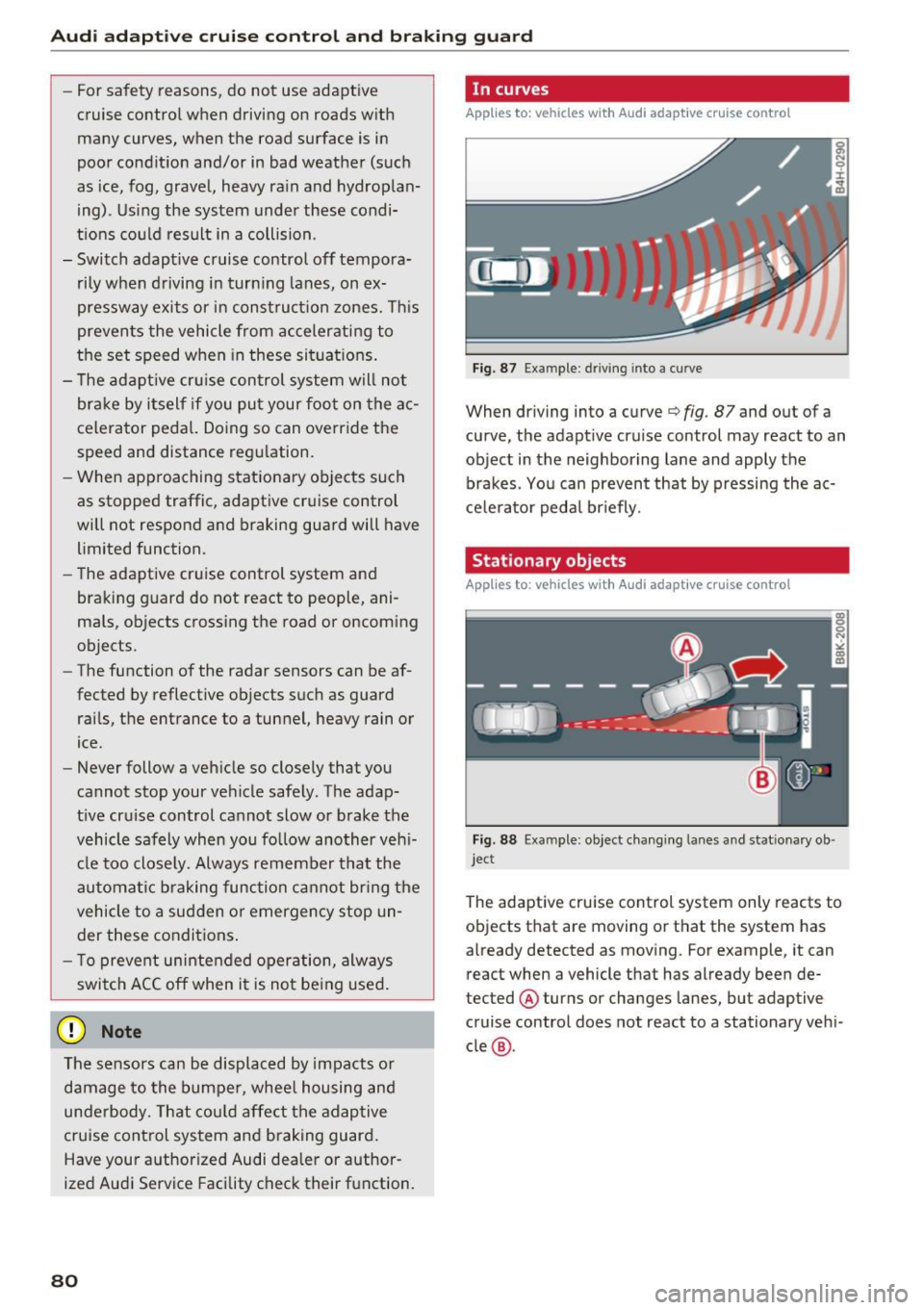
When driving into a curve c:::> fig. 87 and out of a
curve, the adapt ive cruise control may react to an
object in the neighboring lane and apply the
brakes . You can prevent that by pressing the ac
ce lerator pedal br iefly.
Stationary objects
Applies to: vehicles with Audi adaptive cruise control
Fig. 88 Example: object chang ing lanes and stat ionary ob ·
jec t
The adaptive cruise control system only reacts to
objects that are moving or that the system has
already detected as moving . For example, it can
react when a vehicle that has already been de·
tected @ turns or changes lanes, but adaptive
cruise control does not react to a stationary vehi
cle @.