ABS AUDI RS7 SPORTBACK 2016 Owners Manual
[x] Cancel search | Manufacturer: AUDI, Model Year: 2016, Model line: RS7 SPORTBACK, Model: AUDI RS7 SPORTBACK 2016Pages: 282, PDF Size: 70.78 MB
Page 14 of 282
Instruments and indicator lights
-Whenever stalled or stopped for repair,
move the vehicle a safe distance off the
road, stop the engine, and turn on the
emergency flasher
c> page 46.
- The engine compartment of any motor vehi
cle is a potentially hazardous area. Before
you check anything in the engine compart
ment, stop the engine and let it cool down.
Always exercise extreme caution when work
ing under the hood
c> page 203.
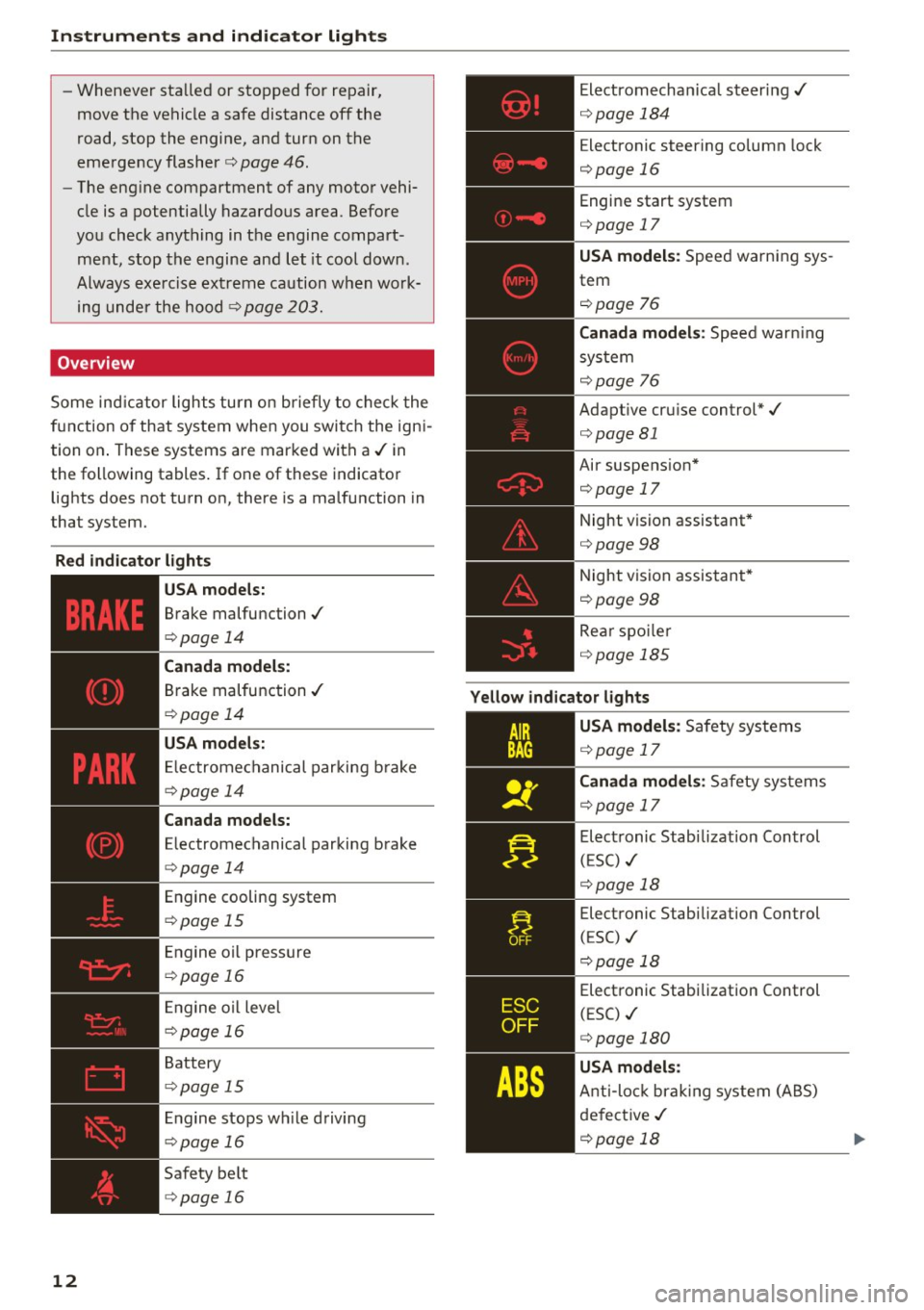
Overview
Some indicator lights turn on briefly to check the
function of that system when you switch the igni
tion on. These systems are marked with a../ in
the following tables. If one of these indicator
lights does not turn on, there is a malfunction in
that system.
Red indicator lights
12
-------------
US A models:
Brake malfunction../
c>page 14
Canada models:
Brake malfunction../
c>poge 14
USA models:
Electromechanical parking brake
c>page 14
Canada models:
Electromechanical parking brake
c>page 14
Engine cooling system
c>poge 15
Engine oil pressure
c>poge 16
Engine oil level
c>poge 16
Battery
c>page 15
Engine stops while driving
c>page 16
Safety belt
c>page 16
Electromechanical steering../
c>page 184
Electronic steering column lock
c>page 16
Engine start system
c>page 17
USA models: Speed warning sys
tem
c>poge 76
Canada models: Speed warning
system
c> poge 76
Adaptive cruise control*../
c>page 81
Air suspension*
c>page 17
Night vision assistant*
c>page 98
Night vision assistant*
c>poge98
Rear spoiler
~page 185
Yellow indicator lights
A IR
BAG
-------------
US A models: Safety systems
c>page 17
Canada models: Safety systems
c>poge 17
Electronic Stabilization Control
(ESC) ../
c>poge 18
Electronic Stabilization Control
(ESC) ../
c::>page 18
Electronic Stabilization Control
(ESC) ../
c::>page 180
USA models:
Anti-lock braking system (ABS)
defective ../
c>poge 18
Page 15 of 282
TPMS
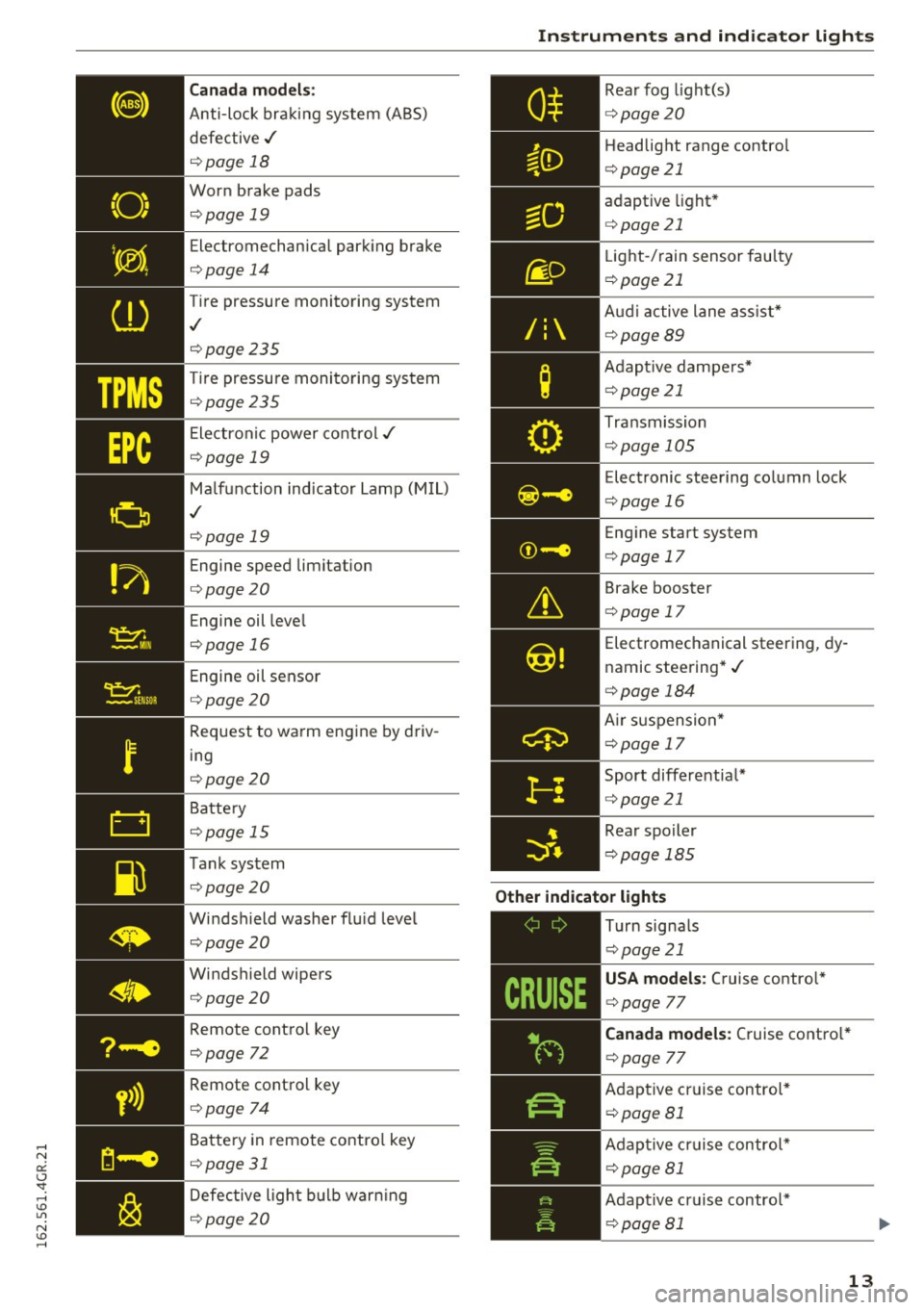
Canada models:
Anti-lock bra king system (ABS)
defective ,/
¢page 18
Worn brake pads
¢page 19
Electromechan ica l park ing brake
¢ page 14
Tire pressure monito ring system
,I
¢page 235
Tire pressu re moni toring sys tem
¢page 235
Ele ct ron ic power co ntro l./
¢page 19
Malf u nction ind icator La mp (M IL)
,I
¢page 19
Engine speed limitation
¢page 20
Engine oil leve l
¢page 16
Engine oil sensor
¢page 20
Request to wa rm eng ine by driv
ing
¢ page 20
Battery
¢ page 15
T ank sys tem
¢page 20
Windshield washer flu id leve l
¢page 20
Windshield wipers
¢page 20
Remote cont rol key
¢page 72
Remote cont ro l key
¢ page 74
Battery in remote contro l key
¢page 31
Defective ligh t bulb warning
¢ page 20
Instruments and ind icator lights
R ea r fog light(s)
Headlight range contro l
¢page 21
ad aptive light *
¢page 21
Light-/ rain sensor fau lty
¢ page 21
Audi a ctive lane as sist*
¢ page89
Adap tive da mpe rs*
¢ page 21
Tra nsmission
¢pag e 105
Elec tronic steering column lock
¢ page 16
Engine start system
¢ page 17
Brake booster
¢page 17
Electromechanical steer ing, dy
namic stee ring* ./
¢page 184
Air su sp ensio n*
¢page 17
Sport differentia l*
¢page 21
Rear spoiler
¢ pag e 18 5
Other indicator lights
-------------
Turn signa ls
¢ pag e 21
USA models : Cruise contro l*
¢ page 77
Canada models: Cruise co ntro l*
¢ page 77
Adap tive c ruise contro l*
¢ page 81
Adap tive c ruise contr ol*
¢page 81
Adap tive cr uise contro l*
¢ page 81
13
Page 16 of 282
Instruments and indicator lights
Audi active lane assist *
¢page89
High beam assist"
¢ page44
High beam
¢page44
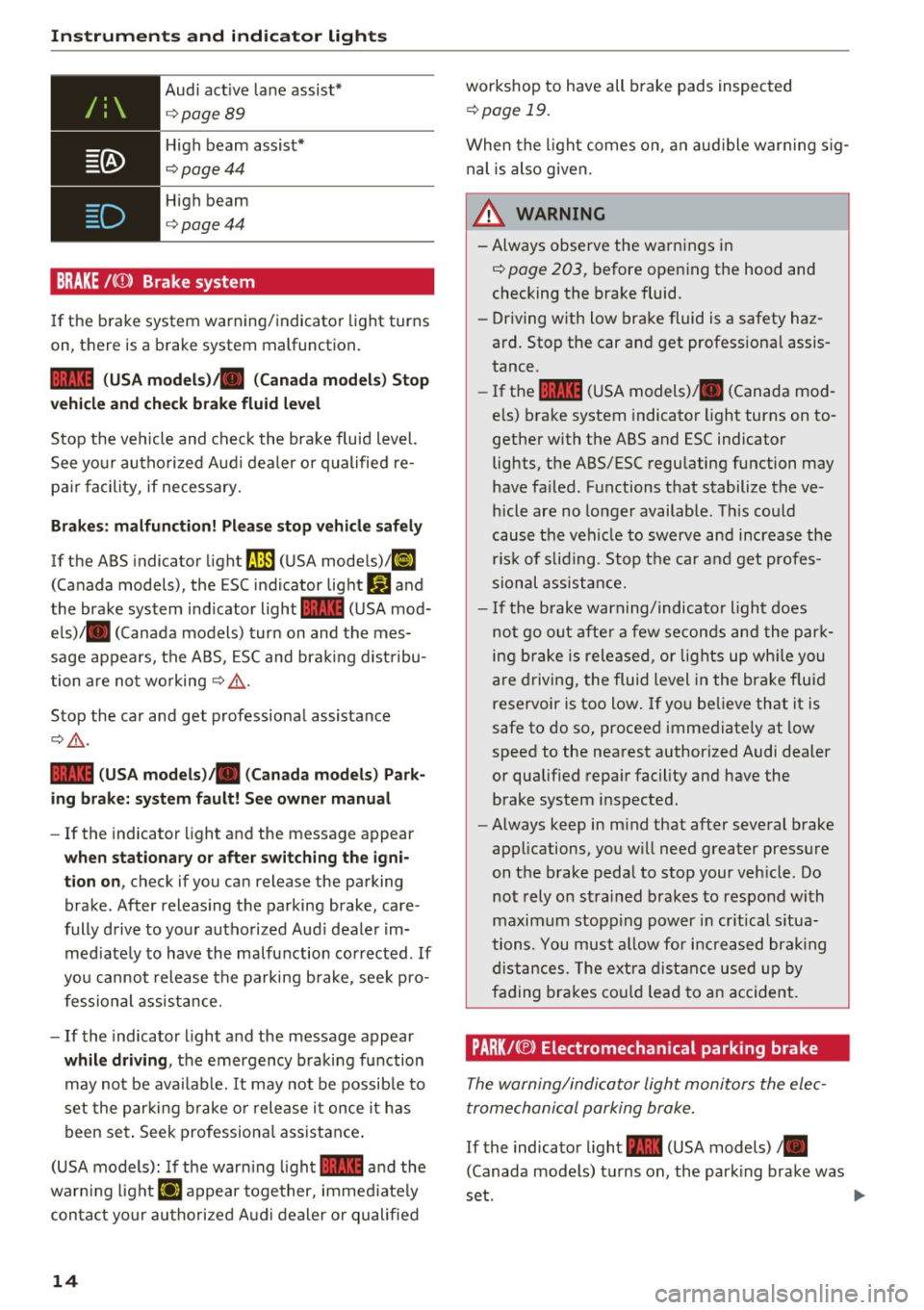
BRAKE/( ©) Brake system
If the b rake system warning/ indicator light turns
on, there is a brake system malfunction .
1111 (USA model s)/. (Canada model s) Stop
v ehicle and check brake fluid le vel
Stop the veh icle and check the brake fluid level.
See yo ur autho rized Aud i deale r or qualified re
pa ir facility, if necessary.
Brakes : malfun ction! Pl eas e stop vehicle saf ely
If the ABS indicator light rJ] (USA mode ls)/ ll]
(Canada models), the ESC indicator light DJ and
the brake system ind icator light
1111 (USA mod
e ls)/ . (Canada models) turn on and the mes
sage appears, the AB S, ESC and brak ing dist ribu
tion a re not wo rking
¢ .&, .
Stop the car and get professiona l assistance
Q .&, .
1111 (US A mod els )/ . (Canada models ) Park
ing brake : sy ste m f ault! See owne r manua l
-If the indicator light and the messag e appear
whe n stationa ry or afte r switching the igni
tion on ,
check if you can release the parking
brake . After releasing the parking brake , care
fully drive to yo ur authorized Aud i dealer im
med iate ly to have the ma lfunction co rrected . If
you cannot release the parking brake , see k pro
fessional ass istance .
- If the indicator l ight and the message appear
whil e driving , the emergency braking function
may not be avai lab le. It may not be possib le to
set the par kin g b rake o r release it once it h as
been set . Seek professiona l assistance .
(USA models): If the warn ing light
1111 and the
warn ing light
llJ appear together, immed iate ly
con tact yo ur authori zed A udi dealer or qualified
14
workshop to have all brake pads inspected
¢ page 19.
When the light comes on , an aud ible warn ing sig
nal is also given.
_&. WARNING
-Always observe the warnings in
¢ page 203, before open ing the hood and
checking the brake fluid.
- Driving with low brake fluid is a safety haz
ard. Stop the car and get professional assis
tance .
- If the
1111 (USA models)/ . (Canada mod
els) brake system indicato r light turns on to
gethe r with the ABS and ESC indicator
lights, the ABS/ESC regu lating function may
have fa iled . Functions that stabilize the ve
hicle are no longer available . Th is could
cause the vehicle to swerve and increase the ris k of sliding . Stop the car and get profes
sional ass is tance.
- If the brake warning/indicator ligh t does
not go out afte r a few seconds and the par k
ing brake i5 relea5ed, or light5 up wh ile you
are driving, the fluid level in the brake fluid
reservoir is too low. If yo u be lieve that it is
safe to do so, proceed immediately at low
speed to the nearest authorized Audi dealer
or qualif ied repa ir facility and have the
brake system inspected.
- Always keep in m ind that after several brake
applications, you w ill need greater pressure
on the b rake pedal to stop your veh icle . Do
not rely on strained brakes to respond with
maximum stopp ing power in cr itical s itua
tions. You must a llow for increased brak ing
distances. The extra dist ance used up by
fading bra kes co uld lead to an accident.
PARK/ C®) Electromechanical parking brake
The warning/indicator light monitors the elec
tromechanical parking brake .
If the indicator light -(USA models) •
(Canada mode ls) t urns on , the park ing brake was
set .
~
Page 20 of 282
Instruments and indicator lights
how it normally functions and the brake pedal
may vibrate.
Drive to an autho rized Aud i de aler or autho rized
Aud i Service Facility immediately to have the
malfunct ion corrected .
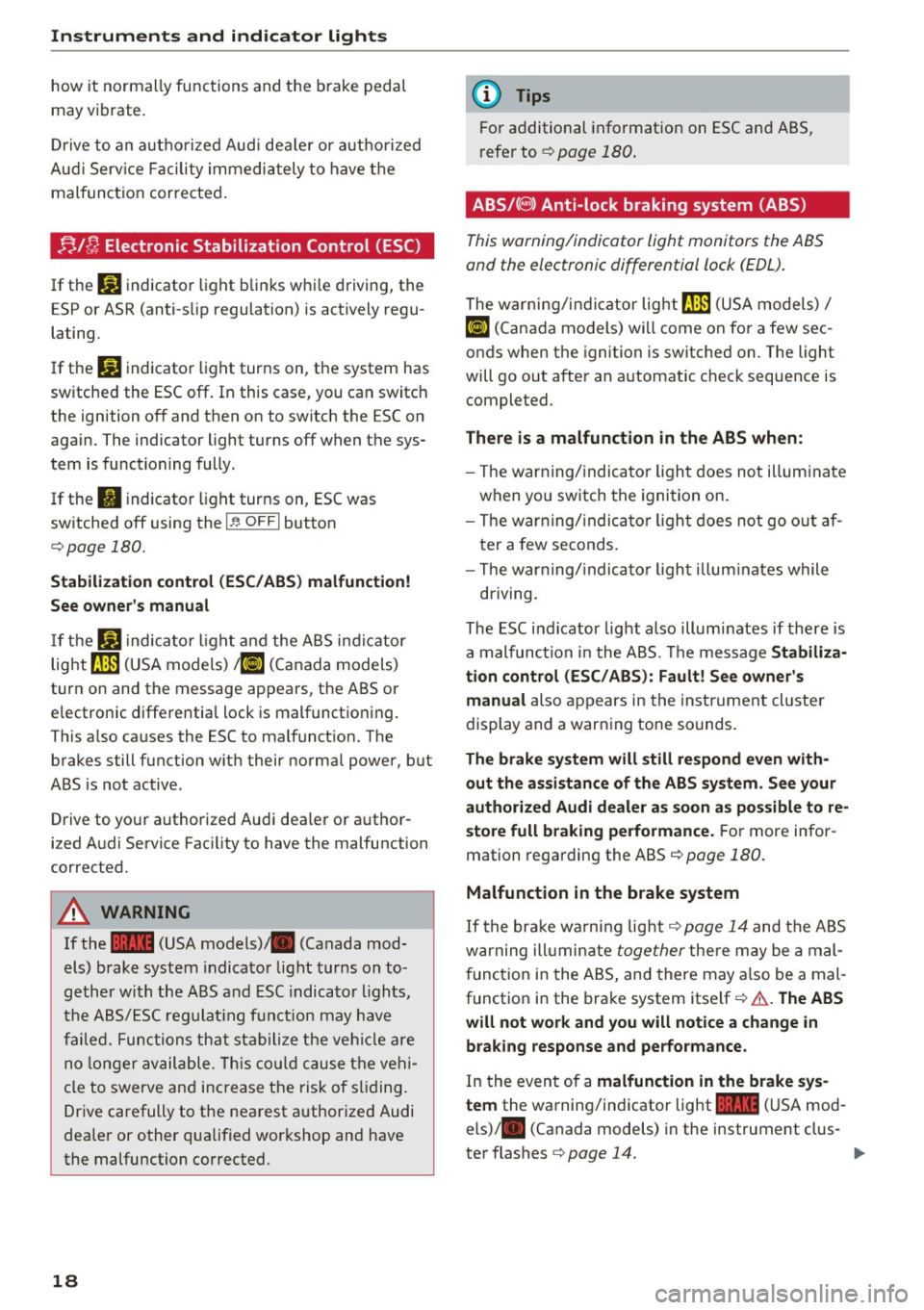
;;Jf; Electronic Stabilization Control (ESC)
If the m indicator light blinks while driving, the
E SP or ASR (anti-slip regulation) is actively regu
lating.
I f the
liJ indicator light turns on, the system has
sw itched the ESC off . In this case, you can switch
the ignition off and then on to switch the ESC on
again. The indicator light turns off when the sys
tem is functioning fully.
If the
II indicator light turns on, ESC was
switched off using the
I ~ OFFI button
¢page 180.
Stabilization control (ESC/ ABS) malfunction!
See owner's manual
If the liJ indica to r light and the ABS indicator
lig ht ~ (USA models)
;fiJ (Canada models)
turn on and the message appears, the ABS or
electronic differential lock is malfunctioning .
This a lso causes the ESC to malfunct ion. The
brakes still function w ith their norma l power, but
ABS is not active .
Drive to yo ur aut ho rized Audi dea ler or a uthor
ized Audi Service Fac ility to have the malfunction
corrected.
A WARNING
If the 1111 (USA models) ,111 (Canada mod
els) brake system indicator light turns on to
gether with the ABS and ESC indicator lights,
the ABS/ESC regulating funct ion may have
failed. Functions that stabilize the vehicle are
no longer available. This could cause the vehi
cle to swerve and increase the risk of sliding.
Drive carefully to the nearest authorized Audi
dealer or other qualified wor kshop and have
the malfunction corrected.
18
(D Tips
For additional information on ESC and ABS,
r efe r to ¢
page 180.
ABS/( @) Anti-lock braking system (ABS)
This warning/indicator light monitors the ABS
and the electronic differential lock (EDL) .
The warning/indicator lig ht fJ] (USA models)/
ti] (Cana da models) wi ll come on for a few sec
onds when the ignition is switched on. The light
will go out after an a utomatic check sequence is
completed.
There is a malfunction in the ABS when:
- The war ning/ indicator light does not illuminate
when you switch the ignition on.
- The war ning/ indica tor light does not go out af
ter a few seconds.
- The war ning/indica tor light illuminates while
driving.
The ESC indi cator lig ht also illum inates if there is
a malfunction in the ABS. The message Stabiliza•
tion control (ESC/ABS): Fault! See owner's
manual
also appears in the inst rument cl uste r
display and a warn ing tone sounds .
The brake system will still respond even with
out the assistance of the ABS system. See your
authorized Audi dealer as soon as possible to re
store full braking performance.
For more infor
mation regarding the ABS
¢page 180.
Malfunction in the brake system
If the brake wa rning light ¢ page 14 and the ABS
warning ill umin ate
together there may be a mal
function in the ABS, and there may also be a mal
funct ion in the brake system itself¢&. .
The ABS
will not work and you will notice a change in
braking response and performance.
In the even t of a malfunction in the brake sys
tem
the wa rning/indicator light 1111 (USA mod
els) ,111 (Canada models) in the instrument clus-
ter flashes ¢
page 14. .,.
Page 21 of 282
.... N
er: (.J
'SI: ......
lock (EDL)
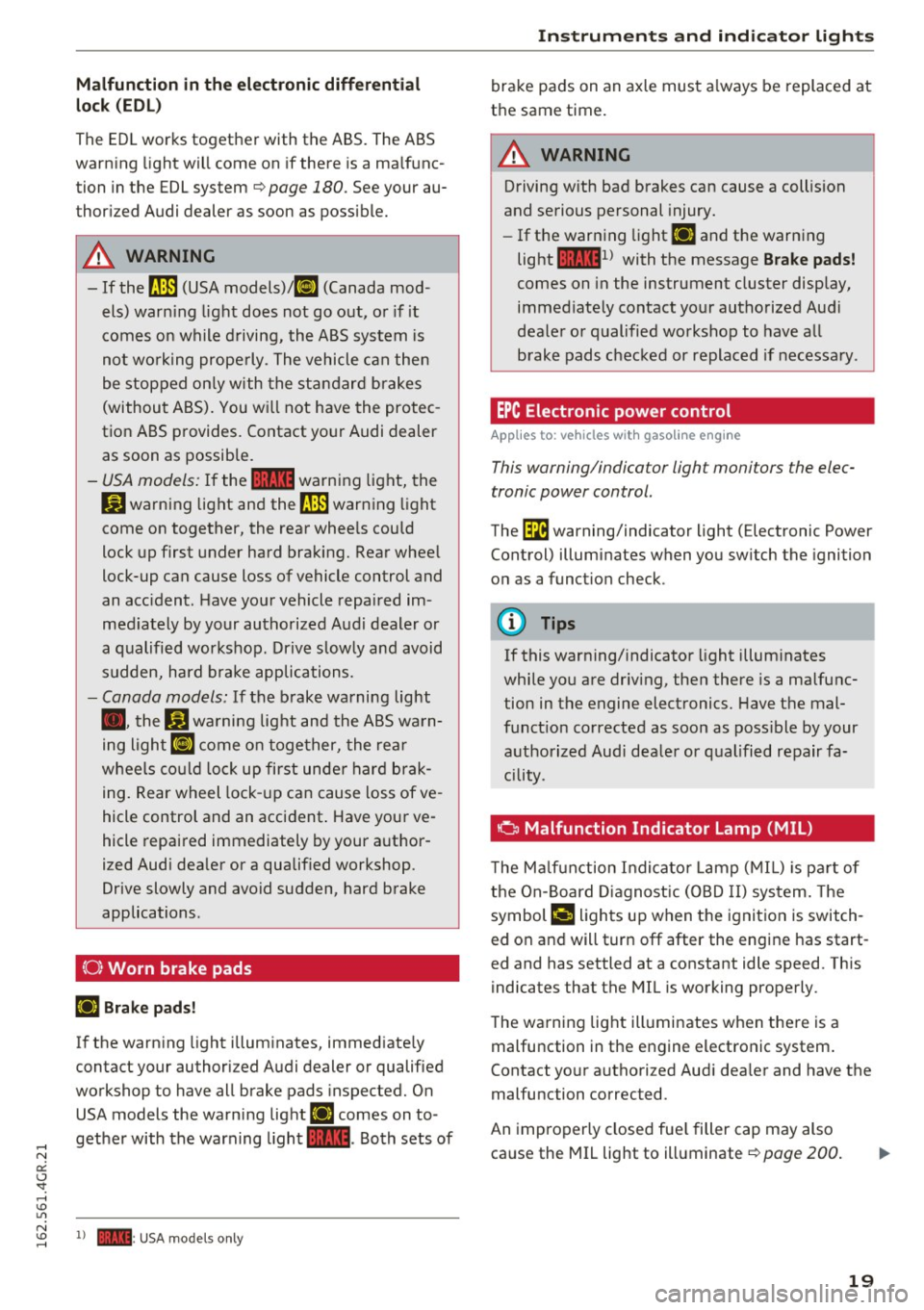
The EDL works together with the ABS. The ABS
warn ing light will come on if there is a ma lfunc
tion in the EDL system
c::.>page 180. See your au
thor ized Audi dealer as soon as possible.
A WARNING
-If the t'm (USA models)/ 11] (Canada mod-
els) warn ing light does not go out, or if it
comes on while driving, the ABS system is
not wo rking prope rly. The vehicle can then
be stopped on ly with the standard brakes
(without ABS). You will not have the protec
tion ABS provides. Contact your Audi dealer
as soon as possible.
- USA models: If the 1111 warning light, the
DJ warning light and the t'm warning lig ht
come on together, the rear wheels could
lock up first under hard braking. Rear wheel
lock-up can cause loss of vehicle control and
an acc ident. Have your vehicle repaired im
med iately by your authorized Audi dealer or
a qualified workshop. Drive slowly and avoid
sudden, hard brake applications.
-Canada models: If the brake warning light
. , the
DJ wa rning light and the ABS warn
ing light
II] come on together, the rear
wheels could lock up first under hard brak
ing. Rear wheel lock -up can cause loss of ve
hicle control and an accident . Have your ve
hicle repaired immediately by your author
ized Audi dealer or a qualified workshop.
Drive slowly and avoid sudden, hard brake
applications .
{0} Worn brake pads
IJ Brake pads!
-
If the warning light illum inates, immediate ly
contact your authorized Audi dealer or qualified
wo rkshop to have all brake pads inspected. On
USA models the warning light
IJ comes on to
gether with the warning light
1111. Both sets of
~ 1) - : USA models only
Instruments and indicator lights
brake pads on an axle must always be replaced at
the same time.
A WARNING
-Driving with bad brakes can cause a collision
and serious personal injury.
- If the warn ing light
IJ and the warning
light
llll1 l with the message Brake pads!
comes on in the instrument cluster display,
immed iately contact your authorized Aud i
dealer or qualified workshop to have all
brake pads checked or replaced if necessary .
EPC Electronic power control
Applies to : veh icles w it h gasoli ne e ngi ne
This warning/indicator light monitors the elec
tronic power control.
The (m warning/indicator light (Electronic Power
Control) illuminates when you switch the ignition
on as a function check.
(!) Tips
If this warning/indicator light illuminates
while you are driv ing, then there is a malfunc
tion in the engine electronics. Have the mal
funct ion corrected as soon as poss ible by your
authorized Audi dealer or qualified repair fa
cility.
o Malfunction Indicator Lamp (MIL)
T he Ma lfunction Indicator Lamp (MIL) is pa rt of
the On-Board Diagnostic (OBD II) system. The
symbol
¢,ij lights up when the ignition is switch
ed on and will turn off after the engine has start
ed and has settled at a constant idle speed. This
indicates that the MIL is working properly.
The warning light illuminates when there is a
malfunction in the engine electronic system.
Contact yo ur authorized Audi dea ler and have the
malfunction corrected.
An improperly closed fuel filler cap may also
ca use the MIL light to illuminate
c::.>page 200 .
19
Page 24 of 282
Instruments and indicator lights
CRUISE /11
(') Cru ise control
The warning/indicator light ltj;\9~1@ (USA models)/
El (Canada models) illuminates when the cruise
control is activated ¢
page 77.
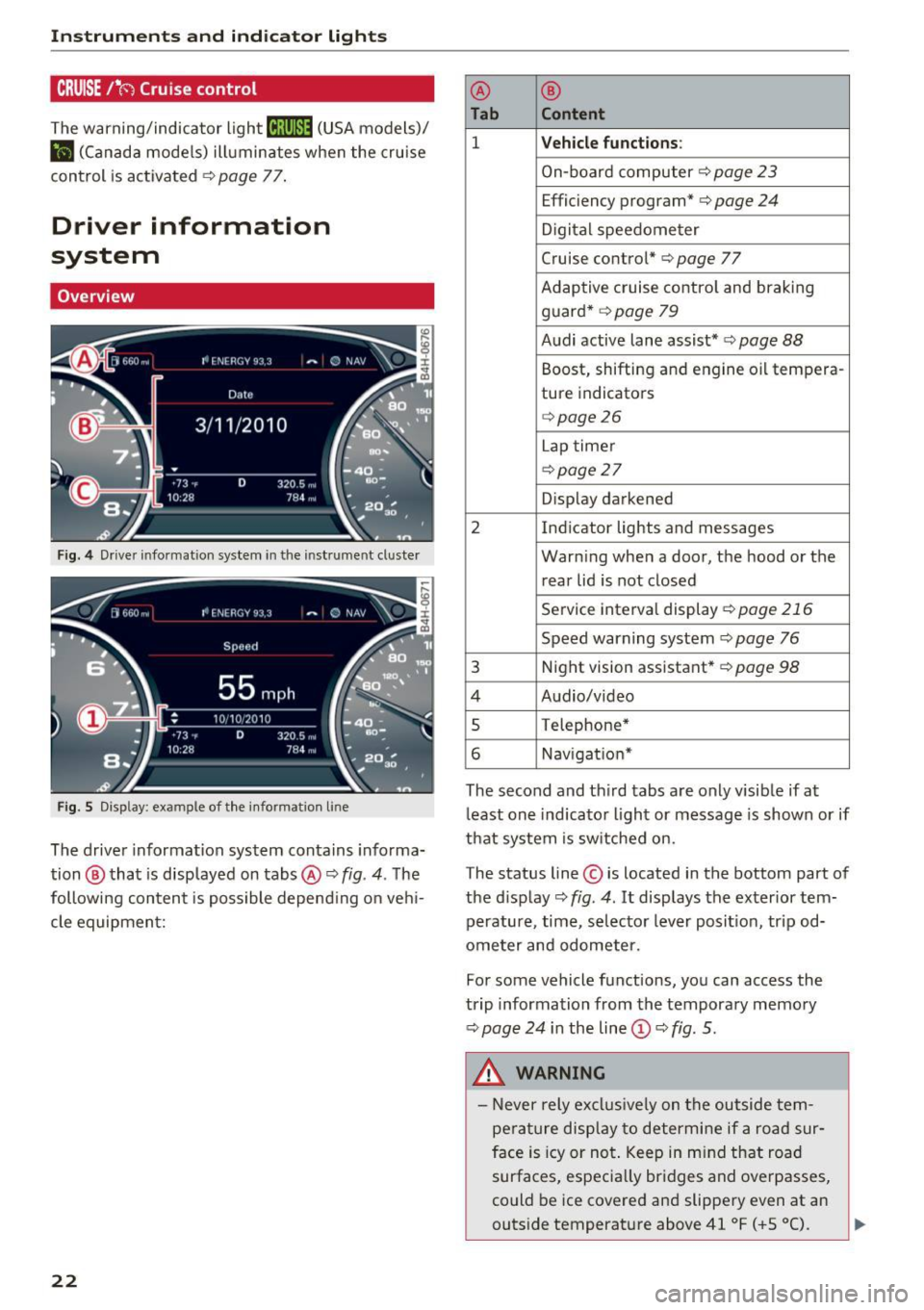
Driver information
system
Overview
Fig. 4 Driver informat ion system in the instrument cluster
Fig. S Disp lay: example of the in formation lin e
The driver information system contains informa·
tion @ that is displayed on tabs@¢
fig. 4. The
following content is possible depend ing on veh i
cle equipment:
22
@ ®
Tab Content
1 Vehicle functions :
On-board computer¢ page 23
Efficiency program*¢ page 24
Digital speedometer
Cruise control* ¢
page 77
Adaptive cruise control and braking
guard* ¢
page 79
Audi active lane assist* ¢ page 88
Boost, shifting and engine oil tempera-
ture indicators
¢page26
Lap timer
¢page 27
Display darkened
2 Indicator lights and messages Warning when a door, the hood or the rear lid is not closed
Service interval display
¢page 216
Speed warning system~ page 76
3 Night vision assistant* ¢ page 98
4 Audio/video
s Telephone*
6 Nav igat ion*
The second and third tabs are only visible if at
least one indicator light or message is shown or if
that system is switched on.
The status line © is located in the bottom part of
the display¢
fig. 4 . It displays the exterior tern·
perature, time, selector lever position, tripod·
ometer and odometer.
Fo r some vehicle functions, you can access the
trip information from the temporary memory
¢
page 24 i n the line©¢ fig. 5.
&_ WARNING
- Never rely exclusively on the outside tern·
perature display to determine if a road sur
face is icy or not. Keep in mind that road
surfaces, especially bridges and overpasses,
could be ice covered and slippery even at an
-
outside temperature above 41 °F ( +S 0
(). ~
Page 25 of 282
-Always reduce your speed and drive with
special care in cold weather cond itions when
the chance of encountering icy road surfaces
increases.
(D Tips
- If the vehicle is stat iona ry, o r if you are driv
i ng at a very low speed, the temperature
s hown in the d isp lay m ight be slightly high
er t han the actual outside temperature. T his
i s caused by t he heat be ing radiated from
t h e eng ine.
- You can select the u nits used for temp era
ture, speed and othe r measureme nts in the
MM I.
- Fo r info rmation o n the a udio/video and nav
i ga tion* func tions, re fer to the s epa ra te
M MI owner's manual.
Operation
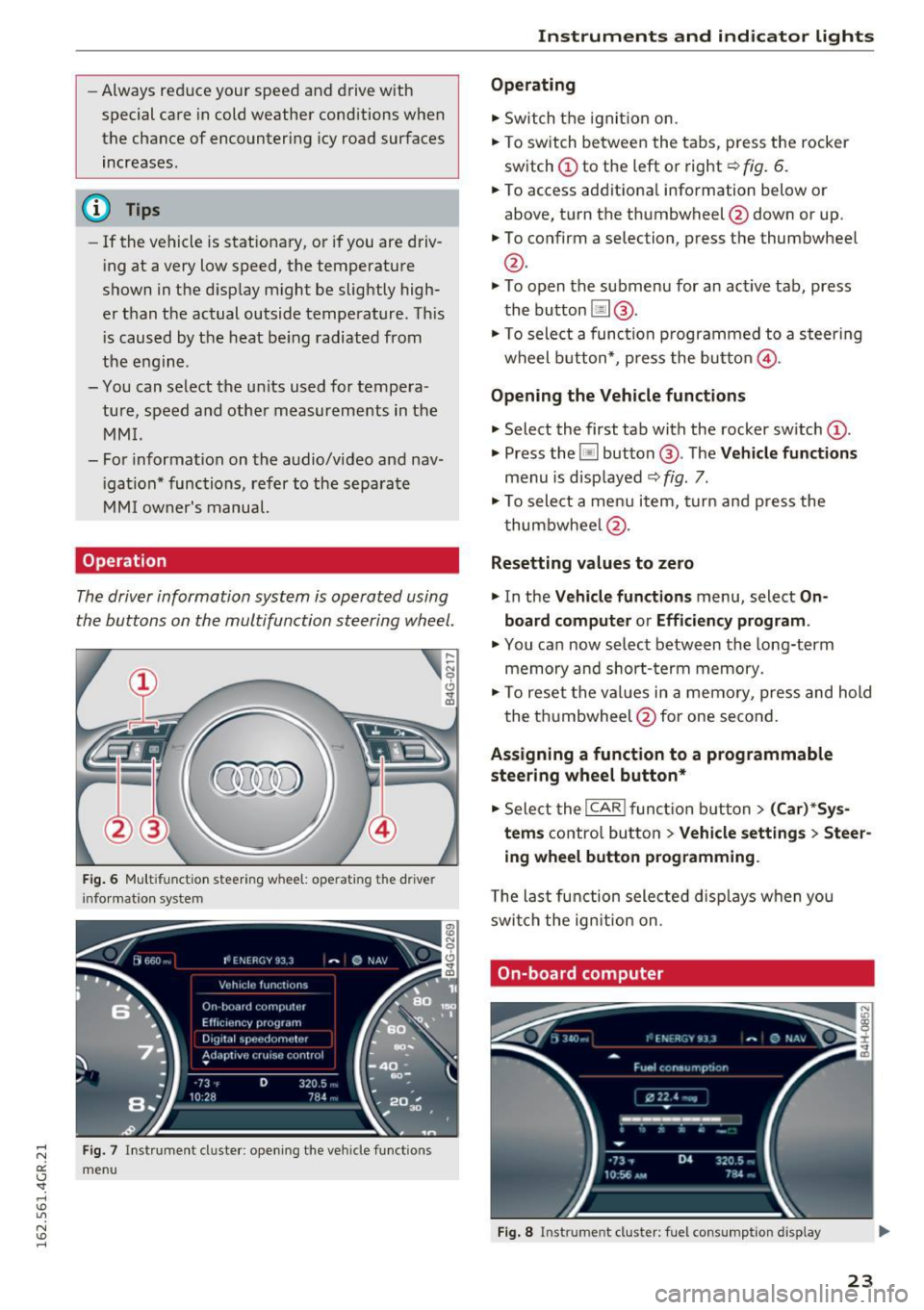
The driver information system is operated using
the buttons on the multifunc tion steering wheel.
F ig. 6 M ultifunct io n steering wheel: operating the driver
info rmation system
Fig. 7 In strume nt cluste r: o penin g the vehicle funct ions
menu
Instruments and indicator lights
Operating
.,. Switch t he igni tion on.
.,. To switch be twee n the tabs, p ress the rocker
sw itch
(D to the left o r right¢ fig. 6 .
.,. To access additiona l information below or
above, t urn the th umbwheel @down or up .
.,. To confirm a selection, p ress the thumbwheel
@.
.,. To open the submenu for an ac tive tab , press
the button [ii@.
.,. To sele ct a func tion p rogrammed to a steering
wheel button *, p re ss the butto n @ .
Opening the Vehicle functions
.,. Select the first tab with the rocker sw itch (D .
.,. Press the~ button @. The Vehicle functions
menu is disp layed ¢ fig. 7.
.,. To sele ct a men u it em, turn an d press the
t humbwhee l@ .
Resetting values to zero
.,. In the Vehicle functions menu, select On
board computer or Efficiency program .
.,. You ca n now se lec t b etw een the long-term
memory an d short- term memory .
.,. To reset the val ue s in a m emo ry, pres s and hold
the t humbwheel @for one se cond.
Assigning a function to a programmable
steering wheel button*
.,. Sele ct the I CAR ! fun ction butt on> (Car) *Sy s
tem s
contro l butto n > Vehicle settings > Steer
ing wheel button programming .
The la st fun ction sele cte d di spla ys w hen yo u
swi tch the ig nition on.
On-board computer
Fi g. 8 Instrument cluster: fuel consu mptio n display
23
Page 78 of 282
Driving
back. The braking force of the parking brake is
only released if sufficient drive power has been built up at the wheels.
(D Tips
For safety reasons, the parking brake is only
released automatically when the driver's safe
ty belt is buckled.
Emergency braking function
This is used if the conventional brake system
fails or locks up.
... To brake your vehicle in an emergency , pull the
~ switch and hold it pulled .
... As soon as you release the~ switch or acceler-
ate, the braking stops.
If you pull the switch(®) and hold it above a
speed of about 5 mph (8 km/h), the emergency
braking function is initiated. The vehicle is braked
at all four wheels by activating the hydraulic brake system. The brake performance is similar
to making an emergency stop¢.&..
In order not to activate the emergency braking by
mistake, an audible warning tone (buzzer)
sounds when the~ switch is pulled. As soon as
the ~ switch is released, or the accelerator pedal
is depressed, emergency braking stops .
A WARNING
Emergency braking should only be used in an
emergency, when the normal brake pedal has
failed or the brake pedal is obstructed. Using
the parking brake for emergency braking will
slow your vehicle down as if you had made a
full braking maneuver. ESC and the associat
ed components (ABS, ASR, EDL) cannot over
come the laws of physics. In corners and
when road or weather conditions are bad, a
full brake application can cause the vehicle to
skid or the rear end to break away, which in
creases the risk of an accident.
76
Speed warning system
' Introduction
The speed warning system helps you to stay un
der a specified maximum speed .
The speed warning system warns you if you are
exceeding the maximum speed that you have set.
You will hear a warning tone when your speed ex ceeds the stored value by approximately 3 mph
(3 km/h) . An indicator light. (USA models)/.
(Canada models) in the instrument cluster dis
play also turns on at the same time. The indicator
light./. turns off when the speed decreases
below the stored maximum speed.
Setting a threshold is recommended if you would
like to be reminded when you reach a certain
maximum speed. Situations where you may want
to do so include driving in a country with a gener
al speed limit or if there is a specified maximum
speed for winter tires.
(D Tips
Even though your vehicle is equipped with a
speed warning system, you should still watch
the speedometer to make sure you are not
driving faster than the speed limit.
' Setting the threshold
You can set, change and delete the warning
threshold in the Infotainment system.
... Select: the I CARI function button > (Car)* Sys
tems
control button > Driver assistance >
Speed warning .
You can set any threshold between 20 mph
(30 km/h) and 150 mph (240 km/h). Settings
can each be adjusted in increments of 5 mph (10
km/h).
Page 126 of 282
Driving safety
moving. Objects can becom e trapped under
the brake pedal and accelerator pedal caus ing a loss of vehicle control.
Storing cargo correctly
loading the luggage compartment
All luggage and other objects must be properly
stowed and secured in the luggage compart
ment .
Loose items in the luggage compartment can
shift suddenly, changing vehicle handling charac
teristics . Loose items can also increase the risk of
serious personal injury in a sudden vehicle ma neuver or in a collision.
.., Distribute the load evenly in the luggage com
partment.
.., Always place and properly secure heavy items in
the luggage compartment as far forward as
possible.
... Secure luggage using the tie-downs provided
c::;, page 62, Luggag e compartm ent.
... Make sure that the rear seatback is securely
la tched in place .
A WARNING
Improperly stored luggage or other items can
fly through the vehicle causing serious per sonal injury in the event of hard braking or an
accident . To help reduce the risk of serious
personal injury :
- Always put objects , for example, luggage or
other heavy items in the luggage compart
ment.
- Always secure objects in the luggage com
partment using the tie-down hooks and
suitable straps.
A WARNING
Heavy loads will influence the way your vehi
cle handles. To help reduce the risk of a loss
of control leading to serious personal injury:
- Always keep in mind when transporting
heavy objects, that a change in the center of
gravity can also cause changes in vehicle
handling:
124 -
Always distribute the load as evenly as
possible.
- Place heavy objects as far forward in the
luggage compartment as possible .
- Never exceed the Gross Axle Weight Rating
or the Gross Vehicle Weight Rating specified
on the safety compliance sticker on the left
door jamb. Exceeding permissible weight
standards can cause the vehicle to slide and
handle differently.
- Please observe information on safe driving
c::;,page 118.
A WARNING
To help prevent poisonous exhaust gas from
being drawn into the vehicle, always keep the
rear lid closed while driving .
- Never transport objects larger than those fitting completely into the luggage area be
cause the rear lid cannot be fully closed.
-If you absolutely must drive with the rear lid
open, observe the following notes to reduce
the risk of poisoning:
- Close all windows,
- Close the power roof*,
- Open all air outlets in the instrument pan-
el,
- Switch off the air recirculation,
- Set the fresh air fan to the highest speed.
A WARNING
-
Always make sure that the doors, all win
dows, the power roof* and the rear lid are se
curely closed and locked to reduce the risk of
injury when the vehicle is not being used.
- After closing the rear lid, always make sure
that it is properly closed and locked .
- Never leave your vehicle unattended espe
cially with the rear lid left open. A child
could crawl into the vehicle through the lug
gage compartment and close the rear lid be
coming trapped and unable to get out. Be ing trapped in a vehicle can lead to serious
personal injury.
- Never let children play in or around the vehi
cle.
Page 130 of 282
Safety belts
Why use safety belts?
Frontal collisions and the law of physics
Frontal crashes create very strong forces for peo
ple riding in vehicles .
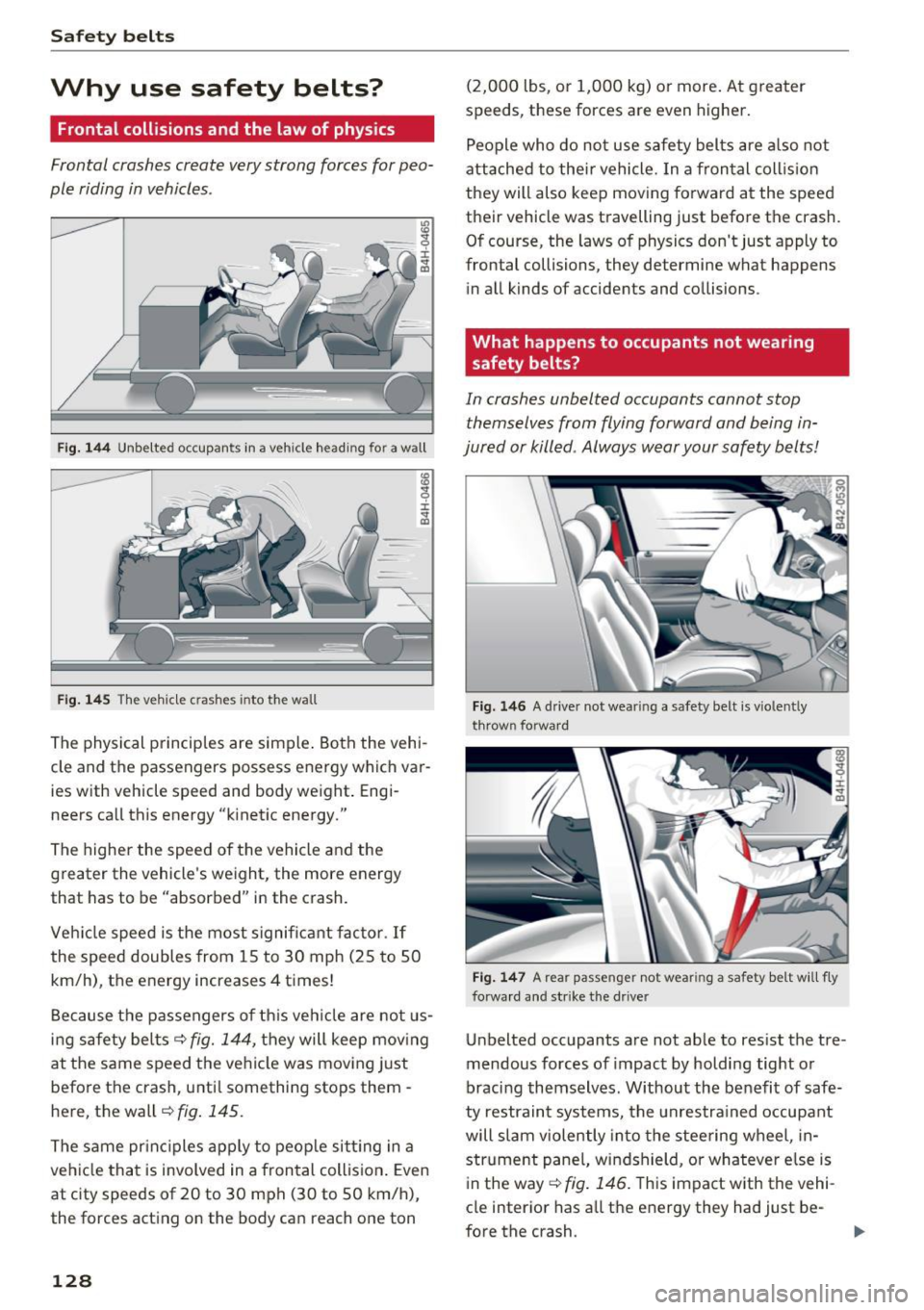
Fig. 144 Unbelted occupants in a veh icle headi ng fo r a wall
Fig. 145 T he vehicle c rashes into the wall
The physical principles are simple. Both the vehi
cle and the passengers possess energy which var ies w ith vehicle speed and body weight . Engi
neers call this energy "k inetic energy."
The higher the speed of the vehicle and the
greater the vehicle's weight, the more energy
that has to be "absorbed" in the crash.
Vehicle speed is the most significant factor .
If
the speed doubles from 15 to 30 mph (25 to 50
km/h), the energy increases 4 times!
Because the passengers of this vehicle are not us
ing safety belts~
fig. 144, they will keep moving
at the same speed the vehicle was moving just
before the crash, unti l something stops them -
here, the wall~
fig. 145.
The same principles apply to people sitting in a
vehicle that is involved in a frontal collision . Even
at c ity speeds of 20 to 30 mph (30 to 50 km/h),
the forces acting on the body can reach one ton
128
(2,000 lbs, or 1,000 kg) or more . At greater
speeds, these forces are even higher.
People who do not use safety belts are also not
attached to their vehicle. In a frontal collision
they will also keep moving forward at the speed
their vehicle was travelling just before the crash.
Of course, the laws of physics don't just apply to
frontal collisions, they determine what happens in all kinds of accidents and collisions .
What happens to occupants not wearing
safety belts?
In crashes unbelted occupants cannot stop
themselves from flying forward and being in
jured or killed . Always wear your safety belts!
Fig. 146 A drive r not wea ring a safety belt is vio len tly
t hrow n fo rward
Fig. 147 A rear passe nge r not wear ing a sa fety belt will f ly
forward an d str ike the driver
Unbelted occupants a re not able to res ist the tre
mendous forces of impact by holding tight or
bracing themselves. Without the benefit of safe
ty restraint systems, the unrestra ined occupant
will slam violently into the steering wheel, in
strument pane l, windshield, or whatever e lse is
in the way ~
fig. 146. T his impact with the vehi
cle interior has all the energy they had just be-
fore the crash.
liJJ,-