horn AUDI RS7 SPORTBACK 2016 Owners Manual
[x] Cancel search | Manufacturer: AUDI, Model Year: 2016, Model line: RS7 SPORTBACK, Model: AUDI RS7 SPORTBACK 2016Pages: 282, PDF Size: 70.78 MB
Page 11 of 282
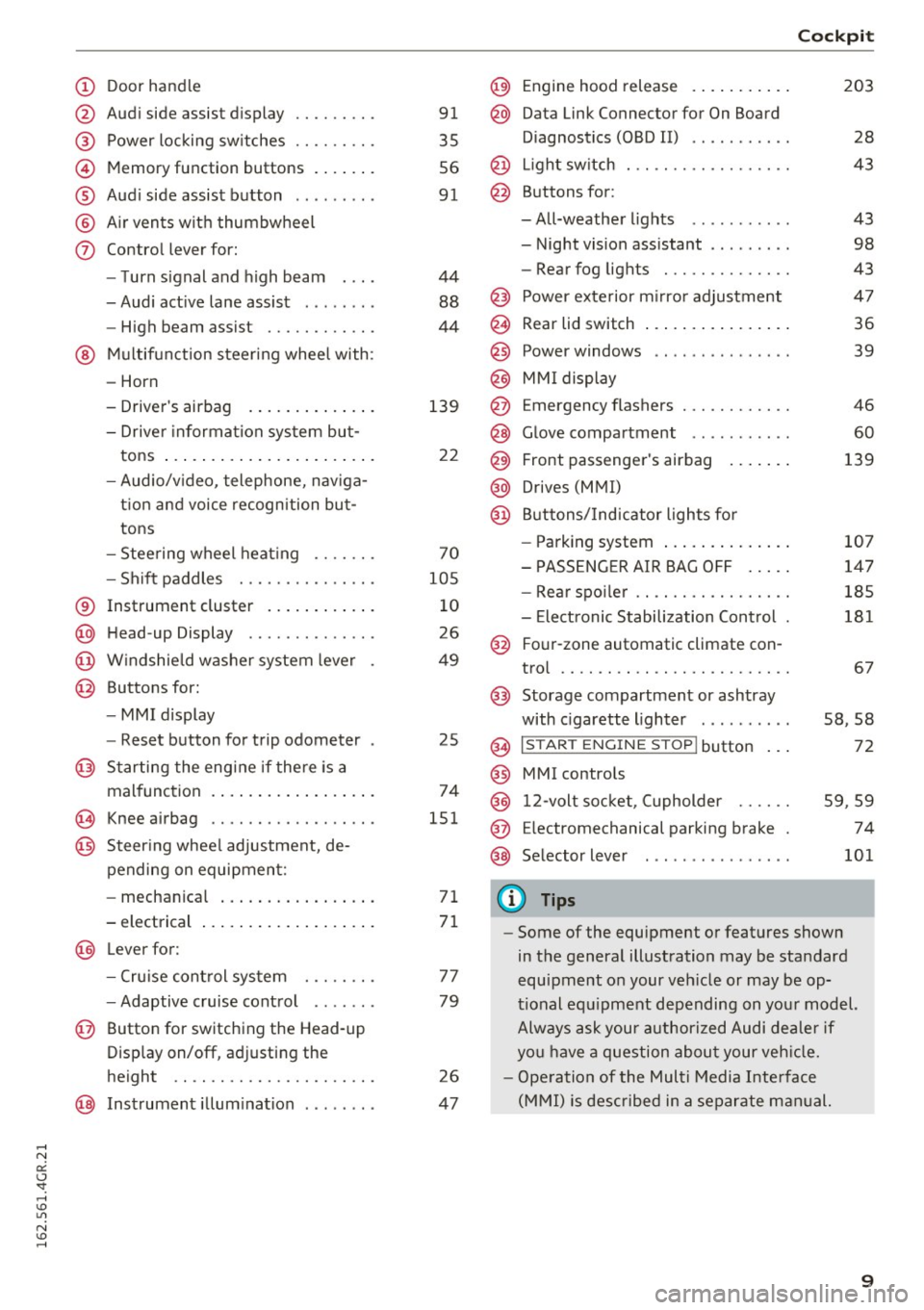
(!) Door handle
@
®
©
®
®
(j)
Audi side assist display
Power locking switches ...... .. .
Memory function buttons ...... .
Audi side assist button .. .. ... . .
Air vents with thumbwheel
Control lever for:
- Turn signal and high beam
- Audi active lane assist . .. ... . .
- High beam assist ......... .. .
@ Multifunction steering wheel with:
- Horn
- Driver's airbag
- Driver information system but-
tons ...................... .
- Audio/video, telephone, naviga
tion and voice recognition but
tons
- Steering wheel heating ...... .
- Shift paddles ............ .. .
® Instrument cluster ........... .
@ Head-up Display ............ . .
@ Windshield washer system lever
@ Buttons for:
- MMI display
- Reset button for trip odometer
@ Starting the engine if there is a
malfunction ................. .
~ Knee airbag .. ............. .. .
@ Steering wheel adjustment, de
pending on equipment:
- mechanical ................ .
- electrical
@ Lever for :
- Cruise control system ... .. .. .
- Adaptive cruise control ...... .
@ Button for switching the Head-up
Display on/off, adjusting the
height .. .. ............... .. .
@ Instrument illumination ....... .
91
35
56
91
44
88
44
139
22
70
105
10
26
49
25
74
151
71
71
77
79
26
47
@) Engine hood release .......... .
@ Data Link Connector for On Board
Diagnostics (OBD II) .... ...... .
@ Light switch . .. .............. .
@ Buttons for :
-All-weather lights - Night vision assistant .. ...... .
- Rear fog lights ............. .
@ Power exterior mirror adjustment
@ Rear lid switch ............... .
@
@
@ Power windows
MMI display
E mergency flashers
@ Glove compartment .......... .
@ Front passenger's airbag ...... .
@ Drives (MMI)
@ Buttons/Indicator lights for
- Parking system ............. .
- PASSENGER AIR BAG OFF .... .
- Rear spoiler .. .............. .
- Electronic Stabilization Control .
@ Four-zone automatic climate con-
trol .... .... .. .............. .
@) Storage compartment or ashtray
with cigarette lighter ......... .
@ I ST AR T ENGINE ST OP ! button
@ MMI controls
@
@
@ 12-volt socket, (upholder
E lectromechanical parking brake
Selector lever
(D Tips
Cockpit
203
28
43
43
98
43
47
36
39
46
60
139
107
147
185
181
67
58,58
72
59 ,59
74
101
- Some of the equipment or features shown
in the general illustration may be standard
equipment on your vehicle or may be op
tional equipment depending on your model.
Always ask your authorized Audi dealer if
you have a question about your vehicle.
- Operation of the Multi Media Interface
(MMI) is described in a separate manual.
9
Page 35 of 282
unlocked to give access to the vehicle
occupants from the outside.
- If the power locking system should ma l
function, you can lock the driver's door us ing the mechanical key¢
page 36.
- If the power locking system should fail, you
can still open the fuel tank flap in an emer
gency ¢
page 201.
- You are well advised not to keep valuables
inside an unattended vehicle, visible or not.
Even a properly locked vehicle cannot pro
vide the security of a safe.
- If the LED in the upper edge of the driver's
door panel comes on for about 30 seconds
after the vehicle is locked, there is a mal
function in the power locking or the anti
theft warning system. Have the malfunction
corrected by an authorized Audi dealership
or qualified repair facility.
Setting central locking
In the Infotainment system, you can set which
doors the central locking system will unlock .
.. Select: the ICARI function button > (Car)* Sys
tems control button > Vehicle settings > Cen
tral locking*.
Door unlocking -
You can decide if All doors or
only the
Driver should unlock . The luggage com
partment lid also unlocks when
All is selected . If
you select
Driver in a vehicle with a convenience
key*, only the door whose handle you pull will un
lock.
If you select Driver, all the doors and luggage
compartment lid will unlock if you press the~
button on the remote control master key twice.
Disable tailgate handle -If you select On, the
luggage compartment lid handle is locked . In
this case the luggage compartment lid can be opened with the
! ""'I button on the master key or
with the
l=I button* in the driver's door. In
vehicles with a convenience key*, you can still
open the luggage compartment lid using the
handle if an authorized master key is near the
proximity sensor* .
Opening and closing
Fold mirrors when locking* -If you select On,
the exterior rearview mirrors fold in automatical
ly when you press the~ button on the remote
control master key or touch the sensor* in the
handle.
Lock when driving -If you select On, the vehicle
locks automatically when driving. All of the doors
and the luggage compartment lid lock.
Tone when locking -if you select On, a tone will
sound when you lock the vehicle.
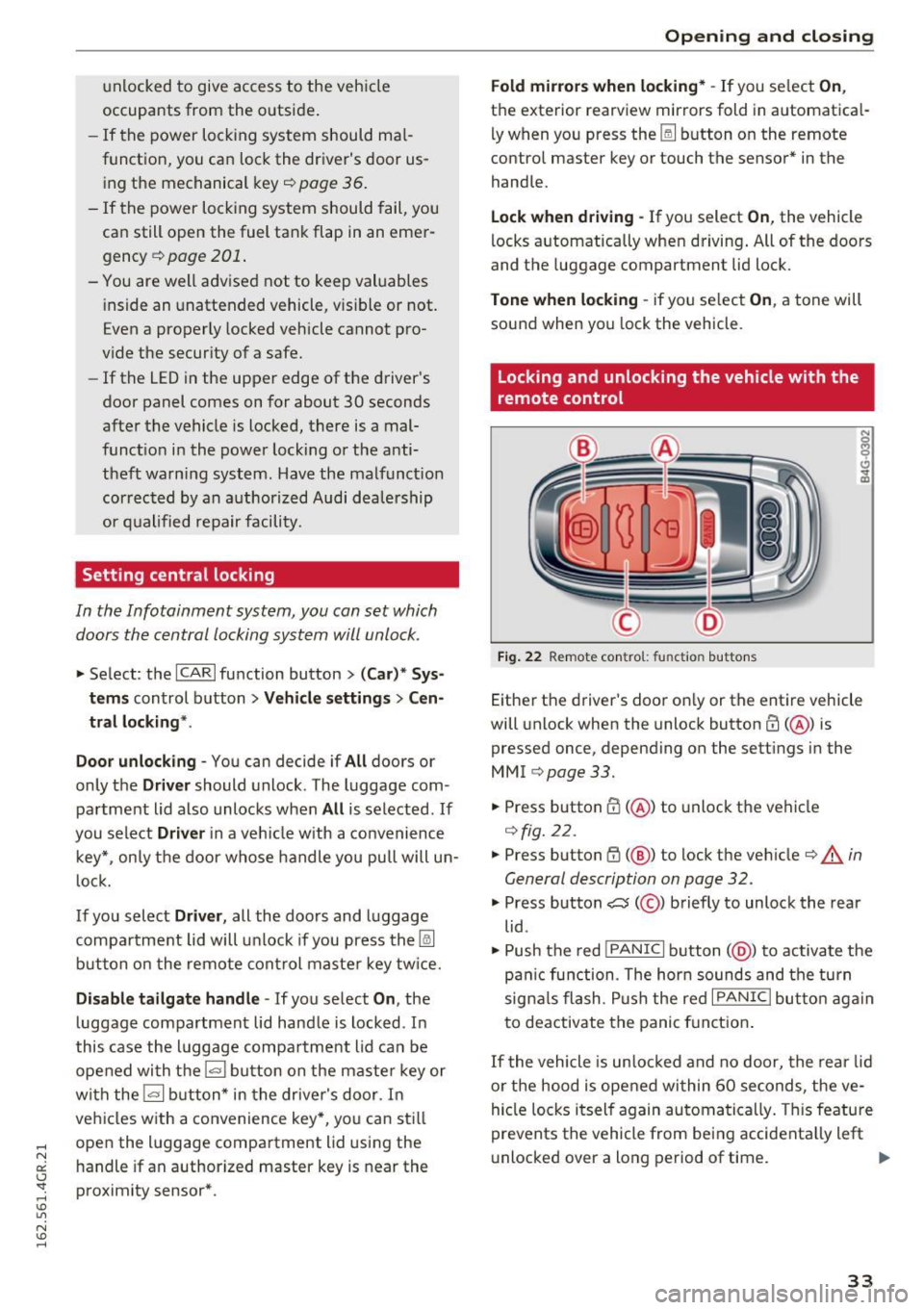
Locking and unlocking the vehicle with the
remote control
Fig. 22 Remote con trol: fu nct io n buttons
Either the driver's door only or the entire vehicle
will unlock when the unlock button
m (@ ) is
pressed once, depending on the settings in the
MMI ¢page33.
"'Press button CD(@ ) to unlock the vehicle
¢fig. 22.
.. Press button G'.l (@ ) to lock the vehicle ¢ & in
General description on page 32.
.,. Press button C:5 (@ ) briefly to unlock the rear
lid .
• Push the red
!PANIC I button( @) to activate the
panic function . The horn sounds and the turn
signals flash . Push the red
I PANIC I button again
to deactivate the panic function.
If the vehicle is unlocked and no door, the rear lid
or the hood is opened within 60 seconds, the ve
hicle locks itself again automatically. This feature
prevents the vehicle from being accidentally left
unlocked over a long period of time. ..,.
33
Page 152 of 282
Airbag system
(D Tips
If the capacitive passenger detection system
determines that the front passenger seat is
empty, the frontal airbag on the passenger
side will be turned off, and the
PASSENGER
AIR BAG OFF
light will stay on.
Repair , care and disposal of the airbags
Parts of the airbag system are installed at many
different places on your Audi. Installing, remov
ing, servicing or repairing a part in an area of the
vehicle can damage a part of an airbag system
and prevent that system from working properly
in a collision.
There are some important things you have to
know to make sure that the effectiveness of the
system will not be impaired and that discarded
components do not cause injury or pollute the
environment.
A WARNING
-Improper care, servicing and repair proce
dures can increase the risk of personal injury
and death by preventing an airbag from de
ploying when needed or deploying an airbag
unexpectedly:
- Never cover, obstruct, or change the steer ing wheel horn pad or airbag cover or the in
strument panel or modify them in any way.
- Never attach any objects such as cup holders or telephone mountings to the surfaces cov
ering the airbag units.
- For cleaning the horn pad or instrument
panel, use only a soft, dry cloth or one mois
tened with plain water. Solvents or cleaners could damage the airbag cover or change
the stiffness or strength of the material so
that the airbag cannot deploy and protect
properly.
- Never repair, adjust, or change any parts of the airbag system.
- All work on the steering wheel, instrument
panel, front seats or electrical system (in
cluding the installation of audio equipment,
cellular telephones and CB radios, etc.)
must be performed by a qualified technician
150
who has the training and special equipment necessary.
- For any work on the airbag system, we
strongly recommend that you see your au
thorized Audi dealer or qualified workshop.
- Never modify the front bumper or parts of
the vehicle body.
- Always make sure that the side airbag can
inflate without interference:
- Never install seat covers or replacement
upholstery over the front seatbacks that
have not been specifically approved by
Audi.
- Never use additional seat cushions that
cover the areas where the side airbags in
flate.
- Damage to the original seat covers or to
the seam in the area of the side airbag
module must always be repaired immedi
ately by an authorized Audi dealer.
- The airbag system can deploy only once. Af
ter an airbag has been deployed, it must be
replaced with new replacement parts de
signed and approved especially for your
Audi model version. Replacement of com plete airbag systems or airbag components
must be performed by qualified workshops
only . Make sure that any airbag service ac
tion is entered in your Audi Warranty
&
Maintenance booklet under AIRBAG RE
PLACEMENT RECORD.
- For safety reasons in severe accidents, the
alternator and starter are separated from
the vehicle battery with a pyrotechnic circuit
interrupter.
- Work on the pyrotechnic circuit interrupt
er must only be performed by a qualified
technicians who have the experience, in
formation and special tools necessary to perform the work safely.
- If the vehicle or the circuit interrupter is
scrapped, all applicable safety precautions must be followed.
~
Page 252 of 282
Fuses
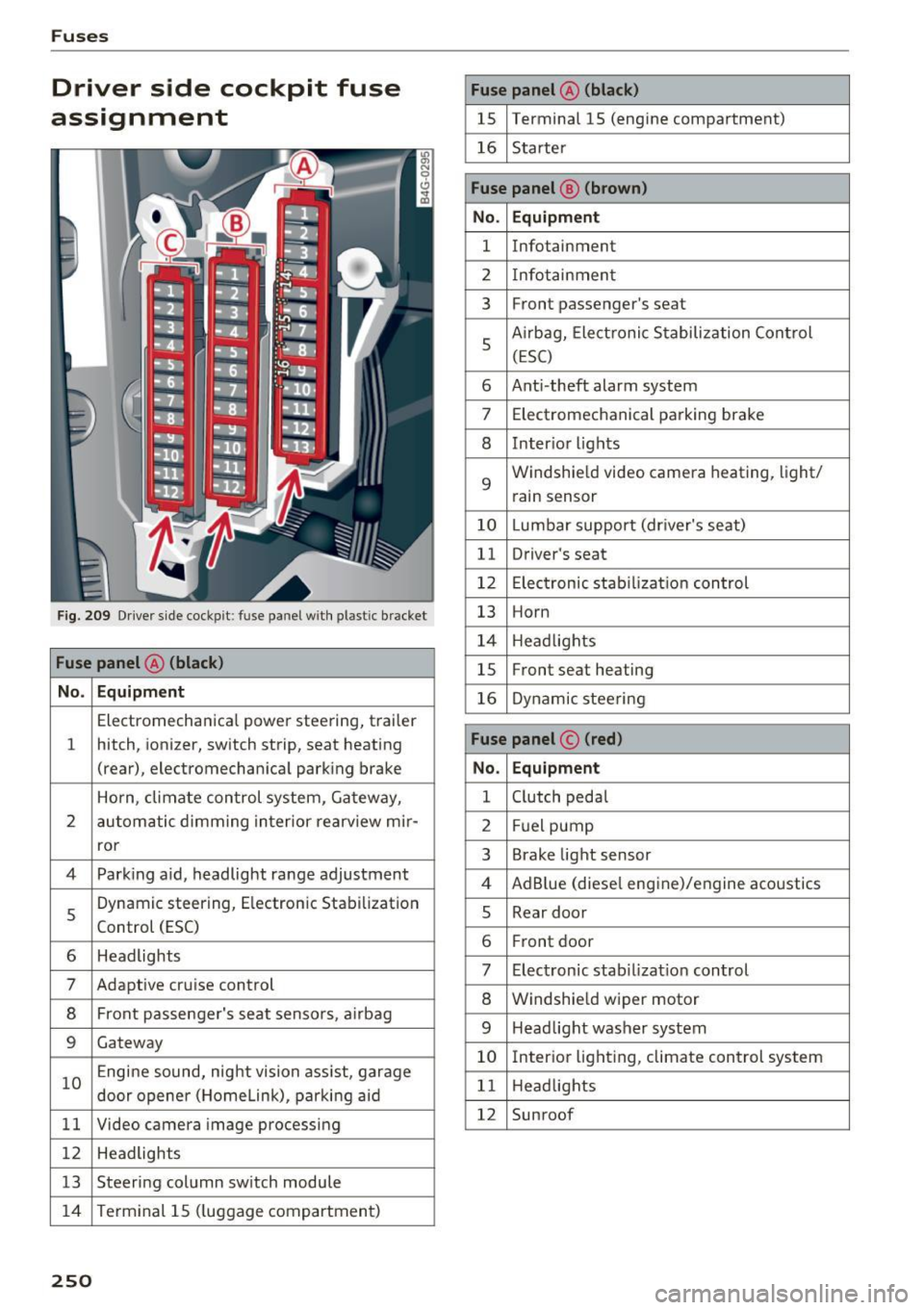
Driver side cockpit fuse
assignment
Fig . 209 Driver side cockp it: fuse panel with plastic bracket
Fuse panel @ (black)
No . Equipment
Electromechanical power steering, trailer
1 hitch, ionizer, switch strip, seat heating
(rear), electromechanical parking brake
Horn, climate control system, Gateway,
2 automatic dimming interior rearv iew mir·
ror
4 Park ing aid, headlight range adjustment
5 Dynamic steering, Electron
ic Stabilization
Control (ESC)
6 Headlights
7 Adaptive cruise control
8 Front passenger's seat sensors, airbag
9 Gateway
10 Engine sound, night vision
assist, garage
door opener (Home Link), parking aid
11 Video camera
image processing
12 Headlights
13 Steering column switch module
14 Terminal 15 (luggage compartment)
250
Fuse panel
@ (black)
15 Terminal 15 (engine compartment)
16 Starter
Fuse panel @ (brown)
No. Equipment
1 Infotainment
2 Infotainment
3 F
ron t passenger's seat
5 Airbag, Elect
ronic Stabilization Control
(ESC)
6 Anti·theft alarm system
7 Electromechanical parking brake
8 Inter ior lights
9
Windshield video camera heating, light/
rain sensor
10 Lumbar support (driver's seat)
11 Driver's seat
12 Electronic stabilization control
13 Horn
14 Headlights
15 Front
seat heating
16 Dynamic steering
Fuse panel © (red)
No . Equipment
1 Clutch pedal
2 Fuel pump
3 Brake light sensor
4 AdBlue (diesel
engine)/engine acoustics
5 Rear door
6 Front
door
7 Electronic stab ilizat ion control
8 Windshield wiper motor
9 Headlight washer system
10 Interior
lighting, climate control system
11 Headlights
12 Sunroof
Page 273 of 282
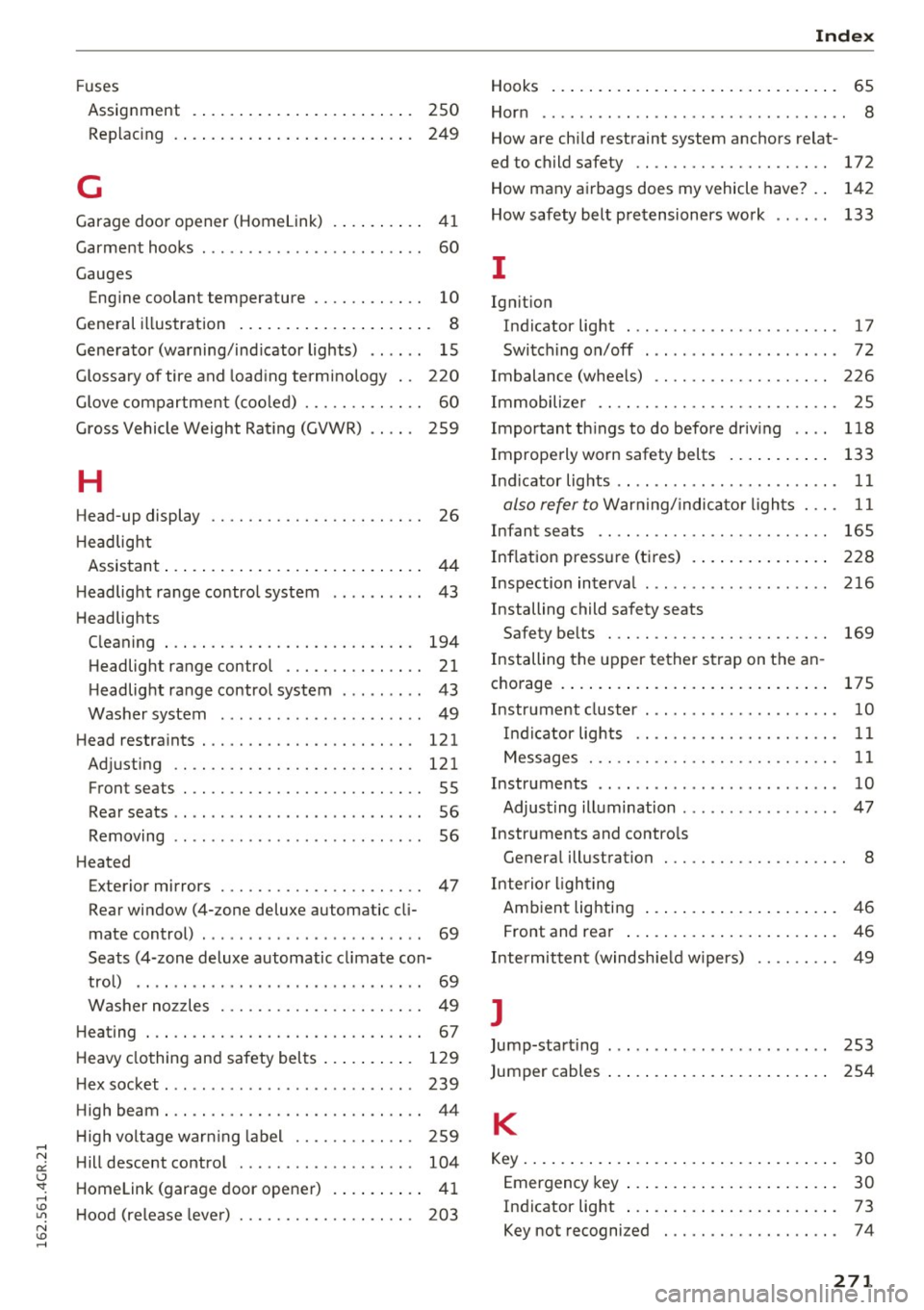
Fuses
Assignment . . . . . . . . . . . . . . . . . . . . . . . . 250
Replac ing . . . . . . . . . . . . . . . . . . . . . . . . . . 249
G
Garage door opener (Homelink) . . . . . . . . . . 41
Garment hooks . . . . . . . . . . . . . . . . . . . . . . . . 60
Gauges Engine coolant temperature . . . . . . . . . . . . 10
General illustration . . . . . . . . . . . . . . . . . . . . . 8
Generator (warning/indicator lights) . . . . . . 15
Glossary of tire and loading terminology . . 220
Glove compartment (cooled) . . . . . . . . . . . . . 60
Gross Vehicle Weight Rating (GVWR) . . . . . 259
H
Head-up display . . . . . . . . . . . . . . . . . . . . . . . 26
H eadlight
Assistant . . . . . . . . . . . . . . . . . . . . . . . . . . . . 44
H eadlight range control system . . . . . . . . . . 43
Headlights Cleaning . . . . . . . . . . . . . . . . . . . . . . . . . . . 194
Headlight range control . . . . . . . . . . . . . . . 21
Headlight range control system . . . . . . . . . 43
Washer system . . . . . . . . . . . . . . . . . . . . . . 49
Head restraints. .. .... ......... .. .. .. . 121
Adjusting . . . . . . . . . . . . . . . . . . . . . . . . . . 121
Front seats . . . . . . . . . . . . . . . . . . . . . . . . . . 55
Rear seats . . . . . . . . . . . . . . . . . . . . . . . . . . . 56
Removing . . . . . . . . . . . . . . . . . . . . . . . . . . . 56
Heated Exterior mirrors . . . . . . . . . . . . . . . . . . . . . . 47
Rear window (4- zone deluxe automatic cli
mate control) . . . . . . . . . . . . . . . . . . . . . . . . 69
Seats (4-zone deluxe automatic climate con-
trol) . . . . . . . . . . . . . . . . . . . . . . . . . . . . . . . 69
Washer nozzles . . . . . . . . . . . . . . . . . . . . . . 49
Heating . . . . . . . . . . . . . . . . . . . . . . . . . . . . . . 67
Heavy clothing and safety belts . . . . . . . . . . 129
Hex socket . . . . . . . . . . . . . . . . . . . . . . . . . . . 239
High beam . . . . . . . . . . . . . . . . . . . . . . . . . . . . 44
High voltage warning label . . . . . . . . . . . . . 259
Hill descent control . . . . . . . . . . . . . . . . . . . 104
Homelink (garage door opener) . . . . . . . . . . 41
H ood (release lever) . . . . . . . . . . . . . . . . . . . 203
Index
Hooks . . . . . . . . . . . . . . . . . . . . . . . . . . . . . . . 65
Horn . . . . . . . . . . . . . . . . . . . . . . . . . . . . . . . . . 8
How a re child restraint system anchors relat -
ed to child safety . . . . . . . . . . . . . . . . . . . . . 172
How many airbags does my vehicle have? . . 142
How safety belt pretensioners work . . . . . . 133
I
Ignition
Indicator light . . . . . . . . . . . . . . . . . . . . . . . 17
Switching on/off . . . . . . . . . . . . . . . . . . . . . 72
Imbalance (wheels) . . . . . . . . . . . . . . . . . . . 226
Immobilizer . . . . . . . . . . . . . . . . . . . . . . . . . . 25
Importantthingstodobeforedriving .. .. 118
Improperly worn safety belts . . . . . . . . . . . 133
Ind icator lights . . . . . . . . . . . . . . . . . . . . . . . . 11
also refer to Warning/indicator lights . . . . 11
Infant seats . . . . . . . . . . . . . . . . . . . . . . . . . 165
Inflation pressure (tires) . . . . . . . . . . . . . . . 228
Inspection interval . . . . . . . . . . . . . . . . . . . . 216
Installing child safety seats Safety belts . . . . . . . . . . . . . . . . . . . . . . . . 169
Installing the upper tether strap on the an
chorage . . . . . . . . . . . . . . . . . . . . . . . . . . . . . 17 5
Instrument cluster . . . . . . . . . . . . . . . . . . . . . 10
Indicator lights . . . . . . . . . . . . . . . . . . . . . . 11
Messages . . . . . . . . . . . . . . . . . . . . . . . . . . . 11
Instruments . . . . . . . . . . . . . . . . . . . . . . . . . . 1 0
Adjusting illumination . . . . . . . . . . . . . . . . . 47
Inst ruments and cont rols
General illustrat ion . . . . . . . . . . . . . . . . . . . . 8
Interior l ighting
Ambient lighting . . . . . . . . . . . . . . . . . . . . . 46
Front and rear . . . . . . . . . . . . . . . . . . . . . . . 46
Intermittent (windshield wipers) . . . . . . . . . 49
]
Jump-starting 253
Jump er cables . . . . . . . . . . . . . . . . . . . . . . . . 254
K
Key............ .... ................ .. 30
Emergency key . . . . . . . . . . . . . . . . . . . . . . . 30
Indicator light . . . . . . . . . . . . . . . . . . . . . . . 73
Key not recognized . . . . . . . . . . . . . . . . . . . 74
271