ESP AUDI S3 2009 User Guide
[x] Cancel search | Manufacturer: AUDI, Model Year: 2009, Model line: S3, Model: AUDI S3 2009Pages: 324, PDF Size: 76.02 MB
Page 33 of 324
-Turn off the engine.
- Check coolant level => page
233 .
-Add coolant if necessary => page 234 .
-Continue driving only after the engine coolant
warning/indicator light goes out.
- Contact your authorized Audi dealer for assistance if
necessary.
If the engine coolant level is correct, then the radiator fan may be
the cause of the malfunction.
If the generator warning/indicator light should also illuminate
=> page 14, then the fan belt may be damaged .
& WARNING
• If your vehicle should break down for mechanical or other
reasons, park at a safe distance from moving traffic, turn off the
engine and turn on the hazard warning lights
=> page 58, "Emer
gency flasher
A".
• Never open the hood if you see or hear steam or coolant
escaping from the engine compartment -you risk being scalded.
Wait until you can no longer see or hear steam or coolant
escaping.
• The engine compartment of any vehicle is a dangerous area.
Before you perform any work in the engine compartment, turn off
the engine and allow it to cool . Follow the warning stickers
=> page 217, "Engine compartment" .
0 Note
Do not continue driving if the -IL symbol illuminates. There is a
malfunction in the engine cooling system -you could damage your
engine. •
Controls and equip
ment
Driver information display
Engine oil pressure malfunction 'l=;:f.
The red engine oil pressure warning symbol requires
immediate service or repair.
If the 'l=::7-: symbol appears in the display and flashes, the oil
pressure is too low. In addition to the symbol, the following
message also appears in the display:
Switch off engine and check oil level
-Pull off the road and stop the vehicle.
Shut the engine down.
Check the engine oil level=> page
229.
Contact your authorized Audi dealer for assistance if
necessary.
Engine oil level too low
If the engine oil level is too low, top off oil to the proper level
=> page 230.
Engine oil level OK
If the ~ symbol star ts flashing again even though the engine oil
level checks OK on the dipstick,
do not start driving again and do not
let the engine run at idle .
Instead, contact your authorized Audi
dealer for assistance.
[ i] Tips
• The engine oil pressure symbol ~ is not an indicator for a low
engine oil level. Do not rely on it. Instead, check the oil level in your
engine at regular intervals, preferably each time you refuel, and
always before going on a long trip.
• The yellow oil level warning indication requires oil refill or
workshop service without delay. Do not wait until the red oil pres
sure warning symbol
~ starts to flash before you respond to the ...
I • •
Page 37 of 324
Opening and closing
Keys
Key set
®
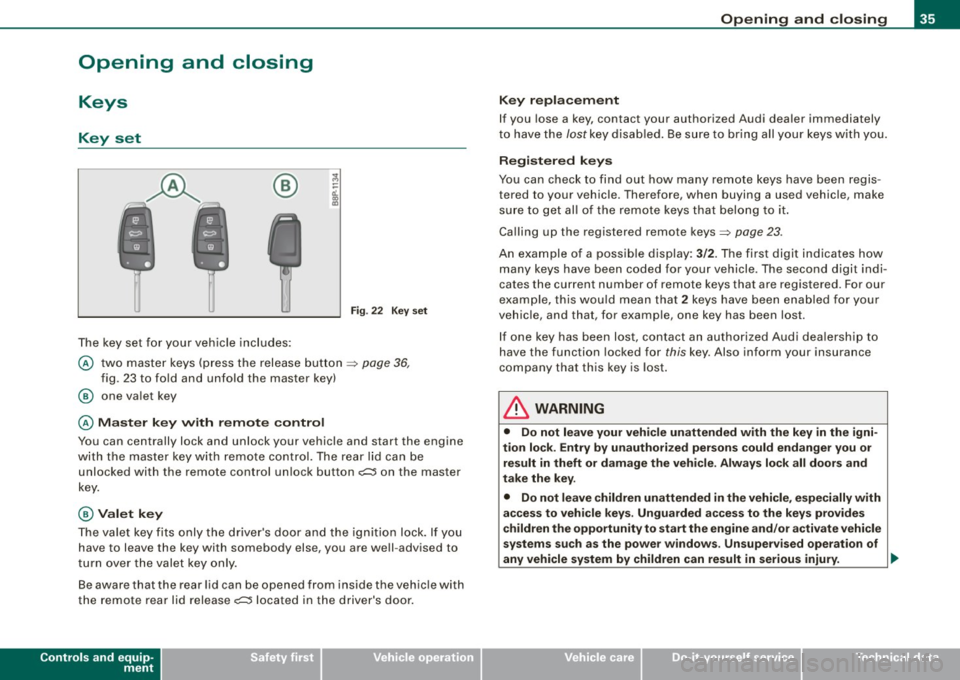
The key set for your vehicle includes:
Fig. 22 Key s et
@ two master keys (press the release button ~ page 36,
fig . 23 to fo ld and unfold the master key)
@ one va let key
@ M as ter key with rem ote control
You can centrally lock and unlock your vehicle and start the engine
with the master key with remote control. The rear lid can be
unlocked with the remote control un lock button
o;:::::::5 on the master
key.
@ Valet key
The va let key fits only the driver's door and the ignition lock. If you
have to leave the key with somebody else, you are well -advised to
turn over the valet key only .
Be aware that the rear lid can be opened from inside the vehic le with
the remote rear lid release
o;:::::::5 located in the driver's door.
Controls and equip
ment
Opening and clo sing
K ey repla cement
If you lose a key, contact your authorized Audi dea ler immediately
t o have the /ostkey disab led . Be sure to bring all your keys wi th you.
Registered keys
You can check to find out how many remote keys have been regis
tered to your vehic le. Therefore, when buying a used vehicle, make
su re to get a ll of the remote keys that belong to it .
Calling up the registered remote keys~
page 23.
An example of a possib le display: 3/2. The first digit indicates how
many keys have been coded for your vehicle . The second digit indi
cates the current number of remote keys that are registered . For our
exa mple, this wou ld mean that
2 keys have been enab led for your
vehicle, and that, for examp le, one key has been lost.
I f one key has been lost, co ntact an authorized Aud i dea lership to
have the function locked for
this key. Also inform your insurance
company that this key is lost .
& WARNING
• Do not leave your vehicle unattended with the key in the igni
tion lock . Ent ry b y unauth oriz ed persons could endanger you or
re sult in theft or damage the vehi cle . Always lock all door s and
t ak e the k ey.
• Do not leave children unattended in the vehicle , especially with
acce ss to veh icle key s. Unguarded a ccess to the key s pro vide s
c hildren the opportunity to sta rt the engine and /or a ctivate vehicle
sy stem s suc h a s the po wer window s. Un supervised operation of
any vehicle system by children can result in serious injury . ..,.
I • •
Page 40 of 324
Openin g a nd clo sin g
• Remote control feature => page 36.
• Anti-theft alarm system=> page 45.
All the doors and the rear lid are locked by the central locking
system when you lock the vehicle.
U nlock ing th e vehic le
You can un lock the vehicle from outside either by using the remote
control
or by inserting and turning the key in the driver's door lock.
When you
unl ock your vehic le:
• The anti-theft alarm system is deactivated briefly .
• The vehicle interior lights i lluminate for approxima tely 30
seconds.
• All turn signal ligh ts will flash twice when the car is un locked .
• After unlocking the vehicle, you have 30 seconds to open a door
or the rear lid. After 30 seconds, the vehic le automatica lly locks and
the anti-theft alarm system activates again .
The rear lid can be locked or unlocked either by using the remote
control
o r by inserting and turning the key in the driver's door lock.
Un locking the vehicle with the remote control
c::::::5 wil l only unlock
the rear lid , to open it, the lid handle needs to be pressed.
Lo ckin g the vehicle
You can lock the vehicle from outside either by using the remote
control
or by inserting and turning the key in the drivers's door lock.
When you
lo ck the vehicle :
• All doors and the rear lid are locked .
• All turn signal lights will flash once when the car is locked.
• The anti -theft alarm system is activated . T he horn of the anti
theft alarm system will sound and the anti-theft alarm system readi ness l ight, located in the center of the instrument pane l below the
windshie ld on the right s ide of the air vent, will start to b link.
• The vehicle interior ligh ts turn off .
Automatic locking *
The automatic locking fea ture locks all the vehicle doors and the
rear lid when you drive faster than 9 mph (15 km/h).
You can unlock the vehicle from the inside by:
• removing the key from the ignition switch (the vehicle wi ll auto
matically un lock itself) or
• pressing the unlock part of the power lock switch
oc:"D or
• pulling the inside handle for that door (once - the front door is
unlocked and opened at the same time, twice to open the rear door).
If you wish, you can have an authorized Audi dealer convert your
powe r door lock sys te m to automatic locking.
& WARNING
• When you lock your vehicle from out side , nobody -esp ecia lly
c h ildr en - s hould r em ain in sid e the vehi cle . R emember , when you
lock the vehicle from the out side the window s ca nnot be opened
fr om t he in side .
• When you leave the vehicle , alway s remo ve the ignition key and
t a ke it with you . Thi s w ill pre vent p assengers (children , for
ex ampl e) from a ccidentall y being lock ed in the vehicle should they
a cc ident ally pre ss t he powe r lock ing switc h on t he center consol e.
• Do not leave children in side the vehicle un supe rvi se d. In an
emerg ency it w ould be impos sible t o ope n th e door s from the
out side without the key.
[ i ] T ips
• In the event of a crash with airbag deployment all locked doors
wi ll be automatical ly un locked to give access to the vehic le occu
pants from the outs ide .
• If the power locking system shou ld fai l, you can stil l open the
fue l tank flap in an emergency=>
page 223. ~
Page 45 of 324

Closing the rear lid
- Pull it down and shut it firmly~ &-There is a recess in
the interior trim of the lid to make it easier to pull down.
& WARNING
• After closing the rear lid, always pull up on it to make sure that
it is properly closed. Otherwise it could open suddenly when the
vehicle is moving.
• To help prevent poisonous exhaust gas from being drawn into
the vehicle, always keep the rear lid closed while driving. Never
transport objects larger than those fitting completely into the
luggage area, because then the rear lid cannot be fully closed.
• Never leave your vehicle unattended especially with the rear lid
left open. A child could crawl into the car through the luggage
compartment and pull the lid shut, becoming trapped and unable
to get out. To reduce the risk of personal injury, never let children play in or around your vehicle. Always keep the rear lid, as well as
the vehicle doors, closed when not in use.
[ i] Tips
• If the rear lid is open or not properly locked when the ignition is
turned on, the door and rear lid warning appears in the instrument
cluster display.
• If the rear lid on a locked vehicle is unlocked with the middle
button
c:::5 on the remote key, the rear lid is automatically locked
again immediately after closing. This is indicated by the turn signals
blinking. •
Contro ls and eq uip
ment
Opening and closing
Emergency release for rear lid
If the rear lid cannot be opened, an emergency release is
provided.
Fig . 32 Rear and trunk
section: Access to
emergency release
Fig . 33 Rear lid interior
section: Emergency
release
The emergency release is located on the inside of the rear
lid . To release the rear lid, proceed as follows:
Fold down the right rear seat back~ fig. 32.
Take your ignition key and move through the opening
until your head and shoulders are in the trunk .
Now insert the key bit into the slot in the cover as shown
in
~ fig. 33 (D and pry the cover up carefully. ~
Vehicle care I I irechnical data
Page 48 of 324
Opening and closing
Power windows
Controls
Fig. 37 Driver's door :
power window
switches
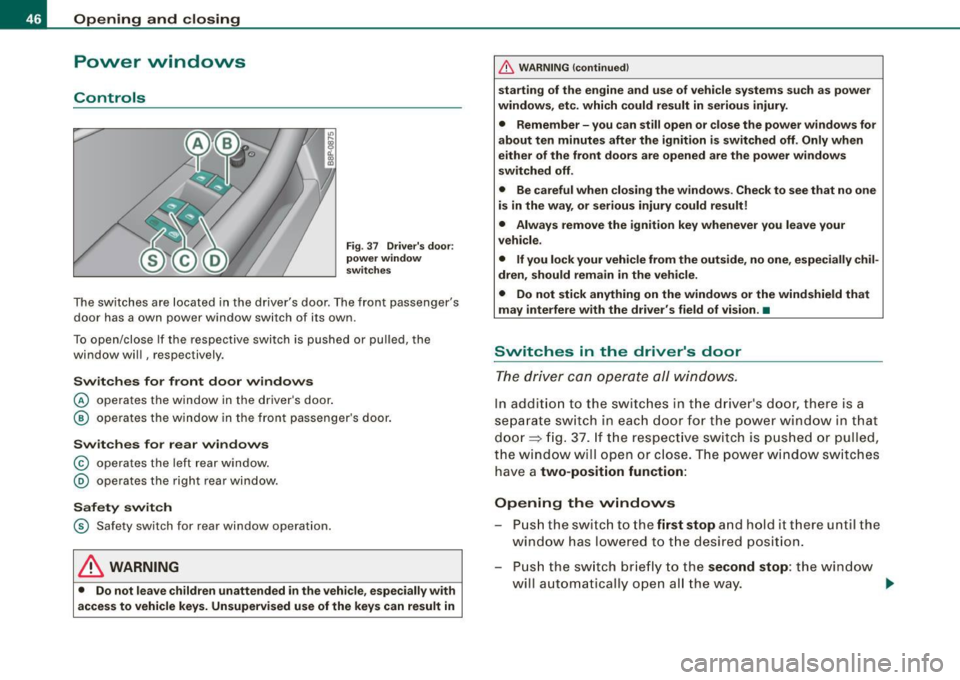
The switches are located in the driver's door . The front passenger's
door has a own power window switch of its own.
To open/close If the respective switch is pushed or pulled, the
window will , respectively.
Switches for front door windows
© operates the window in the driver's door.
@ operates the window in the front passenger's door.
Switches for rear windows
© operates the left rear window.
@ operates the right rear window.
Safety switch
© Safety switch for rear window operation.
LJ}. WARNING
• Do not leave children unattended in the vehicle, especially with
access to vehicle keys. Unsupervised use of the keys can result in
& WARNING (continued)
starting of the engine and use of vehicle systems such as power
windows, etc. which could result in serious injury.
• Remember -you can still open or close the power windows for
about ten minutes after the ignition is switched off. Only when
either of the front doors are opened are the power windows
switched off.
• Be careful when closing the windows. Check to see that no one
is in the way, or serious injury could result!
• Always remove the ignition key whenever you leave your
vehicle.
• If you lock your vehicle from the outside, no one, especially chil
dren, should remain in the vehicle.
• Do not stick anything on the windows or the windshield that
may interfere with the driver's field of vision.•
Switches in the driver's door
The driver can operate all windows.
In addition to the switches in the driver's door, there is a
separate switch in each door for the power window in that
door=> fig. 37. If the respective switch is pushed or pulled,
the window will open or close. The power window switches have a
two-position function:
Opening the windows
Push the switch to the first stop and hold it there until the
window has lowered to the desired position.
- Push the switch briefly to the
second stop: the window
w ill automatically open all the way. _.
Page 51 of 324
Closing complete ly
- Press the sw itch 0 ~ p age 48, fig . 39 until the roof is
completely closed
~ & .
Closing partially
- Press the sw itch 0 ~ page 48, fig. 39 until the roof has
reac hed the des ired position~ &. If the roof is almost
closed and you interrupt the operation, the roof opens
automatically to a min imum setting; this is the smallest
possible opening that can be set.
If you park your vehicle in the sun, we recommend that you c lose the
sun b lind . You should especially make certain that the panoramic
s liding sunroof is c losed when the sun blind is closed when parked
or if there is a sudden rain shower.
The sun blind has two positions : completely open or completely
closed . The sun blind is manually operated.
& WARNING
Never clo se the pan oramic sliding sunroof careless ly or wi thout
wa tc hing -th ere i s a ri sk of per son al injur y. For t his re aso n, a lways
remove the ignit ion ke y wh en l eav ing the vehi cle.
[ i ) Tips
• When you park your vehicle, we genera lly recommend closing
the panoramic sliding sunroof and the sun blind.
• When the vehicle is parked, a wet roof shou ld be dried light ly
with a soft cloth
before it is op ened so that water does not drip into
the interior .
• In an emergency , the panoramic sliding sunroof can be closed
manually ~
page 49, "Emergency mechan ical closing for the
panoramic sliding sunroof".•
Contro ls and eq uip
ment
Op ening and clo sing
Ap plies to vehicles: wi th panoramic sliding sunroof
Comfort closing
The open roof can also be closed from the outside.
- Hold the key in the driver's door lock in the loc k position
until the roof is closed ~& .
& WARNING
Never clo se the panor ami c sliding su nroof careles sly or without
wat ching -ther e is a r isk of p ers onal injury. •
Emergency mechanical closing for
the panoramic sliding sunroof
App lies to veh icles: with panoramic s liding sun roof
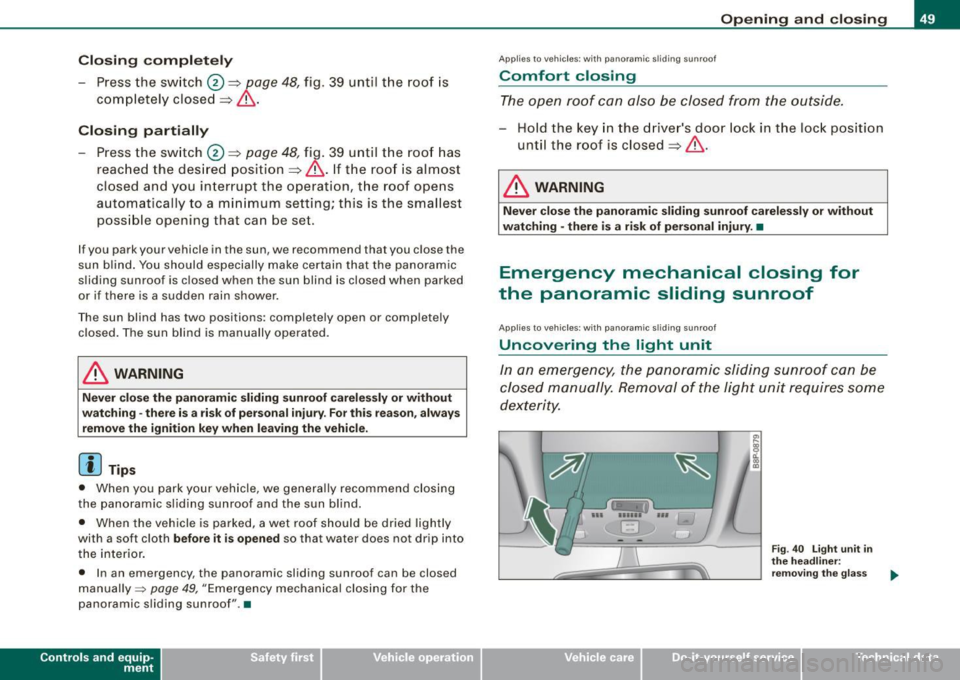
Uncovering the light unit
In an emergency, the panoramic sliding sunroof can be
closed manually. Removal of the light unit requires some
dexterity.
--- '!!ii '-,-.. ---i
EJ
Vehicle care I I
~ 0:. CD
th e head line r:
re m ov ing t he g lass
Technical data
Page 55 of 324
• In cool or damp weather conditions the headlights may fog over
temporarily on the inside.
- The critical factor is the temperature difference between the
interior and the exterior of the headlight lens.
- With the main beams switched on, the light -emitting area will
be free of condensation after a short time, however the edges of
the glass may still be fogged .
- The rear lights and turn signals may also be affected.
- This physical phenomenon has no effect on the life of your
vehicle's lighting system .•
A pplies to vehic les : wit h ligh t sens or p ack age
Sensor activated head- and tail light control
In the "AUTO" position light sensors switch the head- and
tail lights on and off.
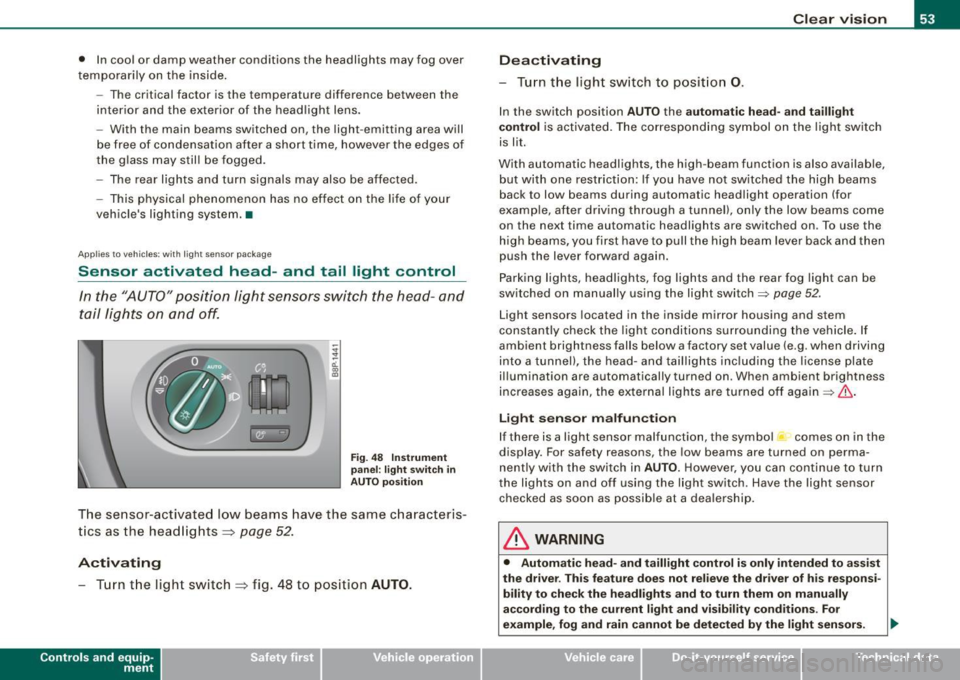
Fig. 48 Instrument
panel : light switch in
AUTO position
The sensor-activated low beams have the same characteris
tics as the headlights ~
page 52.
Activating
-Tur n t he light switch ~ fig . 48 to position AUTO.
Con tro ls and eq uip
ment
Clear vision
Deactivating
- Turn the light switch to position 0.
In the switch position AUTO the automatic head-and taillight
control
is activated. The corresponding symbol on the light switch
is lit.
With automatic headlights, the high -beam function is also available,
but with one restriction: If you have not switched the high beams
back to low beams during automatic headlight operation (for
examp le, after driving through a tunnel), only the low beams come
on the next time automatic headlights are switched on . To use the
high beams, you first have to pull the high beam lever back and then
push the lever forward again .
Parking lights, headlights, fog lights and the rear fog light can be
switched on manually using the light switch=>
page 52 .
Light sensors located in the inside mirror housing and stem
constantly check the light conditions surrounding the vehicle. If
ambient brightness falls below a factory set value (e .g . when driving
into a tunnel), the head-and taillights including the license plate
illumination are automatically turned on . When ambient br ightness
increases again, the external lights are turned off again=>
If:::..
Light sensor malfunction
If there is a light sensor malfunction, the symbol comes on in the
display. For safety reasons, the low beams are turned on perma
nently with the switch in
AUTO. However, you can continue to turn
the ligh ts on and off using the light switch . Have the light sensor
checked as soon as possible at a dealership.
& WARNING
• Automatic head -and taillight control is only intended to assist
the drive r. This feature does not relieve the driver of his responsi
bility to check the headlights and to turn them on manually
according to the current light and visibility conditions. For
example, fog and rain cannot be detected by the light sensors. .,
Vehicle care I I irechnical data
Page 56 of 324
Clear vision
& W ARNIN G (con tinued )
Conseq uently , alwa ys swit ch the headl ights i o on under these
weather condition s and when driving in the da rk .
• Cra she s ca n happen when you c annot see the road ahe ad and
when you c annot be seen by other motori sts .
• Alway s turn on the headlights so that you c an see ahead and
s o that ot hers can see you r ca r from the back.
[ i ] Tips
• In the AUTO mode, the low beams are turned off when the igni
tion is turned off. The remaining l ights are turned off when the key
is taken out of the igni tion lock.
• Do not attach stickers to the windshie ld in front of the sensors as
this can disable the automatic head- and tail light control and the
automatic glare -dimming of the rearview mirror(s) .
• Always observe the specific local regulations for your area when
to use your lights .
• In the event of a light sensor malfunction , the driver information
display will show the symbol . If a ligh t sensor malfunction is indi
cated, you must use the light switch to turn the low beams on and
off. •
App lies to t he market: USA mode ls
Applies to vehicles: with daytime ru nni ng lights and bi-xeno n ligh ts
Daytime running lights (DRL)
The daytime running lights are turned on autom atically
when the ignition is switched on .
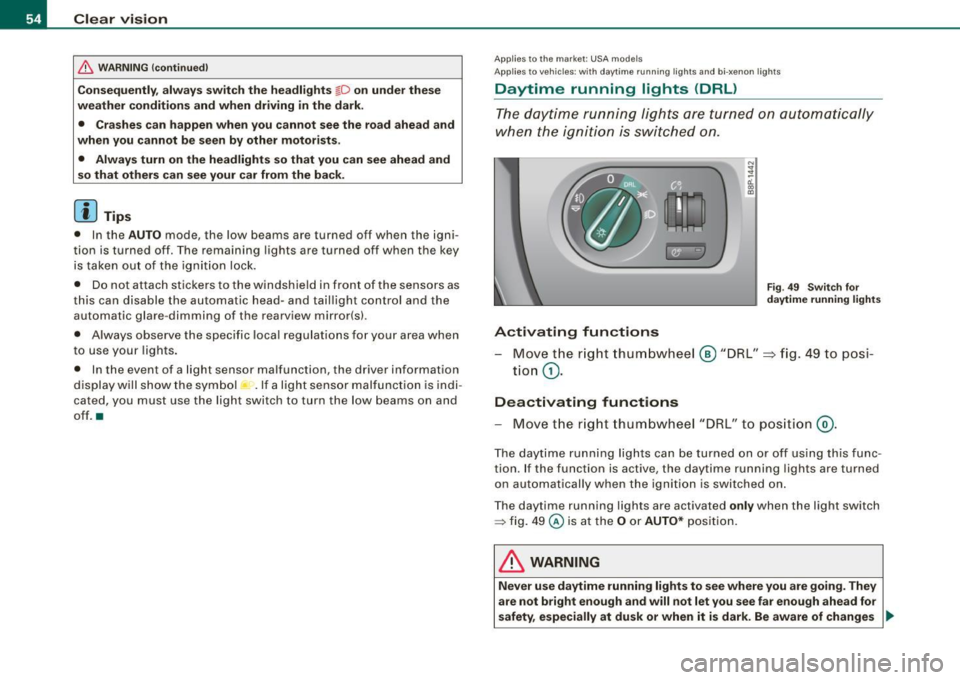
®r @'
Activating functions
F ig . 4 9 Swit ch for
d ayt ime running li ghts
- Move the r ight thum bwhe el @ "DRL" =} fig. 49 to posi-
tio n
G).
Deactivating functions
- Move t he r ig ht thum bwhee l "DRL" to po siti on @ .
The day time running lights ca n be turned on or off using this func
tion. If the function is active, the daytime running lights are turned
o n aut omatically when the ignition is switched on.
The daytime running lights are activated
only when the light switch
=> fig . 49 @ is at the O or AUTO* posi tion.
& WARNING
Never u se dayt ime running light s to see where you are goin g. They
are not bright enough and will not let you see far e nough ahead for
safety , especially at dusk or when it is dark. Be aware of change s _..
Page 57 of 324
& WARNING (continued)
in outside light conditions when you are driving and respond by
switching on your low beams
io.
0 Note
Always be aware of changes in outside light conditions while you
are driving . Respond in time to fading daylight by turning the light
switch to position
io (or "AUTO" if your car is equipped with this
feature)
to turn on your headlights. •
Applies to the market: Canada models
Daytime running lights (Canada models only)
When you turn on the ignition the daytime running lights
will come on automatically.
The daytime running lights are activated only when the light switch
@=> page 54, fig . 49 is either at the O or the ;oo:c position. When the
ignition is switched on, there is a difference between vehicles with
bi-xenon lights and halogen lamps :
• On vehicles with bi -xenon lights only the daytime running lamps
in the headlights will come on .
• On vehicles with halogen lights the front fog lights, side marker
lights and tail lights come on automatically
& WARNING
Never use daytime running lights to see where you are going. They
are not bright enough and will not let you see far enough ahead for
safety, especially at dusk or when it is dark. Be aware of changes
in outside light conditions when you are driving and respond by
switching on your low beams
io.
Controls and equip
ment
Clear vision
0 Note
• With the light switch at the O or ooo:c position, only your front fog
lights remain turned on when it turns dark outside. Even though
your instruments appear well lit, the road ahead of you is not. The light pattern provided by fog lights alone is not sufficient for safe
driving in poor light or darkness. Therefore:
• Always be aware of changes in outside light conditions while
you are driving. Respond in time to fading daylight by turning the light switch to position
io (or "AUTO" if your car is equipp ed with
this feature)
to turn on your headlights.
[ i] Tips
The daytime running lights function cannot be turned off.•
Applies to vehic les : w ith Ada ptive ligh t
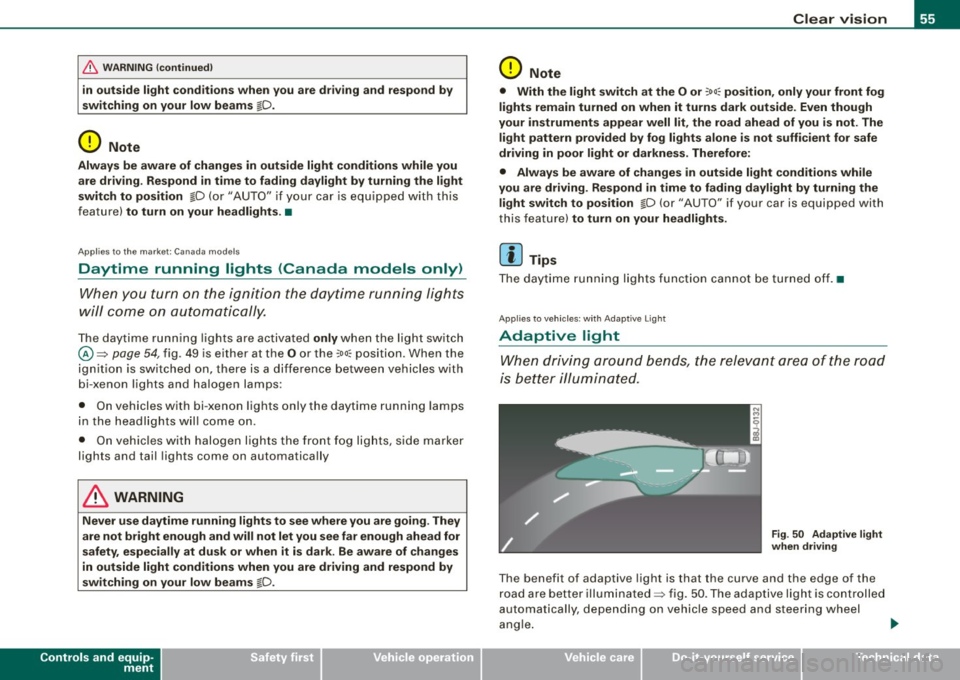
Adaptive light
When driving around bends, the relevant area of the road
is better illuminated.
Fig . 50 Adaptive light
when driving
The benefit of adaptive light is that the curve and the edge of the
road are better illuminated=> fig . 50 . The adaptive light is controlled
automa tically , depending on vehicle speed and steering wheel
angle. _,,,,
I • •
Page 71 of 324
& WARNING (continued)
• For safety reasons, the windshield wiper blades should be
replaced once or twice a year. •
Mirrors
Manual anti -glare adjustment
Standard setting
- Move the small lever (located on the bottom edge of the
mirror) to the front.
Anti-glare setting - Move the small lever (located on the bottom edge of the
mirror) to the rear. •
Applies to veh icles: w it h a utom ati cally dim mi ng in sid e m ir ro r
Automatically dimming inside mirror
The automatic dimming function can be turned on and off
if required.
Controls and equip
ment
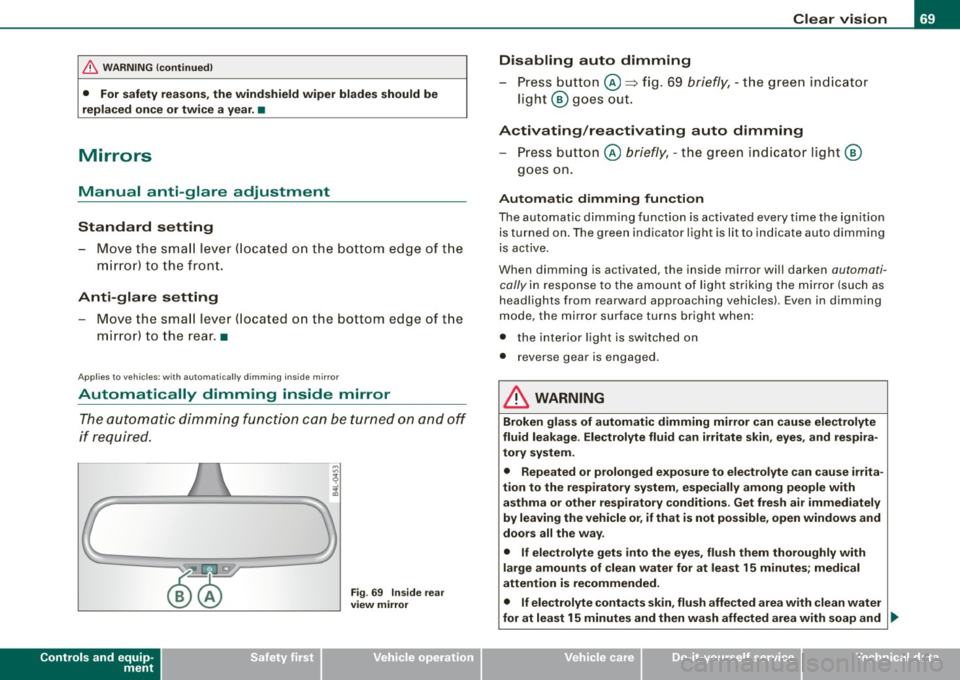
Fig . 69 Inside rear
view mirror
Clear vision
Disabling auto dimming
- Press button @=> fig. 69
briefly, -the green indicator
light ® goes out.
Activating/reactivating auto dimming Press button @
briefly, -the green indicator light ®
goes on.
Automatic dimming function
The automatic dimming function is activated every time the ignition
is turned on. The green indicator light is lit to indicate auto dimming
is active.
When dimming is activated, the inside mirror will darken
automati
cally
in response to the amount of light striking the mirror (such as
headlights from rearward approaching vehicles). Even in dimming
mode, the mirror surface turns bright when:
• the interior light is switched on
• reverse gear is engaged .
& WARNING
Broken glass of automatic dimming mirror can cause electrolyte
fluid leakage . Electrolyte fluid can irritate skin, eyes, and respira
tory system.
• Repeated or prolonged exposure to electrolyte can cause irrita
tion to the respiratory system, especially among people with
asthma or other respiratory conditions . Get fresh air immediately
by leaving the vehicle or, if that is not possible, open windows and
doors all the way.
• If electrolyte gets into the eyes, flush them thoroughly with
large amounts of clean water for at least 15 minutes; medical
attention is recommended.
• If electrolyte contacts skin, flush affected area with clean water
for at least 15 minutes and then wash affected area with soap and ._
I • •