brake light AUDI S3 2009 User Guide
[x] Cancel search | Manufacturer: AUDI, Model Year: 2009, Model line: S3, Model: AUDI S3 2009Pages: 324, PDF Size: 76.02 MB
Page 97 of 324
Glove compartment
The glove compa rtmen t is illumin ated an d can be Jocke d.
"' 10 ., ~ a:. ., 03
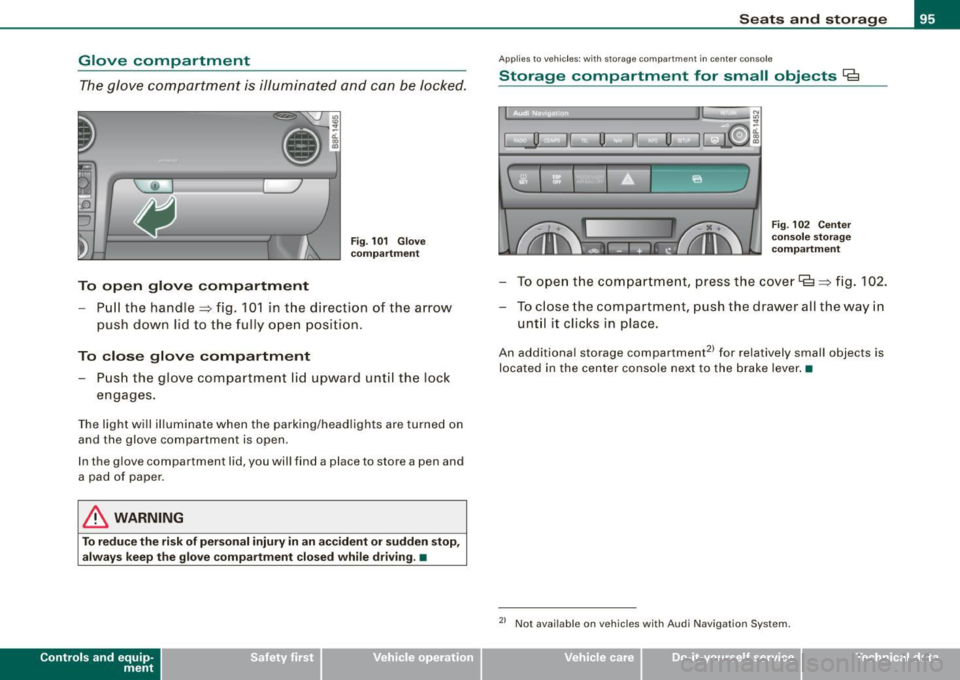
To open glove compartment
Fi g. 101 Glove
c ompartment
- Pull the handle => fig. 10 1 in t he direction of the a rrow
p ush do wn lid to the fully o pen p osition .
To close glove compartment - Push the glove compartment lid upward unt il the loc k
engages.
T he light will il luminate when the parking/head lights are turned on
and the glove compartme nt is ope n.
I n the g love compartment lid, you wil l find a place to store a pen and
a pad of paper.
& WARNING
To reduce the risk of per sonal injury in an accident or sudden stop ,
always keep th e glove compa rtment closed while driving . •
Con tro ls and eq uip
ment
Seats and storag e
Applie s to veh ic les : w it h stora ge co mpart ment in cente r co nsole
Storage compartment for small objects Ca
I, __] II 0
l
l
I~ u
I
' Fig . 102 Center
c o nso le st orag e
co mpartm ent
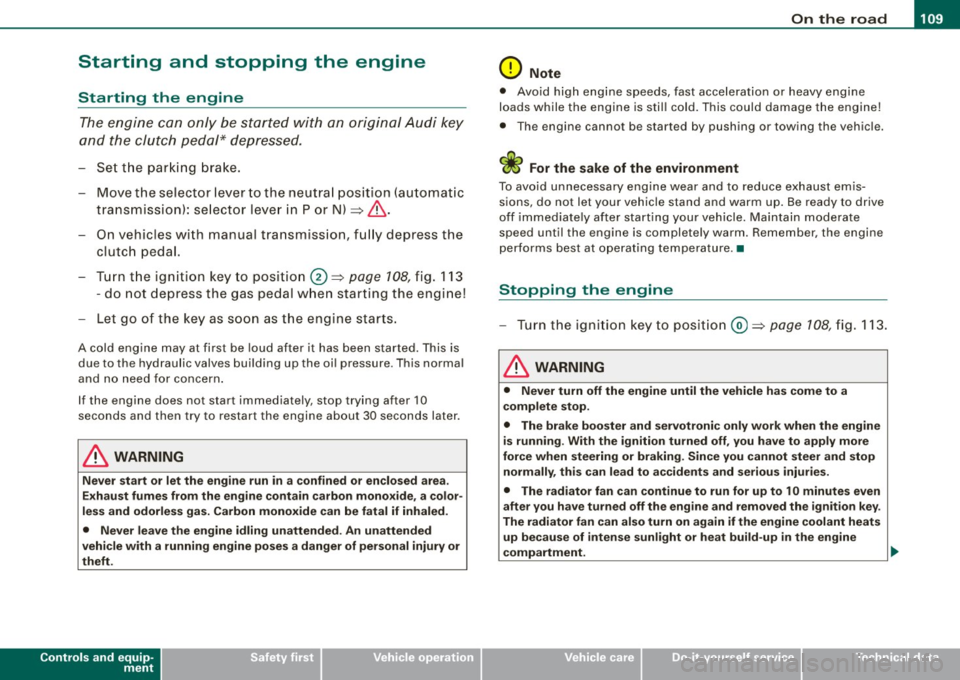
- T o open th e c om partm ent, pre ss t he c ove r lg => fig. 102.
- To c lose the compa rtment, push the drawe r all the way in
unt il it clic ks in place.
An additiona l storage compartment2 1 for relatively small objects is
located in the cen ter console ne xt to the brake lever .•
2> Not avai lab le on veh ic le s with Audi Nav igat ion System .
Vehicle care I I irechnical data
Page 111 of 324
___________________________________________________ O _n_ t_h _ e_ r_ o _ a_ d __ lfflll
Starting and stopping the engine
Starting the engine
The engine can only be started with on original Audi key
and the clutch pedal* depressed.
- Set the parking brake.
Move the selector lever to the neutral position (automatic
transmission): selector lever in P or N) =>
&.
- On vehicles with manual transmission, fully depress the
clutch pedal.
- Turn the ignition key to position@=>
page 108, fig. 113
- do not depress the gas pedal when starting the engine!
- Let go of the key as soon as the engine starts.
A cold engine may at first be loud after it has been started. This is
due to the hydraulic valves building up the oil pressure . This normal
and no need for concern.
If the engine does not star t immediately, stop trying after 10
seconds and then try to restart the engine about 30 seconds later.
& WARNING
Never start or let the engine run in a confined or enclosed area.
Exhaust fumes from the engine contain carbon monoxide, a color
less and odorless gas. Carbon monoxide can be fatal if inhaled .
• Never leave the engine idling unattended. An unattended
vehicle with a running engine poses a danger of personal injury or
theft.
Controls and equip
ment
0 Note
• Avoid high engine speeds, fast acceleration or heavy engine
loads while the engine is still cold. This could damage the engine!
• The engine cannot be started by pushing o r towing the vehicle.
~ For the sake of the environment
To avoid unnecessary engine wear and to reduce exhaust emis
sions, do not let your vehicle stand and warm up. Be ready to drive
off immediately after starting your vehicle. Maintain moderate
speed until the engine is completely warm. Remember, the engine
performs best at operating temperature. •
Stopping the engine
-Turn the ignition key to position@=> page 108 , fig. 113.
& WARNING
• Never turn off the engine until the vehicle has come to a
complete stop.
• The brake booster and servotronic only work when the engine
is running . With the ignition turned off, you have to apply more
force when steering or braking. Since you cannot steer and stop
normally, this can lead to accidents and serious injuries.
• The radiator fan can continue to run for up to 10 minutes even
after you have turned off the engine and removed the ignition key.
The radiator fan can also turn on again if the engine coolant heats
up because of intense sunlight or heat build-up in the engine
compartment. .,
I • •
Page 112 of 324

• ..__O_ n_ t_h _ e_ r_ o_ a_ d ____________________________________________________ _
0 Note
Do not stop the engine immediately after hard or extended driving.
Keep the engine running for approximately two minutes to prevent
excessive heat build-up. •
Parking brake
Parking brake
When the parking brake is set, it prevents the vehicle from
rolling away unintentionally.
Setting the parking brake
Fig . 114 Center
console: Parking brake
set
- Pull the parking brake lever all the way up.
Releasing the parking brake Pull the parking brake lever up slightly
and press the
release button at the same time=> fig. 114 -arrow-.
Keep the release button pressed and lower the parking
brake=>
& -
If you should drive off with the parking brake still set, a warning tone
will sound and the following will appear in the instrument cluster to remind you to release the parking brake:
Parking brake set
The parking brake warning comes on only after you have driven for longer than 3 seconds and faster than 5 mph (5 km/h).
The parking brake warning light Brake (USA)/
{CD) (CON) illuminates
when the parking brake is set and you switch on the ignition.
& WARNING
Always release the parking brake completely . A partially engaged
brake will overheat the rear brakes, reduce their effectiveness and
cause excessive wear. This could lead to brake failure and an acci
dent.
0 Note
Only after the vehicle has come to complete stop, should you firmly
set the parking brake and either move the gearshift lever into 1st .
gear (manual transmission) or move the selector lever into "P"
(Automatic transmission). •
Parking
To prevent a parked vehicle from rolling away, there are a
few things you should do.
When you park your vehicle, do the following:
- Stop the vehicle using the brake pedal.
- Set the parking brake firmly.
- Move the selector lever into the
P position (automatic
transmission)
or move the gearshift lever into 1st. gear
(manual transmission) => &. .,_
Page 116 of 324

• .___O_ n_ t_h _e _ r_o _a_ d __________________________________________________ _
CRUISE (US model)/ r,,f (Canadian model) will also light up in the
instrument cluster.
& WARNING
• Always pay attention to traffic even when the cruise control is
switched on. You are always responsible for your speed and the
distance between your vehicle and other vehicles.
• For safety reasons, the cruise control should not be used in the
city, in stop-and-go traffic, on twisting roads and when road condi
tions are poor (such as ice, fog, gravel, heavy rain and hydro
planing) -risk of accident.
• Turn off the cruise control temporarily when entering turn
lanes, highway exit lanes or in construction zones.
• Please note that inadvertently "resting" your foot on the accel
erator pedal causes the cruise control not to brake. This is because
the cruise control is overridden by the driver's acceleration.
[ i J Tips
• Vehicles with manual transmission : You can attain the set speed
only if the currently engaged gear allows it and the engine is not
stressed. Shifting to a higher or lower gear promptly will allow the
engine to run smoothly.
• The cruise control cannot maintain a constant speed when
driving downhill. The vehicle will accelerate under its own weight.
Downshift to a lower gear or use the brakes to slow down. •
Changing speed
- Press lever in the 0 or Q direction~ page 113, fig. 116
to increase or decrease your speed.
Release the lever to save that speed .
Change speed in increments of 1 mph (1 km/h) by lightly pressing
the lever. If you keep the lever pressed down, you will alter your
speed in 5 mph (10 km/h) increments.
You can also press the accelerator pedal down to increase your
speed, e .g. if you want to pass someone. The speed you saved
earlier will resume as soon as you release the accelerator pedal.
If, however, you exceed your saved speed by 5 mph (10 km/h) for
longer than 5 minutes, the cruise control will turn off temporarily.
The symbol will go out but the saved speed will be retained. •
Presetting your sp eed
You can preset your desired speed while the vehicle is not
moving.
- Turn on the ignition.
Pull lever into position
G) ~ page 113, fig. 116.
Press the lever in the
0 or Q direction to increase or
decrease your speed.
- Release the lever to save that speed.
This function makes it possible, for example, to save the speed you
want before driving on the highway. Once on the highway, activate
the cruise control by pulling the lever toward
G) . •
Switching th e system off
Temporary deactivation
Press the brake pedal, or
- Keep the clutch pedal pressed down
longer, or
Press the lever into position
0 (not clicked into place)
~ page 113, fig. 116, or ._
Page 117 of 324

On th e road 1111
--------------~:.:..--J
- Drive for longer than 5 minutes at more than 5 mp h
(10 km/h) above the stored speed .
Switchin g o ff compl ete ly
- Press lever into position@ (clicked into place), or
- Switch the ign ition of f.
The system retains the saved speed if you deactivate the cruise
control temporarily. To resume the saved speed, release the brake or
clutch pedal and pull the lever to position
G) .
Switching the ignition off erases the saved speed.
& WARNING
You s hould only return t o th e sa ved sp ee d if it i s not to o fast fo r
the curre nt traff ic condi tio ns -ris k of an a ccident! •
Applies to ve hic les: with m agn etic r id e
Audi magnetic ride
Damping can be adjusted to the driver's preference and it
adapts automatically to the curren t driving situation.
t 9 1 ] J
Fi g. 11 8 Ce nte r
co nso le: Sw itc h for
A ud i m agn etic rid e
Press the switch ~ fig. 118 to turn sport setting on or off.
Con tro ls and eq uip
ment
Audi magnetic ride is an e lectronically control led damping system.
This chassis system assists the driver by adapt ing to the particular
s ituation through imperceptible control processes . The
dampin g
provides individua l modulation of damping forces . For example,
with damping characteristics set to provide greater comfort ,
damping is set somewhat harder for a brief period on ly as required,
when rounding a curve and when braking.
Standard settin g
Select the standard setting if you prefer a suspension setting
emphasizing comfort .
Sp or t setting
Select the sport setting if you prefer a sporty suspension setting .
The LE D in the switch comes on to indicate sport setting .
[ i ] Tip s
The warning/indicator light in the instrumen t cluster comes on in
the event of a malfunction. Drive to the closest authorized Audi
dea le r as soon as possible and have the malfunction repaired .•
Vehicle care I I irechnical data
Page 119 of 324

_______________________________________________________ T_ ra_ n_s_ m __ is_s_ io_ n __ ftllll
S tronic transmission
Ap plies to veh ic les: w ith S tronic®
Introduction
Your vehicle is equipped with a S tronic transmission, also called a
double -clutch system/transmission.
Power is transferred between the engine and the transmission by
means of two independent clutches. They replace the torque
~
converter of conventiona l automatic transmissions and allow the
vehic le to acce lerate without a noticeable break in the power flow.
With the aid of
tiptronic , the gears can optionally be shifted manu
ally => page 121. •
Ap plies to veh ic le s: w ith S troni c®
Selector lever positions
All the selector lever positions are explained in this
section.
Fig . 120 Display :
Selector lever posi
tion s
The se lector lever position is shown in the instrument cluster
display by highlighting the appropriate symbol.
Controls and equip
ment P
-Park lock
In this position the gears are mechanically locked .
The park lock must only be engaged with the veh icle
stationary
=> & .
To engage P and to remove the lever from this position, you must
depress the release button (button in the se lector lever handle)
and
simultaneously you must step on the brake pedal.
R -reverse
In this position, reverse is engaged.
Reverse gear must only be engaged with the vehicle
stationary and
the engine running at idle speed =>& .
To engage R, you have to depress the release button
and simulta
neously step on the brake pedal. In the R position, the back -up lights
illuminate with the ignition on.
N -Neutral
The transmission is in neutral in this position .
D -Normal position for driving forward
In this position, the forward gears are automatically shifted up and
down, depending on engine load and vehicle speed.
To engage S from N, the brake pedal must be depressed at speeds
below 5 km/h or when the vehicle is stationary=>& .
In certain circumstances (driving in the mountains for example) it
can be beneficial to switch temporarily to the manua l shift program
=> page 121 in order to adjust the gear ratios to driving conditions
manually .
S -Sport setting
The S setting should be selected for sporting driving . The power
reserves of the engine can be fully exploi ted through later upshifts.
To engage S from N, the brake pedal must be depressed at speeds
below 5 km/h or when the vehicle is stationary =>& .
~
I • •
Page 121 of 324
_______________________________________________________ T_ r _a_ n_s_ m __ is_s_ io_ n _ __.1111111
The selector lever lock is effective only when the vehicle is
stationary and at speeds below 5 km/h. At higher speeds, the lock in
the N position is automatically switched off .
The selector lever is not locked when rapid shifts are made through
the N position (e.g. from R to Dl. This allows you to "rock" the vehicle
if it becomes stuck. If the lever is in the N position for more than
1 second with the brake pedal not depressed, the selector lock
engages automatically .
Release button
The release button in the selector lever handle prevents accidental
shifts into certain selector lever positions . When you press the
release button, the selector lever lock is cancelled . In the illustra
tion, the positions in which the release button has to be pressed are
highlighted in color~
page 718, fig. 121.
Ignition key removal lock
The ignition key can only be remove after the ignition is switched off
if the selector lever is in P. As long as the ignition key is removed, the
selector lever is locked in P.
[ i) Tips
If the selector lever does not engage, there is a malfunction . The
engine is disabled to prevent the vehicle from driving off uninten
tiona lly. To allow the selector lever to engage again, proceed as
follows: Press and release the brake pedal. •
Contro ls and eq uip
ment
Ap plies to vehic les: wit h S tron ic®
Driving Notes
The forward gears are shifted up or down automatically.
Starting from stop
Step on and hold the brake pedal.
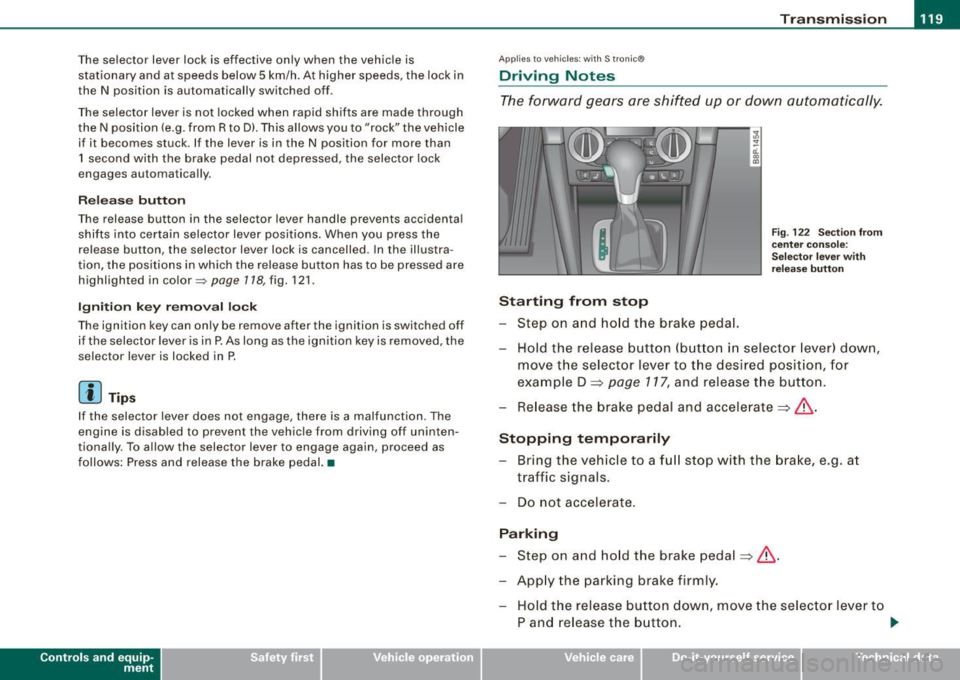
Fig. 122 Section from
center console:
Selector lever with
release button
Hold the release button (button in selector lever) down,
move the selector lever to the desired position, for
example D =>
page 117, and release the button.
Release the brake pedal and accelerate => &, .
Stopping temporarily Bring the vehicle to a full stop with the brake, e.g. at
traffic signals.
Do not accelerate.
Parking Step on and hold the brake pedal=>&, .
Apply the parking brake firmly. Hold the release button down, move the selector lever to
P and release the button. .,.
Vehicle care I I irechnical data
Page 123 of 324

Transmission -_______________ ___.
& WARNING
Hill Descent Assist cannot overcome physical limitations, so it
may not be possible to maintain a constant vehicle speed under all
circumstances. Always be ready to apply the brakes. •
Applie s t o veh ic les : w iths tron ic @
tiptronic operation
Tiptronic allows the driver to shift gears manually.
Contro ls and eq uip
ment "'
"' ...
-a: ., m
Fig
. 123 Center
console: Manual
shifting (tiptronic)
Fig . 124 Display :
Manual shifting
(tiptronic)
Switching to manual
Push the selector lever to the right from D. As the trans
mission has switched, 6 5 4 3 2 1 appears in the display,
w ith the gear that is engaged highlighted.
Upshifting Tap the selector lever forward (in the tiptronic setting)
=> fig. 123 0-
Downshifting
Tap the selector lever backward (in the tiptronic setting)
o .
Switching to manual can be carried out with the vehicle stationary
as well as moving.
When accelerating, the transmission shifts into the next gear in
gears 1, 2, 3, 4 and 5 shortly before the maximum permissible
engine speed is reached.
If you have selected a lower gear than the current one, the transmis
sion will only shift down when the engine cannot be overspeeded .
If kick -down is actuated, the transmission shifts into a lower gear
independently of speed and engine rpm. •
Vehicle care
I I irechnical data
Page 124 of 324

-Tr
ansmi ssio n
..__ ______________ _
Applies to vehic les: with S Ironic® and with Tip tronic contro ls on the steering whee l
Steering wheel with Tiptronic ® controls
The selector paddles allow the driver to keep both hands
on the steering wheel when shifting gears.
Shifting up
Fig . 125 S port
s teer ing wheel w it h
se lector padd les
- Pu ll the right paddle, marked G) => fig . 125 briefly
towards you.
Shiftin g down
Pu ll the left paddle, marked O => fig. 125 briefly towards
you .
The selector paddles on the steering wheel are activated when the
selector lever on the center console is in
D, S, or in the manual posi
tion (Tiptronic mode).
You can also shift gears in the Tiptronic mode using the selector
lever on the center console.
[ i ] Tips
With the gear selector lever in either "D" or "S" the transmission wi ll
switch back to the automatic mode if you do not use the paddles
within approx . 30 seconds .•
Ap plies to vehicles: wi th S tronic®
Kick-down feature
The kick-down feature allows maximum acceleration .
If you depress the accelerator pedal fu lly beyond the full -throt tle
position, the transmission automatically downshifts one gear,
depending on vehic le speed and engine rpm. The upshift into the
next higher gear takes place as soon as the maximum specified
engine speed is reached.
& WARNING
Pleas e n ote t hat th e dr ive whee ls ca n sp in if th e kick -do wn i s used
o n a s mooth slipp ery road -ris k of skiddin g!•
Ap plies to vehic les: with S tron ic®
Launch Control Program
The Launch Control Program permits maximum accelera
tion.
In order to use Launch Control, the ASR (Anti-Slip Regu la
tion) must be disabled. When ASR is disabled, the ESP
warning/indicator light in the instrument cluster illumi
nates . So that Launch Control can be used, the engine must
be at operating temperature and the steering wheel must
not be turned.
- With the engine running, briefly press the ESP button.
The message "ASR off" appears in the instrument cluster
d isplay.
- Shift the gear lever to "S" or the tiptronic® position.
- Step on t he brake pedal with your left foot a nd keep the
brake pedal fully depressed fo r at least one second. _,,,
Page 125 of 324
Transmission -_______________ ___.
- With your right foot, step on the accelerator to the wide
open throttle position or Kickdown. The engine speed
settles at about 3,200 rpm.
Take your left foot off the brake.
The S tronic® in your vehicle is electronically controlled. A special
Launch Control Program provides the best acceleration from a
standing start.
& WARNING
• Always adapt your driving to the traffic flow.
• Only use Launch Control when road and traffic conditions allow
it and other drivers will not be endangered or annoyed by your
driving and the acceleration of the vehicle.
• Make sure that ESP remains enabled . With the ESP disabled,
the vehicle could brake away, particularly on a slick and slippery road -risk of skidding!
• Once acceleration is finished, switch ASR on again by briefly
pushing the ESP button. •
Applies to veh ic le s: w ith S t ron ic ®
Back -up program
In the event of a system ma/function, there is an back-up
program.
In the event of system malfunction, the automatic transmission
switches to the fail-safe mode. All of the selector lever position
displays for the automatic transmission are highlighted with a light
background in the instrument cluster display. In some cases you
cannot drive in the reverse gear any more.
If the transmission switches to fail-safe mode, you should take the
vehicle to an authorized Audi dealership as soon as possibl e to have
the condition corrected. •
Contro ls and eq uip
ment
Ap plies to vehic les: w ith S tron ic ®
Emergency release for selector lever
If the vehicle's power supply fails, the selector lever can
be released in an emergency.
~ ..
-ti. ., m
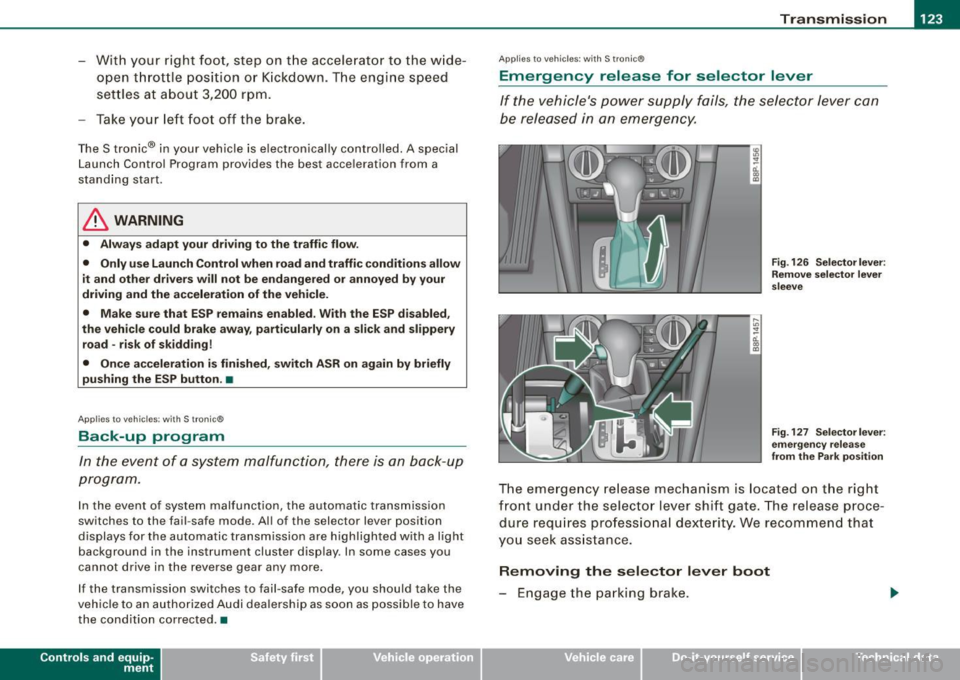
Fig. 126 Selector lever :
Remove selector lever
sleeve
Fig . 127 Selectorlever :
emergency release
from the Park position
The emergency release mechanism is located on the right
front under the selector lever shift gate. The release proce
dure requires professional dexterity. We recommend that
you seek assistance.
Removing the selector lever boot
- Engage the parking brake.
Vehicle care I I Technical data