headlights AUDI S3 2009 User Guide
[x] Cancel search | Manufacturer: AUDI, Model Year: 2009, Model line: S3, Model: AUDI S3 2009Pages: 324, PDF Size: 76.02 MB
Page 61 of 324

Turn signals -¢ Q and high beam ~D lever
The lever on the left side of the steering column is used to
operate the turn signals and the high beam as well as the
headlight flasher.
Fig . 55 Turn signal and
high beam lever
The turn signal and high beam lever has the following func
tions:
Turn signals ¢ ¢
- Lift the lever up all the way~ fig. 55 G), to use the right
turn signals, or push the lever down all the way
0 to use
the left turn signals.
Auto-blink
- Move the lever (up or down) just to the point of resis
tance to use the turn signals for as long as you need
them, for example when changing lanes.
- Briefly move the lever up or down just to the point of
resistance and then release it to flash the turn signals
three times in succession. This feature allows to indicate
lane changes clearly and with minimum effort when
driving on highways.
Con tro ls and eq uip
ment
Clear vision
High beam
~D
- Push the lever forward 0 to switch on the high beam.
- Pull the lever back towards you to switch off the high
beam .
Headlight flasher ~D
Pull the lever toward the steering wheel © to use the
headlight flasher.
Notes on these features
• The turn signals only work with the ignition switched on. The
indicator lights¢ or¢ in the instrument cluster=> page 11 also
blink.
• After you have turned a corner, the turn signal switches off auto
matically .
• The high beam works only when the headlights are on. The indi
cator light ~Din the instrument cluster illuminates when the high
beams are on.
• The headlight flasher works only as long as you hold the lever -
even if there are no lights switched on. The indicator light ~D in the
instrument cluster illuminates when you use the headlight flasher.
0 Note
Do not use the high beam or headlight flasher if you know that these
could be blinding oncoming traffic.•
Vehicle care I I irechnical data
Page 62 of 324

Clea r vis io n
Interior lights
Interior lights and glove compartment light
The interior lights include the both reading lights for the
driver and the front passenger.
•• • • ............. ........... u ... . :i! ::: ::::: ::::::::::::::::::::: :::
·· :: Ill 11111
1
0
1
... 1
ll_lll .... lll ...... ---4
F ig . 5 6 Contr ol pa nel
above w inds hie ld : inte
rior light switches
Light switch :=:, fig. 56 has the following functions:
Doo r conta ct act iva tion
-Move the switch to the center pos ition . The forward
dome light is turned on/off by the contact switches on
any of the doors.
F o rw ard dom e light on
Move the switch to position I. The forward dome light
goes on and stays on regardless of door position.
F o rw ard dom e lig ht off
- Move the switc h to position 0. The light will not go on
regardless of door position.
Glov e compartm ent li ght
- Open the glove compartment -the light in the glove
compartment automatically illuminates as long as the
side marker lights or headlights are o n. When you close
the g love compartment, the light goes off.
With the interior light switch at the doo r contac t (center) position ,
the forward dome light illuminates whenever you unlock the vehicle
or open a door. The dome ligh t goes out after approximately 30
seconds after you have clos ed the door. Likewise , when you lock
your vehicle or switch on the ignition, the dome light goes out.
If you leave a door open, the dome ligh t will go ou t after ten minu tes
to conserve battery charge.
A dimmer automatically controls the brightness of the lights when
they are switched on. •
Applies to ve hicles: w ith light package
Interior lights and forward reading lights
The interior lights include the both reading lights for the
driver and the front passenger.
• •
Fig. 57 Con tro l p anel
above wi ndshie ld: inte
r io r li gh t sw itches
Light switch ©~ fig. 56 has the following funct ions :
Page 63 of 324

Door contact activation
- Move the switch to the center position. The forward
dome light is turned on/off by the contact switches on
any of the doors.
Forward dome light on
Move the switch to position I. The forward dome light
goes on and stays on regardless of door position.
Forward dome light off
- Move the switch to position 0. The light will not go on
regardless of door position.
Forward reading lights ~
-Press the left or right switch ® to switch the left or right
forward reading light on or off.
Glove compartment light
- Open the glove compartment - the light in the glove
compartment automatically illuminates as long as the
side marker lights or headlights are on. When you close
the glove compartment, the light goes off.
With the interior light switch at the door contact (center} position, the forward dome light illuminates whenever you unlock the vehicle
or open a door . The dome light goes out after approximately 30
seconds after you have closed the door. Likewise, when you lock
your vehicle or switch on the ignition, the dome light goes out.
If you leave a door open, the dome light will go out after ten minutes
to conserve battery charge.
A dimmer automatically controls the brightness of the lights when
they are switched on .•
Con tro ls and eq uip
ment
Clear vision
Ap plies to ve hicles : w it h li ght pack age
Ambient lighting
The ambient lighting illuminate important controls for
you .
················:···\
·· ···:·········· ......... .
,;;;1;;;;1;;;;i;:·B·:iiii iiiiiiiii , ............... . ............ . .
............... . ........... .
EJ 1s1 mm ;~ rJ
0
1
@ui
• •
0 ;!
-ti. ., m
Fig. 58 Control panel
above windshield:
position of ambient
light bulbs
When you switch on the ignition, the lights in the door handles illu
minate .
When the side marker lights or headlights are switched on, the
center console is illuminated from the ambient light located above
the windshield.
You cannot manually turn off these lights.•
Rear reading light
-'
Vehicle care I I
~
N ...
-
-ti. ., m
Fig. 59 Rear reading
light ..
irechnical data
Page 67 of 324
• Before you take your vehicle to an automatic car wash , make sure
you have the windshield wiper system switched off !lever in position
Ol, otherwise the windshield wiper system could get damaged in the
car wash if it should suddenly come on.
[ i] Tips
• The rain sensor is part of the interval wiping system. Turning off
the ignition will also deactivate the rain sensor . To reactivate the
sensor, switch off the interval wiping function, then switch it back
on again.
• Worn or dirty windshield wiper blades cause smearing, which
can affect the operation of the light/rain sensor*. Check the condi
tion of your windshield wiper blades regularly .
• Applies to vehicles with light/rain sensor : When the wipers are
switched on manually and in rain conditions, the automatic head
lights* turn on~
page 53, "Sensor activated head- and tail light
control" or off during the day when the wipers are no longer oper
ating . The automatic headlights* function is available in this case
only when the light switch is in the "AUTO" position~
page 53,
fig. 48.
• Make sure the washer fluid reservoir in the engine compartment
is topped off before going on a long trip. Look up~
page 241 for
checking and filling the washer container .
• The wipers only operate with the hood complete ly c losed .•
Con tro ls and eq uip
ment
Clear vision
Rear window wiper
(Q
The wiper lever is also used to operate the rear window
wiper and the automatic wiper/washer function.
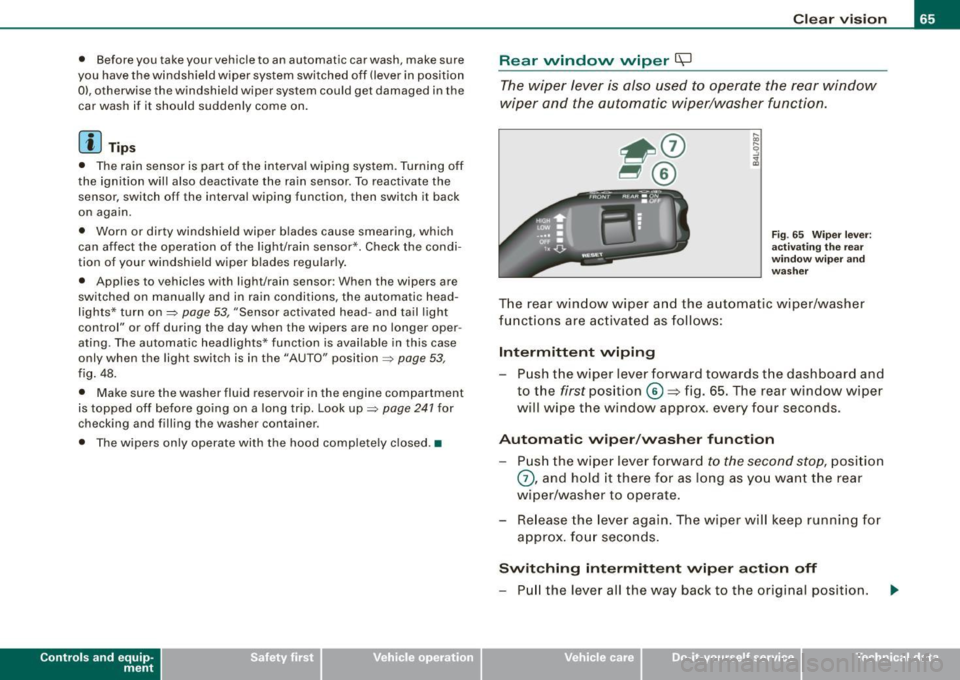
Fig. 65 Wiper leve r:
activating the rear
wi ndo w wipe r and
washer
The rear window wiper and the automatic wiper/washer
functions are activated as follows:
Intermittent wiping
Push the wiper lever forward towards the dashboard and
to the
first position ©=> fig. 65. The rear window wiper
will wipe the window approx. every four seconds.
Automatic wiper/washer function
Push the wiper lever forward to the second stop, position
0, and hold it there for as long as you want the rear
wiper/washer to operate.
Re lease the lever again. The wiper will keep running for
approx . four seconds.
Switching intermittent wiper action off
-Pull the lever all the way back to the original position.
Vehicle care I I irechnical data
Page 68 of 324

Clear vision
& WARNING
Wiper blades are crucial for safe driving! Only in good condition
are they able to clear the windows properly to provide unre
stricted visibility. Worn or frayed wiper blades are a safety hazard!
=> page 67, "Replacing front wiper blades"
(D Note
In freezing or near freezing conditions:
• Always check that the wiper blades are not frozen to the glass
before you turn the wiper on. Loosen a wiper blade which is frozen
in place before operating the wiper to prevent damage to the wiper
blade or the wiper motor.
• Do not use the wiper to clear a frosted window . Using the wipers
as a convenient ice scraper will destroy the wiper blades.
[ i J Tips
For better rearward vision when parking, the rear window wiper is
automatically activated one time when the windshield wipers are
switched on and reverse gear is engaged. •
Applies to vehic les: w ith head light washer system
Headlight washer system
The headlight washer system cleans the headlights.
-Operate the windshield wiper/washer system=> page 63,
fig. 64 © with the headlights turned on by holding the
lever for longer than one second.
The washer jets extend forward out of the front bumper driven by
water pressure to spray the front headlights with water.
You should inspect the headlights regularly (for example when refu
eling) and clean off any solid dirt or insects from the lenses. To
ensure the system works properly in winter, keep the washer jets
free of snow and remove any ice using a de -icing spray. •
Service position
Replacing the windshield wiper blades is only possible
when you move the wiper arms into the service position. In
order to use the windshield wipers, the hood must be
completely closed. When there is a risk of frost, make sure
that the wiper blades are not frozen to the windshield.
Switch the ignition on.
Act ivate the service position by way of the driver infor
mation system =>
page 23.
(D Note
Never drive your vehicle when the windshield wiper arms are in the
service position and pulled away from the windshield. When you
drive faster than 4 mph (6 km/h), the wiper arms automatically
return back to the park position and could cause paint damage to
the engine hood!
[ i] Tips
• You can also turn on the service position, for example, if you
want to protect the windshield from icing by using a cover.
• Th e service position moves to
off automatically when you
operate the windshield wiper lever, or speed exceeds 4 mph
(6 km/h). •
Page 71 of 324
& WARNING (continued)
• For safety reasons, the windshield wiper blades should be
replaced once or twice a year. •
Mirrors
Manual anti -glare adjustment
Standard setting
- Move the small lever (located on the bottom edge of the
mirror) to the front.
Anti-glare setting - Move the small lever (located on the bottom edge of the
mirror) to the rear. •
Applies to veh icles: w it h a utom ati cally dim mi ng in sid e m ir ro r
Automatically dimming inside mirror
The automatic dimming function can be turned on and off
if required.
Controls and equip
ment
Fig . 69 Inside rear
view mirror
Clear vision
Disabling auto dimming
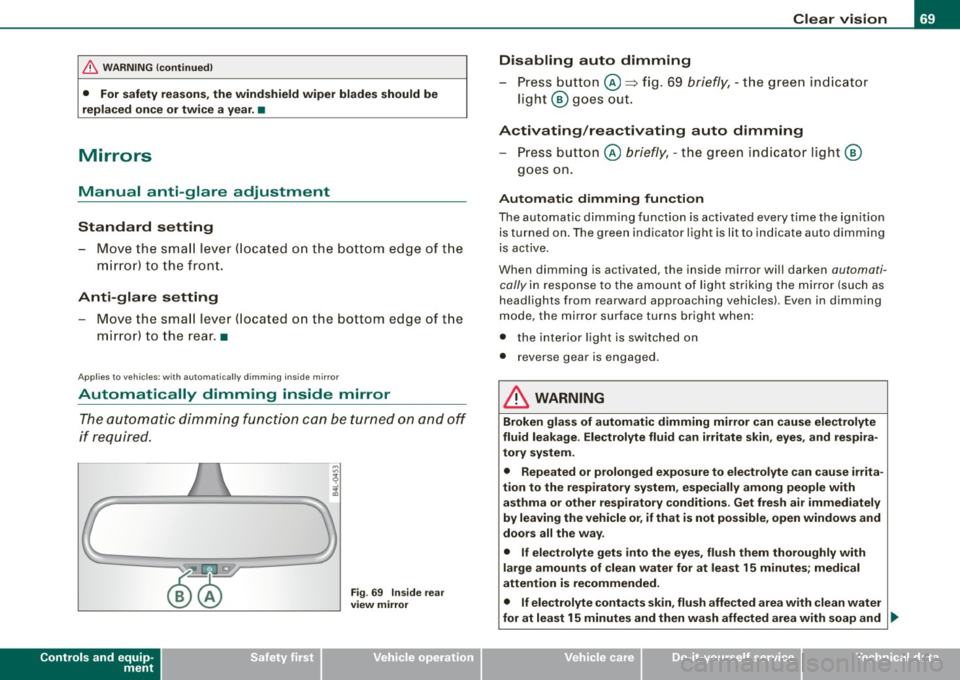
- Press button @=> fig. 69
briefly, -the green indicator
light ® goes out.
Activating/reactivating auto dimming Press button @
briefly, -the green indicator light ®
goes on.
Automatic dimming function
The automatic dimming function is activated every time the ignition
is turned on. The green indicator light is lit to indicate auto dimming
is active.
When dimming is activated, the inside mirror will darken
automati
cally
in response to the amount of light striking the mirror (such as
headlights from rearward approaching vehicles). Even in dimming
mode, the mirror surface turns bright when:
• the interior light is switched on
• reverse gear is engaged .
& WARNING
Broken glass of automatic dimming mirror can cause electrolyte
fluid leakage . Electrolyte fluid can irritate skin, eyes, and respira
tory system.
• Repeated or prolonged exposure to electrolyte can cause irrita
tion to the respiratory system, especially among people with
asthma or other respiratory conditions . Get fresh air immediately
by leaving the vehicle or, if that is not possible, open windows and
doors all the way.
• If electrolyte gets into the eyes, flush them thoroughly with
large amounts of clean water for at least 15 minutes; medical
attention is recommended.
• If electrolyte contacts skin, flush affected area with clean water
for at least 15 minutes and then wash affected area with soap and ._
I • •
Page 72 of 324
Clear vision
& W ARNING (con tinued )
water ; medic al a ttent ion is re commended . Thoroughly wash
affected clothing and shoe s before reuse .
• If sw allowed and per son is con sciou s, rinse mout h with water
fo r at lea st 15 minutes. Do not indu ce vomiting unles s instructed
to do so b y medic al professional . Get medic al attenti on immedi
ately.
0 Note
Liquid electro lyte leaked fro m a broken mirror glass will damage any
plastic surfaces it comes in contact with . C lean up spilled electrolyte
immedia tely with c lear water and a sponge .
[ i ] Tips
• If you switch off the automatic dimming function on th e ins ide
mirror , automati c dimming of the out side mirror s will lik ewi se be
di sabled .
• Check to make sure there are no objects preventing light from
reaching the inside mirror.
• Do not attach any stickers to the windshield in front of the light
sensor, as this wou ld inter fere with the au tomatic opera tion of the
headlights and the automatic dimming of the inside mirror.
• Be aware that automatic d imming of the inside mirror can only
operate properly if the rear window sun b lind * is retracted .•
Outside mirrors
The outside mirro rs are elect ric ally a djusted (powe r
mirr ors)
Adjusting th e outsid e mirrors
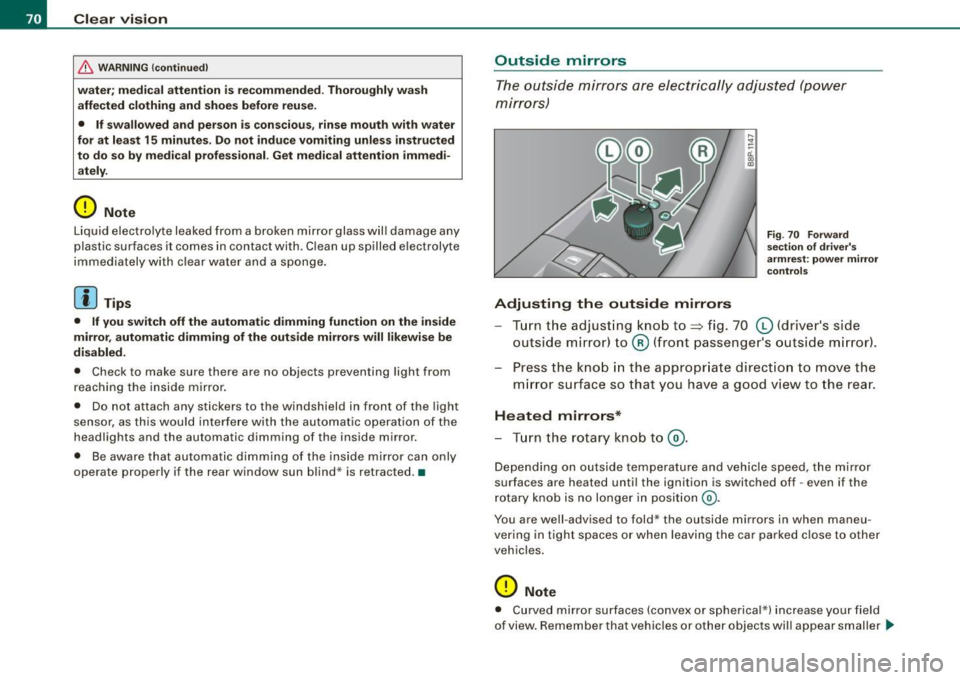
Fig . 7 0 Fo rward
sec tion of dri ve r's
ar mr est: po wer mir ror
c ontrol s
Turn the adjust ing knob to~ fig. 70 (0 (drive r's side
outside mirror) to @ (front passenger's outside m irror) .
Press the kno b in the appropr iate direction to move the
m irror surface so that you have a good view to the rear .
Heated mirrors*
-Tur n the ro tary knob to @ .
Depe nding on outside temperature and vehicle speed, the mirror
surfaces are heated unt il the ignition is switched off -even if the
r otary knob is no longer in posit ion
@ .
You are well -advised to fold* the outside mirrors in when maneu
vering in tight spaces o r when leaving the ca r parked c lose to other
vehic les.
0 Note
• Curved mirror surfaces (convex or spherica l*) increase your fie ld
of view. Remember that vehicles or other objects will appear smaller _..
Page 110 of 324
• ..__O_ n_ t_h _ e_ r_ o_ a_ d ____________________________________________________ _
Ignition lock and ignition switch
Ignition lock
The engine can be s tar ted or tu rned off with the ignition
key.
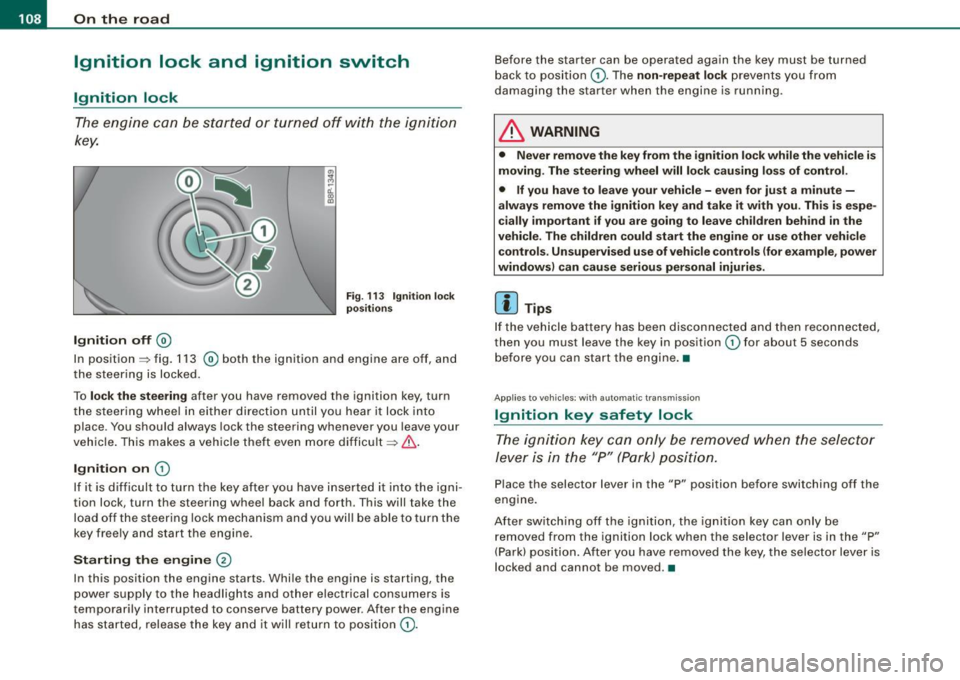
Ignition off ®
Fig . 11 3 Ignit ion lock
po sition s
In position => fig. 113 ® both the ignit ion and engine are off, and
the steering is locked .
To
lo ck the stee ring after you have removed the ignition key, turn
t he steering whee l in either direction until you hear i t lock into
place . You should always lock the steering whenever you leave your
vehic le . This makes a vehicle theft even more difficult => & .
Ignition on G)
If it is difficult to turn the key af ter you have inserted i t into the igni
tion lock, turn the steering wheel back and forth . This will take the
load off the steering lock mechanism and you wil l be able to turn the
key freely and start the engine .
Starting the engine @
In this position the engine starts . Whi le the engine is starting, the
power supply to the headlights and o ther elec trical consumers is
temporari ly interrupted to conserve battery power . After the engine
has started, release the key and it will return to position
G).
Before the starter can be operated again the key must be turned
back to posi tion
G) . The non -repeat lock prevents you from
damaging the starter when the engine is running.
& WARNING
• Never remove the key from the ign ition lo ck w hile the veh icle is
moving. The steering wheel will lo ck causing lo ss of control .
• If you h ave to leave your vehicle -even for just a minute -
alway s remove the ignition key and take it w ith you . Thi s is es pe
c ially important if you are going to leave ch ildren behind in the
vehicle. The children could start the engine or u se other vehi cle
c ontrol s. Unsupervi sed u se of veh icle cont rol s ( for e xamp le , powe r
window s) can cau se serious per sonal injurie s.
[ i ] Tips
If the veh icle battery has been disconnected and then reconnected,
then you must leave the key in position
G) for about 5 seconds
before you can start the engine .•
Ap plies to ve hicl es: w ith a utom at ic tra nsmi ss io n
Ignition key safety lock
The ign ition key can only be rem oved when the selec tor
le ver i s in the "P" (Par k) p osition.
Place the selector lever in the "P" position before switching off the
engine .
After switching off the ignition, the ignition key can only be
removed from the ignition lock when the se lector lever is in the "P"
(Park) position. A fter you have removed the key , the selector lever is
locked and cannot be moved .•
Page 239 of 324
_____________________________________________ C_h_ e_ c _ k_in -= g_a _ n_d _ f_il _li _n ..;::g =--____.•
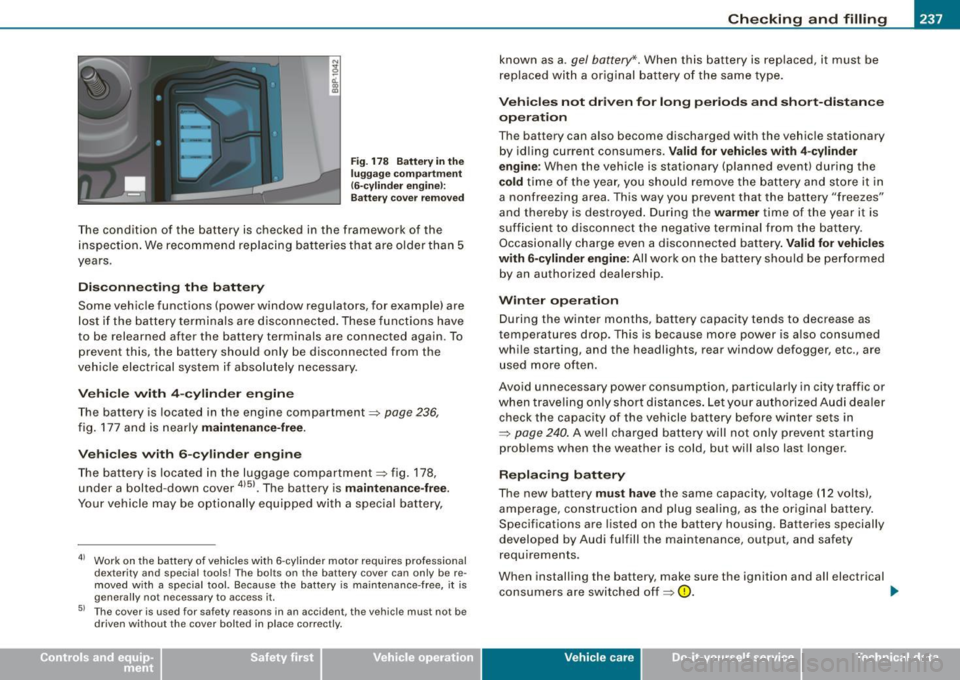
N
~ a:. 00 m
F ig . 178 Battery in the
lugg ag e co mpartme nt
(6-c ylind er eng ine !:
Ba tter y cove r remo ved
T he condition of the battery is checked in the framework of the
inspection . We recommend rep lacing bat teries that are older than 5
years .
Disconnecting the battery
Some vehic le functions (power window regu lators, for example) are
lost if the battery terminals are disconnected . These functions have
to be relearned after the battery terminals are connected again. To
prevent this, the battery should only be disconnected from the
veh icle electr ical system if absolutely necessary.
V ehicle with 4 -cylind er engin e
The battery is located in the engine compartment~ page 236,
fig. 177 and is nearly maintenance -free.
Vehi cle s with 6 -cylinder engine
The bat tery is loca ted in the luggage compartmen t=:> fig . 178,
under a bolted-down cover
4151 • The battery is maintenan ce -free .
Your ve hicle may be optionally equipped with a special battery,
41 Wor k on the battery of vehicles with 6-cy linder motor requires professional
dexterity and special tools! The bolts on the battery cover can only be re
m oved w ith a s pecial tool. Because the batte ry is ma in tenance -free, it is
genera lly not necessary to access it.
51 The cover is used for safety reasons in an acc ident, the vehicle must not be
driven without the cover bolted in place correctly.
known as a. gel battery* . When this battery is replaced, it must be
replaced wi th a or iginal bat tery o f th e same type.
Vehicles not dri ven for long periods and short-distance
operation
The battery can a lso become discharged with the vehicle stationary
by id ling current consumers .
Valid for vehicles with 4 -cylinder
engine :
When the vehic le is stationary (planned event) during the
cold time of the year, you sh ould remove the battery an d store it in
a nonfreezing area. This way you prevent that the battery "freezes"
and thereby is destroyed . During the
warmer time of the year it is
suff icient to disconnect the negative terminal from the battery .
Occasiona lly charge even a disconnected battery .
Valid for veh icles
with 6 -cylinder engine:
All wor k on the ba ttery should be per formed
by an authorized dealership.
Winter op eration
During the winter months, battery capacity tends to decrease as
temperatures drop. This is because more power is a lso consumed
while starting, and the headlights, rear window defogger, etc., are
use d more often .
Avoid unnecessary power consumption, particularly in city traffic or
wh en trave ling on ly shor t distances . Let you r au thor ize d Audi dea ler
check the capacity of the vehicle battery before winter sets in
~ page 240 . A well charged battery will not on ly prevent sta rting
problems when the weather is cold, but wi ll a lso last longer .
Replacing battery
The new battery must have the same capacity , vo ltage (12 volts),
a m perage, con struction and plug sea ling, as t he origina l battery.
Specifications are listed on the battery housing. Batteries specially
developed by Audi fulfill the maintenance, output, and safety
requirements.
When installing the battery , make sure the ignition and all electrical
co nsumers are switche d off ~
0. ..,
Vehicle care I I irechnical data
Page 284 of 324
11111.___F_ u_ s _ e_s _ a_n _ d_ b_ u_lb _ s _______________________________________________ _
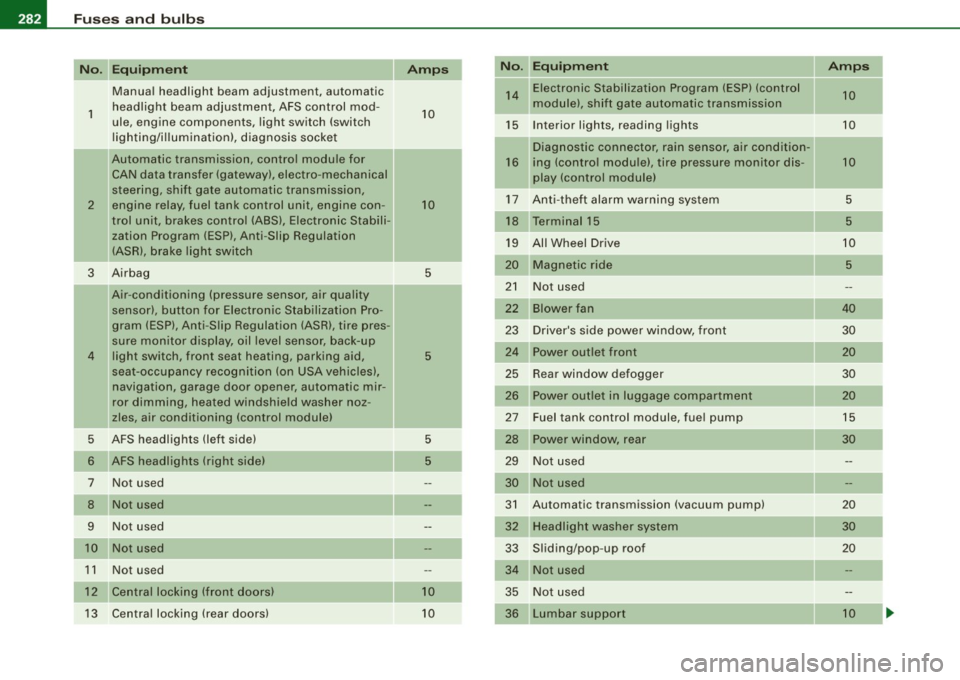
Equipment Amps No. Equipment Amps
Manual headlight beam adjustment, automatic 14 Electronic Stabilization Program (ESP) (control
10
1 headlight beam adjustment, AFS control mod-
10 module),
shift gate automatic transmission
ule, engine components, light switch (switch
15 Interior lights, reading lights 10
lighting/illumination), diagnosis socket
Diagnostic connector, rain sensor, a ir condit ion-
!! Automatic transmission, control module for
16 ing (control module), tire pressure monitor dis- 10
CAN data transfer (gateway), electro -mechanical
play (control module)
steering, shift gate automatic transmission, 17 Anti-theft alarm warning system 5
2 engine relay, fuel tank control unit, engine con
-10
trol unit, brakes control (ABS), Electronic Stabili- 18 Terminal 15
5
zation Program (ESP), Anti -Slip Regulation
19 All Wheel Drive
10
(ASR), brake light switch
-20 Magnetic ride 5
3 Airbag
5
-21 Not used
Air -conditioning (pressure sensor, air quality
sensor), button for Electronic Stabilization Pro- 22
Blower fan 40
gram (ESP), Anti -Slip Regulat ion (ASRl, tire pres -
23 Driver's side power window, front 30
sure mon itor display, oil level sensor, back-up
4 light switch, front seat heating, parking aid, 5 24 Power outlet front
20
seat-occupancy recognition (on USA vehicles), 25 Rear window defogger 30
navigation, garage door opener, automatic mir- 26 Power outlet in luggage compartment 20
ror dimming, heated windshield washer noz-
zles, air conditioning (control module) 27 Fuel tank control module, fuel pump 15
5 AFS headlights (left side)
5 28 Power
window, rear
30
6 AFS headlights (r ight side) 5 29 Not used
7 Not used 30 Not used
8 Not used 31 Automatic transmission (vacuum pump)
20
9 Not used 32 Headlight washer system 30
10 Not used
33 Sliding/pop-up roof
20
1 1 Not used 34 Not used
12 Central locking (front doors} 10 35 Not used
13 Central locking (rear doors) 10
36 Lumbar
support 10