lights AUDI S3 2009 Owner's Manual
[x] Cancel search | Manufacturer: AUDI, Model Year: 2009, Model line: S3, Model: AUDI S3 2009Pages: 324, PDF Size: 76.02 MB
Page 56 of 324
Clear vision
& W ARNIN G (con tinued )
Conseq uently , alwa ys swit ch the headl ights i o on under these
weather condition s and when driving in the da rk .
• Cra she s ca n happen when you c annot see the road ahe ad and
when you c annot be seen by other motori sts .
• Alway s turn on the headlights so that you c an see ahead and
s o that ot hers can see you r ca r from the back.
[ i ] Tips
• In the AUTO mode, the low beams are turned off when the igni
tion is turned off. The remaining l ights are turned off when the key
is taken out of the igni tion lock.
• Do not attach stickers to the windshie ld in front of the sensors as
this can disable the automatic head- and tail light control and the
automatic glare -dimming of the rearview mirror(s) .
• Always observe the specific local regulations for your area when
to use your lights .
• In the event of a light sensor malfunction , the driver information
display will show the symbol . If a ligh t sensor malfunction is indi
cated, you must use the light switch to turn the low beams on and
off. •
App lies to t he market: USA mode ls
Applies to vehicles: with daytime ru nni ng lights and bi-xeno n ligh ts
Daytime running lights (DRL)
The daytime running lights are turned on autom atically
when the ignition is switched on .
®r @'
Activating functions
F ig . 4 9 Swit ch for
d ayt ime running li ghts
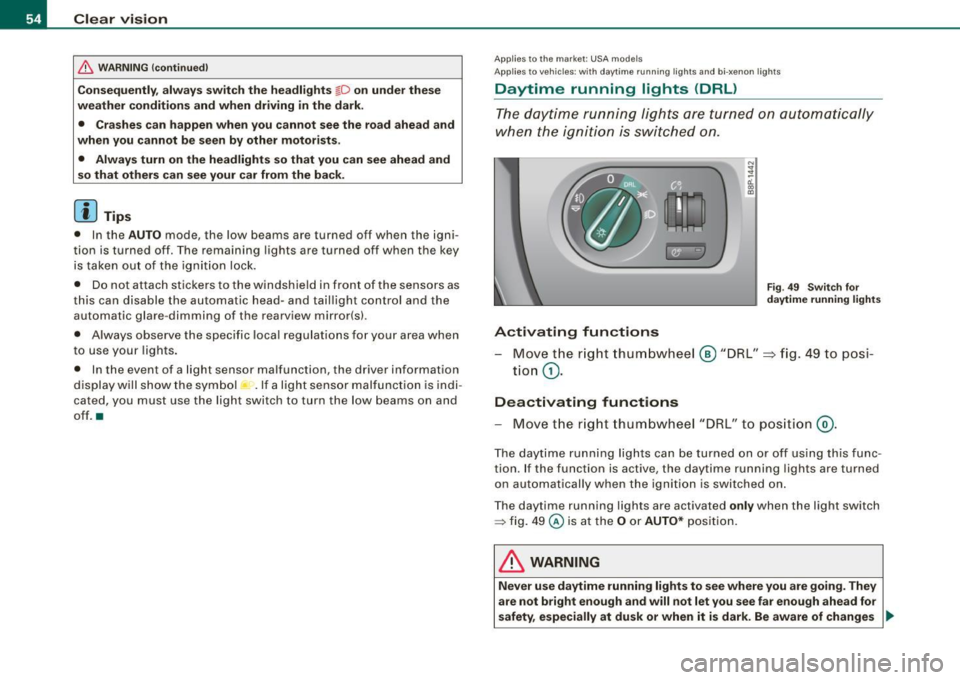
- Move the r ight thum bwhe el @ "DRL" =} fig. 49 to posi-
tio n
G).
Deactivating functions
- Move t he r ig ht thum bwhee l "DRL" to po siti on @ .
The day time running lights ca n be turned on or off using this func
tion. If the function is active, the daytime running lights are turned
o n aut omatically when the ignition is switched on.
The daytime running lights are activated
only when the light switch
=> fig . 49 @ is at the O or AUTO* posi tion.
& WARNING
Never u se dayt ime running light s to see where you are goin g. They
are not bright enough and will not let you see far e nough ahead for
safety , especially at dusk or when it is dark. Be aware of change s _..
Page 57 of 324
& WARNING (continued)
in outside light conditions when you are driving and respond by
switching on your low beams
io.
0 Note
Always be aware of changes in outside light conditions while you
are driving . Respond in time to fading daylight by turning the light
switch to position
io (or "AUTO" if your car is equipped with this
feature)
to turn on your headlights. •
Applies to the market: Canada models
Daytime running lights (Canada models only)
When you turn on the ignition the daytime running lights
will come on automatically.
The daytime running lights are activated only when the light switch
@=> page 54, fig . 49 is either at the O or the ;oo:c position. When the
ignition is switched on, there is a difference between vehicles with
bi-xenon lights and halogen lamps :
• On vehicles with bi -xenon lights only the daytime running lamps
in the headlights will come on .
• On vehicles with halogen lights the front fog lights, side marker
lights and tail lights come on automatically
& WARNING
Never use daytime running lights to see where you are going. They
are not bright enough and will not let you see far enough ahead for
safety, especially at dusk or when it is dark. Be aware of changes
in outside light conditions when you are driving and respond by
switching on your low beams
io.
Controls and equip
ment
Clear vision
0 Note
• With the light switch at the O or ooo:c position, only your front fog
lights remain turned on when it turns dark outside. Even though
your instruments appear well lit, the road ahead of you is not. The light pattern provided by fog lights alone is not sufficient for safe
driving in poor light or darkness. Therefore:
• Always be aware of changes in outside light conditions while
you are driving. Respond in time to fading daylight by turning the light switch to position
io (or "AUTO" if your car is equipp ed with
this feature)
to turn on your headlights.
[ i] Tips
The daytime running lights function cannot be turned off.•
Applies to vehic les : w ith Ada ptive ligh t
Adaptive light
When driving around bends, the relevant area of the road
is better illuminated.
Fig . 50 Adaptive light
when driving
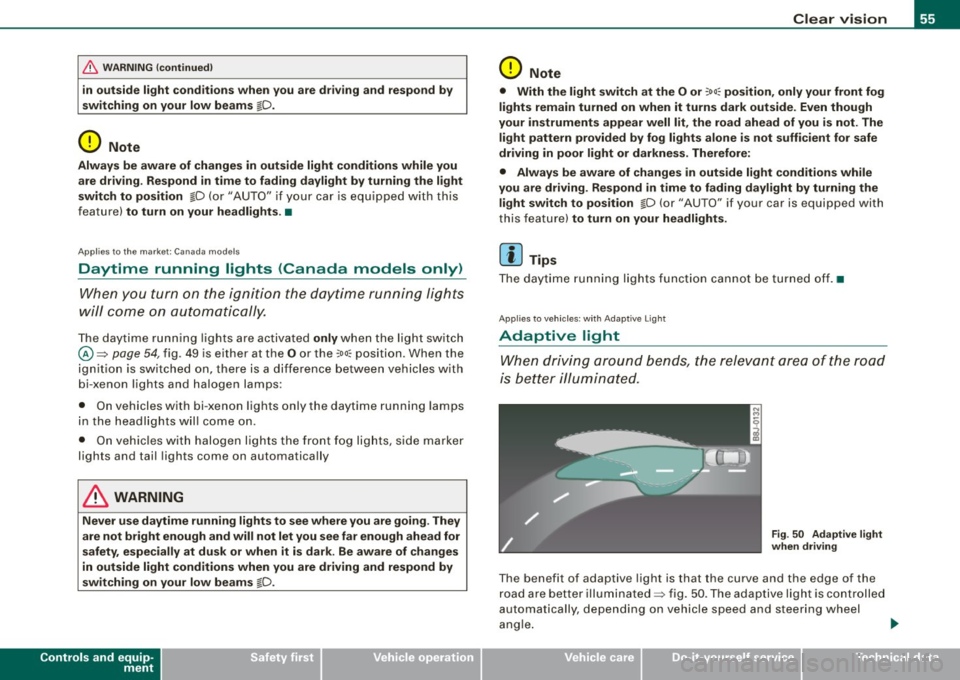
The benefit of adaptive light is that the curve and the edge of the
road are better illuminated=> fig . 50 . The adaptive light is controlled
automa tically , depending on vehicle speed and steering wheel
angle. _,,,,
I • •
Page 58 of 324
Clear vision
When driving around bends, the headlights are controlled
according to steering whee l angle . So that there is no black area
ahead of the vehicle, the two main beams pivot at d ifferent ang les .
[ i ) Tips
The system works above a speed of about 6 mph (10 km/hl. •
Front fog lights }D
Use the light switch to turn on the fr ont fog ligh ts.
Fig. 51 Fog l igh t acti
va tion: light switch
po siti on on vehi cle s
W ITHOU T sens or li gh t
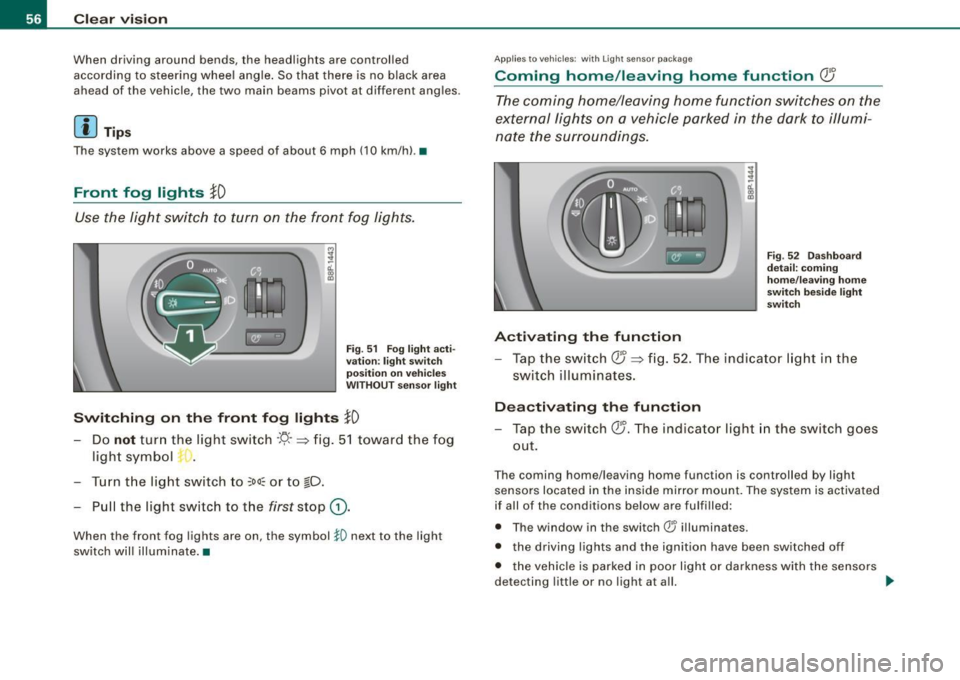
Switching on the front fog lights }D
- Do not tur n the light swi tch ·'!J- -~ fig . 51 towar d the fog
ligh t symb ol
-t. •
-Turn the light switch to ~oo~ or to io.
- Pull the light switch to the first stop G) .
When the front fog lights are on, the symbol }0 next to the light
switch will illuminate .•
Ap plies 1 0 vehi cles: with Ligh t se nso r pac ka ge
Coming home /leaving home function Q5
The coming home/leaving home function switches on the
e x ternal lights on a vehicle parked in the dark t o illumi
na te the sur roundings.
Activating the function
Fi g. 52 Das hb oar d
d etail: com ing
home /leav ing home
s w it ch bes ide lig ht
sw itch
- Tap the sw it c h QJ ~ fi g. 52 . The indicato r light i n th e
s w itch illuminates.
Deactivating th e function
- Tap the switch QJ. The indicator light in the switch goes
out.
T he coming home/leaving home function is controlled by light
se nsors located in the inside mir ror m ount. The system is activate d
if all of the conditions below are fu lfi lled:
• T he w indow in the switch® il luminates.
• the driving lights and the ignition have been switched off
• t he veh ic le is parked in poor l ight or da rkness with the senso rs
detecting little or no light at a ll. _,,
Page 59 of 324

Coming home situ ation
In darkness, the activated system will turn on the headlights, side
marker lights, rear side marker lights, toil lights, and rear license
plate light as soon as the driver's door is opened from inside.
As long as one of the doors or the rear lid remains open, the set of
external lights will keep burning for about four minutes maximum.
To provide light for departure, the set of vehicle lights will keep
burning for about another 30 seconds after all doors and the rear lid
have been closed .
The time until the lights are switched off can be adjusted~ page 23.
Leaving home situation
As soon as the vehicle is unlocked by pressing the en button on your
remote control, the set of external lights is switched on.
The external lights are switched off as soon as the driver's door is
opened from outside . Even if you had the system readjusted to keep
the lights burning for an extended time for coming home, the
external lights will be turned off if you do not open the driver's door
within 60 seconds after unlocking . See chapter "Opening and
Closing" in your Owner's Manual. If the lights are switched off
before you reach the driver's door, press the@ button once more to
turn them on again .
[ i J Tips
• Do not attach any stickers to the windshield in front of the two
light sensors, as this would interfere with both the automatic oper
ation of the head lights and the automatic dimming of the inside
mirror(sl.
• If the vehicle is remotely unlocked and locked three times in
succession, leaving home will not turn on the lights a fourth time to
safeguard the battery and lights.
• If you wish to use the coming home/leaving home function regu
larly, you can leave it activated at all times without risking perma-
Contro ls and eq uip
ment
Clear vision
nent strain on the electrical system. As the system is controlled by
light sensors, it wi ll only be energized in darkness.
• Frequent use of the coming home/leaving home function for
approaching and departing a vehicle parked in the dark will strain
the battery . This applies particularly if only short distances are
driven between stops. Occasionally drive longer distances to make
sure the battery is recharged sufficiently .
• If the fog lights have been switched on by the coming
home/leaving home function, they will always be switched off when
you switch on the ignition .•
Instrument panel illumination
The illumination of the instruments, displays and the
center console can be adjusted.
"' ;
-a'.. co
"'
li8t ey)
Fig . 53 Instrument
panel illumination
You regulate the brightness of the instruments with the left
thumbwheel
<,;"o/ => fig. 53.
Ign ition ON, light switch at @.
With the ignition switched ON, the glow of instrument needles can
be adjusted to appear brighter or dimmer.
1)1,
Vehicle care I I irechnical data
Page 60 of 324
Clear vision
Igniti on ON , light swit ch at ::oo: or fD .
With the lights switched on, the brightness of instrument cluster
!i.e . needles, gauges and displays) and center console il lumination
can be adjusted.
0 Note
The instrument cluster and cent er console illumina tion (gauges and
needles) comes on when you swi tch on the igni tion and the
vehi cle
h eadlights are off .
Be aware of the following difference between
models built to US or Cana dian speci fica tions :
• USA model s: illumination of the in strument clu ster (gauges and
needle s), dash and center con sole around the gear shift lever i s
c o ntrolled by a light sensor lo cated in the instrument panel. The
i n strument panel ill umination will automatically become dimmer
a s th e daylight fades awa y and eventu ally w ill go out completel y
when outside l ight i s very low . Thi s is to remind you , the driver , to
swi tch on the headlight s befo re it get s to o dar k.
• Canada models: in strument panel illumination will stay bright
re gardle ss of the i ntens ity of ambient light . Al wa ys be aware of
change s in out sid e light conditi ons while you are d riving. Re spond
i n time t o fading daylight by turn ing the light swit ch to posit ion
fD
(or "AUTO" if your car is equipped with this feature) to turn on your
headlights . •
Ap plies to vehi cles: with b i-xeno n headli ghts
Bi-Xenon headlights*
After starting the engine, the bi -xenon headlights are automatica lly
adjus ted to the load and angle of the vehic le (for example , during
acce lerat ion and brak ing) . This prevents oncoming traffic fro m
experiencing unnecessary headlight g lare from your bi-xenon head
lights .
If the system is not operating properly, a warning symbol in the
Auto -Check Control is displayed ::::;,
page 33. •
Emergency flasher ~
The emergency flasher mak es othe r moto rists aware that
you or your vehicle are in an emergency situation.
1 1 Q
-
II D ll1
[ Ii J
a
l 'l
"' " "'
J
Fi g. 5 4 Cen ter
co nso le : em erge ncy
fl as her swi tc h
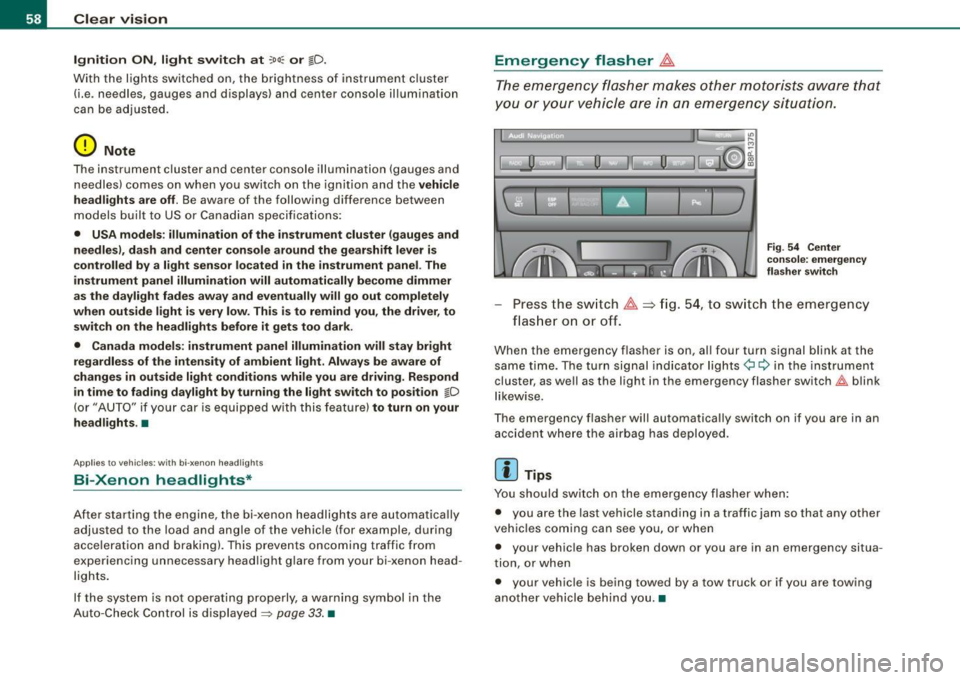
Press the sw itch ~==>fig. 54, to sw itch the emergency
flas her on or off.
When the emergency flasher is on, al l four turn signal blink at the
same time. The turn signal indicator lights¢ Q in the inst rument
cluster, as we ll as the light in the emergency flasher switch~ blink
l ikew ise.
The emergency flasher will automatically switch on if you are in an accident where the airbag has deployed .
[ i ] Tips
You should switch on the emergency flasher when :
• you are the last vehicle standing in a traffic jam so that any other
veh ic les coming can see you, or when
• your vehic le has broken down or you are in an emergency situa
tion, or when
• your vehicle is being towed by a tow truck or if you are towing
another vehicle behind you. •
Page 61 of 324

Turn signals -¢ Q and high beam ~D lever
The lever on the left side of the steering column is used to
operate the turn signals and the high beam as well as the
headlight flasher.
Fig . 55 Turn signal and
high beam lever
The turn signal and high beam lever has the following func
tions:
Turn signals ¢ ¢
- Lift the lever up all the way~ fig. 55 G), to use the right
turn signals, or push the lever down all the way
0 to use
the left turn signals.
Auto-blink
- Move the lever (up or down) just to the point of resis
tance to use the turn signals for as long as you need
them, for example when changing lanes.
- Briefly move the lever up or down just to the point of
resistance and then release it to flash the turn signals
three times in succession. This feature allows to indicate
lane changes clearly and with minimum effort when
driving on highways.
Con tro ls and eq uip
ment
Clear vision
High beam
~D
- Push the lever forward 0 to switch on the high beam.
- Pull the lever back towards you to switch off the high
beam .
Headlight flasher ~D
Pull the lever toward the steering wheel © to use the
headlight flasher.
Notes on these features
• The turn signals only work with the ignition switched on. The
indicator lights¢ or¢ in the instrument cluster=> page 11 also
blink.
• After you have turned a corner, the turn signal switches off auto
matically .
• The high beam works only when the headlights are on. The indi
cator light ~Din the instrument cluster illuminates when the high
beams are on.
• The headlight flasher works only as long as you hold the lever -
even if there are no lights switched on. The indicator light ~D in the
instrument cluster illuminates when you use the headlight flasher.
0 Note
Do not use the high beam or headlight flasher if you know that these
could be blinding oncoming traffic.•
Vehicle care I I irechnical data
Page 62 of 324

Clea r vis io n
Interior lights
Interior lights and glove compartment light
The interior lights include the both reading lights for the
driver and the front passenger.
•• • • ............. ........... u ... . :i! ::: ::::: ::::::::::::::::::::: :::
·· :: Ill 11111
1
0
1
... 1
ll_lll .... lll ...... ---4
F ig . 5 6 Contr ol pa nel
above w inds hie ld : inte
rior light switches
Light switch :=:, fig. 56 has the following functions:
Doo r conta ct act iva tion
-Move the switch to the center pos ition . The forward
dome light is turned on/off by the contact switches on
any of the doors.
F o rw ard dom e light on
Move the switch to position I. The forward dome light
goes on and stays on regardless of door position.
F o rw ard dom e lig ht off
- Move the switc h to position 0. The light will not go on
regardless of door position.
Glov e compartm ent li ght
- Open the glove compartment -the light in the glove
compartment automatically illuminates as long as the
side marker lights or headlights are o n. When you close
the g love compartment, the light goes off.
With the interior light switch at the doo r contac t (center) position ,
the forward dome light illuminates whenever you unlock the vehicle
or open a door. The dome ligh t goes out after approximately 30
seconds after you have clos ed the door. Likewise , when you lock
your vehicle or switch on the ignition, the dome light goes out.
If you leave a door open, the dome ligh t will go ou t after ten minu tes
to conserve battery charge.
A dimmer automatically controls the brightness of the lights when
they are switched on. •
Applies to ve hicles: w ith light package
Interior lights and forward reading lights
The interior lights include the both reading lights for the
driver and the front passenger.
• •
Fig. 57 Con tro l p anel
above wi ndshie ld: inte
r io r li gh t sw itches
Light switch ©~ fig. 56 has the following funct ions :
Page 63 of 324

Door contact activation
- Move the switch to the center position. The forward
dome light is turned on/off by the contact switches on
any of the doors.
Forward dome light on
Move the switch to position I. The forward dome light
goes on and stays on regardless of door position.
Forward dome light off
- Move the switch to position 0. The light will not go on
regardless of door position.
Forward reading lights ~
-Press the left or right switch ® to switch the left or right
forward reading light on or off.
Glove compartment light
- Open the glove compartment - the light in the glove
compartment automatically illuminates as long as the
side marker lights or headlights are on. When you close
the glove compartment, the light goes off.
With the interior light switch at the door contact (center} position, the forward dome light illuminates whenever you unlock the vehicle
or open a door . The dome light goes out after approximately 30
seconds after you have closed the door. Likewise, when you lock
your vehicle or switch on the ignition, the dome light goes out.
If you leave a door open, the dome light will go out after ten minutes
to conserve battery charge.
A dimmer automatically controls the brightness of the lights when
they are switched on .•
Con tro ls and eq uip
ment
Clear vision
Ap plies to ve hicles : w it h li ght pack age
Ambient lighting
The ambient lighting illuminate important controls for
you .
················:···\
·· ···:·········· ......... .
,;;;1;;;;1;;;;i;:·B·:iiii iiiiiiiii , ............... . ............ . .
............... . ........... .
EJ 1s1 mm ;~ rJ
0
1
@ui
• •
0 ;!
-ti. ., m
Fig. 58 Control panel
above windshield:
position of ambient
light bulbs
When you switch on the ignition, the lights in the door handles illu
minate .
When the side marker lights or headlights are switched on, the
center console is illuminated from the ambient light located above
the windshield.
You cannot manually turn off these lights.•
Rear reading light
-'
Vehicle care I I
~
N ...
-
-ti. ., m
Fig. 59 Rear reading
light ..
irechnical data
Page 67 of 324
• Before you take your vehicle to an automatic car wash , make sure
you have the windshield wiper system switched off !lever in position
Ol, otherwise the windshield wiper system could get damaged in the
car wash if it should suddenly come on.
[ i] Tips
• The rain sensor is part of the interval wiping system. Turning off
the ignition will also deactivate the rain sensor . To reactivate the
sensor, switch off the interval wiping function, then switch it back
on again.
• Worn or dirty windshield wiper blades cause smearing, which
can affect the operation of the light/rain sensor*. Check the condi
tion of your windshield wiper blades regularly .
• Applies to vehicles with light/rain sensor : When the wipers are
switched on manually and in rain conditions, the automatic head
lights* turn on~
page 53, "Sensor activated head- and tail light
control" or off during the day when the wipers are no longer oper
ating . The automatic headlights* function is available in this case
only when the light switch is in the "AUTO" position~
page 53,
fig. 48.
• Make sure the washer fluid reservoir in the engine compartment
is topped off before going on a long trip. Look up~
page 241 for
checking and filling the washer container .
• The wipers only operate with the hood complete ly c losed .•
Con tro ls and eq uip
ment
Clear vision
Rear window wiper
(Q
The wiper lever is also used to operate the rear window
wiper and the automatic wiper/washer function.
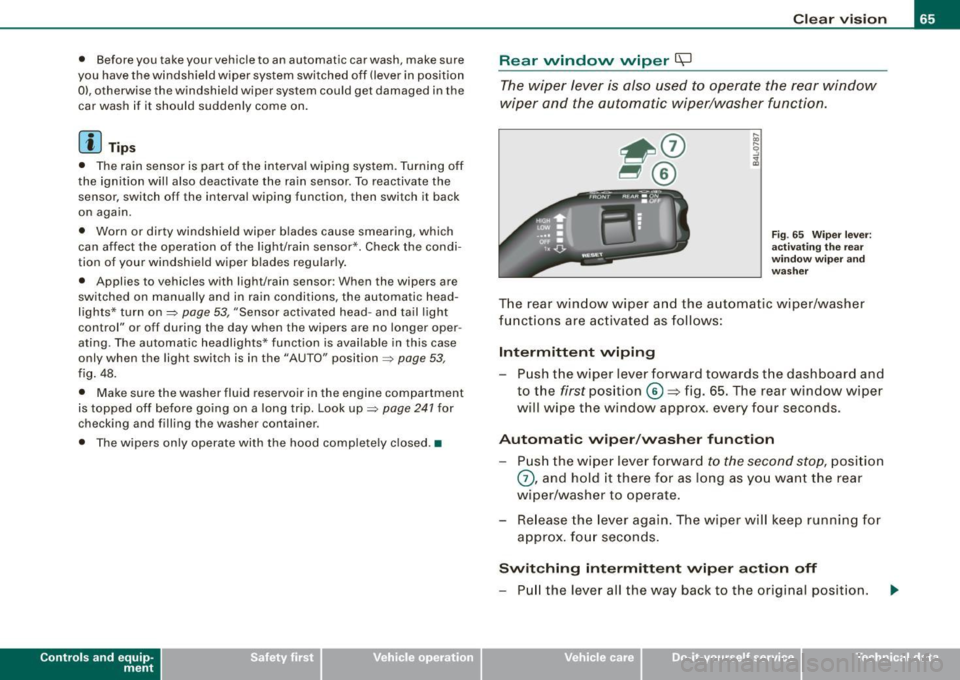
Fig. 65 Wiper leve r:
activating the rear
wi ndo w wipe r and
washer
The rear window wiper and the automatic wiper/washer
functions are activated as follows:
Intermittent wiping
Push the wiper lever forward towards the dashboard and
to the
first position ©=> fig. 65. The rear window wiper
will wipe the window approx. every four seconds.
Automatic wiper/washer function
Push the wiper lever forward to the second stop, position
0, and hold it there for as long as you want the rear
wiper/washer to operate.
Re lease the lever again. The wiper will keep running for
approx . four seconds.
Switching intermittent wiper action off
-Pull the lever all the way back to the original position.
Vehicle care I I irechnical data
Page 68 of 324

Clear vision
& WARNING
Wiper blades are crucial for safe driving! Only in good condition
are they able to clear the windows properly to provide unre
stricted visibility. Worn or frayed wiper blades are a safety hazard!
=> page 67, "Replacing front wiper blades"
(D Note
In freezing or near freezing conditions:
• Always check that the wiper blades are not frozen to the glass
before you turn the wiper on. Loosen a wiper blade which is frozen
in place before operating the wiper to prevent damage to the wiper
blade or the wiper motor.
• Do not use the wiper to clear a frosted window . Using the wipers
as a convenient ice scraper will destroy the wiper blades.
[ i J Tips
For better rearward vision when parking, the rear window wiper is
automatically activated one time when the windshield wipers are
switched on and reverse gear is engaged. •
Applies to vehic les: w ith head light washer system
Headlight washer system
The headlight washer system cleans the headlights.
-Operate the windshield wiper/washer system=> page 63,
fig. 64 © with the headlights turned on by holding the
lever for longer than one second.
The washer jets extend forward out of the front bumper driven by
water pressure to spray the front headlights with water.
You should inspect the headlights regularly (for example when refu
eling) and clean off any solid dirt or insects from the lenses. To
ensure the system works properly in winter, keep the washer jets
free of snow and remove any ice using a de -icing spray. •
Service position
Replacing the windshield wiper blades is only possible
when you move the wiper arms into the service position. In
order to use the windshield wipers, the hood must be
completely closed. When there is a risk of frost, make sure
that the wiper blades are not frozen to the windshield.
Switch the ignition on.
Act ivate the service position by way of the driver infor
mation system =>
page 23.
(D Note
Never drive your vehicle when the windshield wiper arms are in the
service position and pulled away from the windshield. When you
drive faster than 4 mph (6 km/h), the wiper arms automatically
return back to the park position and could cause paint damage to
the engine hood!
[ i] Tips
• You can also turn on the service position, for example, if you
want to protect the windshield from icing by using a cover.
• Th e service position moves to
off automatically when you
operate the windshield wiper lever, or speed exceeds 4 mph
(6 km/h). •