light AUDI S3 2009 Service Manual
[x] Cancel search | Manufacturer: AUDI, Model Year: 2009, Model line: S3, Model: AUDI S3 2009Pages: 324, PDF Size: 76.02 MB
Page 61 of 324

Turn signals -¢ Q and high beam ~D lever
The lever on the left side of the steering column is used to
operate the turn signals and the high beam as well as the
headlight flasher.
Fig . 55 Turn signal and
high beam lever
The turn signal and high beam lever has the following func
tions:
Turn signals ¢ ¢
- Lift the lever up all the way~ fig. 55 G), to use the right
turn signals, or push the lever down all the way
0 to use
the left turn signals.
Auto-blink
- Move the lever (up or down) just to the point of resis
tance to use the turn signals for as long as you need
them, for example when changing lanes.
- Briefly move the lever up or down just to the point of
resistance and then release it to flash the turn signals
three times in succession. This feature allows to indicate
lane changes clearly and with minimum effort when
driving on highways.
Con tro ls and eq uip
ment
Clear vision
High beam
~D
- Push the lever forward 0 to switch on the high beam.
- Pull the lever back towards you to switch off the high
beam .
Headlight flasher ~D
Pull the lever toward the steering wheel © to use the
headlight flasher.
Notes on these features
• The turn signals only work with the ignition switched on. The
indicator lights¢ or¢ in the instrument cluster=> page 11 also
blink.
• After you have turned a corner, the turn signal switches off auto
matically .
• The high beam works only when the headlights are on. The indi
cator light ~Din the instrument cluster illuminates when the high
beams are on.
• The headlight flasher works only as long as you hold the lever -
even if there are no lights switched on. The indicator light ~D in the
instrument cluster illuminates when you use the headlight flasher.
0 Note
Do not use the high beam or headlight flasher if you know that these
could be blinding oncoming traffic.•
Vehicle care I I irechnical data
Page 62 of 324

Clea r vis io n
Interior lights
Interior lights and glove compartment light
The interior lights include the both reading lights for the
driver and the front passenger.
•• • • ............. ........... u ... . :i! ::: ::::: ::::::::::::::::::::: :::
·· :: Ill 11111
1
0
1
... 1
ll_lll .... lll ...... ---4
F ig . 5 6 Contr ol pa nel
above w inds hie ld : inte
rior light switches
Light switch :=:, fig. 56 has the following functions:
Doo r conta ct act iva tion
-Move the switch to the center pos ition . The forward
dome light is turned on/off by the contact switches on
any of the doors.
F o rw ard dom e light on
Move the switch to position I. The forward dome light
goes on and stays on regardless of door position.
F o rw ard dom e lig ht off
- Move the switc h to position 0. The light will not go on
regardless of door position.
Glov e compartm ent li ght
- Open the glove compartment -the light in the glove
compartment automatically illuminates as long as the
side marker lights or headlights are o n. When you close
the g love compartment, the light goes off.
With the interior light switch at the doo r contac t (center) position ,
the forward dome light illuminates whenever you unlock the vehicle
or open a door. The dome ligh t goes out after approximately 30
seconds after you have clos ed the door. Likewise , when you lock
your vehicle or switch on the ignition, the dome light goes out.
If you leave a door open, the dome ligh t will go ou t after ten minu tes
to conserve battery charge.
A dimmer automatically controls the brightness of the lights when
they are switched on. •
Applies to ve hicles: w ith light package
Interior lights and forward reading lights
The interior lights include the both reading lights for the
driver and the front passenger.
• •
Fig. 57 Con tro l p anel
above wi ndshie ld: inte
r io r li gh t sw itches
Light switch ©~ fig. 56 has the following funct ions :
Page 63 of 324

Door contact activation
- Move the switch to the center position. The forward
dome light is turned on/off by the contact switches on
any of the doors.
Forward dome light on
Move the switch to position I. The forward dome light
goes on and stays on regardless of door position.
Forward dome light off
- Move the switch to position 0. The light will not go on
regardless of door position.
Forward reading lights ~
-Press the left or right switch ® to switch the left or right
forward reading light on or off.
Glove compartment light
- Open the glove compartment - the light in the glove
compartment automatically illuminates as long as the
side marker lights or headlights are on. When you close
the glove compartment, the light goes off.
With the interior light switch at the door contact (center} position, the forward dome light illuminates whenever you unlock the vehicle
or open a door . The dome light goes out after approximately 30
seconds after you have closed the door. Likewise, when you lock
your vehicle or switch on the ignition, the dome light goes out.
If you leave a door open, the dome light will go out after ten minutes
to conserve battery charge.
A dimmer automatically controls the brightness of the lights when
they are switched on .•
Con tro ls and eq uip
ment
Clear vision
Ap plies to ve hicles : w it h li ght pack age
Ambient lighting
The ambient lighting illuminate important controls for
you .
················:···\
·· ···:·········· ......... .
,;;;1;;;;1;;;;i;:·B·:iiii iiiiiiiii , ............... . ............ . .
............... . ........... .
EJ 1s1 mm ;~ rJ
0
1
@ui
• •
0 ;!
-ti. ., m
Fig. 58 Control panel
above windshield:
position of ambient
light bulbs
When you switch on the ignition, the lights in the door handles illu
minate .
When the side marker lights or headlights are switched on, the
center console is illuminated from the ambient light located above
the windshield.
You cannot manually turn off these lights.•
Rear reading light
-'
Vehicle care I I
~
N ...
-
-ti. ., m
Fig. 59 Rear reading
light ..
irechnical data
Page 64 of 324

Clear vision
Rear reading light
Press the switch ~ to turn on and off the reading light. •
Luggage compartment light
A dome light in the rear roof liner illuminates the luggage
compartment. An additional light is provided on the
inside of the rear lid.
The light is located on the left side of the trunk.
With the switch at the center position, the rear dome light is auto
matically switched on as soon as the rear lid is opened. The rear
dome light goes out 30 seconds after the rear lid is closed.
If the rear lid is left open for more than 10 minutes, both the rear
dome light and the light in rear lid are switched off to conserve the
battery charge. •
Vision
Applies to vehicles: w ith light pa ckage o r illum inated vanity m irror
Sun visors
Using the sun visors makes driving safer.
3
[ )
-
Fig . 60 Sun visor
The sun visors for the driver and front passenger can be removed
from their center mountings and moved toward the door windows
G) ~ fig. 60 to protect against side glare.
The vanity mirror in the sun visors is covered by a lid. When you
slide the lid@ open the mirror illumination comes on automati
cally. When you slide the lid shut or fold the sun visor back up, the
illumination also goes out.
There is a folding visor between the visors for the driver and the
passenger which can be used to cover the space above the rear view
mirror. •
Applies to vehicles: with sun blinds on rear side windows
Sun blind
Use the sun shades to cut glare through the rear
passenger windows and the rear window.
LI tJ
~
. •
'
' '
'
'
•
N
0
"' 0 ti. .,
"'
Fig. 61 Rear side
window: sun blind
extended
Sun blind, rear side windows doors
Pull the shade upward out of the door sill and engage in
the hooks located at the top of the door frame~ fig. 61. •
Page 66 of 324
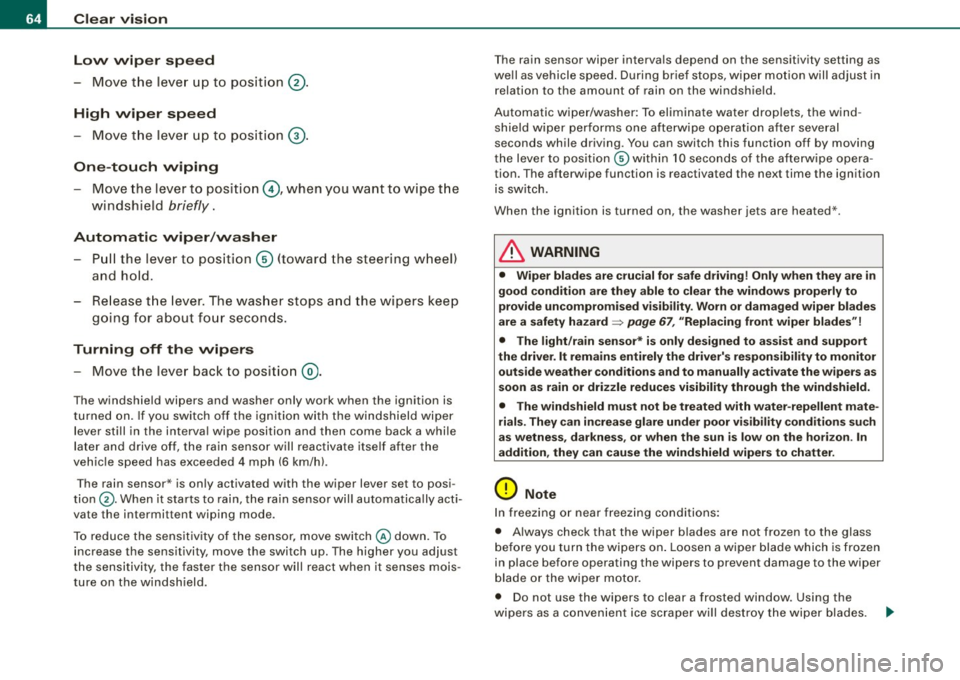
Clear vision Low wiper speed
- Move the lever up to position @ .
High wiper speed
- Move the leve r up to pos ition G) .
One-tou ch wiping
Move the lever to position@, when you want to wipe t he
windshield
briefly .
Automatic wip er/ wash er
- Pull the lever to pos ition G) (toward the steering wheel)
and hold.
- Re lease t he lever . The was her stops a nd the wipers keep
g o ing for about fo ur secon ds.
Turning off th e wipers
- Move the lever back to position @.
The windshield wipers and washer only work when the ignition is
turned on . If you switch off the igni tion with the windshield wiper
lever still in the interva l wipe position and then come back a while
la ter and drive off, the rain sensor w ill reactiva te itse lf afte r the
veh ic le speed has exceeded 4 mph (6 km/hl.
The rain sensor* is only activated with the wiper lever set to posi
tion ®· When it starts to rain, the rain sensor wil l automatica lly acti
vate the intermittent wiping mode.
To reduce the sensitivity of the sensor, move switch @down. To
increase the sensitivity, move the switch up. The higher you adjust
the sensitivity, the faster the sensor will react when it senses mois
ture on the windsh ield. T
he rain sensor wiper interva ls depend on the sensitivity setting as
we ll as vehicle speed . During brief stops, wipe r mo tion will adjust in
relation to the amount of rain on the windshield.
Automatic wiper/washer: To eliminate water drop lets, the wind
shield wiper performs one afterwipe operat ion after several
seconds while driving. You can switch this function off by moving
t he lever to posit ion © within 10 seconds of the afterwipe opera
tion. The afterwipe function is reactivated the next time the ignition
is switch.
When the ignition is turned on, the washer jets are heated *.
& WARNING
• Wiper blade s are crucial for safe driving ! Only when they are in
good condition are they able to clear the window s properly to
provide uncompro mised v is ib ility. Worn or dam aged wiper bl ades
are a safety hazard =>
page 67 , "Replacing front wiper blade s"!
• The light /rain sen sor * is on ly de signed to a ssis t an d suppo rt
the driver . It remains en tirely the dr iver' s re spon sibility to monitor
out side weather cond ition s and to manuall y activate the wiper s as
s oon a s rain or dri zzle reduces visibility through the wind shield .
• The wind shield mu st not be t re ate d with water -r e pellent mat e
rial s. They can increa se glare under po or vi sibilit y conditions su ch
a s w etne ss, dar kne ss, or whe n the sun is lo w on t he hori zon . In
addition , they can cau se the windshield wipers to ch atter .
0 Note
In freezing o r near freez ing conditions:
• Always check that the wiper blades are not frozen to the glass
b efore you turn the wipers on . Loosen a wipe r blade which is fr ozen
in place before operating the wipers to prevent damage to the wiper
b lade or the wiper motor.
• Do not use the wipers to clear a frosted window . Using the
wipers as a conven ient ice scraper wi ll dest roy the wiper blades. .._
Page 67 of 324
• Before you take your vehicle to an automatic car wash , make sure
you have the windshield wiper system switched off !lever in position
Ol, otherwise the windshield wiper system could get damaged in the
car wash if it should suddenly come on.
[ i] Tips
• The rain sensor is part of the interval wiping system. Turning off
the ignition will also deactivate the rain sensor . To reactivate the
sensor, switch off the interval wiping function, then switch it back
on again.
• Worn or dirty windshield wiper blades cause smearing, which
can affect the operation of the light/rain sensor*. Check the condi
tion of your windshield wiper blades regularly .
• Applies to vehicles with light/rain sensor : When the wipers are
switched on manually and in rain conditions, the automatic head
lights* turn on~
page 53, "Sensor activated head- and tail light
control" or off during the day when the wipers are no longer oper
ating . The automatic headlights* function is available in this case
only when the light switch is in the "AUTO" position~
page 53,
fig. 48.
• Make sure the washer fluid reservoir in the engine compartment
is topped off before going on a long trip. Look up~
page 241 for
checking and filling the washer container .
• The wipers only operate with the hood complete ly c losed .•
Con tro ls and eq uip
ment
Clear vision
Rear window wiper
(Q
The wiper lever is also used to operate the rear window
wiper and the automatic wiper/washer function.
Fig. 65 Wiper leve r:
activating the rear
wi ndo w wipe r and
washer
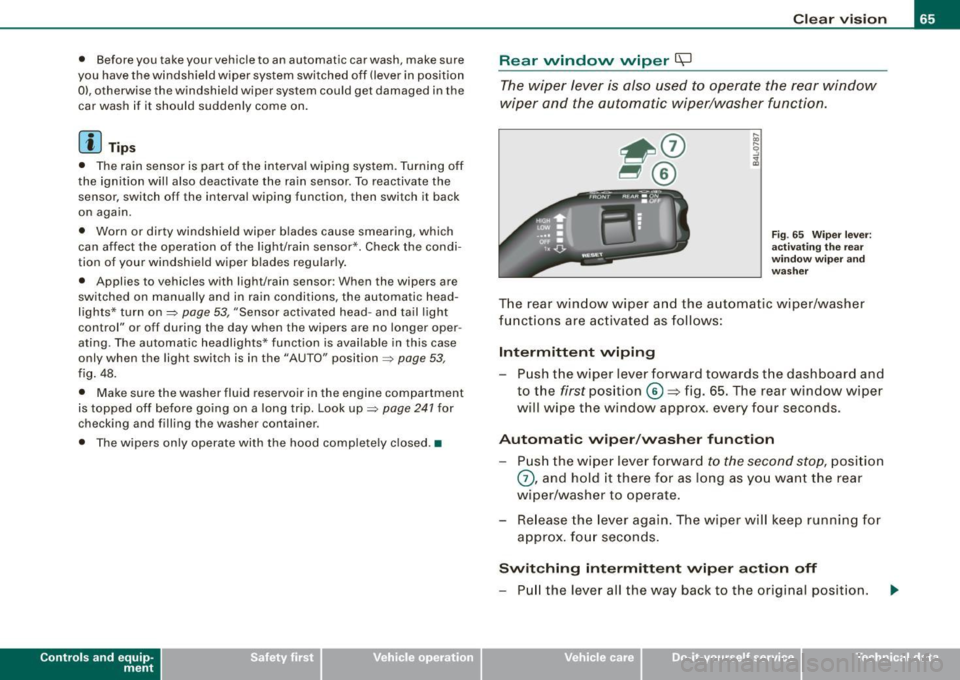
The rear window wiper and the automatic wiper/washer
functions are activated as follows:
Intermittent wiping
Push the wiper lever forward towards the dashboard and
to the
first position ©=> fig. 65. The rear window wiper
will wipe the window approx. every four seconds.
Automatic wiper/washer function
Push the wiper lever forward to the second stop, position
0, and hold it there for as long as you want the rear
wiper/washer to operate.
Re lease the lever again. The wiper will keep running for
approx . four seconds.
Switching intermittent wiper action off
-Pull the lever all the way back to the original position.
Vehicle care I I irechnical data
Page 68 of 324

Clear vision
& WARNING
Wiper blades are crucial for safe driving! Only in good condition
are they able to clear the windows properly to provide unre
stricted visibility. Worn or frayed wiper blades are a safety hazard!
=> page 67, "Replacing front wiper blades"
(D Note
In freezing or near freezing conditions:
• Always check that the wiper blades are not frozen to the glass
before you turn the wiper on. Loosen a wiper blade which is frozen
in place before operating the wiper to prevent damage to the wiper
blade or the wiper motor.
• Do not use the wiper to clear a frosted window . Using the wipers
as a convenient ice scraper will destroy the wiper blades.
[ i J Tips
For better rearward vision when parking, the rear window wiper is
automatically activated one time when the windshield wipers are
switched on and reverse gear is engaged. •
Applies to vehic les: w ith head light washer system
Headlight washer system
The headlight washer system cleans the headlights.
-Operate the windshield wiper/washer system=> page 63,
fig. 64 © with the headlights turned on by holding the
lever for longer than one second.
The washer jets extend forward out of the front bumper driven by
water pressure to spray the front headlights with water.
You should inspect the headlights regularly (for example when refu
eling) and clean off any solid dirt or insects from the lenses. To
ensure the system works properly in winter, keep the washer jets
free of snow and remove any ice using a de -icing spray. •
Service position
Replacing the windshield wiper blades is only possible
when you move the wiper arms into the service position. In
order to use the windshield wipers, the hood must be
completely closed. When there is a risk of frost, make sure
that the wiper blades are not frozen to the windshield.
Switch the ignition on.
Act ivate the service position by way of the driver infor
mation system =>
page 23.
(D Note
Never drive your vehicle when the windshield wiper arms are in the
service position and pulled away from the windshield. When you
drive faster than 4 mph (6 km/h), the wiper arms automatically
return back to the park position and could cause paint damage to
the engine hood!
[ i] Tips
• You can also turn on the service position, for example, if you
want to protect the windshield from icing by using a cover.
• Th e service position moves to
off automatically when you
operate the windshield wiper lever, or speed exceeds 4 mph
(6 km/h). •
Page 71 of 324
& WARNING (continued)
• For safety reasons, the windshield wiper blades should be
replaced once or twice a year. •
Mirrors
Manual anti -glare adjustment
Standard setting
- Move the small lever (located on the bottom edge of the
mirror) to the front.
Anti-glare setting - Move the small lever (located on the bottom edge of the
mirror) to the rear. •
Applies to veh icles: w it h a utom ati cally dim mi ng in sid e m ir ro r
Automatically dimming inside mirror
The automatic dimming function can be turned on and off
if required.
Controls and equip
ment
Fig . 69 Inside rear
view mirror
Clear vision
Disabling auto dimming
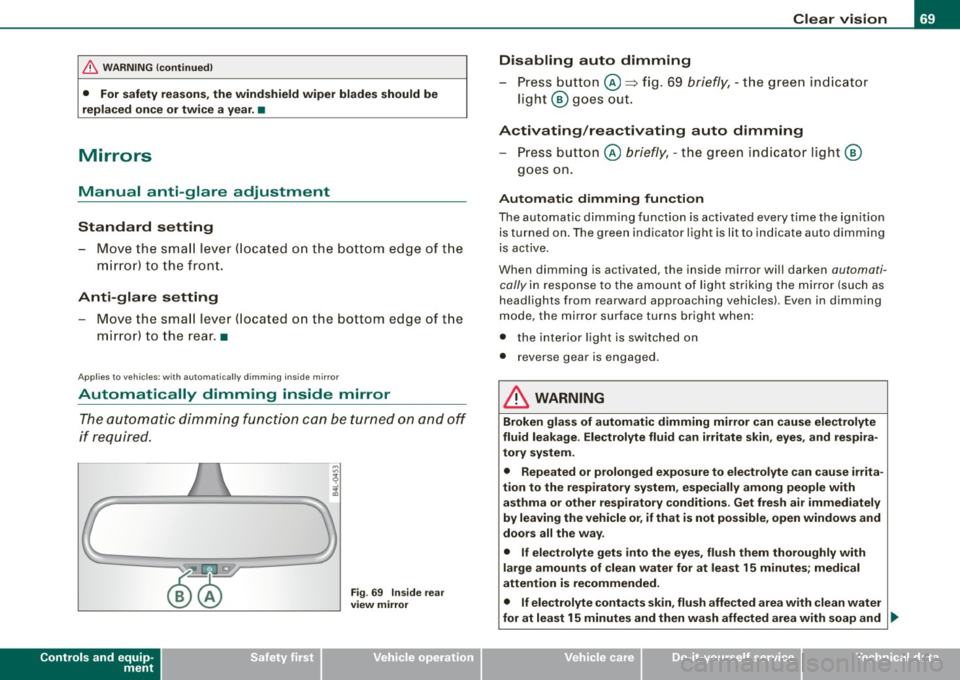
- Press button @=> fig. 69
briefly, -the green indicator
light ® goes out.
Activating/reactivating auto dimming Press button @
briefly, -the green indicator light ®
goes on.
Automatic dimming function
The automatic dimming function is activated every time the ignition
is turned on. The green indicator light is lit to indicate auto dimming
is active.
When dimming is activated, the inside mirror will darken
automati
cally
in response to the amount of light striking the mirror (such as
headlights from rearward approaching vehicles). Even in dimming
mode, the mirror surface turns bright when:
• the interior light is switched on
• reverse gear is engaged .
& WARNING
Broken glass of automatic dimming mirror can cause electrolyte
fluid leakage . Electrolyte fluid can irritate skin, eyes, and respira
tory system.
• Repeated or prolonged exposure to electrolyte can cause irrita
tion to the respiratory system, especially among people with
asthma or other respiratory conditions . Get fresh air immediately
by leaving the vehicle or, if that is not possible, open windows and
doors all the way.
• If electrolyte gets into the eyes, flush them thoroughly with
large amounts of clean water for at least 15 minutes; medical
attention is recommended.
• If electrolyte contacts skin, flush affected area with clean water
for at least 15 minutes and then wash affected area with soap and ._
I • •
Page 72 of 324
Clear vision
& W ARNING (con tinued )
water ; medic al a ttent ion is re commended . Thoroughly wash
affected clothing and shoe s before reuse .
• If sw allowed and per son is con sciou s, rinse mout h with water
fo r at lea st 15 minutes. Do not indu ce vomiting unles s instructed
to do so b y medic al professional . Get medic al attenti on immedi
ately.
0 Note
Liquid electro lyte leaked fro m a broken mirror glass will damage any
plastic surfaces it comes in contact with . C lean up spilled electrolyte
immedia tely with c lear water and a sponge .
[ i ] Tips
• If you switch off the automatic dimming function on th e ins ide
mirror , automati c dimming of the out side mirror s will lik ewi se be
di sabled .
• Check to make sure there are no objects preventing light from
reaching the inside mirror.
• Do not attach any stickers to the windshield in front of the light
sensor, as this wou ld inter fere with the au tomatic opera tion of the
headlights and the automatic dimming of the inside mirror.
• Be aware that automatic d imming of the inside mirror can only
operate properly if the rear window sun b lind * is retracted .•
Outside mirrors
The outside mirro rs are elect ric ally a djusted (powe r
mirr ors)
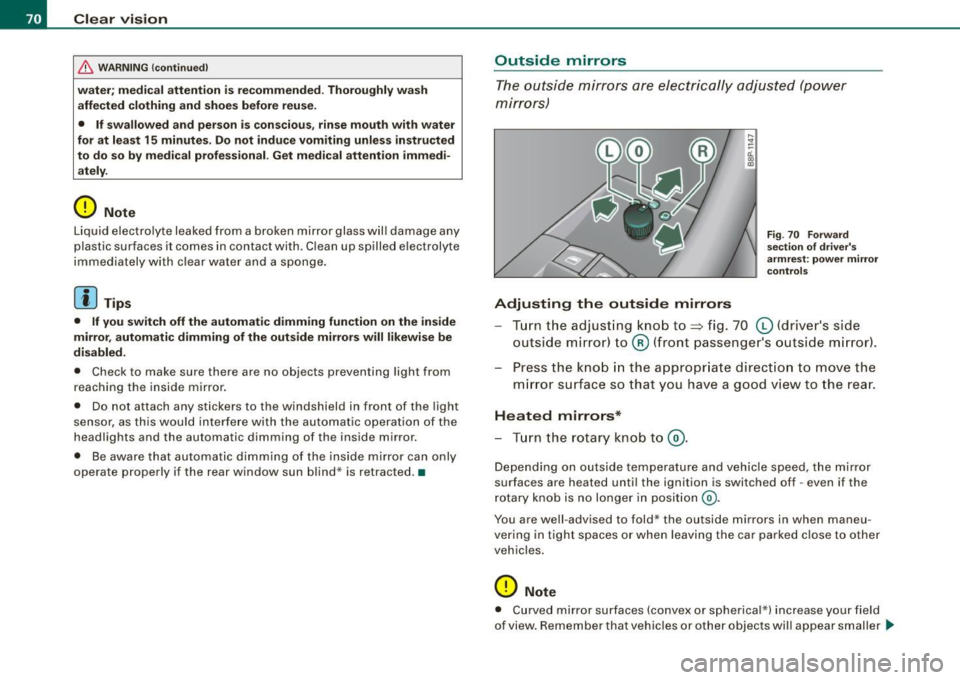
Adjusting th e outsid e mirrors
Fig . 7 0 Fo rward
sec tion of dri ve r's
ar mr est: po wer mir ror
c ontrol s
Turn the adjust ing knob to~ fig. 70 (0 (drive r's side
outside mirror) to @ (front passenger's outside m irror) .
Press the kno b in the appropr iate direction to move the
m irror surface so that you have a good view to the rear .
Heated mirrors*
-Tur n the ro tary knob to @ .
Depe nding on outside temperature and vehicle speed, the mirror
surfaces are heated unt il the ignition is switched off -even if the
r otary knob is no longer in posit ion
@ .
You are well -advised to fold* the outside mirrors in when maneu
vering in tight spaces o r when leaving the ca r parked c lose to other
vehic les.
0 Note
• Curved mirror surfaces (convex or spherica l*) increase your fie ld
of view. Remember that vehicles or other objects will appear smaller _..
Page 73 of 324
and farther away than when seen in a flat mirror. If you use this
mirror to esti mate distances of fo llowing vehicles when changing
lanes, you cou ld es timate incorrectly and cause an accident .
[ i] Tip s
If there shou ld be a malfunction in the electrica l system, you can
sti ll adjust the outside mirrors by pressing the edge of the mirror .•
Ap plie s to v ehicl es: wit h autom atic dim ming for out side m irro rs
Automatic dimming for outside mirrors
The outside mirrors are dimmed together with the automatic
dimming of the inside mir ror . When the ignition is switched on, the
mirrors darken automatical ly depending on the light striking them
(e .g. head lights from the rear) .
When the interior lighting is switched on and when reverse gear is
engaged , the mirrors are swi tched back to their original brightness
(not dimmed).
& WARNING
Broken glas s of automatic dimming mirror can c ause electrolyte
fluid le akage. Electrolyte fluid can ir ritate s kin , eyes , and re spir a
tory system .
• Repeated or prolonged e xposure to ele ctro lyte can cau se irrita
tion to the respi ratory sy stem , e specially among people with
asthm a or other respir atory co ndition s. G et fresh a ir i mmediately
by leaving the veh icle or , if that is not po ssible , open windows and
do ors all the way.
• If electrolyte get s into the eyes , flush them thoroughly with
large amounts of clean wate r fo r at least 15 minut es; medi cal
attention i s recommended .
• If ele ctrolyte cont acts sk in , flu sh affe cted are a with clean w ater
for at lea st 15 minute s and then wash affected area with soap and
Controls and equip
ment
Cl ea r vision
& WAR N IN G ( continued )
water; medic al attent ion is re commend ed . Thoroughly wash
affected clothing and shoes before reu se .
• If swallowed and person i s cons ciou s, rinse mouth w ith w ater
for at lea st 1 5 minute s. Do not indu ce vomitin g unles s instructed
to do so by medic al profession al. Get medi cal attent ion immed i
ately.
0 Note
Electrolyte leaki ng from a broken mirror g lass at tacks the veh ic le
paint and plastic surfaces . C lean up spilled electrolyte immediately
with c lear water and a sponge.
[ i ] Tips
• If automatic dimming for the inside mirror is swit ched off , the
out side m irrors are also not dimmed automati cally.
• Automatic di mming for the mirror only operates proper ly if the
sunshade * for the rear window is retracted, or the light striking the
ins ide mirror is not hindered by other ob jects. •
I • •