light AUDI S3 2009 Workshop Manual
[x] Cancel search | Manufacturer: AUDI, Model Year: 2009, Model line: S3, Model: AUDI S3 2009Pages: 324, PDF Size: 76.02 MB
Page 76 of 324
Seats and storage
Seats and storage
General recommendations
Why is your seat adjustment so important?
The safety belts and the airbag system can only provide
maximum protection if the front seats are correctly
adjusted.
There are several different ways you can adjust the driver's seat and
the front passenger's seat so that it conforms to your body size. It is
especially important that the seat be adjusted properly so that:
• you can easily and quickly reach all the switches and controls in
the instrument panel
• your body is properly supported thus reducing physical stress
and fatigue
• the safety belts and airbag system can offer maximum protec
tion=>
page 147
In the following chapters, you will see exactly how you can best
adjust your seats.
There are special regulations and instructions for installing a child safety seat on the front passenger's seat. Always heed the informa
tion regarding child safety provided in=>
page 769, "Child Safety".
L1}. WARNING
Incorrect seating position of the driver and all other passengers
can result in serious personal injury.
• Always keep your feet on the floor when the vehicle is in motion
- never put your feet on top of the instrument panel, out of the
window or on top of the seat cushion! This applies especially to
the passengers. If your seating position is incorrect you increase
the risk of injury in the case of sudden braking or an accident. If
& WARNING (continued)
the airbag inflates and the seating position is incorrect this could
result in personal injury or even death.
• It is important for both the driver and front passenger to keep
a distance of at least 10 inches (25 cm) between themselves and
the steering wheel and/or instrument panel. If you're sitting any closer than this, the airbag system cannot protect you properly. In
addition to this, the front seats and head restraints must be
adjusted to your body height so that they can give you maximum
protection.
• Always try to keep as much distance as possible between your
self and the steering wheel or instrument panel.
• Do not adjust the driver's or front passenger's seat while the
vehicle is moving . Your seat may move unexpectedly, causing
sudden loss of vehicle control and personal injury. If you adjust
your seat while the vehicle is moving, you are out of position. •
Driver's seat
The correct seat position is important for safe and relaxed
driving.
We recommend that you adjust the driver's seat in the
following manner:
- Adjust the seat in fore and aft direction so that you can easily push the pedals to the floor while keeping your
knees slightly bent=>
& in "Why is your seat adjustment
so important?".
- Adjust the seatback so that when you sit with your back
against the seatback, you can still grasp the top of the
steering wheel.
~
Page 87 of 324
Applies to vehic les: w it h ca rgo ne t
Elastic cargo net
The cargo net prevents light objects from sliding around
in the luggage compartment.
Fig . 86 Luggage
compartment : cargo
net
Fig . 87 Luggage
compartment : cargo
net attached to hooks
Securing objects to the luggage compartment
floor with the net
- Lay out the cargo net in the luggage compartment .
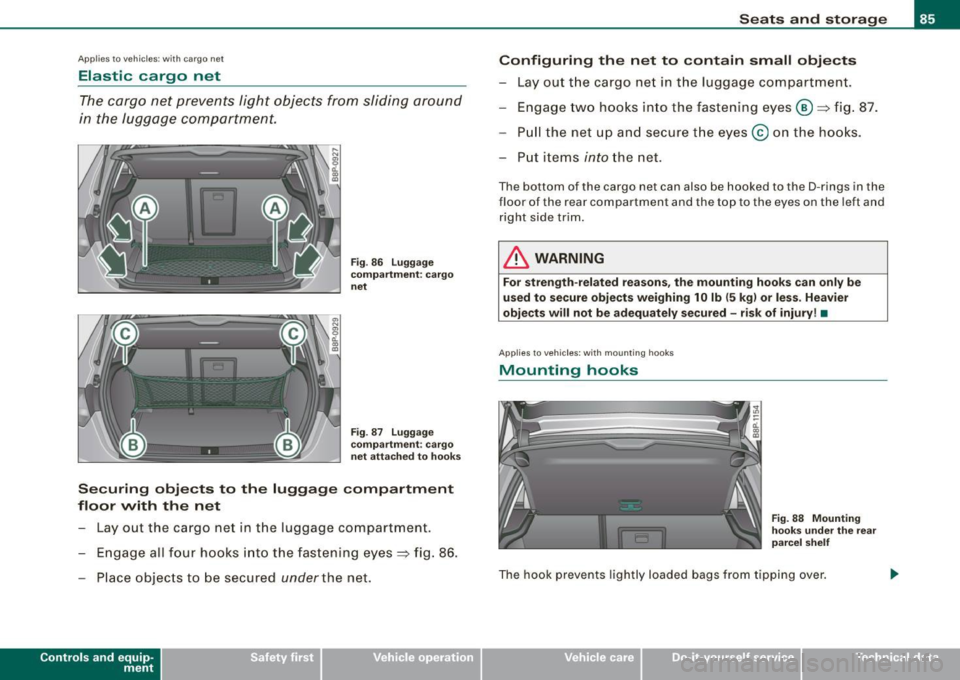
- Engage all four hooks into the fastening eyes~ fig. 86.
- Place objects to be secured
under the net.
Con tro ls and eq uip
ment
Seats and storage
Configuring the net to contain small objects
- Lay out the cargo net in the luggage compartment.
- Engage two hooks into the fasten ing eyes ®~ fig. 87.
- Pull the net up and secure the eyes @ on the hooks.
Put items
i nto the net.
The bo ttom of the cargo ne t can al so be hooked to the D-rings in the
floor of the rear compartment and th e top to the eyes on the left and
right side t rim.
& WARNING
For strength-related reasons, the mounting hooks can only be
used to secure objects weighing 10 lb (5 kg) or less . Heavier
objects will not be adequately secured -risk of injury! •
Applies to v ehic les: with mo unt ing hooks
Mounting hooks
Fig . 88 Mounting
hooks under the rear
parcel shelf
The hook prevents lightly loaded bags from tipping over.
Vehicle care I I Technical data
Page 88 of 324

Seats and storage
& WARNING
For strength-related reasons, heavy objects must not be hung on
the hooks. Heavy objects are not adequately secured -this
increases the risk of injury. •
Retractable luggage compartment cover
The luggage compartment cover keeps luggage or other
objects out of view.
Fig. 89 Rear lid open
with luggage compart ment cover
Removing the luggage compartment cover
Detach the retaining straps=> fig. 89 at the rear hatch G).
-Pull the cover 0 horizontally out of the mount@ in the
direction of the arrow.
Installing the luggage compartment cover
- Push the cover horizontally into the mounts provided
=> fig. 89@ on the side panel until the cover seats.
- Install the retaining straps in the rear hatch => fig. 89
G)
=>& .
& WARNING
• The luggage compartment cover must never be installed
without being secured -this creates an accident hazard.
• Whenever driving, never place any hard or heavy objects on the
luggage compartment or allow pets to sit on the luggage compart
ment cover . They could become a hazard to vehicle occupants in
the event of sudden braking or in an accident.
0 Note
Make sure that the heating wires in the rear lid do not get damaged
by objects scraping against them.
[ i ] Tips
• You can use the luggage compartment cover to store light
weight clothing but do not leave any heavy or sharp objects in the
pockets of the clothing.
• Remember that placing clothing on the luggage compartment
cover can block the driver's vision in the rear view mirror. This also
applies especially when you have to transport large objects.
• So that stale air can escape from the vehicle be sure not to cover
the ventilation slot between the rear lid and the luggage compart
ment cover installed. •
Page 95 of 324
Ashtray
Rear ashtray
1.-~-.,
I I
Fig. 98 Rear ashtray
To open ashtray
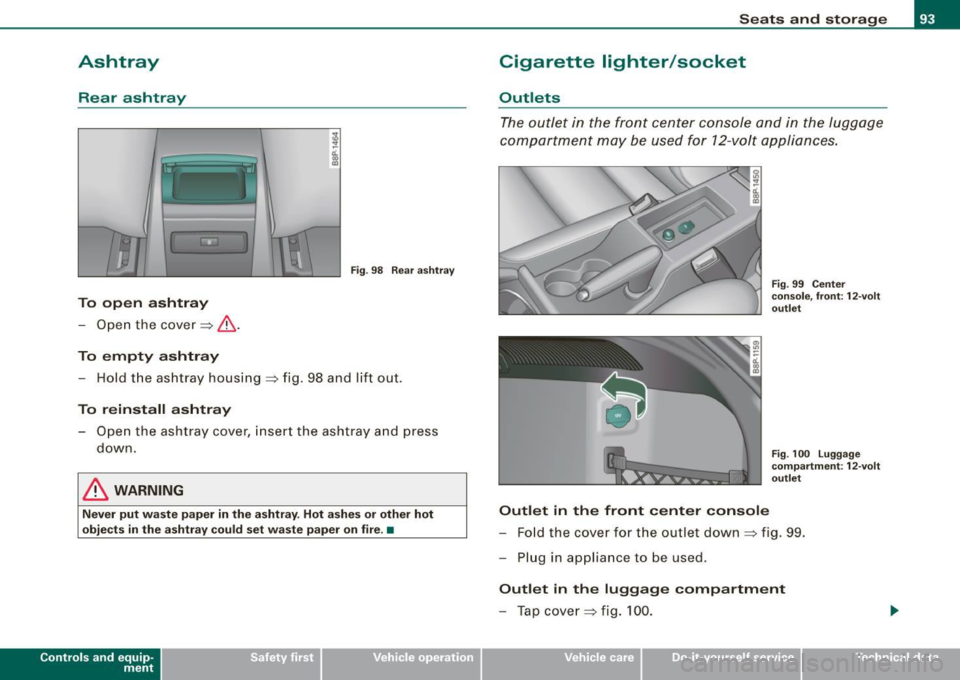
-Open the cover ~ &.
To empty ashtray
- Hold the ashtray housing=> fig. 98 and lift out .
To reinstall ashtray
-Open the ashtray cover, insert the ashtray and press
down.
& WARNING
Never put waste paper in the ashtray. Hot ashes or other hot
objects in the ashtray could set waste paper on fire .•
Con tro ls and eq uip
ment
Seats and storage
Cigarette lighter /socket
Outlets
The outlet in the front center console and in the luggage
compartment may be used for 12-volt appliances.
Outlet in the front center console
Fig. 99 Center
console, front: 12-volt
outlet
Fig .
100 Luggage
compartment : 12-volt
outlet
- Fold the cover for the outlet down ~ fig. 99.
- Plug in appliance to be used.
Outlet in the luggage compartment
-Tap cover ~ fig. 100.
Vehicle care I I irechnical data
Page 96 of 324
Seats and storage
-Plu g in ap plia n ce to be us ed.
The ou tlet may be used for 12-volt app liances with maximum
consumption of up to 100 watts, such as a flash light , smal l vacuum
cleaner, etc .
Before you purchase any accessories, always read and follow the
inf orm ati on i n
=> page 305 , "Addi tiona l ac cess ories and parts
replacement" .
& WARNING
The outlet plu s any appliances plugged into it remain functional
even if the ignition is switched off or the ignition key is removed .
Ne ver leave children inside the vehicle without supervi sion .
0 Note
To avoid damaging the socket, only use p lugs that fit properly .
[ i ] Tips
When the engine is off and accessories are sti ll plugged in and are
on, the vehicle batte ry can sti ll be d rained .•
Storage
General overview
There are numer ous pl aces to store items i n your ve hicle.
Storage in the front arm rest
Storage in t h e rear ar m res t
=> page 87
Glove compart ment (A ir v enti lati on i n t he ::::> page 95
glove compartment*, CD changer *) Cent
er console
Compartments in the door trims
S to ra ge in the f ootwe ll
=> page9 5
=> page96
=> page96
Compartments in luggage compartment => page 97
Some of the s torage locations are only found on specific veh icle
models or are optional equ ipment .
& WARNING
• Always remove obje cts from the in strument panel. Any items
not put away could slide around inside the vehicle while driving or
when a ccelerating or when applying the bra kes or when driving
around a corner .
• When you are driving make sure that anything you may have
placed in the center console or other storage locations cannot fall
out into the footwells . In case of sudden bra king you would not be
able to brake , depress the clut ch or accelerate .
• Any pie ces of clothing that you have hung up mu st not interfere
with the driver's view. The coat hooks are designed only for light
weight clothing . Never hang any clothing with hard , pointed or
heavy objects in the pockets on the coat hooks . During sudden
bra king or in an accident -especially if the airbag is deployed -
these obje cts could in jure any passengers inside the vehicle. •
Page 97 of 324
Glove compartment
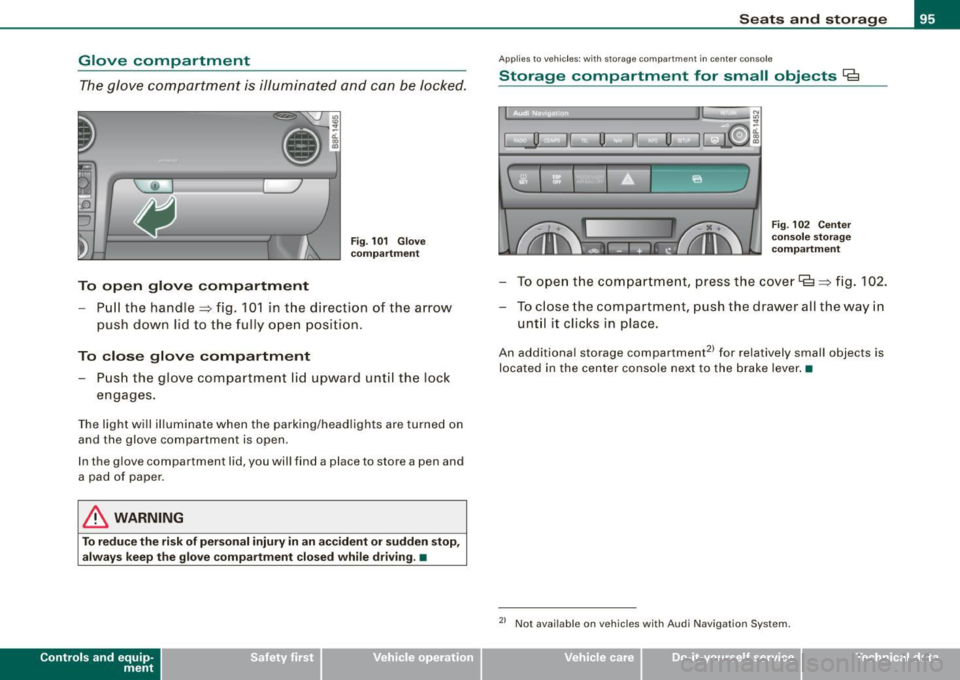
The glove compa rtmen t is illumin ated an d can be Jocke d.
"' 10 ., ~ a:. ., 03
To open glove compartment
Fi g. 101 Glove
c ompartment
- Pull the handle => fig. 10 1 in t he direction of the a rrow
p ush do wn lid to the fully o pen p osition .
To close glove compartment - Push the glove compartment lid upward unt il the loc k
engages.
T he light will il luminate when the parking/head lights are turned on
and the glove compartme nt is ope n.
I n the g love compartment lid, you wil l find a place to store a pen and
a pad of paper.
& WARNING
To reduce the risk of per sonal injury in an accident or sudden stop ,
always keep th e glove compa rtment closed while driving . •
Con tro ls and eq uip
ment
Seats and storag e
Applie s to veh ic les : w it h stora ge co mpart ment in cente r co nsole
Storage compartment for small objects Ca
I, __] II 0
l
l
I~ u
I
' Fig . 102 Center
c o nso le st orag e
co mpartm ent
- T o open th e c om partm ent, pre ss t he c ove r lg => fig. 102.
- To c lose the compa rtment, push the drawe r all the way in
unt il it clic ks in place.
An additiona l storage compartment2 1 for relatively small objects is
located in the cen ter console ne xt to the brake lever .•
2> Not avai lab le on veh ic le s with Audi Nav igat ion System .
Vehicle care I I irechnical data
Page 99 of 324
Applies to veh ic les : w it h stora ge net in lu ggage compa rtm ent
Side storage in the luggage compartment
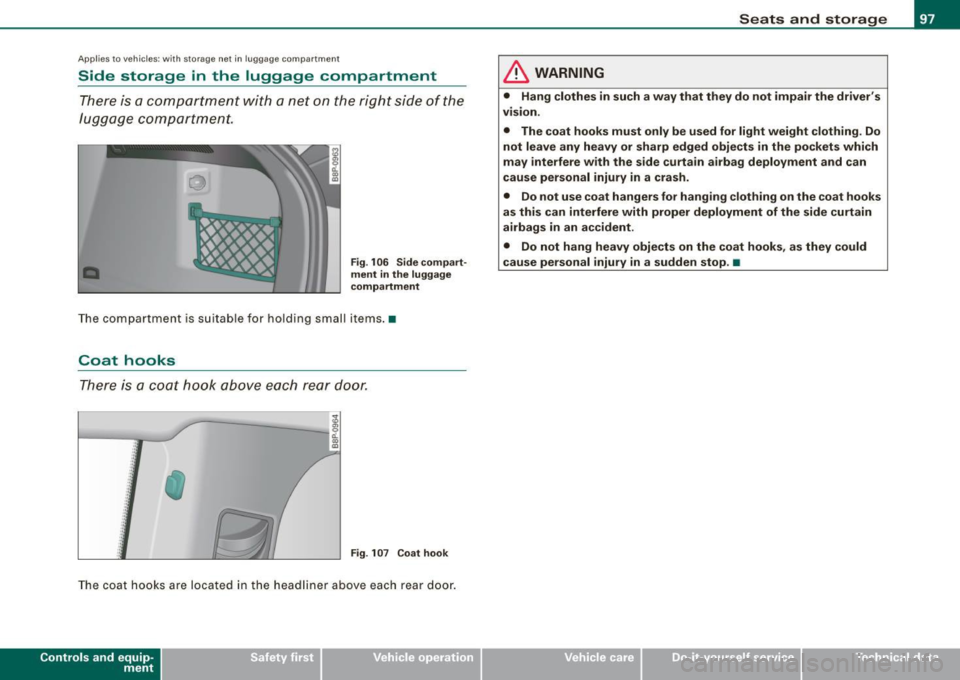
There is a comportment with a net on the right side of the
luggage comportment.
•
Fig . 106 Side compart
ment in the luggage
compartment
The compartment is suitable for holding small items. •
Coat hooks
There is a coot hook above each rear door.
:I ,,
;:
J ' t
" ::·
/
}
· : : .: ,, 1
} Fig . 107 Coat hook
The coat hooks are located in the headliner above each rear door.
Con tro ls and eq uip
ment
Seats and storage
& WARNING
• Hang clothes in such a way that they do not impair the driver's
v1s1on.
• The coat hooks must only be used for light weight clothing. Do
not leave any heavy or sharp edged objects in the pockets which
may interfere with the side curtain airbag deployment and can
cause personal injury in a crash.
• Do not use coat hangers for hanging clothing on the coat hooks
as this can interfere with proper deployment of the side curtain
airbags in an accident.
• Do not hang heavy objects on the coat hooks, as they could
cause personal injury in a sudden stop. •
Vehicle care
I I Technical data
Page 100 of 324
Warm and cold
Warm and cold
Climate controls
Description
The air conditioner is fully automatic and is designed to
maintain a comfortable and uniform climate inside the
vehicle.
We recomme nd the following s ettings:
- Select and set a temperature between 64
°F (+22 °C) and
84 °F (+28 °C).
- Press the !AUTO
I button.
With this setting, you attain maximum comfort in the least amount
of time . Change this set ting, as desired, to mee t your pe rsonal
needs.
The climate controls are a combination of heating, venti lation and
cooling systems, which automatica lly reduce humidity and coo l the
air inside your vehic le .
The air temperature, air flow and air distribution are automatically
regu lated to achieve and maintain the desired passenger compart
ment temperature as quick ly as possible.
The system automatically compensates for changes in the outside
temperature and for the intensity of the sun light entering the
veh ic le. We recommend you use the
Automat ic mode=> page 101
for year -round comfort.
P lease note the following :
Turn on the air conditioner to reduce humidity in the vehic le. This
a lso prevent the window s from fogging up. When the outside temperature is high and the air is very humid,
c
ondensat ion from the evaporator may drip under the vehicle . T his
is normal and does not indicate a leak.
I f the outside temperature is low, the fan normally only switches to
a higher speed once the engine coola nt has war med u p sufficiently .
T he air conditioner temporarily sw itches off when you drive off from
a standstill using fu ll throttle to save engine power.
The comp ressor also swi tches off if the coolant temperatu re is to o
high so that the engine can be adequate ly cooled under extreme
lo ads .
Air pollutants filt er
The air po llutants fi lter (a combined partic le filter and activated
charcoal fi lter) reduces or eliminates outside air pollution (dust, or
p ollen) from en ter ing the vehic le .
The air po llutants fi lter must be changed at the intervals specified
in your Warranty
& Maintenance bo oklet, so that the ai r conditioner
can proper ly work.
I f you drive your vehicle in an area with high air pol lution, the filter
may need to be changed m ore freque ntly tha n specified in your
Audi Warranty
& Maintenance booklet. If in doubt, ask your autho
r iz ed Aud i Service Adviso r fo r a dvice .
& WARNING
Redu ced vi sibility i s dangerou s and can cause accidents .
• For saf e driving it is very important that all window s be free of
ice , sno w and conden sation.
• Fully familiarize yourself with the proper use and fun ction of
the heating and ventil ation sy stem and especially how to defog
and defrost the windows. ...
Page 102 of 324
• ..__w_ a_ r_m _ a_ n_d_ c_ o_ ld __________________________________________________ _
Controls
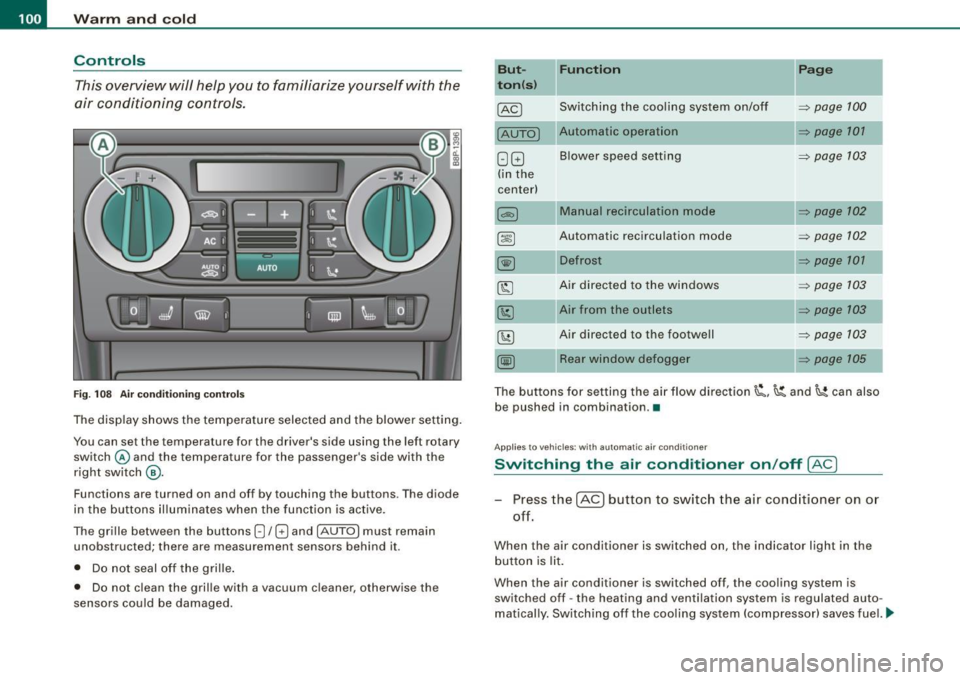
This overview will help y ou to familiarize yourself with the
air conditioning controls.
F ig. 10 8 Air cond it io ning co ntrols
The display shows the tempera ture selected and the blower setting.
You can set the temperature for the driver's side using the left rotary
switch © and the temperature for the passenger 's side with the
r ight switch
@ .
Functions are turned on and off by touching the buttons. The diode
in the butt ons il luminates when the function is active.
The grille between the buttons
8 / 8 and [AUTO) must remain
unobstructed; there are measurement sensors behind it.
• Do not seal off the grille .
• Do not clean the grille with a vacuum cleaner, otherwise the
sensors could be damaged.
But
t o n (s ) Functi
on
Switching the coo ling system on/o ff
[AUTO I Automatic operation
G GJ Blower speed setting
(in the
center)
Automatic recirculation mode
Defrost
Air direc ted to the windows
Air from the outlets
Air directed to the footwell
Rear window def ogger
Page
=> page 100
=> page 101
=> page 103
=> page 102
=> page 102
=> page 101
=> page 103
=> page 103
=> page 103
=> page 105
The buttons for setting the ai r flow direction~'~ and~ can also
be pushed in combination .•
App lies to vehicle s: wi th automat ic air condi tioner
Switching the air conditioner on /off !AC)
Press the [AC] button to switch the air cond itioner on or
off.
When the air conditioner is switched on, the indicator light in the
b utton is lit.
When the air conditioner is switched off, the cooling system is
switched off -the heating and ventilation system is regulated auto
matically. Sw itch ing of f the coo ling sys tem (compressor) saves fuel. ._
Page 103 of 324
___________________________________________________ w_ a _r_m _ a_ n_d_ c_ o_ ld __ _
Please keep in mind that with the air conditioner switched off, the
interior temperature cannot be lower than the outside temperature.
There is no cooling and the air is not dehumidified (danger of the
windows becoming fogged).
[ i ] Tips
if there is a defect in the air conditioner, the air conditioner cannot
be switched on. In this case, the diode in the button does not light
after being switched on. in the event of a system fault, please
contact an Audi or specialist garage. •
Switching the air conditioning on and off @
-Press the [AC] button to switch the air conditioner on or
off .
if there is a defect in the air conditioner, the air conditioner cannot
be switched on. In this case, the diode in the button does not light
after being switched on . in the event of a system fault, please
contact an Audi or specialist garage. •
Automatic mode [ AUTO I
The automatic mode is the standard setting for all
seasons.
Swit ching on AUTO
- Select temperature between 64 °F (+18 °C) and 84 °F
(+28 °C) .
- Press
[AUTO I~ page 100, fig. 108 .
AUTO on ly works when you set the inside temperature between
64 °F (18 °C) and 84 °F (28 °C). If you se lect a tempe rature be low
Controls and equip
ment
64 °F (18 °C), LO will appear in the disp lay. If you se lect a tempera
t ure above 84 °F (28 °C),
HI will appear in the display .
The system automatica lly compensates for changes in outside
temperature and for the intensity of the sun light .
[ i ] Tip s
By keeping the [AU TO I button on the driver's side pressed for
severa l seconds, the temperature of the passenger's side can be set
to the temperature of the driver's side or vice versa. The new
t emperature setting will be shown in the disp lay. •
Setting the temperatur e 1
Separate tempera tures can be selected for the driver's
and fr ont passenger's side.
- Turn the rotary sw itch © on the driver's side and the
rotary switc h@ on the passenger's s ide left( -) or right
(+ ) to control the temperature~ page 10 0, fig. 108.
There is a time de lay before the selected temperature is reached.
[ i ] Tip s
The temperature setting for the driver's side can be transferred to
the passenger's side~
page 101. •
Defrosting /defogging the windshield[@)
The windshield and side windows are quickly defrosted or
defogged
- Press [@]~ page 100, fig. 108 .
- Press[@] again or press
[AUTO I to switch off the
def ros ter .
I • •