ECO mode AUDI S3 2010 User Guide
[x] Cancel search | Manufacturer: AUDI, Model Year: 2010, Model line: S3, Model: AUDI S3 2010Pages: 320, PDF Size: 75.34 MB
Page 29 of 320
Setting speed warning 1 ~ page 27.
Speed warning 2 ,,. / (Canada models)
Storing warning 2 is recommended if you always want to be
reminded of a certain speed, for example when you are traveling in
a country that has a general maximum speed limit, or if you do not
want to exceed a specified speed for winter tires.
The speed warning 2 symbol, /
,J. (Canada models) appears in the
display when you exceed the stored speed limit. Unlike warning 1,
it will not go out until the vehicle speed drops below the stored
speed limit.
Setting speed warning 2
~ page 27.
[ i ] Tips
Even though your vehicle is equipped with a speed warning system,
you should still watch the speedometer to make sure you are not
driving faster than the speed limit. •
Speed warning 1: setting a speed limit
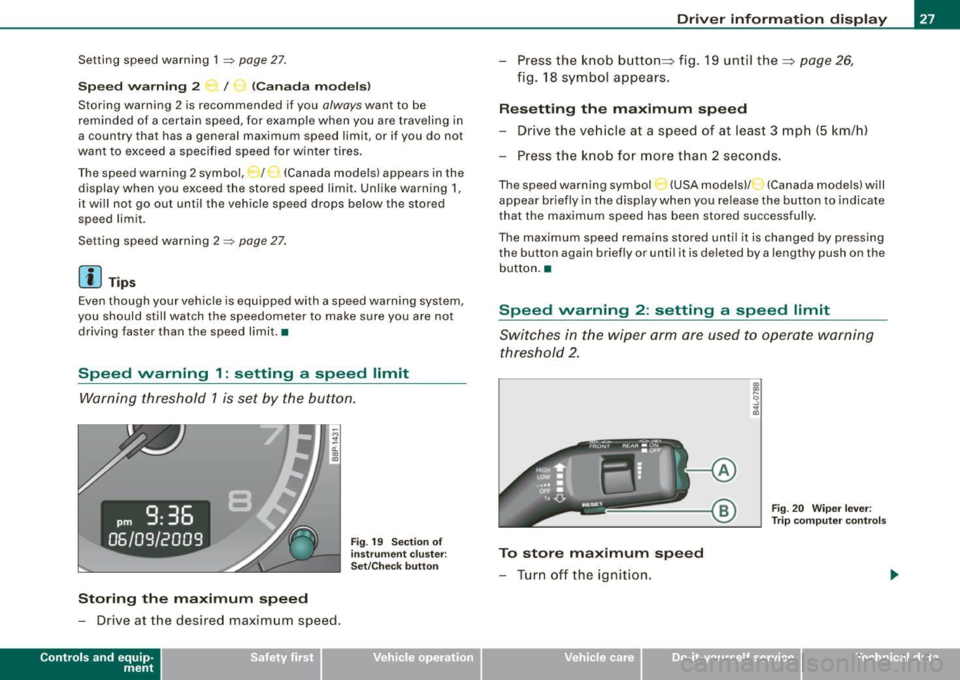
Warning threshold 1 is set by the button.
Storing the maximum speed
-Drive at the desired maximum speed .
Contro ls and eq uip
ment
Fig . 19 Section of
instrument cluster:
Set/Check button
Driver information display
- Press the knob button~ fig. 19 until the~ page 26,
fig. 18 symbol appears.
Resetting the maximum speed
- Drive the vehicle at a speed of at least 3 mph (5 km/h)
- Press the knob for more than 2 seconds.
The speed warning symbol·-(USA models) /- (Canada models) will
appear briefly in the display when you release the button to indicate
that the maximum speed has been stored successfully.
The maximum speed remains stored until it is changed by pressing
the button again briefly or until it is deleted by a lengthy push on the
button. •
Speed warning 2: setting a speed limit
Switches in the wiper arm are used to operate warning
threshold 2.
To store maximum speed
- Turn off the ignition.
Vehicle care I I
Fig. 20 Wiper lever:
Trip computer controls
irechnical data
Page 31 of 320
Yellow symbols
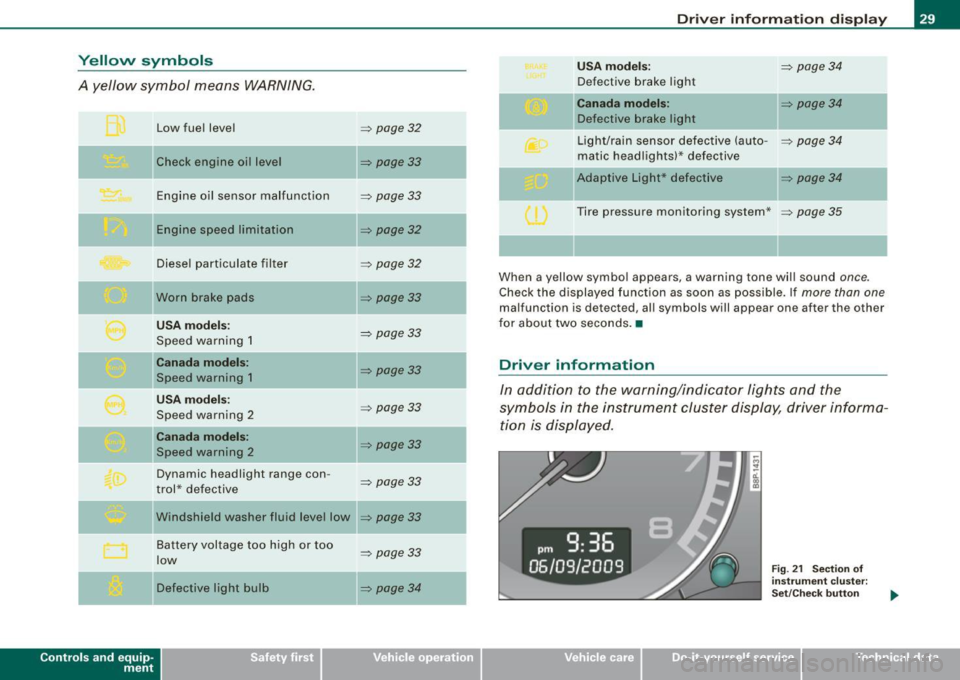
A yellow symbol means WARNING.
Contro ls and eq uip
ment Low fuel level
Check engine oi l level
Engine oil sensor malfunction
Engine speed limitation
Diesel particulate filter
Worn brake pads
USA models:
Speed warning 1
Canada models:
Speed warning 1
USA models:
Speed warning 2
Canada models:
Speed warning 2
Dynamic headlight range con -
trol * defective
W indshield washer fluid level low
Battery voltage too high or too
low
Defective light bulb
=> page 32
=> page33
-
=> page33
=> page32
=> page32
=> page33
=> page 33
=> page33
=> page33
=> page33
=> page33
=> page33
...
=> page 33
=> page34
-
-
-
Driver information display
USA models: => page34
Defective brake light
Canada models: => page 34
Defective brake light
Light/rain sensor defective (auto-
=> page 34
matic headlights)* defective
-Adaptive Light * defective => page34
Tire pressure monitoring system * => page 35
When a yellow symbol appears, a warning tone will sound once.
Check the displayed function as soon as possible. If more than one
malfunction is d etected, all symbols will appear one after the other
for about two seconds. •
Driver information
In addition to the warning/indicator lights and the
symbols in the instrument cluster display, driver informa tion is displayed .
Vehicle care I I
Fig. 21 Section of
instrument cluster:
Set/Check button
irechnical data
Page 32 of 320

Driver information display
Driver information appears in the display when a defective light
bulb is reported by the defective light bulb warning~
page 34,
when the brake pads are worn and before you engage a gear on
vehicles with S tronic.
In addition, driver information may appear when a red symbol
flashes in the driver display .
To display Driver information
As an example, the~ symbol appears in the display. If you now
press the button~
page 29, fig. 21 , the following driver message
appears in the display:
Switch off engine and check oil level
The driver message in the display goes out after about 5 seconds.
You can display the driver message again by briefly pressing the
button. •
Brake system malfunction
BRAKE (USA models) /((D) (Canada models )
The indicator light flashes if the brake fluid level is too
low, if there is a malfunction in the ABS system or when
the parking brake is engaged.
If the BRA KE/(CD) symbol flashes in the display with the
parking brake released, there is a malfunction in the brake
system. In addition to the symbol, one of two messages
appears in the display:
Stop vehicle and check brake fluid
ABS fault
! See owner's manual
- Pull off the road and stop the vehicle.
- Obtain professional assistance.
USA models: if there is a malfunction in the ABS system, the • c:::;
warning/indicator light illuminates along with the BRAKE system
malfunction warning/indicator light~
/.1.
Canada models: if there is a malfunction in the ABS system, the
warning/indicator light illuminates together with the
CCD) brake
system malfunction warning/indicator light~
/.1.
Parking brake set
The parking brake warning light Brake /«D> (Canada models) illumi
nates when the parking brake is set . In addition, a warning tone will
sound after you have driven for longer than 3 seconds and faster
than 3 mph (5 km/h).
& WARNING
• Always observe the warnings in~ page 215, "Engine compart
ment", before opening the engine hood and checking the brake
fluid.
• Driving with low brake fluid is a safety hazard! Stop the car and
get professional assistance.
• If the brake system warning/indicator light illuminates
together with the ABS warning/indicator light, then the ABS
system is malfunctioning. The rear wheels could quickly lock up
when you apply the brakes. This could lead to loss of control and
your vehicle could slide! Drive carefully to the nearest authorized
Audi dealer and have the malfunction corrected. •
Engine cooling system malfunction _t_
A malfunction in the engine cooling system must be
repaired as soon as possible.
When the J_ symbol in the display flashes, then either the
engine coolant temperature is too high, or the coolant level
~
Page 35 of 320

If the '-" symbol comes on, add 1 quart (1 liter) of oil at the next
opportunity =>
page 230. •
Checking the engine oil level r.,
When the symbol illuminates, check the engine oil level as soon
as possible=>
page 229. Top off the oil at your earliest opportunity
=>
page 230. •
Engine oil sensor defective -;...
If the symbol illuminates, contact your authorized Audi dealer
and have the oil sensor inspected.•
Worn brake pads ~ :;
rt. Brake pads!
If the warning light illuminates, immediately contact your autho
rized Audi dealer or qualified workshop to have all brake pads
inspected. On USA models the warning light? comes on together
with the warning light
BRAKE. Both sets of brake pads on an axle must
always be replaced at the same time.
& WARNING
Driving with bad brakes can cause a collision and serious personal
injury.
• If the warning light and the warning light
BRAKE11 with the
message Brake pads! comes on in the instrument cluster display,
immediately contact your authorized Audi dealer or qualified
workshop to have all brake pads checked or replaced if
necessary. •
11 BRAKE : USA models only
Controls and equip
ment
Speed warning
models) 1
· ,I'""'
Driver information display
(USA models> IP (Canada
If the ~ symbol illuminates, this means you are driving faster than
the set vehicle speed. Slow down!=>
page 26. •
Speed warning 2 r (USA models) /,.__, (Canada
models)
If the C) symbol illuminates, this means you have driven faster than
the second set vehicle speed. Slow down! =>
page 26. •
Applies to veh icles : wi th dynamic head light range ad justment
Headlight range control defective
If the illuminates, the dynamic headlight range control is no
longer working properly. Have the system checked and repaired at
your authorized Audi dealer. •
Windshield washer fluid level too low .-_j
If the ~ symbol illuminates, add windshield washer fluid to the
washer system =>
page 240. •
Battery voltage low ~
If the C symbol illuminates, contact your authorized Audi dealer
and have the following components inspected:
• drive belt
• battery charge
Also see if the generator warning/indicator light illuminates
=>
page 14. •
I • •
Page 36 of 320

Driver information display
Defective light bulb warning U
The defective light bulb warning tells you when a vehicle
light bulb has become defective.
If a defective bulb has been detected by the system or a light bulb
burns out, the symbol with a message appears in the display to
tell you which bulb is burnt out and where it is located. For example:
Rear left turn signal
After 5 seconds, the message disappears . If you want to recall the
message into the display, press the CHECK button=>
page 8, fig. 2
©-
There are three reasons why the defective bulb message would
appear in the display:
• The light bulb has burnt out=>
page 283.
• The fuse is "blown" => page 278, "Replacing a fuse".
• The wire connection to the light bulb is defective .
Have the bulb replaced or the connection repaired by your autho
rized Audi Service department.
& WARNING
• Light bulbs are pressurized and could explode while they are
being changed causing serious personal injury.
• Work with due care when handling the high-voltage section of
gas discharge (xenon) lamps. Failing to do so could result in death
or serious injury! •
Brake light defective " U'lf" (USA
models) / (Canada models)
In case of a malfunction or component failure, the symbol
(USA models)/ (Canada models) can appear . The following elec- trical components should be checked, repaired or replaced, as
necessary:
• Brake light bulbs
• All wiring connections
• Brake light switch
Contact your authorized Audi dealer for assistance if necessary.
[ i] Tips
The brake light switch is only inspected as part of the functional
check after the engine is started .•
A pplies to vehi cles : w it h a uto mati c he adl ights
Light /rain sensor defective _,
The indicator light indicates a defect in the automatic
headlights/automatic wiper system.
If the symbol illuminates, the light sensor has failed. For safety
reasons, the low beams are turned on permanently with the switch
in
AUTO. However, you can continue to turn the lights on and off
using the light switch . In the case of a defect in the rain sensor, the
windshield wiper lever functions are still available. Have the
light/rain sensor checked as soon as possible at an authorized Audi
dealer. •
Applies t o vehi cles: with Ad aptive Ligh t
Adaptive Light defective ~{)
C: Adaptive light defective
When this symbol J illuminates, it means that Adaptive Light is
defective. Go to a qualified workshop to have the headlights or the
control unit for the Adaptive Light repaired. •
Page 64 of 320

Clear vision
- P lace th e su n bl ind aga inst the sp ring f orc e in to the
c e n te r br ac ke t :::::,
page 67, fi g. 6 0 @ of th e p arcel s helf.
& WARNING
The sun blind must not be u sed to secure cargo . The luggage
compartment cover is not a luggage ra ck . Objects placed on the
c over pose a danger for all vehicle occupant s during sudden
b rak ing or in an accident . •
Wiper and washer system
tY -.
Wind shi eld wip er ~
The win dshield wi per lever c ontrols both the windshield
w ip ers and the was her sys tem.
Fig. 61 Wiper le ver ;
windshi eld wip er l eve r
po sit io n s
The win dshield wiper le ver :::::, fig. 6 1 has t he foll owing posi
t io ns:
Intermittent wiping \\7 ! (activating rain sensor) *
- Move the lever up to position G) .
Move the in te rva l set switch @, to change the inte rva ls.
Low wiper speed
- Move t he lever u p to pos ition ® ·
High wiper speed
- Mov e the lever up t o po sition G) .
One -touch wiping
- Move the lever to posi tion ©, when you wa nt to wipe the
windshield
briefly.
Automatic w iper /washer
- Pull the lever to pos ition G) (towar d th e ste ering wheel)
and hold.
- Re lease t he lever. The was her stops a nd th e w ipers kee p
g oing f or ab out fo ur secon ds.
Turning off the wipers
- Move t he lever bac k to positio n ®·
The windshield wipers and washer only work when the ignition is
turned on . If you sw itch off the ignitio n with the windshield wiper
lever still in the interval wipe position and then come back a while
l ater and drive off, the rain sensor wil l reactivate i tse lf after the
vehic le speed has exceeded 4 mp h (6 km/h).
The rain sensor * is only activated with the wiper lever set to posi
tion @. When i t star ts to rain, the rain s ensor wil l automatically ac ti
vate the int ermi tte nt wiping mode.
To reduce the sensi tiv ity of the sensor, move switch
@ down . To
increase the sensitivity, move the switch up . The higher you adjust
the sensitivity, the fas ter the sensor will react whe n it senses mois -
ture on the windshield. .,
Page 73 of 320

Applies to vehi cles: wit h dig it al compass
Setting the magnetic deflection zone
The correct magnetic deflection zone must be set in order
to display the directions correctly .
/
@
®
Fig. 69 North America: magnetic deflection zone boundaries
-Hold the@=> page 70, fig. 68 button down until the
number of the set magnetic deflection zone appears on
the interior rear v iew mirror .
- Adjust the magnetic deflection zone by repeatedly
pressing on the @ button. The set mode automatically
deactivates after a few seconds. •
Contro ls and eq uip
ment
Ap plies to vehi cles: with digital compass
Calibrating the compass Clear vision
The
compass has to be recalibrated if the display is wrong
or inaccurate.
Hold the@ button down until the letter C is displayed on
the interior rear view mirror.
Drive in a circle at a speed of about 5 mph (10 km/h) until
a direction is shown on the interior rear view mirror.
& WARNING
The digital compass is to be used as a directional aid only. Even
though you may want to look at it while you are driving, you must
still pay attention to traffic, road and weather conditions as well
as other possible hazards. •
Vehicle care
I I irechnical data
Page 75 of 320
- Position the head restraint according to the occupant's height=>
page 77. For maximum protection, the top of
the head restraint should be at least at eye level, prefer
ably higher and ideally level with the top of the head
=>
page 129 , fig. 126.
& WARNING
Never place any objects in the driver's footwell. An object could
get into the pedal area and interfere with pedal function. In case
of sudden braking or an accident, you would not be able to brake
or accelerate! •
Front passenger's seat
Always move the front passenger seat into the rearmost
position.
To avoid contact with the airbag while it is deploying, do not
sit any closer to the instrument panel than necessary and
always wear the three-point safety belt provided adjusted
correctly. We recommend that you adjust the passenger's
seat in the following manner :
- Move the front passenger seat into the rearmost position
of the fore and aft adjustment range=>
& in "Why is
your seat adjustment so important?" on
page 72.
- Bring the backrest up to an (almost) upright position.
Do
not ride with the seat reclined.
- The ideal position for the head restraint is with the upper
edge of the restraint level with the top of your head
=>
page 77. You should not lower the top of the restraint
below the level of your eyes.
Con tro ls and eq uip
ment
Seats and storage
- Place your feet on the floor in front of the passenger's
seat. •
Adjusting front seats manually
Applies to vehicle s: wi th manua l seat ad justme nt
Adjustment controls
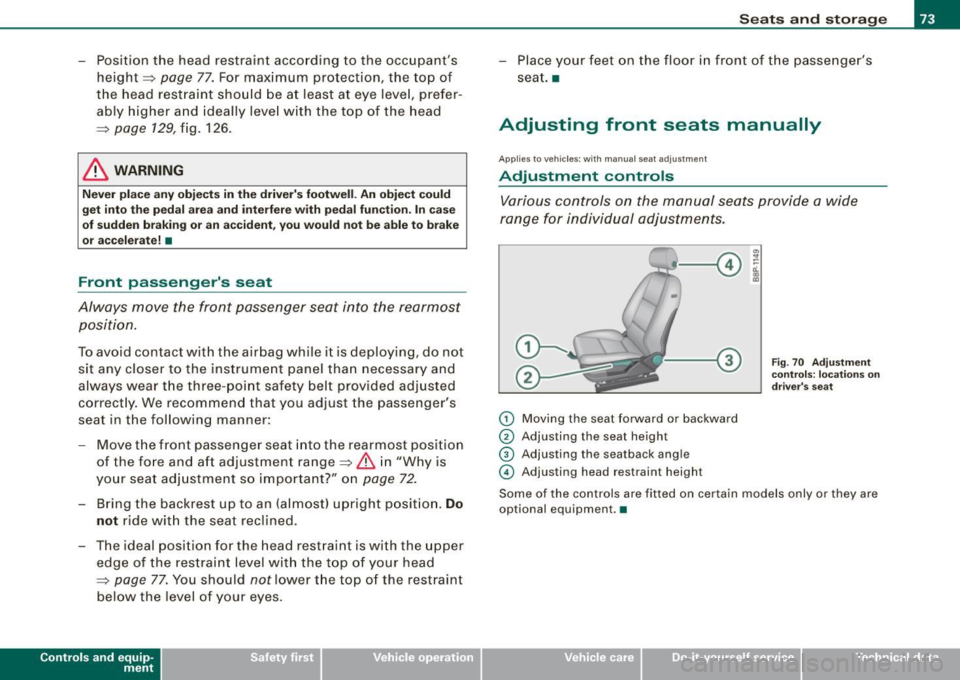
Various controls on the manual seats provide a wide
range for individual adjustments.
G) Moving the seat forward or backward
© Adjusting the seat height
© Adjusting the seatback angle
© Adjusting head restraint heigh t
Fig. 70 Adjustment
controls: locations on
driver's seat
Some of the controls are fitted on certain models only or they are
optional equipment. •
Vehicle care
I I irechnical data
Page 98 of 320
Warm and cold
Warm and cold
Climate controls
Description
The air conditioner is fully automatic and is designed to
maintain a comfortable and uniform climate inside the
vehicle.
We recomme nd the following s ettings:
- Select and set a temperature between 64
°F (+22 °C) and
84 °F (+28 °C).
- Press the !AUTO
I button.
With this setting, you attain maximum comfort in the least amount
of time . Change this set ting, as desired, to mee t your pe rsonal
needs.
The climate controls are a combination of heating, venti lation and
cooling systems, which automatica lly reduce humidity and coo l the
air inside your vehic le .
The air temperature, air flow and air distribution are automatically
regu lated to achieve and maintain the desired passenger compart
ment temperature as quick ly as possible.
The system automatically compensates for changes in the outside
temperature and for the intensity of the sun light entering the
vehic le. We recomme nd you use the
Automati c mode~ page 99for
year -round comfort.
P lease note the following :
Turn on the air conditioner to reduce humidity in the vehic le. This
a lso prevent the window s from fogging up. When the outside temperature is high and the air is very humid,
c
ondensat ion from the evaporator may drip under the vehicle . T his
is normal and does not indicate a leak.
I f the outside temperature is low, the fan normally only switches to
a higher speed once the engine coola nt has war med u p sufficiently .
T he air conditioner temporarily sw itches off when you drive off from
a standstill using fu ll throttle to save engine power.
The comp ressor also swi tches off if the coolant temperatu re is to o
high so that the engine can be adequate ly cooled under extreme
lo ads .
Air pollutants filt er
The air po llutants fi lter (a combined partic le filter and activated
charcoal fi lter) reduces or eliminates outside air pollution (dust, or
p ollen) from en ter ing the vehic le .
The air po llutants fi lter must be changed at the intervals specified
in your Warranty
& Maintenance bo oklet, so that the ai r conditioner
can proper ly work.
I f you drive your vehicle in an area with high air pol lution, the filter
may need to be changed m ore freque ntly tha n specified in your
Audi Warranty
& Maintenance booklet. If in doubt, ask your autho
r iz ed Aud i Service Adviso r fo r a dvice .
& WARNING
Redu ced vi sibility i s dangerou s and can cause accidents .
• For saf e driving it is very important that all window s be free of
ice , sno w and conden sation.
• Fully familiarize yourself with the proper use and fun ction of
the heating and ventil ation sy stem and especially how to defog
and defrost the windows. ...
Page 101 of 320
Please keep in mind that with the air conditioner switched off, the
interior temperature cannot be lower than the outside temperature.
There is no cooling and the air is not dehumidified (danger of the
windows becoming fogged).
[ i ] Tips
if there is a defect in the air conditioner, the air conditioner cannot
be switched on. In this case, the diode in the button does not light
after being switched on. in the event of a system fault, please
contact an Audi or specialist garage. •
Switching the air conditioning on and off @
-Press the [AC] button to switch the air conditioner on or
off.
if there is a defect in the air conditioner, the air conditioner cannot
be switched on. In this case, the diode in the button does not light
after being switched on . in the event of a system fault, please
contact an Audi or specialist garage. •
Automatic mode [ AUTO I
The automatic mode is the standard setting for all
seasons.
Swit ching on AUTO
- Select temperature between 64 °F (+18 °C) and 84 °F
(+28 °C) .
- Press
[AUTO I~ page 98, fig . 103.
AUTO on ly works when you set the inside temperature between
64 °F (18 °C) and 84 °F (28 °C). If you se lect a tempe rature be low
Controls and equip
ment
W arm and cold
64 °F (18 °C), LO will appear in the disp lay. If you se lect a tempera
t ure above 84 °F (28 °C),
HI will appear in the display .
The system automatica lly compensates for changes in outside
temperature and for the intensity of the sun light .
[ i ] Tip s
By keeping the [AU TO l button on the driver's side pressed for
severa l seconds, the temperature of the passenger's side can be set
to the temperature of the driver's side or vice versa. The new
t emperature setting will be shown in the disp lay. •
Setting the temperature 1
Separa te tempera tures can be selected for the driver's
and fr ont passenger's side.
- Turn the rotary sw itch © on the driver's side and the
rotary switc h@ on the passenger's s ide left( -) or right
(+ ) to control the temperature ~ page 98, fig. 103.
There is a time de lay before the selected temperature is reached.
[ i ] Tip s
The temperature setting for the driver's side can be transferred to
the passenger's side~
page 99. •
Defrosting/defogging the windshield[@)
The windshield and side windows are quickly defrosted or
defogged
- Press [®I~ page 98, fig. 103 .
- Press[@] again or press
[AUTO I to switch off the
defros ter .
I • •